

Page 1
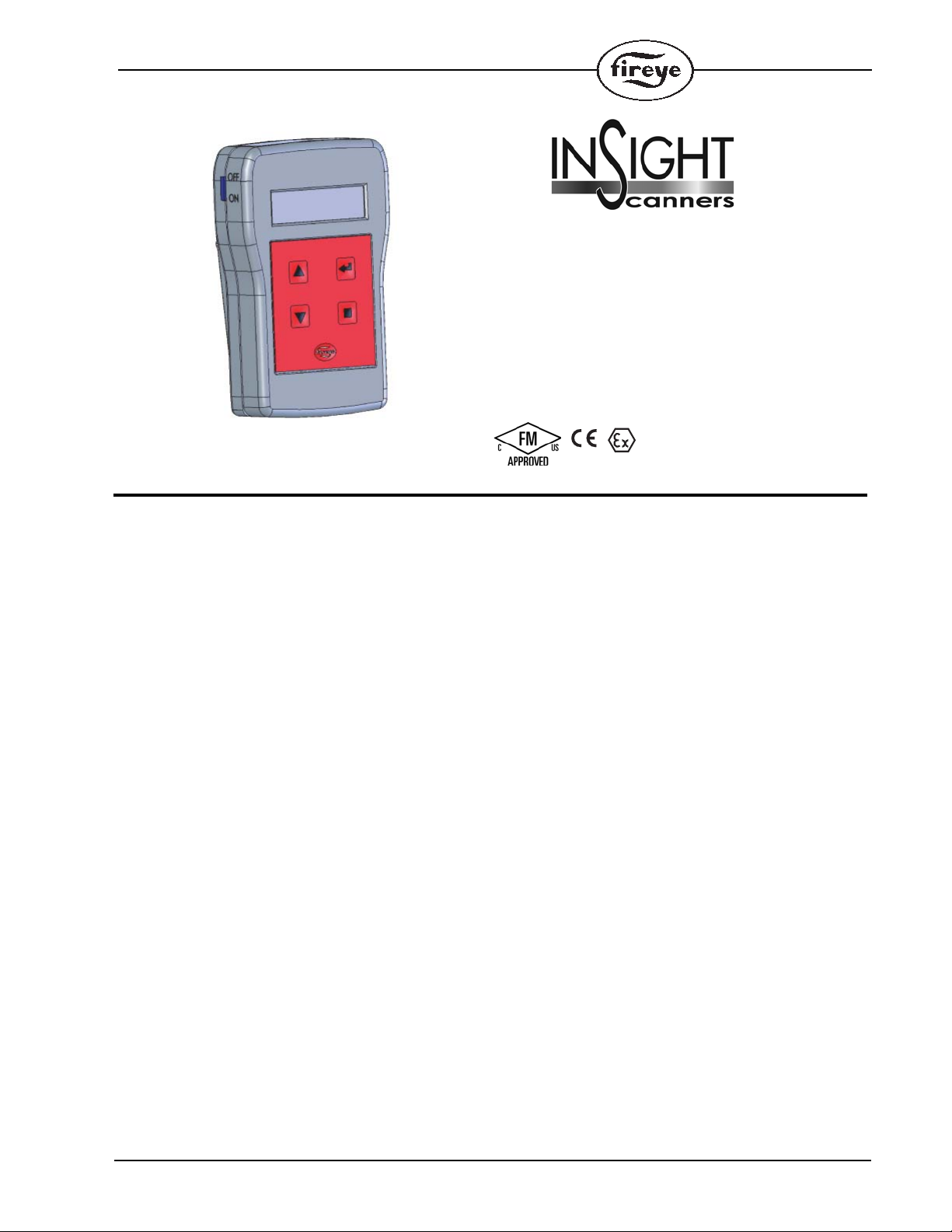
WIRELESS
HANDHELD
COMMISSIONING TOOL
P/N 95WIHH-2
II
1725
II 1 G Ex ia IIC T4
Ta= -20° to 40°C
FM09ATEX0066
CLASS I, DIV 1 GROUPS A, B, C, D T4A
AEx ia IIC T4 Ta= -20°C to 40°C
DESCRIPTION
133-735
MAY 6, 2013
The 95WIHH-2 Wireless Handheld Commissioning Tool is an intrinsically safe, wireless IrDA
ready (Infrared Data Association) device designed to be used with InSight II scanners. The device
can be used to remotely navigate the InSight II scanner’s menu, set and review operating parameters,
and view error messages and alerts.
The device offers an IrDA automatic address discovery feature that enables an end user to quickly
establish a communication link with the target scanner without having prior knowledge of the scanner’s address. The address discovery feature is particularly useful in applications where multiple
scanners are deployed.
1
Page 2

OPERATION
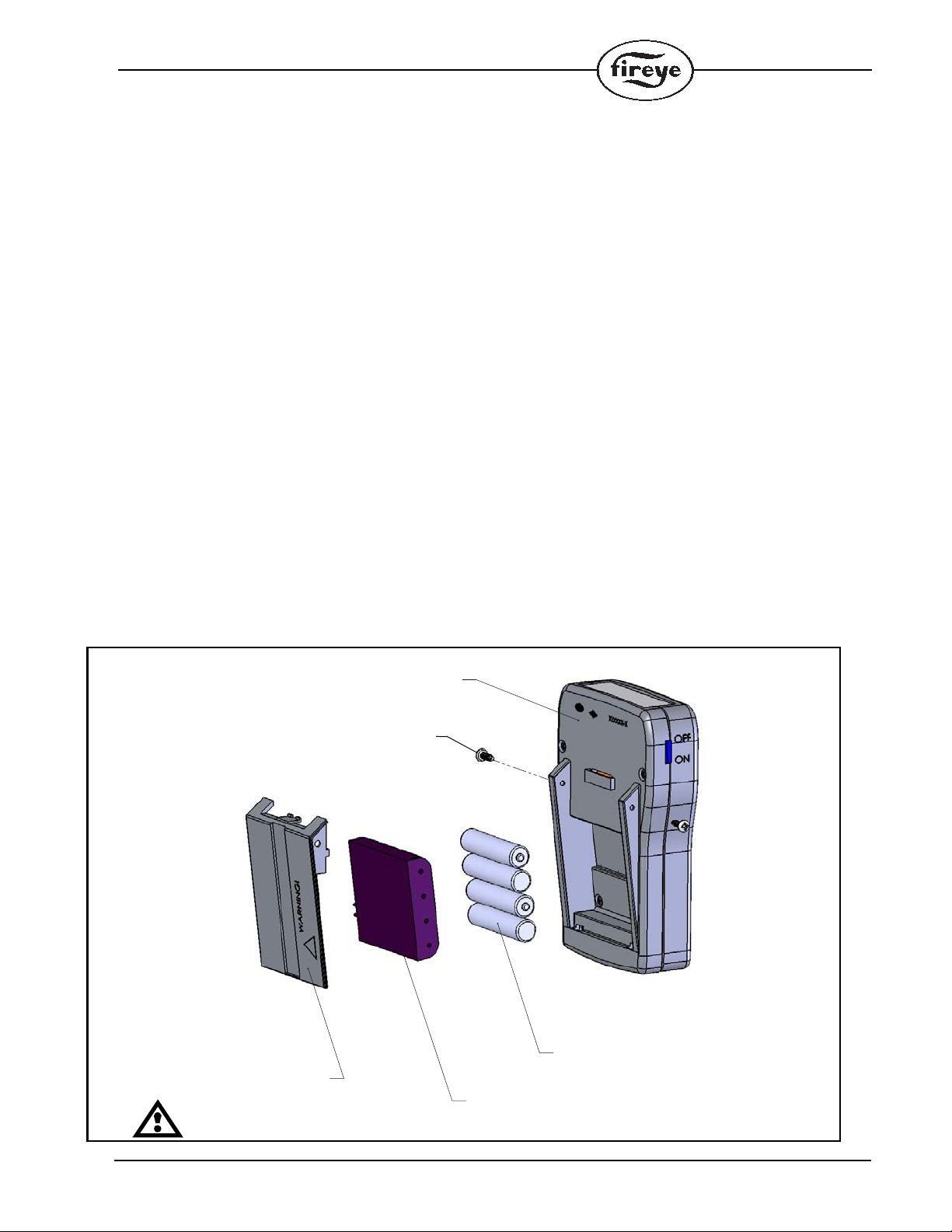
Before the tool can be used, it is important that the four alkaline “AAA” batteries (provided) are
inserted into the unit. See Figure 3 for pictorial details. For proper operation, the batteries must be
oriented properly in the battery holder. The battery holder should be mounted “face-down” in the
battery compartment before securing with the compartment cover.
Initial configuration may be necessary before the handheld commissioning tool can be fully operational. Please see the CONFIG MENU section below for configuration information. The most
important configuration step is the communication address. The handheld commissioning tool can
only communicate with the InSight II scanner when the IrDA communication addresses match. By
default, the handheld communication tool is programmed to communicate on IrDA address 247.
Please consult the bulletin for the InSight II scanner on how to manually review or change the IrDA
communication address.
Alternatively, the IrDA communication address can be Auto Detected by the handheld commissioning tool by following the Auto Detect procedure outlined in the CONFIG MENU. Auto Detect provides a convenient way of retrieving the communication address of the target scanner. Upon
retrieving, the handheld commissioning tool automatically updates its internal IrDA address register
and will then be ready to communicate with the target scanner.
NOTE: Since the Auto Detect process implements an address discovery protocol, it is important that
the handheld commissioning tool is properly aimed and within close proximity of the target scanner.
Systems with multiple scanners within close proximity may present communication interference
while performing address discovery.
There are two battery saving options in the CONFIG MENU: Auto Time Off and Backlight LED
Intensity. Adjusting these options will impact battery life. A conservative setting of shutting the
backlight off and setting the Sleep Timer to 1 minute will shield the best battery life performance. A
liberal setting of 100% Backlight Intensity and disabling the sleep timer will yield the worst battery
life performance. By default, the scanner is set for 4 minutes Auto Off Time (sleep) and 100% backlight intensity. Users are advised to pick a setting that is best suited for their application.
After a communication link is successfully established with the target scanner, the handheld commission tool can be used to navigate the scanner’s menu, view and change operating parameters, and
view error messages and alerts. The scanner’s menu system is described in the InSight II bulletin
CU-113.
When the handheld commissioning tool is not in use, it is recommended that the power switch is
placed in the OFF position. Although the handheld commissioning tool goes into sleep mode after it
has reached the set idle period, longest battery life is achieved when the unit is completely powered
off by sliding the side power switch to the OFF position. While in sleep mode, the handheld commissioning tool can be brought to normal operating mode by pressing the “Fireye” key or sliding the
side power switch to OFF ↔ ON.
APPLICATION
2
The 95WIHH-2 Wireless Handheld Commissioning Tool is designed to be used with InSight II scanners fitted with 95WIDISP-2 transmitter modules. Communication link distance is up to 5 feet, with
a view angle of 30 degrees (See figure 4).
Several factors that present IrDA communication issues should be avoided. Factors like operation in
direct sunlight, exceeding maximum link distance or angle, or operation with multiple scanners
(within close proximity) with identical IrDA addresses are not conducive to successful IrDA communication.
Page 3
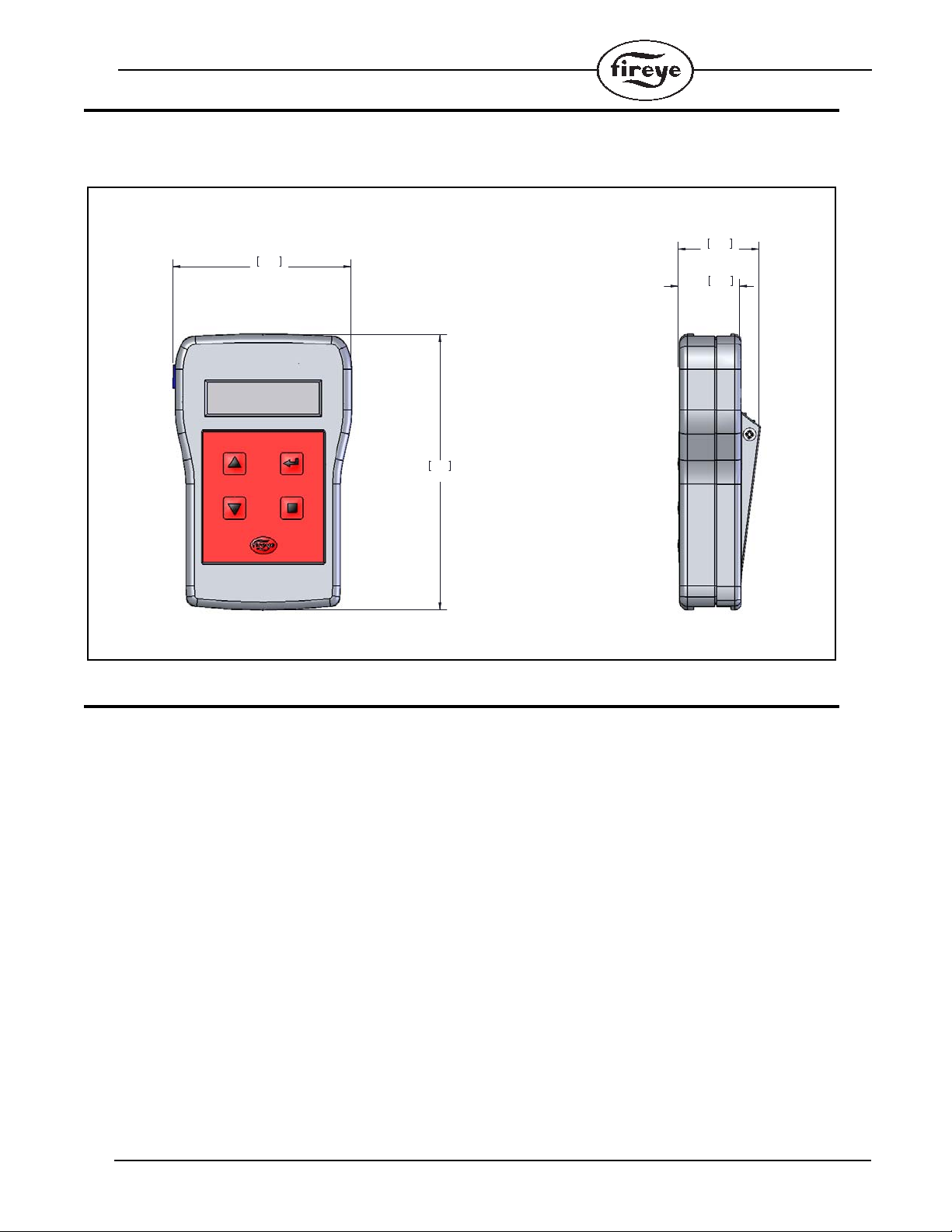
DIMENSIONS
3.18
80.8
4.92
125
1.10
27.9
1.44
36.7
Dimensions: inch [mm]
FIGURE 1. TYPE 95WIHH-2 WIRELESS HANDHELD COMMISSIONING TOOL
SPECIFICATIONS
MECHANICAL:
Housing Material: ABS Plastic
Color: Gray
Environment: IP 40
Operating Temperature: -4°F to 104°F (-20°C to 40°C)
Storage Temperature: -4°F to 140°F (-20°C to 60°C)
Humidity: 0% to 85% relative humidity, non condensing
Shipping Weight: 0.30lb (0.136Kg)
ELECTRICAL:
Power Source: 1.5V “AAA” alkaline battery (4x) (provided)
Status Indication: 2 line x 16 character alpha-numeric LCD display
Operator Interface: Five (5) button membrane keypad and one (1) side slide switch
Power Consumption: Active w/backlight on: 213 mW
Active w/backlight off: 51 mW
Sleep: 2.8 mW
3
Page 4
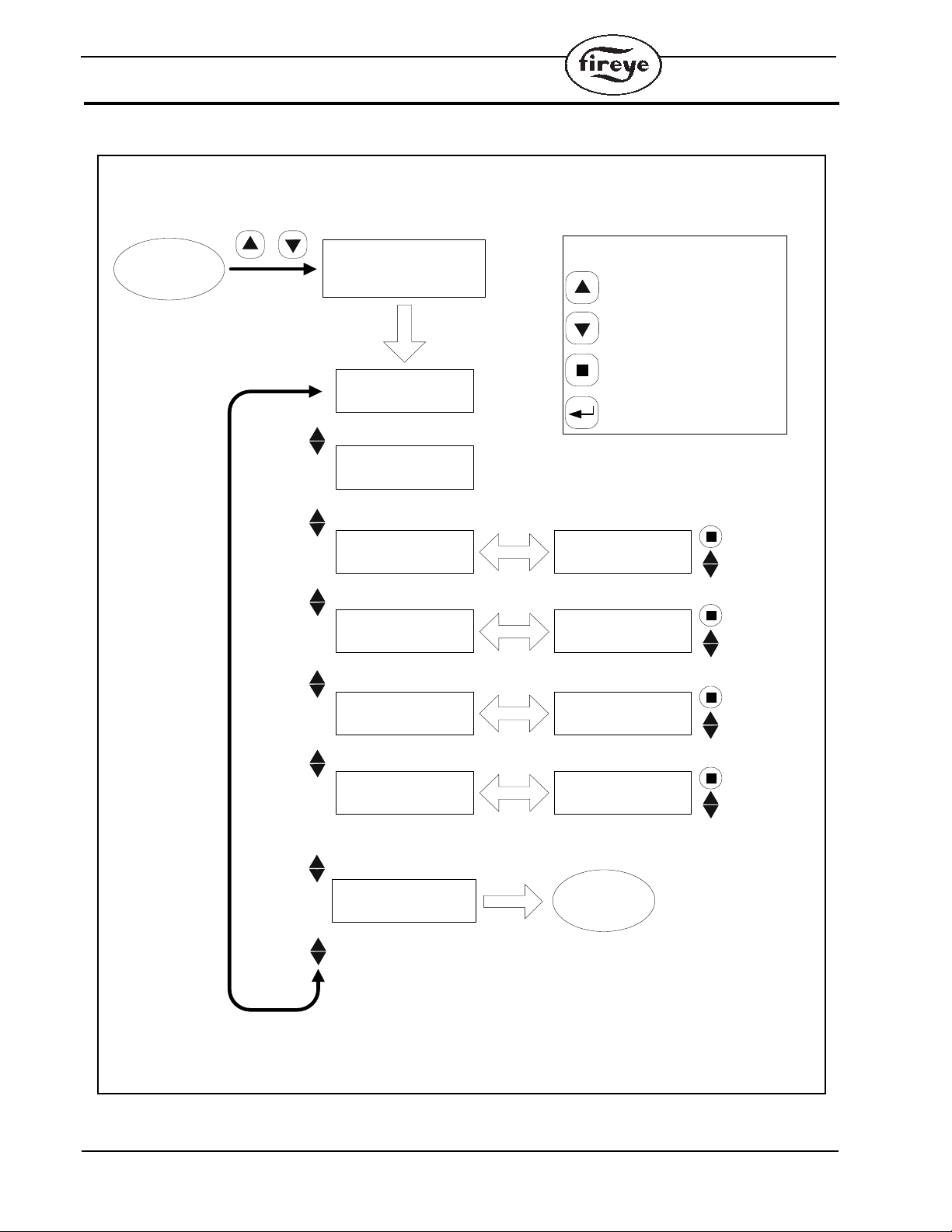
THE CONFIG MENU
Config Menu
Code CRC
xxxx
Firmware Rev.
xxxx
Save new value
Save new value
IrDA COMS ADDR
xxx
IrDA COMS ADDR
247
Change value
SELECT
Auto Off Time (m)
xx
Auto Off Time (m)
10
Change value
SELECT
Save new value
Save new value
Backlight LEDs %
xxx
Backlight LEDs %
100
Change value
SELECT
Detect IrDA Addr
xxx
Detect IrDA Addr
YES
Change value
SELECT
DISPLAY MENU
< SELECT TO EXIT
SELECT
Main
Screen
Main
Screen
DISPLAY MENU
SELECT TO ENTER >
+
Press
simultaneously
SELECT
Must aim commissioning tool
at the scanner when using this
feature
Keypad Legend
UP Key
(Scrolls through menu,
counter clockwise)
DOWN Key
(Scrolls through menu, clockwise)
PROGRAM Key
SELECT Key
FIGURE 2. CONFIG MENU LOOP
(see config menu description on next page)
4
Page 5
CONFIG MENU DESCRIPTION
(4) TRIPLE "A" SIZE BATTERIES
BATTERY HOLDER
BATTERY COVER
ASSEMBLED UNIT
(2) BATTERY COVER SCREWS
To enter the Config Menu, depress the UP and DOWN buttons simultaneously.
1. Firmware Rev.
This is read-only. It shows the firmware revision level of the handheld commissioning tool.
2. Code CRC
This is read-only. The CRC value is passed periodically to the InSight II scanner as part of the
hand-shaking data communication protocol.
3. IrDA COMS ADDR
This is the communication address menu. In order for the handheld commissioning tool to communicate with the InSight II scanner, the IrDA communication address must be set to match the
address of the scanner. The allowable address range is 001 to 247. The default address is 247.
An Auto Detect feature is available to users who do not know the communication address of the
scanner. The Auto Detect feature is explained below.
4. Auto Off Time (m)
The Auto Off Time menu is used to set the idle time period (in minutes) before the scanner goes
into battery saving sleep mode. This is a battery saving feature. The allowable range is 0 (always
ON) to 10 minutes. The default setting is 4 minutes.
5. Backlight LEDs %
The Backlight LEDs menu is used to set the LCD brightness. This is a battery saving feature.
The selectable options are 0% (backlight off), 25%, 50%, 75%, and 100% (maximum brightness). The default setting is 100%.
6. Detect IrDA Addr
This menu is used to Auto Detect the InSight II scanner’s communication address. The handheld
communication tool must be aimed at the scanner while selecting this menu. The unit must
remain aimed at the scanner until the address discovery is complete. The unit will display the
scanner’s address after a successful discovery.
FIGURE 3. BATTERY COMPARTMENT
Warning: Do not remove batteries in a potentially explosive atmosphere
5
Page 6
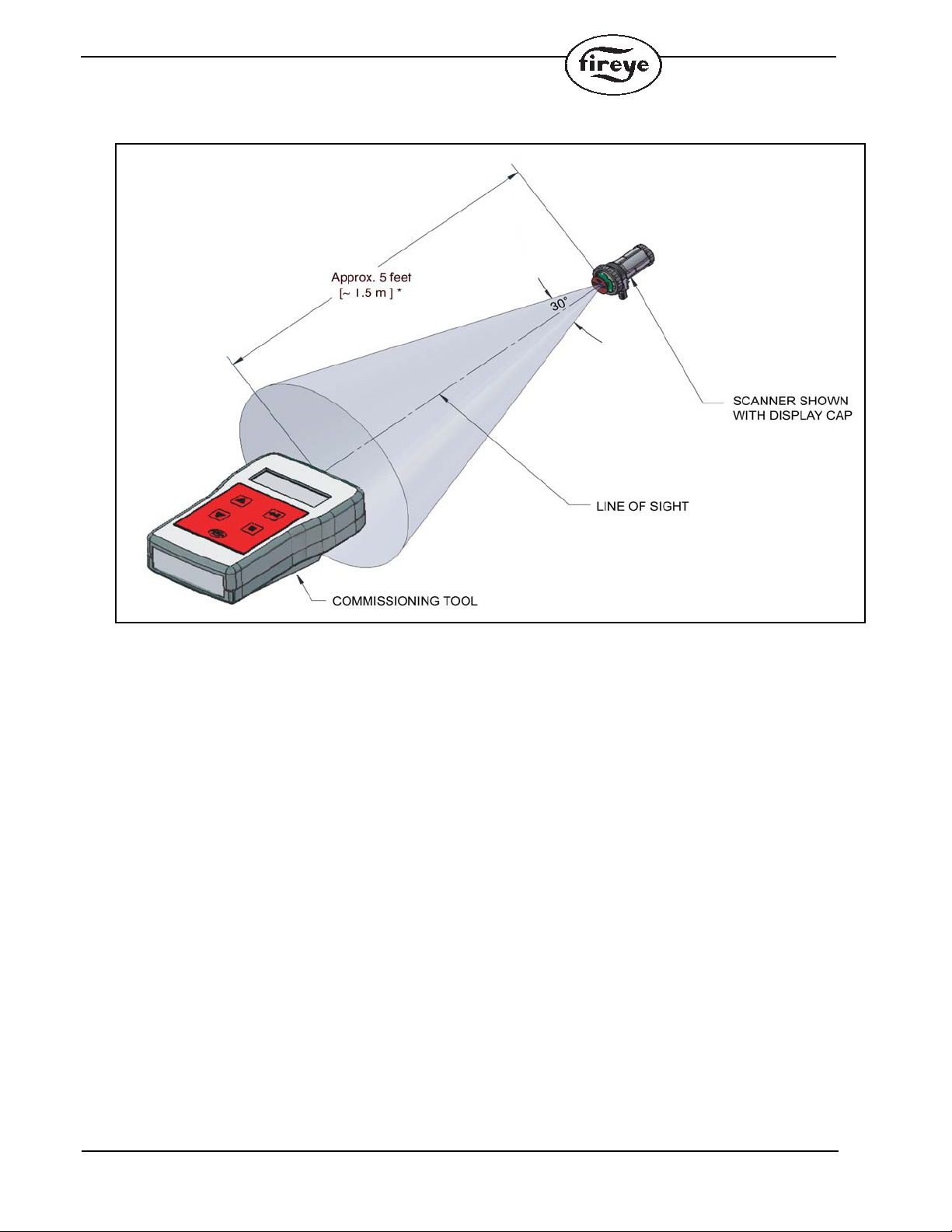
FIGURE 4. COMMISSIONING TOOL LINE OF SIGHT
INSIGHT II
* Typical Maximum distance with fresh batteries
6
Page 7

ORDERING INFORMATION
PART NUMBER STRUCTURE
PART NUMBER DESCRIPTION BULLETIN
95WIHH-2 InSight II Wireless Handheld Commissioning Tool. 133-735
7
Page 8

DIAGNOSTIC
1) Unit won’t turn on
• Check or replace battery
• Slide power switch ON ↔ OFF
2) Unit won’t communicate with scanner
• Check to make sure the scanner’s IrDA address matches the handheld tool OR perform
automatic IrDA address discovery
• Make sure link distance or angle does not exceed specification outlined in Figure 4.
• Weak batteries can reduce link distance. Replace batteries accordingly.
3) Slow to respond/update when talking to scanner
• Make sure link distance or angle does not exceed specification outlined in Figure 4.
• Weak batteries can slow down communication. Replace batteries accordingly.
4) Keypad doesn’t work
• Press the “Fireye” button
• Slide power switch ON ↔ OFF
5) Unit goes to sleep quickly or unit won’t go to sleep
• Adjust the idle time period in the Auto Time Off menu
6) Battery life is not very long
• Adjust the idle time period in the Auto Time Off menu
• Adjust LCD brightness in the Brightness LEDs menu
• Always place the power switch in the OFF position when unit is not in use.
7) LCD message is not legible
• Avoid extremely bright area
• Adjust LCD brightness in the Brightness LEDs menu
• Check or replace batteries
8) Battery compartment cover does not fit/close/lock
• Battery holder should be inserted into compartment facing down (see figure 3).
8
Page 9

Blank Page
9
Page 10

NOTICE
FIREYE
133-735
3 Manchester Road MAY 6, 2013
Derry, New Hampshire 03038 USA supersedes March 2, 2010
www.fireye.com
WARRANTIES
When Fireye products are combined with equipment manufactured by others and/or integrated into
systems designed or manufactured by others, the Fireye warranty, as stated it its General Terms and
Conditions of Sale, pertains only to the Fireye products and not to any other equipment or to the
combined system or its overall performance.
FIREYE guarantees for one year from the date of installation or 18 months from date of manufactur e
of its products to replace, or, at its option, to repair any product or part thereof (except lamps and
photocells) which is found defective in material or workmanship or which otherwise fails to conform
to the description of the product on the face of its sales order. THE FOREGOING IS IN LIEU OF
ALL OTHER WARRANTIES AND FIREYE MAKES NO WARRANTY OF MERCHANTABILITY OR ANY OTHER WARRANTY, EXPRESS OR IMPLIED. Except as specifically
stated in these general terms and conditions of sale, remedies with respect to any product or part
number manufactured or sold by Fireye shall be limited exclusively to the right to replacement or
repair as above provided. In no event shall Fireye be liable for consequential or special damages of
any nature that may arise in connection with such product or part
.
10
 Loading...