

Page 1
Page 1
Electronic Lock Operating Manual
For FireKing KF Models
TO OPEN SAFES
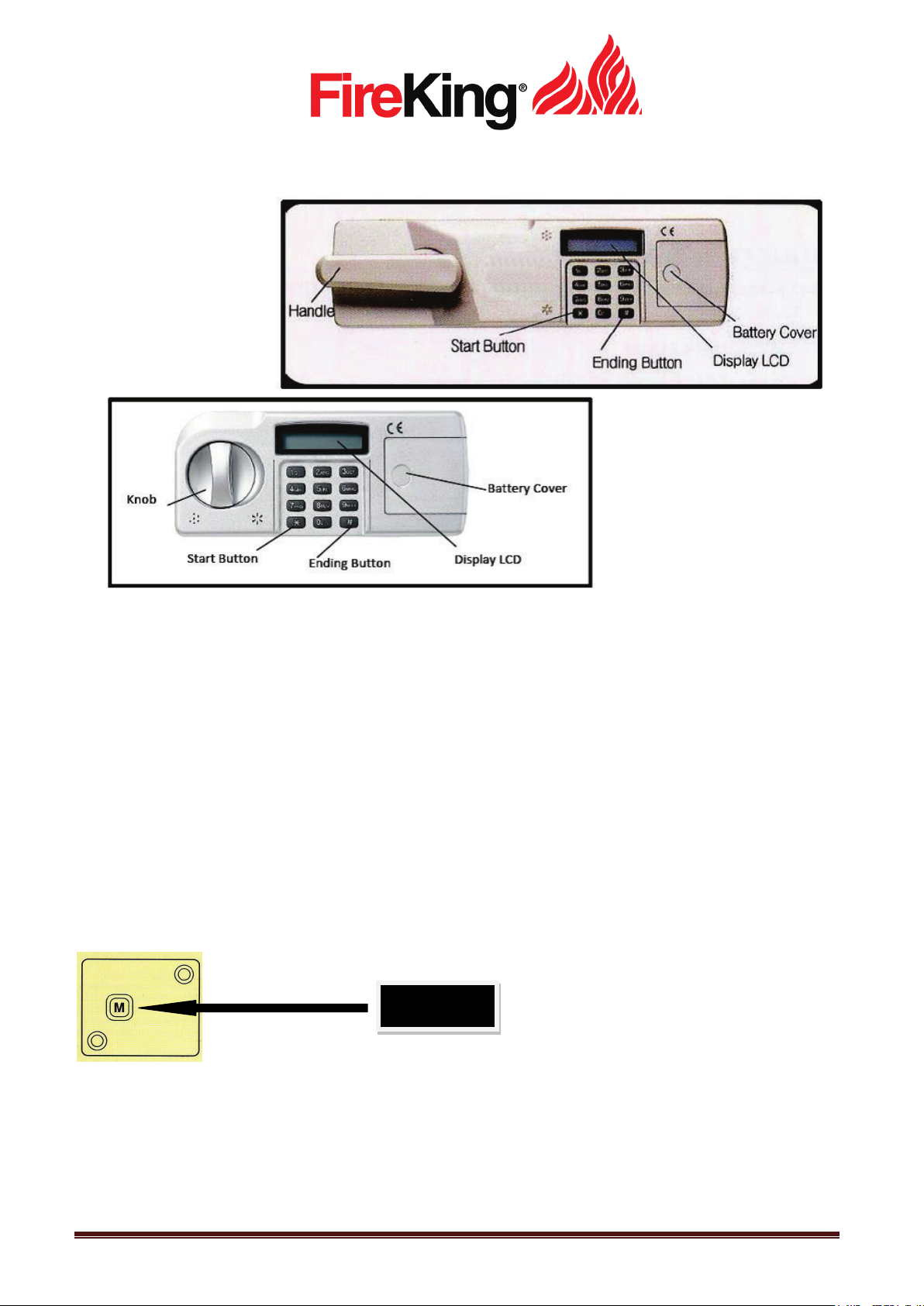
Insert four 1.5V (AA) batteries after opening the cover of battery.
STEP 1: Press start button “ * “
STEP 2: Press master code (4560) given by the manufacture.
STEP 3: Press the “#” button “Match” will be displayed.
STEP 4: Turn knob/handle to open the safe door.
TO CHANGE PERSONAL CODE (User Code 1)
The Personal code could be input from 4 digits to 16 digits.
STEP 1: Press the reset button located inside on back of door
STEP 2: Enter your new Personal Code (Ex: 5555)
STEP 3: Press the “#”button
STEP 4: LED will display SUCCESS! Or ERROR!
STEP 5: If ERROR is displayed redo from step 1.
Reset Button
101 Security Parkway * New Albany, IN 47150 USA * 800-457-2424/812-948-8400
www.fireking.com
Page 2

Page 2
CHANGE/ADD OTHER USER CODES (Users 2, 3 and 4)
STEP 01: Press start button “*”
STEP 02: Press end button “#”
STEP 03: Enter your personal code (Ex: 5555)
STEP 04: Press “#”
STEP 05: “0-EXIT” will be shown on the LCD
STEP 06: Press “1”(C-NO:1…will be shown on LCD).
STEP 07: Set or change a user code by pressing 2, 3 or 4
STEP 08: Enter new personal code and then press “#” (EX 7777#)
STEP 09: Enter new personal code again (EX 7777#) to confirm and then press “#”
STEP 10: LED will display SUCCESS! Or ERROR!
STEP 11: If ERROR is displayed redo from step 1.
DELETE USER CODES (only users 2 – 4 can be deleted)
STEP 01: Press start button “*”
STEP 02: Press end button “#”
STEP 03: Enter your personal code (Ex: 5555)
STEP 04: Press “#”
STEP 05: “0-EXIT” will be shown on the LCD
STEP 06: Press “2” (D-NO:2,34.. will be shown on LCD).
STEP 07: Press the user code you want to delete (Ex: 2 ,3 or 4)
STEP 08: To delete Press “1”. To cancel Press “0”
STEP 09: LED will display SUCCESS! Or ERROR!
TO HIDE USER CODES
STEP 01: Press start button “*”
STEP 02: Press end button “#”
STEP 03: Enter your personal code (Ex: 5555)
STEP 04: Press “#”
STEP 05: “0-EXIT” will be shown on the LCD
STEP 06: Press 7 “DIS PL AY MODE” will be shown
STEP 07: To unhide code repeat steps 1-6
THE TIME FOR CHANGING BATTERY
In case the safe doesn’t open, even if the melody along with LED will turn on or Low Battery is displayed. The
battery needs to be replaced immediately.
*NOTICE
If you make a mistake entering the USER code, ERROR will appear on the display. After 3 wrong attempts,
“PLEASE WAIT” will appear on the display for 3 minutes and it cannot be used during this time.
101 Security Parkway * New Albany, IN 47150 USA * 800-457-2424/812-948-8400
www.fireking.com
 Loading...