

Page 1
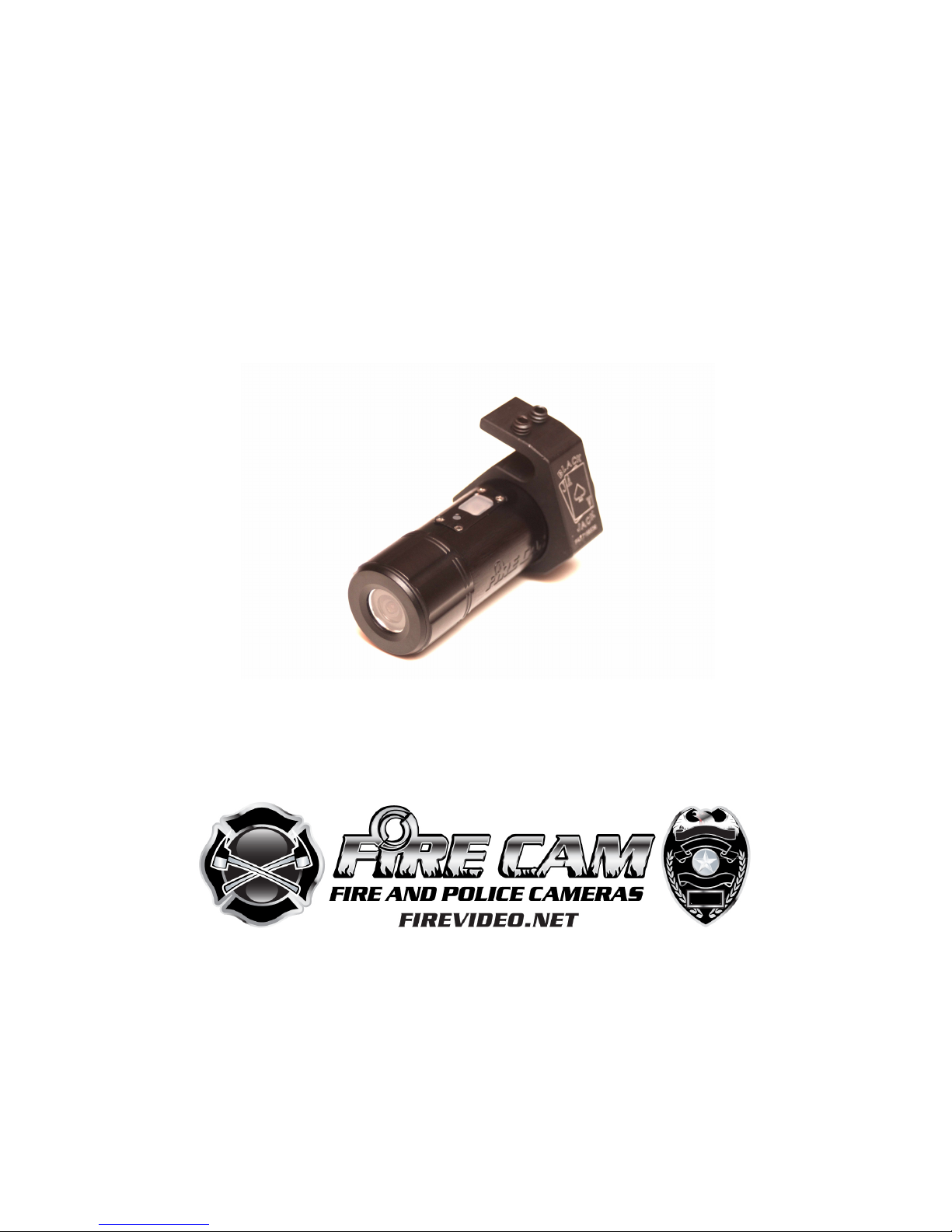
Fire Cam Mini 1080
User
Manual
Page 2
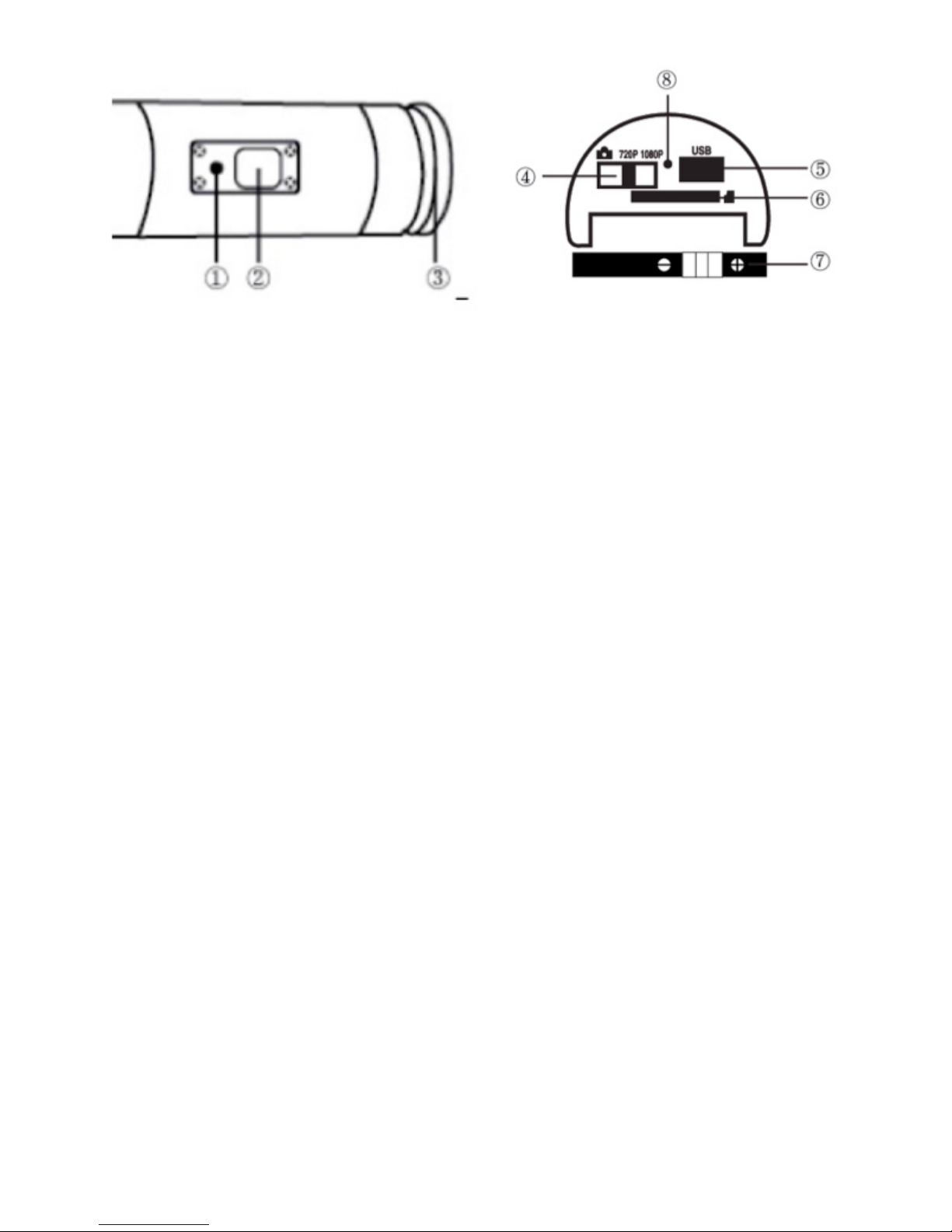
① LED ② Power / Shutter ③ Rear Cap ④ Mode Switch
⑤ USB ⑥ Micro SD Card Slot ⑦ Battery ⑧ Microphone
Initial Set Up
1. Make sure the Fire Cam MINI 1080 is OFF before inserting or
removing the memory card.
2. Unscrew the rear cap (open) located at the back of the
Fire Cam MINI 1080.
3. Install a micro SD memory card CLASS 6 or 10 (max up to
32GB) into the rear slot. To insert the micro SD card, slide the micro
SD card into the card slot on the back of the Fire Cam MINI 1080
with the card label facing down. The micro SD card will click into
place once it is inserted past flush with the camera. Then screw on
the rear cap.
4. If no micro SD memory is inserted in the Fire Cam MINI 1080,
the
LED on top of the camera will blink red and blue.
5. When using a micro SD memory card in the Fire Cam MINI
1080,
there should be no data from other devices on the card. If you
are using a micro SD memory card for the first time in the
Fire Cam MINI 1080, you should format the card in your
computer.
Page 3
Charging The Battery
Unscrew the rear cap located at the rear of the camera and plug
the USB charger to the camera. The blue light is on while
charging, goes off when the battery is fully charged. You can
record up to 60 minutes with one charge.
Date & Time Setting
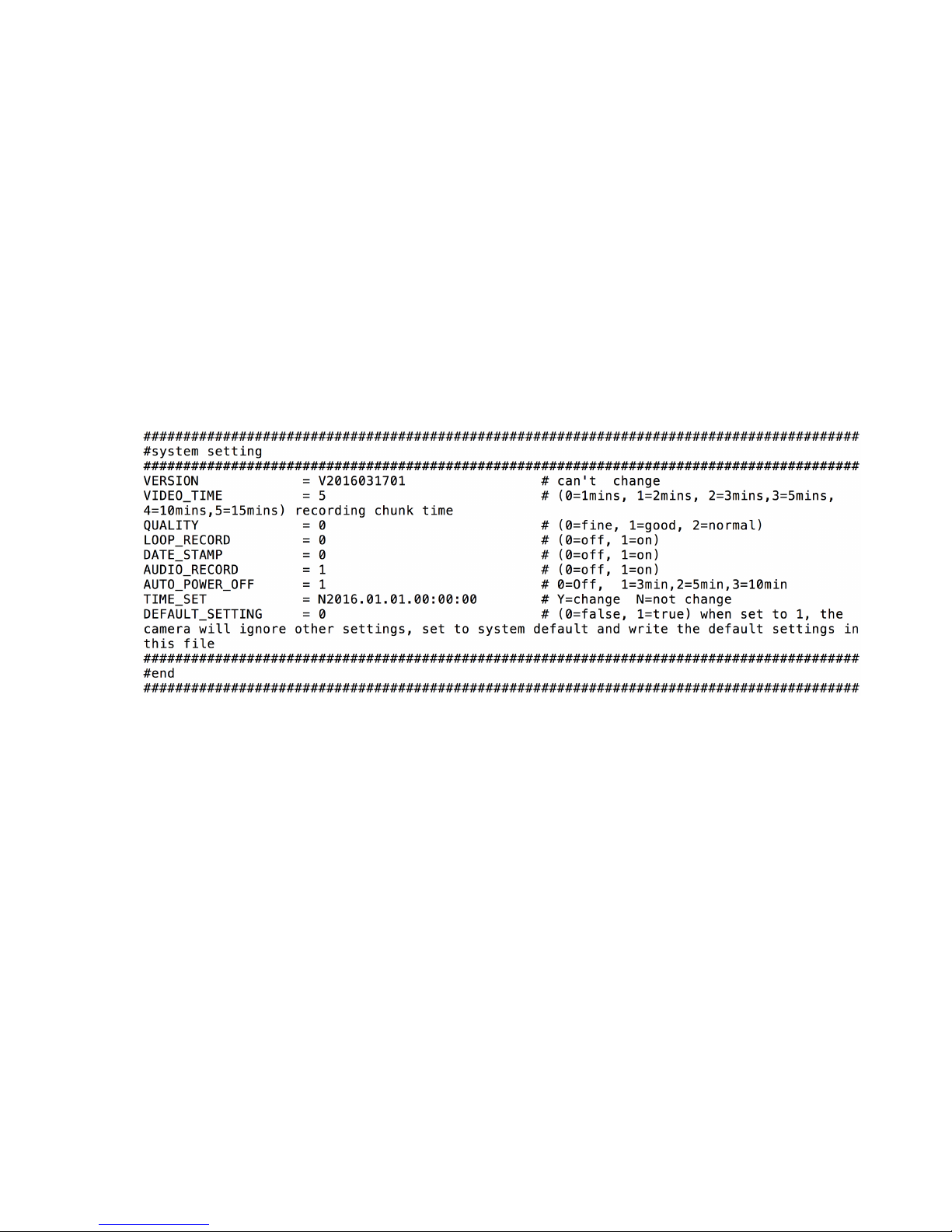
Version: is the firmware version of your camera.
Video Time: The length of the video before the camera splits the
file. The camera does not stop recording, The file is only split so
there is not a huge file to download. We recommend 15 min.
Quality: The sharpness of the video. Fine is the best.
Loop Record: When selected ON and the card is full, the camera
will record over the first recordings. We recommend you leave this
OFF.
Date Stamp: Shows the date and time at the bottom right corner of
the video when selected ON.
Audio Record: Camera audio can be turned ON or OFF
Page 4
Auto Power Off: Normally set to 1 to save battery if the camera is
not recording.
Time Set: The actual date and time. Please remember to put a “Y”
in front of the year.
Default: Changes everything back to default settings.
**MAKE SURE TO SAVE THE TXT FILE AFTER YOU MAKE
CHANGES**
Remember to insert a micro SD card before you start taking videos or pictures
Take a Video
To take videos with the Fire Cam MINI 1080, turn
on the camera by pressing the Power button. The
camera will automatically start recording and the
red LED will blink while the video is recording.
Press the button again to stop recording. To turn
off the camera, hold the button down until the camera beeps 6
times.
Take Still Pictures
Page 5

To take still pictures with the Fire Cam MINI 1080, make sure that
the Video/Photo switch is set to for photo mode. Turn on the Fire
Cam MINI 1080 by pressing the Power button.
The camera will automatically start taking photos and the red LED
will blink. Press the button again to stop taking photos and to go
back to the standby mode.
In photo mode the Fire Cam MINI 1080 will take photos every 3
seconds. It stops automatically if the battery is empty or if the micro
SD card is full.
Playback On Your Computer
Unscrew the rear cap, power on the Fire Cam MINI 1080, connect
with your computer via USB cable from the USB port. The camera
will be recognized automatically as USB Device. Or you can take
out the micro SD card and use your own card reader to connect
with your computer too which would make transferring files faster
than using the USB cable.
The device must be powered on while connected with computer
for data download. Don’t remove the battery! The camera will be
recognized as a storage device on PC only when mode switch is
set to video. When you remove the battery while the video is
playing, damage to your video data could occur!
On a MAC
Plug the Fire Cam MINI 1080 into your MAC with the included USB
cable. The MAC OS will recognize the the camera as an external
hard drive.
Page 6

IMPORTANT TIP FOR MAC USERS
When deleting files from your Micro SD cards you must empty the
trash before removing it or unplugging the Fire Cam MINI
1080 from your computer. If you do not empty your trash the
photos and videos files will not be completely erased from
your card and will remain there as ghost files.
LED Status
Red LED
Blue LED
Standby
OffOnBattery Charging
OffOnTaking Video
Flashing
On
Taking Photo
Flashing
On
Low Battery
Fast Flashing
On
No SD Card
Fast Flashing
On
SD Card Full
Fast Flashing
On
Data Transfer
Off
On
Page 7

REMARKS:
THE SPECIFICATION IS SUBJECT TO CHANGE WITHOUT NOTICE.
Removing/Installation Battery
The battery is designed to have a very tight fix to maximize
reliability in high vibration activities. To remove the battery, pull it out
with the battery holder. Each rechargeable battery has
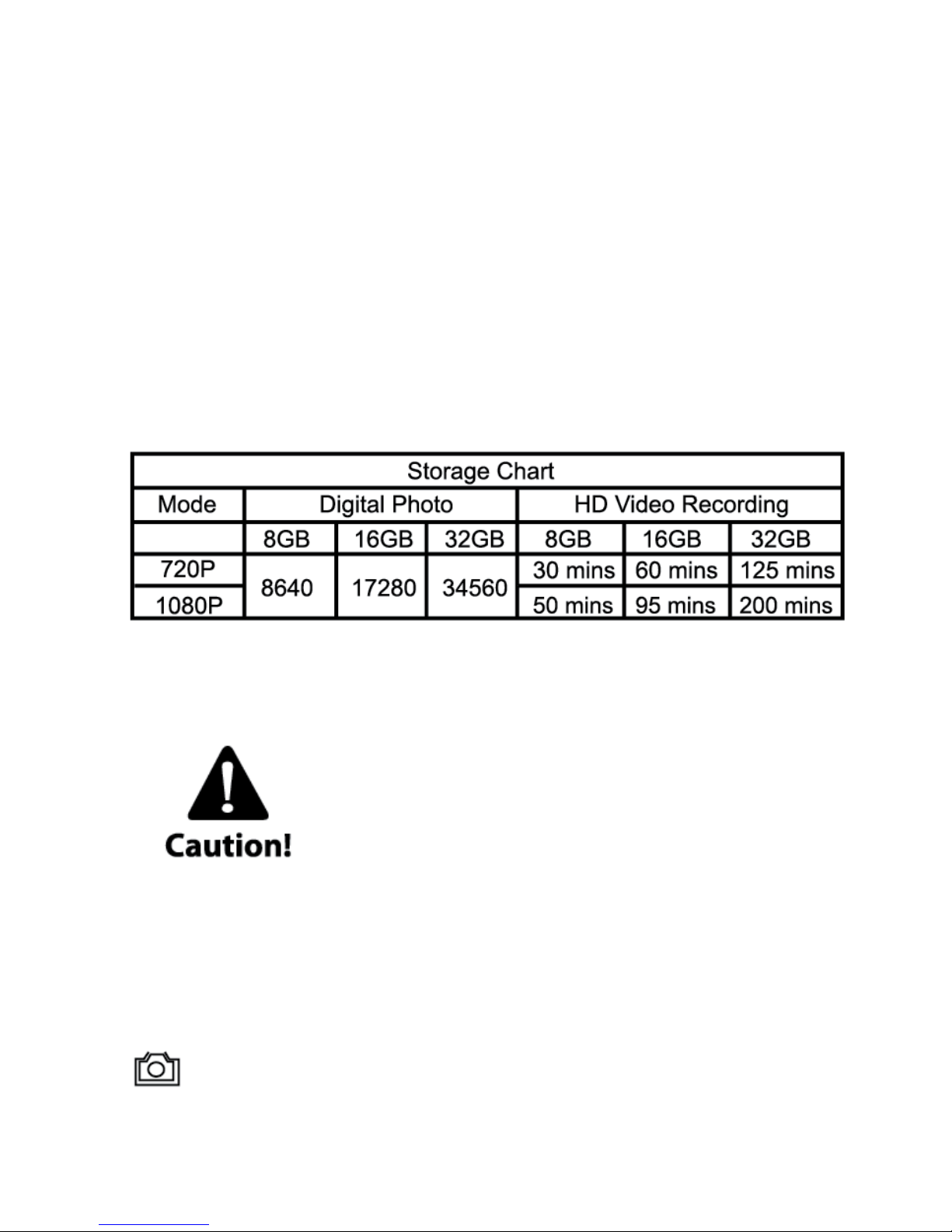
approximately 1 hour battery life.
Additional batteries and mount packages are available at
Firecam.com
Technical Specifications
Optics:
• WIDE ANGLE view
• f/2.4, fixed focus glass lens
Video:
• HD Resolution Settings: 720p: 1280 x 720 @60fps
1080p: 1920 x 1080 @30fps
• Sensor Type: 1 / 4” HD CMOS
• Light Sensitivity: 1.4 V/lux-sec (550nm)
• Video Format: MJPG codec, .AVI file format
• Exposure Control : Auto
• White Balance: Auto
Audio:
• Built-in microphone
Photo:
• Resolution: 2592 x 1944
• Format: JPEG
• Capture mode: Auto snapshot every 3 seconds
Storage:
• Memory: Micro SD card, support Max up to 32GB capacity
(recommended Class 6 or above)
Page 8
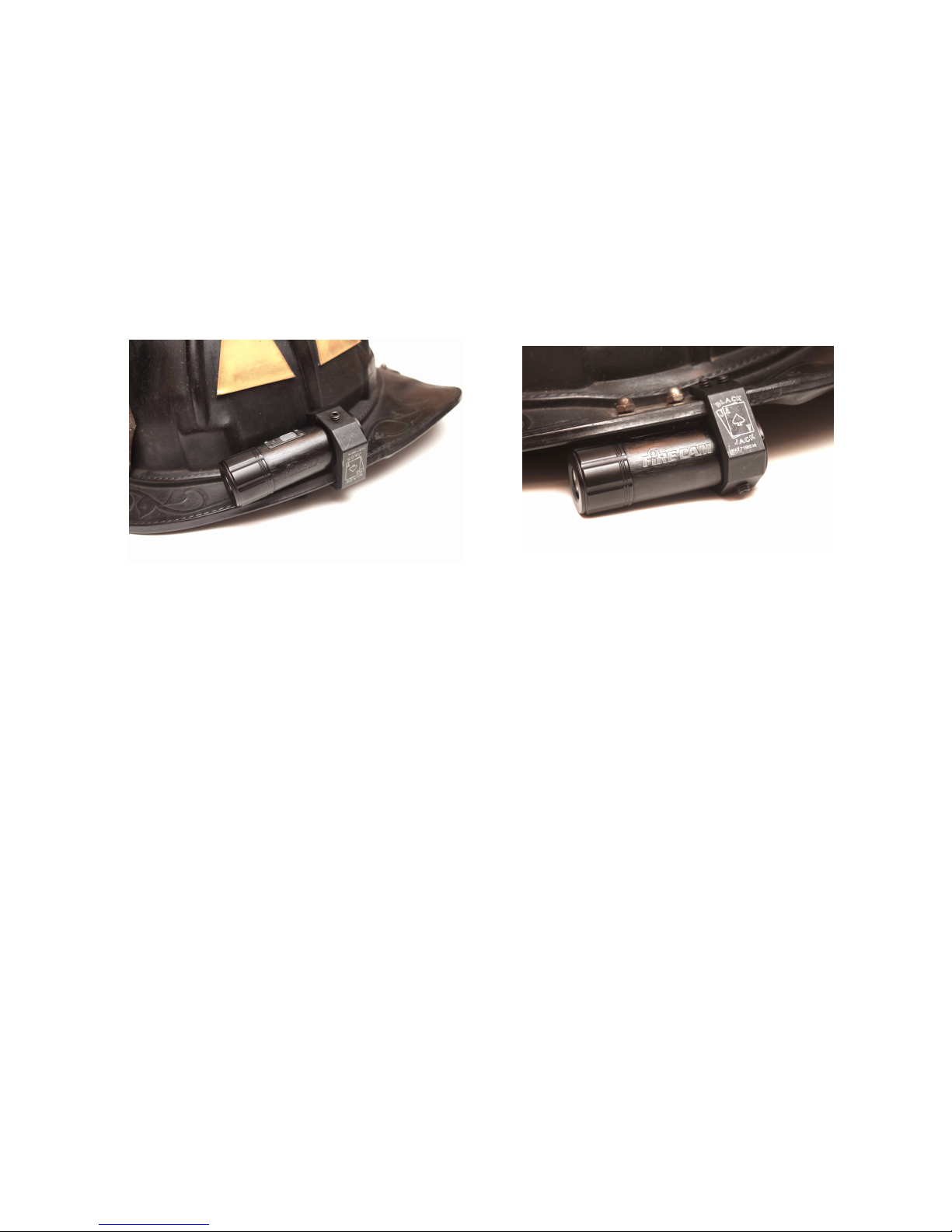
Product size: 86 x 30 x 30 mm
Weight: 94g
Operating System (for USB drive):
Win ME, 2000, XP, Vista, Win 7, Win 8; Mac OS X 10.6+
Mounting BlackJack Holder
With set screws loose, fit the BlackJack mount on the right or left
brim of the fire helmet. It can be installed above the brim or below
the brim depending on the view from your camera. Snug the 2 set
screws on the brim BEING CAREFUL NOT TO OVER TIGHTEN.
Place the camera inside of the BlackJack mount making sure the
button is on the top and camera is level. Tighten down the set
screw to hold the camera BEING CAREFUL NOT TO OVER
TIGHTEN. If the set screw starts to make marks on the camera, this
will not damage the integrity of the unit. A small piece of black tape
can help limit the marks.
Page 9

WARRANTY / DISCLAIMER:
Abuse of Camera IS NOT covered under warranty. Fire Cam
warrants its products against defects in material or workmanship for
12 months from date of purchase unless otherwise specified. The
Fire Cam Mini HD and the Fire Cam 1080 Fire Helmet Cameras
warranty are limited to the replacement or repair of the defective
item at no charge if we determine the item to be defective. This
warranty shall not apply to any item subject to misuse including
such as failure by buyer to follow instructions, product modification,
ordinary wear and tear, negligent or improper operation. Abuse of
camera, cable or accessories IS NOT covered under the warranty.
Fire Cam products are not recommended for concrete training
towers or flashover chambers where it could sustain high temps for
long periods of time. Electronic damage due to over-voltage,
incorrect polarity from product power supplies, or incorrect MAINS
voltage is not covered under the warranty. DO NOT USE ANY
AFTERMARKET CHARGERS FOR YOUR CAMERAS. Fire Cam
chargers are designed specifically for Fire Cam’s only. Modification,
repair, or attempted repair by anyone other than Fire Cam or
without the written permission of Fire Cam will void this warranty.
This warranty covers the cost of factory repair, labor and parts on
eligible equipment which is returned. Equipment, which is repaired
under this warranty will be returned freight prepaid. If it is
determined that the Fire Cam does not need repair, the purchaser
shall pay for return shipping charges. Disclaimer: Fire Cam does
not assume any responsibility for any accidents or injuries incurred
to the user of the Fire Cam Fire Helmet Camera.
WARNING!
Firefighting is a dangerous activity and should only be performed by
a trained professional. The end user of Fire Cam products assumes
all responsibility connected with the use of this product including but
not limited to continuing education, and activity that conforms to
local Standard Operating Procedures. Neither the manufacturer nor
any distributor assumes any liability for injuries sustained while
using Fire Cam products. The Fire Cam® Fire Helmet Cameras™
are manufactured of anodized aluminum, and may retain heat for
Page 10

several minutes after being exposed to a heated environment such
as a structure re or training re so it needs to be handled with care.
The end user is responsible for installation consistent with the
mounting instructions, as well as regular safety inspections of the
BlackJack Holder and Fire Cam Fire Helmet Cameras. For further
questions, please go to www.FireCam.com under the "contact us"
page.
SHIPPING AND RETURNS:
Orders within the United States are shipped by ground which takes
3-5 business days depending on your location in the US. We will
make all efforts to ship your order within 2-3 business days of
receipt. We do not ship on Saturdays and Sundays. All orders
placed on Saturday and Sunday will be processed that following
Monday. During the holidays and Sundays, our order processing
time may increase. Fire Cam charges sales tax for orders shipped
to Illinois. Recipients of orders shipped to other states are
responsible for complying with state and local tax laws. You will
receive an emailed confirmation, if you provided it with your order.
Fire Cam ships to PO boxes via USPS.
International Shipping:
We ship to the United States and most other Countries. For orders
shipped outside of the United States, your order will be shipped via
USPS standard mail. Delivery times vary by destination, most
orders should arrive within 21 days of shipment. All payments are
made in US Dollars. The order total does not include customs
duties or international taxes. The customer is responsible for any
non-US taxes or import duties which may be levied by local
authorities. Please check your countries import and taxation
policies before ordering.
Returns:
3 REASONS FOR RETURNS:
1. Defective item.
2. Wrong item received.
3. Departmental policy that prevents use of the camera.
*All returns must be authorized. *
To receive authorization for a return, you must contact customer
service at www.FireCam.com under the Contact Us page to obtain
Page 11

a Return Authorization number known as an RA #. Upon approval,
an RA form will be emailed which must be completed in full and
returned with item(s). All returns that are not exchanged for another
item can be refunded only within 14 days of the original purchase
date and refund is subject to a 15% restocking fee and the item
MUST be UNUSED / NOT DAMAGED and in the ORIGINAL box. If
the requested items are not in stock by the time we process your
RA, your credit card will be refunded for the value of the items
returned to our warehouse to avoid further delay on your request.
(in which case the 15% restocking fee will be waived).
Once you receive your RA #, you must ship the item(s) back within
7 business days to receive an exchange or the RA # will become
null and void. You will be responsible for the return shipping costs.
We do not refund shipping costs on returns and or exchanges.
Pack your item(s) in the original shipping box if possible and insure
your package for the full value of merchandise and return it to us
using the delivery service of your choice. We are not responsible for
lost or damaged return packages. We will notify you via e-mail once
your return has been processed.
Depending on where you purchased your Fire Cam®, some
cameras may be covered under the "Fire Cam Damage" warranty
throughout the warranty period. If your cameras components
accidentally get damaged in a fire, you are covered for one FREE
replacement. This warranty ONLY applies to customers who
purchase directly from Fire Cam unless a distributor of Fire Cam
otherwise specifies. Fire Cam products are not recommended for
concrete training towers or flashover chambers where it could
sustain high temps for long periods of time and this warranty will not
apply to repeated abuse of the product. We are the ONLY Fire
Helmet Camera™ manufacturer and the ONLY company that offers
this type of warranty. Please go to www.FireCam.com for more
information.
 Loading...