

Page 1
1
VGA Keyboard Mouse
CAT5 Extender
ITEM NO.: VKM02
The VGA, Keyboard Mouse CAT5 Extender allows VGA video signals and keyboard mouse to
be transmitted up to 100 meters via 2 x CAT5 STP or UTP cable. Used in pairs, the Extender
is used in home or commercial applications as a smart, fast and cost-effective, eliminates
costly and bulky VGA, keyboard mouse cable. Applications for classroom projector systems,
boardroom systems, collaborative PC systems C-training systems, and tradeshows PC demo
systems and medical information systems.
Features:
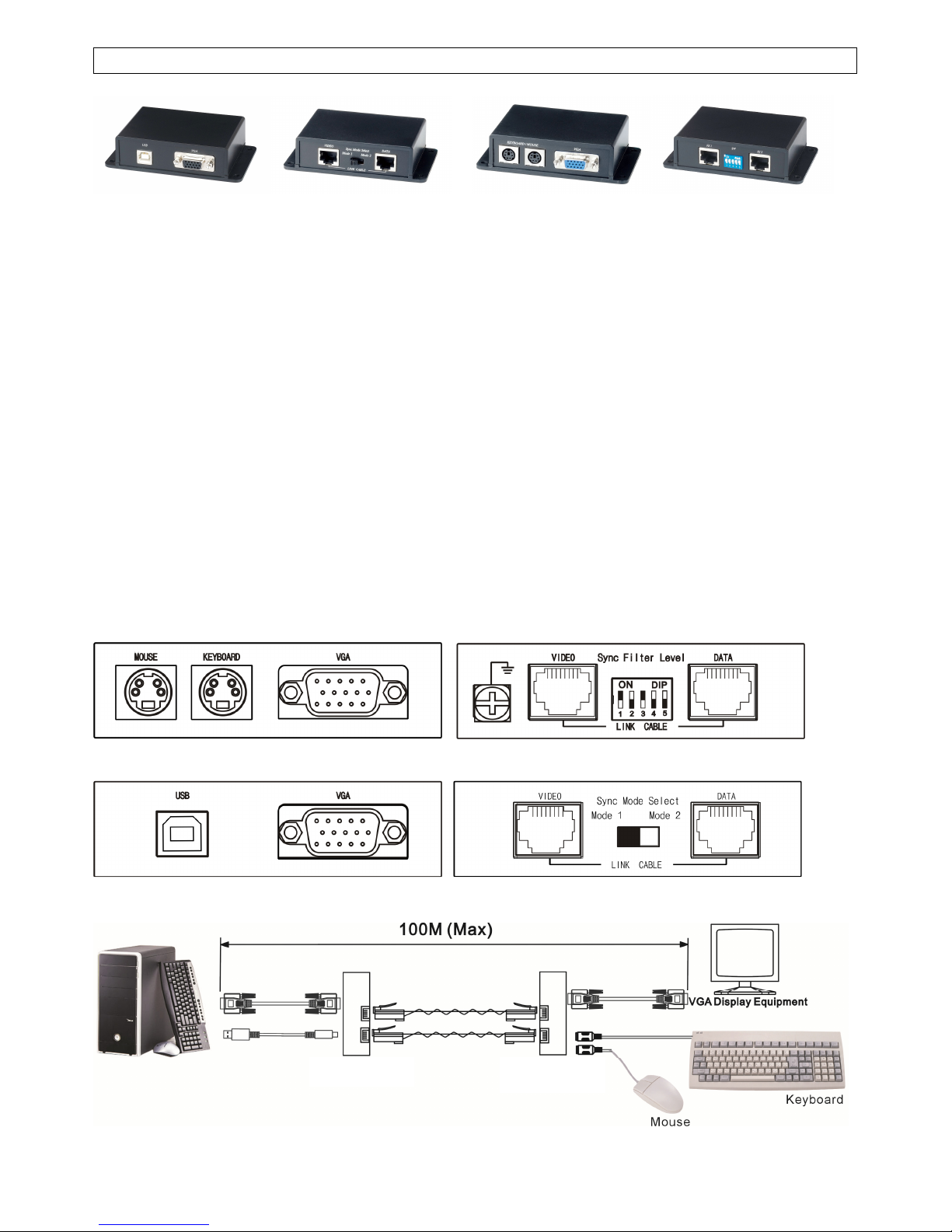
VKM02 Keyboard Mouse CAT5 Extender – USB Interface at Local Unit
Extend VGA and Keyboard mouse over 2 CAT5 UTP cable to instead of VGA cable and
keyboard mouse cable.
Including local and remote units.
Up to 100 meters via standard 4 pairs CAT5 STP or UTP cable instead of VGA cable.
Transmitter built in virtual DDC to avoid improperly setting at resolution and frequency.
Transmitter built in sync mode selection for signal stability.
Receiver built in sync filter level adjustment for signal stability.
Supports up to 1280x1024 pixels.
Passive device, not support VGA DDC protocol.
Perfect for classrooms, lecture halls, tradeshows, video information displays…etc.
Panel View:
VKM02: VKM01R (Remote unit)
VKM02: VKM02T (Local unit)
Installation View:
VKM02T VKM01R
Page 2
2
Recommend Cable:
1. CAT5e UTP/STP or Cat6 UTP cable.
2. There are some certain models or brands of monitors with very high demand at
sync-sensitive, recommend use STP (shielding twisted pair) cable to instead of UTP
(unshielded twisted pair) cable.
RJ45 Pin Configuration: TIA/EIA 568B Wiring standard
Video Link Cable
1. Orange-white Video Red +
2. Orange Video Red -
3. Green-white H-Sync
4. Blue Video Green +
5. Blue-white Video Green -
6. Green V-Sync
7. Brown-white Video Blue +
8. Brown Video Blue –
Data Link Cable
1. Orange-white Keyboard Clock
2. Orange Keyboard Data
3. Green-white Power 1
4. Blue Ground 1
5. Blue-white Power 2
6. Green Ground 2
7. Brown-white Mouse Clock
8. Brown Mouse Data
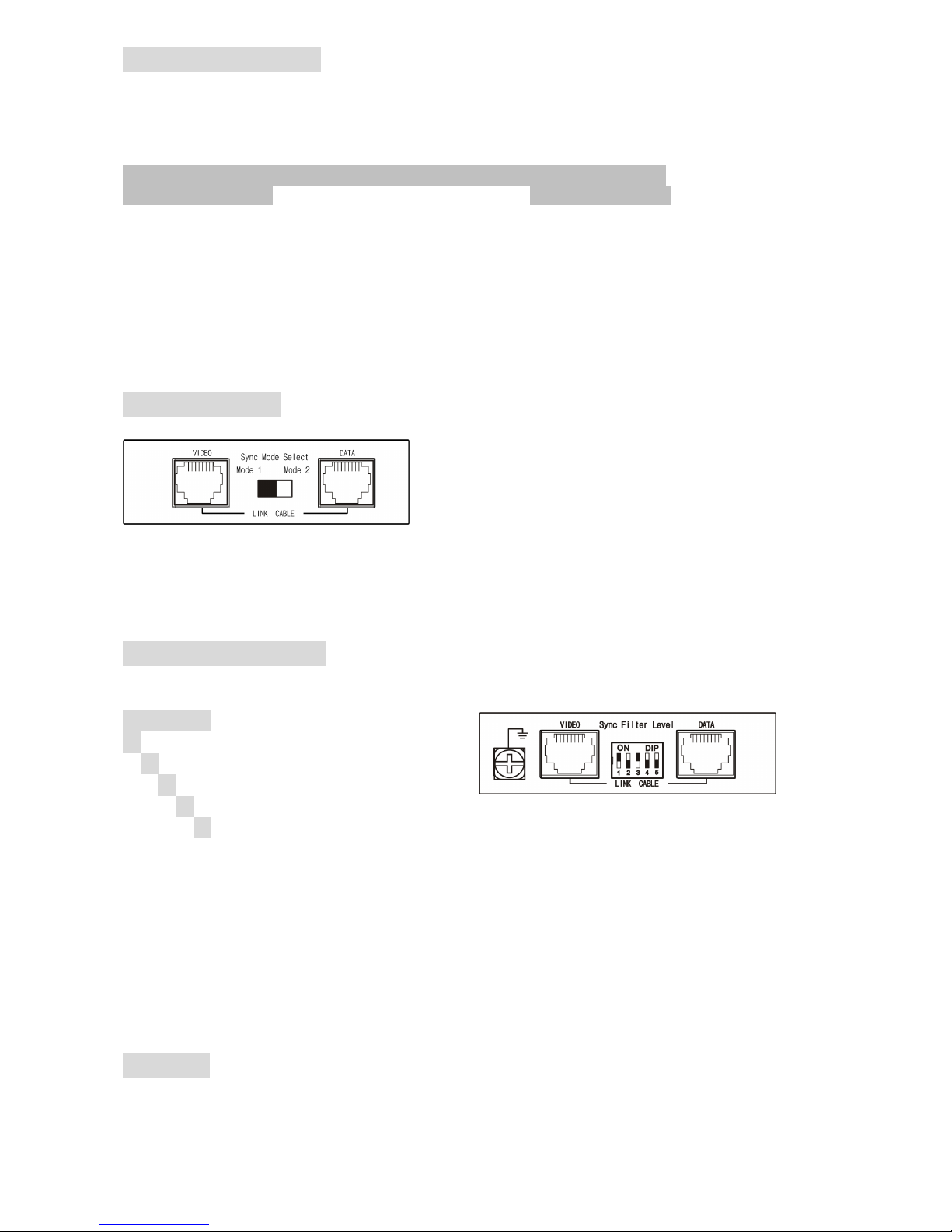
Switch Setting:
VKM02T Sync Mode Select
←←←←
Mode 1
→→→→
Mode 2
1. For new type monitors, such like over 17” LCD Monitor, recommends setting at mode 1
for the best stability. If the picture not normal, then switch to Mode 2.
2. For old type monitors, such like CRT or under 17” LCD Monitor, recommend setting at
mode 2. If the picture still not normal after adjust the dip switch of VKM01R. Then
please use STP (shielding twisted pair) cable.
DIP Switch Setting:
VKM01R Sync Filter Level
ON
ONON
ON
↓↓↓↓↓↓↓↓↓↓↓↓↓↓↓↓↓↓↓↓
Level 0 (Min)
↑↑↑↑↓↓↓↓
Level 1
↓↑↑↑↑↓↓↓
Level 2
↓↓↑↑↑↑↓↓
Level 3
↓↓↓↑↑↑↑↓
Level 4
↓↓↓↓↑↑↑↑
Level 5 (Max)
12345
1234512345
12345
Sync Filter is designed for using UTP CAT5 cabling.
Sync Filter level adjustment is to add the sync stability, but not adjust picture quality or
eliminate skew.
Since different brand monitor have different setting, so there is no recommended setting.
Please adjust the level based on picture stability. If no picture display or picture not stable,
then please use STP cable.
Caution:
1. The wiring must be away from electro magnetic equipment, i.e. microwave, wireless, hi voltage
cable…etc.
2. The maximum distances supported by the VGA Extender are dependent on the type of twisted pair
cable and image resolution of the PC’s VGA interface. Make sure that the maximum
Page 3
3
recommended operational distances have not been exceeded.
3. All wiring is “straight-through” twisted pair cable, not being used for other LAN or telephone
equipment.
4. Do not connect the VGA Extender to a telecommunication outlet wired to unrelated equipment.
5. If the keyboard mouse work abnormal, please reverse the cable of keyboard mouse.
Troubleshooting at picture problem:
1. No picture display:
Check Link cable.
Check DIP switch setting.
Check VGA cable connect.
Change the resolution or frequency.
Change Link cable for STP cable.
2. Picture not stable or disappear intermittence or no picture display:
Check DIP switch setting.
Change the resolution or frequency.
Wiring away from electro magnetic equipments.
Change Link cable for STP cable.
3. Picture tilt:
Check DIP switch setting.
Change the resolution or frequency.
Change Link cable for STP cable.
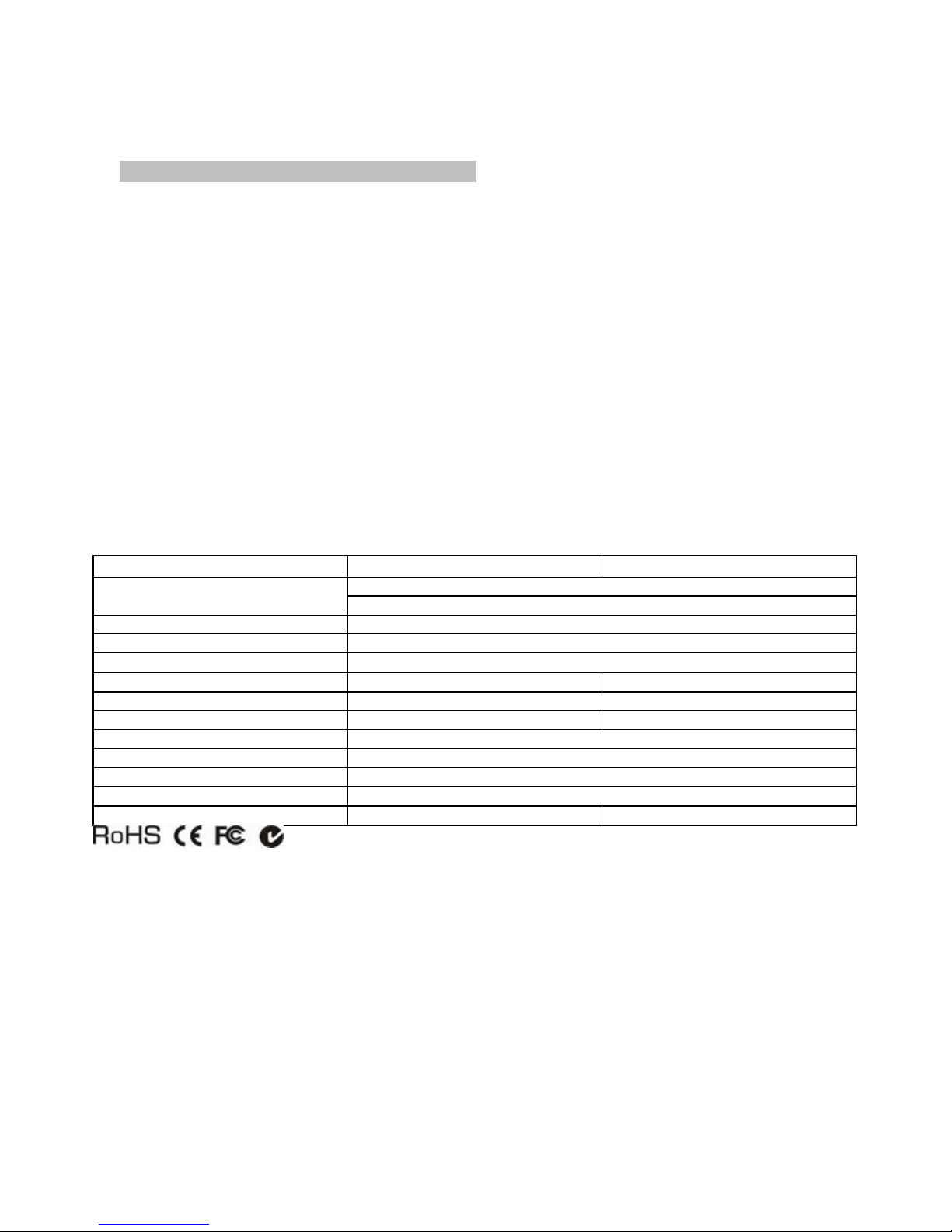
Specification:
ITEM
NO.
VKM02(VKM02T)
VKM02(VKM01R)
Input Signals
Video : 1.1V P-P
Horizon & Vertical Sync: TTL standard. 300kHz max. bandwidth
Insertion Loss Less than 3dB per pair over the frequency range
Video Signal Return Loss -15dB max from DC to 60Mhz
Impedance
75 ohms (DB15), 100 ohms (RJ45)
Setting Switch 2 Stage Slide Switch 5 Stage Dip Switch
Transmission Distance Up to 100 meters depend on image resolution
Input / Output DB15 x 1, USB Type B x 1 DB15 x 1, PS/2 x 2
Link Connection RJ45 x 2
Link Cable CAT5 / CAT5e / CAT6 / STP or UTP Cable
Temperature Operation: 0 to 55 C, Storage: -20 TO 85 c, Humidity: up to 95%
Dimensions mm 108 x 72.2 x 27
Weight g 105 115
Rev. B
 Loading...