

Page 1

FINDSTER USER GUIDE
1
Page 2
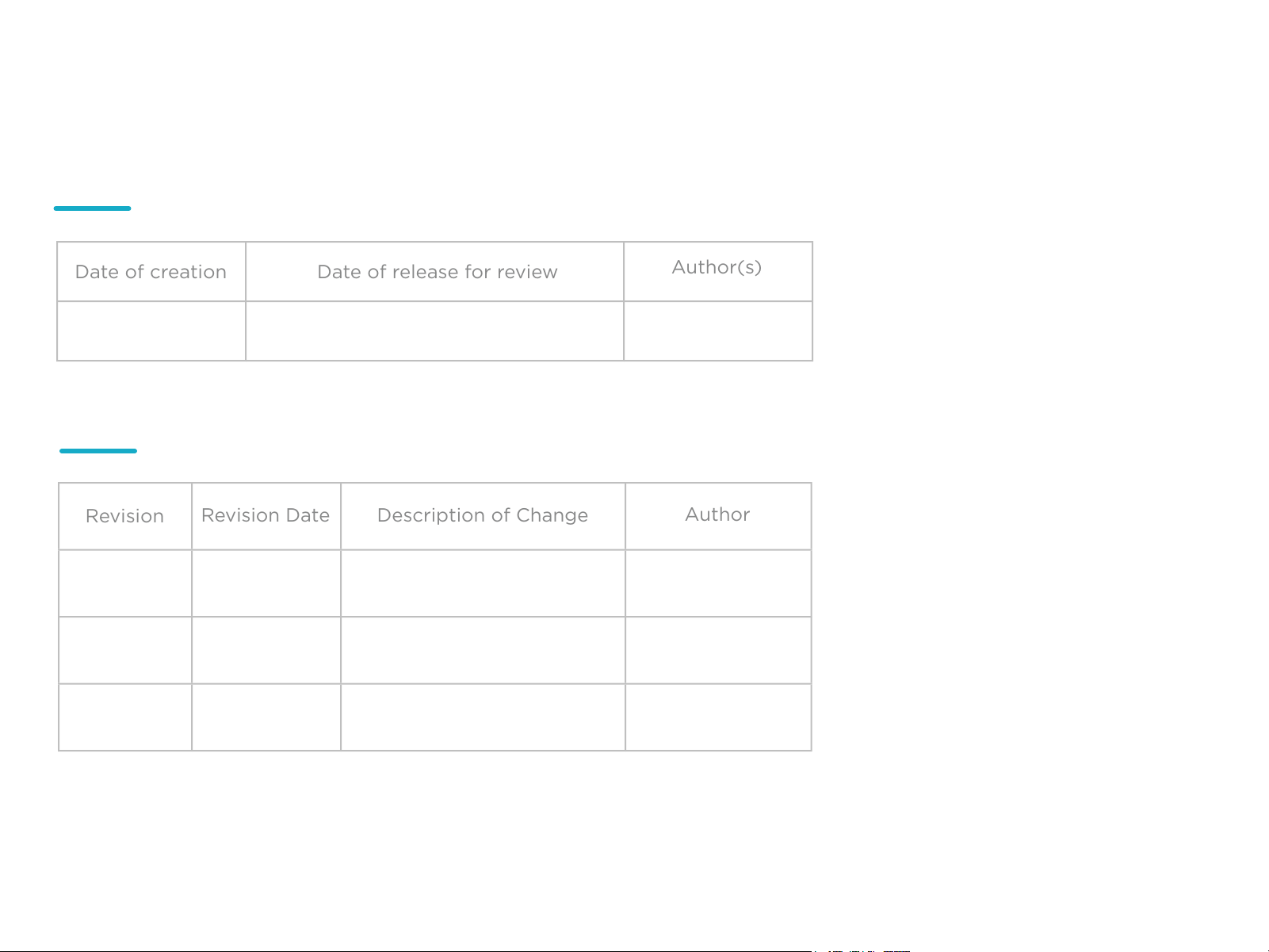
Date of creation
Date of release for review
Author(s)
Revision
Revision Date
Description of Change
Author
Revision History
03/02/2016 João Magalhães
19/02/2016
Track Changes
01
02
17/02/2016
17/02/2016
Regulatory Statements
and Support
Layout Design
Mariana Costa
Paula Ramos
2
Page 3

Table of Contents
1. About this Manual
1.1. Explanation of the pictograms
2. Introduction
2.1. Terms of Use
3. In the box
4. Findster modules overview
4.1 Wearing the modules
5. Getting Started
6. Exploring the App
7. Understanding your tracker
8. Charging the Findster modules
9. Care and Cleaning of Devices
10. Specifications
11. Warnings and Safety information
12. Regulatory Statements
13. Support
3
Page 4

The content of the User Guide, including all figures and
drawings, is copyright-protected information belonging
to Findster Technologies S.A. and/or third parties, and
is provided solely for the purpose of operating and
maintaining the device. Using the content for other
purposes or copying is prohibited.
This manual applies to the Findster system®
Manufacturer
Findster Technologies, S.A.
Rua Sá da Bandeira, nº 651 1º Direito
4000-437 Porto
Portugal
(+351) 223 248 286
info@getfindster.com
4
Page 5
1. About this Manual
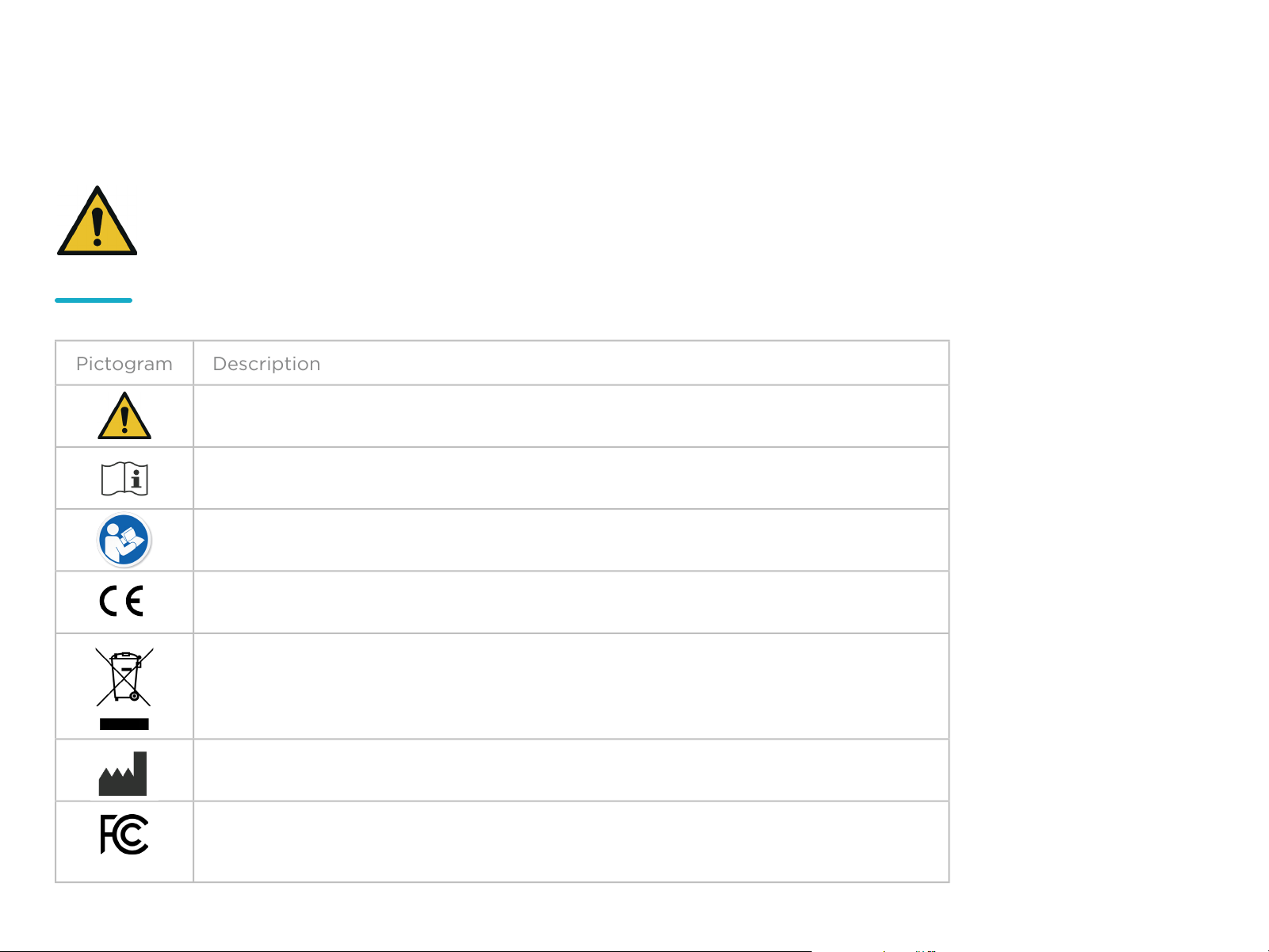
Pictogram
Description
This manual provides detailed technical and operational
information on the Findster system.
Caution – Do not use the Findster system without
reading this manual.
1.1. Explanation of the pictograms
General warning sign according to IEC 60601-1 (2005)
Operating instructions sign according to IEC 60601-1 (2005)
Refer to instruction manual/booklet according to IEC 60601-1 (2005)
CE marking symbol. Complies with R&TT Directive 2014/53/EU
Symbol for the marking of electrical and electronic equipment according to
directive 2002/96/EC.
Protecting the environment. When disposing of this unit, or the batteries it
uses, do so in an environmentally friendly way. directive 2002/96/EC.
Manufacturer symbol sign according to NP EN 980 (2008)
FCC symbol according to the Federal Communications Commission of
United States of America
5
Page 6

2. Introduction
Findster Technologies was established in 2015 to develop products that
take advantage of technology and innovation to connect people with
their loved ones.
A new paradigm in location systems, Findster uses proprietary longrange communication technology to enable the continuous control of
each user’s safety and well being - without requiring any monthly fees.
The system is comprised of two modules – the Guardian and the
Target - which are comfortable and well-designed wearable pieces.
Communicating through Radio Frequency (RF), they allow real-time
monitoring of the target’s geo-location and activity, while also providing
some additional useful features. A high-precision GNSS tracking system
is used, as well as a proprietary communication system in the Sub 1GHz
Industrial/ Scientific/ Medical (ISM) band.
The Findster App receives information directly from the Guardian module – via Bluetooth Low Energy (BLE), or remotely through the cloud
– via WiFi or 3G. The latter allows data sharing with other authorized
users. The App allows large groups to be monitored, centralizing data
and further enhancing the user’s connectivity with the ecosystem.
6
Page 7

2. Introduction
2.1. Terms of Use
WARNING: Read all the Instructions before using Findster!
IMPORTANT: To use Findster the user needs to agree with
the product Terms of Use available at the time of account
creation.
Findster is a tracking system mainly intended to locate pets. However,
to reduce risk of injury when using Findster in other situations, close
supervision is necessary.
When using Findster near children, close supervision is necessary to
prevent and avoid injuries.
Furthermore, Findster Technologies S.A. cannot be responsible for:
GPS errors caused by external sources other than the product hardware;
Losses, kidnapping or any other similar situation.
7
Page 8
3. In the box
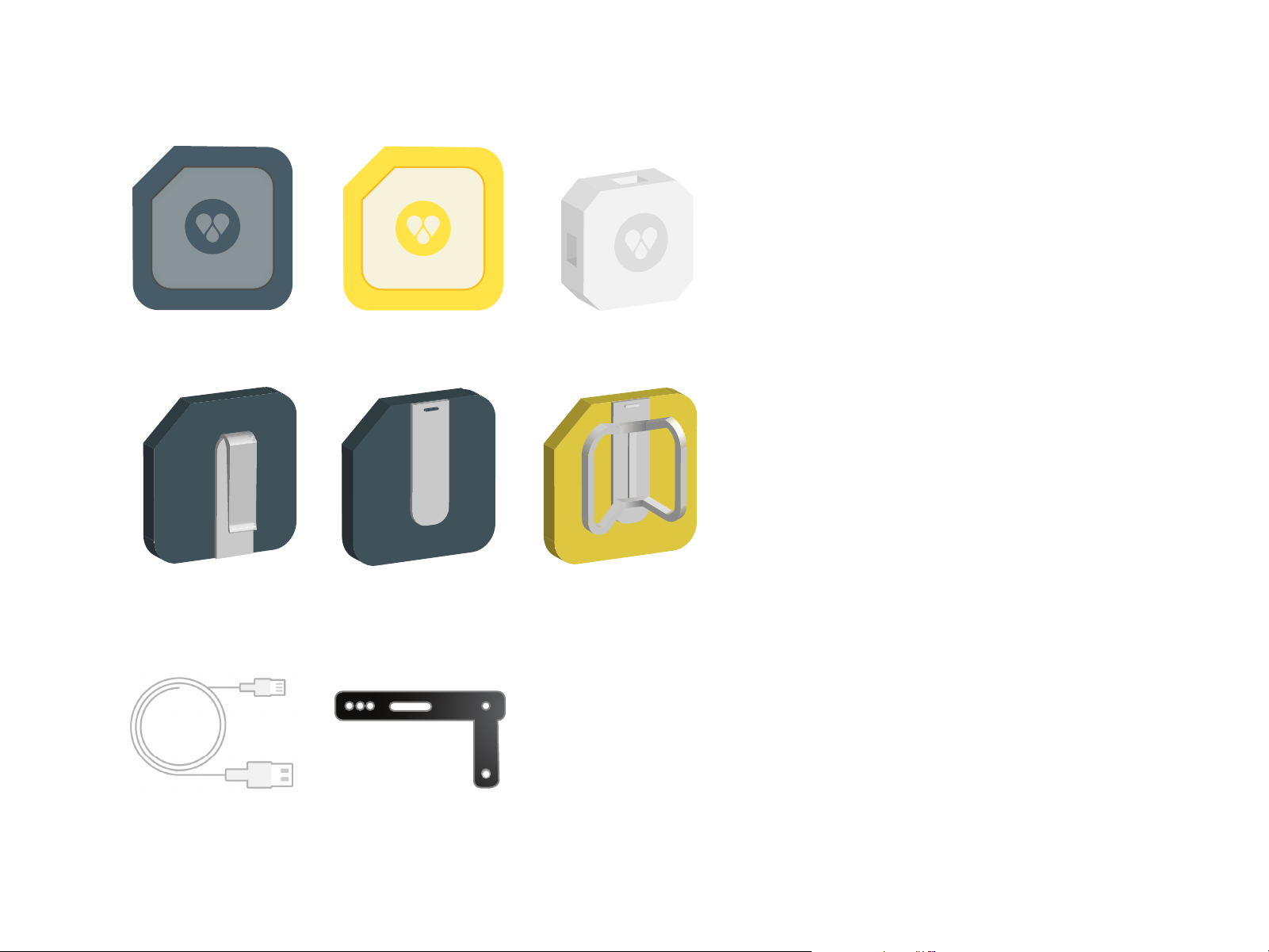
Findster Guardian
1x Belt Clip
Findster Target Portable Charger
1x Pendant Clip
1x Collar Attachment
1x USB - micro USB
charging cable
1x Strap
8
Page 9
4. Findster modules overview
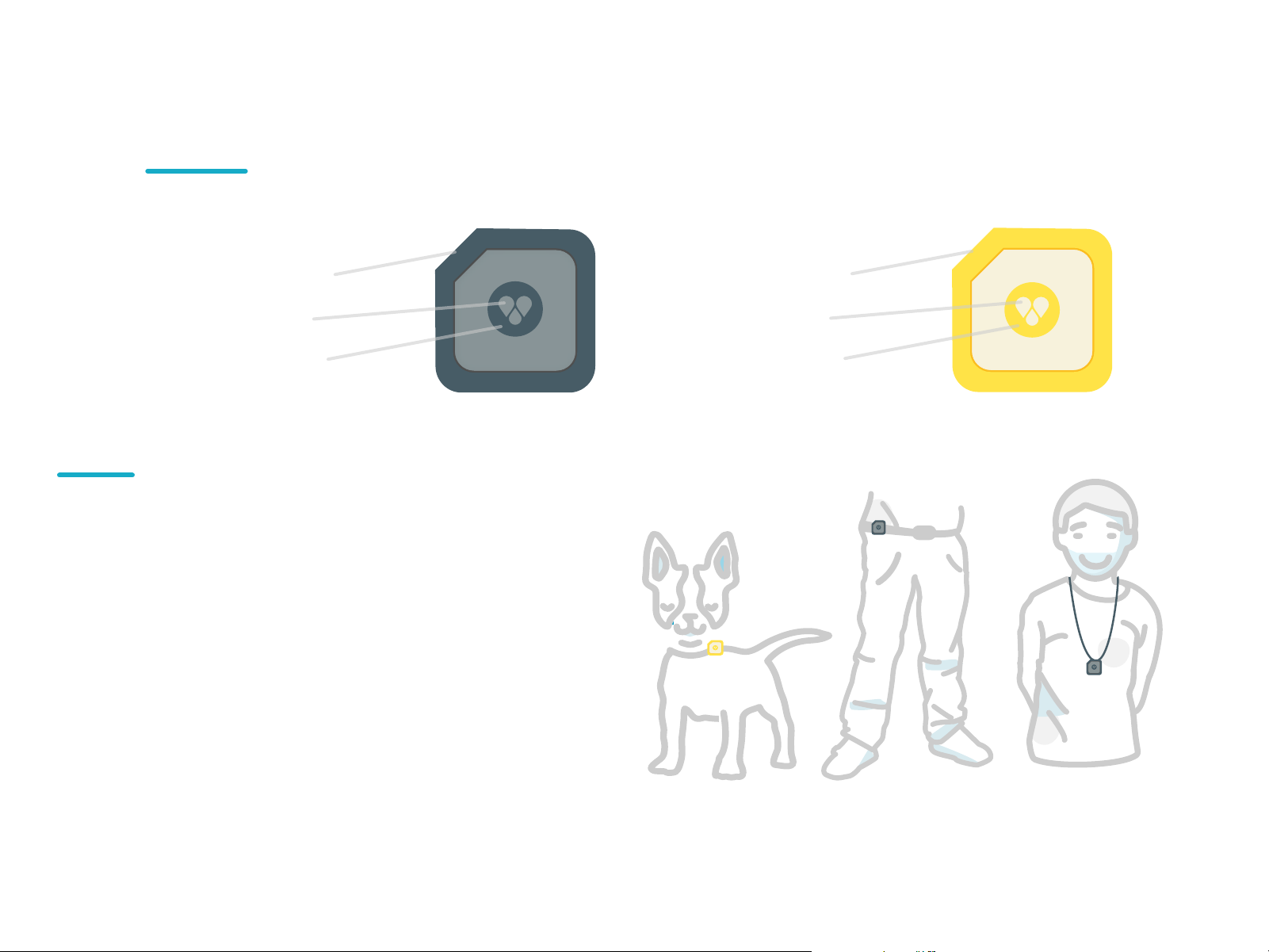
Findster
Guardian
- Charging port
- Status LED
- Power button
4.1. Wearing the Modules
The Guardian module can be worn in two
dierent ways:
- Clipped to a belt
- As a pendant
Two types of clips are included,
one for each use case.
Target
- Charging port
- Status LED
- Power button
The Pet module can be attached
to any collar using the provided
attachment and strap.
9
Page 10
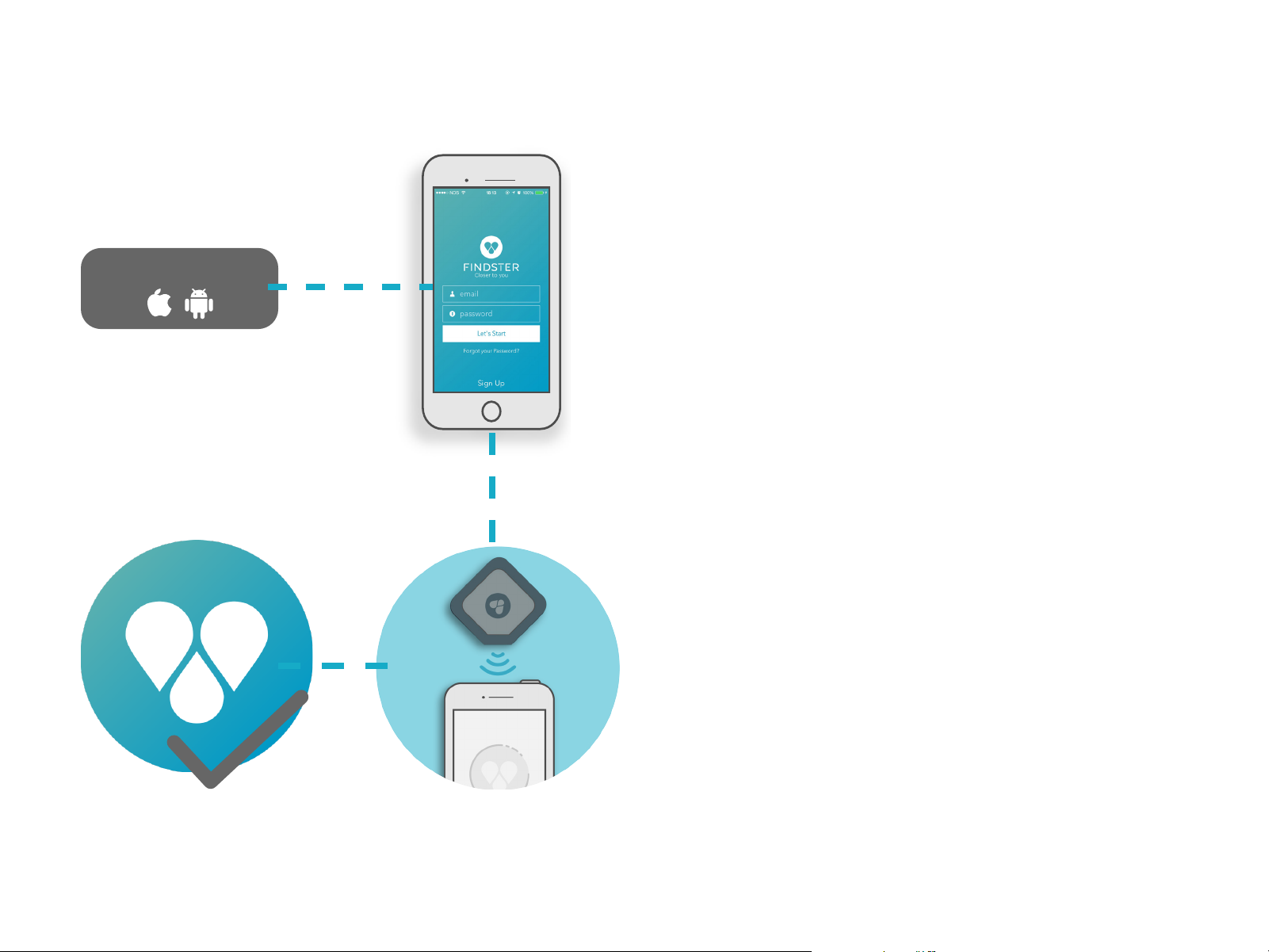
5. Getting started
Download the app.
1.
Download the Findster app
Visit the App Store or the Google Play Store to
download the Findster app.
2.
Login/Register
Follow the instructions provided in the app. If
you’re a first time user, you will need to create an
account.
3.
Pairing
Again, follow the instructions to pair the Findster
Guardian with your phone. You will be prompted
to press the button on your Findster Guardian two
dierent times - the first time to turn it on, and the
second to connect.
4.
Good to go!
Everything’s set - time to explore your Findster
system!
10
Page 11
6. Exploring the App
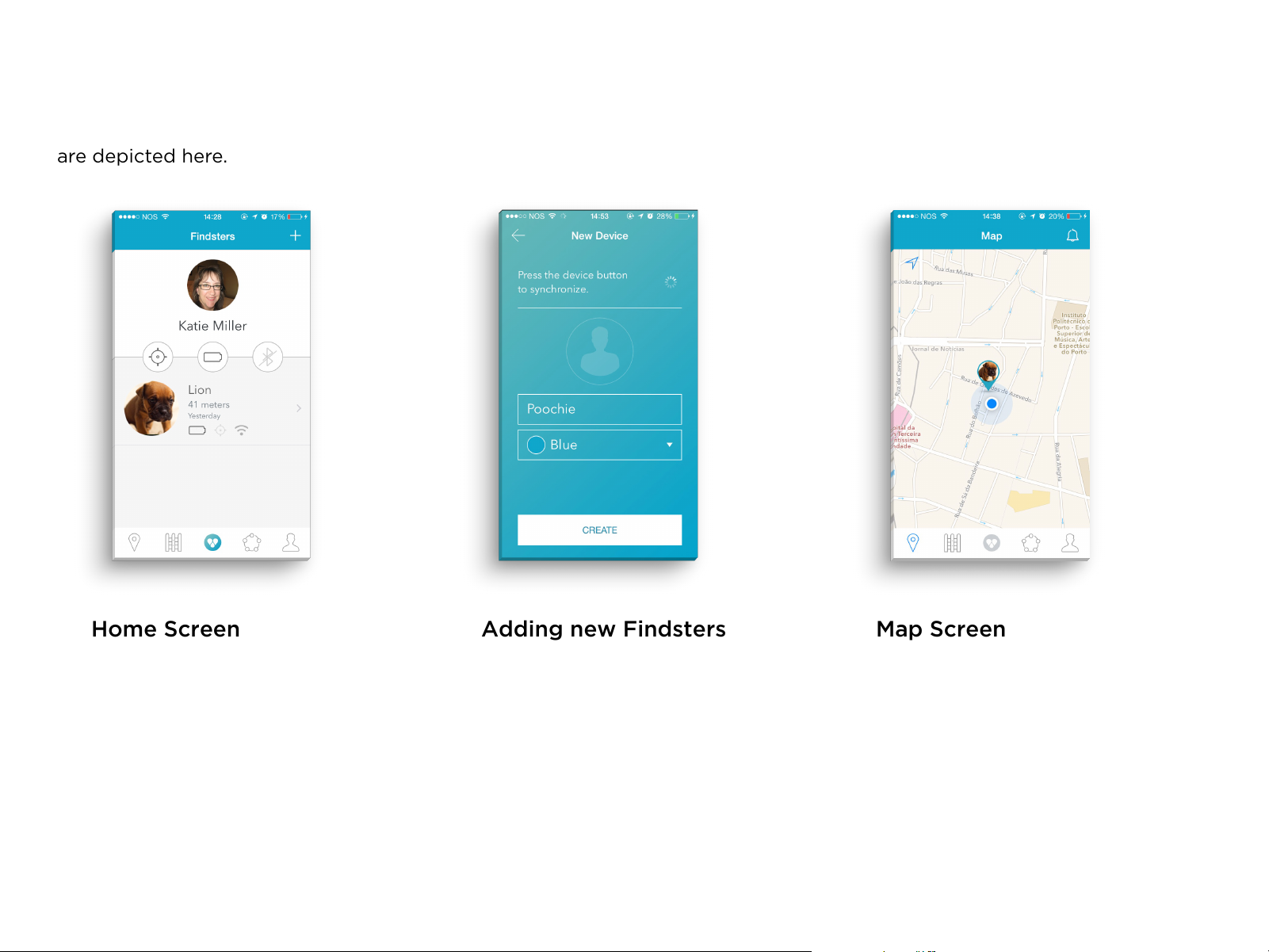
Some of the main screens and features available
are depicted here.
Home Screen
This is your starting point.
You can check your Guardian
module’s battery level, and
information regarding every
Findster currently associated
with your account.
Adding new Findsters
Pressing the “+” button on the
Home screen will allow you
to add a new Findster. After
synchronizing the new device,
you can give it a name and
associate a photo and color to it.
Map Screen
The Map screen allows you to
see your current position, as
well as the position of every
active Findster associated with
your account. It is updated in
real-time.
11
Page 12
6. Exploring the App - Fences
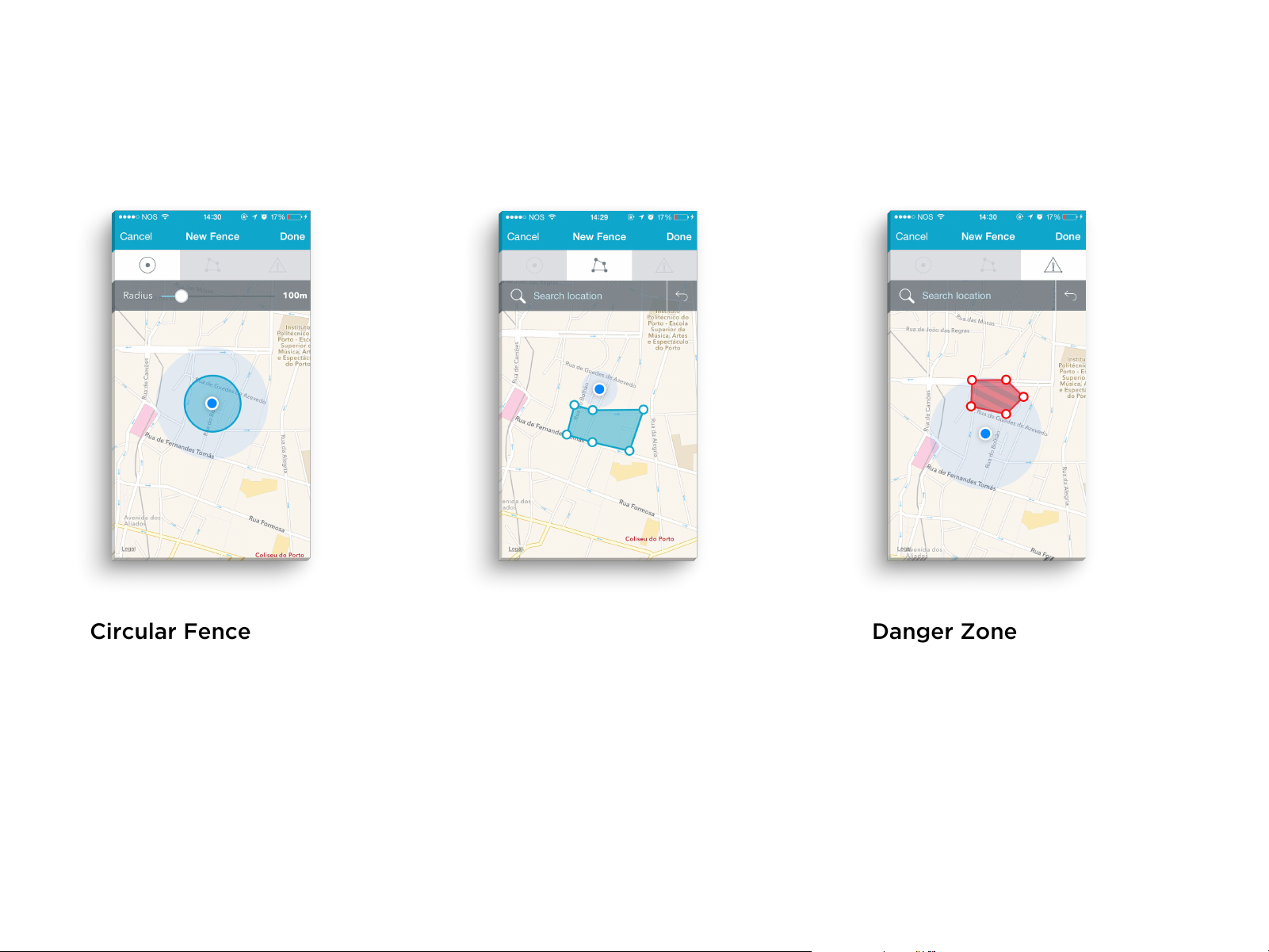
Security zones can be defined considering your Findsters’
current position. After a fence is created, the user is able to
activate/deactivate it at will. Three types of fence are available:
Circular Fence
Centered on the Guardian’s
position, it automatically moves
with you. The user is able to define
the radius of the fence when
creating it. If any Findster goes
outside of the designated area, an
immediate alert will be displayed.
Polygonal Fence
Entirely customizable, it is
comprised of several polygons
chosen by the user. This fence
is stationary. Again, the user
is immediately alerted if any
Findster goes outside the
designated area.
Danger Zone
It follows the same principle
as the polygonal fence, but
is meant to cover areas the
Findsters are not supposed to
enter instead. If this happens,
the user is immediately notified.
This fence is also stationary.
12
Page 13
6. Exploring the App
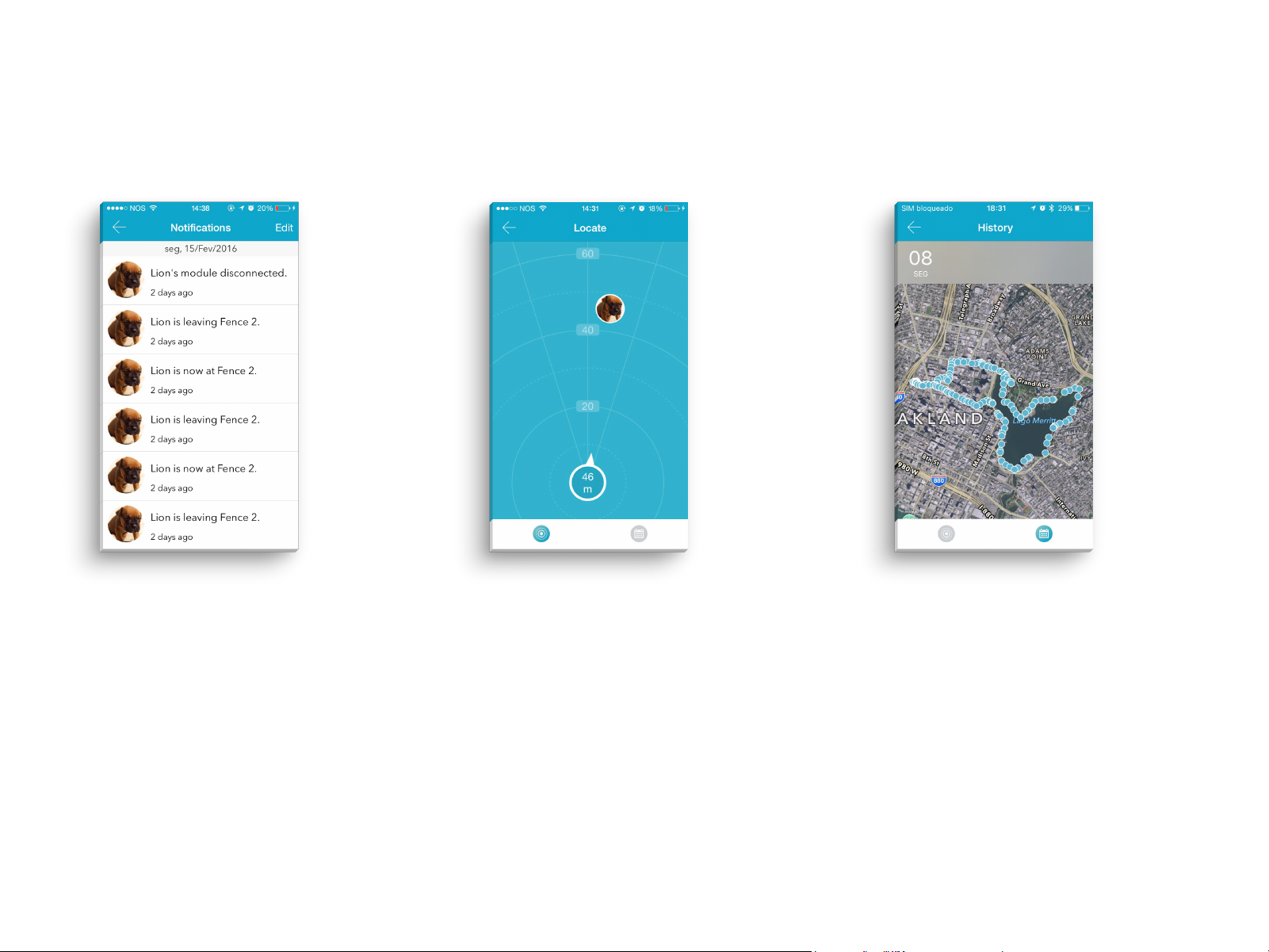
Notications Panel
Accessible through the Map
screen. this panel displays the
most recent events.
Locate Mode
The Locate mode shows you the
distance and direction to each
active Findster associated with
your account. It works as a
compass, and is updated in realtime.
History
Past positions are displayed
using the History feature,
allowing you to reconstruct your
walks.
The user can view information
regarding the previous seven
days.
13
Page 14
6. Exploring the App - Interconnectivity
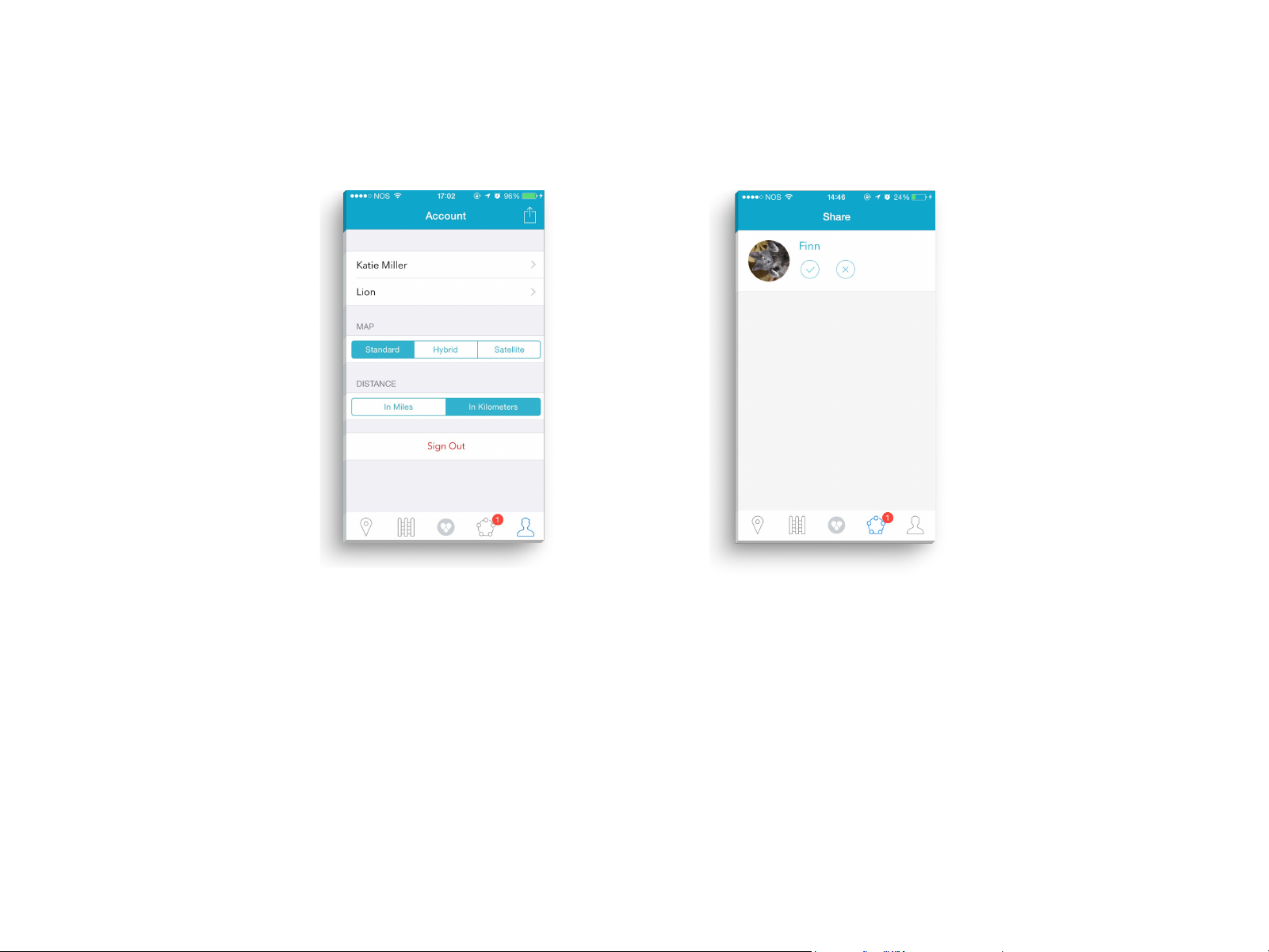
Sharing Findsters
You can share access to your
Findsters with other authorized
people, like family and friends. To
do so, enter the Account menu,
select one of your Findsters and
then enter the desired person’s
email address.
Accepting Requests
Invites received will be displayed
in the Share section.
14
Page 15
7. Understanding your Findster
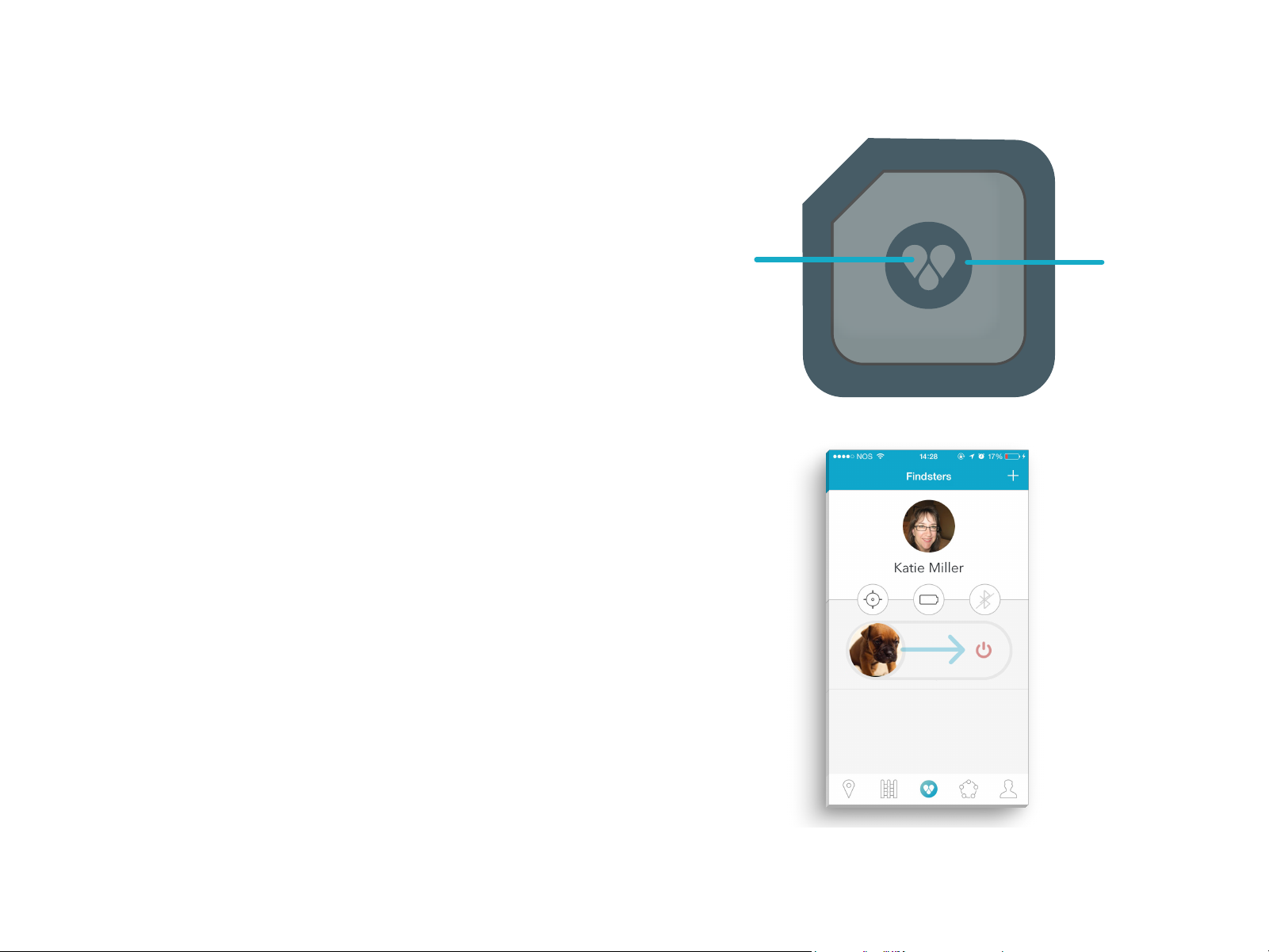
1.
Status LED
Solid red glow - Findster is charging
Solid green glow - Findster is fully charged
Short red blinking - Battery is almost empty
Solid white glow - Pairing, waiting for confirmation
2.
Power Button
- To turn any module on, press the button once.
- To turn a Target module o, use the app: on the
home screen, longpress the respective Findster’s
photo and swipe right.
To avoid turning the modules o accidentally, this
function is accessible through the app only.
1.
2.
- If all Target modules are o, the Guardian module
will automatically turn o.
15
Page 16
8. Charging the Findster modules
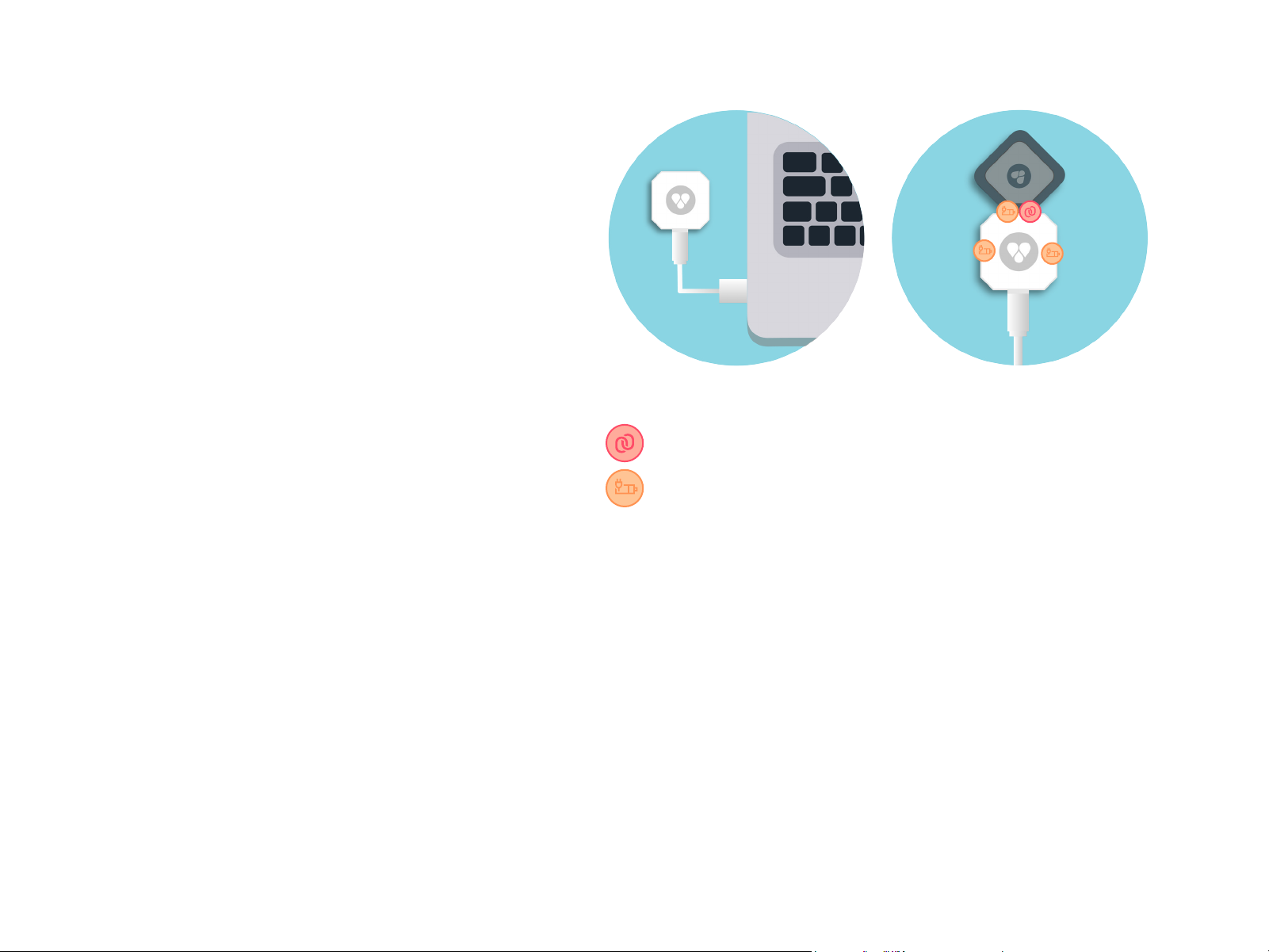
- Using the cable provided, connect the
portable charger to a USB outlet on any
laptop. Afterwards, plug the Findsters into
the portable charger.
Average charging time: 2 hours (full charge)
- The portable charger includes 3 charging
ports, one of which also serves as a data
communication port. In the future, this port
will be used to transfer data updates, via a
Desktop App.
9. Care and Cleaning of Devices
Data communication Port
Charging Port
- Do not clean your Findsters while charging.
- Do not use alcohol (methyl, ethyl or isopropyl) or any
strong dissolvent.
-Do not use thinner or benzene, abrasive cleaners or
compressed air.
To clean the Findster devices, use a cloth lightly dampened
with a mild detergent. Avoid getting liquids inside your
Findsters, at risk of critical malfunctions.
16
Page 17
10. Specications
- General (Modules)
Lightweight
Rechargeable battery
3-axis Accelerometer
RGB LED
High precision GPS: 5-10 ft (1.5-3 m)
Shock resistant
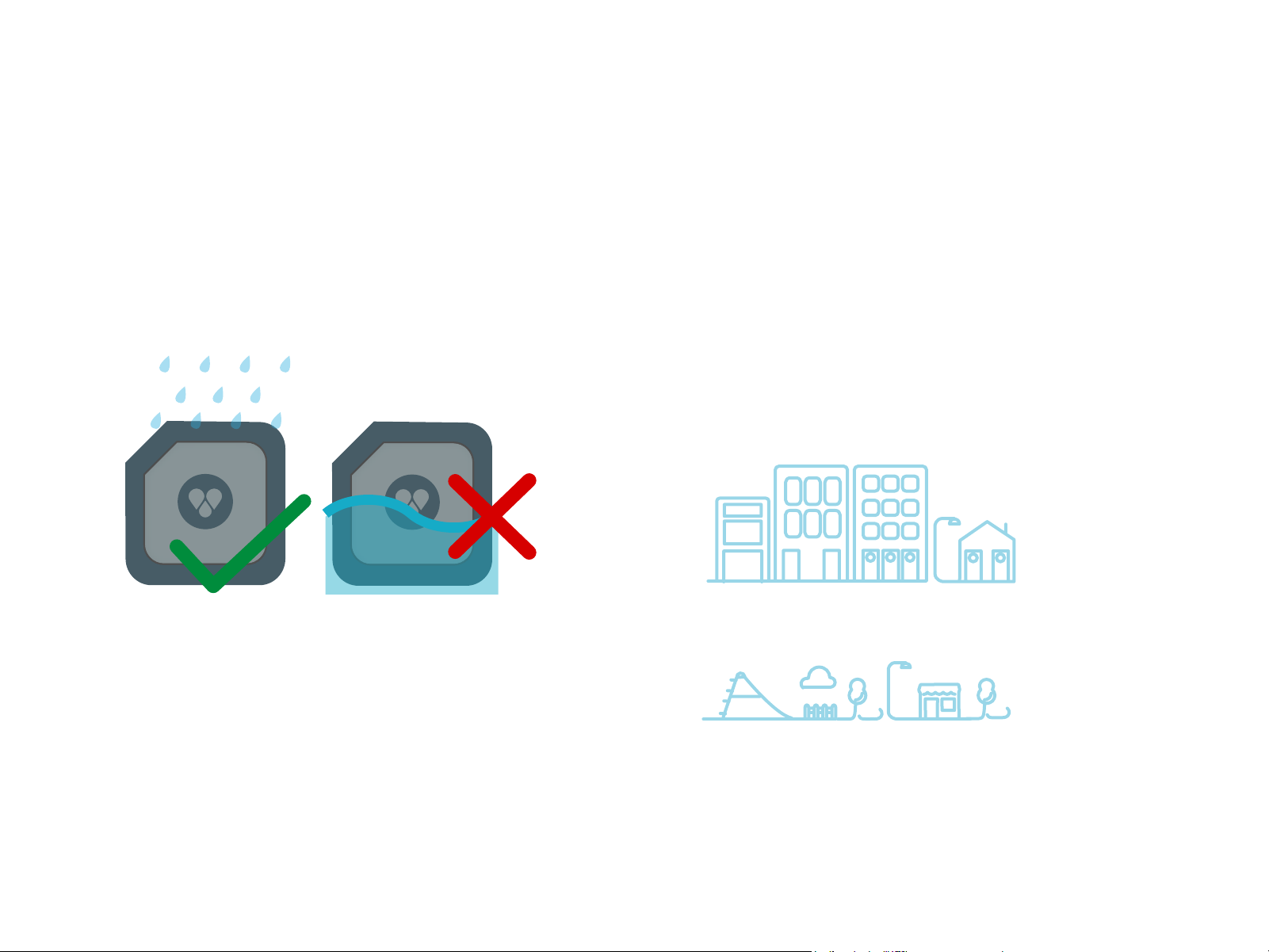
Splash proof Not water proof
- Bluetooth
Bluetooth 4.0 (Low Power)
Compatible with iOS devices running
Bluetooth 4.0 or higher
- RF Communication
Proprietary communication protocol
Average obtainable range: up to
1km (0.62 miles) depending on the
surrounding environment
Urban environment: < 1 km
- Do not attach your tracker to any metal
collars. Using metal ornaments in your
pets’ collar should also generally be avoided.
Open field conditions: >1 km
17
Page 18
10. Specications
Technical Data
Guardian Module
Target Module
Charger
Dimensions (mm)
Weight
Input Power
Autonomy
Standby time
Device Name
Bluetooth LE
IOS
Storage
Conditions
Operation
Conditions
Findster Guardian
42 x 42 x 18
~ 50g
5V
150 mA
12-18 hours
> 6 days
System Requirements
4.0
Ipad 3rd Generation;
iPhone 4/4S; iPod Touch,
5th Genaration (5, 5S,
5C), Ipad 3rd and 4th
Generation; iPod touch
5th Generation; iPad mini
Findster Target
42 x 42 x 18
~ 50g
5V
150 mA
12-18 hours
> 6 days
Environmental Specications
Findster Charger
31 x 31 x 18
~ 20g
5V
500 mA
N / A
N / A
Temperature: -20ºC to + 65ºC
Humidity: 45% to 80% (No condensation)
Atmosphere pressure: 700 to 1060 hPa
Charge temperature: 0ºC to + 45ºC
Discharge temperature: -20ºC to +65ºC
Humidity: 45% to 80% (No condensation)
Atmosphere pressure: 700 to 1060 hPa
18
Page 19

11. Warnings and Safety information
Please read all the following instructions before using your Findster
system. By reading this manual and the following sections it is
assumed that the user is conscient of the safe use and limitations of
the product.
11.1. Important health information and safety precautions
When using this product, the safety precautions below must be taken to avoid
possible legal liabilities and damages. Retain and follow all product safety and
operating instructions. Observe all warnings in the operating instructions on the
product. To reduce the risk of bodily injury, electric shock, fire and damage to
the equipment, observe the following precautions.
CAUTION: The Findster products are mainly intended for tracking
pets. Using the products in a manner other than specified in the
user manual may cause injury. To reduce the risk of injury, close
supervision is necessary when the product is used near children.
19
Page 20

11.2. Safety precautions for Findster components
WARNING: All Findster components contain a Li-ion or Li-ion Polymer battery. Do not disassemble, crush, puncture, short external
contacts, expose to temperatures above 60°C (140°F), or dispose of
in fire or water.
Failure to follow these instructions may cause the battery to leak, catch fire,
or explode.
Avoid dropping the product.
If the battery leaks:
- Do not allow the leaking fluid to come in contact with skin or clothing. If contact has already occurred, flush the aected area immediately with clean water
and seek medical advice.
- Do not allow the leaking fluid to come in contact with eyes. If contact has
already occurred, DO NOT rub; rinse with clean water immediately and seek
medical advice.
- Take extra precautions to keep a leaking battery away from fire, as there is a
danger of ignition or explosion.
11.3. Accessories
Use only the accessories supplied by Findster Technologies S.A. with the
product. Use of any unauthorized accessories with the product may damage
the product or cause injury and will invalidate the warranty.
20
Page 21

12. Regulatory Statements
12.1. FCC
This equipment has been tested and found to
comply with the limits for a Class B digital device,
pursuant to Part 15 of the FCC Rules. These limits are
designed to provide reasonable protection against
harmful interference in a residential installation.
This equipment generates, uses and can radiate
radio frequency energy and, if not installed and used
in accordance with the instructions, may cause
harmful interference to radio communications.
However, there is no guarantee that interference will
not occur in a particular installation. If this
equipment does cause harmful interference to radio
or television reception, which can be determined by
turning the equipment off and on, the user is
encouraged to try to correct the interference by one
To assure
modifications not expressly approved by the party
responsible for compliance could void the user's
authority to operate this equipment. (Example - use
only shielded interface cables when connecting to
computer or peripheral devices).
This device complies with Part 15 of the FCC Rules.
Operation is subject to the following two conditions:
(1) This device may not cause harmful
interference, and
(2) This device must accept any interference
received, including interference that may cause
undesired operation.
continued compliance, any changes or
of the following measures:
- Reorient or relocate the receiving antenna.
- Increase the separation between the equipment
and receiver.
- Connect the equipment into an outlet on a circuit
different from that to which the receiver is
connected.
- Consult the dealer or an experienced radio/TV
technician for help.
21
Page 22

12. Regulatory Statements
12.2. Other Regulatory Statements
1 - OWNERSHIP -
“Findster”, including all the components and documents that
are included in the kits, are the sole property of Findster
Technologies, S.A..
2 - WARRANTIES, RISKS AND DAMAGE TO THE
FINDSTER SYSTEM -
Findster Technologies, S.A. reserves the right to repair
non-conforming or defective components or replace them
with new components, restored or reprocessed. Any parts or
components non-conforming replaced by Findster
Technologies, S.A. will become the sole property of Findster
Technologies, S.A.. Any complaints from the buyer must be
submitted to the manufacturer within the warranty validity
period of 12 (twelve) months in order to be considered within
the warranty boundaries.
Findster Technologies, S.A. reserves the right to refuse
warranty coverage, and will not be responsible for repairing
or replacing any device or component nonconforming or
defective under this warranty if:
The Findster system, or any of its components, is altered,
tampered with, not maintained and/or not used as specified
in the User Guide.
Non-compliance or defect has resulted from any technical
service or equipment maintenance executed by personnel
not authorized by Findster Technologies, S.A..
T
his warranty applies to Findster hardware (charger and
tracking modules) and software (mobile application). This
warranty does not apply to the accessories and mobile
devices used for the operation of the device.
3 - INTELLECTUAL PROPERTY RIGHTS -
The “intellectual property” rights are exclusive property of
indster Technologies, S.A.. These include all the intellectual
F
p
roperty and/or industrial property rights/and or rights about
software or hardware owned by Findster Technologies, S.A.
and/or related with the activity of Findster Technologies, S.A.,
inter alia, relating to Findster or any other product,
technological solution, technical documentation, software,
databases, feedbacks, documents and manuals, know-how,
well as all the studies and conclusions of any nature, including
the ones connected with technics, business, process and
commercialization, already existing and/
or which are subsequently created and/or developed by
Findster Technologies, S.A. and/or by others.
4 - LIABILITY -
In no event will Findster Technologies, S.A. be liable to the
misuse or lack of results of the Findster system, including
negligence.
5 - USER GUIDE -
The User Guide describes the system components, features,
setup and operability.
as
22
Page 23

13. Support
For additional support or in case of system malfunction, contact Findster
Technologies S.A. immediately via e-mail (info@getfindster.com), access the
website (www.getfindster.com/contact/) or by phone (+351 223 248 286).
23
Page 24

V 1.0 , February 2016
2015 Findster Technologies S.A. All rights reserved
23
 Loading...