

Page 1
1. INTRODUCTION 2
2. PACKAGE CONTENTS 2
3. SPECIFICATIONS 3
4. CHOOSING A SUITABLE LOCATION FOR THE CO DETECTORS 4
5. INSTALLATION AND ACTIVATION 5
6. ALARM SIGNALS AND VISUAL INDICATION 9
7. SERVICE LIFE AND FUNCTIONAL TEST 10
8. FEDERAL COMMUNICATIONS COMMISSION STATEMENT 10
9. LIMITED PRODUCT WARRANTY 10
10. FAQ 11
11. CO N TA C T 11
12. DISTRIBUTOR 11
SMART
CO DETECTOR
USER MANUAL
Page 2
SMART CO DETECTOR USER MANUAL
2
1. INTRODUCTION
This smart CO detector is a Z-Wave™ device (interoperable, with RF mesh network technology which works in two
directions) and is compatible with every Z-Wave™ network and the related security framework. Each device driven by
Z-wave™ functions as a signal amplier, so that multiple devices ensure a greater number of transition routes, which
help to eliminate "RF dead spots". Z-Wave™ devices with the Z-Wave™ logo can also be used for this, regardless of the
manufacturer. Furthermore, our devices can also be used in Z-Wave™ networks of other manufacturers.
2. PACKAGE CONTENTS
CO detector
1x
1x
Mounting kit
1x
1x
Battery
1x
1x
Quick start guide
1x
1x
Page 3
SMART CO DETECTOR USER MANUAL
3
3. SPECIFICATIONS
PRODUCT IDENTIFICATION
Fifthplay Product ID 98-402
DIMENSIONS
Diameter 125 mm
Depth 35 mm
INTERFACES
Test button
POWER CONSUMPTION
Battery power DC 4.5V (3 x AA 1.5V for Alkaline)
RF COMMUNICATION
Protocol Z-Wave™
Frequency range 868.42 MHz
CONTROL PARAMETERS
Temperature 0 - +50°C
Relative humidity 10 – 95%
Action radius 30 m
CURRENT STANDARD
EN50291
ZWAVE COMMAND CLASSES
COMMAND_CLASS_NOTIFICATION_V4
COMMAND_CLASS_ZWAVEPLUS_INFO_V2
COMMAND_CLASS_SECURITY
COMMAND_CLASS_VERSION_V2
COMMAND_CLASS_MANUFACTURER_SPECIFIC_V2
COMMAND_CLASS_DEVICE_RESET_LOCALLY
COMMAND_CLASS_ASSOCIATION_V2
COMMAND_CLASS_ASSOCIATION_GRP_INFO
COMMAND_CLASS_POWERLEVEL
COMMAND_CLASS_BATTERY
COMMAND_CLASS_WAKE_UP_V2
COMMAND_CLASS_FIRMWARE_UPDATE_MD_V2
Page 4
SMART CO DETECTOR USER MANUAL
4
4. CHOOSING A SUITABLE LOCATION FOR THE CO DETECTORS
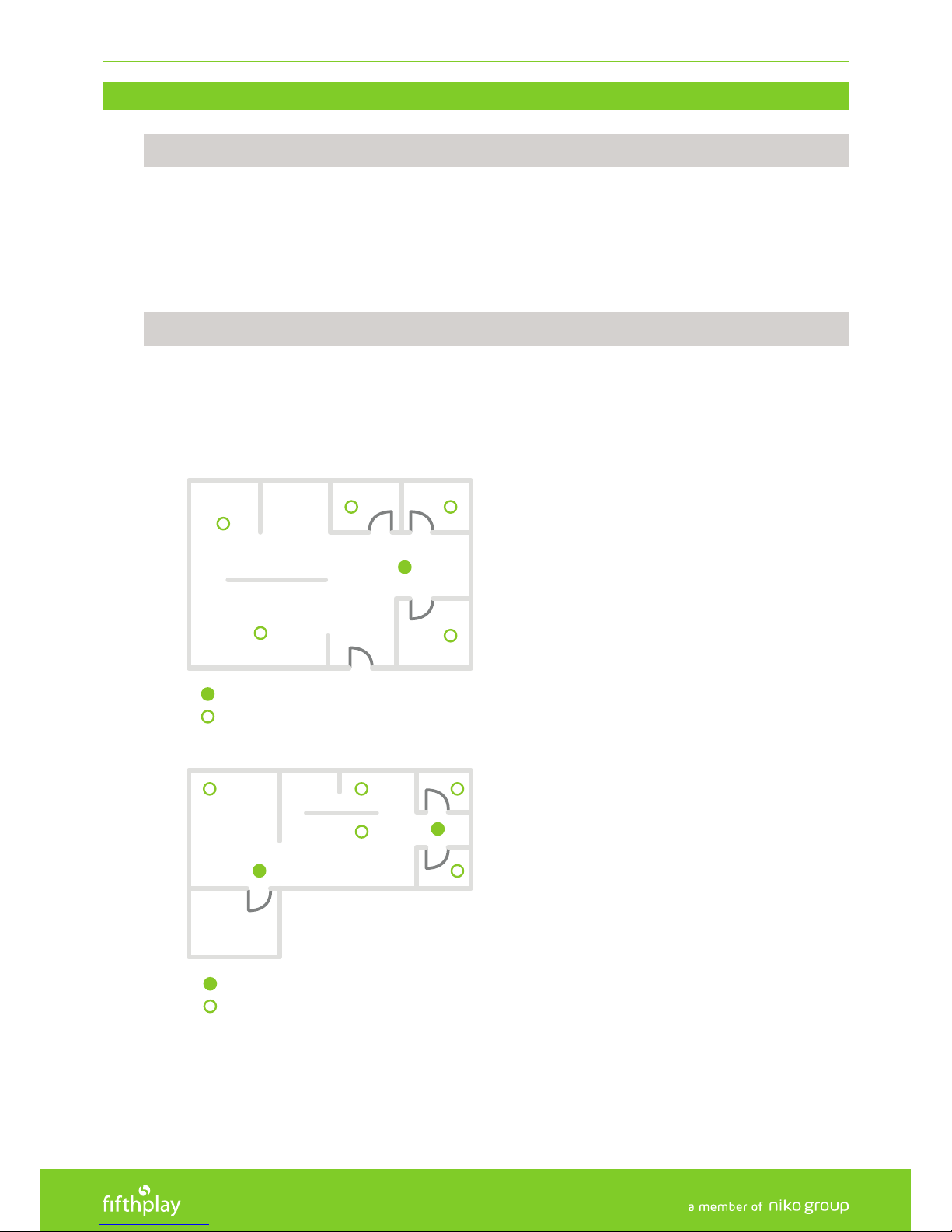
DO
Install a CO detector in every staircase, hallway, bedroom and living space for optimum safety.
Install at least one CO detector at least 6 meters away from a fuel burning boiler or other (fuel) heat
sources.
Install the CO detector at a height of +/- 1.5 meters, as CO does not rise.
DON’T
Rooms in which strong water damp or dust arise under normal conditions.
Close to ventilation ducts where the air ow might prevent CO to reach the CO detector.
Close to uorescent or economy lamps. The starter of these lamps might cause a false alarm due to the
electric elds.
CO DETECTORS FOR MINIMUM SAFETY
CO DETECTORS FOR OPTIMUM SAFETY
CO DETECTORS FOR MINIMUM SAFETY
CO DETECTORS FOR OPTIMUM SAFETY
Page 5
SMART CO DETECTOR USER MANUAL
5
5. INSTALLATION AND ACTIVATION
5.1.1 INSTALLATION OF THE BATTERY
A
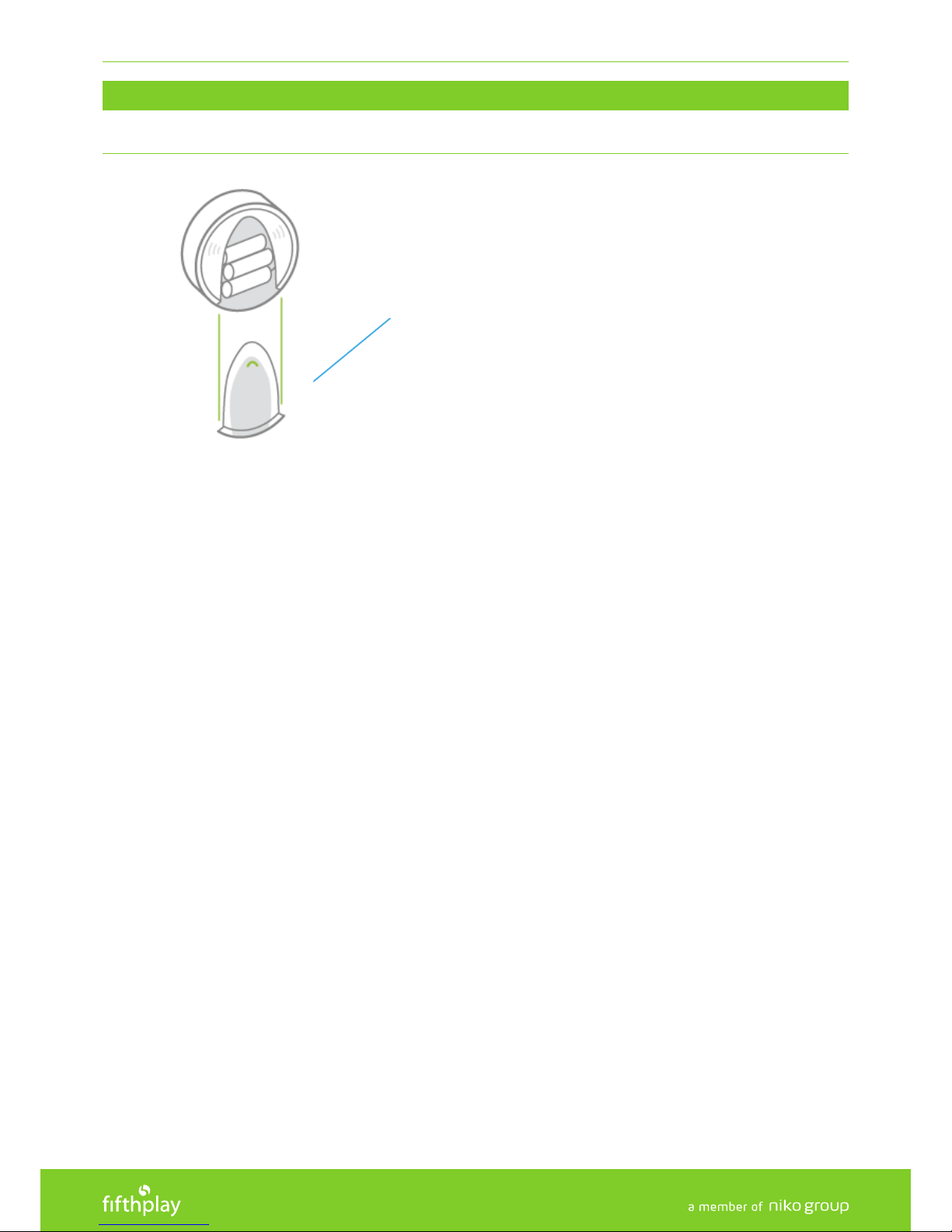
1. Open the cover of the battery (A) by pressing the transparent button while pushing the cover down; place
the battery and close the cover.
2. After 8 to 12 seconds, the CO detector shall indicate that it is ready for connection to the gateway.
Page 6
SMART CO DETECTOR USER MANUAL
6
5.1.2 CONNECTING A CO DETECTOR TO YOUR FIFTHPLAY CUBE
B
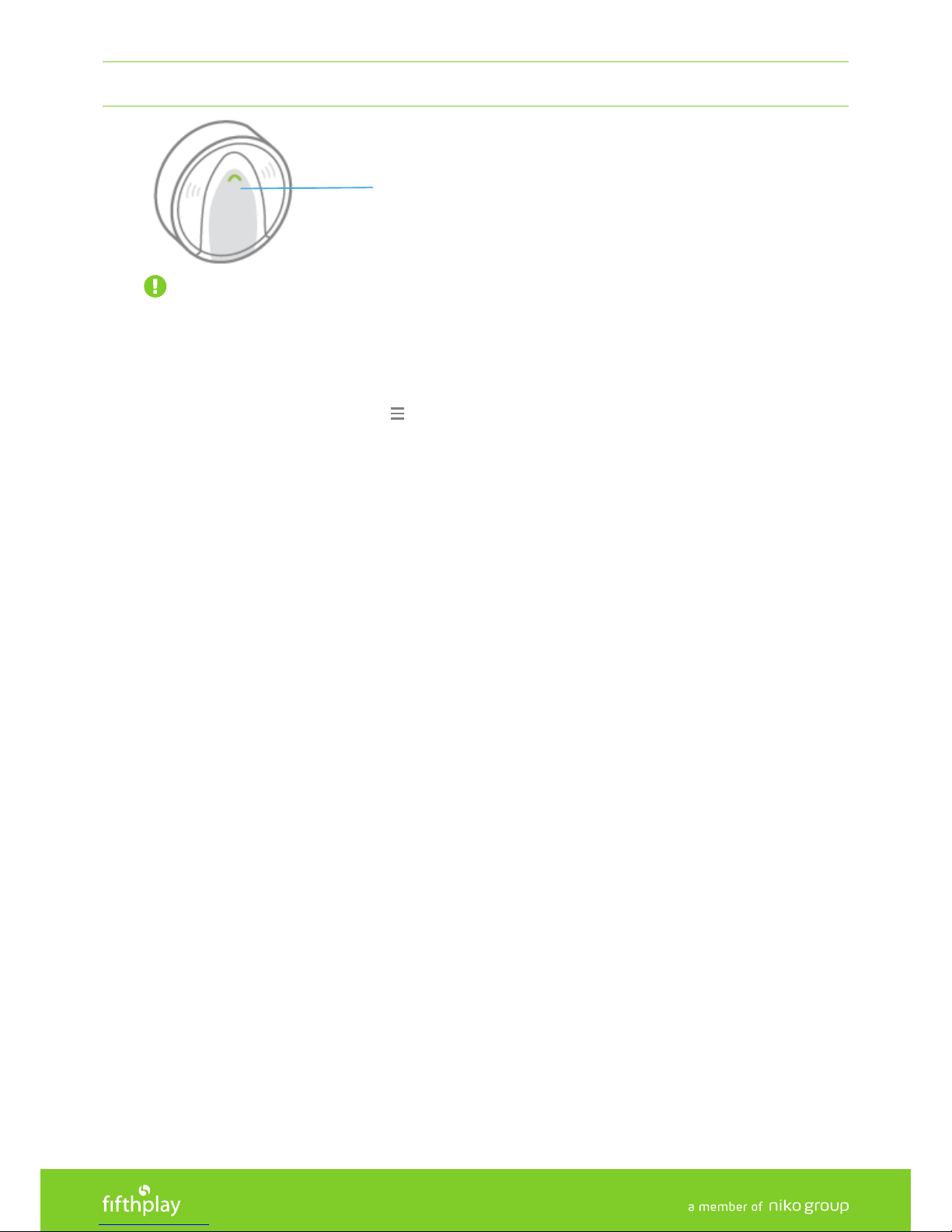
IMPORTANT: Ensure that the CO detector is in the immediate vicinity (0.5 to 1 meter) of the gateway.
You can connect your CO detector to your fthplay cube in the following 2 ways:
Via the APP:
1. Open the fthplay Home app and log in.
2. At the top left of the app, click on and select 'CONFIGURATION'.
3. Go to 'DEVICES'.
4. At the top right, click on +.
5. Select 'SENSOR' as the type of device.
6. Select 'CO DETECTOR'.
7. Wait until the gateway is in connection mode (Once the connection mode has been established, you will
see a notication on your screen). If this is not the case, click on 'CANCEL' and 'TRY AGAIN'. Please note: If no
devices to be added are found, the connection mode will automatically be terminated after 2 minutes.
8. Hold down the programming button (B) of the CO detector for at least 1 second to connect it to the gateway.
Once the connection has been established, you will see a conrmation message on your screen.
Please note: If no device is found within 30 seconds, hold down the programming button (B) again.
9. Once the CO detector has been added, you will see a notication on your screen.
10. If desired, change the name of the CO detector.
Via the WEBSITE:
1. Go to home.fifthplay.com and log in.
2. Go to 'CO
NFIGURATION'.
3. Go to 'DEVICES'.
4. Click on 'ADD A DEVICE'.
5. Click on 'ADD A SENSOR'.
6. Select 'CO DETECTOR' and click on 'NEXT'.
7. Wait until the gateway is in connection mode (Once the connection mode has been established, you will see
a notification on your screen). If this is not the case, click on 'CANCEL' and 'TRY AGAIN'. Please note: If no
devices to be added are found, the connection mode will automatically be terminated after 2 minutes.
8. Hold down the programming button (B) of the CO detector for at least 1 second to connect it to the gateway.
Once the connection has been established, you will see a confirmation message on your screen.
Please note: If no device is found within 30 seconds, hold down the programming button (B) again.
9. Once the CO detector has been added, you will see a notification on your screen.
10. If desired, change the name of the CO detector.
Page 7
SMART CO DETECTOR USER MANUAL
7
5.1.3 MOUNTING OF THE CO DETECTOR
C
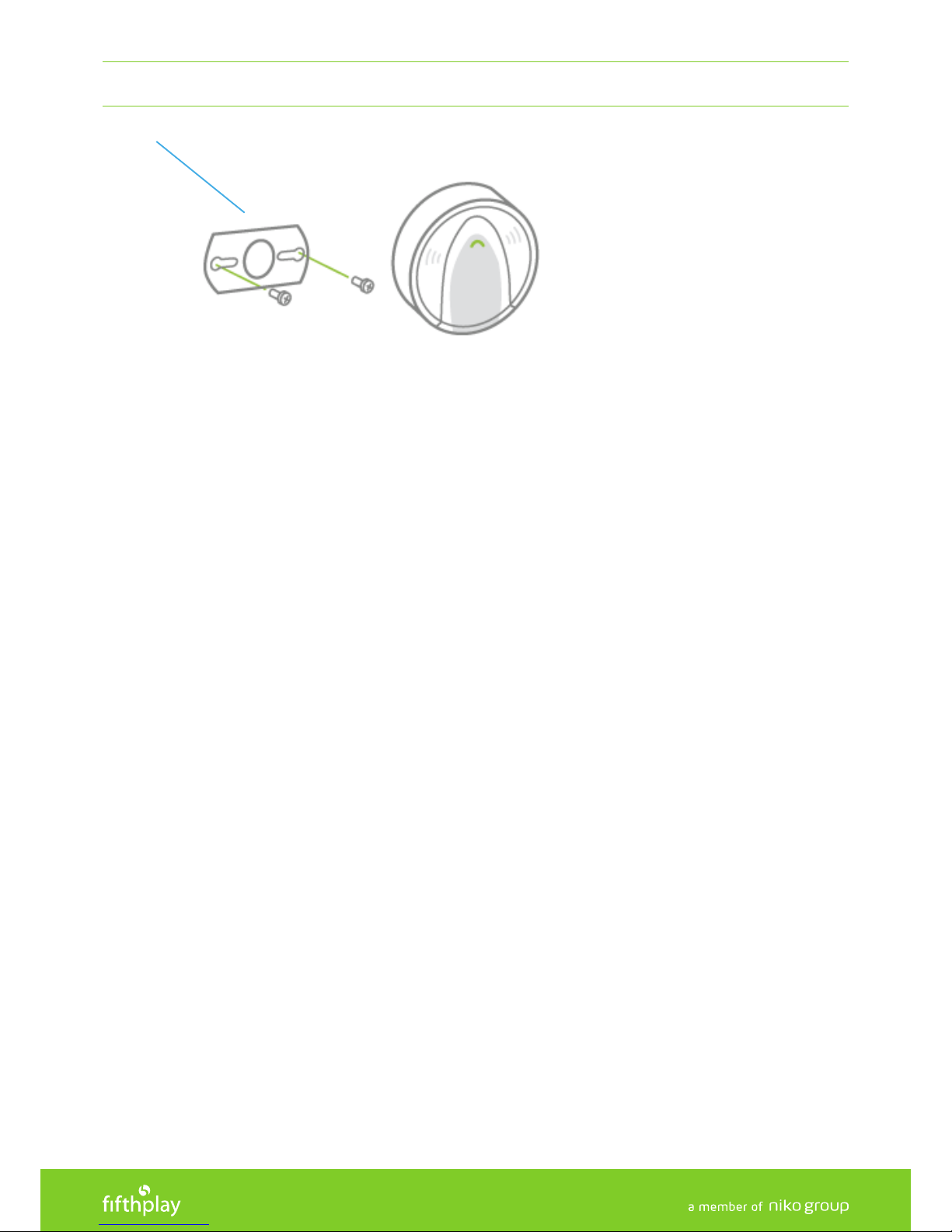
1. Remove the rear side (C) of the CO detector by turning in a counter-clockwise motion.
2. Place the rear side (C) of the CO detector where you want to install it.
3. Mark each hole for the screws to determine the location of the plugs and screws.
4. Use a 5 mm drill and drill 2 holes on the marked locations.
5. Place the plugs in the drill holes and secure the rear side (C) of the CO detector in place by using the screws.
6. Mount the CO sensor on the rear side by turning in a clockwise motion.
7. If the CO detector has been mounted correctly, the LED lamp of the CO detector shall light up every 334
seconds.
Page 8
SMART CO DETECTOR USER MANUAL
8
5.1.4 DISCONNECTING A SMOKE DETECTOR FROM YOUR FIFTHPLAY CUBE
B
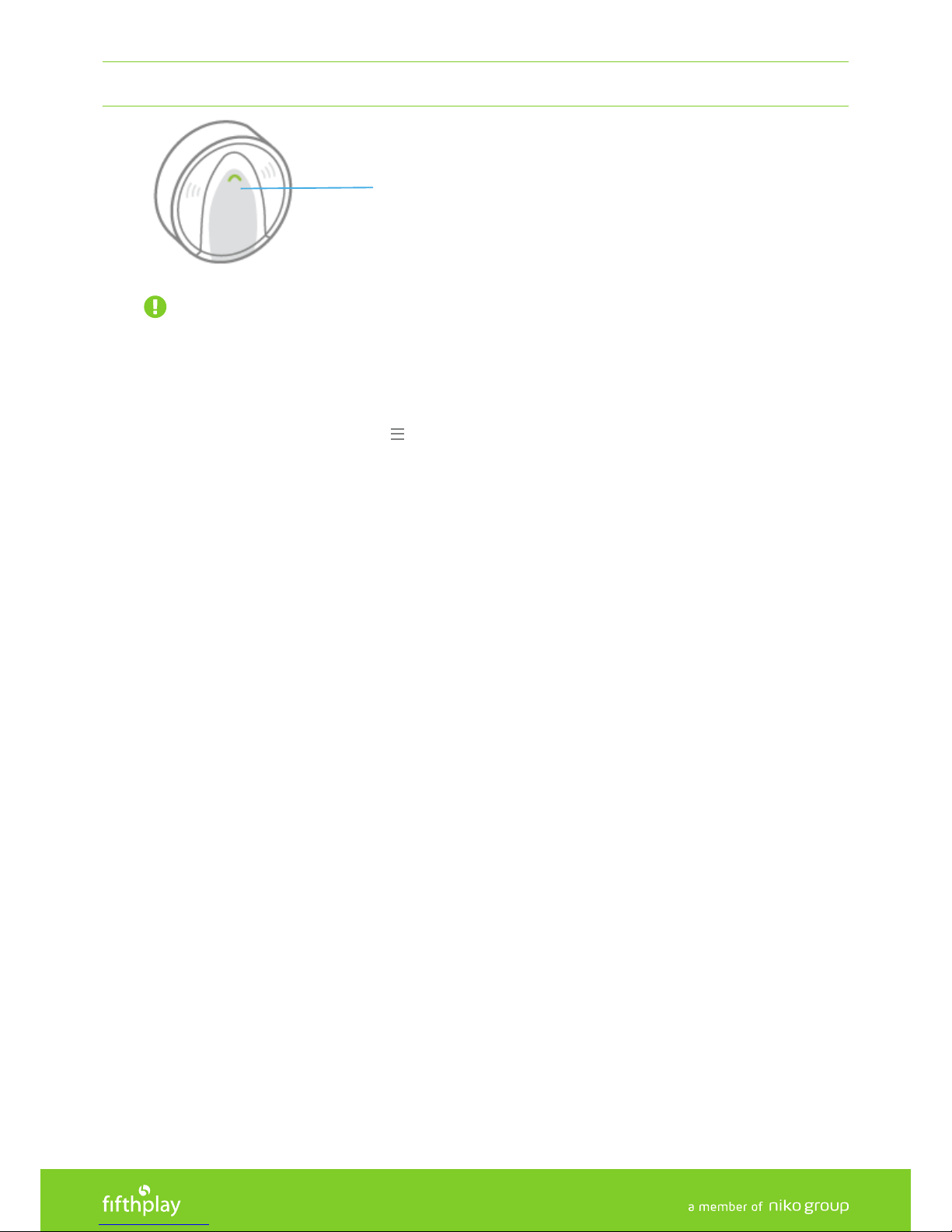
IMPORTANT: Ensure that the CO detector is in the immediate vicinity (0.5 to 1 meter) of the gateway.
You can disconnect your CO detector from your fthplay cube in the following 2 ways:
Via the APP:
1. Open the fthplay Home app.
2. At the top left of the app, click on and select 'CONFIGURATION'.
3. Go to 'DEVICES'.
4. Select the CO detector you want to remove.
5. Click on 'REMOVE'.
6. Wait until the gateway is in connection mode (Once the connection mode has been established, you will
see a notication on your screen). If this is not the case, click on 'CANCEL' and 'TRY AGAIN'. Please note: If no
devices to be removed are found, the connection mode will automatically be terminated after 2 minutes.
7. Hold down the programming button (B) of the CO detector for at least 1 second to remove it from the
gateway.
8. Once the CO detector has been removed, you will see a notication on your screen.
Via the WEBSITE:
1. Go to home.fthplay.com and log in.
2. Go to 'CONFIGURATION'.
3. Go to 'DEVICES'.
4. Select the CO detector you want to remove.
5. Click on 'REMOVE DEVICE'.
6. Wait until the gateway is in connection mode (Once the connection mode has been established, you will
see a notication on your screen). If this is not the case, click on 'CANCEL' and 'TRY AGAIN'. Please note: If no
devices to be removed are found, the connection mode will automatically be terminated after 2 minutes.
7. Hold down the programming button (B) of the CO detector for at least 1 second to remove it from the
gateway.
8. Once the CO detector has been removed, you will see a notication on your screen.
Page 9
SMART CO DETECTOR USER MANUAL
9
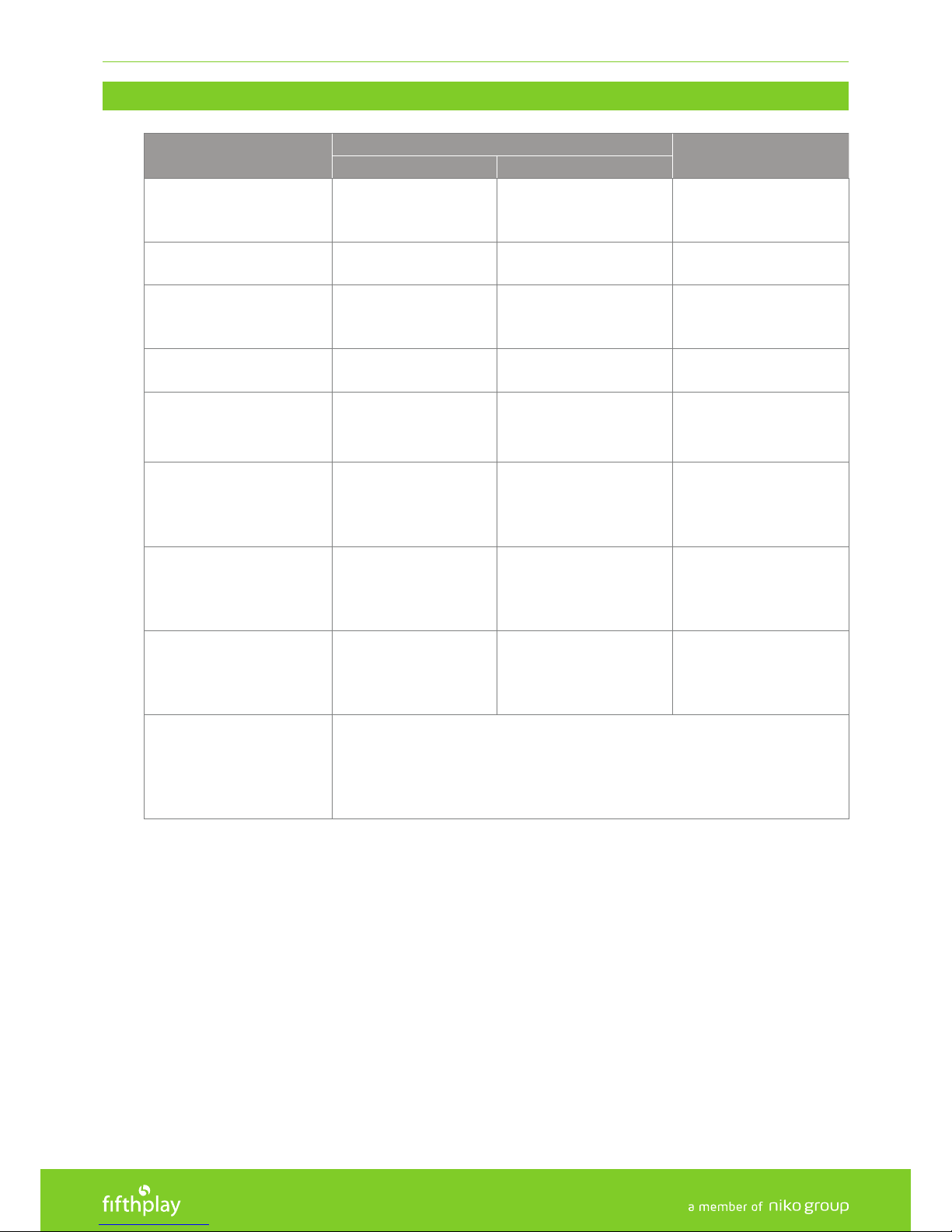
6. ALARM SIGNALS AND VISUAL INDICATION
STATUS
INDICATION ON THE CO DETECTOR
INDICATION IN THE APP
WHAT YOU SEE WHAT YOU HEAR
ACTIVATION MODE
(the battery is placed in the
CO detector)
3 LEDs ashing 1x 1 beep -
CO DETECTED
Red LED ashing fast
and continuously
4 beeps / break / 4 beeps
/ …
Push notication / text
message / email
IDLE MODE
(the CO detector is
functioning properly)
Green LED ashes 1x per
minute
- -
LOW BATTERY VOLTAGE
Orange LED ashes 1x
per minute
1 beep per minute
Push notication / text
message / email
DISMANTLING SECURITY
(the CO detector is not
installed correctly)
Orange LED lights up
continuously
1 beep per minute
Push notication / text
message / email
ERROR SIGNAL
(the CO detector is not
functioning properly, please
check the device)
Orange LED ashes 3x
per minute
1 beep per minute -
LOW SENSITIVITY
(the CO detector has internal
issues, please replace the
device)
Orange LED ashes 2x
per minute
1 beep per minute -
END OF LIFE
(the CO detector is at the
end of its service life, please
replace the device)
Orange LED ashes 4x
per minute
1 beep per minute -
QUIET MODE
The quiet mode can temporarily mute an alarm, the red LED however
will continue to ash. To make use of this function, press
the test button of the device when the alarm sounds.
If the CO concentration is still too high after 4 minutes, the alarm
will sound again.
Page 10
SMART CO DETECTOR USER MANUAL
10
7. SERVICE LIFE AND FUNCTIONAL TEST
It is recommended to replace CO detectors 5 years after the production date. You can nd this date on the device.
The fthplay CO detector tests its battery capacity every 24 hours. If the capacity is less than 3.6V (+/-0.1V), a message
is sent via the app and a visual and audible signal can be observed on the CO detector itself (also see (5) Alarm signals
and Visual Indication).
Test the CO detector on a weekly basis by pressing the test button. If the CO detector is functioning properly, you will
hear 4 short beeps and the three LED lamps will ash simultaneously.
If the CO detector only beeps once and the orange LED lamp ashes 3x per minute, the CO detector is not functioning
properly.
If this is the case, it must be checked.
8. FEDERAL COMMUNICATIONS COMMISSION STATEMENT
This product complies with all of the relevant European guidelines and regulations. If applicable,
you can nd the EC declaration of conformity regarding this product at http://cube.fthplay.
com/downloads.
This product cannot be deposited in the unsorted waste. Take your discarded product to a
recycling centre or a recognised collection point. Just like producers and importers, you too
play an important role in the promotion of sorting, recycling and reuse of waste electrical and
electronic equipment. To nance the rubbish collection and waste treatment, the government
levies recycling charges in certain cases (included in the price of this product).
9. LIMITED PRODUCT WARRANTY
• The warranty period is two years from the date of delivery. The delivery date is the invoice date of purchase
of the product by the consumer. If there is no invoice, the date of production applies.
• The consumer is obliged to inform fthplay in writing about the non-conformity, within two months of
noticing the defect.
• In case of a non-conformity, the consumer only has the right to a product repair or replacement free of
charge, which shall be decided by fthplay.
• fthplay shall not be held liable for a defect or damage resulting from incorrect installation, improper or
careless use, incorrect operation, transformation of the product, maintenance that does not adhere to the
maintenance instructions or an external cause, such as damage due to moisture or overvoltage.
• The compulsory regulations of the national legislation concerning the sale of consumer goods and the
protection of the consumer in the countries where fthplay sells, directly or via sister companies, subsidiaries,
chain stores, distributors, agents or permanent sales representatives, take priority over the above-mentioned
rules and regulations.
Page 11

SMART CO DETECTOR USER MANUAL
11
10. FAQ
Consult our frequently asked questions page on cube.fthplay.com/FAQ or
consult the user manuals on cube.fthplay.com/downloads
11. CON TAC T
Email: hello@fthplay.com
Telephone: +32 (0) 3 808 70 38
12. DISTRIBUTOR
Fifthplay NV
Generaal Lemanstraat, 47
B-2018 Antwerp
 Loading...