

Page 1
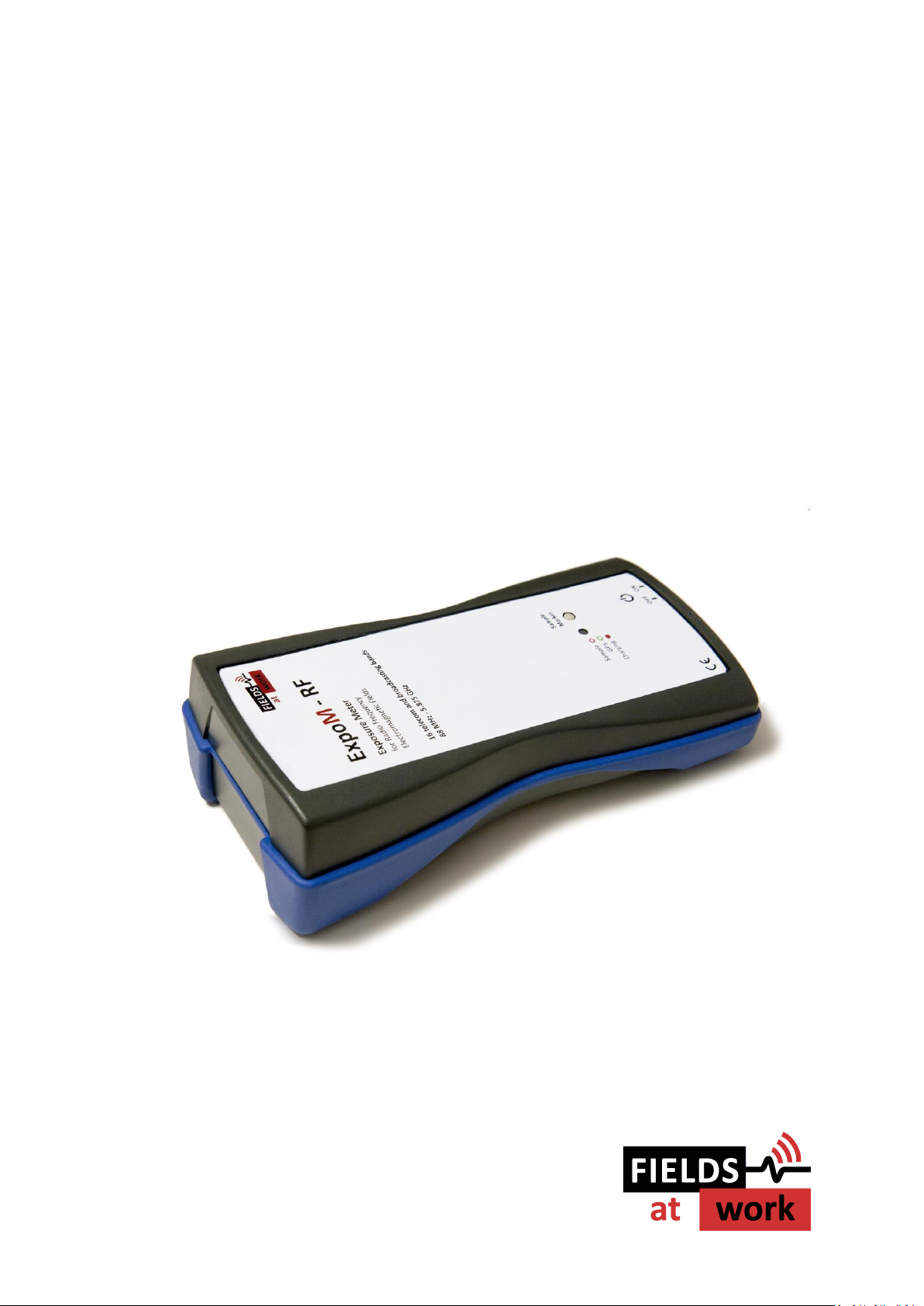
ExpoM - RF
User Manual
Page 2

Fields at Work GmbH, Hegibachstrasse 41, 8032 Zürich, Schweiz
2019 Fields at Work GmbH, Zurich Page 2/16 ExpoM - RF manual rev. 2.3
ExpoM - RF
User Manual
Contents
1 Description .............................................................................................................................. 3
2 Case and interfaces .................................................................................................................. 3
2.1. Multi-color LED .............................................................................................................. 4
3 Using ExpoM - RF ..................................................................................................................... 4
3.1. Starting a measurement ................................................................................................ 4
3.2. Setting a marker ............................................................................................................. 5
4 Battery management ............................................................................................................... 5
4.1. Charging the battery ...................................................................................................... 5
4.2. Over-discharge protection (automatic shutdown) ........................................................ 6
5 ExpoM - RF Utility (PC Software) .............................................................................................. 6
5.1. Installing the USB driver ............................................................................................... 10
5.2. Data format .................................................................................................................. 10
6 Smartphone App .................................................................................................................... 11
6.1. Establishing the Bluetooth connection ........................................................................ 11
7 Technical Specifications ......................................................................................................... 13
7.1. Frequency bands and measurement range ................................................................. 13
7.2. RF Measurement .......................................................................................................... 13
7.3. Size / Conditions ........................................................................................................... 13
7.4. Connectivity / Storage .................................................................................................. 13
7.5. Battery Management ................................................................................................... 14
7.6. ExpoM RF Utility Software ........................................................................................... 14
7.7. ExpoM RF Android Software ........................................................................................ 14
Page 3
Fields at Work GmbH, Hegibachstrasse 41, 8032 Zürich, Schweiz
2019 Fields at Work GmbH, Zurich Page 3/16 ExpoM - RF manual rev. 2.3
i
i
1 Description
ExpoM - RF is a personal radio frequency exposure meter. Band selective measurements allow for a
detailed differentiation of the different electromagnetic field sources. The 16 bands covered by this
device include all major wireless communication and broadcasting services, including LTE. ExpoM RF stands out due to its true-RMS detection method. This approach ensures modulation insensitive
measurements, allowing for meaningful cross-standard field value comparisons.
Additional features include GPS based outdoor localization and Bluetooth connectivity. The
integrated Bluetooth module allows to stream the measurement data to any Android based device
for real-time display.
Important notice: The accuracy and reliability of the GPS localization depends on the environmental
conditions. Inside buildings and homes GPS localization may not be possible.
Important notice: After switching on the device it may take several minutes for the GPS receiver to
search for satellites. No position data will be logged during this time. The first few measurement
points may be quite inaccurate.
2 Case and interfaces
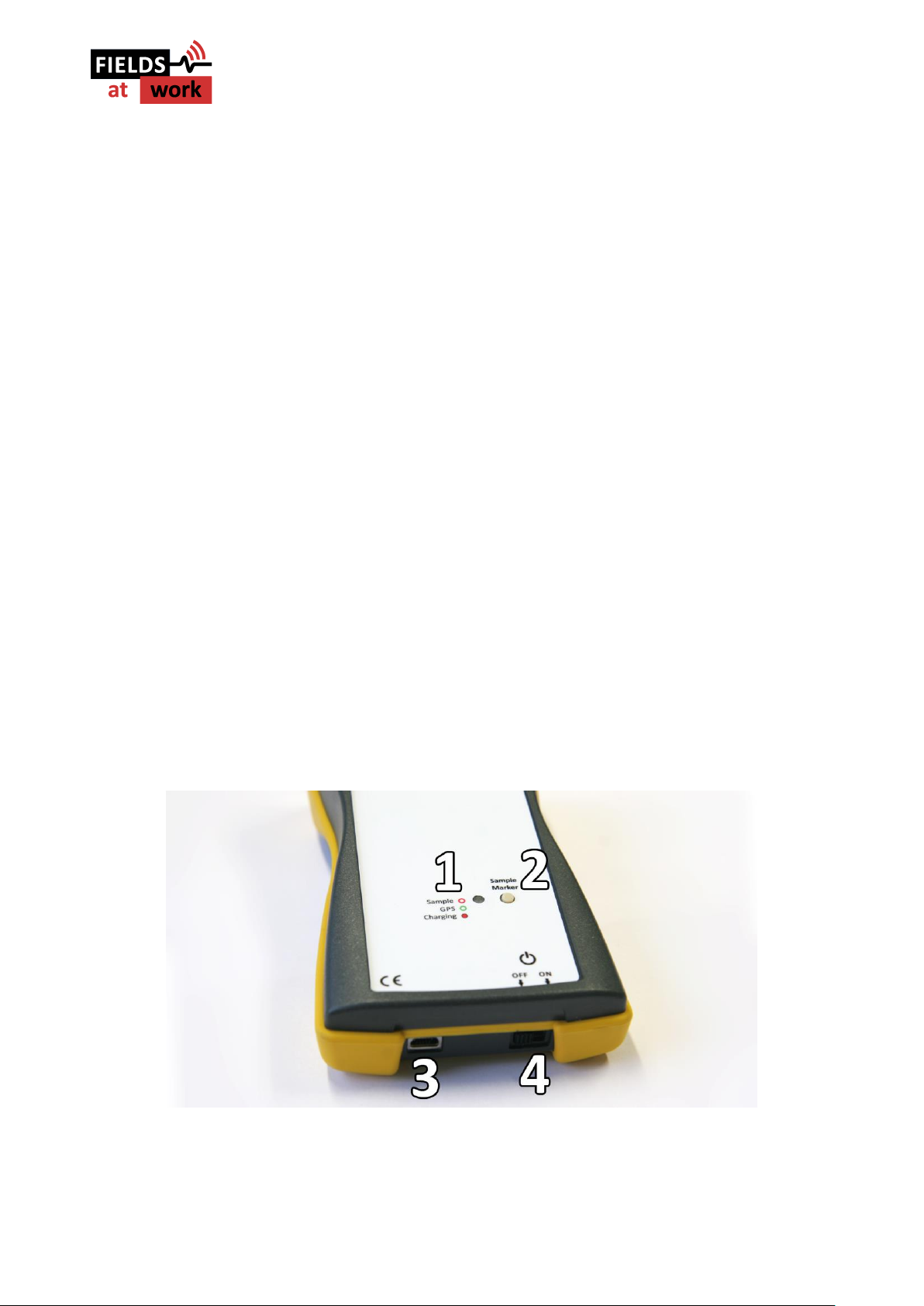
The standard enclosure of ExpoM - RF provides basic water (IP 64) and shock protection of the
exposure meter. The case includes following control elements and interfaces (0):
Figure 1: ExpoM – RF control elements: Multi-color LED (1), Marker button (2), Mini-USB interface (3), ON/OFF switch (4)
Page 4
Fields at Work GmbH, Hegibachstrasse 41, 8032 Zürich, Schweiz
2019 Fields at Work GmbH, Zurich Page 4/16 ExpoM - RF manual rev. 2.3
i
i
2.1. Multi-color LED
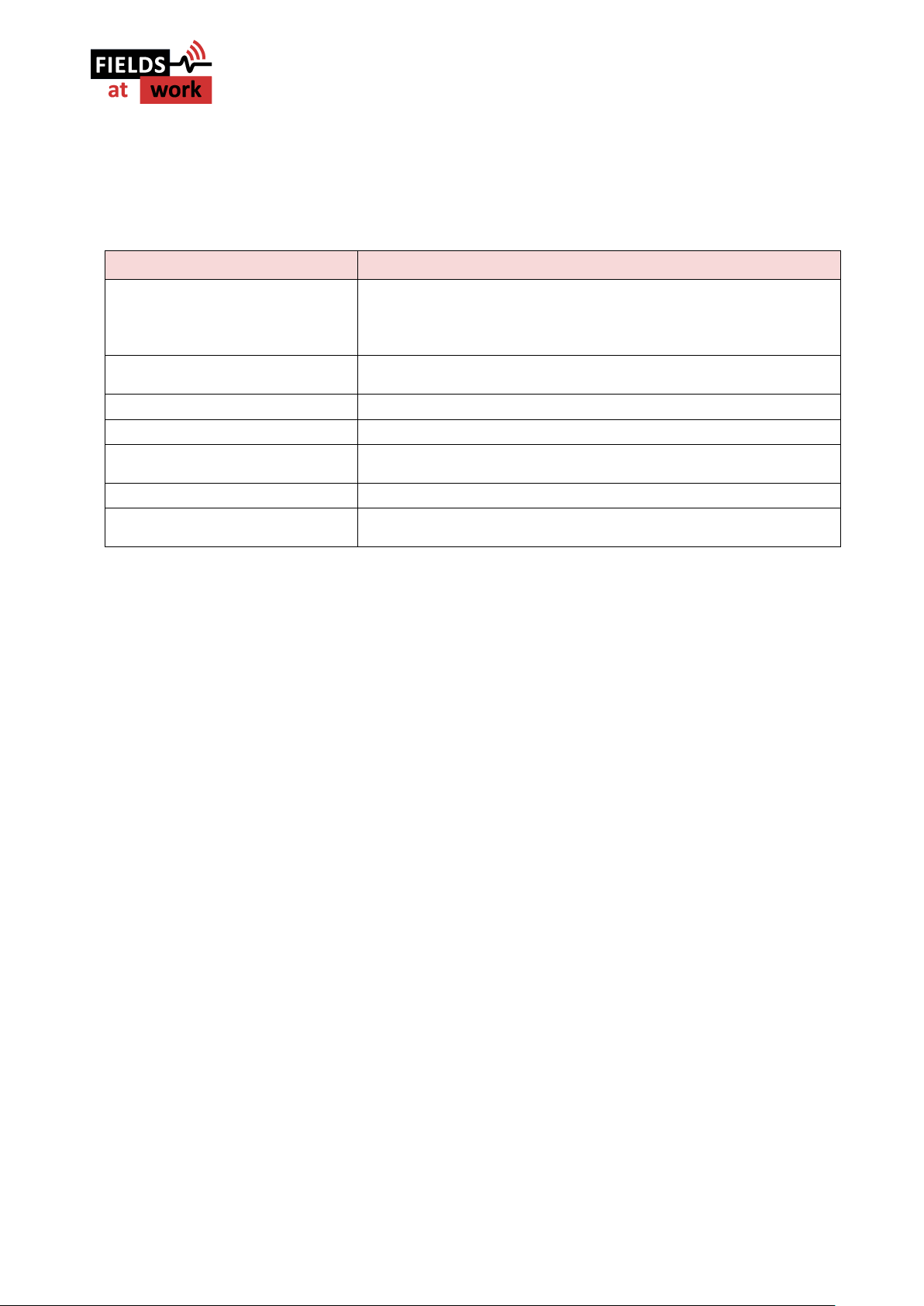
Status information about the operation of the device is given via the multi-color LED. The following
table shows an overview about the color code and its corresponding behavior.
Situation
Multi-color LED
Device initialization (after power on)
1. White flash immediately after switch is turned on;
2. Bluetooth init: Blue light for 2 sec; only if Bluetooth is enabled
3. Successful initialization is signalized by a quick color sweep
After initialization ExpoM - RF switches over to measurement mode.
Measurement mode
Short red flash after each measurement. If GPS is enabled, an additional
green flash signalizes a successful GPS position fix.
Charging the battery
Continuous red light. Turns off as soon as the battery is fully charged.
Connection to PC
Continuous yellow light.
Bluetooth connection
Single blue flash: Bluetooth connection established
Double blue flash: Bluetooth has been disconnected
Marker button pressed
Blue light lights up for about one second
Initialization error at power on
Series of fast red flashes shortly after power-on. Device has to be restarted
using the ON/OFF switch.
3 Using ExpoM - RF
3.1. Starting a measurement
As soon as the device is turned on by means of the ON/OFF switch it starts to measure and log the
data using the last device settings (described in paragraph 5 / Figure 6). The device can be turned
on and off at any time. When ExpoM - RF is powered on, the new measurements are appended to
the existing log file preserving all previously recorded data. The internal memory can only be cleared
using the ExpoM - RF Utility on the PC (see chapter 5).
Important notice: During the measurement the device should not be hold in the hand and not be
placed on a metallic surface. Both can influence the receiving characteristics of the built-in antennas
and therefore influence the measurement. If it is required to use it as a handheld device, please
contact the distributor for an additional calibration (additional calibration will cause additional
costs).
Important notice: The measured data is saved to the internal memory every 6 samples. Before each
memory access it is temporarily held in a volatile memory that is erased when the device is turned
off. It is therefore recommended not to switch off the device for at least 6 additional measurements
after the required time end point.
Page 5

Fields at Work GmbH, Hegibachstrasse 41, 8032 Zürich, Schweiz
2019 Fields at Work GmbH, Zurich Page 5/16 ExpoM - RF manual rev. 2.3
i
i
i
i
3.2. Setting a marker
The Marker button on the top of the device can be used to flag single measurement samples. The
flagged samples are highlighted by means of an ascending marker number visible in the
measurement results after download. The marker number can be reset with ExpoM - RF utility on
the PC (see chapter 0).
4 Battery management
4.1. Charging the battery
The USB interface is used to recharge the internal battery or power the device from an external
power source. Unless it is already fully charged, the battery is recharged as soon as the device is
connected to a powered USB source (Wall adapter, PC, laptop etc.). Any compliant USB port and
chargers providing at least 1000 mA can be used for this purpose.
While ExpoM - RF is charging the battery, the multi-color LED lights solid red. At the end of the
charging cycle the red light turns off.
Important Notice: Using USB chargers that do not fulfill the USB dedicated charger port specification
can lead to incomplete and slow charging process of the batteries. It is strongly recommended to
use an USB charger with a current rating of at least 1A (1000mA). More information about suitable
USB charger types for ExpoM - RF can be obtained from the distributor.
Important Notice: Although it is possible to perform measurements while charging ExpoM - RF it is
inadvisable to do so. The charging cable falsifies the antenna characteristics, reducing the
measurement accuracy. Frequency bands below 1 GHz are particularly susceptible to this effect.
Important Notice: At environmental temperatures above 45°C ExpoM - RF should not be charged.
Direct exposure to sunlight during the charging process should be avoided.
Note: The actual charging time depends on the charger model and the type of USB cable used. Long
and / or thin USB cables can significantly increase the required charging time regardless of which
type of charger is used. It is recommended to the USB cable provided with the device.
Page 6
Fields at Work GmbH, Hegibachstrasse 41, 8032 Zürich, Schweiz
2019 Fields at Work GmbH, Zurich Page 6/16 ExpoM - RF manual rev. 2.3
4.2. Over-discharge protection (automatic shutdown)
In order to preserve its capacity as long as possible, the internal battery must be prevented from
being discharged below a critical level. ExpoM - RF includes a battery monitoring circuit that powers
the device down when a critically low battery level (below 3% remaining capacity) is detected. After
such an automatic power down it is recommended to switch ExpoM - RF off using the ON/OFF switch
and charge it for at least 10 minutes before switching it on again.
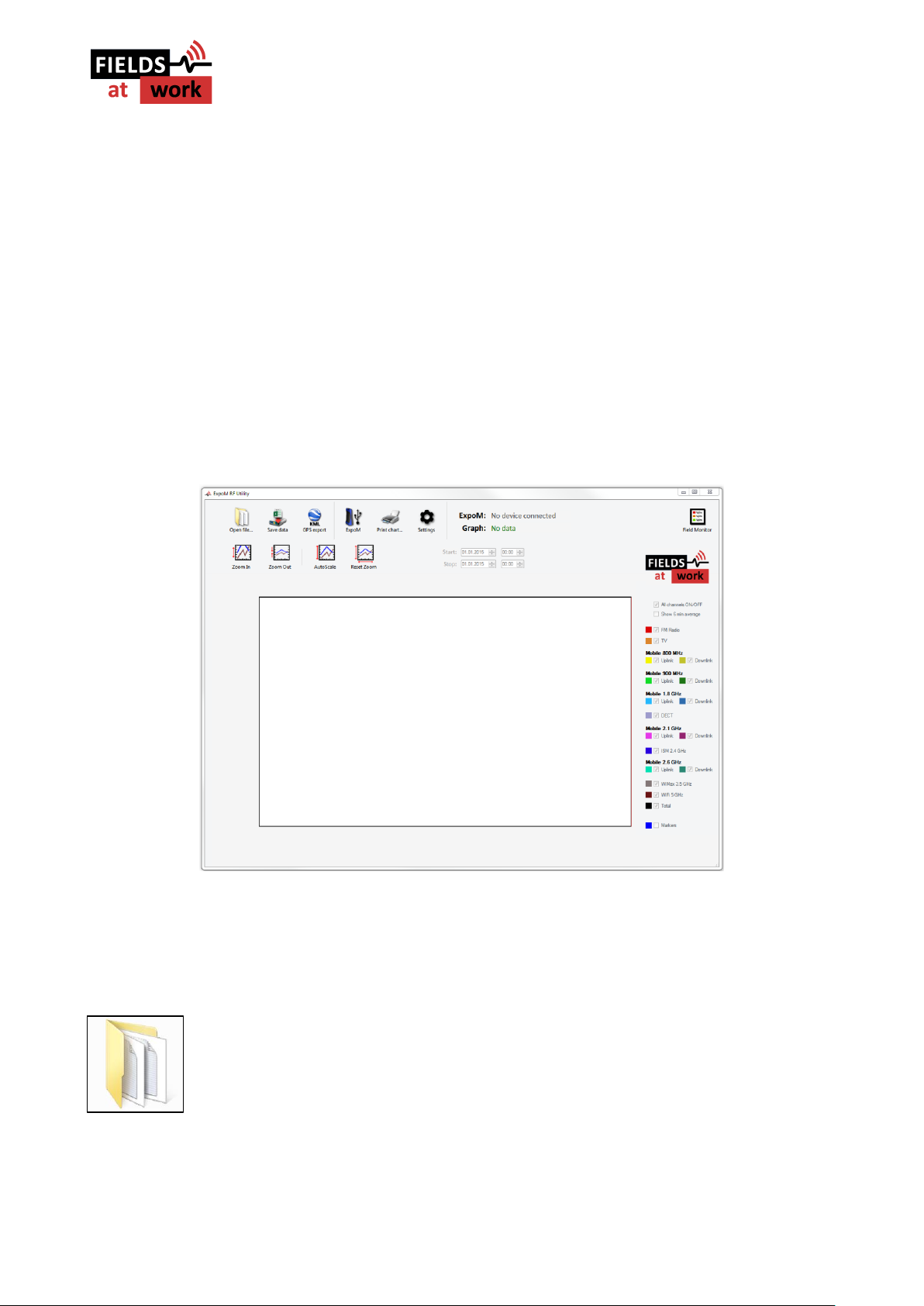
5 ExpoM - RF Utility (PC Software)
The ExpoM - RF Utility software is required for transferring and displaying the measurement data
from the ExpoM - RF to a PC and for changing the various device settings. This software is currently
only available for Windows operating systems.
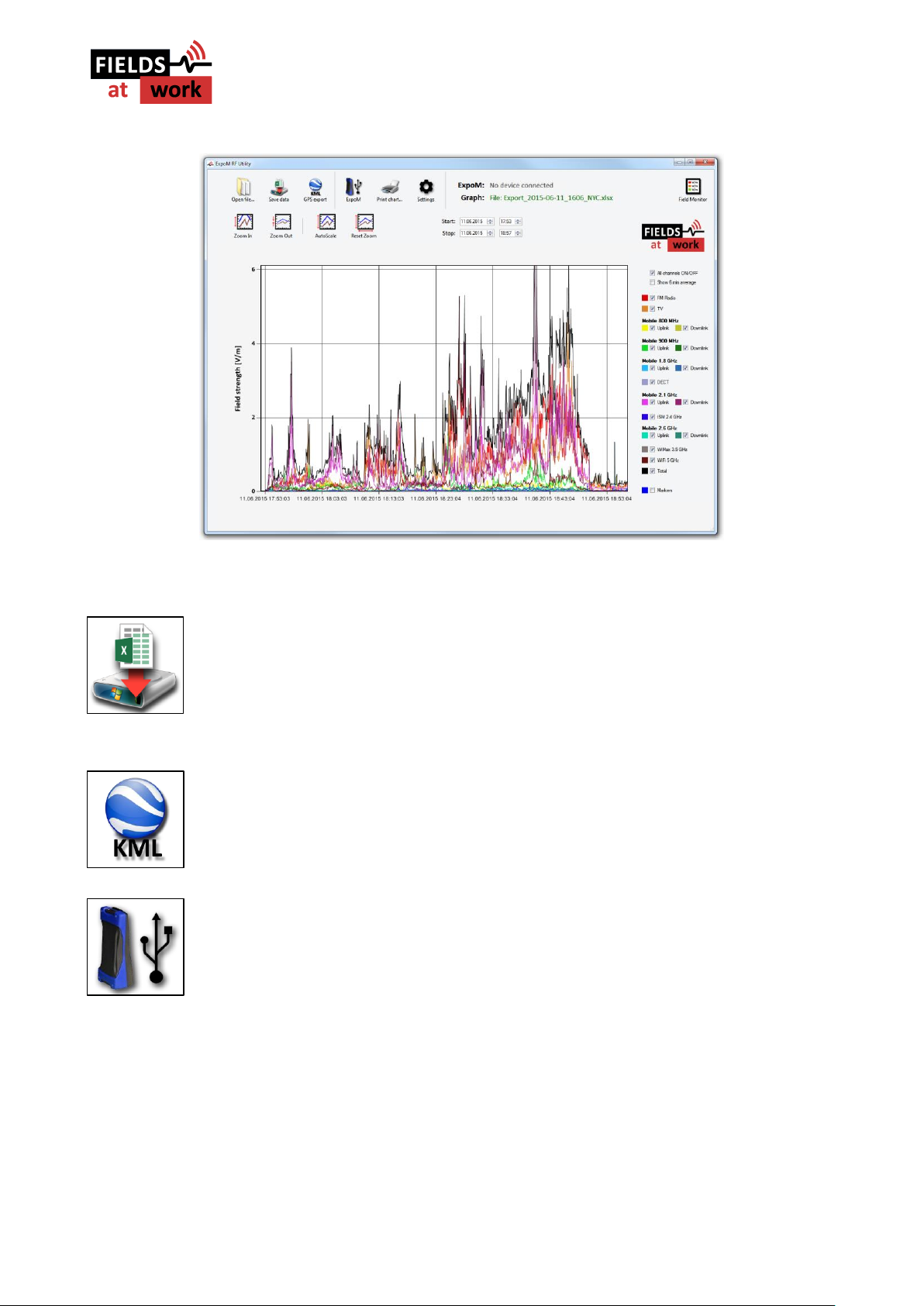
Figure 2: Main window of the ExpoM - RF Utility Software
In the following the functions of the different buttons in the menu bar are explained:
"Load file": When selecting the 'Open file' button any measurement file previously
saved on the PC can be selected and loaded into the Utility. When loading is
completed the data is displayed in the large window (see Figure 3). The procedure
of selecting the file to be opened corresponds to the one of all common Windows
software.
Page 7
Fields at Work GmbH, Hegibachstrasse 41, 8032 Zürich, Schweiz
2019 Fields at Work GmbH, Zurich Page 7/16 ExpoM - RF manual rev. 2.3
Figure 3: Main window with displayed data set after loading
"Save data": All data loaded to the software is saved at the selected location on
the PC. This function corresponds to the 'Save As' functionality of all common
Windows software.
"KML GPS export": The data is exported in a file format that can be directly loaded
into Google Earth.
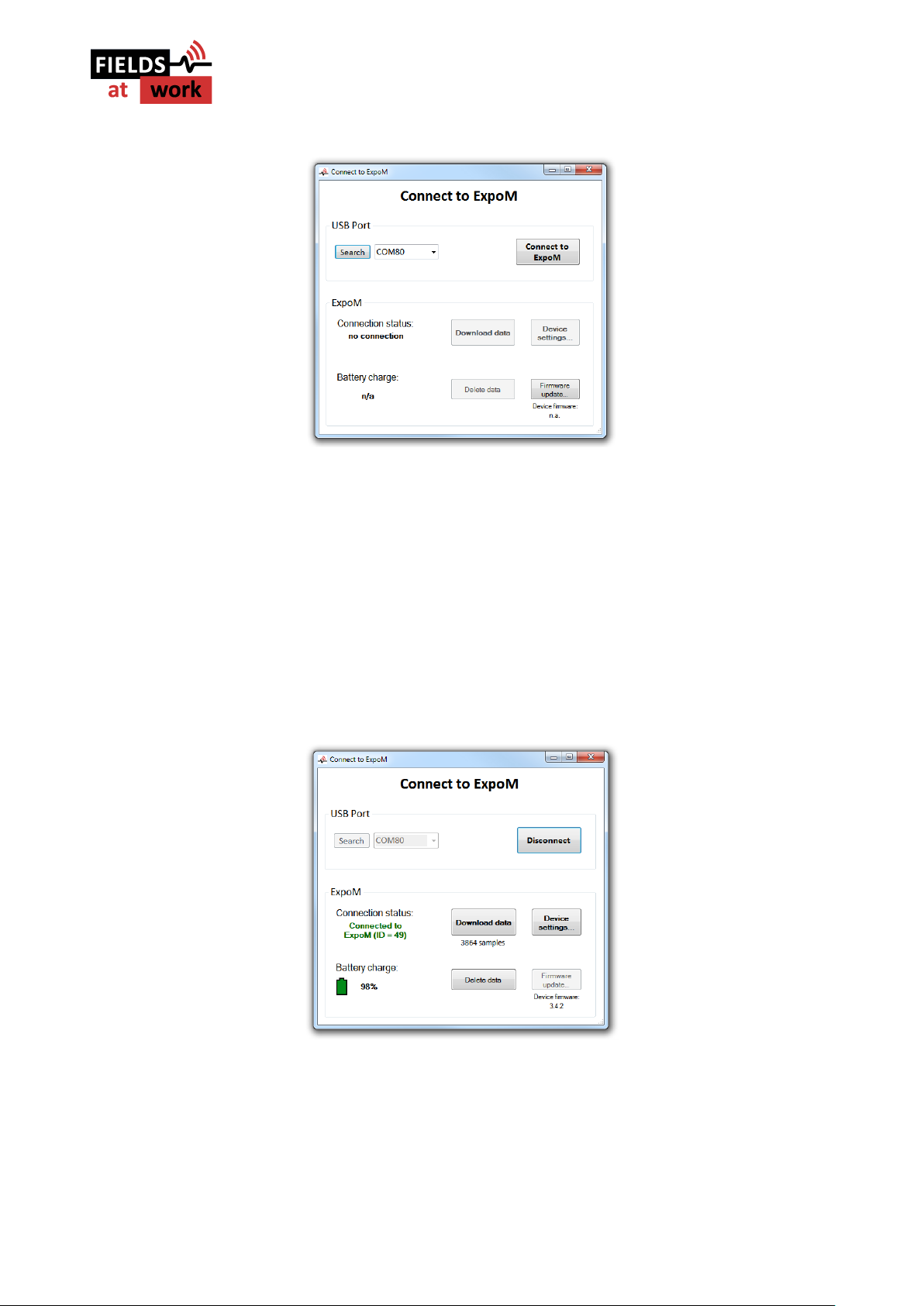
"ExpoM": Connecting to an ExpoM - RF device and change the device settings.
Please make sure to turn on your ExpoM - RF and connect it to the PC using an
USB cable. When this button is pressed, following window will appear:
Page 8
Fields at Work GmbH, Hegibachstrasse 41, 8032 Zürich, Schweiz
2019 Fields at Work GmbH, Zurich Page 8/16 ExpoM - RF manual rev. 2.3
Figure 4: Dialog window for connecting to an ExpoM - RF via USB
The USB Port control element on the top left lists all serial ports found on the computer. If your
device has been successfully recognized, there will be at least one entry in the USB port drop-down
menu. If more than one port was found on your computer, it is possible that a wrong one is chosen
by the application. In that case it is necessary to select the right port number manually using the
drop-down menu. If the Utility it is not able to recognize any COM port or no connection to your
device is possible even after several attempts, please refer to chapter 5.1. .
Turn on ExpoM RF. Wait 3-5 seconds for the device to switch into measurement mode and select
Connect to ExpoM. As soon as a connection to the device has been successfully established the
command window will change and the data information of the device is displayed (Figure 5).
Figure 5: Dialog window after selecting the device
Using the Download data button the data stored on the device is downloaded and displayed in the
Main window. Depending on the number of measurement samples stored on the device this
operation can take several minutes. The Delete data button erases all the data saved on the device.
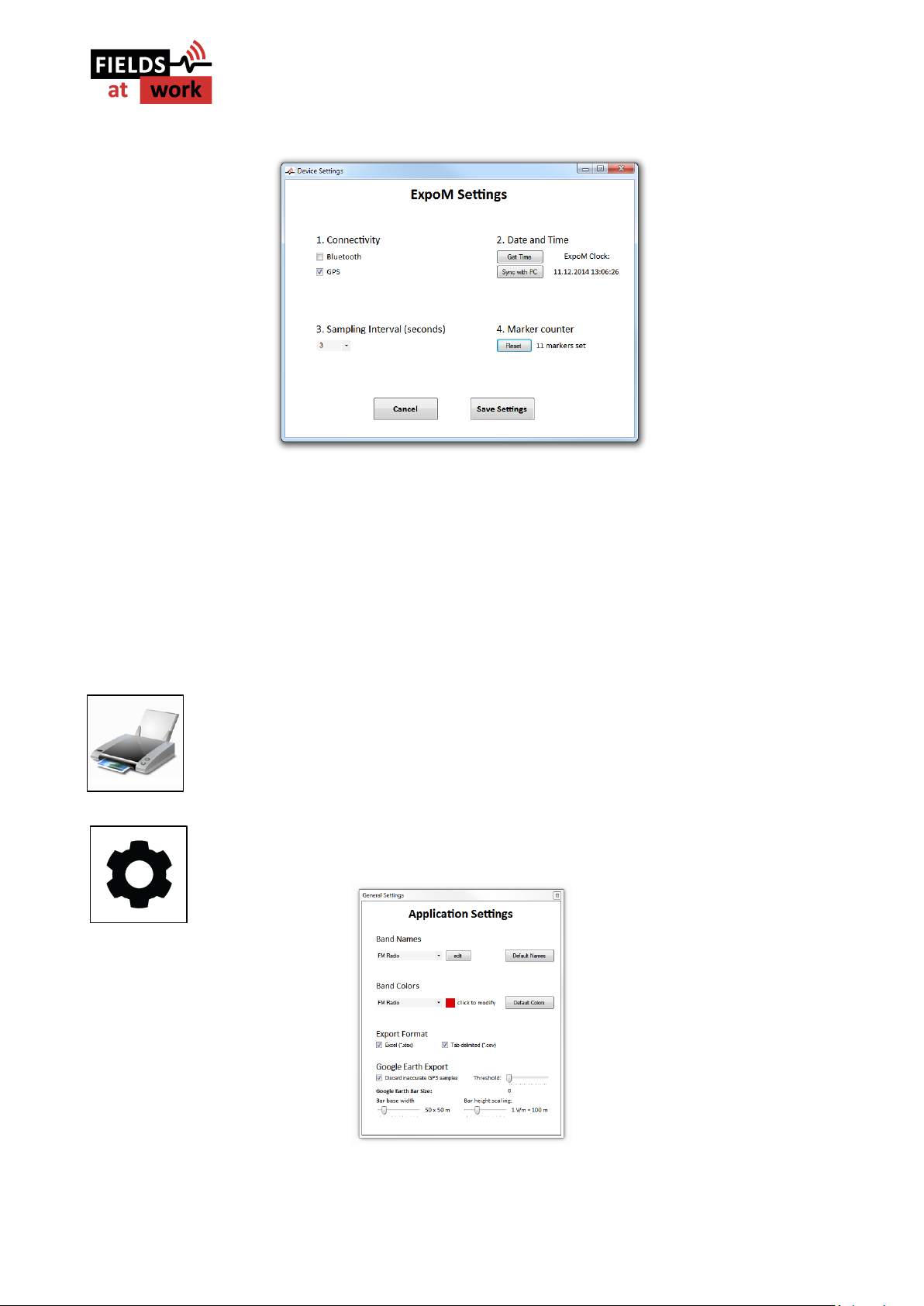
Selecting the Device settings... button brings you to the Device Settings window shown in Figure 6.
Page 9
Fields at Work GmbH, Hegibachstrasse 41, 8032 Zürich, Schweiz
2019 Fields at Work GmbH, Zurich Page 9/16 ExpoM - RF manual rev. 2.3
Figure 6: Device settings dialog window of the Expom - RF
In this window the connectivity options (Bluetooth and GPS) can be switched on and off. This will
improve runtime of the device. The date and time of the real time clock in the device is displayed
and can be synchronized with the computer clock that the device is connected to. The sampling
interval (in seconds) can be either selected in a pull down menu or entered in the corresponding
text field. Values between 3 and 3000 seconds in steps of 0.1 second are accepted. The device’s
marker number counter is reset to 0 using the Reset button in the Marker counter section.
"Print chart": Printing of the curves displayed in the main window. If the monitor
window is open, the monitor data is also printed.
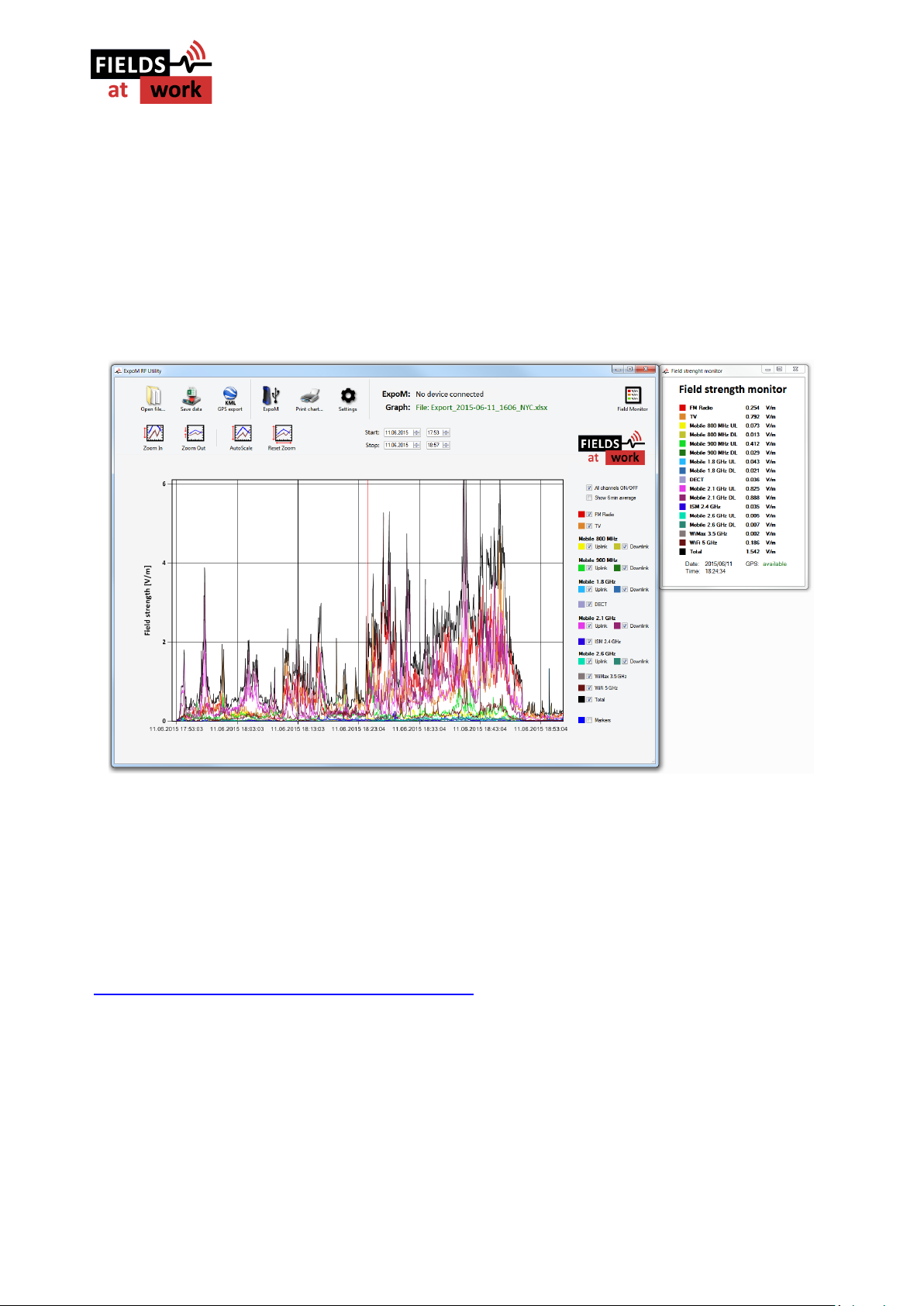
"Settings": This button directs you to the application settings dialog window
displayed in the following:
Figure 7: Application Settings Window
Page 10
Fields at Work GmbH, Hegibachstrasse 41, 8032 Zürich, Schweiz
2019 Fields at Work GmbH, Zurich Page 10/16 ExpoM - RF manual rev. 2.3
The application settings allow to modify the band names and the corresponding color. These
settings are stored locally and will be automatically activated every time ExpoM - RF utility is started.
The Google Earth export options allow to customize the appearance of the 3D bar graph of the
exported KML files. Please note that a new KML file has to be exported for changes to take effect.
The accuracy slider allows to set a filter on the quality of the GPS positioning accuracy. When this
option is enabled, GPS data captured in bad reception conditions is discarded in the KML export.
Caution: setting the filter too strict can lead to no GPS data being exported at all.
Figure 8: Main window with displayed data set and monitor window displaying the field strengths
5.1. Installing the USB driver
The USB driver required for ExpoM RF is included with most Windows versions and is automatically
installed the first time ExpoM - RF is connected to the PC. If the automatic driver installation fails,
however, it is necessary to install the driver manually. The driver can be found on our homepage
(www.fieldsatwork.ch/index.php?page=downloads).
5.2. Data format
ExpoM - RF PC utility can store the measurement data in two different file formats, Excel (xlsx) and
CSV. All field strengths are given in Volts per meter (V/m).
Being a simple and universal text based file format, a CSV file can be imported into virtually any
spreadsheet application (Excel, Open-/LibreOffice etc.). In both formats the measurements are
stored chronologically row by row in a table. Following information is contained in each row:
Page 11
Fields at Work GmbH, Hegibachstrasse 41, 8032 Zürich, Schweiz
2019 Fields at Work GmbH, Zurich Page 11/16 ExpoM - RF manual rev. 2.3
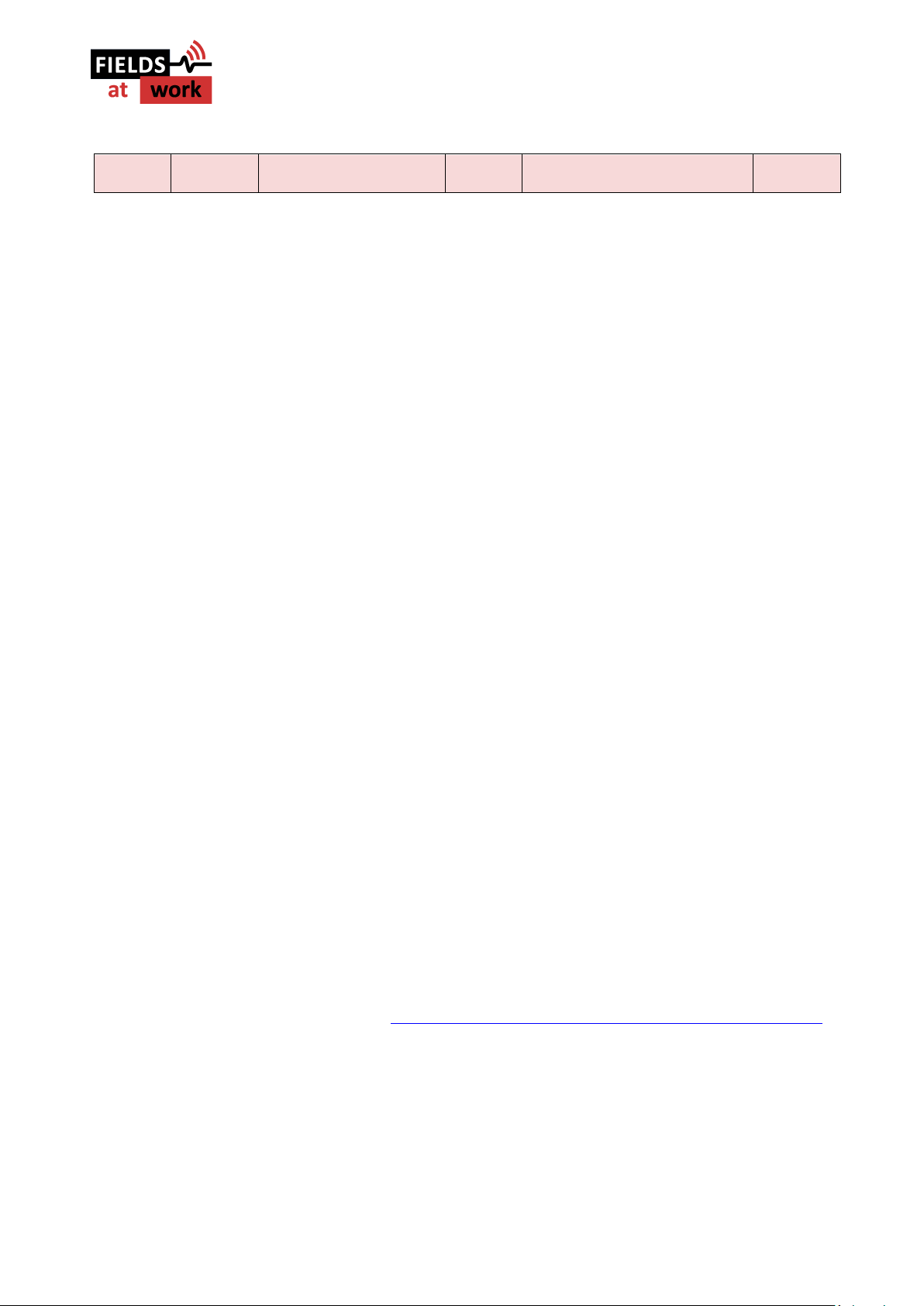
Date and
Time
Sequence
number
Field strengths
Band #1 … Band #16, Total
Overload
GPS: Fix, lat, lon, altitude, HDOP,
number of sat, speed
Marker
(number)
Figure 9: Contents of one row of the CSV file generated by the ExpoM - RF Utility
Date and Time: Contains the date and time at which the corresponding sample was taken.
Sequence number: Each measurement is labeled with a sequence number. Every time ExpoM - RF
is switched on the sequence number starts at 1. If not interrupted by a power cycle, the sequence
number counts up to 65535 after which it restarts at 1.
Field strength: The measured field strength of the 16 frequency bands are stored in the same order
as listed in 7.1. . The last field contains the resulting total field strength computed from all band
measurements. All field values are expressed in Volts per meter (V/m).
Overload: An exclamation mark (!) in this field signalizes that ExpoM - RF measured a signal
exceeding its specified measurement range. The affected sample is likely to be inaccurate due to
overload effects and should be discarded. Otherwise this entry is empty.
GPS: The recorded GPS data consists of the following 7 parameters:
1. GPS fix 0: invalid; 1: 2D only (no accurate altitude information) 2: full GPS localization
2. Latitude NMEA format: degrees minutes.decimal_minutes
3. Longitude NMEA format: degrees minutes.decimal_minutes
4. Altitude Meters above mean sea level. Caution: accuracy is strongly signal dependent
5. HDOP GPS fix quality (lower = better). < 2: very good; 2-5: OK; >5: limited accuracy
6. Nsat Number of satellites in view; higher numbers mean higher GPS reliability
7. Speed Speed in km/h determined by GPS. In bad reception conditions, speeds up to several
km/h are sometimes measured even in stationary conditions.
Marker: Tracks the number of marker button activations. The measurement that was active at the
time the marker button was pressed contains the corresponding marker number. Otherwise this
entry is empty.
6 Smartphone App
The Bluetooth capability of ExpoM - RF allows to transmit the measurements to a smartphone in
order to visualize the data in in real time. Following requirements have to be fulfilled:
1. Android based smartphone running Android 4.0 or higher.
2. The ExpoM RF App (available on http://www.fieldsatwork.ch/index.php?page=downloads)
is installed on the smartphone.
3. Bluetooth is enabled on ExpoM - RF (using the PC Utility).
6.1. Establishing the Bluetooth connection
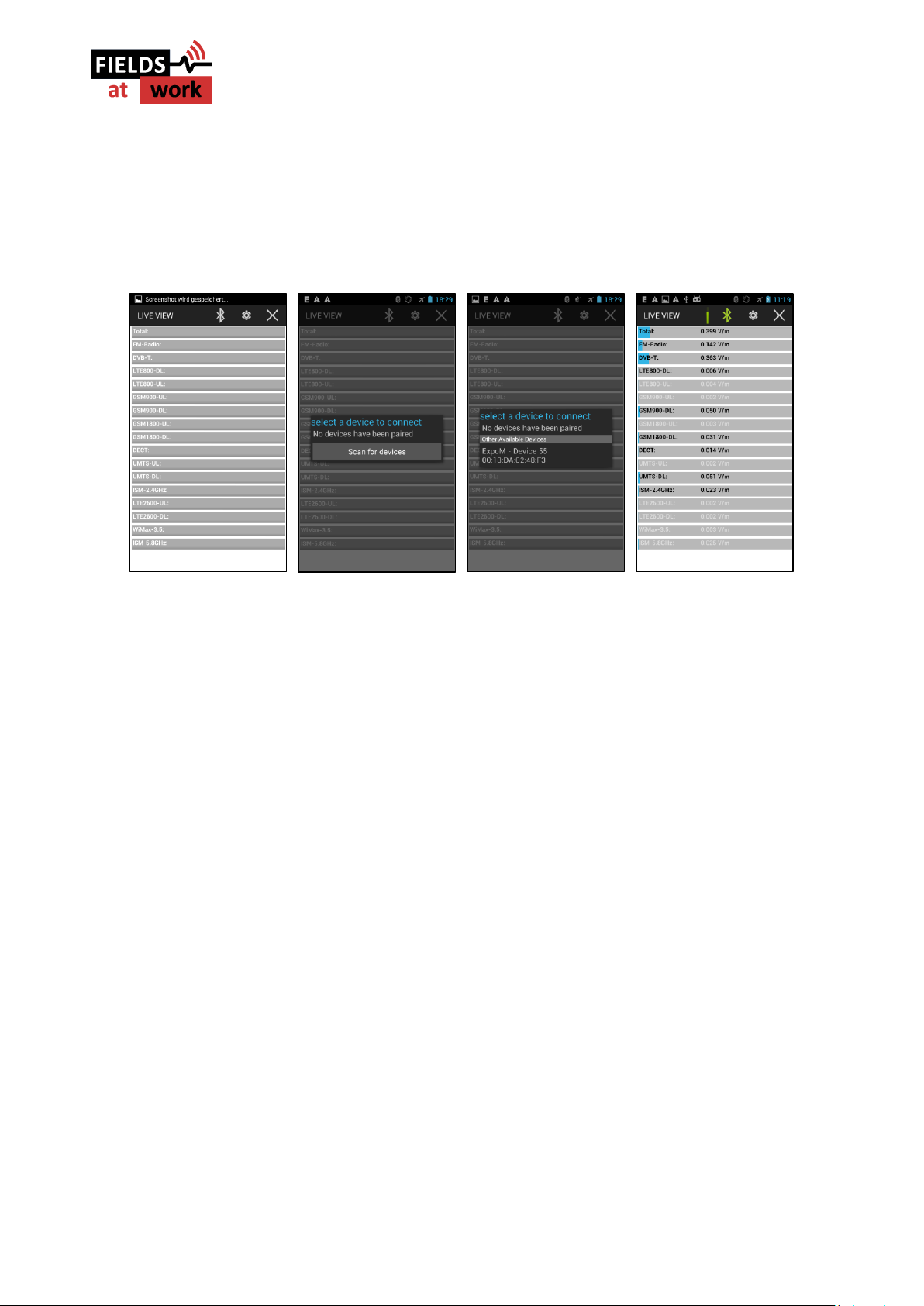
When the app is started, the default screen is displayed (0 on the left). In order to connect to an
ExpoM - RF device, press the Bluetooth icon on the top bar. This will open the Bluetooth connection
Page 12
Fields at Work GmbH, Hegibachstrasse 41, 8032 Zürich, Schweiz
2019 Fields at Work GmbH, Zurich Page 12/16 ExpoM - RF manual rev. 2.3
dialog (2nd picture from the left). If you are connecting a device for the first time select “Scan for
devices”. A list of the available devices will appear. If ExpoM - RF is turned on and Bluetooth is
enabled, it will be found and appear in the list after several seconds (3rd picture). Select the desired
ExpoM - RF device. A pairing dialog will appear. The code for all ExpoM - RF devices is “0000”. As
soon as a device is paired to your smartphone this last step is not required any more.
Figure 10: from left: Default view (not connected); Bluetooth connection dialog; Device is found and can be paired (code: 0000);
ExpoM - RF is successfully connected and streams the measurements.
After this step, the Bluetooth icon turns green and ExpoM - RF starts to stream the measurements
(last picture). In order to improve readability, all measurement values below ExpoM - RF’s detection
limit are greyed out. The device’s current battery status is displayed by means of the bar left to the
Bluetooth icon. Tapping on it displays the exact remaining battery charge in %.
6.2. Disconnecting from a device
The Bluetooth connection can be terminated by means of the Bluetooth icon on the top bar. This
will allow to connect to a different ExpoM RF.
When the phone switches to another app, the ExpoM RF app and any existing Bluetooth connection
are kept alive in the background. The app can be terminated by pressing the cross in the upper right
corner. This will also terminate all Bluetooth connections.
Page 13
Fields at Work GmbH, Hegibachstrasse 41, 8032 Zürich, Schweiz
2019 Fields at Work GmbH, Zurich Page 13/16 ExpoM - RF manual rev. 2.3
7 Technical Specifications
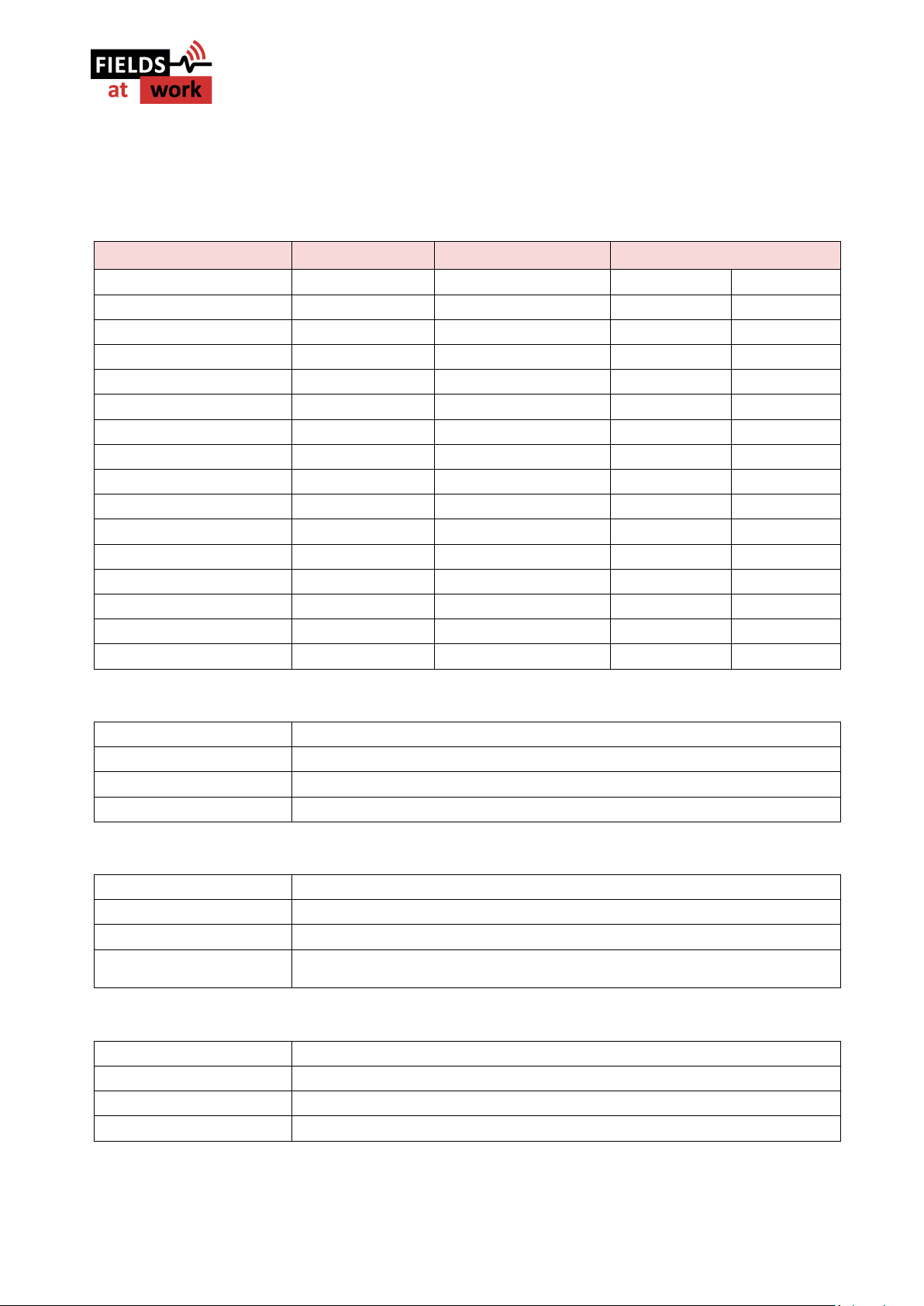
7.1. Frequency bands and measurement range
Band name
E-UTRA Band
Frequency range
Typical dynamic range
FM Radio
87.5 – 108 MHz
0.02 V/m
5 V/m
DVB-T 470 – 790 MHz
0.005 V/m
5 V/m
Mobile 800 MHz downlink
Band XX
791 – 821 MHz
0.005 V/m
5 V/m
Mobile 800 MHz uplink
Band XX
832 – 862 MHz
0.005 V/m
5 V/m
Mobile 900 MHz uplink
Band VIII
880 – 915 MHz
0.005 V/m
5 V/m
Mobile 900 MHz downlink
Band VIII
925 – 960 MHz
0.005 V/m
5 V/m
Mobile 1800 MHz uplink
Band II
1710 – 1785 MHz
0.005 V/m
5 V/m
Mobile 1800 MHz downlink
Band II
1805 – 1880 MHz
0.005 V/m
5 V/m
DECT 1880 – 1900 MHz
0.005 V/m
5 V/m
Mobile 2.1 GHz uplink
Band I
1920 – 1980 MHz
0.003 V/m
5 V/m
Mobile 2.1 GHz downlink
Band I
2110 – 2170 MHz
0.003 V/m
5 V/m
ISM 2.4 GHz
2400 – 2485 MHz
0.005 V/m
5 V/m
Mobile 2.6 GHz uplink
Band VII
2500 – 2570 MHz
0.003 V/m
5 V/m
Mobile 2.6 GHz downlink
Band VII
2620 – 2690 MHz
0.003 V/m
5 V/m
Mobile 3.5 GHz
Band 42
3400 – 3600 MHz
0.003 V/m
3 V/m
ISM 5.8 GHz / U-NII 1-2e
5150 – 5875 MHz
0.05 V/m
5 V/m
7.2. RF Measurement
Detection method
True-RMS, 0.3 seconds integration time for each band
Sample interval
User-selectable; from 3 to 6000 seconds in steps of 0.5 second
Antenna
Tree axis isotropic antenna
Crosstalk
Typically between -40 and -60 dB
7.3. Size / Conditions
Size and weight
16 cm x 8 cm x 3-5 cm (L x W x H) Weight: approx. 320g
Device Calibration
15 field levels, three axes (for each frequency band)
Conformity
CE-marking
Operation Conditions
Temperature -5 to +50 Degrees Celsius
0 to 90% rel. humidity
7.4. Connectivity / Storage
Time
Integrated precision (± 2 ppm) real time clock
Connectivity
USB, Bluetooth, GPS
Marker
Built-in marker button to highlight specific events
Storage
Internal 4 GB memory / 50 million measurement samples
Page 14
Fields at Work GmbH, Hegibachstrasse 41, 8032 Zürich, Schweiz
2019 Fields at Work GmbH, Zurich Page 14/16 ExpoM - RF manual rev. 2.3
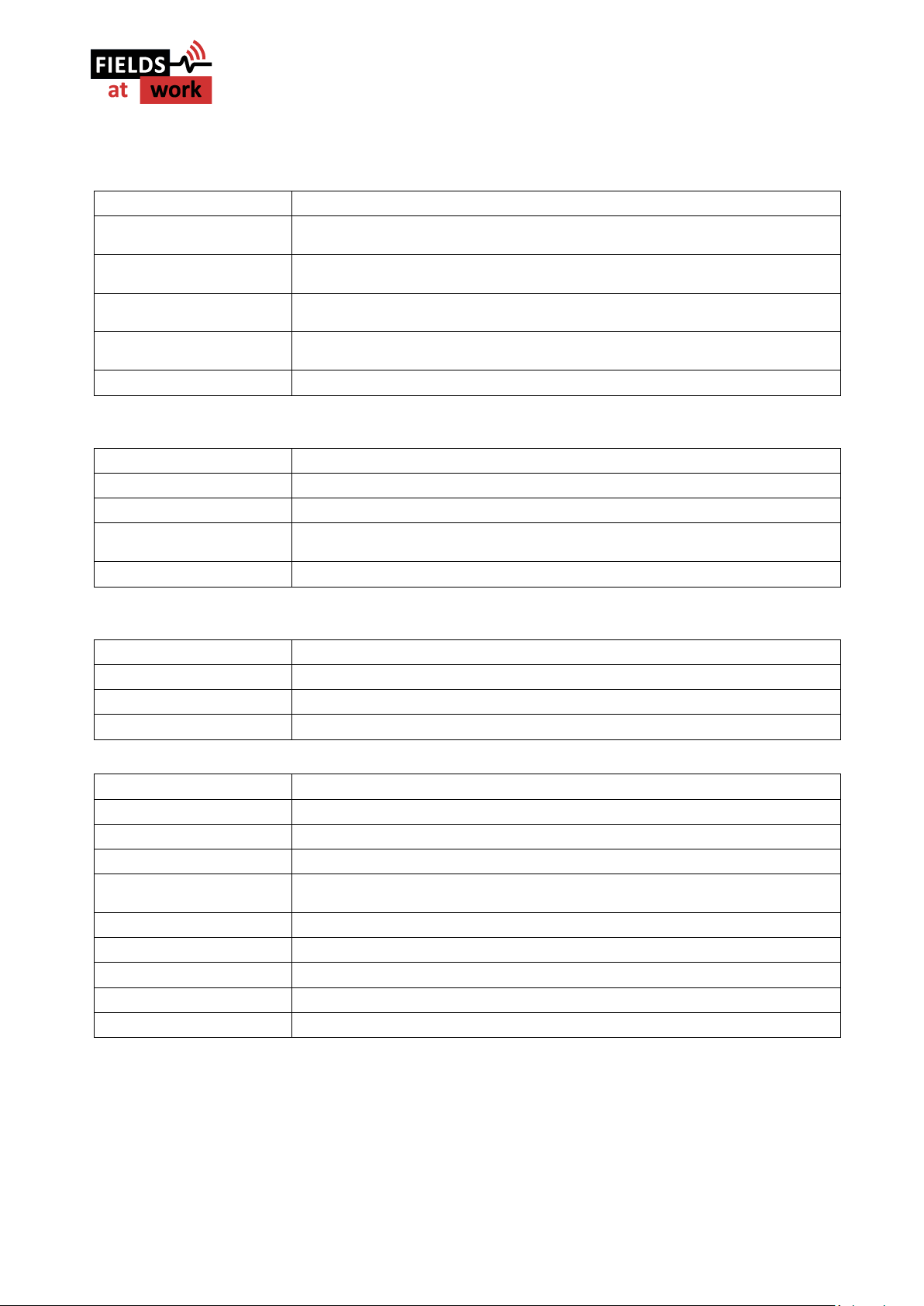
7.5. Battery Management
Battery
Built-in rechargeable Li-ion battery
Typical operating time with
3 sec sample interval
>12h (GPS and Bluetooth ON)
Typical operating time
3 sec sample interval
>16h (GPS and Bluetooth OFF)
Typical Operating time
10 sec sample interval
>55h (GPS and Bluetooth OFF)
Typical Operating time
1 minute sample interval
>7 days (GPS and Bluetooth OFF)
Charging
USB compliant charger ports are supported (min. current rating 1000 mA)
7.6. ExpoM RF Utility Software
Hardware requirements
Dual core processor recommended
Operating System
Windows (XP, 7, 8) with installed .NET environment (Version 4 or newer)
Storage usage
5 MB
Installation
No installation required – ExpoM RF Utility can be started from the downloaded
folder
Download
www.fieldsatwork.ch
7.7. ExpoM RF Android Software
Processor
No limitations
Operating System
Android 4.0 or newer
Storage usage
Less than 5 MB
Download
www.fieldsatwork.ch
Size and weight
16 cm x 8 cm x 3-5 cm (L x W x H) weight: approx. 320g
Time
Integrated precision (± 2 ppm) real time clock
Connectivity
USB, Bluetooth, GPS
Battery
Integrated rechargeable Li-ion battery
Operation time
>10h operation using a sample interval of 3 seconds, GPS and Bluetooth on.
Lifetime is extended by longer sample intervals and disabled GPS/Bluetooth
Charging
USB interface; Generic USB chargers are supported (1A minimum current rating)
Marker
Built-in marker button to highlight specific events
Storage
Non-volatile internal memory; Capacity: 50 million measurement samples
Device Calibration
15 field levels, three axes (for each frequency band)
Case
IP64 protected; Material: ABS
Page 15

Fields at Work GmbH, Hegibachstrasse 41, 8032 Zürich, Schweiz
2019 Fields at Work GmbH, Zurich Page 15/16 ExpoM - RF manual rev. 2.3
Page 16

Fields at Work GmbH, Hegibachstrasse 41, 8032 Zürich, Schweiz
2019 Fields at Work GmbH, Zurich Page 16/16 ExpoM - RF manual rev. 2.3
 Loading...