

Page 1

恩
G5/G6-Family AT Commands
User Manual
Version: V1.1.6
Date: 2015-04-26
Page 2

G5/G6-Family AT Commands User Manual Page2of
243
Copyright
Copyright© Fibocom Wireless Inc. 2015. All rights reserved.
Without the prior written permission of the copyright holder, any company or individual is prohibited to
excerpt, copy any part of or the entire document, or transmit the document in any form.
Attention
The document is subject to update from time to time owing to the product version upgrade or other
reasons. Unless otherwise specified, the document only serves as the user guide. All the statements,
information and suggestions contained in the document do not constitute any explicit or implicit
guarantee.
Trademark
The trademark is registered and owned by Fibocom Wireless Inc.
Versions
Version
Date
Remarks
V1.0.0
2012-12-10
Initial Version
V1.0.1
2013-01-31
Modify:
AT&V/AT&W/ATS24/ATO/AT+CPAS/AT+CLCC/AT+CLCK/AT+CBAUD/
AT+IPR/AT+CFUN/
Add: AT+GTGIS/AT+GTSET/AT+GTTS
V1.0.2
2013-03-08
1,To modify at+cgmm example
2,Modify "D>mem<n>[;]" to "D>"mem"<n>[;]"
3,Modify "+CLCK: ERROR" to "+CLCK: ERROR"
4, Add chapter 15
V1.0.3
2013-04-27
1, change number type 129 to 161 and 128 to 129
2,Change CDS to ODM
3,Add UART2 configuration
4,Add ERROR CODE
5, Update IPR baud rate
V1.0.4
2013-05-09
Some content is transferred to supplementary document
Page 3

G5/G6-Family AT Commands User Manual Page3of
243
V1.0.5
2013-08-01
1, Add AT+MSMPD
2, Add AT+GTWD
3, Add ati0
4, Update Error Code
5,Update the default value of AT&D
6,Add MMGR and MMGL
7,Add +GTSET, +MIPDSETS, +MIPDNS
V1.0.6
2013-10-12
Update section 3.5, section 3.8, section 4.1.4, section 4.1.5 and 10.2.1
Add section 4.1.5, section 9.1.6, section 9.1.7, section 9.1.8, section
9.1.9, section 9.1.10 and section 13.1.20.
V1.0.7
2013-10-26
Update the document name and applicability table
V1.0.8
2013-11-14
Update section 10.2.1
V1.0.9
2013-11-26
Update the example of section 3.2, section 7.1.6 and section 8.1.5;
Add +MMAD, +MTSM;
Update parameter description of +CBAUD and +IPR.
V1.1.0
2014-03-28
Add MSTART commands;
Update the example of CLCK,MCI,MIPSETS;
Update the parameters of CBAUD and IRP.
V1.1.1
2014-07-15
Update section 13.1.1; MIPCALL
Add section 13.1.2; AT+MGAUTH
Add section 11.2.12; AT+MATONE
Add the parameters of +MCELL of section 9.1.6
Add the parameters of section 9.1.7
Update the example of section 9.1.7
Add CGED command;refer to《AT+CGED Commands Note》
V1.1.2
2014-08-05
Update the layout error of ++MATONE
V1.1.3
2014-10-27
Add the commands of +MJDC Jamming Detection and +MJDC
Indication.
V1.1.4
2015-01-21
Add the section of 13.1.21 +MIPNTP, Synchronize the local time via
Page 4
G5/G6-Family AT Commands User Manual Page4of
243
NTP
V1.1.5
2015-04-13
Update some command parameters;
Add the section 9.1.14 and 9.1.15;
Update the file-name;
V1.1.6
2015-04-26
Update the description of copyright and attention.
Applicability Table
No.
Type
Note
1
G510
2
G510S
3
G520
4
G610-A20-xx
5
G620-A20-xx
Page 5

G5/G6-Family AT Commands User Manual Page5of
243
Contents
1 Preface......................................................................................................................................................................11
1.1 Manual Scope.............................................................................................................................................. 11
1.2 Target Audience........................................................................................................................................... 11
2 Introduction to AT Commands.............................................................................................................................. 12
2.1 AT Commands Overview........................................................................................................................... 12
2.2 General System Abbreviations................................................................................................................. 12
2.3 AT Commands Protocol..............................................................................................................................12
2.4 AT Commands Structure............................................................................................................................13
2.4.1 General Symbols Used in AT Commands Description............................................................. 13
2.4.2 Command Structure........................................................................................................................ 13
2.4.3 Results Code Structure...................................................................................................................14
2.5 Command Syntax........................................................................................................................................14
3 Modem ID.................................................................................................................................................................16
3.1 +CGMI, +GMI, +FMI, Request Manufacturer ID....................................................................................16
3.2 +CGMM, +GMM, +FMM, Request Model ID..........................................................................................16
3.3 +CGMR, +GMR, +FMR, Request Revision............................................................................................17
3.4 +CGSN, +GSN, Request Product Serial Number Identification......................................................... 17
3.5 +CSCS, Select Terminal Character Set.................................................................................................. 18
3.6 +CIMI, Request IMSI.................................................................................................................................. 19
3.7 +CFSN, Read Factory Serial Number..................................................................................................... 19
3.8 Request Identification Information............................................................................................................20
3.9 +CNUM, Request MSISDN(s).................................................................................................................. 20
3.10 +CLAC, List of All Available AT Commands......................................................................................... 21
4 Modem Control and Status................................................................................................................................... 22
4.1 Modem Register Commands.................................................................................................................... 22
4.1.1 V, Module Response Format......................................................................................................... 22
4.1.2 Q, Result Code Suppression......................................................................................................... 23
4.1.3 E, Command Echo.......................................................................................................................... 24
4.1.4 S, Bit Map Registers........................................................................................................................25
4.1.5 S12..................................................................................................................................................... 26
4.1.6 &V, View Configuration................................................................................................................... 26
4.1.7 &F, Set to Factory Defined Configuration.................................................................................... 27
4.1.8 Z, Reset to Default Configuration..................................................................................................28
4.1.9 &W, Store User Profile.................................................................................................................... 28
4.1.10 +CRSM, Restricted SIM Access................................................................................................. 29
4.1.11 +CCID.............................................................................................................................................. 34
Page 6

G5/G6-Family AT Commands User Manual Page6of
243
4.2 Sleep Mode Commands............................................................................................................................ 35
4.2.1 S24, Set Number of Seconds Delay Before Module Enters Sleep Mode..............................35
4.3 Error Handling Commands........................................................................................................................ 36
4.3.1 +CMEE, Report Mobile Equipment Error.................................................................................... 36
4.3.2 +CEER, Extended Error Report.................................................................................................... 37
4.4 +MSTART, Start message notification.....................................................................................................38
5 Call Control.............................................................................................................................................................. 39
5.1 Call Control AT Commands....................................................................................................................... 39
5.1.1 D, Dial Command............................................................................................................................ 39
5.1.2 D>, Direct Dialing from Phone Books.......................................................................................... 40
5.1.3 DL, Dial Last Number......................................................................................................................41
5.1.4 H, Hang-up Call................................................................................................................................42
5.1.5 A, Answer Incoming Call.................................................................................................................43
5.1.6 +CRC, Cellular Result Codes and RING, +CRING - Incoming Call Indication.....................44
5.1.7 +CLIP, Calling Line Identification.................................................................................................. 46
5.1.8 +CLIP Indication...............................................................................................................................46
5.1.9 +CCWA, Call Waiting Command.................................................................................................. 48
5.1.10 +CCWA Indication......................................................................................................................... 49
5.1.11 +CHLD, Call Related Supplementary Services Command.................................................... 51
5.1.12 +CCFC, Call Forwarding Number and Conditions.................................................................. 53
5.1.13 +CLIR, Calling Line Identification Restriction........................................................................... 56
5.1.14 O, Return to Online Data State................................................................................................... 58
5.1.15 +CHUP, Hang up Call................................................................................................................... 59
5.1.16 +MDC, Selection of Desired Message to Be Displayed Upon Connection of a Voice Call59
5.1.17 +MHUP, Module Hung UP call.................................................................................................... 60
5.2 Call Status Messages.................................................................................................................................61
5.2.1 +CPAS, Phone Activity Status....................................................................................................... 61
5.2.2 +CLCC, List Current Calls..............................................................................................................62
5.3 Supplementary Services............................................................................................................................ 65
5.3.1 +CSSN, Supplementary Service Notifications............................................................................65
5.3.2 +CUSD, Unstructured Supplementary Service Data.................................................................68
5.3.3 +COLP, Connected Line Identification Presentation................................................................. 73
6 Phone and Date Books and Clock.......................................................................................................................75
6.1 Directory Access Commands - Phone Book.......................................................................................... 75
6.1.1 +CPBS, Select Phone Book Memory...........................................................................................75
6.1.2 This command handles the selection of the memory to be used for reading and writing
entries in the Module’s phone book’s memory..................................................................................... 75
6.1.3 +CPBR, Read Phone Book Entries.............................................................................................. 76
6.1.4 +CPBF, Find Phone Book Entries.................................................................................................78
Page 7

G5/G6-Family AT Commands User Manual Page7of
243
6.1.5 +CPBW, Write Phone Book Entry.................................................................................................79
6.2 System Date and Time Access Commands........................................................................................... 81
6.2.1 +CCLK, Read/Set System Date and Time.................................................................................. 81
7 SMS.......................................................................................................................................................................... 83
7.1 SMS Commands......................................................................................................................................... 83
7.1.1 +CPMS, Preferred Message Storage.......................................................................................... 83
7.1.2 +CMGF, Message Format..............................................................................................................84
7.1.3 +CSCA, Service Center Address.................................................................................................. 85
7.1.4 In SMS text mode, SCA stored in SIM is added to any stored and sent SMS......................85
7.1.5 +CSMP, Set Text Mode Parameters.............................................................................................89
7.1.6 +CSDH, Show Text Mode Parameters.........................................................................................91
7.1.7 +CNMI, New Message Indications to Terminal...........................................................................92
7.1.8 +CMTI, Unsolicited Response (New SMS-DELIVER Receipt Indication)............................. 95
7.1.9 +CMT, Unsolicited Response (New SMS-DELIVER Receipt)................................................. 95
7.1.10 +CDS, Unsolicited Response (New SMS-STATUS-REPORT Receipt)...............................97
7.1.11 +CMGL, +MMGL,List Messages.................................................................................................98
7.1.12 +CMGR, +MMGR, Read Message.......................................................................................... 102
7.1.13 +CMSS, Send Message from Storage.................................................................................... 109
7.1.14 +CMGW, Write Message to Memory....................................................................................... 110
7.1.15 +CMGD, Delete Message.......................................................................................................... 116
7.1.16 +CMGS, Send SM to Network.................................................................................................. 117
8 Access and Security............................................................................................................................................. 119
8.1 Access Control Commands..................................................................................................................... 119
8.1.1 A/, Repeat Last Command...........................................................................................................119
8.1.2 AT, Check AT Communication......................................................................................................119
8.1.3 +CPIN, Enter PIN for Unlocking SIM Card or Enter PUK for Unblocking SIM Card......... 120
8.1.4 +TPIN, Query Number of Remaining SIM PIN/PUK Entering Attempts.............................. 123
8.1.5 +CPWD, Change Password........................................................................................................ 124
8.1.6 +CLCK, Facility Lock.................................................................................................................... 126
9 Network.................................................................................................................................................................. 129
9.1 Network Commands................................................................................................................................. 129
9.1.1 +CSQ, Signal Strength................................................................................................................. 129
9.1.2 +CREG, Network Registration Status........................................................................................130
9.1.3 +CGREG, GPRS Network Registration.....................................................................................131
9.1.4 +COPS, Operator Selection........................................................................................................ 133
9.1.5 +CPOL, Preferred Operators.......................................................................................................136
9.1.6 +MCELL, Module Cell Description............................................................................................. 139
9.1.7 +MCELL Indication........................................................................................................................ 140
9.1.8 +MCI, Module Cell Information................................................................................................... 143
Page 8

G5/G6-Family AT Commands User Manual Page8of
243
9.1.9 +MCI Indication..............................................................................................................................145
9.1.10 +CA Indication..............................................................................................................................145
9.1.11 +MJDC Jamming Detection.......................................................................................................146
9.1.12 +MJDC Indication........................................................................................................................147
9.1.13 +CGED, Module Cell Description.............................................................................................148
9.1.14 +CBAND, Change Radio Band.................................................................................................149
9.1.15 +GTPLMNLS, Clear Arfcn list................................................................................................... 151
10 Hardware Information........................................................................................................................................153
10.1 Hardware Information Commands.......................................................................................................153
10.1.1 +MMAD, Query and Monitor ADC Value.................................................................................153
10.1.2 +MTSM, Temperature Sensor Measurement......................................................................... 154
10.1.3 +CBC, Battery Charger Connection.........................................................................................156
10.1.4 +CBAUD, Baud Rate Regulation..............................................................................................157
10.1.5 +IPR, Local Terminal Serial Port Rate.....................................................................................158
10.1.6 &K, RTS/CTS Flow Control....................................................................................................... 160
10.1.7 +IFC, RTS/CTS Flow Control....................................................................................................161
10.1.8 &C, Circuit 109 Behavior............................................................................................................162
10.1.9 &D, Circuit 108 Behavior............................................................................................................163
10.1.10 +CFUN, Shut Down Phone Functionality............................................................................. 164
10.1.11 +ICF, DTE-DCE Character Framing...................................................................................... 166
10.1.12 +MRST, Perform Hardware power down.............................................................................. 167
10.1.13 +WRIM, RI signal width setting.............................................................................................. 167
10.1.14 +MSMPD, Enable/Disable SIM Card Hot Plug.................................................................... 169
10.1.15 +GTWD, Enable/Disable Watchdog...................................................................................... 170
10.2 UART2 Configuration............................................................................................................................. 170
10.2.1 +GTSET=”UARTMODE”, switch UART2 work mode........................................................... 171
10.2.2 +GTSET=”UARTREV”, report data mode...............................................................................171
10.2.3 +UARTSEND, Send data to UART2........................................................................................171
10.2.4 UART2 use for AT Command....................................................................................................172
11 Audio.....................................................................................................................................................................174
11.1 Scope........................................................................................................................................................ 174
11.2 General Audio Commands.................................................................................................................... 174
11.2.1 +CRSL, Call Ringer Level.......................................................................................................... 174
11.2.2 +CLVL, Loudspeaker Volume....................................................................................................175
11.2.3 +CMUT, Mute/Unmute Microphone Path................................................................................ 175
11.2.4 S94, Sidetone Effect................................................................................................................... 176
11.2.5 S96, Echo Canceling.................................................................................................................. 177
11.2.6 +CALM, Alert Sound Mode........................................................................................................ 177
11.2.7 +VTD, Tone Duration.................................................................................................................. 178
Page 9

G5/G6-Family AT Commands User Manual Page9of
243
11.2.8 +VTS, Command-Specific Tone Duration............................................................................... 179
11.2.9 +MAPATH, Audio Path................................................................................................................180
11.2.10 +MAVOL, Volume Setting........................................................................................................ 181
11.2.11 + MMICG, Microphone Gain Value.........................................................................................183
11.2.12 +MATONE,Start or stop the tone play,and the tone plays only once....................... 183
12 GPRS................................................................................................................................................................... 185
12.1 GPRS Functionality................................................................................................................................185
12.2 GPRS Commands..................................................................................................................................185
12.2.1 +CGCLASS, GPRS Mobile Station Class...............................................................................186
12.2.2 +CGDCONT, Define PDP Context........................................................................................... 187
12.2.3 +CGQMIN, Quality of Service Profile (Min Acceptable)....................................................... 189
12.2.4 +CGQREQ, Quality of Service Profile (Requested)..............................................................191
12.2.5 +CGATT, GPRS Attach or Detach............................................................................................193
12.2.6 D*99, Request GPRS Service "D"............................................................................................194
12.2.7 +CGACT, PDP Context Activate or Deactivate...................................................................... 196
12.2.8 +CGPADDR, GPRS Addresses................................................................................................197
13 TCP/IP..................................................................................................................................................................199
13.1 Basic Mode.............................................................................................................................................. 199
13.1.1 +MIPCALL, Create a Wireless Link......................................................................................... 199
13.1.2 +MGAUTH, Set type of authentication.................................................................................... 201
13.1.3 +MIPOPEN, Open a Socket (UDP or TCP)............................................................................202
13.1.4 +MIPCLOSE, Close a Socket................................................................................................... 205
13.1.5 +MIPSETS, Set Size and Timeout for Automatic Push........................................................ 206
13.1.6 +MIPSEND, Send Data..............................................................................................................208
13.1.7 +MIPPUSH, Push Data into Protocol Stack........................................................................... 210
13.1.8 +MIPFLUSH, Flush Data from Buffers.....................................................................................211
13.1.9 +MIPRUDP, Receive Data from UDP Protocol Stack........................................................... 212
13.1.10 +MIPRTCP, Receive Data from TCP Protocol Stack..........................................................212
13.1.11 +MIPDSETS, Set Size and Timeout for Output Received Data........................................213
13.1.12 +MIPSTAT, Status Report........................................................................................................214
13.1.13 +MIPCONF - Configure Internal TCP/IP Stack....................................................................215
13.1.14 +MPING, Start Ping Execution (ICMP Protocol)................................................................. 218
13.1.15 +MPINGSTAT, Status Update for +MPING Execution....................................................... 221
13.1.16 +MSDNS, Set DNS IP Address.............................................................................................. 223
13.1.17 +MIPODM, Open a Socket (UDP or TCP) in Online Data Mode......................................225
13.1.18 +MIPXOFF, Flow Control - Xoff.............................................................................................. 228
13.1.19 +MIPXON, Flow Control - Xon................................................................................................228
13.1.20 +MIPDNS, Resolve Domain name........................................................................................ 228
13.1.21 +MIPNTP, Synchronize the local time via NTP....................................................................229
Page 10

G5/G6-Family AT Commands User Manual Page10of
243
13.1.22 +MIPREAD, Receive data from buffer.................................................................................. 230
13.2 HEX Mode................................................................................................................................................232
13.2.1 +MIPSEND (Ctrl-Z)..................................................................................................................... 232
13.2.2 +MIPSEND (Timeout).................................................................................................................232
13.2.3 +MIPSEND (Data length)...........................................................................................................233
13.2.4 +GTSET, HEX mode configuration.......................................................................................... 234
14 Error Code...........................................................................................................................................................236
14.1 CME Error................................................................................................................................................ 236
14.2 CMS Error................................................................................................................................................ 239
14.3 TCP/IP Error............................................................................................................................................ 242
Page 11

G5/G6-Family AT Commands User Manual Page11of
243
1 Preface
1.1 Manual Scope
This manual introduces the AT command set, and describes how software developers can use these
commands to communicate with the device, and to create software applications that communicate with
the module using these commands.
Note: The integrator should read the corresponding SW release notes for the module version he is
using to get information about differences from this manual.
1.2 Target Audience
This manual is intended for software developers who communicate with the module using the AT
commands, and create applications to communicate with the module using the AT commands.
Page 12

G5/G6-Family AT Commands User Manual Page12of
243
2 Introduction to AT Commands
2.1 AT Commands Overview
AT commands are sets of commands used for communication with the cellular modem. AT commands are
comprised of assemblies of ASCII characters which start with the "AT" prefix (except the commands A/
and +++). The AT prefix is derived from the word Attention, which asks the modem to pay attention to the
current request (command).
AT commands are used to request services from the cellular modem, such as:
Call services: dial, answer and hang up
Cellular utilities: send/receive SMS
Modem profiles: Auto Answer
Cellular Network queries: GSM signal quality
2.2 General System Abbreviations
The basic system configuration contains a modem and a terminal.
The G5xx/G6xx is the modem and may be referred to as the DCE or TA, such as the phone, the mobile or
the radio.
The terminal (PC or MCU) may be referred to as the DTE or the TE.
2.3 AT Commands Protocol
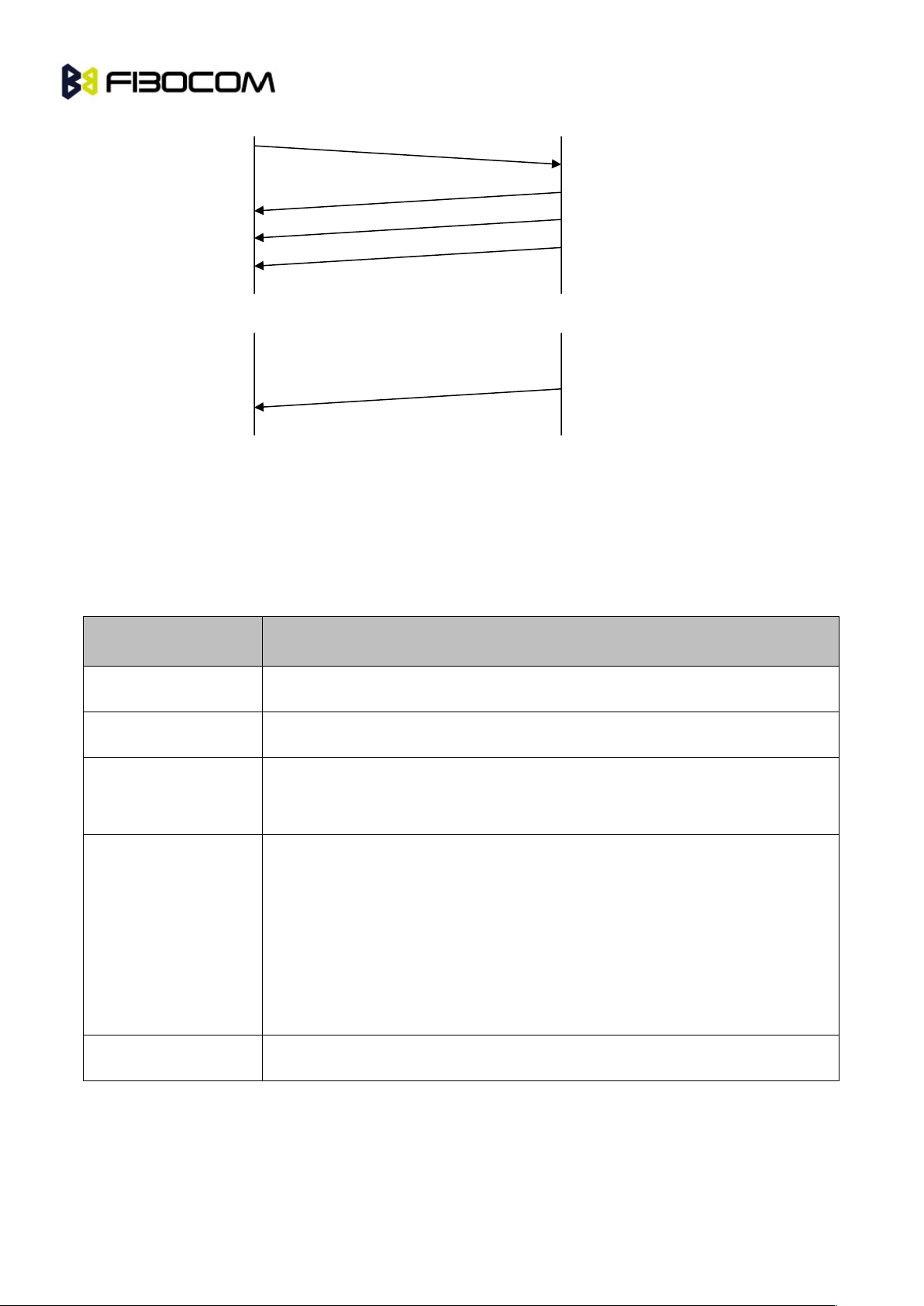
The AT commands interface is basically a Modem Services upon Request.Communication (almost)
always begins from the TE side. This means that any service should be requested from the TE. Thus a
request is called a "Command".
Each command must be answered by a "Results code" from the TA. The results code reports the
command status to the TE. Some commands may include several "Results code" to send data back to the
TE. Some commands may initiate a mode in which, when specified events are generated in the
G5xx/G6xx, "Indicator" messages are sent data asynchronously. The “indicators” can be called
“Unsolicited results code”.
The G5xx/G6xx can echo characters received from the TE (commands) back to the TE.
TE
TA (G5xx/G6xx)
Command
Results code
Page 13
G5/G6-Family AT Commands User Manual Page13of
243
Figure 2-1 Unsolicited results code
2.4 AT Commands Structure
2.4.1 General Symbols Used in AT Commands Description
The following syntax definitions apply in this chapter:
Syntax
Definition
<CR>
Carriage returns character, specified by the value of the S3-register.
<LF>
Line-feed character, specified by the value of the S4-register.
<…>
Name enclosed in angle brackets is a syntax element. The brackets themselves
do not appear in the command line.
[...]
Optional sub-parameter of a command or an optional part of terminal
information response, enclosed in square brackets. The brackets themselves
do not appear in the command line. When the sub-parameter is not provided in
the parameter type commands, the new value equals its previous value. In
action type commands, the action should be performed on the basis of the
recommended default setting of the sub-parameter.
//
Denotes a comment, and should not be included in the command.
2.4.2 Command Structure
Each AT command has the "AT" or “at” prefix string (except the commands A/ and +++).
Each AT command has the suffix <CR> (except the commands A/ and +++).
TE
TA (G5xx/G6xx)
Command
Results code
TE
TA (G5xx/G6xx)
Page 14

G5/G6-Family AT Commands User Manual Page14of
243
Example:
AT+CSQ<CR>
ATS24?<CR>
An AT command line may contain one or more commands. Delimiters are used to separate the
commands from each other. The delimiter is either a semicolon ";" or none, meaning space (basic
commands).
Example:
ATS0=1V1Q0E0<CR>
AT+IFC=0,0;+ICF=3,4;+CNMI
=2,1,0,0,0<CR>
2.4.3 Results Code Structure
By default, the module responds with verbose response codes. The results code prefix is <CR><LF>. The
results code suffix is <CR><LF>.
Example:
<CR><LF>+CSQ: 99,99<CR><LF>
<CR><LF>OK<CR><LF>
The Unsolicited results code is same as the Results code.
2.5 Command Syntax
Execute command syntax
AT+xxx
ATxxx
ATxxx;
Parameter set command syntax
AT+xxx=<Value>
ATxxx=<Value>
Parameter read Command syntax
AT+xxx?
ATxxx?
Parameter test Command syntax
AT+ xxx =?
ATxxx?
<Value> consists of either a numeric constant or a string constant. <compound_value> consist of several
<value> parameters separated by commas.
Page 15

G5/G6-Family AT Commands User Manual Page15of
243
Example of compound_value: <value1>,<value2>,…,<valueN>
Numeric Constants
Numeric constants are expressed in decimal, hexadecimal, or binary form. In the module, the definition of
each command specifies which form is used for values associated with that command.
String Constants
String constants consist of a sequence of characters, bounded at the beginning and end by the
double-quote character (").
Page 16
G5/G6-Family AT Commands User Manual Page16of
243
3 Modem ID
These commands allow the user to query the type of the device that is attached, the technology used in
the device, as well as basic operating information about the module.
3.1 +CGMI, +GMI, +FMI, Request Manufacturer ID
These commands display manufacturer identification. The module outputs a string containing
manufacturer identification information.
Command
Response/Action
AT+CGMI
AT+CGMI?
+CGMI: <manufacturer_ID>
OK
AT+GMI
AT+GMI?
+GMI: <manufacturer_ID>
OK
AT+FMI
AT+FMI?
+FMI: <manufacturer_ID>
OK
Example:
AT+CGMI
+CGMI: " Fibocom "
OK
3.2 +CGMM, +GMM, +FMM, Request Model ID
These commands request the model identification. The module outputs a string containing information
about the specific model, including a list of the supported technology used, and the particular model
number.
Command
Response/Action
AT+CGMM
AT+CGMM?
+CGMM: <list of supported technologies>,<model>
OK
AT+GMM
AT+GMM?
+GMM: <list of supported technologies>,<model>
OK
AT+FMM
AT+FMM?
+FMM: <list of supported technologies>,<model>
OK
Page 17
G5/G6-Family AT Commands User Manual Page17of
243
Example:
AT+CGMM?
+CGMM: "GSM900/1800”,”G510"
OK
The following table shows the +CGMM string parameters.
String
Description
"GSM900"
EGSM at 900 MHz
"GSM1800"
DCS at 1800 MHz
3.3 +CGMR, +GMR, +FMR, Request Revision
These commands request the revision identification. The module outputs a string containing the revision
identification information of the software version contained within the device.
Command
Response/Action
AT+CGMR
AT+CGMR?
+CGMR: <revision>
OK
AT+GMR
AT+GMR?
+GMR: <revision>
OK
AT+FMR
AT+FMR?
+FMR: <revision>
OK
Example:
AT+CGMR
+CGMR: "G510_V0D.00.16"
OK
3.4 +CGSN, +GSN, Request Product Serial Number
Identification
This command displays the product serial number identification IMEI (International Mobile Equipment
Identification). It can be used even when the SIM card is not inserted.
Command
Response/Action
AT+CGSN
AT+CGSN?
+CGSN: <imei>
OK
Page 18
G5/G6-Family AT Commands User Manual Page18of
243
AT+GSN
AT+GSN?
+GSN: <imei>
OK
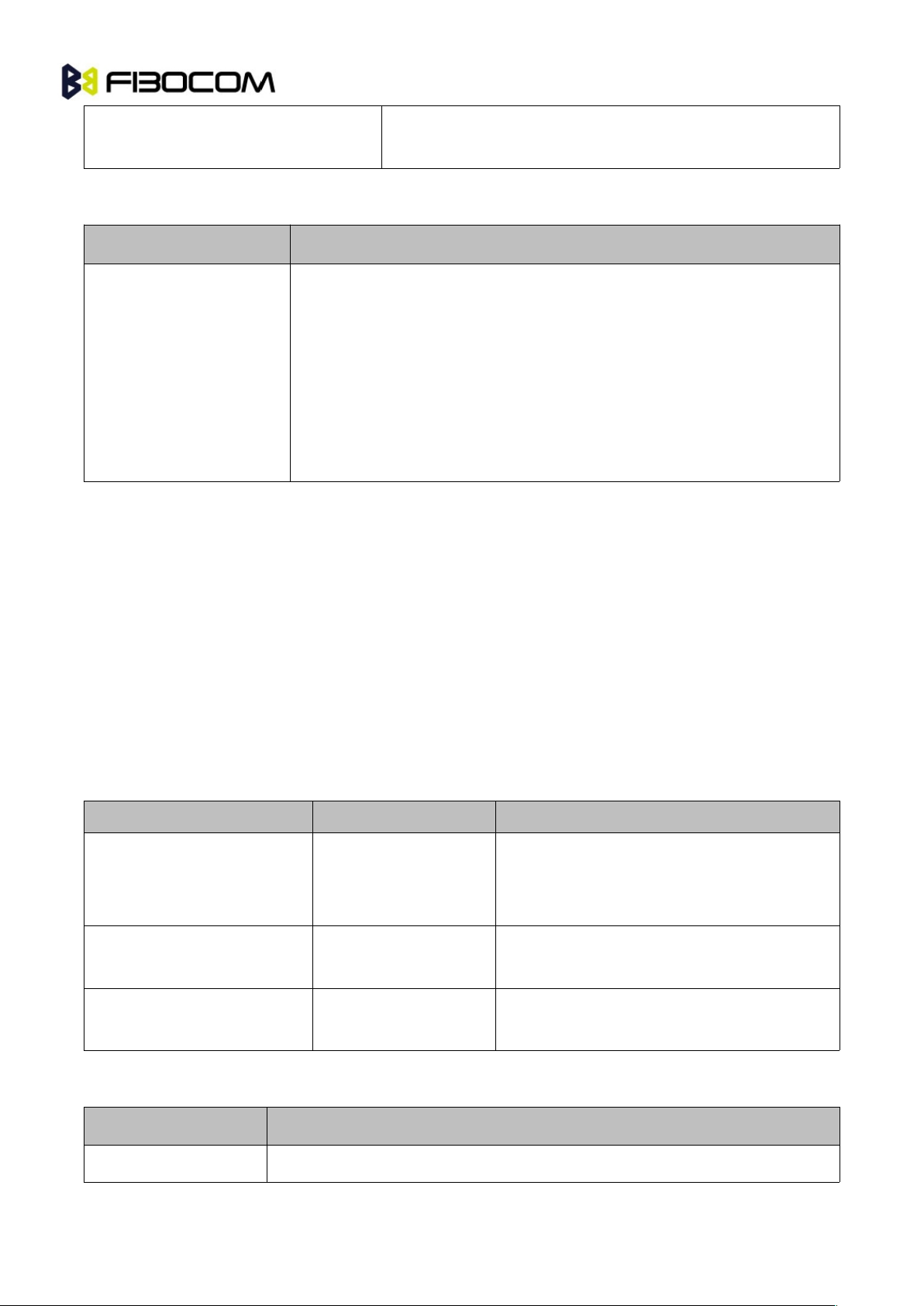
The following table shows the +CGSN, +GSN parameters.
<Parameter>
Description
<imei>
The IMEI (International Mobile Station Equipment Identity) number is
comprised of 15 digits, as specified by GSM 03.03 [3]. IMEI numbers are
composed of the following elements, all in decimal digits:
Type Approval Code (TAC) - 6 digits
Serial Number (SNR) - 6 digits
Spare digit - 1 digit
The TAC and SNR are protected against unauthorized changes.
Example:
AT+CGSN?
+CGSN: “004400013805666”
OK
3.5 +CSCS, Select Terminal Character Set
This command selects the character set. The module supports the following character sets:
"IRA","GSM","UCS2", and “HEX". The default value is “IRA”.
Command
Syntax
Response/Action
Set
+CSCS=[<chset>]
OK
or:
+CMS ERROR: <err>
Read
+CSCS?
+CSCS: <selected character set>
OK
Test
+CSCS=?
+CSCS: (<supported character sets>)
OK
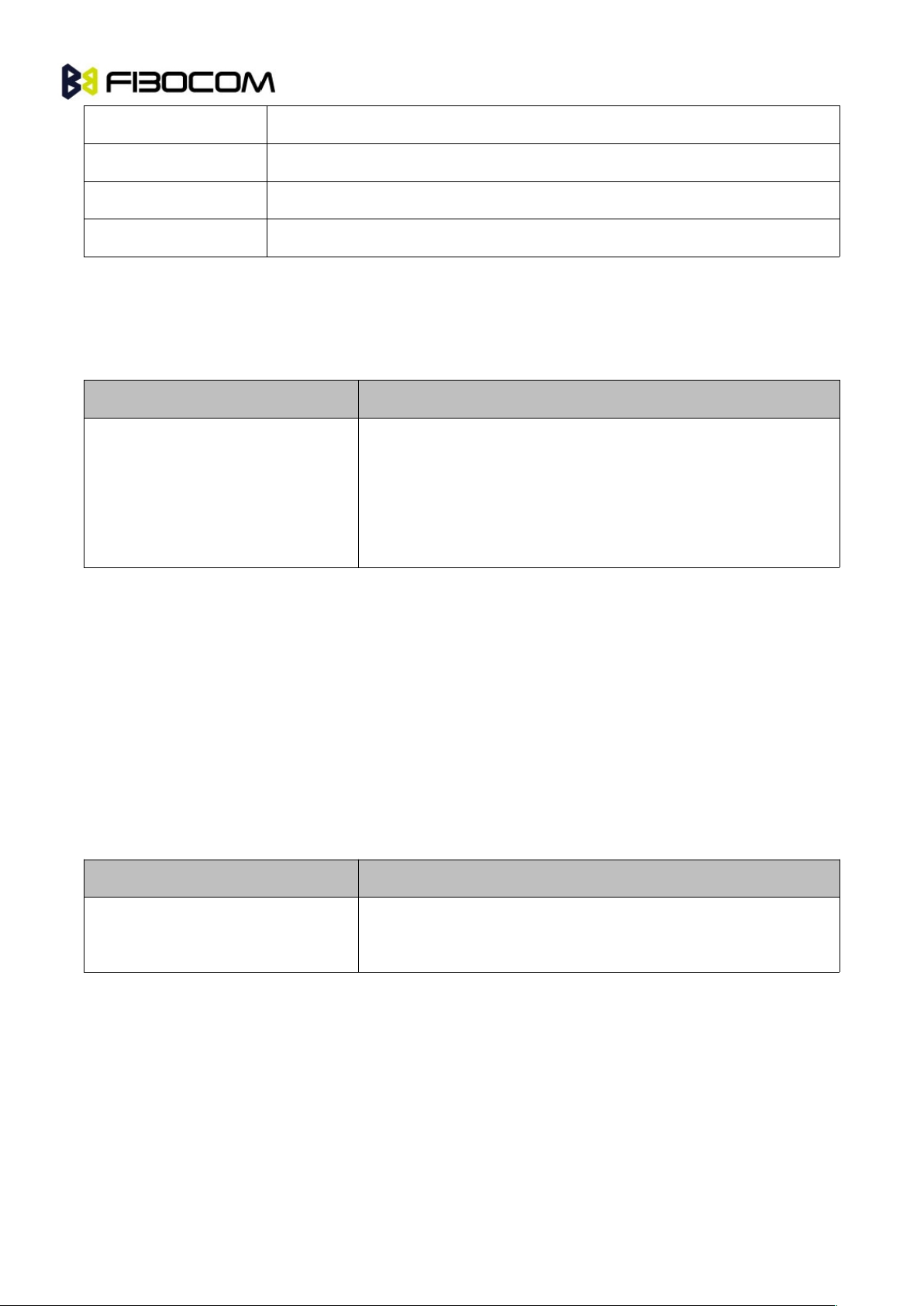
The following table shows the +CSCS parameter optional values.
<chset>
Character Set
“IRA”
International Reference Alphabet (ITU-T T.50)
Page 19
G5/G6-Family AT Commands User Manual Page19of
243
“GSM”
GSM default alphabet (GSM 03.38 subclause 6.2.1)
"UCS2"
2-byte Universal Character Set, Unicode (ISO/IEC 10646 [32])
“HEX”
Character strings consist only of hexadecimal numbers from 00 to FF
“8859-1”
8-bit Character Set
3.6 +CIMI, Request IMSI
This command displays the International Mobile Subscriber Identity number.
Command
Response/Action
AT+CIMI
AT+CIMI?
+CIMI: <imsi>
OK
or:
+CME ERROR: <err>
Example:
AT+CIMI
+CIMI: 314566320021400
OK
3.7 +CFSN, Read Factory Serial Number
This command is used to query the factory serial number.
Command
Response/Action
AT+CFSN
AT+CFSN?
+CFSN: <fsn>
OK
Example:
AT+CFSN
+CFSN: “000000000”
OK
Page 20
G5/G6-Family AT Commands User Manual Page20of
243
3.8 Request Identification Information
This command displays various module information items.
Command
Response/Action
ATIn
<information item n>
or:
+CME ERROR: <err>
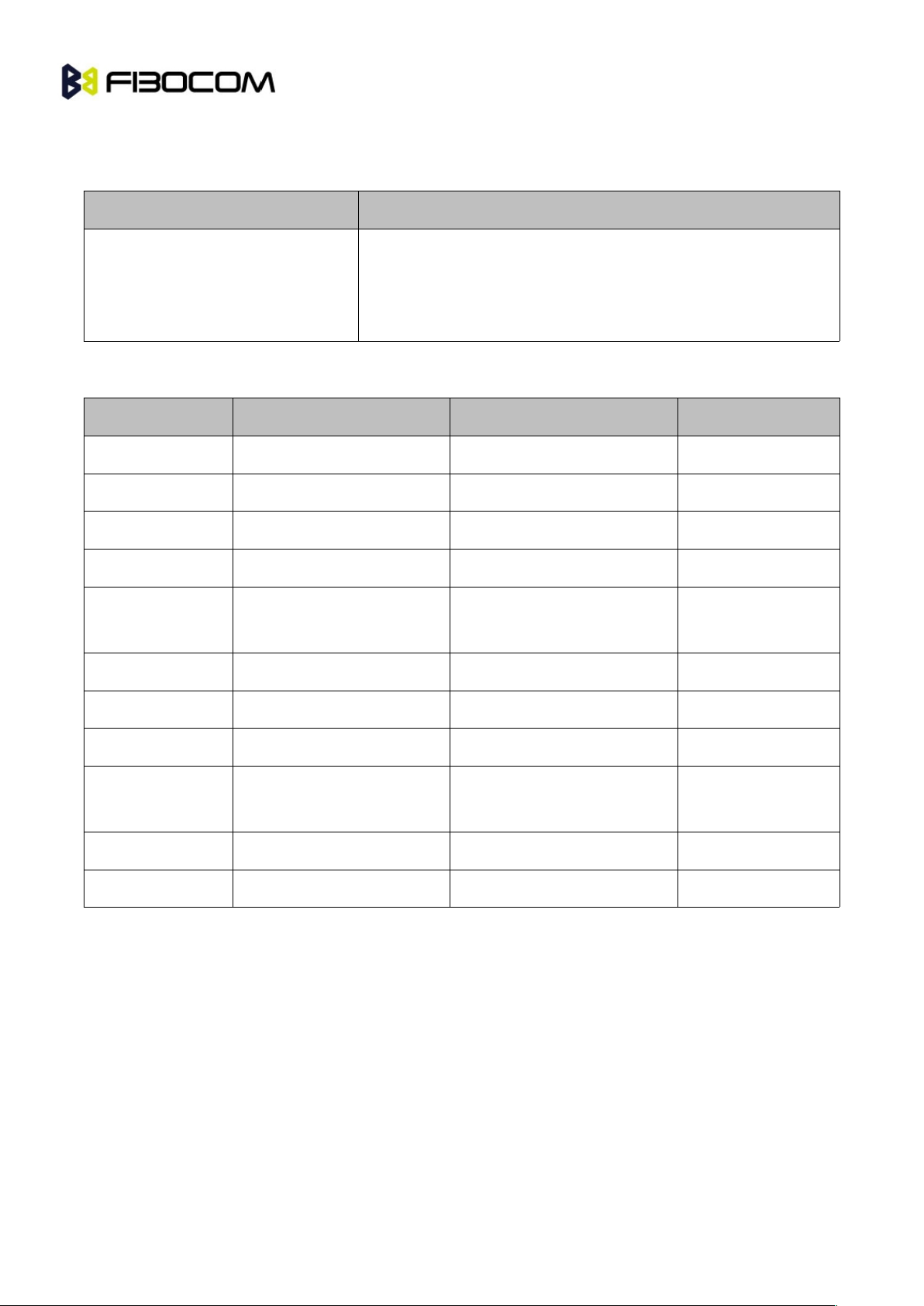
The following table shows the information items that are supported by the module.
ATIn
Description
Output
Reference
ATI
Reports version build time
“20130620Thu1600”
ATI0
Reports version build time
“20130620Thu1600”
ATI1
Reserve
ATI2
Reserve
ATI3
Reports product
description
“G510 GPRS Module”
ATI4
Reserve
ATI5
Reserve
ATI6
Reserve
ATI7
Reports product
description
"GSM900/1800/850/1900”
ATI8
Reports software version
“G510_V0D.00.XX”
ATI9
Reports hardware version
“G510-Q50_V1.0X”
3.9 +CNUM, Request MSISDN(s)
This command displays up to 2 strings of text information that identify the module. The output string
contains double quotes.
On SIM cards that have EFmsisdn file, the string(s) returned are the MSISDN numbers and their
associated data.
On SIM cards that don't have EFmsisdn file, the strings returned are the MSISDN numbers and their
associated data stored in module NVM.
Page 21

G5/G6-Family AT Commands User Manual Page21of
243
Command
Response/Action
+CNUM
+CNUM?
(MSISDN supported)
+CNUM:
[<MSISDN1_string>],<MSISDN1>,<MSISDN1_type><CR><LF
>
[+CNUM:
[<MSISDN2_string>],<MSISDN2>,<MSISDN2_type>]<CR><L
F>
[...]
OK
+CNUM
+CNUM?
(MSISDN not supported)
+CNUM: <phone_number>
OK
The following table shows the +CNUM parameters.
<Parameter>
Description
<MSISDN type>
Phone number type
161 Use for local call
145 Use “+” for international access code
129 Unknown
Example:
AT+CNUM?
+CNUM: "VoiceMail","098765432109876543210987654321",129
OK
3.10+CLAC, List of All Available AT Commands
Command
Syntax
Response/Action
Remarks
Execute
+CLAC
List of available AT
commands
The Execute command displays a list of
all the AT commands supported by the
module.
Page 22

G5/G6-Family AT Commands User Manual Page22of
243
4 Modem Control and Status
4.1 Modem Register Commands
The module holds certain data items in selected memory space, named Software Registers (S-registers)
and Modem Registers. Some of these registers are used as bitmaps, where one register holds more than
one data item.
All S-registers can be accessed using the S command, described in “S, Bit Map Registers”. Some
registers can also be accessed using dedicated commands, detailed below.
4.1.1 V, Module Response Format
This command determines the response format of the data adapter and the contents of the header and
trailer transmitted with the result codes and information responses. This command also determines
whether the result codes are transmitted in a numeric or an alphabetic ("verbose") form. The text portion
of information responses is not affected by this setting.
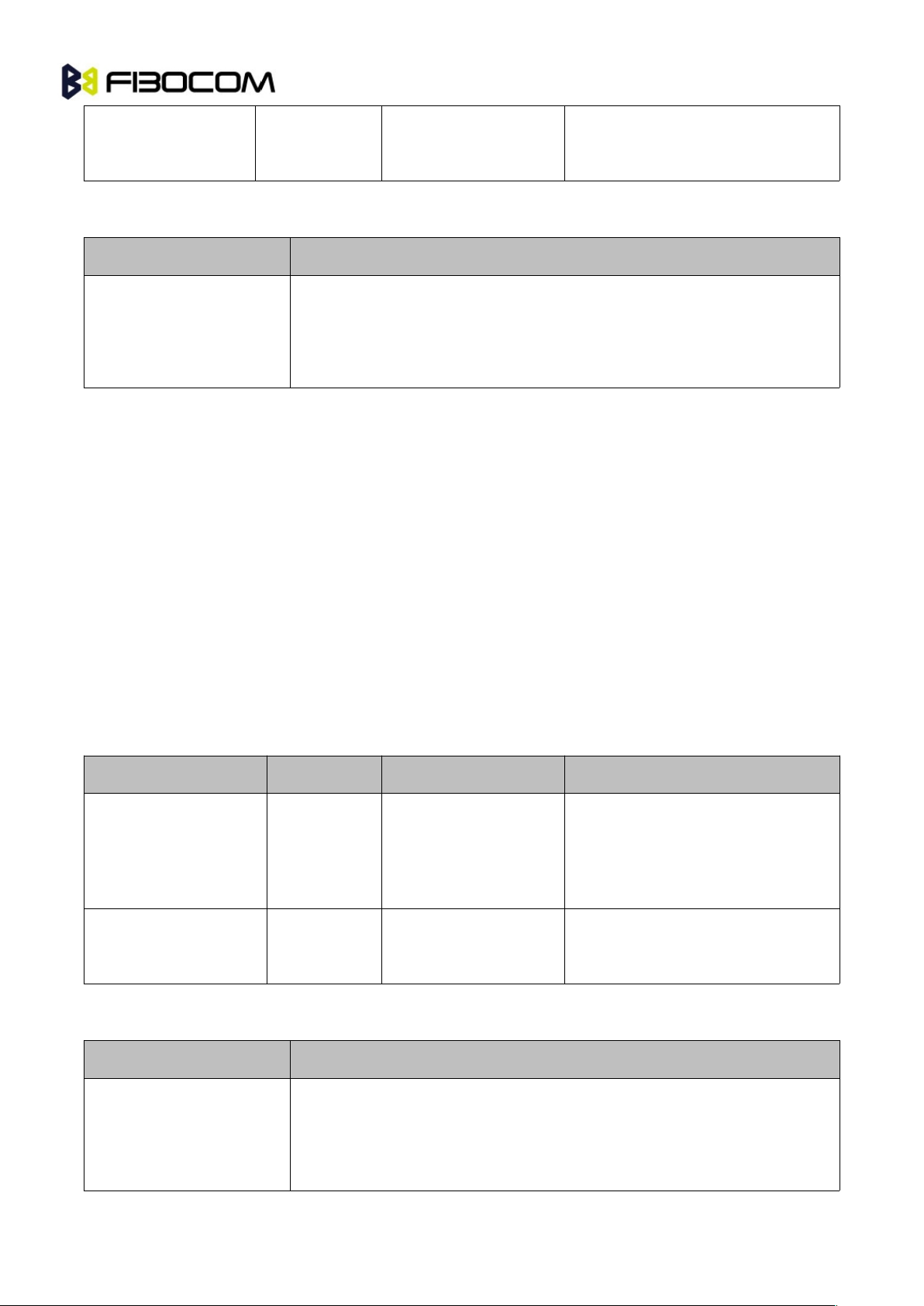
The following table shows the effect that setting this parameter has on the format of information text and
result codes.
V0V1Information Responses
<ATV0><cr><lf>
<ATV1><cr><lf>
0 - "OK"
1 - "CONNECT"
2 - "RING"
3 - "NO CARRIER"
4 - "ERROR"
5 - "NO DIALTONE"
6 - "BUSY"
7 - "NO ANSWER"
8 - “NOT SUPPORT”
9 - “INVALLID COMMAND LINE”
10 - “\r\n”
<numeric code><cr>
<verbose code><cr><lf>
Command
Syntax
Response/Action
Remarks
Set
ATV<value>
OK
The Set command sets the format
Page 23
G5/G6-Family AT Commands User Manual Page23of
243
or:
+CME ERROR: <err>
of information responses and result
codes.
The following table shows the V parameters.
<Parameter>
Description
<value>
0 Transmits limited headers and trailers, and numeric text.
1 Transmits full headers and trailers, and verbose response text.
The default value is 1.
Example:
ATV0
0
ATV1
OK
4.1.2 Q, Result Code Suppression
This command determines whether to output the result codes. Information text transmitted in response to
commands is not affected by the setting of this parameter.
Command
Syntax
Response/Action
Remarks
Set
ATQ<value>
OK
or:
+CME ERROR: <err>
The set commands sets whether or
not to output result codes.
Read
ATQ?
Q: <value>
OK
The following table shows the parameters.
<Parameter>
Description
<value>
0 Transmit result codes.
1 Suppress result codes.
The default value is 0.
Page 24
G5/G6-Family AT Commands User Manual Page24of
243
Example:
ATQ0
OK
ATQ?
Q: 0
OK
ATQ4
ERROR
ATQ1 //No response because result codes are suppressed.
ATQ4 //No response because result codes are suppressed.
4.1.3 E, Command Echo
This command defines whether input characters are echoed to output. If so, these characters are echoed
at the same rate, parity and format at which they were received.
Command
Syntax
Response/Action
Remarks
Set
ATE<value>
OK
or:
+CME ERROR: <err>
The Set command sets whether or
not to echo characters.
Read
ATE?
<value>
OK
The Test command for E is not
defined by ITU, and therefore is not
supported by the module. The
module returns an error.
The following table shows the E parameters.
<Parameter>
Description
<value>
000 Does not echo characters
001 Echoes characters
The default value is 1.
Example:
ATE?
001
OK
Page 25
G5/G6-Family AT Commands User Manual Page25of
243
4.1.4 S, Bit Map Registers
This command reads/writes values of the S-registers. The module supports this command for various S
values, according to official specifications (ITU-I, ETSI, or manufacturer specific).
Command
Syntax
Response/Action
Remarks
Set
ATSn=<value>
OK
or:
+CME ERROR: <err>
The Set command is allowed for
read/write S-registers, and not
allowed for read-only S-registers.
Read
ATSn?
<current value of
S-register n>
OK
or:
+CME ERROR: <err>
Test
The Test command for Sn is not
defined by ITU, and therefore is not
supported by the Module. The G5xx
returns an error.
The following table shows the different S-registers and their associated values.
Sn
Description
Min
Max
Default
S0
Sets/gets number of rings before auto answer.
0
255
0
S3
Sets/gets carriage return code character.
0
127
13
S4
Sets/gets line feed code character.
0
127
10
S5
Sets/gets command line editing character(backspace).
0
127
8
S12
Sets/gets guard time (in units of 50 msec) for the
escape character during ODM connections
0
255
50
Note: S0 (Auto Answer) should work regardless of the DTR HW line state. This is a deviation from the
ITU V. 25-ter standard.
Example:
ATS0?
000
OK
Page 26

G5/G6-Family AT Commands User Manual Page26of
243
ATS0=3
OK
ATS0?
003
OK
4.1.5 S12
This command handles the selection of the guard time, which is stored in S-Register 12, and specifies the
behavior of escape characters during ODM connection.
Note: For a guard time specified by S-Register 12, no character should be entered before or after "+++".
The duration between escape codes must be smaller than the guard time.
Command
Syntax
Response/Action
Remarks
Set
S12=<guard_tim
e>
OK
+CME ERROR:
<err>
The Set command sets the ODM
escape character guard time value if
all parameters are valid.
Read
S12?
<guard_time>
OK
The Read command displays the
current ODM escape character guard
time.
The following table shows the S12 parameters.
<Parameter>
Description
<guard_time>
ODM escape character guard time (units of 50 msec). Range is 0 to 255.
The default value is 50.
4.1.6 &V, View Configuration
This command reports the current S-registers.
Command
Syntax
Response/Action
Remarks
Execute
&V
ACTIVE PROFILE:
...
(profile data)
STORED PROFILE 0:
The Execute command displays the
current active configuration.
Page 27

G5/G6-Family AT Commands User Manual Page27of
243
...
(profile data)
OK
or
+CME ERROR: <err>
Example:
AT&V
ACTIVE PROFILE
&C1, &D1, &K3, E1, Q0, V1, X0, S0:0, S3:13, S4:10, S5:8, +CRC: 0
STORED PROFILE 0:
&C1, &D2, &K3, E1, Q0, V1, X0, S0:0, S3:13, S4:10, S5:8, +CRC:0
OK
4.1.7 &F, Set to Factory Defined Configuration
This command restores the factory default configuration profile. The Module only supports one factory
default profile, 0.
Command
Syntax
Response/Action
Remarks
Set
AT&F<value>
OK
or:
+CMS ERROR: <err>
Read
AT&F?
<current profile number>
Test
The Test command for &F is not
defined by ITU, and therefore is not
supported by the Module. The
Module returns an error.
The following table shows the &F parameters.
<Parameter>
Description
<value>
0 Factory default configuration profile. This is the only value supported.
Page 28
G5/G6-Family AT Commands User Manual Page28of
243
Example:
AT&F?
&F: 0
OK
4.1.8 Z, Reset to Default Configuration
This command drops the current call, and resets the values to default configuration.
Command
Syntax
Response/Action
Remarks
Set
ATZ<value>
OK
or:
+CMS ERROR:
<err>
Read
The Read command for Z is not defined,
and therefore is not supported by the
Module. The Module returns an error.
Test
The Test command for Z is not defined, and
therefore is not supported by the Module.
The Module returns an error.
The following table shows the Z parameters.
<Parameter>
Description
<value>
0 Set to user profile 0
The default value is 0.
Example:
ATZ0
OK
4.1.9 &W, Store User Profile
This command saved the active profile to one of two user profiles.
Note: The user must power off the module in regular process. Otherwise, this command cannot be in
Page 29
G5/G6-Family AT Commands User Manual Page29of
243
effect.
Command
Syntax
Response/Action
Remarks
Set
&W[<n>]
OK
or:
+CME ERROR:
<err>
Set command stores the current active
configuration to user profile 0.
The following table shows the &W parameters.
<Parameter>
Description
<n>
profile number:
0 Store to user’s profile 0
Example:
AT&W0
OK
4.1.10+CRSM, Restricted SIM Access
This command provides limited access to the Elementary Files on the SIM. Access to the SIM database is
restricted to the commands which are listed at <command>. All parameters of AT+CRSM are used as
specified by GSM 11.11 version 8.7.0. As response to the command, the Module sends the actual SIM
information parameters and response data. Error result code "+CME ERROR" may be returned if the
command cannot be transferred to the SIM, e.g. if the SIM is not inserted, or defected, or PIN1/PUK
authentication required, or required input parameters not present. However, failure in the execution of the
command in the SIM is reported in <sw1> and <sw2> parameters.
Some AT+CRSM commands require PIN/PIN2 authentication.
Command
Syntax
Response/Action
Remarks
Set
AT+CRSM=<comman
d>[,<file_id>[,<P1>,<
P2>,<P3>[,<data>]]]
+CRSM:
<sw1>,<sw2>[,<response
>]
OK
or:
+CME ERROR: <err>
Set command transmits the SIM
<command> and its required
parameters to the ME. ME sends
the actual SIM information
parameters and response data.
Page 30

G5/G6-Family AT Commands User Manual Page30of
243
Test
AT+CRSM=?
+CRSM:
(list of
supported<command>s),
(possible <file_id>s range
value),(possible <P1>
range value), (possible
<P2> range
value),(possible
<P3>range value),
OK
or:
+CME ERROR: <err>
The test command returns the
possible ranges of CRSM
Parameters.
The following table shows the +CRSM parameters.
<Parameter>
Description
<command>
Integer type. Command passed on by the ME to the SIM.
176 Read BINARY
178 Read RECORD
192 Get RESPONSE
214 Update BINARY
220 Update RECORD
242 STATUS
<file_id>
Integer type. This is the identifier of a elementary data file on SIM.
Mandatory for every <command> except of STATUS.
<P1>,<P2>,<P3>
Integer type. Parameters passed on by the ME to the SIM. These
parameters are man- datory for every command, except GET RESPONSE
and STATUS.
READ BINARY
<P1> Offset high (0...255)
<P2> Offset low (0...255)
<P3> Length (0...255)
Page 31

G5/G6-Family AT Commands User Manual Page31of
243
READ BINARY
<P1> Rec. No. (0...255)
<P2> Mode "02" = next record
"03" = previous record
"04" = absolute mode/current mode, the record number is given in P1 with
P1='00' denoting the current record.
<P3> Length (0...255)
GET RESPONSE
<P1> "00"
<P2> "00"
<P3> Length (0...255)
UPDATE BINARY
<P1> Offset high (0...255)
<P2> Offset low (0...255)
<P3> Length (0...255)
UPDATE RECORD
<P1> Rec. No. (0...255)
<P2> Mode "02" = next record
"03" = previous record
"04" = absolute mode/current mode, the record number is given in P1 with
P1='00' denoting the current record.
<P3> Length (0...255)
STATUS
<P1> "00"
<P2> "00"
<P3> Length (0...255)
<data>
Information which shall be written to the SIM (hexadecimal character
format). Man- datory for UPDATE BINARY and UPDATE RECORD.
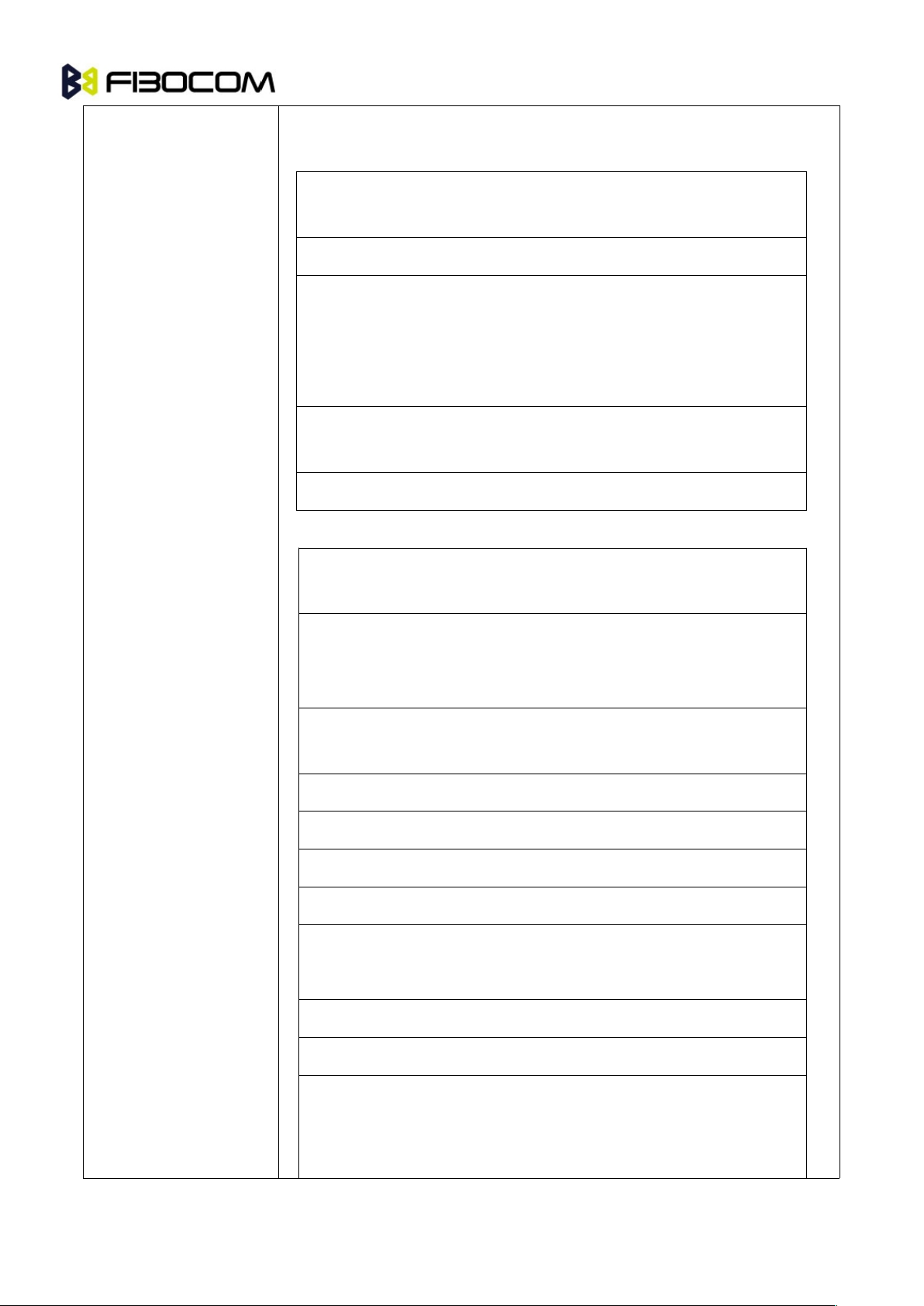
<sw1> <sw2>
Integer character format. Information, from the SIM, about the execution of
the actual command. These parameters are delivered to the TE in both
Page 32
G5/G6-Family AT Commands User Manual Page32of
243
cases, on successful or failed execution of the command.
Responses to commands which are correctly executed:
<sw1><sw
2>
Description
1440Normal ending of the command
145XXNormal ending of the command, with extra
information from the proactive SIM, containing a
command for the ME.
Length 'XX' of the response data.
158XXLength 'XX' of the response data given in case of a
SIM data download error.
159XXLength 'XX' of the response data.
Responses to commands which are postponed:
<sw1><sw
2>
Error Description
1470SIM Application Toolkit is busy. Command cannot
be executed at present, further normal commands
are allowed.
1460XCommand successful but after using an internal
update retry routine 'X' times.
14664Memory problem.
1480No EF selected.
1482Out of range (invalid address).
1484• File ID not found.
• Pattern not found.
1488File is inconsistent with the command
1522No CHV initialized
1524• Access condition not fulfilled.
• Unsuccessful CHV verification, at least one
attempt left.
Page 33
G5/G6-Family AT Commands User Manual Page33of
243
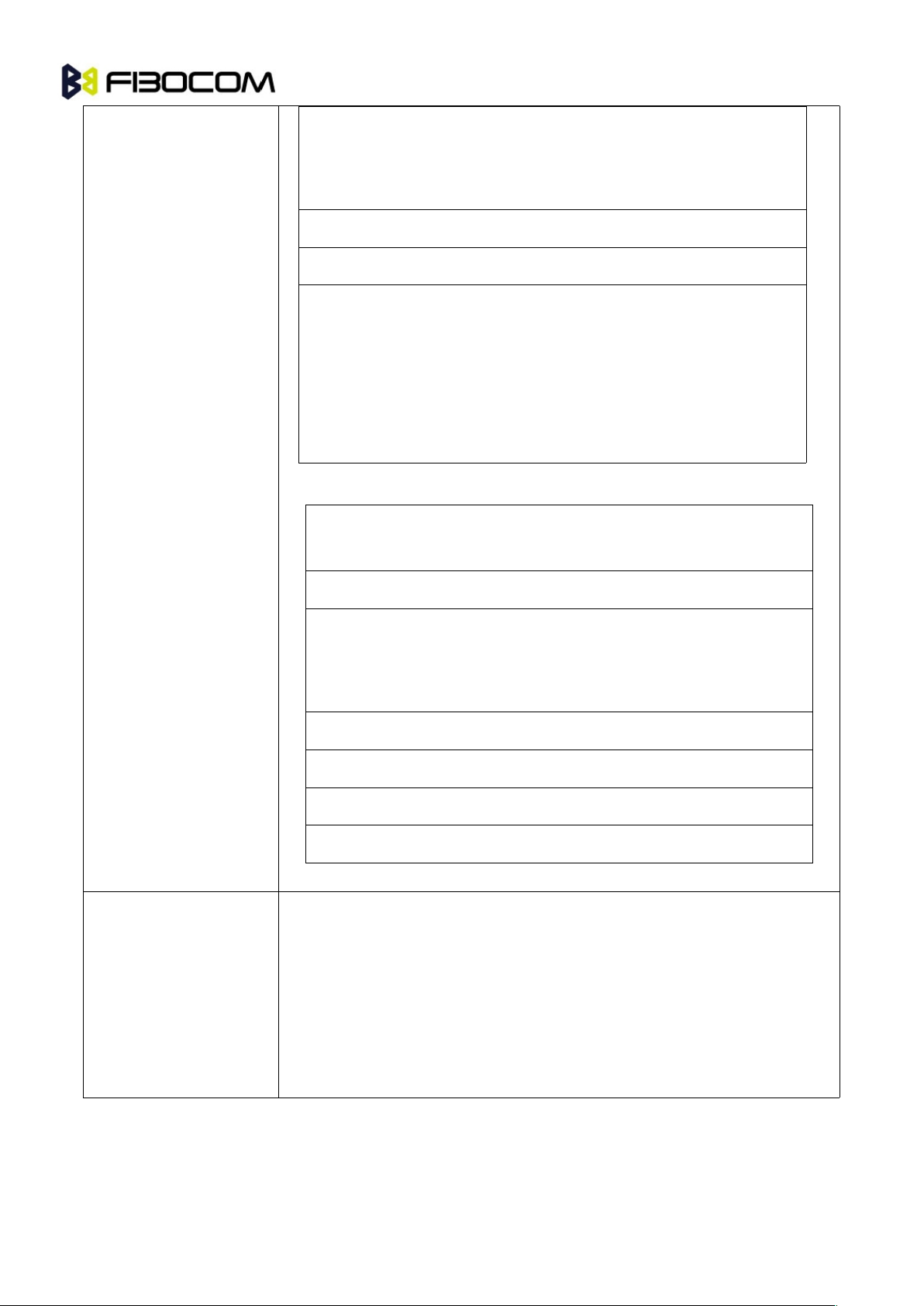
• Unsuccessful UNBLOCK CHV verification, at least
one attempt left.
• Authentication failed.
1528In contradiction with CHV status.
15216In contradiction with invalidation status.
15264• Unsuccessful CHV verification, no attempt left.
• Unsuccessful UNBLOCK CHV verification, no
attempt left.
• CHV blocked.
• UNBLOCK CHV blocked.
<sw1><sw2>Error Description
15280Increase cannot be performed, Max value reached.
103XXIncorrect parameter P3
(Note: 'XX' gives the correct length or states that no
additional information is given ('XX' = '00').
107XXIncorrect parameter P1 or P2.
109XXUnknown instruction code given in the command.
110XXWrong instruction class given in the command.
111XXTechnical problem with no diagnostic given.
<response>
Response of a successful completion of the command previously issued
(hexadecimal character uppercase format). STATUS and GET RESPONSE
return data, which gives information about the current elementary data
file_id. This information includes the type of file and its size (refer to GSM
11.11). After READ BINARY or READ RECORD command the requested
data will be returned. <response> is not returned after a successful
UPDATE BINARY or UPDATE RECORD command.
Example:
AT+CRSM=176,28478,0,0,20
Page 34

G5/G6-Family AT Commands User Manual Page34of
243
+CRSM: 103,4,"9F0F00003F000100000090000200009000563412"
OK
AT+CRSM=192,12258
+CRSM: 144,0,"0000000A2FE2040004FF4401020000"
OK
AT+CRSM=?
+CRSM: (176,178,192,214,220,242),(12037-28599),(0-255),(0-255),(0-255)
OK
4.1.11+CCID
This command returns the card identification number in SIM (SIM file EFICCID, see GSM 11.11
Chap.10.1.1) as string type.
Command
Syntax
Response/Action
Set
AT+CCID
+CCID: <ID>
OK
or:
+CME ERROR: <err>
Read
AT+CCID?
Same as above
Test
AT+CCID=?
OK
Example:
AT+CCID
+CCID: 89860018190839008096
OK
AT+CCID=?
OK
AT+CCID?
+CCID: 89860018190839008096
OK
Page 35

G5/G6-Family AT Commands User Manual Page35of
243
4.2 Sleep Mode Commands
When the Module is connected using UART connection to external device, a sleep mechanism is
available. In order to improve the power consumption, the Module supports a low-power consumption
mode, called "Sleep mode". The Module has internal decision conditions for entering and exiting sleep
mode. As the terminal and the Module operate in a combined system, and as the communication between
the Module and the terminal must be reliable, there should be a mechanism agreed upon by both the
Module and the terminal to coordinate their separate sleep mode entering and exiting sequences. The
Module will not enter sleep mode unless the terminal enables the Module by AT commands.
The following are the Sleep mode AT commands:
ATS24: Activates/deactivates Sleep mode.
The Module receives a request to activate or deactivate Sleep mode.
The Module receives a request to define the behavior of the CTS line when the Module is in Sleep mode.
It enables or disables activation of the CTS line after wakeup.
4.2.1 S24, Set Number of Seconds Delay Before Module Enters
Sleep Mode
This command activates/disables the Sleep mode. The terminal sends ATS24=5, and if there are no radio
and UART activities, the Module enters sleep mode in 5 seconds. it can see.
Command
Syntax
Response/Action
Remarks
Set
ATS24=[<value>]
OK
The Set command sets the amount of
time, in seconds; the Module should
wait before entering Sleep mode.
Read
ATS24?
<value>
OK
The Read command returns the current
value.
The following table shows the S24 parameters.
<Parameter>
Description
<value>
Number of seconds (0 <= n <= 255)
0 Disable Sleep mode
>0 Enable Sleep mode
The default value is 000.
Example:
ATS24?
Page 36

G5/G6-Family AT Commands User Manual Page36of
243
000
OK
ATS24=5
OK //The Module enter Sleep Mode at once
ATS24?
005
OK
(If there are no radio and UART activities, the Module will enter sleep mode in 5 seconds)
4.3 Error Handling Commands
4.3.1 +CMEE, Report Mobile Equipment Error
The Set command disables or enables the use of result code +CME ERROR: <err> as an indication of an
error relating to the functionality of the Module. When enabled, Module-related errors cause a +CME
ERROR: <err> final result code instead of the regular ERROR final result code. Usually, ERROR is
returned when the error is related to syntax, invalid parameters or terminal functionality.
For all Accessory AT commands besides SMS commands, the +CMEE set command disables or enables
the use of result code +CME ERROR: <err> as an indication of an error relating to the functionality of the
Module. When enabled, Module related errors cause a +CME ERROR: <err> final result code instead of
the regular ERROR result code.
For all SMS AT commands that are derived from GSM 07.05, the +CMEE Set command disables or
enables the use of result code +CMS ERROR: <err> as an indication of an error relating to the
functionality of the Module. When enabled, Module-related errors cause a +CMS ERROR: <err> final
result code instead of the regular ERROR final result.
Command
Syntax
Response/Action
Remarks
Set
AT+CMEE=[<n>]
OK
or:
+CME ERROR: <err>
The Set command enables or disables the
use of result code +CME ERROR: <err> as
an indication of an error relating to the
functionality of the Module.
Read
AT+CMEE?
+CMEE: <n>
OK
The Read command returns the current
setting format of the result code.
Test
AT+CMEE=?
+CMEE: (list of
supported <n>s)
OK
The Test command returns values
Supported by the terminal as a compound
value.
Page 37

G5/G6-Family AT Commands User Manual Page37of
243
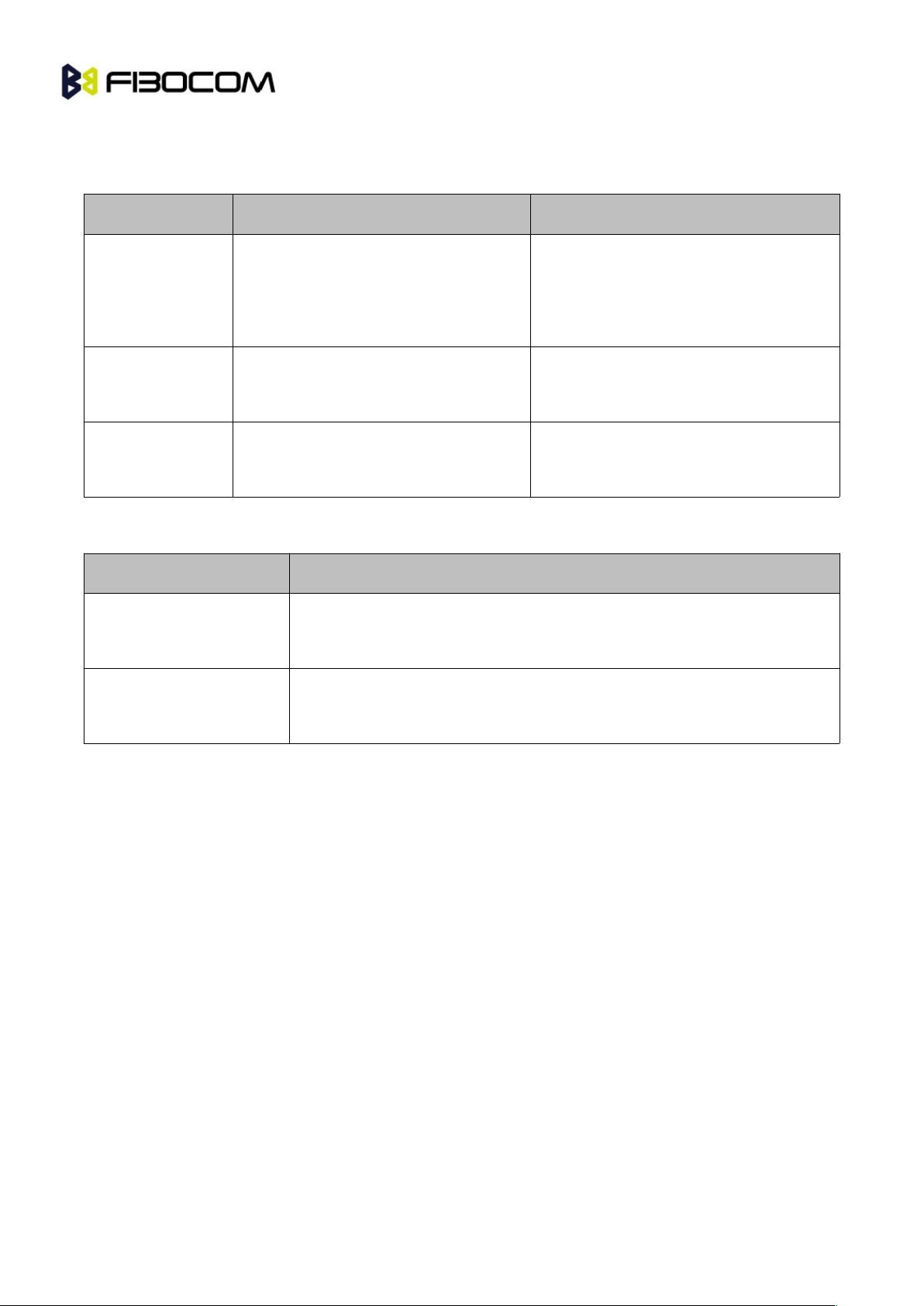
The following table shows the +CMEE parameters.
<Parameter>
Description
<n>
0 Disable the +CME ERROR: <err> result code and use ERROR.
1 Enable the +CME ERROR: <err> or +CMS ERROR: <err> result codes and use
numeric <err> values or +STK ERROR: <err> result codes and use numeric <err>
values.
2 Enable the +CME ERROR: <err> or +CMS ERROR: <err> result codes and use
verbose <err> values or +STK ERROR: <err> result codes and use numeric <err>
values.
The default value is 0.
Example:
AT+CMEE=0 //+CME ERROR is not used
OK
AT+VTD
ERROR
AT+CMEE=1 //Use numeric <err>
OK
AT+VTD
+CME ERROR: 3
AT+CMEE=2 //Use verbose <err>
OK
AT+VTD
+CME ERROR: operation not allowed
4.3.2 +CEER, Extended Error Report
This execution command returns an extended error report containing one or more lines of information text
<report>, determined by the manufacturer, providing reasons for the following errors:
Failure in the last unsuccessful call setup (originating or answering) or the in-call modification.
Last call release.
Typically, the text consists of a single line containing the reason for the error according to information
given by GSM network, in textual format.
Command
Syntax
Response/Action
Execute
AT+CEER
+CEER: <report>
OK
Test
AT+CEER=?
OK
Page 38
G5/G6-Family AT Commands User Manual Page38of
243
4.4 +MSTART, Start message notification
This command can Enable/Disable module output start message when power up.
Command
Syntax
Response/Action
Set
+MSTART=<at start>,<sim ready>
OK
or:
ERROR
Read
+ MSTART?
+MSTART: <at start>,<sim ready>
OK
Test
+MSTART=?
+MSTART: (0-1,0-1)
OK
The following table shows the +MSTART parameters.
<Parameter>
Description
<at start>
0: Do not output “AT command ready” from UART
1: Output “AT command ready” from UART (default value)
<sim ready>
0: Do not output “+SIM READY” after SIM init OK
1: Output “+SIM READY” after SIM init OK (default value)
Example:
AT+MSTART=?
+MSTART: (0,1),(0,1)
OK
AT+MSTART=1,1
OK
AT+MSTART?
+MSTART: 1,1
OK
Page 39

G5/G6-Family AT Commands User Manual Page39of
243
5 Call Control
5.1 Call Control AT Commands
5.1.1 D, Dial Command
This command places a VOICE call on the current network.Call type is a voice call. For more information
about call failure, should use the AT+CEER command.
Note: If there is an active voice call and the terminal sends another ATD voice call command to the
Module, the active call is put on hold and the new number is called.
Command
Response/Action
ATD<number>[;]
VOICE CALL:
1st response - Voice call place begins
OK
2nd response - Voice call connected:
OK
When MO call fails:
1. Connection Failure - NO CARRIER or BUSY or NO ANSWER
2. General Failure - ERROR
3. Security reason (such as SIM not present) - OPERATION NOT
ALLOWED
4. Unknown reason - UNKNOWN CALLING ERROR
The following table shows the D parameters.
<Parameter>
Description
<number>
Valid phone digits are: 0 1 2 3 4 5 6 7 8 9 * # +
The following characters are ignored: A B C D - () / and <space>.
semicolon (;)
When given after <number string>, a voice call is originated to the given
address, otherwise a data call is originated.
The control of supplementary services through the Dial command is not supported as these are controlled
through the specific supplementary service commands (CCFC, CLCK, and so on.)
Initiating a GPRS connection is done through ATD*99#, as described in “D*99.
Page 40

G5/G6-Family AT Commands User Manual Page40of
243
Example:
atd44345678; //VOICE call (with semicolon)
OK
OK
atd44345678 //VOICE call (with semicolon)
OK
OK
5.1.2 D>, Direct Dialing from Phone Books
This command places a VOICE call on the current network by dialing directly from the Module phone
book.
Note:
“+CME ERROR: not found" is returned when no match is found in an existing phone book.
FD phone book supports the (?) wild card character. Telephone numbers containing this character
cannot be dialed directly from the phone book.
"+CME ERROR: Invalid index" is returned when entry <n> is out of the requested Phonebook range.
When SM phonebook is searched and the given entry value is of the ME phonebook, ME phonebook
will be searched as well (result code would be the same as if MT phonebook was searched).
The following table shows a detailed description for the D> commands.
Command
Detailed Description
D><alpha>[;]
Originates a call to a phone number with the corresponding alphanumeric
field <alpha>. The Current Phone Book (Set by +CPBS) is searched for the
entry that begins with the alphanumeric pattern <alpha>.
D>"mem"<n>[;]
Originates a call to a phone number in memory (phone book) mem and
stored in entry location <n>.
D><n>[;]
Originates a call to a phone number from entry location <n> in the Current
Phone Book (Set by +CPBS).
Note: Current used memory (phone book) set/read is done through the memory command
+CPBS=/+CPBS? respectively.
The following table shows the D> parameters.
<Parameter>
Description
<"alpha">
String type value, which should be equal to an alphanumeric field in a phone
Page 41

G5/G6-Family AT Commands User Manual Page41of
243
book entry. The used character set should be the one selected with Select
Terminal Character Set +CSCS. <alpha> is case-sensitive, and should be
placed in quotes ("alpha").
<n>
This parameter is also called "speed dial location". It is an integer type
memory location. <n> should be in the range of locations available in the
memory used.
<"mem">
This parameter is not case-sensitive.
Example:
AT+CPBS="SM"
OK
AT+CSCS="IRA"
OK
AT+CPBW=1,"035659090",129,"VoiceMail"
OK
AT+CPBR=1
+CPBR: 001,"035659090",129,"VoiceMail"
OK
atd>”VoiceMail”; //Phonebook by name
OK
OK
ath
NO CARRIER
OK
5.1.3 DL, Dial Last Number
The DL command places a voice call to the last number dialed. The call progress information
(success/failure) is reported in the same way as for the Dial command.
Command
Detailed Description
ATDL[;]
Initial Response - Last Number retrieved:
ATDL: <DIAL DIGITS>
1st response - Voice call placement begins
OK
2nd response - Voice call connected OK
Page 42
G5/G6-Family AT Commands User Manual Page42of
243
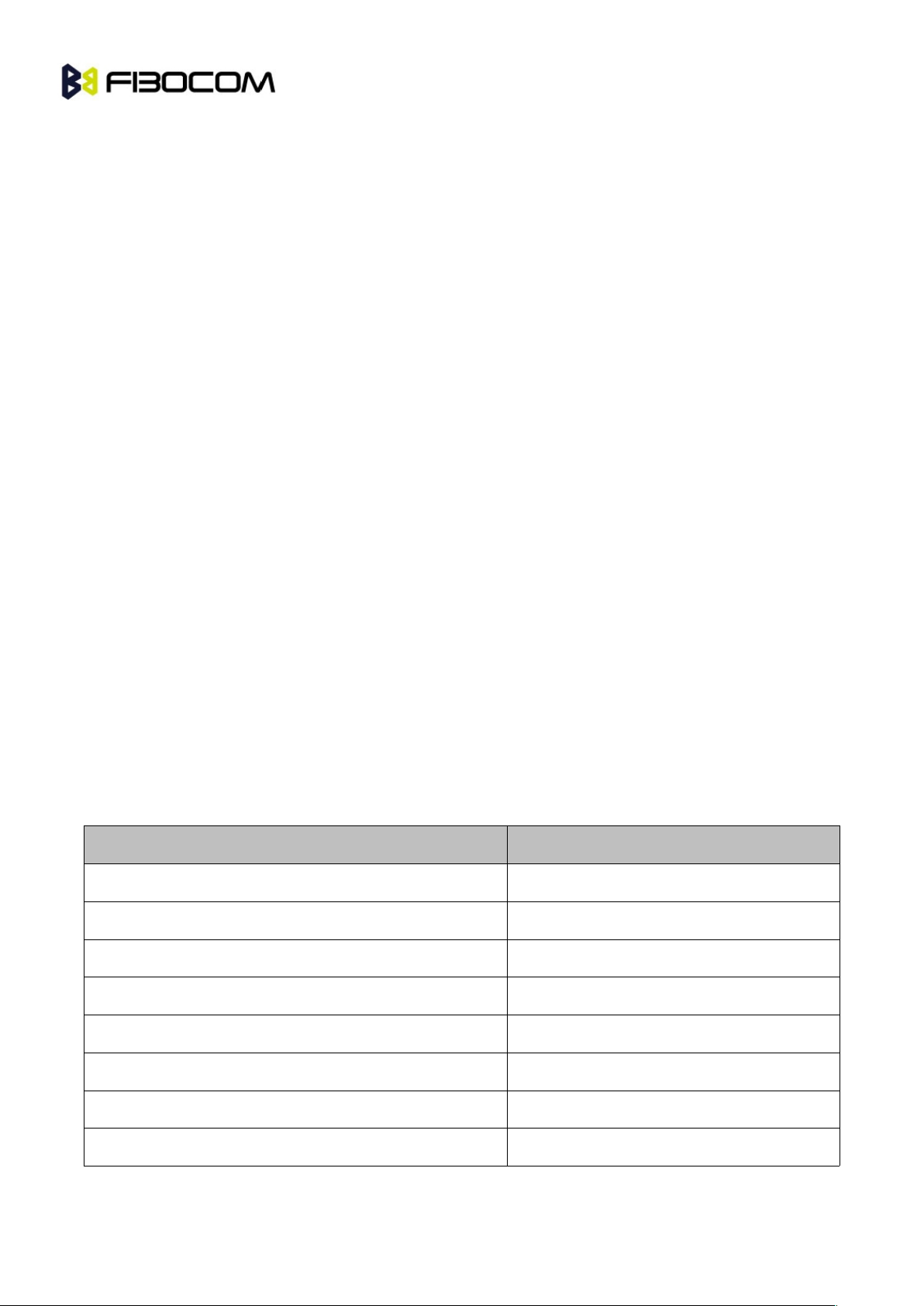
The following table shows the DL parameters.
Note:
When ATDL is issued after a dialed number with comma digit:
ATDL; dials the exact number that was last dialed, including the DTMF tones sent.
If ATDL is sent before any Dial command was issued (mainly after Power On, when the last number is an
empty field), the Module will return NO CARRIER, as mentioned in the ITU V.25-ter standard.
CCFC(*#21#),CCWA(*#43#),CLIP(*#30#),CLIR(*#31#),COLP(*#76#) will be treat as call number
and dail it again.
Example:
atdl;
ATDL: 035658278;
OK
OK //VOICE call
5.1.4 H, Hang-up Call
This command hangs up a call. The Module terminates the call whether it is a voice call, and whether it is
an incoming, originating, waiting, or connected call.
A NO CARRIER message is returned to the terminal before the regular OK approval.
To terminate a held Voice call or to terminate a call out of a MTPY call, refer to “+CHLD, Call Related
Supplementary Services Command” .
The following table shows the call states of the H command.
Call State
Response/Action
IDLE
Error ("operation not allowed")
Single Active
Call released
MTPY Active
Call released (all calls)
Incoming call (RING)
Call released
Single Active and Waiting Call
Single Active released (waiting not affected)
MTPY Active and Waiting Call
MTPY Active released (waiting not affected)
Single (or MTPY) Active and Single (or MTPY) Held
Single (or MTPY) Active released
Held (Single or MTPY) and Waiting Call
Waiting call released
Page 43

G5/G6-Family AT Commands User Manual Page43of
243
Single (or MTPY) Active and Single (or MTPY) Held &
Waiting call
Single (or MTPY) Active released
Example:
RING //Incoming call
RING //Incoming call
ath //Hang-up incoming call
NO CARRIER
OK //Incoming call has been terminated - user determined user busy
RING
ata
OK //Voice call connected
ath //Hang-up connected call
NO CARRIER
OK //Active call has been hung-up - terminated
(... Active multi party call, with 3 numbers …)
ath
NO CARRIER
NO CARRIER
NO CARRIER
OK
atd035659260;
OK
ath //Terminate MO voice call while placed
NO CARRIER
OK
5.1.5 A, Answer Incoming Call
This command answers an incoming VOICE call after a RING/+CRING indication is sent to the terminal.
If the incoming call is answered (connected), the Module sends a CONNECT notification to the terminal.
If the MT call fails, the possible notifications are:
NO CARRIER - Connection Failure
ERROR - General Failure
Note: A waiting call (an incoming call while a call is in progress) is announced by +CCWA rather than
RING. A waiting call can be answered only if it is a voice call. The waiting voice call should be answered
Page 44

G5/G6-Family AT Commands User Manual Page44of
243
using the ATA command, which will put the active call on hold and will connect the waiting call, making it
the active call. This ATA action is the same action as AT+CHLD=2.
Example:
Example - Answering a voice call:
AT+CRC=1
OK
+CRING: VOICE
+CRING: VOICE
ata
OK //VOICE call connected - Module is in Command mode
ath
NO CARRIER
OK
5.1.6 +CRC, Cellular Result Codes and RING, +CRING - Incoming
Call Indication
This command controls whether or not to present the extended format of an incoming call indication. The
RING/+CRING indication is sent from the Module to the terminal when the Module is alerted by an
incoming call from the network. Once this indication is sent, information is available on the calling line via
+CLIP. When +CRC is disabled, the indication is RING, and when +CRC is enabled, the indication is
+CRING.
Command
Syntax
Response/Action
Remarks
Set
+CRC=<n>
OK
The Set command enables/disables
the extended format of an incoming
call indication. When enabled, an
incoming call is indicated to the
terminal with an unsolicited result code
+CRING: <type> instead of the normal
RING.
Read
+CRC?
+CRC: <n>
OK
The Read command queries the
current settings for the cellular result
code.
Test
+CRC=?
+CRC: (list of
The Test command returns the
Page 45

G5/G6-Family AT Commands User Manual Page45of
243
supported <n>s)
possible
<n> values.
RING/+CRING Indication
+CRING: <type> or:
RING
The following table shows the +CRC parameters.
<Parameter>
Description
<n>
0 Extended format disabled
1 Extended format enabled
The default value is 0.
<type>
ASYNCCSD
REL ASYNCCSD
VOICE
Type of incoming call:
asynchronous transparent
asynchronous non-transparent
Normal voice
Example:
AT+CRC?
+CRC: 0
OK
AT+CRC=?
+CRC: (0-1)
OK
Example - RING/+CRING indication
(..Incoming Call..)
RING
RING
RING
AT+CRC=1 //Enable extended ring format
OK
Page 46

G5/G6-Family AT Commands User Manual Page46of
243
+CRING: VOICE
+CRING: VOICE
ath
NO CARRIER
OK
5.1.7 +CLIP, Calling Line Identification
This command controls the Calling Line Identity (CLI) presentation indication to the terminal when an
incoming call is detected by the Module.This command allows the user to query the provisioning status of
the CLI by the network and by the Module. The command also allows the user to enable/disable the CLI
presentation by the Module to the terminal. The +CLIP indication information varies depending on what is
provided by the network and what information is stored in the Module phone book.
Command
Syntax
Response/Action
Remarks
Set
AT+CLIP=[<n>]
OK
or:
+CME ERROR:
<err>
The Set command enables or disables the
presentation of the CLI indication from the
Module to the terminal. Note: The Set
command does not address the network.
Read
AT+CLIP?
+CLIP: <n>, <m>
OK
The Read command returns the +CLIP
enable/disable state in the Module as well as
in the network provisioning state of the CLI
presentation.
Test
The Test command returns the Set command
options (0,1).
5.1.8 +CLIP Indication
When the CLI presentation indication is enabled by the Module (<n>=1), this unsolicited indication is sent
to the terminal after the RING indication.
+CLIP: <number>,<type>[,<subaddr>,<satype>[[,<alpha>] [,<CLI validity>]]]
The following table shows the +CLIP parameters.
<Parameter>
Description
<n>
Enables/disables the CLI presentation indication after the ring indication:
0 Disable CLI presentation
1 Enable CLI presentation
Page 47

G5/G6-Family AT Commands User Manual Page47of
243
The default value is 0.
<m>
Shows the subscriber CLIP service status in the network:
0 CLIP not provisioned
1 CLIP provisioned
2 Unknown (for example, no network and so on)
<"number">
Calling line number. The number format is specified by <type>.
<type>
Type of address octet in integer format:
145 Default when the dialing string includes the international access
code character "+".
161 Default when making a local call.
129 Type of number is unknown (usually the output when the number
itself is unknown).
<subaddr>
NULL, field not used (String type subaddress of format specified by
<satype>)
<satype>
Field not used. Value is always 128 (unknown) - type of sub address octet in
integer format.
<"alpha">
Name of the calling party (if provided by the network or if the number is found
in the Module phone books).
<CLI validity>
The Validity of the Calling Line Identity presentation:
0 CLI valid.
1 CLI has been withheld by the originator.
2CLI is not available due to networking problems or limitations of the
originating network.
Example:
AT+CLIP=?
+CLIP: (0,1)//CLI presentation is disabled by the G5xx/G6xx (0) and is enabled by the network
(1)
OK
AT+CLIP=1
OK
Page 48

G5/G6-Family AT Commands User Manual Page48of
243
Example +CLIP indication:
(…incoming call…)
RING
+CLIP: "13510503472",161,,,"",0
Example +CLIP indication with restricted CLI:
AT+CRC=1
OK
(…incoming call…, caller restricted the CLI presentation (used AT+CLIR)…)
+CRING: VOICE
+CLIP: "",128,,128,"",1 //longzhongyou?
5.1.9 +CCWA, Call Waiting Command
This command controls the Call Waiting supplementary service, including the settings and the queries of
the Module and the network. When the Call Waiting indication is enabled by the Module and there is a
waiting call, a +CCWA: indication is sent from the Module to the terminal. The indication will appear one
time
Note: The Module supports only one of the services at a time: Voice. Multiparty is a voice-only
functionality. A CCWA indication is sent to the terminal only during a voice call-waiting event.
Command
Syntax
Response
Remarks
Set
+CCWA=[<n>
[,<mode>[,<cl
ass>]]]
OK
If <mode>=2 and the
command succeeds:
+CCWA:
<status>,<class1>[<CR><
LF>
+CCWA:
<status>,<class2>
[...]]
OK
The Set command enables/disables the
Call-Waiting indication in the Module and
in the network. Activation, deactivation
and status query are supported.
Note: When the <mode> parameter is set
to 2 (network query), the <n> parameter
is ignored. This means that no
enable/disable action is performed while
querying the network.
Read
+CCWA?
+CCWA: <n>
OK
The Read command returns the
Enable/disable status of the call waiting
Page 49

G5/G6-Family AT Commands User Manual Page49of
243
indication in the Module (<n>).
Test
+CCWA=?
+CCWA: (list of
supported <n>s)
OK
The Test command returns <n> values
supported by the Module as a compound
value.
5.1.10+CCWA Indication
When a call-waiting indication is enabled by the Module (<n>=1), the following unsolicited indication is
sent to the terminal from the Module:
+CCWA: <number>,<type>,<class>[,<alpha>] [,<CLI validity>]
The following table shows the +CCWA parameters.
<Parameter>
Description
<n>
Enables/disables the call waiting indication to the terminal by the Module.
0 - Disable
1 - Enable
The default value is 0.
<mode>
Call waiting service request to the network. When the <mode> parameter is
not given, the network is not interrogated.
0 - Disable
1 - Enable
2 - Query status
<class>
Sum of integers each representing a class of information.
1 - Voice (telephony)
The default value is 1.
<"number">
Calling line number. The number format is specified by <type>.
<type>
Type of address octet in integer format:
145 - Default when the dialing string includes the international access code
character "+".
161 - Default when making a local call.
129 - Type of number is unknown (usually the output when the number itself
is unknown)
<status>
Call waiting support by the network (output for <mode>=2).
Page 50

G5/G6-Family AT Commands User Manual Page50of
243
0 - Not active
1 - Active
<"alpha">
Name of the calling party (if provided by the network or if the number is found
in the Module phone books).
<CLI validity>
The Validity of the Calling Line Identity presentation:
0 - CLI valid.
1 - CLI has been withheld by the originator.
2 - CLI is not available due to networking problems or limitations of the
originating network.
Note: When the parameter <mode> is 2 (Query status), the first parameter is ignored and the third
parameter is always treated as class = 1 unless it was set in Set Mode.
Example:
AT+CCWA=1 //Enable call waiting on Module
OK
AT+CCWA=?
+CCWA: (0-1)
OK
AT+CCWA?
+CCWA: 1
OK
Examples of +CCWA set command - network interrogation
AT+CCWA=1,2 //Class parameter is considered as 7
+CCWA: 1,1 //Call waiting is active for class 1, voice
OK
AT+CCWA=1,2,2 //Class parameter is 2
+CCWA: 0,2 //Call waiting is not active for class 2, data
OK
AT+CCWA=1,1
OK //Enable the call waiting feature in the network, and in the Module
Example +CCWA indication
atd9311234567; //Originate a voice call
OK
OK //Voice call connected
(...conversation...)
Page 51

G5/G6-Family AT Commands User Manual Page51of
243
(… call waiting indication received by the Module …)
+CCWA: "+358317654321",145,1,"Bob"
AT+CHLD=0 //Release the waiting call
OK
NO CARRIER
AT+CRC=1 //RING indication is not relevant to CCWA indication
OK
(…waiting call…, caller restricted to its CLI presentation (used AT+CLIR)…)
+CCWA: "",128,1,"",1 //CLI is restricted, but call type recognized as voice
5.1.11+CHLD, Call Related Supplementary Services Command
This command controls the Call Hold and Multiparty Conversation services. This command manipulates
voice calls only. The Set command allows the control of the following call related services:
Call HOLD: A call can be temporarily disconnected from the Module, but the connection is retained by
the network.
MTPY (Multi party) Conversation: Conference calls.
The network does not reserve more than one traffic channel for a mobile station; therefore the Module can
have only one call on hold at a time.
Note: Only voice calls can be put on HOLD.
A precondition for the multi-party service is that the Module is in control of one active call and one call on
hold. In this situation, the Module can request the network to begin the MTPY (Multi Party) service. Once
a MTPY call is active, remote parties may be added, disconnected or separated (removed from the MTPY
call, but remain connected to the served mobile subscriber).The maximum number of remote parties is
5.In this command, the term CALL refers to a single or MTPY call.
A single Active call is considered a MTPY call with one call index numbered as 1.
Command
Response/Action
+CHLD=<n>
If the call is terminated:
NO CARRIER
OK (approve request was submitted)
If the call state is changed (link, split, from active to hold, and so on):
OK (approve request was done)
If the call is terminated and another call is answered:
Page 52

G5/G6-Family AT Commands User Manual Page52of
243
NO CARRIER
OK (call answered and is now connected)
Command
Syntax
Response/Action
Remarks
Test
+CHLD=?
+CHLD: (list of supported
<n>s)
OK
The Test command returns <n> values
supported by the Module to the
terminal
The following table shows the +CHLD parameters.
<Parameter>
Description
<n>
Call hold operation:
0 - Releases all held calls
or:
Sets User Determined User Busy for a waiting call
1 - Releases all active calls and accepts the held or waiting call
1x - Release specific call x, where x is the serial number of a call participating
in an active MTPY call.
2 - Places all active calls on hold and accepts the held or waiting call
2x - In the case of an active MTPY call, places all active calls on hold, except
for call X
x. Call x remains active.
3 - Adds a held call to the conversation – MTPY
Example:
AT+CHLD=?
+CHLD: (0,1,1x,2,2x,3)
OK
AT+CCWA=1 //Enable call waiting
OK
atd9311234567; //Originate a voice call
OK
OK (...conversation...)
+CCWA: "+358317654321 ",145,1,"Bob" //Awaiting call alerts
AT+CHLD=2 //Put first call on hold and answer the second call
Page 53

G5/G6-Family AT Commands User Manual Page53of
243
OK (...conversation...)
AT+CHLD=3 //Add the held call to the conversation
OK
(...MTPY conversation...)
AT+CHLD=22 //Split: Place the MO active call on hold, MT call remains active
OK
AT+CHLD=0 //Release the held call
OK
NO CARRIER
ath //Release the active call
NO CARRIER
OK
atd9311234567; //Originate a voice call
OK
OK
+CCWA: "055728386",129,1," ",0 //Waiting call alerts
AT+CHLD=1 //Release the active call, accept the waiting call
OK
NO CARRIER //Active 9311234567 was released
OK //Waiting 055728386 was answered
5.1.12+CCFC, Call Forwarding Number and Conditions
This command enables control of the call-forwarding supplementary service. Registration, erasure,
activation, deactivation, and status query are supported.
Command
Syntax
Response/Action
Remarks
Set
+CCFC=<reason>,
<mode>[,<number
>[,<type>[,<class>[
,<subaddr>[,<saty
pe>[,<time>]]]]]]
If the command succeeds:
+CCFC:
<status>,<class1>[,<number>,<type>[,
<subaddr>,<satype>[,<time>]]]
[<CR><LF>
+CCFC:
<status>,<class2>[,<number>,<type>[,
<subaddr>,<satype>[,<time>]]][...]]
+CCFC: (list of supported <reason>s)
The Set command
instructs the Module
which call forwarding
settings to request from
network. The Set
command, in query
mode, interrogates the
network about the
subscriber current call
forwarding status.
Test
+CCFC=?
+CCFC: <reason>
The Test command
Page 54

G5/G6-Family AT Commands User Manual Page54of
243
OK
returns <reason> values
supported by the Module
to the terminal.
The following table shows the +CCFC parameters.
<Parameter>
Description
<reason>
0 - Unconditional
1 - Mobile busy
2 - No reply
3 - Not reachable
4 - All call forwarding
5 - All conditional call forwarding
<mode>
0 - Disable
1 - Enable
2 - Query status
3 - Registration
4 - Erasure
<"number">
Calling line number. The number format is specified by <type>.
<type>
Type of address octet in integer format-.
145 Default when dialing string includes international access code
character "+".
161 Default when making a local call.
<subaddr>
NULL, field not used (String type subaddress of format specified by
<satype>).
<satype>
Field not used. Value is always 129 (unknown) - type of sub address octet in
integer format.
<classx>
The sum of integers representing a class of information.
1 - Voice
The default value is 1.
<time>
1-30 - The number of seconds to wait before calls are forwarded, when "no
reply" is enabled or queried.
Page 55

G5/G6-Family AT Commands User Manual Page55of
243
The default value is 20.
Note: The parameter must be a multiple of 5, for example, 5, 10, 15 and so
on. If not, the module of 5 will be ignored.
<status>
0 - Not active
1 - Active
Note: A forward-to phone <number> (and the optional fields <type>, <subaddr> and <satype>) are tied
to a <reason> and a <class>. This means that there can be a different <number> for the same <reason>
because of a different <class>. When registering without mentioning a <class>, <class>=7 is selected.
A <number> field is mandatory when registering (<mode>=3) and it is irrelevant (ignored) in all other
<mode>s.
Example:
AT+CCFC=?
+CCFC: (0-5)
OK
AT+CCFC=0,3,"01256316830",129,1
OK
AT+CCFC=1,3,"0545658278",129,1 //Register UC forward-to of all classes.
OK
AT+CCFC=1,1 //Activate UC forward-to of all classes.
OK
AT+CCFC=1 ,2 //Interrogate reason not-reachable of all classes.
+CCFC: 1,1,"+97254151200",145
OK //For <reason>=3, forward only voice calls is activated.
AT+CCFC=4,2 //Interrogate reason all-call-forwarding for all classes.
+CME ERROR: no network service//Interrogation of <reason>=30 is not supported by network.
AT+CCFC=2,3,"+972545658278"
OK
AT+CCFC=2,0 //Disable call-forwarding for reason no-reply of all classes.
OK
AT+CCFC=2,2
+CCFC: 0,1,"+972545658278",145,,25
OK
Page 56

G5/G6-Family AT Commands User Manual Page56of
243
5.1.13 +CLIR, Calling Line Identification Restriction
This command instructs the Module to query, enable or disable the presentation of the CLI (calling line ID)
of a MO call to the called party. The restriction of the CLI (disable presentation) is dependent both on the
Module and on the network.
The network enables three possible provisions of CLIR:
Not provisioned (CLIR Off - presentation allowed)
Provisioned permanently
Provisioned with Temporary mode
The provision is fixed and cannot be changed by an AT command. Temporary Mode:
Temporary mode can be in one of two states:
A - Presentation restricted (CLIR On) as default.
B - Presentation allowed (CLIR Off) as default. A subscriber to Temporary mode always has a default
subscription to state A or B. Temporary-mode provisioning means that the terminal can request the
module to switch the default mode from A to B, and vice versa.
Note: When a service is in state A, and the terminal wants to enable the CLI presentation (turn CLIR off)
for a single call, it can do so using the ATD command. This does not change the Temporary mode state.
This can also be done when the service is in state B and the terminal wants to disable the CLI
presentation (turn CLIR on) for a single call.
Command
Syntax
Response/Action
Remarks
Set
+CLIR=<n>
OK
or:
+CME ERROR: <err>
The Set command instructs the Module
to enable/disable CLI restriction for all
MO calls.
Read
+CLIR?
+CLIR: <n>,<m>
OK
The Read command returns the current
setting of CLIR on the network <m> and
on the Module <n>.
Test
+CLIR=?
+CLIR: (list of
supported<n>s)
The Test command returns <n> values
supported by the Module.
The following table shows the +CLIR parameters.
<Parameter>
Description
<n>
Adjustment for outgoing calls
0 - Presentation indicator is used according to the subscription of the CLIR
service
Page 57

G5/G6-Family AT Commands User Manual Page57of
243
1 - CLIR invocation
2 - CLIR suppression
The default value is 2.
<m>
Subscriber CLIR service status in the network
0 - CLIR not provisioned
1 - CLIR provisioned in permanent mode
2 - Unknown (for example, no network and so on)
3 - CLIR Temporary mode presentation restricted (can be the default)
4 - CLIR Temporary mode presentation allowed (can be the default)
Example:
AT+CLIR=?
+CLIR: (0-2)
OK
AT+CLIR?
+CLIR: 0,0
OK
AT+CLIR=2
OK
atd054565195; //MO voice call
OK
(… calling …)
(… a Module that has 054565195 SIM and is CLIP enabled will receive the following on the
terminal:
RING
+CLIP: "",128,,128,"",1
RING
+CLIP: "",128,,128,"",1)
ath
NO CARRIER
OK
AT+CLIR=0
OK
atd054565195; //MO voice call
OK
Page 58

G5/G6-Family AT Commands User Manual Page58of
243
(… calling …)
(… a Module that has 054565195 SIM and is CLIP enabled will receive the following on the
terminal:
RING
+CLIP: "054565006",129,,128," ",0
RING
+CLIP: "054565006",129,,128," ",0 …)
ath
NO CARRIER
OK
5.1.14 O, Return to Online Data State
This command returns the Module from the Command mode to the Online Data mode and issues a
CONNECT or CONNECT <text> result code.
After dialing or answering (atd/ata commands and connect), the phone enters the Online Data mode
where it is able to transfer data, but not to enter AT commands.
The ESC command +++, transfers the phone to the Command mode. The O command returns the phone
to the fully online Data mode (as it was before using the ESC command).
Note: The escape character '+' can be changed using the S2-register.
The time delay between consecutive escape characters is configured using the S 12-register.
Command
Syntax
Response/Action
Execute
ATO
CONNECT
+CME ERROR: <err> If phone is not in Data Call
NO CARRIER: If connection is not successfully resumed.
Example:
AT+MIPODM //Calling a remote modem - data mode
CONNECT //Module is in Data mode
//Escaping back to Command mode using the +++ sequence
OK
AT //Module is in Command mode
OK
ATO //Returning to Data mode
CONNECT
Page 59

G5/G6-Family AT Commands User Manual Page59of
243
5.1.15 +CHUP, Hang up Call
This command causes the Module to hang up the current GSM call.
Command
Syntax
Response/Action
Remarks
Set
+CHUP
OK
or:
+CME ERROR
<err>
The Set command hangs up the current
GSM call.
5.1.16 +MDC, Selection of Desired Message to Be Displayed Upon
Connection of a Voice Call
This AT command enables you to select the desired messages to be displayed upon connection of a voice
call with a remote party. The OK and CONNECT messages are available.
Command
Syntax
Response/Action
Remarks
Set
+MDC=<
mode>
OK
or:
+CME ERROR:
<err>
The Set command selects which of the
supported messages will be displayed upon
connection of a voice call.
<mode> Command Parameters:
0 - Display OK on voice call connection
1 - Display CONNECT on voice call
connection
Default Values:
Power Up - As previously saved in NVM
FLEX bit
0 - Before Set command is first used
Read
+MDC?
+MDC: <mode>
OK
The Read command should return the
current selection of <mode>.
Test
+MDC=?
+MDC: (list of
supported
<mode>s)
OK
The Test command returns the possible
<mode> values.
Example:
Page 60
G5/G6-Family AT Commands User Manual Page60of
243
AT+MDC=?
+MDC: (0-1)
OK
AT+MDC=1
OK
ATD<number>;
OK
CONNECT
AT+MDC?
+MDC: 1
OK
AT+MDC=0
OK
ATD<number>;
OK
OK
AT+MDC?
+MDC: 0
OK
5.1.17+MHUP, Module Hung UP call
This command hung up a specific call or all calls, and reports a specific disconnect cause to the NW.
Command
Syntax
Response/Action
Remarks
Set
AT+MHUP=<
cause>[,<call
_id>]
OK
or:
+CME ERROR: <err>
Test
AT+MHUP=?
+MHUP:
(1,16,17,18,27,31),(0-7)
OK
Show list of supported <cause>'s
and list of supported <call_id>'s.
The following table shows the +MHUP parameters.
<Parameter>
Description
<cause>
Cause description, send to the NW in the "disconnect" message.
1 "Unassigned (unallocated) number"
Page 61

G5/G6-Family AT Commands User Manual Page61of
243
16 "Normal call clearing"
17 "User busy"
18 "No user responding"
27 "Destination out of order"
31 "Normal, unspecified"
<call_id>
Index of the call id (same as <idx> in +CLCC command)
0 All calls (default).
1-7 Specific call id.
Example:
AT+MHUP=?
+MHUP: (1,16,17,18,27,31),(0-7)
OK
AT+MHUP = 16,3 //Hung up call #3, and send cause "Normal call clearing"
OK
AT+MHUP = 17 //Hung up all calls, and send cause "User busy"
OK
AT+MHUP = 17,0 //Hung up all calls, and send cause "User busy"
OK
5.2 Call Status Messages
5.2.1 +CPAS, Phone Activity Status
This command displays the current activity status of the Module; for example, call in progress, or ringing.
Command
Syntax
Response/Action
Remarks
Execute/Read
AT+CPAS
+CPAS: <pas>
OK
or:
+CME ERROR: <err>
The Execute and Read commands
return the activity status <pas> of the
Module. They can be used to
interrogate the Module.
Test
AT+CPAS
=?
+CPAS: (list of
supported <pas>s)
OK
Page 62

G5/G6-Family AT Commands User Manual Page62of
243
The following table shows the +CPAS parameters.
<Parameter>
Description
<pas>
0 - Ready - The Module allows commands from the terminal
1 - unavailable(MT does not allow commands from TA/TE)
2 - Unknown - The Module is not guaranteed to respond to instructions
3 - Ringing (MT calls) - The Module is ready for commands from the terminal,
but the ringer is active
4 - Call in progress - The Module is ready for commands from the terminal, but a
call is in progress
5 – Asleep (MT is unable to process commands from TA/TE, because it is in a
low functionality state.
Example:
AT+CPAS
+CPAS: 0
OK
AT+CPAS=?
+CPAS: (0-5)
OK
AT+CPAS?
+CPAS: 4
OK
AT+CPAS//Voice call active state
+CPAS: 4
OK
5.2.2 +CLCC, List Current Calls
This command displays a list of all current Module calls and their statuses, and also enables/disables the
unsolicited indication of the call list. (If no calls are received, no information response is sent to the
terminal.)
If the command succeeds but no calls are available, no information response is sent to the terminal.
The maximum number of simultaneous multiparty calls is 5+1 (5 in active group and 1 on hold).
Command
Syntax
Response/Action
Remarks
Set
AT+CLCC=<state>
OK
The Set command enables/disables
unsolicited indications.
Page 63

G5/G6-Family AT Commands User Manual Page63of
243
or:
+CME ERROR: <err>
Execute
AT+CLCC
+CLCC:
<idx>,<dir>,<call
state>,
<mode>,<mpty>,<
number>,<type>[,<
alpha>]
[<CR><LF>
+ CLCC:
<idx>,<dir>,<call
state>,<mode>,<m
pty>,<number>,<ty
pe>[,<alpha>]
[…]]
OK
The Execute command enables the
receiving of data about current calls.
Read
AT+CLCC?
+CLCC: <state>
OK
or:
+CME ERROR
<err>
The Read command returns the call
status.
Test
AT+CLCC=?
+CLCC: (List of
supported
<state>s)
OK
or:
+CME ERROR
<err>
The following table shows the +CLCC parameters.
<Parameter>
Description
<state>
0 Disable CLCC unsolicited indication
1 Enable CLCC unsolicited indication
Page 64

G5/G6-Family AT Commands User Manual Page64of
243
The default value is 0.
<idx>
Integer type, call identification number
<dir>
0 Mobile originated call (MO)
1 Mobile terminated call (MT)
<call state>
The state of the call
0 Active
1 Held
2 Dialing (MO call)
3 Alerting (MO call)
4 Incoming (MT call)
5 Waiting (MT call)
6 Released
<mode>
Bearer/Teleservice
0 Voice Call
<mpty>
Multiparty status
0 Call is not part of a multiparty call
1 Call is one of multiparty call parties
<number>
Phone number in the format specified by <type>.
Contains a string of up to 32 characters.
<type>
Phone number display format.
Type of address octet in integer format (refer to GSM 04.08 [8] subclause
10.5.4.7)
161 Local number
145 International number with access character +
Note: When a mobile-originated call is routed to PSTN (PABX), no ALERT indication is prompted.
Example:
AT+CLCC=?
+CLCC: (0-1)
Page 65

G5/G6-Family AT Commands User Manual Page65of
243
OK
AT+CLCC
+CLCC: 1,0,0,0,0,"01256316830",129,
OK
AT+CLCC?
+CLCC: 0
OK
AT+CLCC=1 //Example with unsolicited indication
OK
ATD055490698;
OK
+CLCC: 1,0,2,0,0,"055490698",129,
+CLCC: 1,0,3,0,0,"055490698",129,
OK
+CLCC: 1,0,0,0,0,"055490698",129,
ATH
NO CARRIER
OK
+CLCC: 1,0,6,0,0,"055490698",129,
5.3 Supplementary Services
This set of commands enables control over supplementary service notifications, including Structured and
Unstructured Supplementary Service Data (USSD) data.
5.3.1 +CSSN, Supplementary Service Notifications
This command handles the enabling and disabling of supplementary service-related, network-initiated,
notifications.
Command
Syntax
Response/Action
Remarks
Set
+CSSN=[<
n>[,<m>]]
OK
or:
+CME ERROR:
<err>
The Set command enables/disables the display of
notification result codes to the TE.
When <n>=1 and a supplementary service
notification is received after a mobile-originated call
setup, the +CSSI: notification is sent to the TE
before any other mobile-originated call setup result
codes. When several different notifications are
received from the network, each of them receives
its own +CSSI result code.
When <m>=1 and a supplementary service
Page 66

G5/G6-Family AT Commands User Manual Page66of
243
notification is received during a mobile-terminated
call setup or during a call, or when a forward check
supplementary service notification is received, the
unsolicited result code +CSSU: is sent to the TE. In
case of a mobile-terminated call setup, a CSSU is
sent after every +CLIP result code
(“+CLIP, Calling Line Identification”). When several
different events are received from the network,
each of them receives its own +CSSU result code.
Note: The values for <n> and <m> are not saved
after power cycle.
Read
+CSSN?
+CSSN: <n>,<m>
OK
The Read command displays the current
supplementary service notification setting.
Test
+CSSN=?
+CSSN: (0-1),
(0-1)
OK
The Test command displays the list of supported
CSSN values.
The following table shows the +CSSN parameters.
<Parameter>
Description
<n>
Sets/displays the +CSSI result code presentation status. This value must be
specified.
0 Disable (default)
1 Enable
<m>
Sets/displays the +CSSU result code presentation status. This value is optional,
but cannot be specified without <n>.
0 Disable (default)
1 Enable
Value
Description
Module Support
0
Unconditional call forwarding is active
Yes
1
Some conditional call forwarding is active
Yes
2
Call has been forwarded
Yes
Page 67
G5/G6-Family AT Commands User Manual Page67of
243
3
Call is waiting
Yes (GSM only)
4
CUG call (<index> is present)
Yes
5
Outgoing calls are barred
Yes
6
Incoming calls are barred
Yes
7
CLIR suppression rejected
Yes
8
Call has been deflected
No
Value
Description
Module Support
0
This is a forwarded call
(Mobile-terminated call setup).
Yes
1
CUG call (<index> is present;mobile-terminated call setup).
Yes
2
Call has been put on hold (during a voice call)
Yes
3
Call has been retrieved (during a voice call)
Yes
4
Multiparty call has been entered(during a voice call)
Yes
5
Call on hold has been released(during a voice call; not a supplementary
service notification)
Yes
6
Forward check supplementary service message received (can be
received at any time)
Yes
7
Call is being connected with the remote party in an alerted state using
an explicit call transfer operation (during a voice call).
Yes
8
Call has been connected with the other remote party using an explicit
call transfer operation (during a voice call or during mobile-terminated
call setup).Number and subaddress parameters may be present:
<number>String type phone number of format defined by <type>
<type>Type of address octet in integer format (refer to GSM04.08 [8],
subclause 10.5.4.7)
<subaddr>String type subaddress of format defined by <satype>
<satype>Type of subaddress octet in integer format (refer to GSM 04.08
[8], subclause10.5.4.8)
Yes
9
Deflected call
(mobile-terminated call setup)
No
Page 68

G5/G6-Family AT Commands User Manual Page68of
243
Example:
AT+CSSN=? // test command
+CSSN: (0-1),(0-1)
OK
AT+CSSN=0,0 // disable both options
OK
AT+CSSN=1,0 // set n value as enabled, m disabled
OK
AT+CSSN?
+CSSN: 1,0 // display the current n & m values
OK
+CSSI: 1 // displayed after mobile originated call setup of call forward and n enable
+CSSU: 2 //displayed when a call has been placed on hold (during the call) using the +CHLD
AT command and m enable
5.3.2 +CUSD, Unstructured Supplementary Service Data
This command allows control of Unstructured Supplementary Service Data (US SD), according to GSM
02.90.
Both network and mobile initiated operations are supported. Parameter <n> is used to disable/enable the
presentation of an unsolicited result code (USSD response from the network, or network initiated
operation) +CUSD: <m>[,<str>,<dcs>] to the TE. In addition, value <n>=2 is used to cancel an ongoing
USSD session. When <str> is given, a mobile initiated USSD-string or a response USSD-string to a
network initiated operation is sent to the network. The response USSD-string from the network is returned
in a subsequent unsolicited +CUSD result code.
Command
Syntax
Response/Action
Remarks
Set
AT+CUSD=
[<n>[,<str>[,
<dcs>]]]
OK
or:
+CME ERROR: <err>
The Set command
enables/disables the display of
the unsolicited result code.
Unsolicited
Report
+CUSD:
<m>[,<str>[,<dsc>]]]
The USSD response from the
network.
Read
+CUSD?
+CUSD: <n>
OK
The Read command displays
the current value of <n>.
Page 69

G5/G6-Family AT Commands User Manual Page69of
243
Test
+CUSD=?
+CUSD: (list of
supported <n>s)
OK
The Test command displays the
supported values of <n>.
The following table shows the +CUSD parameters.
<Parameter>
Description
<n>
0 Disable the result code presentation in the TA.
1 Enable the result code presentation in the TA.
2 Cancel session (not applicable to read command response).
<str>
String type USSD-string (when <str> parameter is not given, network is not
interrogated):
If <dcs> indicates that GSM 03.38 [25] default alphabet is used:
• If TE character set other than "HEX" (refer command Select TE Character Set
+CSCS): ME/TA converts GSM alphabet into current TE character set according to
rules of GSM 07.05 [24] Annex A.
• If TE character set is "HEX": ME/TA converts each 7-bit character of GSM
alphabet into two IRA character long hexadecimal number (e.g. character ? (GSM
23) is presented as 17 (IRA 49 and 55)).
If <dcs> indicates that 8-bit data coding scheme is used: ME/TA converts each
8-bit octet into two IRA character long hexadecimal numbers (e.g. octet with
integer value 42 is presented to TE as two characters 2A (IRA 50 and 65)).
<dcs>
GSM 03.38 - Cell Broadcast Data Coding Scheme in integer format. The supported
value are:
17 - USC2 Language Indicator. (The first character in a USC2 Lang IND has the
language ID in it. This situation is not defined by the GSM 7.07 or the 3GPP 27.007
so the assuming that the first character should have the correctly formatted and
packed language ID already in it).
72 - USC2 (16 bit).
68 - 8 bit.
Each other value except of 96, 80, and 240 are 7 bit.
Not supported values are: 96, 80, 240
The default value is 15 (7 bit).
Page 70
G5/G6-Family AT Commands User Manual Page70of
243
<m>
0 No further user action required (network initiated US SD-Notify, or no further
information needed after mobile Initiated operation).
1 Further user action required (network initiated USSD-Request, or further
information needed after mobile initiated operation).
2 USSD terminated by network. the reason for the termination is indicated by the
index, as described in CUSD Termination Cause Table Index.
3 Other local client has responded.
4 Operation not supported.
5 Network timed out.
CUSD Termination Cause Table Index:
Termination Cause
Index
NO_CAUSE
0
CC_BUSY
1
PARAMETER_ERROR
2
INVALID_NUMBER
3
OUTGOING_CALL_BARRED
4
TOO_MANY_CALLS_ON_HOLD
5
NORMAL
6
DROPPED
10
NETWORK
12
INVALID_CALL_ID
13
NORMAL_CLEARING
14
TOO_MANY_ACTIVE_CALLS
16
UNASSIGNED_NUMBER
17
NO_ROUTE_TO_DEST
18
RESOURCE_UNAVAILABLE
19
CALL_BARRED
20
USER_BUSY
21
NO_ANSWER
22
Page 71
G5/G6-Family AT Commands User Manual Page71of
243
CALL_REJECTED
23
NUMBER_CHANGED
24
DEST_OUT_OF_ORDER
25
SIGNALING_ERROR
26
NETWORK_ERROR
27
NETWORK_BUSY
28
NOT_SUBSCRIBED
29
SERVICE_UNAVAILABLE
31
SERVICE_NOT_SUPPORTED
32
PREPAY_LIMIT_REACHED
33
INCOMPATIBLE_DEST
35
ACCESS_DENIED
43
FEATURE_NOT_AVAILABLE
45
WRONG_CALL_STATE
46
SIGNALING_TIMEOUT
47
MAX_MPTY_PARTICIPANTS_EXCEEDED
48
SYSTEM_FAILURE
49
DATA_MISSING
50
BASIC_SERVICE_NOT_PROVISIONED
51
ILLEGAL_SS_OPERATION
52
SS_INCOMPATIBILITY
53
SS_NOT_AVAILABLE
54
SS_SUBSCRIPTION_VIOLATION
55
INCORRECT_PASSWORD
56
TOO_MANY_PASSWORD_ATTEMPTS
57
PASSWORD_REGISTRATION_FAILURE
58
ILLEGAL_EQUIPMENT
59
UNKNOWN_SUBSCRIBER
60
Page 72

G5/G6-Family AT Commands User Manual Page72of
243
ILLEGAL_SUBSCRIBER
61
ABSENT_SUBSCRIBER
62
USSD_BUSY
63
CANNOT_TRANSFER_MPTY_CALL
65
BUSY_WITH_UNANSWERED_CALL
66
UNANSWERED_CALL_PENDING
68
USSD_CANCELED
69
PRE_EMPTION
70
OPERATION_NOT_ALLOWED
71
NO_FREE_BEARER_AVAILABLE
72
NBR_SN_EXCEEDED
73
NBR_USER_EXCEEDED
74
Call Control by SIM Causes
NOT_ALLOWED_BY_CC
75
MODIFIED_TO_SS_BY_CC
76
MODIFIED_TO_CALL_BY_CC
77
CALL_MODIFIED_BY_CC
78
App. Cause
FDN_FAILURE
90
Example:
AT+CUSD=1,"*00*0549598743#"
+CUSD: 0,"Connecting...",15
+CUSD: 0,"Connected",15
+CLCC: 1,1,4,0,0,"0545550099",129,"" >Call from USSD server
RING
ATA > answer to the server (when answered, the server call to 0549598743)
OK
+CLCC: 1,1,0,0,0,"0545550099",129,""
NO CARRIER
+CLCC: 1,1,6,0,0,"0545550099",129,""
Page 73

G5/G6-Family AT Commands User Manual Page73of
243
5.3.3 +COLP, Connected Line Identification Presentation
This command relates to the GSM supplementary service called COLP (Connected Line Identification
Presentation), which enables a calling subscriber to obtain the connected line identity (COL) of the called
party after setting up a mobile-originated call with the Module. For example, after setting up a
mobile-originated call to one number that is forwarded to another number, the calling party will see the
number of that third party.
When this command is enabled (and the called subscriber permits it), the following intermediate result
code is returned:
+COLP: <number>,<type>[,<subaddr>,<satype>[,<alpha>]].
Note: This command is activated when COLP is supported by the network.
Command
Syntax
Response/Action
Remarks
Set
+COLP=[<n>]
OK
+CME ERROR:
<err>
The Set command enables/disables the
display of the COL at the TE on the Module.
The value set by this command is not
retained after a power cycle.
Read
+COLP?
+COLP: <n>,<m>
OK
The Read command displays the status of
<n>. It also initiates a query of the COLP
service provision status and displays <m>.
Test
+COLP=?
+COLP: (list of
supported <n>s)
OK
The Test command displays the supported
values of <n>.
The following table shows the +COLP parameters.
<Parameter>
Description
<n>
Sets/displays the result code presentation status of the Module.
0 Disable (default)
1 Enable
<m>
Displays the subscriber’s COLP service status in the network.
0 COLP not provisioned
1 COLP provisioned
2 Unknown (for example, no network, and so on)
<number>
Sets the phone number, using the format specified by <type>.
<type>
Sets the address octet type in integer format (refer to GSM 04.08 [8]
Page 74

G5/G6-Family AT Commands User Manual Page74of
243
subclause10.5.4.7).
129 Unknown
145 International (used when dialing string includes "+" international access code
character)
<subaddr>
Sets the subaddress, using the format specified by <satype>.
<satype>
Sets the address octet type in integer format (refer to GSM 04.08 [8] subclause
10.5.4.8).
<alpha>
An optional, string-type, alphanumeric representation of <number> corresponding to
the entry found in the phone book. The character set is defined by +CSCS (Refer to
“+CSCS, Select Terminal Character Set”, page 3-4).
Example:
AT+COLP=0
OK
AT+COLP=2
+CME ERROR: operation not supported
Page 75

G5/G6-Family AT Commands User Manual Page75of
243
6 Phone and Date Books and Clock
6.1 Directory Access Commands - Phone Book
This set of commands enables read/write access to the phone book contained within the Module,
including both the numeric and the alpha information contained in the location. The presentation is
according to GSM 07.07.
In some cases, it may be possible to use these commands to access the dialed and received call stacks.
However, as these phone books cannot be edited, the +CPBW command does not work on them.
6.1.1 +CPBS, Select Phone Book Memory
6.1.2 This command handles the selection of the memory to be used
for reading and writing entries in the Module’s phone book’s
memory.
Command
Syntax
Response/Action
Remarks
Set
AT+CPBS=<storage>[,<
pin2>]
<pin2>is optional while
<storage> = "FD" only
OK
or:
+CME ERROR:
<err>
The Set command selects the phone
book memory storage which is to be
used by other phone book
commands.
Read
+CPBS?
+CPBS:
<storage>
[,<used>,<tot
al>]
OK
The Read command returns the
currently selected phone book
memory, number of used entries and
total number of entries in the phone
book memory.
Test
+CPBS=?
+CPBS: (list of
supported<storag
e>s)
OK
Test command returns the supported
storage as a compound value.
Note: Read format of +CPBS joins RC and MC, therefore the united list will be prompted.
The following table shows the +CPBS parameters.
<Parameter>
Description
<storage>
List of supported phone books and their storage IDs
Page 76

G5/G6-Family AT Commands User Manual Page76of
243
FD: SIM Fixed dialing phone book.
ON: Own numbers (MSISDNs) list (reading this storage is also available
through +CNUM).
SM: SIM phone book.
LD: SIM last-dialing phone book
The default phone book is SM.
<used>
Integer type value indicating the number of used locations in the selected
memory.
<total>
Integer type value indicating the total number of entries in the selected
phone book memory.
<pin2>
String type. PIN2 password 4 - 8 digits.
Example:
AT+CPBS="SM"
OK
AT+CPBR=?
+CPBS: ("SM","FD","LD","ON")
OK
AT+CPBR=1
OK
AT+CPBR=1,3 //There is nothing written in entry 1,2,3
OK
AT+CPBS="FD","<correct pin2>"
OK // +CPBW pin2 unlocked
AT+CPBW=1,"034546565",129,"xyz"// Write into FD storage
OK
AT+CPBS="FD","<wrong pin2>"
+CME ERROR: incorrect password
AT+CPBS="FD","<pin2 longer then 8 chars>"
+CME ERROR: text string too long
6.1.3 +CPBR, Read Phone Book Entries
This command recalls phone book entries from a specific entry number or from a range of entries. If only
one entry is specified, and that entry is empty, OK is returned. If a range of entries is requested, all entries
that contain data within that range are returned. If a listing fails in a Module error, +CME ERROR: <err> is
Page 77

G5/G6-Family AT Commands User Manual Page77of
243
returned. This command can also be used to obtain information about the number of entries and the
maximum size of a phone number and alpha tag fields in the phone book.
This command acts on the currently active phone book, as selected with the +CPBS command.
Command
Syntax
Response/Action
Remarks
Set
+CPBR=<in
dex1>[,<ind
ex2>]
[+CPBR:
<index1>,<number>,<type>,<text>[<C
R><LF>
+CPBR:
<index2>,<number>,<type>,<text>]]
OK
or:
+CME ERROR: <err>
The Set command returns
phone book entries.
Test
+CPBR=?
+CPBR: (list of
supported<index>s)[,<nlength>],
[<tlength>]
OK
The Test command returns
the entry range supported by
the current storage as a
compound value and the
maximum lengths of the
<number> and <text> fields.
The following table shows the +CPBR parameters.
<Parameter>
Description
<index1>
<index2>
Index for a given phone book entry
<number>
Phone number of a given entry
<type>
The address type of a phone number
161 Use for local call
145 Use “+” for international access code
129 Unknown “129" is used to represent an email address or a mailing list. In this
case, <ph_type> can be used to further differentiate between the two.
<text>
Text identifier for a phone book entry, according to the character set as specified by
command +CSCS.
<nlength>
The maximum number of digits in the <number>.
<tlength>
The maximum number of characters in the <text> entry
Page 78

G5/G6-Family AT Commands User Manual Page78of
243
Note: The MC and RC have the same memory storage area; therefore there are only 10 entries in total.
Some of the entries are listed if the MC phone book is selected, and others are listed if the RC phone
book is selected. The phone book selection is done using the AT+CPBS command.
Example:
AT+CPBS="SM"
OK
AT+CPBR=?
+CPBR: (1-250),20,14
OK
At+CPBR=1
OK
AT+CPBR=1,3 //There is nothing written in entry 1,2,3
OK
AT+CPBR=4
+CPBR: 4,"18888888",129,"Tom"
OK
6.1.4 +CPBF, Find Phone Book Entries
This execution command enables the user to search for a particular entry, by name, in the currently active
phone book. If no matching entry is found, the command returns OK. If multiple matches are found, all are
returned.
Command
Syntax
Response/Action
Set
+CPBF=<findtext
>
[+CPBF: <index1>,<number>,<type>,<text>[[...]
<CR><LF>
+CBPF: <index2>,<number>,<type>,<text>]]
OK
or:
+CME ERROR: <err>
Test
AT+CPBF=?
+CPBF: [<nlength>][,<tlength>]
OK
Page 79

G5/G6-Family AT Commands User Manual Page79of
243
The following table shows the +CPBF parameters.
<Parameter>
Description
<findtext>
Case-sensitive text substring to search for, according to the character set
specified by the +CSCS command.
<index1>
<index2>
Index for a given phone book entry
<number>
Phone number of a given entry
<type>
The address type of a phone number
129 Use for local call
145 Use “+” for international access code
128 Unknown
Note: "128" is used to represent an email address or a mailing list. In this
case, <ph_type> can be used to further differentiate between the two.
<text>
Text identifier for a phone book entry that starts with the substring <findtext>,
according to the character set as specified by command +CSCS.
Example:
AT+CPBS="SM" //Selecting phone book
OK
AT+CPBF="Lin"
+CPBF: 1,"18888888",129,"Linzhao"
OK
AT+CPBF="Voice" //Searching for string "Voice" and finding Voice Mail
+CPBF: 2,"+8613800138000",145,"Voicemail"
OK
AT+CPBF="" //Searching for everything in phone book, and finding all entries
+CPBF: 1,"18888888",129,"Linzhao"
+CPBF: 2,"+8613800138000",145,"Voicemail"
+CPBF: 3,"18888888",129,"???"
OK
6.1.5 +CPBW, Write Phone Book Entry
This command enables the user to store a new entry in the phone book, or edit/delete an existing entry
from the phone book. A particular entry in the phone book can be stored, or the next available entry is
Page 80

G5/G6-Family AT Commands User Manual Page80of
243
used.
This command writes the entry in the currently active phone book, selected with the +CPBS command
(Refer to “+CPBS, Select Phone Book Memory”). The entry is selected by <index>, the phone number is
entered into the <number> field and text associated with the number is entered into the <text> field. If
these fields are omitted, the phone book entry is deleted. If the <index> field is omitted, but a number is
entered in the <number> field, the phone number is entered into the first available entry in the phone book.
If the writing fails in a Module error, +CME ERROR: <err> is returned.
The phone book and date book are share dynamic memory storage. If the writing fail in a Module error in
case of "full memory" error while the memory is not full by 'used' field of +CPBS command (Refer to
“+CPBS, Select Phone Book Memory”).
Note: The "FD" phone book supports single wild card characters (?) and prefixes of a number in the
telephone number field. In cases of fixed dialing, these entries in the "FD" phone book define a group of
permitted numbers.
Call indications related to a fixed dialing entry containing wild cards or only a prefix of a number do not
display any <alpha> identifier.
Command
Syntax
Response/Action
Remarks
Set
AT+CPBW=[<index>][
,<number>[,<type>[,<t
ext>]]]
OK
or:
+CME ERROR: <err>
Test
AT+CPBW=?
+CPBW: (list of
supported<index>s)[,<nlength>],(li
st of supported<type>s)[,<tlength>]
OK
This command
queries the allowable
command field and
sizes.
The following table shows the +CPBW parameters.
<Parameter>
Description
<index>
Index for a given phone book entry
<number>
Phone number of a given entry
<type>
The address type of a phone number
161 Use for local call
145 Use “+” for international access code
129 Unknown
Note: "128" is used to represent an email address or a mailing list. In this case,
<ph_type> can be used to further differentiate between the two.
Page 81

G5/G6-Family AT Commands User Manual Page81of
243
<text>
Text identifier for a phone book entry, according to the character set as specified by
command +CSCS.
<nlength>
The maximum size of a phone number, in digits. There is a limited number of PB
records that can be stored with this length. The number of "long" PB records depends
on the size of the SIM card EXT1 extension file. If the extension file is full, an attempt
to store a new record with more than 20 digits returns an error.
<tlength>
The maximum number of characters in the <text> entry. This applies to GSM standard
characters only. Non-GSM standard character sets and extended GSM characters
require additional space in storage. In some cases, when using such characters the
text cannot be stored. In this case, the Module returns a "text string too long"error.
6.2 System Date and Time Access Commands
6.2.1 +CCLK, Read/Set System Date and Time
This command reads and sets the Module current date, time and time zone.
Command
Syntax
Response/Action
Remarks
Set
+CCLK=<ti
me>
OK
or:
+CME ERROR:
<err>
The Set command sets the date, time and time zone
of the system clock.
Note: Set Command sets user defined system clock
values and saves them in the NVM memory. These
saved values are kept after power-cycle as well.
Read
+CCLK?
+CCLK: <time>
OK
or:
+CME ERROR:
<err>
The Read command returns the current date, time
and time zone setting.
By default, <time> will represent the network
updated time.
If the user has used the Set command once, then
<time> will represent the Set command setting.
Note: If network operator does not support System
Clock Update Message, the initial date, time and
time zone, displayed by CCLK Read Command
could be invalid (user's responsibility to set date,
time and time zone by CCLK Set Command).
Note: See Execute Command for how-to enable
back network update time.
Page 82

G5/G6-Family AT Commands User Manual Page82of
243
Test
+CCLK=?
+CCLK (list of
supported
<time>s)
OK
The Test command returns valid parameters for the
+CCLK Set command.
The following table shows the +CCLK parameters.
<Parameter>
Description
<time>
ASCII string of format:
yy/MM/dd,hh: mm: ss±zz
or
yy/MM/dd,hh: mm: ss
or
yy/MM/dd,hh: mm
yy - 2-digit year [2000-2069]
MM - 2-digit month [01-12]
dd - 2-digit day of month [00-31]
hh - 2-digit hour [00-23]
mm - 2-digit minute [00-59]
ss - 2-digit seconds [00-59]
zz - (optional) time zone offset from GMT, in quarter-hours [-47...+48]. If
this value is not specified, the time zone offset will be 0.
Example:
AT+CCLK=?
+CCLK: "88/12/31, 23: 59: 59(-47-+48)”
OK
AT+CCLK="01/01/01, 01: 01: 01-06"
OK
AT+CCLK?
+CCLK: "01/01/01, 01 : 01 : 01-06"
OK
Page 83

G5/G6-Family AT Commands User Manual Page83of
243
7 SMS
7.1 SMS Commands
Module supports SMS PDU and SMS TEXT mode according to ETSI specifications 07.05 & 3.40.
7.1.1 +CPMS, Preferred Message Storage
This command handles the selection of the preferred message storage area. The message storage area
is divided into three parts, mem1, mem2 and mem3.
Command
Syntax
Response/Action
Remarks
Set
+CPMS=<me
m1>[,<mem2
>[,<mem3>]]
+CPMS:
<used1>,<total1>,<used2>,<total2>,
<used3>,<total3>
OK
or:
+CMS ERROR: <err>
The Set command
sets the memory
storage.
Read
+CPMS?
+CPMS:
<mem1>,<used1>,<total1>,<mem2
>,<used2>,<total2>,<mem3>,<used
3>,<total3>
OK
or:
+CMS ERROR: <err>
The Read command
displays the selected
memory storage type
for the three memory
areas.
Test
+CPMS=?
+CPMS: (list of
supported<mem1>s),(list of
supported <mem2>s),(list of
supported <mem3>s)
OK
or:
+CMS ERROR: <err>
The Test command
lists the supported
memory storage for
<mem1>, <mem2>
and <mem3>.
Page 84

G5/G6-Family AT Commands User Manual Page84of
243
The following table shows the +CPMS parameters.
<Parameter>
Description
<mem1>
Memory from which messages are read and deleted.
Supported values are: "SM".
The default value at power-up is "SM".
<mem2>
Memory to which writing operation is made.
Supported value is: "SM"
The default value at power-up is "SM".
<mem3>
Memory to which received SMS are stored (unless forwarded directly to
TE). Supported value is: "SM".
The default value at power-up is "SM".
"SM"
SIM message storage
Example:
AT+CPMS="SM"
+CPMS: 5,50,5,50,5,50
OK
AT+CPMS?
+CPMS: "SM",5,50,"SM",5,50,"SM",5,50
OK
7.1.2 +CMGF, Message Format
This command is a basic command. The Set command handles the selection of the message format used
with send, list, read and write commands, as well as the format of unsolicited result codes resulting from
message receipts. The Module supports both PDU mode (where entire TP data units are used) and text
mode (where the body of the message and its headers are given as separate parameters).
Command
Syntax
Response/Action
Remarks
Set
+CMGF=<
mode>
OK
or:
+CMS ERROR: <err>
The Set command sets the message
format to use.
Read
+CMGF?
+CMGF: <mode>
The Read command displays the
current message format.
Page 85
G5/G6-Family AT Commands User Manual Page85of
243
OK
Test
+CMGF=?
+CMGF: (list of
supported mode>s)
OK
The Test command lists all the
supported message formats.
The following table shows the +CMGF parameters.
<Parameter>
Description
<mode>
Message format:
0 PDU mode (default)
1 Text mode
Example:
AT+CMGF=1
OK
AT+CMGF?
+CMGF: 1
OK
AT+CMGF=?
+CMGF: (0,1)
OK
7.1.3 +CSCA, Service Center Address
This command enables to write/read SCA to/from SIM.
7.1.4 In SMS text mode, SCA stored in SIM is added to any stored
and sent SMS.
In SMS pdu mode, SCA stored in SIM is added to stored SMS and send SMS only when SCA address
length coded in PDU equals zero.
Command
Syntax
Response/Action
Remarks
Set
+CSCA=<sc
a>[,<tosca>]
OK
or:
+CMS ERROR:
<err>
Sets service center address stored in SIM
(EF-SMSp -Short message service
parameters). <tosca> is optional parameter,
default value is 129 (local number). When
<sca> is prefixed with ‘+’ it indicates that
Page 86

G5/G6-Family AT Commands User Manual Page86of
243
<tosca> is set to 145(International number).
Read
+CSCA?
+CSCA:
<sca>,<tosca>
OK
Read command displays <sca> and <tosca>
stored in SIM*EF-SMSp).
Test
The Test command for +CSCA is not defined
by ETSI.
The following table shows the +CSCA parameters.
<Parameter>
Description
<sca>
Service Center Address“ ”"+" character prefix of <sca> indicates <tosca> of 145.
Minimum 1 and up to 20 characters, where each character is represented by semi
octets (excluding ‘+’ character).
If <sca> contains an odd number of digits, bits 4 to 7 of the last octet shall be filled with
an end mark coded “s "1”11".
<tosca>
Type of service center address.
<tosca> of 129 is mostly use for local number and 145 for International.
<tosca> of 129 is default value.
<tosca> values are in range of 0-255.
Valid values are defined according to:
GSM03.40 v7.4.0 section 9.1.2.5 as follow:
Bit 7 is 1
Bits 6,5–4 - Present Type of number as follow:
Bits 6 5 4
0 0 0 Unknown
0 0 1 International number
0 1 0 National number
0 1 1 Network specific number
1 0 0 Subscriber number
1 0 1 Alphanumeric, (coded according to GSM TS 03.38 7-bit default alphabet)
1 1 0 Abbreviated number
1 1 1 Reserved for extension
Page 87
G5/G6-Family AT Commands User Manual Page87of
243
Numbering-plan-identification (applies for Type-of-number = 000,001,010)
Bits 3 2 1 0
0 0 0 0 Unknown
0 0 0 1 ISDN/telephone numbering plan (E.164/E.163)
0 0 1 1 Data numbering plan (X.121)
0 1 0 0 Telex numbering plan
1 0 0 0 National numbering plan
1 0 0 1 Private numbering plan
1 0 1 0 ERMES numbering plan (ETSI DE/PS 3 01-3)
1 1 1 1 Reserved for extension.
All other values are reserved.
+CSCA <SCA> parameters.
Following table describes +CSCA <SCA> valid parameters including the conversion when using stored
<SCA> in SMS PDU mode (editing SMS via +CMGW or +CMGS without SCA). This is according to
24.008V031000P Table 10.5.118/GSM 24.008V031000P: Called party BCD number:
<SCA> Character in SMS (Text mode)
Mapped character for SMS (PDU mode)
Digits: 0-9
Digits: 0-9
‘+’
0x91
‘*’
‘A’
‘#’
‘B’
‘A’
‘C’
‘B’
‘D’
‘C’
‘E’
Example:
AT+CSCA?
+CSCA: "+97212356",145 // Read SCA address and TOSCA stored in SIM (EF-smsp)
OK
AT+CSCA="97212356"
OK
AT+CSCA?
+CSCA: "97212356",129
OK
Page 88

G5/G6-Family AT Commands User Manual Page88of
243
AT+CSCA?
+CSCA: "*A”C#",129
OK
AT+CMGW=13
> 0481ABCD1211640A8150224902450000A700 // ‘*’->’A’, ‘A’->B’, ‘B’->C’, ‘#’->’D’
+CMGW: 15
OK
AT+CMGR=15
+CMGR: 2,,13
0481ABCD1211640A8150224902450000A700 // SCA read as stored for current SMS
OK
AT+CSCA?
+CSCA: "*A”C#",129 // Read command remained // SCA settings didn’t change
OK
AT+CSCA?
+CSCA: "*A”C#",129
OK
AT+CMGW=
> 0011640A8150224902450000A700
+CMGW: 16
OK
AT+CMGR=16
+CMGR: 2,,13
0481CAEDFB11640A8150224902450000A700 // SCA is: ACDEB in pdu, mapped to *ABC#
OK
AT+CMGW=13
> 0381AB1211640A8150224902450000A700 // Set SCA to BA21
+CMGW: 17
OK
AT+CMGR=17
+CMGR: 2,,13
0381AB1211640A8150224902450000A700 // SCA is set correctly only for current SMS but
+CSCA setting didn’t changed
OK
AT+CSCA?
Page 89

G5/G6-Family AT Commands User Manual Page89of
243
+CSCA: "*A”C#",129 /SCA didn’t change in storage
OK
7.1.5 +CSMP, Set Text Mode Parameters
This command is a basic command and is used to select values for additional parameters needed when
SM is sent to the network or placed in storage when TEXT mode is selected.
Command
Syntax
Response/Action
Remarks
Set
+CSMP=[<fo>[,<
vp>[,<pid>[,<dcs
>]]]]
OK
or:
+CMS ERROR:
<err>
The set command selects values for
additional parameters needed when SM
is sent to the network or placed in storage
when text format message mode is
selected.
Read
AT+CSMP?
+CSMP:
<fo>,<vp>,<pid>,<dc
s>
OK
The read command returns the current
parameters value.
Test
AT+ CSMP =?
OK
The test command just returns OK.
The following table shows the +CSMP parameters.
<Parameter>
Description
<fo>
First octet of GSM 03.40. in integer format. For details see +CMGW definitions.
The default value at power-up is 17. (Message type is: SMS-SUBMIT and relative VP
format).
<vp>
Validity Period. Depending on SMS-SUBMIT <fo>, TP-Validity-Period-Format bits
setting.
If there is no correlation between the VPF and the VP value. an error message will be
returned.
Either in integer format (see Table) or in time-string format ("yy/MM/dd,hh:mm:ss±zz").
<pid>
Protocol-Identifier. The one octet information element by which the SM-TL either refers
to the higher layer protocol being used, or indicates inter-working with a certain type of
telematic device.
"0 - no inter-working, SME-to-SME protocol (default) "Any value between 0-255 will be
accepted.
Page 90
G5/G6-Family AT Commands User Manual Page90of
243
The SC may reject messages with a TP-Protocol-Identifier containing a reserved value
or one, which is not supported.
<dcs>
One octet of Data Coding Scheme, indicates the data coding scheme of the DATA,
and may indicate a message class.
Note:
For DCS expanded information, see section “DCS handling”.
default alphabet: 00xx00xx, 111 100xx, 1 101xxxx
8 bit data: 00xx01xx, 111101xx
UCS2: 00xx10xx, 1110xxxx
reserved: 00xx11xx, 0100xxxx-1011xxxx
The default value at power-up is 0 - Default alphabet.
<Parameter>
Description
0 to 143
(TP-VP + 1) x 5 minutes (i.e. 5 minutes intervals up to 12 hours)
144 to 167
12 hours + ((TP-VP - 143) x 30 minutes)
168 to 196
(TP-VP - 166) x 1 day
197 to 255
(TP-VP - 192) x 1 week
Example:
AT+CSMP?
+CSMP: 17,167,0,0 (default values for SMS-SUBMIT)
OK
AT+CSMP= 1,256,0,0
+CMS ERROR: numeric parameter out of bounds
AT+CSMP=?
OK
AT+CSDH=1
OK
AT+CMGF=1
OK
AT+CMGW="15820447141"
> ABC (^Z)
+CMGW: 6
Page 91

G5/G6-Family AT Commands User Manual Page91of
243
OK
AT+CMGR=6
+CMGR: "STO UNSENT","15820447141","",129,17,0,0,167,"+8613800755500",145,3
ABC
OK
7.1.6 +CSDH, Show Text Mode Parameters
This command controls whether detailed header information is shown in text mode result codes.
Command
Syntax
Response/Action
Remarks
Set
+CSDH=[<show>
]
OK
or:
+CMS ERROR: <err>
The set command controls whether
detailed header information is shown
in text mode result codes.
Read
AT+CSDH?
+CSDH: (<show>)
OK
The read command returns the
current <show> parameter value.
Test
AT+CSDH=?
+CSDH: (list of supported
<show>s)
OK
The following table shows the +CSDH parameters.
<Parameter>
Description
<show>
0 - Means do not show header values defined in commands +CSCA and +CSMP
(<sca>, <tosca>, <fo>, <vp>, <pid> and <dcs>) nor <length>, <toda> or <tooa> in
+CMT, +CMGL, +CMGR result codes for SMS- DELIVERs and SMS-SUBMITs in text
mode; for SMS-COMMANDs in +CMGR result code, do not show <pid>,<mn>, <da>,
<toda>, <length> or <cdata> (default).
1 - Means show the values in result codes.
Example:
AT+CSDH=?
+CSDH: (0-1)
OK
AT+CSDH?
+CSDH: 0
Page 92

G5/G6-Family AT Commands User Manual Page92of
243
OK
AT+CMGR=160// SMS-SUBMIT
+CMGR: "STO UNSENT","0544565034",
ABC
OK
AT+CSDH=1
OK
AT+CMGR=160
+CMGR: "STO UNSENT","0544565034",,81,29,0,0,"04/11/04,09: 48:
36+08","+97254120032",145,3
ABC
OK
7.1.7 +CNMI, New Message Indications to Terminal
This command handles enabling of unsolicited notifications to the terminal when an SM is received by the
Module.
After sending an unsolicited response to the TE, the Module will expect a +CNMA (new message
acknowledge) from the TE within a predefined timeout of 60 seconds. The Module will not send another
unsolicited response to the TE before the previous one is acknowledged. If acknowledged within the
timeout, the new SM is not saved in the message storage. If not, the new SM is saved in the message
storage and +CNMI parameters are set to 0.
Command
Syntax
Response/Action
Set
+CNMI=[<mode>[,
<mt>[,<bm>[,<ds>[
,<bfr>]]]]]
OK
or:
+CMS ERROR: <err>
Read
+CNMI?
+CNMI: <mode>,<mt>,<bm>,<ds>,<bfr>
OK
Test
+CNMI=?
+CNMI: (list of supported <mode>s), (list of supported
<mt>s), (list of supported <bm>s), (list of supported
<ds>s), (list of supported <bfr>s)
OK
Page 93

G5/G6-Family AT Commands User Manual Page93of
243
The following table shows the +CNMI parameters.
<Parameter>
Description
<mode>
0 Buffer unsolicited result codes in the TA; if the TA buffer is full, the oldest
indication may be discarded and replaced with the new received indications
(ring buffer).
1 Discard indication and reject new received message unsolicited result
codes when TA-TE link is reserved; otherwise forward them directly to the
terminal.
2 buffer unsolicited result codes in the TA when the serial link is busy (e.g.
data-transfer); otherwise forward them directly to the terminal.
<mt>
0 No SMS-DELIVER indications are routed to the terminal (default)
1 If SMS-DELIVER is stored in the Module, the memory location indication is
routed to the terminal using the unsolicited result code: +CMTI:
<mem>,<index>
2 SMS-DELIVER (except class2 SMS) are routed directly to the TE using
the unsolicited result code:
+CMT: [<alpha],<length><CR><LF><pdu> (in PDU mode)
or
+CMT:
<oa>,[<alpha>],<scts>[,<tooa>,<fo>,<pid>,<dcs>,<sca>,<tosca>,<length
>]<CR><LF>
If ME has its own display device then class 0 SMS and SMS in the
message waiting indication group (discard message) may be copied to
both ME display and to terminal. In this case ME shall send the
acknowledgement to the network. Class 2 SMSs and messages in the
message waiting indication group (storage message) result in indication as
defined in <mt>=1
<bm>
0 No CBM indications are routed to the terminal (default)
<ds>
0 No SMS-STATUS-REPORT indications are routed to the terminal (default)
1 SMS-STATUS-REPORT is routed directly to the terminal
<bfr>
0 TA buffer of unsolicited result codes defined within this command is
flushed to the TE when <mode> 1...3 is entered (OK response shall be
given before flushing the codes).
Page 94

G5/G6-Family AT Commands User Manual Page94of
243
Example:
AT+CNMI=?
+CNMI: (0-2),(0-2),(0),(0-1),(0)
OK
AT+CNMI?
+CNMI: 0,0,0,0
OK
AT+CNMI=1,1
OK
AT+CMSS=142,"0544565034" // send to myself
+CMSS: 72
OK
+CMTI: "SM",15
AT+CNMI=1,2
OK
AT+CSDH=1
OK
AT+CMSS=142,"054565034" // send to myself
+CMSS: 73
OK
+CMT: "+972544565034",,"04/11/04,09: 48: 36+08",145,4,0,0,"+97254120032",145,3
ABC
AT+CSMP=49,167 /*Set first octet to status report - see status report parameters in CMGW*/
OK
AT+CSMP?
+CSMP: 49,167,0,0
OK
AT+CNMI=1,,,1
OK
AT+CNMI?
+CNMI: 1,0,0,1,0
OK
AT+CNMI=1,0,0,1,0
OK
AT+CMGS="0524680592"
> HELLO
+CMGS: 168
Page 95
G5/G6-Family AT Commands User Manual Page95of
243
OK
+CDS: 6,168,"+972524680592",145,"05/08/02,15: 20: 12+08","05/08/02,15: 20: 14+08",0
AT+CNMI=1,0,0,2
OK
AT+CMSS=296
+CMSS: 185
OK
7.1.8 +CMTI, Unsolicited Response (New SMS-DELIVER Receipt
Indication)
The +CMTI unsolicited response is sent to the TE upon receipt of a new SMS-DELIVER SM, if the +CNMI
parameter <mt> is set to 1. Refer to “+CNMI, New Message Indications to Terminal”.
This unsolicited message indicates that a new SMS-DELIVER message was received, and is stored in
location <index>:
+CMTI: <mem>,<index>
The following table shows the +CMTI parameters.
<Parameter>
Description
<mem>
Message memory space.
"SM" - SIM memory storage.
<index>
Location of the new message.
Example:
AT+CNMI=1,2
OK
AT+CMGS=1 8 //send to my self
> 079179521201009511000c917952428650290004AA0441424344
+CMGS: 69
OK
+CMTI: "SM",4
7.1.9 +CMT, Unsolicited Response (New SMS-DELIVER Receipt)
The +CMT unsolicited response is sent to the TE upon receipt of a new SMS-DELIVER SM if the +CNMI
parameter <mt> is set to 2. Refer to “+CNMI, New Message Indications to Terminal”.
This unsolicited message displays the received SMS-DELIVER message:
In text mode: (+CMGF=1):
Page 96
G5/G6-Family AT Commands User Manual Page96of
243
+CMT: <oa>,[<alpha>],<scts>[,<tooa>,<fo>,<pid>,<dcs>,<sca>,<tosca>,<length>] <CR><LF><data>
(about parameters in italics, refer command Show Text Mode Parameters +CSDH).
In PDU mode: (+CMGF=0):
+CMT: [<alpha>],<length><CR><LF><pdu>
The following table shows the +CMT parameters.
<Parameter>
Description
<oa>
Message origination address.
<scts>
Service center time stamp.
<toda>
Type of origination address
<fo>
First octet of the SM
<pid>
Protocol Identifier
<dcs>
Data Coding Scheme
<sca>
Service Center Address
<tosca>
Type of Service Center Address
<data>
Message contents.
<alpha>
Alpha ID of message.
<length>
In PDU mode: Size of message, in octets, excluding SMSC data.
In TEXT mode: number of characters included in the <data>
<pdu>
Message header and contents in PDU mode format. See description in
“+CMGR, Read Message”.
After sending a +CMT unsolicited response to the TE, the Module will expect a +CNMA (new message
acknowledgment) from the TE within a predefined timeout of 60 seconds. The Module will not send
another +CMT unsolicited response to the TE before the previous one is acknowledgement. If the +CMT
is acknowledged within the timeout, the new SM is not saved in the message storage. If the +CMT is not
acknowledged and the timeout has expired, the new SM is saved in the message storage and +CNMI
parameter <mt> is set to 0.
Example:
AT+CNMI=1,2
OK
AT+CSDH=1
OK
Page 97
G5/G6-Family AT Commands User Manual Page97of
243
AT+CMSS=142,"054565034" // send to myself
+CMSS: 74
OK
+CMT: "+972544565034",,"04/11/04,09: 48: 36+08",145,4,0,0,"+97254120032",145,3
ABC
AT+CNMA
OK
AT+CMGF=0
OK
AT+CMGS=18 // send to myself
> 079179521201009511000c917952446505430004AA0441424344
+CMGS: 70
OK
+CMT: ,23
0791795212010095040C917952446505430004502032115430800441424344
7.1.10+CDS, Unsolicited Response (New SMS-STATUS-REPORT
Receipt)
The +CDS unsolicited response is sent to the TE upon receipt of a new mobile-terminated SM if the
+CNMI parameter <ds> is set to ’1’.
This unsolicited message displays the received SMS-DELIVER message.
Unsolicited Response
In text mode: (+CMGF=1):
+CDS: <fo>,<mr>[,<ra>][,<tora>],<scts>,<dt>,<st><CR><LF>
In PDU mode: (+CMGF=0):
+CDS: <length><CR><LF><pdu>
The following table shows the +CDS parameters.
<Parameter>
Description
<fo>
First octet of the SM
<mr>
Message Reference
<ra>
Message Recipient address
<tora>
Type of Recipient address
<scts>
Service center time stamp
<dt>
Discharge-Time
<st>
Status
Page 98

G5/G6-Family AT Commands User Manual Page98of
243
After sending a +CDS unsolicited response to the TE, the Module will expect a +CNMA (new message
acknowledgment) from the TE within a predefined timeout of 60 seconds. The Module will not send
another +CDS unsolicited response to the TE before the previous one is acknowledged. If the +CDS is
acknowledge d within the timeout, the new SM is not saved in the message storage. If the +CDS is not
acknowledged and the timeout has expired, the new SM is saved in the message storage and +CNMI
parameter <ds> is set to ’0’.
Example:
AT+CMGF=1
OK
AT+CSMP=49,167
OK
AT+CSMP?
+CSMP: 49,167,0,0
OK
AT+CNMI=1,0,0,1
OK
AT+CMGS="052468000"
> Hello
+CMGS: 187
OK
+CDS: 6,187,"+97252468000",145,"05/08/03,08: 56: 34+08","05/08/03,08: 56: 34+08",70
AT+CNMA
OK
7.1.11+CMGL, +MMGL,List Messages
These commands display a list of all SMS with the status value <stat>, from the Module message storage
<mem1> (selected using the +CPMS command). The command returns a series of responses, one per
message, and each containing the message index, status, and data. If the status of a message is
"RECEIVED UNREAD", execution of the +CMGL command changes the status of the message to
"RECEIVED READ".
The +MMGL command does not change the message status. In addition, +MMGL includes a <stat>
selection that can be used to query the Module for a list of message headers without attendant message
data.
Command
Syntax
Response/Action
Remarks
Set
+CMGL[=<
If text mode (+CMGF=1) command execution
Page 99

G5/G6-Family AT Commands User Manual Page99of
243
stat>]
or
+MMGL[=<
stat>]
is successful and SMS-SUBMITs and/or
SMS-DELIVERs:
+CMGL:
<index>,<stat>,<oa/da>[,<scts>][,<tooa/toda>,
<length>]<CR><LF><data>[<CR><LF>
+CMGL:
<index>,<stat>,<da/oa>[,,<scts>][,<tooa/toda>,
<length>]<CR><LF><data>[...]]
The parameters <tooa/toda>,<length> refer
command shows the Text Mode Parameters
+CSDH and will be shown according to +CSDH
settings.
If text mode (+CMGF=1) command execution
is successful and SMS-COMMANDs:
+CMGL: <index>,<stat>,<fo>,<ct>[<CR><LF>
+CMGL: <index>,<stat>,<fo>,<ct>[...]]
If text mode (+CMGF=1), command execution
is successful and CBM storage:
+CMGL:
<index>,<stat>,<sn>,<mid>,<page>,<pages><
CR><LF><data>[<CR><LF>
+CMGL:
<index>,<stat>,<sn>,<mid>,<page>,<pages><
CR><LF><data>[...]]
If text mode (+CMGF=1) command execution
is successful and SMS-STATUS_REPORTs:
+CMGL:
<index>,<stat>,<fo>,<mr>[,<ra>][,<tora>],<scts
>,<dt>,<st>[<CR><LF>
+CMGL:
<index>,<stat>,<fo>,<mr>[,<ra>][,<tora>],<scts
>,<dt>,<st>[...]]
In PDU mode (+CMGF=0):
Page 100

G5/G6-Family AT Commands User Manual Page
100of243
+CMGL:
<index>,<stat>[,<alpha>],<length><CR><LF><
pdu>[<CR><LF>
+CMGL:
<index>,<stat>[,<alpha>],<length><CR><LF><
pdu>[…]]
Or
+CMS ERROR: <err>
Test
+CMGL=?
+MMGL=?
+CMGL: (list of supported <stat>s)
The Test
command lists
all the
supported
<stats>
The following table shows the +CGML/+MMGL parameters.
<Parameter>
Description
<index>
1-352 Index of message in storage.
<stat>
Status of message in memory:
PDU
mode
Text mode
Description
0
“REC
Received unread messages
1
“REC READ”
Received read messages
2
“STO
Stored unsent messages
3
“STO SENT”
Stored sent message
4
“ALL”
All messages
<oa/da>
Original/destination address.
<data>
Message contents in text mode
<length>
In PDU mode: Size of message, in octets, excluding SMSC data. In TEXT mode:
Number of characters included in <data>.
<pdu>
Message header and contents in PDU mode format. See description in “+CMGR,
Read Message”.
<toda/toda>
Type of origination address / destination address
 Loading...