

Page 1
QuickSpecs
Overview
HP Flat Panel Monitor L2035
HP Flat Panel Monitor L2035
HP Flat Panel Monitor L2035HP Flat Panel Monitor L2035
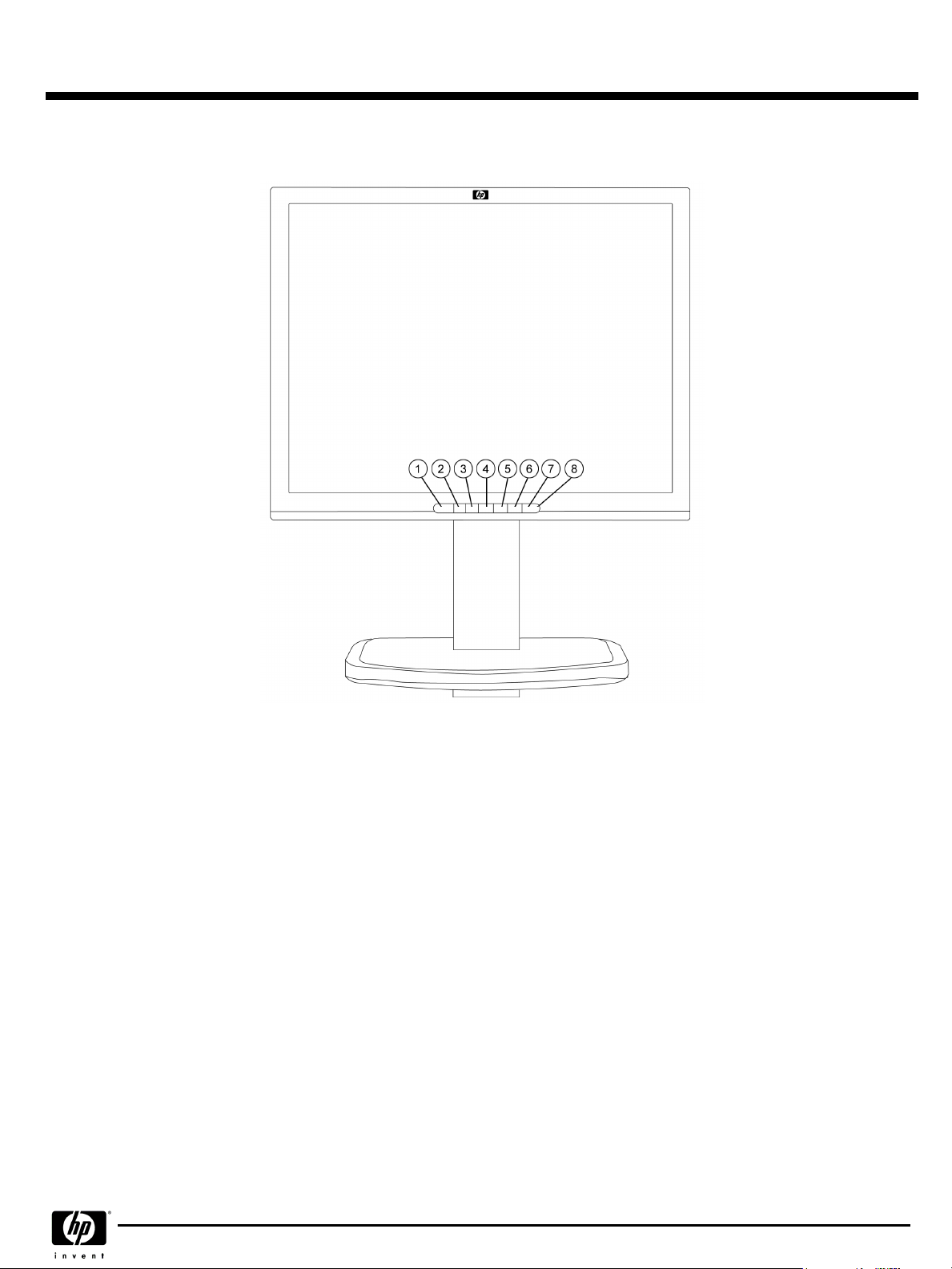
1.
Activates Picture in Picture (PiP) window
2.
Signal input selection
3.
Auto adjustment of displayed Image
4.
Select/adjust OSD menu settings; selects VGA input when OSD is not
active
Models
Models
ModelsModels
Business Desktop Channel – P9614A#xxx
Workstation Volume Channel – P9614W#xxx
Workstation Value Channel – P9614X#xxx
5.
Select/adjust OSD menu settings; selects DVI-I input when OSD is not
active
6.
Launches OSD menu and selects functions.
7.
Full power = green; Sleep = amber
8.
Turns the monitor on and off
DA - 11869 Worldwide — Version 1 — February 2, 2004
Page 1
Page 2

QuickSpecs
Technical Specifications
Panel
Panel
PanelPanel
On Screen Display
On Screen Display
On Screen DisplayOn Screen Display
(OSD)
Controls
Controls
ControlsControls
Signal Interface/
Signal Interface/
Signal Interface/Signal Interface/
Performance
Performance
PerformancePerformance
Type
Type
TypeType
Viewable Image Area
Viewable Image Area
Viewable Image AreaViewable Image Area
(diagonal)
Screen Opening
Screen Opening
Screen OpeningScreen Opening
(W x H)
Viewing Angle
Viewing Angle
Viewing Angle Viewing Angle
Brightness
Brightness
Brightness Brightness
Contrast Ratio
Contrast Ratio
Contrast Ratio Contrast Ratio
Response Rate
Response Rate
Response Rate Response Rate
Pixel Pitch
Pixel Pitch
Pixel PitchPixel Pitch
Color Depth Support
Color Depth Support
Color Depth SupportColor Depth Support
*All specifications are provided by the component manufacturers. Performance specifications represent the highest
specification of all HP's component manufacturers' typical level specifications for performance. Actual performance may
vary either higher or lower.
Buttons or Switches
Buttons or Switches
Buttons or SwitchesButtons or Switches
Languages
Languages
LanguagesLanguages
User Controls
User Controls
User ControlsUser Controls
Horizontal Frequency
Horizontal Frequency
Horizontal FrequencyHorizontal Frequency
Vertical Frequency
Vertical Frequency
Vertical FrequencyVertical Frequency
Graphics Controller
Graphics Controller
Graphics ControllerGraphics Controller
Native Resolution
Native Resolution
Native ResolutionNative Resolution
Preset VESA Graphic
Preset VESA Graphic
Preset VESA GraphicPreset VESA Graphic
Modes
Modes
(non-interlaced)
Modes Modes
Text Mode
Text Mode
Text ModeText Mode
Mac Mode
Mac Mode
Mac ModeMac Mode
Sun Mode
Sun Mode
Sun ModeSun Mode
Maximum Pixel Clock
Maximum Pixel Clock
Maximum Pixel ClockMaximum Pixel Clock
Speed
Speed
SpeedSpeed
User Programmable
User Programmable
User ProgrammableUser Programmable
Modes
Modes
ModesModes
Anti-Glare
Anti-Glare
Anti-GlareAnti-Glare
Anti-Static
Anti-Static
Anti-StaticAnti-Static
Default Color
Default Color
Default ColorDefault Color
Temperature
Temperature
TemperatureTemperature
(typical)*
(typical*
(typical)*
(typical)*
HP Flat Panel Monitor L2035
HP Flat Panel Monitor L2035
HP Flat Panel Monitor L2035HP Flat Panel Monitor L2035
20-inch Active Matrix TFT (thin film transistor)
20.1 in (51 cm)
16.2 x 12.17 in (41.1 x 30.9 cm)
Up to 170° H/170° V (10:1 minimum contrast ratio)
Up to 250 nits (cd/m2)
Up to 400:1
16 ms (typical, rise + fall)
0.255 mm
16.7 million colors
PiP (Picture in Picture), Input select, auto adjust, OSD up, OSD down, OSD menu select,
power
English, French, German, Spanish, Italian
Brightness, contrast, positioning, color temperature, individual color control, serial number
display, full screen resolutions, clock, clock phase, video picture-in-picture (size and
position), input selection (includes separate direct access key for dedicated swap between
inputs 1 and 2), factory reset
30 to 94 kHz (VGA input); 30 to 92 KHz (DVI input) (for modes with pixel clock less than
157 MHz)
48 to 85 Hz (VGA input); 30 to 92 KHz (DVI input) (for modes with pixel clock less than
157 MHz)
Pixelworks PW171
1600 x 1200 @ 60 Hz (recommended)
1600 x 1200 @ 60 Hz, 75 Hz (VGA input)
1280 x 1024 @ 60 Hz, 75 Hz, 85 Hz
1280 x 960 @ 60 Hz
1152 x 900 @ 66 Hz
1024 x 768 @ 60 Hz, 75 Hz, 85 Hz
800 x 600 @ 60 Hz, 85 Hz
640 x 480 @ 60 Hz, 75 Hz, 85 Hz
720 x 400 @ 70 Hz
1152 x 870 @ 75 Hz and 832 x 624 @ 75 Hz
1152 x 900 @ 66 Hz
202 MHz (VGA input); 162 MHz (DVI input)
Yes, 10
Yes
Yes
6500 K
DA - 11869 Worldwide — Version 1 — February 2, 2004
Page 2
Page 3

QuickSpecs
Technical Specifications
Video Input
Video Input
Video InputVideo Input
Power
Power
PowerPower
Mechanical
Mechanical
MechanicalMechanical
Environmental
Environmental
EnvironmentalEnvironmental
Options
Options
OptionsOptions
Other
Other
OtherOther
Plug and Play
Plug and Play
Plug and PlayPlug and Play
Input Signal
Input Signal
Input SignalInput Signal
Input Impedance
Input Impedance
Input ImpedanceInput Impedance
Sync Input
Sync Input
Sync InputSync Input
Video Cable
Video Cable
Video CableVideo Cable
Video Cable Length
Video Cable Length
Video Cable LengthVideo Cable Length
Input Power
Input Power
Input PowerInput Power
Frequency
Frequency
FrequencyFrequency
Maximum
Maximum
MaximumMaximum
Power Saving
Power Saving
Power SavingPower Saving
Power Cable Length
Power Cable Length
Power Cable LengthPower Cable Length
Dimensions
Dimensions
DimensionsDimensions
Weight
Weight
WeightWeight
Tilt Range
Tilt Range
Tilt RangeTilt Range
Swivel Range
Swivel Range
Swivel RangeSwivel Range
Height Adjustable
Height Adjustable
Height AdjustableHeight Adjustable
Pivot Rotation
Pivot Rotation
Pivot RotationPivot Rotation
Base
Base
BaseBase
Temperature - Operating
Temperature - Operating
Temperature - OperatingTemperature - Operating
Temperature - Non-
Temperature - Non-
Temperature - Non-Temperature - Nonoperating
operating
operatingoperating
Humidity - Operating
Humidity - Operating
Humidity - OperatingHumidity - Operating
Humidity - Non-operating
Humidity - Non-operating
Humidity - Non-operatingHumidity - Non-operating
Altitude - Operating
Altitude - Operating
Altitude - OperatingAltitude - Operating
Altitude - Non-operating
Altitude - Non-operating
Altitude - Non-operatingAltitude - Non-operating
HP Desktop Access Center
HP Desktop Access Center
HP Desktop Access CenterHP Desktop Access Center
Accessories Included
Accessories Included
Accessories IncludedAccessories Included
User Guide Languages
User Guide Languages
User Guide LanguagesUser Guide Languages
Warranty Languages
Warranty Languages
Warranty LanguagesWarranty Languages
Color
Color
ColorColor
VESA External Mounting
VESA External Mounting
VESA External MountingVESA External Mounting
Kensington Lock-Ready
Kensington Lock-Ready
Kensington Lock-ReadyKensington Lock-Ready
(H x W x D)
HP Flat Panel Monitor L2035
HP Flat Panel Monitor L2035
HP Flat Panel Monitor L2035HP Flat Panel Monitor L2035
Yes
Four connectors, including one 15-pin mini D-sub VGA, one DVI-I (VGA analog and
digital input), one composite video, and one s-video
75 ohms ± 10%
Separate sync (HSYNC/VSYNC); composite sync, Sync on Green
VGA to VGA; VGA to DVI-I; DVI-D to DVI-I
5.9 ft (1.8 m)
Auto-Ranging, 90 to 132 VAC and 195 to 265 VAC; internal power supply, 50 Hz/60 Hz
47.5 to 63 Hz
< 75 watts
< 5 watts
5.9 ft (1.8 m)
Unpacked w/stand
Unpacked w/stand
Unpacked w/standUnpacked w/stand
Unpacked w/o stand
Unpacked w/o stand
Unpacked w/o stand Unpacked w/o stand
only)
Packaged
Packaged
PackagedPackaged
Unpacked
Unpacked
UnpackedUnpacked
Packaged
Packaged
PackagedPackaged
-5° to + 25° vertical
-35° to + 35°
Yes, range 3.54 in/9.0 cm
Yes
Attached
46° to 95° F (10° to 35° C)
6° to 140° F (-10° to 60° C)
20% to 80% non-condensing
5% to 85%
+12,000 ft
+40,000 ft
Sold separately, the HP Desktop Access Center features integrated microphone/headset
jacks, dual function headset for phone/PC support, a MultiBay slot for adding an optical
drive (sold separately), and four USB ports for easy integration of third-party digital
solutions; part number DK985A. For more information, refer to the HP Desktop Access
Center QuickSpecs.
VGA to VGA cable – connects the graphic card's VGA analog connector to the monitor's
input #1 (VGA analog) connector
VGA to DVI-I cable – connects the graphic card's VGA connector to the monitor's input
#2 (DVI-I analog) connector
DVI-D to DVI-I cable – connects the graphic card's DVI-D digital connector to the
monitor's input #2 (DVI-I digital) connector
English, B. Portuguese, French, LA Spanish, Korean, S. Chinese, T. Chinese, Bahasa,
Japanese, Danish, Finnish, German, Norwegian, Spanish, Swedish, Greek, Polish,
Russian, Slovenian, Turkish
English, Canadian French, LA Spanish, Brazilian Portuguese, Danish, German, Castilian
Spanish, French, Italian, Dutch, Norwegian, Finnish, Swedish, Bahasa Indonesian,
Korean, T. Chinese, S. Chinese
Carbonite/Silver
Yes (Standard 4 hole pattern, 100 mm)
Yes
17.36 to 20.9 x 17.8 x 8.27 in
(44.1 to 53.1 x 45.2 x 21.0 cm)
(head
14.29 x 17.8 x 3.19 in (36.3 x 45.2 x 8.1 cm)
11.5 x 21.9 x 23.9 in (29.2 x 55.6 x 60.6 cm)
With stand: 20.28 lbs (9.2 kg);
Without stand: 12.35 lbs (5.6 kg)
26.9 lb (12.2 kg)
DA - 11869 Worldwide — Version 1 — February 2, 2004
Page 3
Page 4

QuickSpecs
HP Flat Panel Monitor L2035
HP Flat Panel Monitor L2035
HP Flat Panel Monitor L2035HP Flat Panel Monitor L2035
Technical Specifications
Certification and
Certification and
Certification andCertification and
Compliance
Compliance
ComplianceCompliance
Compatibility
Compatibility
CompatibilityCompatibility
Service and Warranty
Service and Warranty
Service and WarrantyService and Warranty
© Copyright 2004 Hewlett-Packard Development Company, L.P.
The information contained herein is subject to change without notice.
Microsoft and Windows NT are US registered trademarks of Microsoft Corporation.
The only warranties for HP products and services are set forth in the express warranty statements accompanying such products and services. Nothing herein
should be construed as constituting an additional warranty. HP shall not be liable for technical or editorial errors or omissions contained herein.
Australian ACA Approval, Canadian Requirements/CSA, CE Marking, China CCIB/CCEE Approval, CISPR Requirements,
Eastern European Approvals, Energy Star Compliant, FCC Approval, German Ergonomic (TUV and GS Mark), ISO 92413,7,8 VDT Guidelines, ISO 13406-2 Pixel Defect Guidelines, Mexican NOM Approval, MIC Requirements (New Zealand),
MPR-II Compliant, Nordic Approvals (Nemko, Fimko, Demko, Semko), PC2001 Compliant, PC99 Certified, S. Korean MIC
Approval, Taiwan BSMI Approval, TCO 03 (emissions, ergonomics, environment), TUV-Ergo, UL Listed, VCCI Approvals,
Windows Certification (Microsoft® Windows® 98, Microsoft Windows 2000, and Microsoft Windows XP)
Compatible with platforms using the VESA standard video modes and HP Compaq Business Desktops d500, d300, and
d200 Series, Compaq Evo Desktops, and HP Business Desktops d300 series.
Limited three years parts, labor, and on-site service, including backlight. Availability varies by region. Certain restrictions
and exclusions apply. Consult HP Customer Service for details.
DA - 11869 Worldwide — Version 1 — February 2, 2004
Page 4
 Loading...