

Fhiaba Integrated Series, StandPlus Series, Professional Series, Classic series User Manual
Page 1

USER MANUAL
Page 2

Page 3

Page
2
Important directions for safety and the environment
1
For your safety
1.1
Caring for the environment
1.2
Index
10
15
17
3
4
8
Installation
2
Installation
2.1
Connection to the electrical power supply
2.2
Connection to the water system
2.3
Before starting
3
Know your appliance
3.1
Main features
3.2
Main components
3.3
Electronic Control
3.4
Main control panel and Fresco control
3.5
Appliance switching on and off
4
Switching on and off
4.1
How to adjust the temperature for different requirements
4.2
Ice Maker activation
4.3
Information and malfunction messages on the display
4.4
Settings and Special Functions
5
Customization and language settings
5.1
Special functions activated through the Fhiaba Access Menu
5.2
Basic settings of the Fhiaba Access Menu
5.3
Internal Layout
6
Internal Layout (positioning, adjustment, removal)
6.1
Activation and use of the Ice Maker
7
Activation and use of the Ice Maker
7.1
Water Filter
7.2
18
19
22
23
24
26
27
Lighting
8
Lighting
8.1
Food Conservation
9
General directions
9.1
How to maintain good food quality
9.2
Recommendations for conserving fresh food
9.3
Recommendations for conserving frozen food
9.4
Recommended times for food conservation
10
Care and Cleaning
11
Care and Cleaning
11.1
Condenser cleaning
11.2
Internal cleaning
11.3
Troubleshooting Guide
12
Troubleshooting Guide
12.1
Malfunction messages appearing on the display
12.2
Before calling for service
13
Before calling for service
13.1
Fhiaba Access Menu Map
14
Functions
14.1
Setting
14.2
www.fhiaba.com ∙ [email protected] ∙ Info Line 800-344222 ∙ Tel +39 (0)434 420160 ∙ Fax +39 (0)434 420161
1
Page 4

1
Important directions for safety and the environment
1.1
For your safety
Notes
Recommendations for correct
use of the appliance
If this appliance is replacing an existing appliance which must be removed or disposed of, make sure that it does not become a dangerous
trap for children by cutting its power supply cable and rendering it impossible to close the door. Use the same caution at the end of the lifespan
of the new appliance.
This appliance is designed to refrigerate beverages and foods and is
destined for domestic use.
The appliance must be installed by following the instructions in the Installation Guide, particular care should be taken not to obstruct the vent
openings of the appliance and of the built-in units.
The appliance features a concentrated lighting system with LED lamps.
Do not stear into these lamps when they are on to avoid possible eyesight
damage. This warning is also contained on the label attached to the inside of the refrigerator door.
When the freezer is functioning do not touch the inner surfaces in stainless steel with wet or damp hands, since skin may stick to the very cold
surfaces.
Do not use any type of electrical equipment inside of the food conservation compartments.
When positioning the shelves, do not place fingers in the shelf slide
guides.
Do not position containers of flammable liquids near the appliance.
1.2
Important
Directions for avoiding
appliance damage
Warning
Indications for avoiding injury
to people
Caring for the environment
Completely switch off the appliance and unplug the power supply
cable during cleaning operations. If the plug is not easily reached, it is a
good idea to disconnect the omnipolar switch that controls the socket
that the appliance is connected to.
The packaging parts can be dangerous for children: do not allow children to play with the plastic bags, plastic film or Styrofoam.
Any repairs must be performed by a qualified Fhiaba Service technician.
This appliance is not intended for use by persons (including children)
with reduced physical, sensory or lack of experience and knowledge unless they have been given supervision or instruction concerning use of
the appliance by a person responsible for their safety. Children should be
supervised to ensure that they do not play with the appliance.
Pay special attention to correct disposal procedure for all the packaging materials.
The appliance must not be disposed of with urban waste. Contact local waste disposal centers for on how to dispose of recyclable waste.
Prior to disposal, cut the power supply cord and make it impossible
to close the door.
During disposal, avoid damage to the refrigeration circuit.
The appliance does not contain hazardous substances for the atmospheric ozone layer, neither in the refrigeration circuit nor in the insulation.
www.fhiaba.com ∙ [email protected] ∙ Info Line 800-344222 ∙ Tel +39 (0)434 420160 ∙ Fax +39 (0)434 420161
2
Page 5
Installation
2
Installation
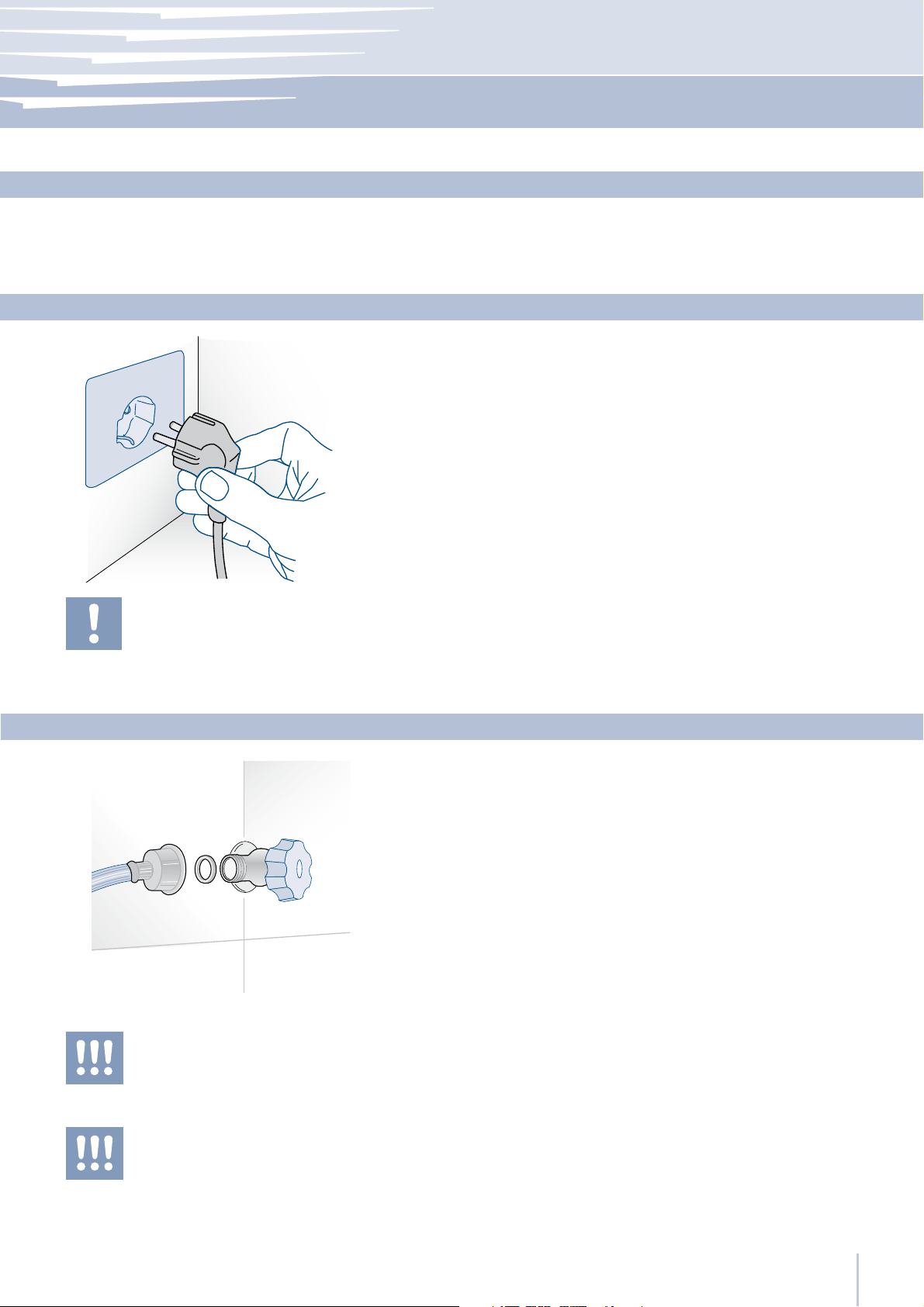
Make sure that installation is performed correctly, adhering to all directions in the specific installation manual provided with the appliance.
Connection to the electrical power supply
The appliance is equipped with a Schuko type 16A plug and must be
connected to the electrical power supply through a corresponding
Schuko socket.
Do not use extension cords and/or multiple adapters for the power
supply connection.
2.1
2.2
Do not use extension cords and/or multiple
adapters for the power supply connection.
The appliance should be supplied only with
drinkable water.
Connection to the water system
The models provided with Ice Maker require a connection to the domestic water supply system. This can be executed through the provided water hose with 3/4” threading.
The system pressure must be between 0.05 MPa and 0.5 MPa (between
0.5 Bar and 5 Bar).
Differents pressures can cause malfunctions or leaks in the water system. The appliance should be supplied only with drinkable water.
2.3
Make sure that installation is performed correctly, according to all of the directions in
the specific installation manual provided
with the appliance.
www.fhiaba.com ∙ [email protected] ∙ Info Line 800-344222 ∙ Tel +39 (0)434 420160 ∙ Fax +39 (0)434 420161
3
Page 6
3
Before starting
3.1
Know your appliance
Congratulations for having purchased your new Fhiaba:
from now on you can use our innovative conservation system, which will allow you to keep all of your food in the
best way possible.
This manual will answer most of your questions about the
product’s features. Should you require further information,
please check our website
www.fhiaba.com
or write us an e-mail at
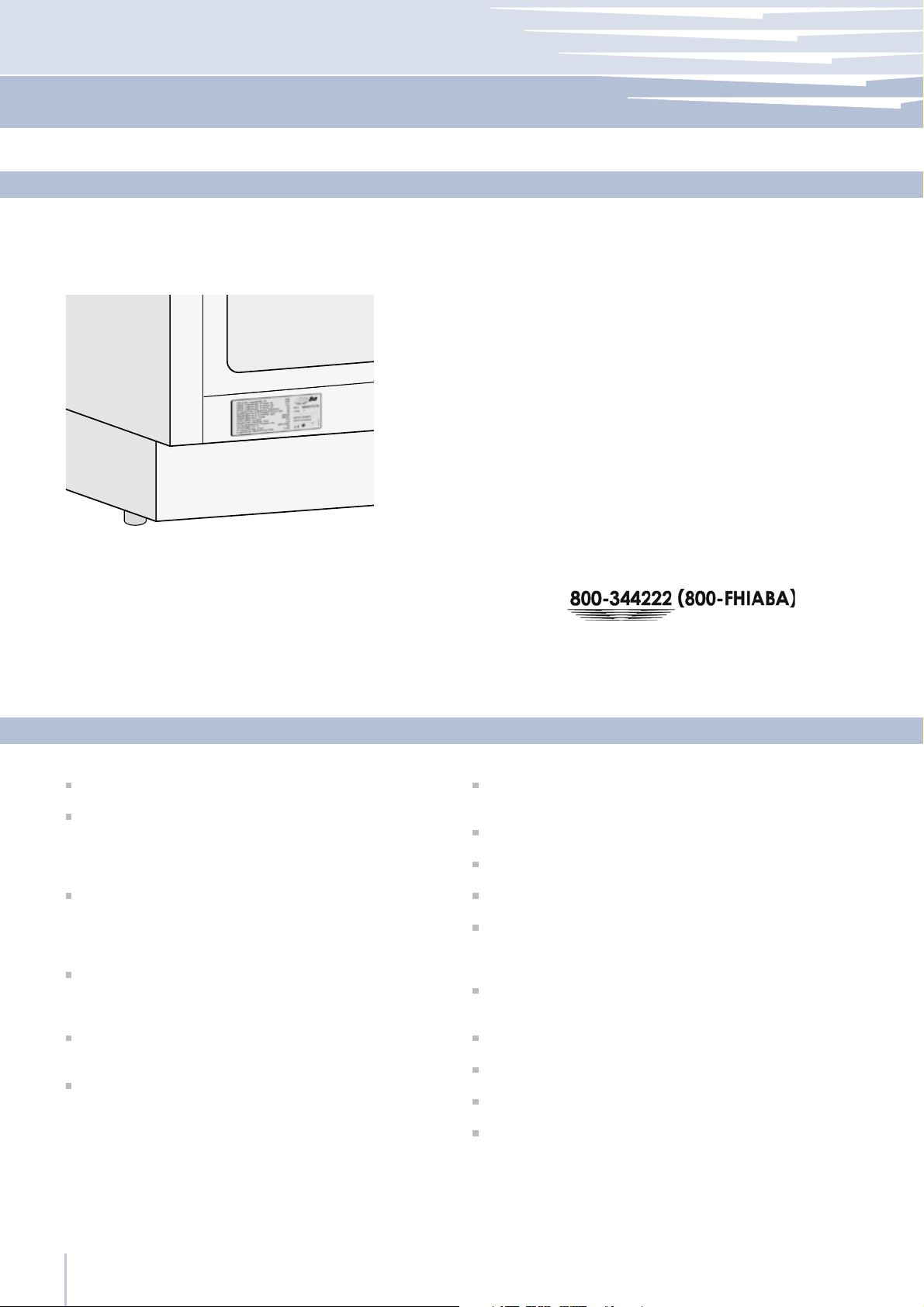
Before calling, write down the model type and serial
number which are available on the warranty certificate
and on the rating plate located on the bottom left-hand
corner of the appliance, behind the bottom drawer and
any messages which may have appeared on the display.
3.2
Exclusive design by Giugiaro
The Fhiaba TriMode refrigeration system and the efficient
separation of internal compartments ensures maximum
freshness and offers excellent conservation of foods in the
three compartments: refrigerator, Fresco and freezer
It is also possible, should there be a need, to further increase the flexibility of the appliance by making the freezer
compartment operate as a refrigerator or as a Fresco compartment
The Fresco compartment has a low temperature and controlled humidity, providing excellent conservation in maximum safety conditions for fresh foods
Electronic control guarantees constant temperature and
humidity levels set by the user
An interactive menu (Fhiaba Access) allows customized
management of appliance functions and the visualization
of functioning messages
Main features
Power save features to reduce consumption during vaca-
tion periods
Ample drawers with Soft self-closing systems in the Fresco area
Ice Maker for automatic ice production in the desired size
Easily replaceable water filter located inside the refrigerator
Patented sliding shelf system, with shelves that can be positioned at any level inside of the refrigerator without having
to be removed
Stainless steel surface both inside and outside, with fine aluminum trim
Patented hinge system that permits automatic door closing
External drawers with to self-closing system
Localized lighting with LEDs
Anti-tipping system by means of wall mounting brackets
www.fhiaba.com ∙ [email protected] ∙ Info Line 800-344222 ∙ Tel +39 (0)434 420160 ∙ Fax +39 (0)434 420161
4
Page 7
Before starting
3
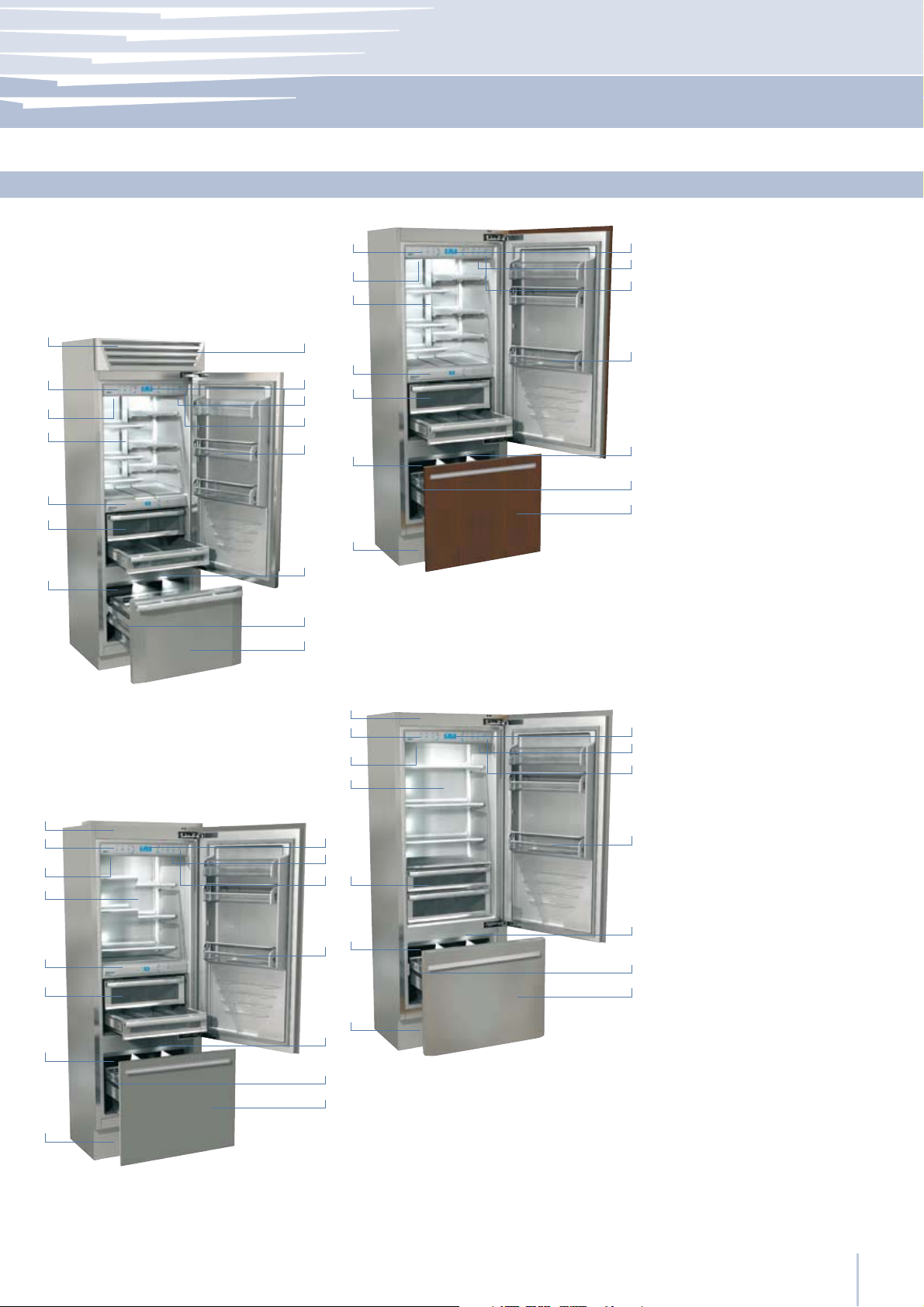
Main components
2
3
4
9
Single drawer model
10
11
1 Stainless steel structure with
3.3
aluminum trim
1
2
3
4
5
6
7
10
11
12
13
8
9
5
6
7
8
Integrated Series
2 Control panel with Fhiaba
12
Access
3 Water Filter
4 Patented shelf positioning
13
system
5 Control panel, Fresco area
14
6 Fresco compartment with
15
controlled humidity
or “Low Temp”
7 Automatic icemaker
8 Double refrigeration system
14
15
9 Temperature display
10 Sound signals
StandPlus Series
1
2
3
4
11 Vacation function
12 Spacious door shelves
9
10
13 Innovative lighting
11
14 Automatic door and
drawer closure
1
10
11
12
13
14
15
9
6
7
8
Classic Series
2
3
4
5
6
7
8
15 Frezer compartment that
12
can be transformed into
a refrigerator or Fresco
compartment
(TriMode function)
13
14
15
Professional Series
www.fhiaba.com ∙ [email protected] ∙ Info Line 800-344222 ∙ Tel +39 (0)434 420160 ∙ Fax +39 (0)434 420161
5
Page 8
3
Before starting
1
2
3
4
3.3
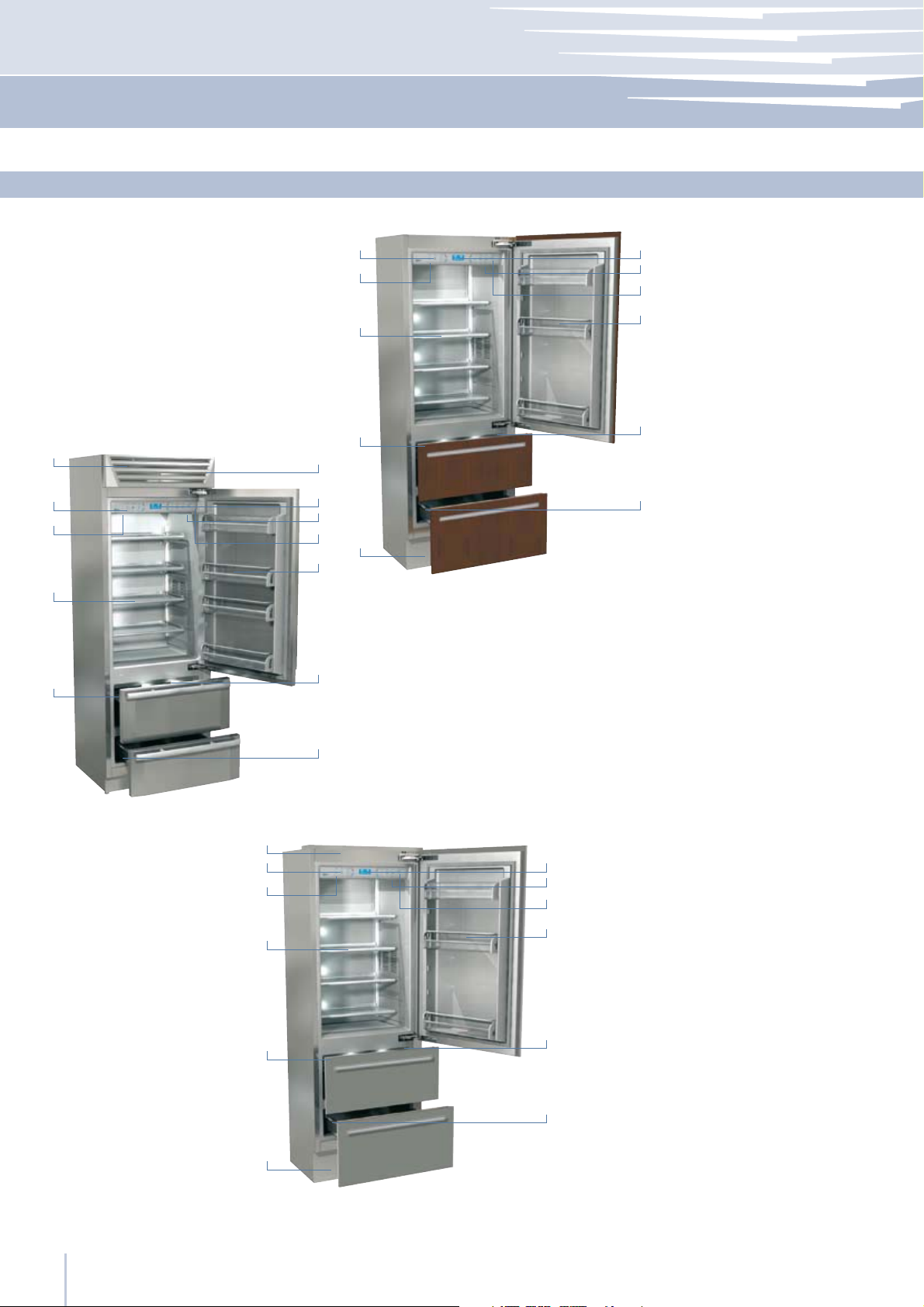
Main components
10
2
3
4
Two drawer model
7
8
1 Stainless steel structure with
9
aluminum trim
10
2 Control panel with Fhiaba
Access
3 Water Filter
4 Patented shelf positioning
5
11
system
5 Automatic icemaker
6
6 Double refrigeration system
7
8
9
6
Integrated Series
12
7 Temperature display
8 Sound signals
9 Vacation function
10 Spacious door shelves
11 Innovative lighting
5
StandPlus Series
11
12
1
2
3
4
5
7
8
9
10
11
12 Automatic door and
drawer closure
12
6
Professional Series
www.fhiaba.com ∙ [email protected] ∙ Info Line 800-344222 ∙ Tel +39 (0)434 420160 ∙ Fax +39 (0)434 420161
6
Page 9
Before starting
Componenti principali
Electronic Control
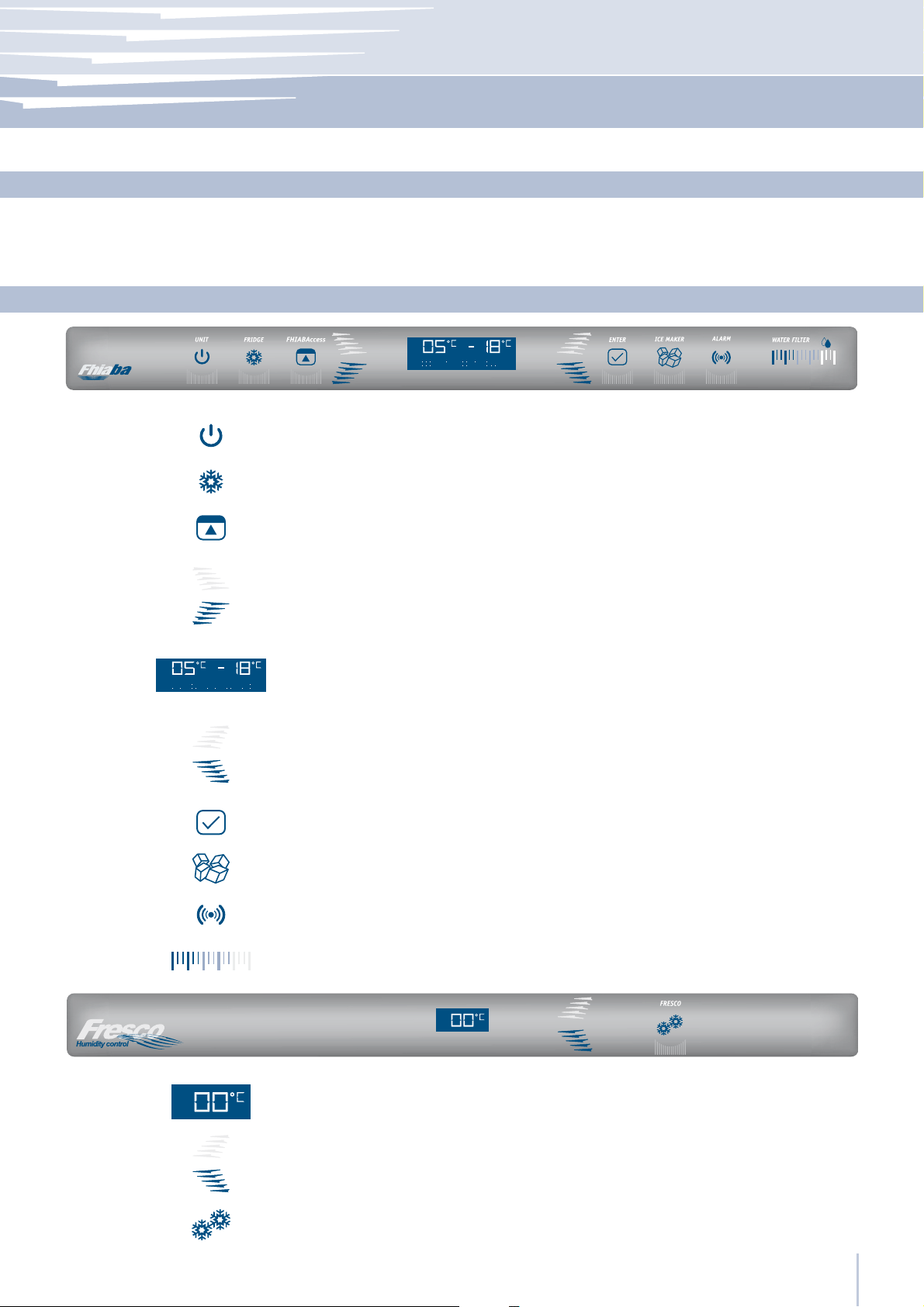
The innovative electronic control system designed by Fhiaba maintains constant temperature on the three compartments
and visualizes it on the control panel display. It also allows user interaction making it possible to personalize settings of the
varios functions and to receive sound and/or visual messages if any malfunction should occur in the appliance.
3
3.3
3.4
Main control panel and Fresco control
1234 5 67 9 108
1
2
3
4
5
Unit
Fridge
Fhiaba
Access
Up/down
Fridge
Display
Up/Down
6
Freezer
(TriMode)
Allows complete switching on and off of the appliance
(press for three seconds).
Allows switching on and off of only the refrigerator compartment
(press for three seconds).
Allows access to the appliance function menu
Using the Up and Down buttons, it is possible to change the set temperature of the refrigerator and scroll through the interactive menu.
It shows the temperature of the refrigerator and freezer compartments,
the date and time, Fhiaba Access functions and visual messages.
By selecting Up/Down the preset temperature can be changed according to the selected function mode (freezer, refrigerator, Fresco).
Componenti principali
3.3
3.5
10
11
12
13
7
8
9
Enter
Ice maker
Alarm
Water Filter
Display
Up/Down
Fresco
www.fhiaba.com ∙ [email protected] ∙ Info Line 800-344222 ∙ Tel +39 (0)434 420160 ∙ Fax +39 (0)434 420161
Confirms activation or deactivation of the selections made in the Fhiaba
Access Menu.
Allows activating or deactivating the automatic ice production.
Blinks to signal possible malfunctioning, also in combination with a sound
signal which can be deactivated by pressing the button.
Shows the status of the water filter cartridge capacity.
11 12 13
Shows the temperature of the Fresco compartment.
Using the Up and Down buttons, it is possible to change the
temperature set for the Fresco compartment.
Allows switching on and off of only the Fresco compartment (press
for three seconds).
7
Page 10
4
Appliance switching on and off
4.1
Switching on and off
First startup
Switching off the Refrigerator and Fresco
compartments
Restarting
Switching off for long periods
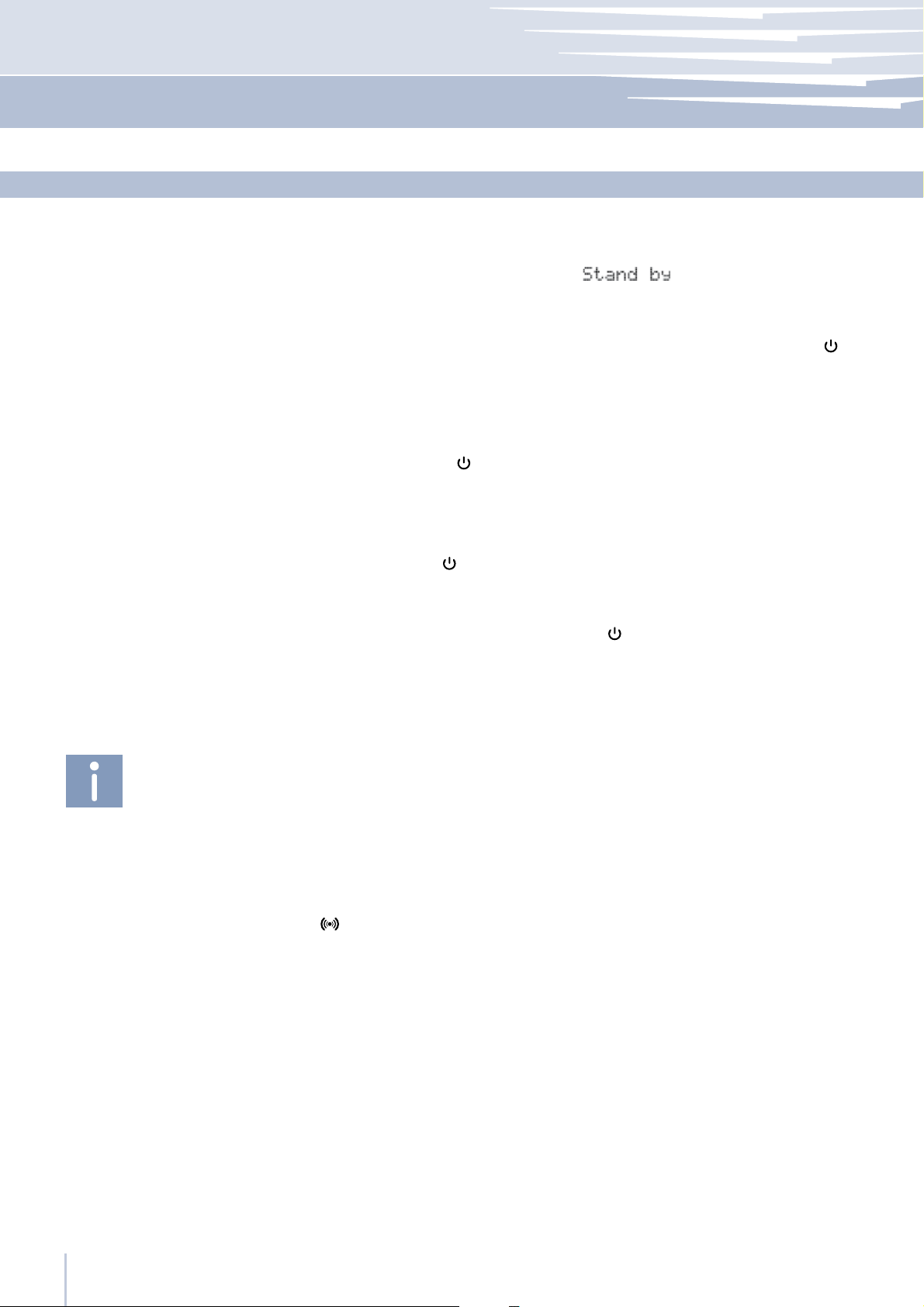
When the appliance is connected to the electrical power supply but has
not yet been switched on, the display shows the message
(safety message to warn that the appliance is connected to the mains,
and all the panel buttons are off.
To switch on all the appliance compartments, press the Unit button
three seconds.
When the appliance is first switched on the TriMode compartment is set to
the “freezer” mode. After switching on it remains always on and can be
switched off only by switching off the complete appliance.
Press Unit
Use the same buttons to restart.
The freezer compartment always stays on and cannot be switched off
except by completely switching off the appliance by pressing the Unit
button
During periods of long absence it is recommended to switch off the refrigerator by pressing the Unit button
the electrical plug or the omnipolar switch controlling the socket.
for three seconds.
for three seconds.
for three seconds and disconnecting
for
If at the first startup the Standby message does not
appear, but another message appears, it means
that the appliance has already started the cooling
process. If this is the case, deactivate any possible
sound signal by pressing the Alarm button
close the door and wait until the set temperature is
reached.
During the first startup, it will not be possible to use the
Fhiaba Access Menu to modify the factory settings
until the preset temperature has been reached.
Each time the appliance is switched on it goes
trough a self-diagnosis procedure lasting three minutes before completely starting up.
If only the refrigerator compartment or the Fresco
compartment is switched off, the specific fan will
continue to operate to prevent the formation
of unpleasant odors and mold.
,
Completely empty the refrigerator, clean and dry it and leave the doors
and drawers partially open to prevent unpleasant odors.
Before switching off the appliance for a long period
of time, remove all of the items inside and leave the
doors and drawers open to prevent the formation of
unpleasant odors and mold.
www.fhiaba.com ∙ [email protected] ∙ Info Line 800-344222 ∙ Tel +39 (0)434 420160 ∙ Fax +39 (0)434 420161
8
Page 11
Appliance switching on and off
4
How to adjust the temperature for different requirements
Refrigeration Compartment
Fresco Compartment
Freezer Compartment
(TriMode)
The temperature shown can vary slightly in respect
to the set temperature following frequent openings
of the doors or insertion of room temperature foods
or large quantities of foods.
6 to 12 hours are necessary to reach the selected
temperature.
4.2
Each model has been carefully tested before leaving the factory and is
adjusted in such a way to ensure high performance and low consumption. Usually, it is not necessary to modify the settings.
Nevertheless, according to special needs, it is possible to modify the set
temperatures as follows:
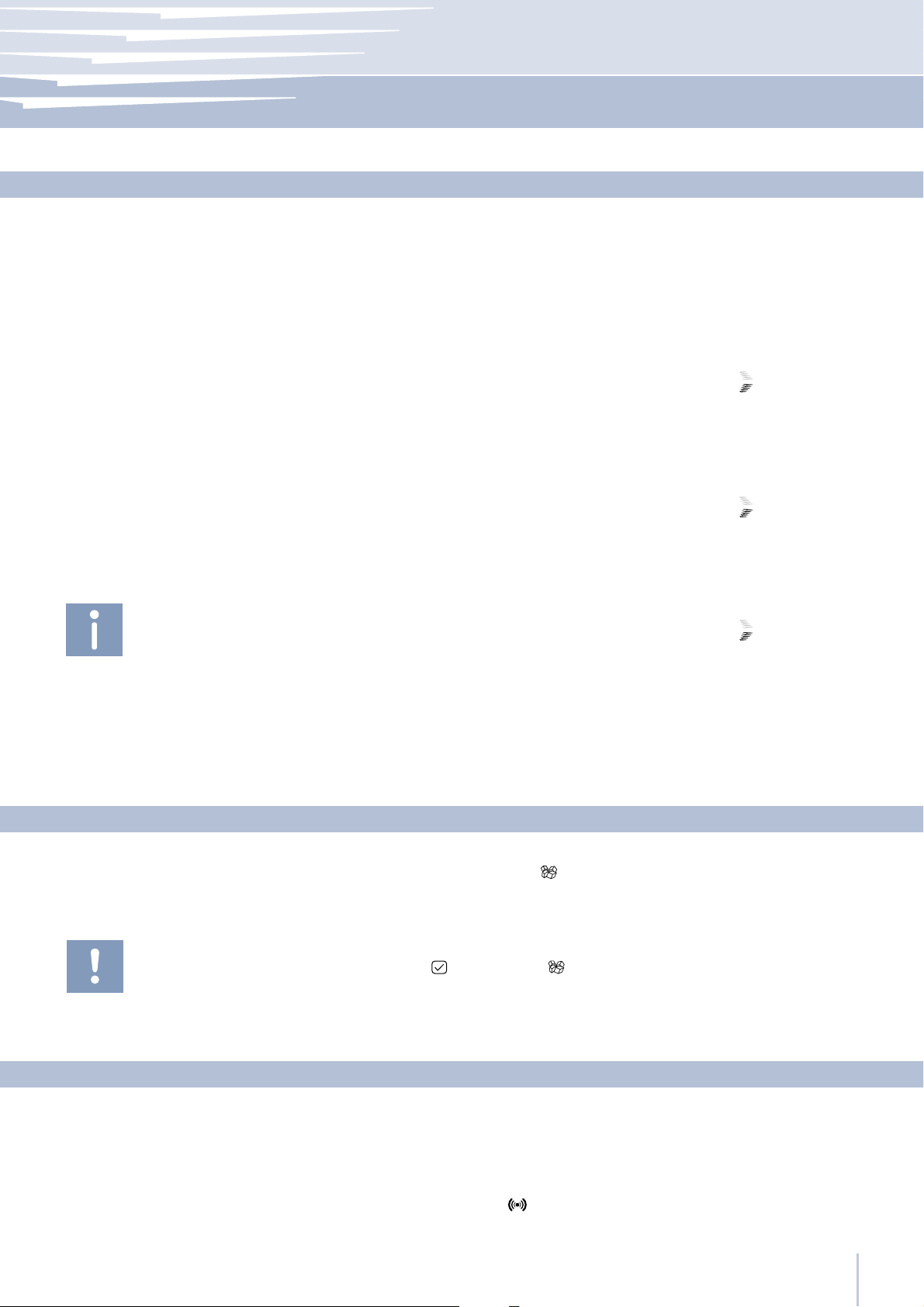
From +2°C to +8°C (from 35.6°F to 46.4°F), the recommended preset temperature is +5°C (41°F).
To adjust the temperature use the Up/Down buttons
these buttons the newly set temperature will appear in the display. To
modify this temperature, use the buttons until reaching the desired temperature.
From -2°C to +2°C (from 28.4°F to 35.6°F), the recommended preset temperature is 0°C (32°F).
To adjust the temperature use the Up/Down buttons
these buttons the newly set temperature will appear in the display. To
modify this temperature, use the buttons until reaching the desired temperature.
From -15°C to -22°C (from 5°F to -7.6°F), the recommended temperature
is preset at -18° (0°F).
To adjust the temperature use the Up/Down buttons
these buttons the newly set temperature will appear in the display. To
modify this temperature, use the buttons until reaching the desired temperature.
In case the compartment is used as refrigerator or Fresco compartment
(TriMode function) the recommended and preset temperatures will correspond to those indicated for the respective compartments.
. Upon touching
. Upon touching
. Upon touching
Do not activate the Ice Maker unless the appliance
is connected to the water mains.
Information and malfunction messages on the display
www.fhiaba.com ∙ [email protected] ∙ Info Line 800-344222 ∙ Tel +39 (0)434 420160 ∙ Fax +39 (0)434 420161
Ice Maker Activation
That Ice Maker button located on the main control panel permits activation of the automatic icemaker. The button is lighted when the icemaker is functioning.
A prewash of the hydraulic circuit should be performed before activating
the Ice Maker for the first time. To do this touch at the same time buttons
Enter
After a few minutes the Ice Maker can be activated.
and Ice Maker .
4.3
4.4
An integrated control system provides information through lighted signals
or text messages visualized on the display.
The information signal is always visualized with a fixed text message, while
a malfunction signal is visualized with blinking text. The sound signal that
accompanies some malfunction signals can be deactivated by pressing
the Alarm button
The list of malfunction signals is located at the back of this manual.
on the main control panel.
9
Page 12
5
Settings and Special Functions
5.1
To prevent an inadvertent change to the settings
the keypad is automatically locked after a certain period of time.
To re-activate the Fhiaba Access function, press
simultaneously the Fhiaba Access button
the Down button for at least three seconds.
5.2
Customization and language settings
and
Special functions activated through the Fhiaba Access Menu
It is possible to customized the functions of your Fhiaba to adapt it to
diverse usage needs, resetting the main parameters (Settings) or activating special functions (Functions).
Functions are visualized on the main display by pressing the Fhiaba
Access button .
The Up/Down buttons permit scrolling the available functions, which
can be selected by pressing the Enter button
the current functioning status.
Using the Up/Down buttons , it is also possible to scroll through the selected function, activating or deactivating by pressing the Enter button
. Once the function is confirmed, the display will automatically
visualize the main menu to select other functions.
At any time it is possible to return to the previous selection through the
FhiabaAccess button
The language of the messages appearing on the display can be
changed by operating as follows:
Enter the Menu by pressing the Fhiaba Access button
tings via the Up/Down buttons
the Language function and the desired language.
.
and confirm via Enter . Then select
. The display visualizes
select Set-
Shopping Fridge
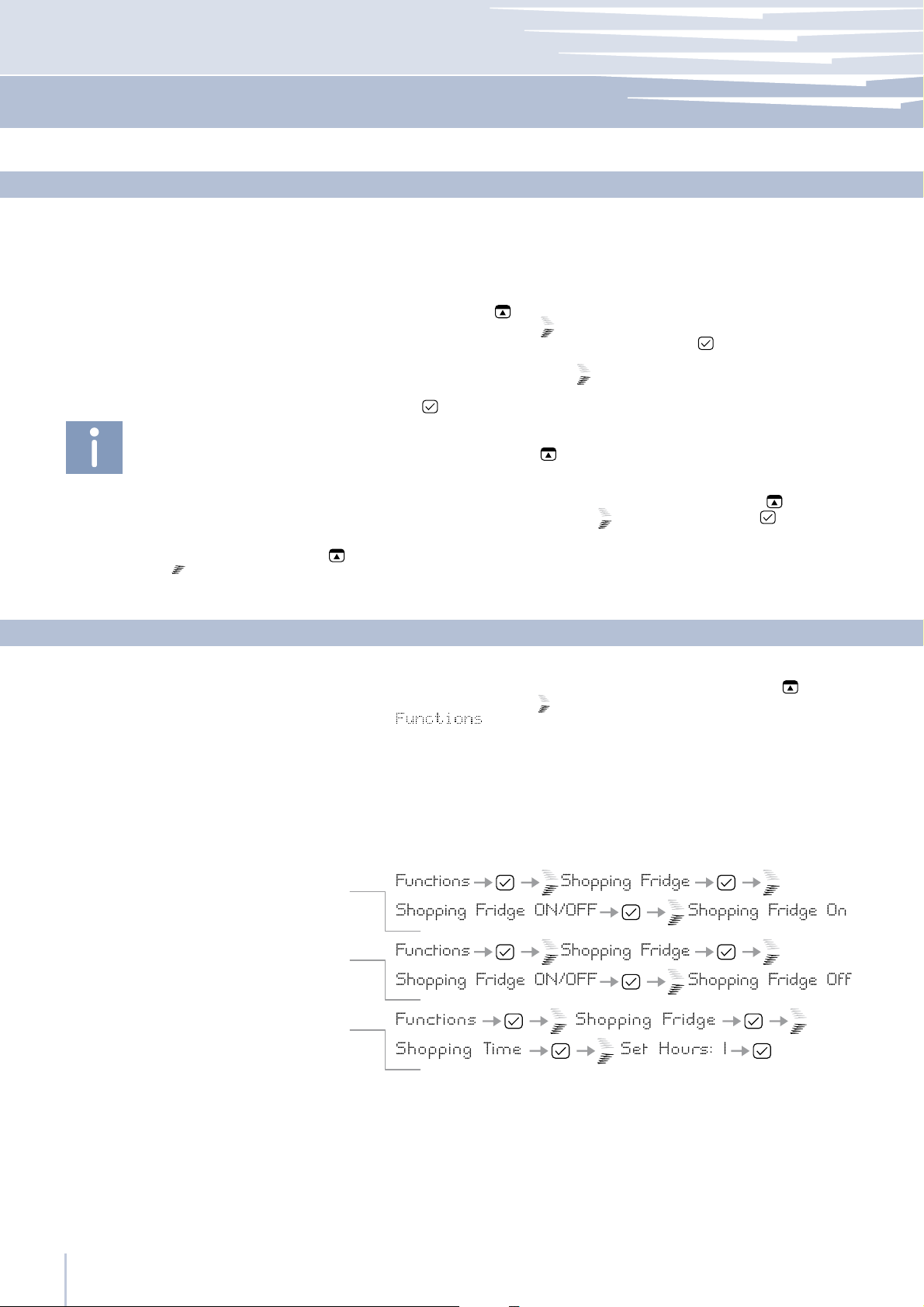
How to activate
How to deactivate
How to program timed activation
To use special functions, select the Fhiaba Access button
the Up/Down button to access the menu, confirming the selection
.
The function lowers the refrigerator temperature to +2°C (35.6°F) for 12
hours, permitting more rapid cooling of food that has just been placed
in. Once the 12 hours have expired, the function deactivates automatically, returning to the previously set temperature. It is possible to
program a timed activation of the function. After a prolonged interruption of electrical current, it is necessary to reactivate the function.
It is possible to program the function with a delay of 1 to 12 hours.
and use
Vacation Fridge
www.fhiaba.com ∙ [email protected] ∙ Info Line 800-344222 ∙ Tel +39 (0)434 420160 ∙ Fax +39 (0)434 420161
10
This function (recommended in case of prolonged absences since it allows considerable energy savings) brings the refrigerator compartment
temperature to +14°C (57.2°F). It is possible to program the duration, or it
can be manually deactivated upon re-entry after a period of absence.
This function remains active even if during the period of absence there is
a prolonged interruption of electrical power.
Page 13
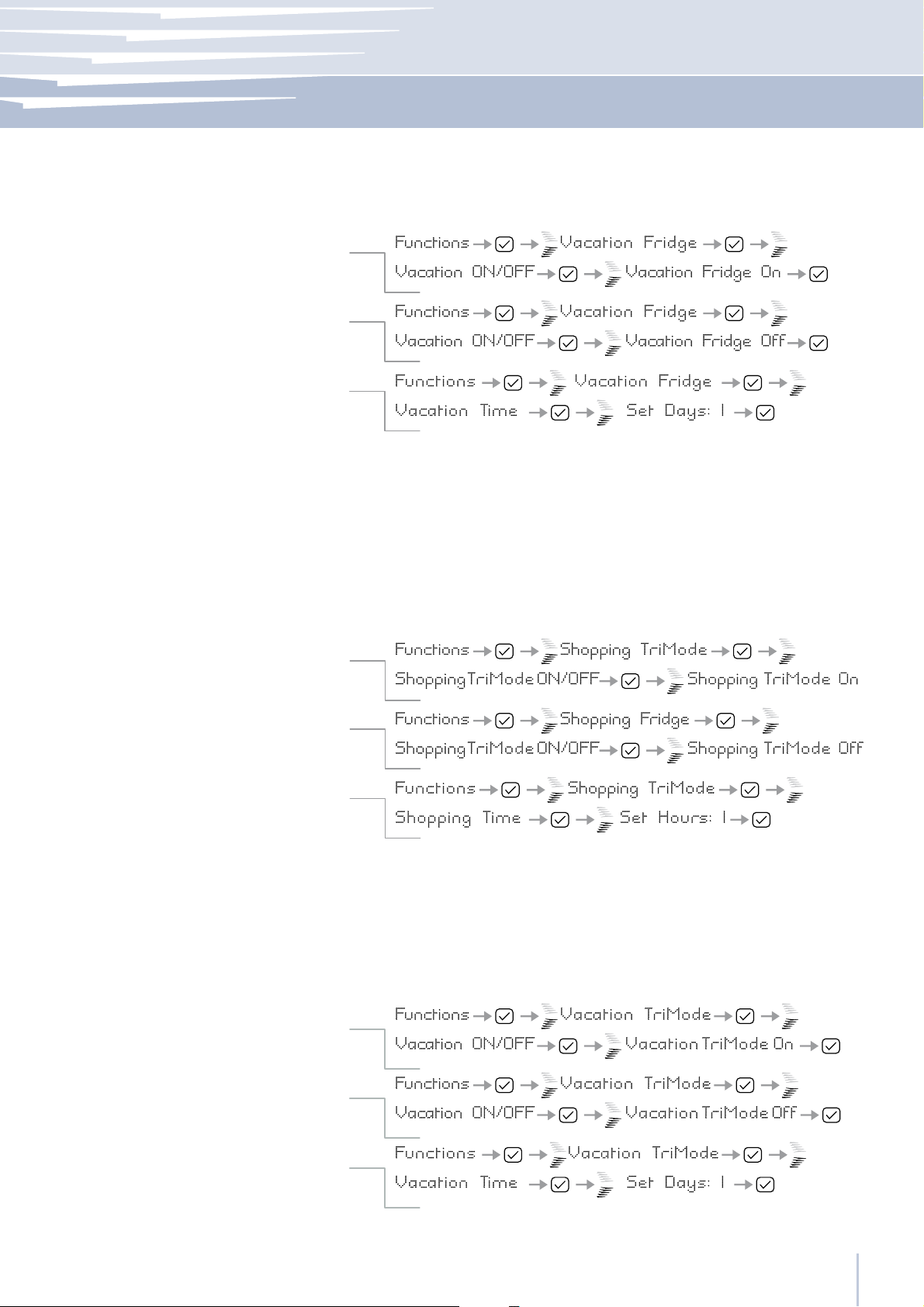
How to activate
How to deactivate upon re-entry
How to program the duration
Settings and Special Functions
It is possible to program a period from 1 to 90 days.
5
Shopping TriMode
How to activate
How to deactivate
How to program timed activation
Vacation TriMode
This function must be activated at least 24 hours before inserting room
temperature items into the freezer, or several hours before placing into
the freezer previously frozen items which have been subject to a slight
temperature rise. This function is automatically deactivated when the
programmed time period expires. It is possible o program timed activation of the function.
After a prolonged interruption of the electrical power, it is necessary to
reactivate the function.
It is possible to program the function with a delay of 1 to 12 hours.
This function (recommended in case of prolonged absences since it allows considerable energy savings) brings the TriMode compartment temperature to - 18°C (46.4°F). It is possible to program the duration, or it can
be manually deactivated upon re-entry after a period of absence.
This function remains active even if during the period of absence there is
a prolonged interruption of electrical power.
How to activate
How to deactivate upon re-entry
How to program the duration
www.fhiaba.com ∙ [email protected] ∙ Info Line 800-344222 ∙ Tel +39 (0)434 420160 ∙ Fax +39 (0)434 420161
It is possible to program a period from 1 to 90 days.
11
Page 14
5
Settings and Special Functions
Bottle Cooler
How to activate
How to deactivate
How to program the duration
Ice Maker
How to activate the cube size function
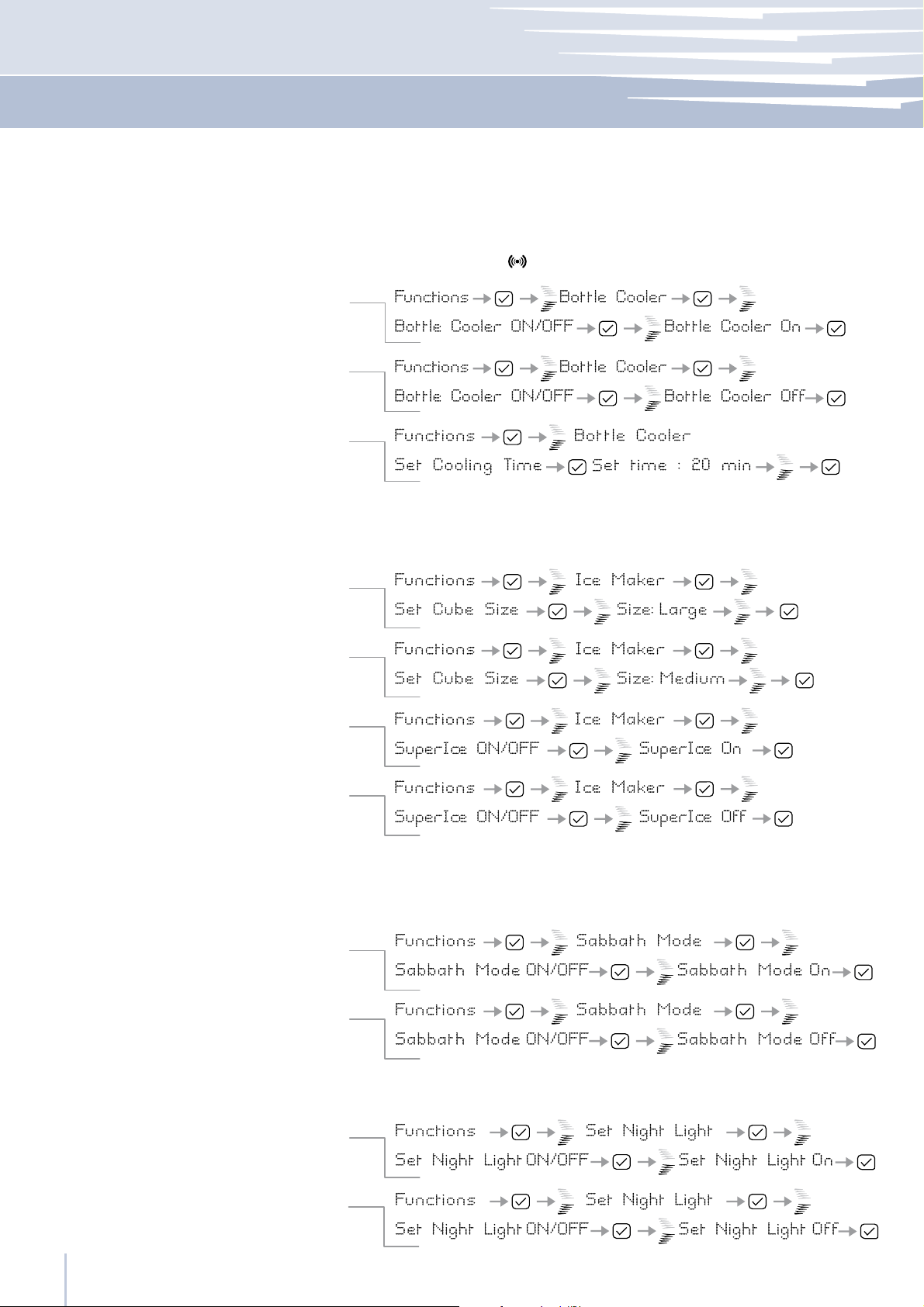
This function can be activated when it is necessary to cool off beverages
quickly, by placing them inside the freezer compartment.
It is possible to select a duration of 1 to 45 minutes. A sound signal will indicated when the optimal temperature has been reached. After removing
the beverages, deactivate the sound signal by pressing
the Alarm button
The IceMaker function permits selecting the size of the ice cubes, by
choosing between Large (base setting) or Medium, and activation of
the SuperIce function, which increases the quantity of produced ice.
The SuperIce function deactivates automatically after 24 hours.
.
How to deactivate
How to activate the SuperIce function
How to deactivate
Sabbath Mode (Optional)
How to activate
How to deactivate
Night Light
The function makes it possible to comply to certain religious observances
requiring that the operation of the appliance is not affected by the opening or closing of the doors (the thermostatic control, the inner lighting and
the ice maker are deactivated).
This function activates a courtesy light to illuminated the refrigerator area
in the dark.
How to activate the Night Light function
How to deactivate the Night Light function
www.fhiaba.com ∙ [email protected] ∙ Info Line 800-344222 ∙ Tel +39 (0)434 420160 ∙ Fax +39 (0)434 420161
12
Page 15
Settings and Special Functions
5
Water Filter
How to check the status of the filter
Reset Filter
How to set the filtered water meter to zero
Bypass Filter
How to activate filter Bypass
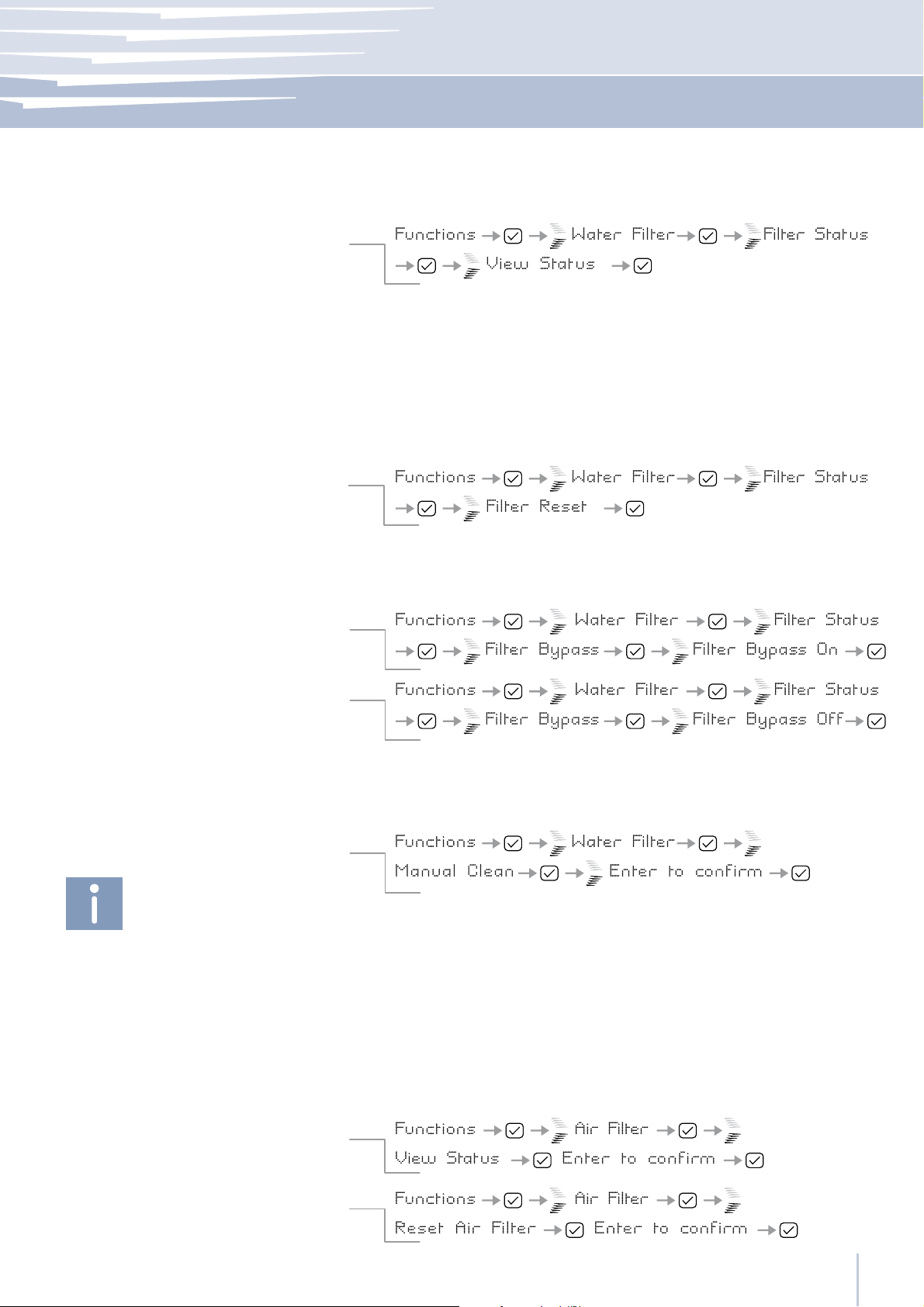
The View Status function permits visualizing the exact quantity of filtered
water in liters and the time left before the filter needs to be replaced.
The Reset Filter function sets to zero the quantity of water filtered and the time
left before the filter needs to be replaced. It is necessary to set the meter to
zero each time the cartridge is replaced.
After 30 days from the appearance of the message “Replace Filter Cartridge”, ice production will be suspended and the display will visualize the
message “No Water”. To once again activate ice production it is necessary
to set the filtered water meter to zero via the Reset Filter function. The days
and the liters available before filter replacement is necessary are indicated.
This function is to be activated when it is not necessary to filter the water,
because excellent quality water is already available from the home water system.
Manual Clean, Water Filter
How to manually clean the filter
Correctly position the ice tray or another suitable
container under the IceMaker to collect water, then
close the drawer. At the end of the operation, wash
the tray.
Air Filter
How to check the status of the filter
How to set the filtered air meter to zero
If the ice production is disabled for long period, the water circuit is automatically cleaned. Nevertheless, in particular cases, it is possible to
manually intervene and perform a supplementary cleaning.
Repeat the operation until the water is clean.
The View Status function permits visualizing the exact quantity of filtered
air in liters and the time left before the filter needs to be replaced.
The Reset Filter function sets to zero the quantity of air filtered and the
time left before the filter needs to be replaced. It is necessary to set the
meter to zero each time the cartridge is replaced.
www.fhiaba.com ∙ [email protected] ∙ Info Line 800-344222 ∙ Tel +39 (0)434 420160 ∙ Fax +39 (0)434 420161
13
Page 16
5
Settings and Special Functions
5.3
Basic settings of the Fhiaba Access Menu
Select the Fhiaba Access button
to select
TriMode Options
How to set the Fridge function
How to set the Fresco function
How to revert to the Freezer function
Default Setting
How to reset default settings
Date
Set Date
How to set the date
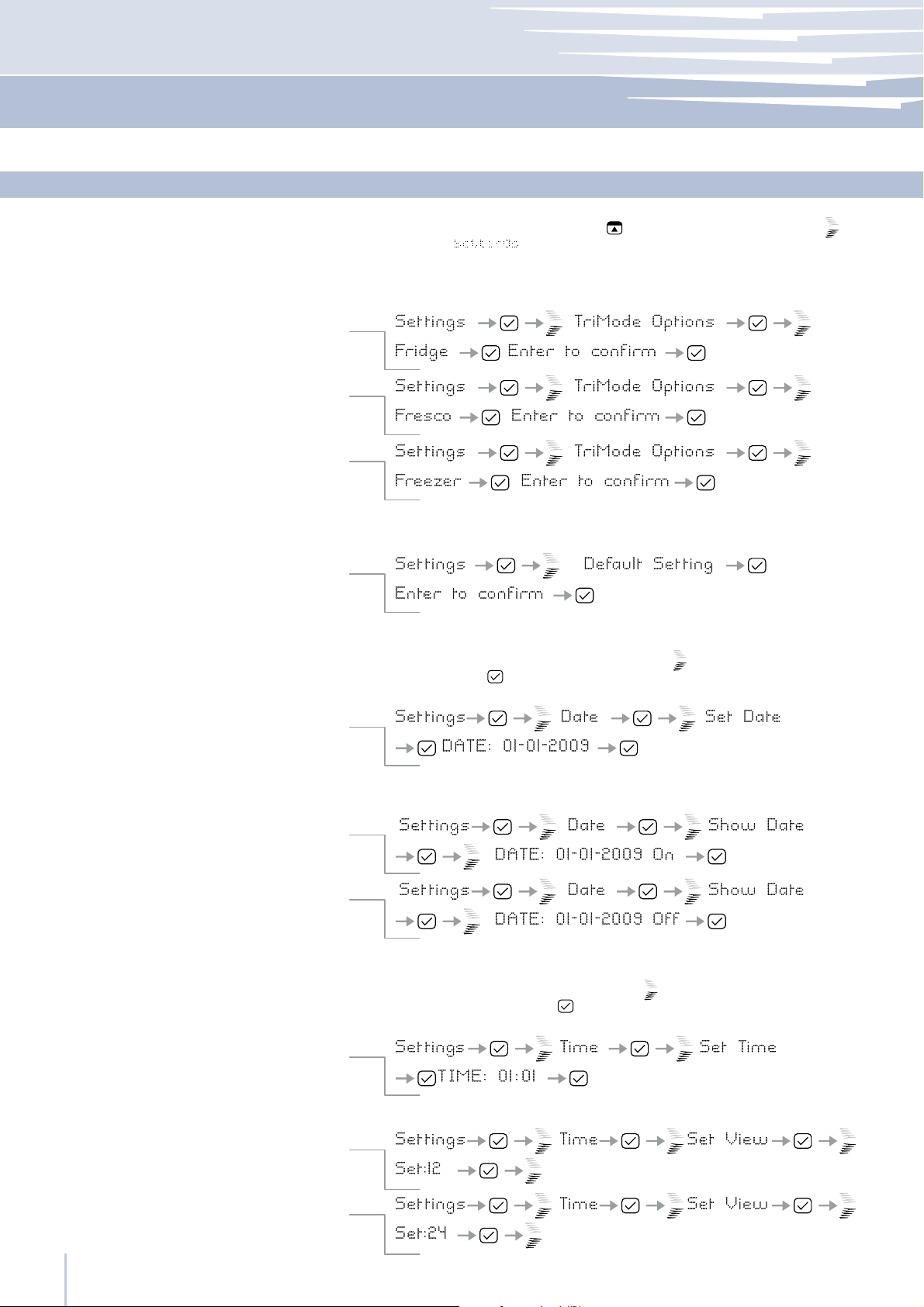
The freezer compartment can, if required, be converted to the refrigeration o Fresco operating mode.
This offers the possibility to reset default factory settings and cancels any
previous changes.
The display will visualize the date in the format dd:mm:yy (day:month:year),
the day will blink. Use the Up/Down buttons
firm with Enter to go on to the next setting; once the year is confirmed
the date will be set.
and used the Up/Down button
.
to modify the setting, con-
Show Date
How to activate the date
How to deactivate the date
Time
Set Time
How to set the time
Set 12/24
How to set the display to 12 h
How to set the display to 24 h
Using this function it is possible to deactivate/activate the date visualization on the display.
The display visualizes the hours and minutes in the format hh:mm and with
hh: blinking. Use the Up/Down buttons to modify the setting and then
confirm by pressing Enter to go on to the next setting.
Once the minutes are confirmed, the time will be set.
This function selects the display at 12 or 24 h.
www.fhiaba.com ∙ [email protected] ∙ Info Line 800-344222 ∙ Tel +39 (0)434 420160 ∙ Fax +39 (0)434 420161
14
Page 17
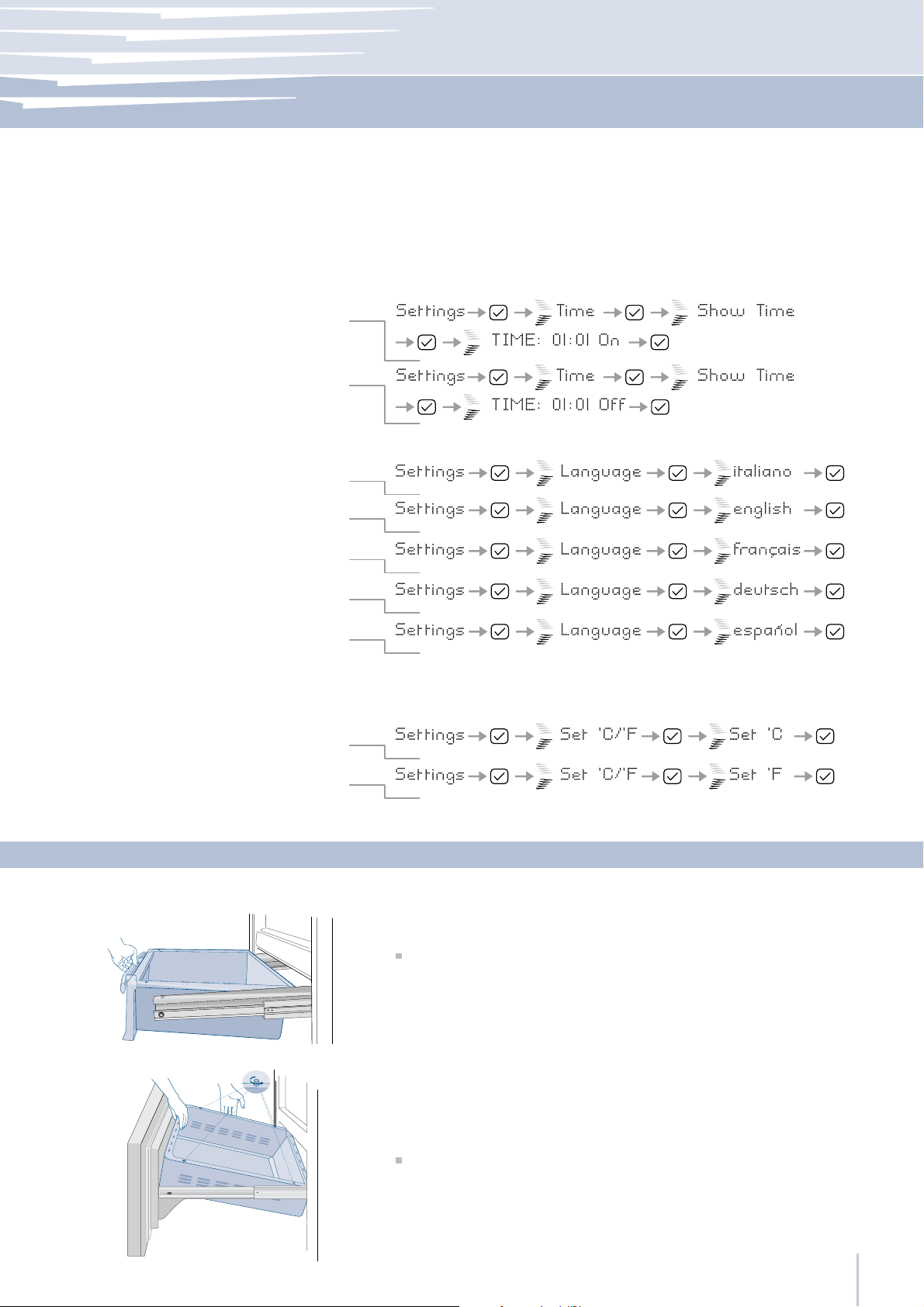
Internal Layout
5-6
Show Time
How to activate the permanent time
How to deactivate
Language
Italian
English
French
German
Spanish
Set °C/°F
How to set the temperature in Centigrade
Through this function it is possible to activate/deactivate the constant
visualization of the time.
The function allows selection of the language for the display messages.
This function permits visualizing the temperature in Centigrade or Fahrenheit degrees. Normally, the appliance is set for visualization in centigrade
degrees.
How to set the temperature in Fahrenheit
Fresco Drawer
TriMode Drawer
Internal Layout (positioning, adjustment, removal)
Fixed to the slide guides with two locking nuts
to remove the drawer, unscrew the locking nuts and remove
the drawer
The upper TriMode can be removed using the same method used for
the Fresco drawer
to remove the lower drawer unscrew the four locking nuts.
6.1
www.fhiaba.com ∙ [email protected] ∙ Info Line 800-344222 ∙ Tel +39 (0)434 420160 ∙ Fax +39 (0)434 420161
15
Page 18
6
Internal Layout
Ice Tray
Do not place hands or fingers near the Icemaker
when in function.
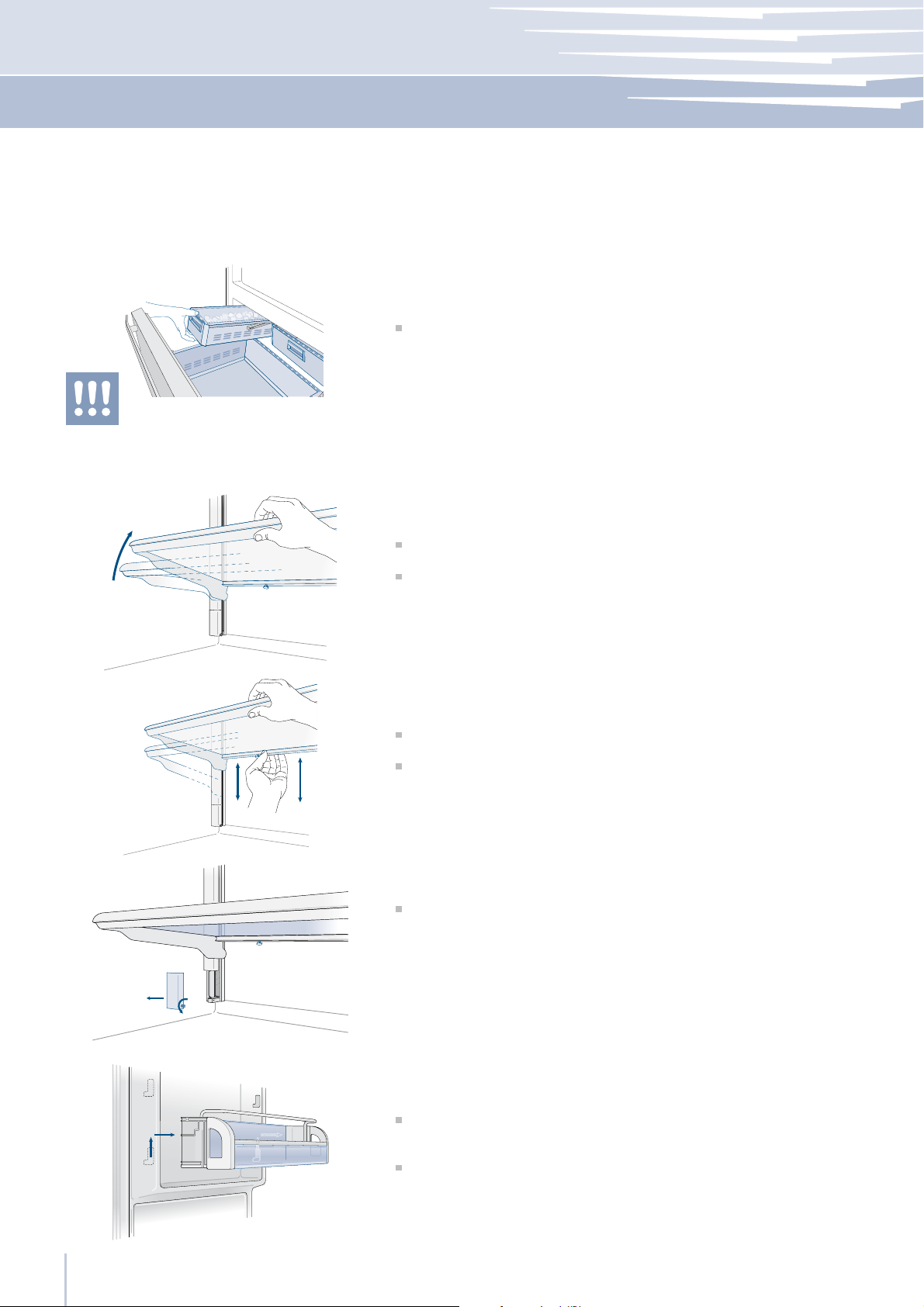
Shelves
Located in the upper drawer of the freezer compartment
after removal, make sure to reposition it correctly.
The shelves are sliding and easily positioned by the user as follows:
pull and slightly turn the locking knob
lift the front part of the shelf and tilt it
lift or lower the shelf to the desired position
reposition the locking knob
to remove a shelf it is necessary to first remove the end parts of the
guides (unscrew the locking nut), slide it downwards and remove it.
2
1
Door Shelves
2
1
The door shelves can be easily removed for cleaning
Hold the door shelf at the sides and push it upwards to release it from
its seat, then pull it outwards.
Reverse the procedure to reinstall
www.fhiaba.com ∙ [email protected] ∙ Info Line 800-344222 ∙ Tel +39 (0)434 420160 ∙ Fax +39 (0)434 420161
16
Page 19
Activation and use of the Ice Maker
7
It is normal that some ice cubes stick to one another. If the ice is not frequently used, the older
cubes can become opaque, and will have a
strange flavor and become smaller.
The Icemaker automatically deactivates if the
Vacation function is activated.
When the Icemaker is started for the first time, it
is recommended to empty the full ice tray of the
first ice cubes.
If the equipment has been switched off for a
month or more, it is recommended to performe a
water filter cleaning cycle.
Activation and use of the Ice Maker
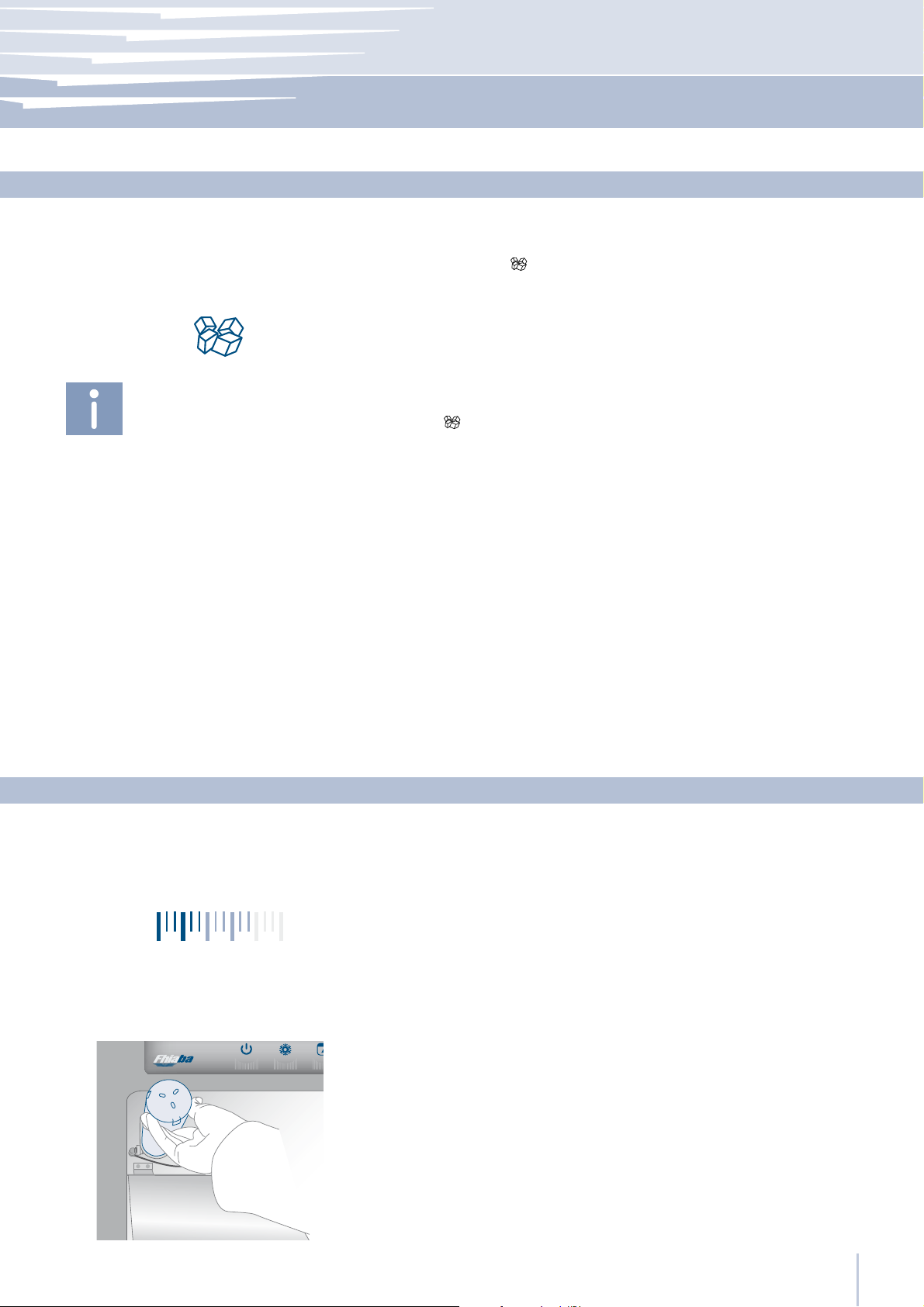
To activate the Ice Maker after installation of the appliance, press the
Icemaker button .
Please note that from 12 to 24 hours are necessary before ice can be
harvested. The production is of 10 cubes per cycle in approximately
10 cycles in 24 hours.
The yield depends on the temperature set in the freezer, the room
temperature and the frequency of door opening.
If the appliance is operating without being connected to the water
system, make sure that the Icemaker is deactivated by pressing the
button
The Ice Maker produces ice until the ice tray is full and will automatically stop once the maximum level is reached.
With the SuperIce function, it is possible to increase the quantity of ice
produced a 24 hours, while the Set Cube Size function permits selection of the size of the produced ice cubes.
.
7.1
Filter Replacement
Water Filter
The Water Filter makes available high-quality water for the production
of ice cubes. It provides up to 3000 liters of water for a maximum time
of six months.
On the upper right of the command panel it is possible to monitor the
use status of the filter: when the entire area is lighted the filter has just
been replaced; the white lighted area indicates that the filter capacity is below 20%. When the filter is nearly expired the message “Replace
Filter Cartridge” will appear on the display.
The filter is located inside the refrigerator compartment, near the door
hinge, protected by a flap door. Prior to change the filter switch off the
Ice Maker by pressing the IceMaker button. Then enter the Fhiaba Access Menu and set “Manual Clean” function. At the end of the cleaning
cycle remove the water from the ice tray and wipe it dry.
Press the front of the flap door to open it and carefully rotate the filter
cartridge for a quarter rotation in a counter clockwise direction until it detaches from its housing. It is normal for a small quantity of water to come
out. Remove the cap of the new cartridge and insert it into the housing
by gently rotating it for a quarter rotation in a clockwise direction until it
locks into place.
7.2
www.fhiaba.com ∙ [email protected] ∙ Info Line 800-344222 ∙ Tel +39 (0)434 420160 ∙ Fax +39 (0)434 420161
17
Page 20
8
Lighting
8.1
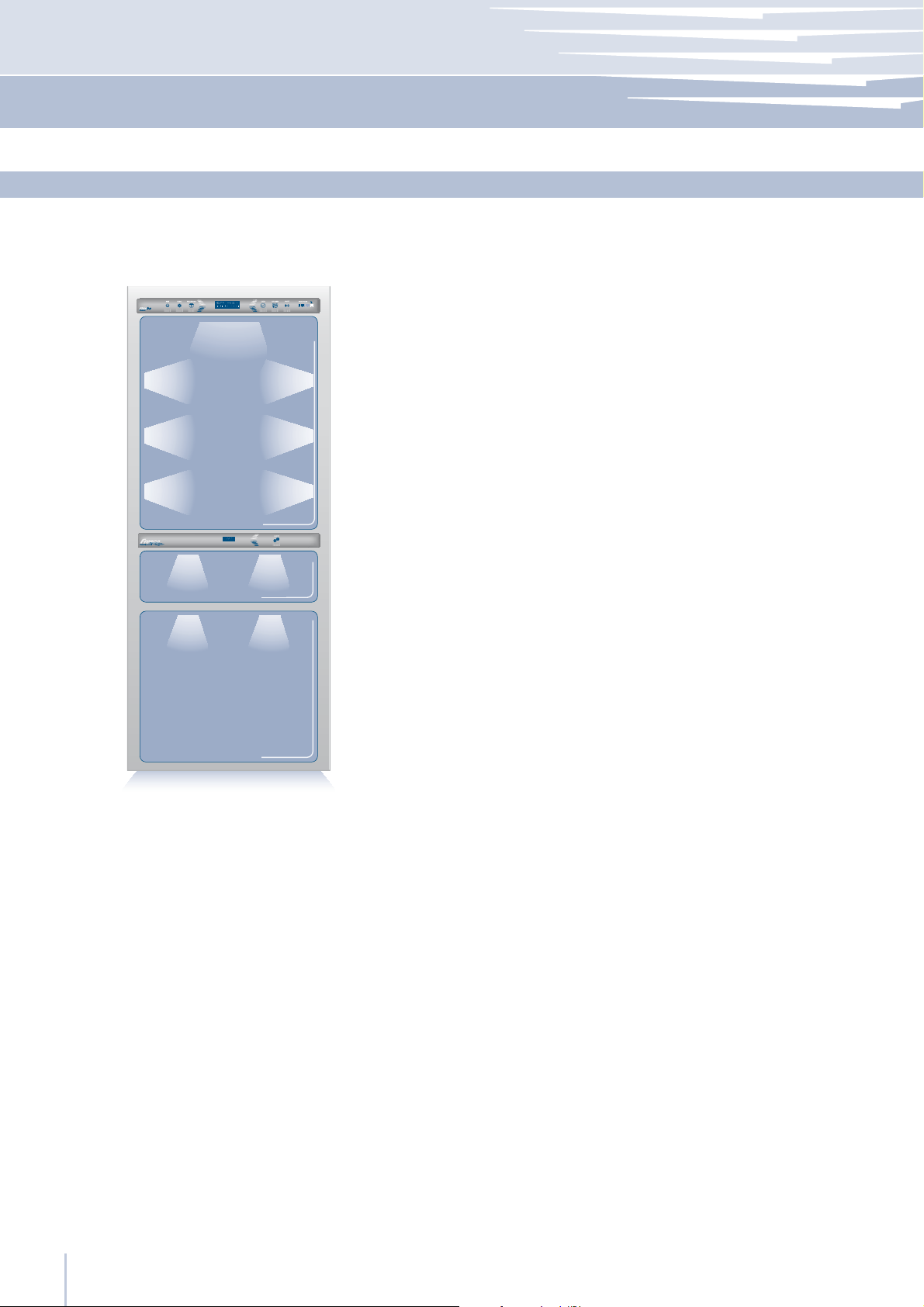
Lighting
To provide optimum interior lighting, LED strips illuminate the refrigerator compartment from the top and sets of LED lights directly illuminate
different areas of the refrigerator compartment, of the Fresco drawers
and the freezer drawer.
In case of malfunction and/or breaking down of the lighting system,
the repair should be carried out only by a qualified Fhiaba Service
technician.
www.fhiaba.com ∙ [email protected] ∙ Info Line 800-344222 ∙ Tel +39 (0)434 420160 ∙ Fax +39 (0)434 420161
18
Page 21
Food Conservation
9
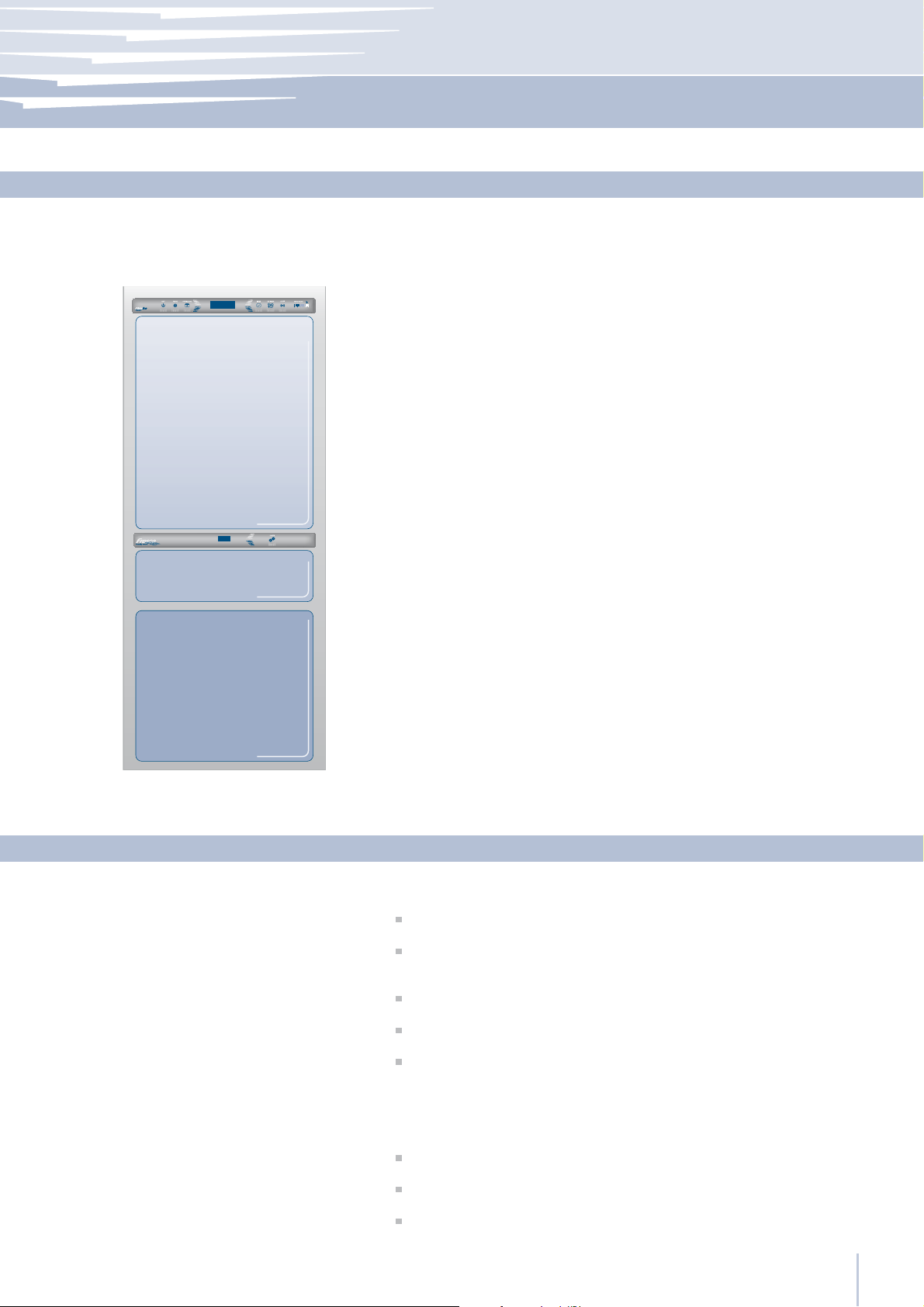
Fridge
from +2° to +8 °C
(from 35,6°F to 46,4°F)
Fresco
from -2° to +2 °C
(from 28,4°F to 35,6°F)
Freezer
from -15° to -22 °C
(from 5°F to -7,6°F)
General directions
Your Fhiaba is designed to ensure precise, constant temperatures and
appropriate humidity levels in all compartments.
In addition, the double refrigeration ensures that frozen foods and ice
do not absorb the odor of fresh foods and that the humidity in the refrigerator does not freeze and build up frost.
Nevertheless, to properly conserve all of your foods, it is not enough to
have an excellent refrigerator. It is also necessary to know the rules for
correct food conservation.
Do bear in mind that all foods will inevitably change their characteristics
over the passage of time. This change begins long before the food is
consumed, since foods contain micro organisms which multiply and can
cause deterioration. This process occurs more rapidly due to inappropriate manipulation, conservation temperatures and humidity levels.
It is therefore recommended to follow the directions presented below
which will permit using your refrigerator/freezer in the most rational and
safe manner and keep your foods in the best way for as long as possible.
Bear in mind that the Fresco area is the area for conserving the most
delicate fresh foods, since it ensures constant average temperature
below or equal to 0°C (32°F).
Periodically check that all foods are in a perfect state of conservation. It is usually quite clear when a food item is deteriorated, due to
mold, unpleasant odor and unpleasant aspect. Nevertheless, there
are cases in which these conditions are not so evident. If you believe
that a food item was kept for an excessive period of time and may be
deteriorated, do not consume this item or even taste it, even if it seems
to still be healthy, since the bacteria that cause deterioration of food
can also cause poisoning and illness.
When in doubt, throw the food away.
9.1
How to maintain good food quality
When buying groceries
When placing foods in Check the refrigeration temperature of the various compartments on
www.fhiaba.com ∙ [email protected] ∙ Info Line 800-344222 ∙ Tel +39 (0)434 420160 ∙ Fax +39 (0)434 420161
Always take the following precautions:
Place any packages of raw meat, fish or poultry in plastic bags so
that they do not drip on other foods.
Purchase meat, poultry and fish last. Do not leave your groceries in
a warm car after shopping. Keep a freezer bag in your car and use it
in case of very high temperatures or long trips.
Check the production dates and “best used within” times on foods
to be sure that they are fresh.
Be very careful when buying fresh foods, and only buy a quantity
that can be consumed in a week.
Leave warm foods at room temperature for at least two hours before
placing them in the refrigerator, unless you have activated the Shopping function before.
the control panel:
The refrigerator temperature must be 8°C (45°F) or lower and the
freezer temperature must be -18°C (0°F)
Follow the recommendations regarding the conservation times and
temperatures indicated in the tables to follow.
Keep raw meat, fish and poultry separate from other foods and
avoid any possible drippings.
9.2
19
Page 22
9
Food Conservation
When placing foods in
When preparing food
When placing in the refrigerator your meat, fish or poultry, leave
these in their original packaging, unless the packaging is ripped or
punctured. Repeated manipulation could introduce bacteria into
these foods.
To keep food in the freezer is a good idea to use freezer containers,
with plastic freezer bags or aluminum foil around the freezer containers if you intend to conserve the food for more than two months. This
will minimize dehydration and quality deterioration
Label and date the packages
To keep foods in the refrigerator, wrap these in plastic film or deposit
them in plastic containers or vacuum packed containers to avoid drying. Always mark with the date the packages or containers.
Be careful to correctly position the food items on the shelves in a way
that does not obstruct the air circulation vents inside the compartment.
Wash all items that have come in contact with food
Carefully wash hands before and after contact with food
Sterilize containers, utensils and kitchen tools that have come into
contact with meat, fish and poultry.
Sterilize sponges used to wash kitchenware weekly.
Use plastic gloves if you have any hand condition.
Defrost foods in the refrigerator or in the microwave oven, not on
the countertop. If you use a microwave oven to defrost food, cook
the food immediately.
Marinate food only in the refrigerator.
Rinse fish and poultry before cooking.
Avoid contamination when preparing dishes. Keep raw meat, fish,
poultry and their liquids away from other food items.
For example, do not use the same surface in the same utensils for preparing meat, fish, poultry and vegetables.
Keep your cutting boards perfectly clean, whether in wood or plastic.
Wash these with warm water and soap, and rinse with a diluted disinfecting solution.
When cooking food
When you have leftovers
Do not taste raw or partially cooked meat, poultry, fish and eggs.
Cook meat at a temperature of 75°C (167°F) or higher.
For cuts of meat over 5 cm, use a meat thermometer to check the
temperature. For thinner cuts of meat, to check if it is cooked, check
the color of the juice and whether it is clear or pink.
If you are cooking meat which is not yet defrosted, increase the
cooking time one and half times the normal duration.
Bear in mind that roasted meat and poultry, when cooked in the
oven, need temperatures of 160°C (320°F) or higher.
Cook the egg whites and yolks until they are well done.
Do not use the same containers that have contained raw or partially
cooked eggs.
If your oven or microwave is equipped with a probe for temperature
control, use it.
Keep leftovers in the refrigerator or in the freezer in small closed containers. Before placing them in the refrigerator, make sure that they
have cooled off. Therefore let at least two hours pass after cooking
and make sure that there is adequate air circulation around the container, so that the food can cool off quickly.
Date leftover containers and use them within the recommended time.
Completely cover and heat leftovers before serving.
Boil sauces and soups. Consume leftovers after they have been
heated to a temperature of at least 75°C (167°F).
If you think the food is gone bad, or when in doubt, throw it away.
www.fhiaba.com ∙ [email protected] ∙ Info Line 800-344222 ∙ Tel +39 (0)434 420160 ∙ Fax +39 (0)434 420161
20
Page 23
Food Conservation
9
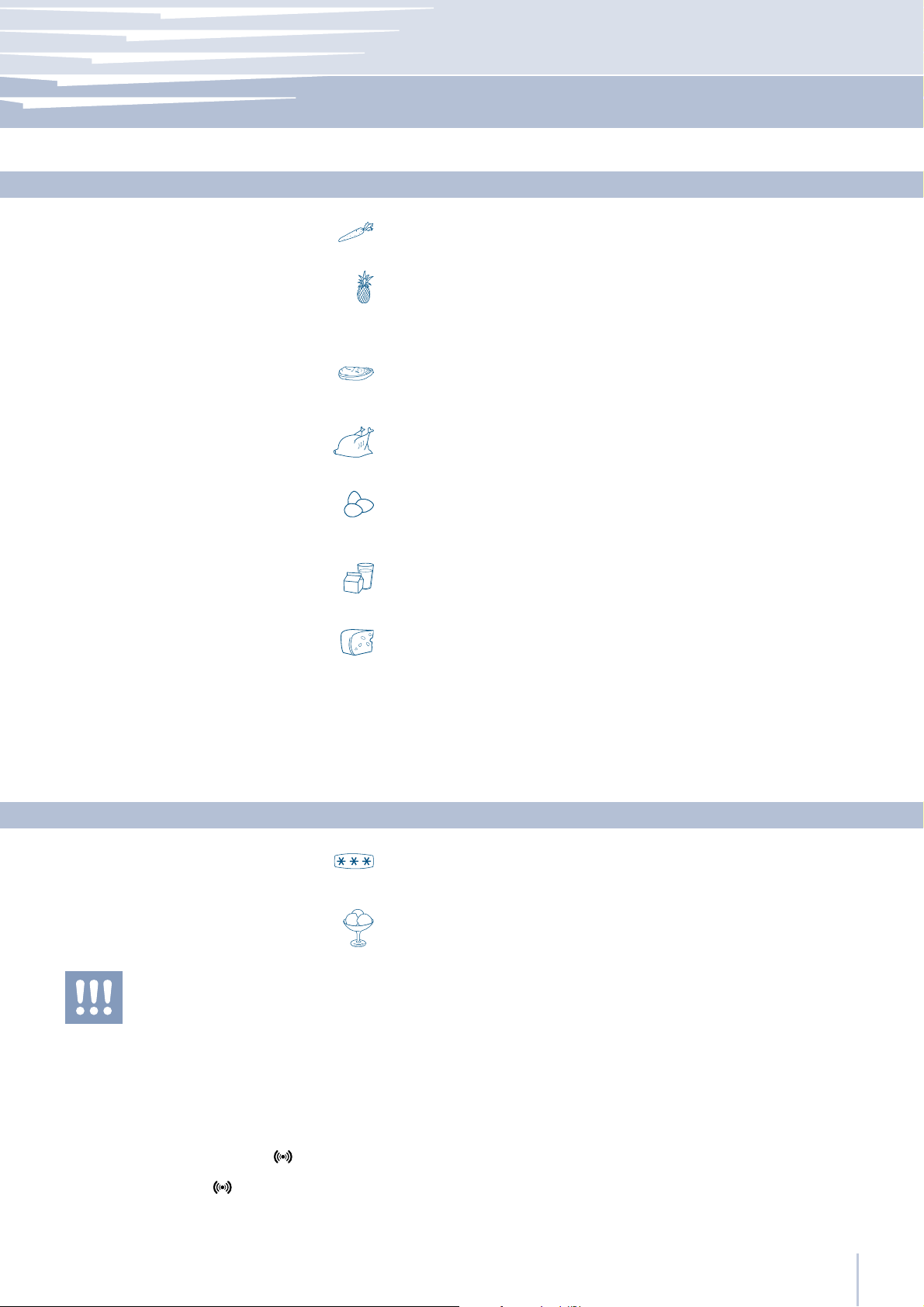
Vegetables
Fruit
Packaged meat
Fresh meat, fish and poultry
Eggs
Milk, cream and fresh cheeses
Recommendations for conserving fresh food
Wash vegetables in cold water and dry well. Place vegetables in vacuum
packed containers, plastic containers or vegetable bags in a Fresco Drawer.
Wash and dry fresh fruit. Pack very aromatic fruit in plastic bags.
Fruit should be placed in the high humidity Fresco compartment.
Place in the refrigerator in its original packaging.
After opening, wrap the remaining food in plastic bags or aluminum foil.
Remove the original packaging, then put in plastic bags or containers
and immediately place in the refrigerator.
Place the eggs in their package or container into the refrigerator without
washing them. Check the “best used within” date and at any rate use
the eggs within two weeks of purchasing.
These should be kept in their original closed packaging. Place these on
refrigerator shelves and consume these within five days of purchase.
9.3
Cheeses
Leftovers
Frozen food
Ice cream
After a prolonged interruption of electrical power,
once the electrical power is reactivated, a sound
signal indicates that the temperature has raised
above normal levels. In addition to this the display
will visualize for one minute the highest temperature
detected inside the compartments, to allow the user
to decide how to better use the food items.
After one minute the display will resume normal
operation, while the Alarm button
to blink.
Press the Alarm button
highest recorded temperatures.
to visualize again the
will continue
Place these in the Fresco drawer in their original packaging.
Once opened, close these hermetically in plastic bags or aluminum foil.
Let these cool off and cover hermetically with aluminum foil or place
in sealed containers to prevent drying or the spread of odors.
Recommendations for conserving frozen food
Place food in plastic bags for the freezer. These bags must be hermetically sealed against air and humidity. Do not refreeze defrosted meat.
The firmness of ice cream depends on the quantity of cream that it contains. In general, high-quality ice cream has large amounts of cream,
therefore a very low temperature in the freezer will be necessary to maintain its firmness.
Therefore, ice cream without much firmness is not necessarily an indication of a temperature problem as raised above normal levels.
9.4
www.fhiaba.com ∙ [email protected] ∙ Info Line 800-344222 ∙ Tel +39 (0)434 420160 ∙ Fax +39 (0)434 420161
21
Page 24

10
Recommended times for food conservation
Fresh foods Conservation area Time
Raw meats
Large cuts Fresco Compartment 4 days
Beef steaks, poultry and wild game Fresco Compartment 3 days
Ground meat Fresco Compartment 1-2 days
Carpaccio Fresco Compartment Immediately
Cooked meat
Boiled meat and roasted meat Refrigerator Compartment 2 days
Meat sauce Refrigerator Compartment 6 days
Fish
Raw and cooked fish Fresco Compartment 2 days
Other
Soups and broths Refrigerator Compartment 2 days
Pasta Refrigerator Compartment 2 days
Opened cold cuts Fresco Compartment 3 days
Fresh cheeses Fresco Compartment 2-3 days
Well sealed aged cheeses Refrigerator Compartment Several months
Eggs (fresh and unwashed) Refrigerator Compartment 2 weeks
Opened cans Refrigerator Compartment 2-3 days
Raw vegetables (in perforated bags) Fresco Compartment 1 week
Frozen foods Conservation area Time
Beef, veal, lamb and goat meat Freezer Compartment (steaks) 6-12 months
Beef, veal, lamb and goat meat Freezer Compartment (Meat with bone) 4-6 months
Ground beef Freezer Compartment 1-2 months
Pork Freezer Compartment (Without bones) 4-6 months
Pork Freezer Compartment (With bones) 2-3 months
Ground pork Freezer Compartment 1-2 months
Meat leftovers Freezer Compartment 2-3 months
Whole chicken and turkey Freezer Compartment 8-12 months
Goose, duck and pheasant Freezer Compartment 4-8 months
Fish Freezer Compartment 1-2 months
Shellfish Freezer Compartment 2-3 months
Cooked food Freezer Compartment 1-2 months
Vegetables Freezer Compartment 8-12 months
Fruit Freezer Compartment 6-12 months
Desserts and cakes Freezer Compartment 2-3 months
www.fhiaba.com ∙ [email protected] ∙ Info Line 800-344222 ∙ Tel +39 (0)434 420160 ∙ Fax +39 (0)434 420161
22
Page 25
Care and Cleaning
11
Scrupulously follow the detailed directions that can
be found in the provided kit and never use abrasive or metallic products which could scratch and
damage the satin finishing on the appliance permanently.
Before performing any sort of cleaning, disconnect
the appliance from the electrical power supply.
Make sure you do not damage the refrigerant circuit in any way.
1
Care and Cleaning
To clean the parts in steel use a microfiber cloth and the sponge provided in the kit with the appliance. Always use the cloth and sponge
in the direction of the steel’s satin finish.
Every now and then, to make to steel shiny, wipe with a slightly damp
microfiber cloth.
Do not use the sponge on aluminium parts, such as the handles and
the profiles of the glass shelves. You should use special care to keep
free of obstructions the ventilation openings in the appliance or in the
cabinet that houses it.
Condenser cleaning
A ventilation grille is located either at the top of the appliance or at the
bottom according to the model type.
A foam filter is placed behind the grille to protect from dust the ventila tion system.
To clean it use a vacuum cleaner with a soft brush attachment at maximum power, sweeping it along the vent slits. In case of a significant dust
build up, the ventilation grille can be removed to allow a more accurate cleaning of the filter.
Take care also to check the condition of the finned condenser and
clean it from dust if needed.
11.1
11.2
2
The edges of the condenser are sharp, therefore use
adequate protection for the hands and arms when
cleaning the condenser.
Do not use water on the electrical parts, lights and
control panel.
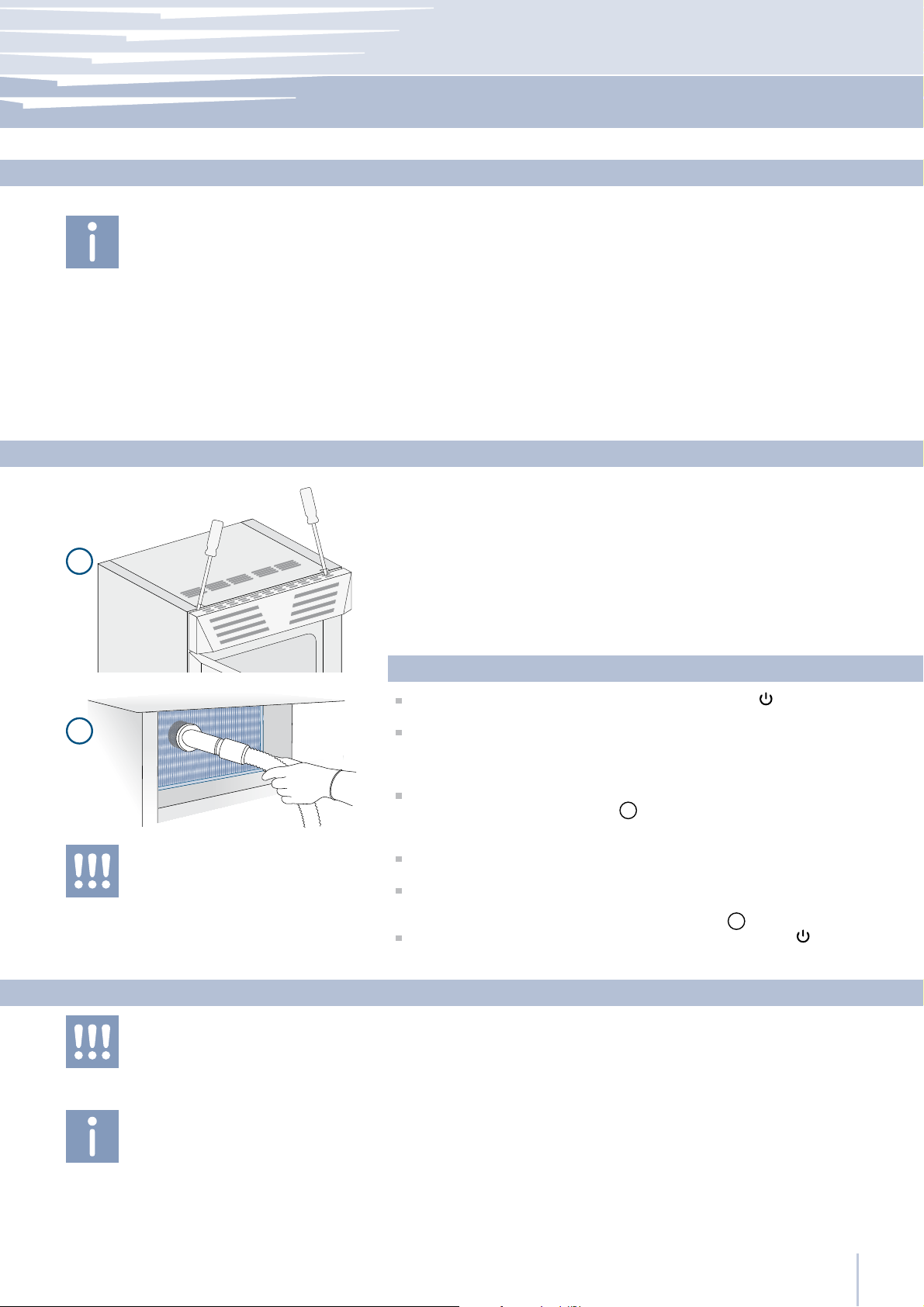
Operate as follows:
Switch off the appliance by pressing the Unit button on the main
control panel for approx 3 seconds.
On models with ventilation at the base remove the screws securing
the g r i lle at the bottom and ta ke it off. On mode ls w ith ventilation at the
top remove the grille, which is mounted with pressure hooks, by pulling
it outward.
In some cases you may need to free the grille from the hooks by prizing it off from the top as illustrated
to avoid damages or scratches to the grille, wrap some protective tape
around the tool’s end.
Thoroughly clean the grille and the foam filter, by means of a vacuum
cleaner and the soft brush attachment.
Wait approx 30 minutes, until the finned condenser cools down to
room temperature, then clean it thoroughly from any dust build up as
shown in the picture, taking care not to damage it
Start up the appliance again, by pressing the Unit button on the
main control panel for approx 3 seconds.
Clean the internal and removable parts by washing them with a solution of lukewarm water, a small amount of dishwashing detergent and
a pinch of baking soda.
Rinse and dry right away.
. Use a flat blade screwdriver, and
1
.
2
Internal cleaning
11.3
Do not bring cold glass parts into contact with boiling water.
Do not wash any parts of the refrigerator in a dishwashing machine since this could damage or irreparably deform the parts.
www.fhiaba.com ∙ [email protected] ∙ Info Line 800-344222 ∙ Tel +39 (0)434 420160 ∙ Fax +39 (0)434 420161
Do not use mechanical devices or other methods to speed up defrosting.
23
Page 26
12
Troubleshooting Guide
12.1
Troubleshooting Guide
“Call Service” message
The refrigerator or the freezer does not work
The refrigerator or the freezer
is warmer than usual
The appliance remains in function
for a long time period
If you notice malfunctions in your appliance, use this guide before calling for service: this guide can help you personally resolve the problem
or could provide important information to be conveyed to the service
technician to ensure rapid and effective repair.
A malfunction is usually indicated by a message on the display.
Problems that cannot be solved by the user are signaled through a
malfunction code and the message “Call Service”.
Is the appliance connected to the electrical power supply?
Is electrical power available at the electricity socket?
Is the Unit button
Does the display show a malfunction code?
Is the temperature adjusted correctly?
Were the doors or drawers open for a long period of time?
Were large quantities of food recently inserted?
Bear in mind that during very hot weather and with very high temperatures in the room it is normal that the compressor remains on for
prolonged periods of time.
Were the doors or drawers open for a long period of time?
Were large quantities of food recently inserted?
Check that the doors are closed and that the food or containers do
not obstruct the perfect closure of the door.
activated?
If you hear unusual noises
Condensation inside and outside
of the refrigerator
Ice or frost build up inside the refrigerator
or freezer
Unpleasant odors inside the refrigerator
The doors are difficult to open
www.fhiaba.com ∙ [email protected] ∙ Info Line 800-344222 ∙ Tel +39 (0)434 420160 ∙ Fax +39 (0)434 420161
24
It is normal to hear noises from the ventilators or compressors during
operation or during the defrost phase.
Noise could be more marked depending on the position of the appliance and the surrounding environment.
If the climate is very humid, the formation of condensation is normal.
Opening the door or drawers for prolonged periods of time can contribute to the formation of condensation.
In any case, make sure that the doors are always perfectly closed.
Did you leave the doors open for a long period of time?
Do the doors close perfectly?
If the doors do not close perfectly, contact your installer.
In case of frost or ice buil up in the Fresco compartment, due to frequent and prolonged opening of the doors, deactivate the Fresco
function for whill viaa the button on the control panel. Wait until the
frost or ice melt, then remove the drawer and dry the sides and bottom of the compartment.
Clean the appliance completely according to the instructions.
Hermetically cover all the food. Do not conserve food for prolonged
periods of time.
The appliance is designed to ensure a fully hermetic closure. When the
door is closed, a vacuum condition can occur: in this case it is necessary to wait a few seconds until the pressure balances before opening
the door.
Page 27
Troubleshooting Guide
12
The Ice Maker does not work
The Ice Maker does not produce
sufficient amounts of ice
The ice cubes freeze into one block
The ice has an unusual flavor or color
Display message Malfunction description
Power Failure
Fridge door open
Make sure that the Ice Maker is on (Icemaker button
To switch on the Ice Maker press the button.
Make sure that the appliance is connected to the water supply.
On average, the Ice Maker produces approximately 10 cubes of ice
every two hours.
If the ice is not used frequently, it is possible that blocks of ice may form.
It is recommended to remove the block of ice cubes and then let the Ice
Maker fill the ice tray again.
When the Ice Maker is started for the first time, it is recommended to
empty the first full tray of ice cubes.
If the refrigerator was switched off for more than one month or if the cartridge was not changed for more than six months, it could be necessary to
replace the filter cartridge.
Contact a plumber or a water treatment expert to make sure that the
problem is not due to the water supply.
Malfunction indications appearing on the display
Prolonged interruption of electrical power
the appliance resumes work automatically, the display shows the warmest temperatures
achieved
Fridge door open
the message appears after one minute from the door opening
on).
12.2
Freezer door open
No water
Replace filter cartridge
Water circuit problem
Fridge too warm
Fridge too cold
Frischefach too warm
Frischefach too cold
Freezer too warm
Freezer too cold
Error Code... Call service
Freezer door open
the message appears after one minute from the door opening
No water
filter not replaced when required or filter status not reset after replacement
Replace filter cartridge
message appears when only 30% of filter capacity is left
Water circuit problem
water leak of fault to the water system: call Customer Care for advice
Fridge too warm
see Troubleshooting Guide
Fridge too cold
wait for 12 hours: if malfunction persists call Customer Care for advice
Fresco Compartment too warm
see Troubleshooting Guide
Fresco Compartment too cold
wait for 12 hours: if malfunction persists call Customer Care for advice
Freezer too warm
see Troubleshooting Guide
Freezer too cold
wait for 12 hours: if malfunction persists call Customer Care for advice
Functioning problems
call Customer Care who may put you in contact with the nearest Fhiaba Service Agent
www.fhiaba.com ∙ [email protected] ∙ Info Line 800-344222 ∙ Tel +39 (0)434 420160 ∙ Fax +39 (0)434 420161
25
Page 28
13
Before calling for service
13.1
Before calling for service
If our recommendations were not sufficient to solve the problem,
please get in touch with our Customer Care Center for further support
via our website at
www.fhiaba.com
or by sending an email to
You can also contact us on the phone at
If necessary, we will place you in contact with the Fhiaba Service
Center nearest to you.
Before calling, write down the model type and serial number and any
messages which may have appeared on the display.
This information is available on the warranty certificate and on
the rating plate which is located on the inside the refrigerator
compartment (behind the water filter flap door on models provided
with Ice Maker).
www.fhiaba.com ∙ [email protected] ∙ Info Line 800-344222 ∙ Tel +39 (0)434 420160 ∙ Fax +39 (0)434 420161
26
Page 29
Fhiaba Access Menu Map
14
Shopping Fridge
Vacation Fridge
Shopping TriMode
Vacation TriMode
Shopping ON/OFF
Shopping Time
Vacation ON/OFF
Vacation Time
Shopping ON/OFF
Shopping Time
Vacation ON/OFF
Vacation Time
Functions
Shopping Fridge Off
Shopping Fridge On
Set Hours: 1
Vacation Fridge Off
Vacation Fridge On
Set Hours: 1
Shopping TriMode Off
Shopping TriMode On
Set Hours: 1
Vacation TriMode Off
Vacation TriMode On
Set Hours: 1
14.1
FUNCTIONS
Bottle Cooler
Ice Maker
Set Sabbath Mode
Set Night Light
Water Filter
Set Cooling Time
Cooler ON/OFF
Set Cube Size
Super Ice ON/OFF
Sabbath Mode Off
Sabbath Mode On
Night Light Off
Night Light On
Status Filter
Manual Clean
Set Time: 20 min
Bottle Cooler Off
Bottle Cooler On
Size: LARGE
Super Ice Off
Super Ice On
View Status
Reset Filter
Bypass Filter
Bypass Filter Off
Bypass Filter On
Air Filter
View Status
Reset Air Filter
www.fhiaba.com ∙ [email protected] ∙ Info Line 800-344222 ∙ Tel +39 (0)434 420160 ∙ Fax +39 (0)434 420161
27
Page 30
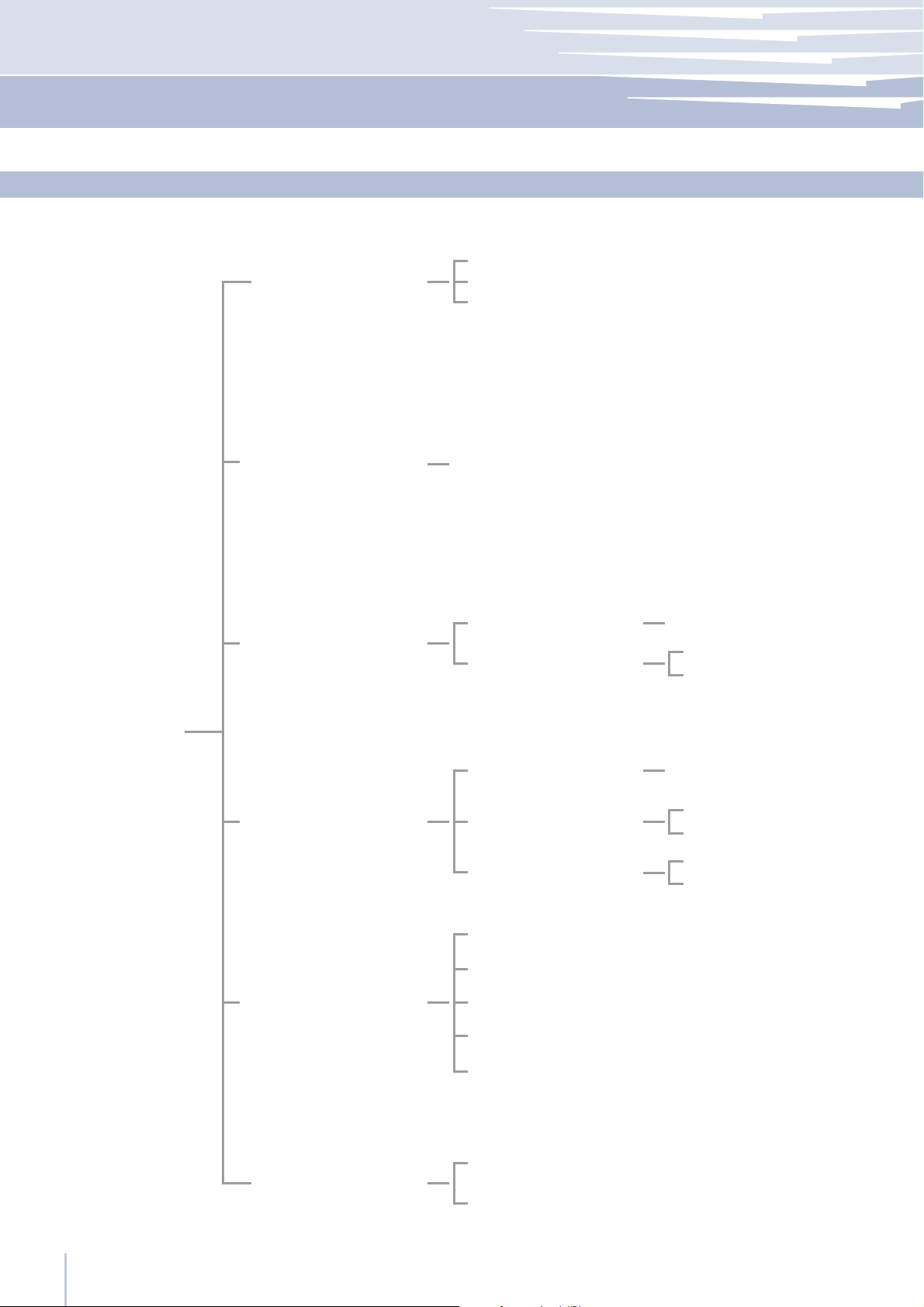
14
Fhiaba Access Menu Map
14.2
Setting
TriMode Options
Default Setting
Date
Freezer
Fresco
Fridge
Enter to Confirm
Set Date
Show Date
DATE: 01-01-2009
DATE: 01-01-2009 On
DATE: 01-01-2009 Off
SETTINGS
Time
Language
Set °C/°F
Set Time
Show Time
Set View
italiano
english
français
deutsch
español
Set °C
Set °F
TIME: 01:01
TIME: 01:01 On
TIME: 01:01 Off
Set: 24
Set: 12
www.fhiaba.com ∙ [email protected] ∙ Info Line 800-344222 ∙ Tel +39 (0)434 420160 ∙ Fax +39 (0)434 420161
28
Page 31

09-06-2009
Baron Industries srl Via Fiumicino, 20 · 33082 · Azzano Decimo · PN · Italy · Tel +39 0434 420160 · Fax +39 0434 420161
E-mail: [email protected] · www.fhiaba.com · Info Line 800-Fhiaba (800-344222)
Baron Industries srl is constantly researching new way to improve the features and the design of their products, therefore models are often upgraded and reviewed.
Page 32

B09000101 EN
www.fhiaba.com
Info Line
800 - Fhiaba . (800-344222)
 Loading...