

Page 1

1
Quick Start Guide
Page 2

2
Page 3

1
What’s inside
Step 1 Signing up for your Fetch TV service 3
Step 2 Unpack the box 4
Step 3 Connect Fetch TV Box to your broadband modem 6
Step 4 Connect Fetch TV Box to your TV Antenna 9
Step 5 Connect Fetch TV Box to your TV 11
Step 6 Power up Fetch TV Box 13
Step 7 Start up Fetch TV 15
Remote Control 16
Fetch TV Mobile app 17
Fetch TV Box 18
Troubleshooting 19
Getting More Help 22
Specifications 23
Page 4

2
It’s here – TV made better.
Welcome to Fetch TV – an exciting new television experience that puts
you in control of the best TV, great movies and popular interactive
applications.
There are 7 easy steps to get you started:
1. Sign up for your Fetch TV service
2. Unpack the box
3. Connect the Fetch TV Box to your broadband modem
4. Connect the Fetch TV Box to your TV Antenna
5. Connect the Fetch TV Box to your TV
6. Power up your Fetch TV Box
7. Start up Fetch TV
This guide tells you all you need to know about setting up and turning
on Fetch TV. It also has important safety and usage information.
It’s Fetch TV and it’s ready when you are.
Page 5

3
1
Sign up for Fetch TV service
Now that you have your Fetch
TV box you need to subscribe
to Fetch TV and get the
activation code for your box.
To do this follow these simple
steps:
1. On your computer or mobile device web browser, go
to fetchtv.com.au/activate and follow the on screen
prompts to get started.
2. You’ll need to set up a username and password, enter
your account info, and payment details.
3. Once your payment details are conrmed you’ll get an
activation code on screen, by email and SMS to your
mobile phone. Your Fetch TV Box will prompt you to
enter the activation code during start up later (Page 15).
Manage your Fetch TV account at
www.fetchtv.com.au/account
www.fetchtv.com.au/account is where you go when you
need to update your account or payment details or when
you have any billing enquiries. It’s also where we post
any information about service outages and where you can
access online troubleshooting for your Fetch TV service.
Keep a note of your username and password as you will
need these to log into your Fetch TV account.
Page 6
4
2
Unpacking
the box
Before you install your
Fetch TV Box, check that
all the accessories you
need have been supplied
using this page as a
checklist.
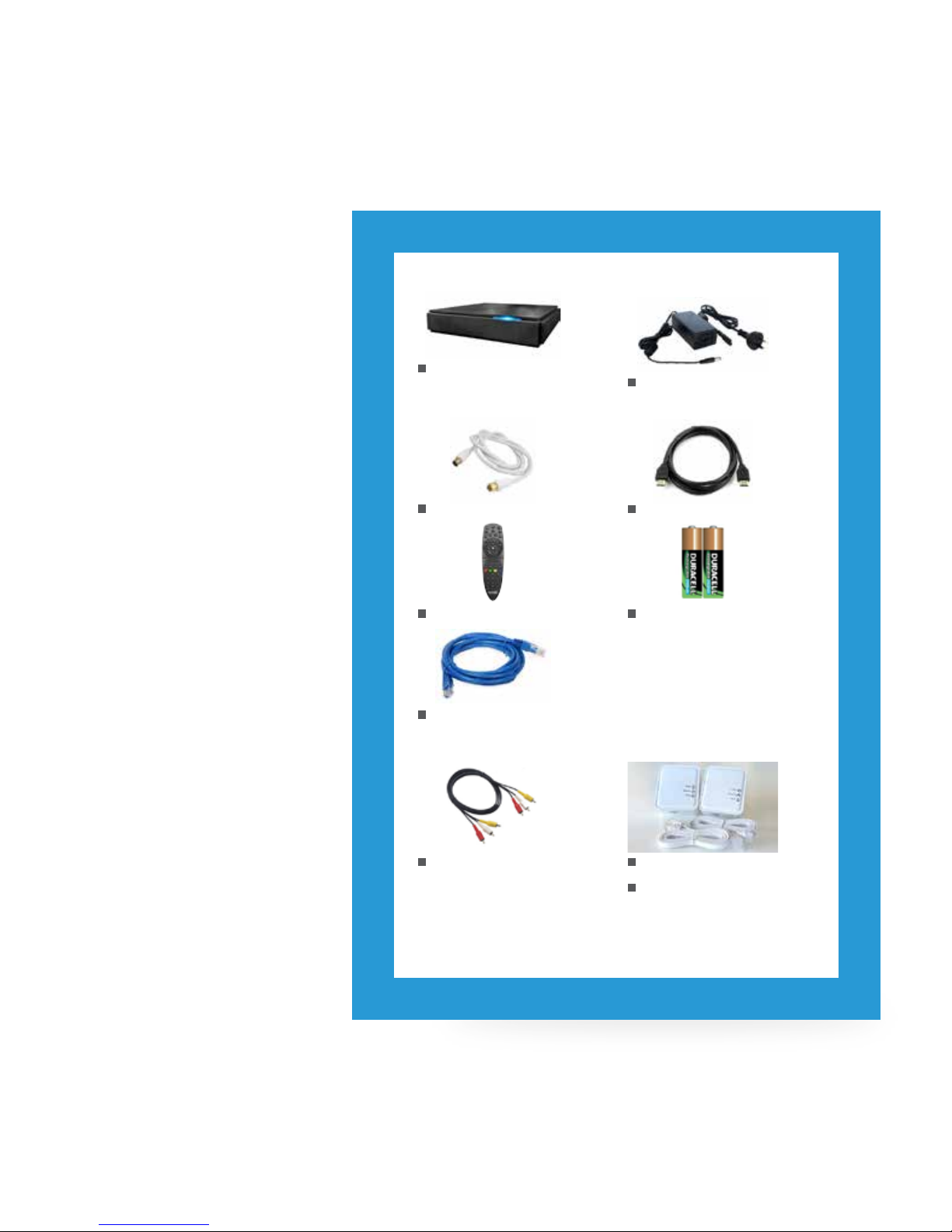
You will need:
1 Fetch TV Box Unit
1 Power Supply Unit
1 Power Cord (1.5m)
1 Antenna Cable (1.5m)
1 HDMI Cable (1.8m)
1 RJ45 Ethernet Cable (2m)
1 Remote Control 2 AA Batteries
1 RYW Composite Cable
(1.5m)
For connecting Fetch TV
Box to TV if can’t use
HDMI
2 Power Line Adapters
2 RJ45 Ethernet Cables
(90cm)
For connecting Fetch
TV Box to modem when
they’re in different rooms
You may not need to use:
Page 7

5
Installation Tips
• Place the Fetch TV Box horizontally on a clean,
dry, steady surface with 5cm of space all around
it. Don’t stack it on audiovisual appliances that
generate heat or electromagnetic radiation.
• Keep the Fetch TV Box away from direct
sunlight, carpet, heating and cooking sources.
Don’t put it in closed cabinets or on vibrating
surfaces like loudspeakers.
• Make sure the Fetch TV Box is close to the
TV and/or home theatre it’s being connected
to, and within 6 metres from where the remote
control is used.
• Only use a clean, dry cloth to clean the Fetch TV
Box and remote control. Don’t use solvents or
cleaning agents of any kind.
• Please don’t open the Fetch TV Box in any way.
It could be dangerous and void the warranty.
• Obviously, it’s perfectly ne to change the
batteries in the remote control.
• The Fetch TV Box is designed to work from a
100V-240V 50Hz AC power source only.
• Use only the original power cord and power
supply unit supplied and make sure the cord is
fully inserted into the back panel of the Fetch TV
Box before turning the Power on. Check that the
cord is free from obstruction.
• If the cord is damaged, turn the power off and
ask the retailer from which you bought the Fetch
TV Box for a replacement.
• Before cleaning, always unplug the Power at the
wall and back of Fetch TV Box. Never remove
the plug by yanking the cord.
• Keep the Fetch TV Box away from babies,
children and sharp objects.
• Don’t place liquid lled items on top of the Fetch
TV Box and don’t insert any objects through the
ventilation spaces in the cover.
• Please visit www.fetchtv.com.au/account and
log into your Account to get troubleshooting
steps in case of any problems.
Fetch TV Box And Now a Safety Message
Page 8
6
Connect your Fetch TV Box to
your broadband Modem
Fetch TV is delivered by
broadband internet, so you need
to connect your Fetch TV Box to
the broadband modem. There are
various ways to do this:
• Ethernet Cable (recommended option) – direct
or via data cabling
• Power Line Adapters (alternative option if your
broadband modem and box are too far apart
for the Ethernet cable to reach)
3
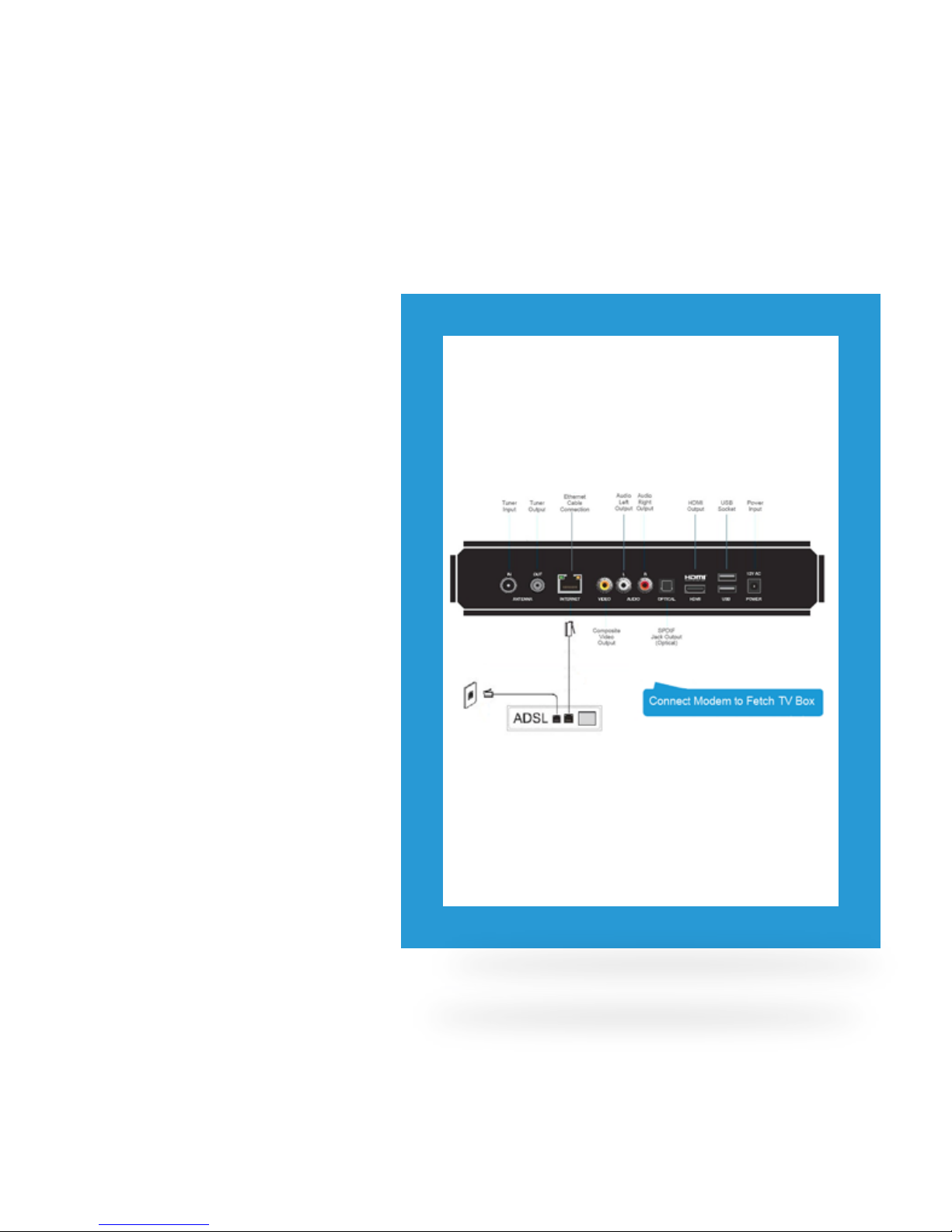
Option 1 Connect Modem direct to Fetch TV
Box via Ethernet cable
Use this option if your TV and Fetch TV Box are close
enough to your broadband modem to connect them
using an Ethernet cable.
To connect, follow these steps:
1. Plug one end of the Ethernet Cable into a free port
on your broadband modem.
2. Plug other end into the port labelled INTERNET on
the back of your Fetch TV Box.
Page 9
7
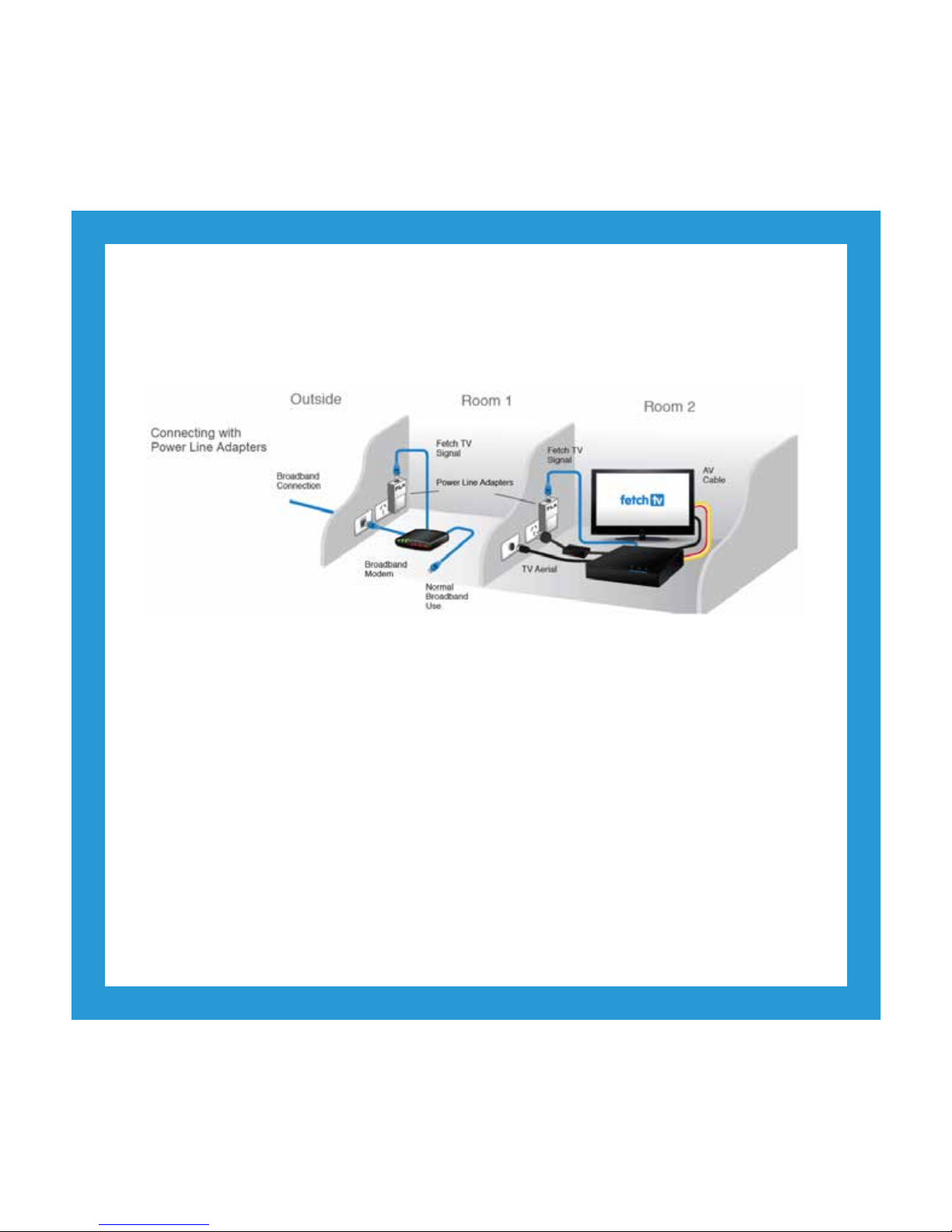
Use this option if your modem and Fetch TV Box are in different rooms in your home. The Power Line Adapters,
which came with your Fetch TV Box, will transmit the service using the power cables inside your walls.
Option 2 Connect Modem to Fetch TV Box with Power Line Adapters
To connect, follow these steps:
1. Plug one Power Line Adapter into an electrical wall socket near your broadband modem.
2. Plug one end of an Ethernet cable into the port on the Power Line Adapter.
3. Plug the other end into a free port on your broadband modem.
4. Plug the other Power Line Adapter into an electrical wall socket near your TV and Fetch TV Box.
5. Plug one end of an Ethernet cable into the port on the Power Line Adapter.
6. Plug the other end into the port labelled INTERNET on the back of your Fetch TV Box.
Page 10
8
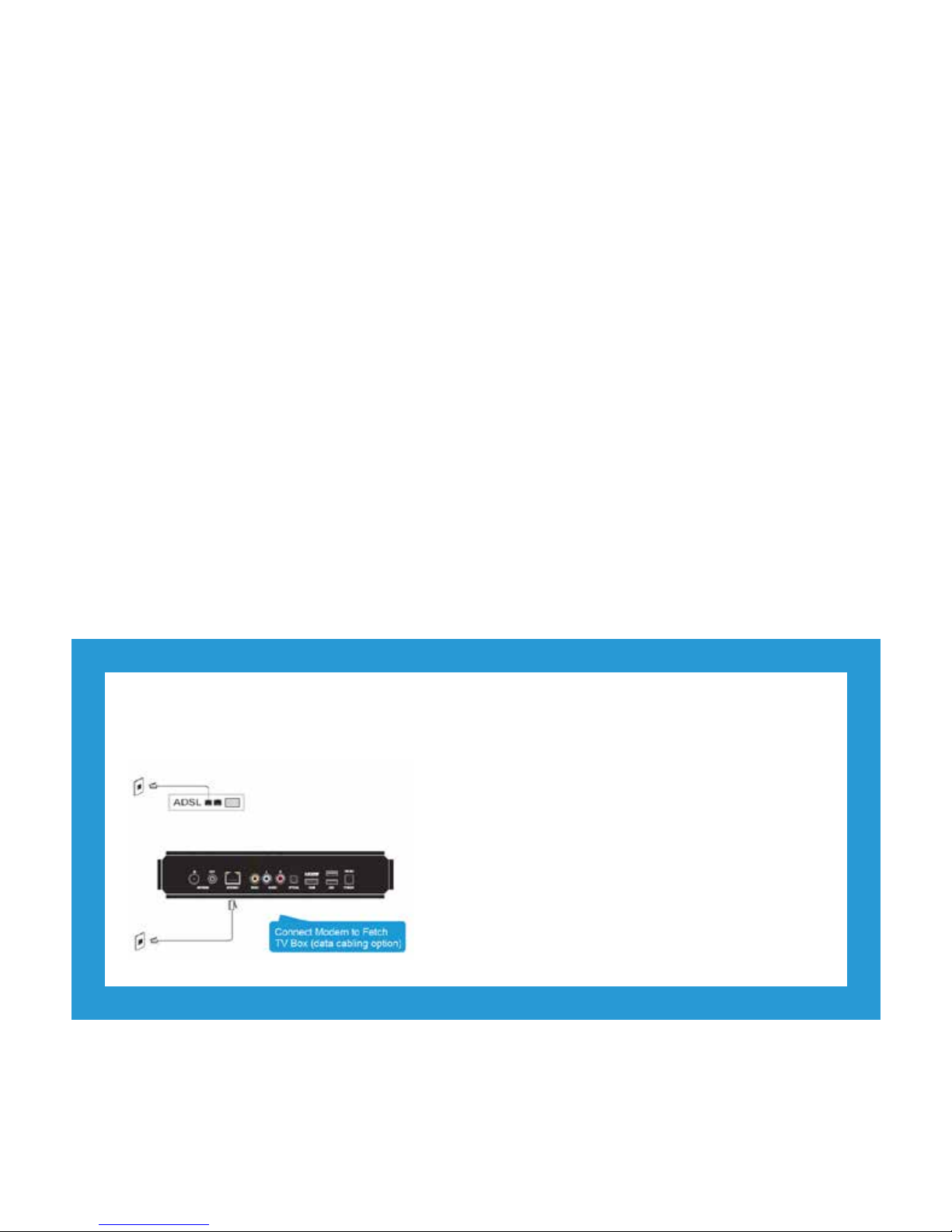
Use this option if your installation location has internal data cabling.
Option 3 Connect Modem to Fetch TV Box using data cabling
To connect, follow these steps:
1. Plug one end of the Ethernet Cable into a free port on
your broadband modem.
2. Plug the other end into the Ethernet wall socket
nearest to your broadband modem.
3. Plug one end of a second Ethernet Cable into the
port labelled INTERNET on the back of your Fetch
TV Box.
4. Plug the other end into the Ethernet wall socket
nearest your TV and Fetch TV Box.
• You will nd the pair of Power Line Adapter units (model no. P1L5-V2) inside the foam bar in the packaging with your Fetch TV
Box. The associated Ethernet cables for them are in the accessory box.
• Power Line Adapters units may only be used on the same electrical circuit in a home. Most homes have one circuit for lighting and
another for electrical outlets, but large homes may have two circuits for electrical outlets.
• Power Line Adapters should be plugged directly into the wall outlet.
• Each Power Line Adapter needs at least 5cm clearance below the power outlet to plug in the Ethernet cable so won’t suit very low
mounted wall outlets.
• Plugging the Power Line Adapters into a double adapter or a power board isn’t recommended as these can prevent the Power Line
Adapters from connecting and working properly, and can also affect the speed and quality of your Fetch TV service.
• If you have to use an adapter/power board, because there is no other wall outlet available, make sure that:
- the double adapter/power board does not have surge protectors or noise ltering, and
- the Power Line Adapter is plugged into the rst outlet (the one nearest the cord) on the double adapter/power board.
• In some houses, the conguration of the wiring in the house may mean the Power Line Adapters can’t establish a connection due
to multiple circuits or 3-phase power congurations.
For more information, visit www.fetchtv.com.au/account and log in to download the Power Line Adapter Setup Guide from
Support > How-To Guides.
Some more information on Power Line Adapters.
Page 11
9
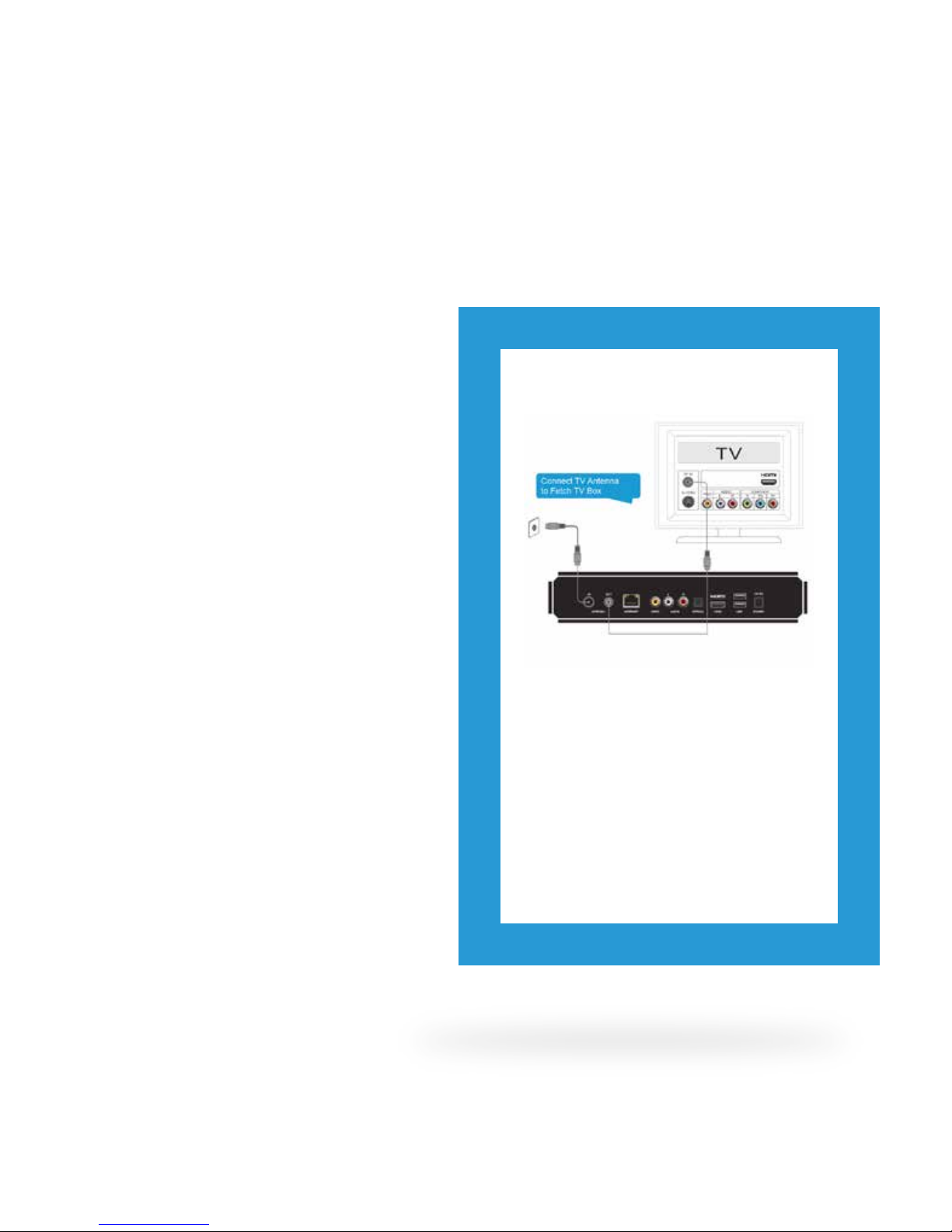
Connect your Fetch TV
Box to TV Antenna
You get your free-to-air Digital TV
channels using your normal TV antenna.
They are not delivered over broadband
internet.
You’ll need your existing TV antenna
cable as well as the one that came with
your Fetch TV Box. Unplug the existing
antenna cable from your TV but leave it
connected to the wall antenna socket.
4
Connect TV Antenna to Fetch TV Box
1. Plug one end of the existing antenna
cable into the antenna wall socket, or leave
if already connected to the wall.
2. Plug the other end of the antenna cable into
the socket labelled Antenna-IN on the back
of your Fetch TV Box.
3. Plug one end of the second antenna
cable into the socket labelled Antenna-OUT
on the back of your Fetch TV Box.
4. Plug the other end into the antenna socket
on the back of your TV.
Page 12
10
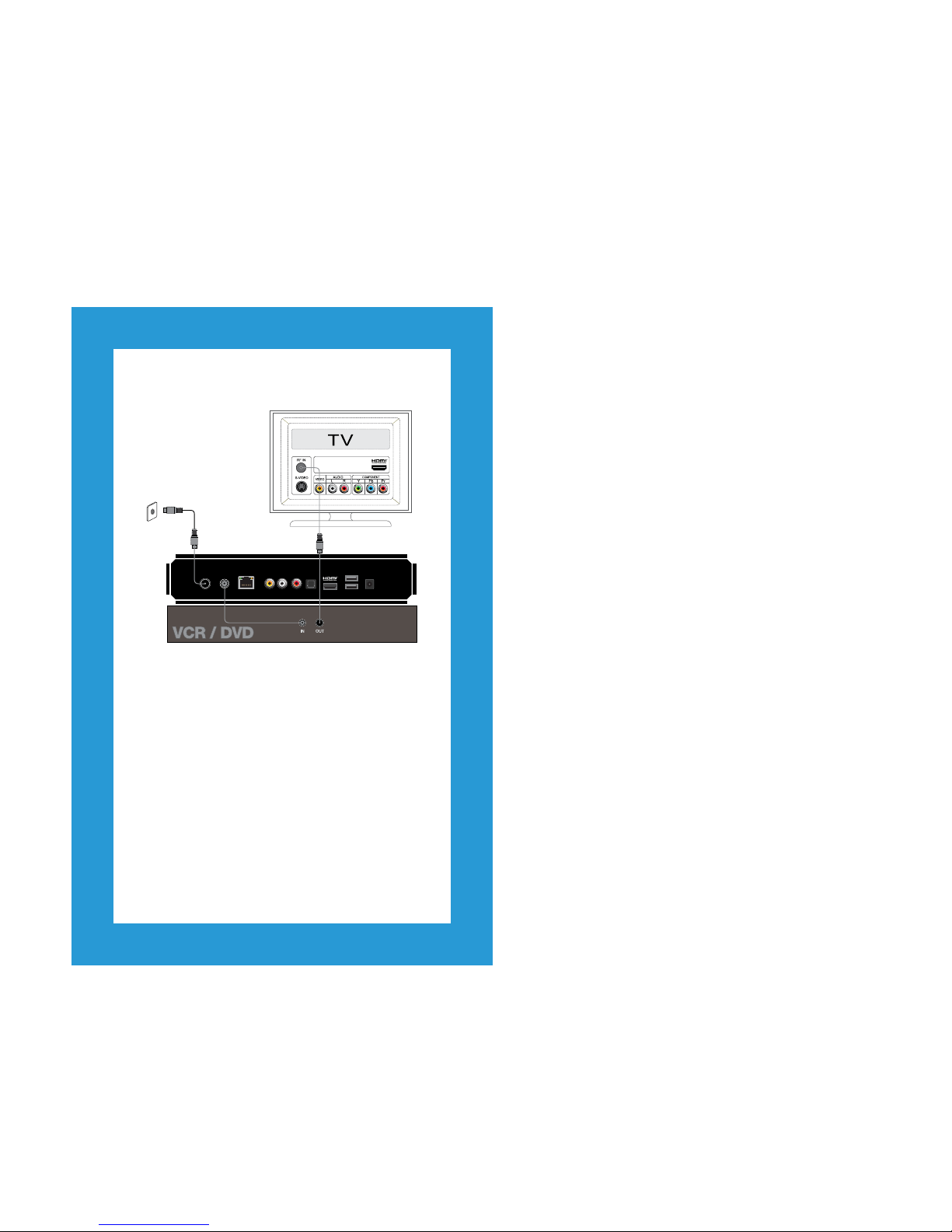
Want to connect a VCR/DVD Player?
1. Plug one end of the existing antenna
cable into the antenna wall socket, or leave
if already connected to the wall.
2. Plug the other end of the antenna cable into
the socket labelled Antenna-IN on the back
of your Fetch TV Box.
3. Plug one end of the second antenna
cable into the socket labelled Antenna-OUT
on the back of your Fetch TV Box.
4. Plug the other end into the antenna socket
on the back of your TV.
Your Fetch TV Box has an optical digital audio output and
HDMI port. Either of these may be used to connect to your
home theatre so you can enjoy 5.1 surround sound modes
with supported content. See your home theatre supplier for
more details.
Want to connect to a Home Theatre
(Digital Audio)?
ANTENNA AUDIO
OPTICAL
INTERNET VIDEO
IN OUT L R
HDMI USB POWER
12V AC
Page 13
11
Connect your
Fetch TV Box to
your TV
There are various ways to connect
the Fetch TV STB to your TV or home
theatre system. The one you choose will
depend on the display capability of your
TV and the connection ports available.
HDMI is the recommended connection
option if available.
5
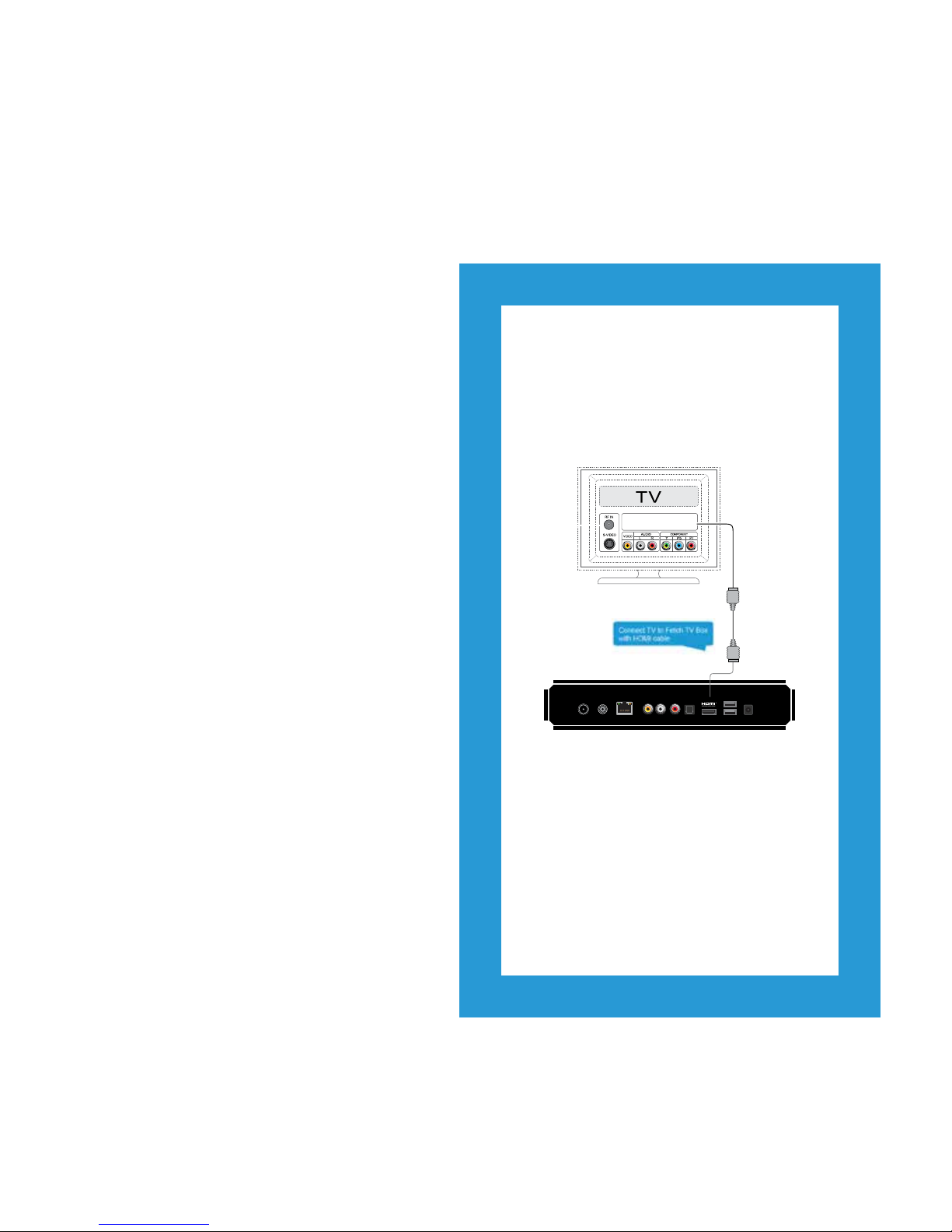
Digital High Definition – HDMI
(Recommended Option)
This connection delivers the highest quality
picture and audio letting you watch High
Denition programming. Only the HDMI cable is
needed.
1. Plug the HDMI cable into the port labelled
HDMI on the back of the Fetch TV Box.
2. Plug the other end into any available HDMI
port on your TV.
ANTENNA AUDIO
OPTICAL
INTERNETV IDEO
IN OUTL R
HDMI USB POWER
12V AC
Page 14
12
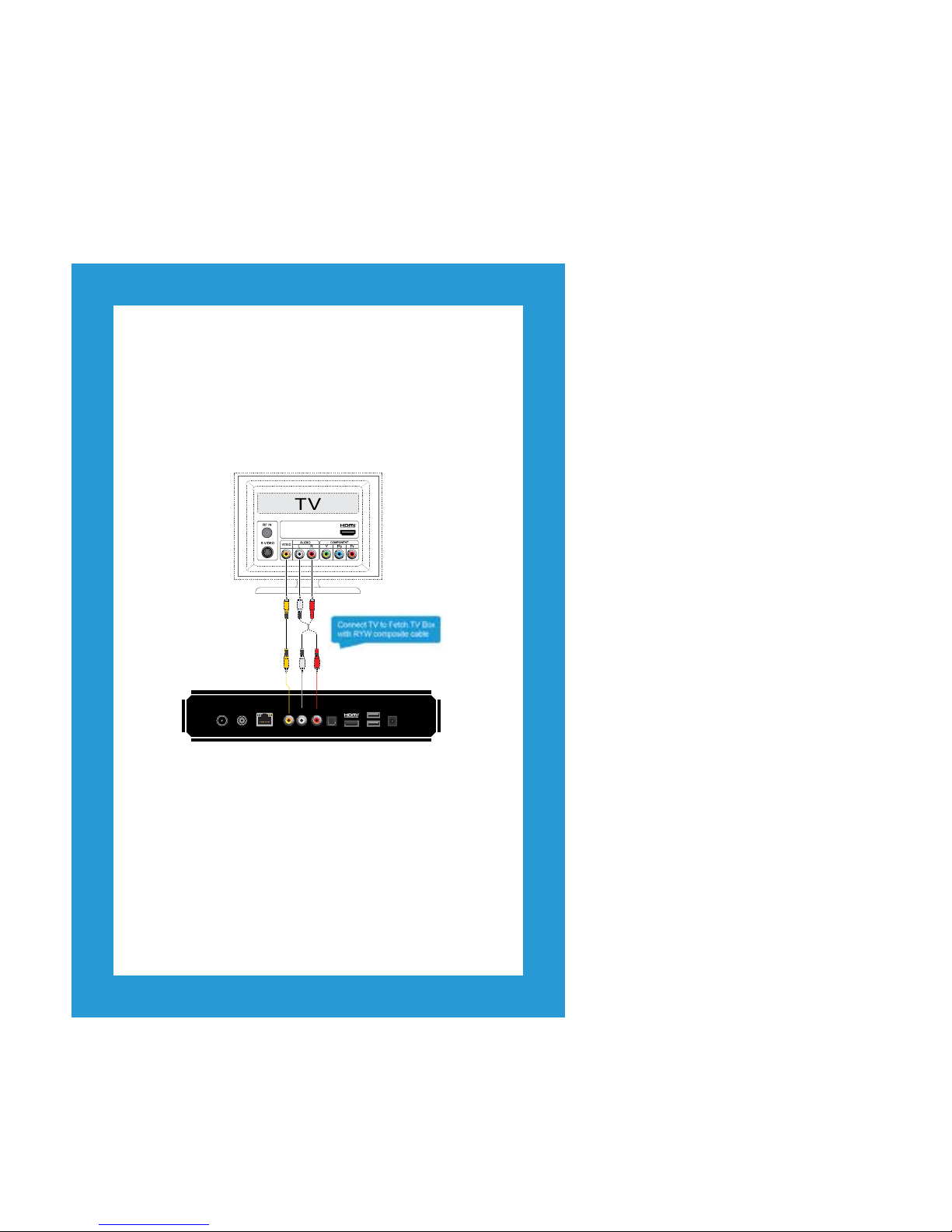
Analogue Composite Video and Stereo Audio
(Alternative Option)
This mode delivers Standard Denition viewing only. Use
this type of connection if your TV display has no other video
input types available. Use the Red/Yellow/White cable when
connecting.
1. Plug Yellow jack into Video port on Fetch TV Box and
T V.
2. Plug White jack into Audio (Left) port on Fetch TV Box
and TV.
3. Plug Red jack into Audio (Right) port on Fetch TV Box
and TV.
ANTENNA AUDIO
OPTICAL
INTERNETV IDEO
IN OUTL R
HDMI USB POWER
12V AC
Page 15
13
Power up your Fetch TV Box
Once you’ve completed all the
steps and put the batteries in
your remote control it’s time to
turn everything on.
6
Connect your Fetch TV Box to Power
1. Plug your power cable into the power
supply unit.
2. Plug the other end of the power supply
unit into the Fetch TV Box.
3. Plug the other end of the power cable into
the wall power socket.
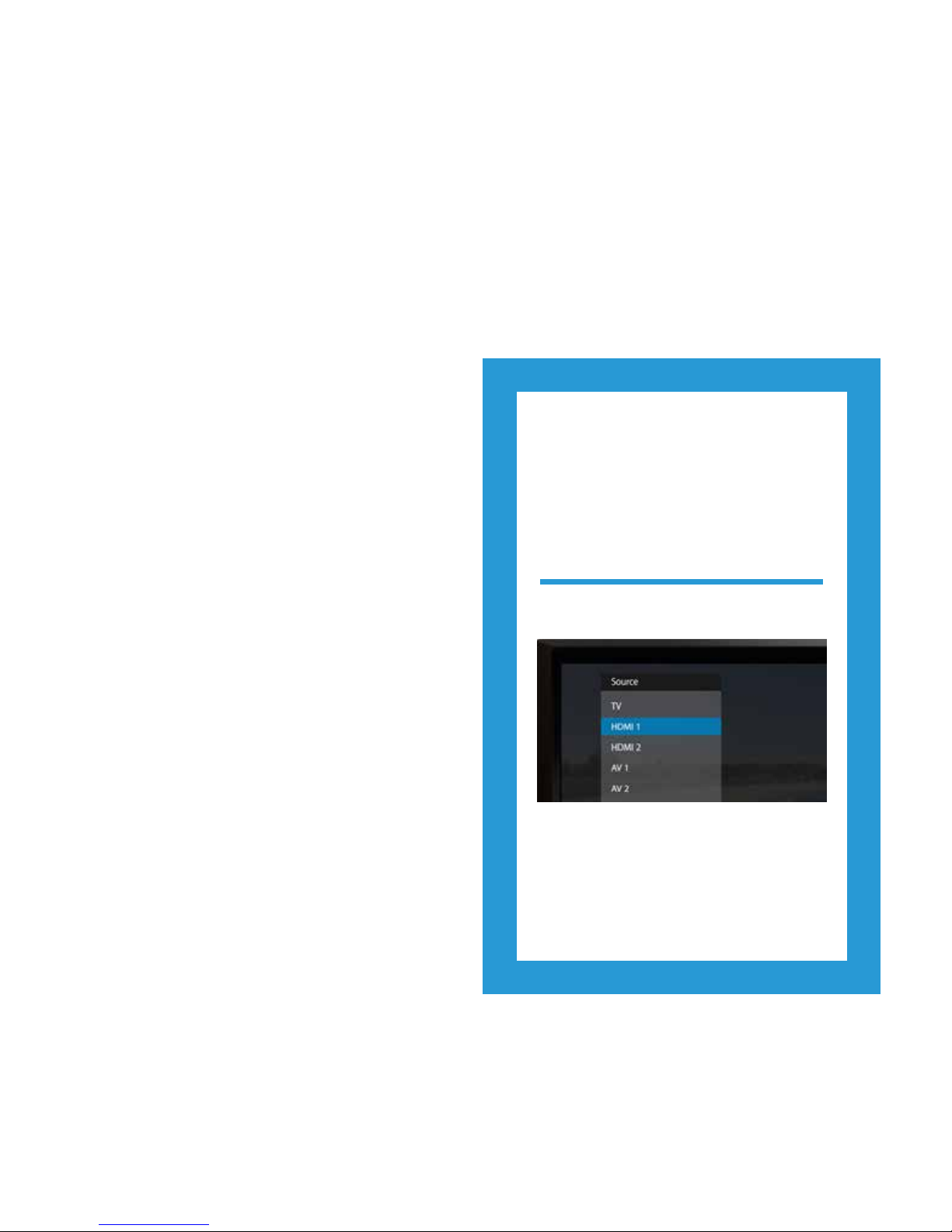
Select Source / Input on TV
1. Turn on your TV.
2. On your TV remote control press either
Source/Input or AV Select.
3. Select the HDMI port you used to connect
(or other connection method if you didn’t
use HDMI).
Page 16
14
1. Make sure both Power Line Adapters are turned on at
the wall socket.
2.
Data light will turn on when the adapters are
connected to each other, and turn green when data is
transmitting between the adapters.
3.
Ethernet light will ash when data is successfully
transmitting.
1. Turn on the Power at the wall socket. The power light on
the Fetch TV Box
will light up.
Turn on Power Line Adapters (if used)
Turn on Fetch TV Box
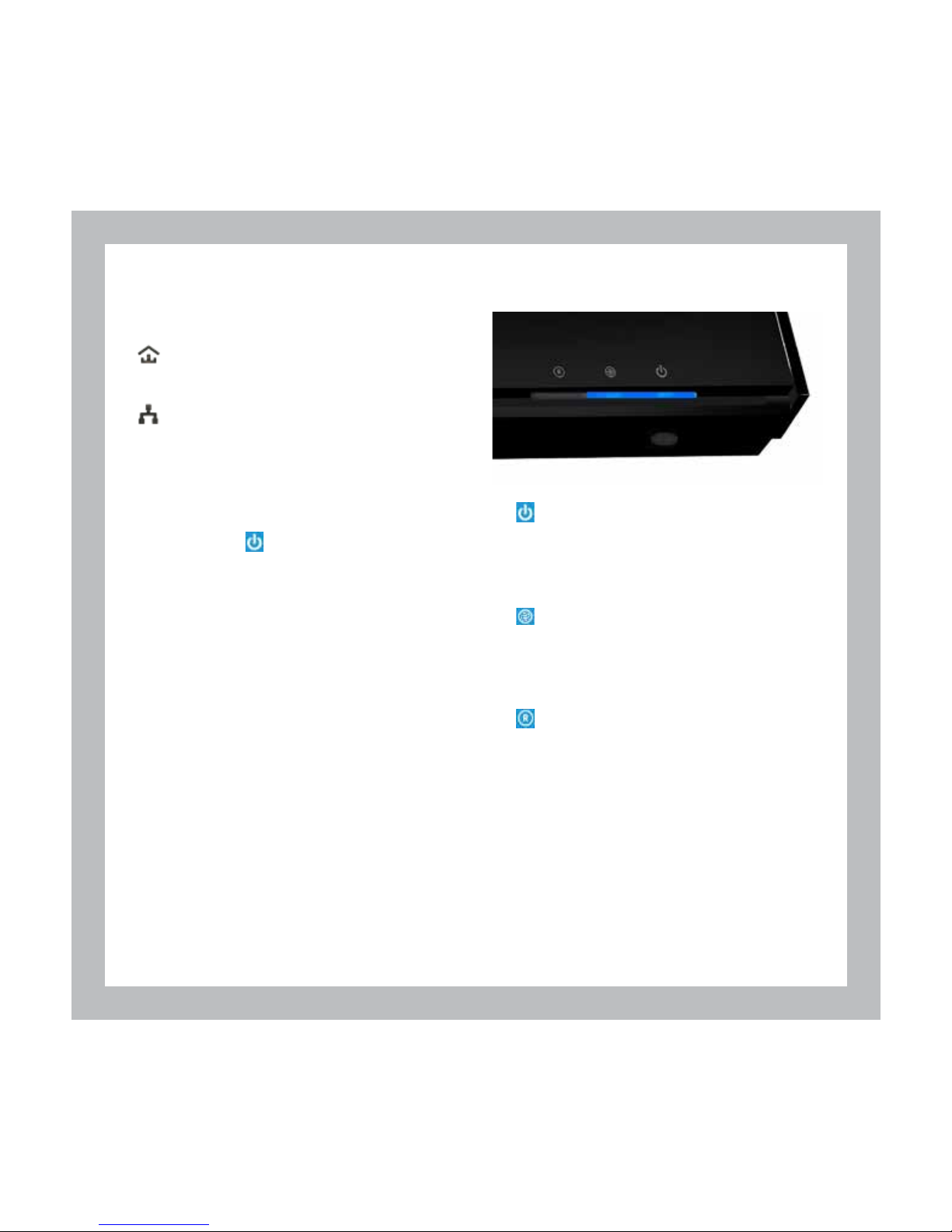
1. Standby light is blue when the Fetch TV Box is
powered on. If it is red, the box is in standby mode
and you should press the standby button on the
remote control to turn it on.
2.
Internet light on Fetch TV Box is blue when you
have a broadband connection. If it is red, there
is no live connection. During initial startup it will
change from red to blue.
3.
Remote/Recording light on Fetch TV Box will
ash when you press any key on the remote. If
it doesn’t ash the box isn’t responding to the
remote control.
Check Fetch TV Box Connection
Visit www.fetchtv.com.au/account and log into your
Account to get troubleshooting steps. Go to Support >
Technical Help then select Setup and Activation > I’m
having difficulty setting up my service > My Fetch TV
Box doesn’t turn on
Need help powering up your Fetch TV Box?
Page 17

15
Start up your
Fetch TV
This is the home stretch where
you activate your Fetch TV Box
and get it all happening.
When you’ve turned the power
on, it will take a few minutes for
the box to move through three
loading screens and the screen
may go black between each
one. Don’t worry, this is normal.
Once finished simply follow the
instructions on the Welcome
Screen.
7
Welcome Screen
• When prompted, enter the Activation Code that you
got on Sign Up (Page 3). Use the remote control to enter
the code (which is case sensitive). Your code will then be
checked and conrmed.
• The next screen lets you choose 5.1 Surround Sound
for Fetch TV, if your sound system supports this Audio
Setting.
• Next you can set up your Parental PIN. Do this now by
following the on screen instructions or later by going to
Main Menu > Manage > Settings > User > PIN Change
on your Fetch TV Box. The default PIN is 0000.
• The box will then do a Channel Scan which may take
up to 5 minutes. This will pick up all available free-to-air
channels. When done, follow the on screen instructions
to proceed.
• The box will check Diagnostics then restart and show
the Fetch TV menu.
Please do not turn off or reboot your Fetch TV Box at
any time during set up. Note that software updates
can take up to 5 minutes.
Fetch TV is now ready for you
Visit www.fetchtv.com.au/account and log in to your
Account to download the Fetch TV User Guide from the
Support > How-To Guides section. It will help you get the
most from your Fetch TV service.
Need help starting up Fetch TV?
If you can’t start up Fetch TV or activate your box, go to
www.fetchtv.com.au/account and, after logging in, choose
Support > Technical Help, then Setup and Activation or
Hardware and Settings Issues.
Page 18
16
Remote Control
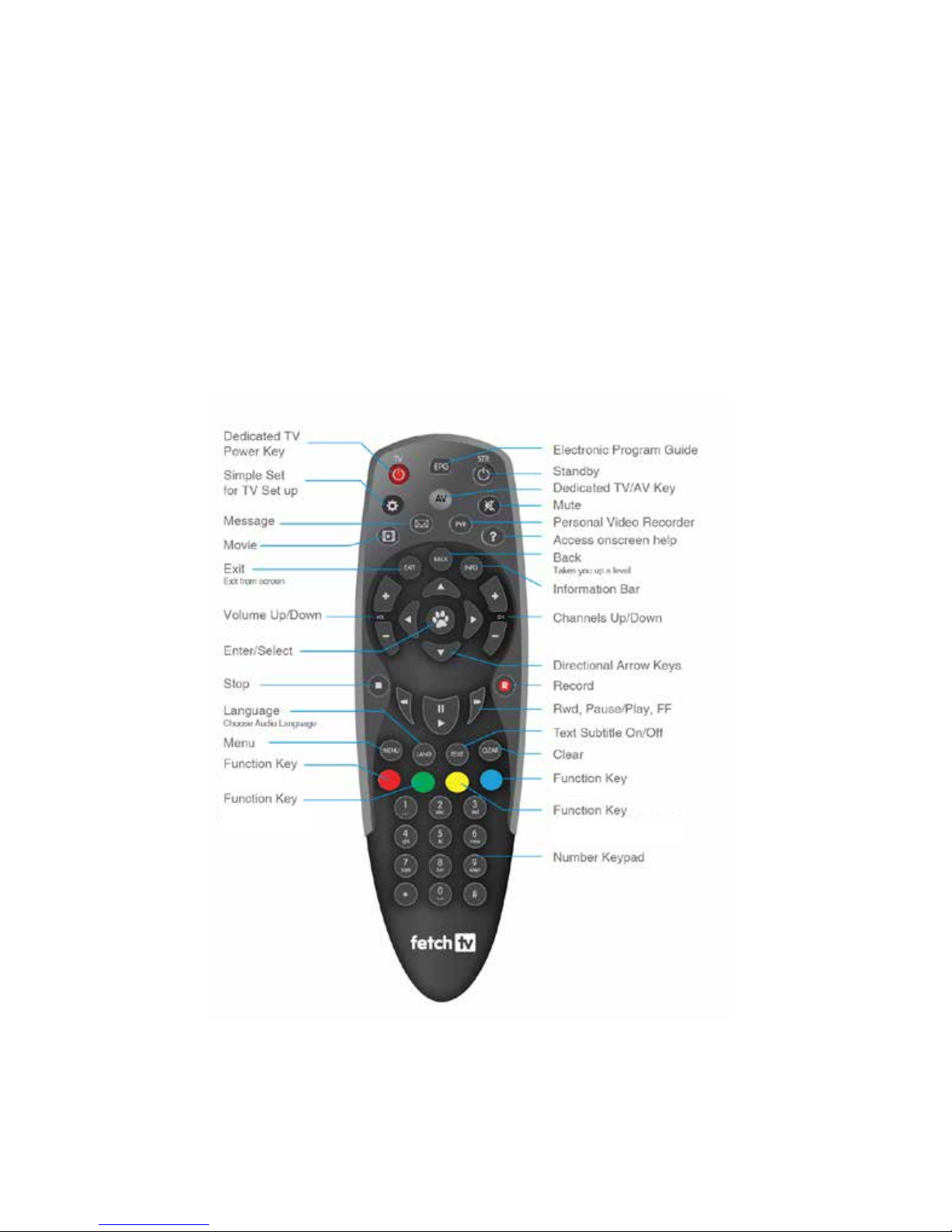
The remote control brings Fetch TV to life and has all the functions you need for quick and easy viewing. To make your remote control
work, remove the battery cover, insert the two batteries supplied, and replace the cover.
You can use the Fetch TV remote to operate your TV as well as your Fetch TV Box. To program your Fetch TV remote to control your
TV, go to Main Menu > Manage > Settings > Remote Control.
Set Up Universal Remote
use varies by context
use varies by context
use varies by context
use varies by context
Page 19
17
Fetch TV Mobile App
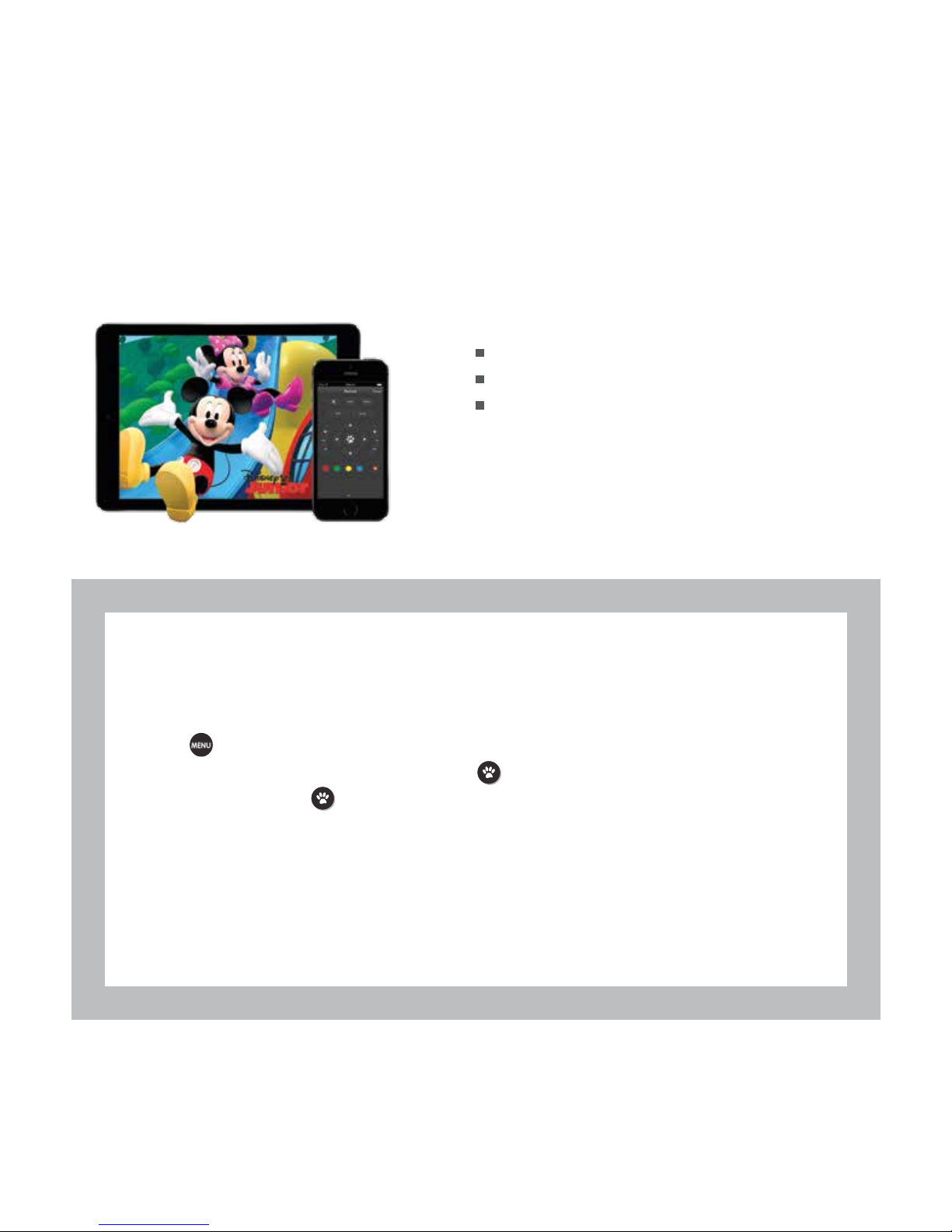
Control your Fetch TV Box with your tablet or mobile phone at home or when you’re out and about, using the Fetch TV Mobile app.
To start go to the App Store or Google Play and install the Fetch TV
app on your phone or tablet.
Schedule recordings
Watch selected content
Doubles as a remote control
Once you’ve installed the app on your phone or tablet you need to pair it with your Fetch TV Box by following these
steps:
Pair the app with your Fetch TV Box
1. Turn on your Fetch TV Box.
2. Press
on your remote control to bring up the main menu.
3. Go to Manage > Settings > Mobile & Tablet and press
4. Select Connect and press . This will display the connection code on screen. These codes expire within a
few minutes and you may need to repeat the above steps if there is any delay in you moving to step 5 below.
5. Launch the Fetch TV app on your mobile device.
6. On the app go to Main Menu > Manage > Connection then type in the 6 digit connection code shown on your
TV.
7. Finally, read the terms and conditions and, if you agree, accept the license agreement.
For more information, visit www.fetchtv.com.au/account and log into your Account to download the Fetch TV
Mobile App User Guide from Support > How-To Guides.
Page 20
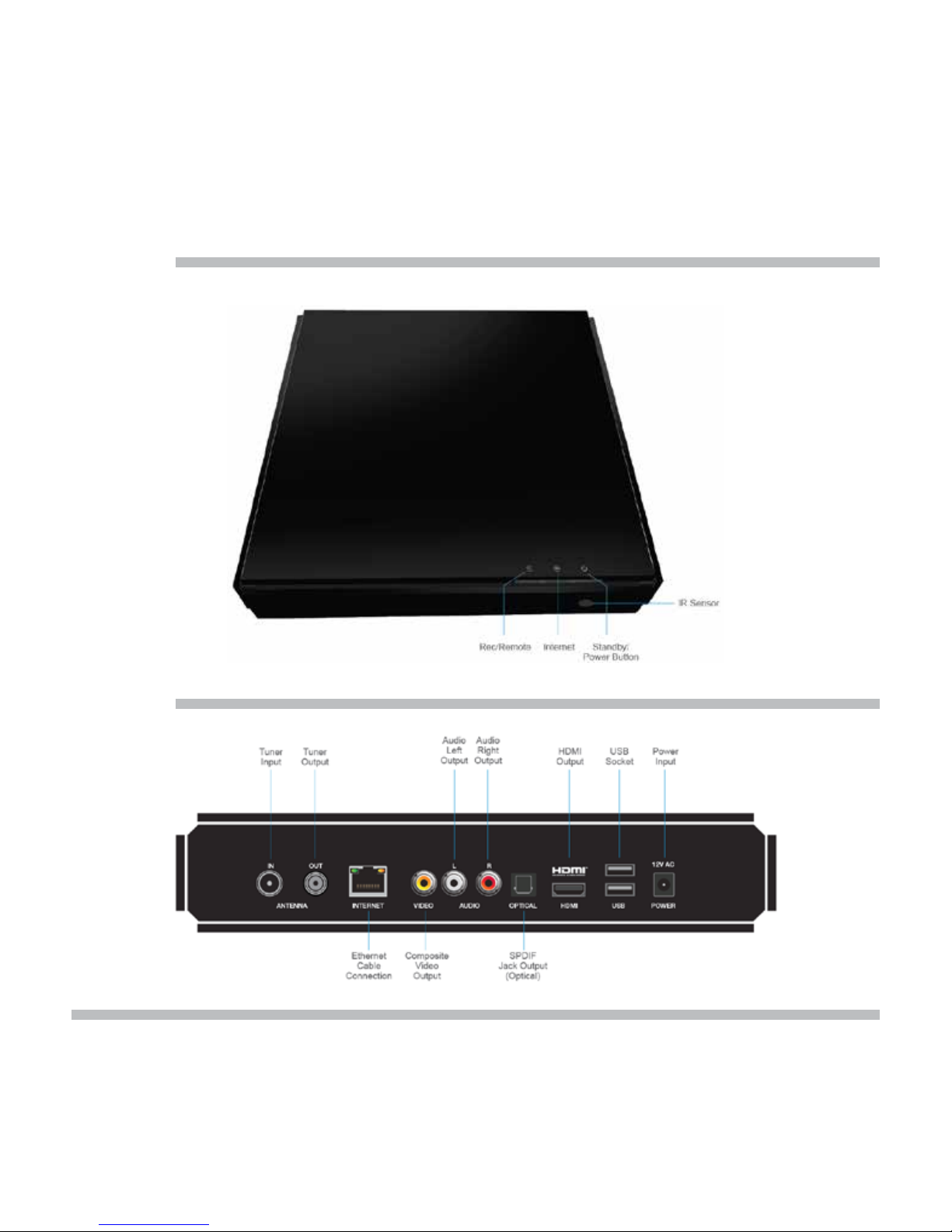
18
Back Panel
Fetch TV Box
Front Panel
Page 21
1919
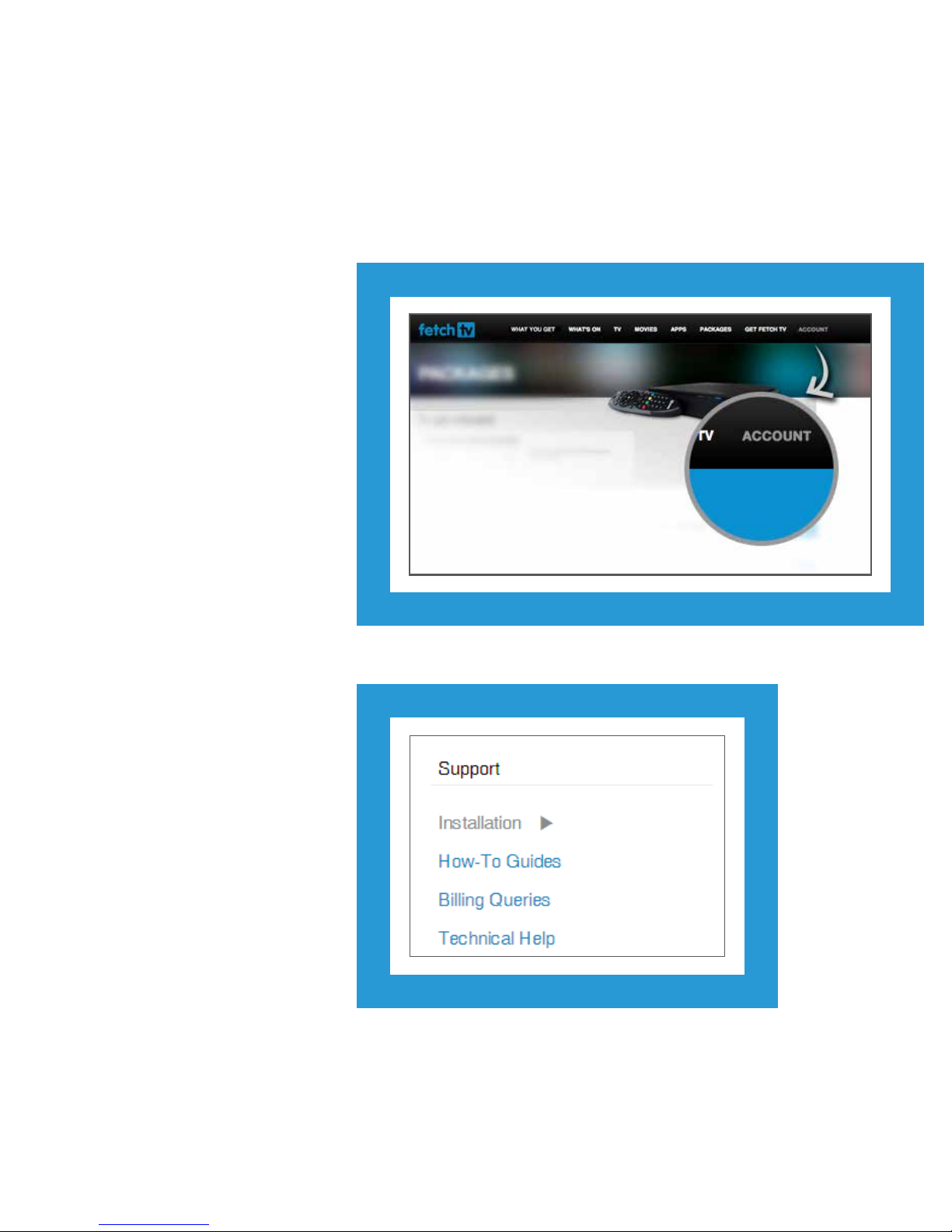
Troubleshooting
If you’re having trouble getting Fetch TV to
work, log into Account from the Fetch TV
website -
fetchtv.com.au/account
Here you will nd comprehensive technical
support articles, guides and billing FAQ’s.
For step-by-step troubleshooting for
common problems go to the
Technical Help section. Just choose a
category, like ‘Setup and Activation’ or
‘Recording TV’, and follow the on screen
prompts.
Page 22

20
Here are some basic things to check before you look for help.
Power cycle
• Reboot the Fetch TV Box by turning it off at the wall power
point, waiting 10 seconds, and turning it on again. Like
many electronic devices, this will solve most issues you
have with the service.
Cabling and TV
• Make sure the power cord and power supply unit are
correctly connected (Page 13), and there is power available
at the wall power point.
• Check that the AV connections are secure and, if necessary,
try another connection mode (Page 13).
• Make sure the TV is set to the right AV input source
(Page 13).
Internet connection
• Double-check the broadband connection is active. on
the Fetch TV Box should be lit blue. If using an Ethernet
connection, also check that the indicator lights on your
Internet modem are on. If using Power Line Adapters, check
the status lights on the adapters (Page 14).
• If there’s no broadband connection, check you can browse
the internet on a computer or smartphone connected to the
same router as your Fetch TV Box. If not, contact your ISP.
If you can, reboot your modem, and if that doesn’t help, see
these steps in the Technical Help section of your Account:
Internet Connectivity Problems.
Recording
• If the Fetch TV Box is not recording or replaying on
command, run the hard drive diagnostics via Main Menu >
Manage > Settings > Diagnostics.
Remote control
• Use the remote control within six metres from the Fetch
TV Box. If no buttons light up on the remote control when
pressed you may need to change the batteries.
Power Line Adapters (PLAs)
• Make sure both PLA units are plugged into the power socket
correctly and that the power switch is turned on.
• Make sure the Ethernet cables to both PLA units are secure
and are correctly plugged into the Fetch TV Box and your
modem or LAN (Page 7).
• Reboot the PLA units by turning both off at the power point
for 10 seconds, then turn both on and wait for them to pair
with each other.
To troubleshoot issues with the Power Line
Adapters further, see the article in the Technical
Help section of Account: Hardware and Settings
Issues > My power line adapters don’t work
Page 23
21
Advanced troubleshooting
If you have completed the basic troubleshooting steps above, and the more specic ones available via www.fetchtv.com.au/account,
and your Fetch TV service is still having operational issues you will need to perform a reset.
• You should try a ‘soft reset’ rst. It will reinstall the user interface and clear system les, but won’t touch your recordings.
• If a soft reset doesn’t x the issue with your box, you can try a ‘hard reset’. This is a more thorough reset, but be aware it clears
your series tags, messages and any recordings and downloads on your box.
• After a reset, you’ll need to re-enter your Activation Code in the Welcome Screen (Page 15). You can log into fetchtv.com.au/
account to get your activation code.
Be aware this will remove all recordings and series tags from your
Fetch TV Box.
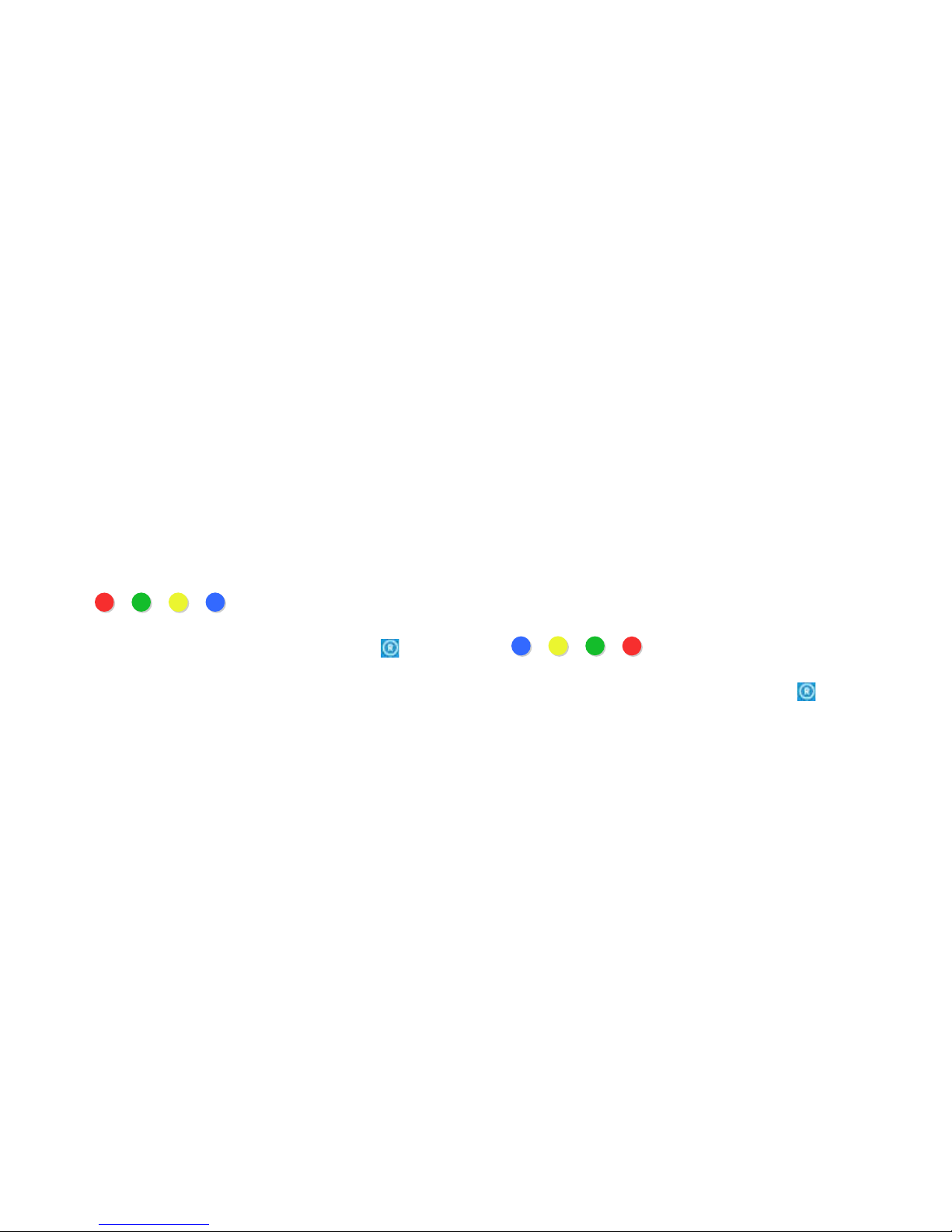
1.29 To do a Soft Reset 1.30 Hard reset
1. Turn the Fetch TV Box off then back on.
2. When the rst screen appears, start pressing the following
buttons on your remote control, in order:
> > >
(Left to right on the remote control)
3. Keep pressing these until the ‘REM/REC’ light (
) on the
Fetch TV Box starts ashing or the Fetch TV Box restarts.
When the Fetch TV Box restarts you’ll see the Welcome Screen
again (Page 15).
1. Turn the Fetch TV Box off then back on.
2. When the rst screen appears, start pressing the following
buttons on your remote control, in order:
> > >
(Right to left on the remote control)
3. Keep pressing these until the ‘REM/REC’ light (
) on the
Fetch TV Box starts ashing or the Fetch TV Box restarts.
When the Fetch TV Box restarts, you’ll see the Welcome Screen
again (Page 15).
Page 24
22
Getting more help
If you have questions about payment of your Fetch TV service, changing your subscription or how to update your Credit Card details,
go to www.fetchtv.com.au/account and select Billing Queries from the menu. Select or search for an FAQ to assist you.
1.31 Have a question about billing?
Log into your account at fetchtv.com.au/account at any time to check for service outages. You’ll also be notied here of any billing
issues affecting your service or account and what you need to do to resolve them.
1.33 Service status and billing alerts
You can download the following User Guides from the How-To Guides section.
1.Fetch TV User Guide 4.My Media Hub User Guides
2.Universal Remote Instructions 5.Power Line Adapter Setup Guide
3.Mobile App Guide
1.32 User Guides
Page 25
23
23
23
Specications
Other
Dimensions
Max Weight
Max Power Consumption
Operating Temperature Range
Storage Temperature Range
Humidity
Hard Drive Capacity
Tuners
Video Decode
Audio Decode
Surround Sound Support
Interactive Applications support
260x252x50mm
1.52kg
20W
+5 to + 45 deg C
-20 to +70 deg C
10 to 90% NC
1TB
3 x DVB-T
MPEG4 HD / H.264/AVC
MPEG4 AAC, MPEG 4 HE-AAC v2
Dolby Digital Surround 5.1 (AC3) and Dolby Digital Plus (Enhanced AC3)
Adobe Flashlite for Digital Home
Output Connector Specication Signal
Composite Video RCA Phono 1Vp/p 75 Ohms PAL – Standard Denition
Analogue Audio 2 x RCA Phono 1V rms 600 Ohms Left and Right Channels
Digital Video +
Digital Audio
HDMI 1.4 HDCP content protected 720p50, 1080i60, 1080p50, 1080p60
High Denition
Surround Audio TOSLINK S-P/DIF Optical
Antenna Belling-Lee UHF (IEC169) 75 Ohms Active Loop-through
Input Connector Specication Signal
Power
DC Male jack
(5.5mm diameter)
Input 100-240V
Output 12.0V 4A
Antenna
Belling-Lee UHF (IEC169)
75 Ohms
Channel Bandwidth 7 or 8 MHz
Broadband RJ-45 Ethernet IPv4, IPv6
Data 3 x USB Type A USB 2.0 Host
Page 26

24
Product Code M605T
This product complies with the following Standards:
Electrical Safety AS/NZS 60065.1-2008
RF Emissions AS/NZS CISPR 13 and 22
C-Tick Supplier Code N25670
Compliance Contact
Fetch TV
Level 5, 61 Lavender Street
Milsons Point NSW 2061
ABN: 36 130 669 500
www.fetchtv.com.au
Page 27

25
Page 28

26
© Fetch TV Pty Limited. ABN 36 130 669 500. All rights reserved. Fetch TV Pty Limited is the owner of the trade marks Fetch TV. The set top box and the Fetch TV service may only be
used lawfully and in accordance with relevant terms of use of which you are notied by your Fetch TV service provider. You may only use the recording functionality of the set top box
for the purpose of viewing programs at your address at a more convenient time. You must not use any recording or the electronic program guide, or any part of it, for any purpose other
than private and domestic purposes and you must not sub-licence, sell, lease, lend, upload, download, communicate or distribute it (or any part of it) to any person.
Version: 18 October 2014
www.fetchtv.com.au
 Loading...