

Page 1

MEET KIN PANEL
INSTALLER'S MANUAL
ENGLISH Version
This manual corres
FERMAX ELECTRÓNICA S.A.U.
ponds to firmware version V2.0.
Page 2

http://www.fermax.com
MEET
DIGITAL VIDEO Panel manual available at https://www.fermax.com/qr/meet/
Copyri
ght Notice
Fermax and Fermax MEET panel are trademarks of Fermax Electronica S.A.U. registered in
the European Union and other countries.
© FERMAX ELECTRÓNICA S.A.U., 2018.
Page 3
Page 3
1 Product Introduction
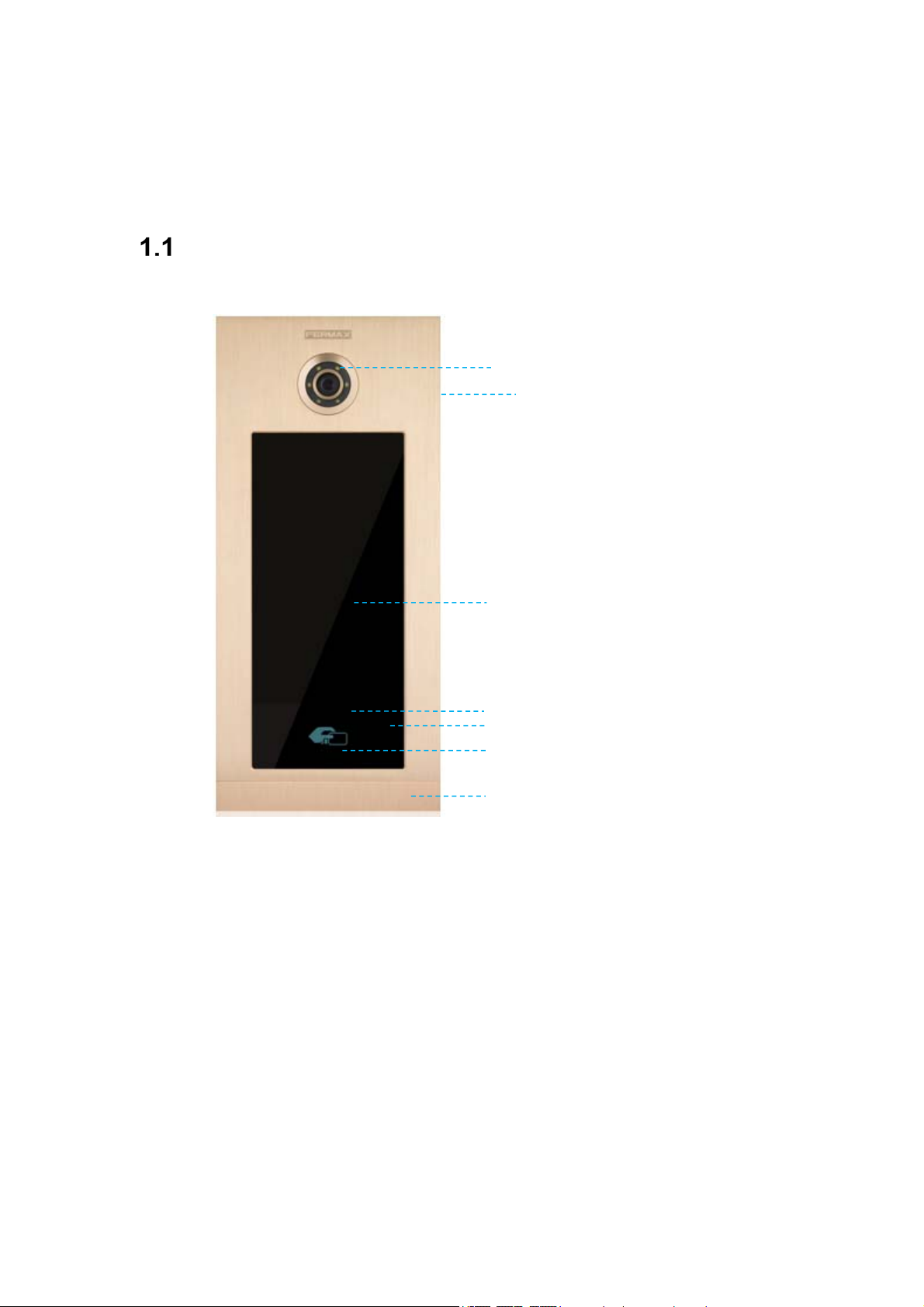
Overview
High definition camera 1,2Mpx
Lighting for night vision with LEDs
Speaker
TFT and touch screen
Motion sensor
Microphone
Mifare reader
Slider
Page 4
Page 4
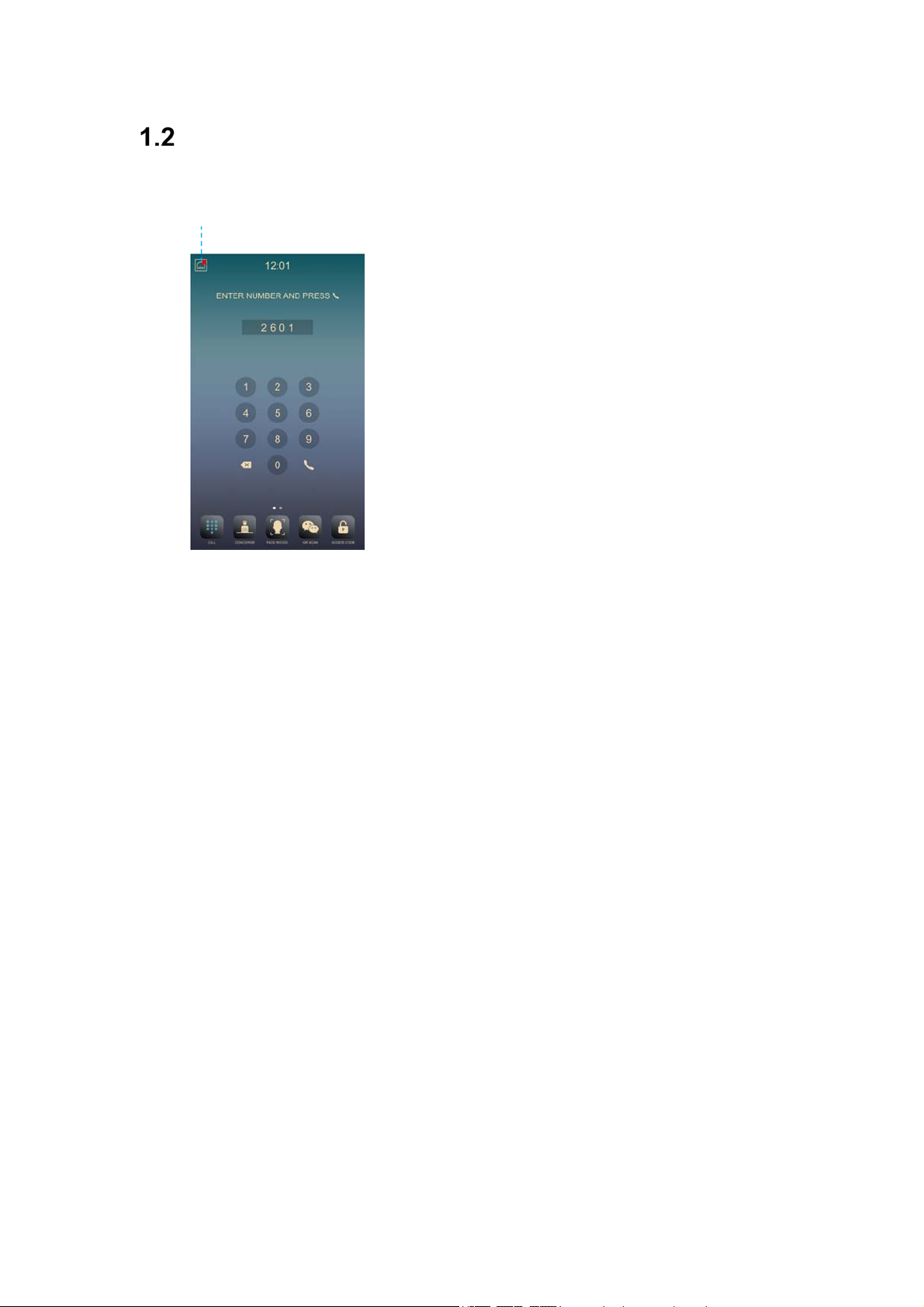
Panel Display Screen
Network Status
2 Functions Introduction
Call apartment
Call guard uni
Call volume s
Door opening, relay delay setting
Connect exit
peech
S
Door opened and tamper alarm
Lift control (Only when inst
Access Cod
Mifare reade
Alarm management by access control
Face Recognition for release lo
t
ettings
s
button
alled)
e
r
ck
Page 5
Page 5
Call Apartment
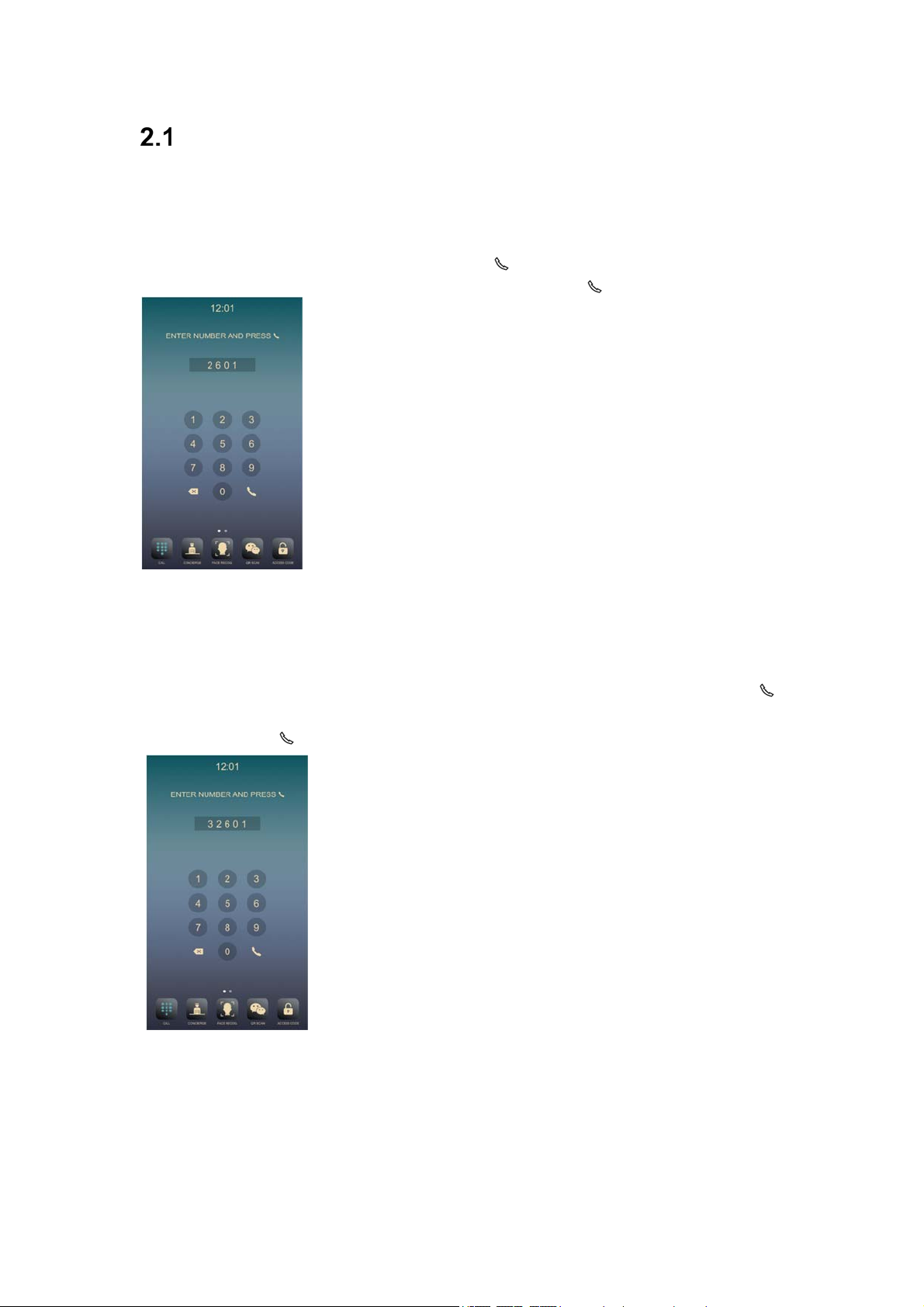
2.1.1 Block Panel call apartment
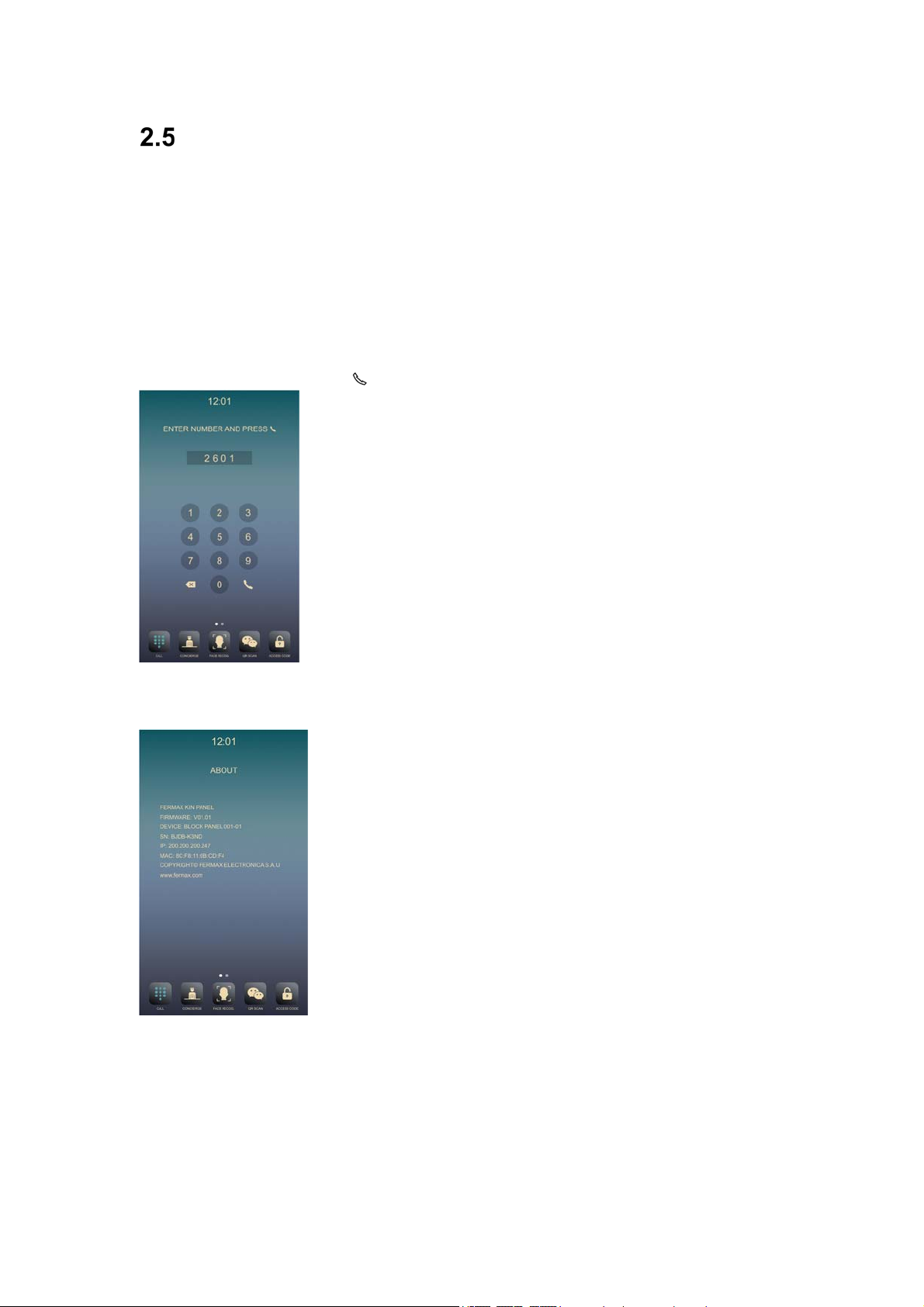
Visitors need enter apartment number followed by to confirm. For example, if the resident
lives in apartment 2601, the visitor should enter: 2601 and press
2.1.2 General Entry Panel call apartment
Visitors need to enter block number followed by a 4 digits apartment number followed by
to confirm. For example, if the resident lives in block 3 apartment 2601, the visitor shall enter:
32601 and press
Page 6
Page 6
Call Guard Unit
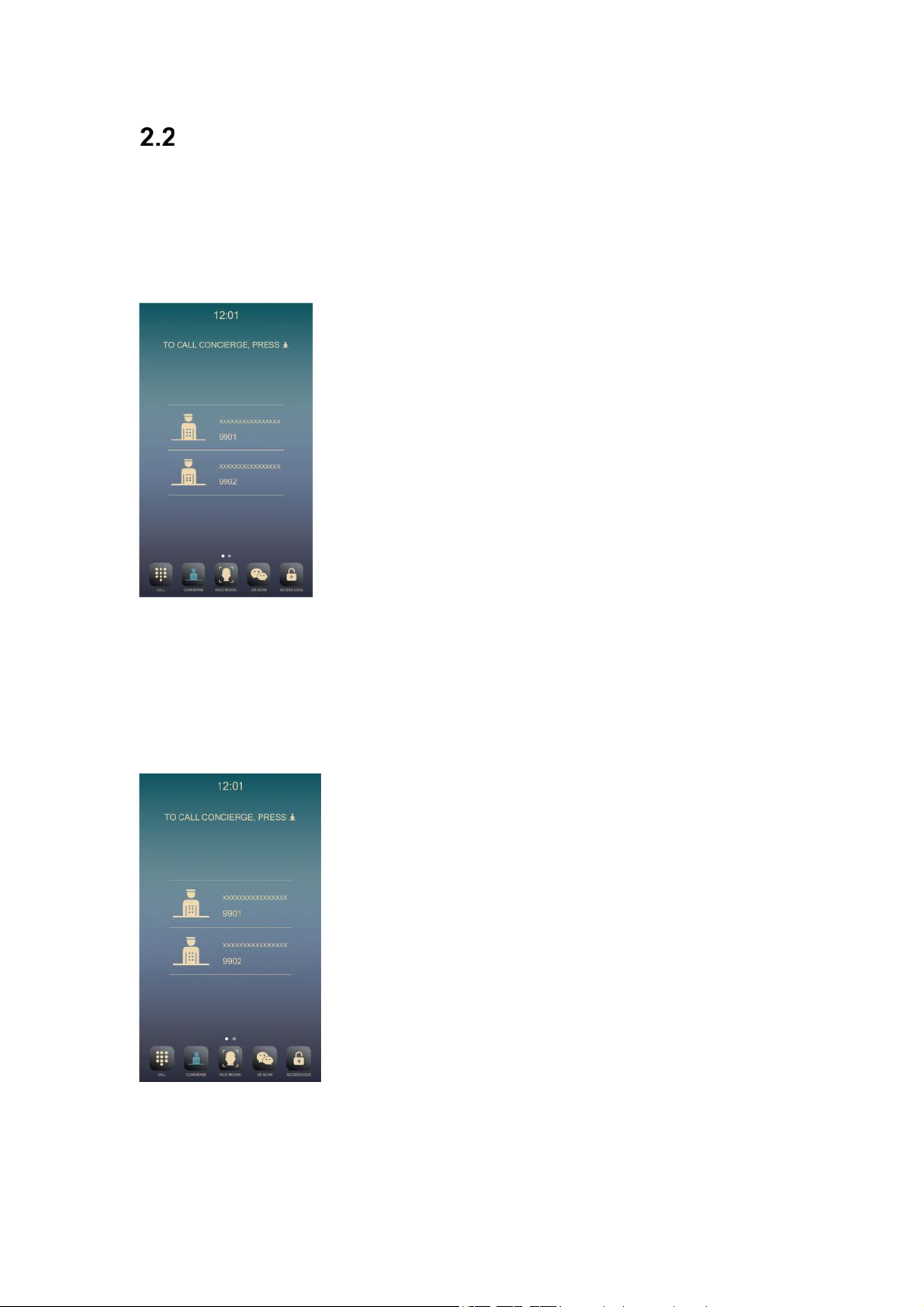
2.2.1 Block Panel Call Guard Unit
The visitor or resident can call the guard unit by touch concierge icon , then select the concierge
that they want to call .This call can be made from all Block Entry Panels.
2.2.1 General Entry Panel Call Guard Unit
The visitor or resident can call the guard unit by touch concierge icon , then select the concierge
that they want to call .This call can be made from all General Entry Panels.
Page 7
Page 7
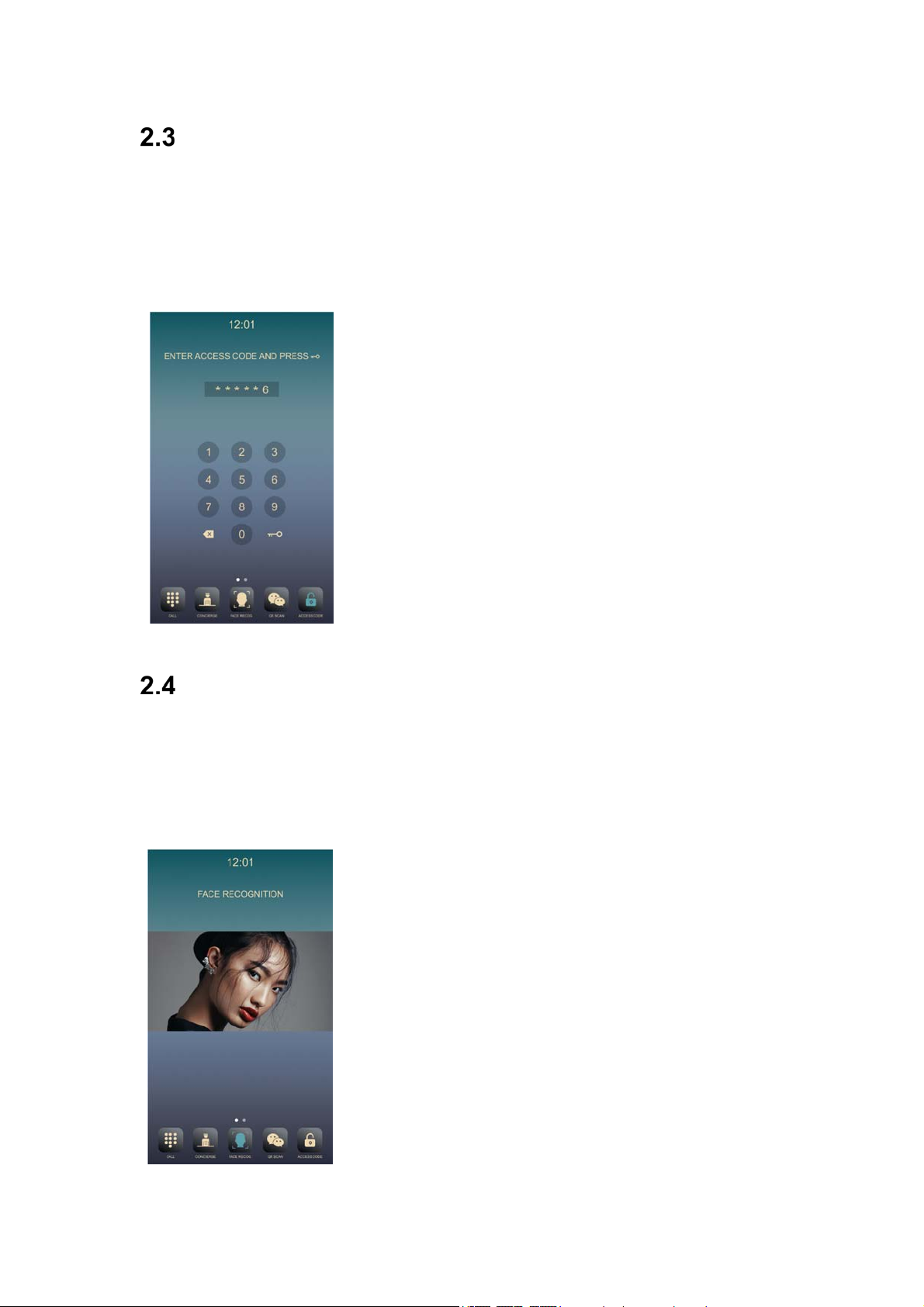
Access Code
Press ACCESS CODE icon to access code function, entering the access code followed by KEY
icon to confirm.
If the access code is correct the door will open and release the lock.
You can enable or disable the function at web of the panel.
The access code to be defined at web of the panel, Maximum access code 8.
Face Recognition
Press FACE RECOG icon to key access face recognition function, the camera of the panel will
start to read the face information. If the face data is authorized, the door will open and release
the lock. The face data is to be added through the management software. Maximum face data
10000.
Page 8
Page 8
Mifare Reader
Resident can access to their corresponding entrance by passing their authorized Mifare card,
the door will open and release the lock.
The Mifare card data is to be added through management software, Maximum 100,000 Mifare
cards.
2.6 About
Enter code 9999 followed by icon to confirm, The ABOUT information will show.
You can get information about the device name, firmware version, IP address, MAC address.
Page 9
Page 9
3 Installation
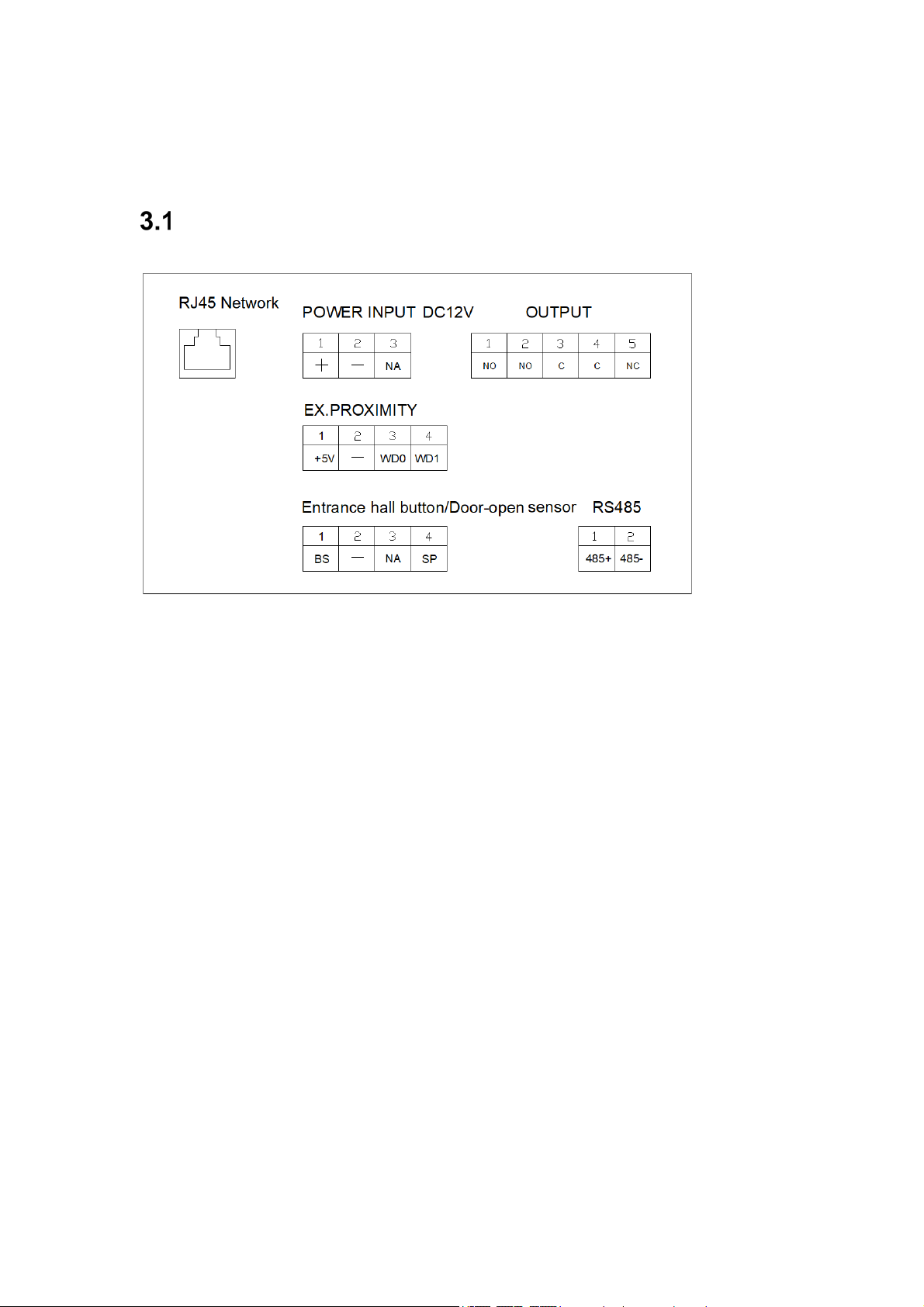
Connectors
10/100Mbps RJ45 Port.
+, —: 12Vdc Power
C, NO, NC:
+5V
BS, —:
—, SP:
485
, —, WD0, WD1: Wigand-26 protocol outpu
+, 485-: To lift control gateway
Relay contacts for release lock, the double terminals are the same connection.
Exit button.
Door-open sensor.
Input.
t or input.
, F01491 (4 relay module).
Page 10
Page 10

Technical Parameters
Dimensions
Panel (mm): 185(W) ×405(H) ×53(D)
Power supply: 12Vdc/POE
Standby current: 330mA
Working current: 500mA
Technical specifications of the display:
-Size: 10 inch
-Format: 16:9
-Resolution: 1024*600
Camera pixel: 1.2 megapixels
90o visual angle: Vertical 72º, Horizontal 54º Minimum illumination: 0.5Lux
Maximum conversation time: 120s
Door relay time: 1-9s
Door delay time: 0-9s
Door sensor time: 120s
IC cards: 100,000
Face data: 10000
Operating temperature: 40℃
Relative humidity: 20%~80%, without condensation
3.3 FCC Warning
This device complies with Part 15 of the FCC Rules. Operation is subject to the following two conditions:
(1) This device may not cause harmful interference, and (2) this device must accept any interference
received, including interference that may cause undesired operation.
NOTE 1: This equipment has been tested and found to comply with the limits for a Class B digital device,
pursuant to part 15 of the FCC Rules. These limits are designed to provide reasonable protection against
harmful interference in a residential installation. This equipment generates, uses and can radiate radio
frequency energy and, if not installed and used in accordance with the instructions, may cause harmful
interference to radio communications. However, there is no guarantee that interference will not occur in a
particular installation. If this equipment does cause harmful interference to radio or television reception,
which can be determined by turning the equipment off and on, the user is encouraged to try to correct the
interference by one or more of the following measures:
- Reorient or relocate the receiving antenna.
- Increase the separation between the equipment and receiver.
-Connect the equipment into an outlet on a circuit different from that to which the receiver is connected.
-Consult the dealer or an experienced radio/TV technician for help.
NOTE 2: Any changes or modifications to this unit not expressly approved by the party responsible
for compliance could void the user's authority to operate the equipment.
Page 11
Page 11

Caution:
Products can only be used below 2000m altitude
For the following equipment:
Product Name: KIN TOUCH PANEL
Model: 1445, 1446 Brand Name: FERMAX
FERMAX (SHANGHAI) ELECTRONICS CO., LTD.
E-mail: [email protected]
hereby declares that this [Name: KIN TOUCH PANEL, Model: 1445, 1446] is in compliance
with the essential requirements and other relevant provisions of Directive 2014/53/
EU.
The full text of the EU declaration of conformity is available at the internet
address: www.xxx.com
This product is intended for sale and application in a business environment.
RED Article 10 2
-This product can be used across EU member states
RED Article 10 10
-The product is class 1 product, No restrictions
NFC:
Frequency Range: 13.56MHz
Radiated H-Field: -12.6dBuA/m(@10m)
Page 12
 Loading...