

Page 1
Useful Phone Numbers
e
33
7
5-4339
00-800-1810-1810
3
5
800-955-0959
0
(0)
0
5
0
(0)
0
1
(0)
0
3
1
(0)
1
(0)
4
1
(22)
0
1
(0)
6
0
Veuillez lire ce
SB-99Ci
SB-99Ci
elp Lin
Australia +1-800-
Canada +1-800-66
-11-7
urope
exico +1-800-2
nited States +1-
ellowes
Australia +61-3-8336-970
Benelux +31-
Canada +1-90
Deutschland +49-
Espana +34-91-748-05-0
France +33-
Italia +
-76-523-209
-475-632
-5131-4977
-1-30-06-86-8
9-071-73004
apan +81-
orea +82-
alaysia +60-(0)-35122-123
olska +48-
Singapore +65-6221-381
nited Kingdom +44-
nited States +1-630-893-160
4-118
-3-5496-240
-2-3462-284
-771-47-4
-1302-83683
1789 Norwood Avenue, Itasca, Illinois 60143-1095 • USA • 630-893-1600
Australi
a Canada Deutschland France Japan Polska United Kingdom
Benelux China Españ
2007 Fellowes, Inc. Part No. 402842
fellowes.com
a Italia Korea Singapore United States
’appareil.
fellowes.com
Page 2

.
.
t
w
y
O
f
WARRANTY / GARANTIE / GARANTÍA
s
s
t
v
ll
gp
p
t
.
f
l
g
q
v
ygq
p
Our promise to you is quite simple. Fellowes shredders are built stronger, engineered to run longer,
resist jams and power through large jobs. The Fellowes worry free warranty described below covers
he performance of the product, provides for prompt service and support, plus a lifetime cutter
arranty.
Limited Warrant
n material and workmanship and provides service and support for 2 years from the date of purchase
by the original consumer. Fellowes warrants the cutting blades of the machine to be free from defects
n material and workmanship for the lifetime of the shredder. If any part is found to be defective
Notre promesse est très simple. Les déchiqueteuses Fellowes sont fabriquées très fortes et elles
ureront plus longtemps, résisteront aux blocages et fonctionneront pour les gros travaux. La garantie
ans tracas de Fellowes décrite plus bas couvre la performance du produit, offre un service et un
upport rapides en plus d’une garantie à vie pour les lames.
Garantie limitée : Fellowes, Inc. (« Fellowes ») garantit que les pièces de l’appareil seront libres de
out vice de matériau ou de fabrication et offre service et support pendant une période de deux
(2) ans à partir de la date d’achat par le consommateur original. Fellowes garantit que les lames
e coupe de l’appareil seront libres de tout vice de matériau ou de fabrication pendant la durée de
ie de la déchiqueteuse. Si une pièce s’avère défectueuse durant la période de garantie, votre seul
La promesa que le hacemos es bastante simple. Las destructoras de Fellowes están fabricadas con
más solidez, están diseñadas para
randes. La garantía sin preocupaciones de Fellowes descrita abajo cubre el desempeño del producto y
stipula un pronto servicio y soporte técnico, además de una garantía de por vida de las hojas de corte.
Garantía
e defectos de material y mano de obra y proporciona servicio y soporte técnico durante 2 años a
partir de la fecha en que el consumidor ori
las cuchillas cortantes de la má
ida útil de la destructora. Si se encuentra algún defecto en cualquiera de las piezas durante el período
: Fellowes, Inc. (“Fellowes”) warrants the parts of the machine to be free of defects
uncionar más tiempo, son resistentes a atascos y procesan trabajos
imitada: Fellowes, Inc. (“Fellowes”) garantiza que las piezas de la máquina estarán libres
inal haya adquirido el producto. Fellowes garantiza que
uina estarán libres de defectos de material y mano de obra durante la
uring the warranty period, your sole and exclusive remedy will be repair or replacement, at Fellowes’
ption and expense, of the defective part. This warranty does not apply in cases of abuse, mishandling,
r unauthorized repair. ANY IMPLIED WARRANTY, INCLUDING THAT OF MERCHANTABILITY OR FITNESS
F
R A PARTICULAR PURPOSE, IS HEREBY LIMITED IN DURATION TO THE APPROPRIATE WARRANTY
PERIOD SET FORTH ABOVE. In no event shall Fellowes be liable
amages attributable to this product. This warranty gives you specific legal rights. The duration, terms,
nd conditions of this warranty are valid worldwide, except where different limitations, restrictions,
r conditions may be required by local law. For more details or to obtain service under this warranty,
ease contact us or your dealer.
t unique recours sera la réparation ou le remplacement de la pièce à la discrétion et aux frais de
owes. Cette garantie ne couvre pas les cas d’utilisation abusive, d’utilisation incorrecte ou de
Fe
LA PÉRIODE DE GARANTIE APPROPRIÉE ÉTABLIE DANS CE DOCUMENT. En aucun cas, Fellowes ne sera
enue responsable de quelque façon que ce soit de tout dommage indirect ou consécutif attribuable à
e produit. Cette garantie vous donne des droits juridiques spécifiques. La durée, les modalités et les
onditions de cette garantie s’appliquent partout au monde sauf dans les cas où différentes limites,
estrictions ou conditions pourraient être exigées par la loi locale. Pour plus de détails ou pour obtenir
n service sous cette garantie, veuillez nous contacter ou contacter votre concessionnaire
e garantía, la única y exclusiva solución será la reparación o el cambio de la pieza defectuosa,
AL PERÍODO DE DURACIÓN CORRESPONDIENTE DE LA GARANTÍA CONFERIDA ANTERIORMENTE. En
ingún caso, Fellowes será responsable de cualquier daño, directo o indirecto, que pueda atribuírsele
este producto. Esta garantía le confiere derechos legales. La duración, los términos y las condiciones
e esta garantía son válidos en todo el mundo, excepto en los lugares donde la legislación local
xija limitaciones, restricciones o condiciones diferentes. Para obtener más detalles o recibir servicio
onforme a esta garantía, comuníquese con nosotros o con su distribuidor.
or any consequential or incidental
DATE OF PURCHASE / DATE D’ACHAT / FECHA DE COMPRA
SERIAL NUMBER / NUMÉRO DE SÉRIE / NÚMERO DE SERIE
erial Number is located on inside of cabinet
numéro de série se trouve à l’intérieur du boîtier
l Número de serie está ubicado en el interior del gabinete.
erial Number / Numéro de série / Número de serie
Page 3
17
AUTOAUTO
A.
.
T.
.
J.
g!
•
.
•
y
.
•
•
•
)
•
•
.
•
•
.
W
Will
f
hred
t
............................................................................
)
S
...........................................................................................................
.......................................................................................................
......................................................................................................
m
,
50 credit cards; 10 CDs. 17 sheets per pass.
e
®
.
S
e
®
y
p
n
h
y
e
®
h
J
)
d)
)
d)
e
®
)
Q
R. Reverse
)
d
A
S
J
g
t
Sh
w
t
y
®
hredd
g.
Shredd
g
l
y
s
Shredd
s
d
r
T
ON
Shredd
l
g
S
e
®
technology has been
shut off
T
1
7
A
U
T
O
1
7
A
U
T
O
g
th
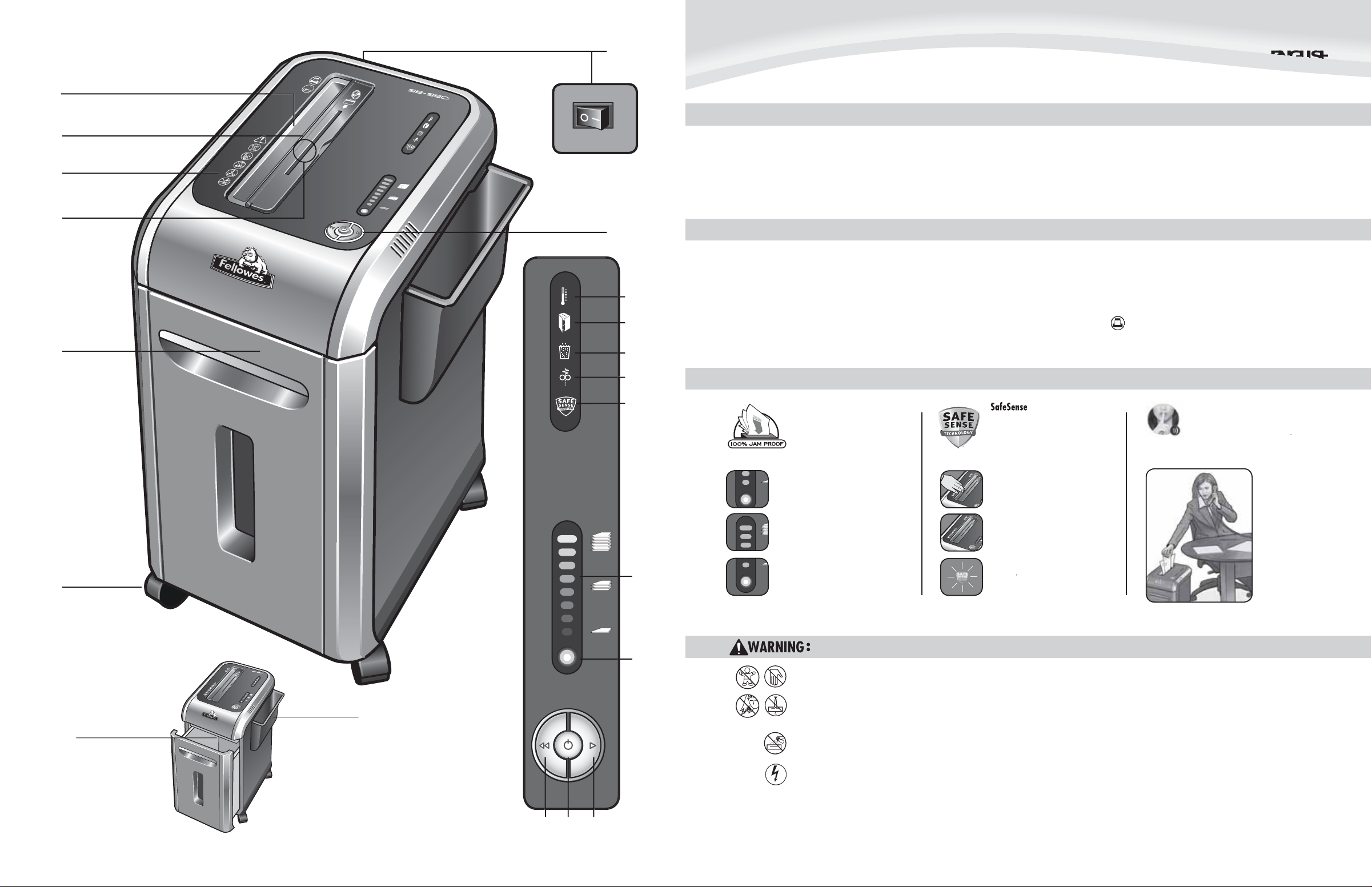
A. SafeSens
B. Paper entr
C. See safety instructions
D. CD/Card fla
E. Pullout bi
AUT
O
Technology
F. Casters
G. Disconnect power switc
. Paper tra
I. SafeSens
override switc
. Power controls
. Overheat (red
. Bin open (re
. Bin full (red
. Paper jam (re
. SafeSens
indicator (yellow
P. Sheet capacity indicator
. Aut o correctingutton
S. On/off (blue
T. Forwar
ue)
APABILITIE
ill shred: Paper, credit cards, CD/DVD’s, staples and small paper clips
not shred: Adhesive labels, continous form paper, transparencies, newspaper,
cardboard, large paper clips, laminates,
ile folders, X-rays or plastic other than noted
above
Paper s
ross-Cu
size:
32” x 1-1/2” (3.9 x 38mm
E
aximum:
heets per pass
Ds/Cards per pass
aper width
*8.5”x11”, 20lb., (75g) paper at 120V, 60 Hz, 5Amps; heavier paper, humidity or other than rated
voltage may reduce capacity. Recommended daily usage rates: 50–100 shredding passes per day
Fellowes SafeSens
between 50 – 80 degrees Fahrenheit (10 – 26 degrees Celsius) and 40 – 80% relative humidity
shredders are designed to be operated in home and office environments ranging
9”/230m
DVANCED PRODUCT FEATURE
am Proof System
liminates frustrating jams by
reventing overloads and powerin
hrough misfed paper.
ECHNICAL EXPLANATI
eet capacity indicator tells you
hen you have too many sheets or
oo few to maximize productivit
er will not operate when too many
heets are fed into paper entry (red
ight). Reduce sheet quantity and refee
Stops s
hands are too close to the openin
TECHNICAL EXPLANATION
nd indicator will light up when
ands are too close to the openin
peration when hands are no
onger near the openin
Technology
er immediately when
er will stop automatically
er will resume norma
SilentShredTechnology
Si
entShred™ noise quality
shreds without nois
ECHNICAL EXPLANATION
disruption
SilentShred™ motor
eatures whisper-quiet,
efficient shreddin
erformance without
e noisy disruptions.
.
misfed, shredder will automatically
P
djust to power through or reverse
ut pape
ashing indicator warns when
afeSens
MPORTANT SAFETY INSTRUCTIONS — Read Before Usin
1
7
Keep away from children and pets. Keep hands away from paper
ntry. Always set to off or unplug when not in use
A
UTO
Keep foreign objects – gloves, jewelry, clothing, hair, etc. – awa
rom shredder openings. If object enters top opening, switch to
everse (R) to back out object
ever use aerosol products, petroleum based lubricants or other flammable
roducts on or near shredder. Do not use canned air on shredder.
Do not use if damaged or defective. Do not disassemble shredder. Do
ot place near or over heat source or water.
This shredder has a Power Disconnect Switch (G) that must be in the ON (I
osition to operate shredder. In case of emergency, move switch to OFF (O)
osition. This action will stop shredder immediately.
Avoid touching exposed cutting blades under shredder head.
Rotate CD flap entry for shredding CDs/cards. Keep finger away from
D hole
Do not put foreign objects in paper entry.
The grounded socket-outlet shall be installed near the equipment and shall be
asily accessible
.
Page 4
17
A
UT
O
17
A
UT
O
AUTOAUTO
1
7
AU
T
O
17
A
U
T
O
1
7
A
U
T
O
1
7
A
U
T
O
1
7
A
U
TO
S
e
®
is active and
y
SE
®
)
BASIC SHREDDING OPERATIO
N
J
ON
y
ease
s
g
Touc
e
®
T
)
e
®
S
e
®
is deactivated when
g
S
p
f
®
g
g
y
S
f
dd
f
g
f
d
y
th
f
y
try
g
pap
emove several sheets u
e
e
r
A
w
g
i
G
MIS
G
1
7
A
U
T
O
1
7
A
U
T
O
e
p
.
f
p
p
p
p
y
Whe
g
t
(
17
AUT
O
g
(
)
1
7
A
U
T
O
APER OR CD/CARD
ontinuous operation:
-minute maximum
NOTE: Shredder runs brie
after each
ass to clear entry.
Continuous o
eration beyond
0-minutes will trigger
40-minute cool down
eriod.
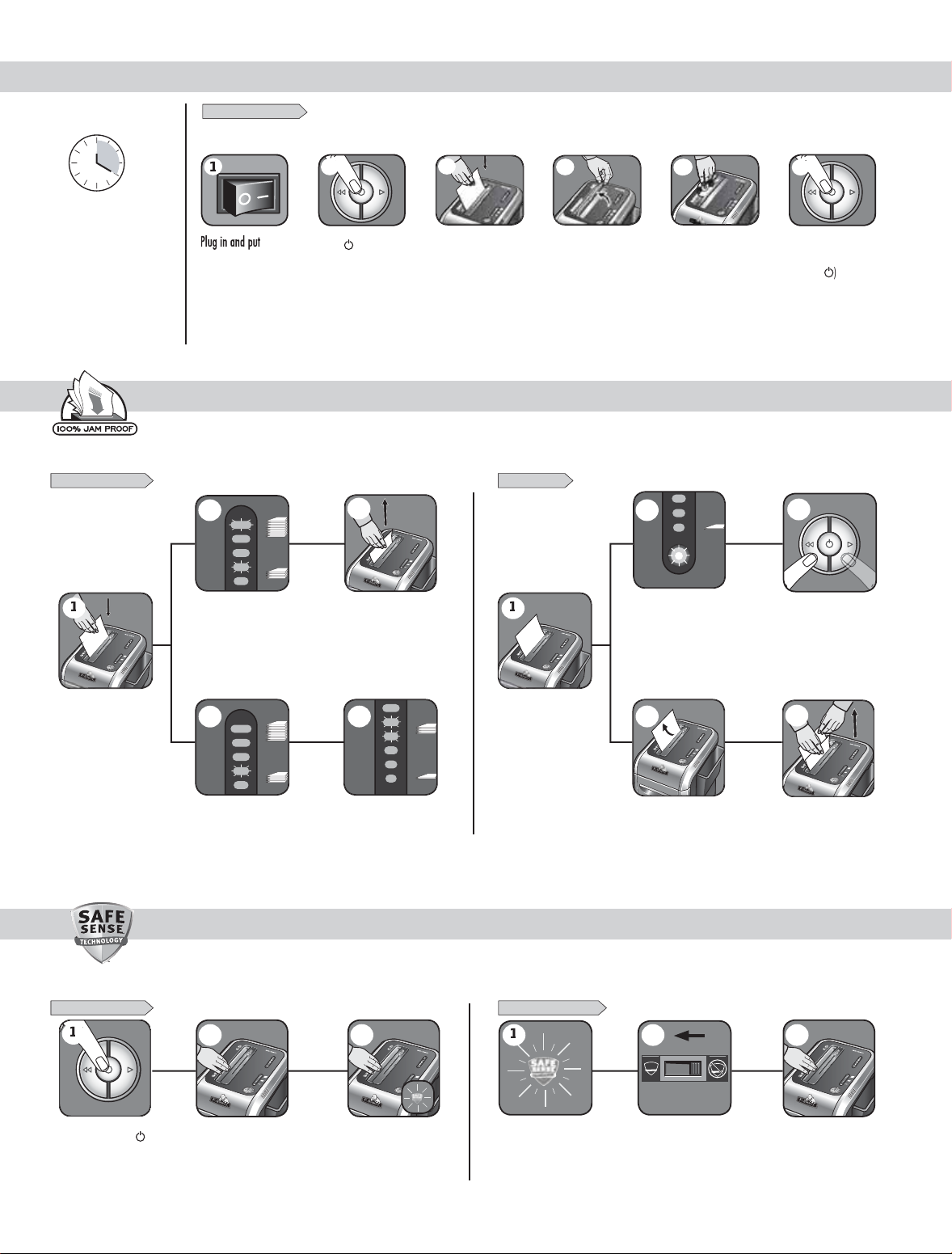
AM PROOF SYSTEM OPERATI
Eliminates frustrating jams by preventing overloads and powering through misfed paper.
ET-UP AND TESTIN
isconnect power
ly
switch in ON (I)
f too many sheets, indicator will
li
ht up to red and shredder will
not take
er
osition
Press ( ) ON to
ctivate (blue
R
ndicator is below red and th
shredder will take the pape
Feed into paper
ntry and releas
ntil th
To shred CDs rotate
FED PAPER
D flap into place
5
Hold CD/card at edge,
feed into CD/Card fla
entr
and release
utomatic correcting action
ill power through the misfed
paper, so shreddin
cont
nue
can
6
n finished
shreddin
set
o Off
isfed paper can also be
addressed by manually usin
forward and reverse
See
aintenance & Troubleshooting
Feed into paper entr
nd rel
SET-UP AND TESTIN
urn the shredder (
n to activate SafeSens
If paper is misfed and
tops shreddin
hredder will take fewer sheets,
but i
indicator is below yellow,
you can a
more sheets without
Increase the number of sheets
being
ed up to the top yellow light
to maximize your pro
uctivit
ear of jammin
AFESEN
TECHNOLOGY OPERATION
Stops shredder immediately when hands are too close to the opening.
FLASHING INDICATOR
h test area and
ook for the SafeSens
indicator to illuminate
afeSens
working properl
afeSens
indicator is flashin
there is too much paper for
e shredder to power through,
it will reverse the paper out
eas
removal
hift override switch to
the “active”
reactivating Sa
osition,
eSense
educe paper quantity to an
cceptable amount and refeed into
paper en
or
Confirm the indicator is no longer
flashin
our hand on the test area
3
and retest by puttin
Page 5
1
7
A
U
TO
17
A
U
T
O
y
(
k
ime
E
A
)
h
pap
h
s
E
S
e
®
h
g
The shredde
e
e
®
d
h
ition
f
d
e
®
f
e
on
f
shredded
®
,
)
y
f
4
ADVANCED PRODUCT FEATURE MAINTENANCE AND TROUBLESHOOTING
M
SE
®
g.
1
7
AUT
O
AUTOAUTO
y
p
y
r
y
l shredded)
AUTOAUTO
S
p.
ocate Auto-sta
ared sensor.
1
7
A
UT
O
G
n
pap
y)
.
y
pap
.
1
7
AU
T
OAU
4
17
A
U
TOA
SSO
S
S
G
•
g
•
s
•
3
•
•
p
?
•
s
•
.
®
S
0
S
3
BASIC PRODUCT MAINTENANCE AND TROUBLESHOOTIN
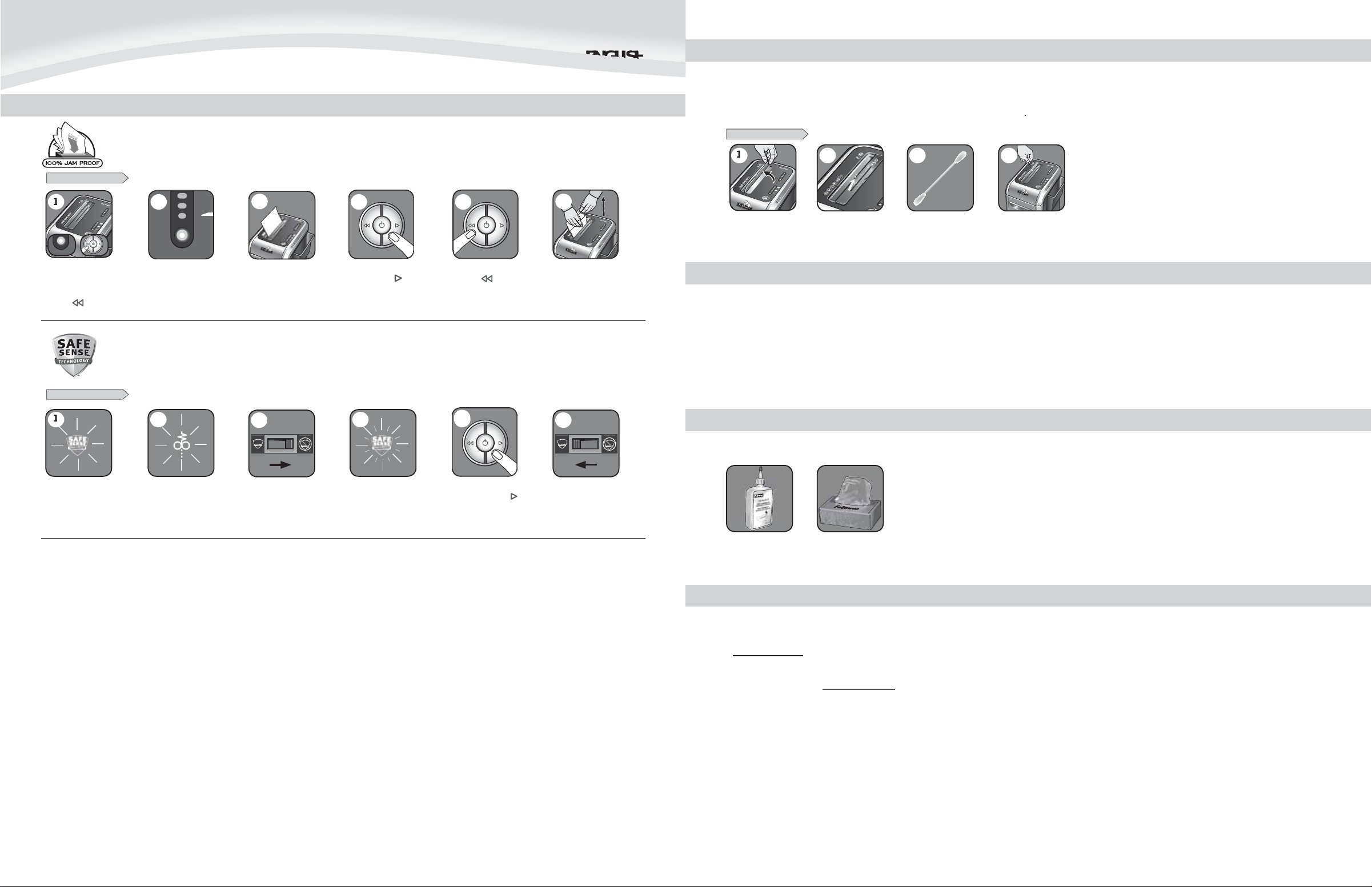
CLEANING AUTO-START INFRARED SENSORS
Paper detection sensors are designed for maintenance free operation. However, on rare occasions the sensors may become blocked by paper dust causing the motor to ru
even if there is no paper present (Note: two
er detection sensors are located in the center of the paper entr
JAM PROOF SYSTE
Eliminates frustrating jams by preventing overloads and powering through misfed paper.
ISABLING THE FEATUR
Should you choose to disable
the s
stem, press and hold
the auto button
reverse ( )
same t
blue) and
ey at the
AFESEN
Stops shredder immediately when hands are too close to the openin
ISABLING THE FEATUR
nce disabled, the blue
uto light is no longer
lluminated (To re-engage,
epeat step 1
TECHNOLOGY
Shredding can continue wit
the system disabled, however
a
er jam may occur with
too many s
eet
If jam occurs, press and
hold forward ( ) ke
the document is com
through the shredde
until
letel
not cleared, press
reverse ( ) briefl
(repeat steps 4 and 5
unti
If steps 4 and 5 do not clear
am, reverse paper all the
wa
out, remove several
sheets and re
eed
TO CLEAN THE SENSOR
Lift CD fla
PREVENTIVE MAINTENANCE AND MI
L
inf
rt
Dip cotton swab in
ubbing alcohol
Using cotton swab, wipe
awa
any contamination
from the
er sensors
CELLANEOUS TROUBLESHOOTIN
All cross cut shredders require oil for peak performance. If not oiled, a machine may experience diminished sheet capacity, intrusive noise when shredding and could
ultimately stop runnin
. To avoid these problems, we recommend you oil your shredder each time you empty your waste bin.
Run shredder once a day in reverse for 15 seconds to clear cutter
Empty wastebasket when bin full indicator light is illuminated using bag # 3605
Shredder will not function if the pull-out bin is not pushed all the way in, or if bin needs to be emptied.
When shredding for a prolonged period of time, the motor can become warm and require a cool down period. When this occurs the overheat indicator will alert you to the
roblem, this model will require 40 minutes to cool down.
ACCE
RIE
aintenance is an important part of protecting your investment. Don’t forget oil and shredder bags.
hould the SafeSens
indicator stay lit without
touc
ing the openin
r will simulat
jam and SafeSens
eed to be deactivate
To deactivate, shift override
switc
will
pos
to the “not active“
Once deactivated, the
indicator will
the SafeSens
lash an
eatur
will not functi
To clear paper, press
and hold
orward ( )
ey until paper is
Once the paper is cleared,
eactivate the SafeSense
eature (To re-engage
see Operations
hredder oil – #3525
B-99Ci Shredder
lastic bag – #3605
PROBLEM STILL NOT SOLVED
ellowes is committed to giving our customers the support and service they deserve. That is why we offer several options for you to find technical information, step-by-step
ssistance and personal attention.
www.fellowes.com features an extensive on-line support section with a number of self-service option
Our customer service professionals are dedicated to resolve any of your issues
o to Support Section at www.fellowes.com or see back page of manual for useful telephone numbers
 Loading...