

Page 1
POWERSHRED
OPERATING INSTRUCTIONS
NOTICE D'UTILISATION
MANUAL DEL PROPIETARIO
BETRIEBSANLEITUNG
®
420
420CC
420HS
1.209.999.100 – Edition 08/99
Page 2

420
420 CC
420 HS Paper shredder
USA
Paper shredder Fellowes 420/420 CC/420 HS .................................................. 3–8
F
Déchiqueteuse Fellowes 420/420 CC/420 HS ................................................. 9–14
Destructora de documentos Fellowes 420/420 CC/420 HS ........................... 15–20
E
D
Aktenvernichter Fellowes 420/420 CC/420 HS ............................................... 21-26
2 1.209.999.100 Edition 08/99
USA
Page 3

420
420 CC
Paper shredder 420 HS
Contents Page
1. Important Safety Instructions.................................................................................. 4
2. Parts Identification .................................................................................................. 4
3. Technical Specifications ......................................................................................... 5
4. Supplies.................................................................................................................. 6
5. Installation .............................................................................................................. 6
6. Caution ................................................................................................................... 6
7. Operation................................................................................................................ 6
8. Checklist for Inoperative Machine .......................................................................... 7
9. Malfunctions ........................................................................................................... 7
10. Maintenance ........................................................................................................... 7
11. Warranty ................................................................................................................. 8
12. Customer Service ................................................................................................... 8
Edition 08/99 1.209.999.100 3
USA
Page 4
420
420 CC
420 HS Paper shredder
1. Important Safety Instructions
1. Read all instructions before use.
2. Save these instructions for later use.
3. Follow all warnings and instructions marked on
the product.
4. Unplug this product from the wall outlet before
cleaning. Cleanwith a damp cloth using a mild
soap and water solution. (Do not use abrasives
or petroleum based cleaners.)
5. Place this product as close as possible to
power source for quick and easy unplugging.
6. Do not use this product near water.
7. This product should never be placed near or
over a radiator or heat source.
8. Operate from the type power source indicated
on the marking label. If you are not sure of the
type of power available, consult your dealer or
local electricity board.
9. Do not allow anything to rest on the power cord.
Do not place this product where people may
walk on the cord.
10. If an extension cord is used with this product,
make sure that the total of the ampere ratings
on the products plugged into the extension cord
do not exceed the extension cord ampere
rating. Also, make sure that the total of all
products plugged into the wall outlet does not
exceed 15 amps.
11. Do not attempt to service this product yourself,
as opening or removing covers may expose
you to dangerous live parts or other risks.
12. Unplug this product and refer servicing to
qualified personnel under the following
conditions:
A) When the power cord or plug is damaged or
frayed.
B) If liquid has been spilled on the product.
C) If the product has been exposed to rain.
D) If the product does not operate normally when
the operating instructions are followed.
E) If the product has been dropped or the casing
has been damaged.
13. Keep out of the reach of children.
14. This shredder should be operated only with an
operator in attendance.
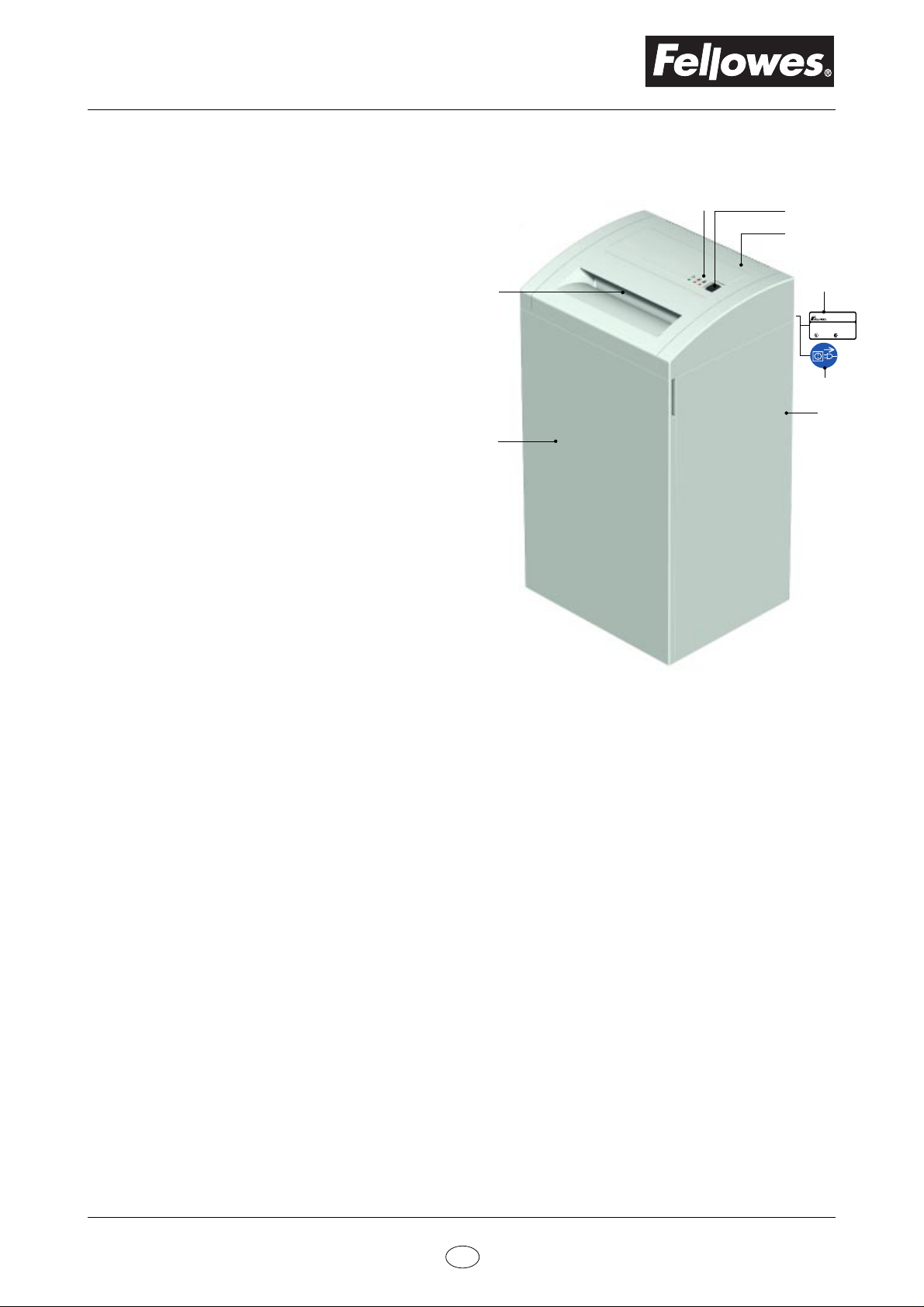
2. Parts Identification
1
8
7
420
420 CC
420 HS
1. LED display 5. Caution label
2. Rocker switch 6. Cabinet
3. Cover 7. Cabinet access door
4. Serial label 8. Paper feed opening
2
3
4
Fellowes Manufacturing Co.
1789 Norwood Avenue
R
Itasca, IL 60143 USA
Model:
Serial #:
Voltage: Motor:
Current: Manufactured:
R
5
6
R
4 1.209.999.100 Edition 08/99
USA
Page 5

3. Technical Specifications
Model Model Model
420 420 CC 420 HS
420
420 CC
Paper shredder 420 HS
Cutting Style
Strip Cut Cross Cut Cross Cut
Shred Size
5/32" 1/4" 5/32" x 1 1/2" 1/16" x 5/8" 1/32" x 7/16"
(3.9mm) (5.8mm) (3.9 x 40mm) (1.9 x 15mm) (0.78 x 11mm)
Security rating (DIN 32757)
22 3 4 5
*Sheet capacity 8 1/2" x 11" - 20 lb.
(A4, 70g/m2 -16 lb.)
20 25 16 10 7
(28) (34) (22) (15) (9)
Speed - 115 volt 60Hz units
- 220/240 volt 50Hz units
24,8 FPM 26,6 FPM 26,6 FPM
(126 mm/sec) (135 mm/sec) (135 mm/sec)
Entry width
High Security
11 13/16"
(300 mm)
Motor power
Input voltage (Depending on country)
Dimensions
Weight
92 lbs (42 kg) 99 lbs (45 kg) 105 lbs (48 kg)
Waste container volume
Noise level
- In Idle 56dB
- Under load 62dB strip cuts and 70dB cross cuts
*Paper DIN 19307 SM 4a – 70
4/3 H.P.
(1150 W)
100V 50/60Hz
115V 60Hz
220/240V 50Hz
19 11/16" x 16 17/32" x 35 7/32"
(500 x 420 x 895 mm)
26.4 gallons (100 liters)
Edition 08/99 1.209.999.100 5
USA
Page 6
420
420 CC
420 HS Paper shredder
4. Supplies
– Bags for cut material
(Packed in dispenser carton, 50 or 100 bags
to a roll depending on size. Contact Fellowes
or your local Fellowes dealer for the stock
number of the bag that fits your machine.)
– Cutting block oil for cross-cut units
Stock # 35250
5. Installation
– Refer to separate set–up instructions for proper
assembly
– Operate this product only from the type of
power source indicated on the marking label
– Install the paper shredder so that the plug is
easily accessible
– Shredder must be operated only in upright
position
– Set up paper shredder so that the ventilation
slots are unobstructed. To ensure sufficient
ventilation of the shredder a minimum distance
of 4" (10 cm) to the wall or to the furniture must
be maintained.
7. Operation
Read operating instructions before
putting shredder into operation
Insert plug in power outlet
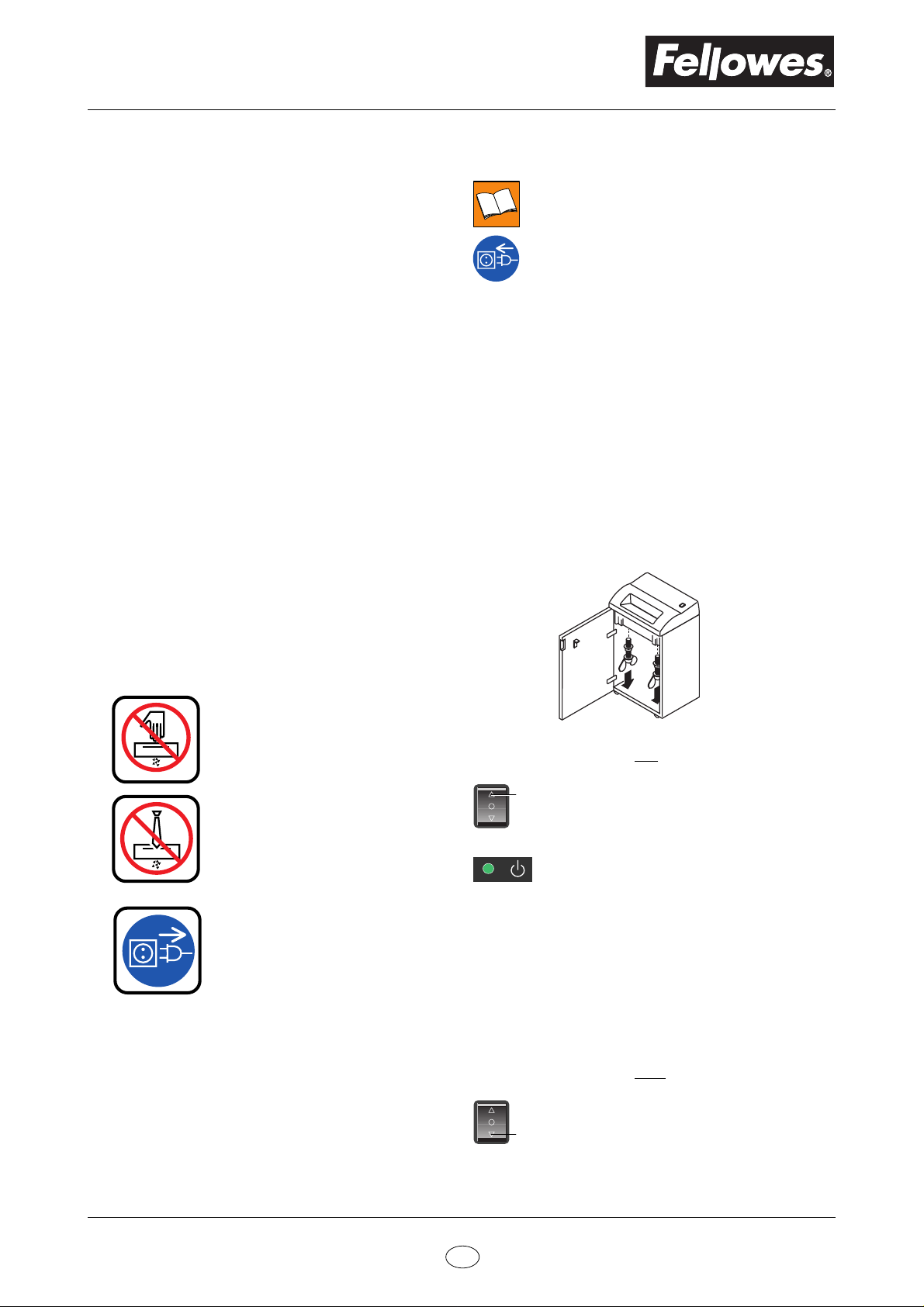
Install waste bag for shredded material
– Open front door and completely remove
bag frame from cabinet
– Fold new bag around frame.
Allow bag to overhang frame by
approximately 7" (20 cm).
– Slide frame with bag back into cabinet
– Close cabinet door.
Before start-up
– Undo the wing screws securing the unit
during transportation
6. Caution
Never insert hand, fingers or any
foreign objects into the feed
opening.
Serious injury may result.
Keep all loose articles of
clothing, ties, jewelery, long hair
or other loose objects away from
feed opening.
Injury may result.
Always turn off and unplug the
machine before moving,
servicing, cleaning or any other
conduct other than normal
operation.
Serious injury may result.
Switching equipment ON
– Press rocker switch to pos. 1
1
• Switch locks in "on" position
• Equipment is ready for operation
(stand by)
• Green LED lights
– Feed paper
• The shredding process is started by
photo–cells in the paper feed opening.
Insert paper and shredding begins
automatically.
• When the shredding is complete, the
cutting system automatically stops
after approx. 3 sec.
Switching equipment OFF
– Press rocker switch to pos. 3
• Switch resets to center position and the
3
machine is turned off.
6 1.209.999.100 Edition 08/99
USA
Page 7
420
420 CC
Paper shredder 420 HS
8. Checklist for Inoperative Machine
If the equipment does not work properly,
please check the following points first:
– Is the plug inserted?
– Is the switch turned on?
– Is the cabinet door closed?
– Is waste receptacle full?
Empty waste bag.
– Is there a paper jam in the shredder?
– Is the motor overheated?
Switch machine off and allow motor to
cool down for approximately 15–20 min.
If none of the above applies and the equipment stil
does not run, please contact our customer service
department.
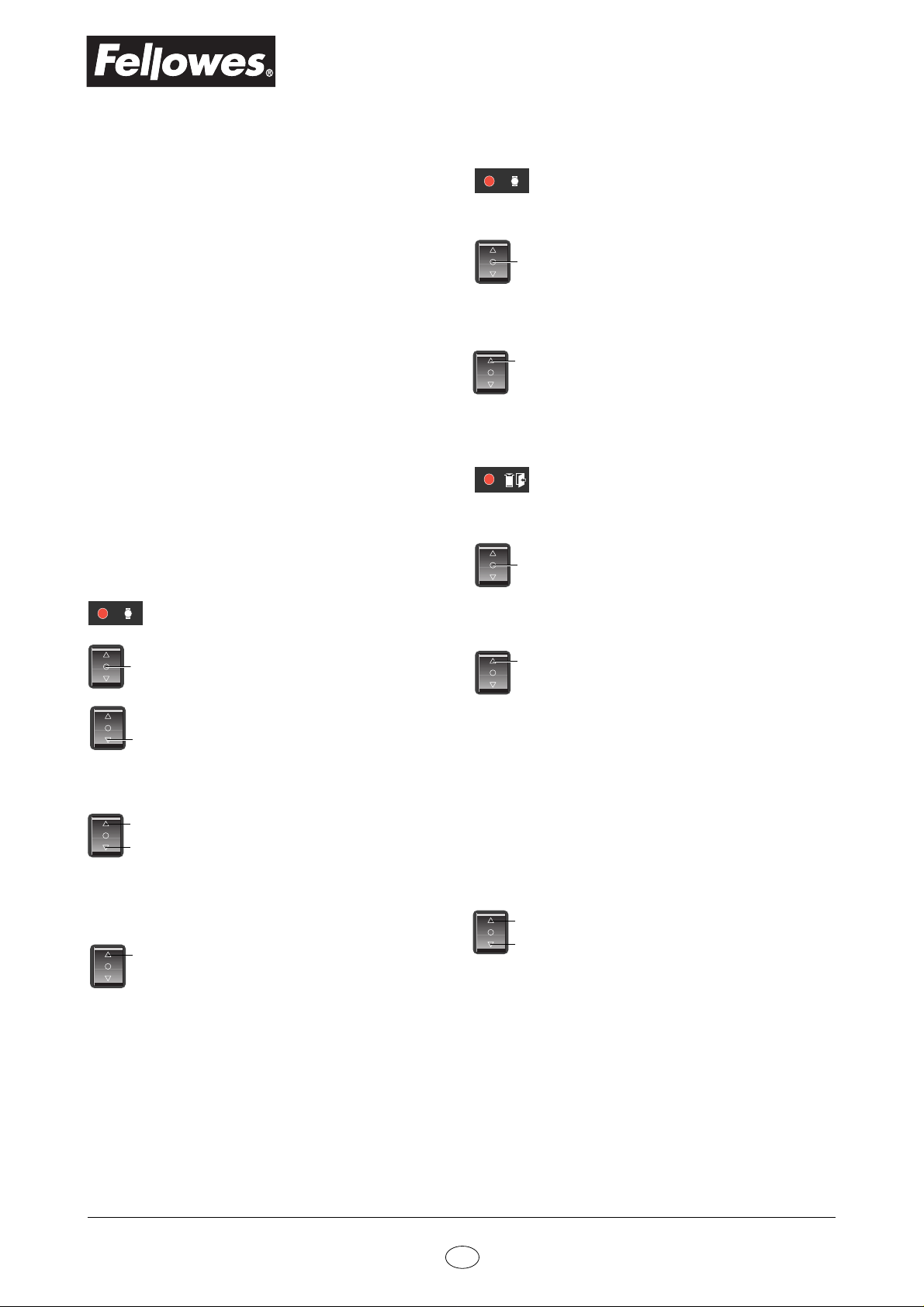
9. Malfunctions
Paper jam
Red LED lights
Motor Overheating
Red LED lights
– Paper shredder switches off automati-
cally.
• Press rocker switch to center position
2
(2).
• Allow shredder to cool down for
approximately 15-20 minutes.
1
• Return switch to "on" position (1)
and continue shredding.
Cabinet door ajar / bag full
Red LED lights
– Paper shredder switches off automati-
cally.
•Press rocker switch to center position
2
(2).
• Make sure cabinet door is properly
closed and/or empty waste bag.
• Press rocker switch to center position
2
(2) to stop the cutting system
• Press and hold down rocker switch in
pos. 3 to reverse the cutting system
3
and back out jammed material
(paper is pushed out)
Caution!
Do not
1
material through the machine by
3
attempt to force the jammed
alternating the cutting system between
forward and reverse
• Remove excess paper
• Return switch to pos. 1 and continue
1
shredding in smaller quantities so as
not to jam the machine further
Note:
The 420 HS
will not run
forward again
unless the jammed material has been
completely removed from the throat
1
• Return switch to "on" position (1) and
continue shredding.
10. Maintenance
(Cross cut unit only)
– When shredding capacity drops or the
noise increases
• Spray special cutting block oil onto
cutting system
1
• Run cutting system forward and
backward several times without feeding
3
paper
• Continue shredding
Edition 08/99 1.209.999.100 7
USA
Page 8

420
420 CC
420 HS Paper shredder
11. Warranty
FELLOWES® POWERSHRED LIMITED
WARRANTY
1 year
5 years
Fellowes® warrants this product to be free from
defects in material and workmanship for a
period of one year from the date of purchase by
the original consumer. At it's option, Fellowes
will repair or replace without charge for material
or labor, any component found to be defective
during the warranty period. Additionally, the
cutting cylinders are warranted for 5 years from
the original purchase date and will be replaced
without charge for material or labor if found by
Fellowes® to be defective.
Warranty Exclusions
The parties agree that the buyer's sole and
exclusive remedy against Fellowes® shall be for
the repair or replacement of defective parts as
provided herein. The buyer agrees that no
other remedy (including, but not limited to,
incidental or consequential damages for lost
profits, lost sales, injury to property or any other
incidental or consequential loss) shall be
available to him. This warranty shall NOT apply
and is void under the following circumstances:
1. When this product or any part thereof has been
subjected to accident, alteration, abuse, or
misuse.
2. When the original Model and Serial Number
Plate has been altered, effaced or removed.
3. When repair or service covered under this
warranty (other than routine maintenance
(as described in the
performed by personnel without the express
written consent of Fellowes®.
4. When the product has been used pursuant to
any verbal or written rental, lease or loan
agreement.
THIS WARRANTY DESCRIBED HEREIN SHALL
BE IN LIEU OF ANY OTHER WARRANTY,
EXPRESSED OR IMPLIED, INCLUDING, BUT NOT
LIMITED TO, ANY IMPLIED WARRANTY OF
MERCHANTABILITY OR FITNESS FOR A
PARTICULAR PURPOSE. ANY REPRESENTATIONS OR PROMISES INCONSISTENT WITH OR
IN ADDITION TO THIS WARRANTY ARE
UNAUTHORIZED AND SHALL NOT BE BINDING
UPON FELLOWES.
on all parts and labor
parts and labor on cutting cylinders
Owner's Manual
) has been
®
12. Customer Service
United States
Fellowes Manufacturing Co.
1789 Norwood Avenue
Itasca, IL 60143
Tel.: 1-800-955-0959
Canada
Fellowes Manufacturing of Canada Ltd.
2750 John Street
Markham, Ontario L3R 2W4
Tel.: 1-800-665-4339
United Kingdom
Fellowes Manufacturing UK Ltd.
Doncaster Road
Kirk Sandall
Doncaster, South Yorkshire DN3 1HT
Tel.: 01302-885 331
Australia
Fellowes Manufacturing (Australia) Pty.Ltd.
10 Fellowes Court
Tullamarine, Victoria 3043
Tel.: (03) 9330-3211 in Melbourne
1-800-331-177 outside Melbourne
Nederland
Fellowes
P.O. Box 180
4130 Ed Vianen
Nederland
Tel.: 0347-377988
Germany
Fellowes GmbH
Dieselstraße 27
D-30827 Garbsen
Tel.: 05131-49770
France
Fellowes Lynx S.A.
194 allée de la Croix des Hormes
69250 Montanay
Tel.: 33-72-08-25-50
8 1.209.999.100 Edition 08/99
USA
 Loading...