

Page 1
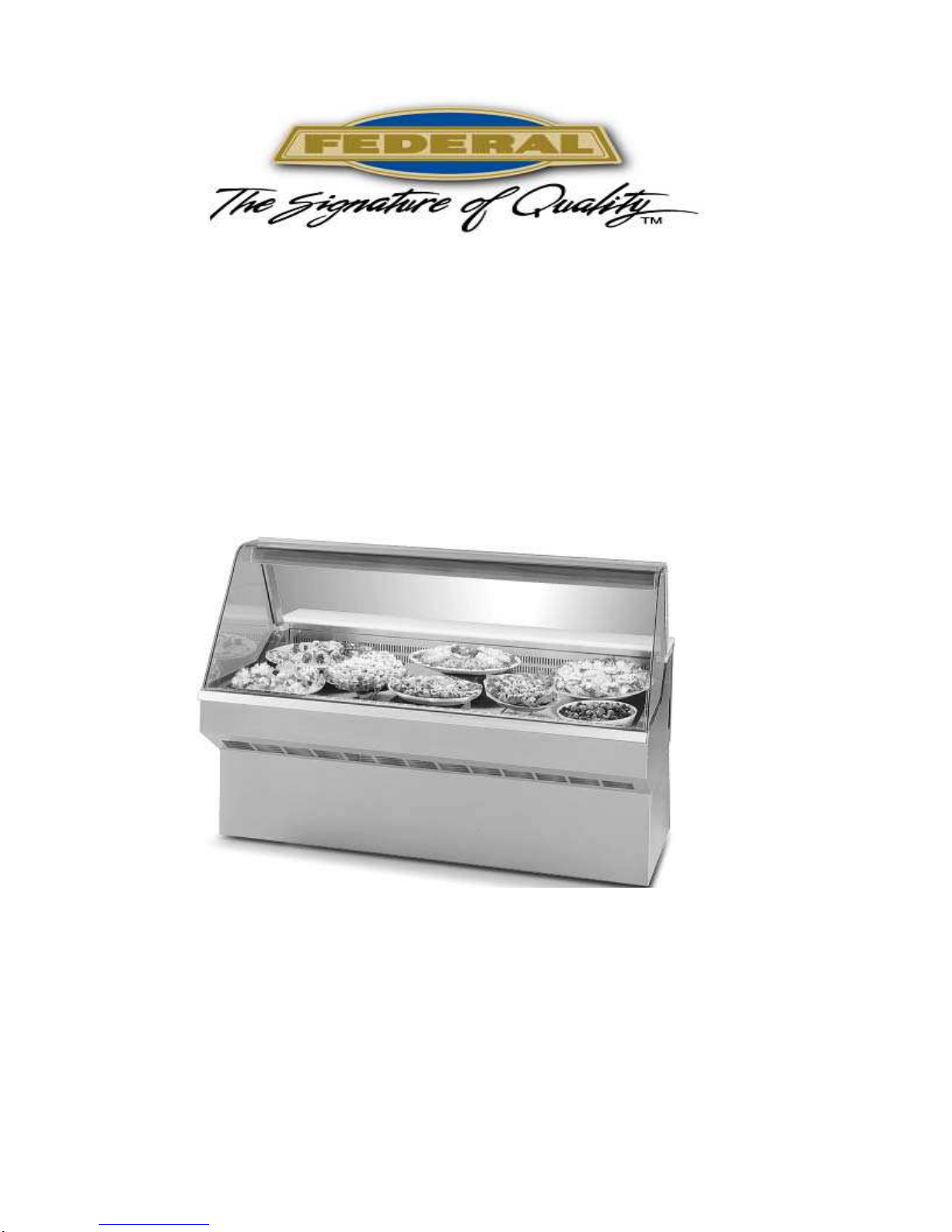
E-1620
0509
SQ3CD, SQ4CD, SQ5CD, SQ6CD, SQ8CD
Self-Contained & Remote Models
INSTALLATION & OPERATION
INSTRUCTIONS
KEEP THIS MANUAL FOR FUTURE REFERENCE
Engineering and technical data are subject to change without notice.
Federal Industries P.O. Box 290 Belleville, WI 53508
Toll Free 1(800) 356-4206 WI Phone (608) 424-3331 Fax: (608) 424-3234
Page 2

Contents
INTRODUCTION.............................................................................................................1
WARNING LABELS & SAFETY INSTRUCTIONS .........................................................2
PRE-INSTALLATION PROCEDURES............................................................................3
INSTALLATION INSTRUCTIONS ..................................................................................3
REMOVING CASE FROM SHIPPING SKID....................................................................3
REMOVING PACKAGING MATERIAL.............................................................................4
LEVELING THE CASE....................................................................................................4
GRILL REMOVAL............................................................................................................4
CONDENSATE EVAPORATOR......................................................................................4
LIGHTS............................................................................................................................4
ELECTRICAL INFORMATION & GROUNDING.............................................................5
OPERATING INSTRUCTIONS .......................................................................................6
DOORS...........................................................................................................................6
LIGHT REPLACEMENT ..................................................................................................6
PLACING PRODUCT INTO CASE..................................................................................
COMPUTER CONTROLS............................................................................................
HINGED FRONT GLASS.................................................................................................9
PERIODIC MAINTENANCE.............................................................................................
CLEANING INSTRUCTIONS........................................................................................10
WEEKLY CLEANING.....................................................................................................10
INTERIOR CLEANING..................................................................................................11
EXTERIOR CLEANING.................................................................................................11
SERVICE INFORMATION.............................................................................................12
PRE-SERVICE CHECKLIST....................................................................................
SALE & DISPOSAL......................................................................................................14
REFRIGERATION & ELECTRICAL DATA – SELF-CONTAINED ...............................15
REFRIGERATION & ELECTRICAL DATA - REMOTE ...............................................16
REPLACEMENT PARTS ..............................................................................................17
REPLACEMENT PARTS ..............................................................................................18
WIRING DIAGRAM – SQ3CD, SQ4CD, SQ5CD, SQ6CD – SELF-CONTAINED ........19
WIRING DIAGRAM – SQ8CD – SELF-CONTAINTED .................................................20
WIRING DIAGRAM – SQ3CD-R, SQ4CD-R, SQ5CD-R, SQ6CD-R - REMOTE ..........21
WIRING DIAGRAM – SQ8CD-R – REMOTE................................................................22
WIRING DIAGRAM – RECEPTACLE...........................................................................23
Market Deli Refrigerated Cases
INSPECTION FOR SHIPPING DAMAGE........................................................................3
LOCATING THE DISPLAY CASE....................................................................................3
INITIAL START-UP..........................................................................................................6
6
7-8
9
DAILY CLEANING.........................................................................................................10
12-13
SPECIAL SERVICE SITUATIONS.................................................................................14
OWNER RESPONSIBILITY...........................................................................................14
Page 3
INTRODUCTION
Thank you for purchasing a Federal Industries display case. This manual contains important
instructions for installing and servicing the Market Deli Refrigerated Cases. A repair parts list
and wiring diagram are also included in the manual. Read all of these documents carefully
before installing or servicing your case.
NOTICE
Read this manual before installing your case. Keep this manual and refer to it before doing any
service on the equipment. Failure to do so could result in personal injury or damage to the
case.
NOTICE
Installation and service of the electrical components in the case must be performed by a
licensed electrician.
The portions of this manual covering electrical components contain technical instructions intended only
for persons qualified to perform electrical work.
Improper or faulty hookup of electrical components in the case can result in severe injury or
death.
All electrical wiring hookups must be done in accordance with all applicable local, regional, or
national standards.
Record the model and serial numbers of the case for easy reference. Always refer to both
model and serial numbers in your correspondence regarding the case.
Case Model__________________________ Serial Number______________________
Condensing Unit Model________________ Serial Number______________________
This manual cannot cover every installation, use, or service situation. If you need additional
information, call or write us:
Market Deli Refrigerated Cases Page 1
DANGER
SERIAL NUMBER
Warranty/Technical Service Department
Toll Free (800) 356-4206
WI Phone (608) 424-3331
Page 4
WARNING LABELS & SAFETY
INSTRUCTIONS
This is the safety-alert symbol. When you see this symbol on your case or
in the manual, be alert to the potential for personal injury or damage to
your equipment.
Be sure you understand all safety messages and always follow recommended precautions and
safe operating practices.
NOTICE TO EMPLOYERS
You must make sure that everyone who installs, uses, or services your case is thoroughly
familiar with all safety information and procedures.
Important safety information is presented in this section and throughout the manual.
The following signal words are used in the warnings and safety messages:
DANGER: Severe injury or death will occur if you ignore the message.
WARNING: Severe injury or death can occur if you ignore the message.
CAUTION: Minor injury or damage to your case can occur if you ignore the message.
NOTICE: This is important installation, operation, or service information. If you ignore the
message, you may damage your case.
The warning and safety labels shown throughout this manual are placed on your Federal
Industries case at the factory. Follow all warning label instructions. If any warning or
safety labels become lost or damaged, call our customer service department at 1(800)
356-4206 for replacements.
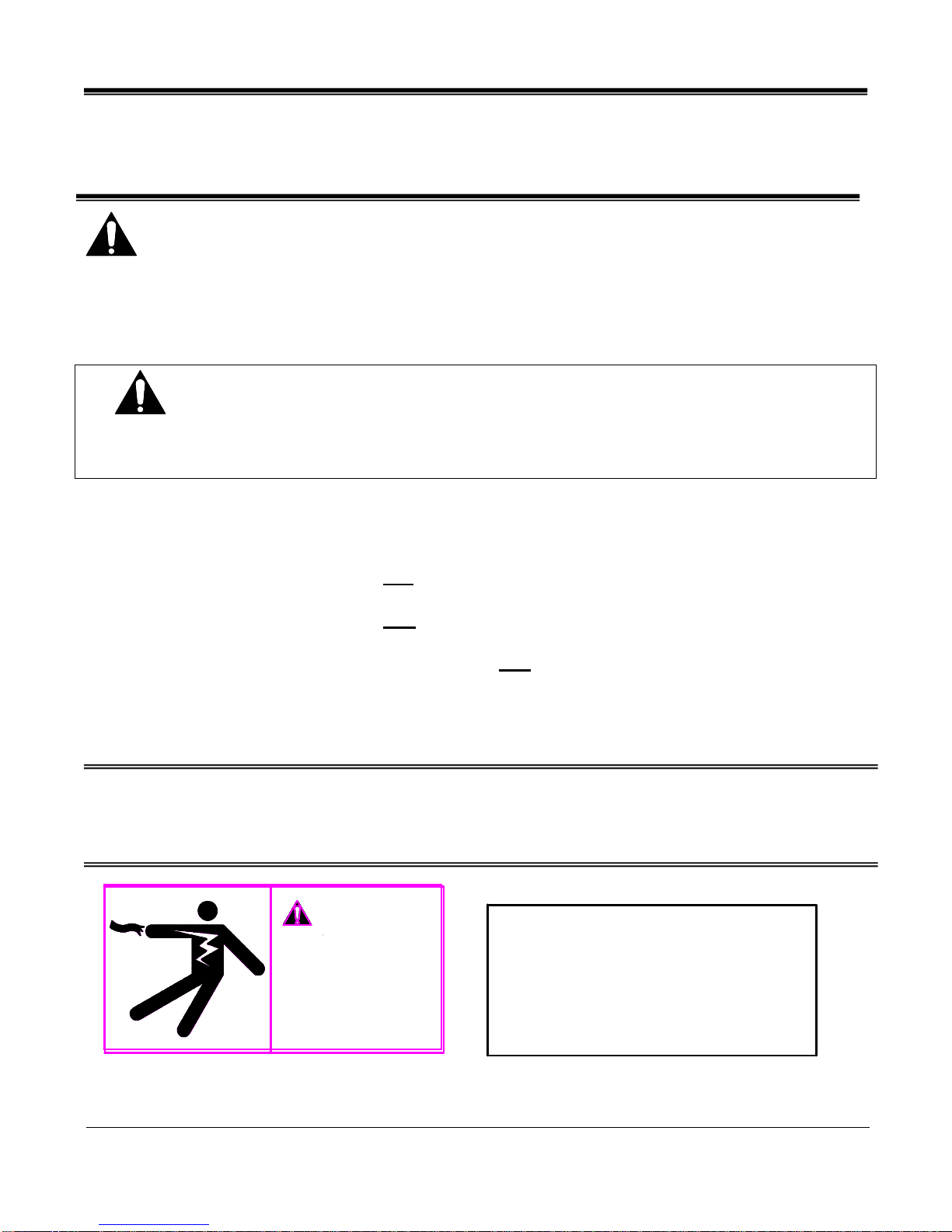
DANGER
HIGH VOLTAGE.
Turn power off
before servicing.
May have more than
one disconnect
switch.
This label is located on the back of the display case. This label is located below the display pan.
Market Deli Refrigerated Cases Page 2
CAUTION
HAZARDOUS MOVING PARTS
DO NOT OPERATE UNIT WITH
DISPLAY PANS REMOVED.
Page 5
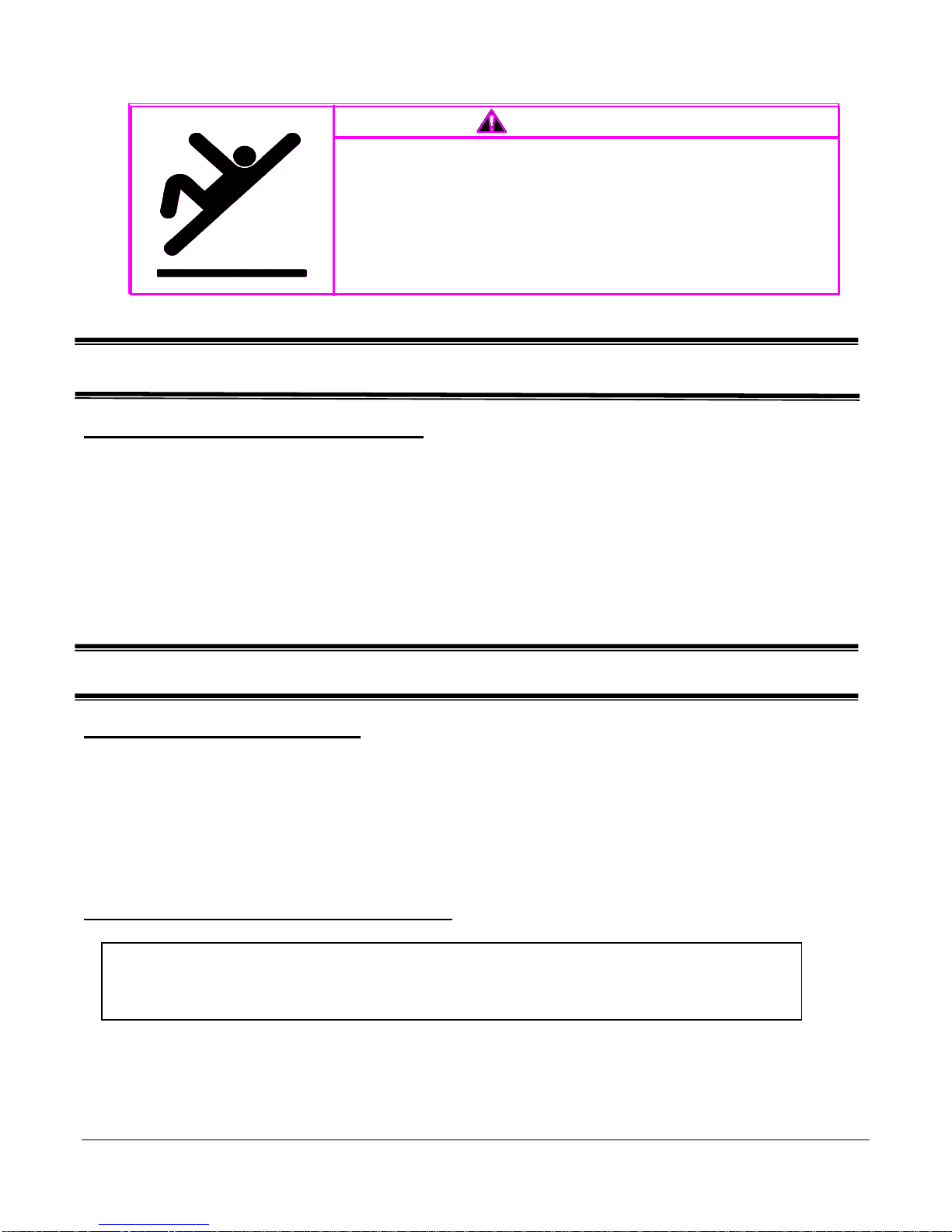
Floor surface around case may become slippery.
Excess condensation can occur and run onto the
floor if case is operated in an environment
above recommended temperature and humidity
levels.
Case is designed to operate in an environment
not to exceed 75º F.
This label is located on the back of the display case.
PRE-INSTALLATION PROCEDURES
Inspection For Shipping Damage
You are responsible for filing all freight claims with the delivering truck line. Inspect all
cartons and crates for damage as soon as they arrive. If damage is noted to shipping
crates or cartons, or if a shortage is found, note this on the bill of lading (all copies) prior
to signing.
If damage is discovered when the case is uncrated, immediately call the delivering truck
line and follow-up the call with a written report indicating concealed damage to your
shipment. Ask for an immediate inspection of your concealed damage item. Crating
material must be retained to show the inspector from the truck line.
INSTALLATION INSTRUCTIONS
Locating The Display Case
The case should be located where it is not subjected to the direct rays of the sun,
heating ducts, grills, radiator, or ceiling fans, nor should it be located near open doors or
main door entrances. Also, avoid locations where there is excessive air movement or
air disturbances.
The condenser air inlet is located at the rear of the case. Do not block this inlet and do
not locate the air inlet near a source of heat.
Removing Case from Shipping Skid
CAUTION
:
Do not push against the curved glass, end glass, doors, or
doorframes when removing the case from the skid or moving
Move the case as near as possible to the final location before removing it from the
shipping skid.
Remove the eight (8) screws that secure the case to the skid.
Market Deli Refrigerated Cases Page 3
Page 6
Removing Packaging Material
Remove the brackets that held the case to the shipping skid.
Remove the shipping tape that secures the doors and lift-up glass. If it is necessary to
remove tape residue from plastic materials, use cleaning compounds recommended in
the cleaning section of this manual.
Leveling the Case
The case must be level for proper drainage of defrost condensate to the condensate
evaporator.
Four (4) leg levelers are provided for leveling the case. The leg levelers can be turned
in, and the case can be placed with the base frame on the floor.
The leveled case can be sealed to the floor using and NSF Listed Sealant.
Grill Removal
DANGER: Electrical shock hazard. Do not operate unit with
panels removed.
The front of the case has a removable base panel to access the refrigeration
components. Normally, it is not necessary to remove the panel to install the case. This
panel must be in place for proper operation of the case.
There is one (1) removable panel on the back of the case. The panel allows access to
the condensing unit, and the field wiring connection box. Remove this panel to make
field-wiring connections.
Condensate Evaporator
This case is furnished with an electric condensate evaporator. Plumbing
connections are not required.
The condensate evaporator is located behind the rear panel and is accessible from
the rear of the case.
Make sure that the drain line has not been dislodged during shipment and that the
drain terminates properly over the water reservoir.
Lights
The ballasts used on this case allow removal of one or more top lights without
affecting the remaining lights.
Market Deli Refrigerated Cases Page 4
Page 7
ELECTRICAL INFORMATION &
GROUNDING
This Case Must Be Grounded
DANGER: Improper or faulty hookup of electrical components in
the display case can result in serve injury or death.
All case electrical connections must be performed only by a licensed electrician.
All electrical wiring hookups must be done in accordance with all applicable local,
regional, or national electrical standards.
A separate circuit for each display case is recommended to prevent other appliances on
the same circuit from overloading the circuit and causing malfunction.
The electrical service must be grounded upon installation.
This unit is designed for permanent connection to a power source. See the electrical
data plate located next to electrical junction box for proper circuit size and wire
ampacity.
The electrical field connection 2 x 4 box is accessible from the rear of the case and is
located in the right “leg” (as viewed from case rear). A second 2 x 4 field connection
box is also located in the right leg and is required to supply electrical power to the
general purpose receptacle.
Market Deli Refrigerated Cases Page 5
Page 8
OPERATING INSTRUCTIONS
Initial Start-Up
After all the checks outlined in the installation section of this manual have been made,
the case is ready to be put into service.
Doors
Clean the door track frequently for easy door operation. A very light film of lubricant,
such as PAM, will help the doors slide easily.
The entire door track assembly may be removed if desired by tilting the top back and
lifting the entire frame out.
The display case is intended to be operated with the rear doors in place. However,
during peak service periods, the doors may be removed for ease of serving out of case.
DO NOT keep doors off unit for long periods of time.
Light Replacement
This will allow bulb prongs to easily slide out of bulb receptacles located at each end of
the bulb.
The bulbs are furnished with plastic safety light shields. Make certain the light shields
are always in place to safeguard against bulb breakage.
When replacing lights, use direct equivalents to the original bulbs.
Placing Product into Case
CASE SHOULD BE STOCKED WITH PRE-CHILLED PRODUCT ONLY.
The display pans are removable for cleaning and can become dislodged in shipment.
To ensure proper airflow and performance of the case, make sure that the display pans
are positioned as shown. Check that the pans are installed properly before placing
product on the display pans.
Market Deli Refrigerated Cases Page 6
Remove bulb from top light assembly by rotating bulb 90 degrees and pulling outward.
Do not block the slots along the front or rear of the case display floor.
Page 9

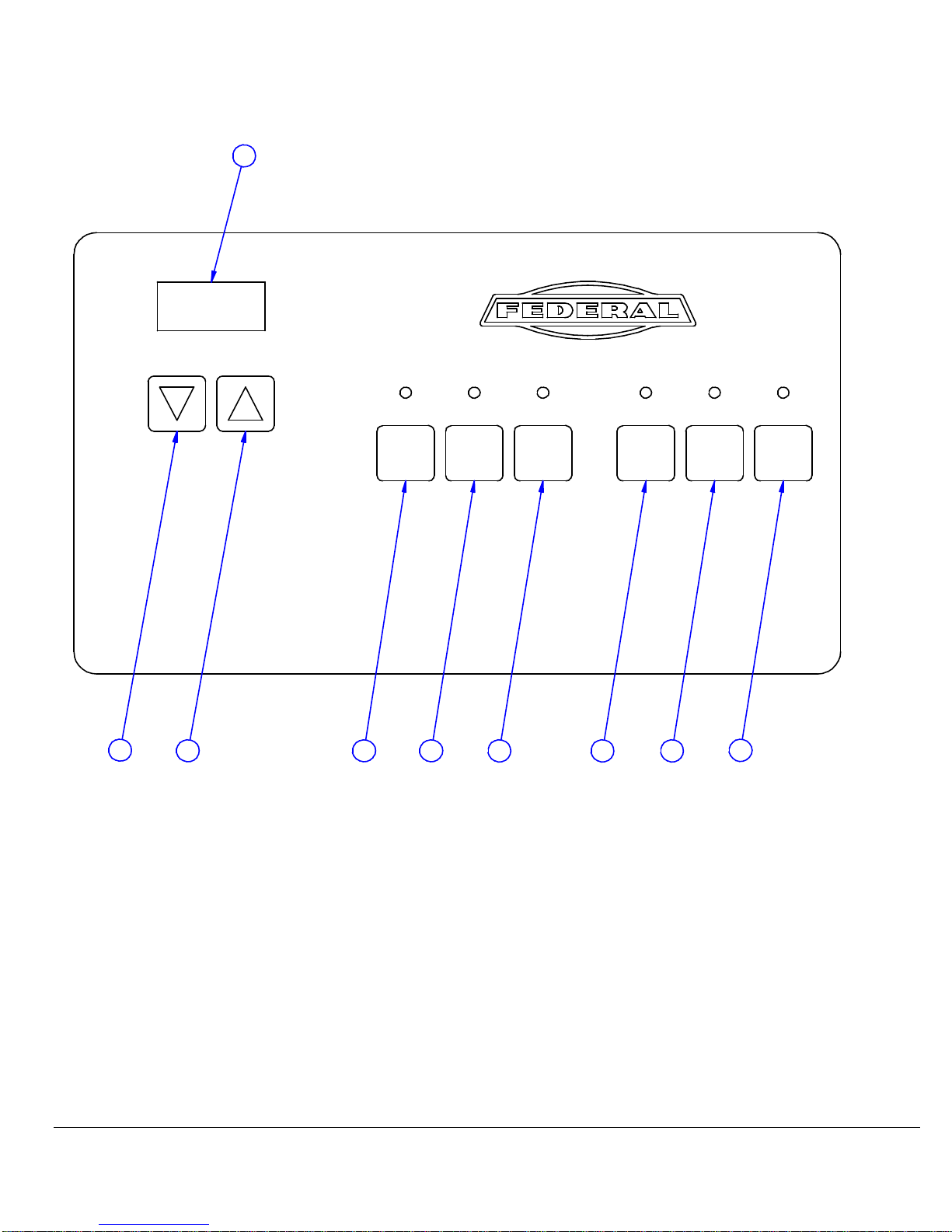
COMPUTER CONTROLS
for
SQCD CASES
E3014
A. Display
Display temperature readout and displays the time.
B. Down Arrow
Press once to display current heat setting, press again to change to a warmer setting.
C. Up Arrow
Press once to display current refrigeration setting. Press again to change to a cooler
setting.
Temperature Setting
The display has an off position, “0”, and numbered position 1 through 9. The coolest
setting is 9. Be using the up and down arrows, set the display at the lowest number
necessary to achieve desired case temperature.
D. Clock Display/Set
Press to display current time. Adjust time with bottoms B (Hours) & C (Minutes). Press
again to return the temperature display.
E. Defrost Start Display/Set
Press to display current defrost start time – adjust same as clock.
F. Defrost Stop Display/Set
Press to display current auto stop time – adjust same as clock. If start and stop time are
the same, auto start/stop is off.
G. Light Switch
Turns fluorescent lights on and off. Red light indicates on.
H. Humidity Switch
Turns the optional humidification system on and off. Red light indicates switch is on.
I. Main Power Switch
Turns off power to all components – retains all settings. This does not turn off complete
power to the unit.
Market Deli Refrigerated Cases Page 7
Page 10
A
PM
35
CLOCK DEFROST
TIME
DISPLAY
SET
B
C D E F G H
START
DISPLAY
SET
DEFROST
STOP
DISPLAY
SET
HUMIDITYLIGHTS POWER
ON/OFFON/OFF ON/OFF
I
Market Deli Refrigerated Cases Page 8
Page 11

Hinged Front Glass
The front glass hinges up for easy cleaning of the case interior. Pneumatic cylinders assist in
lifting the glass. The glass will hold open in any position.
The hinged glass mechanism will give years of reliable operation in normal usage. Service on
the lift mechanism is required if . . .
-The glass becomes difficult to open.
-The glass does not hold in the open position.
-The glass closes fast.
Consult the factory if service is required.
NOTE: Condensation will occur on the front and side glass if the room environment exceeds 75º
ambient and/or 55% relative humidity conditions.
CAUTION
: Operation of lift-up glass is to be done by trained store
personnel only. This case is not intended to be used as
a self-serve unit. Do not allow customers to operate liftup glass.
Periodic Maintenance
Cleaning Condenser Coil
Remove the rear grill and vacuum the front surface of the condenser coil.
This should be done every one to two months as necessary.
Market Deli Refrigerated Cases Page 9
Disconnect power to unit.
Page 12

CLEANING INSTRUCTIONS
Daily Cleaning
This case should be cleaned thoroughly, as described in the weekly cleaning section, before it is
used for the first time.
NOTICE: Avoid splashing or soaking any electrical components with water
to prevent electrical damage to the case.
NOTICE: Shut off lights and power switches and remove all product from case.
Allow sufficient time for the unit to reach room temperature before
proceeding with cleaning.
NOTE: For major spills or foreign material buildup use complete weekly cleaning
instructions.
1. Clean all foreign materials from the door opening.
2.
Wipe complete interior of case using a damp cloth.
3.
The glass can be cleaned with common window cleaners. The remaining exterior surface
should be wiped down using any ammoniated cleaners or soapy warm water.
Note: Detergents are not recommended.
Weekly Cleaning
necessary to maintain a clean, sanitary case. The case should be cleaned to this procedure
before using the first time.
NOTICE: Avoid splashing or soaking any electrical components with water to
prevent electrical damage to the case.
Allow sufficient time for the unit to reach room temperature before
proceeding with cleaning.
Market Deli Refrigerated Cases Page 10
This procedure is recommended on a weekly basis. It may need to be performed more often if
NOTICE: Shut off lights and power switches and remove all product from case.
Page 13

Interior Cleaning
1. Remove rear doors by tilting top of frame back and lifting entire assembly out.
2. Lift up the front glass to the fully open position.
3. Lift the display pans up and take them out of the case.
4. Remove thumbscrews that hold the rear vent to the back of the case.
5. Take out front condensation glass by lifting it up and out.
6. Remove front vent by lifting straight up and out.
7. Clean the entire interior of the case using warm soaping water. Wipe off all soapy water
with a damp cloth and allow to dry.
Note: Depending on the amount of usage and spillage of foreign material, some fasteners may
have to be removed and parts disassembled to allow proper cleaning of the unit.
8. Clean all foreign material from door tracks using warm soapy water and a brush. Apply a
light film of lubricant, such as PAM, to make the doors operate smoother.
9. Clean both sides of the doors and interior of the front glass using any common window
cleaner.
10. Reassemble the case in reverse order starting with Step 6.
Exterior Cleaning
1. Clean the front glass using any common window cleaner.
2. The exterior surfaces should be wiped down using any ammoniated cleansers or warm
soapy water.
Market Deli Refrigerated Cases Page 11
Page 14

SERVICE INFORMATION
Before any service work is performed on the case, make sure all power is disconnected
to the case.
CAUTION
RISK OF ELECTRIC
SHOCK DISCONNECT
POWER BEFORE
SERVICING UNIT.
Service problems or request for repair parts from authorized service agencies, trained service
personnel, or owners should be referred to:
91-12340
Warranty/Technical Service Department
Toll Free: (800) 356-4206
WI Phone (608) 424-3331
. . . . . . . . . . . . . . . . . . . . . . . . . . . . . . .
Pre-Service Checklist
You may avoid the cost and inconvenience of an unnecessary service call by first
reviewing this checklist of frequently encountered situations that can cause
unsatisfactory case performance.
CAUTION: Before servicing case, turn off power at the main breaker of
fuse box.
Market Deli Refrigerated Cases Page 12
Pre-Service Checklist
Page 15

Cases Does Not Operate
Check for disconnected power supply.
Check for tripped breaker or blown fuse.
Check that the power switch and thermostat displays are not “off”.
Lights Do Not Operate
Check that light switch is “on”.
Be sure light is properly seated in the sockets.
Case Temperature Too Warm
Check that the cold air inlet and outlet slots are not blocked.
Be sure front glass is closed tightly and back doors are closed.
Check for a blocked or dirty condenser coil.
Check cold airflow. Lack of adequate cold airflow could indicate a
defective evaporative fan or a blocked evaporator coil. Check that paper or foreign
materials are not blocking evaporator. If the evaporator coil is blocked due to excessive
frost, turn the temperature setting to “0” (“off”) position for approximately one hour to
defrost. Excessive frost can buildup if the case is operated with the doors open for
extended periods of time.
Glass Fogging
Checkroom ambient – Case is designed to operate in an environment not to
exceed 75ºF and 55% relative humidity.
Check case temperature – Case is designed to operate between 36ºF and
42ºF.
Check that the airflow is not being disturbed by a nearby fan or air duct.
Check that nothing is placed on the top of the case glass.
Overflow of Condensate Evaporator
A high wattage heater is used to eliminate the evaporator condensate.
The heater shuts off automatically when the water level in the pan drops.
If the pan is overflowing . . .
Check that float moves freely inside water reservoir and activates float
switch.
Check that drain line terminates properly over water reservoir.
Check room ambient conditions. Room environment should not exceed
75ºF ambient and 55% humidity conditions.
Market Deli Refrigerated Cases Page 13
Page 16

Special Service Situations
order to perform service work. In those situations, Federal Industries recommends that the
refrigerant charge be evacuated into a recovery system to prevent the possibility of hydrofluorocarbons (HFC’s) from being released into the atmosphere.
If moisture or liquid is observed around or under a Federal Industries case, an immediate
investigation should be made by qualified personnel to determine the source of the moisture or
liquid. The investigation made should determine if the case is malfunctioning or if there is a
simple housekeeping problem.
Moisture or liquid around or under a case is a potential slip/fall hazard for persons walking
by or working in the general area of the case. Any case malfunction or housekeeping problem
that creates a slip/fall hazard around or under a case should be corrected immediately.
There are rare occasions when the refrigerant charge must be evacuated from a case in
SALE & DISPOSAL
safety labels and the Installation-Service Manual are included with it. If you need
replacement labels or manuals, Federal Industries will provide them free of
charge. Contact the Customer Service Department at Federal Industries at
(800) 356-4206.
The Customer Service Department at Federal Industries should be contacted at
the time of sale or disposal of your case so records may be kept of its new
location.
If you sell or give away your Federal Industries case, and you evacuate the
refrigerant charge before shipment, Federal Industries recommends that the
charge be evacuated into a recovery system to prevent the possibility of HFC”s
from being released into the atmosphere.
Market Deli Refrigerated Cases Page 14
Owner Responsibility
If you sell or give away your Federal Industries case, you must make sure that all
Page 17

REFRIGERATION & ELECTRICAL DATA
Refrigerant 24 oz. 28 oz. 30 oz. 32 oz. 36 oz.
Charge (R-134A)
AMPS AMPS AMPS AMPS AMPS
Compressor
RLA 7.6 9.5 9.5 9.5 10.7
LRA 48.0 58.8 58.8 58.8 69.0
Condenser Fan 0.5 0.5 0.5 0.5 1.3
Motor
Evaporator Fan 0.4 ea.(1) 0.4 ea.(1) 0.4 ea.(1) 0.4 ea.(2) 0.4 ea.(2)
Lights 0.3 0.7 0.7 0.7 0.8
Condensate 4.8 4.8 4.8 4.8 4.8
Evaporator
Refer to the rating plate data attached to the rear of the case for Maximum Fuse Size and Minimum
Circuit Ampacity.
Each model is equipped with a general-purpose receptacle, which requires a separate electrical circuit
of 120V, 15 Amps. This receptacle must be wired in accordance with the National Electrical Code.
Market Deli Refrigerated Cases Page 15
SQ3CD SQ4CD SQ5CD SQ6CD SQ8CD
ALL MODELS ARE 120 VOLT, 1 PHASE, 60 HERTZ
Page 18

REFRIGERATION & ELECTRICAL DATA
Refrigerant R134A R134A R134A R134A R134A
AMPS AMPS AMPS AMPS AMPS
Evaporator Fan 0.4 ea.(1) 0.4 ea.(1) 0.4 ea.(2) 0.4 ea.(2)
Lights 0.3 0.7 0.7 0.7 0.8
Condensate 4.8 4.8 4.8 4.8 4.8
Evaporator
Refer to the rating plate data attached to the rear of the case for Maximum Fuse Size and Minimum
Circuit Ampacity.
Each model is equipped with a general-purpose receptacle, which requires a separate electrical circuit
of 120V, 15 Amps. This receptacle must be wired in accordance with the National Electrical Code.
Market Deli Refrigerated Cases Page 16
SQ3CD SQ4CD SQ5CD SQ6CD SQ8CD
ALL MODELS ARE 120 VOLT, 1 PHASE, 60 HERTZ
Page 19

REPLACEMENT PARTS
MODELS : SQ3CD, SQ4CD, SQ5CD,
SQ6CD & SQ8CD (SELF-ONTAINED)
Part Description Part Number
Refrigerated System SQ3CD SQ4CD SQ5CD SQ6CD SQ8CD
Condensing Unit 30-13455 30-12961 30-12961 30-12961 30-12962
Compressor 30-15035 30-15036 30-12961 30-15036 30-15037
Evaporator Coil 33-13267 33-13268 30-13268 33-13269 33-13270
Expansion Valve 32-12625 32-12625 32-12625 32-12625 32-12625
Evaporator Fan Motor 41-11628 41-11628 41-11628 41-11628 41-11628
Evaporator Fan Blade 72-11450 72-12254 72-11450 72-11450 72-11450
Filter Drier 32-12626 32-12391 32-12626 32-12391 32-12391
Condensate Evaporator SA-2094 SA-2094 SA-2094 SA-2094 SA-2094
Electrical Components
Ballast 39-12902 39-12902 39-12902 39-12903 39-12903
Light Bulb 42-11069 42-11070 42-15440 42-11071 42-11070
Ribbon Cable (8 Pin) 41-13767 41-13767 41-13767 41-13767 41-13767
Ribbon Cable (12 Pin) 41-13766 41-13766 41-13766 41-13766 41-13766
Temperature Probe 41-13755 41-13755 41-13755 41-13755 41-13755
Logic Board 41-13744 41-13744 41-13744 41-13744 41-13744
Relay Board 41-13745 41-13745 41-13745 41-13745 41-13745
Misc. Components
Front Curved Glass 50-13028 50-13029 50-15753 50-12830 50-13831
Side Glass 51-13124 51-13124 51-13124 51-13124 51-13124
Condensation Glass 51-13161 51-13162 51-15761 51-13764 51-13765
Gas Cylinder 81-14319 81-13660 81-13661 81-13660 81-13660
Decal – Elect Hazard 91-10743 91-10743 91-10743 91-10743 91-10743
Federal Logo Sticker 91-72523 91-72523 91-72523 91-72523 91-72523
Mirrored Side Glass(
Mirrored Side Glass (
Rear Door Glass 15-14148 15-14149 15-15762 15-14150 15-14151
Market Deli Refrigerated Cases Page 17
Left
) 55-13249 55-13249 55-13249 55-13249 55-13249
Right
) 55-13248 55-13248 55-13248 55-13248 55-13248
Page 20
r
REPLACEMENT PARTS
MODELS : SQ3CD, SQ4CD, SQ5CD,
SQ6CD & SQ8CD (REMOTE)
Part Description Part Number
Refrigerated System SQ3CD SQ4CD SQ5CD SQ6CD SQ8CD
Evaporator Coil 33-13267 33-13268 33-13268 33-13269 33-13270
Expansion Valve 32-12625 32-12625 32-12625 32-12625 32-12625
Evaporator Fan Motor 41-11628 41-11628 41-11628 41-11628 41-11628
Evaporator Fan Blade 72-11450 72-12254 72-11450 72-11450 72-11450
Condensate Evaporator SA-2094 SA-2094 SA-2094 SA-2094 SA-2094
Electrical Components
Ballast 39-12902 39-12902 39-12902 39-12903 39-12903
Light Bulb 42-11069 42-11070 42-15440 42-11071 42-11070
Light Socket 42-12776 42-12776 42-12776 42-12776 42-12776
Ribbon Cable (8 Pin) 41-13767 41-13767 41-13767 41-13767 41-13767
Ribbon Cable (12 Pin) 41-13766 41-13766 41-13766 41-13766 41-13766
Temperature Probe 41-13755 41-13755 41-13755 41-13755 41-13755
Logic Board 41-13744 41-13744 41-13744 41-13744 41-13744
Relay Board 41-13745 41-13745 41-13745 41-13745 41-13745
Misc. Components
Front Curved Glass 50-13028 50-13029 50-15753 50-12830 50-13831
Side Glass 51-13124 51-13124 51-13124 51-13124 51-13124
Condensation Glass 51-13161 51-13162 51-15761 51-13764 51-13765
Gas Cylinder 81-13660 81-13661 81-13661 81-13661 81-13661
Decal – Elec. Hazard 91-10743 91-10743 91-10743 91-10743 91-10743
Federal Logo Sticker 91-72523 91-72523 91-72523 91-72523 91-72523
Mirrored Side Glass(
Mirrored Side Glass (
Rear Door Glass 15-14148 15-14149 15-15762 15-14150 15-14151
Left
) 55-13249 55-13249 55-13249 55-13249 55-13249
Right
) 55-13248 55-13248 55-13248 55-13248 55-13248
Market Deli Refrigerated Cases Page 18
Page 21
r
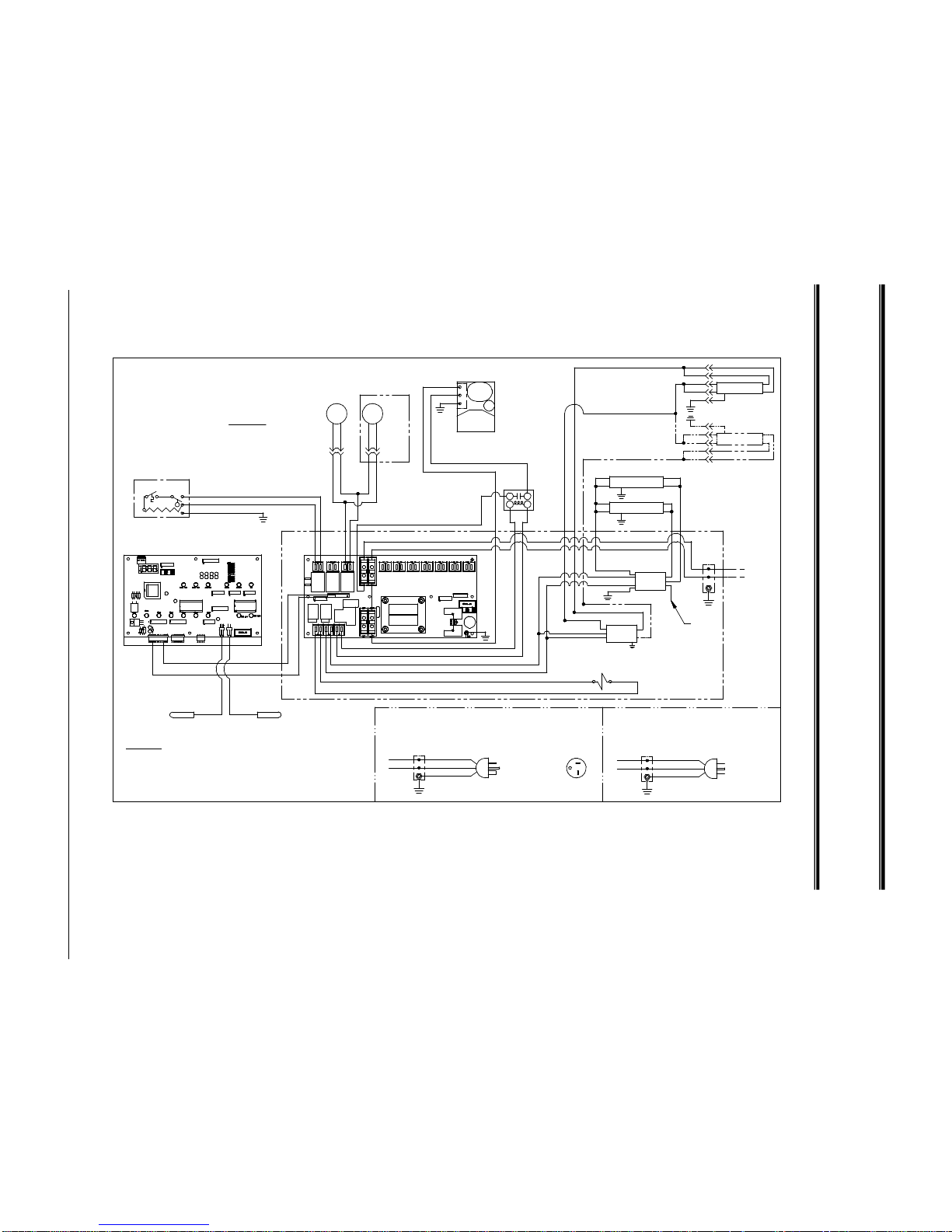
WIRING DIAGRAM
-
SQ3CD, SQ4CD, SQ5CD, SQ6CD
(SELF-CONTAINED)
SQ-6CD
60 HERTZ
N
L1
GND
1 PHASE
W
BLK
2X4 BOX
NEMA 5-20P PLUG
POWER CORD WITH
OPTIONAL POWER CORD
120 VOLTS
FO40 APPLICATION
2. UNIT MUST BE GROUNDED.
1. SEE DATA PLATE FOR WIRE AND FUSE SIZING.
3. CUT AND INSULATE EXTRA LEAD IN TWO LAMP
NOTES:
SQ-3CD ONLY
REVISED ON 5/7/01
1 PHASE
120 VOLTS
60 HERTZ
N
2X4 BOX
BLK
W
GND
L1
OPTIONAL POWER CORD
POWER CORD WITH
NEMA 5-15P PLUG
SQ6CD
(2 LAMP)
(1 LAMP)
SQ4CD
SQ3CD
B
B
R
B
B
Y
Y
B
B
YYLAMP
LAMP
(MEZANNINE OPTION)
G
G
BB
BLK
W
R
(MEZANNINE OPTION)
BALLAST
NOTE 3
B
SOLENOID (HUMIDITY OPTION)
THERMOSTAT DIGITAL THERMOMETER
W
BLK
RELAY
B
A
CONDENSING
UNIT
G
YW
W
IN COMP.
FOR DETAILS.
SEE DIAGRAM
SQ-5CD
SQ-4CD
SQ-3CD
DIAGRAM FOR:
W
TEMPERATURE PROBES
RIBBON CABLE
BLK
W
BLK
W W
BLK
LAMP
WW
BLK
BLK
W
BLK
BLK
BLK
BLK (RIBBED)
BLK (RIBBED)
G
Y
YW
120 VOLTS
FIELD WIRING
1 PHASE
60 HERTZ
2X4 BOX
USED ON
EXTRA FAN
SQ-6CD ONLY
M
FAN
MOTOR
BLK
PLUG
BLK
RECP.&
PLUG
M
FAN
MOTOR
BLK
BLK
RECP.&
BLK
W
G
BLK
FLOAT
SWITCH
EVAPORATOR
CONDENSATE
THERMOSTAT
R
LAMP
B
B
W
R
BALLAST
G
E-1565 04/08/97 CCS SQ-MARKET DELI SELF-CONTAINED
COLOR CODE
B = BLUE
Y = YELLOW
W = WHITE
R = RED
BLK = BLACK
G = GREEN
Market Deli Refrigerated Cases Page 19
Page 22
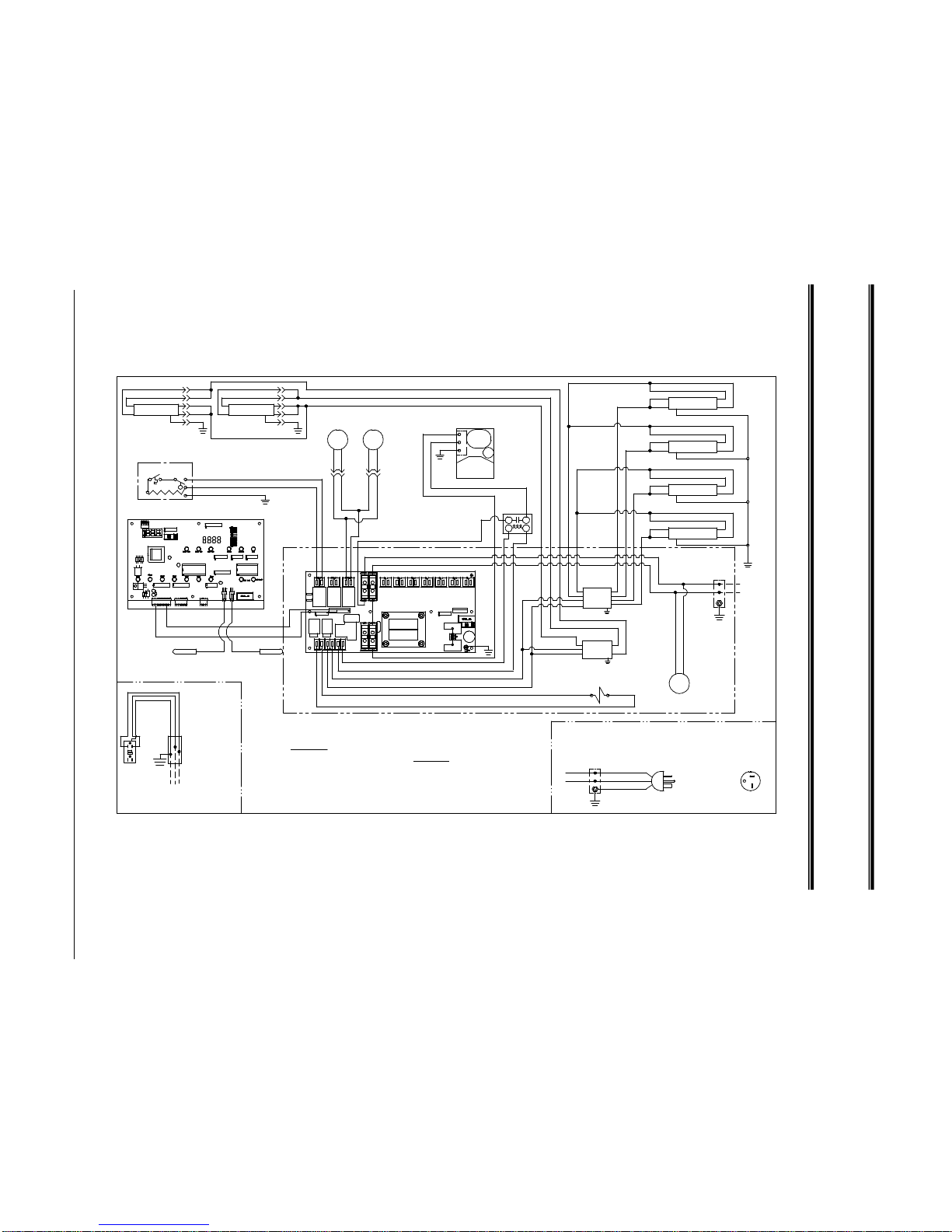
WIRING DIAGRAM
-
SQ8CD
(SELF-CONTAINED)
G = GREEN
BLK = BLACK
R = RED
W = WHITE
Y = YELLOW
B = BLUE
COLOR CODE
RECEPTACLE
15 AMP GFCI
2X4 BOX
G
BLK
W
WBLK
LINE
G
120 VOLTS
60 HERTZ
1 PHASE
BLK
BLK
OPTIONAL
BASE EXHAUST FAN
M
BLK (RIBBED)
BLK
NOT AVAILABLE ON
CORD CONNECTED
UNITS
W
BLK
L1
N
GND
2X4 BOX
OPTIONAL POWER CORD
1 PHASE
120 VOLTS
60 HERTZ
POWER CORD WITH
NEMA 5-20P PLUG
BLK
W
B
A
RELAY
E-1613-1 07/25/07 BJW SQ-MARKET DELI SELF-CONTAINED
REV. A - ADDED EXHAUST FAN 09/16/08
R
B
BB
Y
Y
G
B
B
Y
G
Y
B
MOTOR
FAN
LAMPLA MP
(MEZANNINE OPTION)
RBB
Y
W
B B
(MEZANNINE OPTION)
R
W
BLK
BALLAST
THERMOSTAT
DIGITAL THERMOMETER
SOLENOID (HUMIDITY OPTION)
W
SQ-8CD
DIAGRAM FOR:
W
TEMPERATURE PROBES
RIBBON CABLE
BLK
W
BLK
W W
BLK
W
W
BLK
BLK
W
BLK
BLK
BLK
BLK (RIBBED)
BLK (RIBBED)
G
Y
Y
LAMP
B
B
Y
G
Y
Y
LAMP
B
Y
G
B
LAMP
B
Y
G
B
Y
LAMP
Y
Y
G
B
B
Y
RBB
Y
Y
Y
Y
BALLAST
W
BLK
R
120 VOLTS
FIELD WIRING
1 PHASE
60 HERTZ
FUSE SIZING.
SEE DATA PLATE FOR WIRE AND
2X4 BOX
UNIT MUST BE GROUNDED.
M
FAN
MOTOR
BLK
PLUG
BLK
RECP.&
PLUG
M
BLK
BLK
RECP.&
W
G
BLK
FLOAT
SWITCH
EVAPORATOR
CONDENSATE
THERMOSTAT
UNIT
CONDENSING
SEE DIAGRAM
FOR DETAILS.
IN COMP.
Y
G
W
Market Deli Refrigerated Cases Page 20
Page 23

WIRING DIAGRAM
-
SQ3CD-R, SQ4CD-R, SQ5CD-R,
SQ6CD-R (REMOTE)
M
BLK
G
W
FLOAT
SWITCH
OPTIONAL CONDENSATE PUMP
SQ-5CDR
REVISED 03-13-01
AIR
CIRCULATION
FAN
W
BLK
M
FO40 APPLICATION.
NOTES:
NOTE 3
B
THERMOSTAT DIGITAL THERMO METER
SOLENOID (COMPRESSOR)
SOLENOID (HUMIDITY OPTION)
BLK
SQ-6CDR
SQ-4CDR
SQ-3CDR
DIAGRAM FOR:
W
TEMPERATURE PROBES
RIBBON CABLE
BLK
W
BLK
W W
BLK
LAMP
W
W
BLK
BLK
BLK
W
BLK
BLK
BLK (RIBBED)
BLK (RIBBED)
G
BLK
BLK
W
120 VOLTS
FIELD WIRING
1 PHASE
60 HERTZ
2. UNIT MUST BE GROUNDED.
1. SEE DATA PLATE FOR WIRE AND FUSE SI ZING.
2X4 BOX
3. CUT AND INSULATE EXTRA LEAD IN TWO L AMP
USED ON
EXTRA FAN
SQ-6CD ONLY
M
FAN
MOTOR
BLK
PLUG
BLK
RECP.&
PLUG
M
FAN
MOTOR
BLK
BLK
RECP.&
BLK
BLK
G
W
FLOAT
SWITCH
EVAPORATOR
CONDENSATE
THERMOSTAT
W
R
LAMP
B
B
W
R
BALLAST
G
E-1566 02-13-98 C CS SQ-MARKET DELI REMOTE
COLOR CODE
B = BLUE
Y = YELLOW
W = WHITE
R = RED
BLK = BLACK
G = GREEN
Market Deli Refrigerated Cases Page 21
Page 24

WIRING DIAGRAM
-
SQ8CD-R (REMOTE)
AIR CIRCULATION FAN
M
W
BLK
THERMOSTAT DIGITAL THERMOMETER
SOLENOID (COMPRESSOR)
SOLENOID (HIMIDITY OPTION)
BLK
SQ-8CDR
DIAGRAM FOR:
W
TEMPERATURE PROBES
RIBBON CABLE
BLK
W
BLK
W W
BLK
W
W
BLK
BLK
W
BLK
BLK
BLK
BLK (RIBBED)
BLK (RIBBED)
G
BLK
BLK
W
Y
LAMP
B
B
Y
G
Y
Y
LAMP
B
Y
G
B
LAMP
B
Y
G
B
Y
LAMP
Y
Y
G
B
B
Y
R
B
B
Y
Y
Y
Y
BALLAST
W
BLK
R
120 VOLTS
FIELD WIRING
1 PHASE
60 HERTZ
FUSE SIZING.
SEE DATA PLATE FOR WIRE AND
2X4 BOX
UNIT MUST BE GROUNDED.
M
FAN
MOTOR
BLK
PLUG
BLK
RECP.&
PLUG
M
FAN
MOTOR
BLK
BLK
RECP.&
W
G
BLK
FLOAT
SWITCH
EVAPORATOR
CONDENSATE
THERMOSTAT
W
E-1614 12/26/96 CCS SQ-MARKET DELI REMOTE
COLOR CODE
B = BLUE
Y = YELLOW
W = WHITE
R = RED
BLK = BLACK
G = GREEN
Market Deli Refrigerated Cases Page 22
Page 25
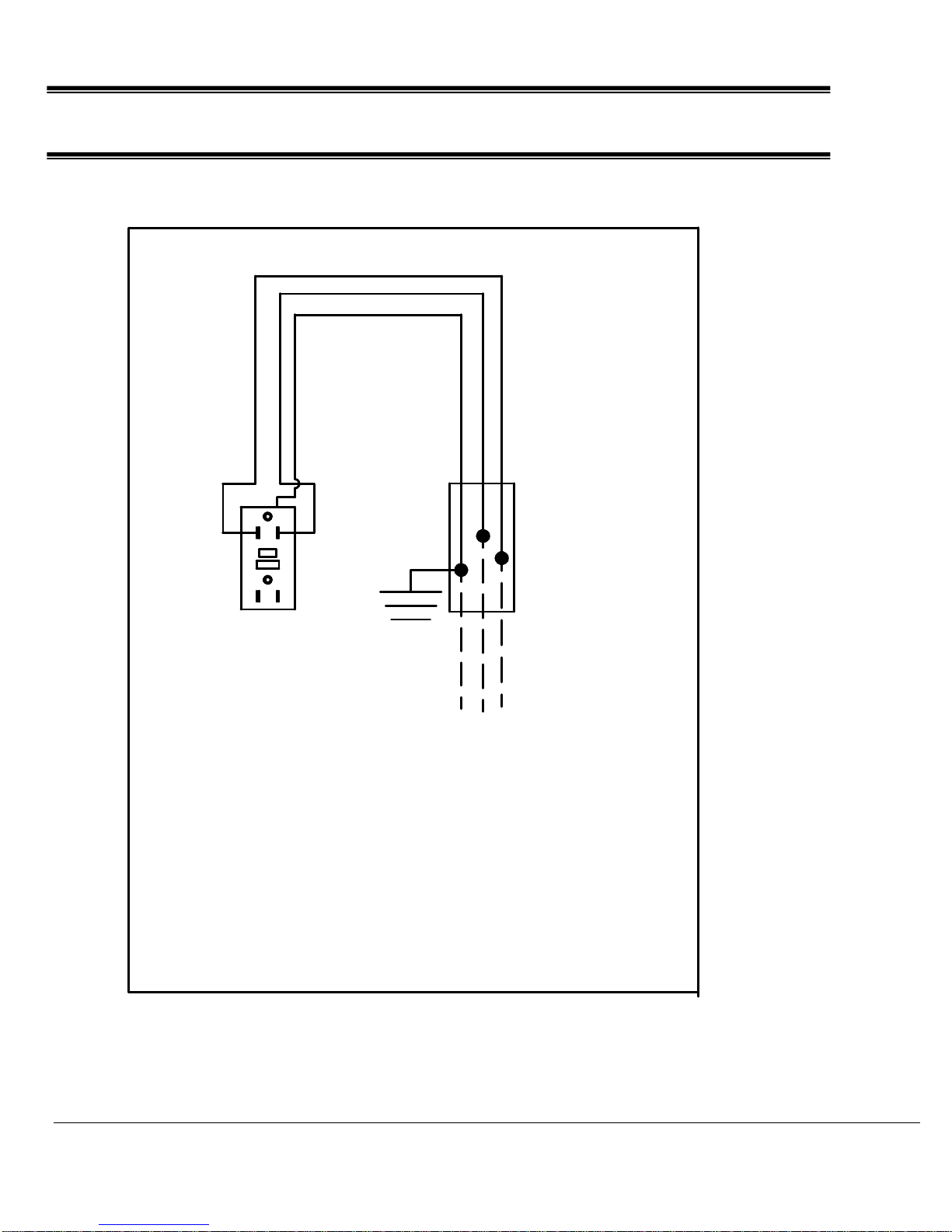
WIRING DIAGRAM - RECEPTACLE
BLK
W
G
LINE
BLK
W
G
15 AMP GFCI
RECEPTACLE
E-1423-1 07/25/07 BJW
2X4 BOX
120 VOLTS
60 HERTZ
1 PHASE
UNIT MUST BE
GROUNDED
Market Deli Refrigerated Cases Page 23
WIRING, PLUG RECEPTACLE
 Loading...