

Page 1
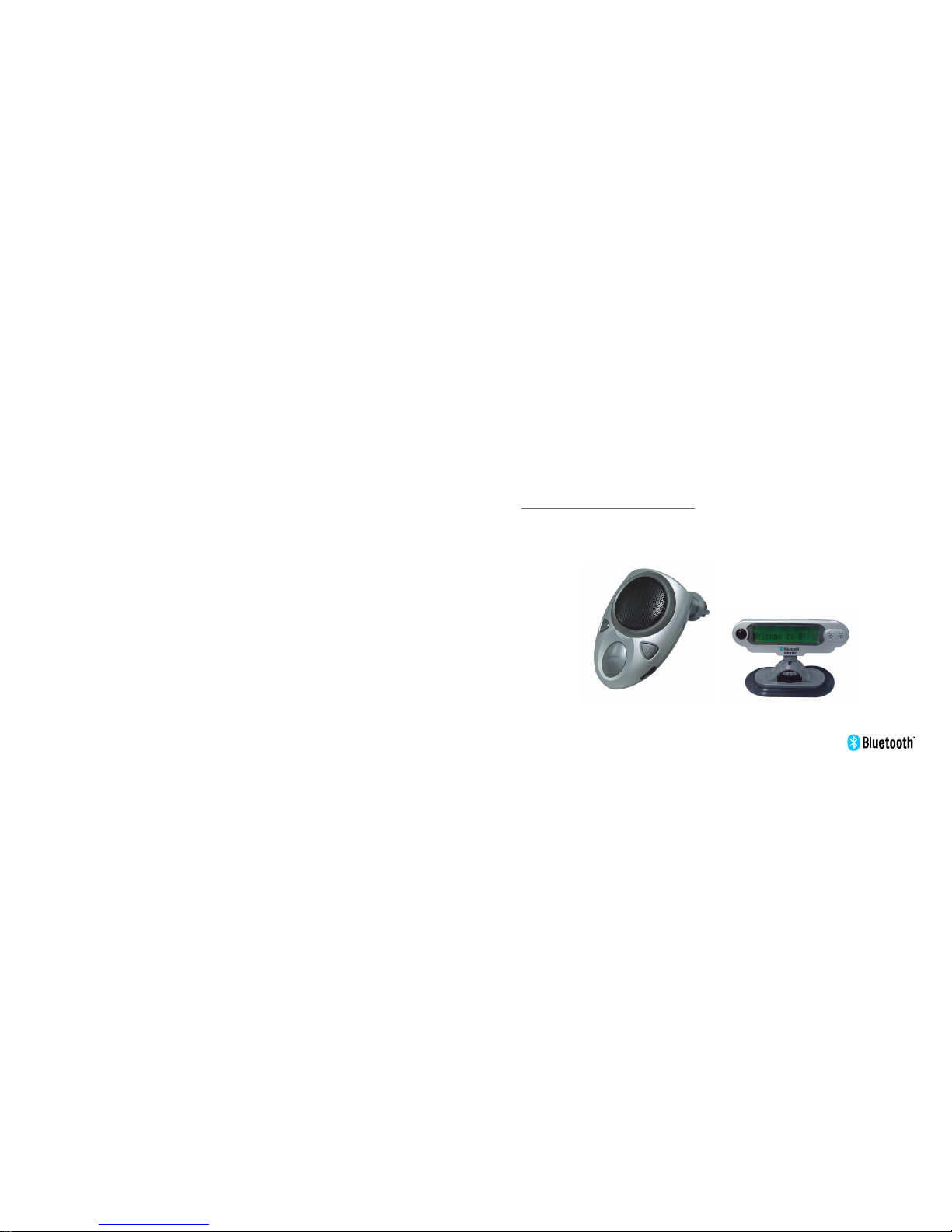
AdvancedBluetooth
WirelessProduct
BT-202
Page 2

Introduction
FeatureList
SafetyandGeneralInformation
BeforeUsing
LocationofControls
FunctionOperations
Packagecontents
Turningtheuniton/off
Installingtheunitinavehicle
Pairing
Adjustingspeakervolume
Adjustingringervolume
BackupSIM
Contents
1
3
4
6
6
7
9
8
11
11
13
15
Ⅰ
16
Page 3

DownloadtoSIM
Deletingthephonebooknumber
Languagesetting
Makingacall
Answeringacall
Endingacall
Lastnumberredial
Rejectingacall
ViewingCallerIDnumbers
Callingbackthelast5CallerIDnumbers
Transferringacall
CallerIDSystemOperations
StatusIndicators
CareandMaintenance
Troubleshooting
21
22
23
23
24
25
25
27
27
29
30
31
Ⅱ
17
19
31
Troubleshooting
Symptom Check&Remedy
Nothingappears
onLCDdisplay
CheckthattheLCDdisplayisconnectedtobaseunitproperly.
Checkthatthebaseunitisconnectedtocigarettelighterproperly.
Nooperation
Checkthatthebaseunitisconnectedtocigarettelighterproperly.
Checkthatthebaseunitisturnedon.
Checkthepairingissuccessful.
NoLEDindicator
Checkthatthebaseunitisconnectedtocigarettelighterproperly.
Checkthatthebaseunitisturnedon.
Powerdownthenuptheunit.
l
l
l
l
l
l
l
l
Cannotwork
20
Page 4

Introduction
YourBluetoothwirelessproductBT-202
WhatisBluetoothwirelesstechnology
TheBluetoothwirelessproductBT-202isdevelopedforinstallationinmotorvehiclesto
enblehandsfreeoperationofyourmobilephone.ItisbaseonBluetoothwireless
technologyconnectstoacompatiblephonewithoutwires.Itiseasilyconvertyour
mobilephonecommunicationintothisin-carsolution,talkingthroughitshighquality
speakerandmicrophone.
Theproductisintendedforusewithanymobilephoneswhichsupporthandsfree
and(or)headsetprofile.Forthemobilephoneswhichsupporthandsfreeandheadset
profiles,theBT-202willtrytoconnecttomobilephonewithhandsfreeprofilefirst,ifit
fails,thenwithheadsetprofile.
Bluetoothwirelesstechnologypropelsyouintoanewdimensioninconnectivity.
Bluetoothdevicescommunicatewithoutwires,usingbuilt-inradiotransceiversthat
operateonagloballyavailableradiofrequencytoensureworldwidecompatibility.Your
IfyourmobilephoneandtheBT-202connectsto
eachotherwithheadsetprofile,thefollowingfunctionmaybeinvalid.
LCDdisplay,Voicedialling,Lastnumberredialandrejectingacall.
1
30
CareandMaintenance
YouradvancedBT-202isaproductofsuperiordesignandshouldbetreated
withcare.Thesuggestionsbelowwillhelpyoutoenjoyyourproductformany
years.
l
Keeptheproductdry.Precipitation,humidityandalltypesofliquidsormoisture
cancontainmineralsthatwillcorrodeelectroniccircuits.
Donotuseorstoretheproductindusty,dirtyareas.
Donotattempttoopentheproduct.Non-experthandingmaydamageit.
Donotuseharshchemicals,cleaningsolventsorstrongdetergentstocleanthe
product.Useaclean,softcloththatisslightlydamptocleantheproduct.
Iftheproductwon'tbeusedforalongtime,removeitfromcigarettelighterand
storeitwithsafelyprotected.
l
l
l
l
Page 5

Introduction
WhatisBluetoothwirelesstechnology(continued)
BluetoothwirelessproductBT-202canconnecttootherBluetoothdeviceswithina
rangeofapproximate10metres.
ThewirelessconnectionbetweenthecompatibledevicesestablishedusingBluetooth
technologyisfreeofchargefortheuser.Insomecountries,theremayberestrictions
onusingBluetoothdevices.Checkwithyourlocalauthorities.
2
29
StatusIndicators
Status Indicators
TheRedLEDandBlueLEDflashalternately.
Standbymode
TheBlueLEDflashesper3seconds.
Turnon/offthe
unitbypressing
MFB
TheBlueLEDflashes4timesrapidly.
TheRedLEDandBlueLEDflashalternatelyonce,thenthe
BlueLEDflashes20timesrapidly.
Poweruptheunit
Pairingmode
Intalkmode
TheBlueLEDflasheseverysecond.
Page 6

FeatureList
1.Bluetoothcompatible
2.Upto10metresrange
3.LCDdisplayscallingnumbers
4.Talktimedisplay
5.Fullduplex
6.Easyinstallation
7.Speakerandringervolumeadjustment
8.Callbackfunction
9.Voicediallingfunction
10.Lastnumberredial
11.Transfersacallbetweentheunitandmobilephone
12.CopynumberstoSIMcard(orfromSIMcard)
13.Infraredremotecontrol
14.Languageselection
3
28
CallerIDSystemOperations
Transferringacall(continued)
3.Totransferback,justpressonce.
1.Whenacallisreceived,pressthereceptionbuttoninyourmobilephoneto
answerthecall.
2.Pressonce.Thenthecallistransferredtotheunit,andyourmobilephone
returnstoStandbymode.
3.Totransferback,Pressforabout3secondsandthenaconfirmationtone
willbeheard.
MFB
MFB
MFB
Totransferacallfrommobilephonetotheunit
Page 7
SafetyandGeneralInformation
4
Importantinformationonsafeandefficientoperation.
Readthisinformationbeforeusingyourdevice.
Electromagneticinterference/compatibility
Facilities
Aircraft
Usersarenotpermittedtomakechangesormodifythedeviceinanyway.Changesor
modificationsnotexpresslyapprovedbythepartyresponsibleforcompliancecould
voidtheuser'sauthoritytooperatetheequipment.
Nearlyeveryelectronicdeviceissusceptibletoelectromagneticinterferenceif
inadequatelyshielded,designed,orotherwiseconfiguredforelectromagnetic
compatibility.
Toavoidelectromagneticinterferenceand/orcompatibilityconflicts,turnoffyour
deviceinanyfacilitywherepostednoticesinstructyoutodoso.
Hospitalsorhealthcarefacilitiesmaybeusingequipmentthatissensitivetoexternal
RFenergy.
Wheninstructedtodoso,turnoffyourdevicewhenonboardanaircraft.Anyuseofa
devicemustbeinaccordancewithapplianceregulationsperairlinecrewinstructions.
27
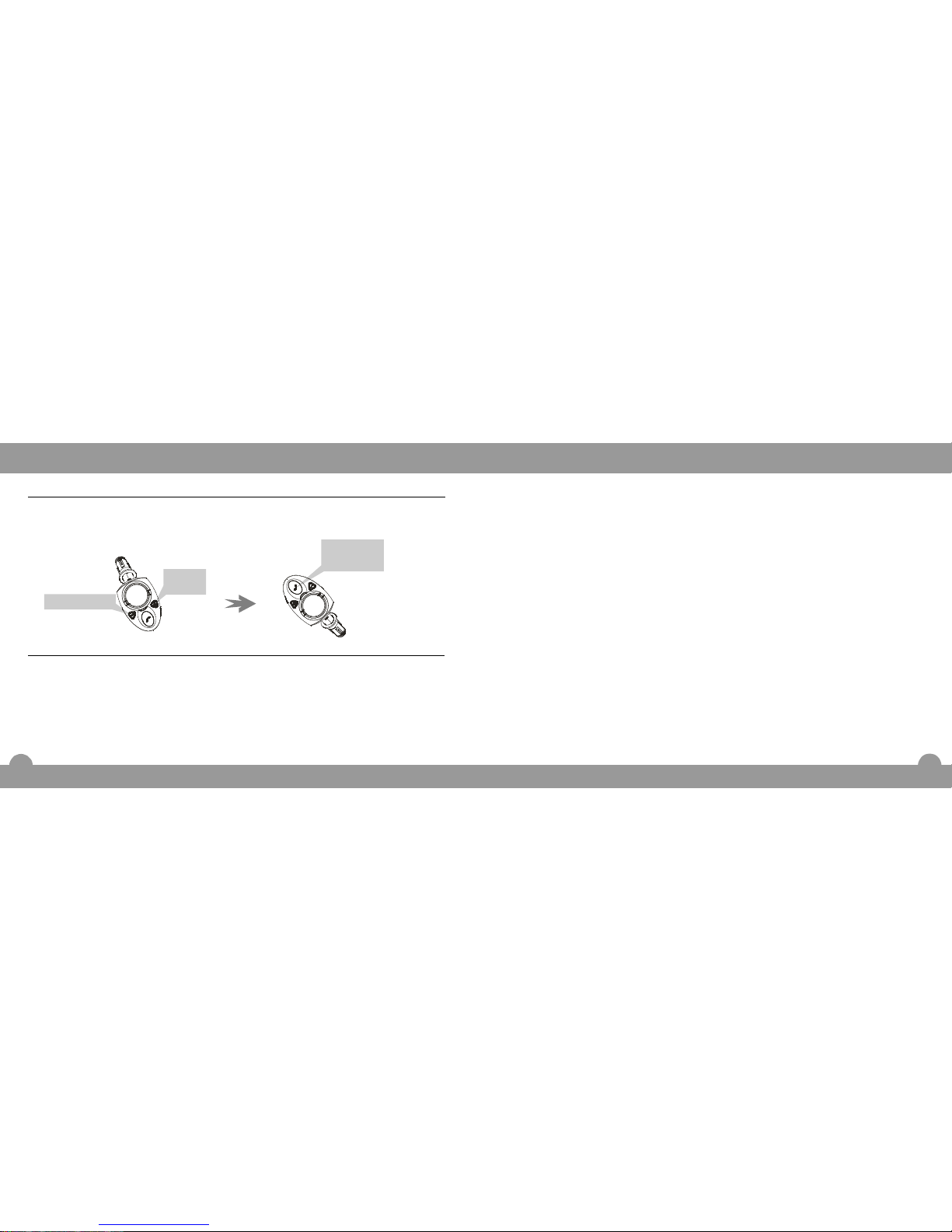
CallerIDSystemOperations
1.InStandbymode,pressor
buttonrepeatedlyto
selectthenumberyouwanttocall
back.
VolumeUp
VolumeDown
Callingbackthelast5incomingnumbers
2.Pressoncetocallback.MFB
Duringacall,thefeatureallowsyoutotransferacallfromtheunittoyourmobilephone
orviceversasothatyoucanacceptthecallinprivateorinpublicconveniently.
Transferringacall
Totransferacallfromtheunittomobilephone
1.Whenacallisreceived,presstoanswerthecall.
2.Pressforabout3secondsandthenaconfirmationtonewillbeheard.
Thenthecallistransferredtomobilephone,andtheunitreturnstoStandbymode.
MFB
MFB
Pressthis
buttononce.
Volume
Up
VolumeDown
Page 8
SafetyandGeneralInformation
5
Medicaldevices
Hearingaids
Othermedicaldevices
Somedevicesmayinterferewithsomehearingaids.Intheeventofsuchinterference,
youmaywanttoconsultwithyourhearingaidmanufacturertodiscussalternatives.
Ifyouuseanyotherpersonalmedicaldevice,consultthemanufacturerofyourdevice
todetermineifitisadequatelyshieldedfromRFenergy.Yourphysicianmaybeableto
assistyouinobtainingthisinformation.
26
05926036442
VOl
---+-
Thisiconindicate
theincoming
numberisthe
fourthrecord.
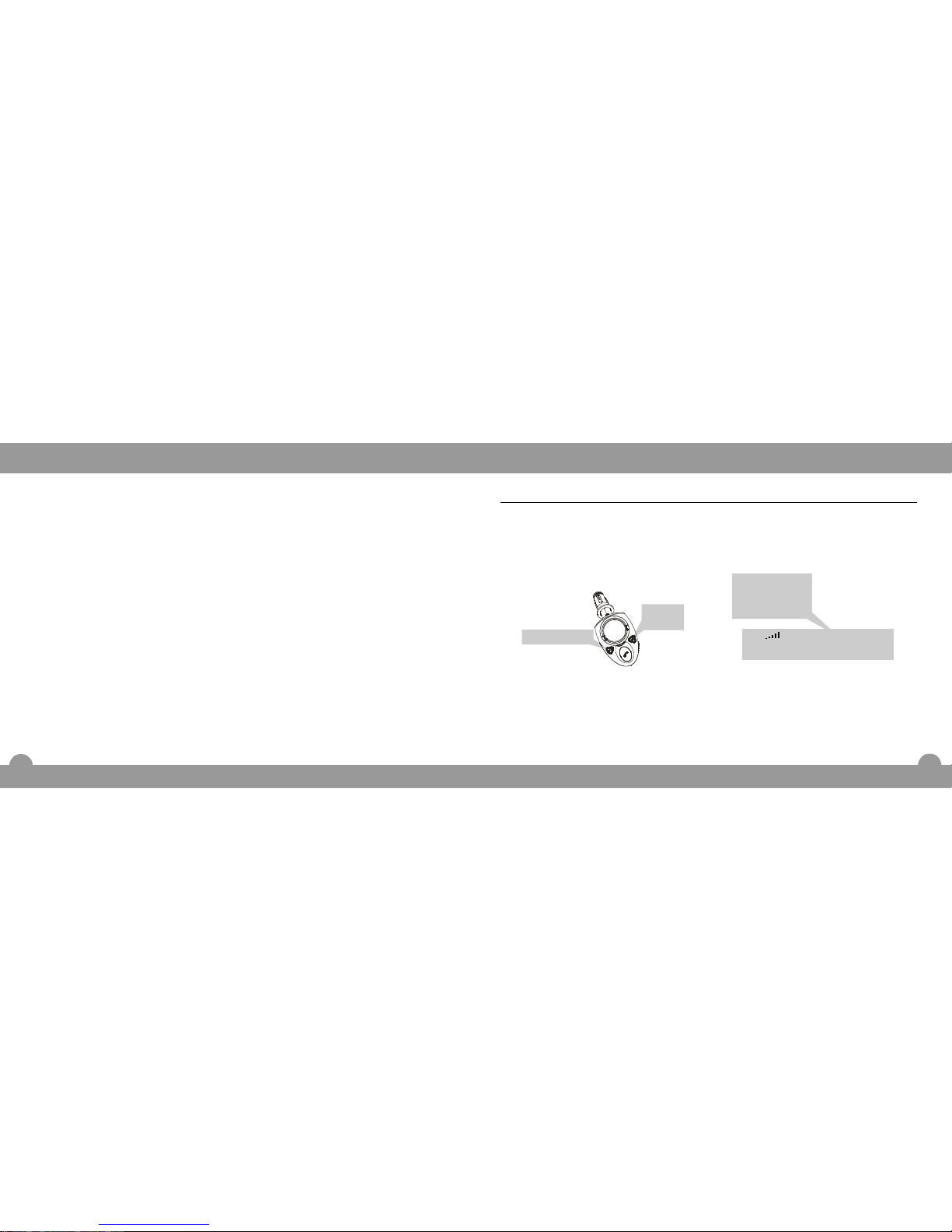
Viewingincomingnumbers(continued)
Presstoviewtheforward
number,pressbuttonto
viewthedownwardnumber.
VolumeUp
VolumeDown
Volume
Up
VolumeDown
Thelocationofthe+iconindicatesthe
sequenceoftheincomingcallnumber.
CallerIDSystemOperations
Page 9
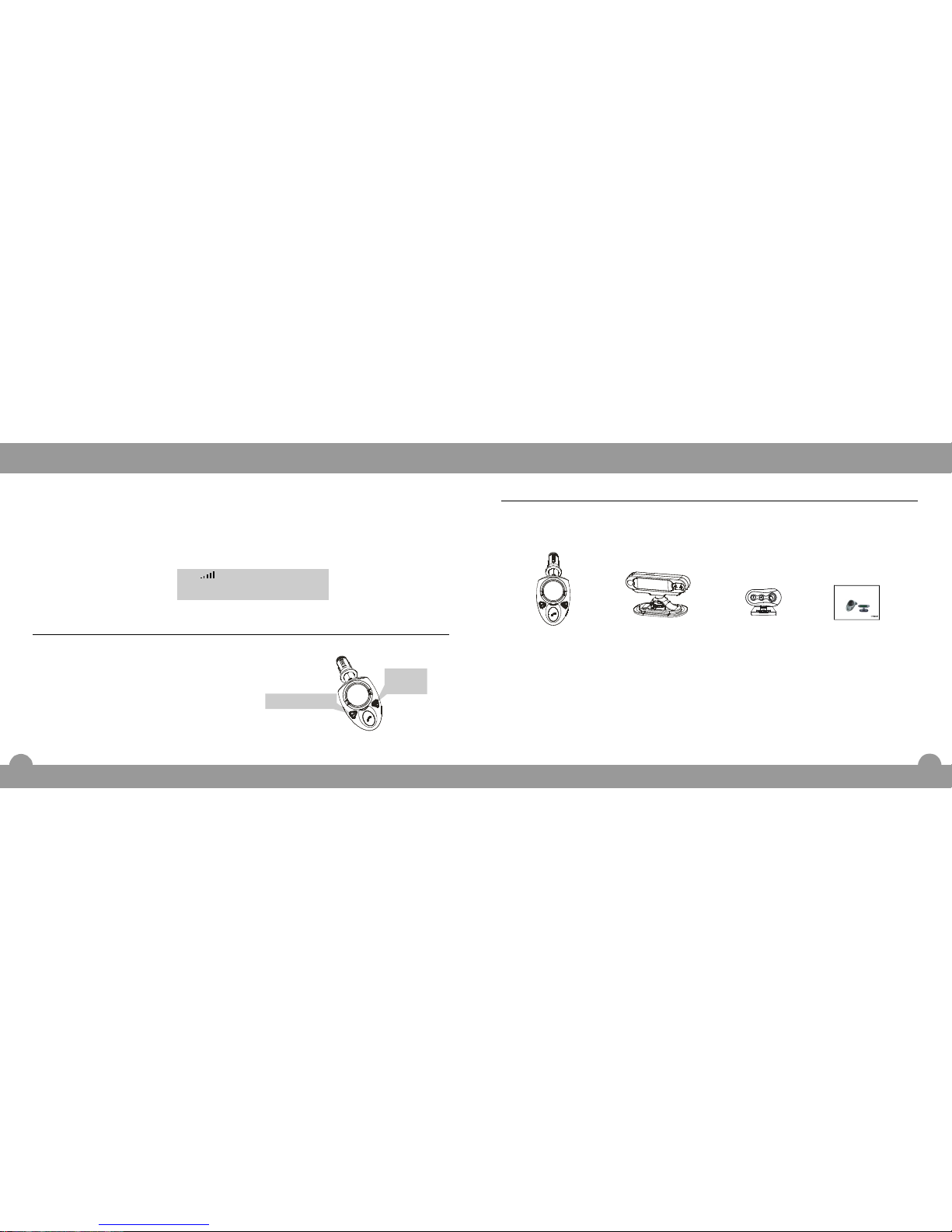
Packagecontents
Onceyouhaveopenedthegiftbox,checktomakesurethatyouhavealltheparts
shownbelow.Ifanypieceismissingorbroken,pleasecallyourdealer.
Baseunit
Displayunit
withcoilcord
User'smanual
BeforeUsing
6
AdvancedBluetooth
WirelessProduct
BT-202
25
Remote
controlunit
CallerIDSystemOperations
05926036442
Whenacallisreceived,theLCDdisplayshowscaller'snumber,ifyourlocaltelephone
companyprovidestheCallerIDservice.Iftheincomingnumberisstoredinthe
phonebook,thematchingnamewilldisplayinsteadofthenumberwhenitisreceived.
Thelast5incomingnumberswillbesavedintheCallerIDlist,andyoucanusethelist
todialthenumbers.Ifthestorageisfull,theoldestnumberwillbereplacedbythenew
one.
Viewingincomingnumbers
InStandbymode,pressor
buttonrepeatedlytoview
theincomingnumbers.
VolumeUp
VolumeDown
Volume
Up
VolumeDown
VOl
Page 10
BeforeUsing
7
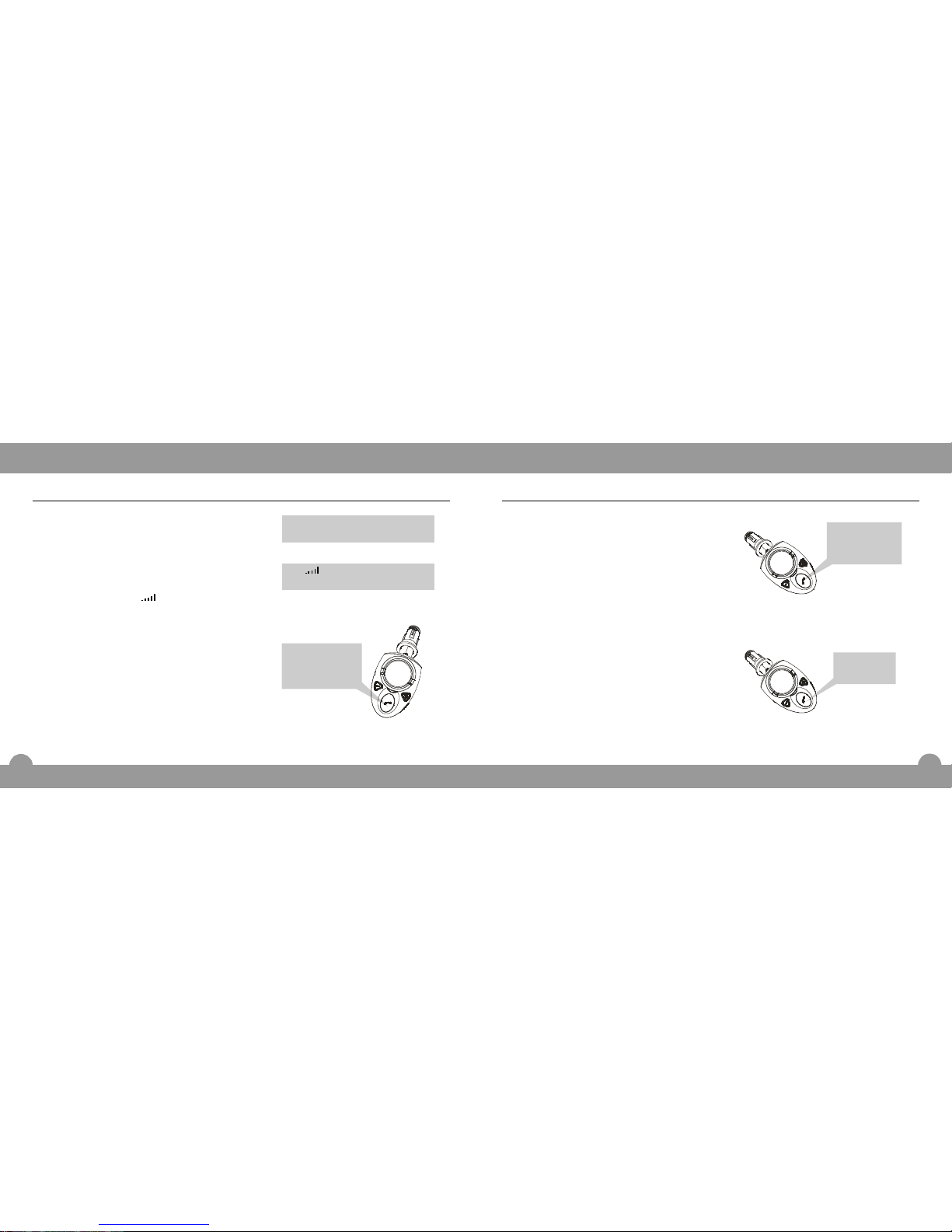
Turningtheuniton/off
Whenyouturnontheignitionofyourcar,the
unitisturnedonautomatically.ThentheRed
andBlueLEDsflashalternatelyonceandthen
theBlueLEDflashes20timesrapidly,
meanwhile""willshowon
theLCDdisplay.Afterthat,theBlueLED
flashesper3seconds,andtheLCDdisplay
showstheicon"".Thenunitenters
Standbymodeandisreadyforuse.
ToturnofftheunitinStandbymode
Toturnontheunit
WelcometoBT202
Pressandholduntilaprompttoneis
heard.
Pressandholduntilaprompttoneis
heard,andthentheBlueLEDstartstoflash
per3seconds.
VOL
MFB
MFB
Pressandhold
thisbuttonuntil
aprompttoneis
heard.
24
Whenacallisreceived,theunitringsand
theLCDdisplayshowsthecaller's
number.Iftheincomingnumberisstored
inthephonebook,thematchingname
willdisplayinsteadofthenumberwhenit
isreceived.
Whenyouaremakingacallwiththeunit,
ifyouwanttoendthecallbeforegetting
throughtheline,doasfollows.
Pressandholduntilaprompttone
isheardtorejectthecall.
OR
Rejectthecallfromyourmobile
phone'skeypad.
Pressoncetorejectthecall.
OR
Rejectthecallfromyourmobile
phone'skeypad.
MFB
MFB
Rejectingacall
FunctionOperations
Pressandhold
thisbuttonuntil
aprompttoneis
heard.
Pressthis
buttononce.
WelcometoBT202
VOl
Page 11
BeforeUsing
8
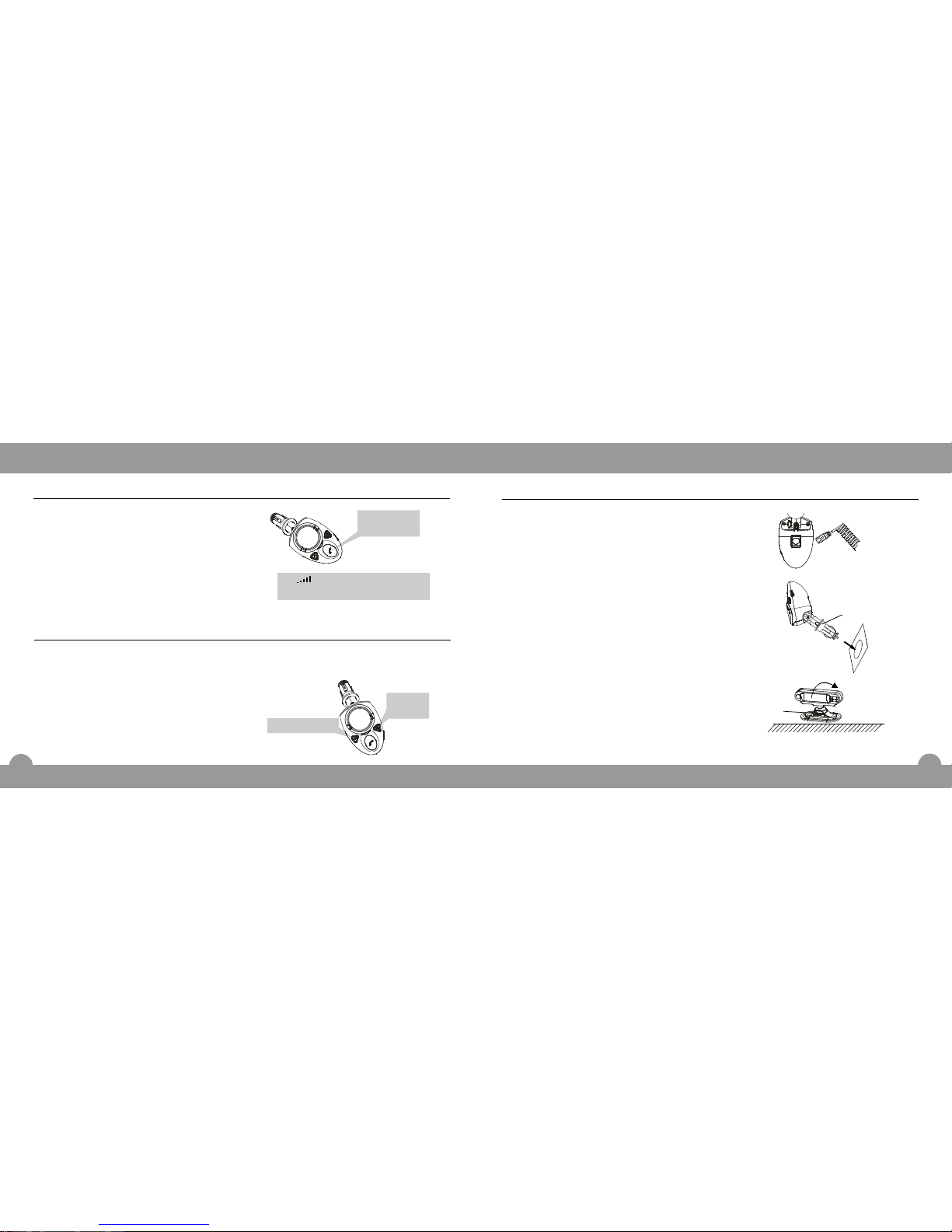
1.Inserttheplugofcoilcordintothe
coilcordjackonthebaseunit.Make
suretheplugclicksintoplace.See
figureA.
2.Installingthebaseunit(SeefigureB)
a.Insertthebaseunitintothecigarette
lighterofyourvehicle.SeefigureB.
b.Pushtheadjusterinthearrow
directiontofastenthebaseunit.
3.PastetheLCDdisplayunitatproper
placewhereyoucanwatchtheLCD
displayeasily.
Youcanrelaxtheadjuster,then
screwtheLCDtoadjustthe
microphonemouthpointtowardto
yourmouth.
SeefigureC.
Installingtheunitinavehicle
figureA
figureB
figureC
Adjuster
Adjuster
23
FunctionOperations
Pressonce.
OR
Endcallfromyourmobilephone's
keypad.
Afterendingthecall,theLCDwill
displaythetalkduration.
MFB
Endingacall
InStandbymode,pressandhold
orbuttonuntilyou
hearaprompttone.Afterthetone,the
lastdiallednumberwillbedialledout
automatically.
OR
Dialthelastdiallednumberfromyou
mobilephone'skeypad.
VolumeUpVolumeDown
Lastnumberredial
Pressandholdoneofthetwo
buttonsuntilaprompttoneisheard.
Volume
Up
VolumeDown
Pressthis
buttononce.
05:30
VOl
Call1
Endtalked
Page 12
LocationofControls
9
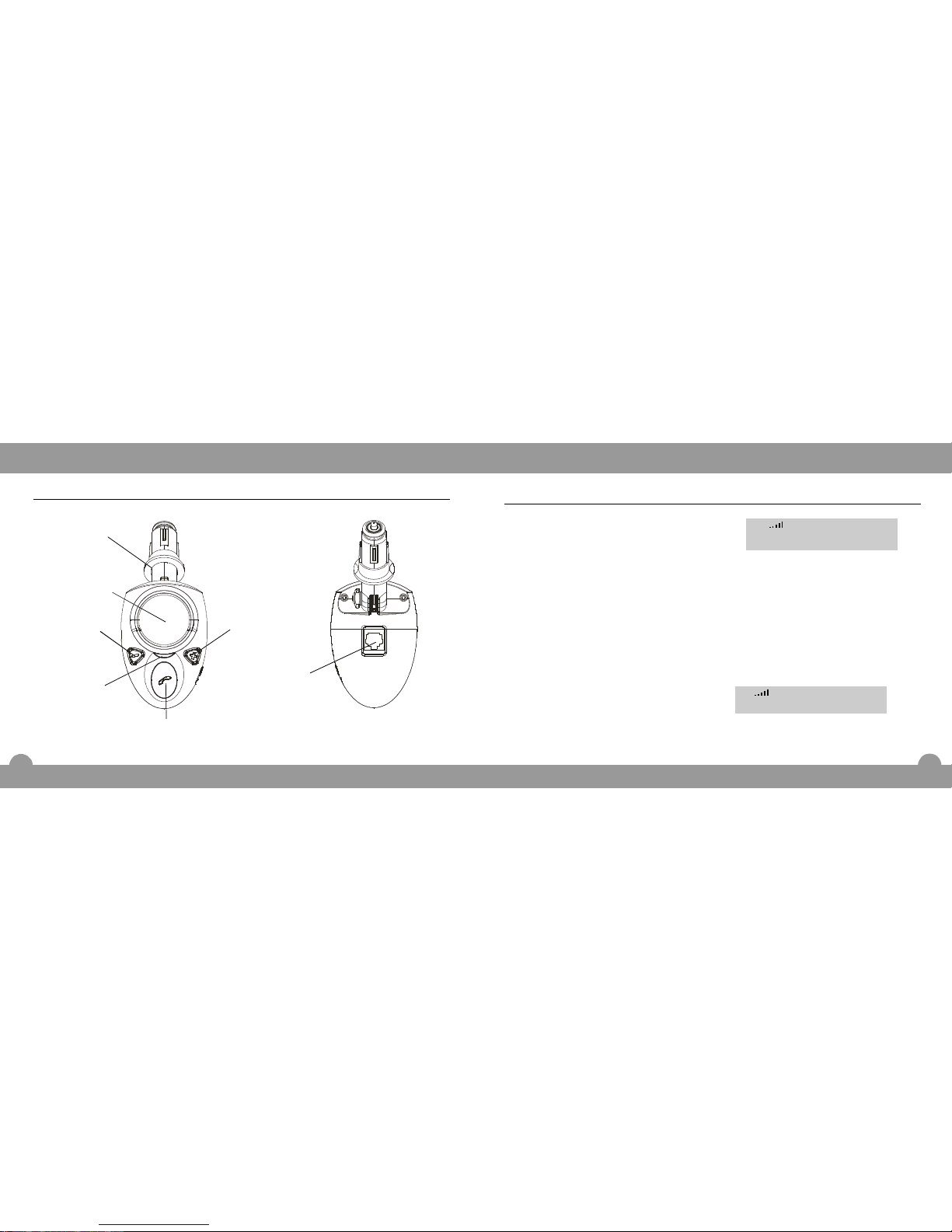
MultifunctionButton(MFB)
Adjuster
VolumeUp
VolumeDown
Speaker
Coilcordjack
Baseunit
LEDindicator
22
FunctionOperations
Presstoanswerthecall.
OR
Answerthecallwithyourmobile
phone'skeypad.
MFB
Answeringacall
Ifthecallisansweredbypressing,
aftergettingthroughtheline,theunit
startstotimeandtheLCDdisplay
showsthetalktime.
MFB
l
Whenacallisreceived,theunitrings
andtheLCDdisplayshowsthecaller's
number.Iftheincomingnumberisstored
inthephonebook,thematchingname
willdisplayinsteadofthenumberwhenit
isreceived.
Note:
05926036442
VOl
05:30
VOl
Call1
Page 13
LocationofControls
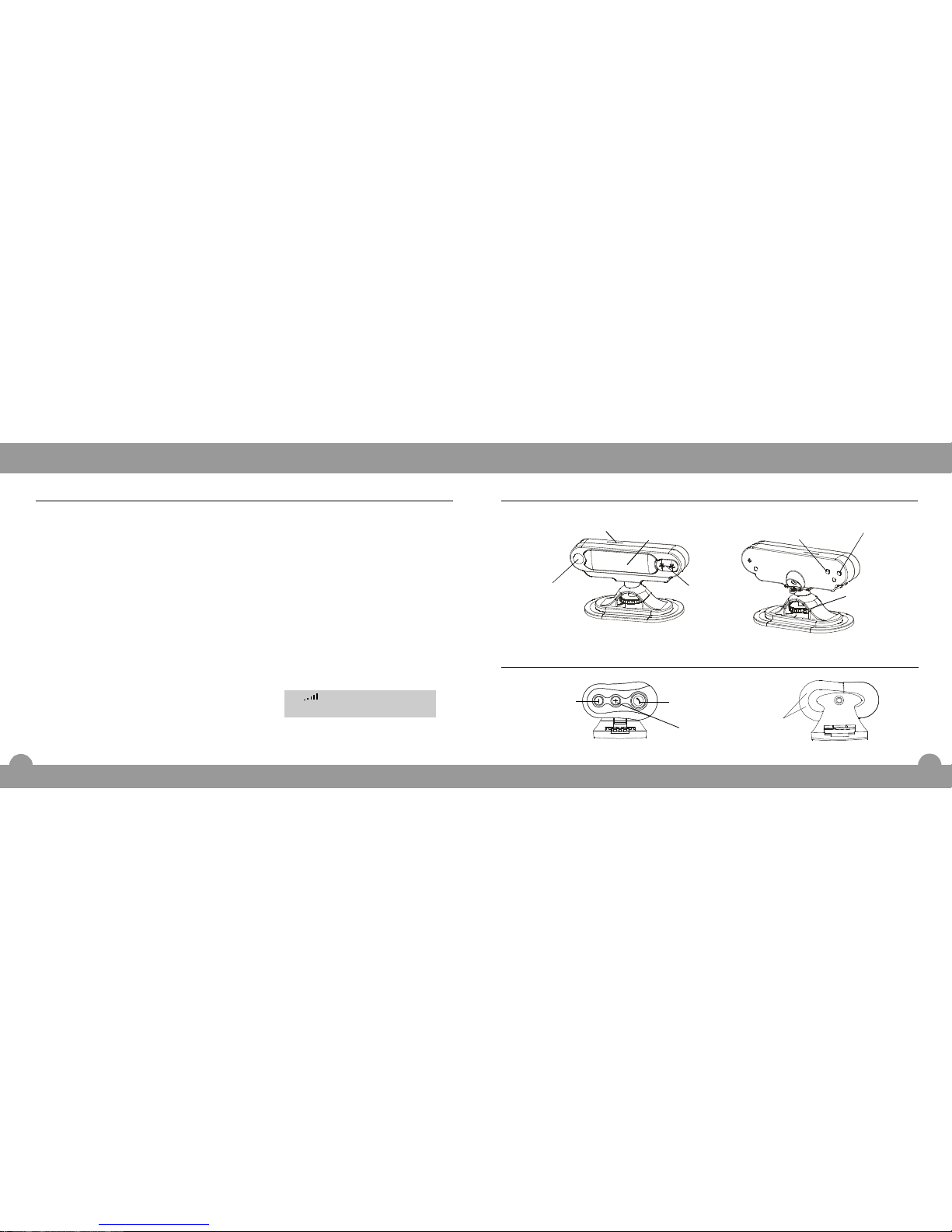
Displayunit
Microphones
LCDdisplay
10
SIMcardjack
Infraredacceptor
Adjuster
DownloadtoSIM
BackupSIM
21
Remotecontrolunit
Multifunction
Button(MFB)
VolumeUp
VolumeDown
Infraredemitter
FunctionOperations
InStandbymode,dialthenumberby
keypad.
Pressmobilephone's"send"key.
1.
Makingacall
2.
Usingyourmobilephone
InStandbymode,press.MFB
1.
Usingtheunit'svoice-dialling(ifsupported
byyourmobilephone)
Youwillthenhearthevoiceactivationtoneandyourmobilewill
remindyoutospeakthevoicetag.
Afterthat,speakavoicetagwhich
matchesyourdesirednumberthat
wasrecordedinyourmobilephone.
Thentheunitwillrepeatyourvoice
taganddialoutthenumber.
2.
Note:
Thetimeofpressingshouldbe
morethan0.2secondsandlessthan
1.6seconds.
MFB
l
Afteractivatingvoice-diallingfunction,
theunitstartstimerandtheLCD
displayshowsthetalktime.
l
05:30
Note:
VOl
Call1
Page 14

11
FunctionOperations
Pairing
YourBT-202canstorepairinginformationforuptofivedifferentdevicesequippedwith
Bluetoothwirelesstechnology.Whenanattempttopairtomorethanfivedevicesis
made,theoldestpaireddeviceisremovedfromthememory.
Whenanyofthepaireddevicesareintherangeof10metresandpowerison,theunit
willautomaticallyinitiateapairedconnectionwiththedeviceitwasconnectedto.If
not,presstoquicklystarttheconnection.
Ifyouwanttoconnecttoanotherdeviceofthepaireddevices,youcouldinitiatethe
connectionfromyourmobilephone(pleaserefertoyourmobilephone'smanual).If
youwanttoconnecttootherdeviceswhichhaven'tpairedwiththeunit,youmust
initiatethepairingprocessasfollows.
Ifyoupowerdownthenuptheunitorthepairedmobilephone,theywillinitiatethe
connectionautomatically.
Withtheunitandyourmobilephoneincloseproximity,dothefollowingstepstopair
them.
last
Note:
MFB
l
20
Pressandholdboth"BackupSIM"
and"DownloadtoSIM"buttononthe
rearofthedisplay.
Insertthebaseunitintothe
cigaretteofyourvehicle.
TheLCDwillshow"language
setting",andthenthecurrent
setting("German,English,Spanish
orFrench").
1.
Languagesetting
Youcanselectadisplaylanguage.4
differentlanguagesareavailable.They
areGerman,English,Spanishand
French.Youshouldsetthelanguage
duringtheinstallingprocess(referto
"installingtheunitinavehicle"onpage8
fordetails).
2.
Pressthe"BackupSIM"buttonto
selectthelanguage.
Pressthe"DownloadtoSIM"button
toconfirm.
3.
4.
FunctionOperations
Page 15
FunctionOperations
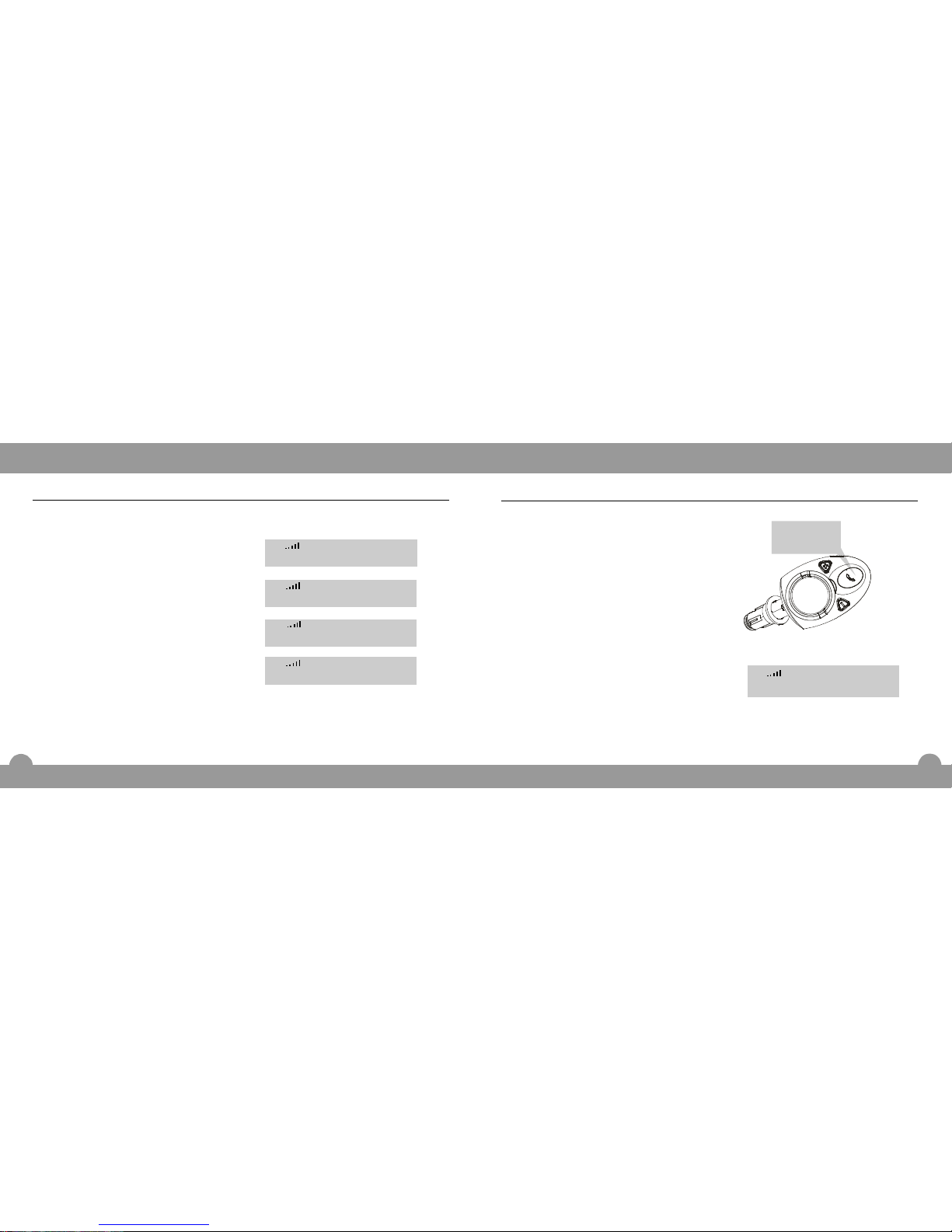
Pressandholduntilaprompt
toneisheardtoindicatetheunitis
turnedoff.(Whentheunitisin
Standbymode.)
PressandholduntiltheRed
LEDandBlueLEDflashalternately.
Thentheunitenterspairingmode,
and"Pairing"willshowontheLCD.
MFB
MFB
1.
2.
Note:
Youwillhearaprompttonewhich
indicatestheunitisturnedon.You
shouldcontinuallyholdthebuttonuntil
theRedLEDandBlueLEDflash
alternately.Thentheunitenterspairing
mode.
l
Initiatethepairingprocessusing
themobilephonethatyouwantto
3.
Pairing(continued)
12
Pressandhold
thisbutton.
----Pairing-----
VOl
19
FunctionOperations
-----Return-----
Pressboth"BackupSIM"and
"DownloadtoSIM"buttononthe
rearofthedisplayunitonce.The
LCDwillshow"Delphonebook?"
Pressthe"DownloadtoSIM"button
toconfirm.TheLCDwillshow
"Deleting"andthen"Deletedall".
OR
Pressthe"BackupSIM"buttonto
exit,theLCDwillshow"Return".
1.
Deletingthephonebooknumber
Youcandeletethenumberinthe
phonebook.
Del.phonebooks?
-----Delete-----
-Filesdeleted--
2.
VOl
VOl
VOl
VOl
Page 16

13
FunctionOperations
match.Thenthephonewillremindyou
toenterpasskey.Thedefaultpasskey
is"0000".Pleaserefertotheuser's
manualofyourmobilephonefor
"pairingprocess".
Aftertheunitenterspairingmode,if
thereisnodevicelinkedwithin2
minutes,theunitwillreturntoStandby
mode.
Ifthepairingissuccessful,theLCD
displayshows""andtheunit
entersStandbymode.Thentheunit
andmobilephonearereadyforuse.
VOL
Note:
l
l
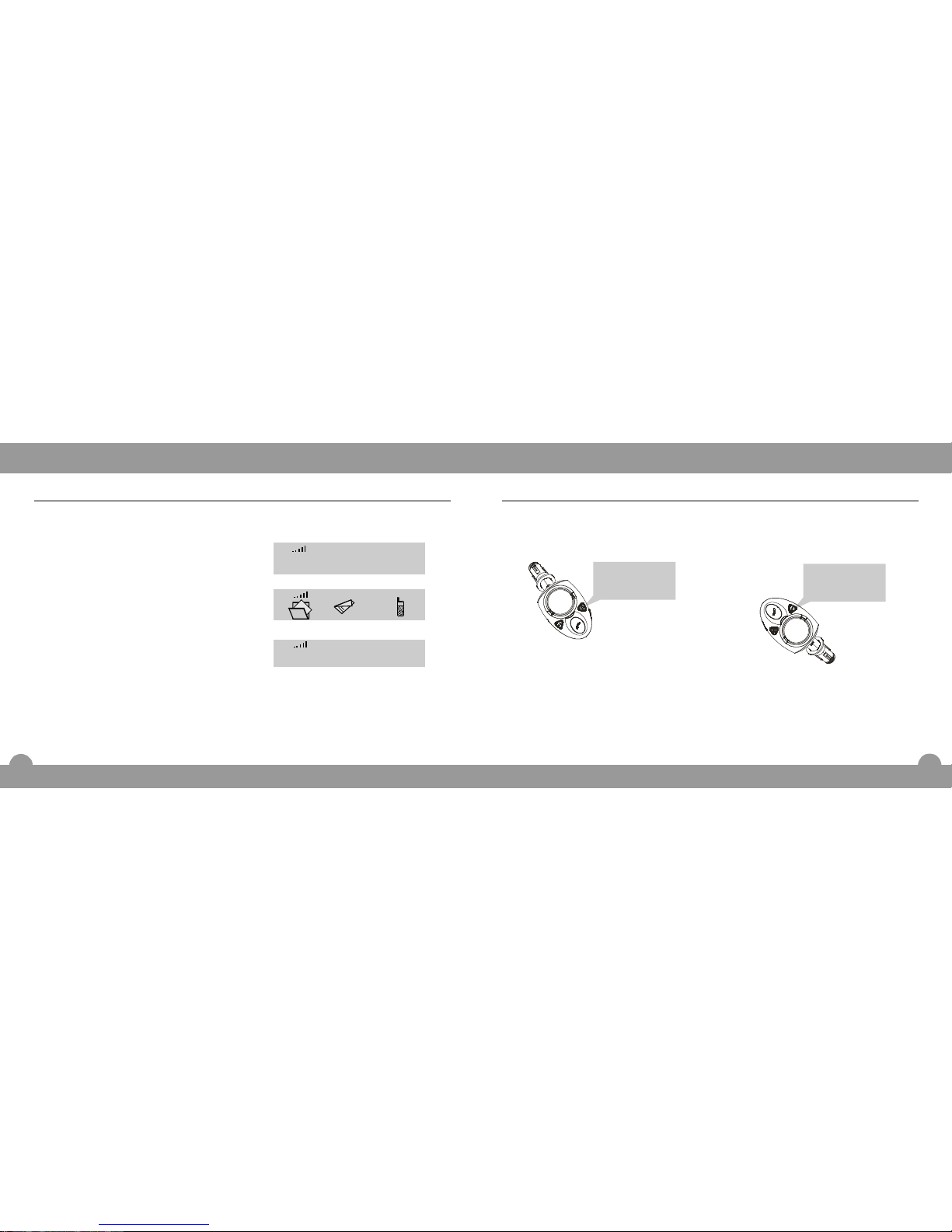
Adjustingspeakervolume
Youcanpressorbuttonoruseyourmobilephone
(dependingonyourmobilephone)toadjustthespeakervolumeduringconversation.
Thereare5levelsforadjusting.Duringadjusting,theiconvariesaccordingtothe
volumelevels.Themorebars,thehigherthevolume.
volumeupvolumedown
1.Pressbuttonrepeatedly
toincreasespeakervolume.See
figure1.
VolumeUp
Pairing(continued)
FunctionOperations
Usethevolumeupswitchofyour
mobilephonetoincreasespeaker
volume(dependingonyourmobile
phone).
OR
VOl
FunctionOperations
18
IfyouhavenotinsertaSIMcardinto
theSIMcardjack,theLCDwillshow
"InsertSIMcard"topromptyouto
insertthecard.
Ifthecarddosenottouchwell,the
LCDwillshow"ReadSIMerror".
IfyourSIMcardhasbeensetPIN,The
LCDwillshow"SIMPINlockedYou
shoulddrawouttheSIMcardandinert
ittoyourmobilephonetodeleteyour
SIMcardPIN.Theninsertthecardto
thedisplayunittotryagain.
".
l
Note:
l
l
InsertSIMcard
VOl
-----Error------
VOl
-SIMPINlocked-
VOl
Page 17
14
Adjustingspeakervolume(continued)
FunctionOperations
2.Pressbuttonto
decreasespeakervolume.See
figure2.
VolumeDown
OR
Usethevolumedownswitchofyour
mobilephonetodecreasespeaker
volume(dependingonyourmobile
phone).
Figure1 Figure2
Whenyouuseorbuttonoftheunittoadjustmentthespeaker
volume,yourmobilephone'stalkvolumemaybeadjustedaccordingly(dependingon
yourmobilephone).
VolumeUpVolumeDown
Note:
l
Pressthisbutton
toincreasethe
speakervolume.
Pressthisbutton
todecreasethe
speakervolume.
17
FunctionOperations
3.
InsertaSIMcardintotheSIMcard
jack.
Press"DownloadtoSIM"buttonon
therearofthedisplayunit.TheLCD
willshow"DownloadtoSIM"and
thenenterintothecopymode.
Whenfinish,theLCDwillshow
"Copycompleted".
1.
DownloadtoSIM
Youcancopythenumberfromtheunitto
theSIMcard.
2.
DownloadtoSIM
VOl
-Copycompleted-
VOl
VOl
Page 18
15
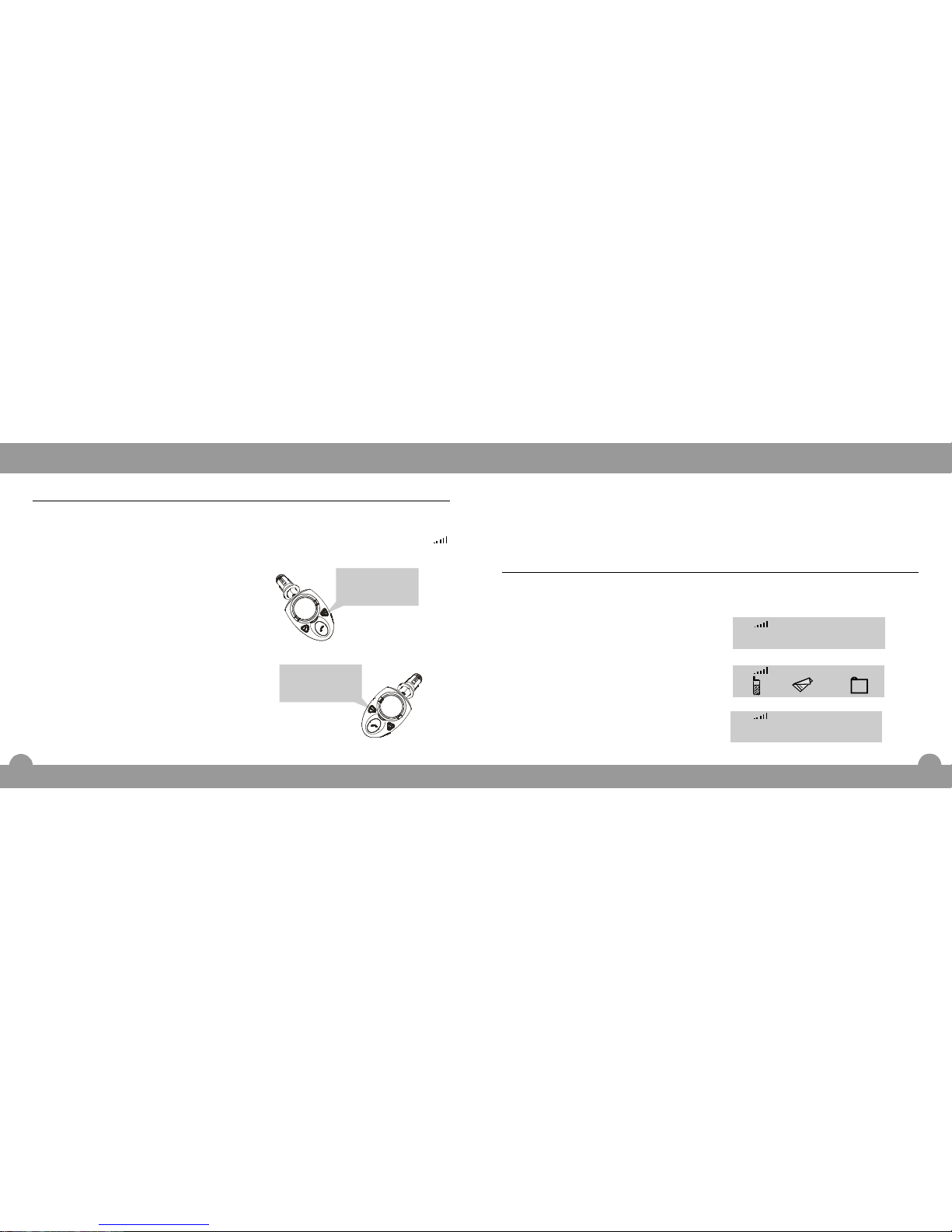
2.Pressbuttontodecrease
ringervolume.
OR
Usethevolumeupswitchofyour
mobilephonetoincreaseringer
volume(dependingonyourmobile
phone).
VolumeDown
FunctionOperations
Adjustingringervolume
Whenacallisreceived,theunitrings.Atthemomentyoucanpressor
buttonoruseyourmobilephone(dependsonyourmobilephone)to
adjusttheringervolume.Thereare5levelsforadjusting.Duringadjusting,theicon
variesaccordingtothevolumelevels.Themorebars,thehigherthevolume.
VolumeUp
VolumeDown
1.Pressbuttontoincrease
ringervolume.
OR
Usethevolumeupswitchofyour
mobilephonetoincreaseringer
volume(dependingonyourmobile
phone).
VolumeUp
Pressthisbutton
toincreasethe
ringervolume.
Pressthisbutton
todecreasethe
ringervolume.
16
FunctionOperations
Whenyouuseorbuttonoftheunittoadjustmenttheringer
volume,yourmobilephone'sringervolumemaybeadjustedaccordingly(depending
onyourmobilephone).
VolumeUpVolumeDown
Note:
l
InsertaSIMcardintotheSIMcard
jack.
Press"BackupSIM"buttononthe
rearofthedisplayunit.TheLCDwill
show"BackupSIM"andthenenter
intothecopymode.
Whenfinish,theLCDwillshow
"Copycompleted".
1.
BackupSIM
YoucancopytheSIMcardnumbertothe
unit.
--BackupSIM---
-Copycompleted-
2.
3.
VOl
VOl
VOl
 Loading...