

Page 1
OPERATING GUIDE
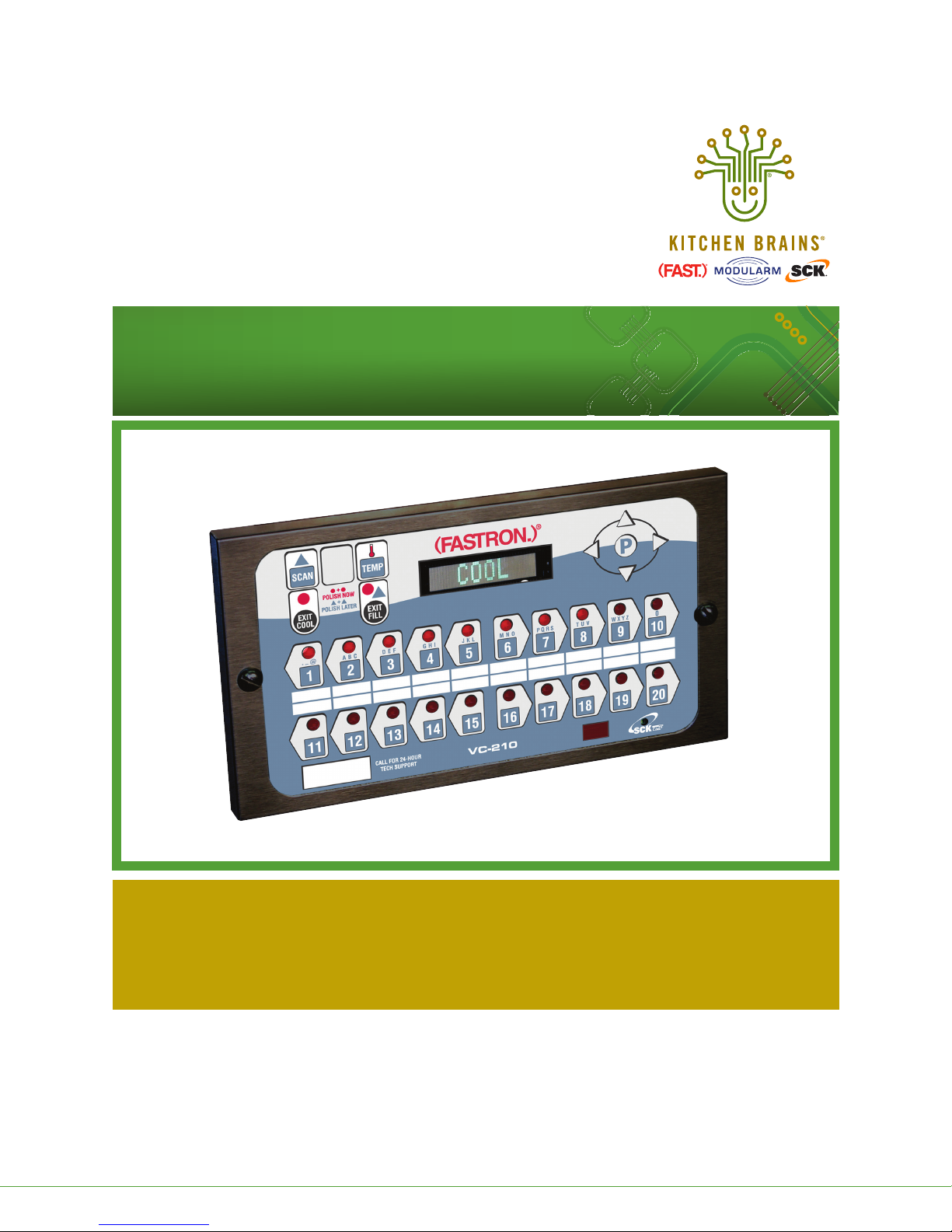
(FASTRON.)® VC-210 Controller
®
Save the instructions
for future reference.
www.KitchenBrains.com
This document contains confidential information. The dissemination, publication, copying, or duplication of this document or the software described herein without prior written authorization is strictly prohibited.
Kitchen Brains © 2017 | www.KitchenBrains.com | 229-51422 D
24/7 Toll-Free Technical Support
1-800-243-9271
(from the U.S., Canada and the Caribbean)
Page 1 of 8
Page 2

Operating the (FASTRON.)® VC-210
The (FASTRON.)® VC-210 process controller is used to
control many different appliances.
Each controller can time up to 20 products, store
messages, alarm names, cooking and filtering parameters,
and has shortening management capabilities.
Kitchen Brains is not liable for any use
of product not in accordance with its
installation and operating instructions.
Before using this equipment or for any
questions on the operation of the appliance,
consult and follow all instructions and safety
warnings found in the appliance operators’
manual supplied from the manufacturer of
the appliance.
OPERATING THE (FASTRON.)® VC-210
CONTROLLER
RECIPE REVIEW — Quickly see what is programmed for
each product key
1. Press the SCAN key.
2. Select any product key previously programmed–LED will
be lit above the key.
3. Press the DOWN arrow key to scroll through the list.
4. Press SCAN to exit.
VIEW TEMPERATURE SETTING
1. Press the TEMP key ‘once’ to view Actual temperature, or
2. Press the TEMP key ‘twice’ to view Set temperature.
This document contains confidential information. The dissemination, publication, copying, or duplication of this document or the software described herein without prior written authorization is strictly prohibited.
Kitchen Brains © 2017 | www.KitchenBrains.com | 229-51422 D
Page 2 of 8
Page 3
Operating the (FASTRON.)® VC-210
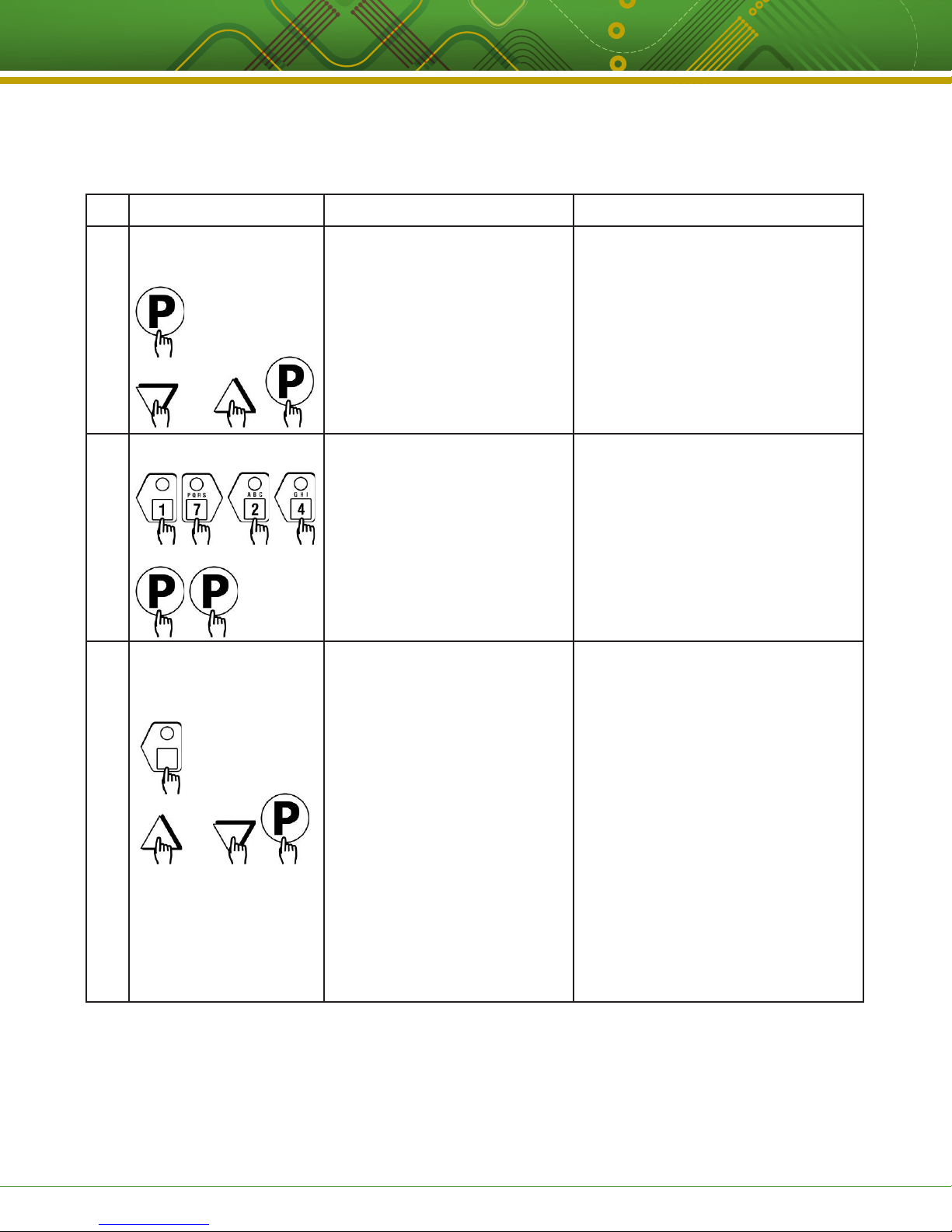
RECIPE PROGRAMMING (1724)
KEY PRESS DISPLAY ACTION
Enter Program Mode • To enter programming mode, press
1
OR
and hold the “P” key for 3 seconds.
• Scroll down to “Programming.”
• Press the “P” key to lock in entry.
• The display will prompt user to enter
a pass code.
Enter Pass Code Enter Code
2
Choose a Product Key
3
(Recipe)
OR
SELECT PRODUCT TO PROGRAM
ALL, NAME, TIME, TEMPERATURE,
TIMING, PRESSURE1, ALARM,
ALARM NAME, ALARM DONE,
TONE, HOLD TIME, HOLD LINK,
FLTR LCKOUT, PRODUCT CNT, RQI
1
”Pressure” will only appear if
appliance is a pressure fryer.
2
”RQI TRACKER” will only appear
if it was selected in System
****
Recipe
Choices are:
TRACKER2, EXIT
Programming.
• Enter pass code 1 7 2 4.
• Press the “P” key to lock in your entry.
• Display will show “Recipe.” Press the
“P” key.
• Press the product key to be
programmed. That key’s LED will
remain lit.
• Scroll to the feature you want
changed and press the “P” key.
NOTE: Selecting “ALL” allows you to
review and/or change all parameters for
that key.
To jump to a specific feature, select one
from the list and follow the appropriate
instructions to make the changes.
This document contains confidential information. The dissemination, publication, copying, or duplication of this document or the software described herein without prior written authorization is strictly prohibited.
Kitchen Brains © 2017 | www.KitchenBrains.com | 229-51422 D
Page 3 of 8
Page 4
Operating the (FASTRON.)® VC-210
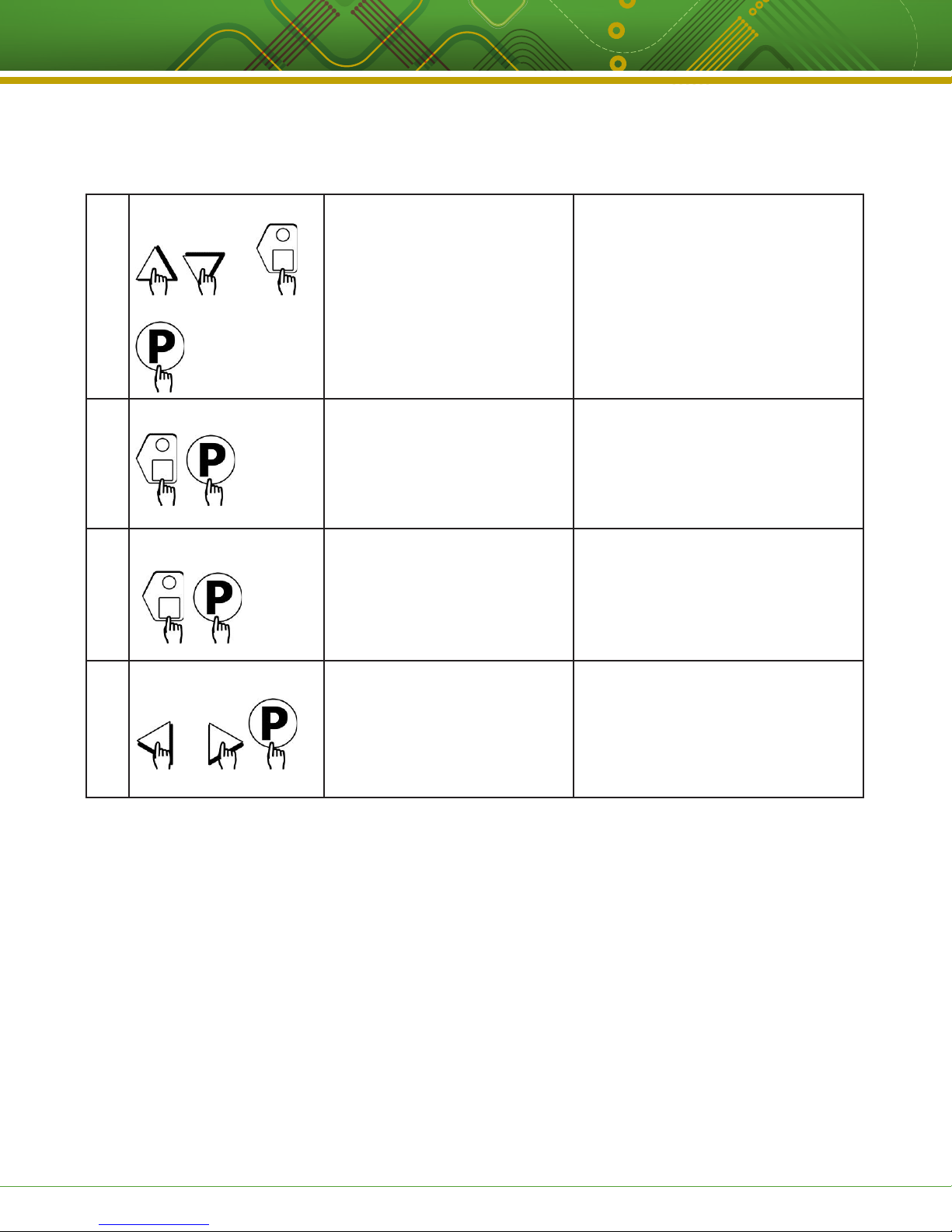
Choose a Product Name PRODUCT NAME • Press the UP or DOWN arrow keys
4
OR
to scroll through product names, OR
start spelling the desired product
name by using the top row of lettered
product keys.
• Press the “P” key to lock in selection.
Set Stage 1 Cook Time STAGE 1 TIME
5
Set Stage 1 Temperature STAGE 1 TEMP
6
Set Stage 1 Timing STAGE 1 TIMING
7
OR
(STRAIGHT, FLEX)
MM:SS
XXX F
• Type in the time for Stage 1. Range is
from 00:00 to 99:59.
• Press the “P” key to advance to next
stage or parameter.
• Type in the Setpoint temperature for
this stage. Range is from 200 to 375 F,
or the equivalent of Degrees C.
• Press the “P” key to advance to the
next stage or parameter.
• Press the LEFT or RIGHT arrow keys
to select the type of timing to be used
for this stage.
• Press the “P” key to advance to next
stage or parameter.
This document contains confidential information. The dissemination, publication, copying, or duplication of this document or the software described herein without prior written authorization is strictly prohibited.
Kitchen Brains © 2017 | www.KitchenBrains.com | 229-51422 D
Page 4 of 8
Page 5
Operating the (FASTRON.)® VC-210
8
9
10
11
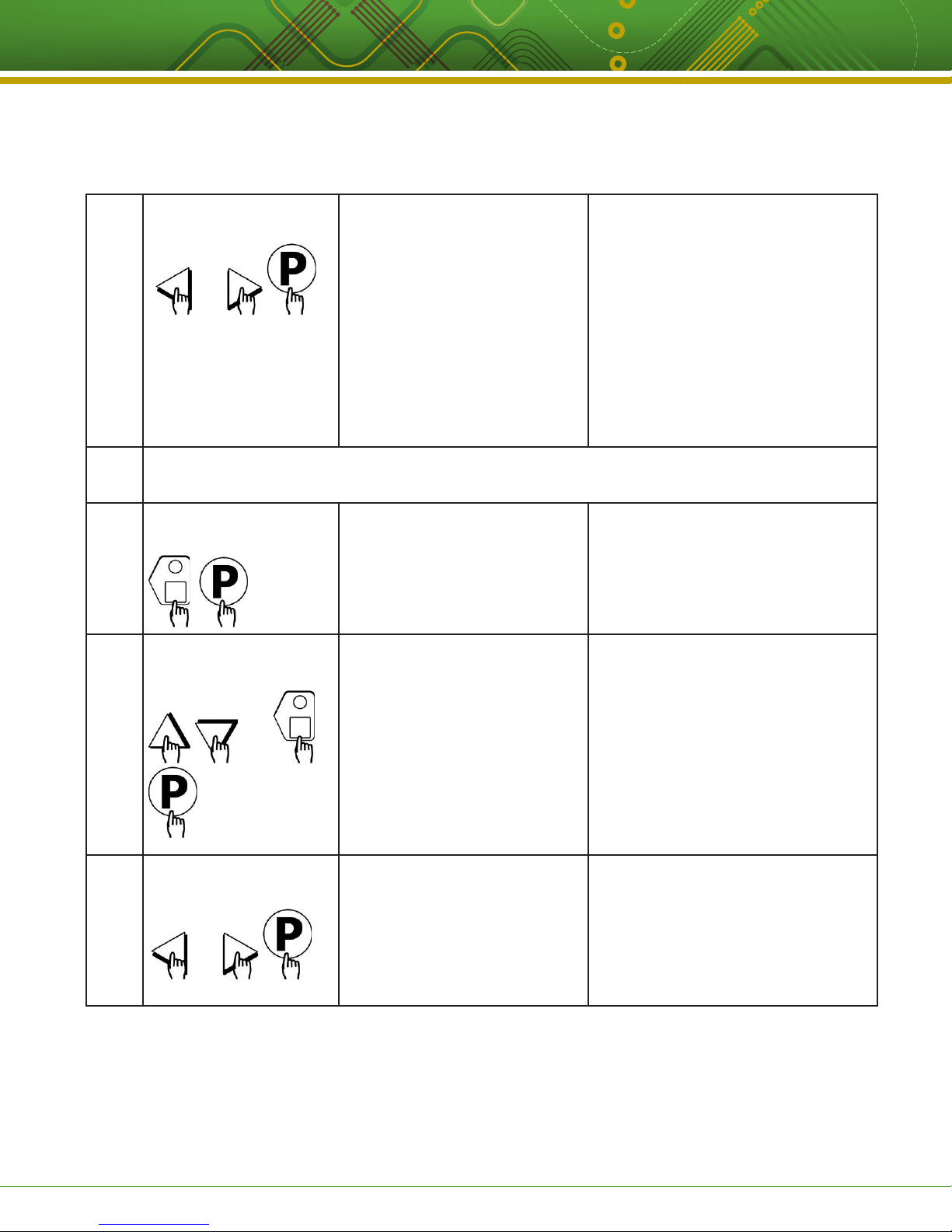
Set Pressure Solenoid
Position
OR
Set Alarm 1 Time
(Selectable)
Set Alarm 1 Name
(Selectable)
OR
STAGE 1 PRESSURE
(OPEN, CLOSED)
• Press the LEFT or RIGHT arrow
keys to select whether the pressure
solenoid should be opened or closed.
This message will appear only
if the appliance is a pressure
fryer.
• Press the “P” key to advance to next
stage or parameter.
• The display will show “Stage Time 2.”
If you have a second time, type in that
time and repeat steps 5-8. A total of 9
stage times can be programmed.
If applicable, repeat steps 5-8 for additional stages.
A total of 9 stages can be programmed.
ALARM 1 TIME
MM:SS
• Type in Alarm Time for activating the
Action Alarm.
Skip Steps 10-13 if the Alarm
Time for this stage is zero.
• Press the “P” key to advance to the
next stage or parameter.
ALARM 1 NAME
“ACTION”
• Press the UP or DOWN arrow keys to
scroll through the Alarm Names, OR
start spelling the desired action alarm
name by pressing the appropriate
product keys.
• Press “P” key to lock in the selection.
12
This document contains confidential information. The dissemination, publication, copying, or duplication of this document or the software described herein without prior written authorization is strictly prohibited.
Kitchen Brains © 2017 | www.KitchenBrains.com | 229-51422 D
Set Alarm #1 Cancel Mode
(Selectable)
OR
ALARM 1 DONE
(AUTOMATIC, MANUAL)
• Press the LEFT or RIGHT arrow keys
to select how the Action Alarm is to
be canceled.
• Press the “P” key to advance to next
stage or parameter.
Page 5 of 8
Page 6
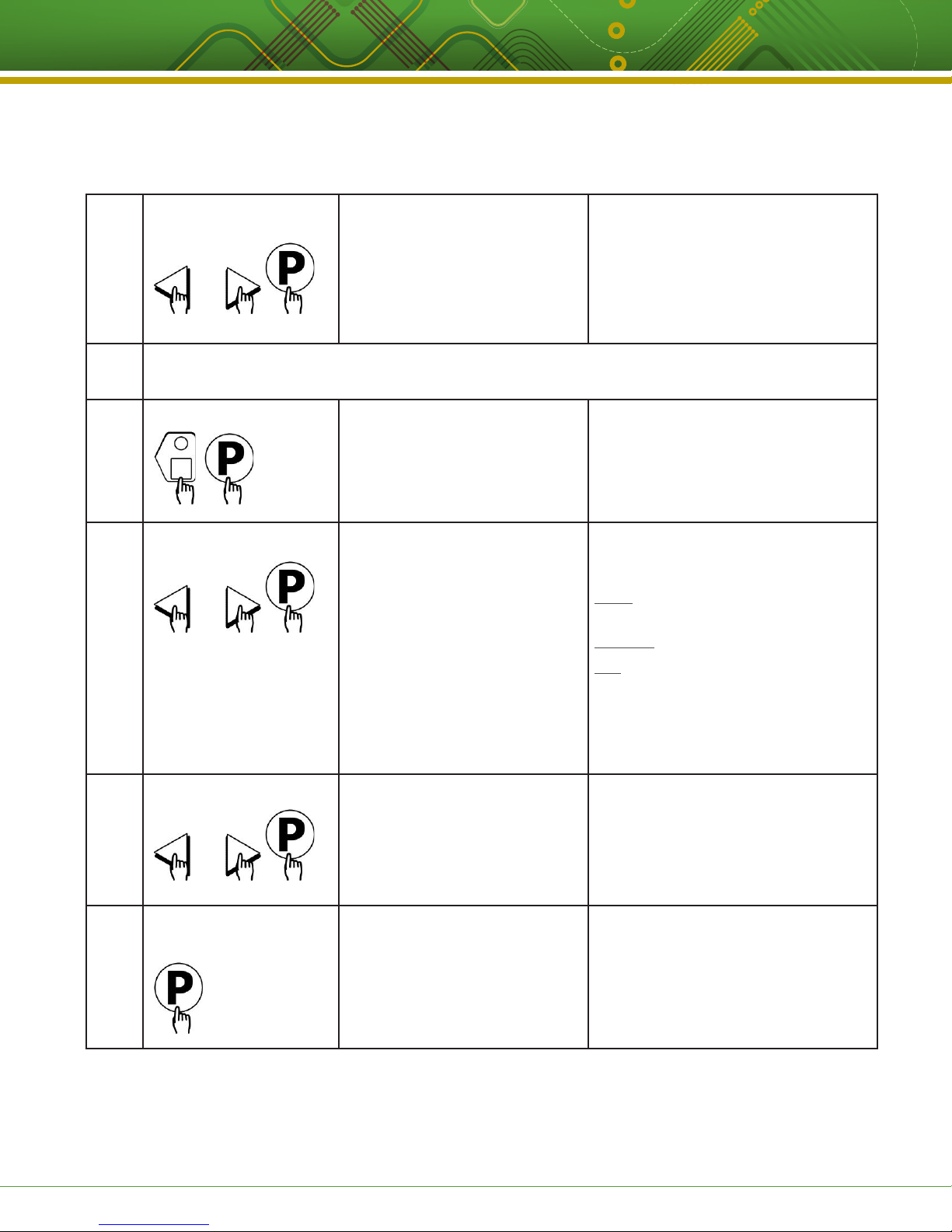
Operating the (FASTRON.)® VC-210
13
14
15
16
Setting Alarm 1 Tone ALARM 1 TONE
SHORT, MEDIUM, LONG, DOUBLE,
LONG/SHORT, NONE
OR
If applicable, repeat Steps 10-13 for additional Action Alarms.
A total of three (3) Action Alarms can be programmed.
Select Hold Time HOLD TIME
00:00
(Note: time is in Hours:Minutes)
Set Filter Lockout FILTER LOCKOUT
(COOL, NO FILTER, 1-99)
OR
• Press the LEFT or RIGHT arrow keys
to select Alarm Tone.
• Press the “P” key to advance to next
stage or parameter.
• Type in the length of hold time
required. The value is in the range of
0 to 60.
• Press the “P” key to advance to the
next step or parameter.
• Press the LEFT or RIGHT arrow keys
to select how you want to end a cook
cycle.
COOL = return to Setback temp. after
cook.
No Filter = return to Drop temp. after cook
1-99 = # of cooks allowed before entering
filter locked. When 1-99 is selected,
product cycles will return to drop temp.
until a filter lockout cycle is forced.
• Press the “P” key to select.
17
Set Product Heads PRODUCT HEADS
OR
18
This document contains confidential information. The dissemination, publication, copying, or duplication of this document or the software described herein without prior written authorization is strictly prohibited.
Kitchen Brains © 2017 | www.KitchenBrains.com | 229-51422 D
Select Another
Product Key
XX
SELECT PRODUCT
TO PROGRAM
• Press the LEFT or RIGHT arrow keys
to select count value. The range is 0 to
99 pieces or “USER PROMPT.”
• Press the “P” key to advance.
• Repeat from step #3 in this section,
or press the “P” key and scroll to
Exit.
• Press the “P” key to exit
programming.
Page 6 of 8
Page 7

Operating the (FASTRON.)® VC-210
NOTES
This document contains confidential information. The dissemination, publication, copying, or duplication of this document or the software described herein without prior written authorization is strictly prohibited.
Kitchen Brains © 2017 | www.KitchenBrains.com | 229-51422 D
Page 7 of 8
Page 8

Operating the (FASTRON.)® VC-210
This document contains confidential information. The dissemination, publication, copying, or duplication of this document or the software described herein without prior written authorization is strictly prohibited.
Kitchen Brains © 2017 | www.KitchenBrains.com | 229-51422 D
Food Automation - Service Techniques, Inc.
905 Honeyspot Road, Stratford, CT 06615-7147 USA
Phone: +1-203-377-4414
Sales: 1-800-FASTRON
Fax: +1-203-377-8187
www.KitchenBrains.com
Toll-free technical support from the U.S.,
Canada, and Caribbean: 1-866-840-4271
Europe, Middle East, Africa
31 Saffron Court Southfields Business Park
Basildon, Essex SS15 6SS ENGLAND
Phone: +44 0 1268544000
China
1803, 18F, No 922 Hengshan Rd
Shanghai 200030, CHINA
Phone: +8613916 854 613
Asia Pacific
13A MacKenzie Road
228676
Singapore
Phone: +65 98315927
Page 8 of 8
 Loading...