

Page 1
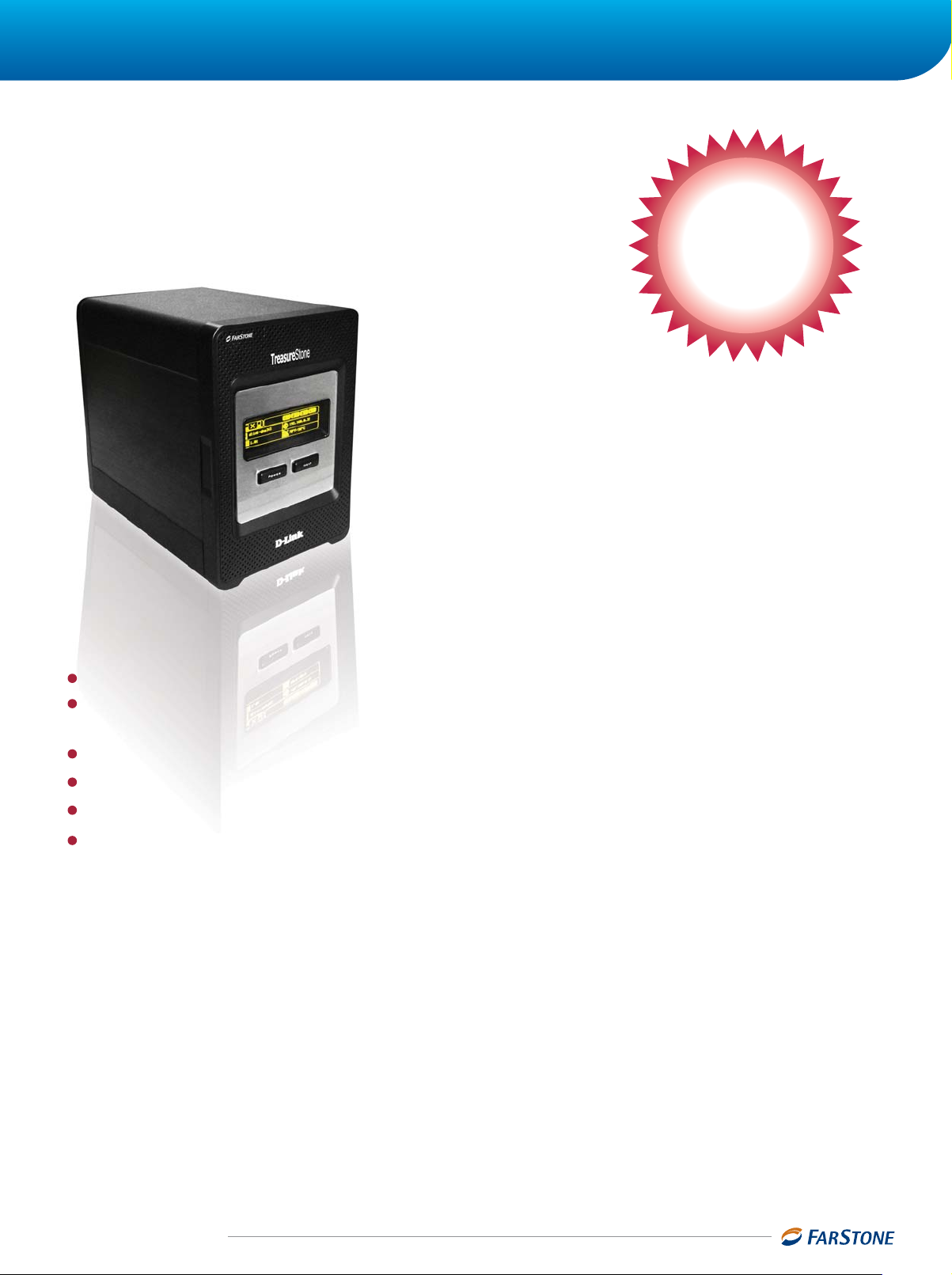
TreasureStone VirtualDrive DVD Server
Playing & Managing CD/DVD with Peace of Mind P l a y i n g & M a n a g i n g C D / D V D w i t h P e a c e o f M i n d
TreasureStone
VirtualDrive DVD Server
An exclusive solution allows playing CD/DVD without physical discs
that integrates with virtual discs management, user authorization
management, high speed storage over network and disk array.
Exclusive
Plug-and-Play
Virtual Cabinet
Solution
TM
Super Capacity with 1,000 DVDs, 6,000CDs, 1,000,000 MP3s or 1,000,000 photos
Main & Sub Server Design--- Designate automatic offsite backups to protect data from earthquakes,
fires, or floods
Site License --- No more per workstation or per server licenses
200 Times Faster Access Rates for network sharing with encrypted disc support
Windows/Mac/Linux/Unix/Netware Operating Systems support
High Capacity, High Speed, High Efficiency---Capacity is up to 4,000GB; network speed is up to 1000
mbps; also supports Raid 0/1/5
TreasureStone VirtualDrive DVD Server
It compiles applications and encrypted disc data into virtual CD/DVD image files and saves them
onto TreasureStone. In doing so, the original CD/DVDs and physical drives are not needed any more.
You can share the disc through the LAN or Internet by selecting the virtual image files. TreasureS-
tone breaks through traditional CD/DVD tower limitations, such as regions, bandwidth, number of
persons access at the same time, and it reduces huge cost of purchasing CD/DVD cabinets and
maintenance fee. Therefore, it is the best choice for educational agencies, businesses, libraries, and
entertainment companies to create multimedia data storage.
is the network storage device for a virtual cabinet.
www.farstone.com
1
The Trusted Backup & Recovery Solutions
Page 2
TreasureStone TreasureStone
Plug-and-Play: TreasureStone VirtualDrive DVD Server is a flash memory
application. Run it directly without worrying about system crash or damage.
TreasureStone VirtualDrive DVD Server provides the best performance.
TreasureStone VirtualDrive
Feature & Benefits
Multiple Disc Format Support: Audio CD, CD-ROM, Mixed
Mode CD, Photo CD, Video CD, DVD-ROM, ISO 9660 format,
and many encrypted discs, such as Safedisk1, Safedisk2,
SecuRom, LaserLock, etc.
Offsite Backup: Main and Sub servers of TreasureStone
VirtualDrive DVD Server enhance the protection, ensure data
security and protection from earthquakes, fires, floods, and
other unexpected disasters.
Virtual Cabinet: TreasureStone VirtualDrive DVD Server
provides an [Administrator], which allows the administrator to
create 1000 virtual cabinets, set the privileges and share
different virtual drives for different clients. Without any
advanced settings, the [Client] can access virtual drives, play
virtual drives automatically, and share discs limitlessly.
TreasureStone VirtualDrive DVD Server takes the place of
expensive physical cabinets. Its fast running speed allows you
to switch discs at any time without spin-up delays. Furthermore, it is easy to use, space-saving, and easy to maintain.
Convenient and Economical: TreasureStone makes it easy for the
webmaster to manage all discs for the company. Any end-user can access
the disc data freely (Generally, the same data may be accessed by few
users). Thus, TreasureStone improves the productivity and working
efficiency of the end-user, while it prevents the original discs from getting
wear and tear.
Authorization Management
Set different privileges for different users or groups to
ensure disc data security.
Convenient for Education
Store all learning material on TreasureStone to allow
any user to access the data at any time. Multiple users
can access the shared virtual drives through the LAN or
Internet simultaneously.
Reduce Management Involvement
Select the virtual drive, and then execute the disc content
without the physical disc. Meanwhile, the administrator
can search for the needed files through the browser
remotely and conveniently.
Optimized Performance
Without spin-up delays, you can run applications or
encrypted discs at speeds 200 times faster than a physical
disc running speed.
CD/DVD Archiving
Compile physical discs as high-quality virtual drives and
save them on TreasureStone. Manage all virtual drives in
the friendly user interface to avoid loss or damage of the
physical discs. The users can access the virtual drives
through a web browser, client program, or My Network
Places.
Customized Virtual Drive
Select the needed files, including instructional files,
applications, utilities, videos, music, and other data, and
convert them to virtual image files.
Safe and Confidential: Sets a security access level for each virtual drive for
different clients. The program only displays the virtual discs authorized for
each client. For example, some discs can only be accessed by the managers. The client can only access authorized virtual image files.
Unlimited Network Share: TreasureStone VirtualDrive DVD Server provides
a high-speed network share and unlimited disc usage.
File Archiving: Compiles important files, music, photos as a virtual drive
for easy management and sharing.
Print Server: Connects to printers to make them available for all comput-
ers on the network.
FTP Server: Users on the LAN or Internet can visit TreasureStone,
upload/download files and directories.
UPnP AV Server: Provides UPnP network media service, support UPnP AV
network player. You insert media into TreasureStone, and then play it on
the supported player.
Running Multiple Discs Simultaneously
Each client can execute a maximum of 23 virtual drives
simultaneously. Execute multiple disc applications
simultaneously and avoid changing the physical discs.
ISO File Support
Support the ISO image file format. You can conveniently
convert the data format.
Execute without Physical Discs
Execute without inserting the physical disc. All virtual
drives are kept on the computer, and you can access any
of them anytime, anywhere.
System Requirements
TreasureStone VirtualDrive DVD Server-Administrator
Windows 32-bit, 64-bit, Vista, Server 2003, Server 2008
CD/DVD-ROM
25MB or more HDD space
TreasureStone VirtualDrive DVD Server-Client
Internet Explorer 6.0, Mozillaa Firefox 1.0, Safari 1.0 or
higher version
PC or Mac
www.farstone.com
2
The Trusted Backup & Recovery Solutions
Page 3

System Architecture of TreasureStone VirtualDrive DVD Server
Internet & LAN
TreasureStone (Sub Server)
Music/Photos Convert
DVDs/Instructional videos
Applications/Utilities
Physical disc
N
EX
T
Convert Convert
TreasureStone (Main Server)
Data
Physical disc
Customized VirtualDrive
Printer
Play music Play DVDs Play instructional videos Execute Applications Execute utilities VirtualDrive Administrator
Offsite Backup
Set remote sub server and remote disaster backup schedule
Hardware Settings
Set advanced settings of TreasureStone hardware, such as print
server, FTP server, uPvP AV server, iTunes server, and so on.
Competitive Differentiators
Product
Solutions
Target
Authorization
Product Deployment
Performance/Cost
Awards
TreasureStone VirtualDrive DVD Server
www.farstone.com
FarstoneCorporation
Hardware + Software
Enterprises
Unlimited Authorization
Plug-and-Play
High
Disk Tower
Hardware Only
Enterprises
N/A
Separate and complicated installation
Normal
3
The Trusted Backup & Recovery Solutions
EMCHP
Disk Tower
Hardware Only
Enterprises
N/A
Separate and complicated installation
Normal
Page 4

The Trusted Backup & Recovery Solutions
Exclusive Virtual Cabinet Solution, Integrating Software and Hardware
Scenarios
School/Training Center
Library
Internet Cafe
Accounting Firm
/Financial Department
IT Corporation
/R&D Center
Government
/Administration
Department
Pain Points TreasureStone VirtualDrive DVD Server Solutions
Original disc has only one copy
Same disc has to be used by many users at the same
time.
It is necessary to keep all training data for later use.
Search for some training discs
Search for specific data quickly
Search for some references and copy them onto discs
Same disc has to be used by many users at the same
time.
Same disc has to be used by many users at the same
time.
Keep various encrypted discs for different clients
Play DVDs freely
Run multiple discs on the same computer
Financial data should be safe and confidential.
Copy financial data onto physical discs.
Source code should be safe and confidential.
Copy source code onto physical discs in every fixed
period.
Operate the test process with various physical discs.
Copy files onto physical discs in every fixed period.
Rely on various discs to complete day-to-day
operations.
Save all data on TreasureStone directly to avoid disc loss or damage.
Each client can execute 23 virtual drives simultaneously at most and avoid disc switch.
The users can access the virtual drive through browser, client program, or My Network
Place.
TreasureStone allows you to search for the specific data immediately.
TreasureStone allows you to search for the specific data immediately.
The users can access the virtual drive through browser, client program, or My Network
Place.
Run virtual drive at 200 times faster than CD-ROM. Reduce time to access data
immensely.
The users can access the virtual drive through browser, client program, or My Network
Place.
Each client can execute 23 virtual drives simultaneously at most and avoid disc switch.
Support many encrypted disc format, such as Safedisk1, Safedisk2, SecuRom, LaserLock,
and so on.
Provide password protection and access privileges of the discs.
Save all data on TreasureStone directly to avoid disc loss or damage.
Be able to select specific files
Convert data to virtual discs and save them on TreasureStone.
Provide password protection and access privilege of the discs.
Save all data on TreasureStone directly and avoid disc loss or damage.
The users can access the virtual drive through browser, client program, or My Network
Place.
Select the specific files
Convert to virtual discs and save them on TreasureStone.
The users can access the virtual drive through browser, client program, or My Network
Place.
TV Channel
/Non-linear
Editing System
VOD Systems
/ KTV System
Fami ly
/Music Fans
/Movie Fans
Quickly search for the needed video material to edit.
Copy the finished work onto physical discs for later use.
Manage all video discs, audio discs, and photos as
material database.
Run multiple discs on the same computer.
Allow clients to select the video and audio files.
Each client can select any program as he wants.
Same disc has to be shared by many clients.
Manage the favorite physical discs
Appreciate any discs at any time
Share discs with other conveniently
Run multiple discs simultaneously.
TreasureStone allows you to search for the specific data immediately.
Save all data on TreasureStone directly and avoid disc loss or damage.
Each client can execute 23 virtual drives simultaneously at most and avoid disc switch.
Run virtual drive at 200 times faster than CD-ROM. Reduce time to access data
immensely.
TreasureStone allows you to search for the specific data immediately.
The users can access the virtual drive through browser, client program, or My Network
Place.
Save all data on TreasureStone directly and avoid disc loss or damage.
TreasureStone allows you to search for the specific data immediately.
Each client can execute 23 virtual drives simultaneously at most and avoid disc switch.
The users can access the virtual drive through browser, client program, or My Network
Place.
Support many encrypted disc format, such as Safedisk1, Safedisk2, SecuRom, LaserLock,
and so on.
Related TreasureStone Series Product
TreasureStone Backup & Recovery Server is
snapshot, complete system backup, file backup, universal restore, centralized network management,
and with a high-speed disk array storage.
Partners
a suite of all-in-one solution, integrates system
Recommended by
industry experts
Product Contact
With regard to the detailed product information, technical service, and all other information of our company, you are welcome to
contact us via one of the following ways:
Website: http://www.farstone.com E-mail: sales@farstone.com
4
 Loading...