

Page 1

a.book Page i Monday, January 17, 2000 4:00 PM
Fast Starlet Gig Switch/4SX
User’s Guide
Page 2

a.book Page ii Monday, January 17, 2000 4:00 PM
Copyright © 2000 Farallon Communications, Inc. v.0100
All rights reserved.
This manual and any associated artwork, software, and product designs are copyrighted with all rights reserved. Under the copyright laws this manual, artwork, software, and product designs may not be copied, in whole or part, without the written
consent of Farallon. Under the law , copying includes translation to another language or
format.
Farallon Communications, Inc.
3089 Teagarden Street
San Leandro, CA 94577-5720
U.S.A.
For additional copies of this user’s guide, order Farallon part number 6120366-00-01.
Other products and corporate names may be trademarks of other companies and are
used only for explanation and to the owner’s benefit without intent to infringe.
Page 3

a.book Page iii Monday, January 17, 2000 4:00 PM
Table of Contents
Chapter 1 - Introduction .................................................................................5
Features .....................................................................................................6
Package contents ...................................................................................6
Front panel ..................................................................................................7
Starlet Gig Switch LEDs ...........................................................................7
Power LED .........................................................................................7
Link LEDs ..........................................................................................7
Activity LEDs ......................................................................................7
Starlet Gig Switch ports ...........................................................................7
Rear panel ..................................................................................................8
Power port ..............................................................................................8
Chapter 2 - Installation ..................................................................................9
Choosing a location ...................................................................................10
Desktop installation ..............................................................................10
Rack installation ...................................................................................11
Connecting power ......................................................................................11
Connecting the switch ................................................................................12
Connecting 1000Base-SX devices and switches ......................................12
Chapter 3 - Network Planning ......................................................................13
1000Base-SX Gigabit guidelines .................................................................14
1000Base-SX Gigabit networks ...................................................................15
10/100/1000Mbps network interconnections ........................................15
Chapter 4 - Farallon Technical Support .........................................................17
How to reach us ....................................................................................17
Farallon Internet information resources ..............................................18
Outside of the United States and Canada ..........................................18
Appendix .....................................................................................................19
Warranty .....................................................................................................21
Page 4

a.book Page iv Monday, January 17, 2000 4:00 PM
Page 5

a.book Page 5 Monday, January 17, 2000 4:00 PM
Chapter 1
5
Introduction
Farallon’s Fast Starlet® Gig Switch/4SX is designed to give you the
ultimate in performance, flexibility, ease-of-use and reliability. The
switch can increase network performance by bringing the power of
Gigabit Ethernet to your network.
Gigabit Ethernet provides a cost effective solution to bandwidth
problems, eliminating bottlenecks in server connections and
maximizing network connectivity . The Fast Starlet Gig Switch acts as a
high-speed selective bridge, automatically forwarding traffic from one
segment to another without interfering with unused segments,
increasing the total capacity of your existing network.
In addition to offering higher performance, Gigabit Ethernet simplifies
network administration and provides increased bandwidth while still
using standard Ethernet protocols.
The Fast Starlet Gig Switch/4SX offers four 1000Base-SX fiber optic
SC ports for connecting to other Gigabit network devices or switches.
Page 6

a.book Page 6 Monday, January 17, 2000 4:00 PM
6
EATURES
F
Full compliance with IEEE 802.3z standards
■
4 1000Base-SX fiber optic SC ports
■
Store and forward switching architecture
■
Full duplex supported on all ports
■
32K MAC address entry table with address aging
■
Comprehensive LEDs for at-a-glance management
■
19-inch rack mountable
■
FCC Class A, CE Class A
■
P
ACKAGE CONTENTS
Fast Starlet Gig Switch/4SX
■
■
AC power cord*
■
Self-adhesive feet
■
Rack mounting brackets and screws
■
This user’s guide
* Power cords provided separately outside of North America.
Page 7
a.book Page 7 Monday, January 17, 2000 4:00 PM
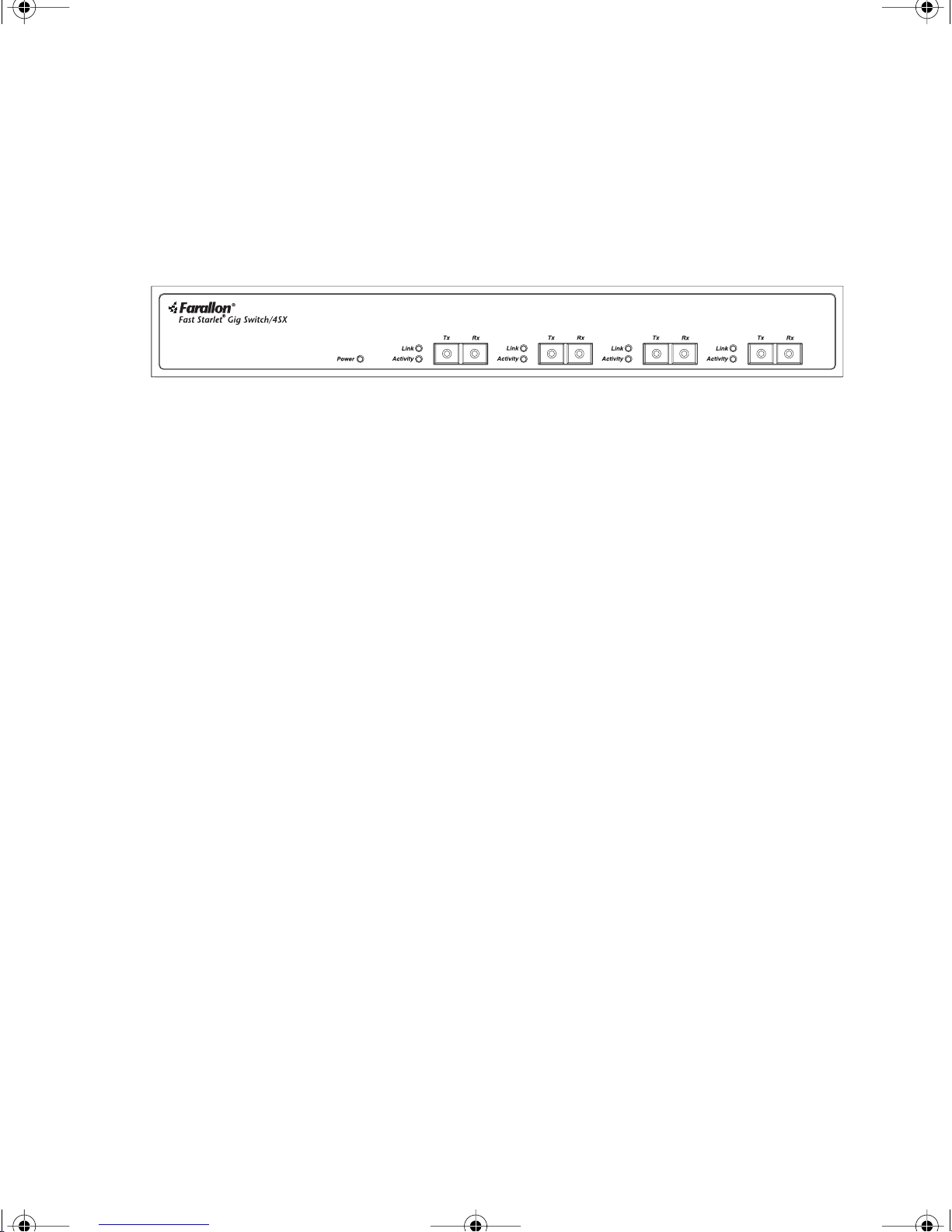
RONT PANEL
F
All status indicators (LEDs) and ports for connecting to other devices
and networks are on the front panel.
Introduction 7
TARLET GIG SWITCH
S
LED
S
A set of Link and Activity LEDs indicate the status of each port.
The Power LED indicates the unit is receiving power.
OWER
P
LED
The Power LED is lit solid green when the switch is receiving power.
L
INK
LED
S
The LED is lit solid green when a valid 1000 Mbps link is established
at the port. The LED is off when there is no link.
CTIVITY
A
LED
S
The LED blinks green when the port is receiving or transmitting data
on the 1000 Mbps network. The LED is off when no data is detected
at the port.
TARLET GIG SWITCH PORTS
S
The four 1000Base-SX ports with SC connectors provide the full
duplex multimode fiber Gigabit connections to the switch.
When connecting a Gigabit device to the Fast Starlet Gig Switch using
multimode SC cable, be sure that the TX (transmit) and RX (receive)
ends of the cable are correctly connected to the RX and TX ports on
both devices. See “Installation” on page 9 for more information.
Page 8
a.book Page 8 Monday, January 17, 2000 4:00 PM
8
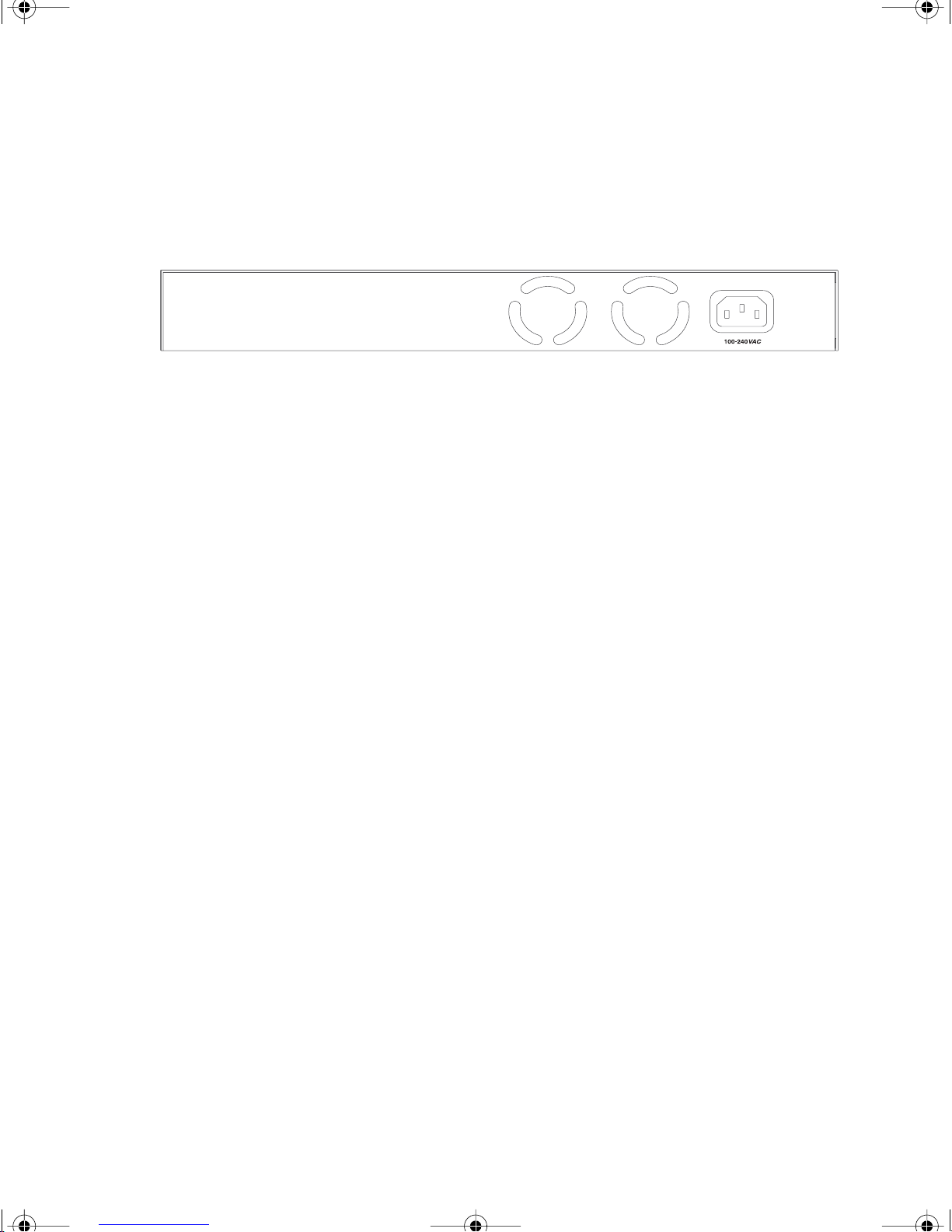
EAR PANEL
R
The power port is located on the Gig Switch’s rear panel.
P
OWER PORT
The power port located on the rear panel accepts the power cord for
the switch. The Power LED on the front panel should light when the
power cord is plugged into the power port.
Page 9

a.book Page 9 Monday, January 17, 2000 4:00 PM
Chapter 2
9
Installation
Your Fast Starlet Gig Switch can be installed in these simple steps:
■
Choose a proper location for your switch.
■
Connect power to your switch.
■
Connect 1000Base-SX devices or networks to the Gigabit ports.
Page 10
a.book Page 10 Monday, January 17, 2000 4:00 PM
10 Chapter 2
HOOSING A LOCATION
C
When choosing a location for your Fast Starlet Gig Switch:
■
■
Avoid dusty or damp locations.
Avoid electromagnetically noisy areas, such as near power
transformers or radio transmitters.
Avoid temperatures below 32˚ Fahrenheit (0
■
Fahrenheit (
Allow a clear view of the front panel LEDs and easy access to
■
40˚C)
.
or above 105˚
˚C)
the front panel ports.
Place the switch on a clean, level, sturdy surface or in an EIA
■
standard equipment rack.
D
ESKTOP INSTALLATION
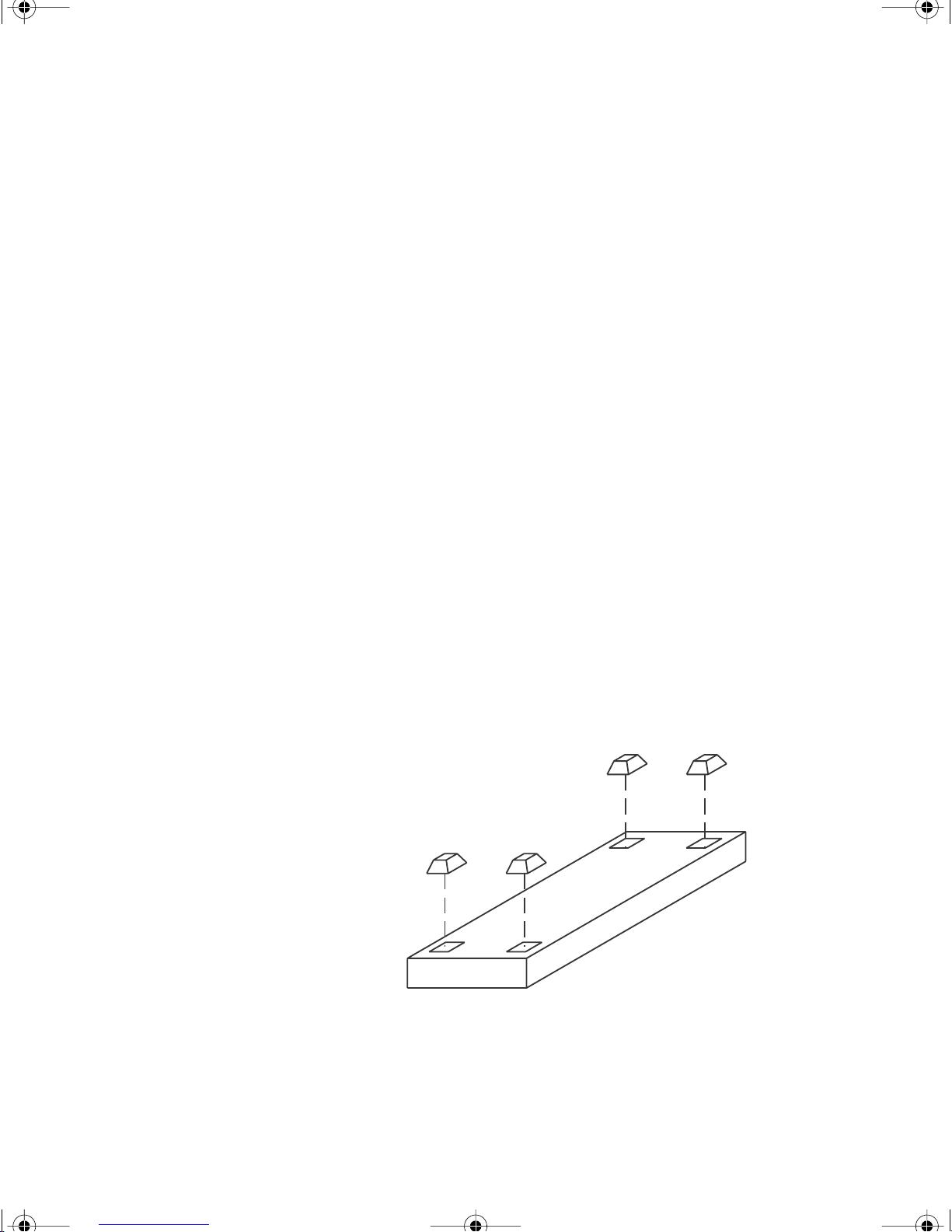
You may set the switch on any flat, sturdy surface. Use the four
self-adhesive feet provided with the switch to cushion against
vibration and prevent slipping.
Remove the protective sheet from each foot, and stick the feet to
the four indented corners on the bottom of the switch.
Attaching the self-adhesive feet for desktop installation
Page 11
a.book Page 11 Monday, January 17, 2000 4:00 PM
R
ACK INSTALLATION
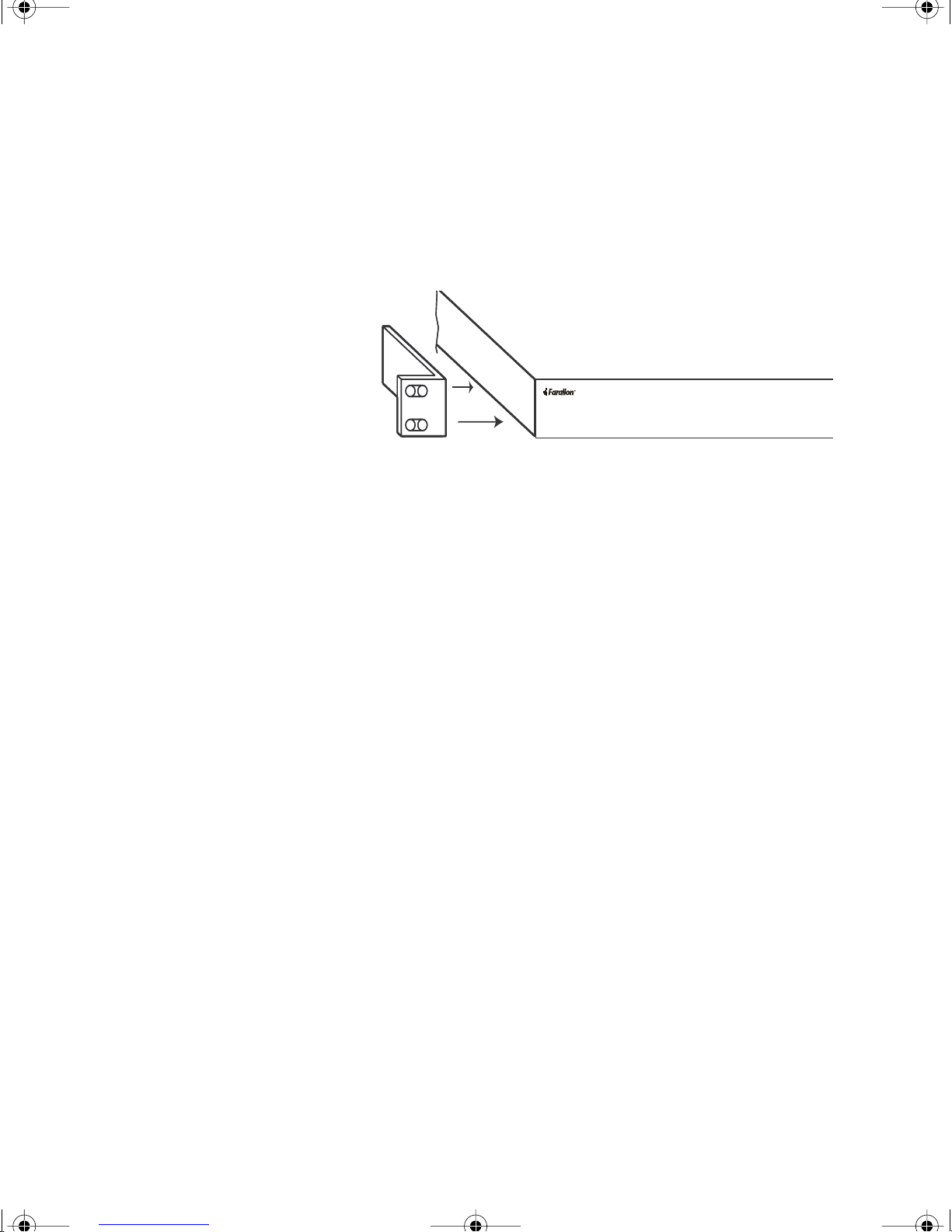
Your switch comes with two rack mounting brackets. You can use
these brackets to mount the switch on an EIA standard 19” rack.
Installation 11
Attaching the mounting brackets for rack installation
Attach the brackets to the switch, using the screws provided, then use
the screws provided to attach the brackets to the rack.
C
ONNECTING POWER
To supply power to your switch:
1. Plug the power supply cord into the power port on the rear panel
of your switch.
2. Plug the power supply cord into an AC wall outlet.
3. Verify that the Power LED is lit. If the Power LED is not lit, check
the following:
■
The power cord is properly connected to the wall outlet.
The wall outlet is functional.
■
Page 12
a.book Page 12 Monday, January 17, 2000 4:00 PM
12 Chapter 2
ONNECTING THE SWITCH
C
Before connecting any device to your switch, make sure that:
■ 1000Base-SX 62.5/125 micron multimode fiber optic SC cable
length is not greater than 220 meters.
■ 1000Base-SX 50/125 micron multimode fiber optic SC cable
length is not greater than 550 meters.
CONNECTING 1000BASE-SX DEVICES AND SWITCHES
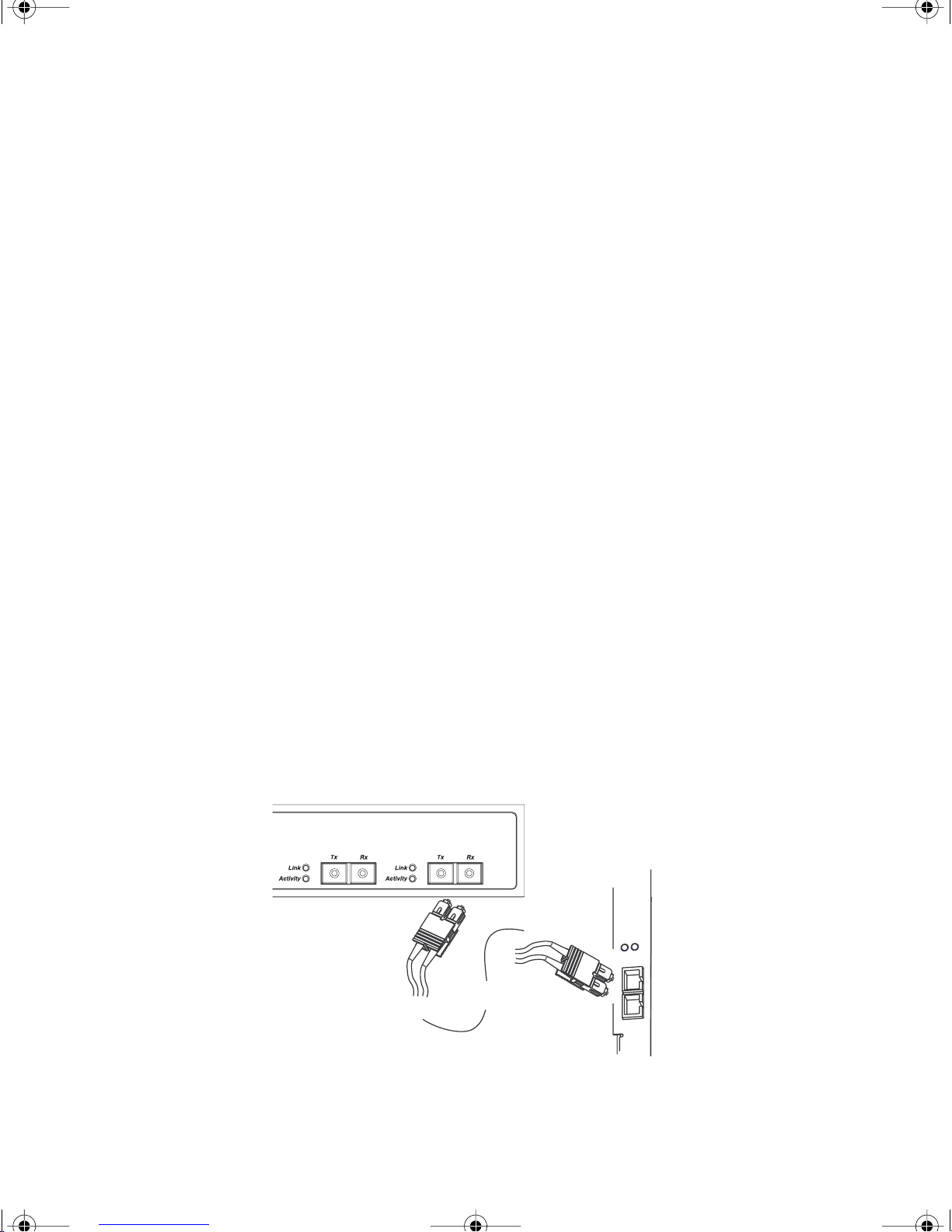
1. Be sure you are using a working multimode fiber optic SC cable.
Fiber cables are fragile. If you have trouble with a connection to
your switch, it is recommended that you check the cable.
2. Connect the TX (transmit) and RX (receive) SC connectors at one
end of the cable to a port on the Fast Starlet Gig Switch.
3. Connect the other end of the cable to a 1000Base-SX device or
another Gigabit switch. Make sure the TX (transmit) end of the
multimode SC cable is connected to the RX (receive) port on the
Gigabit device and the RX end of the multimode SC cable is
connected to the TX port on the Gigabit device.
Note: Because Gigabit Ethernet uses laser technology, it is recom-
mended that you do not look into the end of a fiber cable that
has been connected to a card or switch.
Fast Starlet Gig Switch4/SX
1000 Mbps Full Duplex device
DATA
LINK
TX
Multimode SC Fiber
RX
Connecting the Fast Starlet Gig Switch/4SX to a Gigabit device.
Page 13

a.book Page 13 Monday, January 17, 2000 4:00 PM
Chapter 3
13
Network Planning
Your Fast Starlet Gig Switch/4SX can be used to expand your network
topology and enhance network performance. The switch can increase
file server performance and segment large networks.
Each port on your Fast Starlet Gig Switch/4SX creates a collision
domain. With multiple collision domains, you increase the number of
switches you can include in the network, and reduce congestion.
The Fast Starlet Gig Switch/4SX is designed for easy installation and
high performance in a network where traffic and the number of users
increase continuously.
Page 14

a.book Page 14 Monday, January 17, 2000 4:00 PM
14 Chapter 3
1000BASE-SX GIGABIT GUIDELINES
■ The suggested cable type is 62.5/125 or 50/125 multimode fiber
optic SC.
■ Maximum cable length of 62.5/125 multimode fiber is 220
meters, maximum cable length of 50/125 multimode fiber is 550
meters.
■ The maximum number of switches between two end nodes sug-
gested by the IEEE is seven.
■ Make sure the TX (transmit) end of the multimode SC cable is
connected to the RX (receive) port on the Gigabit device and the
RX end of the multimode SC cable is connected to the TX port on
the Gigabit device. Do not detach the cable ends from any
labelled clips, and do not attempt to dismantle the cable in order
to ‘cross over’ the cable. Fiber cables are already crossed over.
Page 15
a.book Page 15 Monday, January 17, 2000 4:00 PM
1000BASE-SX GIGABIT NETWORKS
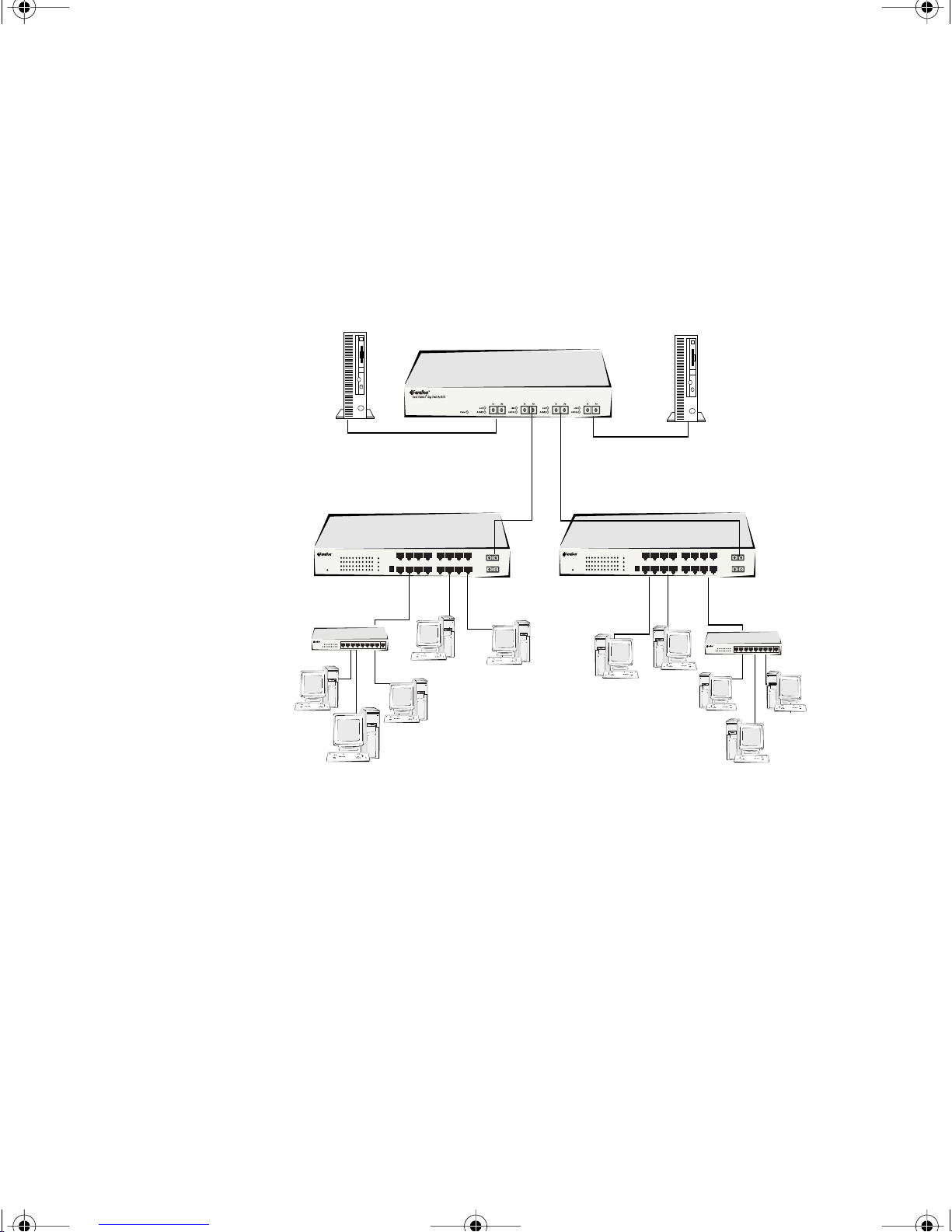
By adding your Fast Starlet Gig Switch/4SX to your network, you can
connect a Gigabit network or server . The ports on your Fast Starlet Gig
Switch can be used as high-speed backbone or file server links.
Network Planning 15
Gigabit server
Fast Starlet Gig Switch/4SX
1000Mbps Full Duplex
Fast Starlet Switch 10/100/1000
Gigabit server
1000Mbps Full Duplex
Fast Starlet Switch 10/100/1000
10/100/1000MBPS NETWORK INTERCONNECTIONS
Adding your Fast Starlet Gig Switch/4SX to a large network creates
more collision domains in that network. The Fast Starlet Switch’s builtin filtering separates a segment’s local traffic from network traffic,
reducing the amount of network traffic and easing congestion in each
collision domain.
Farallon’s Fast Starlet Switch 10/100/1000 can connect 10Base-T
and 100Base-TX networks to the Fast Starlet Gig Switch/4SX.
The 1000Mbps Gigabit Ethernet connections will allow multiple Fast
Starlet Switches to be connected at very high speeds, resulting in a
reduction of bottlenecks between network segments.
Page 16

a.book Page 16 Monday, January 17, 2000 4:00 PM
Page 17

a.book Page 17 Monday, January 17, 2000 4:00 PM
Chapter 4
17
Farallon Technical Support
Farallon is committed to providing its customers with reliable products
and excellent technical support. Please take a moment now to fill out
the registration card enclosed in your switch package so that we can
notify you about any updated product information.
Before contacting Farallon Customer Service, please look in this
user’s guide for answers to your questions and possible solutions to a
problem. Also, be sure to read any paper release notes or electronic
“Read Me” files that you receive from Farallon.
If you contact us by telephone, please be at the site of the problem,
prepared to reproduce it and to try some troubleshooting steps.
HOW TO REACH US
If you have any questions, concerns, or suggestions, please contact
us by telephone, fax, mail, or the Internet:
Phone: (510) 346-8001
Phone support hours are 7:00 am to 4:30 pm PST.
Fax: (510) 346-8116
Mail: Farallon Customer Service
E-mail: [email protected]
3089 Teagarden St.
San Leandro, California 94577-5720
USA
Page 18

a.book Page 18 Monday, January 17, 2000 4:00 PM
18 Chapter 4
FARALLON INTERNET INFORMATION RESOURCES
Product information can be found on the Internet at:
www.farallon.com.
OUTSIDE OF THE UNITED STATES AND CANADA
If you are not located in the United States or Canada, you can get
service locally by contacting your nearest Farallon reseller or
distributor. For a worldwide list of our distributors, see our Internet
information resources or contact Farallon directly.
Page 19

a.book Page 19 Monday, January 17, 2000 4:00 PM
Appendix
TECHNICAL SPECIFICATIONS
Standards IEEE 802.3z 1000Base-SX Ethernet
Data transfer rate Gigabit Ethernet 1000Mbps (full duplex)
19
Cabling 1000Base-SX 62.5/125 micron multimode fiber
optic (220m) or 50/125 micron
multimode fiber optic (550m)
Ports 4 1000Base-SX SC
AC inputs 100 to 240 VAC 50 or 60 Hz
Power consumption 23 watts
Temperature Operating 0 ° ~ 40° C
Storage -20° ~ 70° C
Humidity Operating 10 ° ~ 90° RH
Storage 10° ~ 95° RH
Dimensions 330mm (13 in) x 43mm (1.69 in) x 230mm (9.06 in)
Regulatory FCC Class A, CE Class A
Page 20

a.book Page 20 Monday, January 17, 2000 4:00 PM
20
REGULATORY NOTICES
FCC COMPLIANCE STATEMENT
This equipment has been tested and found to comply with the limits for a
Class A digital device, pursuant to Part 15 of the FCC Rules. These limits
are designed to provide reasonable protection against harmful
interference when the equipment is operated in a commercial
environment. This equipment generates, uses, and can radiate radio
frequency energy and, if not installed and used in accordance with the
instruction manual, may cause harmful interference to radio
communications. Operation of this equipment in a residential area is
likely to cause harmful interference in which case the user will be
required to correct the interference at his own expense. Operation is
subject to the following two conditions: (1) this device may not cause
harmful interference, and (2) this device must accept any interference
received, including interference that may cause undesired operation.
This digital apparatus does not exceed the Class A limits for radio noise
emission from digital apparatus set out in the Radio Interference
Regulations of the Canadian Department of Communications.
Le présent appareil numérique n'émet pas de bruits radioélectriques
dépassant les limites applicables aux appareils numériques de la classe
A prescrites dans le Règlement sur le brouillage radioélectrique édicté
par le ministère des Communications du Canada.
CE MARK
This equipment conforms to the European Community CE Mark standard
for the design and manufacturing of information technology equipment.
This standard covers a broad area of product design, including RF
emissions and immunity from electrical disturbances.
Warning: In a domestic environment this equipment may cause radio
interference, in which case the user may be required to take adequate
measures. Adequate measures include increasing the physical distance
between this product and other electrical devices.
Page 21

a.book Page 21 Monday, January 17, 2000 4:00 PM
Warranty
LIMITED WARRANTY AND LIMITATION OF REMEDIES
Farallon warrants to you, the end user, that the accompanying Farallon product, which may
include third party products or technology (the “Product”) will be free from defects in materials
and workmanship under normal use. This warranty will expire three (3) years from date of
purchase. Farallon’s entire liability and your sole remedy under this warranty during the warranty
period is that Farallon shall, at its option, either repair the Product or refund the original
purchase price of the Product.
In order to make a claim under this warranty you must comply with the following procedure:
1.Contact Farallon Customer Service within the warranty period to obtain a Return Materials
Authorization (“RMA”) number.
2.Return the defective Product and proof of purchase, shipping prepaid, to Farallon with the RMA
number prominently displayed on the outside of the package.
If you are located outside of the United States or Canada, please contact your dealer in order to
arrange for warranty service.
Page 22

a.book Page 22 Monday, January 17, 2000 4:00 PM
THE ABOVE WARRANTIES ARE MADE BY FARALLON ALONE, AND THEY ARE the ONLY
WARRANTIES MADE BY ANYONE REGARDING THE ENCLOSED PRODUCT. Farallon and its
licensor(s) make no other warranties, express or implied, including without limitation the implied
warranties of merchantability and fitness for a particular purpose, regarding the enclosed
product. Except as otherwise expressly provided above, Farallon and its licensor(s) do not
warrant, guarantee or make any representation regarding the use or the results of the use of the
product in terms of its correctness, accuracy, reliability, currentness, or otherwise. The entire
risk as to the results and performance of the product is assumed by you. The exclusion of
implied warranties is not permitted by some states or jurisdictions, so the above exclusion may
not apply to you. IN THAT CASE, ANY IMPLIED WARRANTIES ARE LIMITED IN DURATION TO
NINETY (90) DAYS FROM THE DATE OF DELIVERY OF THE PRODUCT. There may be other rights
that you may have which vary from jurisdiction to jurisdiction.
REGARDLESS OF WHETHER OR NOT ANY REMEDY SET FORTH HEREIN FAILS OF ITS ESSENTIAL
PURPOSE, in no event will Farallon, its licensor(s) and the directors, officers, employees or
agents of any of them be liable to you for any consequential, incidental or indirect damages
(including damages for loss of business profits, business interruption, loss of business
information, and the like) arising out the use or inability to use the product even if Farallon or its
licensor(s) have been advised of the possibility of such damages. Because some states or
jurisdictions do not allow the exclusion or limitation of liability for consequential or incidental
damages, the above limitations may not apply to you. Farallon and its licensor(s) liability to you
for actual damages from any cause whatsoever, and regardless of the form of the action
(whether in contract, tort [including negligence], product liability or otherwise), will be limited to
$50.
 Loading...