

Page 1
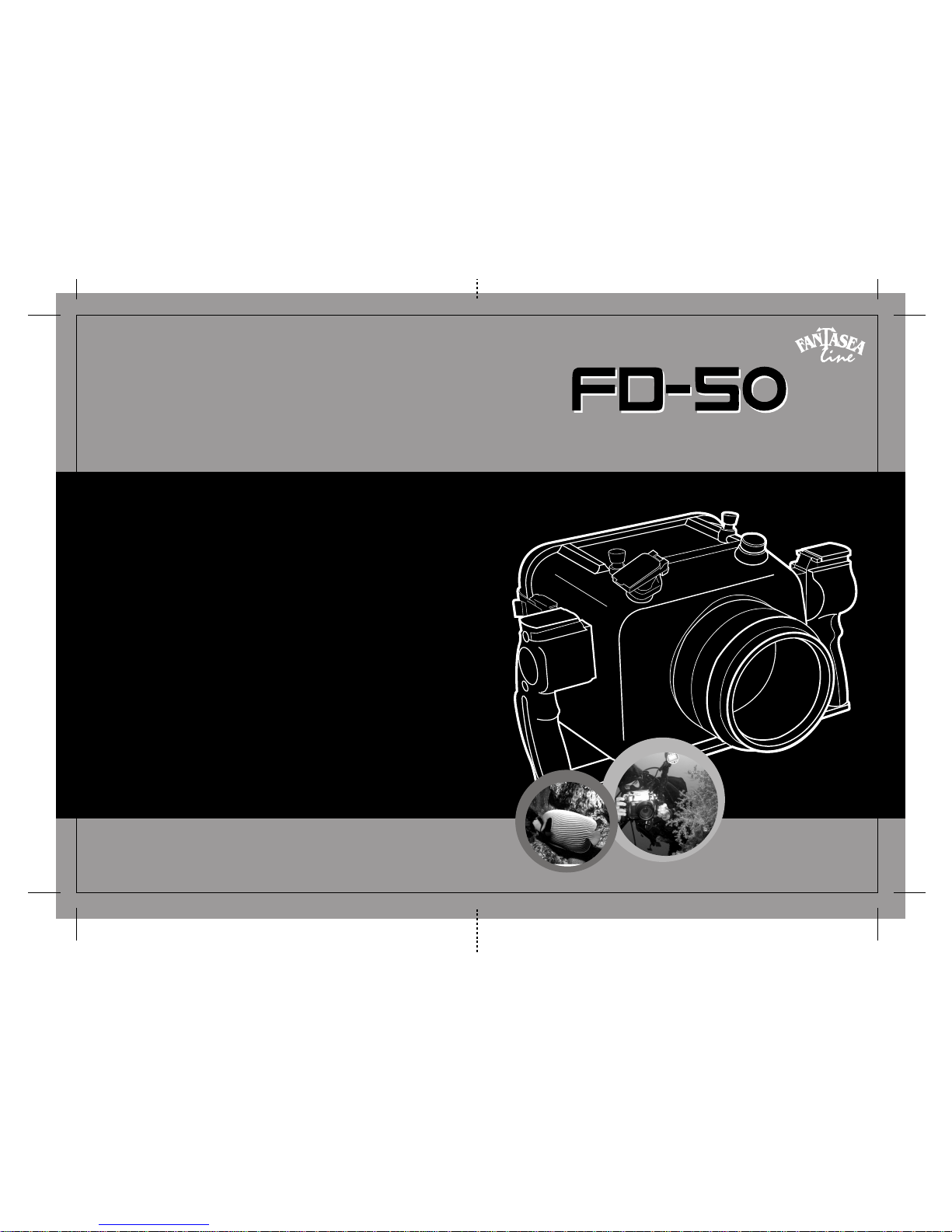
Fantasea Line FD-50 Waterproof Housing
for the Nikon D-50
OPERATORS MANUAL
Page 2
Introduction
pg.2
Included with housing
pg.2
Camera Model
pg.3
A Variety of Uses
pg.3
Specifications
pg.3
Housing Orientation
pg.4
Control Details
pg.5
Preparation of Housing
pg.8
Basic Shooting Techniques
pg.12
Camera Lenses and Ports
pg.15
1
T able of Contents
Fantasea FD-50 Housing
Instruction Manual
Introduction
Welcome to the exciting world of underwater digital SLR photography.
Your purchase of the FD-50 housing for the Nikon D-50 digital camera
will set you apart from other photographers. With this system, you will
enjoy the best chance of capturing the widest variety of superior underwater
images. The FD-50 offers you the opportunity to use the exact Nikon
lenses for the best circumstances, including a choice of macro, wide angle,
fisheye, and zoom lenses. Y ou will find the housing to be easy and instinctive
to use and handle and will have countless dives in which to experiment
with the D-50’s advanced imaging capabilities. Fantasea Line Photo is
pleased to offer our help with any of your photographic needs.
The purpose of this manual to is to provide you with the basic introduction
to your FD-50, which should get you comfortable with the housing and
allow you to get started taking great underwater images right away. We
strongly urge you to thoroughly read the Nikon D-50 instruction manual
as well, to familiarize yourself with the most common controls and settings
that you will use for your underwater photography. The FD-50 housing
will permit access to most of the important controls on the camera. To
take full advantage of these features, it is best to have a good command
of what each option can do for you, so you will know when you should
use each specific control.
Included with housing:
The FD-50 housing consists of a front and back shell that latch together
to form the housing body.
A screw in standard flat port is included. This port will accommodate
the 18-70mm lens (without a manual zoom control). Other optional
ports are available for different lenses ( 5 inch super wide angle Dome
Port, 60 mm macro/close up port and 105 mm super macro port)
Two housing handles are attached to the camera body and the base plate.
These handles are made with the standard Fantasea strobe arm mounting
shoe on the top of each one for attaching a Fantasea (or other company)
Flex arm or Ball and Joint arm for the accessory flash and/or underwater
light.
Base plate for mounting other tray and arm systems.
Optical viewfinder eyepiece built into the back cover of the housing
to assist the photographer in viewing and focusing.
A five-pin TTL flash sync port to connect with the D-50’s hot shoe.
Removable camera mounting tray that slides into position with the D50 attached, positioning the camera in the exact location for perfect
control alignment.
Nikon is a registered trademark of the Nikon Corporation.
2
Care & Maintenance
pg.11
Fantasea FD-50 Warranty
pg.15
Flood Insurance
pg.15
Fantasea Authorized Service & Repairs
pg.16
Page 3
Camera model
A Variety of Uses:
3
Spare gasket
Adjustment tool
Wrist lanyard
Warranty and other documents
Instruction Manual
The FD-50 is dedicated exclusively to the Nikon D-50 camera. The size
and shape of the camera, plus the location of controls for alignment with
housing controls requires this precision design. Together, the D-50 camera
and FD-50 housing offer the best combination of advanced digital
photography at an affordable price. No other camera may be used in the
FD-50 housing.
The Fantasea FD-50 housing is more than just an underwater camera
system. It protects the D-50 against damage from such environmental
conditions as rain, snow, dust, sand, and dirt. It is perfect protection for
active outdoor sports, where these elements would normally not allow an
advanced camera like the D-50 to be used without danger of damage. The
lightweight, compact housing and handles make it easy to hold and use
while sailing, fishing, kayaking, backpacking, or just for fun at the beach
or around the pool. It will also provide a valuable tool for many commercial,
industrial, and medical applications, because it is impervious to most
liquids, and sprays.
Specifications:
The FD-50 is an injection molded polycarbonate housing.
The main seal between front and back halves is a compression gasket.
The ports are sealed when mounted by a radial O-ring.
Controls use stainless steel shafts and springs
Controls are sealed by double O-rings.
Control knobs and buttons are made of molded polycarbonate
Latches are stainless steel
Handles are made of molded polycarbonate
Flash sync port is a standard five-pin Nikonos type TTL connector.
The Fantasea FD-50 has a maximum working depth rating of 200’ (60m)
4
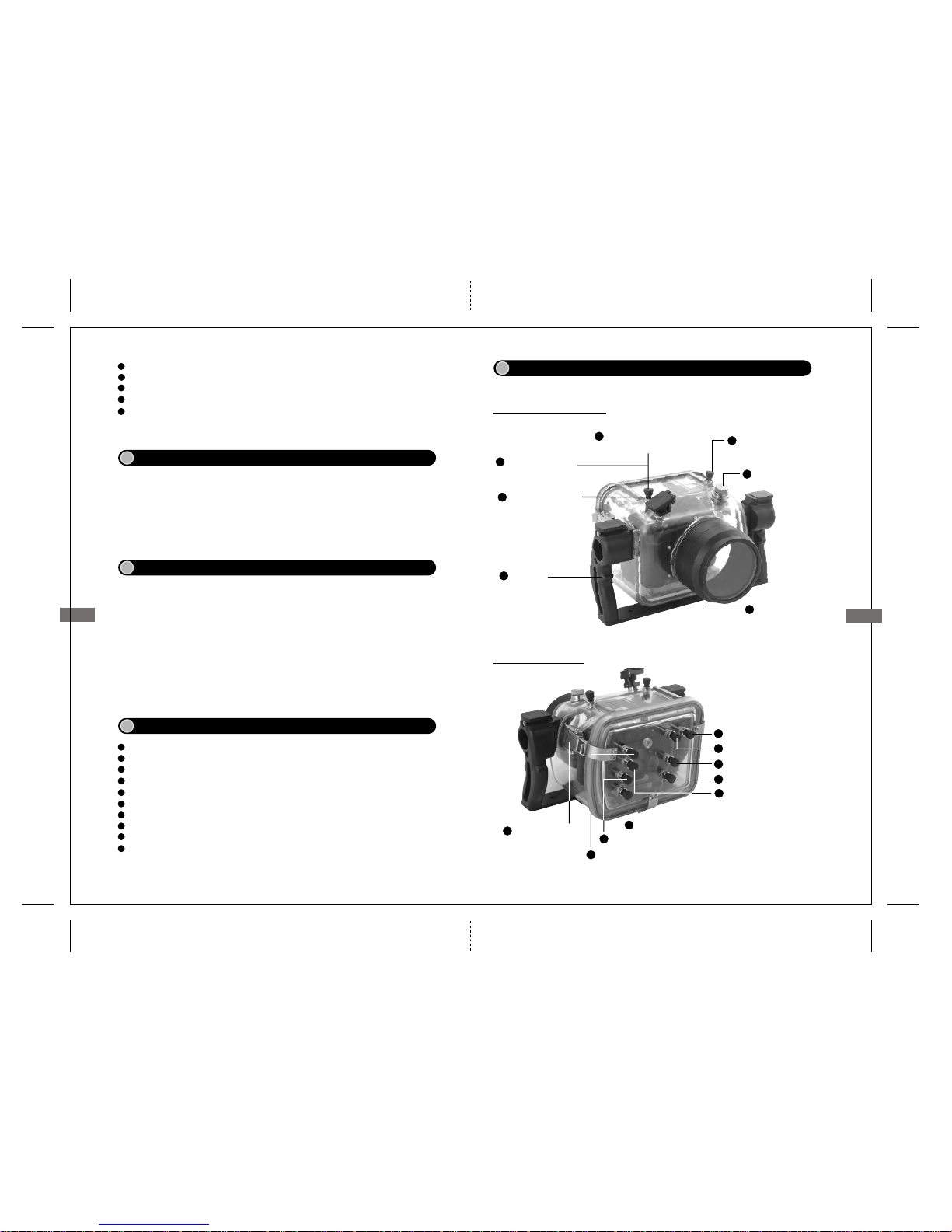
Housing Orientation
Front, Top & Left Side:
See pages 5-7 for control details
Back & Right Side:
3
Handles
Light Meter/Exposure
Compensation Control
6
Exposure Mode
Control Dial
7
1
Flash Sync Port
ON/OFF Control
Shutter Release
Control
4
LCD Control
Panel Illuminator
5
Delete Control
8
Playback Control
Command Dial
AE-L/AF-L Control
Four Way Multi-Control
10
11
12
9
White Balance/Image Control
13
ISO Sensitivity/Menu Control
14
Auto Bracketing/Advance E-mode
Control
15
Latching Buckles
16
Interchangeable
Port and mount
2
Page 4
5
Control Details:
The following is a partial list of the most common uses of housing and
camera controls. For the full list of camera functions and settings accessed
by each control, you should consult your D-50 camera instruction manual.
Please note that some of the FD-50 housing controls are designed to operate
more than one camera control. And the command dial and sub-command
dial will perform multiple functions when operated in conjunction with
other camera/housing controls.
1. Flash Sync Port:
Connect any standard five-pin Nikonos type sync cord to this bulkhead
connector.
Align the index dots to correctly position cord to seat in flash port.
Push down on cord to seat the O-ring seal, and make connection with
the five pins.
Tighten collar on sync cord to insure cord does not come loose or apart
while underwater or during use.
2. Interchangeable Port Mount:
3. Handles:
Allows the use of different ports to match different interchangeable
lenses for creative imaging control. Carefully check that both o-rings
mounted on the port thread areas are properly seated, clean and
lubricated prior to installing the lens port.
Ergonomically located for easy gripping and access to controls. Strobe
arms can be mounted on the base shoe on top of each handle.
4. ON/OFF / Shutter Release Control:
Rotate knob under shutter release lever to turn main power on or off.
Half depress to activate light meter and auto focus lock (AF-S mode)
Full depress to take picture.
5. LCD Control Panel Illuminator:
Push housing control button to illuminate main control panel backlight.
6. Light Meter/Exposure Compensation Control: Dual Control
Rotate housing control over camera Light Meter control.
6
Press button and rotate command dial to choose Matrix Metering, Center
Weighted Metering, or Spot Metering.
Rotate housing control over camera exposure compensation control
Press button and rotate command dial to choose amount of compensation.
7. Exposure Mode Control Dial:
Push down and rotate housing control to change camera’s main exposure
modes. Choose Manual, Aperture Priority, Shutter Priority, Program, or
any of several Scene Modes.
8. Command Dial:
Rotating dial independently changes Shutter Speeds in M or S exposure
mode.
Rotating dial independently while in P mode shifts the program exposure
into flexible program, and changes the combination of shutter speeds
and apertures.
Rotating while pushing other control buttons affects:
o Flash Mode
o Light Meters
o Exposure Compensation
o Auto Bracketing Set or Cancel
o Advance Mode
o ISO Sensitivity setting
o White Balance Mode
o Image Size
9. AE-L/AF-L Control:
Press and Hold the AE-L/AF-L button to lock exposure and focus prior
to recomposing a scene. The original exposure value and focus distance
will remain set after re-composition.
Press Up and Down buttons to scroll through Menu options.
Press Left and Right buttons to make menu settings and confirm settings.
Use Left and Right buttons in Playback mode to scroll through images
recorded on memory card.
10. Four-Way Multi-Control:
11. Delete Control:
Press Playback button to turn on LCD Monitor and show last image
recorded on card.
Use the Four-Way Multi-Control to scroll through images on card until
you find the one you want to consider for deletion.
Press Delete Button once to activate delete function.
Explanation 5 and 6 refer to the same button with multiple
controls.
Note
Page 5
7
8
12. Playback Control:
Press housing Playback button to activate LCD monitor in Playback
mode.
View any image on memory card by scrolling with the left and right
arrows on the Four Way Multi-Control.
Press housing Playback button once more, or depress shutter release
half way to turn LCD monitor off.
Press Delete Button a second time to confirm your decision to delete
the image shown in the LCD Monitor.
Press the Playback button again, or depress the shutter release button
half way to turn off the LCD Monitor and return to Shooting Mode.
Rotate housing control over camera White Balance control.
Press button and rotate Command Dial to choose Auto White Balance
Mode or specific Modes for the situation.
Press button and rotate Sub-Command Dial to choose a White Balance
Compensation value to deviate from the camera’s normal value setting
in each White Balance Mode.
Rotate housing control over camera Quality control
Press button and rotate Command Dial to choose Image Quality. Choose
from Raw, Fine, Normal, Basic, or Raw & Basic options.
Press button and rotate Sub-Command Dial to choose Image Size.
Choose Large, Medium, or Small Image size.
13. White Balance/Image Control:
14. ISO Sensitivity/Menu Control:
Rotate housing control over camera ISO Sensitivity control.
Press button and rotate command dial to choose from ISO sensitivity
settings between 200 and 1600.
Rotate housing control over camera Menu control
Use Four Way Multi-Control to navigate through menus and make
setting choices.
15. Auto Bracketing/Advance Control:
Rotate housing control over camera Auto Bracketing control.
Press button and rotate Sub-command dial to choose between two or
three frame exposure bracketing, and amount of change between each
exposure.
Rotate housing control over camera Motor Drive Advance control.
Press button and rotate command dial to choose between single frame
or continuous advance shooting modes, and self-timer settings.
16. Latching Buckles:
Provides positive closure to the housing and activates the gasket seal.
See below for directions on how to close.
Preparation of Housing
Mount Housing Port:
Clean & Lubricate Port O-ring [for Port O-ring only]
Prior to inserting camera in housing, it is recommended that Menu option
settings be made according to the preferences of the user. Most of these
choices are ones that will remain unchanged for most of the time while
diving, and therefore it will be more convenient and less time consuming
to make the settings prior to diving.
Makeing common or required camera settings.
In order to properly maintain the Port O-ring you must periodically
remove port O-ring from channel using only your fingers.
Push and lift the O-ring from its channel.
Do NOT use any sharp instruments, such as knives or dental picks,
to remove O-ring. You may accidentally cut the O-ring causing a
potential leakage.
Inspect the O-ring visually and by feel for any cuts, nicks, flat spots,
stretching, or any debris, such as sand, dirt, lint, hair, or other matter
that could compromise the integrity of the seal.
Clean O-ring by soaking in fresh water until all debris is removed.
Dry O-ring with a soft clean cloth. Be careful it does not leave any
lint on the O-ring.
Lubricate the O-ring with the supplied silicone grease. Do not over
grease the O-ring. It only requires enough grease to allow it to slip
into place and make a seal. It should be slippery and shiny but without
any abundance or build-up of grease. A teardrop amount is usually
sufficient for proper lubrication.
Inspect the O-ring channel for any debris or foreign matter that could
damage the O-ring or cause it to lose its seal.
Clean the O-ring channel using a damp cloth or Q-tip. Be careful not
to leave any lint behind.
Replace the O-ring in the channel by lifting it over the end of the port
until it sits in its channel. Be sure the O-ring is not twisted or deformed
and out of position in any way.
Mount the port on the housing body by aligning the threads on the
end of the port with the mount on the housing and screwing clockwise
until it is FULLY screwed in place.
Page 6
Use a clean wet cloth. Use only water to clean the gasket’s sealing
surface.
Do not remove the gasket unless there is evidence that there is a need
to clean the underside surface, or the channel it sits in.
If the gasket does need to be removed for cleaning or replacement, pull
up on the gasket tab to lift it out of its channel.
When replacing or changing gasket, begin by aligning the gasket tab
with its cutout slot in the housing channel. Work the gasket down and
into the channel around the full circumference of the opening. Be sure
it is completely seated in the channel for a proper seal.
Do not use any lubrication on this gasket. This is a compression seal
gasket, which is not affected by friction and does not require lubrication
for proper closure of the housing.
10
9
Note 1:
The FD-50 lens port uses 2radial O-rings for a watertight seal.
This is a different type of seal than used to seal the two main
halves of the housing itself. That seal is a compression gasket.
Radial O-rings are affected by friction when closing the seal,
as it rubs against a housing wall. Compression gaskets are not
affected by friction as there is no movement or rubbing against
any wall. It is a direct face-to-face seal. Therefore a radial Oring, such as the O-ring on the port, requires lubrication. The
main housing gasket, a compression seal, does not require any
lubrication. It only requires cleaning.
Note 2:
Lubrication of an O-ring does not improve the seal. It only
reduces the amount of friction on the O-ring when it is being
moved into sealing position. The amount of lubrication required
on the port O-ring is only enough to allow it to slip into place
without friction, so it does not twist or become dislodged. More
grease is not better, and could in some cases have a negative
affect if it is applied in large amounts to form a build-up that
could trap any debris or foreign matter.
Open Housing:
Release all three latches at same time, and lift off back half to open
housing.
Inspect and clean gasket:
Insert D-50 camera and lens in housing:
Mount camera and lens on the removable tray, using the tripod screw.
Slide the tray and camera into the housing tray slot. Make sure it is
completely inserted.
Slide the flash sync cord into the D-50’s hot shoe.
Align the housing controls with the corresponding buttons on the camera.
Take caution to insure the flat sync cord does not get caught in the
housing seal, by storing the slack alongside the left side of the camera.
Place housing back over front and align the complete mating surface
of the housing and the gasket, forming a proper seal.
Position all three latches over latch hooks in ready position.
Close all three latches at one time. If it is not possible to close all three
latches at the same time, close the bottom latch first, maintaining pressure
on the other side. Then close the two side latches simultaneously.
Inspect the gasket seal for proper closure. A complete seal can be visually
confirmed by looking for the black line made by the gasket around the
complete circumference of the housing
Take a Test Dive:
Make the first dive without camera in housing. This will give you
a chance to inspect the housing seal for proper closure. In this case,
any mistakes will not result in the loss of the camera.
Operate all controls under pressure in the water and inspect for watertight
seal.
Before all dives, immerse the housing in the camera rinse tank, and
press all buttons, to visually inspect for any leakage.
While descending on every dive carefully observe the housing . If you
see any bubbles rising from it or water entering surface immediately
while holding the lens port in a downward position. Once on dry land
carefully open the housing, take out the camera and dry it off if any
water is on it and check to see if there is any damage. Please inspect
the housing, rinse it in fresh water, dry it out and then take a dive
without the camera in the housing to check for leaks or other malfunctions.
Recommended Initial Camera Settings:
Set ISO to desired sensitivity setting. Use ISO 200 for the least amount
of noise (digital grain), when possible.
Set personal preferences by using camera menus.
Set D-50 on M (Manual) Exposure Mode
o This is to keep the built-in flash from trying to pop up in low ambient
light.
o The Auto Exposure Modes are not always appropriate for underwater
photography.
Set camera to AF focus mode
Use menu option to set camera for Focus Priority Release mode.
Set Camera to Single Advance Mode
Choose Matrix light meter. This will provide the most sophisticated
light meter for evaluating complicated and fast changing ambient light
conditions.
o The Matrix meter in the D-50 is a 1,005 sensor RGB light meter,
insuring the most accurate evaluation of the ambient light.
Page 7
11
12
Using External Strobes:
Compatible Strobes include any that can use the standard Nikon five pin
TTL sync. But these strobes will have to be used in the Manual Flash
Exposure mode.
Nikon Speed lights, such as the SB-600 and SB-800 can be used with
the D-50 in the TTL Auto Flash Exposure mode.
Connect the strobe sync cord to housing’s bulk head sync port. Align
the index dots on the cord and the bulk head connector. Push the cord
completely into the bulk head connector to seat the O-ring. Tighten the
collar to secure the cord in place.
The O-ring on the end of the sync cord should be inspected, cleaned
and lubricated in the same way the port O-ring was treated.
Using different arms are and tray systems can be accommodated by
attaching to the shoes on the top of the FD-50’s handles, or by attaching
to the base tray tripod mount. An adapter may be needed to physically
mount the arms to the housing handles.
Care & Maintenance
Before a dive:
Protect FD-50 from accidental impact damage. Secure the housing
and camera in a safe location on the boat or in any vehicle, so it does
not bounce around or bump into other cameras and housings. The
insulated bag mentioned above should be padded for this reason. Do
not leave the camera and housing in a camera rinse tank or bucket
on the boat in route to the dive site. Rough conditions can cause
impact damage and photo gear can often get tangled if too many
systems are together in the tank.
Protect FD-50 from sun and heat. This will reduce the possibility of
fogging due to condensation of the warm, moist air inside the housing
when immersed in the colder water. It also reduces the possibility of
sun damage to the polycarbonate. An insulated camera bag is a good
means of protection from overheating.
It is highly recommended that the housing be immersed in the rinse
tank or in shallow water before every dive and all its controls operated
to visually confirm that it is watertight before descending to depth.
Inspection of all user serviceable gaskets and O-rings should be a
routine pre-dive check. Required maintenance for the main gasket
involves cleaning only (if there is no damage requiring replacement).
O-rings may require lubrication. Use the silicone grease supplied
with the housing. Use only enough grease to lightly cover the O-ring
to reduce friction as it is put into its place and the seal is made. Overlubrication should be avoided and can result in debris accumulating
on the O-ring, and compromise the seal.
Rinse the housing with a strong stream of fresh water. Let it soak for
about 20 minutes to allow the water to dissolve any salt residues under
the controls or in tight spaces.
Operate all the controls while the housing is soaking to help dislodge
any salt residue that may be caught under or around the controls.
Dip the housing vigorously several times to agitate the final remains
of salt from the narrow areas or around the controls.
Detach sync cords, arms & brackets for overnight storage. This will
greatly reduce the possibility of electrolysis and corrosion that can
build up between similar metals on the housing.
Traveling:
After a dive:
Dry with a clean towel or allow drying naturally in a cool shady place.
Use protective hard case when traveling to protect the camera and
housing from impact damage.
If possible, do not check camera and housing case on airlines. Use a
hard case that can fit under the seat or in the overhead compartment
of aircraft, and hand carry.
Annual Maintenance and Storage:
Store housing in a cool, dry location when not traveling. . It is
recommended that the housing be stored with the two halves together,
but not with the latching buckles closed. This will take the constant
compression off the main gasket. It is also recommended that the
housing is not stored with the port mounted.
The seals on each of the controls should be replaced every couple of
years or more often if needed. The best indicator of the need for
replacement is if the controls become harder to operate due to a build
up of salt or corrosion.
The housing’s main gasket and port O-ring should be replaced every
year or more often if used frequently. The frequency of replacement
depends on the user’s inspection of these seals and their condition at
the time. If in doubt, it is always better to change them in order to not
take the chance of flooding the housing.
Basic Shooting Techniques:
Practice handling the FD-50 on land.
Getting familiar with the location and movement of all the controls
and how the changes in settings can affect your image is an important
part of the process. It is better to learn the basics of the camera’s
operation on land, rather than when first underwater. It is faster to
operate the camera out of the housing and you will not have the limited
time frame as you would if you were underwater.
Page 8
14
13
Focusing and Shutter release control:
Get used to operating this control on the camera in both half depress,
and full depress movements. You will frequently depress the shutter
release only half way to activate the exposure meter and auto focus
to preview the shooting conditions and make setting changes. Once
you get the feel for operating the camera control directly, you can then
try it in the FD-50, using the housing’s controls in the same manner.
Compose and view exposure information display. It is very important
that you become familiar with the information display in the viewfinder
so you can make proper exposure settings and know what other settings
have been made. You will use this often and it is good to become
familiar with it before attempting to read it underwater. Also practice
composing and focusing the camera by eye, before using it underwater
to get the feel for this operation as well.
Use the viewfinder eyepiece:
It is important to vary each shot by changing exposure settings or
composition. This will give you a good sample of shots from which
to select the best one.
Take lots of shots of any subject or scene
When locking in the exposure value of the background before recomposing and taking the photo.
Sometimes it is good to operate the AE-L button:
There are three light meters in the D-50; Matrix, Center Weighted,
and Spot. Read the D-50 instruction manual for complete descriptions
on each of these meters and when to use each. No matter which one
you choose, they all help guide you to the proper shutter speed and
aperture combination for proper ambient light exposure. Where you
aim the meter is also important. In underwater photography, it is
important to remember to aim the meter at the background water or
“sky” to get the proper exposure information. It is often necessary to
gather this information, make your exposure settings, and then recompose the scene before shooting.
Using the camera’s light meter to determine ambient light:
Utilizing each housing control to properly and efficiently change
camera settings. Some controls only require a straight pushing
movement, while others may require pushing and rotating
simultaneously to operate.
Familiarize yourself with the movements required:
Changing Exposure Settings:
Using the camera in its Manual (M) Exposure Mode gives you the
ability to change either shutter speeds or apertures to control the
exposure the way you want. Get used to making these changes while
your eye is in the viewfinder and you are referencing the LCD display
for guiding you in the exposure process. The command dial is set to
change shutter speeds, and the sub-command dial is set to change
apertures. Practice operating each of these controls so they become
instinctive in operation.
The ISO Sensitivity setting on the camera:
This is the same as the film speed that photographers set on film
cameras, with one small difference: There is no film. This setting is
the equivalent of the film speed you would normally set. The higher
the ISO sensitivity number, the more light is captured and the brighter
the image. Higher ISO sensitivity numbers have more “Noise”, a term
that is the digital equivalent of grain in higher speed films. Try starting
out with a lower ISO sensitivity such as ISO 200 if the lighting
conditions permit.
This will improve the effectiveness of your strobe in restoring lost
color. It will also expand the sharpness of the image by reducing the
amount of backscatter between the lens and the subject.
Get close to you subject when shooting underwater
Those that are easy to approach and will not scare off readily when
you approach. Choose subjects that will result in a large image size.
This will make a more dramatic image.
Begin by choosing subjects
Change F/Stops and shutter speeds to “bracket” your exposures
This will give you a range of image exposures, from which you can
choose the one that you like the best. It improves the probability of
getting a good shot.
This will restore the vivid colors lost through selective light absorption.
Get to know the full manual power rating of your strobe, by shooting
at a constant distance from an average reflective subject, and take
several shots at different F/stops.
Use flash all the time
Practice depressing the shutter release half way, and hold the focus
until you are ready to record the image. If you are shooting a moving
subject, it may be helpful to focus lock on a nearby part of the coral
reef and wait for the subject to enter into your plane of focus.
Focus lock on your subject
Page 9

The Fantasea FD-50 has an interchangeable port system that will
accommodate a wide variety of SLR lenses for use underwater. These
ports include:
Standard Flat Port:
This port will accommodate the 18-55 mm zoom lens in its wide
angle 18mm position. This lens is very popular and is the most
common lens first purchased by D-50 owners. It does not include a
manual zoom control. It is meant for use in only one position.
A very popular port for the workhorse 60mm micro Nikkor lens. This
lens and port is the ideal combination for capturing the widest variety
of fish identification portrait shots in a life-size reproduction.
60mm Macro Port:
105mm Macro Port:
The micro Nikkor is the best tool for capturing the tiny and shy marine
subjects. When it is not possible to closely approach your subject, the
lens will still offer life-size image reproduction, but with a longer
working distance.
5” Dome for Nikon 16 mm or Sigma 15mm:
For distortion free use with wide-angle lenses, having a focal length
of 20mm or more. Some Zoom lenses can be used with this port, but
may require a diopter to allow it to focus accurately.
Fantasea FD-50 Warranty:
The FD 50 includes a one-year limited warranty for defective parts which
the manufacturer will replace.
See separate insert page regarding the unique FD –50 anti flooding program
by DEPP and the FD –50 Accessory Products page.
-
Flood Insurance:
Every Fantasea housing includes a one-year flood insurance policy.
Supplied by the Divers Equipment Protection Program (DEPP), this
insurance policy acts as additional protection to the warranty and is good
for one year. If your Fantasea DSLR housing experiences water leakage
in this period of time you will be compensated for the loss of the camera
body only. Only a small shipping charge will apply. All insurance policies
are automatically activated at the time of purchase.
15
Page 10

All owners must complete the on-line product registration form, by going
to www.fantasea.com and go to the Customer Support area on the left side
and click the banner titled Warranty and Flood insurance, click on the
link at the top of the page labeled “Housing Product Registration, you
will be taken to this page http://www.fantasea.com/registration.asp where
you can complete the form and register your housing purchase. Failure to
register the product within 30 days of purchase will result in a shorter
period of insurance coverage for your housing and may in the end cancel
the flood insurance coverage all together. Also, you must keep the original
sales receipt of your purchase, which must be submitted in the event of
a claim: include it in the box and send it along with a photo copy of the
bill of sale to Fantasea Products. To make a claim go to the same page
and click the banner link: For DEPP anti flood insurance
claims please click here :
http://www.fantasea.com/Claims.asp
Fantasea Authorized Service & Repairs:
U.S.A.
Underwater Photo Tech
16 Manning St.
Derry, NH 03038.
U.S.A.
Phone: +1 603-432-1997
Fax: +1 603-432-4702
[email protected]
Fantasea Line Contact Information:
Fantasea Holdings Ltd.
[email protected] or [email protected]
www.fantasea.com POBox 234, Hofit, Israel Fax 972 9 8663262
Europe:
U/W Foto Service
Eichendorffring 16 ,
56414 Salz
Germany
Phone: +49 6435 7762
[email protected]
16
 Loading...