

Page 1
GENUINE REMOTE ENGINE START
USER’S INSTRUCTIONS
Vehicle:MAZDA CX-5
Parts number
Thank you for purchasing a genuine Mazda accessory.
Before use, be sure to thoroughly read these instructions.
Please read the contents of this booklet in order to properly use the Remote Engine Start.
Your safety depends on it.
After using this instruction manual, store it in a place where it can be easily located.
Note, consult your authorized Mazda dealer, or a dealer appointed store, for proper
vehicle installation of the Remote Engine Start.
If the vehicle equipped with this product, or the product itself, is sold, transferred or
loaned to another party, be sure to give this instruction manual to the new owner, so he
or she can use this product safely and correctly.
<Safe and correct use of the product>
Various warnings and cautions are displayed in this manual to assist you in the safe and
correct use of the product and as precautions against you or others being injured, or the
product being damaged.
Depending on the degree of possible injury or damage that may be incurred,
precautionary items have been divided into ‘Warnings’ and ‘Cautions’ and illustrated with
symbols to depict the nature of the precautionary content.
WARNING
CAUTION
ADVICE
NOTE
A WARNING indicates a situation in which serious injury
or death could result if the warning is ignored.
A CAUTION indicates a situation in which bodily injury or
damage to objects, or both, could result if the caution is
ignored.
Always follow the ADVICE noted to ensure vehicle safety
and performance. Vehicle damage could result, or proper
performance may be compromised if the advice is
ignored.
A NOTE indicates information or a point related to
vehicle usage. Vehicle damage could result, or proper
performance may be compromised if the note is ignored.
:C930 V7 620
GE
No.:ZZ092-00640
Page 2

CONTENTS
1. Remote Engine Start features ............................................................................... 3
2. Safety precautions ................................................................................................3
3. General information............................................................................................... 6
4. Operating precautions........................................................................................... 7
5. Part names............................................................................................................ 9
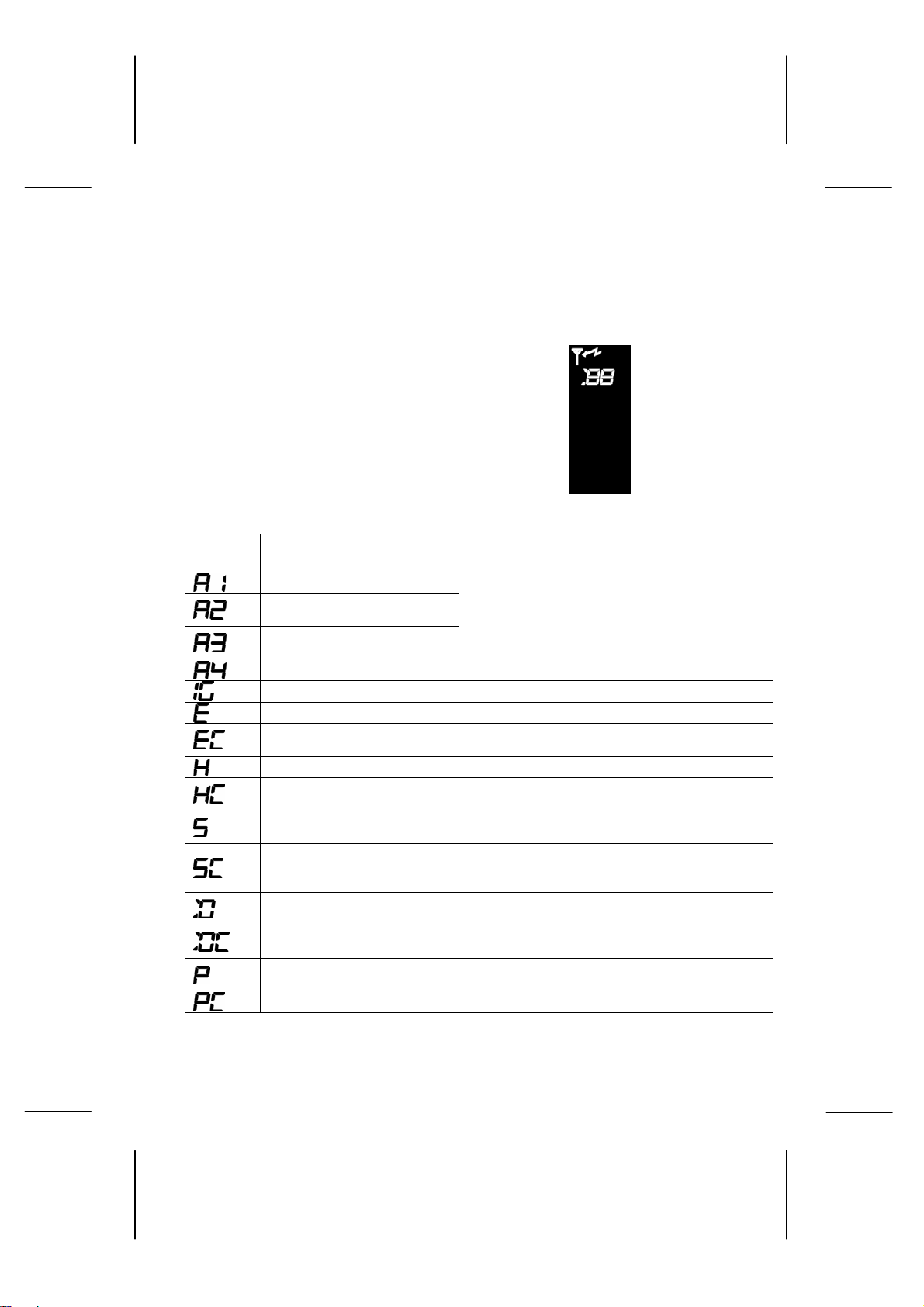
6. Display ................................................................................................................ 10
7. Basic functions for Remote Engine Start ............................................................. 11
8. Low battery warning & replacement directions.................................................... 13
9. Basic operations.................................................................................................. 13
9-1. Engine start operation...................................................................................... 15
9-2. Engine stop operation ......................................................................................18
9-3. Warm up time check ........................................................................................ 20
9-4. Vehicle status check......................................................................................... 21
9-5. Warm up time settings ..................................................................................... 22
9-6. Engine start operation with rear defrost start Up.............................................. 23
9-7. Car find function............................................................................................... 25
10. Troubleshooting................................................................................................. 26
11. Warranty & Servicing......................................................................................... 27
12. Specifications .................................................................................................... 28
2
Page 3
1. Remote Engine Start features
z The Remote Engine Start allows the user to start the engine of a vehicle
from a remote location using a remote control.
z The user can turn on the air conditioner / heater beforehand so the cabin
of the vehicle can be cooled or heated ahead of time.
z The user can check the status of the vehicle from a remote location.
2. Safety precautions
WARNING
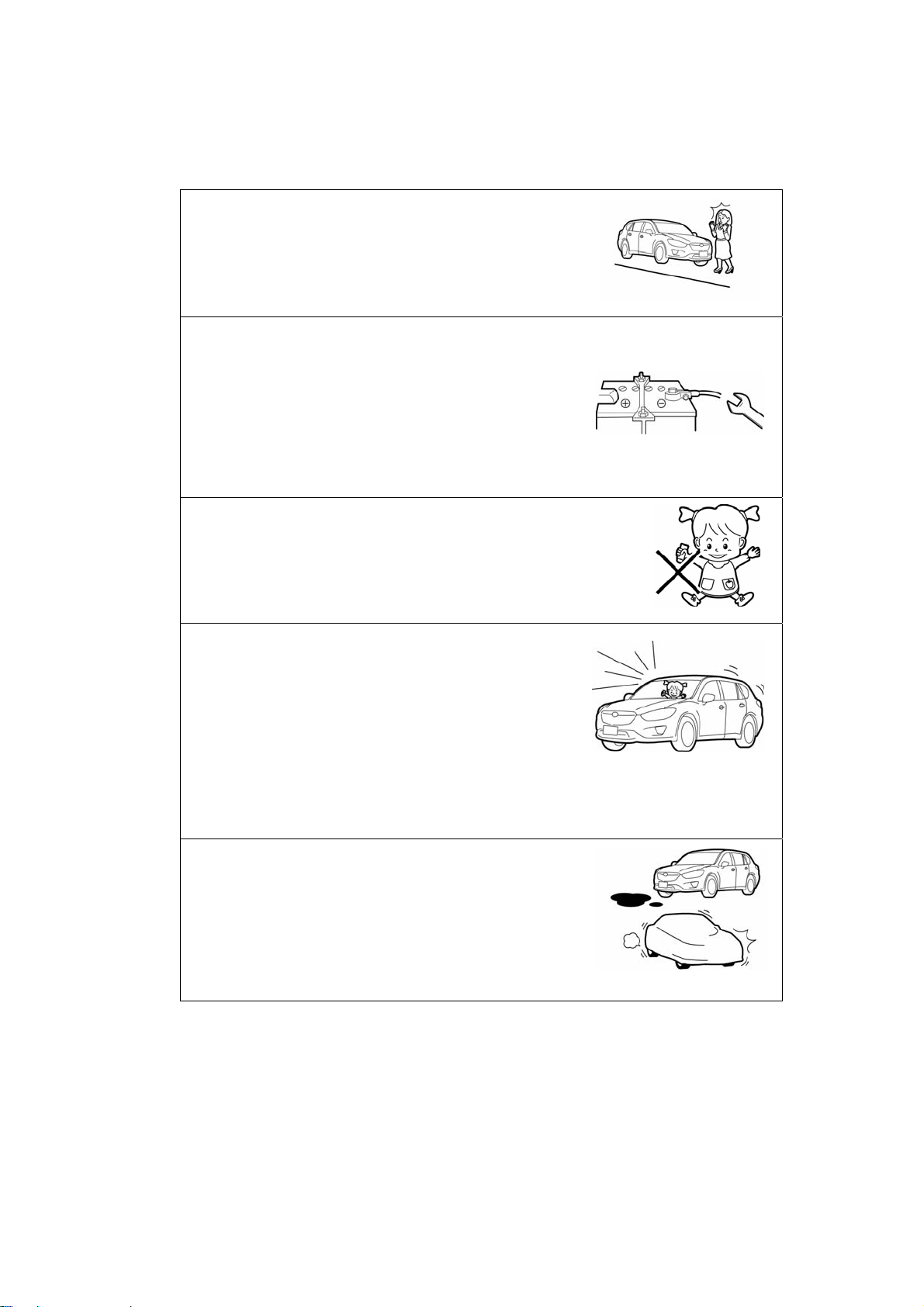
Do not install this device on a vehicle equipped with a
manual transmission.
● Only install this device on designated vehicles which
the harness fits.
● This device can only be installed on vehicles
equipped with AT / CVT. Do no install this product on
a vehicle equipped with a manual transmission
because it is hazardous.
Do not start the engine while inside an enclosed space
or garage.
● Never start up the engine while inside an enclosed
space where the exhaust fumes can build up, such
as a poorly ventilated garage, an underground
parking garage or a parking tower. The exhaust
fumes are hazardous and can cause poisoning or
intoxication.
Ensure that the periphery of the vehicle is safe.
● Use this device only where you can thoroughly
check that the periphery of the vehicle is safe. In
particular, using the device while a child or pet is
close by can result in an unexpected accident.
Do not disassemble or modify this device.
● Never disassemble or modify this device, or install it
in a location not specified in this manual. Otherwise,
it may not operate correctly and/or may result in an
accident or breakdown. In addition, this situation is
not covered under warranty.
3
Page 4
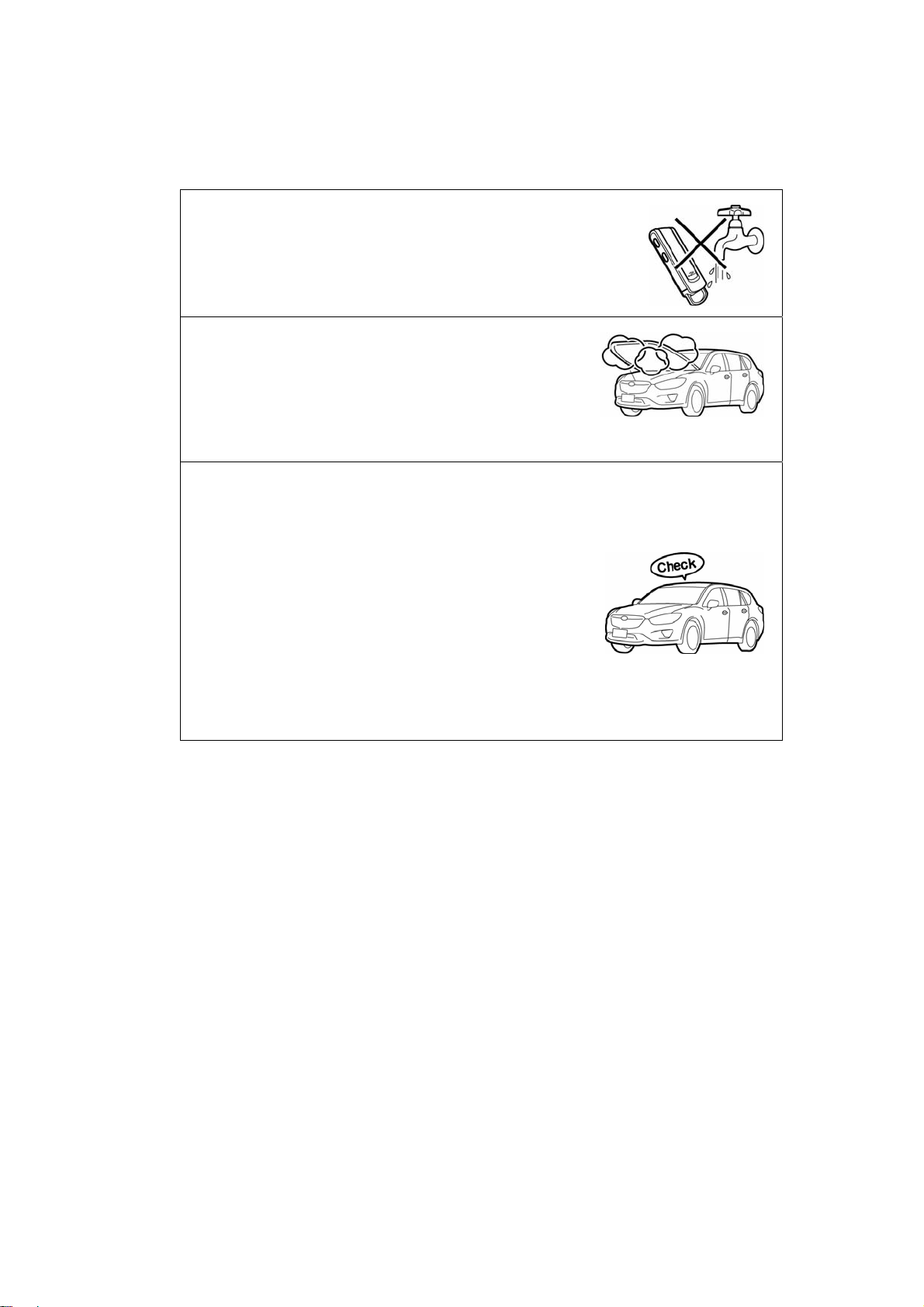
Do not start up the engine using the Remote Engine
Start when parked on an incline.
● If the vehicle were to move unintentionally due to the
engine vibration, jolt, etc., it could result in a serious
accident.
Performing safe maintenance and inspection.
● When performing vehicle inspection and
maintenance, remove the (-) terminal on the vehicle
battery. Never start up the engine with the remote
control during inspection or maintenance at a gas or
service station, etc. Otherwise, an accident may
occur, such as getting a hand or clothes caught in
the rotating parts. Do not perform inspection or
maintenance in the engine compartment while the
hood switch is pressed.
Keep the remote control in a safe and secure place.
● Keep the remote control out of the reach of children.
Otherwise, they may swallow the lithium battery
accidentally and choke.
Do not operate this device while other people are inside
the vehicle.
● In order to prevent an unexpected jump start, etc.,
never start the engine while a pet or someone
(especially children) is inside the vehicle. Stopping
the engine automatically using the Remote Engine
Start settings is hazardous (while someone is inside)
because the temperature inside the vehicle may
become too hot. In addition, there is also a risk of
children accidently pressing the remote control
switch and setting the temperature too high or too
low.
Fire prevention.
● Do not start the engine when the vehicle is near
something flammable (oil or dry grass). Otherwise,
the high temperature from the exhaust fumes or
exhaust pipe could cause a fire.
Do not start the engine while the vehicle is wrapped
with a body cover. Otherwise, the high temperature
from the exhaust fumes or exhaust pipe could cause
a fire.
4
Page 5
Do not pour water on the remote control.
● The remote control is water resistant for exposure
during daily life, but it may break down if submerged
in water or if water gets inside the device.
Do not perform standard inspection and maintenance
right after warming up the engine.
● Performing inspection or maintenance before
operation and immediately after warming up your
vehicle could result in a burn injury. First, wait 5
minutes once the engine has stopped. Then, after
checking all the parts for heat hazards, proceed with
the inspection and maintenance.
Check points when the vehicle is parked.
● Perform the following safety checks thoroughly when
the vehicle is parked to prevent potential accidents
when starting the engine.
• Engage the parking brake.
• Put the shift lever in the “P” position.
• Be sure there is no advanced or smart key inside the
vehicle.
• Close all doors and windows.
• Lock the doors.
• Check that the hood is closed.
• Turn off the windshield wipers.
• If the vehicle is equipped with automatic lights, turn off
the automatic light settings.
• Be sure that the steering lock is engaged.
5
Page 6

3. General information
-Laws in some communities may restrict the use of remote starters. For
example, some laws may require a person using the remote start to have
the vehicle in view when doing so. Check local regulations for any
requirements on remote starting of vehicles.
-This device complies with part 15 of the FCC Rules.
Operation is subject to the following two conditions:
(1) this device may not cause harmful interference, and
(2) this device must accept any interference received, including
interference that may cause undesired operation.
-This device complies with industry Canada licence-exempt RSS
standard(s).
Operation is subject to the following tow conditions:
(1) this device may not cause interference, and
(2) this device must accept any interference, including interference that
may cause undesired operation of this device.
-Consult your authorized Mazda dealer for installation of the remote control
engine starter system.
CAUTION
-FCC WARNING
Changes or modifications not expressly approved by the party responsible for
compliance could void the user’s authority to operate the equipment.
6
Page 7

4. Operating precautions
Usage Environment
• The remote control signal may not reach the receiver if there are strong radio
waves transmitting nearby, or if there are obstacles blocking the signal.
• The engine may be slow to start during severe cold weather conditions.
• After performing an engine start or stop operation, or after performing a
vehicle status check operation, there are times when the remote control
may not receive a response signal from the vehicle, even though the control
operation such as engine start up is actually being executed.
Vehicles with Remote Control Door Lock Function
• The access key, request switch and door handle operations for remote
control (radio signal) keyless entry or for advanced keyless entry systems
may not work or receive the signal sent from the vehicle remote control, etc.,
due to interference caused by the engine running (started by the
Engine Start
vehicle remote control, etc., when the engine is stopped.
Vehicles with Automatic Lights
) or by engine noise. Therefore, perform the operations on the
Remote
• When vehicles equipped with automatic lights are set to the “AUTO”
position for the light switch, the lights turn on if the engine is started at night
with the remote control. However, if the engine automatically stops after
warming up, the lights will also turn off at the same time to prevent the
battery from draining. However, to avoid light interference, set the automatic
light switch to the “OFF” position when using the remote control to turn on
the engine at night.
Do Not Perform Unnecessary Idling
• To help protect the environment, conserve energy and avoid inconveniencing
others, do not perform idling when it is unnecessary or longer than necessary.
7
Page 8
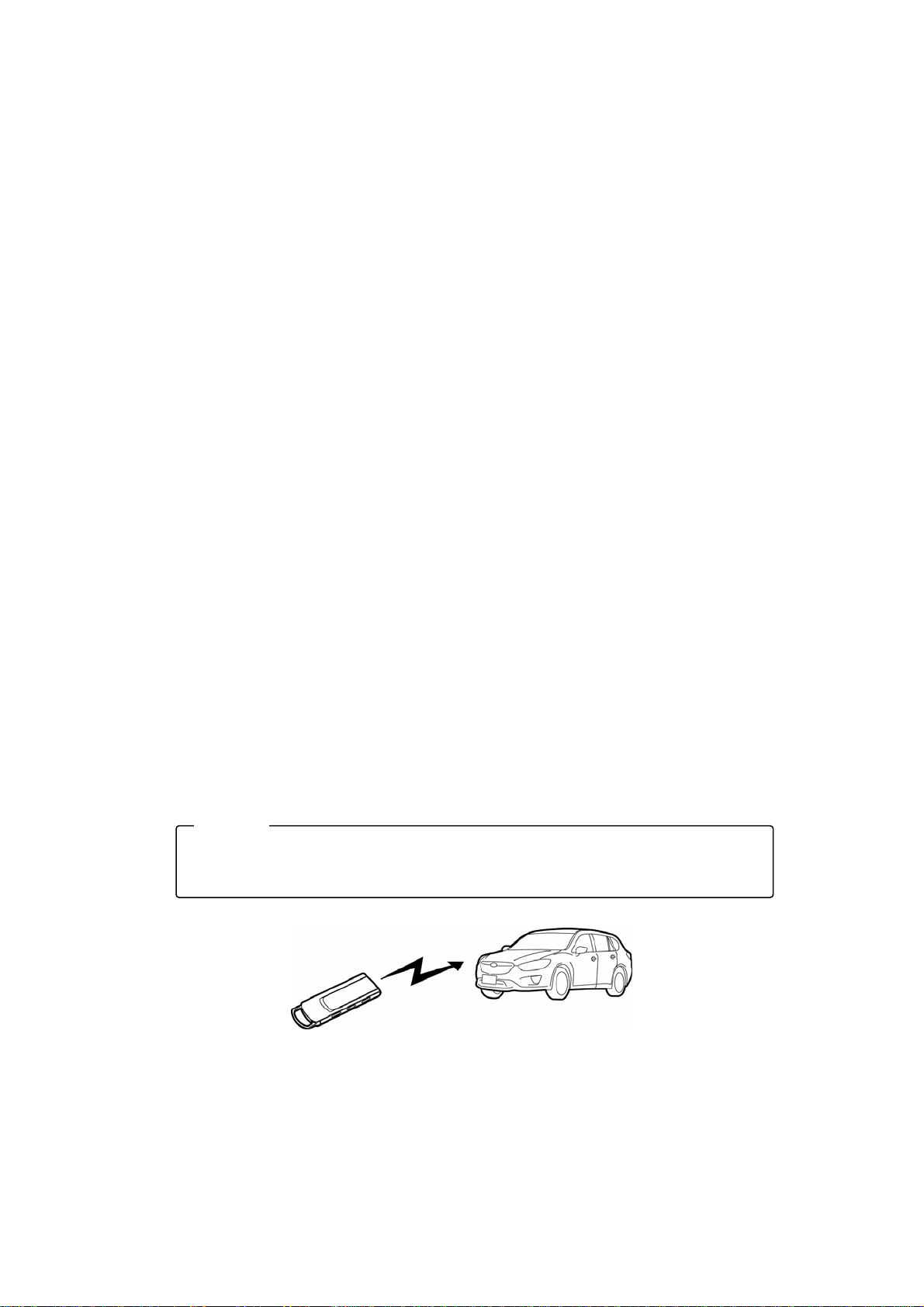
g
Remote Control Handling Instructions
The remote control is a sensitive electronic device similar to a cellular telephone.
Please follow the handling instructions below to avoid damage to or breakdown of the
remote control.
● Avoid storing or using the remote control in places that expose it to direct sunlight,
places that have high humidity, places with extremely high temperatures (on top of
the dashboard, etc.) or places with extremely low temperatures (leaving inside the
vehicle while parked at ski resorts, etc.).
● Do not store or use the remote control in places where it comes into direct contact
with water.
● Avoid exposure to strong impacts such as dropping it on the floor or hitting it
against something hard.
● If the remote control gets very dirty, use a cloth soaked in a watered-down, mild or
neutral detergent, ring out the liquid solution and wipe down the remote control.
(Never use benzene, thinner or chemically treated cloth/wipes.)
● Avoid attaching a lot of keys to the key ring on the remote control, or sitting down
while the remote control is in your pocket, as it can cause the remote control to
deform and may result in damage.
● While carrying the remote control, if the keys, etc., come into contact with a
vehicle, it can lead to remote control breakdown or malfunction due an
electrostatic discharge. Therefore, be careful of this risk during time periods when
electrostatic discharges occur frequently.
● Be sure that the battery cover and clasp are securely locked. Otherwise, if water
accidently gets inside the internal part of the transmitter, it can cause breakdown.
● In places where the use of electronics is restricted, such as on board airplanes or
inside hospitals, do not take out the batteries and use this device.
● The remote control can negatively impact electronic and medical devices.
● Be sure to follow the instructions and rules posted inside medical clinics or
facilities regarding the use of electronic devices.
● If the remote control is used on board airplanes, where usage is restricted, you
may be subject to punishment due to airline rules and regulations.
ADVICE
• Depending on the surroundings and how the remote control is held, the minimum distance
required for the signal transmission varies. Generally, if the remote control is directed toward
the vehicle when transmittin
the signal, it should successfully transmit from far away.
8
Page 9
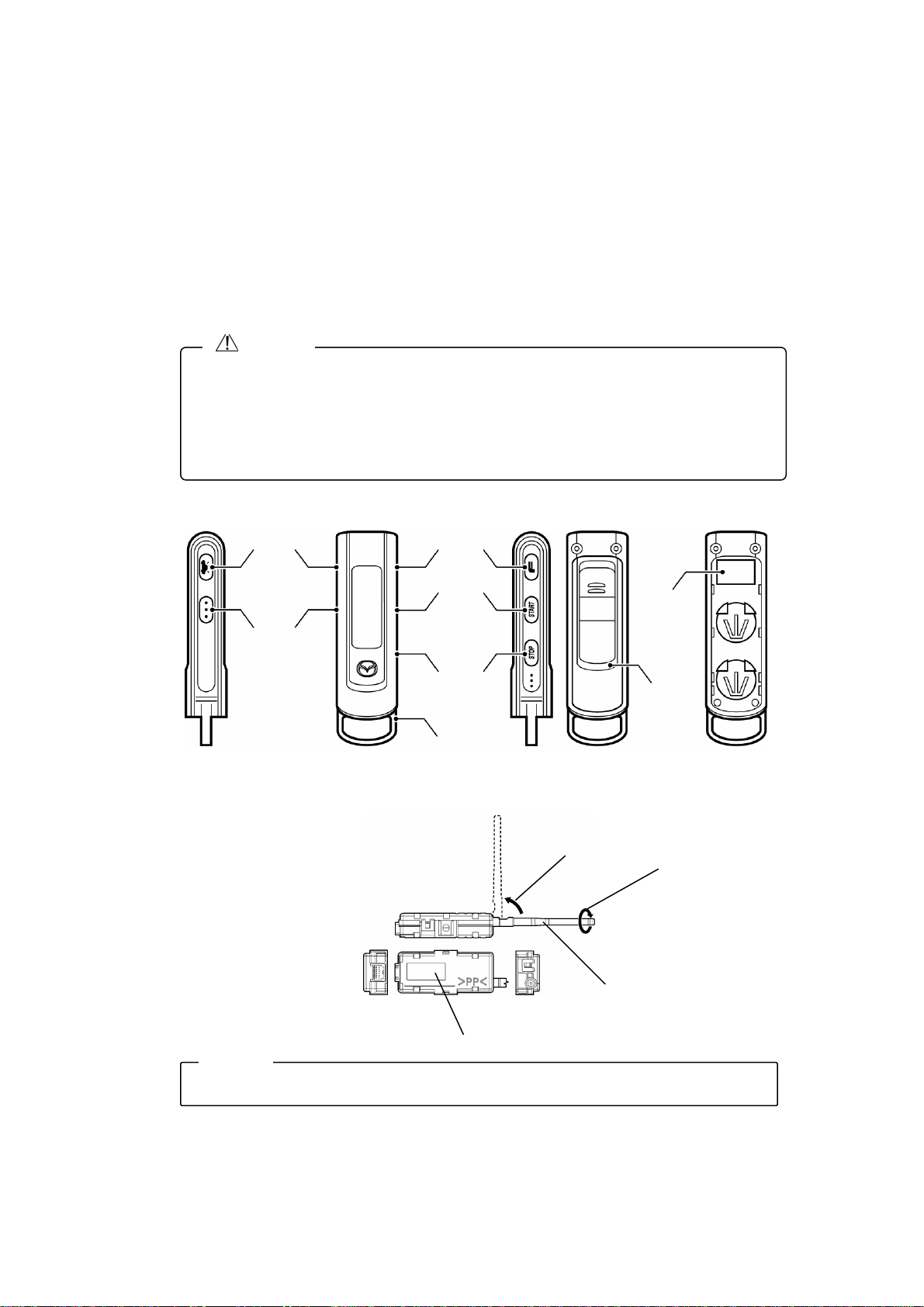
5. Part names
Remote Control
・ Keep the remote control out of the reach of children. Otherwise, they may swallow the
・ Do not drop the remote control or hit it against something hard. Otherwise, it can result in
・ Pour watering on the remote control, or submerging it, can cause breakdown or
Controller
• The location for the controller installation varies depending on the vehicle model.
CAUTION
lithium battery accidentally and choke.
breakdown or malfunction.
malfunction.
Side Front Back Side
Registration
Note
Car find
switch
switch
Function
Start switch
Stop switch
Key ring
*<Confirm method of FCC/IC Label>
The FCC/IC label appears when the
Battery Cover is removed.
Rotates 90º.
Back
Confirm method of FCC/IC Label
FFC/IC
Label*
Battery
cover
Rotates 360º.
Antenna
Sends and receives signal
transmission to and from
the remote control.
9
Page 10
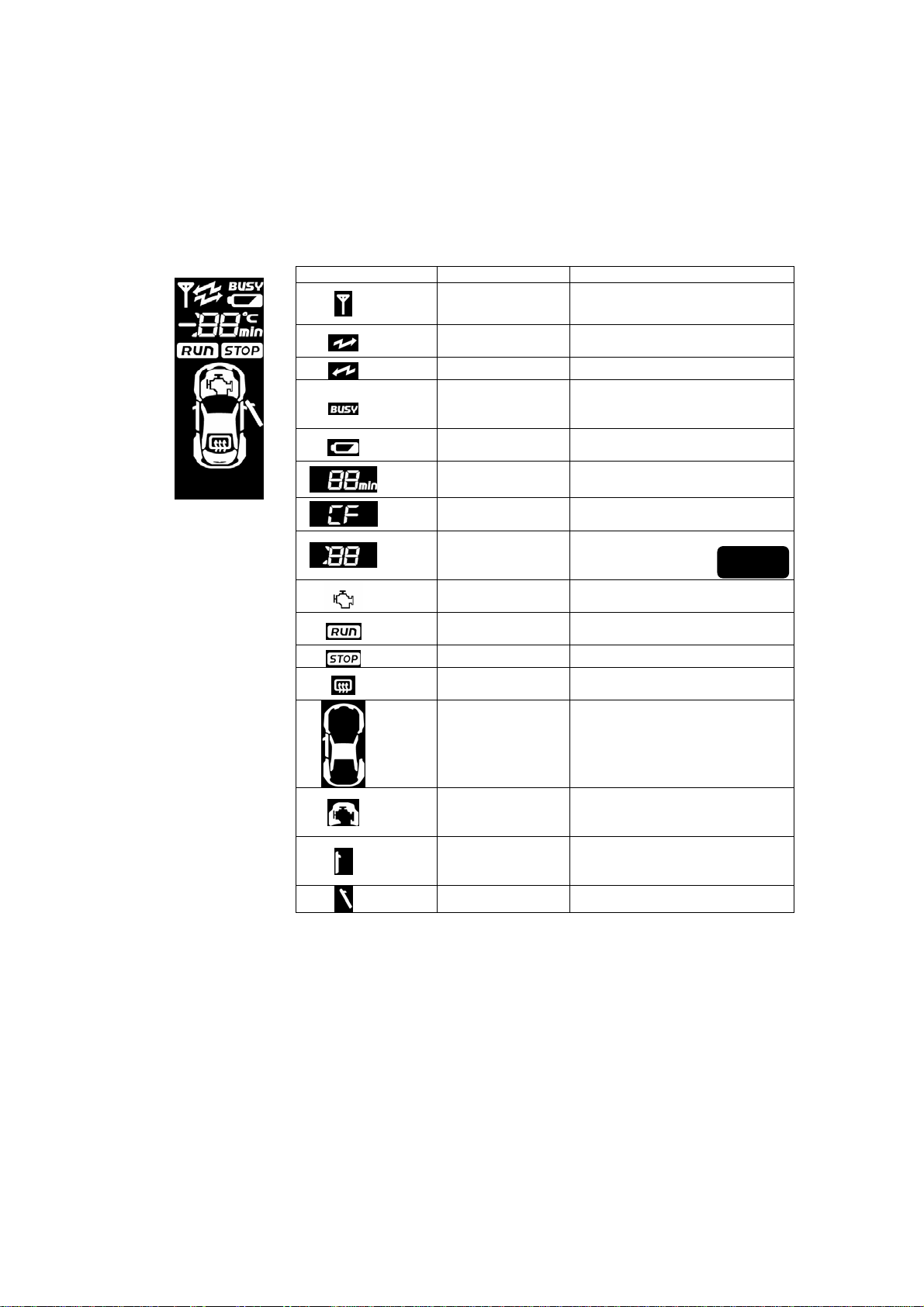
6. Display
Display Name Description
Antenna mark Turns on when sending or
Send mark Flashes when sending a
Receive mark Flashes when receiving a signal.
Send error mark Turns on when a signal for the
Battery mark Turns on when the battery life is
Time display Displays the engine warm up
Vehicle find display Turns on when conducting the
Error display An error description will display
Engine mark Turns on when the engine starts
RUN mark Turns on when the engine starts
STOP mark Turns on when the engine stops.
Rear defrost mark Turns on when the rear defrost
Vehicle mark Turns on when performing a
receiving a signal.
transmission signal.
same frequency band is being
used.
low.
time.
vehicle find operation.
when an error occurs.
up and is running.
up and is running.
is running.
sending operation.
⇒p.16
Hood mark Turns on when performing a
Door close mark Turns on when performing a
Door open mark If any door is open, it turns on.
sending operation. When the
hood is open, it does not turn on.
sending operation. When all
doors are closed, it turns on.
*For further details on the display description, refer to the appropriate
section in the manual.
10
Page 11
E
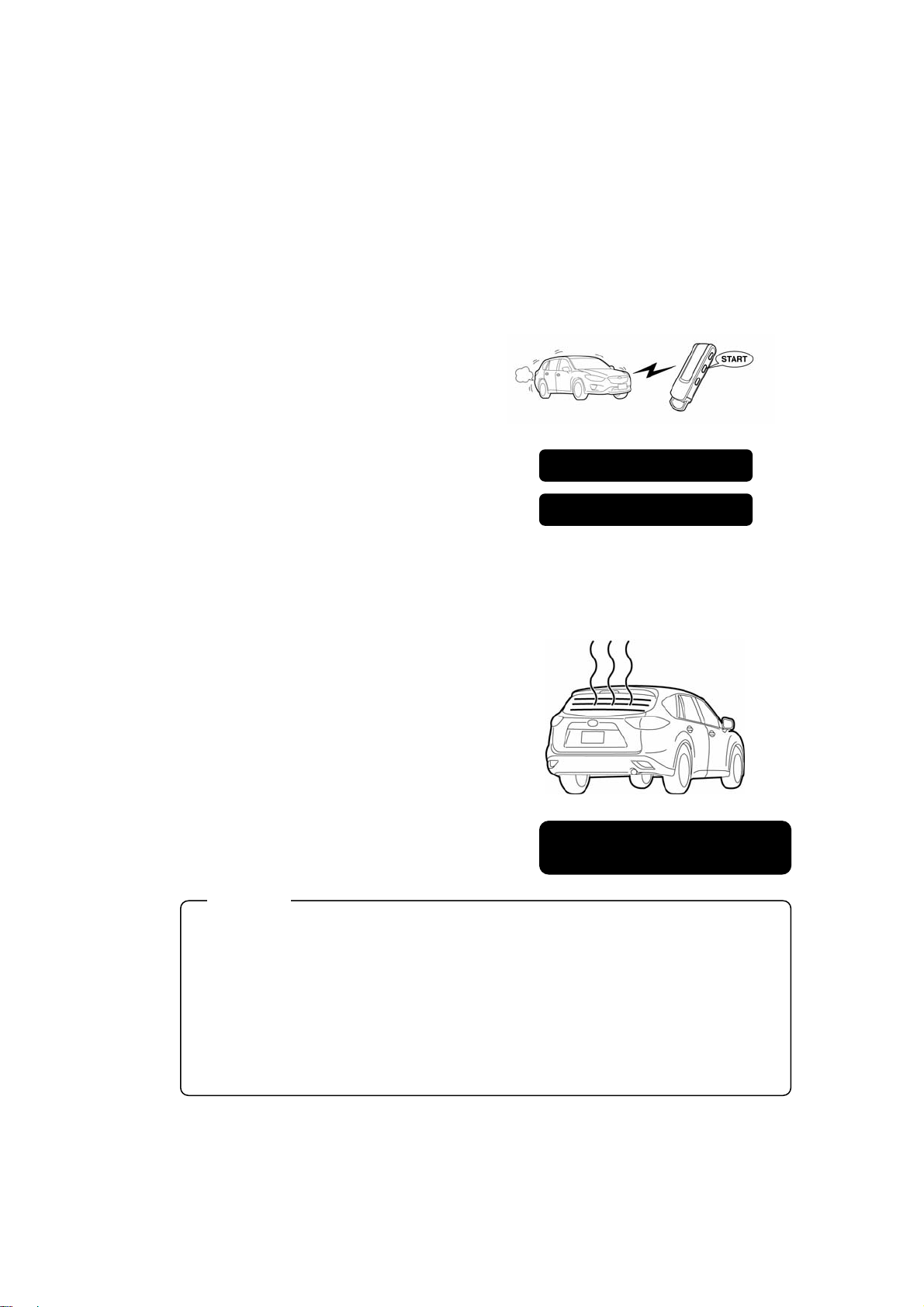
7. Basic functions for Remote Engine Start
Engine Start & Stop Function
The remote control is equipped with
engine start, engine stop and
automatic stop (set with timer)
functions. In addition, the engine
start operation will perform when
conditions outlined on page 14 are
satisfied. The air conditioner /
heater can be turned on beforehand
so the cabin of the vehicle can be
cooled or heated ahead of time.
Rear Defrost Function
The rear defrost turns on in the
following situations.
• When the temperature inside the
vehicle cabin is less than 5ºC, 7
seconds after the engine start
operation performed on the Remote
Engine Start.
• When the rear defrost operation is
performed on the remote control.
ADVIC
・ The internal temperature of the vehicle cabin varies slightly depending on the
installed location of the controller.
・ The rear defrost will automatically stop when the engine stops.
・ The rear defrost will automatically stop after 15 minutes of operation on some
vehicle models.
・ When the internal temperature of the vehicle cabin is less than 5ºC after 7 seconds
from the engine start, the rear defrost will not turn on automatically. In this situation,
use the remote control to turn on the rear defrost.
・ The rear defrost cannot be turned off using the remote control.
・ On some vehicle models, the vehicle indicator light does not turn on when the rear
defrost is turned on with the Remote Engine Start.
Engine start → p.15
Engine stop → p.18
Directions for rear defrost operation
on remote control → p.18
11
Page 12
f
(
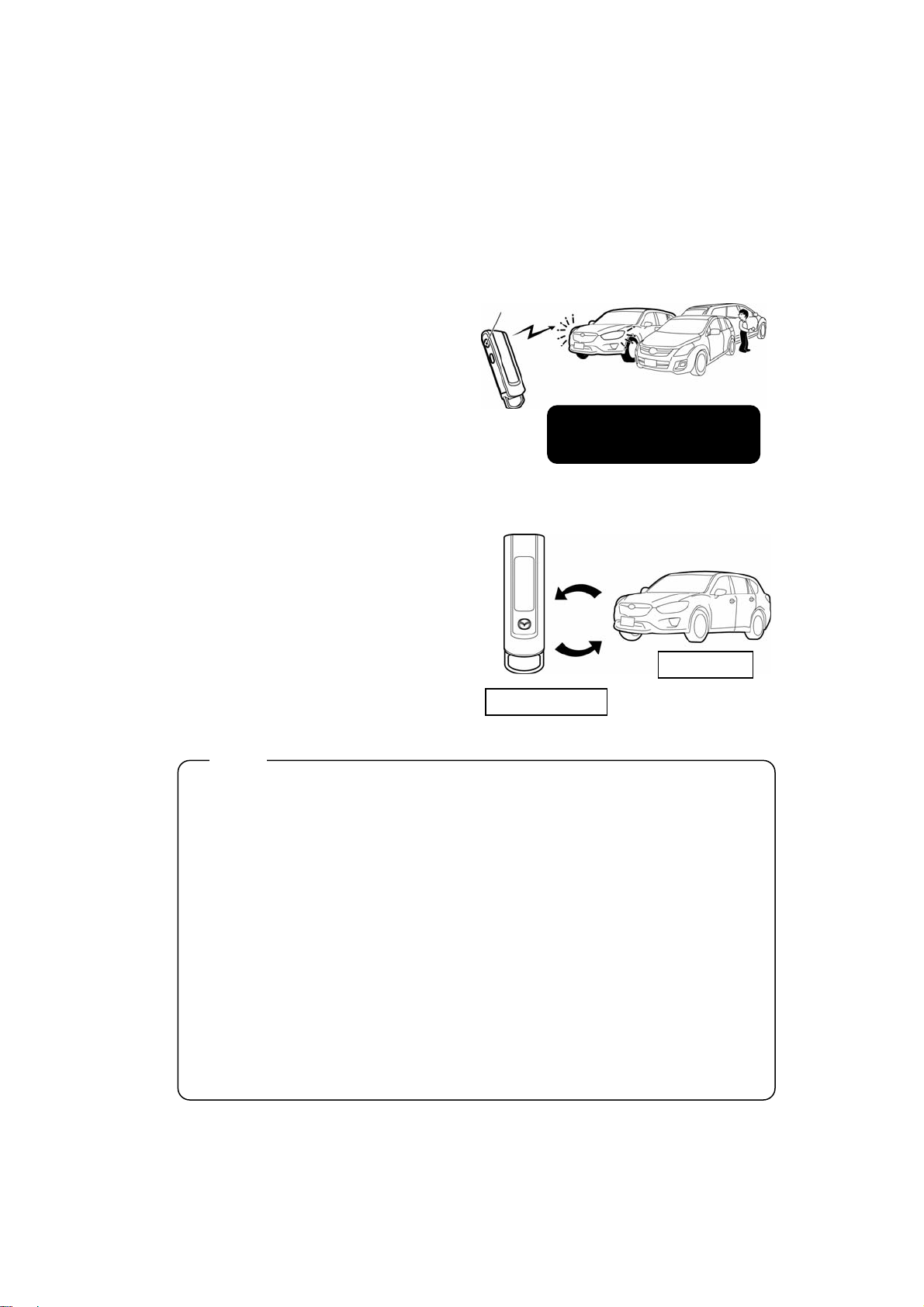
Car Find Function
If the car find operation is
performed on the remote control,
the hazard lights will flash twice and
the horn will sound twice so you
can confirm the vehicle’s location.
This function is convenient when
looking for your vehicle in a large
parking lot, etc.
Answer Back Function
This device conducts bidirectional
communication between the remote
control and the controller (vehicle
side). The user can check the status
of the operations: engine start,
engine stop, warm up time, internal
vehicle temperature and rear defrost,
using the LCD monitor on the
remote control.
Note
Radio Act Regulations
1. When there is a signal being transmitted that is close to the frequency band used
by this device in the surrounding area, transmission between the remote control
and controller shall be restricted due to the regulations imposed by the Radio Act.
In this situation, the remote control will display a send error and/or a receive error.
2. When conducting consecutive operations with the remote control switches, wait
“2 seconds or longer” after the “Send mark” on the LCD monitor has turned off,
and then perform the next operation. The operation signal will not be received i
the second operation is performed within 2 seconds of the first. Consecutive
transmission signals that occur within 2 seconds of each other are restricted
according to the Radio Act.
3. If a send error is displayed, the radio transmission in the area is restricted. Wait
until the display mark turns off before operating the remote control.
4. Regardless if a receive error displays, the engine may have started. (After the
controller receives a signal from the remote control, the controller may not be able
to successfully send an answer back signal to the remote control due to the radio
transmission conditions in the area.)
Car find
Directions for car find
operation → p. 15
Answer back
Send
Remote control
Vehicle side
Controller)
12
Page 13
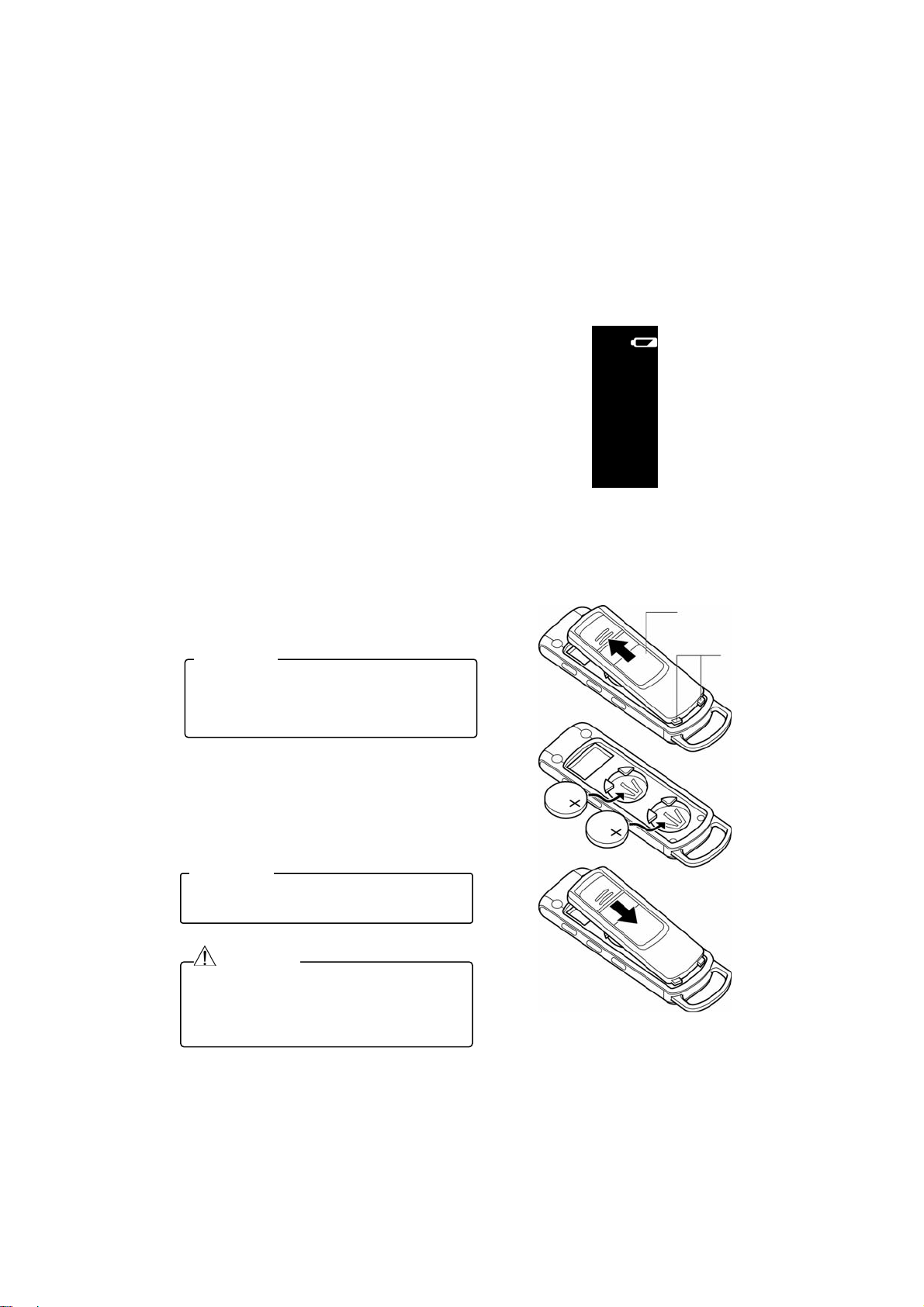
8. Low battery warning & replacement directions
When the battery is running out and
the user tries to conduct an operation,
the “Low battery warning” on the LCD
monitor will display. In this situation,
be sure to replace both batteries at
the same time with new ones. The
performance will go down particularly
under cold conditions.
Battery type: Lithium battery CR2032 / Qty. 2
・ Release the clasps and slide off
the battery cover to remove.
ADVICE
If the cover is stuck and does not slide
off, wrap a flathead screwdriver in a
cloth, etc., and use it in the depression to
release the cover and slide it off.
・ Replace with the new batteries so
the plus (+) side is facing up.
・ Re-attach the battery cover.
ADVICE
When replacing the batteries, be sure to
replace both batteries at the same time.
Lithium battery
(CR2032)
WARNING
Keep the batteries out of the reach of
children. In the event that a battery is
accidently swallowed, consult with a
physician right away.
9. Basic operations
Battery cover
Clasps
13
Page 14
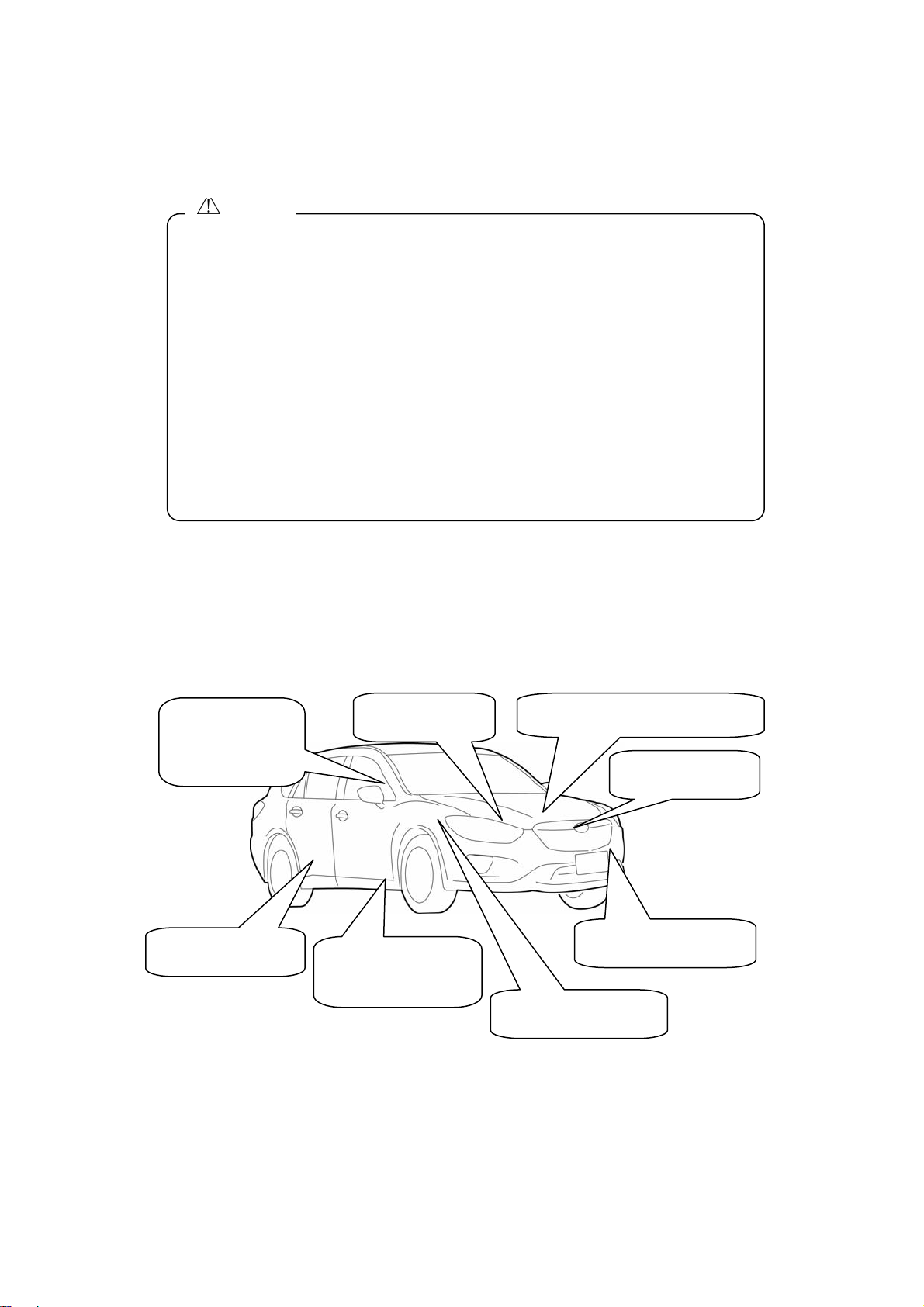
CAUTION
Check points when the vehicle is parked.
When using the engine start function with this device, follow the instructions below
when parking, in order to avoid vehicle theft or an accident from occurring.
・ Be sure to always engage the parking brake.
・ Put the shift lever in the “P” position.
・ Be sure there is no advanced or smart key inside the vehicle.
・ Close all doors and windows.
・ Lock the doors.
・ Close the hood.
・ Turn off the windshield wipers.
・ Be sure that the steering lock is engaged.
Engine Start Conditions
When using the Remote Engine Start, be sure to always check the start
conditions listed below beforehand. Even if just one of the conditions has not
been satisfied, the device will interpret this as a hazard and will not operate.
Even if the user tries to operate the remote control, the engine will not start.
The ignition switch
is not set to ACC
or ON, etc.
The shift lever is
in the “P” position.
There is no advanced key (or
smart key) inside the vehicle.
The hood is closed
all the way.
All doors are closed
all the way.
The accelerator and
foot brake are not
engaged.
The steering lock is
engaged.
The burglar alarm is not
tripped.
14
Page 15
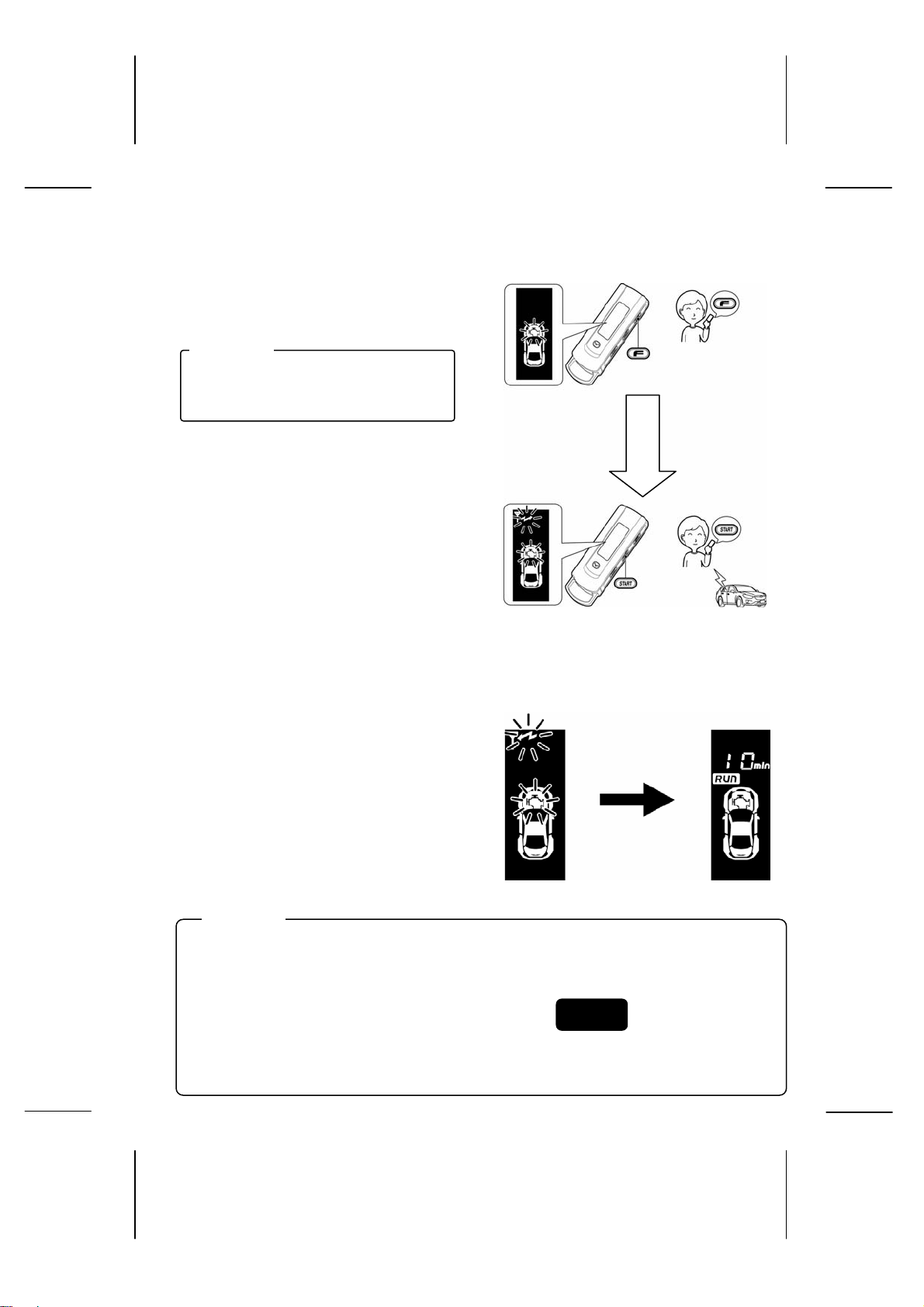
9-1. Engine start operation
z Press the function switch once.
The LCD display will appear as
shown on the right.
ADVICE
The LCD display will appear when the
switch is released.
z Press the start switch while the
above LCD display is shown until
it beeps.
After the send mark flashes, the send
operation is completed. After the send
operation is completed, the controller
will send an answer back signal.
*Press the start switch within 2 seconds
after the LCD display appears. If the
start button is not pressed in time and
the LCD display disappears, start the
procedure over again from step 1.
When the remote control receives a
response from the vehicle, it indicates
the engine start operation with a
display (on the right) and a melody.
ADVICE
・ After the engine start operation is initiated, the controller will automatically send an
answer back signal 2 – 3 times.
・ If there is a transmission error, there will not be an answer back signal after the
second time.
・ If the engine start conditions are not satisfied,
the engine start operation cannot be performed.
・ For vehicles equipped with an automatic wiper function, when the engine start
operation is activated with the remote control, the wipers will not turn on even when
the wiper switch is set to the “AUTO” position and it begins to rain.
Engine start standby Engine start initiated
⇒p.14
Function switch
Within 2 sec.
Start switch
After 8 – 15 sec.
15
Page 16
LCD Display During Engine Start Operation
The LCD display will change as shown below depending on the status of
the vehicle, the signal transmission and the switch operation.
Condition Error Display
(Safety detection display description)
If the safety detection function is turns on,
initiated by the vehicle status, the following
display will appear on the LCD monitor. Be
sure to check the vehicle status once more.
Error Display
Display Description Troubleshoot
Vehicle transmission error
Remote Engine Start
registration error
Remote Engine Start
authentication error
Vehicle side error
ACC or IG is already ON.
Engine rotation error
Engine does not start The battery or gas level may be low. Check the
Hood is open. Close the hood all the way.
Steering lock is not
engaged.
Push start switch is
pressed.
There is an advanced key
(or smart key) inside the
vehicle.
A door is open. Close all doors (including the rear gate) all the
Burglar alarm has been
tripped.
Shift lever is not in the “P”
position.
Foot brake is engaged. Be sure that the foot brake is not engaged.
If this display description appears even after
performing the engine start operation again,
consult with an authorized Mazda dealer where
you purchased the device.
Turn off ACC or IG.
Be sure that the accelerator is not engaged.
battery voltage or the fuel gauge.
Be sure that the steering lock is engaged.
Check whether the push start switch is pressed.
Be sure there is no advanced or smart key
inside the vehicle.
way.
Check whether the burglar alarm has been
tripped.
Put the shift lever in the “P” position.
16
Page 17
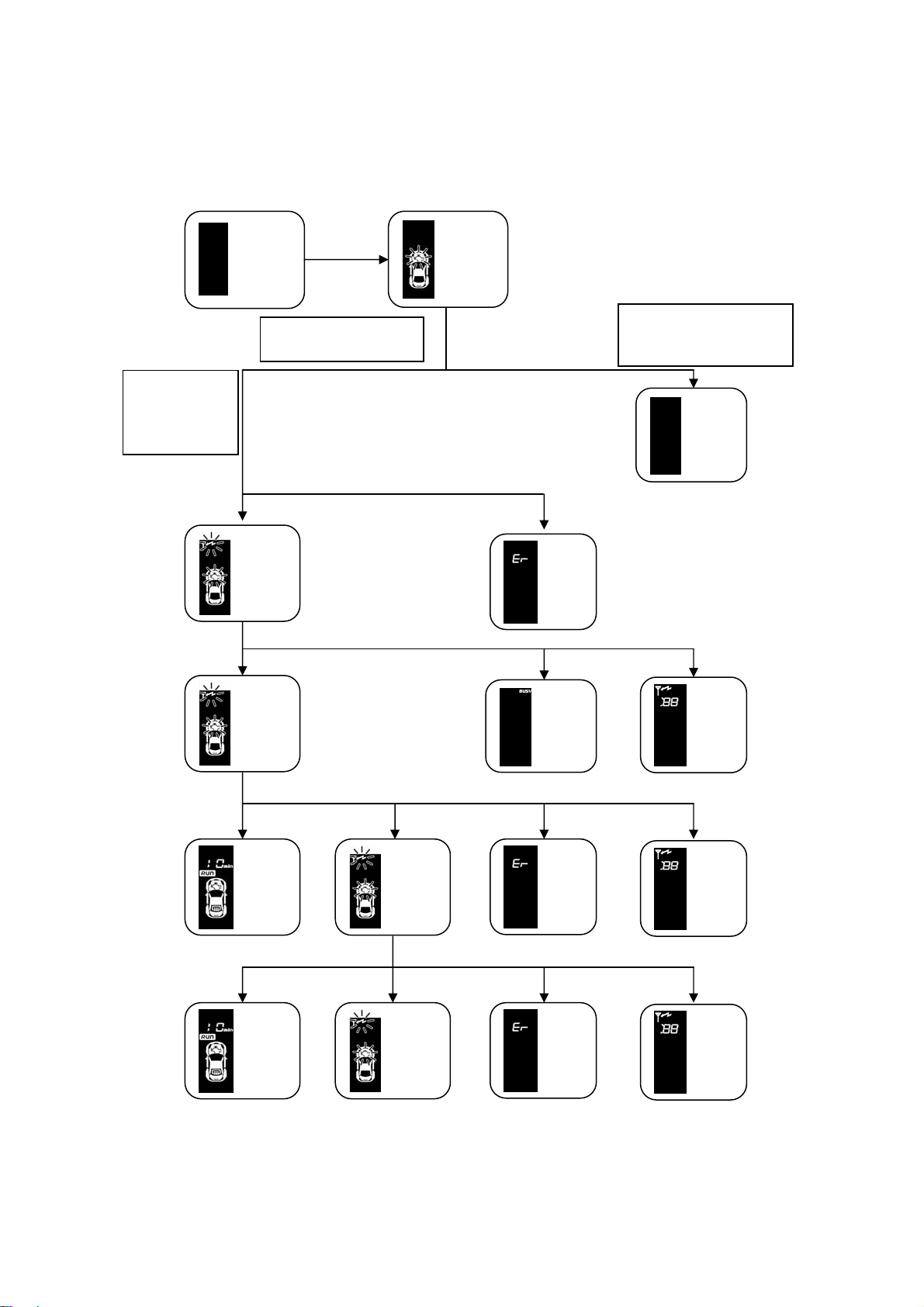
Press the start
switch while the
LCD display is
shown until it
beeps.
Press the function
switch once.
送信
Send
Engine
start
standby
Send
error
Send
error
When the start switch is
not pressed while the
LCD display is shown.
Timeout
Condition
error
Engine
start
initiated
Engine
start
initiated
Engine
start
standby
Engine
start
standby
17
Receive
error
Receive
error
Condition
error
Condition
error
Page 18
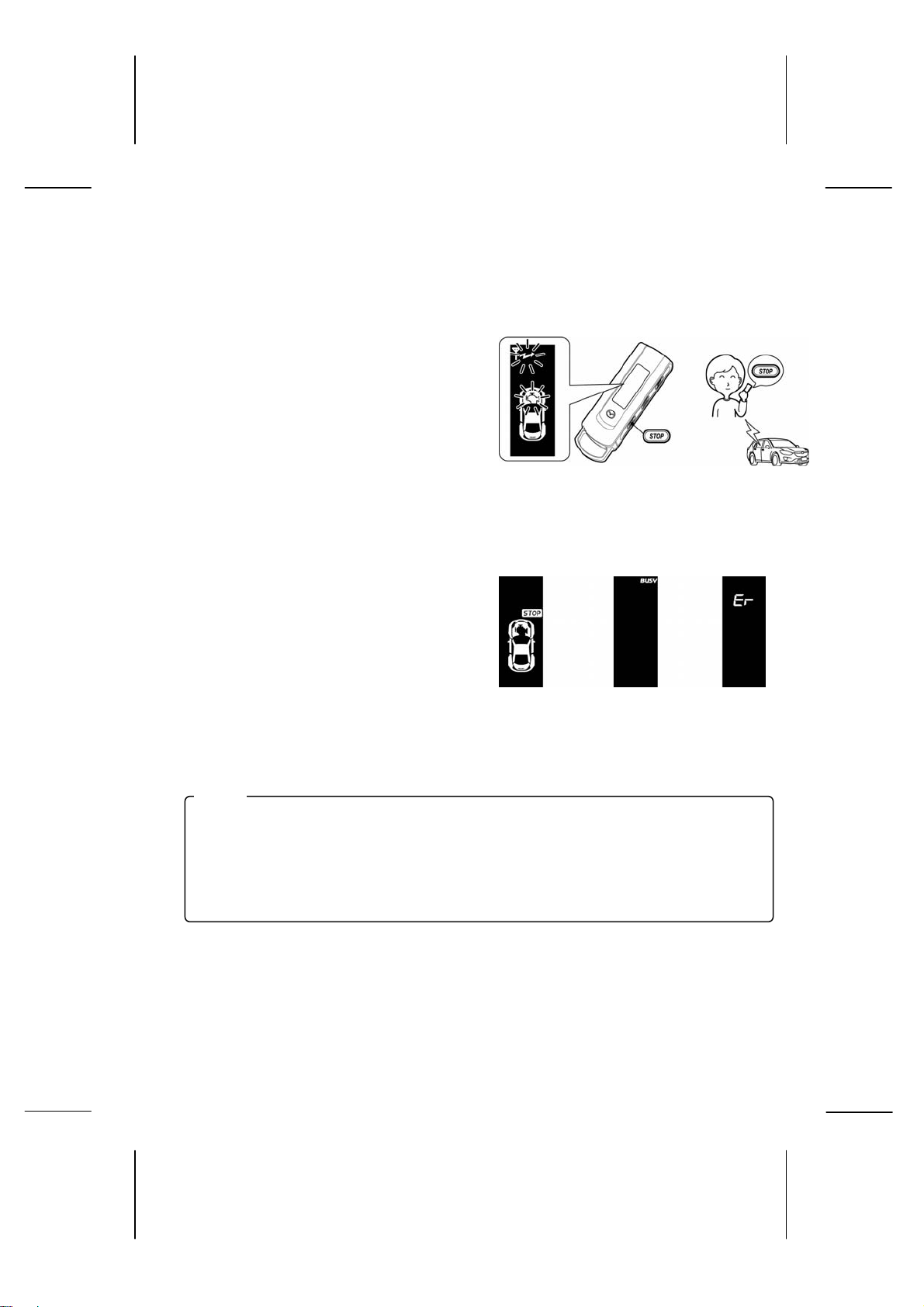
9-2. Engine stop operation
This operation only applies when the engine has been started with the
remote control.
z Press the stop switch until it
beeps.
The LCD display will appear as
shown on the right. After the send
mark flashes, the send operation is
Stop switch
completed. After the send operation
is completed, the controller will send
an answer back signal.
When the remote control receives a
response from the vehicle, it
indicates the engine stop operation
with a display (on the right) and a
melody.
Engine stop
Send error
Receive error
Note
・ On some vehicle models, the engine also stops when the shift lever is pressed.
・ The buzzer on the controller will beep when the engine stop operation is
performed, or when the engine stops after the pre-set warm up time has elapsed.
18
Page 19
● Other Engine Stop Conditions
The engine will stop if one of the following conditions is true.
1) The hood is opened.
2) The shift lever is put in a position other than the “P” position.
3) A door is opened.
4) The push start switch is pressed.
5) The pre-set warm up time has elapsed.
6) The brake pedal is engaged.
7) The accelerator pedal is engaged (the engine stops if the rpm is over 4,000).
8) There is an advanced key or smart key inside the vehicle.
When the vehicle inadvertently moves…
z If the vehicle engine is started with the remote control, it will stop the
engine.
z Restart the engine with the push start switch.
Note
If the engine is started with the push start switch, it cannot be stopped with the
remote control.
19
Page 20
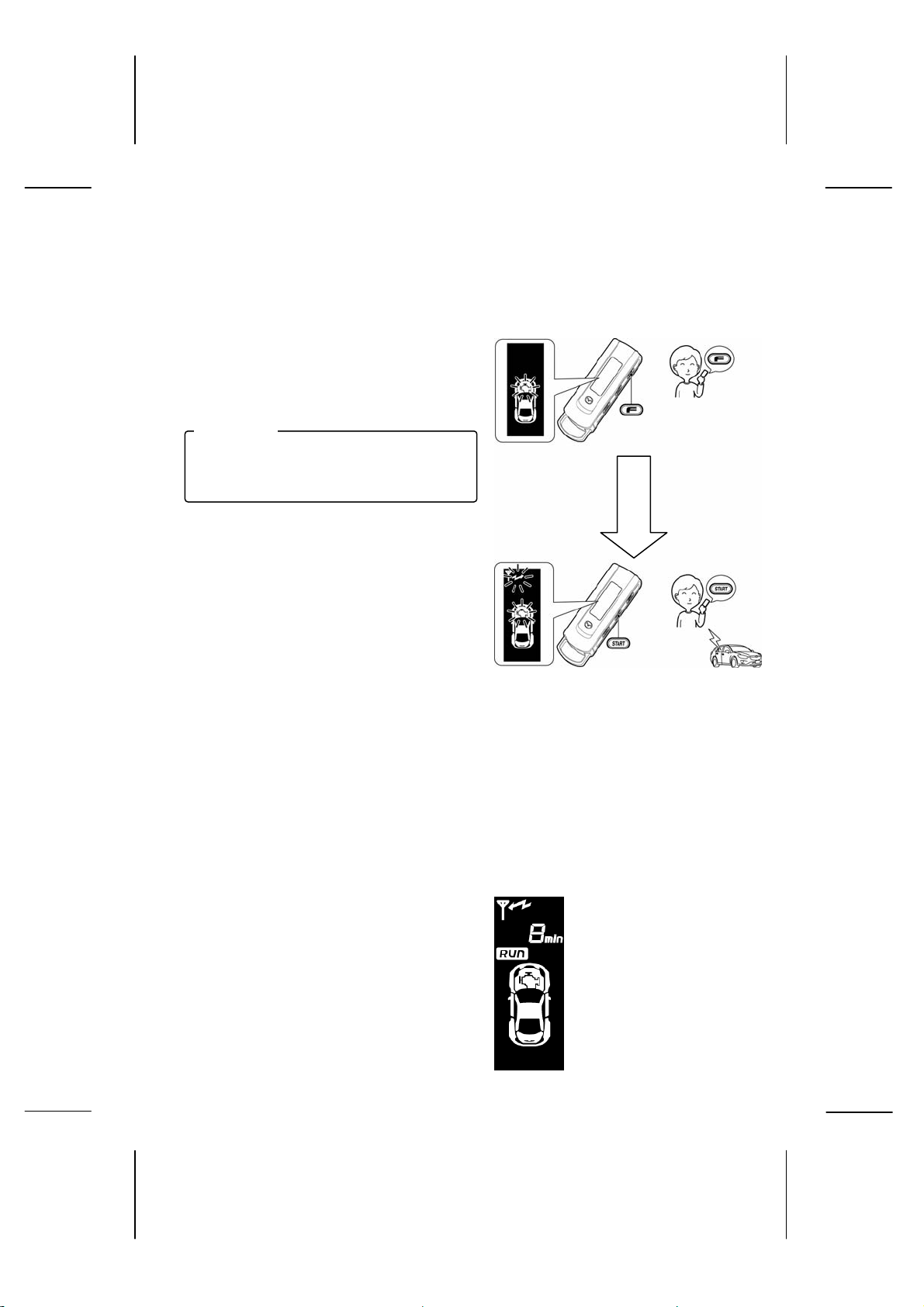
9-3. Warm up time check
p
y
This operation only applies when the engine has been started with the
remote control.
z Press the function switch once.
The LCD display will appear as
shown on the right.
ADVICE
The LCD display will appear when the
switch is released.
z Press the start switch while the
above LCD display is shown until it
beeps.
After the send mark flashes, the send
operation is completed. After the send
operation is completed, the controller
will send an answer back signal.
*Press the start switch within 2 seconds
after the LCD display appears. If the
start button is not pressed in time and
the LCD display disappears, start the
procedure over again from step 1.
When the remote control receives a
Function switch
While LCD
dis
la
s
Start switch
【Display Reference Example】
response from the vehicle, it indicates
the engine start operation with the
display below and a melody.
・Warm up time remaining?
・ 8 min. warm up time remaining
・ Engine running
・ Rear defrost stopped
(It only displays even numbers.)
・ Is the engine running?
・ Is the rear defrost turned on?
20
Page 21
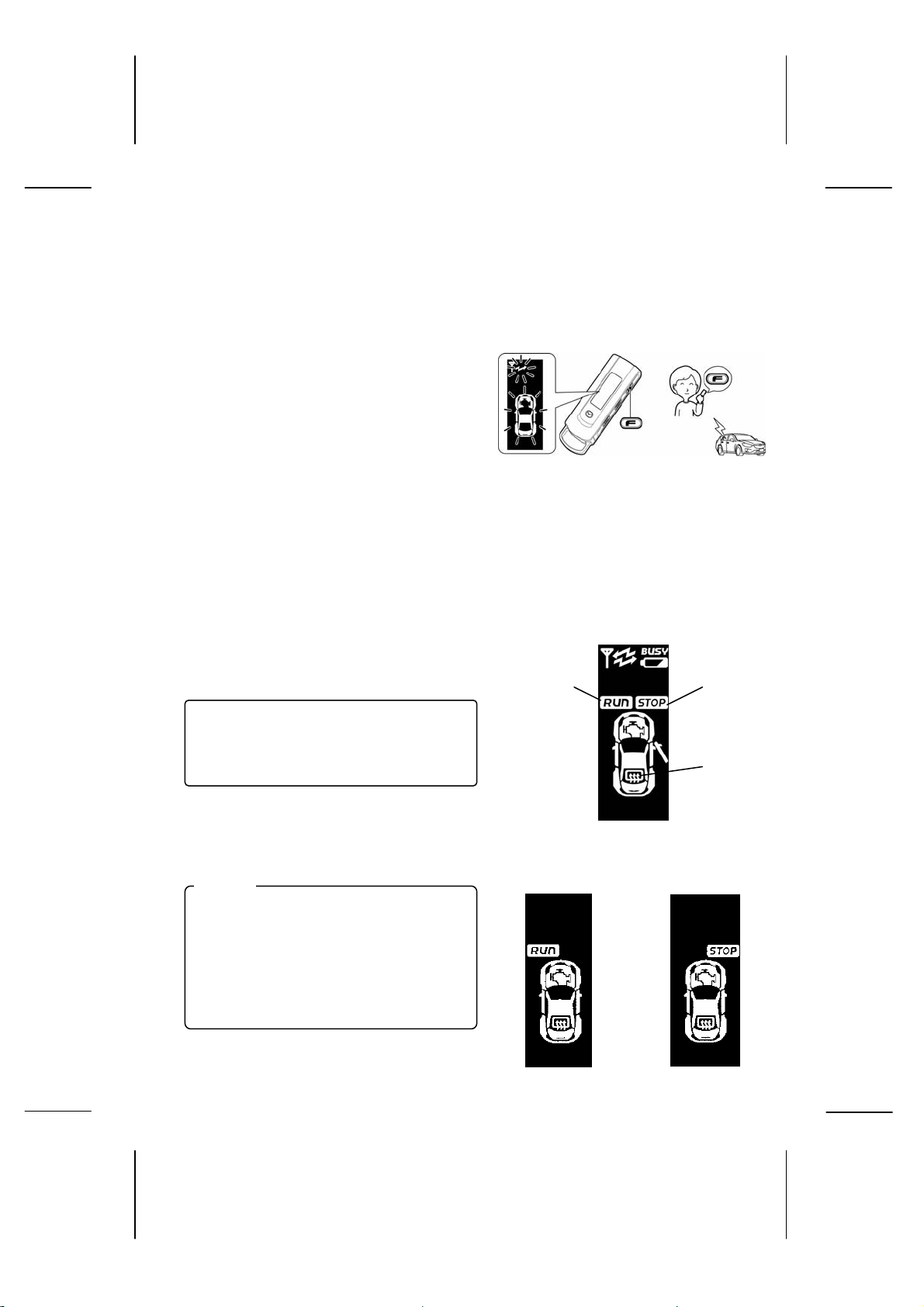
9-4. Vehicle status check
This operation can be performed before or after the engine start operation.
1) Press the function switch until it
beeps.
The LCD display will appear as shown
on the right.
After the send mark flashes, the send
operation is completed. After the send
operation is completed, the controller
will send an answer back signal.
When the remote control receives a
response from the vehicle, it indicates
the engine start operation with a
display (on the right) and a melody.
The following 2 items can be checked.
・ Is the engine running?
・ Is the rear defrost turned on?
Note
The temperature display is only a guide.
The actual temperature may vary
depending on the vehicle parking
conditions. Some vehicle models stop
the rear defrost after 15 minutes. (*In
this situation, the condition error will not
display.)
Function switch
Displays
when engine
starts
【Display Reference Example】
Displays
when engine
stops
Displays when
rear defrost is
turned on
21
Engine running
Engine stopped
Page 22
p
y
displays
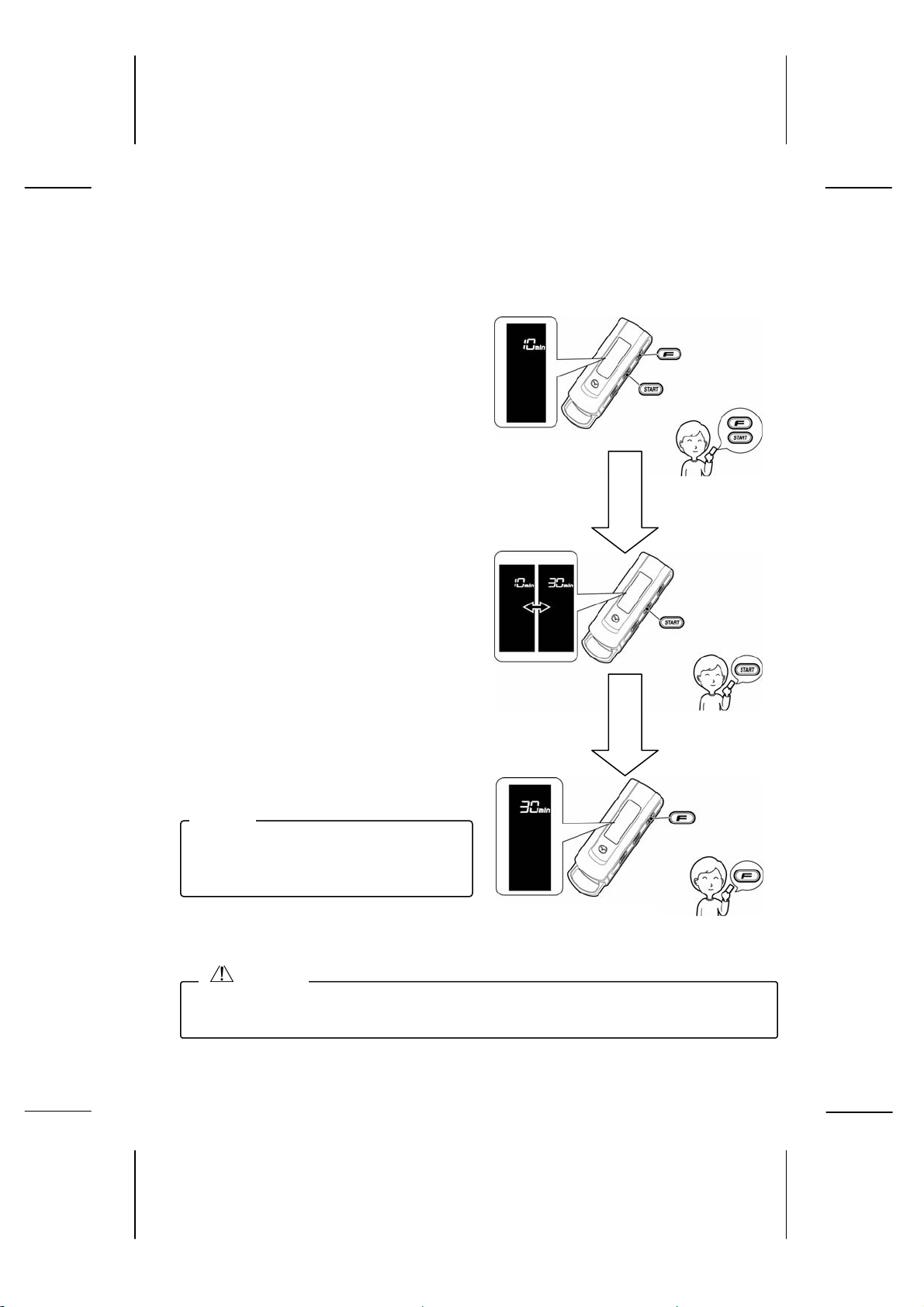
9-5. Warm up time settings
The default setting is 10 minutes.
z Press the function switch and the
start switch at the same time until it
Function switch
beeps.
The current setting time is displayed.
z Press the start switch to set the
warm up time.
The setting time “min” will display.
z Press the function switch until it
beeps.
Note
Some vehicle models stop the rear
defrost after 15 minutes, even if the
warm up time is set to 30 minutes.
*When the
warm up time is
set to 10 min.
*When the warm up
time is set to 30 min.
While LCD
dis
la
s
While LCD
Start switch
Start switch
Function switch
CAUTION
To help protect the environment, conserve energy and avoid inconveniencing others,
do not perform idling when it is unnecessary, or longer than necessary.
22
Page 23
displays
displays
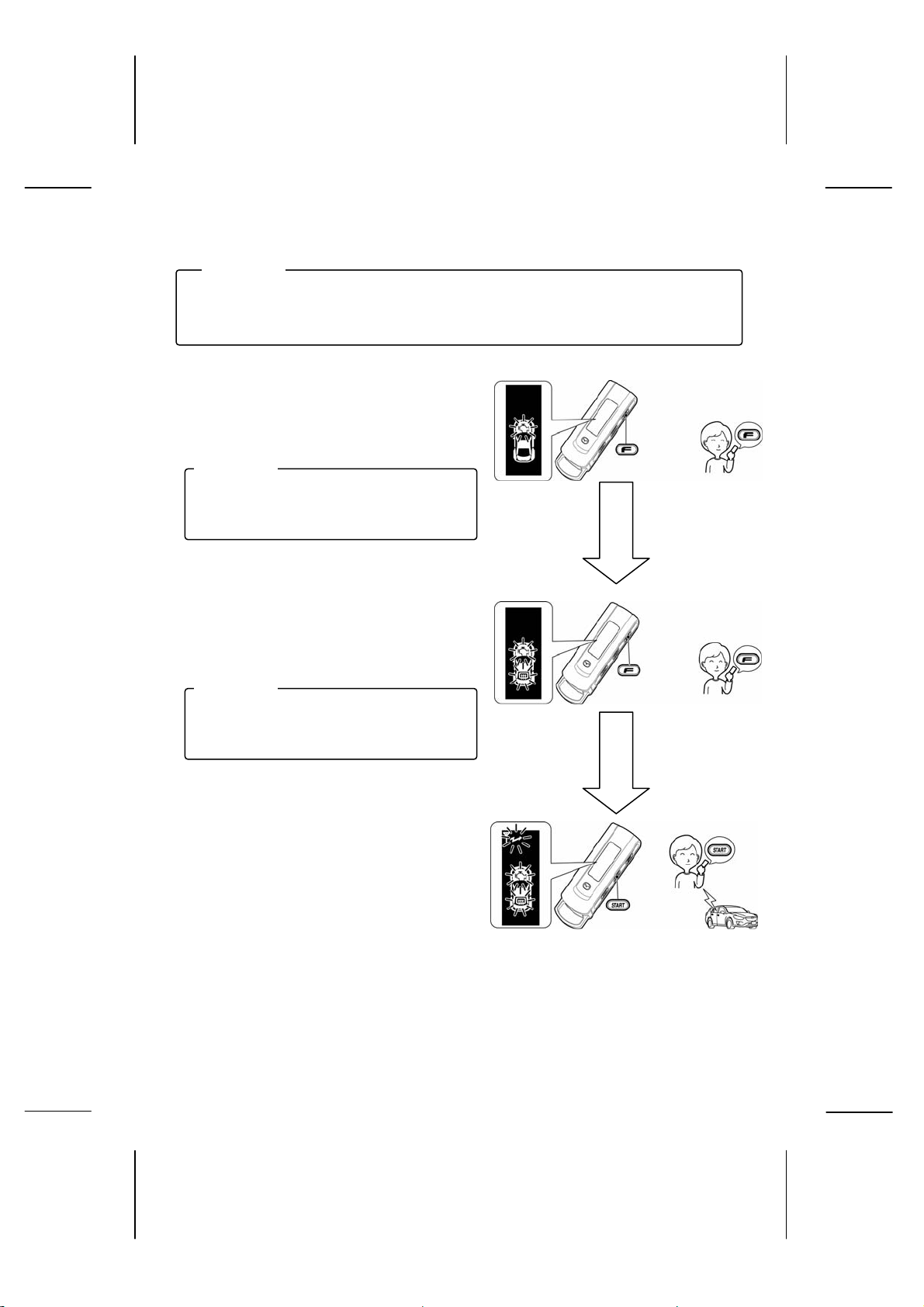
9-6. Engine start operation with rear defrost start Up
ADVICE
After starting the engine with the Remote Engine Start, follow the steps below to
activate or turn on the rear defrost.
z Press the function switch once.
The LCD display will appear as shown
on the right.
ADVICE
The LCD display will appear when the
switch is released.
z Press the function switch once more
while the above LCD display is shown.
The rear defrost mark will flash.
ADVICE
The LCD display will appear when the
switch is released.
z Press the start switch while the
above LCD display is shown until it
beeps.
After the send mark flashes, the send
operation is completed. After the send
operation is completed, the controller
Function switch
While LCD
Function switch
While LCD
Start switch
will send an answer back signal.
*Press the start switch within 2 seconds after the
LCD display appears. If the start button is not
pressed in time and the LCD display disappears,
start the procedure over again from step 1.
23
Page 24
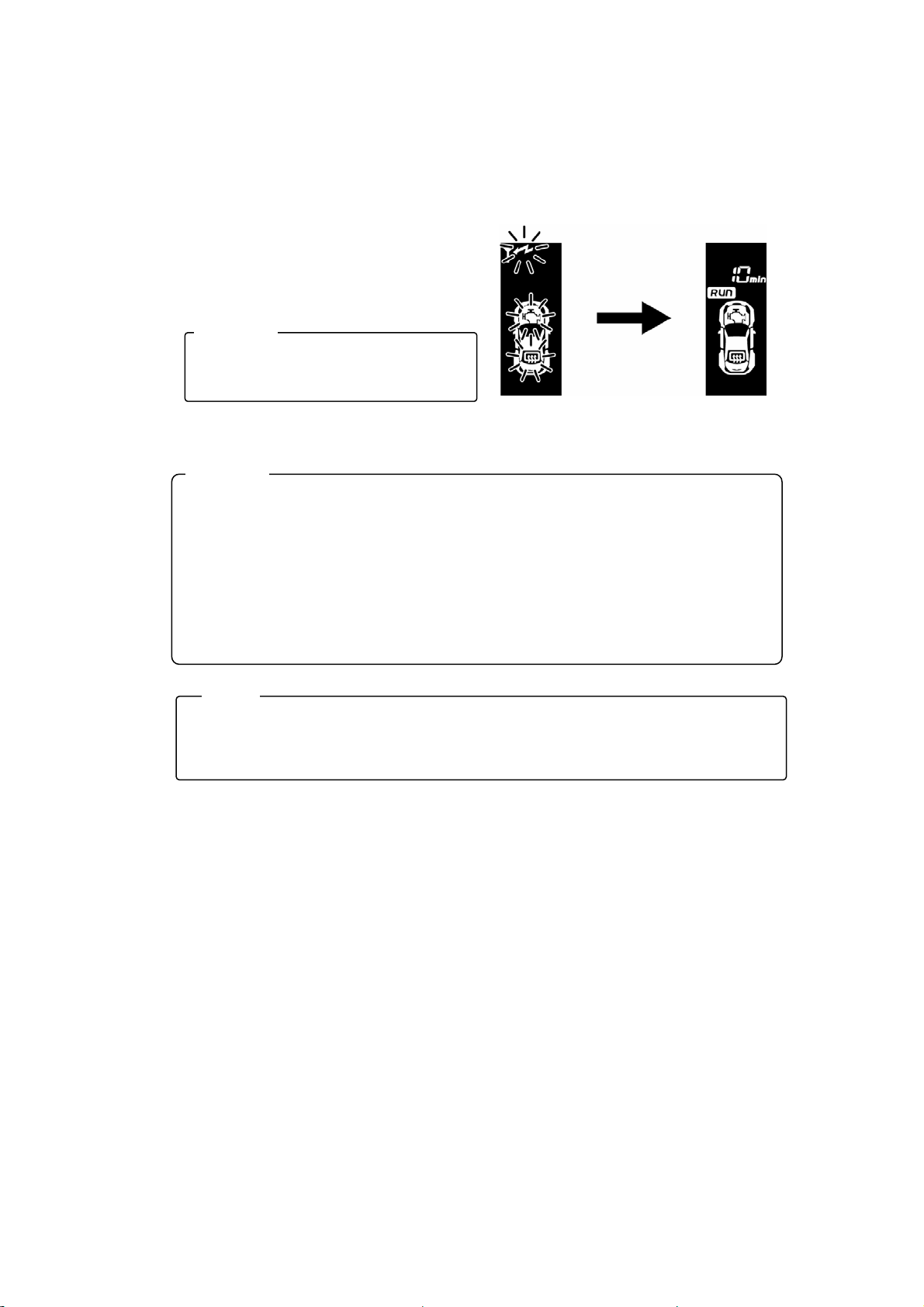
When the remote control receives a
g
response from the vehicle, it indicates the
engine start operation with a display (on
the right) and a melody.
ADVICE
The rear defrost operation cannot be
performed without starting the engine.
After 8 sec.
ADVICE
• After the engine start operation is initiated, the controller will automatically send an
answer back signal 2 – 3 times.
• On some vehicle models, the vehicle indicator light does not turn on when the rear
defrost is turned on with the Remote Engine Start.
• The rear defrost will automatically stop when the engine stops.
• The rear defrost will automatically stop after 15 minutes of operation on some
vehicle models.
Engine start standby Engine running
Note
• The rear defrost will turn on about 7 seconds after the engine starts, when
performing this rear defrost operation, or when this operation is performed within 7
seconds after the en
ine starts.
24
Page 25
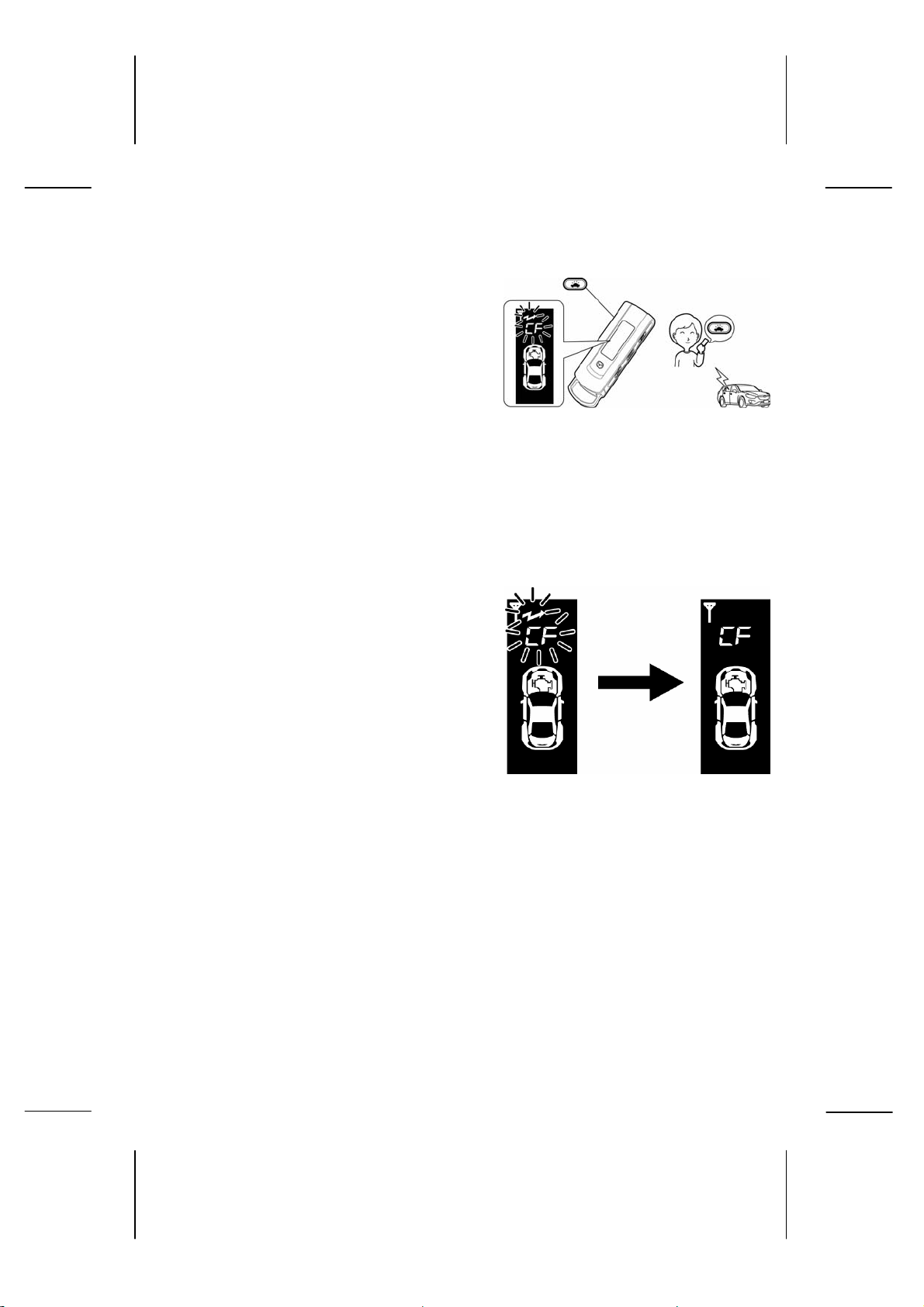
9-7. Car find function
z Press the car find switch until it
beeps.
The LCD display will appear as
shown on the right.
After the send mark flashes, the send
operation is completed. After the
send operation is completed, the
controller will send an answer back
signal.
When the remote control receives a
response from the vehicle, it
indicates the car find operation with a
display (on the right) and a melody.
Car find switch
25
Page 26
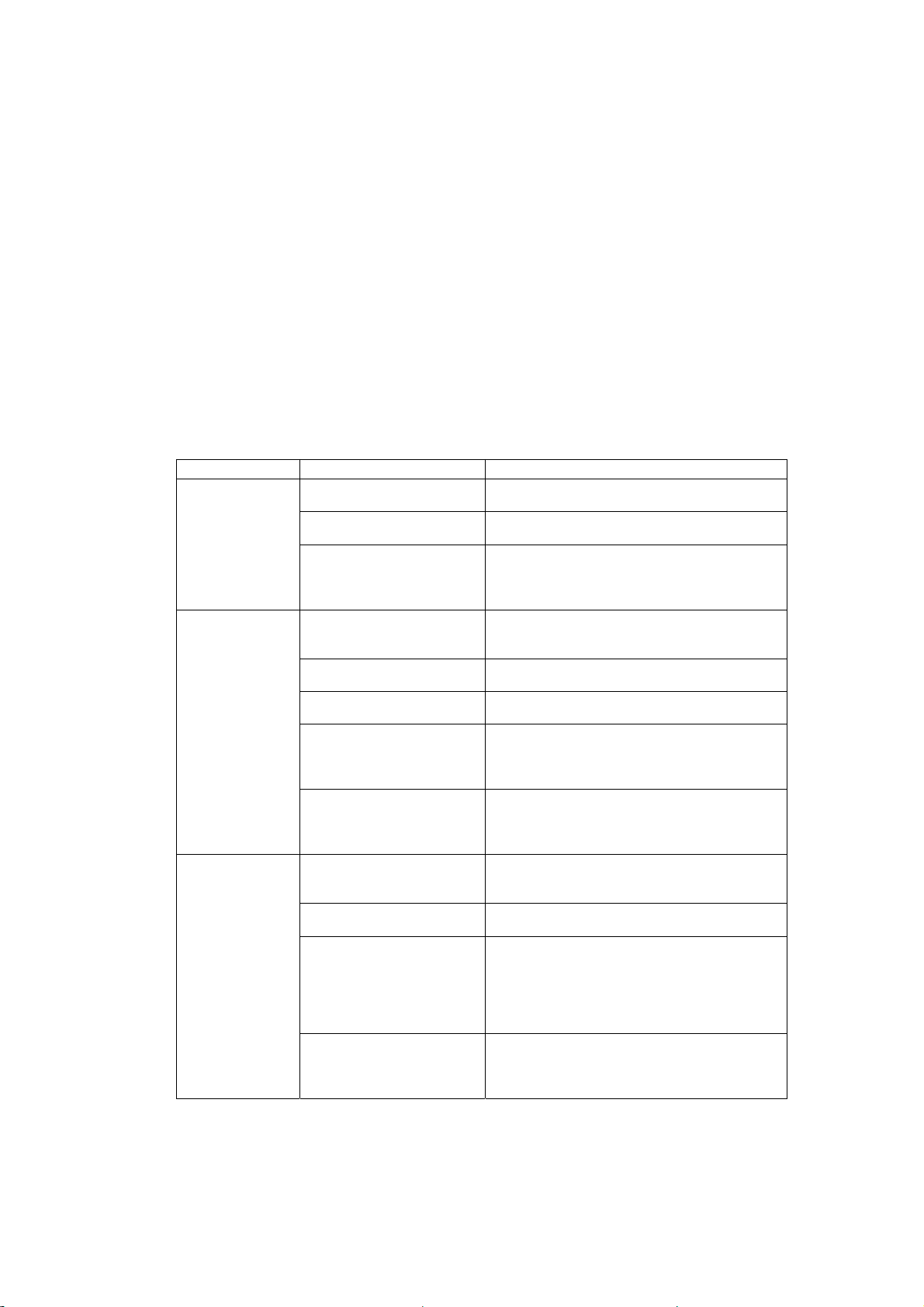
10. Troubleshooting
z Even if you think the device has broken down or malfunctioned, check once
more to be sure.
z If an error occurs, read through this instruction manual thoroughly, and check
the following items in the table below. If the error or problem persists, do not
try to repair the device by yourself. Consult with the authorized Mazda dealer
where you purchased the vehicle or device.
Problem Check Item Troubleshoot
Remote control
does not work
Engine does
not start using
remote control
Engine does
not stop using
remote control
Are the batteries inserted
correctly?
Have the batteries run out? Replace the batteries with new ones.
Did you press multiple
switches at the same time,
other than the warm up
time setting switch?
Did you make a mistake
with the “Start” operation
on the remote control?
Have the engine start
conditions been satisfied?
Are you too far from the
vehicle?
Did you try to conduct an
operation too quickly right
after another operation
was sent?
When pressing the
function or start switch, did
you press another switch
at the same time?
Did you make a mistake
with the “Stop” operation
on the remote control?
Are you too far from the
vehicle?
Did you try to conduct an
operation too quickly right
after another operation
was sent?
Was the engine started
using another method
other than the Remote
Engine Start?
Check the status of the batteries.
(Refer to p.13.)
(Refer to p.13x.)
Refer to the basic operation items to perform
the remote control operation correctly.
(Refer to p.14.)
Refer to the “Engine start operation” section
on p.15.
Check the engine start conditions.
(Refer to p.14.)
Try operating the remote control within the
specified range.
The next transmission cannot be sent while
the LCD display appears. Wait until the display
turns off before conducting an operation.
(Refer to p.p.x.)
Do not press another switch at the same time.
Refer to the “Engine stop operation” section
on p.18.
Try operating the remote control within the
specified range.
The next transmission cannot be sent while
the LCD display appears. Wait until the display
turns off before conducting an operation. A
send operation cannot be conducted while
receiving an answer back signal.
(Refer to p.12.)
If the engine is started using another method
other than the Remote Engine Start, it cannot
be stopped with the remote control.
26
Page 27
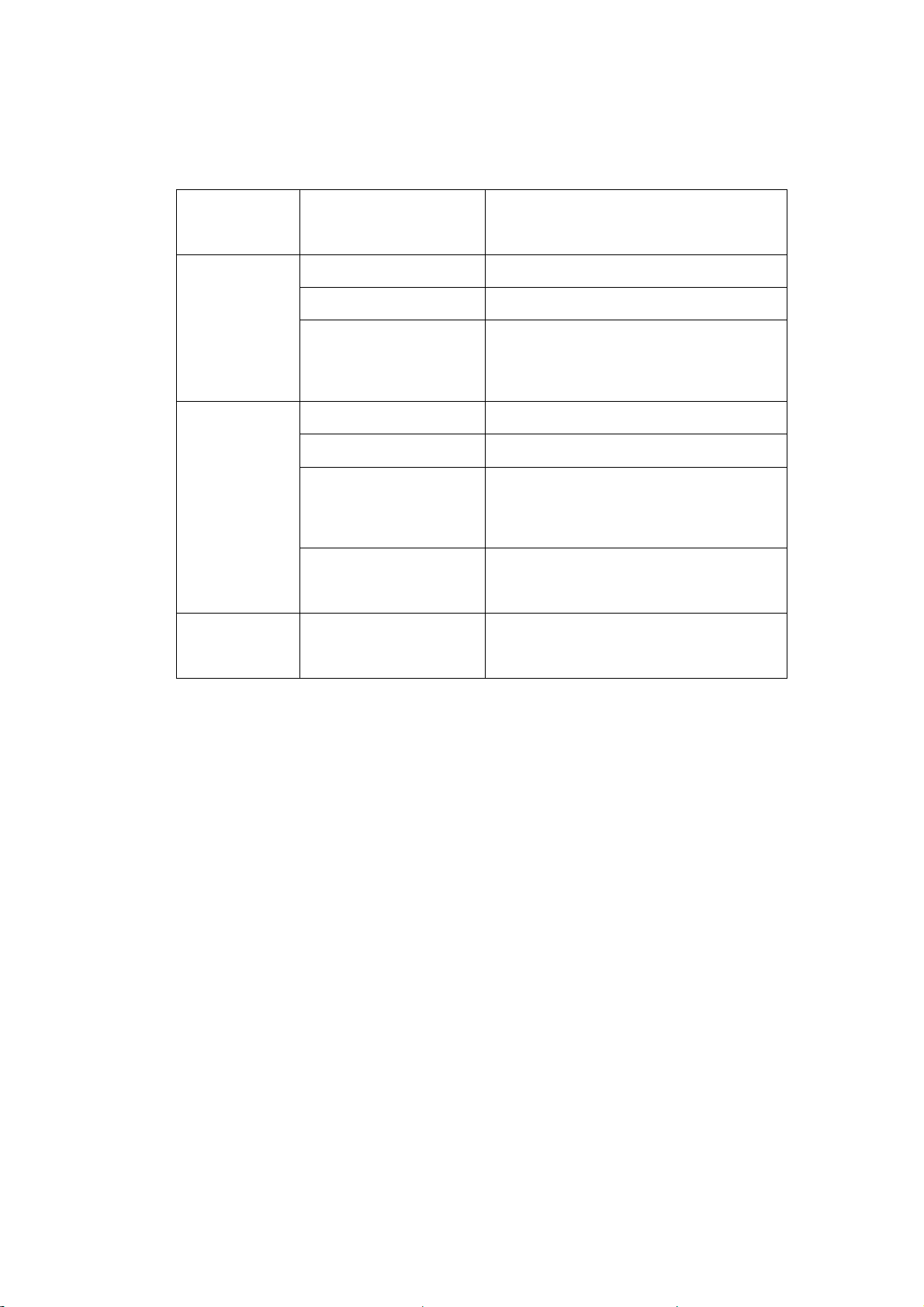
Remote control
operating
distance is
short
Displays a
receive error
Displays a
send error
When the stop switch was
pressed, was another
switch pressed at the same
time?
Have the batteries run out? Replace the batteries with new ones.
Are you too far from the
vehicle?
Is there something
blocking the signal
between the remote
control and the vehicle,
such as a building?
Have the batteries run out? Replace the batteries with new ones.
Are you too far from the
vehicle?
Is there something
blocking the signal
between the remote
control and the vehicle,
such as a building?
Are you trying to start the
engine using the start
operation on the remote
control?
― The send operation is restricted due to the
Do not press another switch at the same time.
(Refer to p.13.)
Try operating the remote control within the
specified range.
Move and try operating the remote control
from a better location, or move closer to the
vehicle when operating the remote control.
(Refer to p.13.)
Try operating the remote control within the
specified range.
Move and try operating the remote control
from a better location, or move closer to the
vehicle when operating the remote control.
The send operation from the controller may be
restricted due to the transmission conditions in
the area.
transmission conditions in the area. Wait until
the display mark turns off before operating the
remote control.
11. Warranty & Servicing
Warranty
The warranty period starts from the date of purchase until x or until the mileage
reaches x0,000 km.
Servicing
If you are having a problem with the device, first re-read this instruction manual again
to troubleshoot the problem or issue. If the problem or issue does not improve,
consult with the authorized Mazda dealer where you purchased the vehicle or device.
If you lose the remote control, contact the authorized Mazda dealer where you
purchased the vehicle or device.
27
Page 28
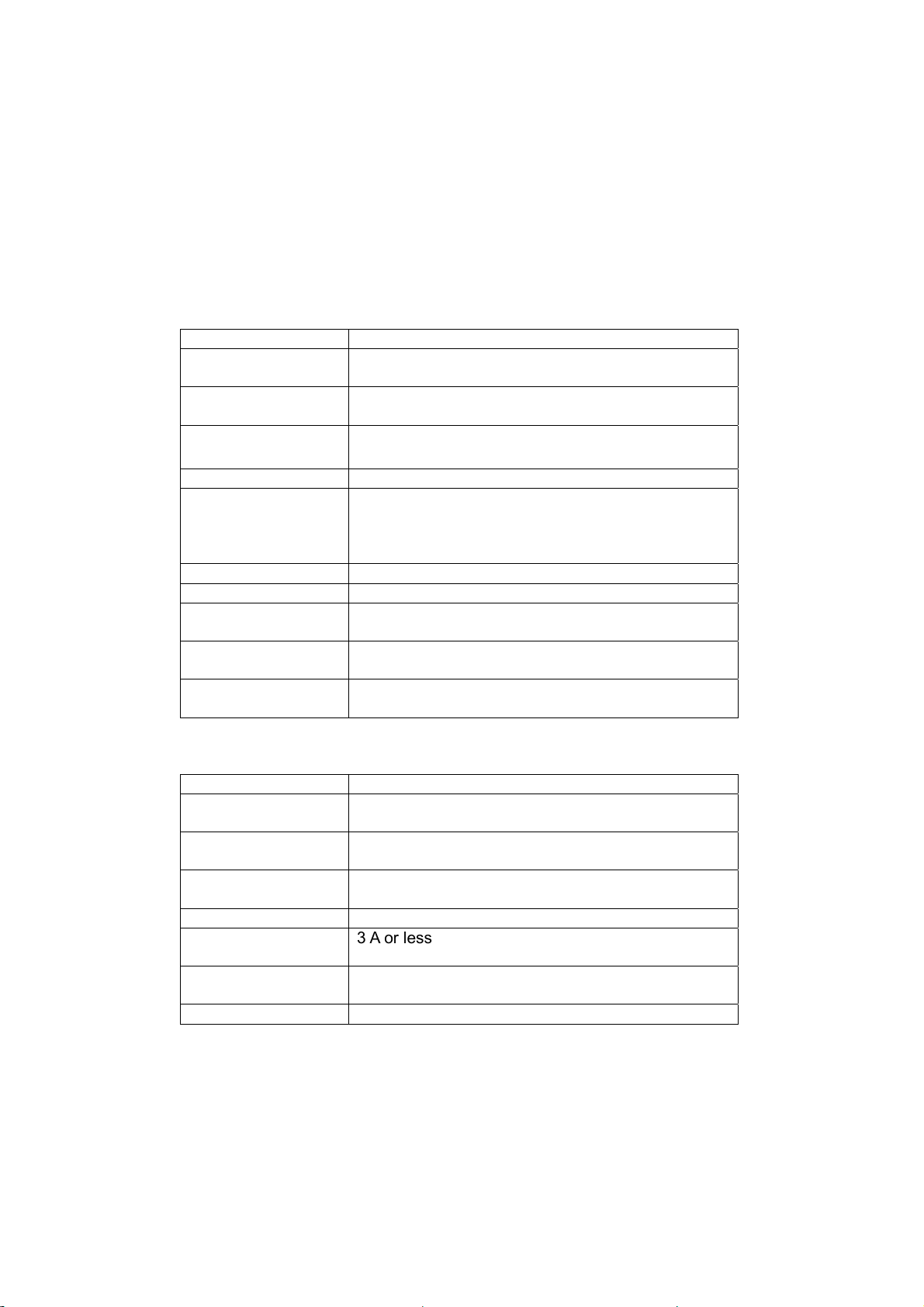
3mA or less
12. Specifications
Remote Control
Applicable standard FCC and IC conforming
Transmission
frequency
Transmission
method
Operating
temperature range
Battery type Coin type, lithium battery CR2032 / Qty. 2
Battery life Approximately 1 year (When starting the engine 5
Dimensions 30 × 97 × 19 (mm)
Weight Approximately 50 g (including the batteries)
Transmission
time
Transmission
rest time
Transmission
antenna
429.2125MHz
Single message transmission
-10 to +60 ºC
times / day. However, the battery life for the
batteries included in the accessories is not
guaranteed.)
Approximately 3 seconds
2 seconds or more
Built-in antenna
Controller
Applicable standard FCC and IC conforming
Transmission
frequency
Transmission
method
Operating
temperature range
Rated voltage DC 13.5 V
Power consumption
during standby
Dimensions 201 × 46 × 26 (mm)
Receiving antenna Coaxial cable whip antenna
*According to our internal standards
The specification and external appearance may change without prior
notice given.
429.2125MHz
Single message transmission
-40 to +85ºC
3 A or less
(Max. dimensions include antenna)
28
Page 29
Be sure to explain the device operation to the customer.
Request for Dealer Performing
Installation Service
• Note that some contents of this instruction manual may not match the actual
device due to changes in the vehicle or product specification.
29
 Loading...