

Page 1
Instruction Manual
Kullan›m K›lavuzu
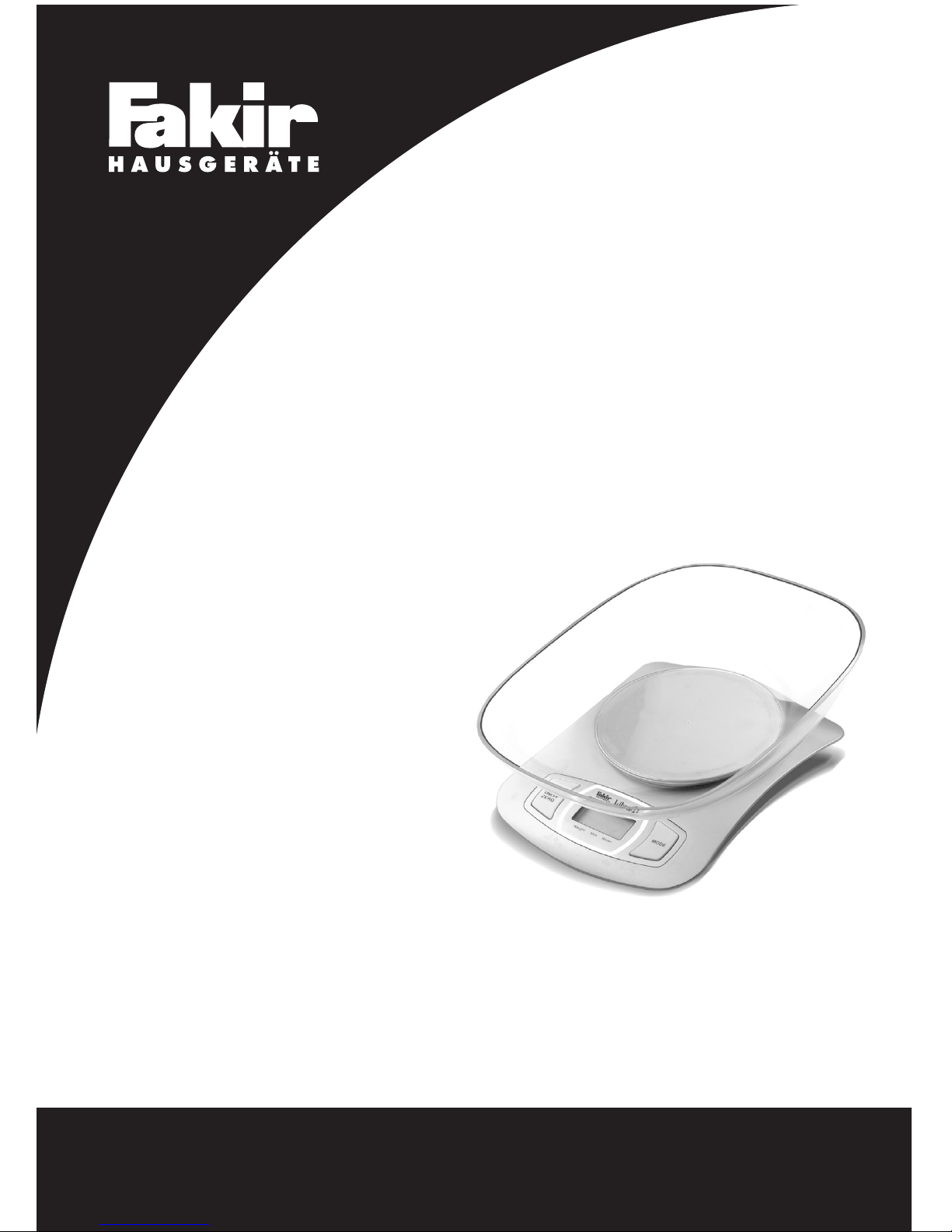
Electronic Kitchen Scale
Elektronik Mutfak Tart›s›
LIBRA
Page 2

Page 3

04
Girifl
Güvenlik önemlidir
Kendi güvenli¤iniz ve di¤erlerinin güvenli¤i için ürünü
çal›flt›rmadan önce kullanma k›lavuzunu okuyunuz. Bu
k›lavuzu ilerideki kullan›mlar için güvenli bir yerde
saklay›n›z. E¤er cihaz›n›z› birisine veriyorsan›z, kullanma
k›lavuzunu da veriniz. Bütün paketleri sökünüz, fakat
cihaz›n›z›n çal›flt›¤›ndan emin olana kadar da paketleri
saklay›n›z.
Güvenlik uyar›lar›
Tart›y› kullan›rken temel güvenlik önlemlerini tüm ofis
cihazlar› için kullan›n›z.
Tart›n›n su s›zd›rmazl›k özelli¤i yoktur. Cihaz› ya¤mur
ya da neme maruz b›rakmay›n›z.
Tart›y› sökmeyiniz. Tart›n›n kullan›c› taraf›ndan tamir
edilebilecek herhangi bir parças› bulunmamaktad›r.
Tart›y› kullanmadan önce tüm kullanma k›lavuzunu
okuyunuz.
Tart›y› yaln›zca tasarlanan amac› için kullan›n›z.
Lütfen tart›n›n ticari ya da t›bbi kullan›mlar için
üretilmedi¤ine dikkat ediniz.
•
•
•
•
•
•
Pilin yerlefltirilmesi
Bu cihaz› 1 adet 3V lityum pil (CR2032) ile kullanabilirsiniz.
Pili yerine yerlefltirmeden önce yal›t›m k⤛d›n› pilden
ay›r›n›z.
Baskülün arkas›nda bulunan pil kapa¤›n› aç›n›z. Küçük
siyah kay›fl› d›flar›ya do¤ru bükünüz, eski pil d›flar›
ç›kacakt›r. Ba¤lant› k›sm›n› bükmemeye özen gösteriniz.
Pil bölmesine yeni pili afla¤›ya do¤ru bast›rarak yerlefltiriniz
Uzun y›llar sorunsuz çal›flmas› için tasarlanan ve üretilen
Fakir Libra Elektronik Mutfak Tart›s›’n› sat›n alm›fl
oldu¤unuz için teflekkür ederiz.
Benzer ürünleri kullanmaya al›fl›k olabilirsiniz, ancak
kullanma k›lavuzunu okumak için lütfen zaman ay›r›n›z.
Bu k›lavuz sat›n alm›fl oldu¤unuz üründen en iyi
performans› alman›z için haz›rlanm›flt›r.
Özelikler
Su ve süt hacmini gösterebilme,
‹ki ayr› biçimde a¤›rl›k birimi: g, lb:oz
‹ki ayr› biçimde hacim birimi: ml, fl’oz
Zay›f batarya göstergesi / fazla yükleme göstergesi
Do¤ru ölçüm yapabilmeyi sa¤layan yüksek duyarl›
hassas ölçüm sensörü ile donat›lm›flt›r.
Dara özelli¤i
Otomatik kapanma özelli¤i
•
•
•
•
•
•
•
black tab
contact
Cihaz›n kullan›m›
Weight
Milk
Water
g
ml
fl’oz
Ib:oz
Dara a¤›rl›¤›
Negatif de¤er
S›f›r a¤›rl›k
A¤›rl›k modu
Süt hacim modu
Su hacim modu
A¤›rl›k birimi (Ib:oz)
Hacim birimi (fl’oz)
Hacim birimi (ml)
A¤›rl›k birimi (gr.)
Weight Milk Water
Weight Milk Water
Weight Milk Water
A¤›rl›k modu
Süt hacim modu
Su hacim modu
g
ml
fl’oz
Ib:oz
g
ml
fl’oz
Ib:oz
g
ml
fl’oz
Ib:oz
Birim dönüfltürme tuflu
Mutfak tart›n›z›n alt›nda flekildeki gibi birim dönüfltürme
tuflu bulunmaktad›r.
Page 4
02
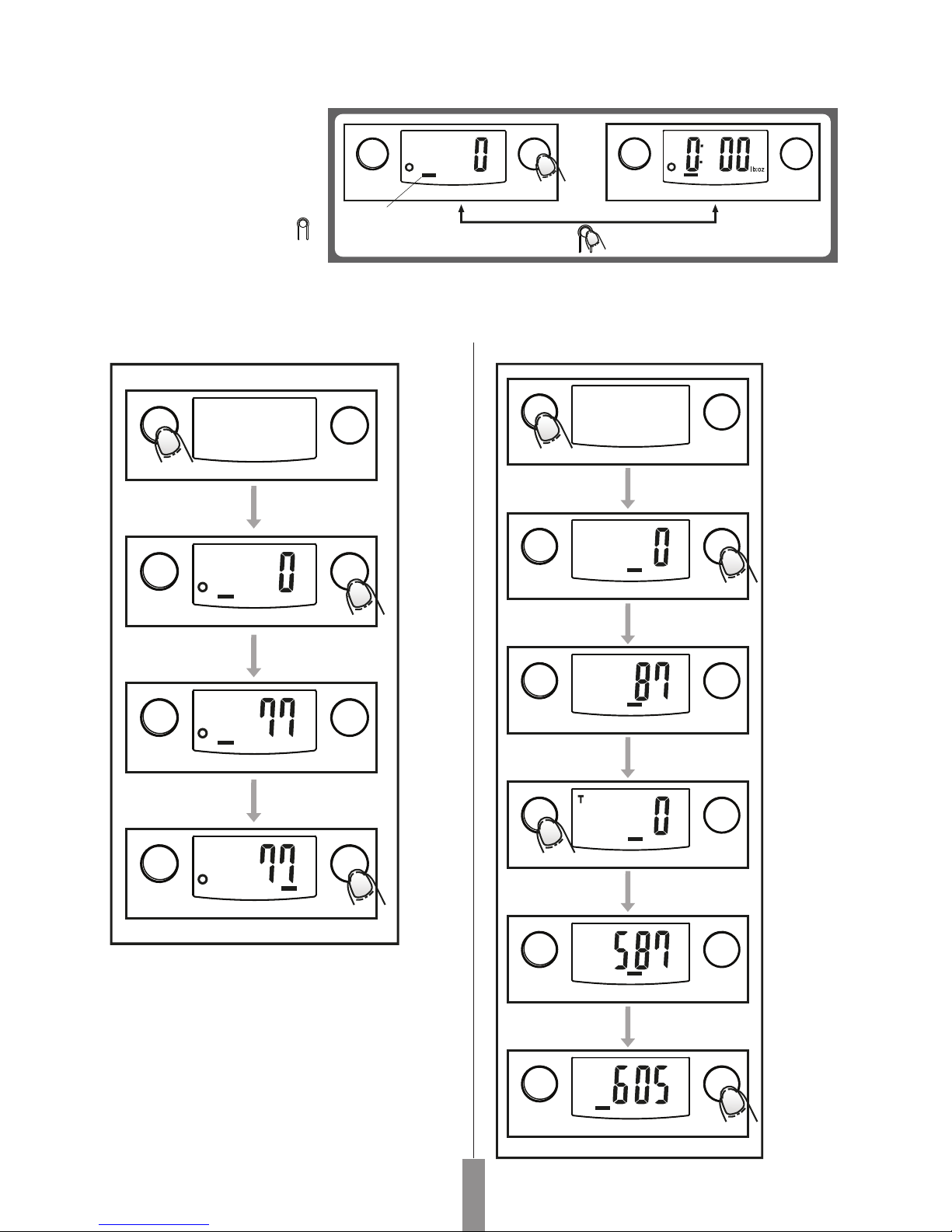
A¤›rl›k biriminin dönüfltürülmesi
E¤er baskülünüz hem Metrik
(kilogram) hem de imperiyal
(Stones) ölçme birimlerine sahipse,
MODE tufluna bas›p çal›flma
modunu (a¤›rl›k, süt hacmi, su
hacmi) seçebilirsiniz. Ard›ndan
birim dönüfltürme tufluna ( )
basarak iki a¤›rl›k birimi aras›nda
dönüfltürme yapabilirsiniz. A¤›rl›k
birimini afla¤›daki flekilde gibi
dönüfltürebilirsiniz:
A¤›rl›k Modu
Tart›y› sa¤lam ve düz bir zemin üzerine yerlefltiriniz.
Tart›y› çal›flt›rmadan önce plastik kab› tart› üzerine
yerlefltiriniz.
A¤›rl›k moduna geçifl için ON/OFF tufluna bas›n›z.
LCD ekran bütün bilgileri gösterene kadar bekleyiniz.
A¤›rl›k modunun çal›flmas› için a¤›rl›k göstergesi bir
süre sonra LCD ekranda belirecektir.
E¤er su veya süt gibi bir s›v›n›n a¤›rl›¤› ölçülecekse,
MODE tufluna bas›p, a¤›rl›k birimini “ml” olarak
de¤ifltirerek, s›v›n›n a¤›rl›¤›n› ö¤renebilirsiniz.
•
•
•
•
•
•
A¤›rl›k birimi olarak g seçti¤inizde, hacim birimi ml olmaktad›r.
A¤›rl›k birimi olarak lb seçti¤inizde, hanim birimi fl’oz olmaktad›r.
Hacim gösterge modu
g
Weight mode
O
N
/
O
F
F
Z
E
R
O
Weight Milk Water Weight Milk Water
M
O
D
E
g
O
N
/
O
F
F
Z
E
R
O
Weight mode
Weight Milk Water
ml
ml
g
ml
ml
M
O
D
E
O
N
/
O
F
F
Z
E
R
O
Weight Milk Water
M
O
D
E
O
N
/
O
F
F
Z
E
R
O
Weight Milk Water
M
O
D
E
O
N
/
O
F
F
Z
E
R
O
Weight Milk Water
M
O
D
E
O
N
/
O
F
F
Z
E
R
O
Weight Milk Water
M
O
D
E
O
N
/
O
F
F
Z
E
R
O
Weight Milk Water
M
O
D
E
O
N
/
O
F
F
Z
E
R
O
Weight Milk Water
O
N
/
O
F
F
Z
E
R
O
Weight Milk Water
g
ml
M
O
D
E
O
N
/
O
F
F
Z
E
R
O
Weight Milk Water
M
O
D
E
O
N
/
O
F
F
Z
E
R
O
Weight Milk Water
M
O
D
E
O
N
/
O
F
F
Z
E
R
O
Weight Milk Water
Page 5
03
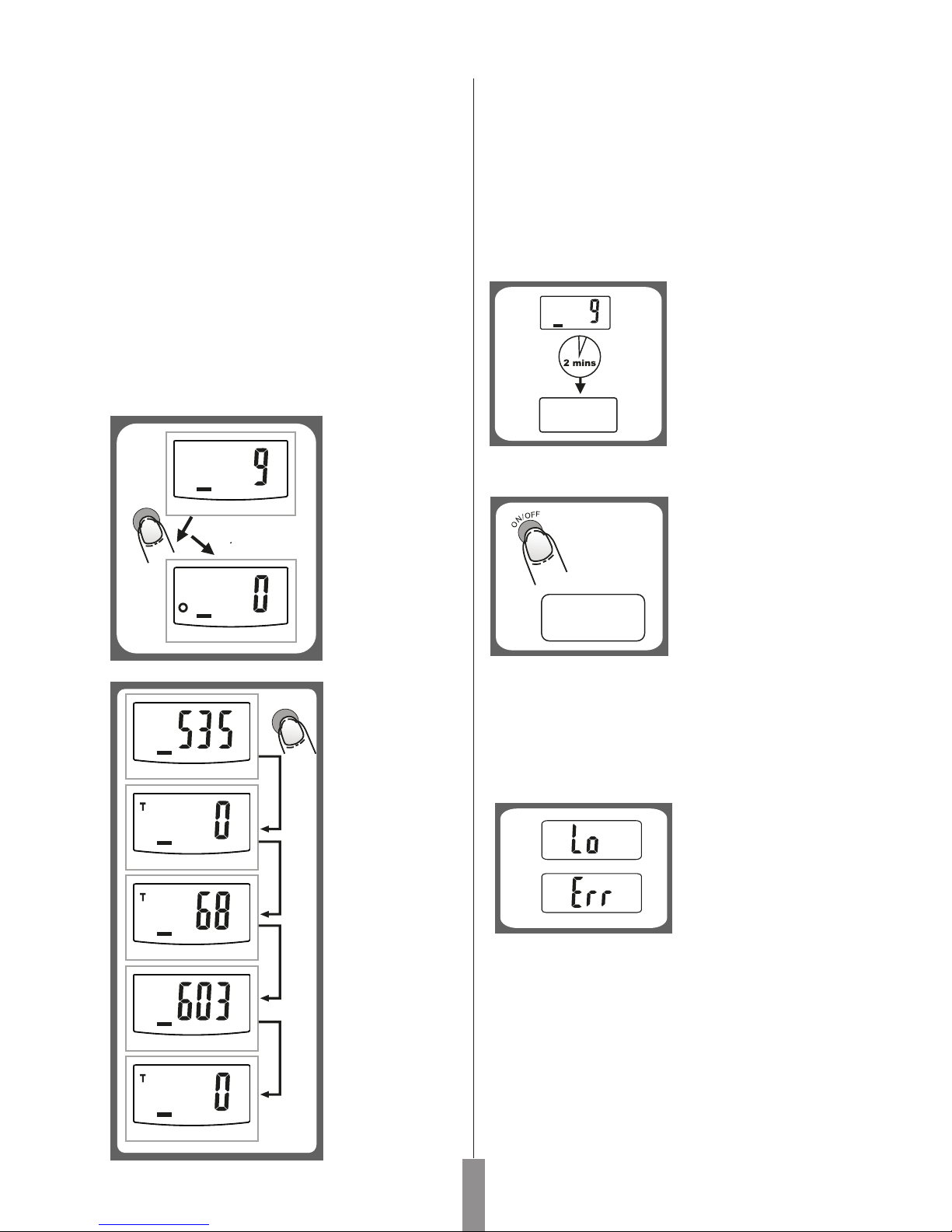
Tart›y› sa¤lam ve düz bir zemin üzerine yerlefltiriniz.
Tart›y› çal›flt›rmadan önce plastik kab› tart› üzerine
yerlefltiriniz.
LCD ekranda “0” belirene kadar bekleyiniz, “water”
(su) veya “milk” (süt) moduna geçmek için MODE
tufluna bas›n›z.
Plastik kab›n üzerine s›v›y› boflaltaca¤›n›z kab›
yerlefltiriniz.
LCD ekran› “0” ‘a getirmek için, ZERO tufluna bas›n›z.
S›v›y› kap içine boflalt›n›z. LCD ekranda s›v›n›n hacmi
belirecektir.
MODE tufluna tekrar basarak s›v›n›n a¤›rl›¤›na bak›p,
a¤›rl›k moduna geçebilirsiniz.
Farkl› a¤›rl›klar›
cihazdan
kald›rmadan ard›
ard›na ölçmek için
bu fonksiyonu
kullanabilirsiniz.
Cihaza ilk önce
ölçmek istedi¤iniz
cismi koyunuz,
ekranda a¤›rl›¤›n›
göreceksiniz. Di¤er
cismi eklemeden
önce “ZERO”
tufluna bas›n›z.
Böylece a¤›rl›k
s›f›rlanacak ve
ekranda “0”
rakam›
gözükecektir.
Durum 2: ZERO tufluna her bast›¤›n›zda, LCD ekranda
“0” belirecektir.”T” simgesi LCD ekran›n sol üst köflesinde
belirecek ve DARA fonksiyonunun aktif oldu¤unu iflaret
edecektir.
ZERO tufluna bast›¤›n›zda baskülün üzerindeki tüm
a¤›rl›klar›n toplam a¤›rl›¤›n› görürsünüz. E¤er daha
fazla a¤›rl›k ölçmek isterseniz, ZERO tufluna bas›p, LCD
ekran› s›f›rlay›n›z; bu durumda ekranda “0” belirecektir.
•
•
•
•
•
•
•
Zero/Dara Fonksiyonu
Durum 1:
ZERO tufluna her
bast›¤›n›zda LCD
ekranda “0”
gözükecektir. “0”
rakam› LCD
ekran›n sol alt
köflesinde
gözükecek ve
ZERO
fonksiyonunun aktif
oldu¤una iflaret
edecektir. Max
a¤›rl›k kapasitesi
de¤iflmeksizin
kalacakt›r.
g
Otomatik kapatma özelli¤i
LCD ekran “0” › gösterirse
veya ayn› a¤›rl›¤› 2
dakikadan uzun süre
gösterirse, otomatik
kapanma özelli¤i devreye
girer.
Cihaz›n Manual Kapanmas›
Cihaz›n pillerinin
ömrünün uzun olmas›n›
istiyorsan›z, her
kullan›mdan sonra
ON/OFF tufluna basarak
cihaz› kapat›n›z.
Maximum a¤›rl›k kapasitesi tart› üzerinde gösterilmifltir.
1.
2.
Uyar› ‹flaretleri
LCD ekranda yandaki gibi
“Lo” iflareti beliriyorsa,
cihaza yeni pil tak›n›z.
LCD ekranda yandaki gibi
“Err” iflareti beliriyorsa,
tart›da fazla yük
bulunmaktad›r.
Cihaz›n temizlik ve bak›m›
Cihaz›n üzerini yumuflak nemli bir bezle silebilirsiniz.
Cihaz› kesinlikle suya veya temizlemek için herhangi
kimyasal bir s›v›ya temas ettirmeyiniz.
Plastik kap ya¤, baharat, sirke ve sert aromal› /renkli
yiyeceklerle temas›ndan sonra derhal temizlenmelidir.
Kab› asitli s›v›lara temas ettirmekten kaç›n›n›z.
Tart›y› her zaman düz ve sert bir zemin üzerinde
kullan›n›z. Hal›, kilim, v.b. üzerinde kullanmay›n›z.
NOT: LCD ekran “0” › gösterdi¤inde ON/OFF tufluna
basarak cihaz› kapat›n›z. Cihaz a¤›rl›¤› okurken, 3
saniyeden uzun bir süre boyunca ON/OFF tufluna
basarak cihaz› kapatabilirsiniz.
•
•
•
g
Weight Milk Water
ZERO
g
Weight Milk Water
g
g
g
g
g
ZERO
Weight Milk Water
Weight Milk Water
Weight Milk Water
Weight Milk Water
Weight Milk Water
Page 6
04
Introduction
Important Safeguards
Follow the basic safety precautions all office equipment
when using scale.
This unit is not represented as waterproof. Do not
expose this product to rain or moisture.
Do not dissemble this scale. The scale does not contain
any parts that can be repaired by the user.
Read all instructions before operating the scale.
Use the scale only for its intended purpose.
Please take care that this scale is not designed for
commercial or medical use.
•
•
•
•
•
•
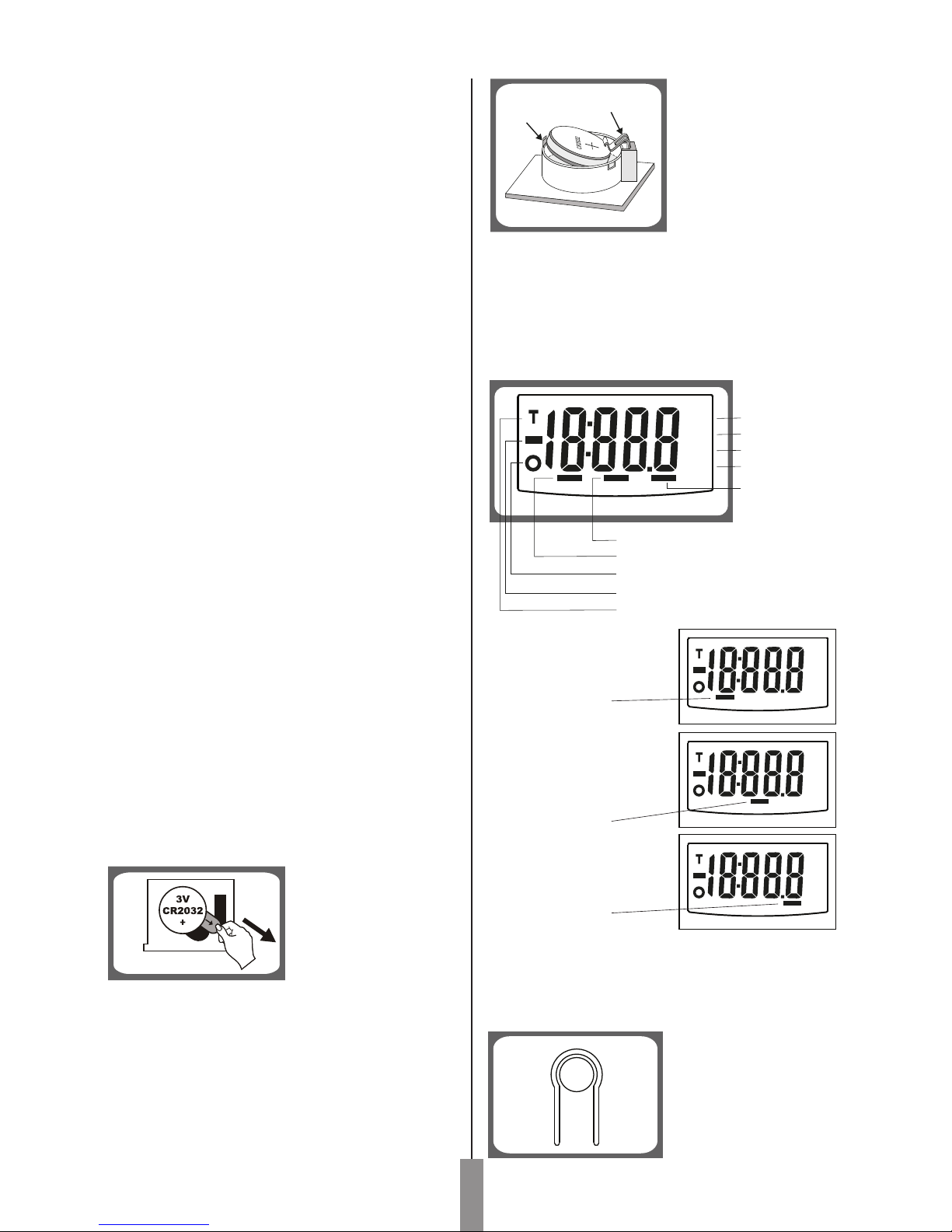
To replace the battery
You could use this appliance with 1x3V lithium battery
(CR2032). Please remove the isolation sheet from the
battery contact before use
Open battery case cover on the back of scale.
Bend the small black tab outwards and the battery will
come out. Take note not to bend the contact.
Install new battery by putting one side of battery beneath
the contact and then pressing down the other side.
Thank you for purchasing Fakir Libra Electronic Kitchen
Scale which has been designed and manufactured to
give you many years of trouble-free service.
You may already be familiar with using a similar product,
but do please take time to read these instructions - they
have been written to ensure you get the very best from
your purchase.
Specifications
Indicate volume of water and milk
Two weight unit systems g, lb:oz convertible
Two volume unit systems ml, fl’oz convertible
Low battery power / Overload indication
With high precision strain gauge sensor
With tare function
Auto off
•
•
•
•
•
•
•
black tab
contact
Usage of the appliance
Weight
Milk
Water
g
ml
fl’oz
Ib:oz
Tare weight
Negative value
Zero weight
Weight mode
Milk volume mode
Water volume mode
Weight unit (Ib:oz)
Volume unit (fl’oz)
Volume unit (ml)
Weight unit (gr.)
Weight Milk Water
Weight Milk Water
Weight Milk Water
Weight mode
Milk volume mode
Water volume mode
g
ml
fl’oz
Ib:oz
g
ml
fl’oz
Ib:oz
g
ml
fl’oz
Ib:oz
Unit Conversion Button
At the bottom of scale,you can find a unit conversion
button as shown in picture.
For yours and others safety please read the instructions
before using the appliance. Please keep this instruction
in a safe place for the further use. If you pass the appliance
on, pass on the instructions too. Remove all packaging,
but keep it until you are satisfied that the appliance is
working.
Safety is important
Page 7
0505
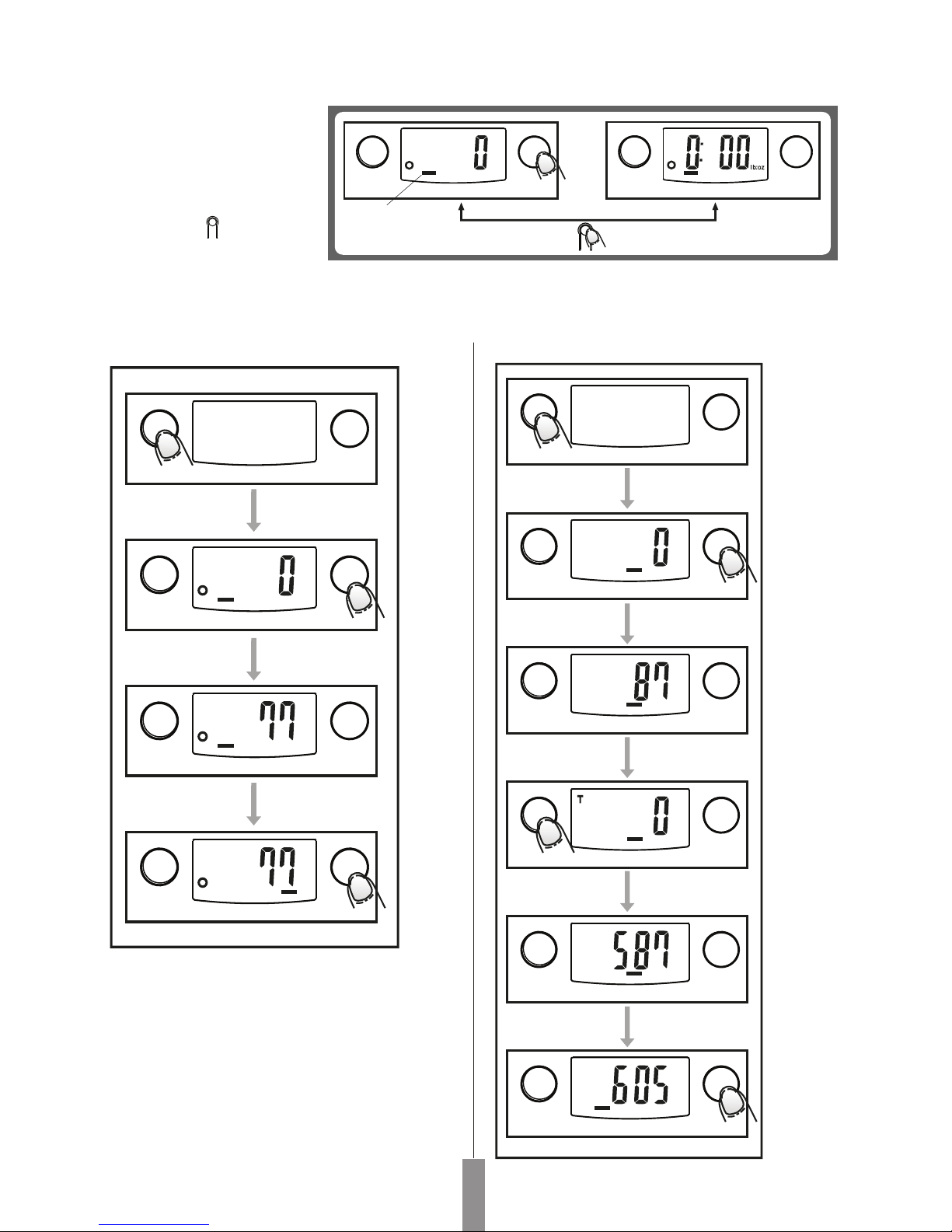
To convert weight unit
If the scale is with both unit
systems of Metric (g, ml) or
Imperial (lb:oz,fl'oz), press
MODE button to choose
working mode (weight, milk
volume, water volume), then
press unit conversion
button to convert between
two systems. Take the
conversion of weight unit
for example:
Weighing Mode
Place the scale on a solid and flat surface.
Place bowl (if used) on the scale before turning on
the scale.
Press "ON/OFF" to enter weighing mode.
Wait until LCD shows all information.
Load weighing object on to start weighing, LCD will
show the weight reading.
If the weighing object is water or milk, press MODE
button to choose volume mode and view the volume
of weighing object.
•
•
•
•
•
•
When setting g as weight unit, the default volume unit is ml;
When setting lb:oz as weight unit, the default volume unit is fl'oz.
Volume indication mode
g
Weight mode
O
N
/
O
F
F
Z
E
R
O
Weight Milk Water Weight Milk Water
M
O
D
E
g
O
N
/
O
F
F
Z
E
R
O
Weight mode
Weight Milk Water
O
N
/
O
F
F
Z
E
R
O
Weight Milk Water
g
ml
M
O
D
E
O
N
/
O
F
F
Z
E
R
O
Weight Milk Water
M
O
D
E
O
N
/
O
F
F
Z
E
R
O
Weight Milk Water
M
O
D
E
O
N
/
O
F
F
Z
E
R
O
Weight Milk Water
ml
ml
g
ml
ml
M
O
D
E
O
N
/
O
F
F
Z
E
R
O
Weight Milk Water
M
O
D
E
O
N
/
O
F
F
Z
E
R
O
Weight Milk Water
M
O
D
E
O
N
/
O
F
F
Z
E
R
O
Weight Milk Water
M
O
D
E
O
N
/
O
F
F
Z
E
R
O
Weight Milk Water
M
O
D
E
O
N
/
O
F
F
Z
E
R
O
Weight Milk Water
M
O
D
E
O
N
/
O
F
F
Z
E
R
O
Weight Milk Water
Page 8
06
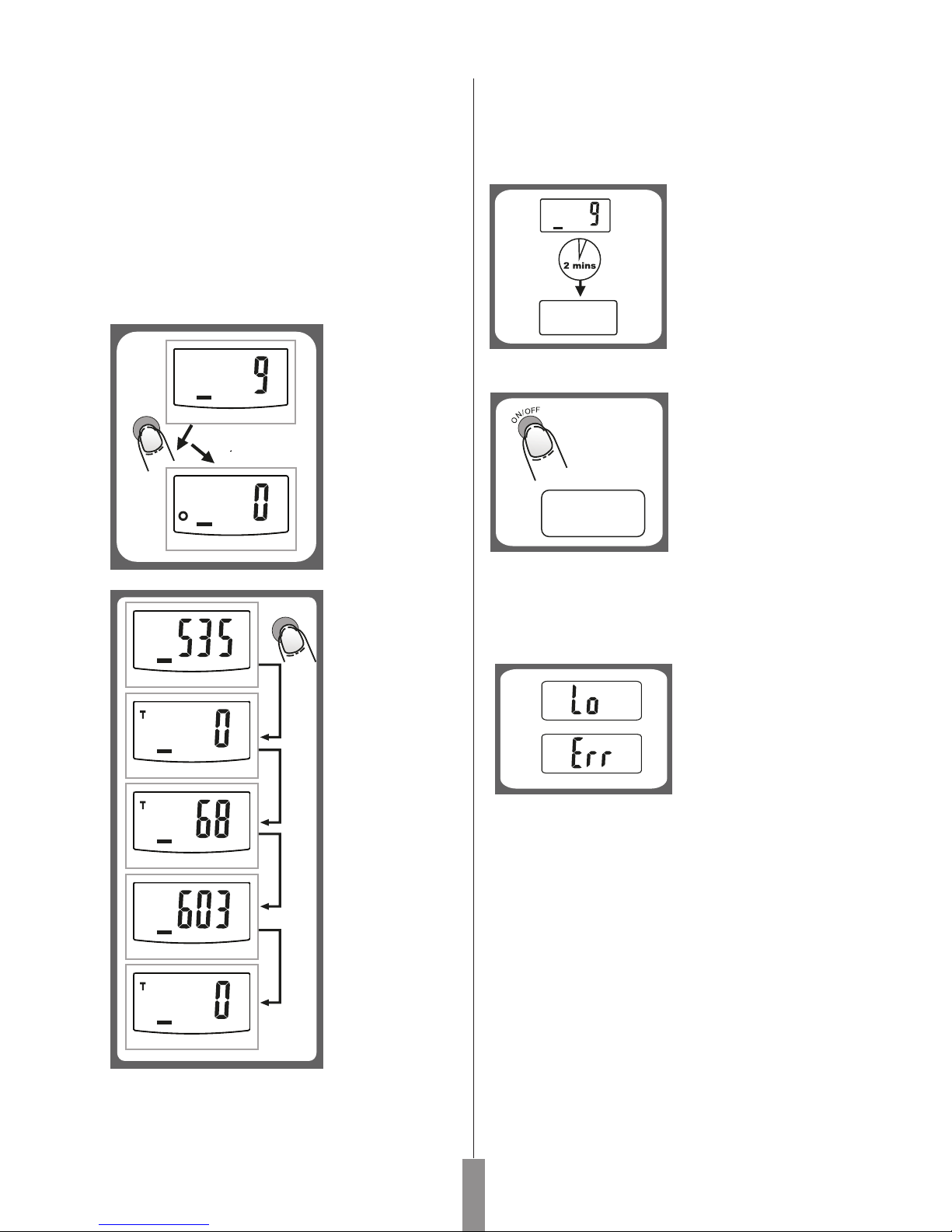
Place the scale on a solid and flat surface.
Press “ON/OFF “button to turn on the scale.
Wait until LCD shows "0", and pres MODE button to
choose "Water" or "Milk" mode.
Put a liquid container on to the scale platform.
Press ZERO button to reset LCD to "0".
Pour liquid (water or milk) in to the container, LCD
shows the volume of the liquid.
Press MODE button to choose "Weight" mode and
view the weight of liquid.
To weigh different
loads consecutively
without removing
loads from the
scale, first put the
load on the scale,
get weight
reading. Press
ZERO button to
reset the LCD
reading to "0"
before adding next
load. You can
repeat this
operation.
By pressing ZERO, you can see the total weight of all
loads on the scale. If you want to weigh more loads, just
press ZERO to reset LCD reading to '0' again.
•
•
•
•
•
•
•
Zero/Tare Function
Condition 1:
LCD will show
"0"each time
ZERO is pressed.
Icon "0" will show
on lower left corner
of LCD, indicating
"ZERO" function is
active. Max.
weight capacity
remains
unchanged.
g
Auto Shut Off
Auto shut-off occurs if
display shows '0' or
shows the same weight
reading for 2 minutes.
Manual Shut Off
To maximize battery life,
always press ON/OFF
again to turn off the scale
after using.
1.
2.
Warning Indicators
1. Replace new battery.
2. Scale overload.
Remove item to avoid
damage. Max.weight
capacity is indicated on
the scale.
Cleaning and Care
Clean the scale with a slightly damp cloth. DO NOT
immerse the scale in water or use chemical/abrasive
cleaning agents.
All plastic parts should be cleaned immediately after
contact with fats, spices, vinegar and strongly
flavored/colored foods. Avoid contact with acids citrus
juices.
Always use the scale on a hard, flat surface. DO NOT
use on carpet.
Note: When display shows "0" ,press "ON/OFF" to
turn off the scale; when display shows weight reading,
press "ON/OFF" for 3 seconds to turn off the scale.
•
•
•
Condition 2:
LCD will show
"0"each time
ZERO is pressed.
Icon "T" will show
on upper left
corner of LCD,
indicating "TARE"
function is active.
Max. weight
capacity is reduced
by total weight of
all loads.
g
Weight Milk Water
ZERO
g
Weight Milk Water
g
g
g
g
g
ZERO
Weight Milk Water
Weight Milk Water
Weight Milk Water
Weight Milk Water
Weight Milk Water
Page 9
NOT / NOTES
0507
Page 10

CAMRY MEASURING TECHNOLOGY (HK) LIMITED
UNIT D,7/F.,RITZ PLAZA,122 AUSTIN ROAD,
TSIMSHATSUI,KOWLOON,H.K.
 Loading...