

Page 1
Ranger Long-Range
Farpointe Data Receiver
Wireless Receiver (433-MHz)
This Quick Start Guide is intended for experienced installation technicians. It is a basic reference to ensure all connections are properly made.
Quick Start Guide
1.0 Description
Wireless Radio Transmitters and Long Range Receivers with an integrated receive antenna comprise Farpointe Data’s high frequency, long-range
identification solution known as Ranger
secure, digital, anti-playback routine2. The two-channel Ranger Receiver (Channels A and B) allows Ranger Transmitter data to be sent over a pair of
Wiegand outputs. Formatting of the Wiegand output is dependent upon the data encoded on each individual Ranger Transmitter.
The Receiver kit includes:
● 1 x Receiver mounted in an IP66 compliant plastic enclosure ● 2 x 3,0 x 16 screws for mounting to a European style wall box
● 1 x cable grommet for weather resistance ● 4 x #6 1-inch Phillips flat head wood screws for flat surface mounting
● 4 x self-captivating M4 screws for lid mounting ● 2 x #6 1-inch Phillips flat head machine screws for mounting to a USA single gang wall
1
. Intended for security access control applications, Ranger’s wireless communications are based upon a
box
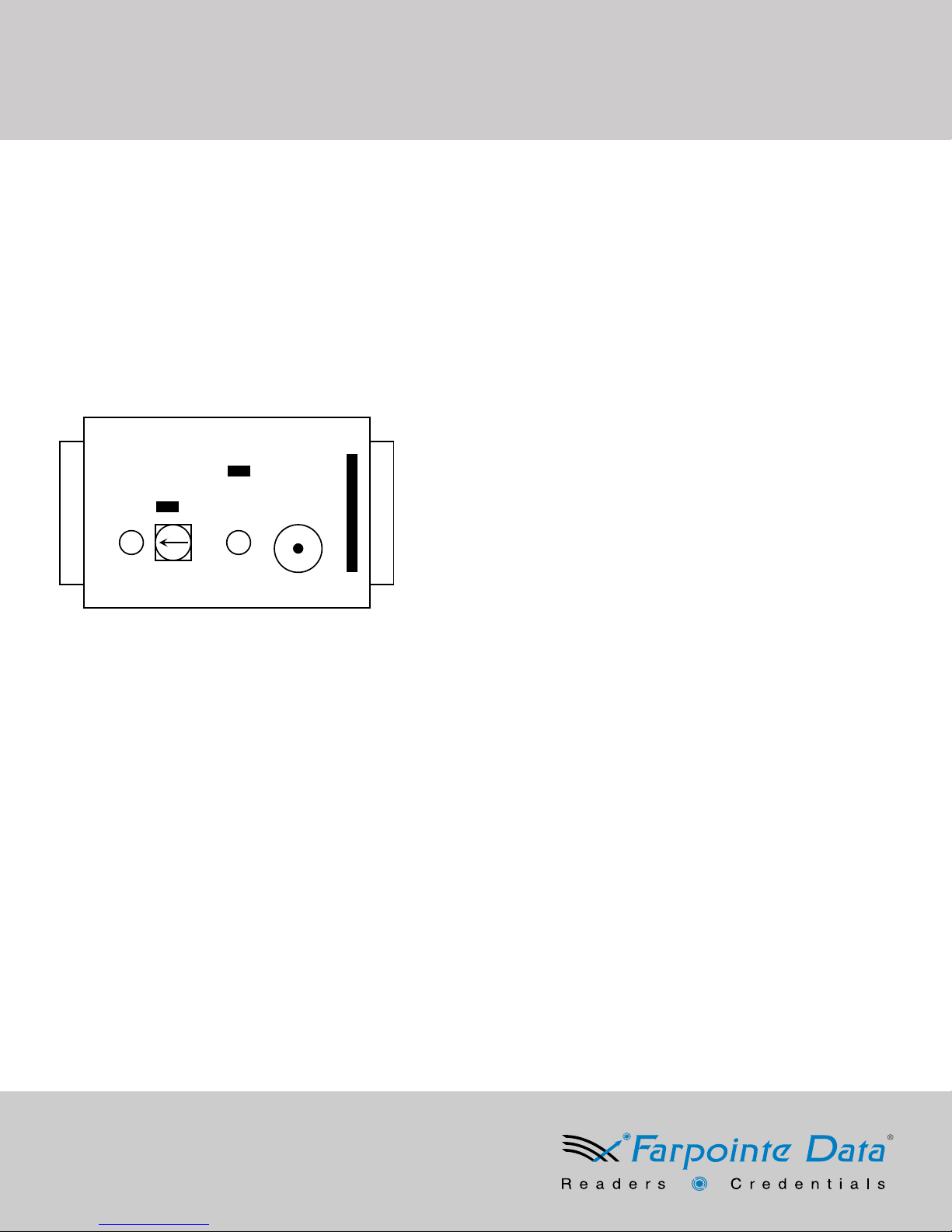
2. Receiver Layout
G
Legend:
A: Range LED
F
B: Range Adjustment Control
C: Functional LED Indicator
D: Beeper
E: 7-PIN Terminal Block
F: Button Select Jumper
A B C D E
G: Front LED Control Jumper
3.0 Cable Requirements
24 AWG minimum, multi-conductor stranded with an overall foil shield, for example Belden 9535 or similar. Per the SIA’s Wiegand specification,
maximum cable length is 500-feet (152 m).
4.0 Output Formats
Wiegand (industry standard 26-bit Wiegand and custom Wiegand formats)
5.0 Grounding
Shield (drain) continuity must run from the reader to the access panel. Shield (drain) and reader ground must be tied together at the access panel and
connect to an earth ground at one point.
6.0 Power
The Receiver may be powered by the access panel. A linear power supply is recommended for best operation. Power required is 8 to 24 VDC at 80
mA (nominal).
7.0 Mounting
The Receiver may be mounted indoors or outdoors. The base of the enclosure includes a drill template providing mounting provisions to a wall box
(North American and European), as well as pre-drilled holes in the four corners allowing mounting to a flat surface.
8.0 Range
The read range between the Receiver and Transmitter may be adjusted. As shipped, the Receiver is set for the maximum, up to 150 feet (46 m). This
may be reduced to a minimum typically of several feet by adjusting the Range Pot in the counter-clockwise direction4.
1
Models include but may not be limited to the WRT-2+, WRT-2+H, WRT-2+A, WRT-4+, WRT-4+H, WRT-4+A, WRT-2+S1, WRT-2+S4 WRT-4+S1, and WRT-4+S4.
2
Addresses the risks associated with code sniffing and unauthorized duplication.
3
For best performance it is important that the Receiver be mounted as far from potential interference sources as possible. These sources may include, but are not limited to,
large metal obstructions, as well as magnetic fields and radio transmissions.
4
The Receiver features a green Range LED that will shine brighter when the detection range is increased, and dimmer when decreased.
3
232 Santa Ana Court
Sunnyvale, CA 94085 USA
Tel: +1-408-731-8700 Fax: +1-408-731-8705
e-mail: [email protected]
Web: www.farpointedata.com
P/N: 01601-001 Rev. 3
Page 2
Ranger Long-Range
Wireless Receiver (433-MHz)
Farpointe Data Receiver
Installation Guide
9.0 LED and Beeper Indicators
5
Refer to the table below for explanations on the Receiver’s LED and Beeper operation
Color/Sound Corrective Action
Green & Beep Initial power up
Amber Normal ON state
Flash Green & Beep An activated transmitter button press has been processed
Flash Red A non-activated transmitter button press has been detected
Off Receiver is not powered on, or failed to power up successfully
6
10.0 Button Selection
Utilizing the Button Select Jumper, the Receiver can be configured to receive data from Buttons 1 and 2, or from Buttons 3 and 4, over channels A and
B. Refer to the following table for button control:
Jumper Position Activated Transmitter Button Output Channel Non-activated Transmitter Buttons
Open Buttons 1 & 2 AD0 & AD1, BD0 & BD1 Buttons 3 & 4
Closed Buttons 3 & 4 AD0 & AD1, BD0 & BD1 Buttons 1 & 2
8.0 Troubleshooting
Issue/Possible Cause Corrective Action
No data received/Transmitter not enrolled Transmitter must be clicked twice to be learned by the Receiver with Receiver powered up
Short Read Range/Knob Adjust range adjustment control to maximum setting (turn clockwise)
Some Buttons not working/Channel Jumper Jumper must be set to channel ‘A’ for buttons 1 & 2/Jumper must be set to channel ‘B’ for buttons 3 & 4
5
The Receiver features a green Range LED that will shine brighter when the detection range is increased, and dimmer when decreased.
6
The Transmitter includes a red LED that will flash upon button press, indicating data transmission.
Many Farpointe Data Readers carry the following certifications:
FCC compliance Statement: This device complies with part 15 of the FCC rules. Operation is subject to the
following two conditions:
(1) this device may not cause harmful interference, and
(2) this device must accept any interference received, including interference that may cause undesired operation.
Product can be used without license conditions or restrictions in all European Union countries, including Austria, Belgium, Bulgaria, Cyprus, Czech
Republic, Denmark, Estonia, Finland, France, Germany, Greece, Hungary, Ireland, Italy, Latvia, Lithuania, Luxembourg, Malta, Netherlands, Poland,
Portugal, Romania, Slovakia, Spain, Sweden, United Kingdom, as well as other non-EU countries, including Iceland, Norway, and Switzerland.
Farpointe Data reserves the right to change specifications without notice.
©2012 Farpointe Data, Inc. All rights reserved. Farpointe Data, the Farpointe Data logo, Pyramid Series Proximity, Pyramid Series logo, Ranger and
Delta are registered trademarks of Farpointe Data, Inc. All other trademarks are the property of their respective owners.
232 Santa Ana Court
Sunnyvale, CA 94085 USA
Tel: +1-408-731-8700 Fax: +1-408-731-8705
e-mail: [email protected]
Web: www.farpointedata.com
 Loading...