

Page 1
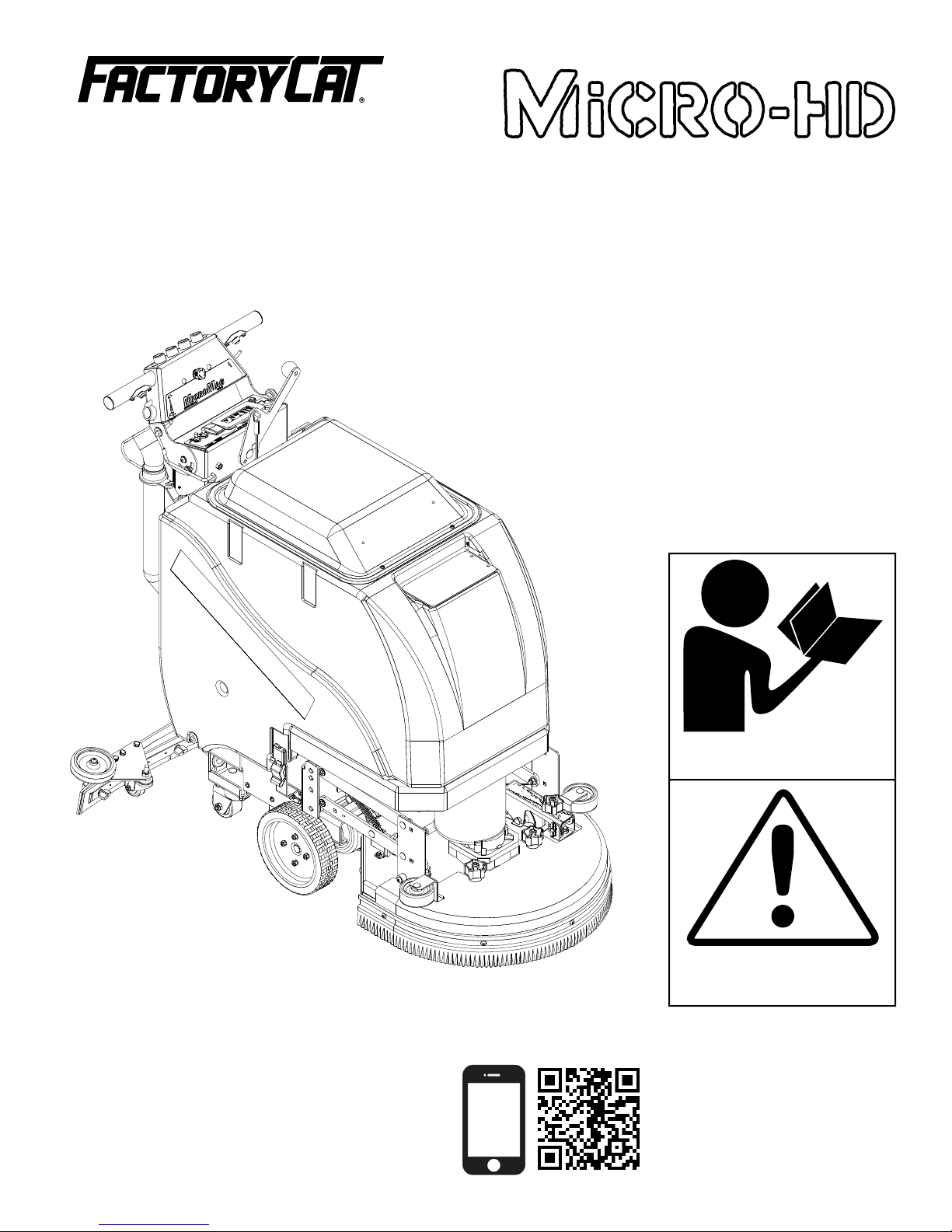
Operating Instructions (EN)
Read these Instructions before
using the machine.
Read these Safety Messages
before using the machine.
Scan With Phone for more Information
www.factorycat.com
1711 South Street
Racine, WI 53404 (USA)
(800) 634-4060 | (+001) 262-681-3583 V18.234
© 2018 RPS Corporation FC-MICRO-HD-OP-EN
Page 2
INTRODUCTION
This manual is furnished with each new machine. This manual will allow the Operator to get the best performance out of
your RPS manufactured Scrubber-Drier, Sweeper, Burnisher, or Orbital Scrubber. Read this manual thoroughly before
operating or servicing the machine.
This machine will provide excellent performance, but the best results will be obtained at the most minimum costs if:
• The machine is regularly maintained - per the Authorized Local Distributor.
• The machine is operated with reasonable care and caution.
• The machine is maintained with manufacturer supplied parts.
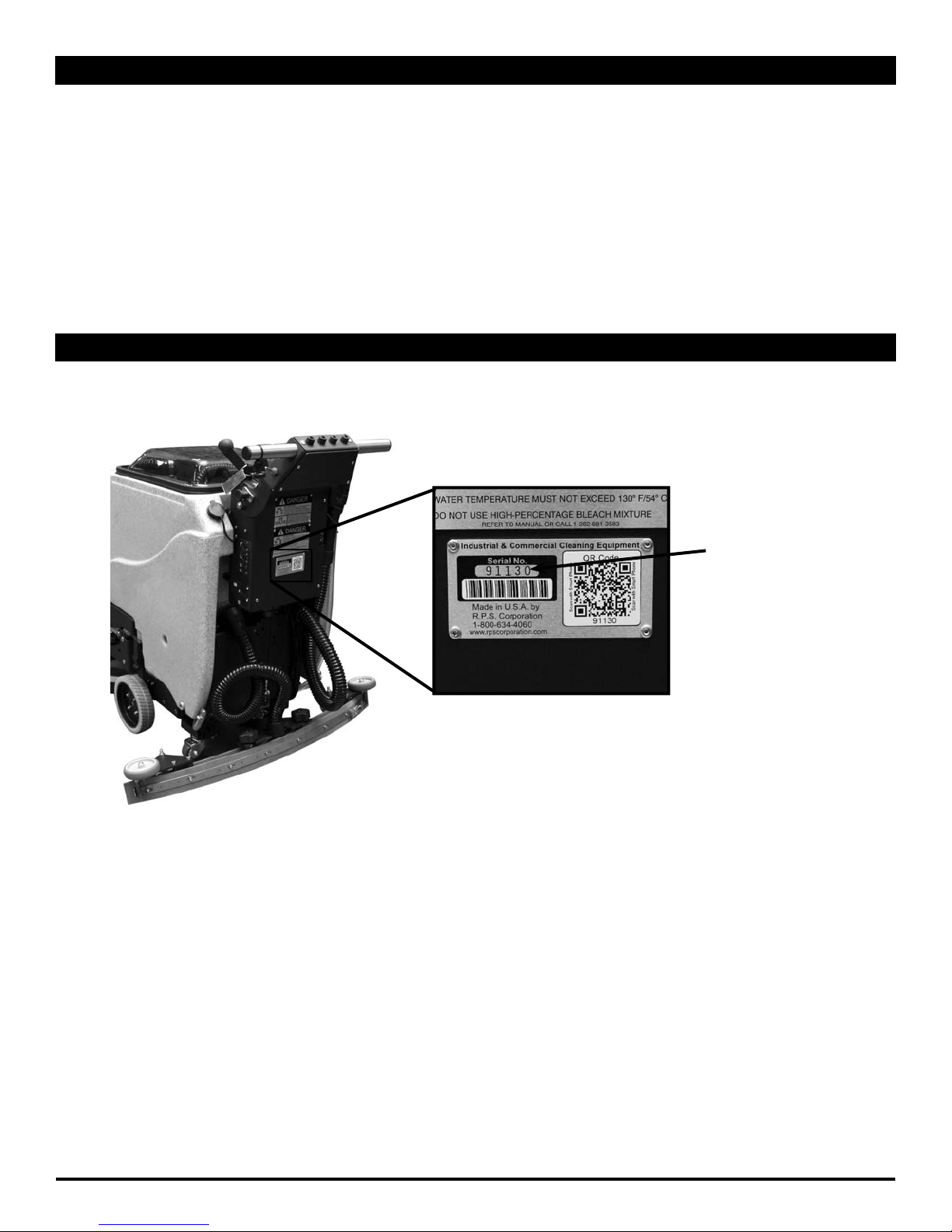
LOCATE SERIAL NUMBER
The serial number of your machine is located on the lower half of the control panel of the machine.
AS OUR POLICY IS ONE OF CONSTANT IMPROVEMENT - ALL INFORMATION AND
SPECIFICATIONS ARE SUBJECT TO CHANGE WITHOUT NOTICE.
SERIAL NUMBER
- 2 - FC-MICRO-HD-OP-EN
Page 3
TABLE OF CONTENTS
Introduction 2
Locate Serial Number 2
Table Of Contents 3
Safety Messages 4
Safety Labels 6
LCD Screen 7
Operation Controls 8
Touch Screen (Optional) 9
Touch Screen Symbols (Optional) 10
Touch Screen Zone Operation (Optional) 11
Touch Screen Zone Progamming (Optional) 12
Battery Setup 13
Remove Squeegee 14
Fill Solution Tank 19
Operation - Scrubbing 20
Draining Recovery Tank 21
Draining Solution Tank 22
Flushing Recovery Tank 23
Clean Drain Saver 24
Clean Cylindrical Hopper 25
Clean Vac Box System 26
Remove Disk Brushes 27
Remove Cylindrical Brushes 28
Charge Batteries 29
Battery Chargers 30
Common Wear Parts 31
Adjust Squeegee 15
Remove From Battery Charger 16
Transportation - Forward 17
Transportation - Reverse 18
Round Disk Brushes: 31
Round Disk Pads: 31
Cylindrical Brushes: 31
Squeegee Blade Kits & Complete Squeegee
Assemblies: 31
P&G Controller Common Error Codes 33
FC-MICRO-HD-OP-EN - 3 -
Page 4
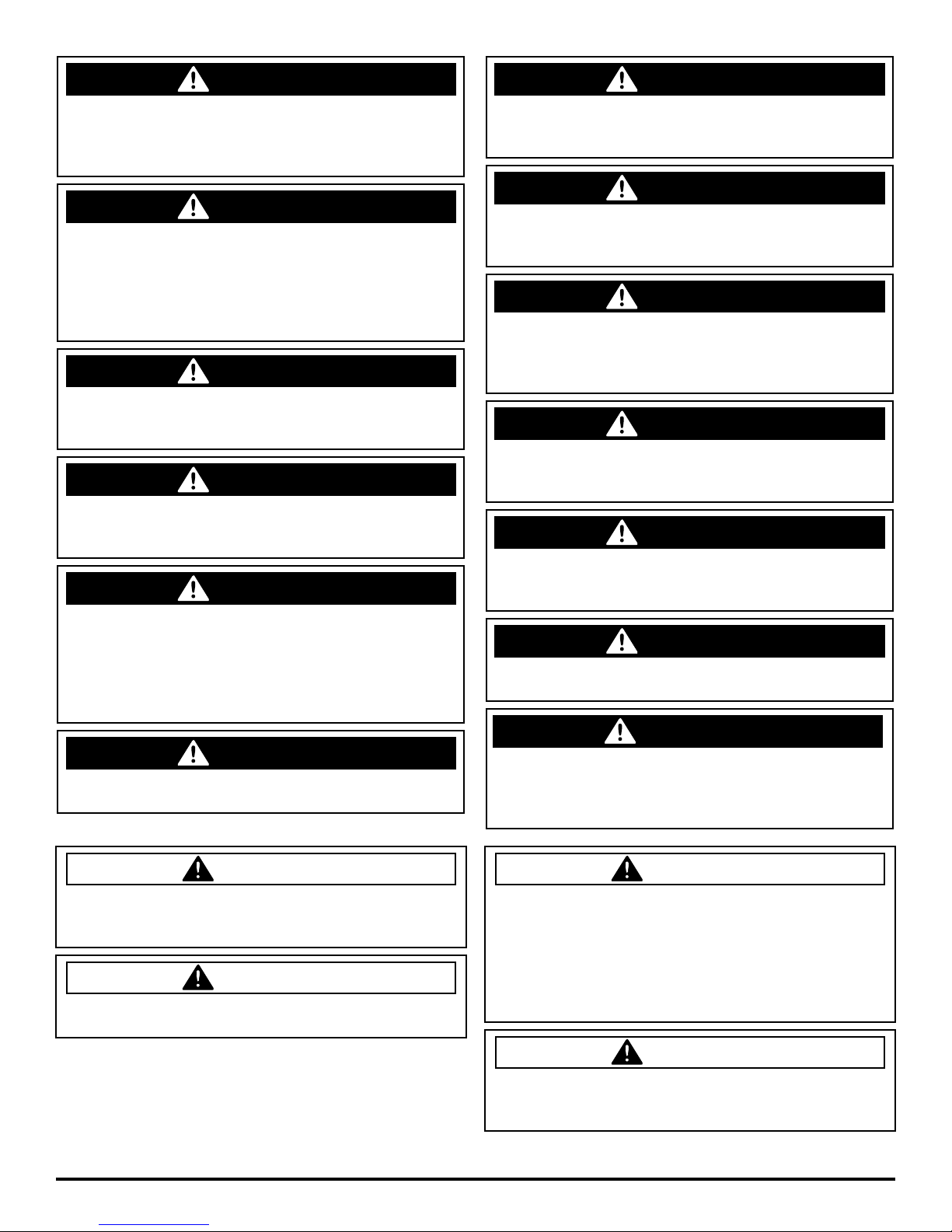
You will see four kinds of safety reminders in this manual:
SAFETY MESSAGES
DANGER
DANGER indicates a hazardous situation which, if not
avoided, will result in death or serious injury.
WARNING indicates a potentially hazardous situation
which, if not avoided, could result in death or serious injury.
CAUTION
CAUTION indicates a potentially hazardous situation
which, if not avoided, could result in minor or moderate
injury or damage to this machine or nearby objects. CAUTION also can be used to alert against unsafe practices.
Your safety, and that of others, is very important. Operating this machine safely is an important responsibility.
NOTICE indicates information considered important, but
not hazard-related. This safety message may be related to
property damage or warranty warnings.
WARNING
NOTICE
DO NOT OPERATE THIS MACHINE:
• Unless you are trained and authorized to do so by your RPS Authorized Local Distributor
• Unless you have read and understood this Operator’s Manual
• On surfaces with greater than a 2% grade unless this machine is equipped with a functional parking brake
• On surfaces with greater than an 8% grade at any time
• On Loading Docks
WHEN OPERATING THIS MACHINE:
• Remove loose objects from the fl oor that could be projected from the rotating Brushes
• Keep your hands and feet away from the rotating Brushes
• Do not operate this machine where fl ammable liquids, vapors, or dust are present
• Use caution when maneuvering
BEFORE LEAVING THE MACHINE:
• Drain “clean” Solution & “dirty” Recovery solution into APPROVED drains
• Park the machine on a level surface
• Turn the machine off & remove key
BEFORE SERVICING THE MACHINE:
• Disconnect the Batteries
DANGER
Explosive hydrogen gas forms when Batteries are
charging. An open fl ame or spark can cause this gas
to explode. Serious personal injury or property damage
could occur. Only charge the Batteries in this machine in
a well ventilated area.
- 4 - FC-MICRO-HD-OP-EN
DANGER
Flammable materials can cause an explosion or fi re. Do
not use fl ammable materials in Tank or pick up.
Page 5
WARNING
The Batteries in this machine produce hazardous
voltage which can cause electrical shock, burns and/
or electrocution. Always disconnect Batteries before
servicing this machine.
WARNING
When climbing or descending ramps, always drive
machine forward. To avoid overturning the machine,
Do not back down ramps. Do not drive across inclines.
Do not turn while ascending or descending ramps.
Overturning the machine can cause serious injury or
death.
WARNING
Do not use water that exceeds 135°F / 57°C. If water
is above said temperature, this will void the Tank
Warranty.
WARNING
Do not park this machine on ramps or slopes. Always
park this machine on a level, hard surface. Do not
operate this machine outdoors or on uneven surfaces.
WARNING
The Batteries in this machine contain sulfuric acid,
which causes burns to skin. If battery acid contacts
clothing or skin, rinse the effected area with cold water
immediately. If battery acid gets on your face or in your
eyes, fl ush the area immediately with cold water and
seek medical attention.
WARNING
To avoid electrical shock, do not operate this machine
over electrical fl oor outlets.
WARNING
Dress safely. Do not wear rings or metal wrist watches
when servicing this machine, as they can cause an
electrical short circuit which can cause serious burns.
WARNING
Do not remove, paint over or destroy warning decals. If
warning decals become damaged, call 1-262-681-3583
for free replacements.
WARNING
Dress safely. Do not wear a neck tie, scarf, or any
loose or dangling clothing while operating this machine.
Loose or dangling clothing or neck-wear can tangle in
rotating parts, causing serious injury or death.
WARNING
Always turn off this machine before leaving it
unattended. Do not allow untrained persons to operate
this machine.
WARNING
NO RIDERS. Do not carry passengers on this machine.
Do not use this machine as a stepladder or work
platform.
WARNING
Understand the dynamic braking system before you
operate the machine on ramps. Machine may coast.
WARNING
Before you service a Battery, always wear face
protection, protective gloves and protective clothing.
Battery acid or battery explosion can cause serious
injuries.
CAUTION
To avoid damage to this machine, use only cleaning
solutions and replacement parts recommended by the
manufacturer.
CAUTION
Do not operate this machine if any parts have been
damaged or removed.
FC-MICRO-HD-OP-EN - 5 -
CAUTION
Always use the automatic battery charger provided
by the manufacturer of this machine to charge the
Batteries of this machine. It is designed to charge
the Batteries at the appropriate rate. If you must use
a different charger, disconnect the Batteries before
charging to avoid damage to the electronic speed
controller.
CAUTION
To avoid damage to the electronic control components
of this machine, Do not store this machine outdoors. Do
not pressure wash this machine.
Page 6
DANGER
SAFETY LABELS
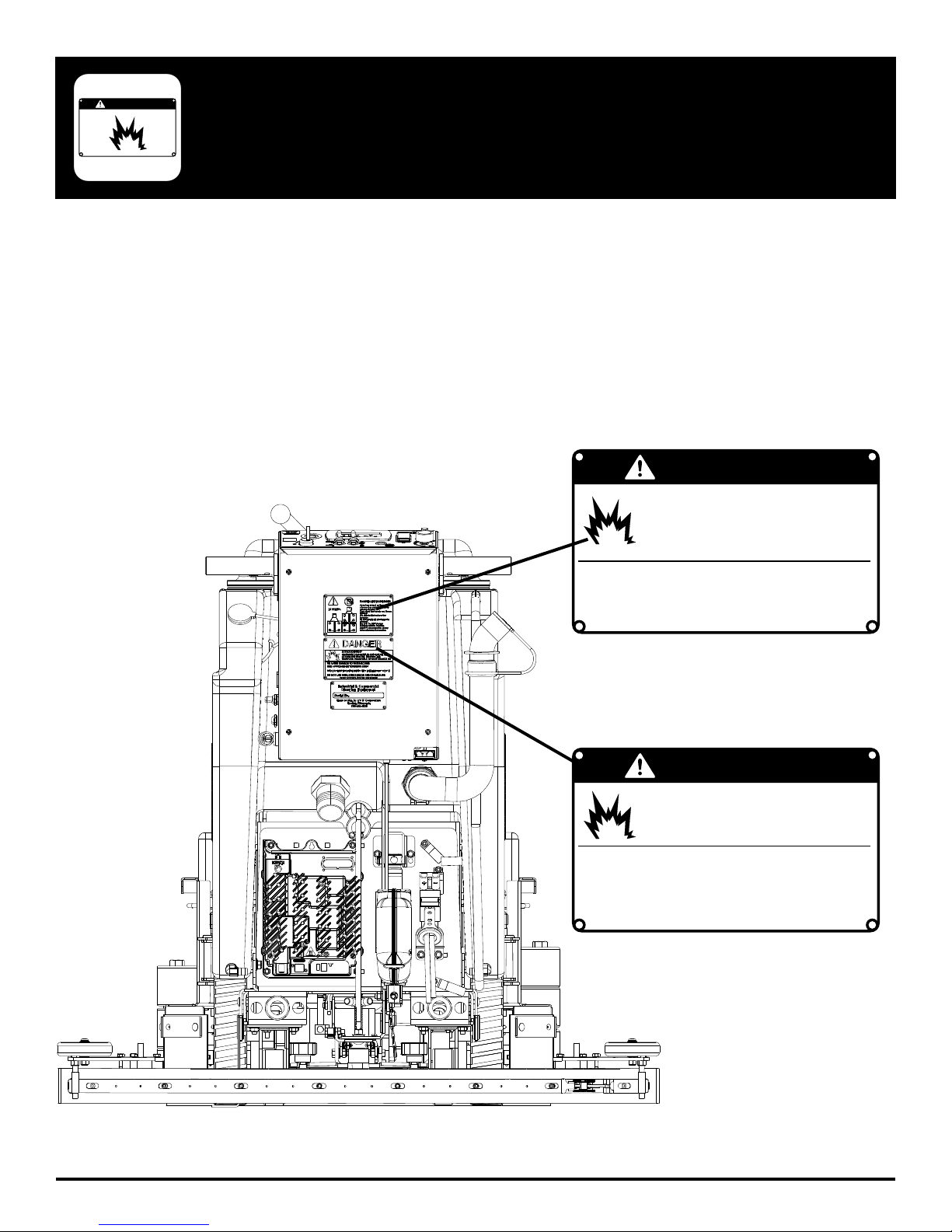
Read and obey all Safety Labels on your MICRO-HD Floor Scrubber. If you have questions about these labels, ask your
supervisor.
These images indicate where on the MICRO-HD Safety Labels are located. If ever the labels become illegible, worn off, or
torn, promptly report it to your supervisor and replace it.
DANGER
EXPLOSIVE HYDROGEN GAS FORMS WHEN
BATTERIES ARE CHARGING. AN OPEN FLAME
OR SPARK CAN CAUSE THIS GAS TO EXPLODE.
ONLY CHARGE THE BATTERIES IN THIS MACHINE IN A WELL VENTILATED AREA.
USE ONLY DISTILLED WATER IN THE BATTERIES. USE
ONLY THE OEM CHARGER PROVIDED WITH THE MACHINE. ALWAYS DISCONNECT THE BATTERY BEFORE
SERVICING THE MACHINE.
REFER TO MANUAL OR CALL +011-262-681-3583
BATTERY CHARGING LABEL
EXPLOSION RISK!
PART #: 253-7280
- 6 - FC-MICRO-HD-OP-EN
DANGER
EXPLOSION RISK!
&,!--!",%-!4%2)!,3#!.#!53%!.
%80,/3)/./2&)2%$/./453%&,!-
-!",%-!4%2)!,3).4!.+/20)#+50
TO AVOID DAMAGE TO THIS MACHINE:
s53%!002/6%$$%4%2'%.43/.,9
s7!4%24%-0%2!452%-534./4%8#%%$˚F/ 54˚#
s$/./453%()'(0%2#%.4!'%",%!#(-)8452%
REFER TO MANUAL OR CALL +011-262-681-3583
TANK LABEL
PART #: 5-728
Page 7
LCD SCREEN
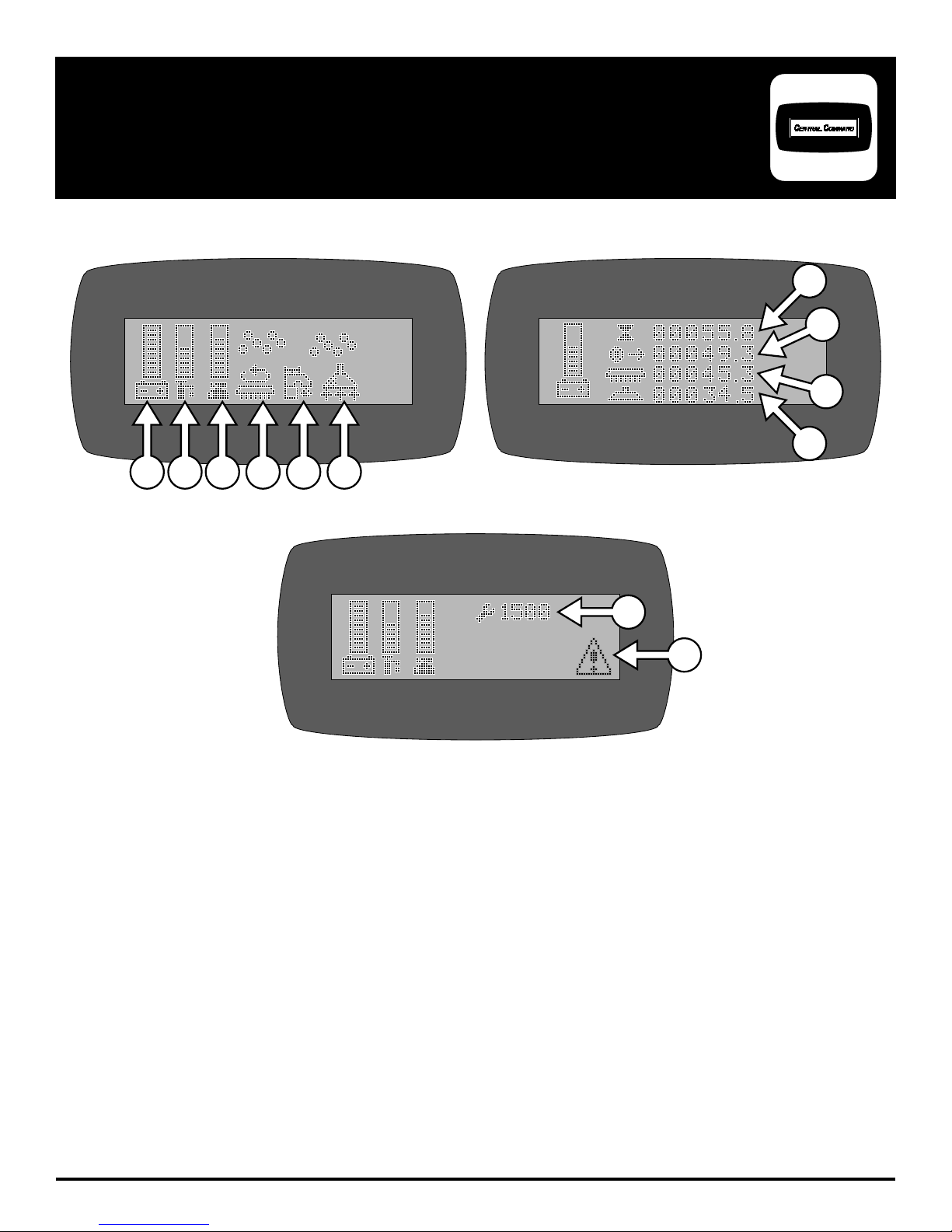
SCREEN #1 (OPERATOR)
1 2 3 4 5 6
SCREEN #2 (MAINTENANCE)
7
8
9
10
SCREEN #3 (WITH ERROR CODE)
11
12
** USE GREEN MENU SELECTION BUTTON ON CONTROL PANEL TO CHANGE SCREENS **
1. BATTERY LEVEL INDICATOR - Indicates the energy level remaining in the Batteries
2. SOLUTION OUTPUT INDICATOR - Indicates the gallons per minute (GPM) 0 - 1.0
3. SCRUBDECK DOWN PRESSURE INDICATOR - Sets the down pressure on the Brushes / Pads
4. SCRUB MOTORS ON - Indicates the Brush Motors are in operation
5. SOLUTION ON - Indicates the solution fl ow is ON
6. VACUUM ON - Indicates the Vacuum is ON
7. KEY SWITCH HOUR METER - Indicates total hours the machine has had keyswitch ON
8. TRANSPORT HOUR METER - Indicates total hours the drive system has been in operation
9. SCRUB BRUSH HOUR METER - Indicates total hours the brush motors have been in operation
10. VACUUM HOUR METER - Indicates total hours the vacuum motor has been used
11. DIAGNOSTIC CODE - Displays diagnostic code which helps troubleshoot issues
12. ERROR WARNING SYMBOL - Indicates when there has been a diagnostic code error
FC-MICRO-HD-OP-EN - 7 -
(Shown on all menu displays)
Page 8
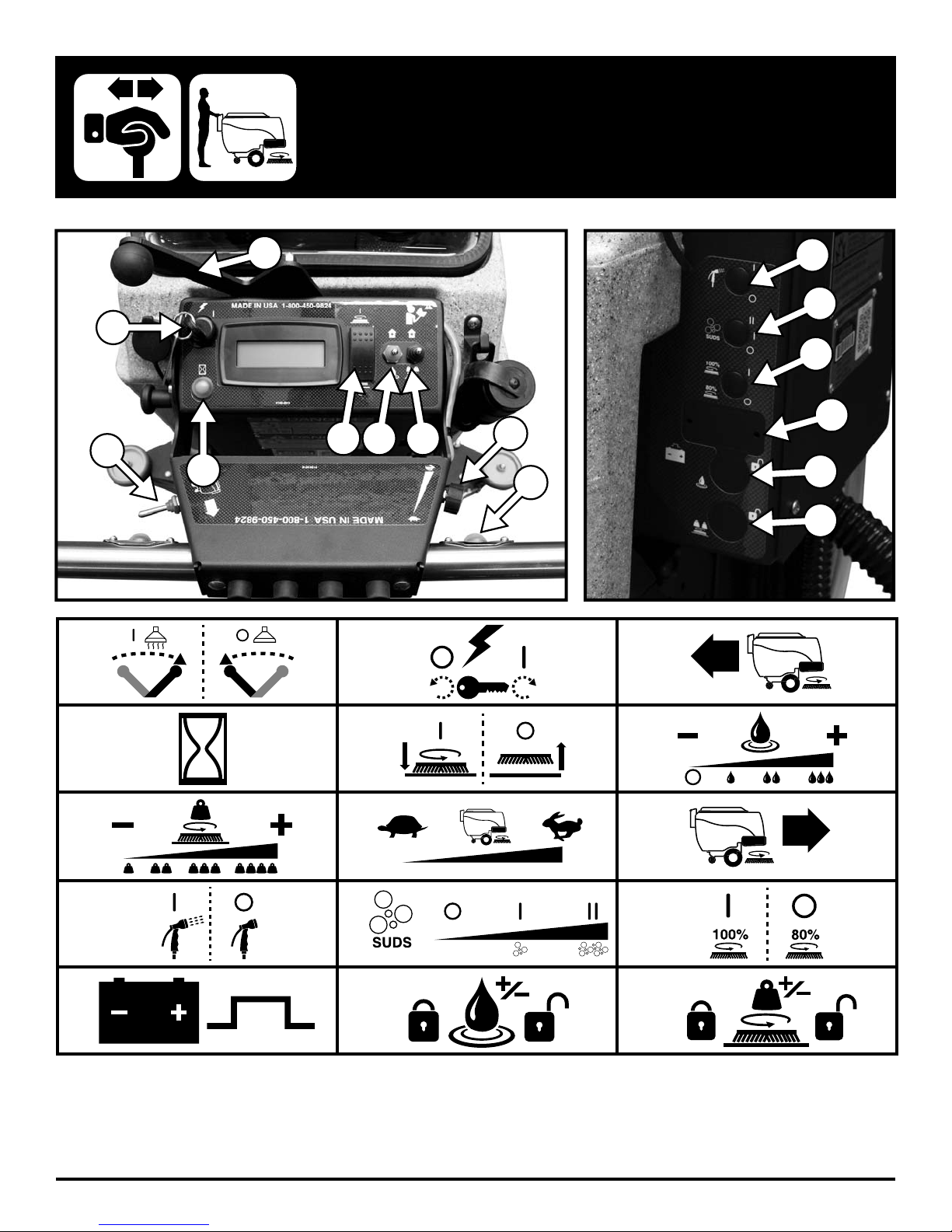
OPERATION CONTROLS
1
2
3
5
4
1. 2.
10
11
12
13
6
7
8
9
14
15
3.
4. 5. 6.
7.
10. 11.
13. 14. 15.
- 8 - FC-MICRO-HD-OP-EN
8.
9.
12.
Page 9
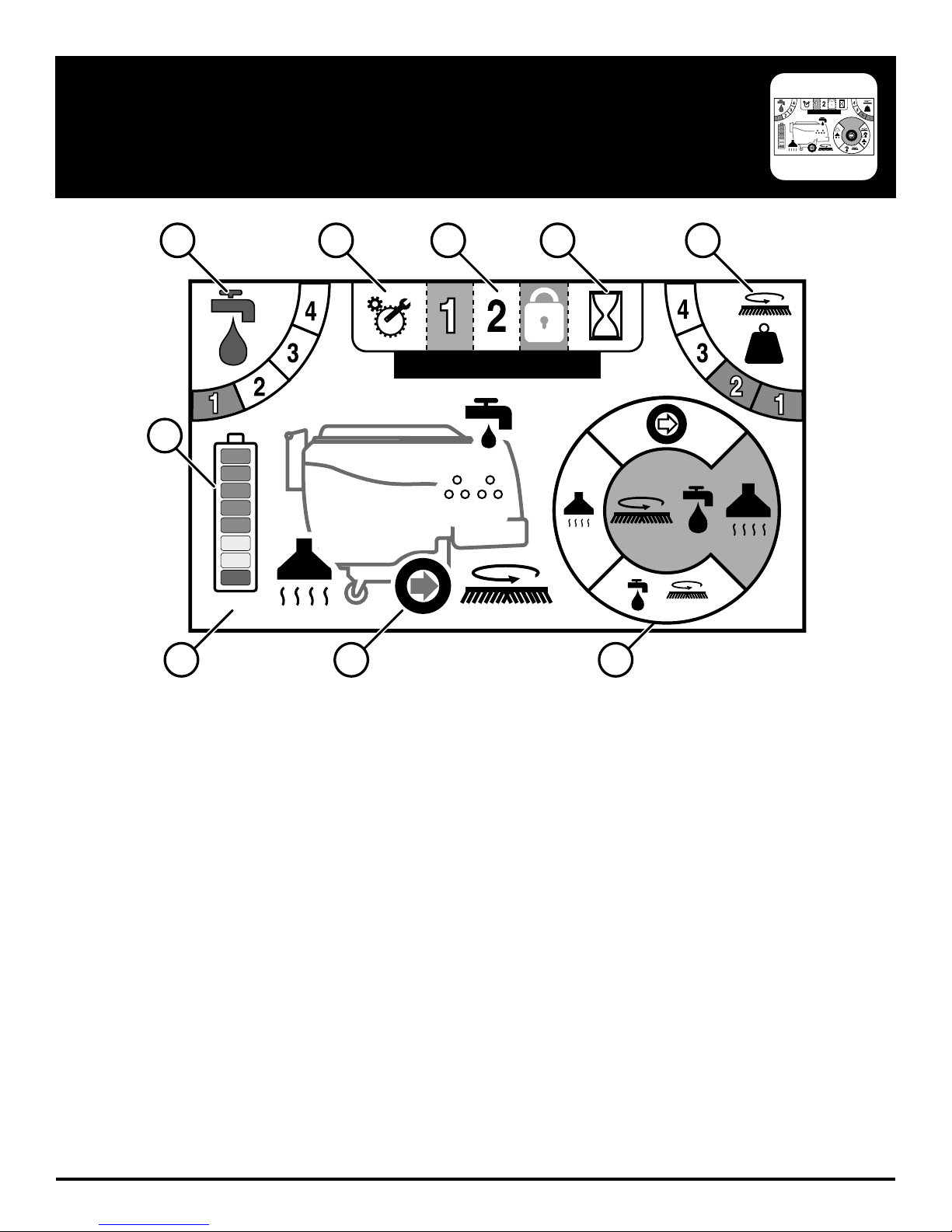
TOUCH SCREEN (OPTIONAL)
3
#1 NAME
SUDSSUDS
1
234 5
3
#1
6
SUDSSUDS
24.9
22.5 34.2
879
1. SOLUTION OUTPUT - Indicates the level of solution that is being dispensed when in operation
2. TECHNICAL / MANAGER SETUP - Access ‘Error Code History’ and Manager Programming
3. PROGRAMMED ZONES - Switch between preset solution and downpressure settings for varying applications
4. HOUR METERS - Displays all of the hour meters of the machine: Key Switch, Transport, Scrub Motors, and Vacuum
Motor
5. DOWN PRESSURE OUTPUT - Indicates the level of downpressure that is being applied to the fl oor surface
6. BATTERY GAUGE - Indicates the level of battery charge available
7. ACTIVE VOLT & AMP DRAW - Indicates the live DC Volts (under battery gauge) and Amp draw (under systems)
when machine is running
8. ACTIVE SYSTEM MACHINE DISPLAY - Indicates which systems of the equipment currently has power
9. OPERATION MODE SELECTOR - Cycle through and select which operation mode you would like to work in
FC-MICRO-HD-OP-EN - 9 -
Page 10
3
#1 NAME
SUDSSUDS
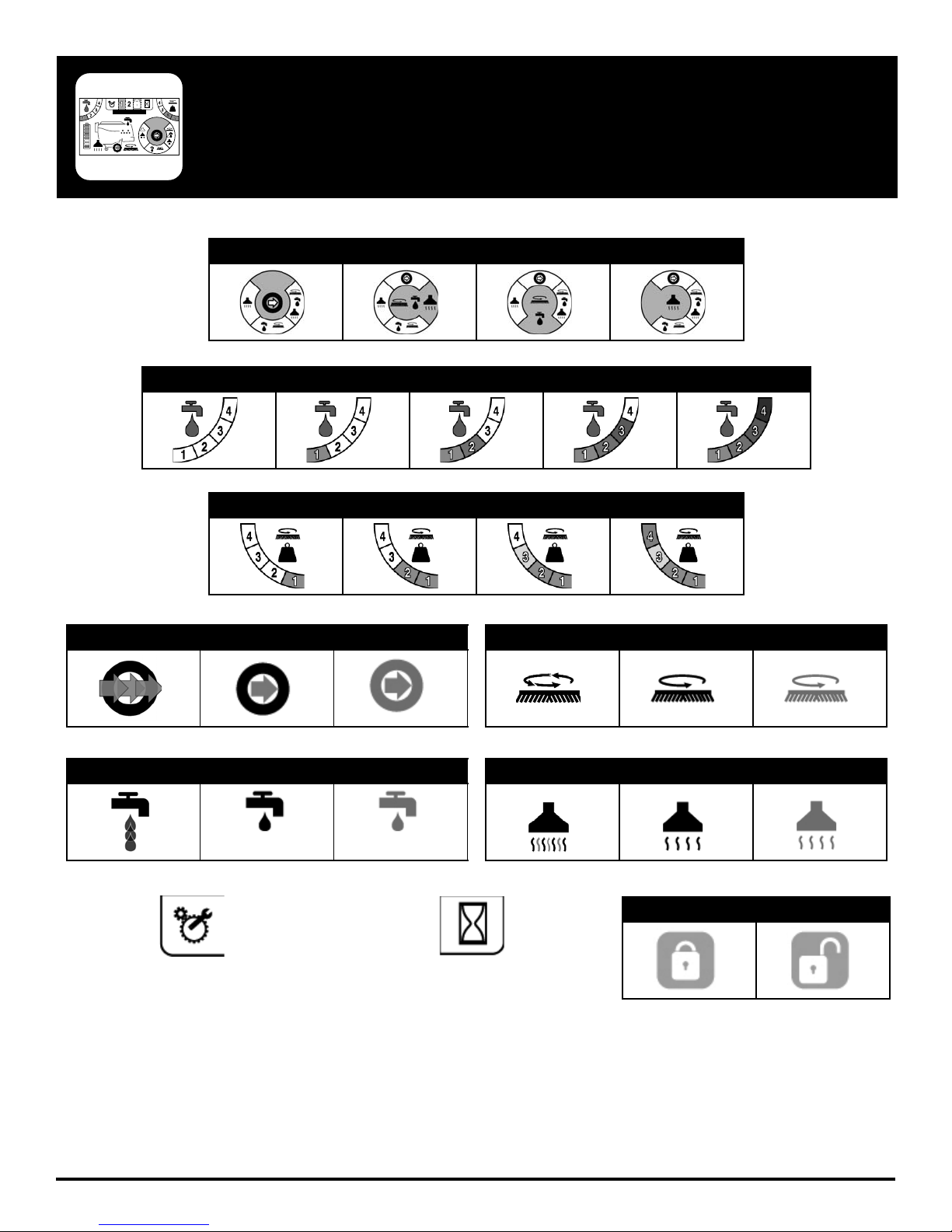
TOUCH SCREEN SYMBOLS (OPTIONAL)
Mode Selection
Transport Only Single Scrub Double Scrub Vacuum Only
Solution Setting
#0 #1 #2 #3 #4
Down Pressure Setting
#1 #2 #3 #4
Transport Motor
Working Active Inactive
Solution Pump
Working Active Inactive
Setup Hour Meters Zone Lock
Scrub Deck Motor(s)
Working Active Inactive
Vacuum Motor
Working Active Inactive
Locked Unlocked
- 10 - FC-MICRO-HD-OP-EN
Page 11
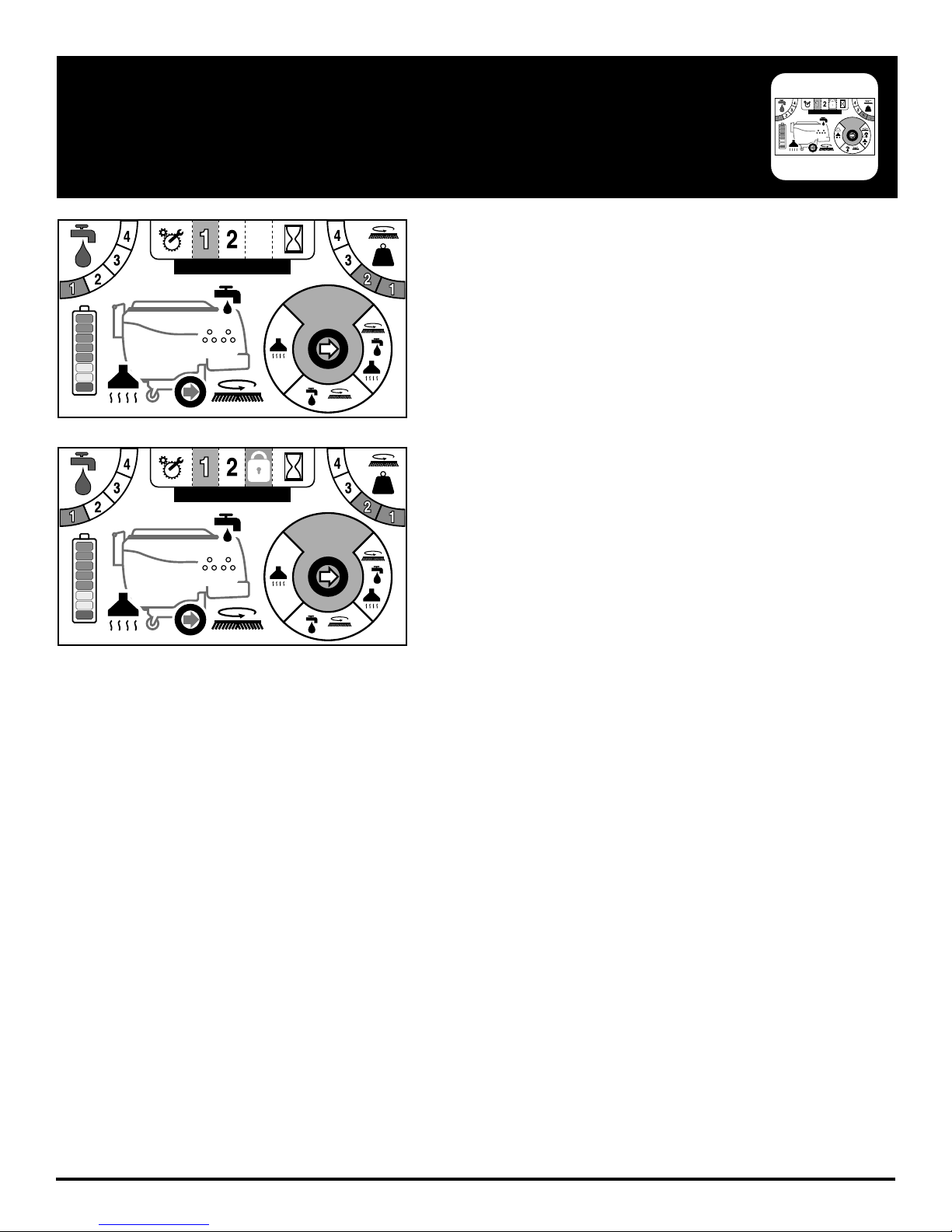
TOUCH SCREEN ZONE OPERATION (OPTIONAL)
The touch screen is designed to be programmed to three specifi c
3
#1 NAME
zones. Each zone can be named and custom programmed or even
disabled if not needed.
The zone you are working in is highlighted as indication. In Figure 1.
the zone selected is Zone 1.
SUDSSUDS
Figure 2. shows Zone 3 “locked out” by the indicator lock icon.
3
#1 NAME
3
#1 NAME
SUDSSUDS
SUDSSUDS
FC-MICRO-HD-OP-EN - 11 -
Page 12
3
#1 NAME
SUDSSUDS
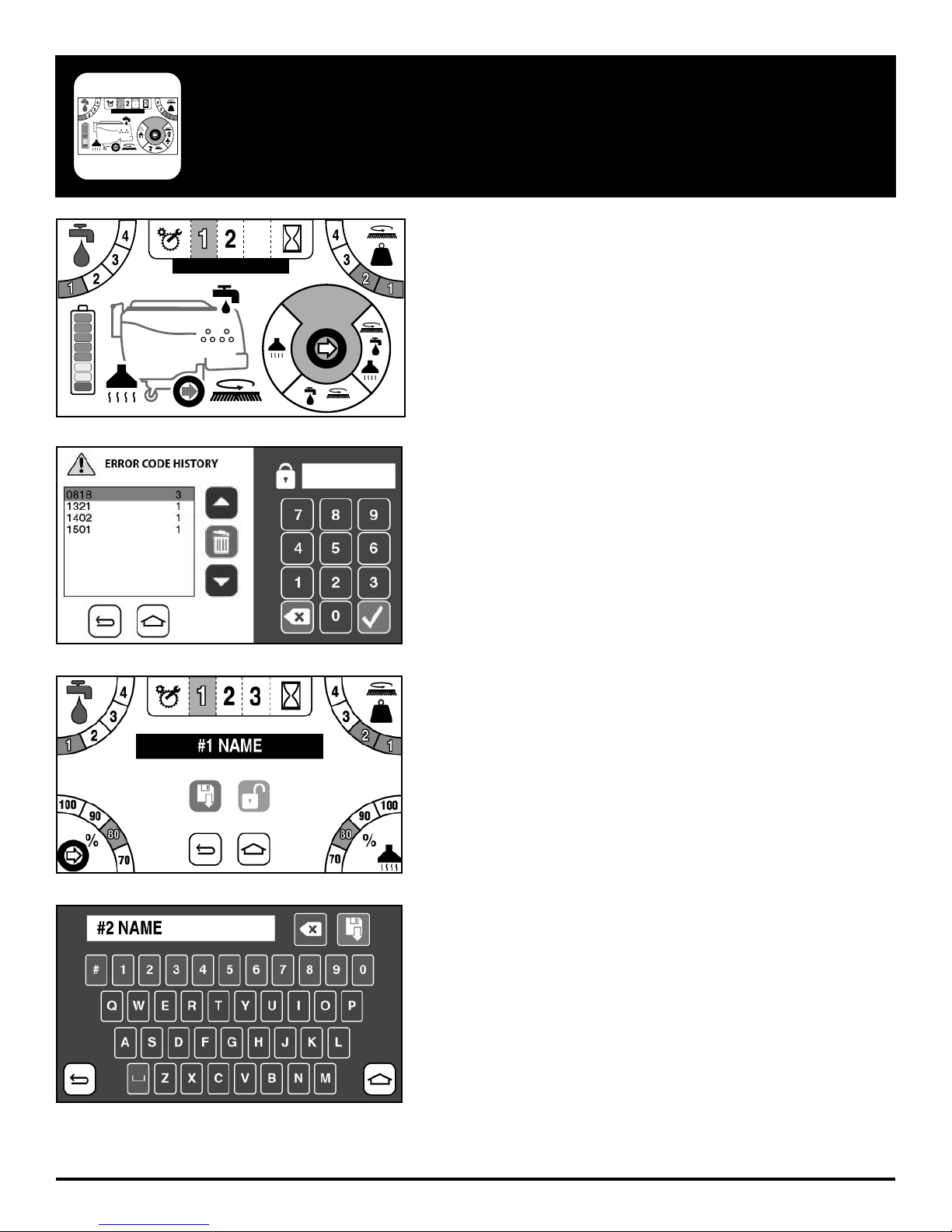
TOUCH SCREEN ZONE PROGAMMING (OPTIONAL)
To program the Zones, go to the Setup page by clicking on the Setup
3
#1 NAME
SUDSSUDS
wrench and gear icon to the left of the Zone number buttons.
From here you will be prompted with a passcode screen. Enter the
manager passcode to get access to setup.
Once you have entered the password, you will see the Figure 3.
screen where you can alter the name, solution output, down-pressure
setting, scrubbing speed, and vacuum power.
Alternatively you can lock the Zone out from this screen.
To alter the name of a Zone, simply click on the black name box and
a full keyboard will appear as Figure 4. shows.
- 12 - FC-MICRO-HD-OP-EN
Page 13
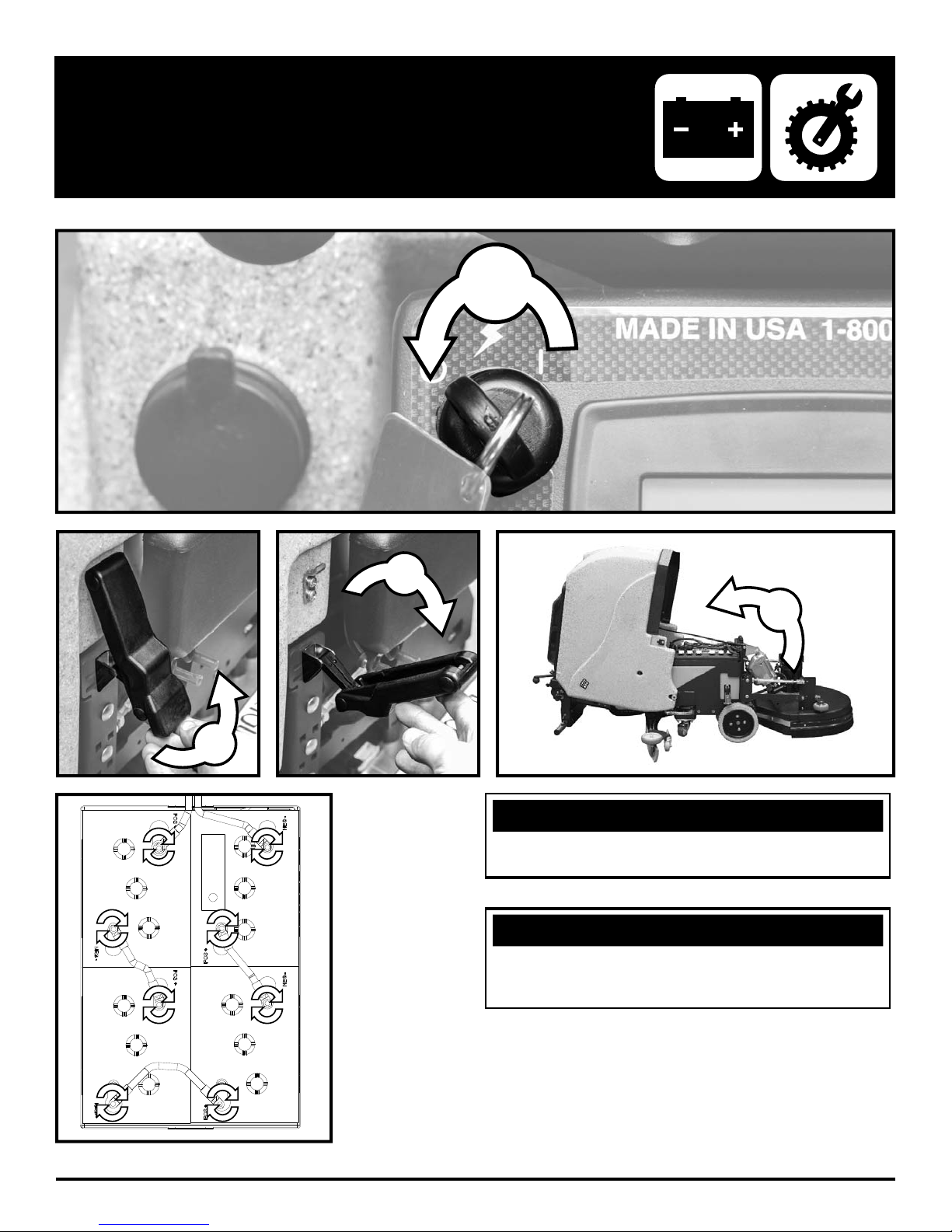
BATTERY SETUP
1
2
3
4
NOTICE
Batteries are a possible environmental hazard. Consult
your Battery supplier for safe disposal methods.
NOTICE
Orientation of Batteries is critical for cables to reach.
Ensure proper torque values when installing batteries.
(Between 8 - 12 ft/lbs)
24 VOLTS
FC-MICRO-HD-OP-EN - 13 -
Page 14
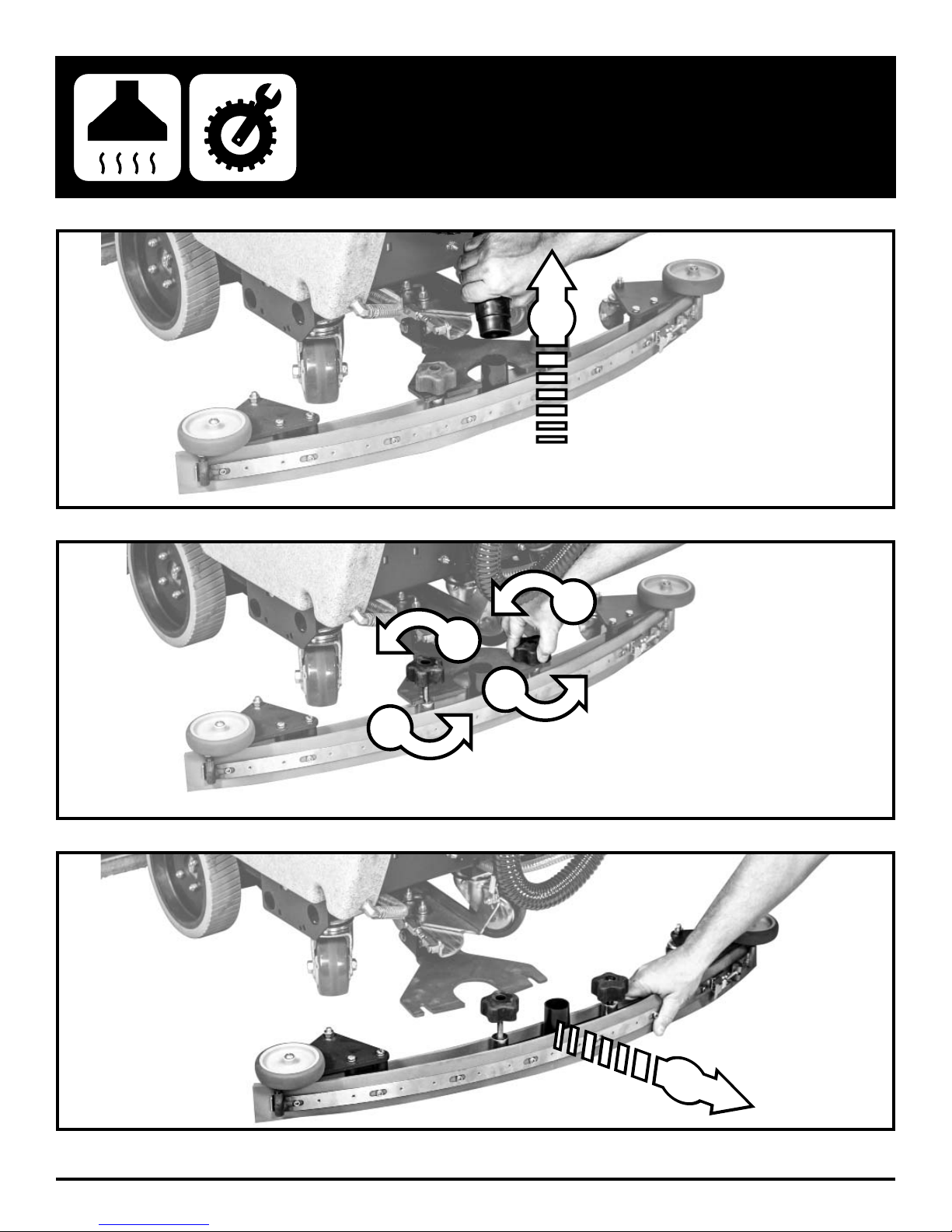
1
REMOVE SQUEEGEE
2
3
2
3
- 14 - FC-MICRO-HD-OP-EN
4
Page 15
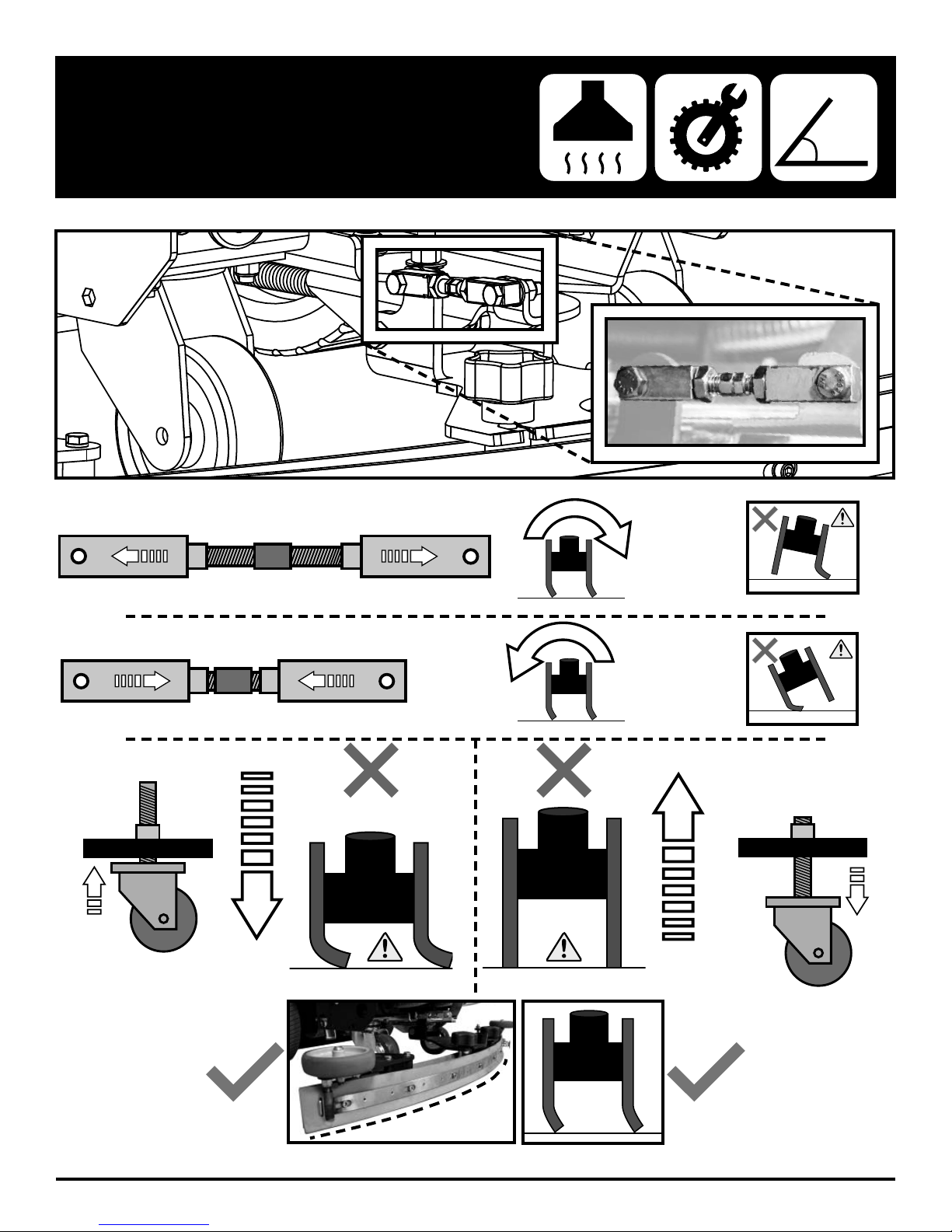
ADJUST SQUEEGEE
FC-MICRO-HD-OP-EN - 15 -
Page 16
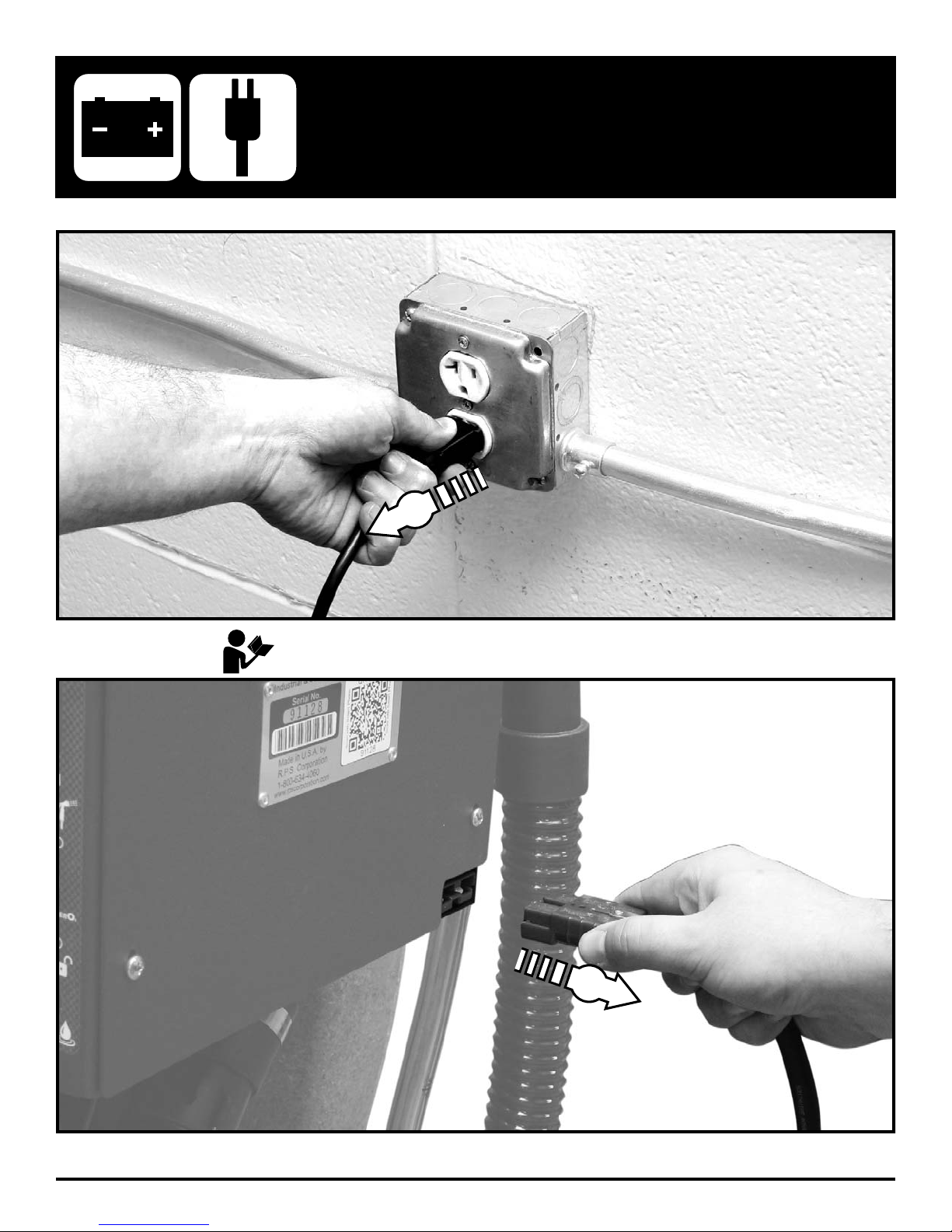
1
REMOVE FROM BATTERY CHARGER
Please refer to OEM Charger Operating Instructions for more information.
2
- 16 - FC-MICRO-HD-OP-EN
Page 17
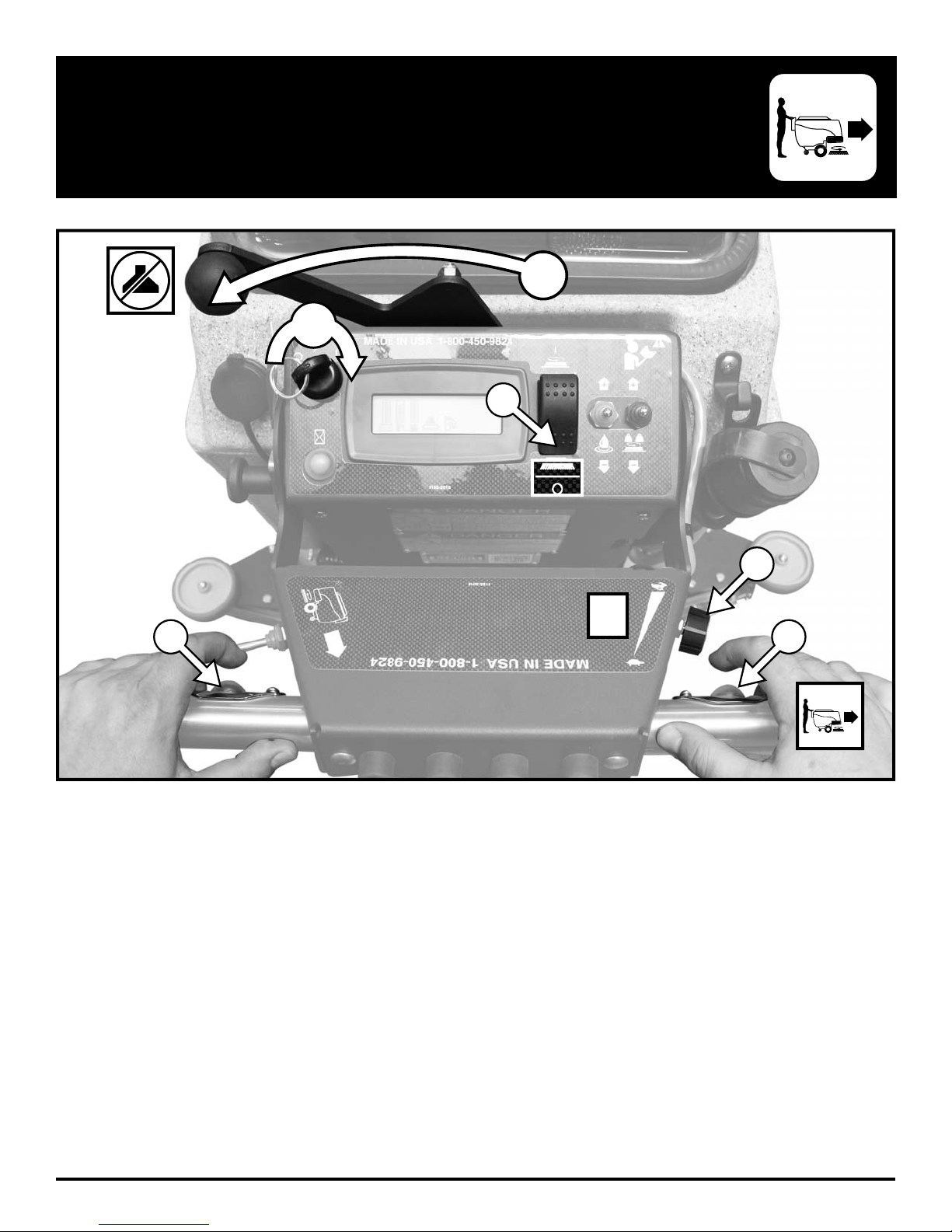
TRANSPORTATION - FORWARD
1
2
3
4
5
½
SPEED
5
FC-MICRO-HD-OP-EN - 17 -
Page 18
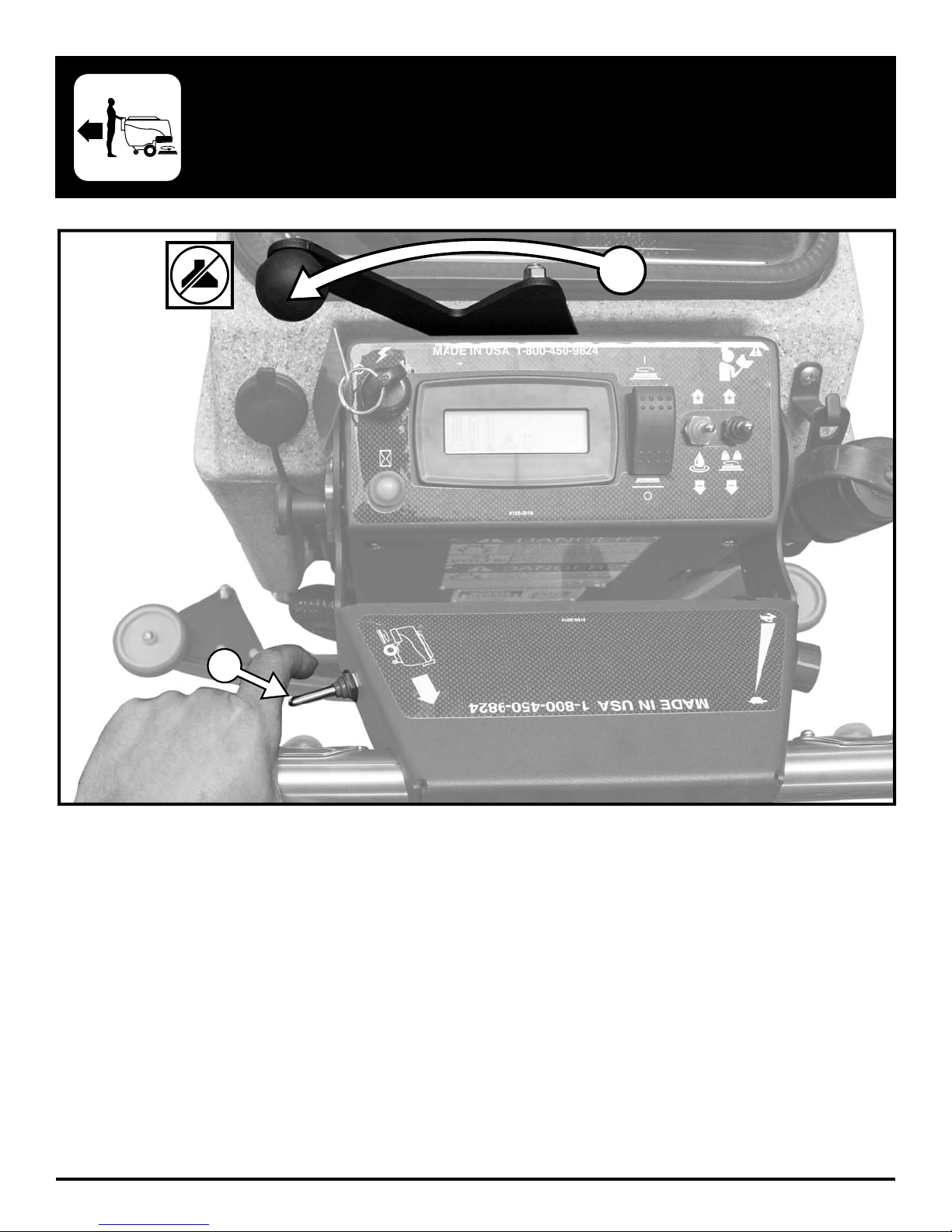
TRANSPORTATION - REVERSE
1
2
- 18 - FC-MICRO-HD-OP-EN
Page 19
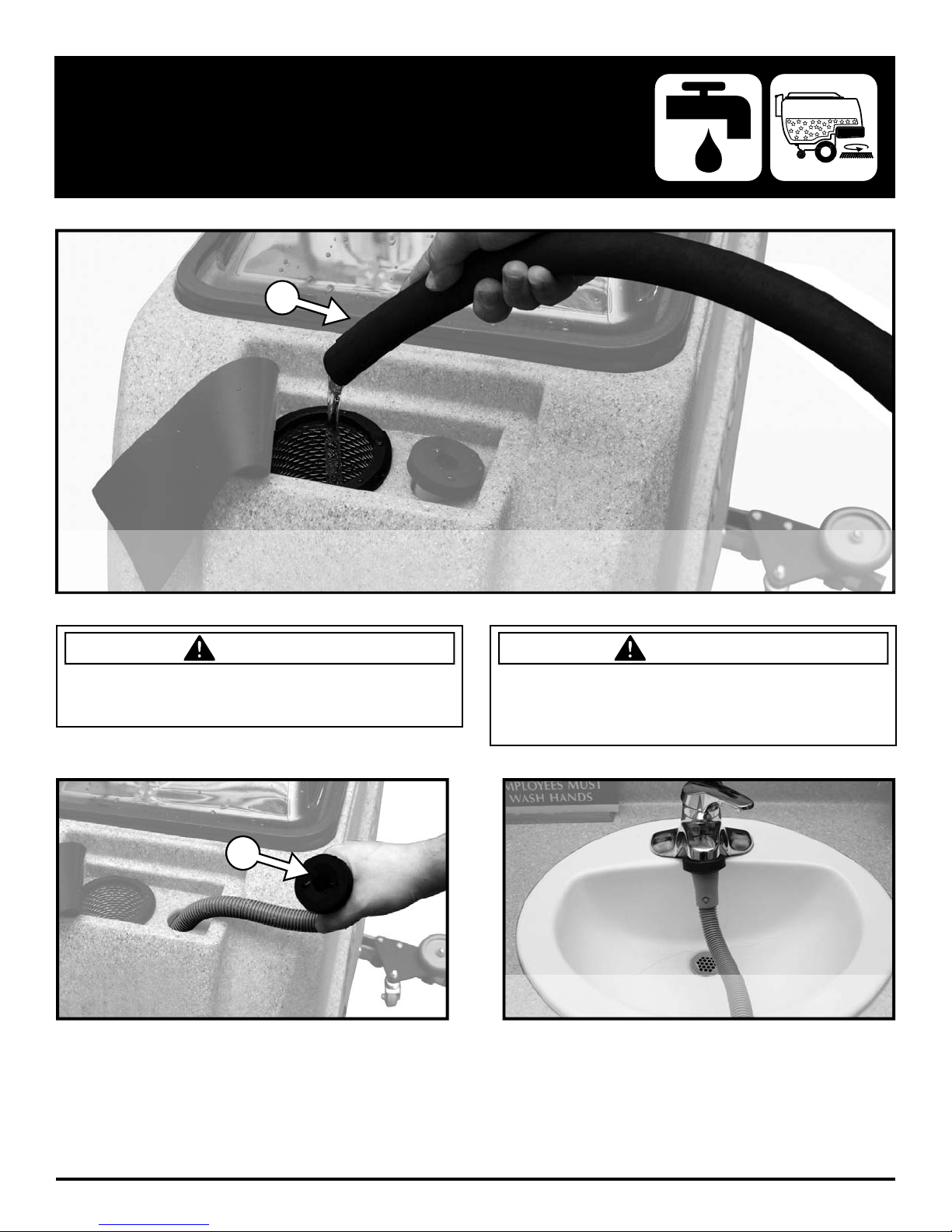
< 10 Gal. ( 38 l ) / < 130°F / 54°C
< 10 Gal. ( 38 l ) / < 130°F / 54°C
FILL SOLUTION TANK
< 10 Gal. ( 38 l ) / < 130°F / 54°C
1
DANGER
EXPLOSION RISK! Flammable materials can cause an
explosion or fi re. Do NOT use fl ammable materials in
Tank or pick up.
1
CAUTION
TO AVOID DAMAGE TO THIS MACHINE:
• Use APPROVED detergents only
• Water temperature must not exceed 130˚F/54˚C
• Do NOT use high-percentage Bleach mixture
< 10 Gal. ( 38 l ) / < 130°F / 54°C
FC-MICRO-HD-OP-EN - 19 -
Page 20
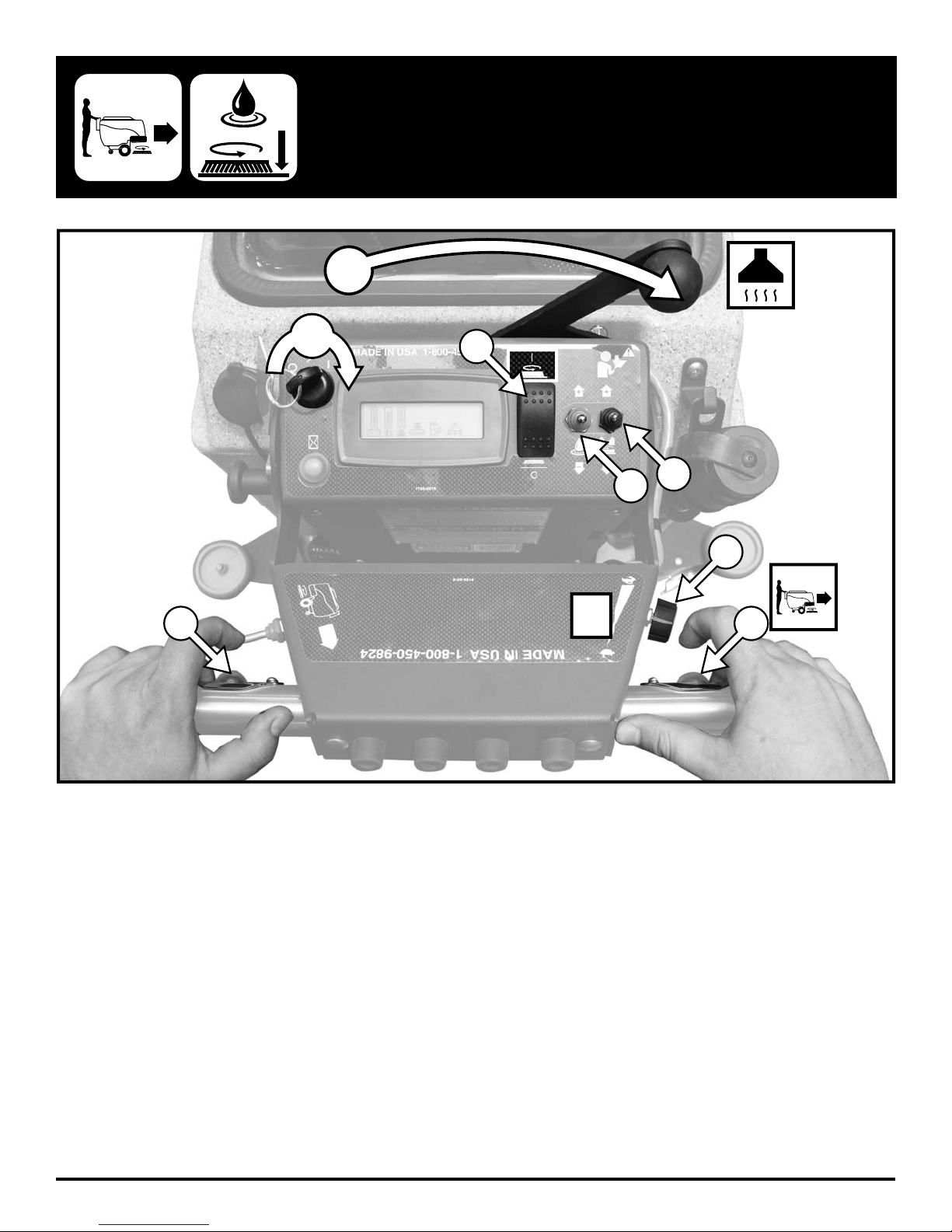
5
OPERATION - SCRUBBING
7
1
4
½
SPEED
2
3
6
7
- 20 - FC-MICRO-HD-OP-EN
Page 21
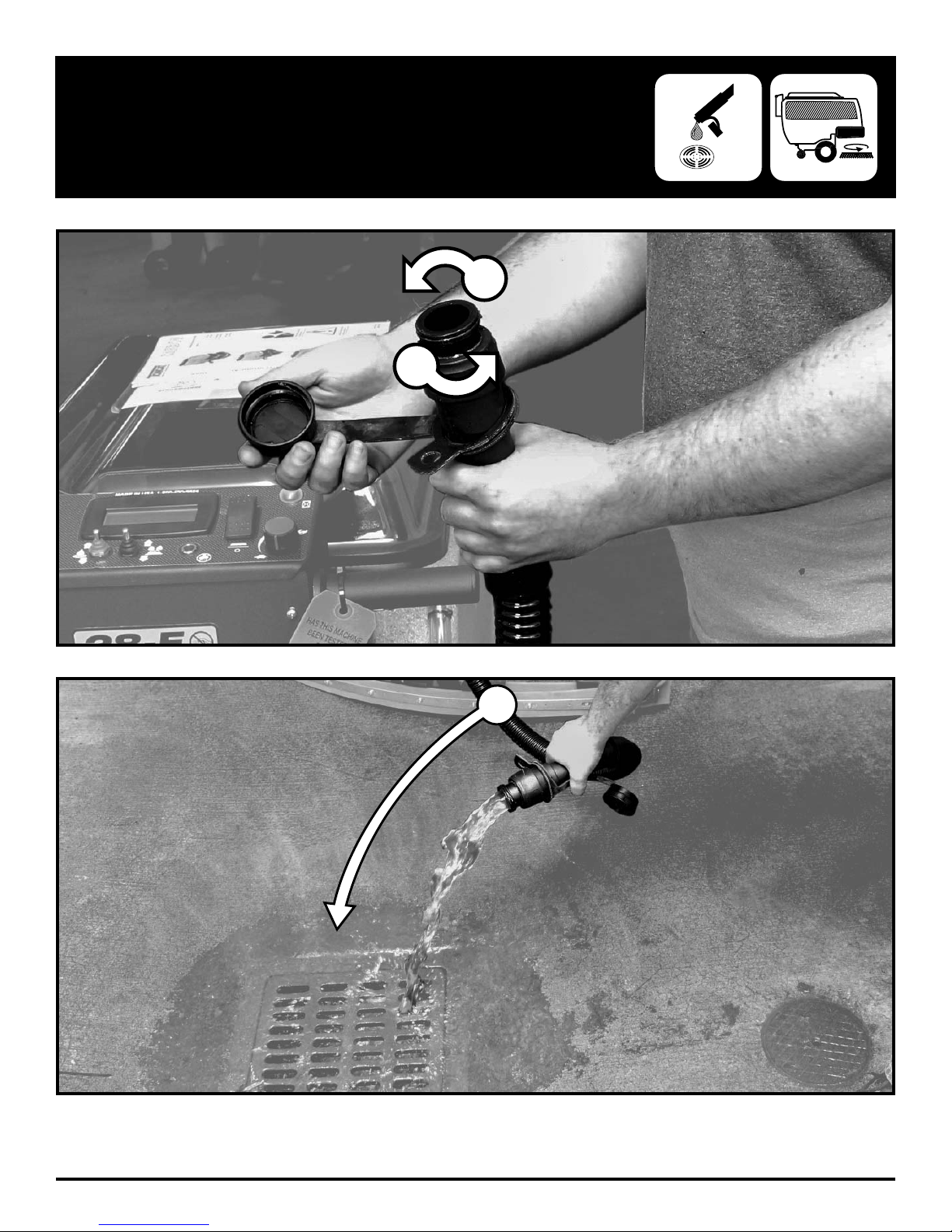
DRAINING RECOVERY TANK
WASTE WATER DRAINS ONLY!
WASTE WATER DRAINS ONLY!
1
1
2
FC-MICRO-HD-OP-EN - 21 -
Page 22
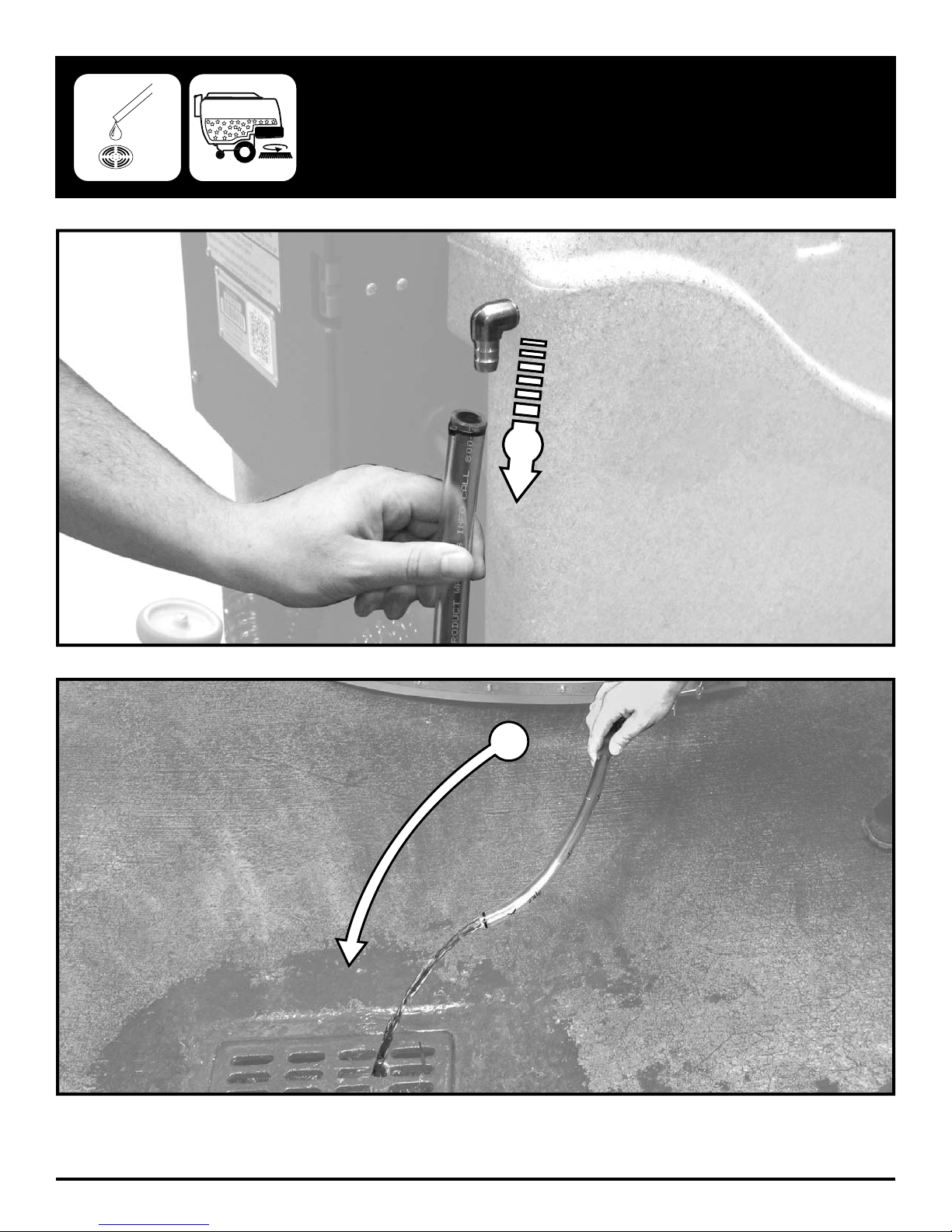
WASTE WATER DRAINS ONLY!
WASTE WATER DRAINS ONLY!
DRAINING SOLUTION TANK
1
- 22 - FC-MICRO-HD-OP-EN
2
Page 23
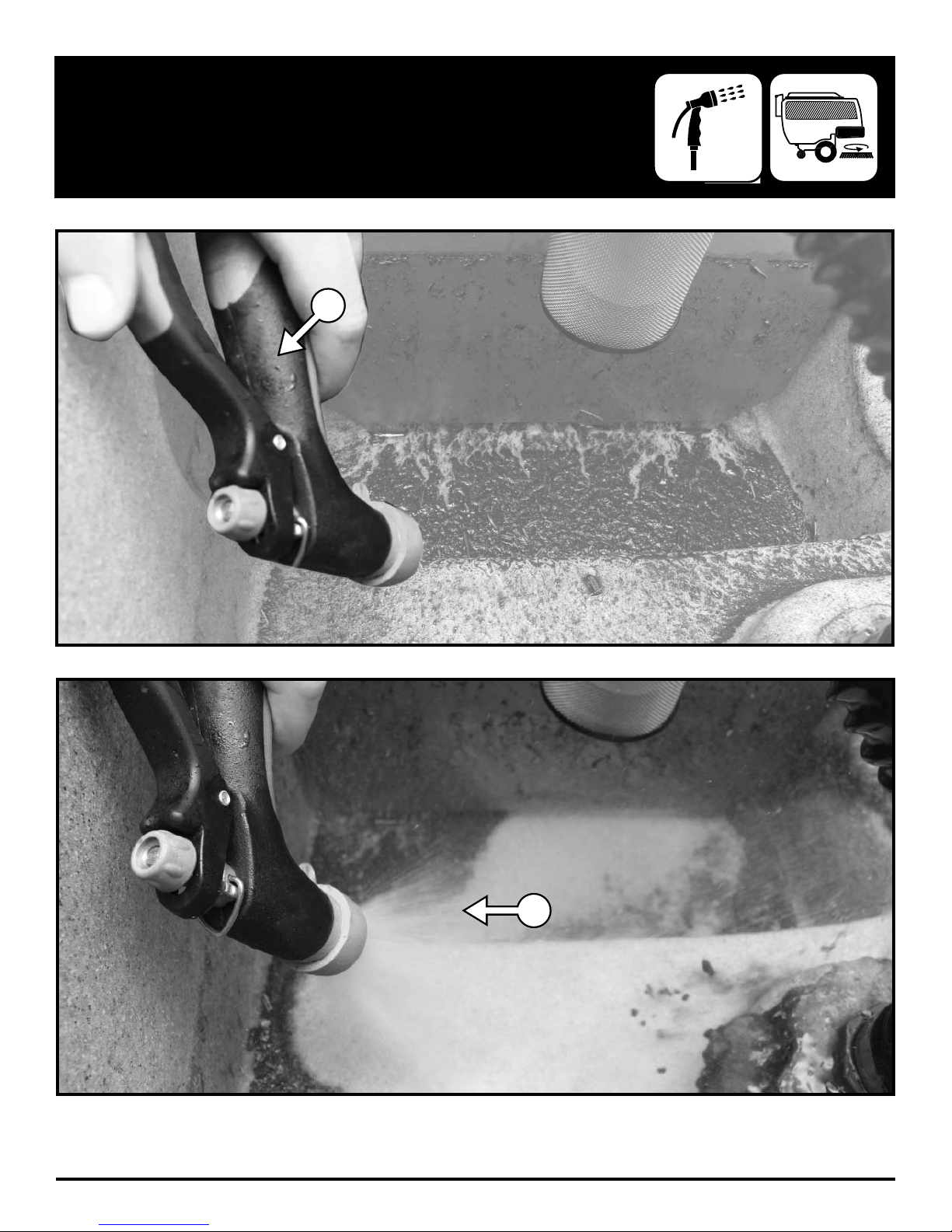
FLUSHING RECOVERY TANK
1
FC-MICRO-HD-OP-EN - 23 -
2
Page 24
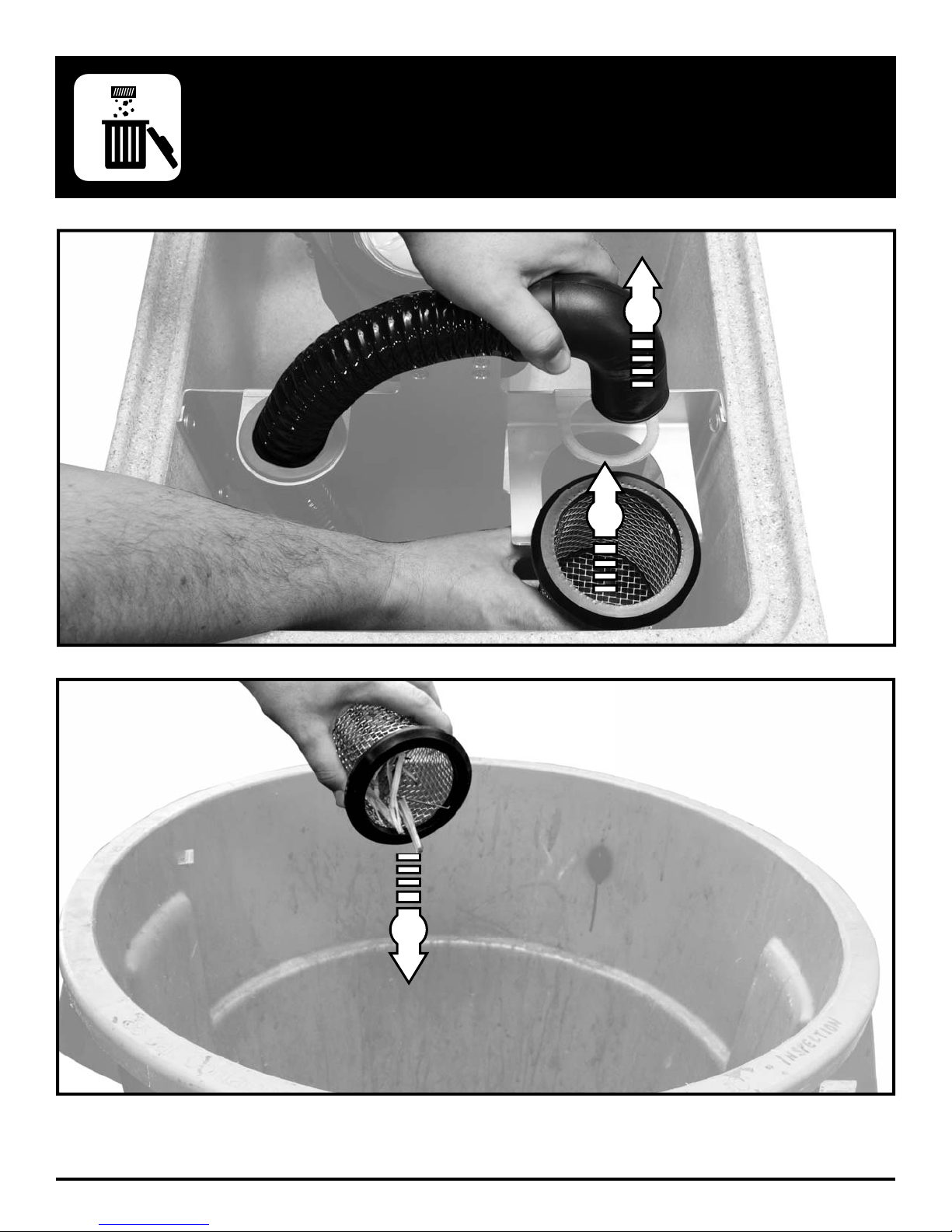
2
CLEAN DRAIN SAVER
1
- 24 - FC-MICRO-HD-OP-EN
3
Page 25
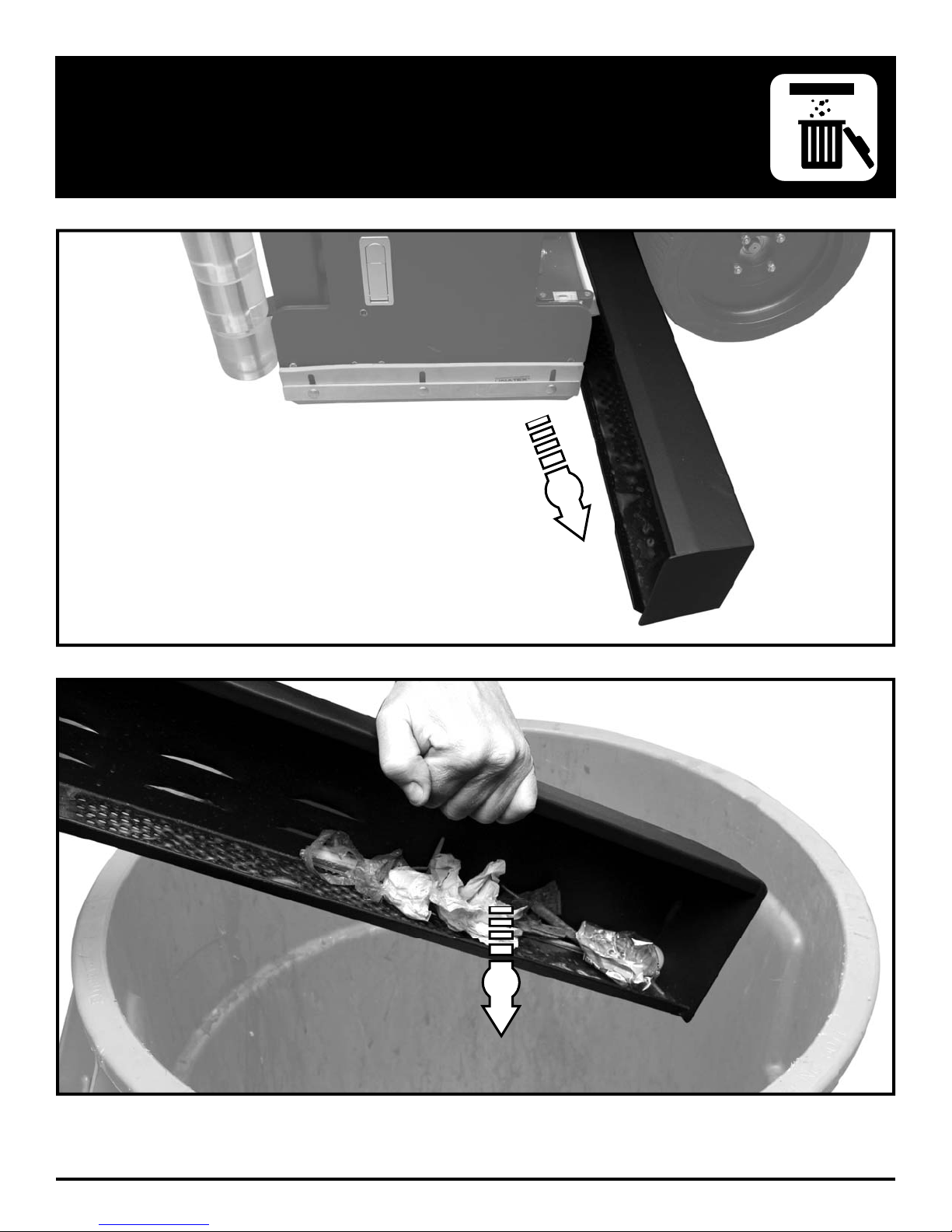
CLEAN CYLINDRICAL HOPPER
1
FC-MICRO-HD-OP-EN - 25 -
2
Page 26
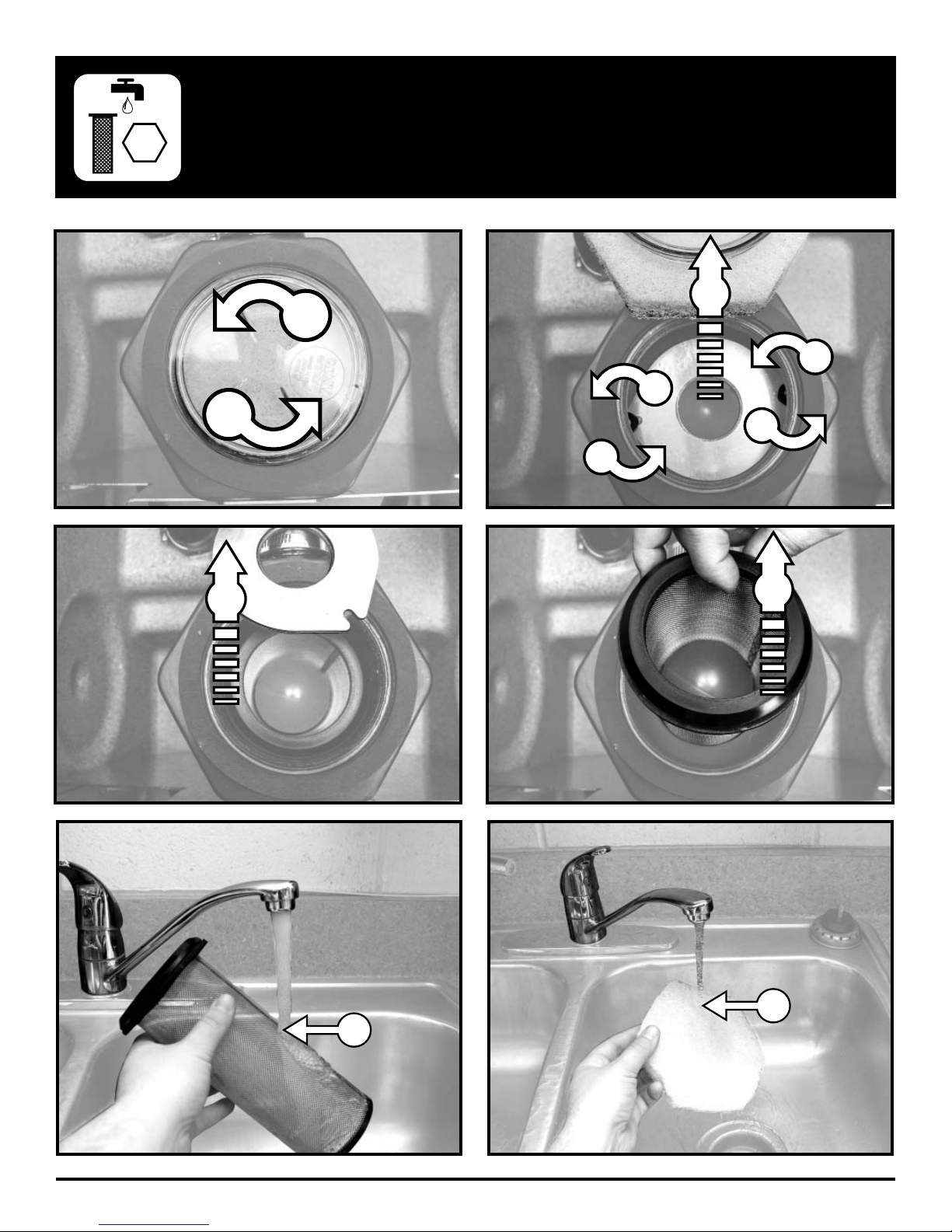
1
CLEAN VAC BOX SYSTEM
2
4
3
1
5
4
3
6
- 26 - FC-MICRO-HD-OP-EN
8
7
Page 27
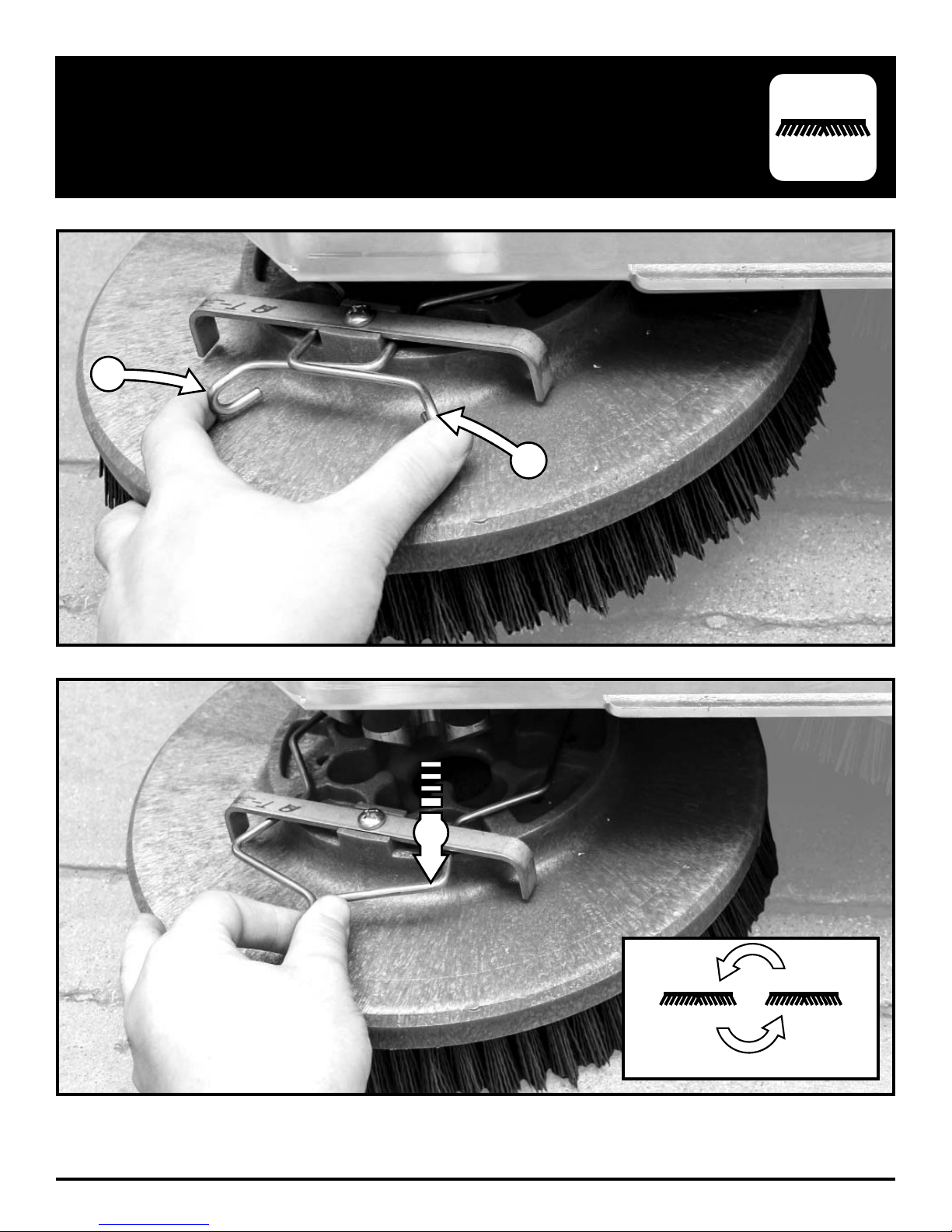
REMOVE DISK BRUSHES
1
1
FC-MICRO-HD-OP-EN - 27 -
2
Rotate after 25 hrs
Page 28
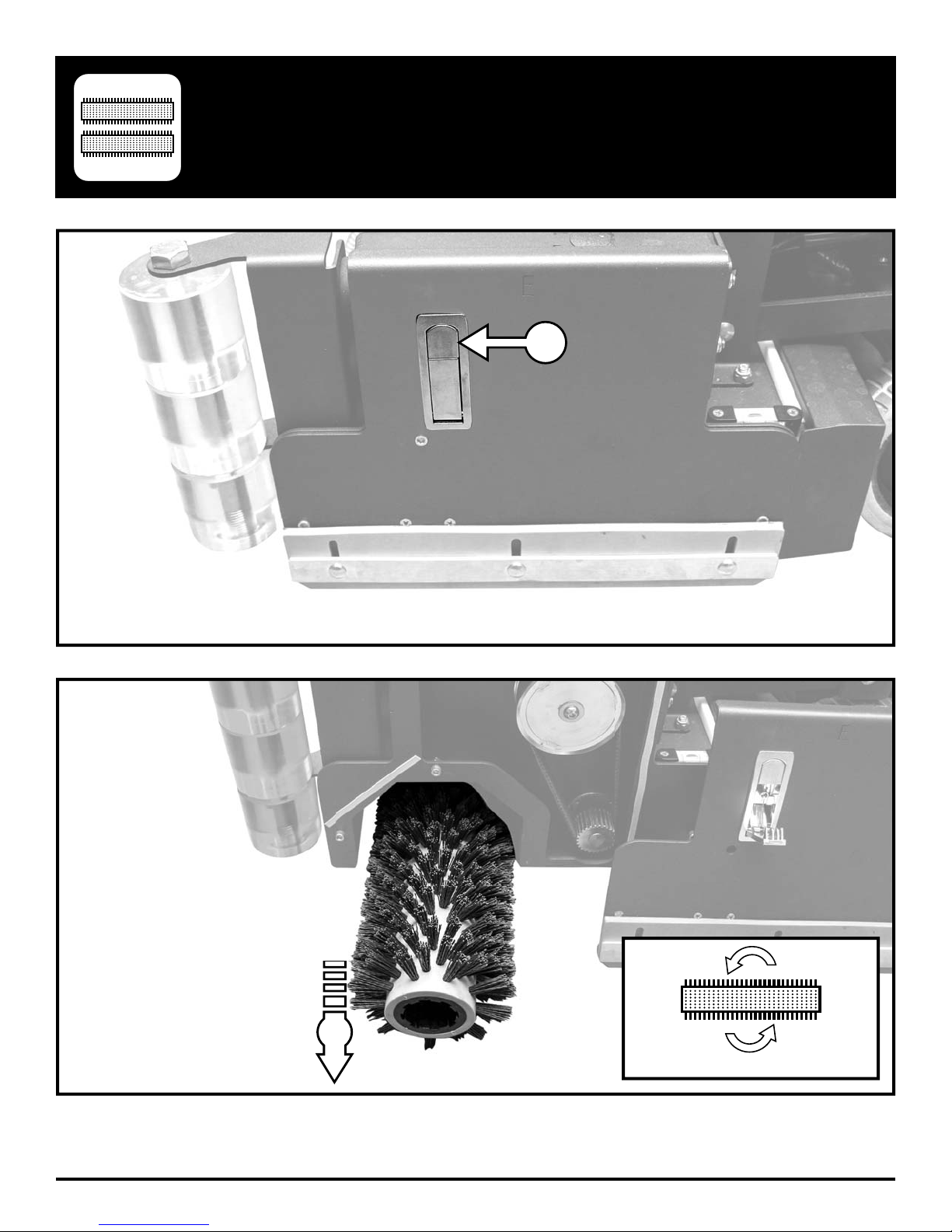
REMOVE CYLINDRICAL BRUSHES
1
- 28 - FC-MICRO-HD-OP-EN
2
Rotate after 25 hrs
Page 29
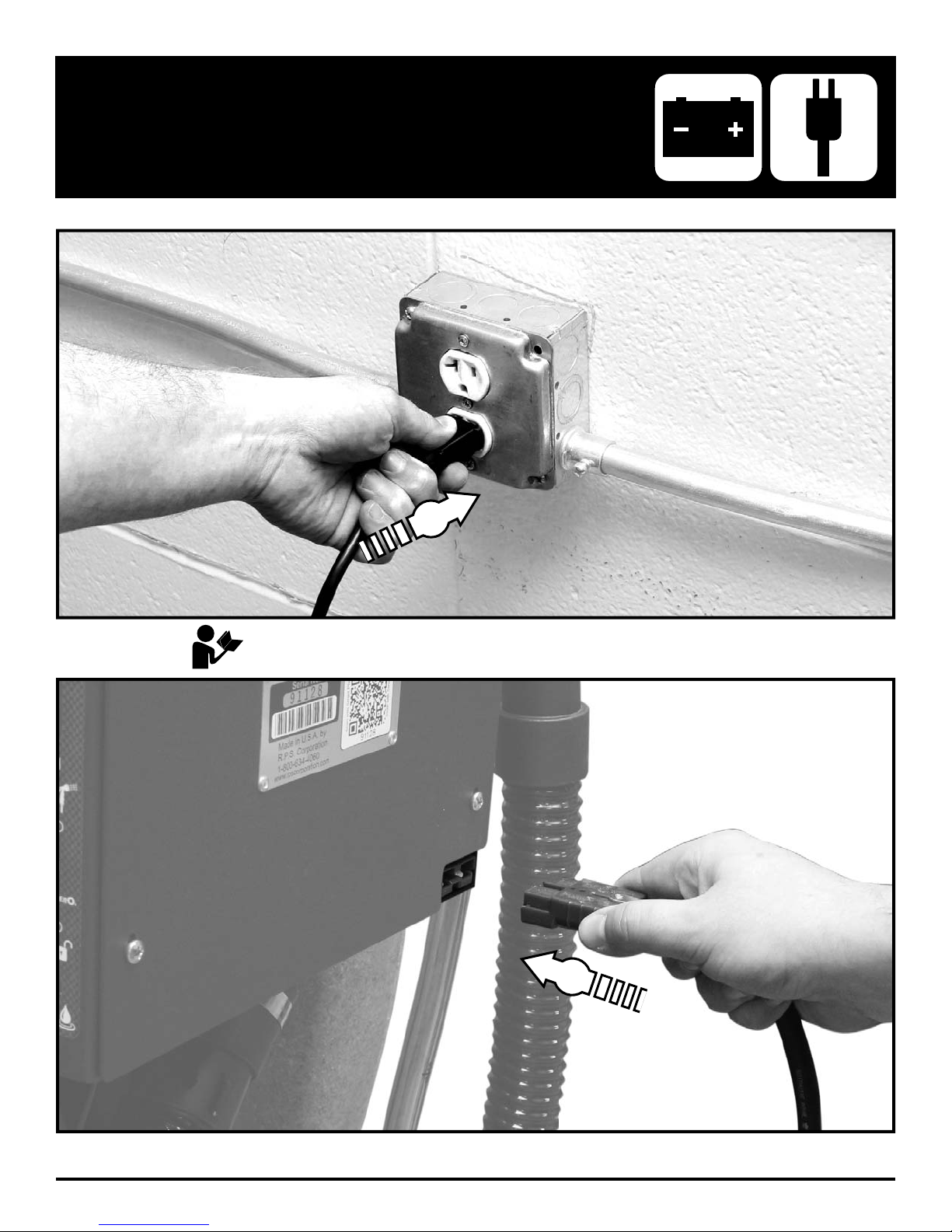
CHARGE BATTERIES
1
Please refer to OEM Charger Operating Instructions for more information.
2
FC-MICRO-HD-OP-EN - 29 -
Page 30
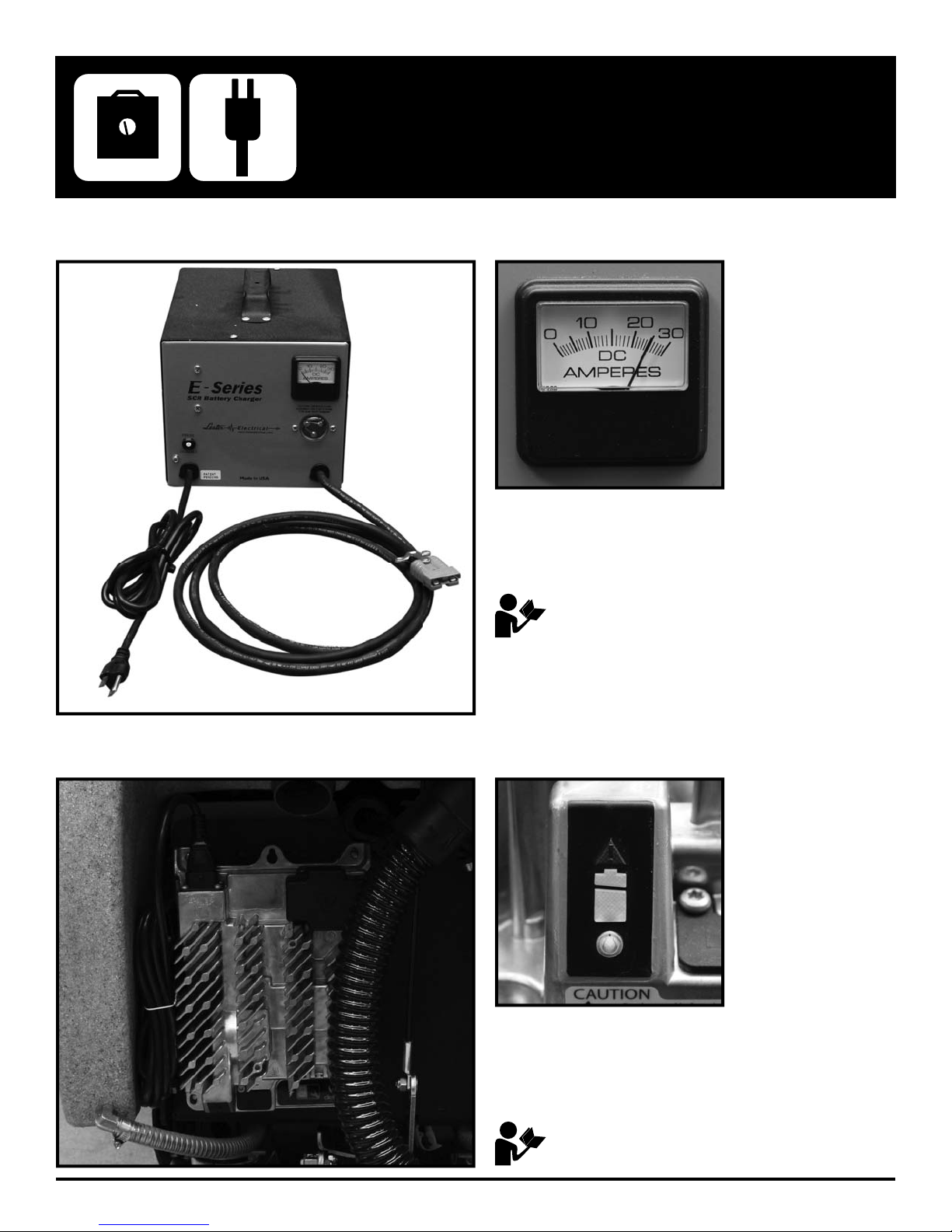
Console / WET / Domestic Chargers:
BATTERY CHARGERS
AC Power IN: 120VAC / 60Hz
DC Power OUT: 24VDC / 12A
Please refer to OEM Charger Operating Instructions for
more information.
Onboard / AGM / International Chargers:
- 30 - FC-MICRO-HD-OP-EN
AC Power: 80-270VAC / 50-60Hz
DC Power OUT: 24VDC / 27A
Please refer to OEM Charger Operating Instructions for
more information.
Page 31
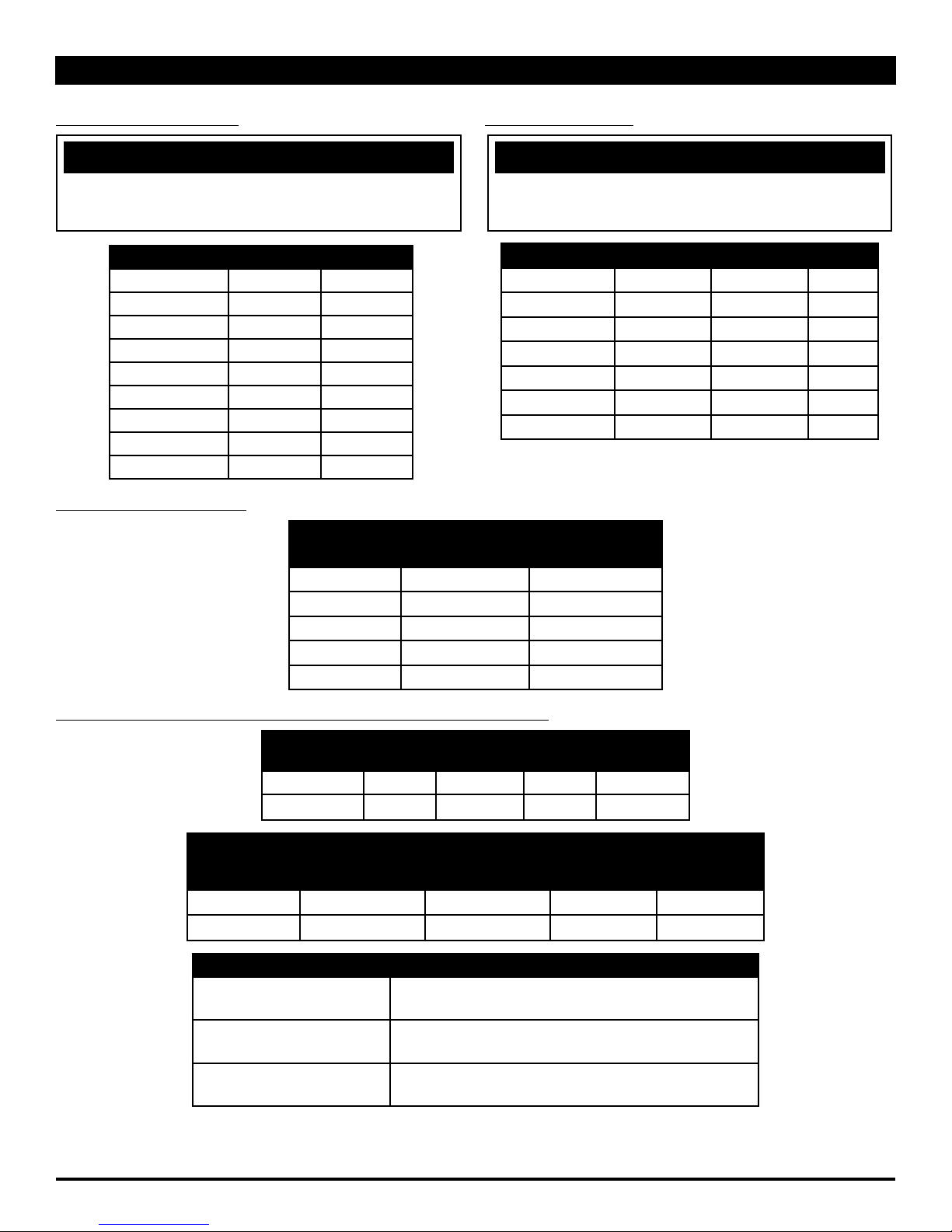
COMMON WEAR PARTS
ROUND DISK BRUSHES:
NOTICE
The ## in Disk Column Denotes Desk Pad Size: 13'', 17''
or 20''
BRUSHES DISK LEVEL
Super Grit
Tough Grit
Midi Grit
Light Grit
Poly
Nylon
Tampico
Pad Driver
Diamond Driver
CYLINDRICAL BRUSHES:
##-382SS Very High
##-382S High
##-382C Medium
##-382PS Moderate
##-382P Light
##-382N Light
##-382T Light
##-382D
##-382DD
BRUSHES MODEL 25''
CYLINDRICAL
Tough Grit 236-697S High
Midi Grit 236-697C Medium
Light Grit 236-697PS Moderate
Nylon 236-697N Light
Tampico 236-697T Light
ROUND DISK PADS:
NOTICE
The ## in Disk Column Denotes Desk Pad Size: 13'', 17''
or 20''
DISK PADS DISK LEVEL COLOR
Super Black
Black
Brown
Green
Blue
Red
White
LEVEL
##-422BB Very High Black
##-422B High Black
##-422BR High Brown
##-422G Medium Green
##-422BL Moderate Blue
##-422R Moderate Red
##-422W Light White
SQUEEGEE BLADE KITS & COMPLETE SQUEEGEE ASSEMBLIES:
SQUEEGEE
36'' Squeegee Standard Standard Standard Standard
42'' Squeegee Optional Optional Optional Optional
SQUEEGEE
SIZE
SIZE
LINATEX BLADE
17'' DISK
DECKS
KIT
20'' DISK
DECKS
GUM RUBBER
BLADE KIT
26'' DISK
DECKS
36'' Squeegee 36-770L 36-770G 36-770U 36-7180
42'' Squeegee 42-770L 42-770G 42-770U 42-7180
SQUEEGEE MATERIAL: USED FOR:
LINATEX
URETHANE
GUM
Provides best wear and tear resistance. Not
designed for use with harsh chemicals.
Provides best resistance when dealing with harsh
chemicals, oils, fuels, etc.
Provides best drying preformance on rough/grouted
fl oor types by sealing over irregularities. Short life.
25'' CYL.
DECKS
URETHANE
BLADE KIT
COMPLETE
SQUEEGEE
ASSEMBLIES
FC-MICRO-HD-OP-EN - 31 -
Page 32
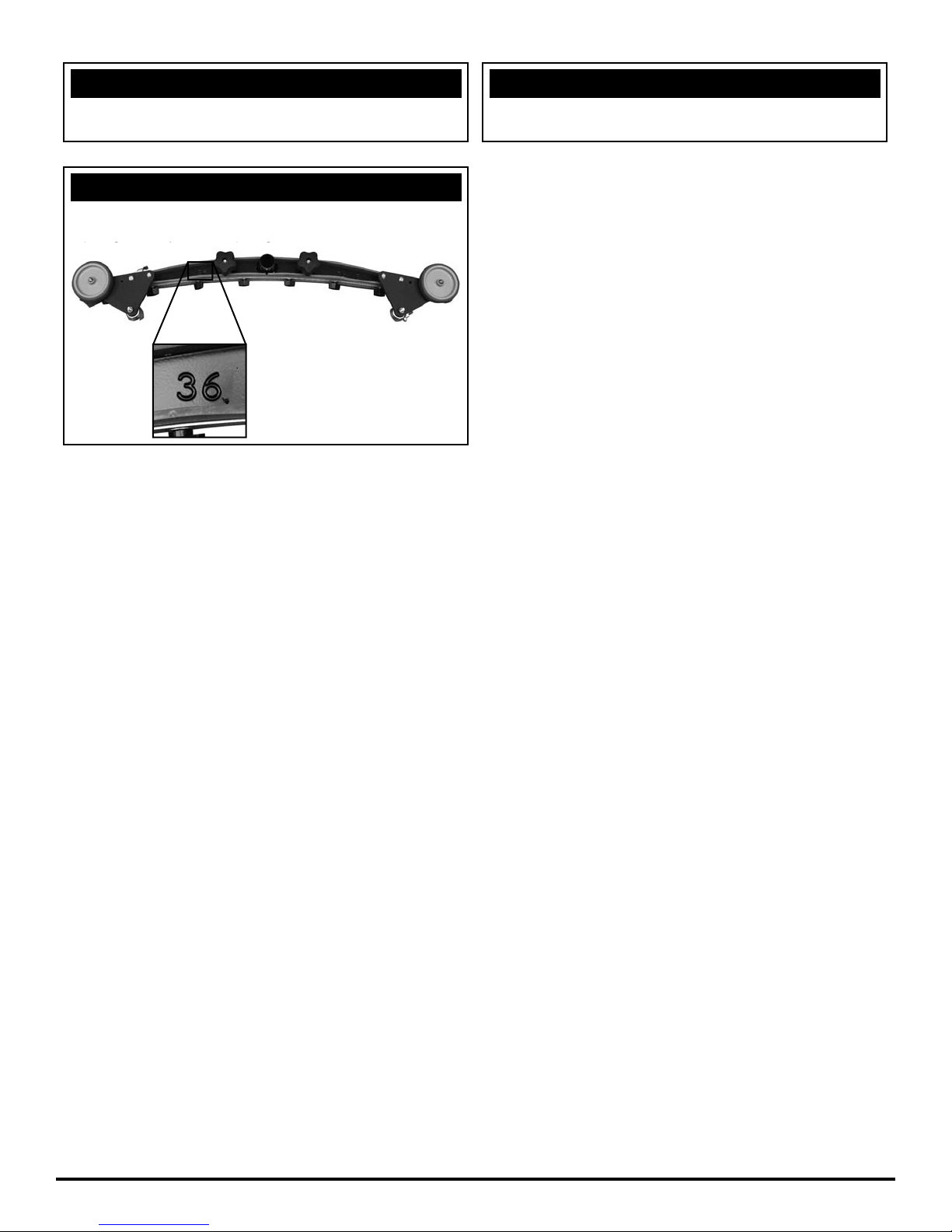
NOTICE
qg y qg
Squeegee blade kits include (1) Rear Blade, (1) Front
Blade, and (2) Caster Wheels with hardware.
NOTICE
Size is stamped into the top of the painted steel
squeegee body on all squeegee's.
NOTICE
Squeegee Assemblies (complete) listed above all come
with Linatex blades.
- 32 - FC-MICRO-HD-OP-EN
Page 33
P&G CONTROLLER COMMON ERROR CODES
p
p
g
g
g
yp
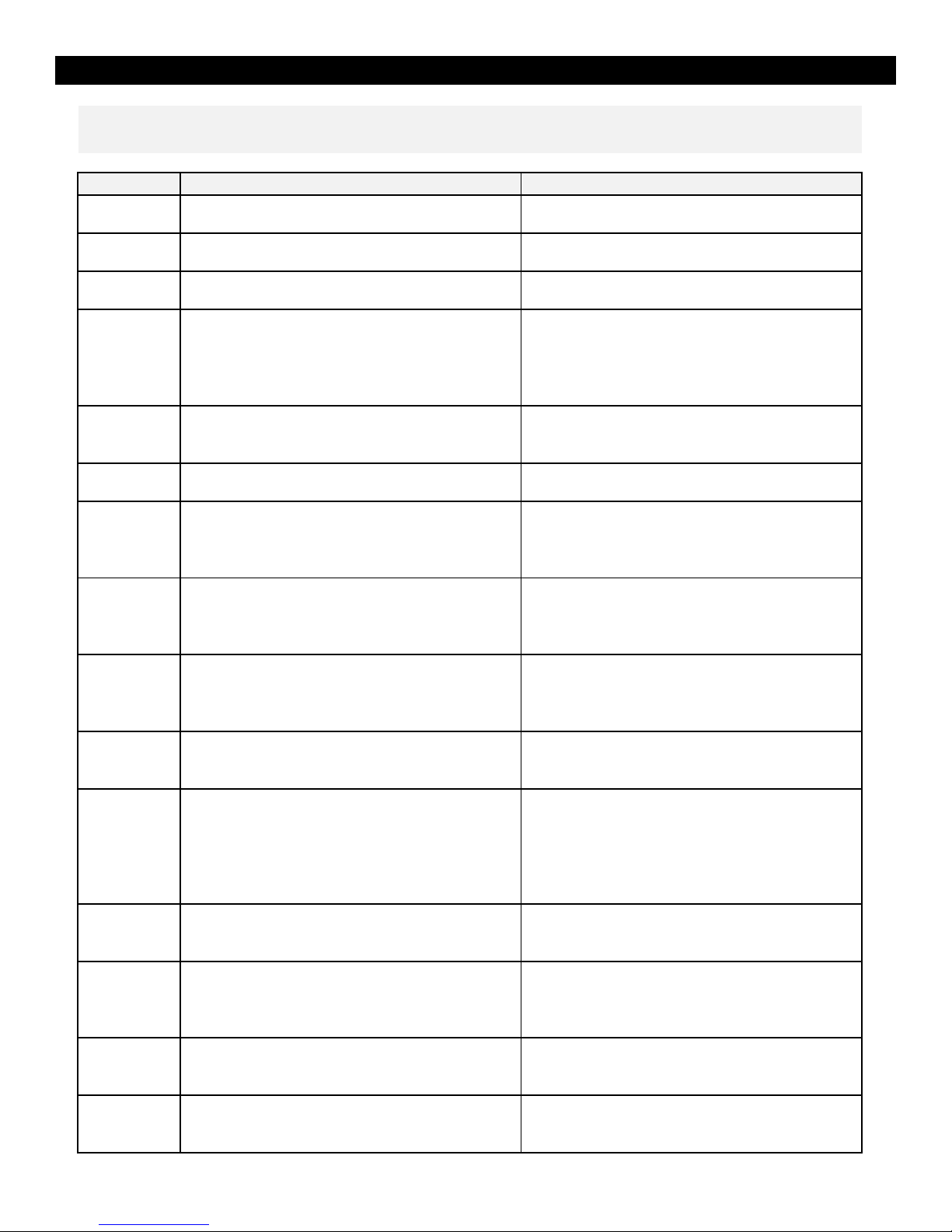
Below are common diagnostic codes and some typical causes / remedies. If the information provided in the "Correction" section does
not cure the code, seek technical support from your local authorized RPS Corporation distributor.
Diagnostic Code Cause Correction
1501 Parking brake is released or the parking brake coil
circuit is o
en
1507 Parking Brake Over Current Parking brake coil is internally shorted or there is a
2C00-2C02 Battery voltage is low Charge the batteries with OEM supplied charger.
Check to assure the parking brake is not manually
released.
roblem with the wiring to the brake.
2F01 Throttle is depressed during power on or a fault with
the throttle system
Turn the machine off, assure that the throttle
button(s) or throttle pedal are not depressed. Turn
the machine back on and if the condition persists,
seek technical support from your local authorized
3101 Brush / Vac Motor - Precharge Fault This code can be caused by the scrub or vacuum
motor(s) having moisture present or contaminated
with debris.
3102 Traction Motor - Precharge Fault This code can be caused by the traction motor
moisture present or being contaminated.
havin
7600 Brush Motor Circuit Open The controller is not seeing continuity on the brush
motor circuit. This can be caused by the wiring to
the scrub brush motor(s), corroded connections or a
7601-7603 Brush Motor Circuit Over Current The brush motor output is exceeding its limit. With
the scrubber turned off, check for entrapped debris
around the brush driver(s) and assure the brushes
7700 Vacuum Motor Circuit Open The controller is not seeing continuity on the
vacuum motor circuit. This can be caused by the
wiring to the scrub brush motor(s), corroded
7701-7703 Vacuum Motor Circuit Over Current The vacuum motor output is exceeding its limit. This
can be caused by a faulty vacuum motor(s) or
ed vacuum motor wiring.
dama
1E03 Charger / Seat Switch – Charger is plugged in or
operator is not on the seat of ride on equipment.
On board charger is plugged into the wall outlet. Off
board charger is plugged into charging port. The
switch at the charger plug for an external charger is
out of adjustment. (Operator is not present on seat
GTR and EX machines Prior to Serial Number 100xxx)
7500 LCD Communication Error The LCD lost communication to the controller. Check
7801-7802 Traction Motor Over Current The traction motor output is exceeding its limit.
7804 Boost Mode The code 7804 indicate the controller is in Boost
7900 Emergency Stop Activated The emergency stop is activated. If the machine is
the 6 wire harness between the LCD module and it's
connections.
Check to assure the parking brake is releasing when
the throttle is engaged. Assure all wheels that
Mode and considered normal under hard
acceleration or when climbin
a hill.
not equipped with an emergency stop switch
t
ically the LCD module has failed.
Page 34

BLANK
THIS PAGE WAS INTENTIONALLY LEFT BLANK
Page 35

BLANK
THIS PAGE WAS INTENTIONALLY LEFT BLANK
Page 36

1711 South Street
Racine, WI 53404
www.factorycat.com
Tel. US: 800-634-4060
Tel. Int: (001) 262-681-3583
© RPS Corporation 2018
 Loading...