

Page 1
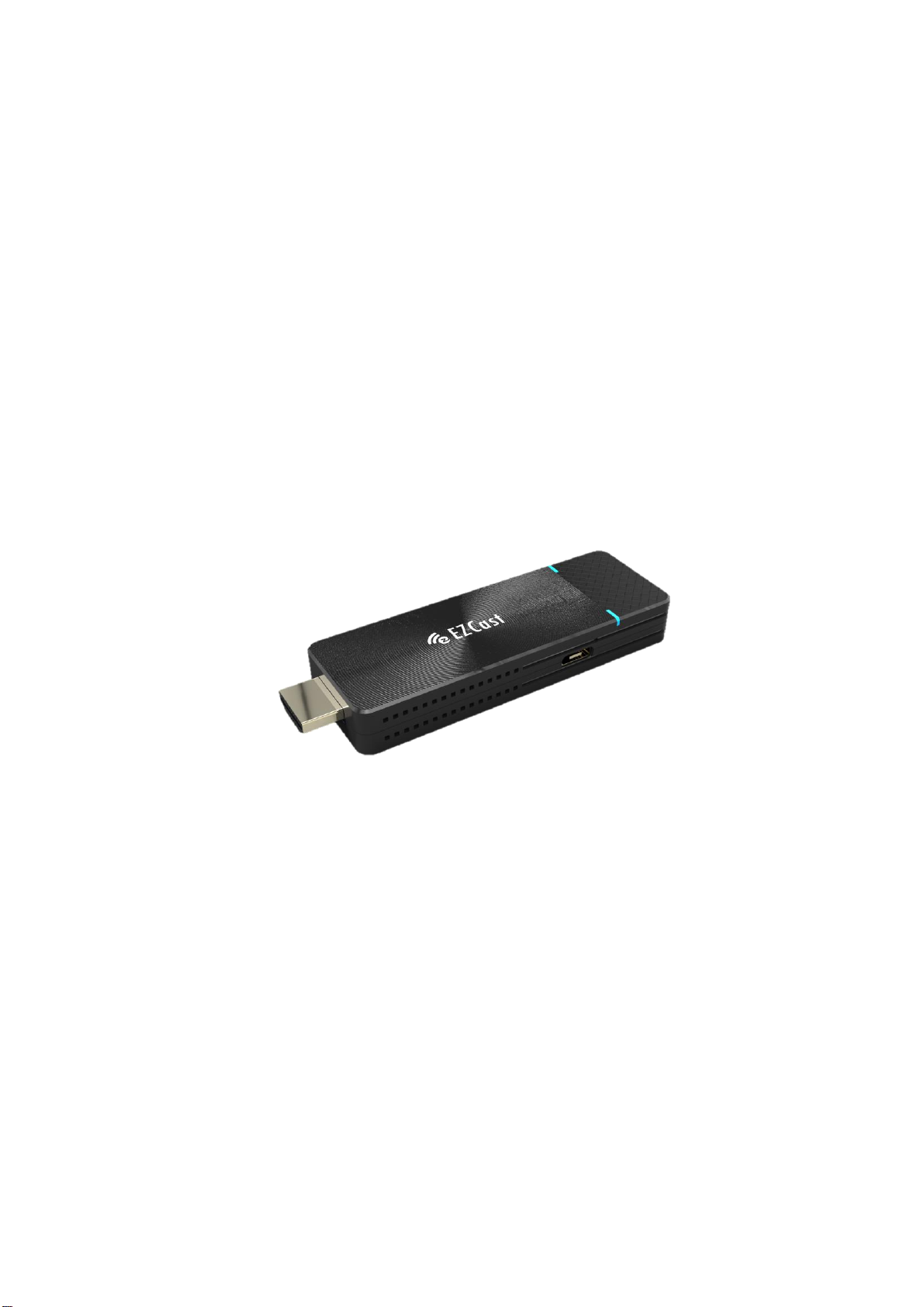
EZCast Pro Dongle 2
ActionsMicroelectronic.
1
EZCast Pro Dongle II
Model: D10
Specification
V1.01
Page 2

EZCast Pro Dongle 2
ActionsMicroelectronic.
2
General Description:
EZCast Pro Dongle II is the most powerful WiFi display dongle product
fitting in a small form factor. With broad OS platforms support, it can
empower your mobile device and cast small displays to a bigger one.
It builds in 802.11ac dual antenna (2T2R) so that you can have best WiFi
performance and anti-interfering capability. With the powerful EZCast
Pro app, you now can do split screens display while you’re in a meeting,
and you can also use the new AirView and EZNote feature to share
content or make notes. We also release a powerful screen broadcast app
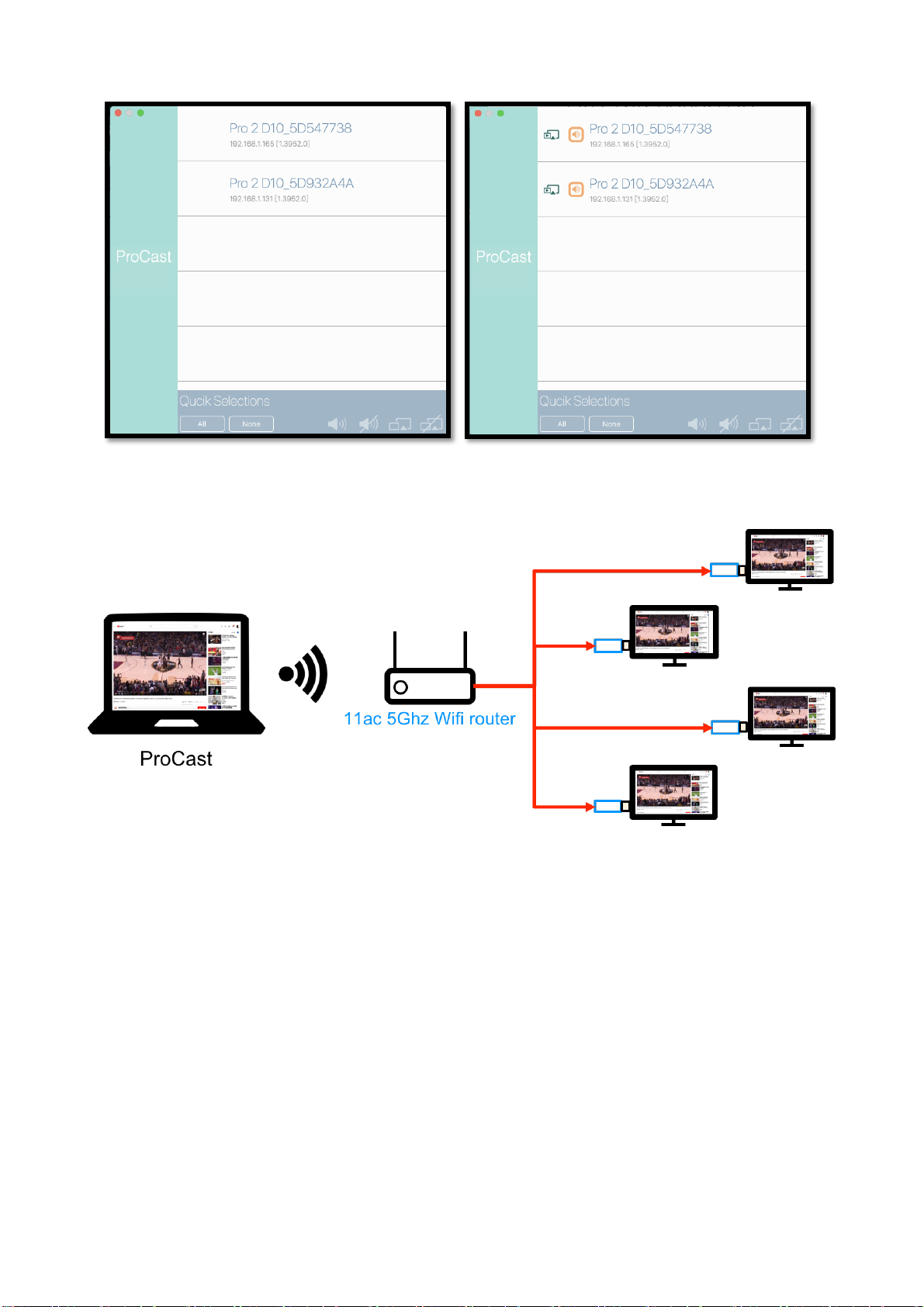
“ProCast”, so that you can cast your content to multiple EZCast Pro
Dongle 2 simultaneously, it will definitely be the best solution for small
offices and classrooms.
System Requirements
HW environment:
⚫TV, Monitor or Projector with HDMI 1.4a input
Page 3

EZCast Pro Dongle 2
ActionsMicroelectronic.
3
⚫DC 5V/1.5A, with type-c USB connector
SW environment for app:
⚫ iOS: 10 and above
⚫ Android: Android 5.0 and above
⚫ MacOS: macOS 10.11 and after
⚫ Windows: Windows 7 and above
⚫ ChromeOS
Page 4
EZCast Pro Dongle 2
ActionsMicroelectronic.
4
Hardware Specification
CPU
AM8270
DRAM
DDR3 1GMB
Flash
NAND Flash 512MB
Output Resolution
⚫ 4096x2160@24hz
⚫ 3840x2160@30hz
⚫ 3840x2160@25hz
⚫ 3840x2160@24hz
⚫ 1920x1080@60Hz
⚫ 1280x720@60hz
⚫ 1280x720@50hz
⚫ 1920x1080@50Hz
⚫ 1920x1080@24Hz
I/O
⚫ HDMI out (HDMI1.4)
⚫ USB type-C connector for DC 5V
WiFi
⚫ 802.11ac 2T2R, max. bandwidth 866Mbps
(@5Ghz)
Page 5
EZCast Pro Dongle 2
ActionsMicroelectronic.
5
WiFi Frequency
5Ghz: 5.150Ghz~5.825Ghz (may vary in
different countries)
Power
DC 5V, 1.5A
Video Support
Capable of decoding1080@60 video with most
formats
⚫ H.265 [email protected] High Tier
⚫ Supports HD MPEG4 SP/ASP
(720p/1080i/1080p)
⚫ H.264 BP@L3, MP and [email protected]
⚫ H.264 MVC [email protected]
⚫ VC-1 SP, MP, AP@L3
⚫ AVS [email protected], AVS+ 1080@60P
⚫ VP8 1080@60P
⚫ Video up-scaling from SD to Ultra HD
(720p/1080i/1080p/2160p)
DRM and Link
Protection
HDCP2.2 for Miracast
LED Indication
Power, WiFi status
Page 6
EZCast Pro Dongle 2
ActionsMicroelectronic.
6
Key
Reset button
Power Consumption
⚫ Standby: 2W approx.
⚫ Casting: 5W approx.
Working Temp.
0~40°C
Storage Temp.
-20~70°C
Operation mode
⚫ Screen Cast:
◼ EZCast Pro App to support screen cast, note taking, split screen
to one receiver.
◼ 3-in-1 mode under main page: Airplay/DLNA/Miracast
⚫ Screen Broadcast:
◼ 1 pc to 8 receivers (depends on WiFi bandwidth) screen broadcast
under local network.
⚫ WiFi: Direct Link(SoftAP) / Infrastructure(Client) / WiFi
Direct(Miracast concurrently)
Page 7

EZCast Pro Dongle 2
ActionsMicroelectronic.
7
Mechanical Design&Dimension
⚫ L 87.5mm x W 32mm x H 12mm (L99mm if includes HDMI
connector)
Weight
⚫ Body: 100g approx. (not including accessory)
⚫ Complete package: 250g approx..
Accessories
⚫ Short HDMI extension cable x1
⚫ Type-C USB cable x1
⚫ QSG x1
Page 8
EZCast Pro Dongle 2
ActionsMicroelectronic.
8
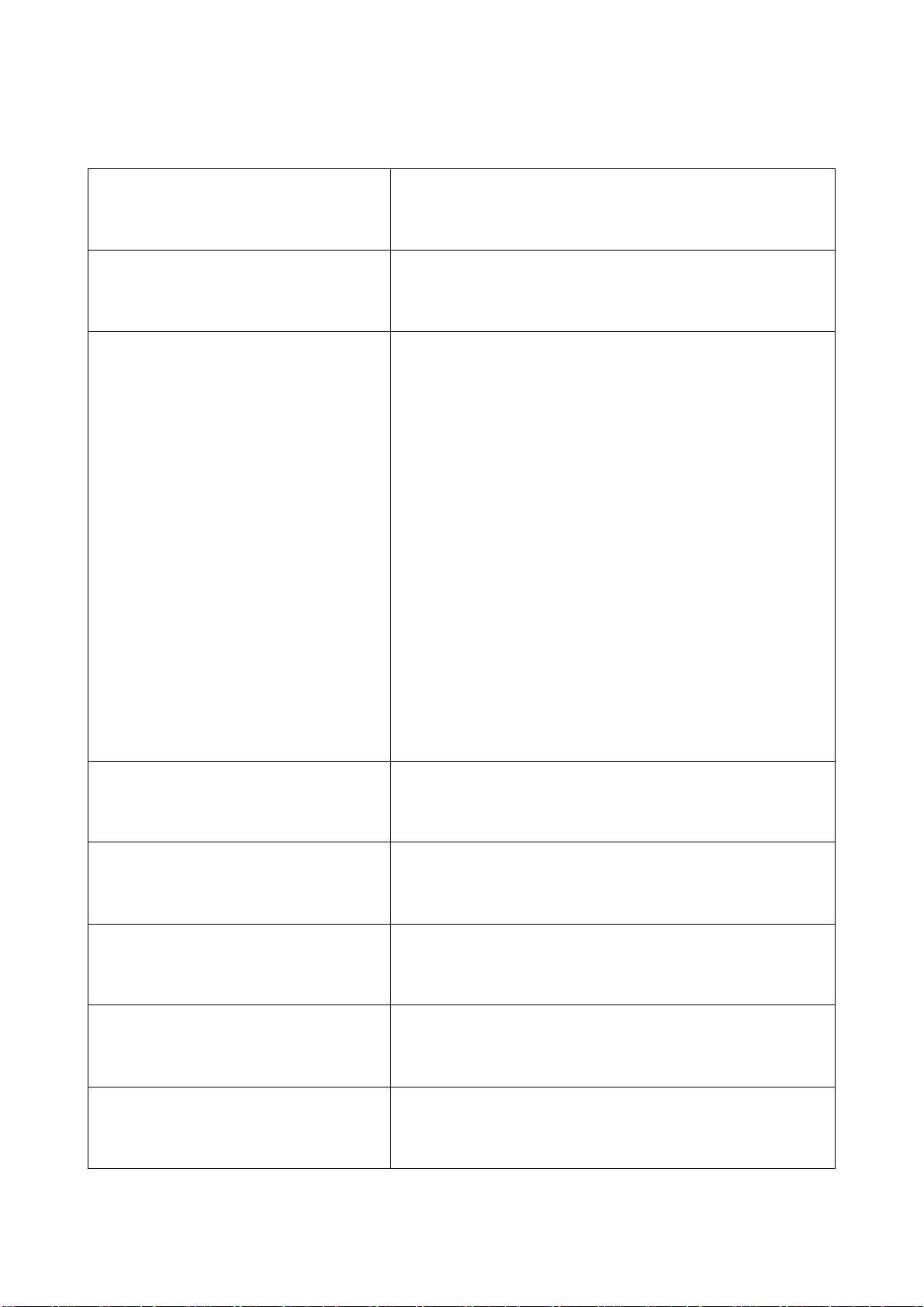
SW Features:
Operation Mode
Link and Offline operation
Control Mode
Admin, Host and Guest
Screen Mirror
⚫ EZCast Pro App for Win/Mac:
Mirror/Extension mode
⚫ Airplay: Mirror, Extension(macOS
only)
⚫ Miracast for Windows and Android:
Mirror, Extension(windows only)
Multimedia Cast
Photo/Video cast
Office Viewer
MS-Office and PDF
Editing Tool
Sketch tool
Web Browser
Embedded browser
Cloud Video
EZChannel for video enterance
Page 9
EZCast Pro Dongle 2
ActionsMicroelectronic.
9
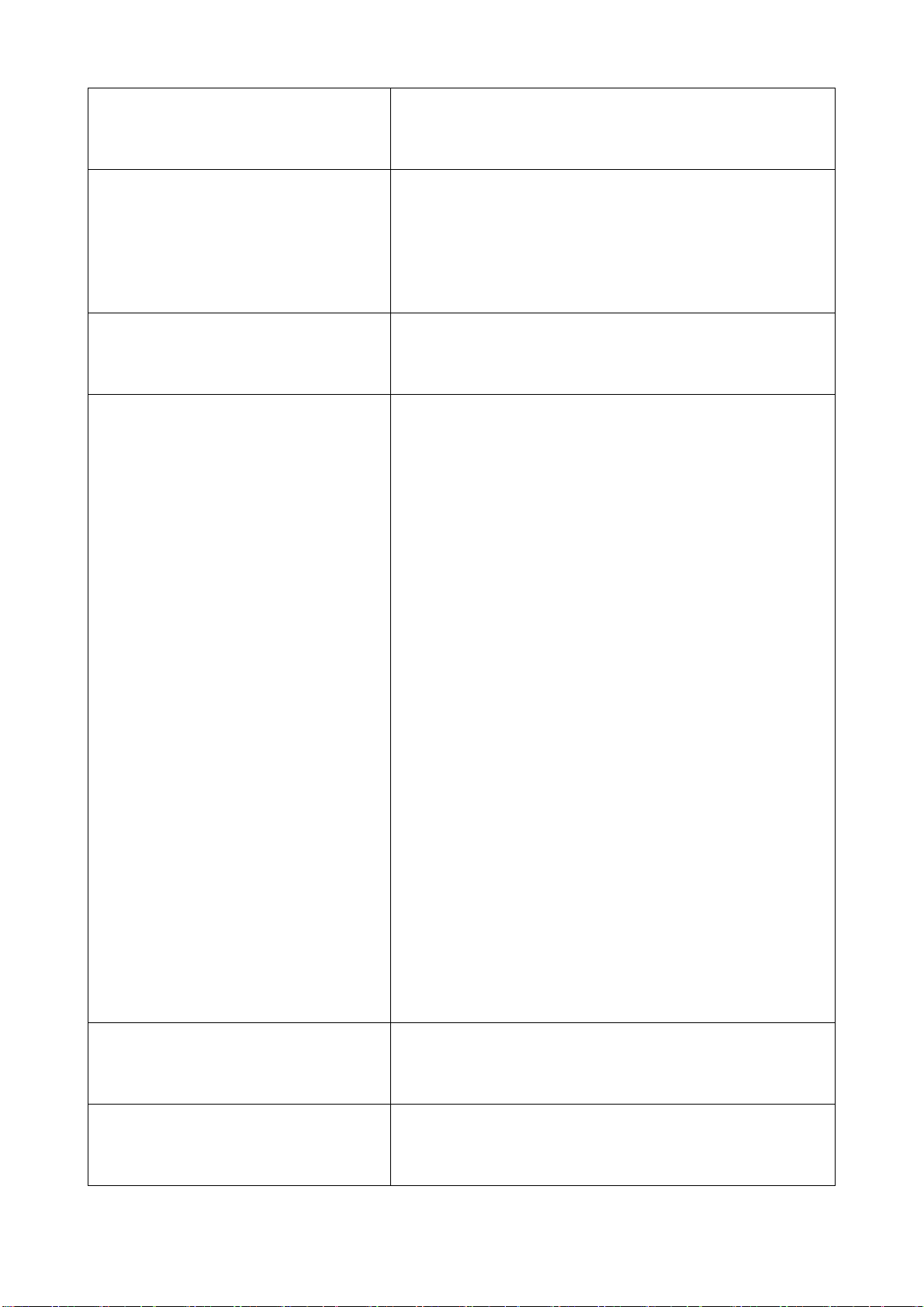
Content Broadcast
Airview to broadcast current display
Camera
Live camera to support fron and rear
camera
Split Screen
1, 2, or 4 displays
Advanced
-Administrator login
-WPA enterprise CA
-Conference control for users and
display positions
-Link status check
-AirView on/off switch
-AirSetup
-Reset to default
EZNote
Note taking and editor
EZKeep
EZNote to be stored on Cloud
Page 10
EZCast Pro Dongle 2
ActionsMicroelectronic.
10
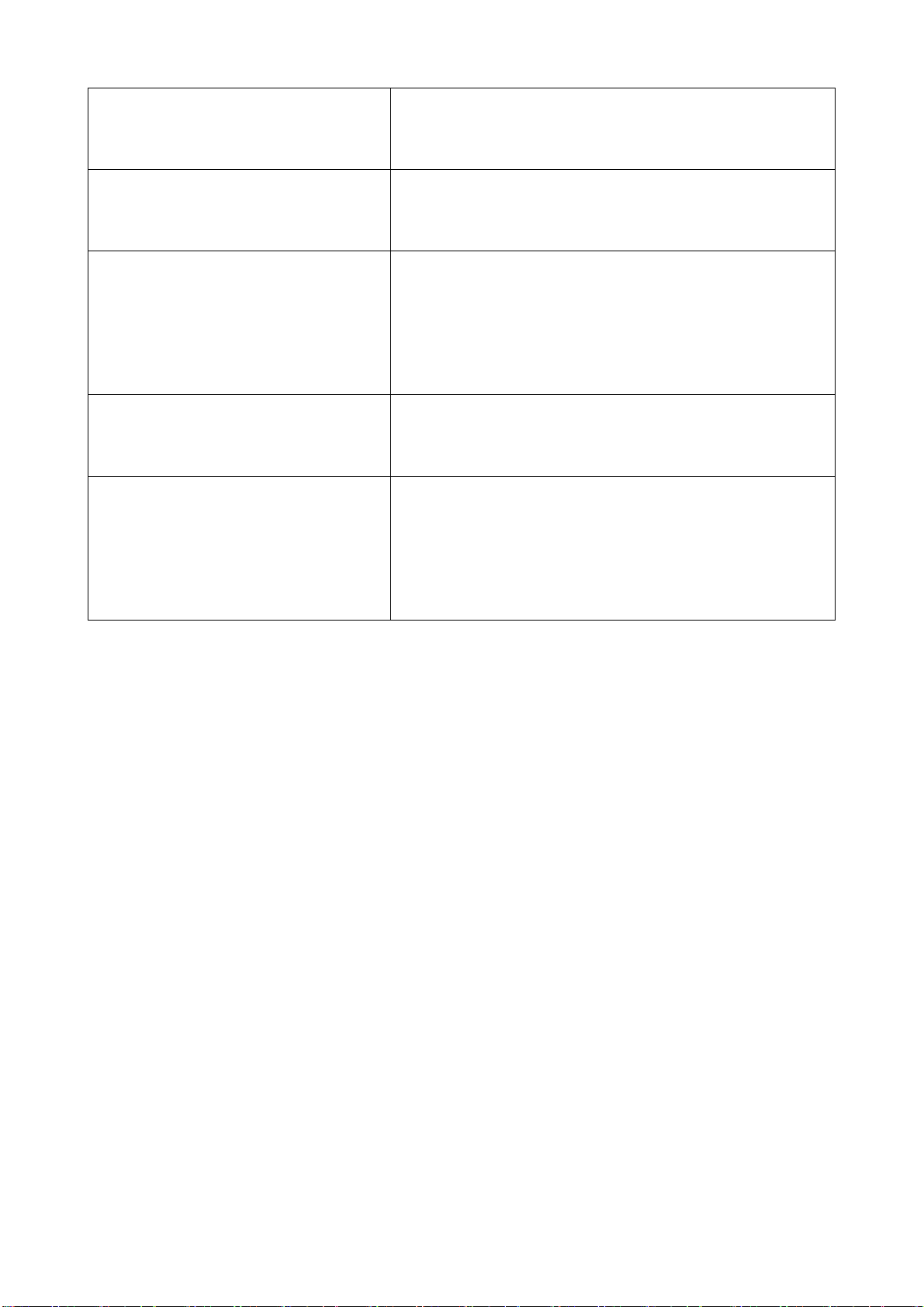
EZBoard
Cross platform interactive board
EZChannel
Cloud video portal
Privacy
Preferred device setting, Do not disturb
mode and auto-allow settings
Others
Comments and Store
ProCast (Multiple device
broadcast)
Single PC to multiple devices screen
mirror (Windows and macOS only)
Page 11
EZCast Pro Dongle 2
ActionsMicroelectronic.
11
 Loading...