

Page 1

Quick Start Guide
Model: EZCast Beam J2
Guide de démarrage rapide
Guía de inicio rápido
Инструкция по началу работы
Vodič za brzi početak
Rychlý návod
Schnellstartanleitung
Snelstartgids
Vodič za hiter začetek
Ghid de inițiere rapidă
Page 2

How to use the projector:
(1)Do not point the projector lens towards human eyes. The bright light can cause
damage to eyes.
(2)Do not block the air vents. Blocked venlaon may cause overheang and
damages to the projector electronics and components.
(3)Do not use chemicals, detergents or water to clean the projector. Moisture and
chemicals may corrode the projector circuit boards.
(4)Do not place the projector within reach of children.
(5)Only use the projector in dry environment with good venlaon.
(6)Do not store the projector in extremely hot or extremely cold temperatures.
Extreme heat and cold can reduce the component lifeme of projector. Recommended working environment is between 5℃~35℃.
(7)Do not aempt to dry the projector in heang devices, such as dryer,
microwave etc.
(8)Do not squeeze or apply excess pressure to the projector. The projector may
be damaged from the pressure.
(9)Do not throw, knock or shake the projector. The projector may be damaged
from the vibraon.
(10)Do not aempt to open the projector. Please refer to qualified customer
support.
(11)Do not aempt to service the projector. Please refer to qualified customer
support in the event of projector malfuncon.
Page 3

Understand EZCast Beam J2 and Remote Controller
Power
V+
V-
Power Off Only
(Remote control is powered by
two AAA baeries (not included))
Back
Keystone
Page 4

(1) Power on the projector with the supplied power adapter.
(2) LED turns green to indicate idle state.
Page 5

Advanced Setting: Projection Location, Brightness,Contrast, Auto V Keystone,
V. Keystone, H. Keystone,4 Corner Correction settings.Use up/down Arrows to
choose function,and left/right Arrows to adjust settings.
Page 6

Page 7

Page 8

Page 9

Page 10

Page 11

Common issues and soluons:
Common issues
No power, LED off,cannot
power on
LED on, cannot power on
Cannot screen mirror
Cannot stream media
Troubleshoong
Soluons
Check the power adapter for loose connecon.
Check the power adapter for loose connecon, press the Power
buon to turn on projector.
1. Check the Quick Start Guide for the correct screen mirroring
funcon.
2. Shorten the distance between smart device and projector for best
screen mirroring quality.
3. Make sure the smart phone is connected to the correct Wi-Fi
network SSID.
Check the internet connecon for your smart device.
Unable to recharge smart
phone when projector is
unplugged from power
Remote not responsive
Cannot shutdown
projector
Auto V Keystone not
working
Did not short press Power before connecng smart phone.
1. Replace remote baeries
2. Pair the remote with your projector again. Pairing procedure:
simultaneously hold down Volume+ and Volume- keys for 3 seconds,
once the remote's flashing red light becomes constant, the pairing
process is complete, and you can begin using the remote normally.
Press and hold the Power buon for 10 seconds to shutdown.
1.Select "Seng>Advanced Seng" and confirm "Auto V Keystone" is
On.
2.If aer step 1, the images are sll not rectangular, then follow the
steps below to calibrate the projector:
Place the projector on a level surface, select "Seng>Advanced
Seng" and turn Off "Auto V Keystone".
Then turn On "Keystone Calibraon", and wait unl "Keystone
Calibraon" turns itself Off aer calibraon.
Finally turn On "Auto V Keystone" to confirm the feature is funconal.
Page 12

1. 注意事項
如何正確使用設備:
(1)請勿將鏡頭朝向人眼,避免開機後鏡頭強光對眼睛造成傷害。
(2)請勿堵塞設備的進/出風口,避免設備無法正常散熱對 內部電子器件造成損壞。
(3)請勿用化學製品、清洗劑或清水來清洗設備,以及避免雨水、濕氣和含有礦物質液體腐
蝕電路板。
(4)請將設備及其部件和配件放在兒童觸摸不到的地方。
(5)請確保設備在乾燥通風的環境下使用。
(6)請勿將設備存放在過熱或過冷的地方,高(低)溫會縮短電子器件的壽命。允許使用環
境為5℃~35℃。
(7)請勿將設備放入任何加熱設備(如乾燥機、微波爐等)進行烘乾。
(8)請勿用力擠壓設備或在其上方放置重物,以避免損壞設備。
(9)請勿扔放、敲打或強烈震動設備,導致內部電路板損壞。
(10)請勿試圖私自拆裝設備。如有問題,請聯絡售後服務。
(11)請勿自行維修任何產品。若設備或任何部件不能正常工作,應及時諮詢售後服務或返
廠維修。
(12)注意:用錯誤型號電池更換會有爆炸危險,務必按照說明處置用完的電池
(13) 經型式認證合格之低功率射頻電機,非經許可,公司、商號或使用者均不得擅自變
更頻率、加大功率或變更原設計之特性及功能。
(14)低功率射頻電機之 使 用不得影響飛航安全及干擾合法通信;經發現有干擾現象時,
應立即停用,並改善至無干擾時方得繼續使用。 前項合法通信,指依電信法規定作業之無線
電通信。 低 功 率射頻電機須忍受合法通信或工業、科學及醫療用電波輻射性電機設備之干
擾。
本產品為高亮度光源,切勿凝視或直視鏡頭光束,可能傷害眼睛。特別注意勿讓兒童直接凝
視鏡頭光束,可能傷害眼睛。
Page 13

認識EZCast Beam J2主機及遙控器
遙控器由兩節AAA電池供電
(電池不包括在內)
Page 14

(1)將隨機標配的電源供應器連接投影機電源埠。
(2)通電後機身側面LED綠燈常亮,投影機進入待機狀態。
Page 15

(5) 高級設定:此選項中有:投影位置、亮度、對比度、自動垂直梯形校正、垂直梯形校正、
梯形校準、水準梯形校正、四角校正,八項設置,按上下方向鍵選擇功能表,游標停在的當前
功能表,按左右鍵可直接調整
Page 16

Page 17

Page 18

Page 19

Page 20

Page 21

常見故障說明:
簡易故障處理
故障現象 處理方法
不通電/指示燈不亮/不能開機 檢查電源是否正確,
電源線是否接好。
電源指示燈亮/不能開機 檢查電源線是否接好,
是否有按電源鍵開機。
不能同屏 1. 同屏模式切換是否對應,請參照快速指南。
2. 同屏時畫面卡頓,同屏距離太遠。
3. 手機的Wi-Fi 與投影儀的SSID是否連接上。
不能線上播放 檢查網路是否連接正常,
參照快速指南操作指引。
遙控器無功能 1.更換遙控器電池。
2.將遙控器與投影機重新配對,
3.操作方法:同時按住音量加、
4.音量減鍵約3秒,看到遙控器
5.紅燈閃爍後變成長亮則配對完
6.成可進行正常操作。
無法正常關機 長按電源鍵約10秒強制關機。
1.選擇“設置”菜單,進入“高級設定”,選擇“自動垂直
梯形校正” 確認是打開狀態
2. 如果以上操作畫面不是呈現正矩形,還有些微梯形現象,則
自動垂直梯形校正無功能
需將投影機進行重新校正。操作方法如下:
請把投影機置於水準桌面,打開“設置”菜單,進入“高級
設定”,選擇關閉“自動垂直梯形校正”後往下選擇打開“
梯形校準”,"梯形校準"會由打開回到關閉狀態,即校準完
成。再選擇打開“自動垂直梯形校正”,梯形校正功能即可
實現
Page 22

成像技術: DLP
亮度 300流明
對比度 300:1
物理解析度 854*480
最高解析度 1080P
光源類型 LED
光源壽命 20000小時
投射比 1.3:1
調焦方式 手動
投影距離 0.5-3M
投影尺寸 1M---37.8"
顯示比例 16:9
梯形校正 垂直自動校正,水準/四角手動校正
電源 輸入:100-240V 50/60HZ 輸出:15V 2A
電池 11.1V 3000毫安培
輸入介面 USB/HDMI
輸出介面 3.5mm耳機輸出
揚聲器 4Ω 2W
系統 EZCast多媒體系統
支援語言 22國
產品尺寸 114.93mm*114.93*32mm
產品淨重 400g
WIFI 2.4G(802.11.b/g/n)
Page 23
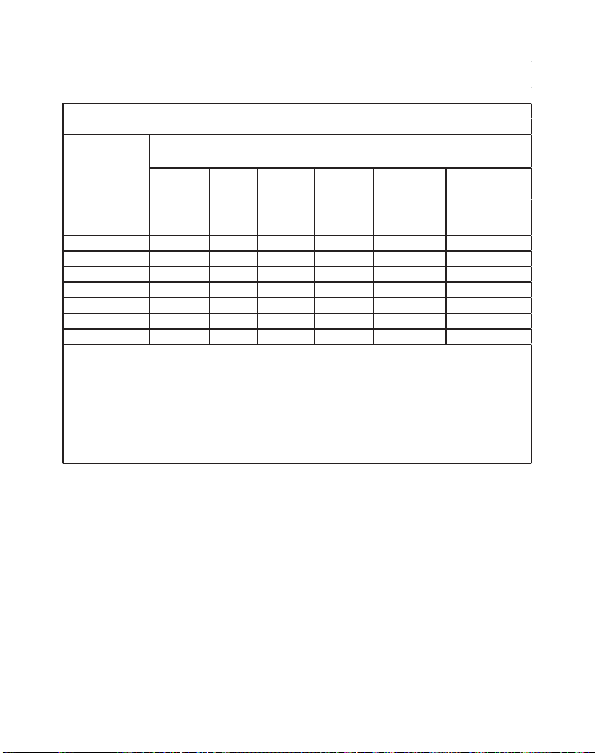
機殼 - ○ ○ ○ ○ ○
電路板 - ○ ○ ○ ○ ○
引擎模組 - ○ ○ ○ ○ ○
光源模组 - ○ ○ ○ ○ ○
風扇 - ○ ○ ○ ○ ○
鐵件 ○ ○ ○ ○ ○ ○
線材 - ○ ○ ○ ○ ○
限用物質含有情況標示聲明書
Declaration of the Presence Condition of the Restricted Substances Marking
限用物質及其化學符號
設備名稱:彩色單槍投影機, 型號(型式):
多溴聯苯
d
多溴二苯醚
Equipment name Type designation (Type)
Restricted substances and its chemical symbols
單元
Unit
(Pb) (Hg) (Cd)
備考1.“超出0.1 wt %”及“超出0.01 wt %”係指限用物質之百分比含量超出百分比含量基準值。
Note 1:“Exceeding 0.1 wt %” and “exceeding 0.01 wt %” indicate that the percentage content of the
restricted substance exceeds the reference percentage value of presence condition.
備考2.“○”係指該項限用物質之百分比含量未超出百分比含量基準值。
Note 2:“○” indicates that the percentage content of the restricted substance does not exceed the
percentage of reference value of presence.
備考3.“-”係指該項限用物質為排除項目。
Note 3:The “−” indicates that the restricted substance corresponds to the exemption.
六價鉻
Hexavalent
chromium
(Cr+6)
EZCast Beam J2
Polybrominate
biphenyls
(PBB)
Polybrominated
diphenyl ethers
(PBDE)
捷濤有限公司
新北市中和區中正路736號4樓之5
 Loading...