

Page 1
MW-2E
A/B Video and embedded audio mixer.
user manual
eyeheight
Page 2

User Manual Versions
Versions
Changes
Date
SW Vers
1.00
Original Version
6/1/2008
7.3
1.1
Audio menu errors corrected.
11/8/2008
7.5/7.6
1.2
Errors in section 3.4 on setting up Etherbox tallies.
1/12/2008
7.7
- 2 -
eyeheight
Unit 34 Park House Watford Business Park Greenhill Crescent Watford Herts GB WD18 8PH
Reg. No. 2855535 Telephone: +44 (0) 1923 256 000 Fax: +44 (0) 1923 256 100 email: [email protected]
Page 3

Table of Contents
1 System Overview ............................................................................................... 5
1.1 The MW-2E Product ............................................................................... 5
Associated Equipment for the MW-2E .............................................................. 6
2 Installation .......................................................................................................... 7
2.1 Connections on the MW-2 E pr oduc t ....................................................... 7
3 Menu Control of the MW-2E ............................................................................... 8
3.1 Flexipanel controls. ................................................................................. 8
3.1.1 Device Buttons. .................................................................................... 8
3.1.2 Menu Navigation. ................................................................................. 8
3.1.3 Parameter adjustment of a green menu. .............................................. 9
3.1.4 Parameter adjustment of a red menu ................................................... 9
3.1.5 Information display ............................................................................... 9
3.2 Memories ................................................................................................ 9
3.2.1 User Memories..................................................................................... 9
3.2.2 Naming User Memories ....................................................................... 9
3.3 Tamper Locking the MW-2E. ................................................................ 10
3.4 Configuring tallies on the etherbox. ....................................................... 10
3.5 The MW-2E Menu Set. ......................................................................... 10
4 Technical Appendix .......................................................................................... 23
4.1 geNETics Automation Pr otoc ol Par ameter table. .................................. 23
4.2 Technical Specification. ........................................................................ 27
- 3 -
eyeheight
Unit 34 Park House Watford Business Park Greenhill Crescent Watford Herts GB WD18 8PH
Reg. No. 2855535 Telephone: +44 (0) 1923 256 000 Fax: +44 (0) 1923 256 100 email: [email protected]
Page 4

Table of Figures
Figure 1 MW-2E Proces si ng car d. ........................................................................ 6
Figure 2 - Front view of etherbox (FB-9E) fitted with FF-9 blank pane l ................. 6
Figure 3 Rear view of etherbox with a single MW-2E installed. ............................. 6
Figure 4 FP-9 Flexipanel can be fitted on the FB-9E or remotely using and RR-9
kit. .................................................................................................................. 6
Figure 5 MW-2E connections ................................................................................ 7
Figure 6 - Typical connections for an MW-2E Module ........................................... 7
Figure 7 Flexipanel (FP-9) controls. ...................................................................... 8
Figure 8 Types of menus showing their characteristic colours .............................. 8
- 4 -
eyeheight
Unit 34 Park House Watford Business Park Greenhill Crescent Watford Herts GB WD18 8PH
Reg. No. 2855535 Telephone: +44 (0) 1923 256 000 Fax: +44 (0) 1923 256 100 email: [email protected]
Page 5

1 System Overview
1.1 The MW-2E Product
This manual describes the func ti on o f the MW-2E, mixer/wipe unit. The MW-2E is
designed as a replacement to the older MW-3/3E unit. Six MW-2E units can fit
into an eyeheight 1RU chassis (FB-9 or FB-9E) making it twice as compact as
the MW-3/3E unit. The MW-2E product also has a full 16 channels of audio as
standard.
The MW-2E is an A/B (2-Input) SDI Mixer unit which will perform a variety of
transitions commonly used in transmission and post production. The main
features are as follows:
• A/B Mix/Cut transitions
• A/B Wipe transitions with 8 wipe patterns with coloured/soft borders
• 16 channel embedded Audio Mixing follows video transitions. (configurable
as mix or cut transitions, cut transitions suitable for dolby E splice)
• Embedded Audio transition can lead or lag video Transitions under
automation.
• Embedded audio manipulation (LR swap, Mono….)
• Programmable (Auto) or manual transitions
• Preview Output with safe area generator built in.
• Internal Matte and Black Generator.
• Up to +/-32uS user definable synchronisation window for A/B Inputs
• External Digital Reference Input ensures output stability
• Transparent to all embedded signals
• 6 user memories
• Compatible with etherbox GPI/Tallies.
• FULLY software and firmware updatable using Flash technology.
• Mechanical relay bypass option available.
• Compatible with eyeheight geNETics automation protocol.
- 5 -
eyeheight
Unit 34 Park House Watford Business Park Greenhill Crescent Watford Herts GB WD18 8PH
Reg. No. 2855535 Telephone: +44 (0) 1923 256 000 Fax: +44 (0) 1923 256 100 email: [email protected]
Page 6
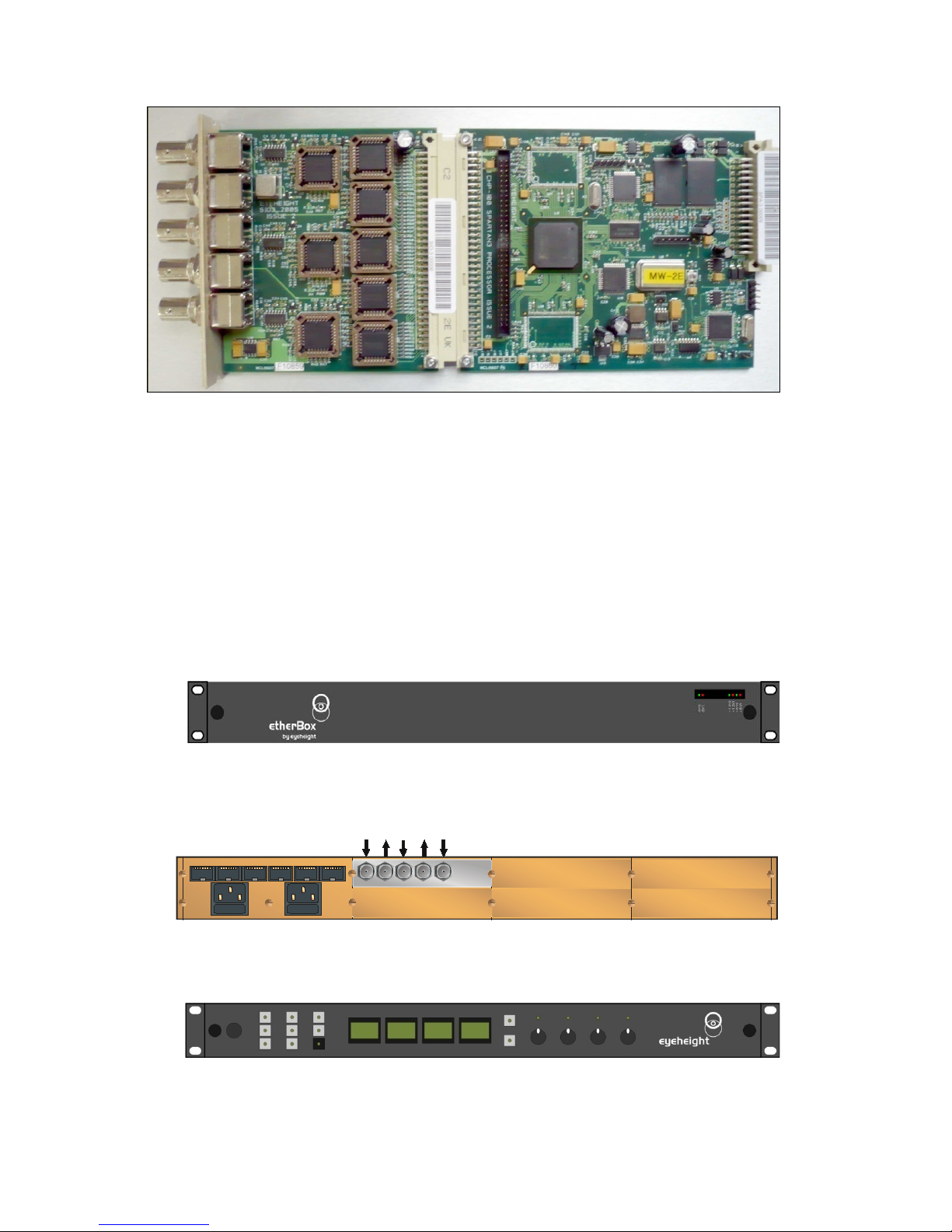
Figure 1 MW-2E Processing card.
Associated Equipment for the MW-2E
The MW-2E processing card requires the following in order to set up and operate
the unit.
1. An etherbox chassis (FB-9E). Up to six MW-2E units and be installed in
one chassis.
2. A Flexipanel control surface such as an FP-9 or an FP-10.
Figure 2 - Front view of etherbox (FB-9E) fitted with FF-9 blank panel
IN
PST OUT
PGM OU T
BG IN
Slot 2
Slot 5
Slot 3
Slot 4 Slot 6
M AIN
IN
BG
IN
PGM
OU T
PST
OU T
PAN EL
I-BUS 232/422
ETHNE T
GPI/0-2 GPI-1
GPI-1
PSU 1
PSU 2
KEY I N
KEY
IN
Figure 3 Rear view of etherbox with a single MW-2E installed.
Figure 4 FP-9 Flexipanel can be fitted on the FB-9E or remotely using and RR-9 kit.
- 6 -
eyeheight
Unit 34 Park House Watford Business Park Greenhill Crescent Watford Herts GB WD18 8PH
Reg. No. 2855535 Telephone: +44 (0) 1923 256 000 Fax: +44 (0) 1923 256 100 email: [email protected]
Page 7
2 Installation
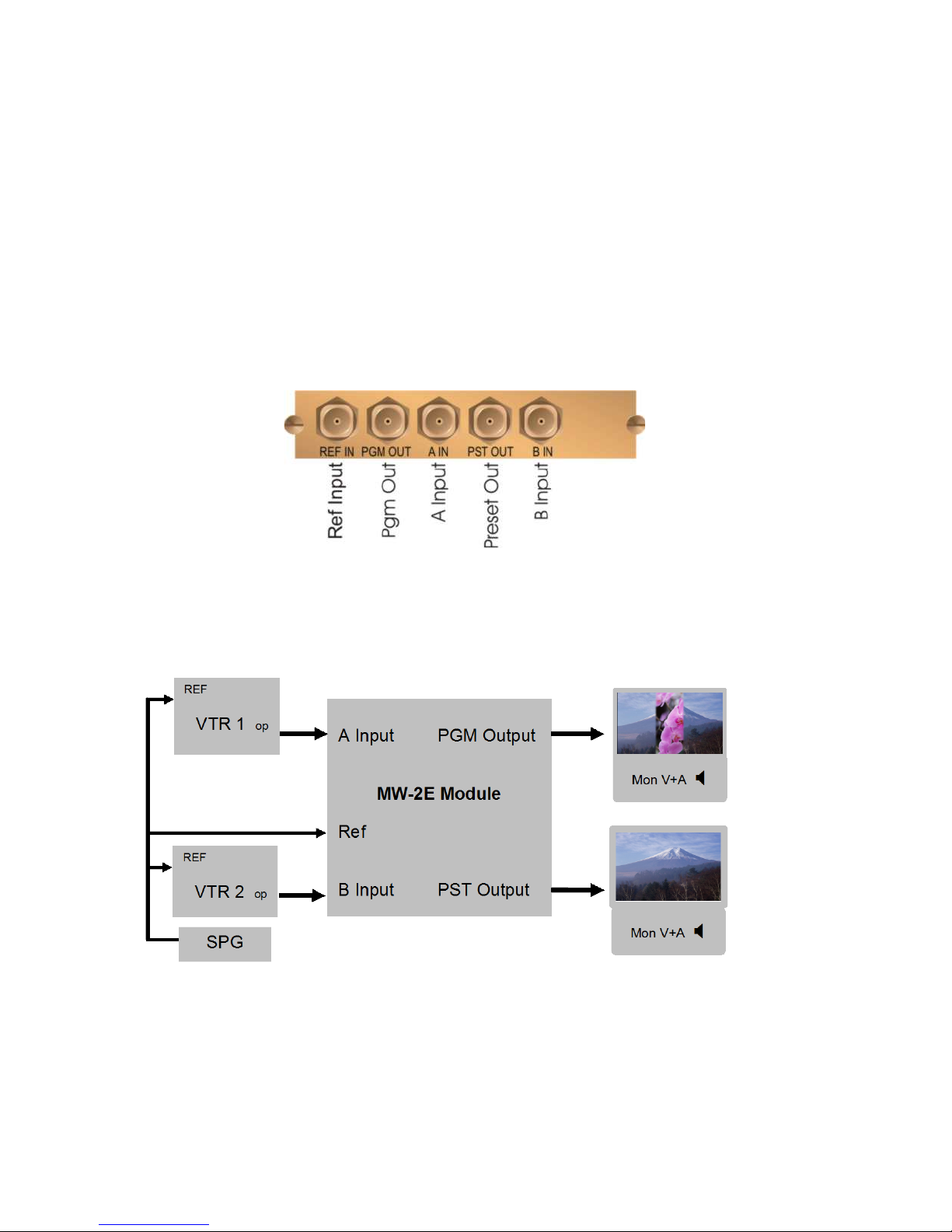
This unit requires SDI digital video connections to the BNC connectors. The user
should refer to the etherbox user manual for installation of the MW-2E into a
chassis and connection of flexipanels. This will also describe the process of
acquiring a processing card (in this case the MW-2E) by the Flexipanel which is
necessary to access the menu structure within the MW-2E.
2.1 Connections on the MW-2E product
Figure 5 MW-2E connections
A Typical Connection diagram for the MW-2E is shown below. All signals,
including the reference, are SDI.
Figure 6 - Typical connections for an MW-2E Module
- 7 -
eyeheight
Unit 34 Park House Watford Business Park Greenhill Crescent Watford Herts GB WD18 8PH
Reg. No. 2855535 Telephone: +44 (0) 1923 256 000 Fax: +44 (0) 1923 256 100 email: [email protected]
Page 8
3 Menu Control of the MW-2E
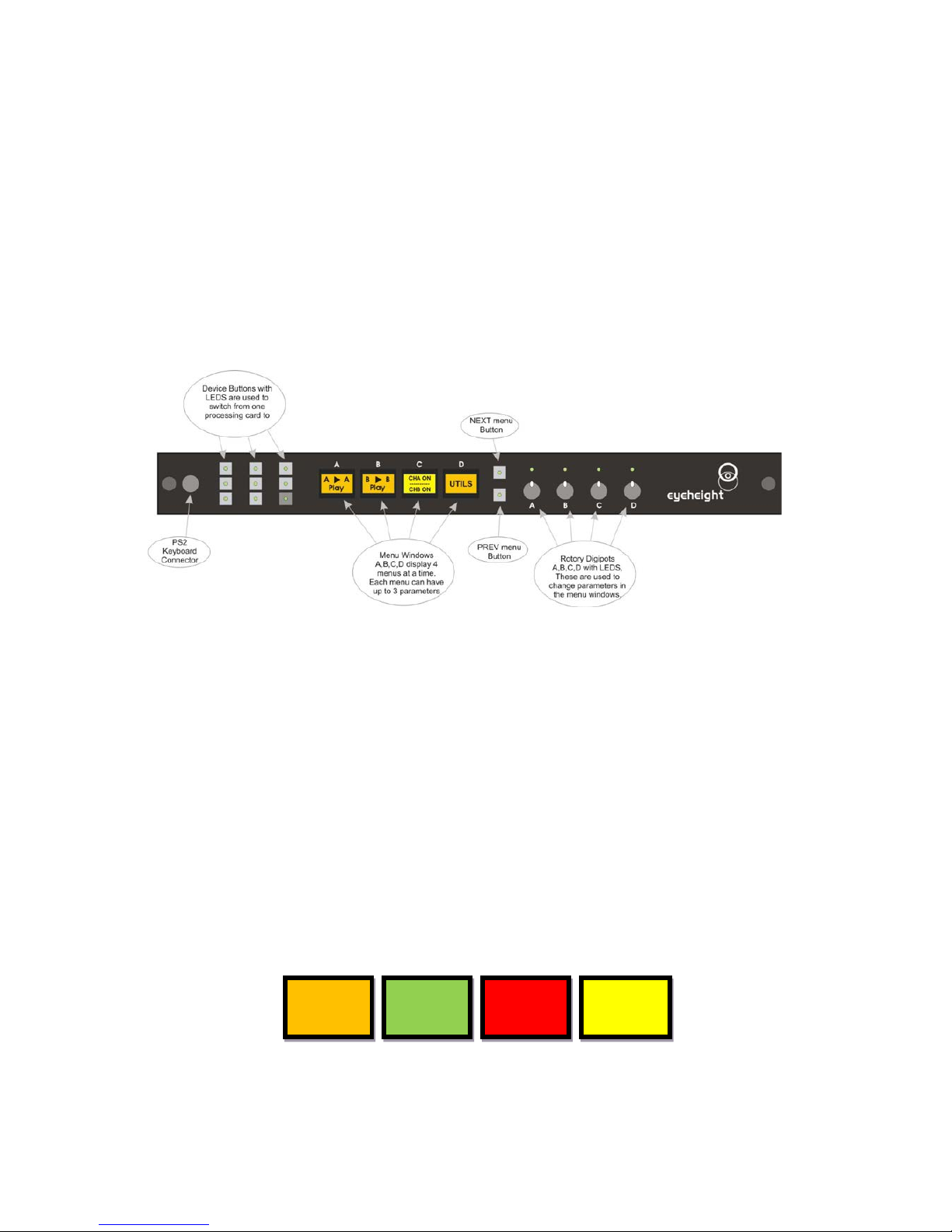
All GeNETics products are controlled using a generic menu system. This generic
menu system is operated from a generic panel (Flexipanel FP-9 or FP-10). An
FP-9 is shown below (An FP-10 has the same controls in a different layout style).
For information about acquiring processor cards for control on a Flexipanel see
the etherbox manual section 4.
3.1 Flexipanel controls.
Figure 7 Flexipanel (FP-9) controls.
3.1.1 Device Buttons.
There are 8 grey device buttons. These switch between the currently selected
processing cards installed in the etherbox. It is also possible to select cards in
another chassis if the I-Bus is connected to the other chassis.
3.1.2 Menu Navigation.
There are t wo ways to navigate from menu to menu.
1. Using the NEXT ane PREV buttons. These are for “Flat” menu structures.
The NEXT and PREV LEDS will flash while further menus are available.
2. Using a GOTO ANOTHER MENU LCD button (as below coloured orange).
This is more common and will take you straight to a relevant set of menus.
Examples are the Play and UTILS menu’s shown on Figure 8.
GOTO
ANOTHER
MENU
SINGLE
PARAMETER
ADJUSTMENT
DOUBLE OR
TRIPLE
PARAMETER
ADJUSTMENT
INFORMATION
DISPLAY
Figure 8 Types of menus showing their character istic colours
- 8 -
eyeheight
Unit 34 Park House Watford Business Park Greenhill Crescent Watford Herts GB WD18 8PH
Reg. No. 2855535 Telephone: +44 (0) 1923 256 000 Fax: +44 (0) 1923 256 100 email: [email protected]
Page 9

3.1.3 Parameter adjustment of a green menu.
A green menu is one in which there is only one adjustable parameter. There are
two ways to adjust the parameter in a green menu.
1. Press the green LCD button. This will increment the value in that window.
This is most frequently done when the menu parameter is Textural for
example switching a parameter between ON and OFF. In this case a
button press is most natural.
2. Use the Rotary digipot (A,B,C or D) to adjust the parameter in the
respective LCD window (A,B,C or D). The direction and speed of rotation
enable numeric values to be set easily.
3.1.4 Parameter adjustment of a red menu
A red menu is one in which there is two or three adjustable parameters . In this
case it is necessary to first select the menu by pressing the red button. When the
red button is pressed it will turn green and either two or three of the rotary digipot
LEDS will flash indicating that the respective rotary digipot will operate the
respective parameter.
3.1.5 Information display
A Yellow menu (Which on most panels does look a light orange!) is one in which
only information is displayed. An example of this is the software version display.
3.2 Memories
3.2.1 User Memories
The user memories are a generic feature of all eyeheight geNETics products. Six
of these are included in the MW-2E. Parameters as shown in the RED menu
numbers are saved.
3.2.2 Naming User Memories
The user memories can be named with up to 6 charac ter s . To do this plug in a
PS-2 Keyboard into a Flexipanel and select the appropriate processor card with a
device button. (See Figure 8 for connector location). T o nam e me mory 1,
“TXroom”
1. Hit F9 function key. The LCD displays will change to text entry mode
2. Type “M01:TXroom” and then press enter.
3. You may get a “not acknowledged” message, this does not matter.
Other memories can be named in the same way but changing the 01 to another
memory number.
- 9 -
eyeheight
Unit 34 Park House Watford Business Park Greenhill Crescent Watford Herts GB WD18 8PH
Reg. No. 2855535 Telephone: +44 (0) 1923 256 000 Fax: +44 (0) 1923 256 100 email: [email protected]
Page 10
3.3 Tamper Locking the MW-2E.
The user can lock specific menus or all the menus on the MW-2E so that it
cannot be adjusted with a manual control panel. This does not effect automation.
To do this plug in a PS-2 Keyboard into a Flexipanel and select the appropriate
processor card with a device button. (See Figure 8 for connector location). To
lock only menu 5. (Next Logo for channel A)
1. Hit F9 function key. The LCD displays will change to text entry mode
2. Type “L05:” and then press enter.
A padlock symbol will appear on the menu and it cannot be adjusted. To unlock
menu 5, type “A05:” as step 2 above. Other menus are done in the same way
To lock the whole product type “L:” as step 2 above and to unlock the whole
product type “A:” as step 2 above.
3.4 Configuring tallies on the etherbox.
The MW-2E can make use of the three configurable tallies on the etherbox
chassis. The etherbox chassis has three usable talli es. Thes e ar e nu mbered
tallies 11,12 and 13. Set up these menus for the box number and tally number for
A channel and B channel inputs of the mixer on men u num ber 45. I f you do not
wish to use a tally set the box number to 0. Refer to the etherbox manu al for
interface information.
3.5 The MW-2E Menu Set.
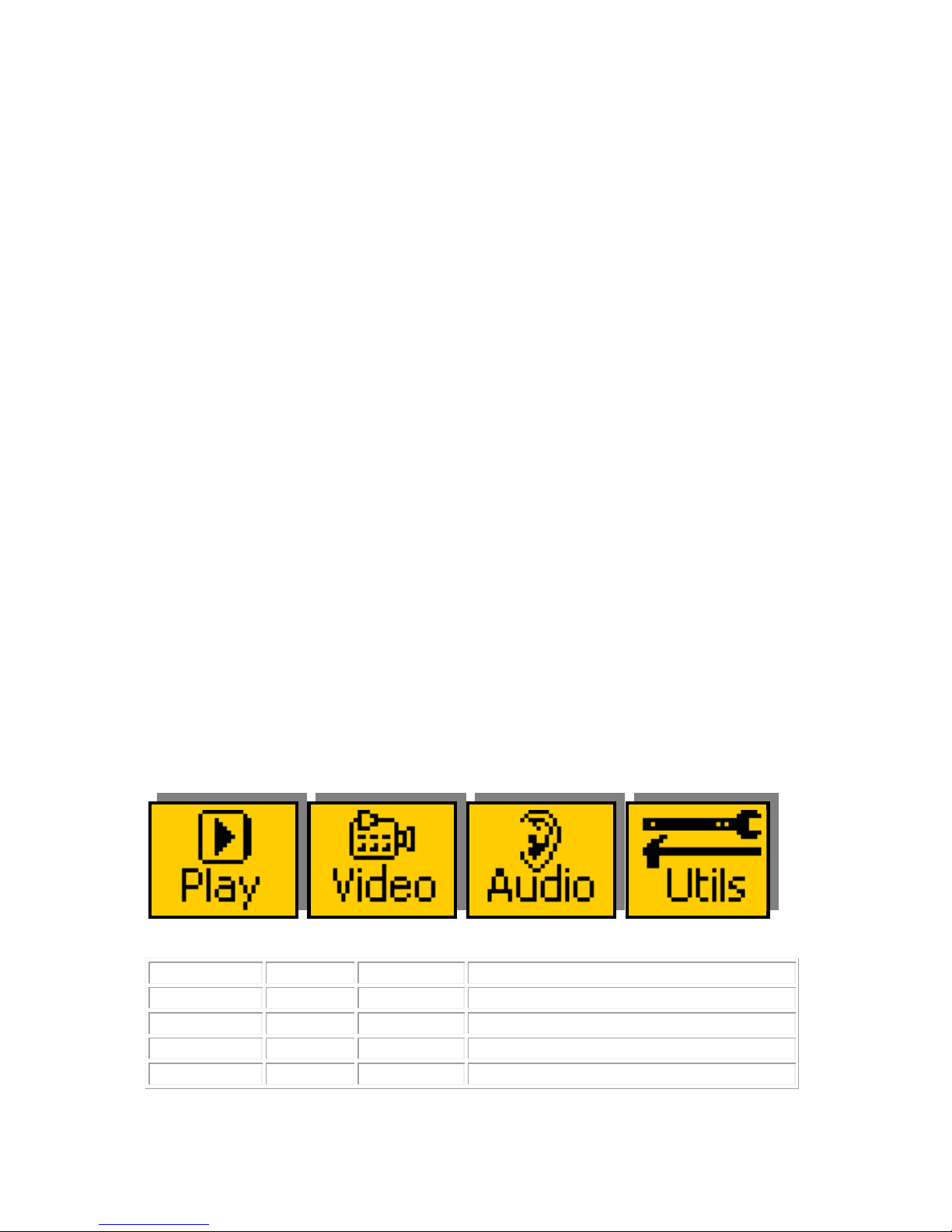
Menus 00-03 Top Level Menus
Menu Num.
Heading
Automation
Function
00
PLAY
none
Go To the main Play menus (4-7)
01
VIDEO
none
Go To the main Video menus (8-23)
02
AUDIO
none
Go To the main Audio menus (108-127)
03
UTIL
none
Go To the main Utility menus (32-63)
- 10 -
eyeheight
Unit 34 Park House Watford Business Park Greenhill Crescent Watford Herts GB WD18 8PH
Reg. No. 2855535 Telephone: +44 (0) 1923 256 000 Fax: +44 (0) 1923 256 100 email: [email protected]
Page 11
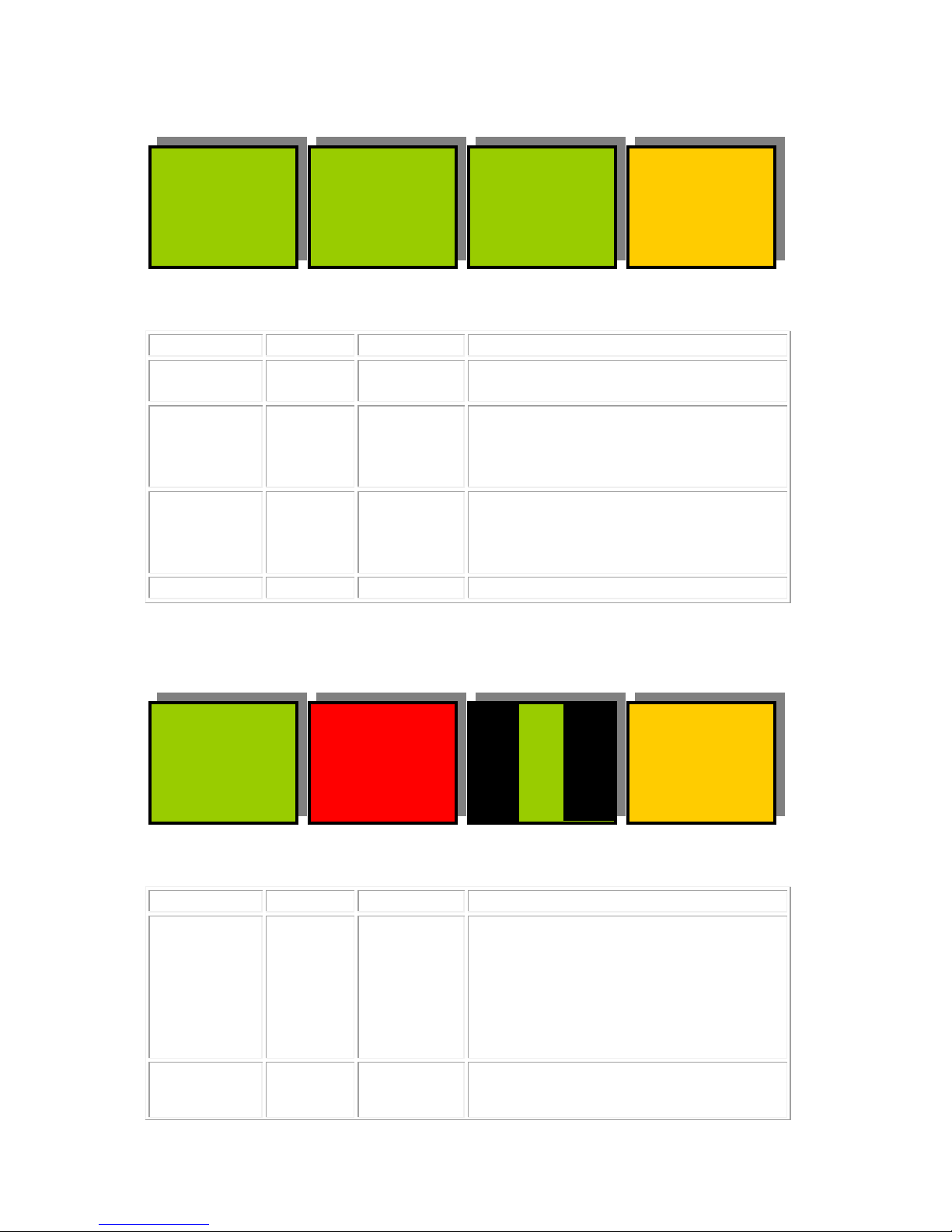
Menus 04-07 PLAY Menus
PROGM
A
PRSET
B
BACK
TAKE
Menu Num.
Heading
Automation
Function
04
TAKE
1=take B
2=take A
This Causes the Auto Transition to
occur.
05
PROGM
0=In A
1=In B
2=Matte
3=Black
This Shows the currently selected
“On-air” Source. A,B matte or black
(matte and black are internal sources)
06
PRSET
0=In A
1=In B
2=Matte
3=Black
This Shows the Next selected “On-air”
Source. A,B matte or black
(matte and black are internal sources)
07
BACK
none
Go To the Top Level Menus
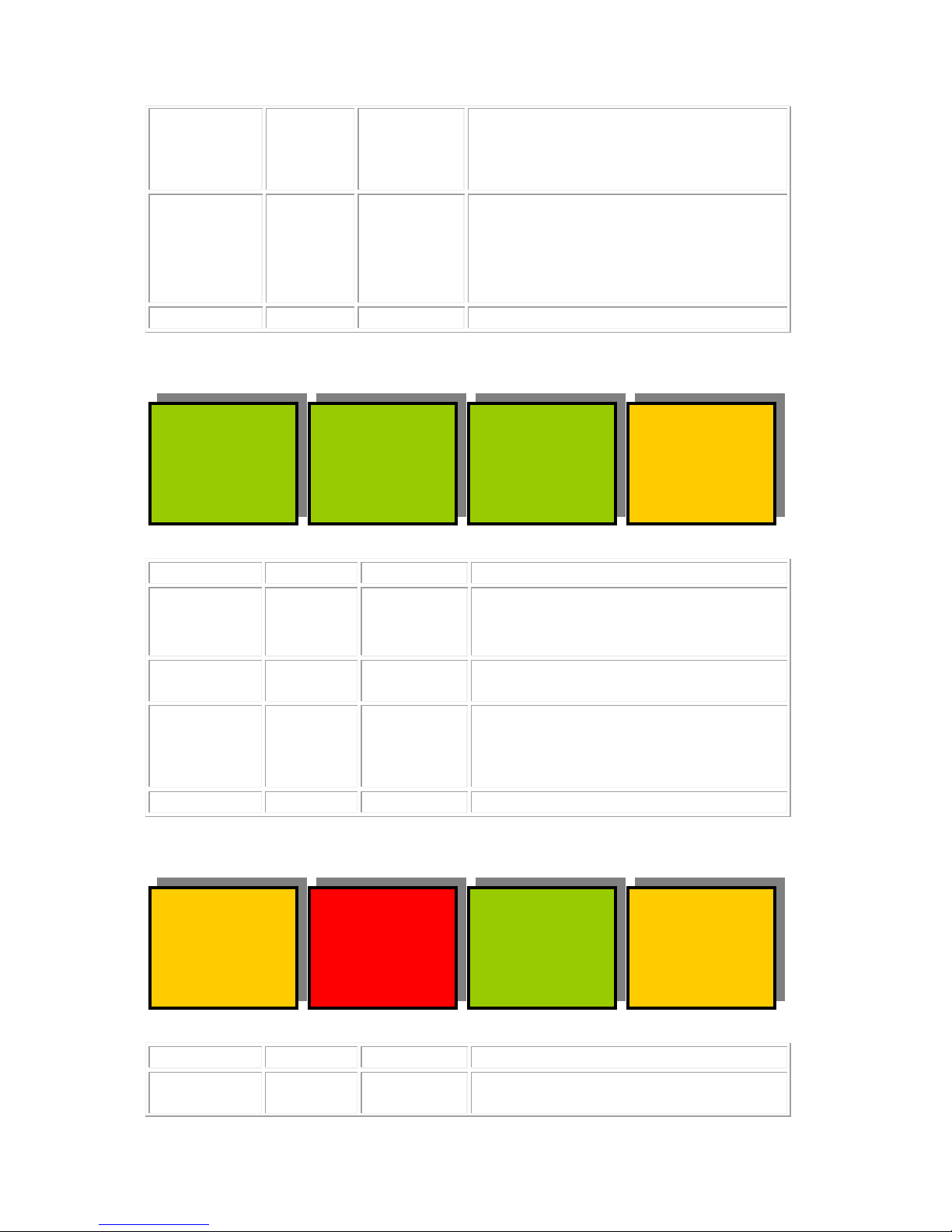
Menus 08-11 VIDEO Transition Set-up Menus (NEXT for more)
TIMES
Tr=25F
Hd=25F
BACK
TRANS:
WIPE
Menu Num.
Heading
Automation
Function
08
TRANS
0=Mix
1=Wipe
2=Cut
3=Cut-Cut
4=Cut-Fade
5=Fade-Cut
6=Fade-Fade
This sets the transition type between
Mix, Wipe and Cut and “U” and “V”
fade types. “U” and “V” fades
Transition to either “Black” or “Matte”
and then “Hold” for a period before
then transitioning to the Preset
Source.
09
TIME
Menu Level “A”
1-200
Menu Level “B”
1-200
Press this button and the two digipots
indicated by the lit LED’s will change
- 11 -
eyeheight
Unit 34 Park House Watford Business Park Greenhill Crescent Watford Herts GB WD18 8PH
Reg. No. 2855535 Telephone: +44 (0) 1923 256 000 Fax: +44 (0) 1923 256 100 email: [email protected]
Page 12
the transition time (in fields - Tr) and
the Hold time (in fields – Hd). The
Hold time is the time that the “U” and
“V” fades stay on Black (Or Matte).
10
WIPE
(Pattern)
0=Vertical
1=Horiz
2=Vert Curtain
3=Horiz Curtain
4=Diagonal
5=Diamond
6=Arrow Left
7=Arrow Up
This shows a representation of the
shape of the currently selected Wipe
Transition.
11
BACK
none
Go To the Top Level Menus
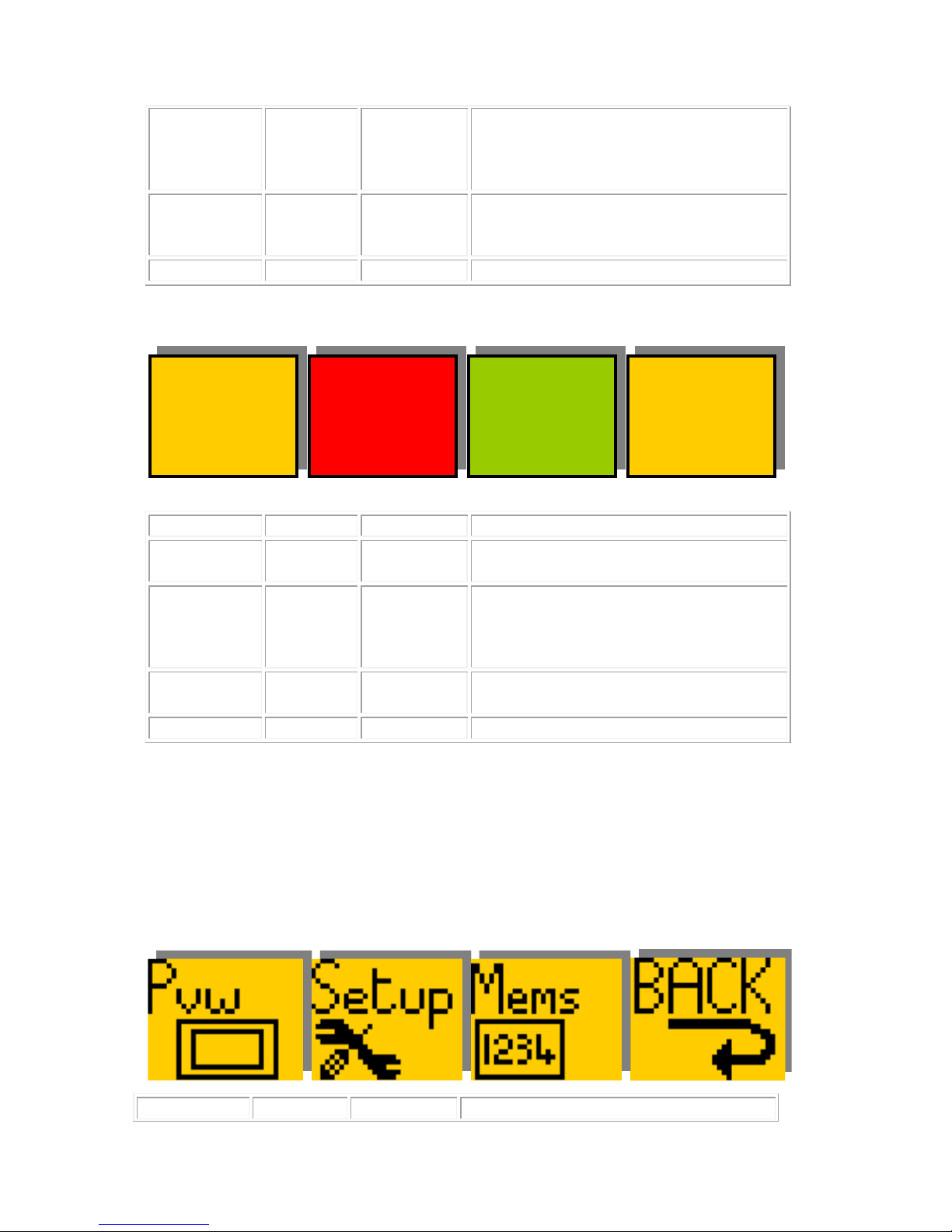
Menus 12-15 VIDEO Transition Set-up Menus (NEXT/PREV to navigate)
BORDER
SIZE
=10
COLOUR
DEPTH
=50%
BACK
BORDER
=SOFT
Menu Num.
Heading
Automation
Function
12
BORDER
0=Off
1=Soft
2=Colour
3=Soft&Col
This selects the Type of Border on the
Wipe edge between; No Border, Soft,
Coloured and Soft and coloured.
13
BORDER
SIZE
1-49
This sets up the Wipe Border Size
between “1” (min) and “49”, (max)
14
COLOUR
DEPTH
0-511
This represents the amount of colour
in the border when the “Soft and
coloured” border option is selected.
(0-100%)
15
BACK
none
Go To the Top Level Menus
Menus 16-19 VIDEO Transition Set-up Menus (NEXT/PREV to navig ate)
L=50%
H=112d
S=50%
MANUAL
TRAN
=0%
BACK
BORDER
COLOUR
--->
Menu Num.
Heading
Automation
Function
16
BORDER
COLOUR
NONE
Points to adjacent menu for
information only.
- 12 -
eyeheight
Unit 34 Park House Watford Business Park Greenhill Crescent Watford Herts GB WD18 8PH
Reg. No. 2855535 Telephone: +44 (0) 1923 256 000 Fax: +44 (0) 1923 256 100 email: [email protected]
Page 13
17
L=
H=
S=
Menu Level “A”
0-255 (L)
Menu Level “B”
0-255 (H)
Menu Level “C”
0-255 (S)
Press this button and the three
digipots indicated by the lit LED’s will
change the Luma, Hue and Saturation
of the border colour.
18
MANUAL
TRAN
0-799
This will manually move the Transition
point between PGM and PST.
(0-100%)
19
BACK
none
Go To the Top Level Menus
Menus 20-23 VIDEO Transition Set-up Menus (PREV for less)
L=50%
H=112d
S=50%
HOLD
TO
Black
BACK
MATTE
COLOUR
--->
Menu Num.
Heading
Automation
Function
20
MATTE
COLOUR
none
Points to adjacent menu for
information only.
21
L=
H=
S=
Menu Level “A”
0-255 (L)
Menu Level “B”
0-255 (H)
Menu Level “C”
0-255 (S)
Press this button and the three
digipots indicated by the lit LED’s will
change the Luma, Hue and Saturation
of the Matte colour.
22
Hold To
0=Black
1=Matte
This is the “Intermediate” source for
the “U” and “V” Fades
23
BACK
none
Go To the Top Level Menus
Menus 24-35 Hidden AUDIO Set-up Menus for automation only.
Menus 36-39 Utility Menus Nested Menus
Menu Num.
Heading
Automation
Function
- 13 -
eyeheight
Unit 34 Park House Watford Business Park Greenhill Crescent Watford Herts GB WD18 8PH
Reg. No. 2855535 Telephone: +44 (0) 1923 256 000 Fax: +44 (0) 1923 256 100 email: [email protected]
Page 14
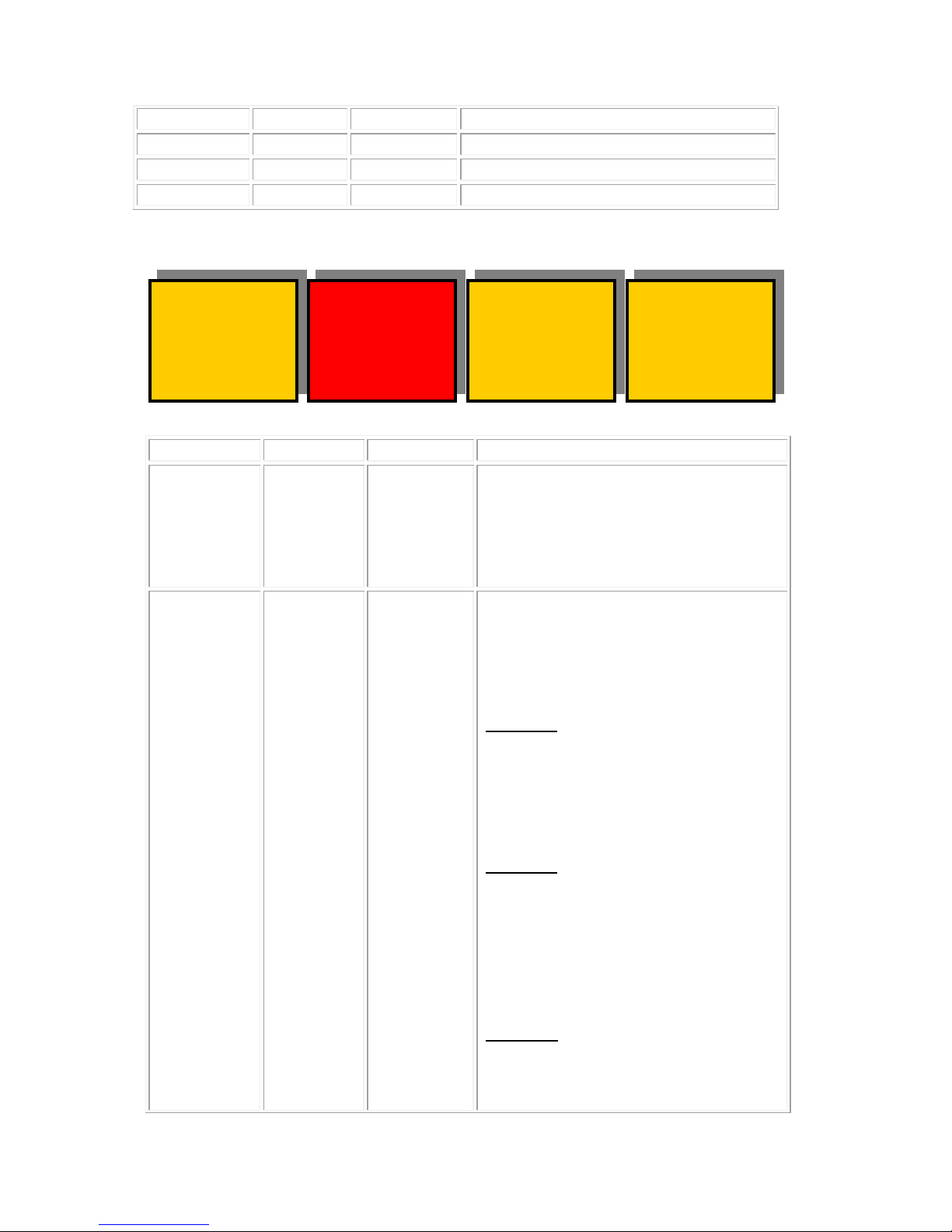
36
Preview
none
Go To preview output menus (40-43)
37
Set-up
none
Go To system set-up menus (44-47)
38
Memories
none
Go To memory menus (48-51)
39
Back
none
Go To the main Utility menus (0-3)
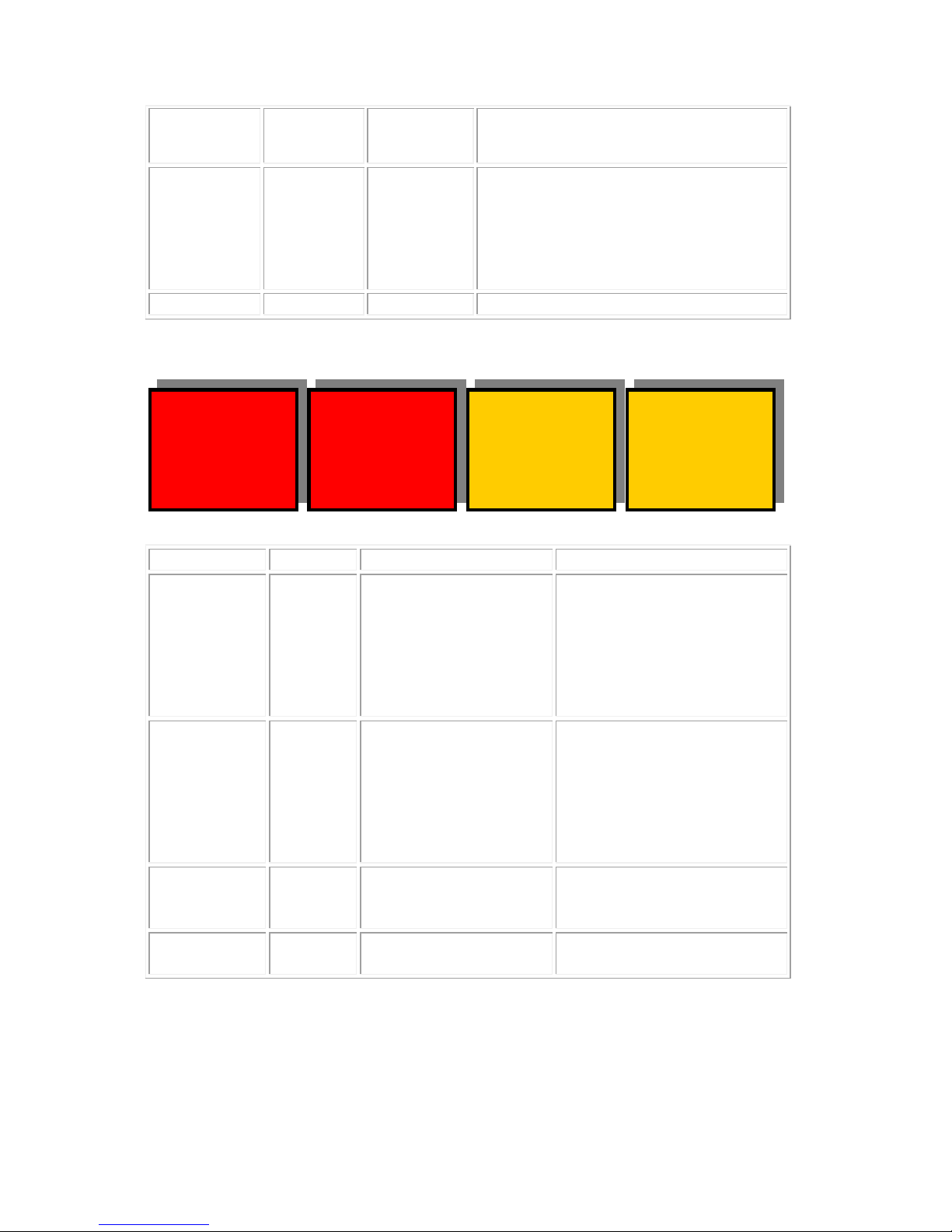
Menus 40-43 Utility M enus: Safe Area Gen
<-SACT
<-16:9
<-Thin
16s
BACK
SAFE
ACTION
ON
Menu Num.
Heading
Automation
Function
40
SAFE
ACTION
None
This Switches on and off the curr entl y
selected area. Pressing the "Red"
switch next to this one and adjusting
the rotary digipots with the lighted
green LED's chooses the Selected
area.
41
None
Menu
Level “A”
0=S.Action
1=S.Capt.
2=DigEdge
3=An Edge
Menu
Level “B”
0=4:3
1=16:9
2=16p4:3
3=16p149
4=43p16:9
Menu Level “C”
0=Thin
1=Thick
When this button is pressed to
"Green". The Three-line display in the
window indicates the three options,
which can be changed by adjusting
the three rotary digipots A, B and C.
Digipot A
Determines the basic Function
Selects "Safe Action" option
Selects "Safe Caption" option
Selects "Digital Edge" opti o n
Selects the "An. Edge" option
Digipot B
Determines the Screen Format
Standard 4:3 Screen
Standard 16:9 Screen
16:9 Shoot to protect 4:3
16:9 Shoot to protect 14:9 (*)
4:3 Shoot to protect 16:9 (*)
(*) -- Not available in 525
Digipot C
Determines the Style of Indicate
Thin White lines are used
Thick White lines are used
- 14 -
eyeheight
Unit 34 Park House Watford Business Park Greenhill Crescent Watford Herts GB WD18 8PH
Reg. No. 2855535 Telephone: +44 (0) 1923 256 000 Fax: +44 (0) 1923 256 100 email: [email protected]
Page 15
2=Shade
3=Black
Shade is used for "danger area"
Black is used for "danger area"
42
<Number>
This is a Timecode seconds count for
timecode trigger ed automa ti on. This
records the “seconds” on the VITC on
the reference input. This is only
relevant in a Playout Compact
system.
43
BACK
none
Go To the Top Level Menus
Menus 44-47 Utility Menus: Timing, EDH and S/W version
Chan A
Box=1
Tal=11
More
BACK
Timing
=864Px
=0 Ln
Menu Num.
Heading
Automation
Function
44
Timing
Menu Level “A”
0-1439
Menu Level “B”
0-624
Press this button and the
two digipots indic ate d by
the respective LED’s will
cause modification to the
Pixel Timing (37nS per
step) and Line Timing
(64uS per step)
45
These are
always
remembered
on power
up.
External
Tally
Set-Up
Not Usable
This unit can activate an
external Tally on the FB-9E
etherbox. The meaning of
this set-up is explained in
the section 3.4
“Configuring tallies on the
etherbox.”
46
More
none
Takes you to the Resets
and Software upgrade
menus. Go to menu 136
47
BACK
none
Go To the Top Level
Menus
- 15 -
eyeheight
Unit 34 Park House Watford Business Park Greenhill Crescent Watford Herts GB WD18 8PH
Reg. No. 2855535 Telephone: +44 (0) 1923 256 000 Fax: +44 (0) 1923 256 100 email: [email protected]
Page 16
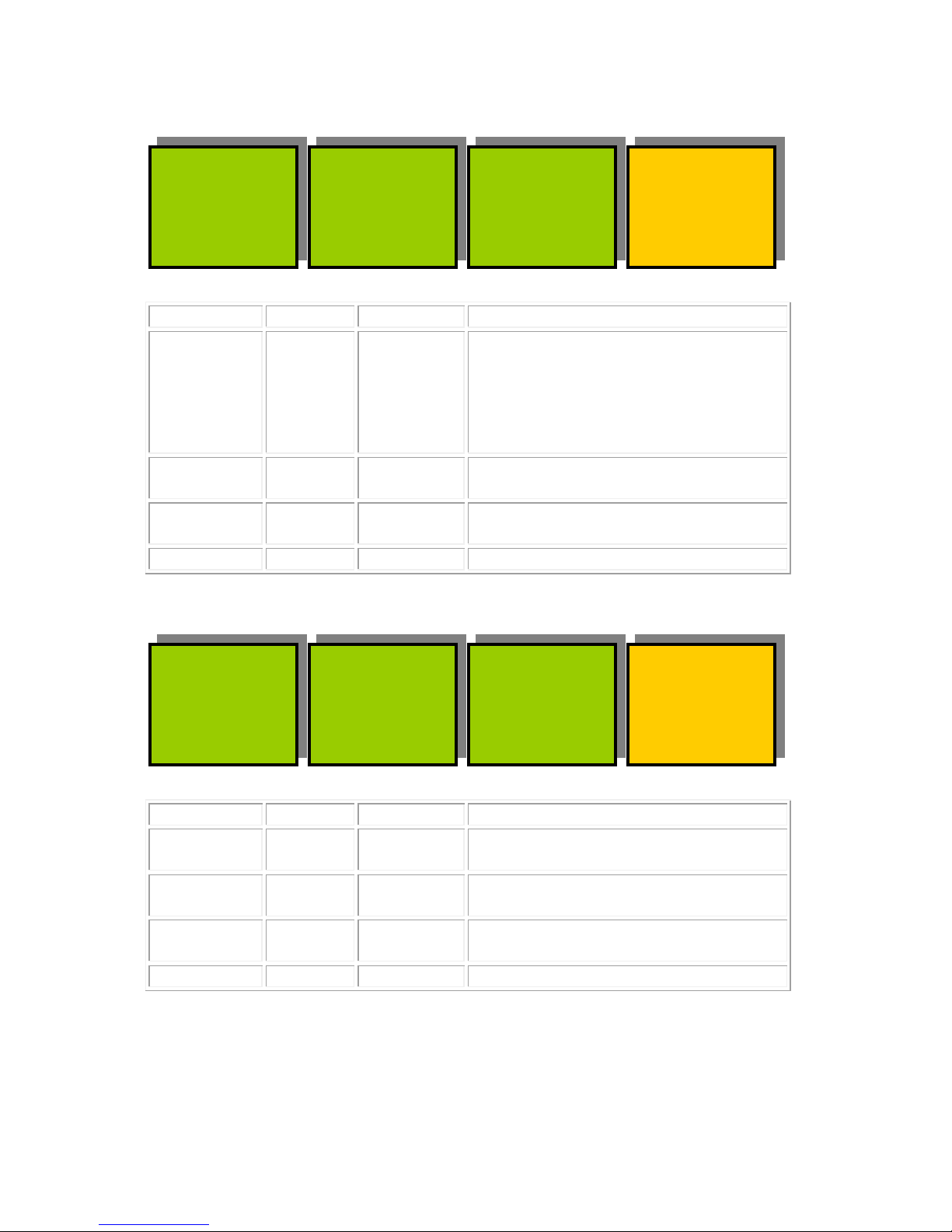
Menus 48-51 Utility Menus: Memories (NEXT for more)
MEM2
------
------
MEM3
------
------
BACK
MEM1
------
------
Menu Num.
Heading
Automation
Function
48
MEM1
1=Recall
Pressing this will recall Memory
number 1.User Names can be
programmed in to the memories us i ng
a keyboard. See “geNETics User
guide”, section “Giving product
Memories names”
49
MEM2
1=Recall
Pressing this will recall Memory
number 2.
50
MEM3
1=Recall
Pressing this will recall Memory
number 3.
51
BACK
none
Go To the Top Level Menus
Menus 52-55 Utility Menus: Memories (NEXT/PREV to navigate)
MEM5
------
------
MEM6
------
------
BACK
MEM4
------
------
Menu Num.
Heading
Automation
Function
52
MEM4
1=Recall
Pressing this will recall Memory
number 4.
53
MEM5
1=Recall
Pressing this will recall Memory
number 5.
54
MEM6
1=Recall
Pressing this will recall Memory
number 6.
55
BACK
none
Go To the Top Level Menus
- 16 -
eyeheight
Unit 34 Park House Watford Business Park Greenhill Crescent Watford Herts GB WD18 8PH
Reg. No. 2855535 Telephone: +44 (0) 1923 256 000 Fax: +44 (0) 1923 256 100 email: [email protected]
Page 17
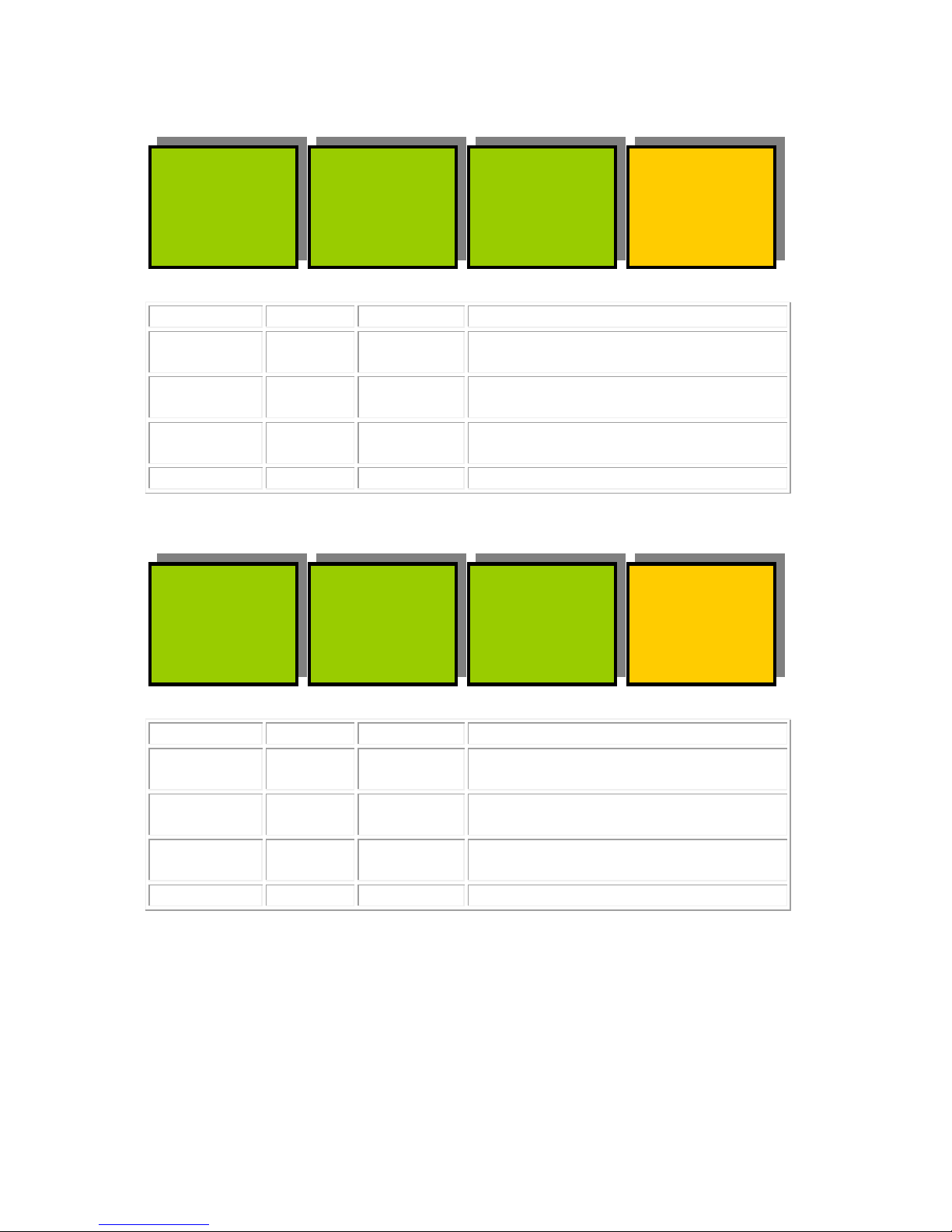
Menus 56-59 Utility M enus: Memories (NEXT/PREV to navigate)
SAVE
MEM2
------
SAVE
MEM3
------
BACK
SAVE
MEM1
------
Menu Num.
Heading
Automation
Function
56
SAVE
MEM1
1=Save
Pressing this will Save Memory
number 1.
57
SAVE
MEM2
1= Save
Pressing this will Save Memory
number 2.
58
SAVE
MEM3
1= Save
Pressing this will Save Memory
number 3.
59
BACK
none
Go To the Top Level Menus
Menus 60-63 Utility M enus: Memories (NEXT/PREV to navigate)
SAVE
MEM5
------
SAVE
MEM6
------
BACK
SAVE
MEM4
------
Menu Num.
Heading
Automation
Function
60
SAVE
MEM4
1= Save
Pressing this will Save Memory
number 4.
61
SAVE
MEM5
1= Save
Pressing this will Save Memory
number 5.
62
SAVE
MEM6
1= Save
Pressing this will Save Memory
number 6.
63
BACK
none
Go To the Top Level Menus
Menus 64-107 Hidden Menu’s.
Menus 108-127 AUDIO Set-up Menus (PREV for less)
- 17 -
eyeheight
Unit 34 Park House Watford Business Park Greenhill Crescent Watford Herts GB WD18 8PH
Reg. No. 2855535 Telephone: +44 (0) 1923 256 000 Fax: +44 (0) 1923 256 100 email: [email protected]
Page 18
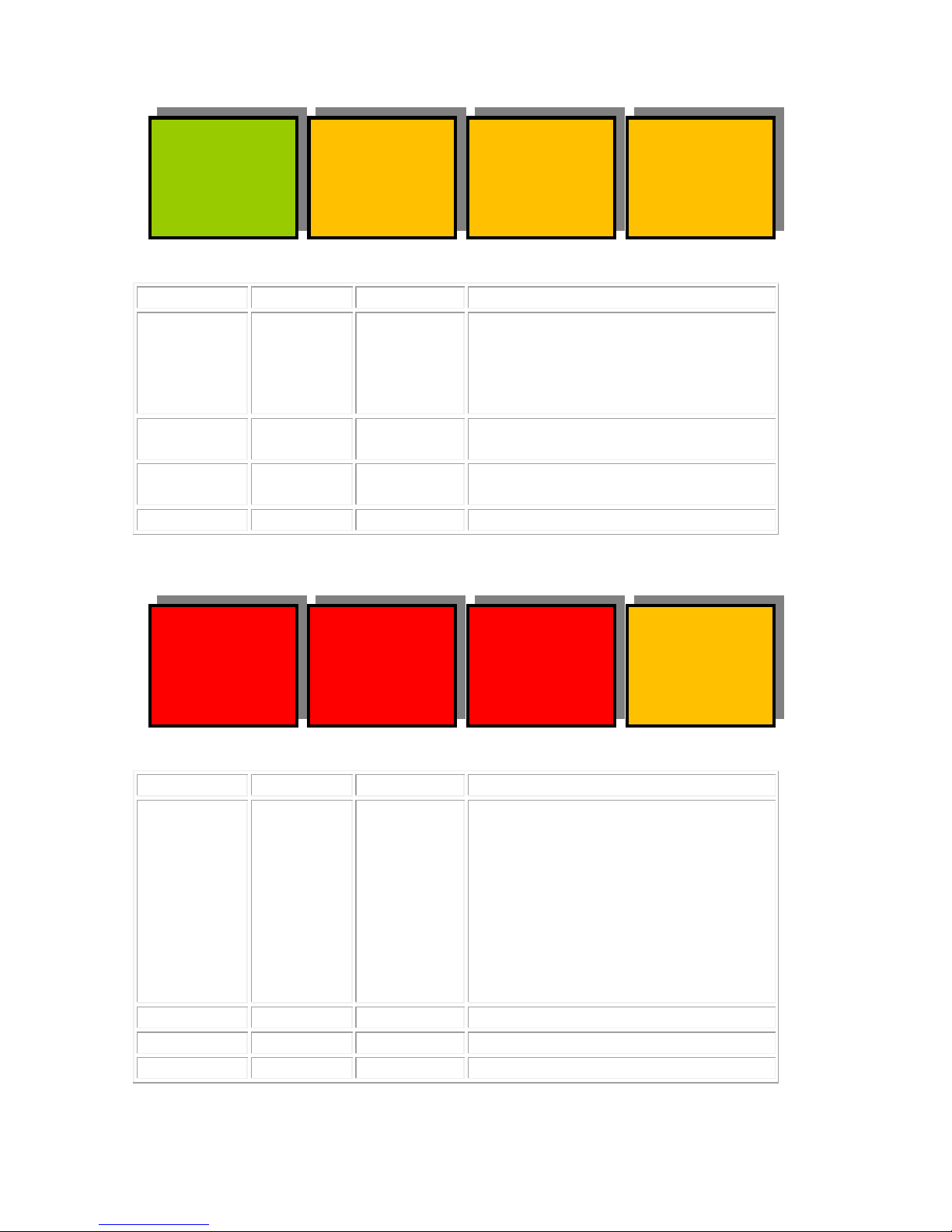
CHANEL
Set-
Up
IP
Mode
BACK
CHANEL
GAIN
=0dB
ABCh34
A-Ster
B-Ster
ABCh56
A-Ster
B-Ster
BACK
ABCh12
A-Ster
B-Ster
Menu Num.
Heading
Automation
Function
108
CHANNEL
GAIN
0=-12dB
1=-6dB
2=0dB
3=+6dB
4=+12dB
5=+18dB
This sets the overall gain on the
Embedded Audio.This applies only
for the MW-2E Module, which
incorporates embedded audio
mixing.
109
Channel
Set-Up
Go to menu 124 to set up Audio
Transition mode, mix, cut.
110
Input
Mode
Go to menu 112 to set up Audio
input config, stereo, mono etc
111
BACK
none
Go To the Top Level Menus
Menu Num.
Heading
Automation
Function
112
ABch12
0=Stereo
1=L<>R
2=LLR
3=RLR
4=Mono
Press this button and the two
digipots indicated by the respective
LED’s will cause modification to the
A and B embedded audio Ch 1 and 2
as follows:
Stereo (No change)
Left and Right Swapped
Left to both Left and Right
Right to both Left and Right
Mono
113
ABch34
As above
As above but for Cha n 3/ 4
114
ABch56
As above
As above but for Chan 5/6
115
BACK
none
Go To menu 108
- 18 -
eyeheight
Unit 34 Park House Watford Business Park Greenhill Crescent Watford Herts GB WD18 8PH
Reg. No. 2855535 Telephone: +44 (0) 1923 256 000 Fax: +44 (0) 1923 256 100 email: [email protected]
Page 19
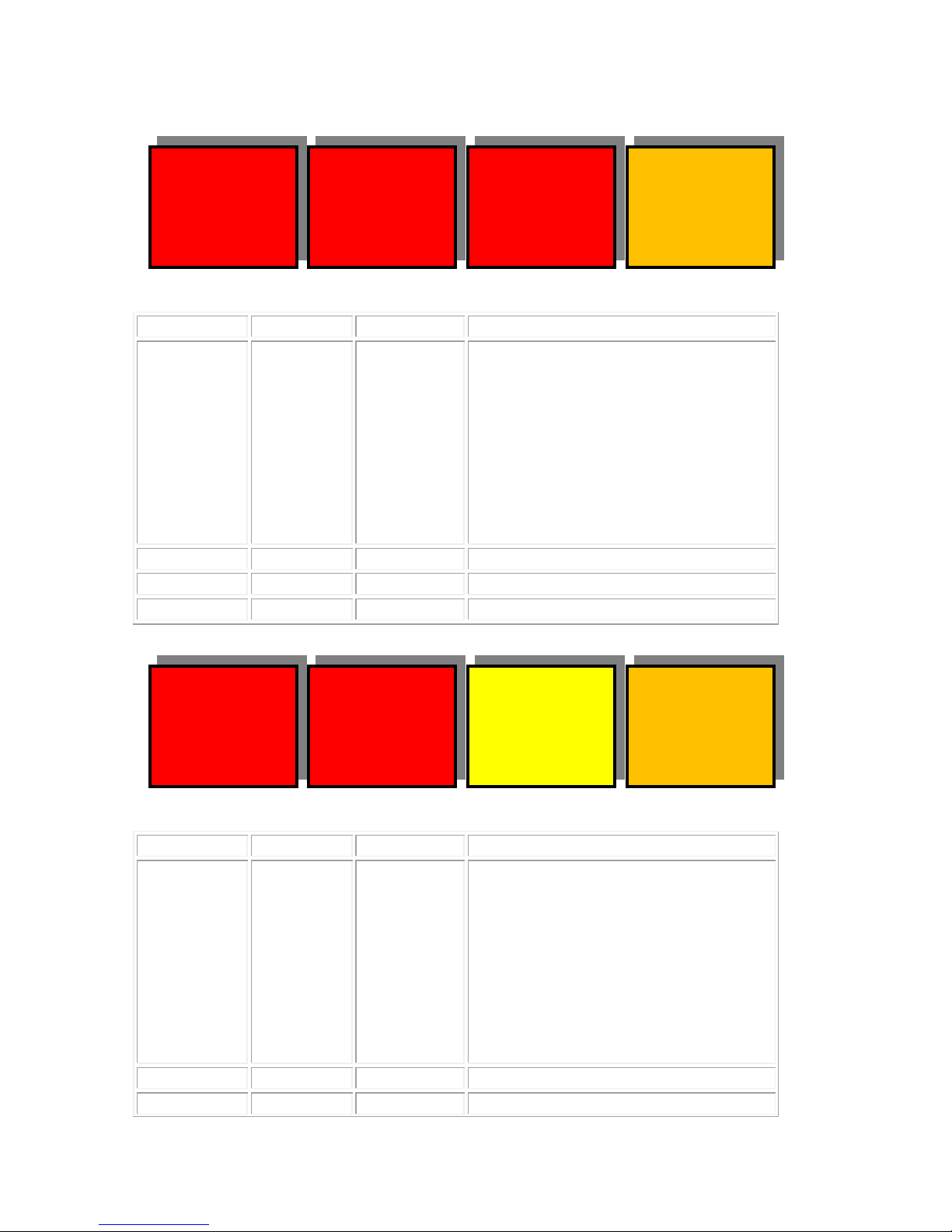
Ch9-10
A-Ster
B-Ster
C11-12
A-
Ster
B-Ster
BACK
ABCh78
A-Ster
B-Ster
C15-16
A-Ster
B-Ster
BACK
C13-14
A-Ster
B-Ster
Menu Num.
Heading
Automation
Function
116
ABch78
0=Stereo
1=L<>R
2=LLR
3=RLR
4=Mono
Press this button and the two
digipots indicated by the respective
LED’s will cause modification to the
A and B embedded audio Ch 7 and 8
as follows:
Stereo (No change)
Left and Right Swapped
Left to both Left and Right
Right to both Left and Right
Mono
117
Ch9-10
As above
As above but for Chan 9/10
118
C11-12
As above
As above but for Chan 11/12
119
BACK
none
Go To menu 108
Menu Num.
Heading
Automation
Function
120
C13-14
0=Stereo
1=L<>R
2=LLR
3=RLR
4=Mono
Press this button and the two
digipots indicated by the respective
LED’s will cause modification to the
A and B embedded audio Ch 13 and
14 as follows:
Stereo (No change)
Left and Right Swapped
Left to both Left and Right
Right to both Left and Right
Mono
121
Ch15-16
As above
As above but for Chan 15/16
122
- 19 -
eyeheight
Unit 34 Park House Watford Business Park Greenhill Crescent Watford Herts GB WD18 8PH
Reg. No. 2855535 Telephone: +44 (0) 1923 256 000 Fax: +44 (0) 1923 256 100 email: [email protected]
Page 20
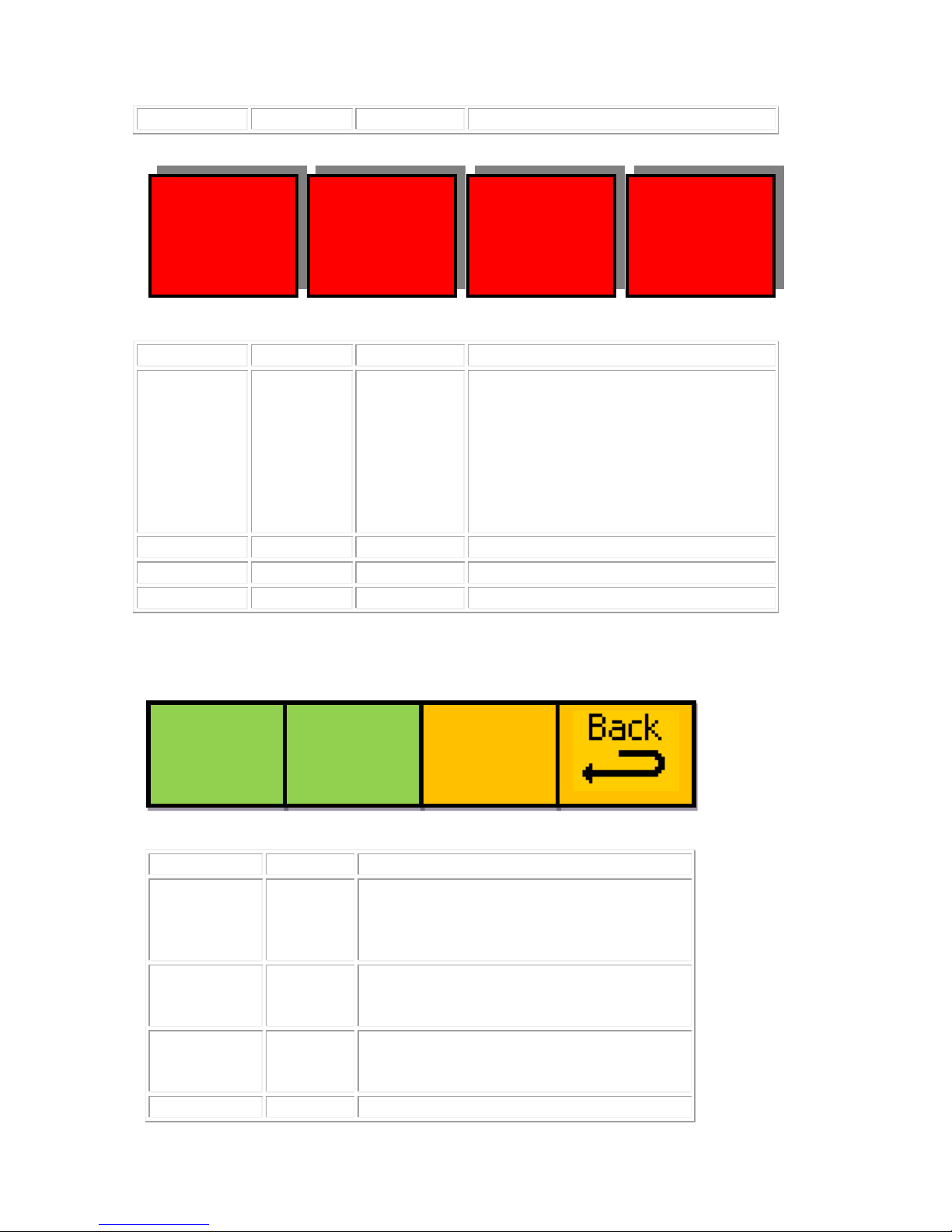
Ch3--4
=Mix
=Mix
Ch5--6
=Mix
=Mix
Ch7--8
=Mix
=Mix
Ch1--2
=Mix
=Mix
Menus 128-147 Resets and Software Upgrade.
Menu Num.
Heading
Function
128
Set as
Power
on
Memory
Pressing this will set the current settings
as the default settings when the unit is
powered up.
129
Reboot
this unit
This applies a warm restart to the unit. It
is the software equivalent of recycling
the power.
130
Factory
Reset
Pressing this will take you to the Factory
Reset Last Chance menu. (Go To Menu
44).
131
BACK
Go To the Top menu
123
BACK
none
Go To menu 108
Menu Num.
Heading
Automation
Function
124
Ch1--2
0=Mix
1=Cut
Press this button and the two
digipots indicated by the respective
LED’s will cause modification to the
Chan1 and 2 Transitions:
Mix Normal Audio with Video Mix
Cut Audio cuts in the middle of the
video transition. This is useful for
splicing DolbyE streams.
125
Ch3--4
As above
As above but for Chan 3/4
126
Ch5--6
As above
As above but for Chan 5/6
127
Ch7--8
As above
As above but for Chan 7/8
Set AS
Pow On
Memory
ReBoot
This
Unit
FACTRY
RESET!
!!!!!!
- 20 -
eyeheight
Unit 34 Park House Watford Business Park Greenhill Crescent Watford Herts GB WD18 8PH
Reg. No. 2855535 Telephone: +44 (0) 1923 256 000 Fax: +44 (0) 1923 256 100 email: [email protected]
Page 21
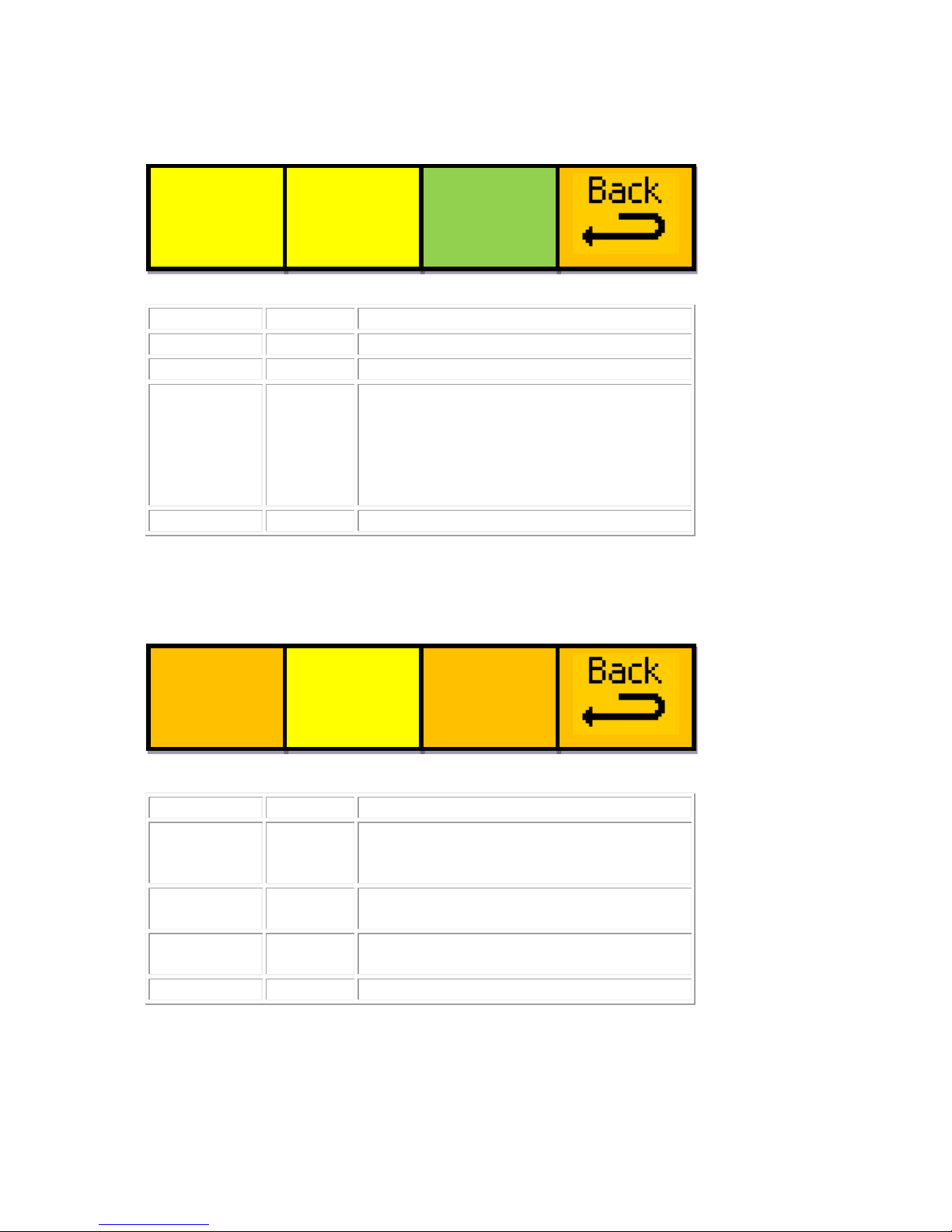
Menu Num.
Heading
Function
132
----
----
133
----
----
134
YES, I
want to
do a
factory
reset!
This will Start a factory Reset of the unit.
This will Wipe ALL Logos and Settings
that may have been previously set-up.
Only do this if you are setting up from
scratch, or there is a problem with your
unit.
135
BACK
Go To the Top Menus
Menu Num.
Heading
Function
136
Upgrade
Software
Pressing this will take you to the
Software Upgrade last chance menu.
(Go To Menu 140).
137
Software
Version
This window displays the software
version.
138
Resets
Pressing this will take you to the Reset
Options. (Go To Menu 128).
139
BACK
Go To the Utilities Menus
UPGRDE
SOFTWR
NOW!
MW-2
Ver1.0
RESETS
START?
ARE->
YOU->
SURE->
YES
- 21 -
eyeheight
Unit 34 Park House Watford Business Park Greenhill Crescent Watford Herts GB WD18 8PH
Reg. No. 2855535 Telephone: +44 (0) 1923 256 000 Fax: +44 (0) 1923 256 100 email: [email protected]
Page 22
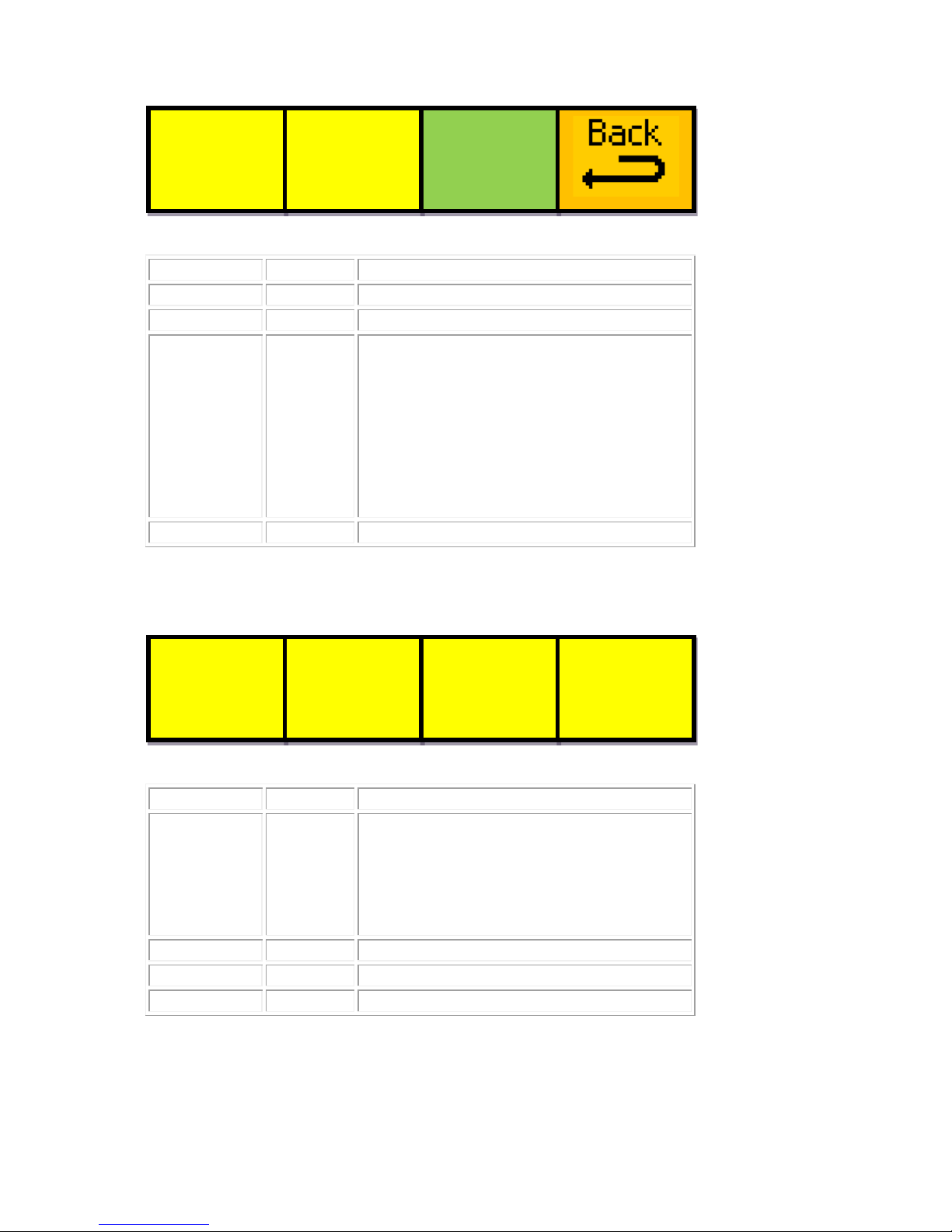
Menu Num.
Heading
Function
140
----
----
141
----
----
142
YES, I
want to
start a
software
upgrade
This will Start a software upgrade of the
unit. You will need to follow the
instructions in the etherbox (FB-9E)
manual to correctly perform this
procedure. This will Wipe ALL Logos
and Settings that may have been
previously set-up. The unit MUST be
installed in an FB-9E t o perf or m an
upgrade.
143
BACK
Go To the Top Menus
Menu Num.
Heading
Function
144
----
This is a system message. If you
accidentally press “Software Upgrade”
then this message appears. If you have
done this accidentally, simply WAIT 3
minutes and the system will return back
to normal.
145
----
----
146
----
----
147
----
----
MW-2
FILE
TIMES
IS UPG
IS REC
OUT IN
RADING
IEVED
3 MINS
IF NO
IT
START?
ARE->
YOU->
SURE->
YES
- 22 -
eyeheight
Unit 34 Park House Watford Business Park Greenhill Crescent Watford Herts GB WD18 8PH
Reg. No. 2855535 Telephone: +44 (0) 1923 256 000 Fax: +44 (0) 1923 256 100 email: [email protected]
Page 23

4 Technical Appendix
4.1 geNETics Automation Protocol Parameter table.
This is the Automaticlly extracted parameters for the MW-2E. This is used for the
generic geNETics automation protocol. See etherbox manual for a full description
of its usage.
M
Acc
Text
Low
Up L
Text1
Text2
Text3
Text4
Text5
Text6 Tx7
Tx8 0 N/A
[Gr]
N/A
N/A A 1 N/A
[Gr]
N/A
N/A A 2 N/A
[Gr]
N/A
N/A A 3 N/A
[Gr]
N/A
N/A A 4 R/W
{# } 0 2 A
TAKE
TAKE
TAKE 4 R
{# } 0 4 B
VidAud
V.Only
A.Only
Asplit
[TRAN] 5 R/W
{# } 0 3 A
PROG
PROG
PROG
PROG 6 R/W
{# } 0 3 A
PRSET
PRSET
PRSET
PRSET 7 N/A
[Gr]
N/A
N/A A 8 R/W
{# } 0 6 A
[Gr]
[Gr]
[Gr]
[Gr]
[Gr]
[Gr] [Gr] 9 R/W
{TIMES:}{Tr=# }
3
253 A 9 R/W
{Hd=# }
0
993 B
10
R/W
{# } 0 7 A
[Gr]
[Gr]
[Gr]
[Gr]
[Gr]
[Gr] [Gr]
[Gr]
11
N/A
[Gr]
N/A
N/A A
12
R/W
{BORDER}{# }
0
3 A
=OFF
SOFT
COL
SFCOL
13
R/W
{ Bord }{ Size }{ =# }
1
49 A
14
R/W
{Colour}{Depth:}{=# % }
0
511 A
15
N/A
[Gr]
N/A
N/A A
16
N/A
{Border}{Color]}{-----]}
N/A
N/A A
17
R/W
{L=# %}
0
255 A
17
R/W
{H=# d}
0
255 B
17
R/W
{S=# %}
0
255 C
18
R/W
{Manual}{ Tran }{=# %}
0
799 A
19
N/A
[Gr]
N/A
N/A A
20
N/A
{Matte]}{Color]}{-----]}
N/A
N/A A
21
R/W
{L=# %}
0
255 A
21
R/W
{H=# d}
0
255 B
21
R/W
{S=# %}
0
255 C
22
R/W
{Hold }{To: }{# }
0
1 A
Black
Matte
23
N/A
[Gr]
N/A
N/A A
24 R {Aud In}{# }
0
2 A
Lead
Lag
LL Off
24
R/W
{# Fds}
64537
999 B
25 R {AudOut}{# }
0
2 A
Lead
Lag
LL Off
25
R/W
{# Fds}
64537
999 B
26
R/W
{F.Rate}{In=# F}
0
250 A
26
R/W
{Ou=# F}
0
250 B
27
N/A
[Gr]
N/A
N/A A
28
R/W
{Audio:}{# }
0
1 A
Follow
Sep
29
R/W
{Chanel}{Gain= }{# }
0
5 A
-12dB
-6dB
0dB
+6dB
+12dB
+18dB
- 23 -
eyeheight
Unit 34 Park House Watford Business Park Greenhill Crescent Watford Herts GB WD18 8PH
Reg. No. 2855535 Telephone: +44 (0) 1923 256 000 Fax: +44 (0) 1923 256 100 email: [email protected]
Page 24

30
R/W
{ABmode}{# }
0
4 A
STER
LRswp
L ] LR
R ] LR
MONO
30
R/W
{# } 0 4 B
STER
LRswp
L ] LR
R ] LR
MONO
31
N/A
[Gr]
N/A
N/A A
32
R/W
{ATAKE:}{# }
0
1 A
A-AUD
[TRAN]
32
R/W
{# } 0 1 B
B-AUD
[TRAN]
33
R/W
{Levels}{A=# %}
0
1023 A
33
R/W
{B=# %}
0
1023 B
34
R/W
{T-Time}{A=# F}
1
200 A
34
R/W
{B=# F}
1
200 B
35
N/A
[Gr]
N/A
N/A A
36
N/A
[Gr]
N/A
N/A A
37
N/A
[Gr]
N/A
N/A A
38
N/A
[Gr]
N/A
N/A A
39
N/A
[Gr]
N/A
N/A A
40 R {# } 0 3 A
SAFE
SAFE
DIG
ANALG
40 R {# } 0 3 B
ACTN
CAPT
EDGE
EDGE
40
R/W
{# } 0 1 C
OFF
ON
41
R/W
{# } 0 3 A
[S.Act
[S.Cap
[D.Edg
[A.Edg
41
R/W
{# } 0 4 B
[4:3
[16:9
16p4:3
16p149
43p149
41
R/W
{# } 0 3 C
[Thin
[Thick
[Shade
[Black
42 R {# s } 1 59 A
43
N/A
[Gr]
N/A
N/A A
44
R/W
{Timing}{# Px}
0
1728 A
44
R/W
{# Ln}
0
627 B
45
R/W
{PGM: }{# }
0
1 A
EDHoff
EDH
On
46
N/A
[Gr]
N/A
N/A A
47
N/A
[Gr]
N/A
N/A A
48
R/W
{% ] }{Mem 1 }{# }
0
1 A
Recall
DONE
49
R/W
{% ] }{Mem 2 }{# }
0
1 A
Recall
DONE
50
R/W
{% ] }{Mem 3 }{# }
0
1 A
Recall
DONE
51
N/A
[Gr]
N/A
N/A A
52
R/W
{% ] }{Mem 4 }{# }
0
1 A
Recall
DONE
53
R/W
{% ] }{Mem 5 }{# }
0
1 A
Recall
DONE
54
R/W
{% ] }{Mem 6 }{# }
0
1 A
Recall
DONE
55
N/A
[Gr]
N/A
N/A A
56
R/W
{% ] }{Mem 1 }{# }
0
1 A
Save
DONE
57
R/W
{% ] }{Mem 2 }{# }
0
1 A
Save
DONE
58
R/W
{% ] }{Mem 3 }{# }
0
1 A
Save
DONE
59
N/A
[Gr]
N/A
N/A A
60
R/W
{% ] }{Mem 4 }{# }
0
1 A
Save
DONE
61
R/W
{% ] }{Mem 5 }{# }
0
1 A
Save
DONE
62
R/W
{% ] }{Mem 6 }{# }
0
1 A
Save
DONE
63
N/A
[Gr]
N/A
N/A A
64
N/A
[Gr]
N/A
N/A A
65
N/A
[Gr]
N/A
N/A A
66
N/A
[Gr]
N/A
N/A A
67
N/A
[Gr]
N/A
N/A A
68
R/W
{# } 0 6 A
[Gr]
[Gr]
[Gr]
[Gr]
[Gr]
[Gr] [Gr]
69
R/W
{# } 0 3 A
[Gr]
[Gr]
[Gr]
[Gr]
70
N/A
[Gr]
N/A
N/A A
- 24 -
eyeheight
Unit 34 Park House Watford Business Park Greenhill Crescent Watford Herts GB WD18 8PH
Reg. No. 2855535 Telephone: +44 (0) 1923 256 000 Fax: +44 (0) 1923 256 100 email: [email protected]
Page 25

71
N/A
[Gr]
N/A
N/A A
72
R/W
{HoldTo}{# }
0
1 A
Black
Matte
72
R/W
{For# F}
0
993 B
73
R/W
{L=# %}
0
255 A
73
R/W
{H=# d}
0
255 B
73
R/W
{S=# %}
0
255 C
74
R/W
{ User }{TrTime}{=# fr}
3
253 A
75
N/A
[Gr]
N/A
N/A A
76
R/W
{# } 0 7 A
[Gr]
[Gr]
[Gr]
[Gr]
[Gr]
[Gr] [Gr]
[Gr]
77
R/W
{# } 0 3 A
NoBord
Bordr1
Bordr2
Bordr3
77
R/W
{Sz=# } 1 49 B
77
R/W
{Dp=# %}
0
511 C
78
R/W
{L=# %}
0
255 A
78
R/W
{H=# d}
0
255 B
78
R/W
{S=# %}
0
255 C
79
N/A
[Gr]
N/A
N/A A
80
R/W
{# } 0 1 A
AUTO
MAN
81
R/W
{# } 0 1 A
AUTO
MAN
82
N/A
{Manual}{[Audio}{[Oride}
N/A
N/A A
83
N/A
{ BACK }{Aud LL}{ }
N/A
N/A A
84
R/W
{Chanel}{Gain= }{# }
0
5 A
-12dB
-6dB
0dB
+6dB
+12dB
+18dB
85
R/W
{# } 0 4 A
STER
LRswp
L ] LR
R ] LR
MONO
86
R/W
{# } 0 4 A
STER
LRswp
L ] LR
R ] LR
MONO
87
N/A
[Gr]
N/A
N/A A
88
N/A
[Gr]
N/A
N/A A
89
N/A
[Gr]
N/A
N/A A
90
N/A
[Gr]
N/A
N/A A
91
N/A
[Gr]
N/A
N/A A
92
R/W
{# } 0 6 A
[Gr]
[Gr]
[Gr]
[Gr]
[Gr]
[Gr] [Gr]
93
R/W
{# } 0 3 A
[Gr]
[Gr]
[Gr]
[Gr]
94
R/W
{ User }{TrTime}{=# fr}
3
253 A
95
N/A
[Gr]
N/A
N/A A
96
R/W
{HoldTo}{# }
0
1 A
Black
Matte
96
R/W
{For# F}
0
993 B
97
N/A
{Matte]}{Color]}{-----]}
N/A
N/A A
98
R/W
{L=# %}
0
255 A
98
R/W
{H=# d}
0
255 B
98
R/W
{S=# %}
0
255 C
99
N/A
[Gr]
N/A
N/A A
100
R/W
{# } 0 7 A
[Gr]
[Gr]
[Gr]
[Gr]
[Gr]
[Gr] [Gr]
[Gr]
101
R/W
{# } 0 3 A
NoBord
Bordr1
Bordr2
Bordr3
101
R/W
{Sz=# } 1 49 B
101
R/W
{Dp=# %}
0
511 C
102
R/W
{L=# %}
0
255 A
102
R/W
{H=# d}
0
255 B
102
R/W
{S=# %}
0
255 C
103
N/A
[Gr]
N/A
N/A A
104
N/A
{MIX }{ }{ }
N/A
N/A A
105
N/A
{ER }{ }{ }
N/A
N/A A
106
N/A
{TRA }{ }{ }
N/A
N/A A
- 25 -
eyeheight
Unit 34 Park House Watford Business Park Greenhill Crescent Watford Herts GB WD18 8PH
Reg. No. 2855535 Telephone: +44 (0) 1923 256 000 Fax: +44 (0) 1923 256 100 email: [email protected]
Page 26

107
N/A
{NS }{ }{ }
N/A
N/A A
108
R/W
{Chanel}{Gain= }{# }
0
5 A
-12dB
-6dB
0dB
+6dB
+12dB
+18dB
109
N/A
[Gr]
N/A
N/A A
110
N/A
[Gr]
N/A
N/A A
111
N/A
[Gr]
N/A
N/A A
112
R/W
{ABCh12}{# }
0
4 A
A-Ster
A-L[]R
A-L]LR
A-R]LR
A-
MONO
112
R/W
{# } 0 4 B
B-Ster
B-L[]R
B-L]LR
B-R]LR
B-
MONO
113
R/W
{ABCh34}{# }
0
4 A
A-Ster
A-L[]R
A-L]LR
A-R]LR
A-
MONO
113
R/W
{# } 0 4 B
B-Ster
B-L[]R
B-L]LR
B-R]LR
B-
MONO
114
R/W
{ABCh56}{# }
0
4 A
A-Ster
A-L[]R
A-L]LR
A-R]LR
A-
MONO
114
R/W
{# } 0 4 B
B-Ster
B-L[]R
B-L]LR
B-R]LR
B-
MONO
115
N/A
[Gr]
N/A
N/A A
116
R/W
{ABCh78}{# }
0
4 A
A-Ster
A-L[]R
A-L]LR
A-R]LR
A-
MONO
116
R/W
{# } 0 4 B
B-Ster
B-L[]R
B-L]LR
B-R]LR
B-
MONO
117
R/W
{Ch9-10}{# }
0
4 A
A-Ster
A-L[]R
A-L]LR
A-R]LR
A-
MONO
117
R/W
{# } 0 4 B
B-Ster
B-L[]R
B-L]LR
B-R]LR
B-
MONO
118
R/W
{C11-12}{# }
0
4 A
A-Ster
A-L[]R
A-L]LR
A-R]LR
A-
MONO
118
R/W
{# } 0 4 B
B-Ster
B-L[]R
B-L]LR
B-R]LR
B-
MONO
119
N/A
[Gr]
N/A
N/A A
120
R/W
{C13-14}{# }
0
4 A
A-Ster
A-L[]R
A-L]LR
A-R]LR
A-
MONO
120
R/W
{# } 0 4 B
B-Ster
B-L[]R
B-L]LR
B-R]LR
B-
MONO
121
R/W
{C15-16}{# }
0
4 A
A-Ster
A-L[]R
A-L]LR
A-R]LR
A-
MONO
121
R/W
{# } 0 4 B
B-Ster
B-L[]R
B-L]LR
B-R]LR
B-
MONO
122
N/A
{ }{ }{ }
N/A
N/A A
123
N/A
[Gr]
N/A
N/A A
124
R/W
{Ch1--2}{# }
0
1 A
=Mix
=Cut
124
R/W
{# } 0 1 B
=Mix
=Cut
125
R/W
{Ch3--4}{# }
0
1 A
=Mix
=Cut
125
R/W
{# } 0 1 B
=Mix
=Cut
126
R/W
{Ch5--6}{# }
0
1 A
=Mix
=Cut
126
R/W
{# } 0 1 B
=Mix
=Cut
127
R/W
{Ch7--8}{# }
0
1 A
= Mix
=Cut
127
R/W
{# } 0 1 B
=Mix
=Cut
128
R/W
{# } 0 1 A
Set As
!WAIT!
129
R/W
{# } 0 1 A
ReBoot
!WAIT!
130
N/A {FACTRY}{RESET!}{!!!!!!}
N/A
N/A A
131
N/A
[Gr]
N/A
N/A A
132
N/A
{START?}{ }{ }
N/A
N/A A
133
N/A
{ ARE ]}{ YOU
]}{SURE?]}
N/A
N/A A
134
R/W
{# } 0 1 A
YES
OK!
135
N/A
[Gr]
N/A
N/A A
136
N/A
UPGRDE SOFTWR
NOW!
N/A
N/A A
137
R/W
{# } 0 1 A
AonAir
BonAir
137
R/W
{Box=# }
0
16 B
137
R/W
{Tal=# }
0
255 C
138
N/A
{RESETS}{ }{ }
N/A
N/A A
139
N/A
[Gr]
N/A
N/A A
140
N/A
{START?}{ }{ }
N/A
N/A A
141
N/A
{ ARE ]}{ YOU
]}{SURE?]}
N/A
N/A A
142
R/W
{# } 0 1 A
YES
- 26 -
eyeheight
Unit 34 Park House Watford Business Park Greenhill Crescent Watford Herts GB WD18 8PH
Reg. No. 2855535 Telephone: +44 (0) 1923 256 000 Fax: +44 (0) 1923 256 100 email: [email protected]
Page 27
143
N/A
[Gr]
N/A
N/A A
144
N/A
{MW-2E }{FILE }{TIMES
}
N/A
N/A A
145
N/A
{IS UPG}{IS REC}{OUT
IN}
N/A
N/A A
146
N/A
{RADING}{IEVED }{3
MINS}
N/A
N/A A
147
N/A
{IF NO }{IT }{ }
N/A
N/A A
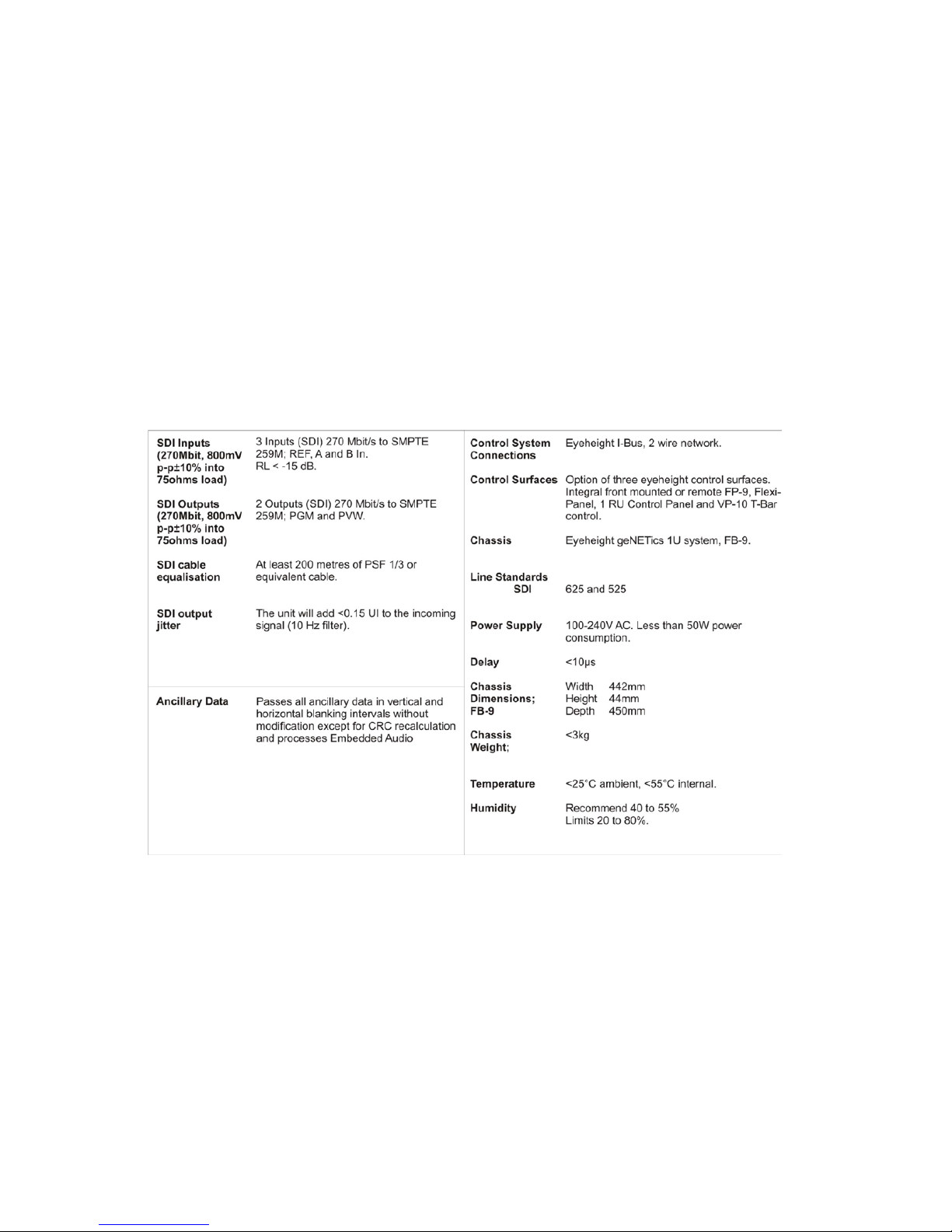
4.2 Technical Specification.
- 27 -
eyeheight
Unit 34 Park House Watford Business Park Greenhill Crescent Watford Herts GB WD18 8PH
Reg. No. 2855535 Telephone: +44 (0) 1923 256 000 Fax: +44 (0) 1923 256 100 email: [email protected]
 Loading...