

Page 1
GREEN SOLUTIONS INC.
®
Eyedro
where electrified areas within the panel are.
DO NOT attempt installation unless you know
should be performed by a qualified electrician.
of shock, burn, and electrocution. Installation
panel may still be dangerous and carry the risk
at eyedro.com
Full warranty policy details are available
manufacturer, during this period.
repaired or replaced, at the discretion of the
workmanship. Defective parts may be
of purchase for all defects in material and
product for a period of one year from date
Eyedro Green Solutions Inc. warrants this
has been turned ‘OFF’ certain areas of the
are still electrified. Even when the main breaker
electrical panel to be removed while some wires
Installation may require the cover of the main
located at eyedro.com/support
and video can be found in the Product Manual
instructions. Complete installation instructions
This insert provides very high level installation
Limited One Year Warranty
Before Getting Started
®
Eyedro
Visit eyedro.com for any questions
or comments. We value your feedback.
GREEN SOLUTIONS INC.
Eyedro
GREEN SOLUTIONS INC.
®
Quick Start Guide
Electricity Monitoring System (EBEM1)
Page 2
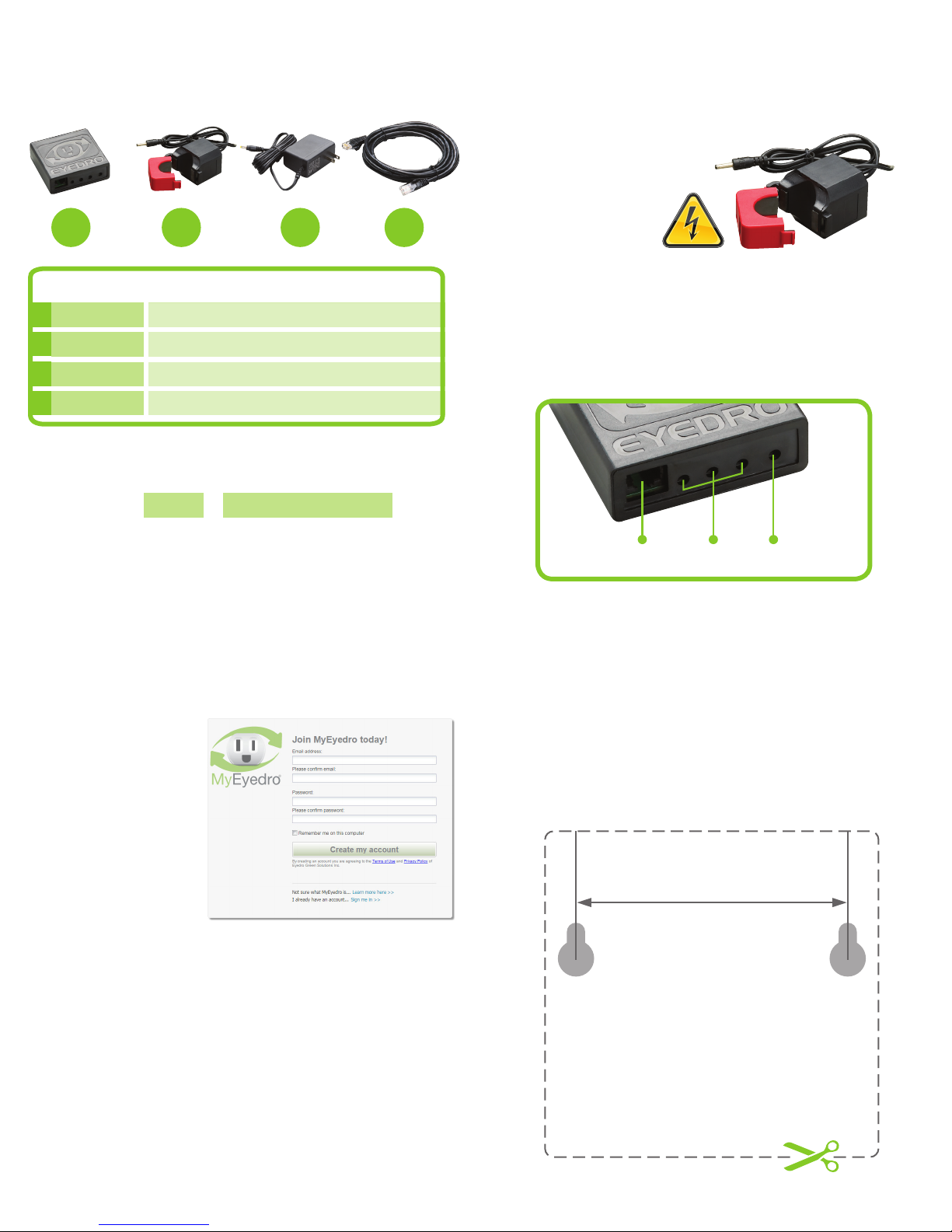
(1) (3) (1) (1)
A B C D
3. Install Hardware1. Verify Package Contents
3.1 Install Current Sensor(s)
on the line1 conductor
of the circuit(s) to
be monitored.
1
Line/Live/Hot conductor(s) only
QTY/LENGTH
A
B
C
D
10ft (3m)
1
3
1
DESCRIPTION
Eyedro Module
Current Sensors (200A to 5000A max 600VAC)
Low-voltage Power Adapter
Ethernet Cable
2. Record Serial Number
3.2 Securely mount the Eyedro modules,
using the template provided below (optional).
3.3 Connect Sensor(s), Ethernet cable and
power adapter to the Eyedro module.
A
B
C
Module SN: -
Ethernet Sensor(s)
4. Create a MyEyedro User Account Template for mounting the
Eyedro Module (optional)
4.1 GO ONLINE TO:
my.eyedro.com
to create your
online account
(or login if you
have an existing
account).
Cut out the below template and use it as a guide to
mark screw locations for a wall mounted module.
Power
Adapter
4.2 Add the device to your user account by entering the
serial number recorded earlier.
4.3 ENJOY! Login to MyEyedro as often as you like to
view your electricity consumption.
4.4 For more details regarding the MyEyedro service, review
the MyEyedro User Guide located at eyedro.com/support.
Copyright © 2016, Eyedro Green Solutions Inc.
2.36in (60mm)
 Loading...