

Page 1
Anleitung
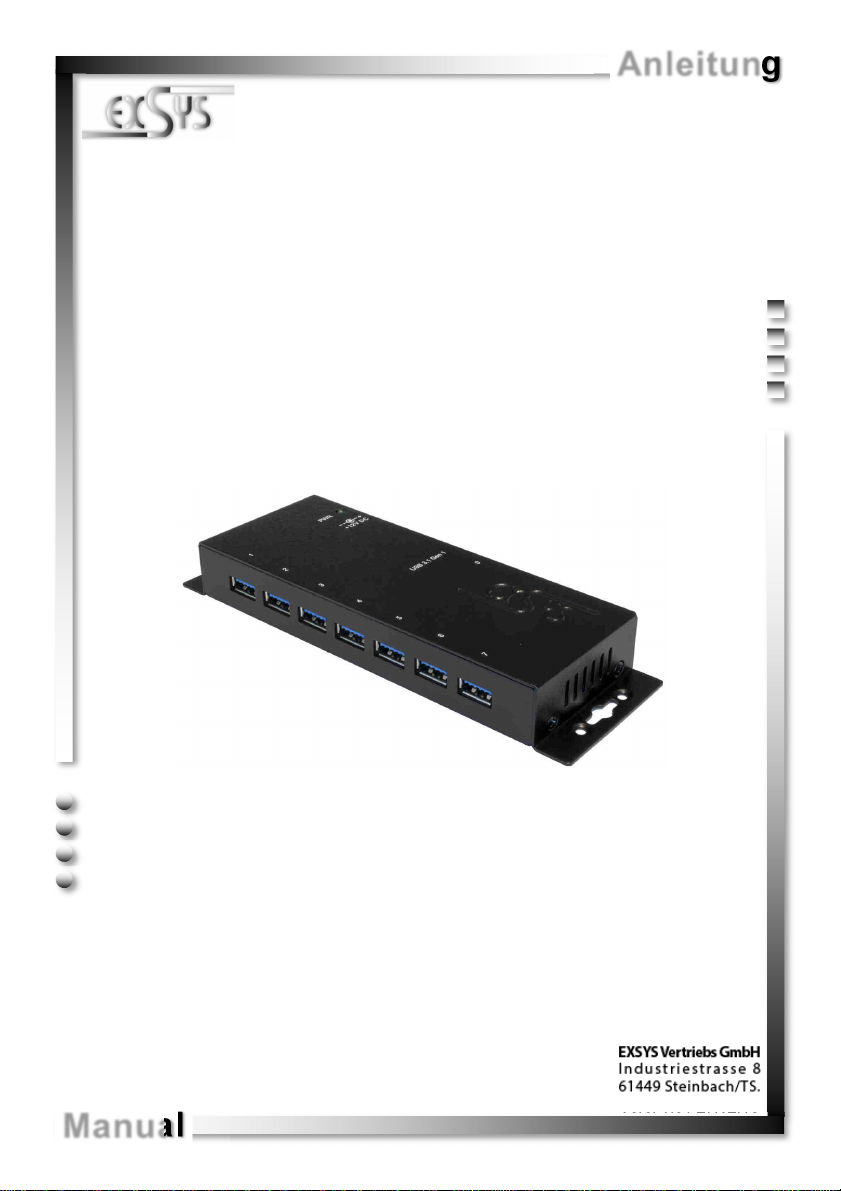
EX-1188HMS-2
7 Port USB 3.1 (Gen1) Metall HUB mit
15KV ESD Überspannungsschutz
7 Port USB 3.1 (Gen1) Metal HUB with
Manual
15KV ESD Surge Protection
Vers. 1.0 / 27.02.18
Page 2

EX-1188HMS-2
Inhaltsverzeichnis
1. Beschreibung ······················································································ 3
2. Lieferumfang ······················································································ 3
3. Aufbau, Anschlüsse & Jumper Einstellungen ··········································· 4-5
3.1 Aufbau······································································································ 4
3.2 Anschlüsse ······························································································ 4-5
3.3 Jumper Einstellungen ·················································································· 5
4. Hardware Installation ············································································ 6
5. Treiber Installation ··············································································· 6
6. Reinigung ·························································································· 6
7. Technische Daten ················································································ 7
8. Technische Zeichnung ·········································································· 7
Index
1. Description ························································································· 8
2. Extent of Delivery ················································································ 8
3. Layout, Connections & Jumper Settings ··············································· 9-10
3.1 Layout ······································································································ 9
3.2 Connections ·························································································· 9-10
3.3 Jumper Settings ························································································ 10
4. Hardware Installation ··········································································· 11
5. Driver Installation ················································································ 11
6. Cleaning ··························································································· 11
7. Technical Information ·········································································· 12
8. Technical Drawing ·············································································· 12
© Copyright 2018 by EXSYS Vertriebs GmbH. All Rights Reserved
2
Page 3

EX-1188HMS-2 Deutsch
1. Beschreibung
Der EX-1188HMS-2 ist ein USB 3.1 (Gen1) Metall HUB für bis zu 7 Endgeräte. Der Hub
ist mit 7 Ports für Endgeräte und 1 Port für den Anschluss an den PC ausgestattet. Er
unterstützt alle USB Anschlüsse von 1.1 bis 3.1. Durch die Stromversorgung über die
12V Buchse werden an jedem Port die vollen 900mA zur Verfügung gestellt. Der USB 3.1
Bus unterstützt optimal die Leistung des schnellen Genesys Chipsatz. Der EX-1188HMS2 gewährleistet so eine sichere Datenübertragung und exzellente Performance von bis zu
5Gbit/s. Er unterstützt den Self Powered und Bus Powered Modus. Zusätzlich ist der EX
-1188HMS-2 mit einem 15KV ESD Überspannungsschutz ausgestattet.
Merkmale:
• Kompatibel zu USB 1.1, 2.0, 3.0 & 3.1
• Bis zu 5Gbit/s
• Es werden alle Betriebssysteme unterstützt
• 15KV ESD Überspannungsschutz
• Zertifiziert für
2. Lieferumfang
Bevor Sie den EX-1188HMS-2 an Ihren PC anschließen, überprüfen Sie bitte zuerst
den Inhalt der Lieferung:
• EX-1188HMS-2
• Netzteil (12V/3A)
• USB 3.1 (Gen1) Kabel
• Anleitung
© Copyright 2018 by EXSYS Vertriebs GmbH. All Rights Reserved
3
Page 4
Deutsch EX-1188HMS-2
3. Aufbau, Anschlüsse & Jumper Einstellungen
3.1 Aufbau
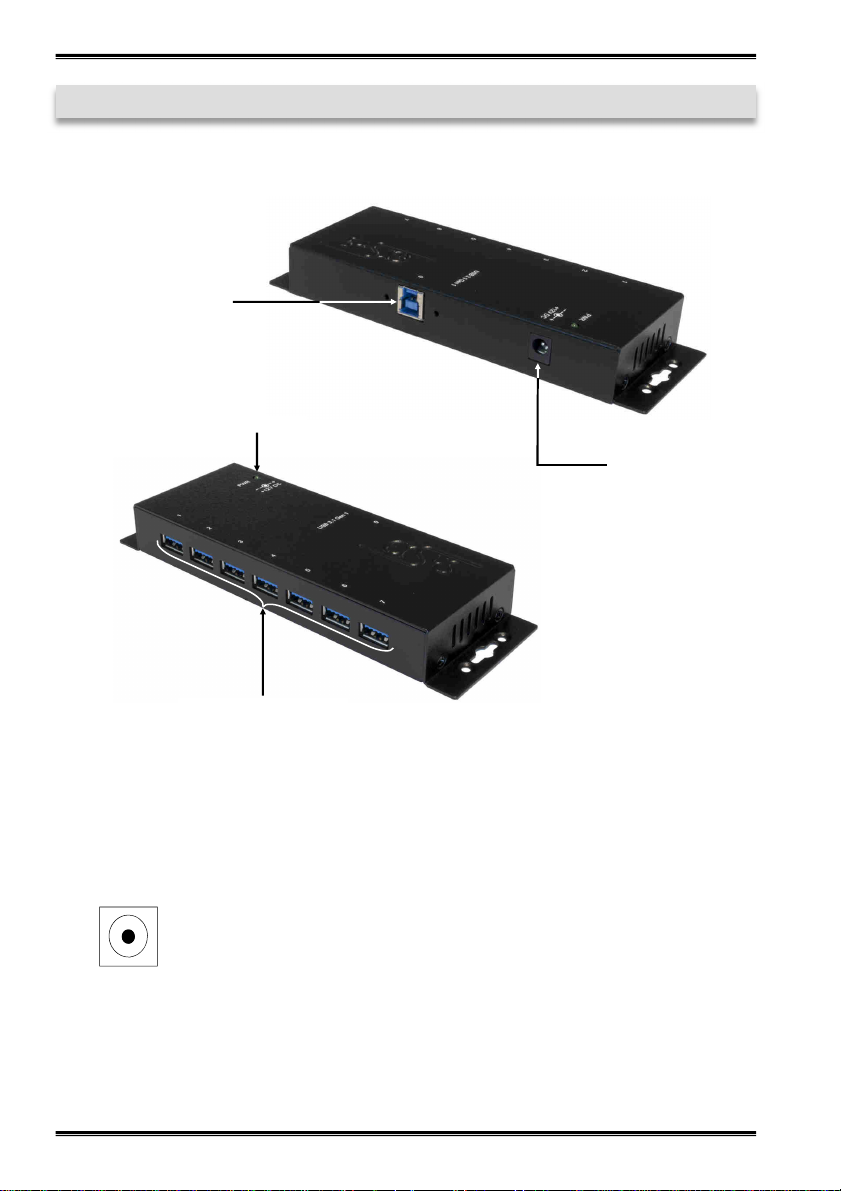
1x USB 3.1 (Gen1)
Upstream B-Buchse
Betriebs LED
12V Buchse
für im Lieferumfang
enthaltenem Netzteil
7x USB 3.1 (Gen1)
Downstream A-Buchse
3.2 Anschlüsse
12V Buchse:
© Copyright 2018 by EXSYS Vertriebs GmbH. All Rights Reserved
ACHTUNG!!!
Nur zur Verwendung mit im Lieferumfang enthaltenem Netzteil!
4
Page 5
EX-1188HMS-2 Deutsch
3. Aufbau, Anschlüsse & Jumper Einstellungen
3.2 Anschlüsse
USB 3.1 (Gen1) A-Buchse:
StdB_SSTX +
GND_DRAIN
StdB_SSTX -
StdB_SSTX+
StdB_SSTX -
Achtung!
Stecker niemals
umgekehrt oder mit
Gewalt einstecken.
VCC
GND
D+ D-
USB 3.1 (Gen1) B-Buchse:
StdB_SSTX +
GND_DRAIN
StdB_SSTX -
StdB_SSTX+
StdB_SSTX -
Achtung!
Stecker niemals
D-
D+
VBus
GND
umgekehrt oder mit
Gewalt einstecken.
3.3 Jumper Einstellungen
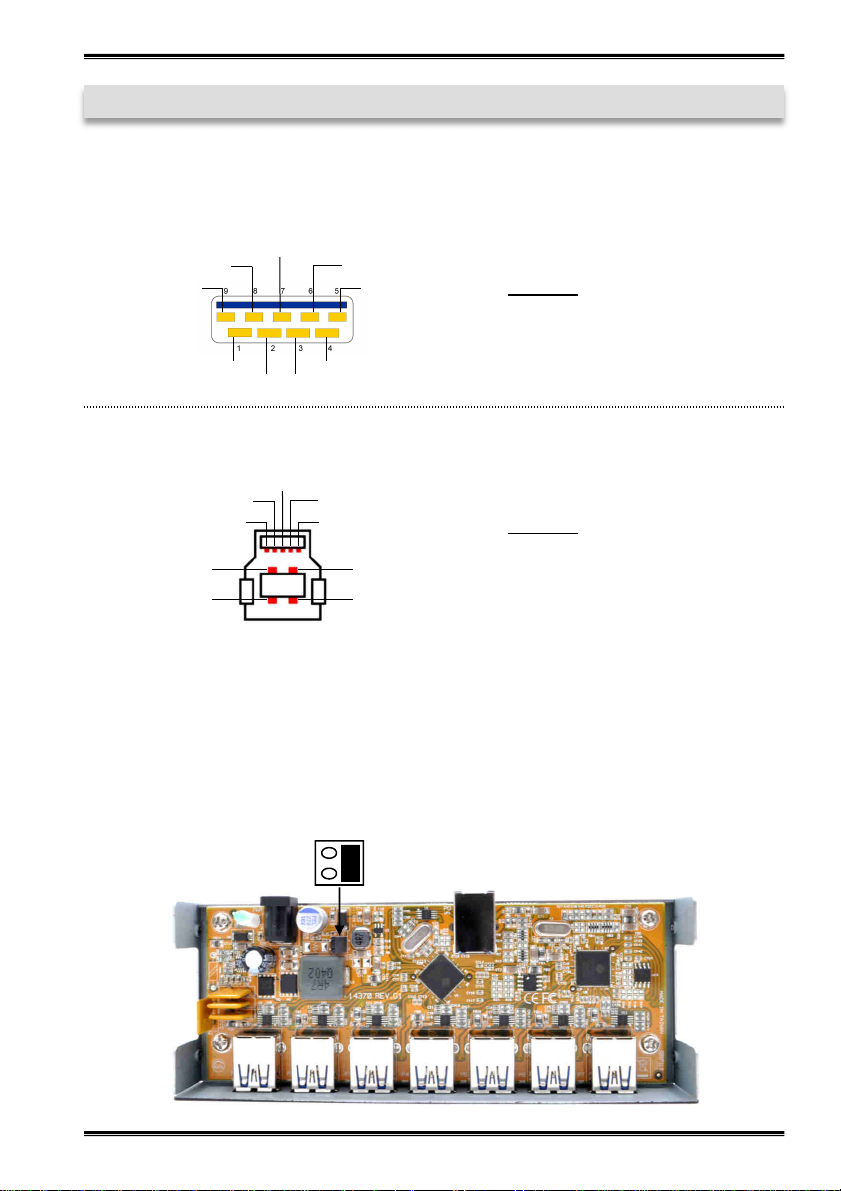
Die EX-1188HMS-2 wird mit der Einstellung Bus-Power ausgeliefert. Sie haben aber
die Möglichkeit die EX-1188HMS-2 auf der Datenleitung zum PC sprich die USB BBuchse stromlos zu machen. Dafür müssen Sie zu erst das Gehäuse mit den vier
Schrauben auf den Seiten öffnen. Nun müssen Sie den Jumper JP4 von E (Enable)
auf D (Disable) setzen. Siehe nachfolgende Abbildung.
E
D
JP4
© Copyright 2018 by EXSYS Vertriebs GmbH. All Rights Reserved
5
Page 6
Deutsch EX-1188HMS-2
4. Hardware Installation
Beachten Sie bitte die folgenden Installationshinweise. Da es große Unterschiede zwischen PC‘s gibt, können wir Ihnen nur eine generelle Anleitung zum Einbau der EX1188HMS-2 geben. Bei Unklarheiten halten Sie sich bitte an die Bedienungsanleitung
Ihres Computersystems.
1. Verbinden Sie das mitgelieferte USB Kabel mit der USB B-Buchse des Hub´s.
2. Verbinden Sie den Stromanschluss des im Lieferumfang enthaltenem Netzteils mit der
12V Buchse des Hub‘s und stecken Sie den Netzstecker des Netzteils in eine Steckdose.
3. Verbinden Sie nun das andere Ende (A-Stecker) des mitgelieferten USB Kabels mit
der A-Buchse an Ihrem PC.
5. Treiber Installation
Alle Betriebssysteme
Nach Abschluss der Hardwareinstallation erkennt das Betriebssystem den EX1188HMS-2 automatisch und installiert diesen.
ÜBERPRÜFEN DES INSTALLIERTEN TREIBER
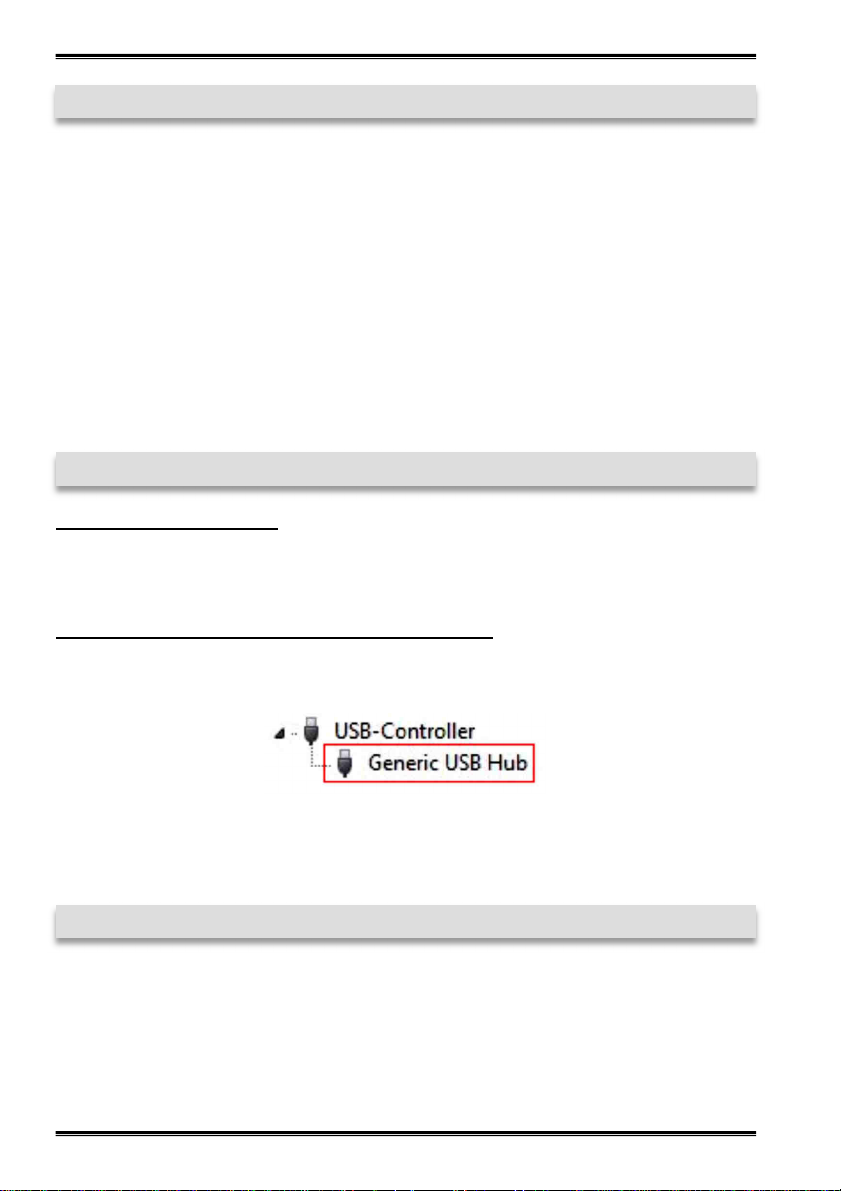
Öffnen Sie den >Geräte-Manager<. Jetzt müssten Sie unter „USB-Controller“ folgende Einträge sehen:
Sind diese oder ähnliche Einträge vorhanden, ist der USB Hub richtig installiert.
6. Reinigung
Zur Reinigung des Gerätes verwenden Sie bitte ausschließlich ein trockenes nicht faserndes Tuch und entfernen Sie die Verschmutzung mit leichtem Druck. Im Bereich der
Anschlüsse bitte darauf Achten, dass keine Fasern des Tuchs in der Buchse hinterlassen werden. Verwenden Sie bitte zu Reinigung in keinem Fall ein feuchtes oder
nasses Tuch!
© Copyright 2018 by EXSYS Vertriebs GmbH. All Rights Reserved
6
Page 7
EX-1188HMS-2 Deutsch
7. Technische Daten
Chip-Set: Genesys
Datentransfer-Rate: 5Gbit/s
Anschlüsse: 7x USB 3.1 (Gen1) A-Buchse, 1x USB 3.1 (Gen1)
B-Buchse, 1x 12V Buchse
Hardwaresystem: USB 1.1, 2.0, 3.0 & 3.1
Betriebssystem: Alle Betriebssysteme
Betriebstemperatur: 0° bis 55° Celsius
Lagertemperatur: -20° bis 85° Celsius
Rel. Luftfeuchtigkeit: 5% bis 95%
Stromversorgung: +12 Volt
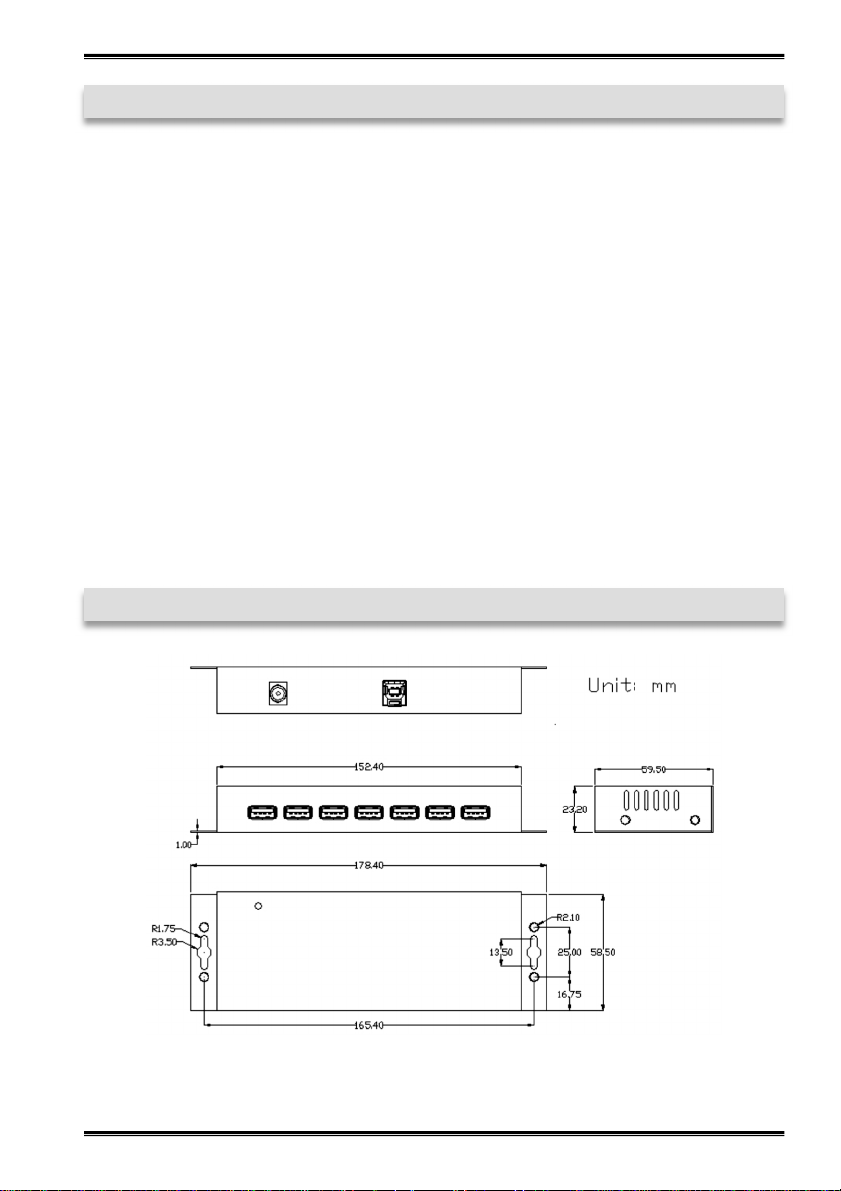
Abmessung: 178,40 x 58,50 x 23,20 mm
Gewicht: 800g
8. Technische Zeichnung
© Copyright 2018 by EXSYS Vertriebs GmbH. All Rights Reserved
7
Page 8

English EX-1188HMS-2
1. Description
The EX-1188HMS-2 is a plug & play high-speed USB 3.1 (Gen1) metal hub for 7 USB
devices. The EX-1188HMS-2 provides 7 ports for USB devices and 1 uplink port for PC.
It supports all USB connections from 1.1 to 3.1. Via a external power supply it is possible to provide a maximum of 900mA on each USB port. The EX-1188HMS-2 design
fully utilize the Genesys chipset, which represents the latest in SuperSpeed USB interface technology. It uses data transfer rates up to 5Gbit/s. It provides a secure and very
high data transfer on each single port. The EX-1188HMS-2 support the Self Powered
and Bus Powered mode. In addition the EX-1188HMS-2 is equipped with an 15KV ESD
surge protection.
Features:
• Compatible for USB 1.1, 2.0, 3.0 & 3.1
• Up to 5Gbit/s
• All Operating Systems are supported
• 15KV ESD Surge Protection
• Certificate for
2. Extent of Delivery
Before you connect the EX-1188HMS-2 to your PC, you should first check the contents
of the delivery:
• EX-1188HMS-2
• Power Supply (12V/3A)
• USB 3.1 (Gen1) Cable
• Manual
© Copyright 2018 by EXSYS Vertriebs GmbH. All Rights Reserved
8
Page 9
EX-1188HMS-2 English
3. Layout, Connections & Jumper Settings
3.1 Layout
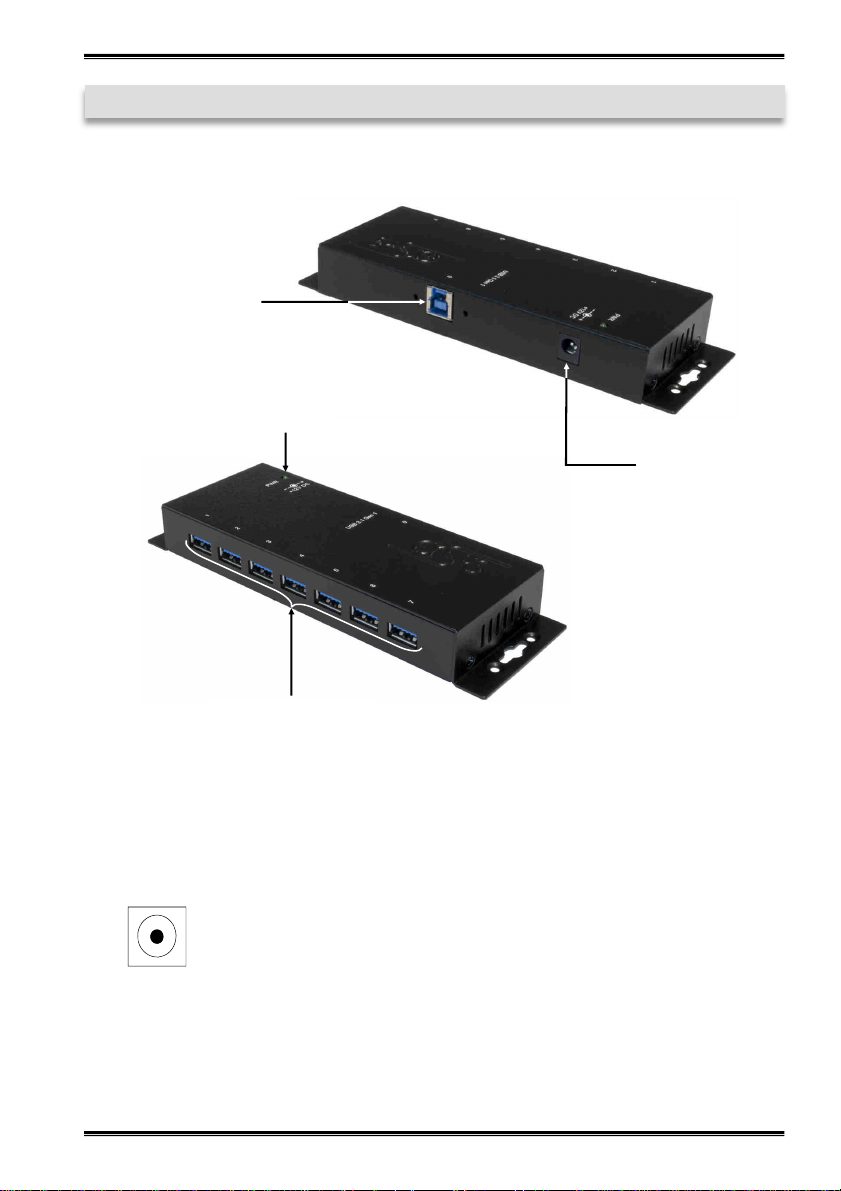
1x USB 3.1 (Gen1)
Upstream B-Port
Power LED
12V Connector
for included external
Power Supply
7x USB 3.1 (Gen1)
Downstream A-Port
3.2 Connections
12V Connector:
© Copyright 2018 by EXSYS Vertriebs GmbH. All Rights Reserved
ATTENTION!!!
Use only with Power Supply which is included in delivery!
9
Page 10
English EX-1188HMS-2
3. Layout, Connections & Jumper Settings
3.2 Connections
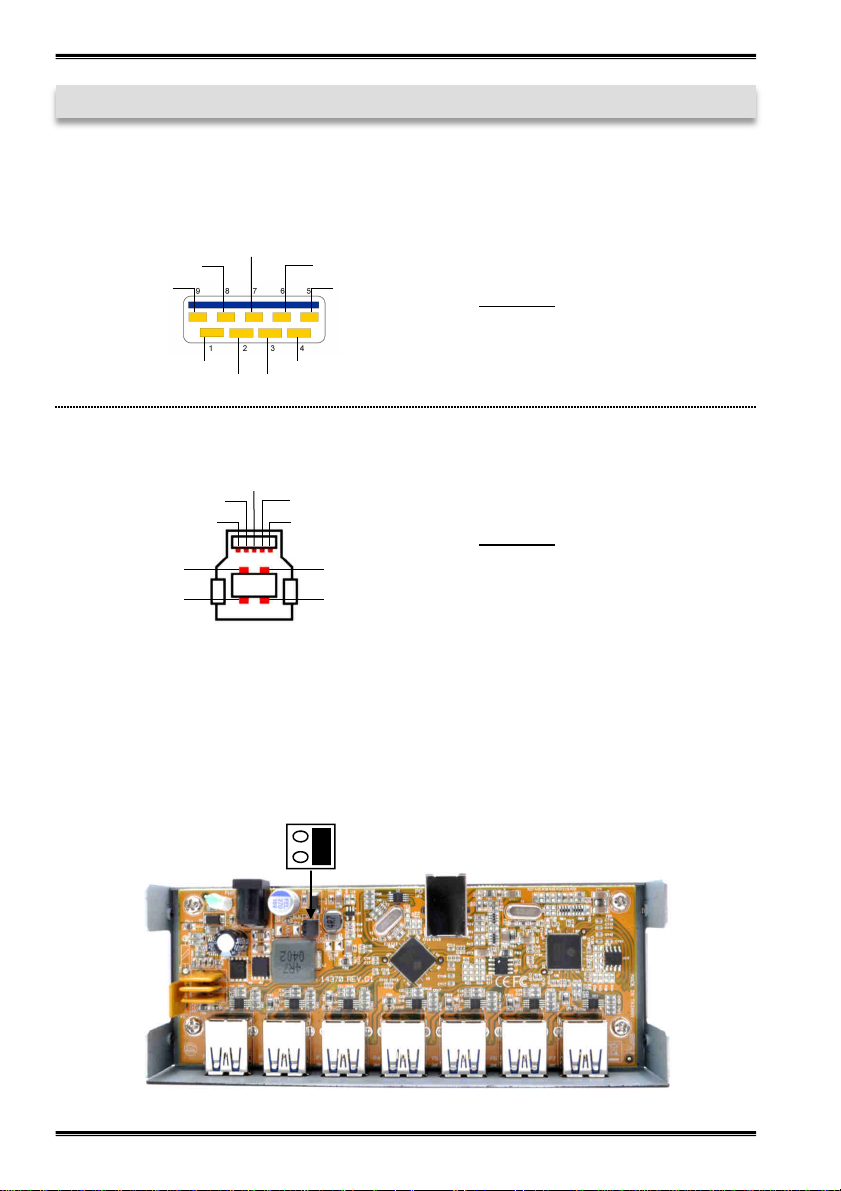
USB 3.1 (Gen1) A-Port:
StdB_SSTX +
GND_DRAIN
StdB_SSTX -
StdB_SSTX+
StdB_SSTX -
Attention!
Never plug in with force
or in wrong direction.
VCC
GND
D+ D-
USB 3.1 (Gen1) B-Port:
StdB_SSTX +
GND_DRAIN
StdB_SSTX -
D-
D+
StdB_SSTX+
StdB_SSTX -
VBus
GND
Attention!
Never plug in with force
or in wrong direction.
3.3 Jumper Settings
The EX-1188HMS-2 will be delivered with the setting Bus-Power. But you have the
possibility to cut the power at the data line. For this you open the case with the four
screws on both sides. Then you must set the jumper JP4 from E (Enable) to D
(Disable). See the following picture.
E
D
JP4
© Copyright 2018 by EXSYS Vertriebs GmbH. All Rights Reserved
10
Page 11
EX-1188HMS-2 English
4. Hardware Installation
Because there are large differences between PC’s, we can give you only a general installation guide. Please refer your computer’s reference manual whenever in doubt.
1. Connect the USB cable to the USB B-Port at the Hub.
2. Connect the included power supply to the 12V connector at the Hub.
3. Now connect the other end from the USB cable (A-Plug) to the A-Port at your PC.
5. Driver Installation
All Operating Systems
After the hardware installation the OS will recognize the device automatically and install
the drivers.
CHECK INSTALLED DRIVER
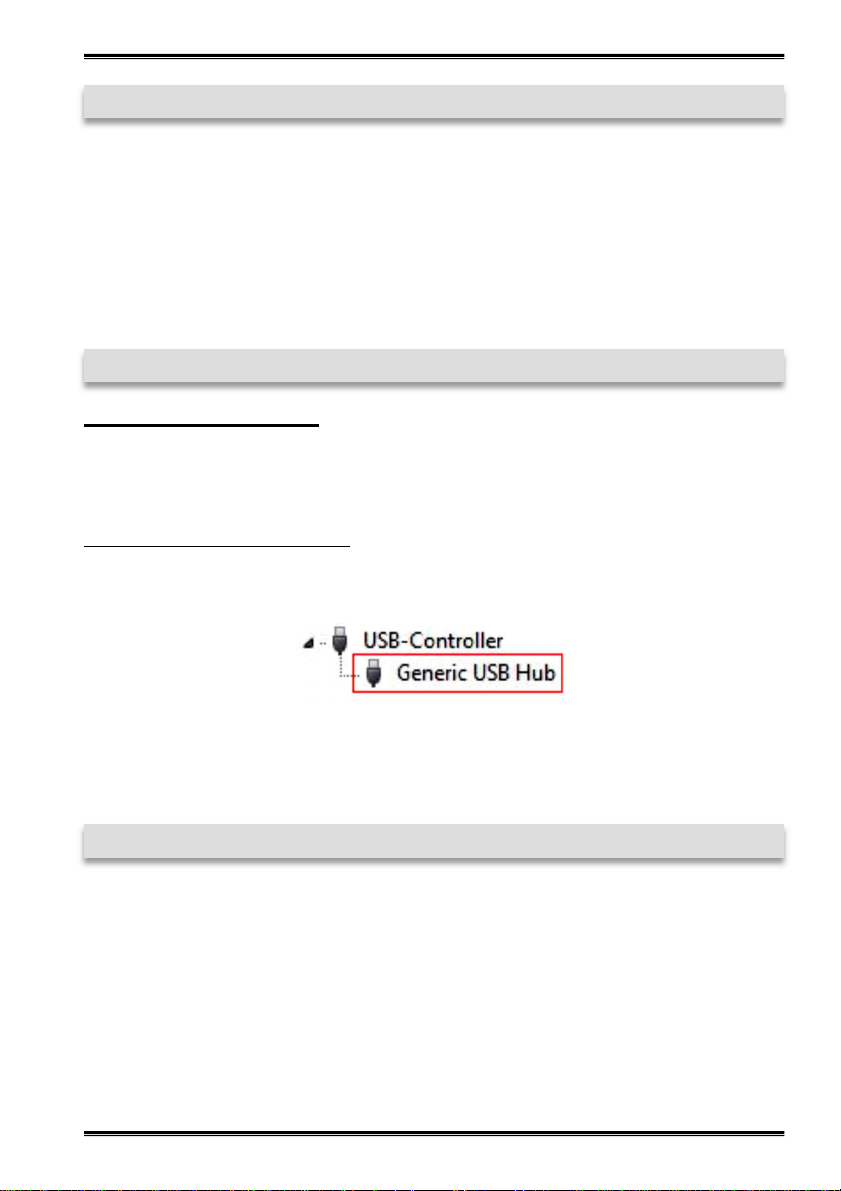
Open the >Device manager<. Now you should see at „USB-Controller“ the following
new entry's:
If you see this or a similar information the device is installed correctly.
6. Cleaning
For cleaning please use only a dry fluff less cloth and remove the dirt with gently pressure. In the area of the connectors please make sure that no fibres from the cloth remain in the connectors. Attention! Never use a moist or wet cloth for cleaning!
© Copyright 2018 by EXSYS Vertriebs GmbH. All Rights Reserved
11
Page 12
English EX-1188HMS-2
7. Technical Information
Chip-Set: Genesys
Data Transfer Rate: 5Gbit/s
Connectors: 7x USB 3.1 (Gen1) A-Port, 1x USB 3.1 (Gen1) B-Port,
1x 12V Connector
Hardware System: USB 1.1, 2.0, 3.0 & 3.1
Operating System: All Operating Systems
Operating Temperature: 32°F to 131°Fahrenheit
Storage Temperature: -40°F to 185°Fahrenheit
Rel. Humidity: 5% to 95%
Power: +12 Volt
Size: 178,40 x 58,50 x 23,20 mm
Weight: 800g
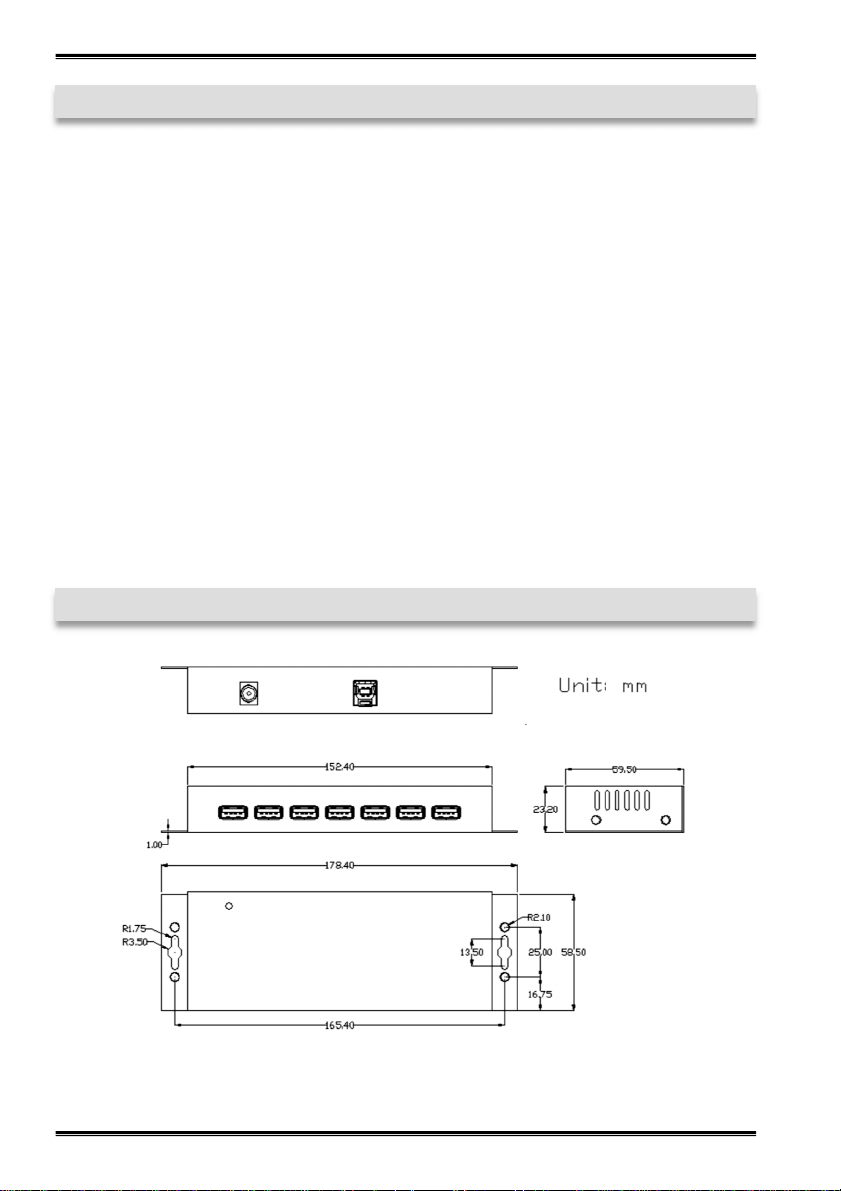
8. Technical Drawing
© Copyright 2018 by EXSYS Vertriebs GmbH. All Rights Reserved
12
 Loading...