

Page 1
CHARGING
LIGHT OPERATION & BATTERY LIFE
USER GUIDE
BLAZE
Fully Charge your light before rst use.
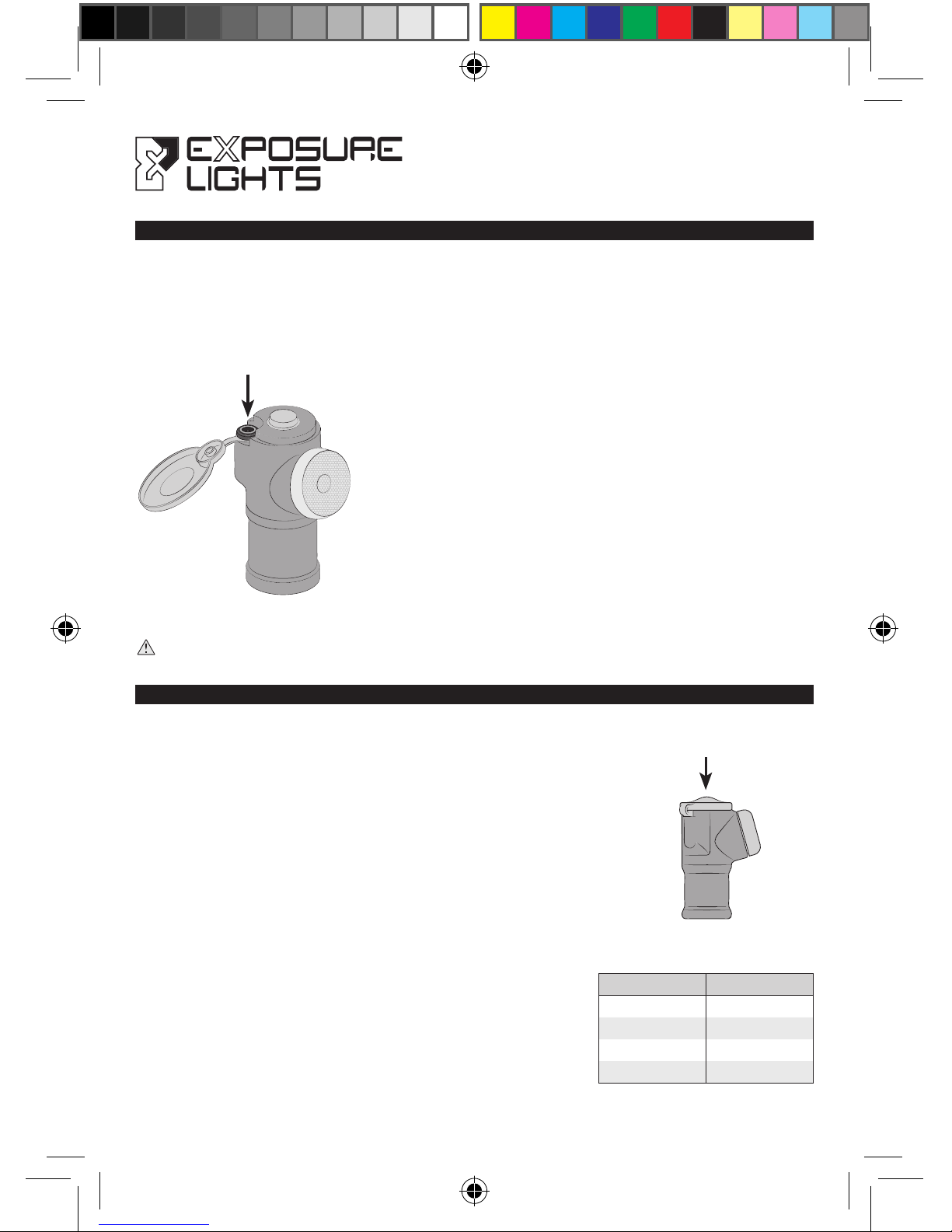
Locate the charge port on top of the light by lifting the silicone top cap.
IMPORTANT: After charging is complete correctly replace the top-cap to prevent water ingress.
Fully insert the USB Top-Up Cable and
begin charging from a USB supply.
An LED behind the Function Button will
ash green to indicate that it is charging
and then turn solid green when the light
is 95% charged, the remaining 5% is a
trickle charge.
Approximate charge time from a
500 mA supply is 4 hours.
To turn the light on press the function button twice in quick
succession.
The light will turn on in the mode that was last used. A single
press of the function button will cycle between a constant
beam and a pulse.
To turn the light off hold the function button down until there is
a double ash and then release.
The Function Button also displays mode and battery life. When
you turn the light on or change to another mode the Function
Button will glow amber for Pulse Mode and green for Constant
for 2 seconds, thereafter the Function Button becomes the
Fuel Gauge and indicates battery life remaining.
NOTE: When the battery has only 5% charge remaining the
light will automatically switch to the low ash setting and the
Function Button will ash red.
Function Button
Charge Port
Fuel Gauge
LED COLOUR BATTERY %
GREEN 100 - 80
AMBER 80 - 25
RED 25 - 5
RED FLASH 5 - EMPTY
Page 2
SEATPOST MOUNTING
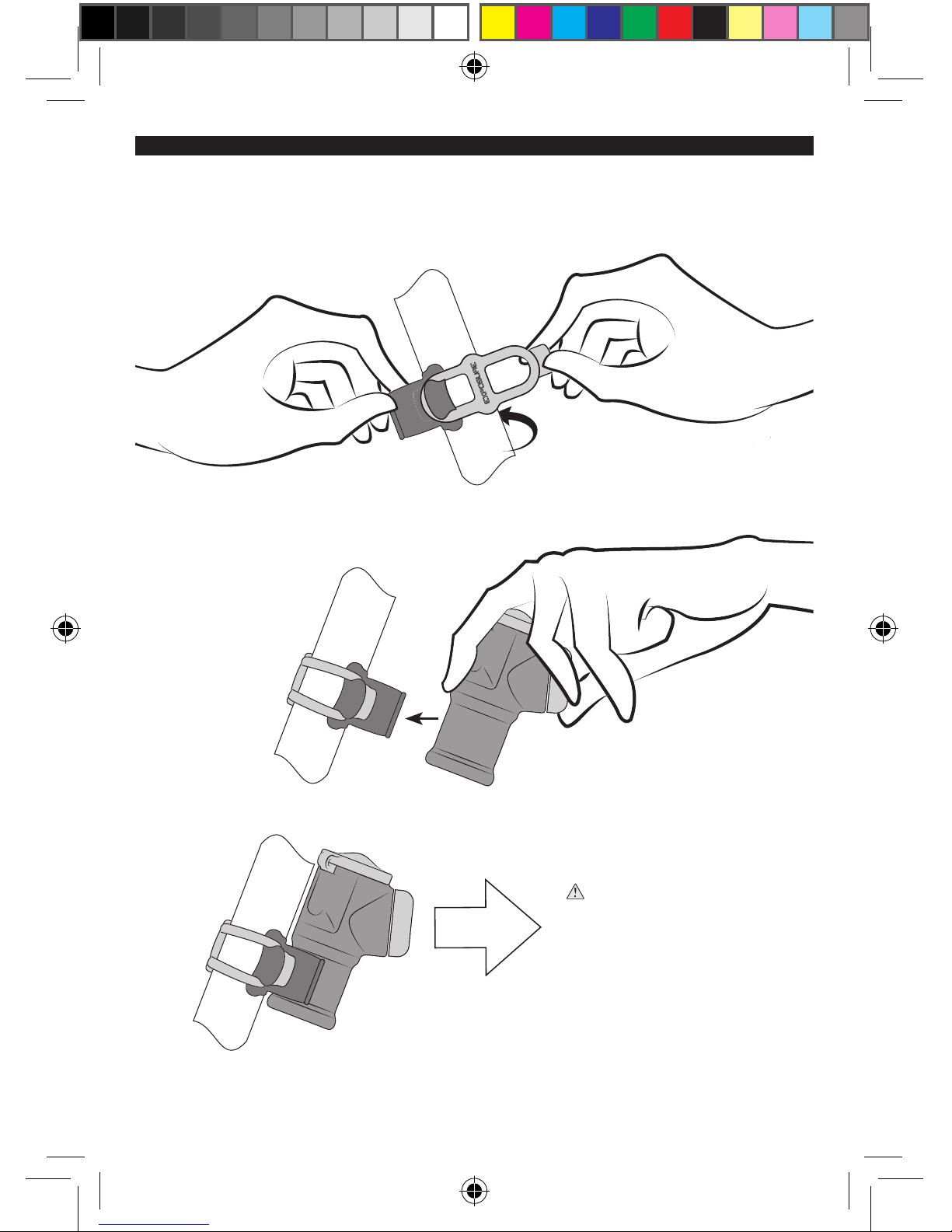
Additional brackets and silicon bands are available from exposurelights.com
Click the Blaze
securely into place.
WARNING: The Blaze lens
is angled so the light will shine
directly back when correctly
attached, make sure it is in the
correct orientation.
Page 3
DAYBRIGHT
OMS BLAZE
OPTIMISED MODE SELECTOR (OMS)
OMS allows you to select a burn time tailored to your needs, the longer the burn time the lower the
lumen output, if you double burn time, you halve lumen output.
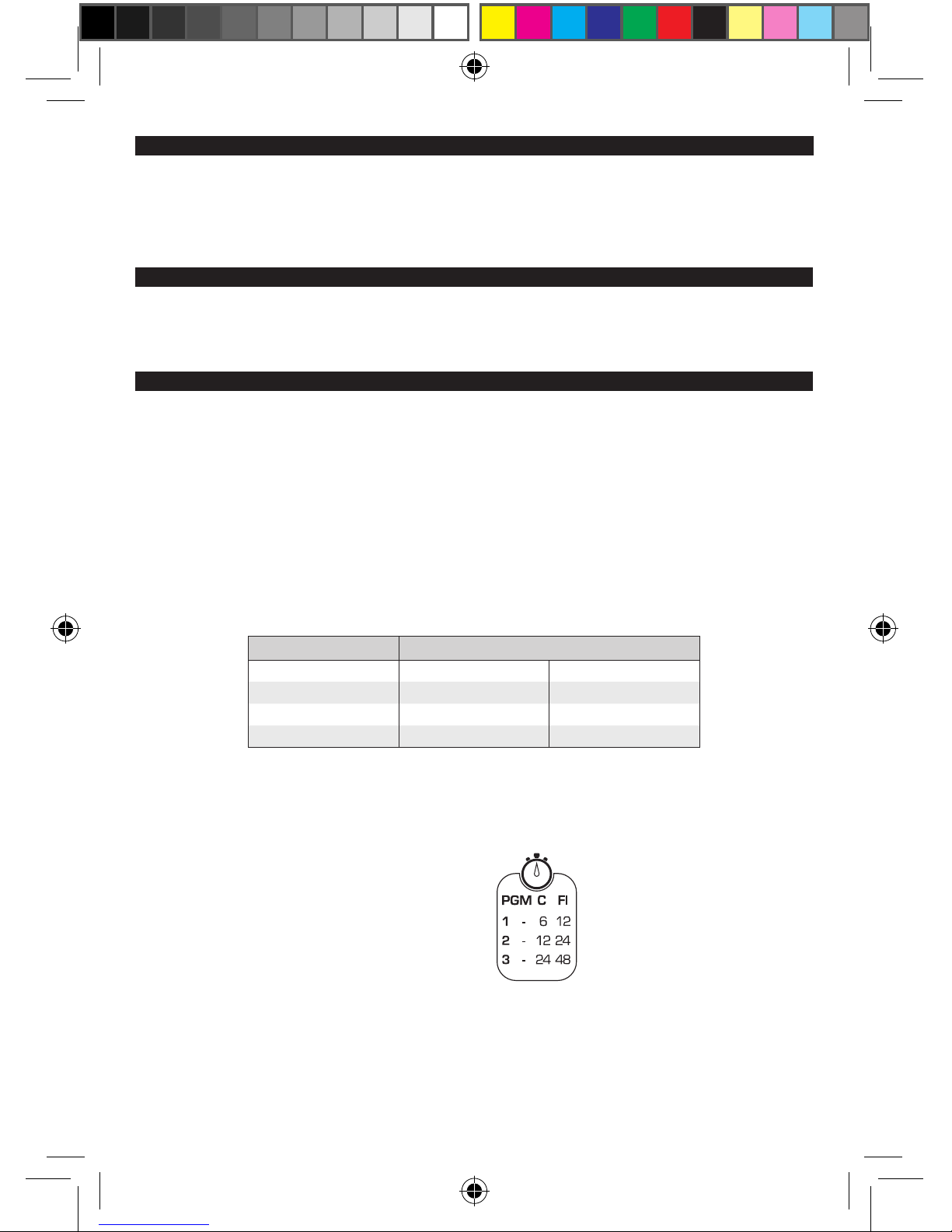
There are three programs to choose from that are shown on the light body.
With the light off press and hold the function button, after 2 seconds the light will ash once, twice
then three times. These ashes correspond to the different programs and you release the function
button after the appropriate ash. e.g. to access Program 2 you release the function button after
the 2nd ash.
The light will then remain in the selected Program, regardless of being turned off and on, until
another Program is selected.
We recommend using your light in DayBright mode during the day for your safety.
To access DayBright mode you need to be in Program 1 and then select the Flash (FL) setting.
An abbreviated version of this table is etched onto the light.
PROGRAM MODE
CONSTANT FLASH
1 HIGH 6 hrs 12 hrs
2 MEDIUM 12 hrs 24 hrs
3 LOW 24 hrs 48 hrs
PGM - Program
C - Constant
Fl - Flash
Page 4
EXPUG2
For more information please visit:
exposurelights.com
WARRANTY & SERVICE
MAINTENANCE
WARNING
Inspect and test your light and bracket apparatus before every ride.
Keep your light clean and free of dirt, be careful when cleaning any mud or dirt from lens to avoid
scratching.
Never use a high pressure spray or hose on your light.
Do not use harsh abrasive or corrosive materials to clean your light.
For extended periods when your light is not in use fully recharge the light once a month, as a long
duration with no charge is detrimental to the cells.
Please do not send any products back to us without contacting our service team rst to
discuss your issue and for a valid returns number.
All our lights come with a 2 year warranty.
If you have a servicing or technical question you can contact us using the information below. If you
return your light for repair, no work will be carried out until you have been contacted with the cost
for the repair. If you are outside of the UK it would be quicker in the rst instance to contact your
local distributor.
+44 (0)1798 839300
Exposure Lights are very powerful lighting systems, please take care when operating. Do not
look directly into the light or shine directly at others, including other road users.
Exposure Lights / Ultimate Sports Engineering Ltd. accept no liability for any injuries or other
damages arising from the use of their product in any circumstances.
NOTE: Patents apply.
EXPUG2
 Loading...