

Page 1
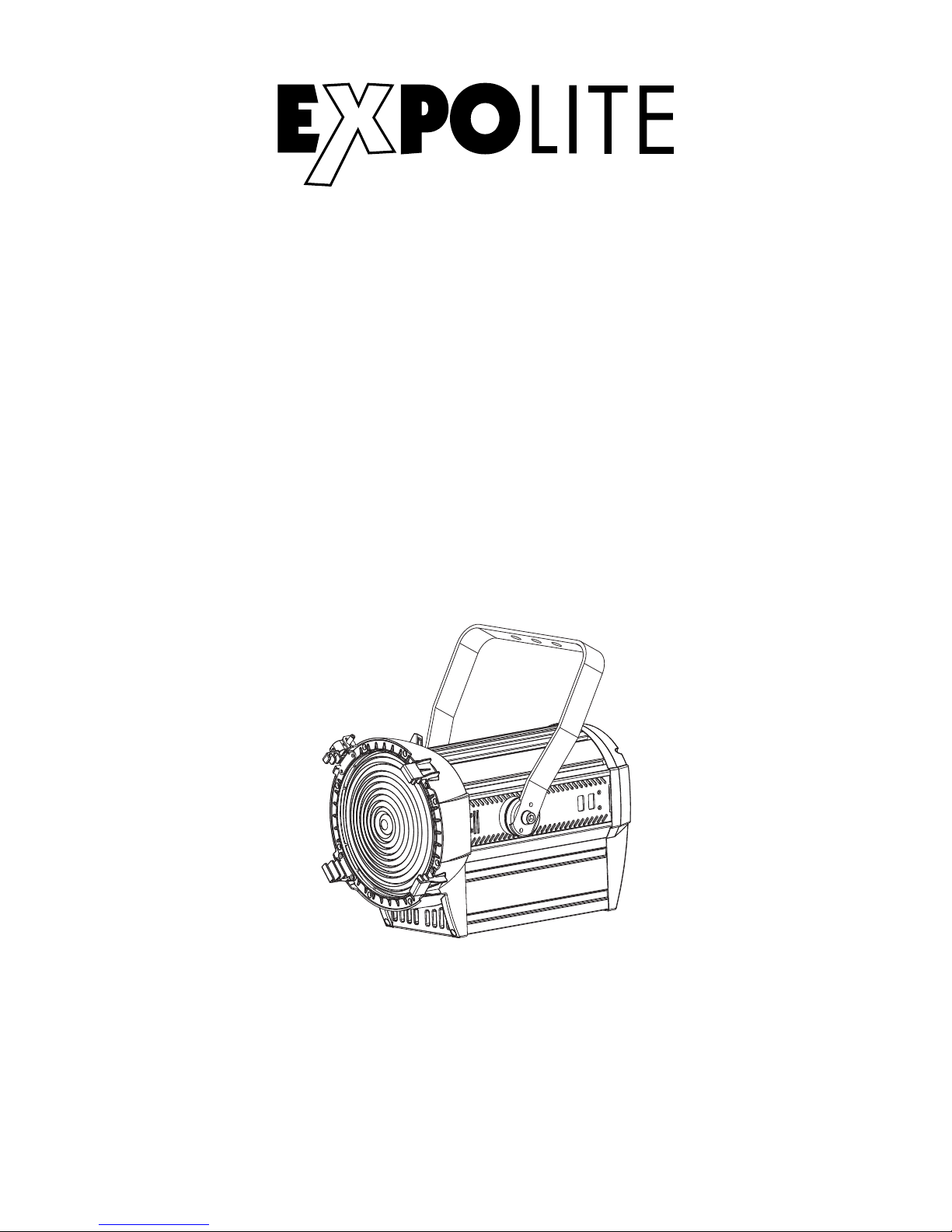
LED HD Fesnel WW
Art.Nr.: led22940
Bedienungsanleitung
Bedienungsanleitung bitte aufbewahren
Keep this Manual for later queries
Änderungen sind ohne Ankündigung möglich.
Changes are possible without prior notice.
Rev. 2018-41-31
User Manual
Eigenschaften
Bedienelemente
Steuerung
Specifications
Menu
Control
Page 2

FOCON SHOWTECHNIC
Vertriebsgesellschaft mbH
Teichweg 4+6
D-49504 Lotte/Wersen
Telefon: ++49 (0) 541-77095-0
Fax: ++49 (0) 541-77095-27
[email protected]
www.focon-showtechnic.com
by
Die beiliegenden Bedienhinweise für Expolite
Geräte sind Bestandteil dieser Bedienungsanleitung. Lesen Sie diese sorgfältig, bevor
Sie das Gerät in Betrieb nehmen.
The enclosed General Information for Expolite
Units are part of these user manual. Read them
carefully before operating the device.
Page 3
Inhalt - Content
Inhalt - Content
Seite / Page
Lieferumfang
Technische Daten
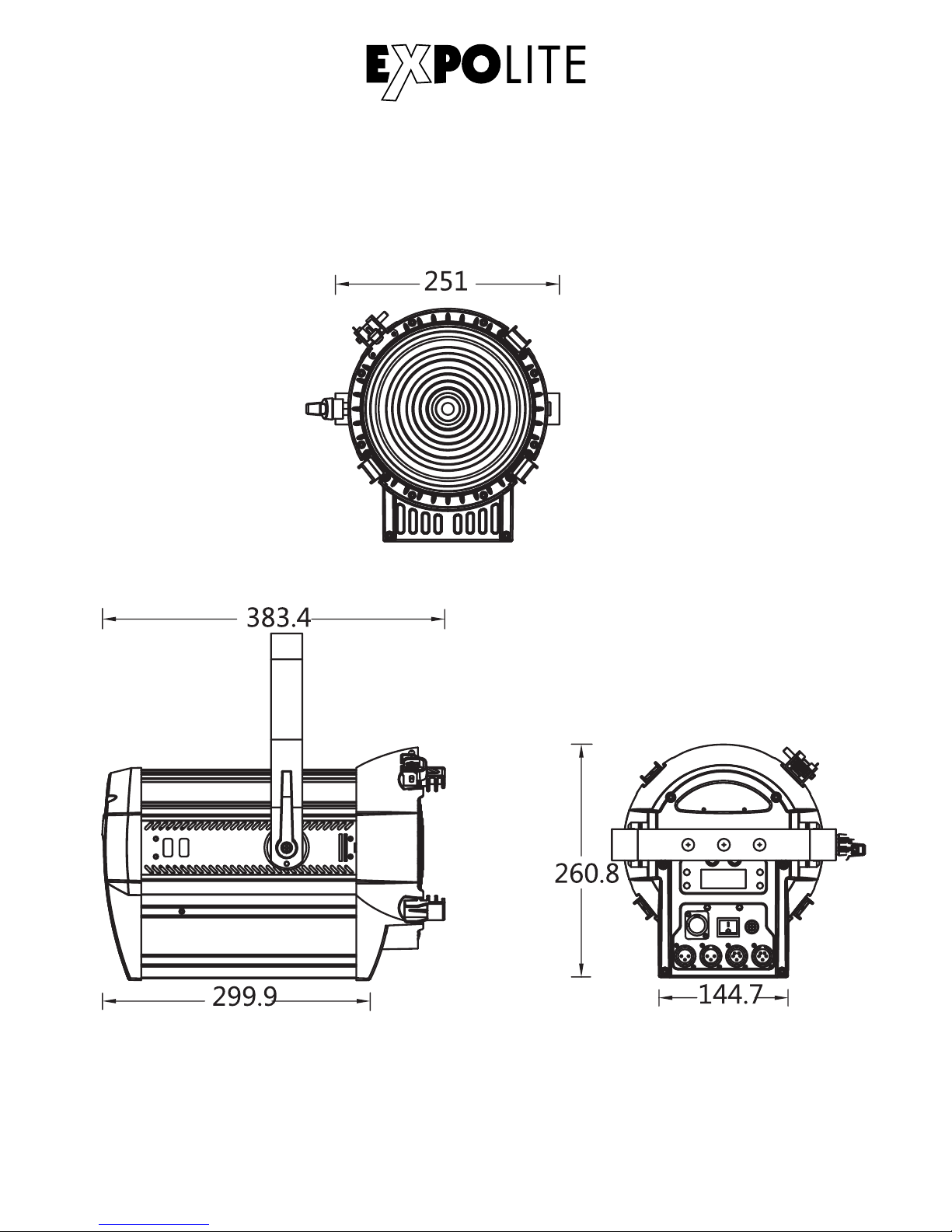
Abmessungen
Installation
Bedienung
Steuerung mit DMX512
Delivery
Product Information
Dimensions
Installation
Operation
Using DMX512 Controller
DE
D-04
ENG
D-05
D-06
D-07
D-08
D-13
E-20
E-21
E-22
E-23
E-24
E-29
Page 4

Lieferumfang
- Expolite LED HD Fresnel WW
Expolite Geräte werden vor dem Versand sorgfältig geprüft. Sollte der
Lieferumfang dennoch nicht vollständig sein, wenden Sie sich bitte umgehend
an Ihren Vertriebspartner.
- Anschlusskabel für Spannungsversorgung
- Bedienhinweise für Expolite Geräte
- Bedienungsanleitung
D-04
Page 5

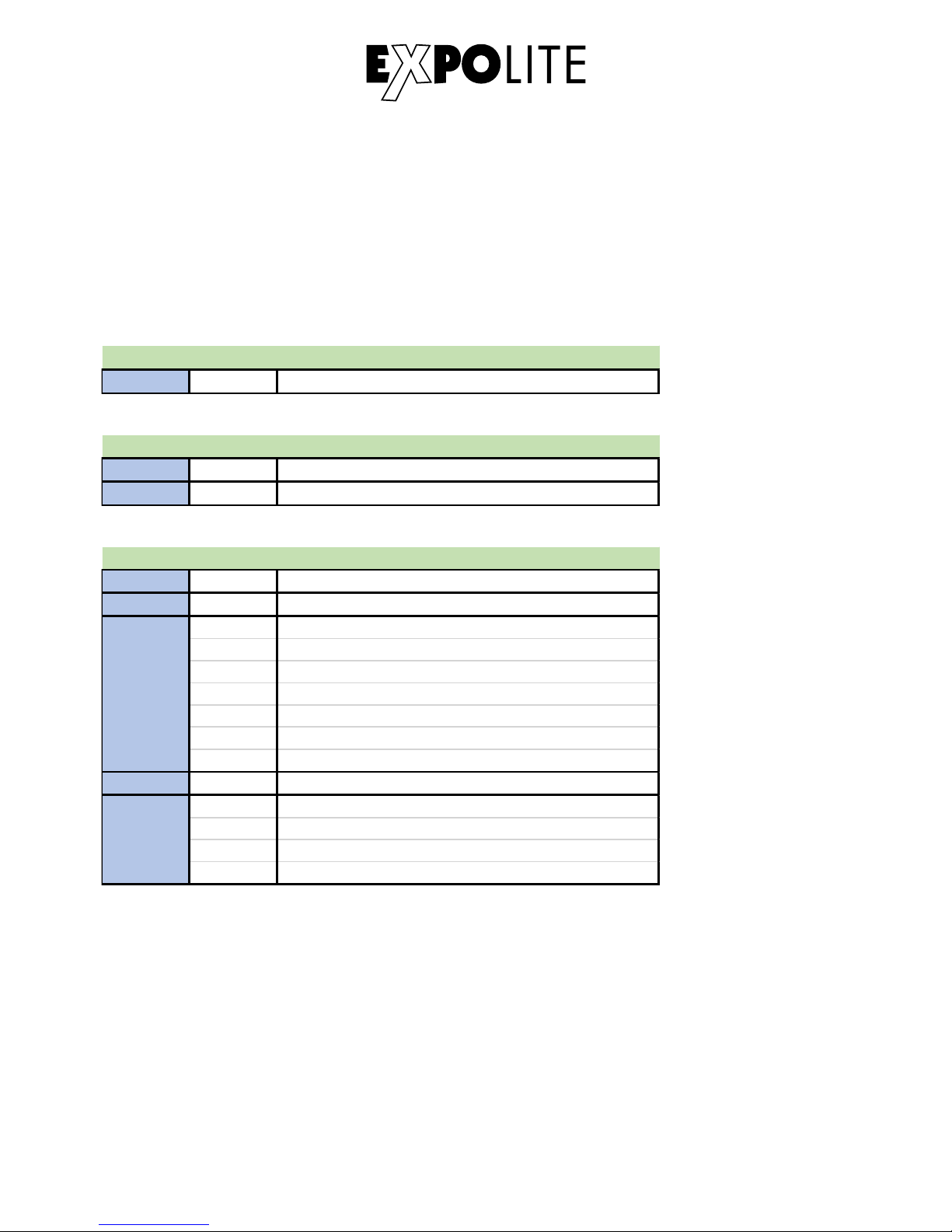
Technische Daten
Spannungsversorgung
Maximale Leistungsaufnahme
Gewicht
Betriebstemperatur
Abmessungen
Luftfeuchtigkeit
Schutzklasse
Gehäuse
LEDs
LED Treiberstrom
Abstrahlwinkel
Steuerung
DMX-Kanäle
Anschlüsse
100V - 240V AC 50/60Hz
180W
417 x 286 x 260mm
6,6kg
Power In/Out | DMX In/Out
-0°C - 45°C
< 98%
IP 20
Aluminium-Strangpressprofil
ca. 160W 3200K*
3,0A
15° - 60°
Stand-Alone / DMX512
1 - 5 (1/2/5)
D-05
* Toleranzbereich der Farbtemperatur entsprechend Herstellerangabe +/- 10%.
Page 6
Abmessungen
Page 7
Installation
Montage
DMX 512
CON TROLL ER
............
DMX A ddr .1 DMX A dd r.(Nx1 )+ 1 DMX A dd r.(Nx2 )+ 1
DMX-Verbindung
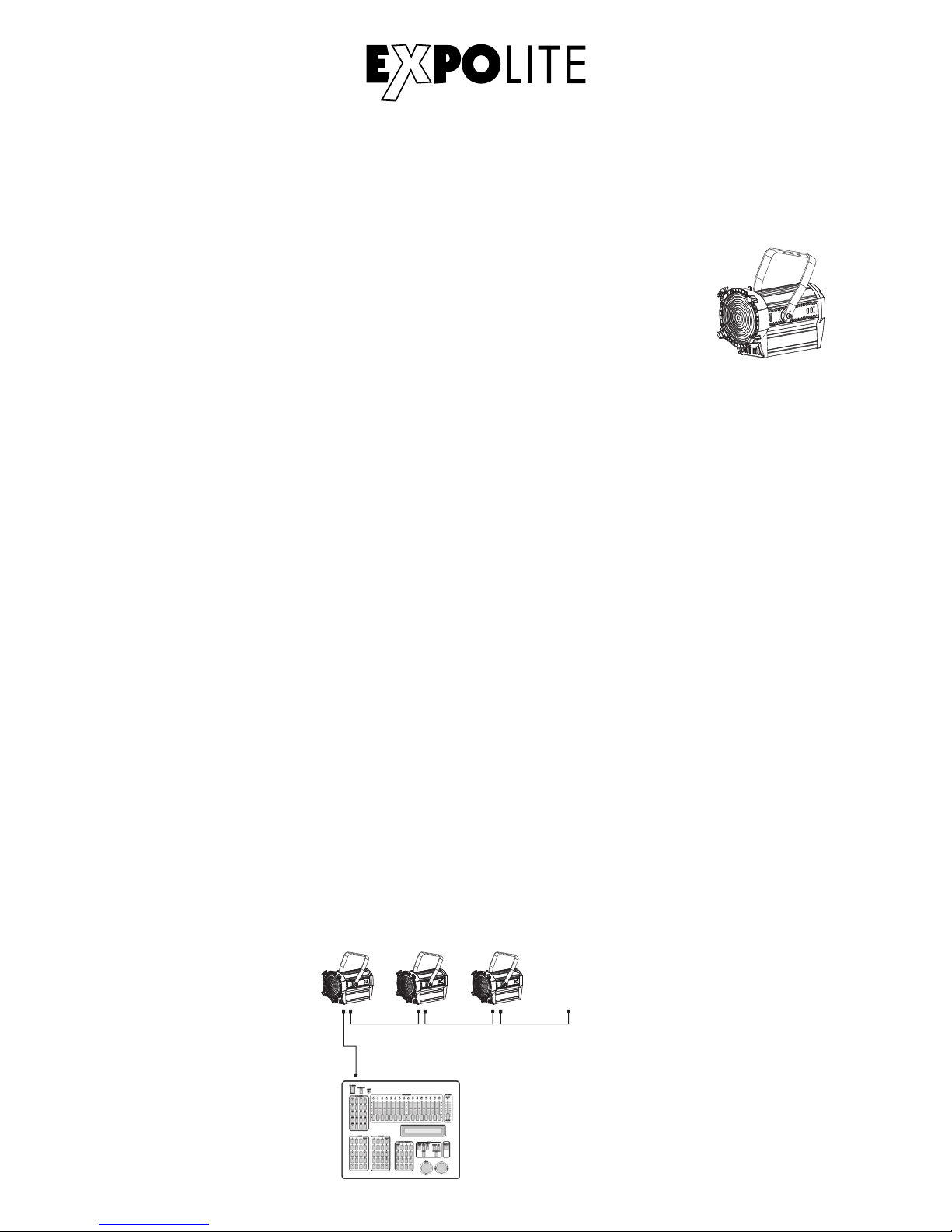
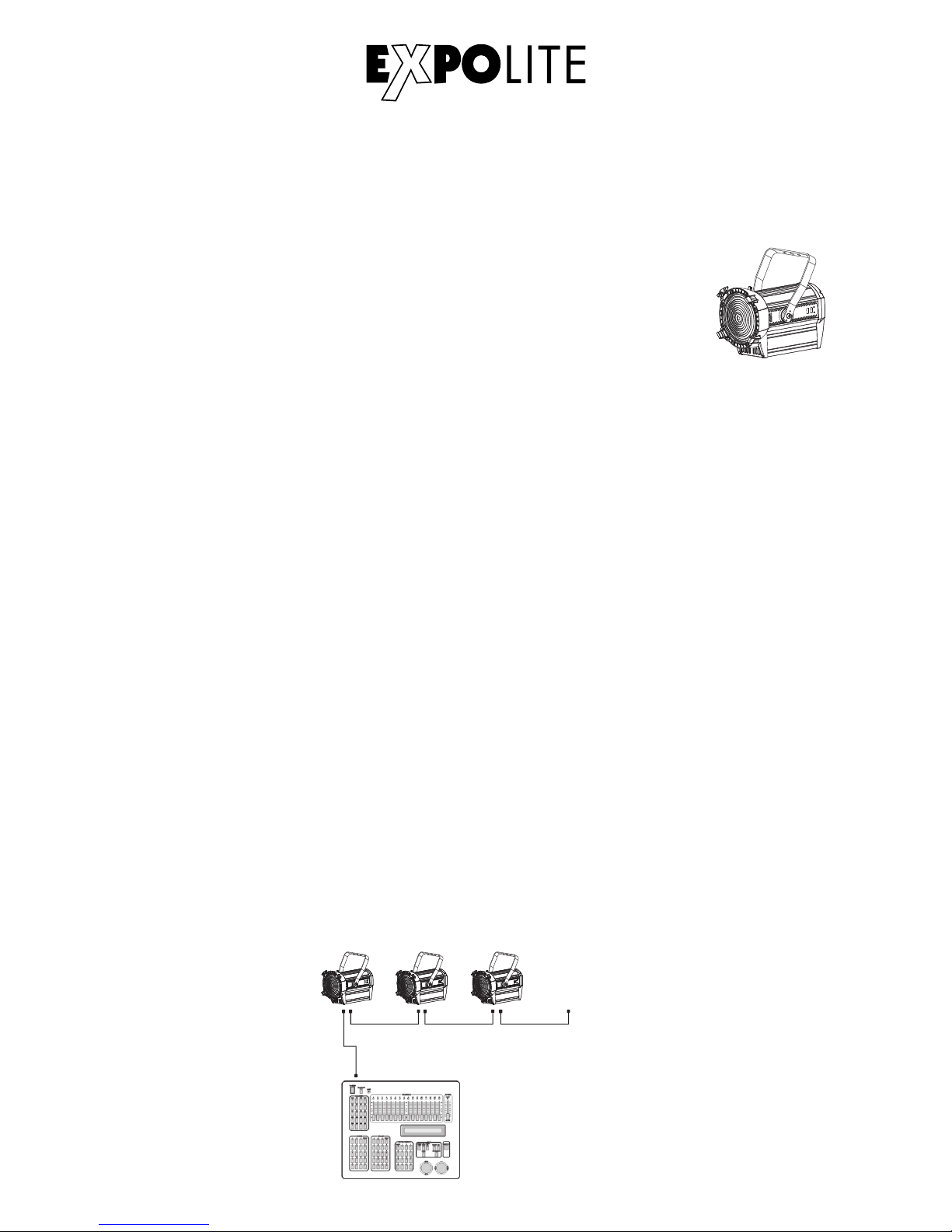
Die Geräte mit geeigneten DMX-Kabeln miteinander und mit dem Kontroller verbinden.
Die vorgesehenen DMX-Adressen und Personalities an den Geräten einstellen.
Verbindung der Spannungsversorgung
Bei 230V Netzspannung: maximal 10 Geräte in Reihe.
Bei 120V Netzspannung: maximal 5 Geräte in Reihe.
D-07
Hängend
Das Gerät kann am Haltebügel hängend montiert werden. Geräte müssen
entsprechend der jeweils gültigen Vorschriften sicher montiert und mit einer
zweiten Sicherung gegen Herabfallen versehen werden.
Stehend
Das Gerät kann stehend betrieben werden. Hierfür ist eine entsprechende
Halterung (zum Beispiel ein Bodenstativ) notwendig. Eine sichere und
ausreichend rutschhemmende Standfläche ist sicherzustellen!
HINWEIS
Das LED Modul kann in jeder beliebigen Lage betrieben werden. Die
Neigung im Bügel kann bequem durch Lösen der Arretierungsschraube
verstellt werden.
Page 8
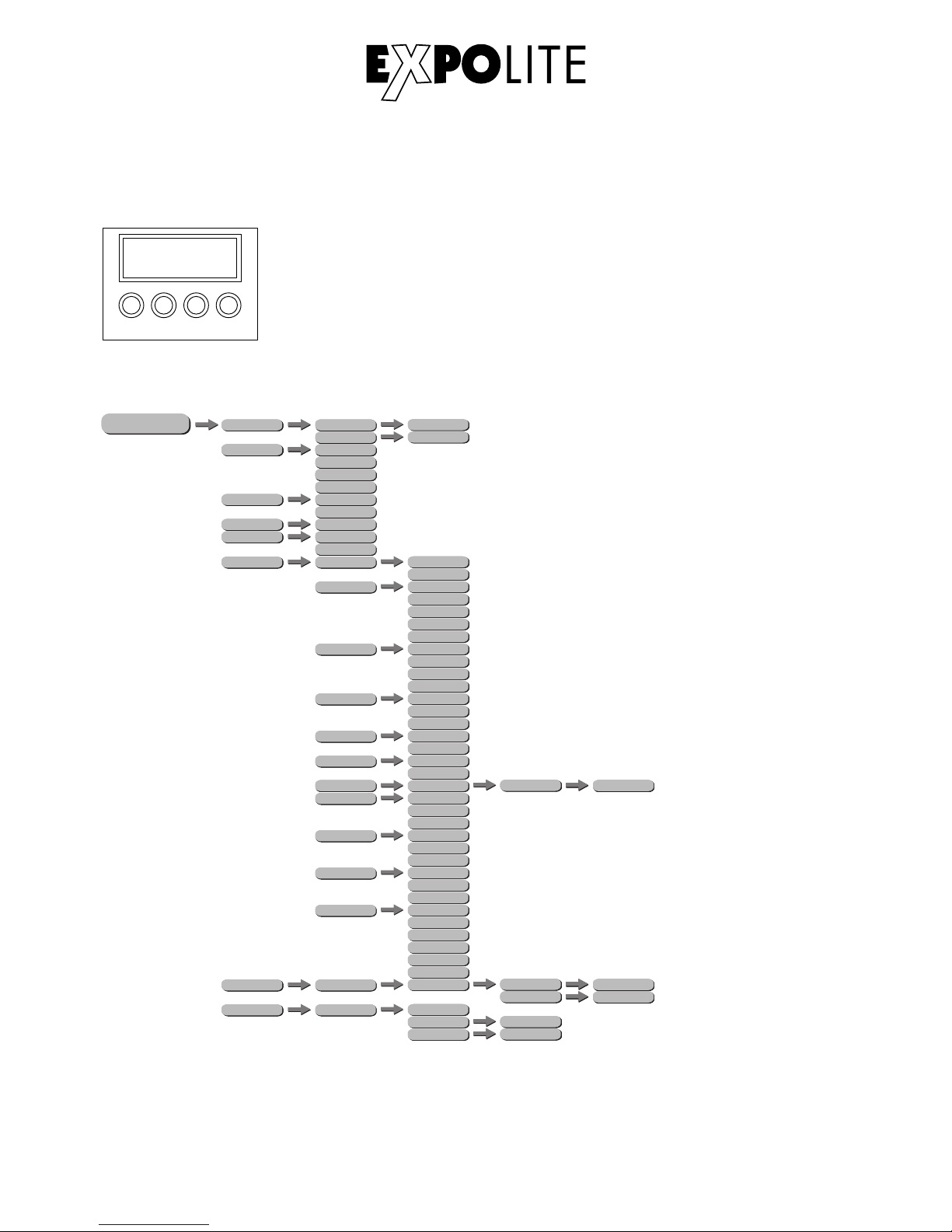
Bedienung
ME NU
PERSON
HSIC
STATIC
DIMMER
MENU - Taste:
ENTER-Taste:
UP-Taste:
DOWN-Taste
ENT ER UP
DOW N
MEN U
Eine Menüebene aufwärts
In gewähltes Menü springen; Eingabe bestätigen
Aufwärts blättern; Wert erhöhen
Abwärts blättern; Wert verringern
Bedienelemente am Gerät
Menüstruktur
PERSON
POWER MODE
HSIC
575W
ZOOM
HSIC
750W
0 - 100
0 - 100
D-08
PERSON
RUN
HSIC
DMX
HSIC
SLAVE
PERSON
RUN MODE
HSIC
DMX 512
HSIC
DMX
HSIC
SENS
HSICDMMR
PERSON
ADDRESS
HSIC
0 - 512
HSIC
YES
PERSON
MOTOR
HSIC
NO
PERSON
SETTING
HSICDIMMER
HSIC
CURV
HSIC
DMX ERROR
HSIC
SLOCK
HSIC
ZOOM
OFF
DIM1
DIM2
DIM3
OFF
CURVE1
CURVE2
CURVE3
SAVE
BLACK
OFF
ON
BASE
POS1
HSICKEY
YES
NO
DIM4
HSIC
PERSONALITY
UNO
DOS
STD.P
HSIC
RESET
****
HSIC
SEND
****
HSIC
OK
RESET
POS2
HSIC
PERFORM
LIVE
STUDIO
POWER
HSIC
MODE SETTING
SELF
MAST
POWER
HSICPWM
600Hz
1200Hz
2400Hz
4000Hz
6000Hz
25000Hz
PERSON
CALIBRATION
HSIC
****
CALZ
HSIC
SEND
****
HSIC
0 - 255
POS1
HSIC
SEND
****
HSIC
0 - 255
POS2
PERSON
INFO
VERSION
V01
****
388Axxxxxxxx
UID
****
LED HD FRESNEL
LABEL
Page 9
DMX-Adresse einstellen
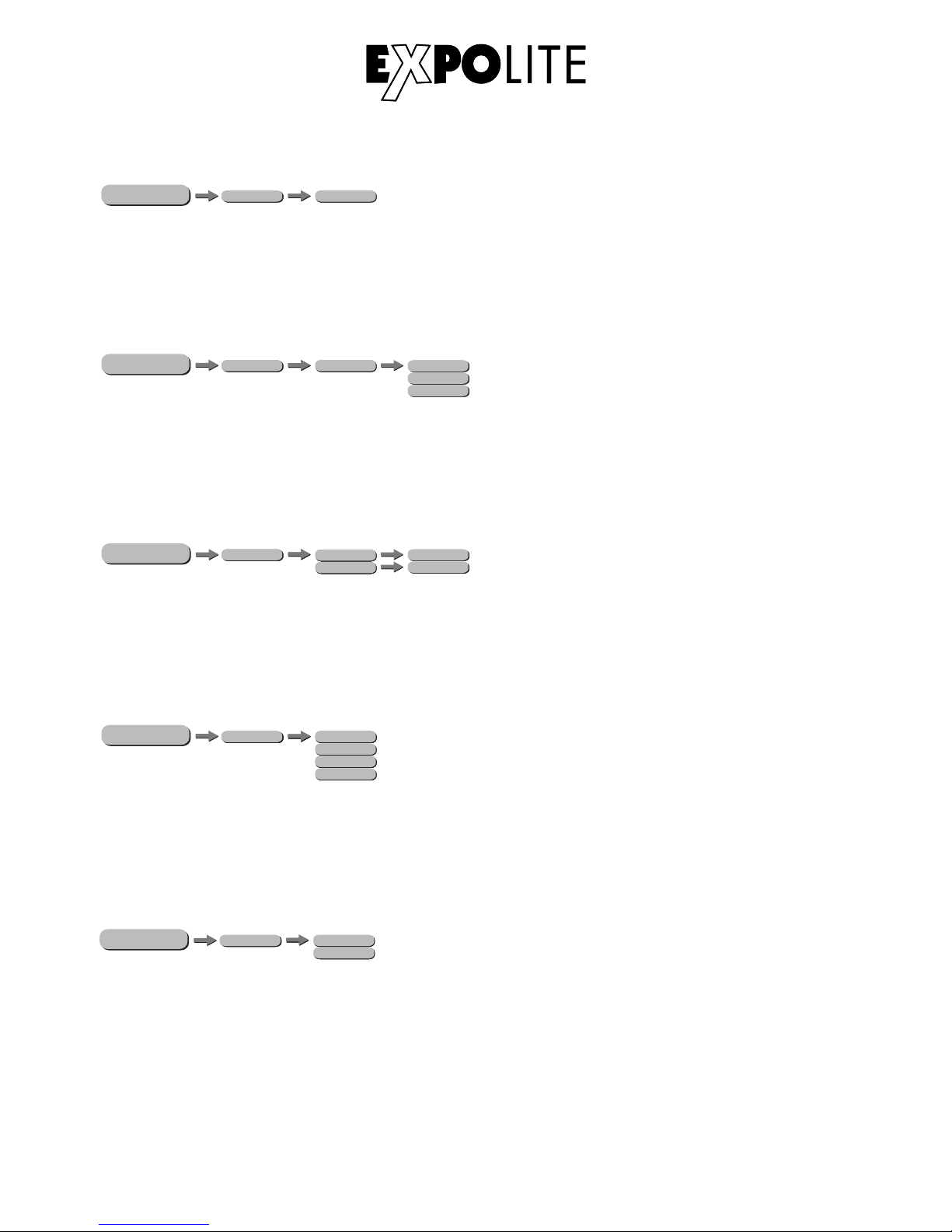
Im Menü wird im Punkt ADDRESS die DMX-Startadresse des Gerätes eingestellt. Diese bleibt auch
bei dem Wechsel der Personality erhalten.
ME NU
PERSON
HSIC
ADDRESS
D.(001 - 512)
DMX-Kanalbelegung einstellen
ME NU
Im Menü PERSONALITY wird die Belegung der DMX-Kanäle des Gerätes festgelegt. Es stehen die
Modi UNO (1 Kanal), DOS (2 Kanäle), STD.P (5 Kanäle) zur Verfügung.
Statische Farbe einstellen
Im Menü werden im Punkt STATIC die Helligkeit (DIMMER) und die Zoom-Position (ZOOM) des
Scheinwerfers im Stand-Alone Betrieb eingestellt.
ME NU
D-10
PERSON
STATIC
Power Mode
ME NU
PERSON
SETTING
HSIC
PERSONALITY
UNO
DOS
STD.P
HSICDIMMER
ZOOM
0 - 100
0 - 100
PERSON
POWER MODE
HSIC
575W
HSIC
750W
Im Menü POWER MODE wird eingestellt, ob die LED mit einer Helligkeit vergleichbar mit einem
575 Watt (575W) oder einem 750 Watt (750W) Halogenscheinwerfer angesteuert werden soll.
Runmode auswählen
Im Menü RUN MODE wird der Betriebsmodus eingestellt. Für den Betrieb an einem DMX-Kontroller
muss DMX aktiviert werden. Im Modus SLAVE wird das Gerät von einem Master-Gerät gesteuert.
ME NU
PERSON
RUN
HSIC
DMX
HSIC
SLAVE
PERSON
RUN MODE
HSIC
DMX 512
HSIC
DMX
HSIC
SENS
HSICDMMR
Page 10
Motor zurücksetzen
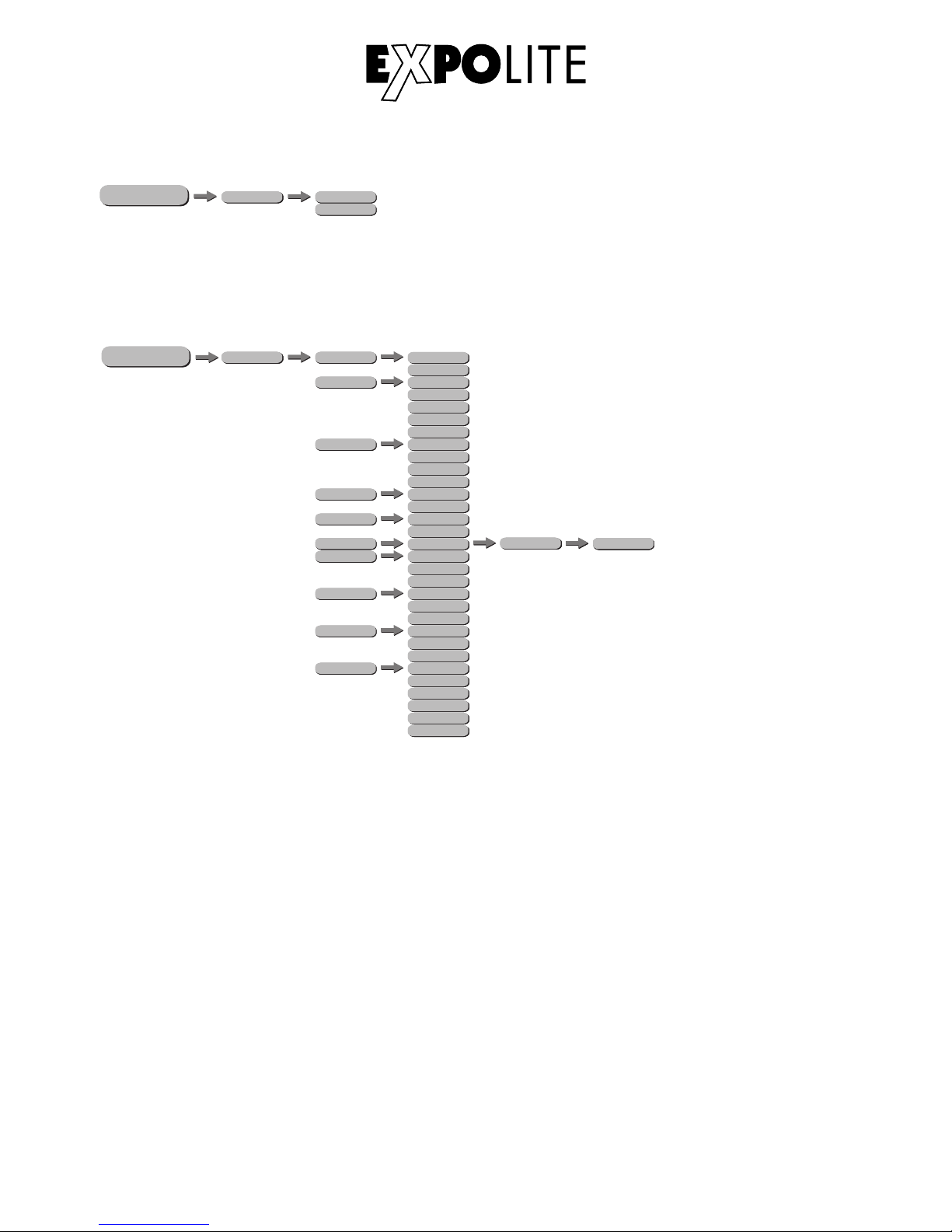
Im Menü MOTOR kann der motorische Zoom zurückgesetzt werden(YES).
ME NU
D-11
Verschiedene Einstellungen
ME NU
Das Passwort lautet: UP - DOWN - UP - DOWN - ENTER
KEY: aktiviert oder deaktiviert den den Passwortschutz des Gerätes bei Gerätestart. Wenn KEY auf
ON gestellt ist, startet das Gerät gesperrt und das Menü wird jeweils 30 Sekunden nach der letzten
Eingabe erneut gesperrt. Für Änderungen im Menü muss dann das Passwort UP - DOWN - UP DOWN - ENTER eingegeben werden.
DIMMER: stellt die gewünschte Dimmkurve zur Simulation eines Halogenleuchtmittels ein (OFF/
DIM1/DIM2/DIM3/DIM4).
HSIC
YES
PERSON
MOTOR
HSIC
NO
PERSON
SETTING
HSICDIMMER
HSIC
CURV
HSIC
DMX ERROR
HSIC
SLOCK
HSIC
ZOOM
OFF
DIM1
DIM2
DIM3
OFF
CURVE1
CURVE2
CURVE3
SAVE
BLACK
OFF
ON
BASE
POS1
HSICKEY
YES
NO
DIM4
HSIC
RESET
****
HSIC
SEND
****
HSIC
OK
RESET
POS2
HSIC
PERFORM
LIVE
STUDIO
POWER
HSIC
MODE SETTING
SELF
MAST
POWER
HSICPWM
600Hz
1200Hz
2400Hz
4000Hz
6000Hz
25000Hz
Page 11
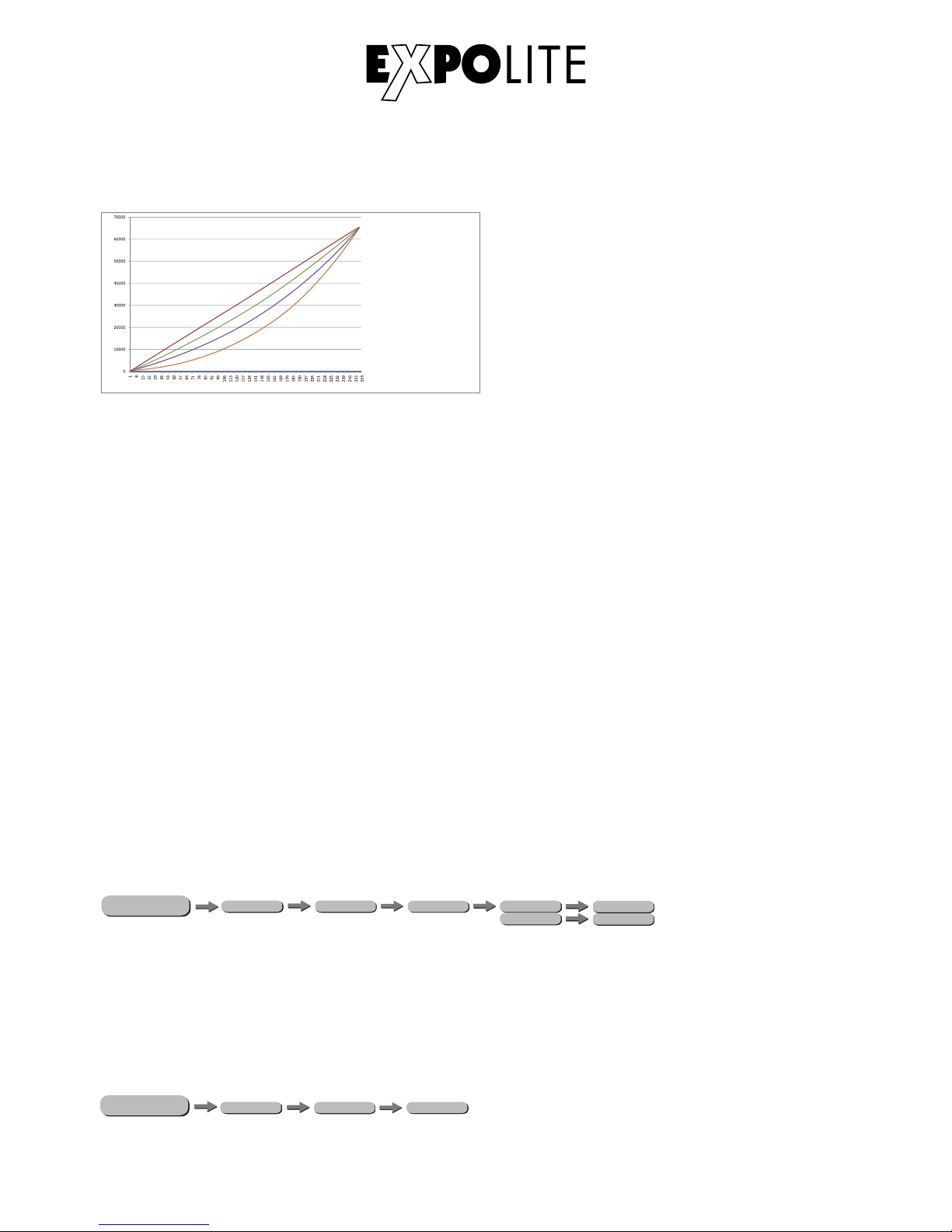
SLOCK: Settings Lock. In diesem Menüpunkt wird eingestellt, ob das Menü SET nur mit
Eingabe der Passwortes erreichbar ist. In diesem Fall (ON) wird das Passwort UP - DOWN - UP -
DOWN - ENTER benötigt, um Einstellungen vorzunehmen.
DMX ERROR: stellt das Verhalten bei Unterbrechung des DMX-Signals ein. SAVE um den letzten
empfangenen Wert zu halten, oder BLACK für Blackout.
RESET: setzt die editierbaren Einstellungen zurück auf die Werkseinstellungen.
ZOOM: in diesem Menü wird die generelle Start- (POS1) und Endposition (POS2) des motorischen
Zooms festgelegt, sowie die Grundposition (BASE) des Zooms.
PERFORMANCE: erlaubt dem User die Performance des Gerätes zwischen LIVE, STUDIO und
POWER zu unterscheiden.
MODE SETTING: legt fest, ob das Gerät Daten als Master an andere Geräte sendet (MASTER),
oder nicht (SELF).
PWM: bietet die Möglichkeit die PWM-Frequenz des Gerätes anzupassen (600Hz/1200Hz/2400Hz/
4000Hz/6000Hz/25000Hz).
CURV dimming
1: OFF
2: Cv1
3: Cv2
4: Cv3
1
2
3
4
(100 %)
CURV: Die Dimmerkurve wird, wie auf der Abbildung ersichtlich, eingestellt.
ME NU
Zoom - Kalibrierung
PERSON
CALIBRATION
HSIC
****
CALZ
HSIC
SEND
****
HSIC
0 - 255
POS1
HSIC
SEND
****
HSIC
0 - 255
POS2
Im Zoom-Menü kann zusätzlich die Start- (POS1) und die Endposition (POS2) für die Steuerung des
motorischen Zooms via DMX eingestellt werden. Diese Werte werden limitiert durch die
Zoom-Einstellungen im Menü Verschiedene Einstellungen.
Info-Menü
ME NU
Im Info-Menü (INFO), Untermenü VERS wird die z.Zt. installierte Firmwareversion des Gerätes
angezeigt.
PERSON
HSIC
INFO VERS
V01
D-11
Page 12
DMX-Kanalbelegung
Dieses Gerät verfügt über verschiedene DMX-Personalities. Bei diesen werden unterschiedlich
viele DMX-Kanäle belegt und die Reaktion des Gerätes unterscheidet sich entsprechend.
Es sind 3 DMX-Personalities (1-/2-/5-Kanäle) wählbar.
Durch Änderungen in der Gerätesoftware kann es zu weiteren oder geänderten Funktionen kommen.
Auf der Website steht das aktuellste Dokument „DMX-Channels“ als PDF zum Download zur Verfügung.
Steuerung mit DMX512
D-13
UNO
1 0-255 Master Dimmer
DOS
1 0-255 Master Dimmer
2 0-255 Master Dimmer Fine
STD.P
1 0-255 Master Dimmer
2 0-255 Master Dimmer Fine
Strobe
0-9 No Function
10-99 Strobe (Slow to fast)
100-109 No Function
110-179 Lightning Strobe
180-189 No Function
190-255 Random Strobe
4 0-255 Focus
Motor Reset
0-200 No Function
201-220 Motor Res et
221-255 No Function
3
5
Page 13

Delivery
- Expolite LED HD Fresnel WW
Expolite devices are carefully checked before shipment. If the delivery is not complete,
please contact your distributor immediately.
- Power connection cable
- General Information for Expolite Units
- User Manual
E-20
Page 14

Product Information
E-21
Voltage
Power Consumption
Weight
Ambient Temperature
Dimensions
Humidity
Protection
Housing
LEDs
LED Current
Optics
Control
DMX-Channels
Connectors
100V - 240V AC 50/60Hz
180W
417 x 286 x 260mm
6,6kg
Power In/Out | DMX In/Out
-0°C - 45°C
< 98%
IP 20
Extruded Aluminium
ca. 160W 3200K*
3,0A
15° - 60°
Stand-Alone / DMX512
1 - 3 (1/2/5)
* Tolerance in colour temperature according to LED manufacturer +/- 10%.
Page 15
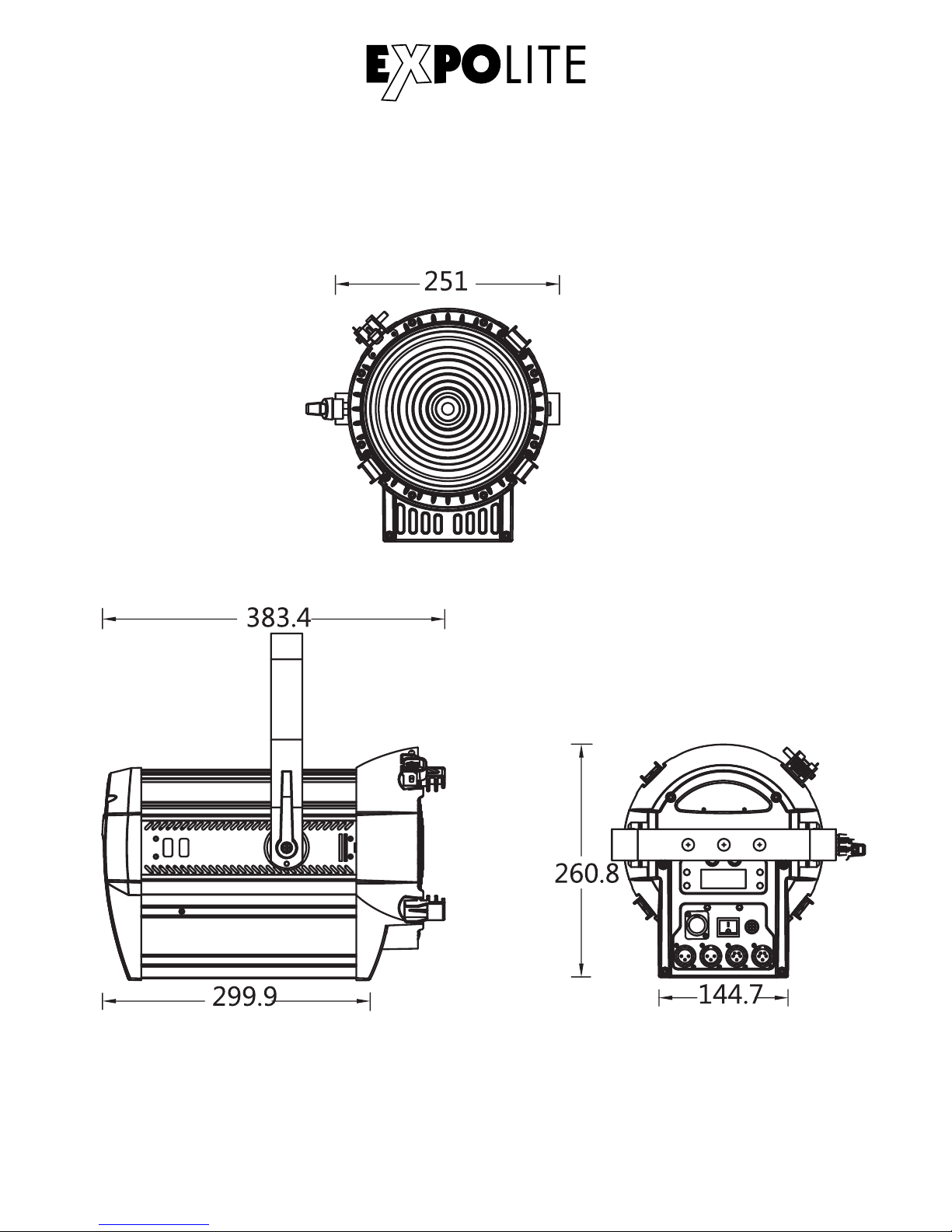
Dimensions
E-22
Page 16
Installation
Mounting
DMX-Connection
Use specified DMX-cables to connect the units to each other and to connect them to the controldesk. Enter the addresses and personalities to the units.
Powerconnection
230V: max. 10 fixtures in a row.
120V: max. 5 fixtures in a row.
DMX 512
CON TROLL ER
............
DMX A ddr .1 DMX A dd r.(Nx1 )+ 1 DMX A dd r.(Nx2 )+ 1
E-23
Hanging
The fixture can be mounted in a hanging position using the mounting
bracket. Fixture must be safe mounted in accordance with the relevant
regulations and provided with a safetycord to prevent falling.
Standing
The fixture can be mounted in an upright or sitting position. An appropriate
attachment (e.g. floorstand) is necessary. A safe and sufficient anti-slip
ground must be ensured!
NOTE
The LED module can be operated in any position.
Page 17
Operation
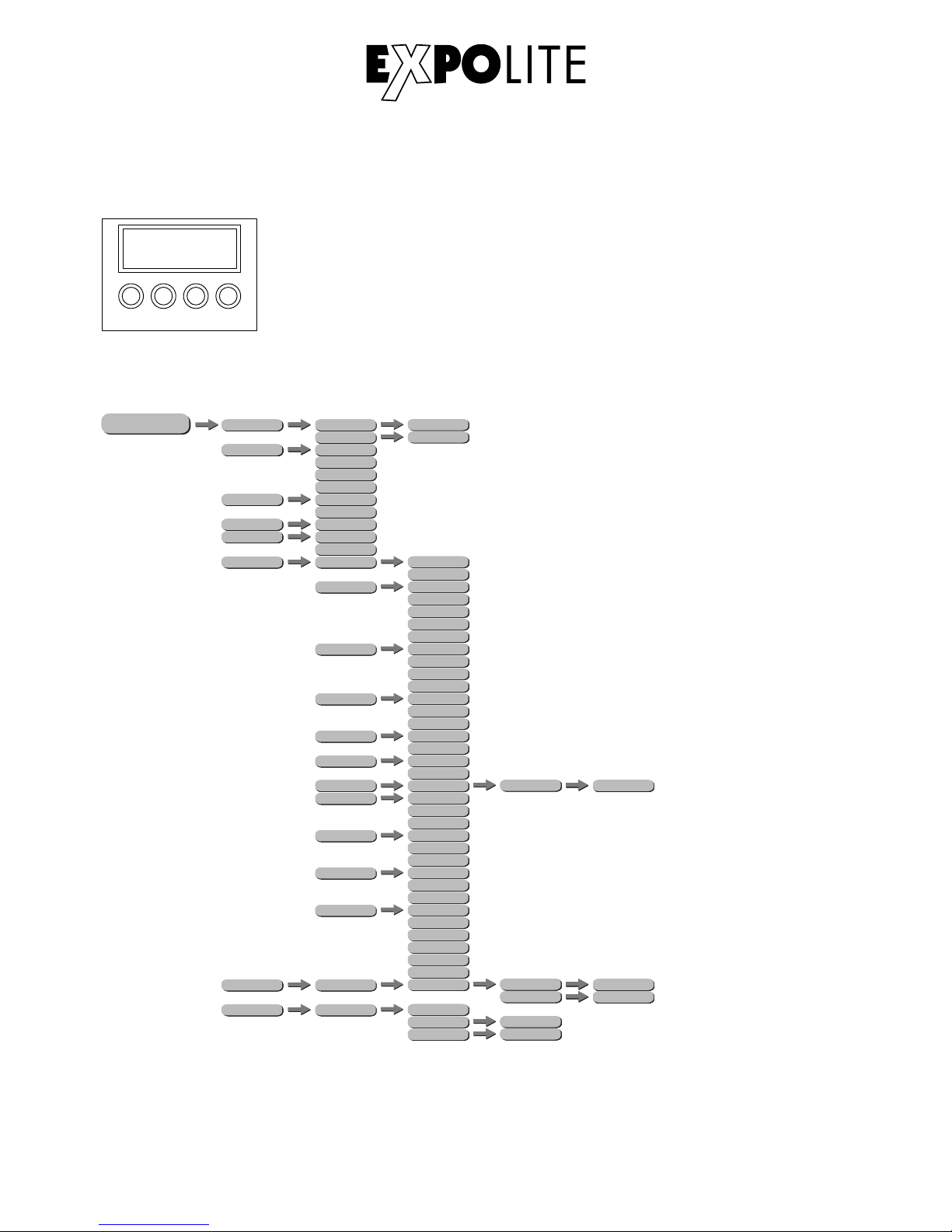
Menu Map
E-24
MENU:
ENTER:
UP:
DOWN:
ENT ER UP
DOW N
MEN U
Return to previous menu
Enter currently selected menu
Scroll Up, Increase value
Scroll down: Decrease value
Display Operation
ME NU
PERSON
HSIC
STATIC
DIMMER
PERSON
POWER MODE
HSIC
575W
ZOOM
HSIC
750W
0 - 100
0 - 100
PERSON
RUN
HSIC
DMX
HSIC
SLAVE
PERSON
RUN MODE
HSIC
DMX 512
HSIC
DMX
HSIC
SENS
HSICDMMR
PERSON
ADDRESS
HSIC
0 - 512
HSIC
YES
PERSON
MOTOR
HSIC
NO
PERSON
SETTING
HSICDIMMER
HSIC
CURV
HSIC
DMX ERROR
HSIC
SLOCK
HSIC
ZOOM
OFF
DIM1
DIM2
DIM3
OFF
CURVE1
CURVE2
CURVE3
SAVE
BLACK
OFF
ON
BASE
POS1
HSICKEY
YES
NO
DIM4
HSIC
PERSONALITY
UNO
DOS
STD.P
HSIC
RESET
****
HSIC
SEND
****
HSIC
OK
RESET
POS2
HSIC
PERFORM
LIVE
STUDIO
POWER
HSIC
MODE SETTING
SELF
MAST
POWER
HSICPWM
600Hz
1200Hz
2400Hz
4000Hz
6000Hz
25000Hz
PERSON
CALIBRATION
HSIC
****
CALZ
HSIC
SEND
****
HSIC
0 - 255
POS1
HSIC
SEND
****
HSIC
0 - 255
POS2
PERSON
INFO
VERSION
V01
****
388Axxxxxxxx
UID
****
LED HD FRESNEL
LABEL
Page 18
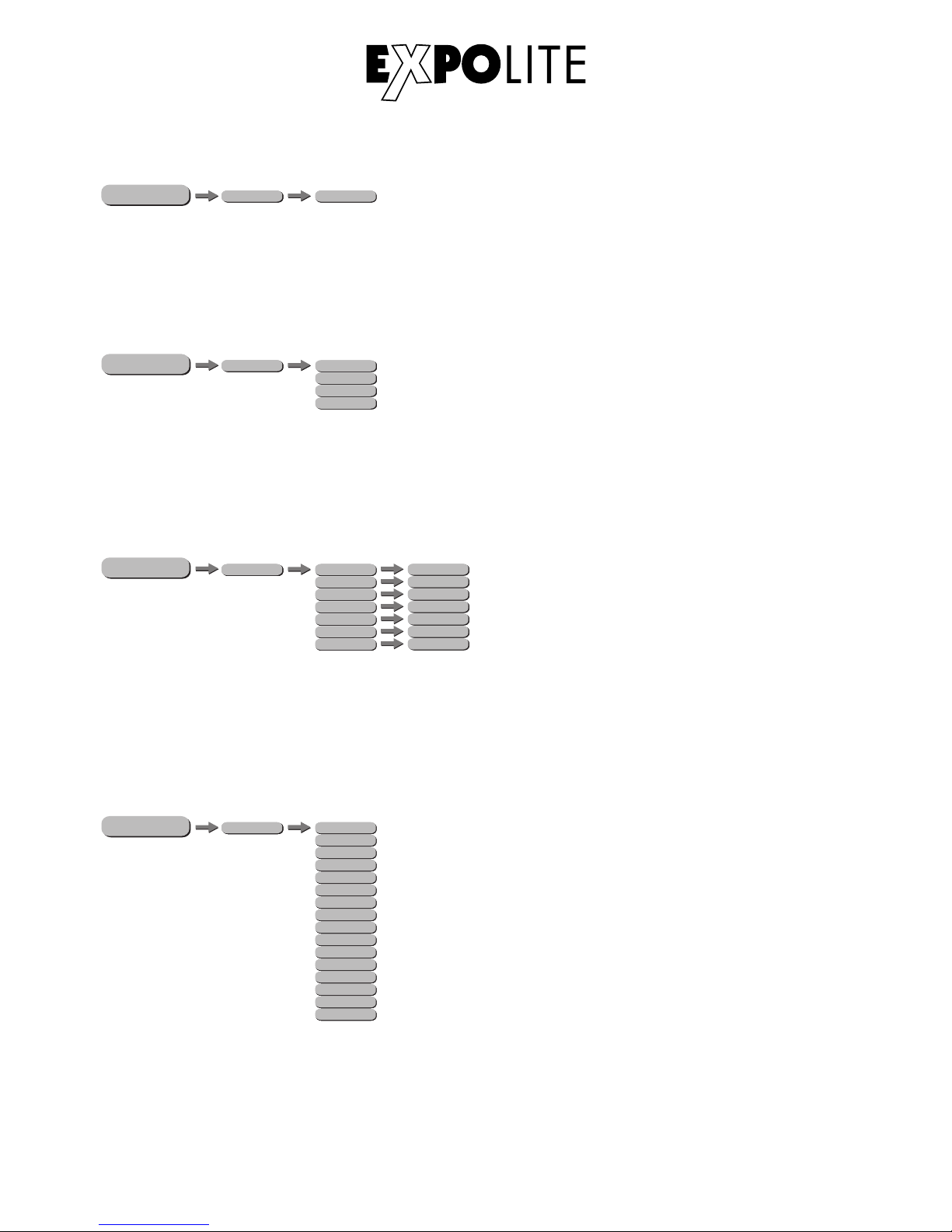
Setting DMX-Address
The DMX start address of the fixture is set in the menu ADDRESS. This is retained even when
changing the personality.
ME NU
Setting DMX-Personality
ME NU
The personality is set in the menu PERSONALITY. There are four different modes which can be
choosen: HSIC (8 channels), SSP (10 channels), TOUR (13 channels) and TR16 (19 channels).
Edit Static Colours
Static colours for stand-alone operation are set in STAT. These are mixed using the DMX value scale
0-255 for RED, GREEN, BLUE, AMBER, LIME and ZOOM as well as the strobe value 0-20Hz
STROBE.
ME NU
E-26
PERSON
HSIC
ADDRESS
D.(001 - 512)
HSIC
SSP
TOUR
Tr16
PERSON
PERSONALITY
PERSON
HSIC
STAT
RED
HSIC
HSIC
HSIC
GREEN
BLUE
AMBER
LIME
G.(0 - 255)
B.(0 - 255)
A.(0 - 255)
L.(0 - 255)
Z.(0 - 255)
S.(0 - 20)
R.(0 - 255)
HSIC
HSIC
ZOOM
STROBE
Using Preset Colours
ME NU
PERSON
PRESET COLOR
HSIC
L106
HSIC
R05
HSIC
L019
HSIC
R08
HSIC
R89
HSIC
R377
HSIC
L194
HSIC
R54
HSIC
R86
HSIC
L213
HSIC
R80
HSIC
R3314
HSIC
L202
HSIC
L328
HSIC
L768
HSIC
L101
In the menu PRESET COLOR the preset colours stored in the device are activated.These are based
on the colour scale of some Lee and Rosco filters (LXXX/RXX).
Page 19
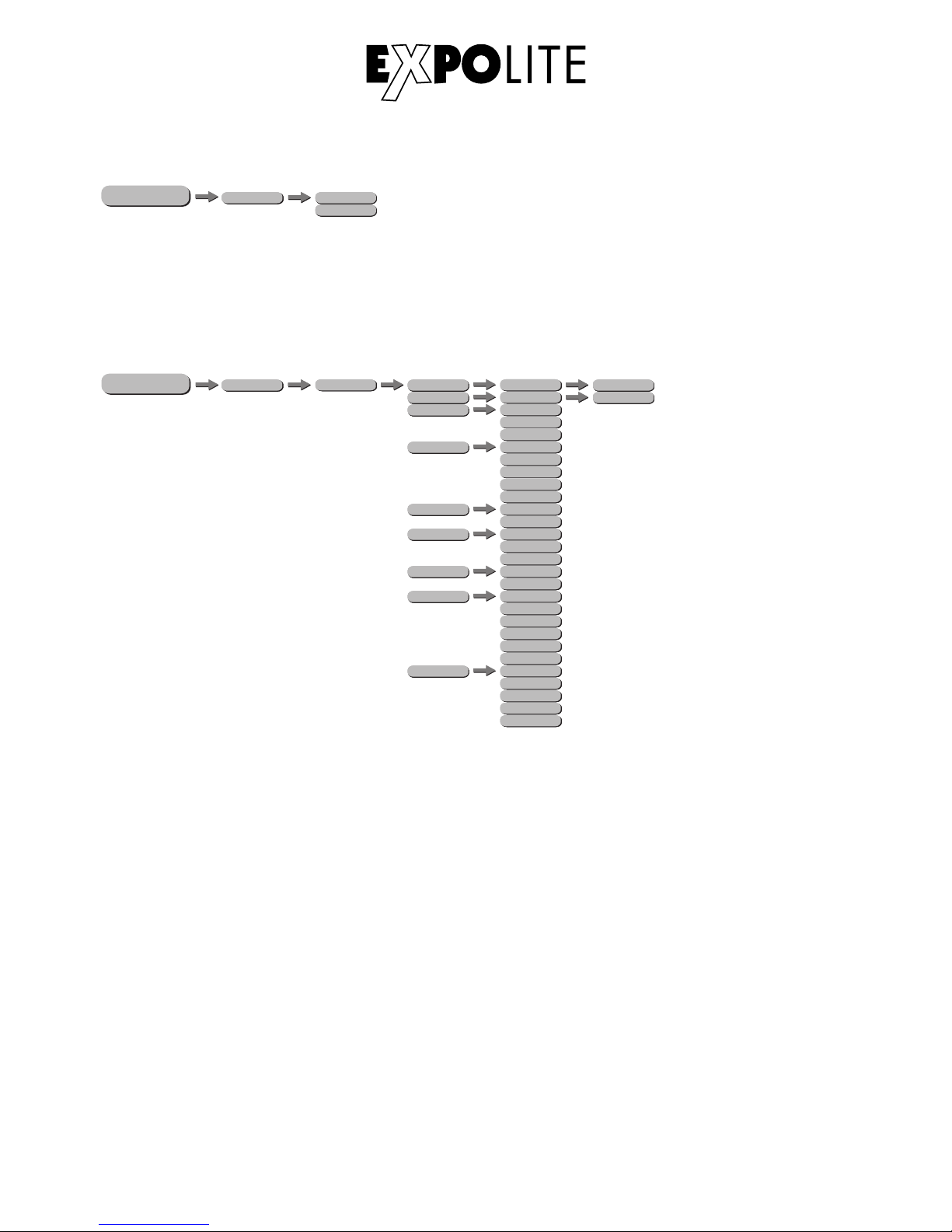
Choose Run Mode
The operating mode is set in menu RUN. For operation on a DMX-controller DMX needs to be
set. SLAVE sets the fixture into slave mode.
ME NU
E-27
PERSON
RUN
HSICDMX
HSIC
SLAVE
Miscellaneous Settings
ME NU
PERSON
SETTING
HSIC
RESET
HSIC
COLOR
HSICDIMMER
HSIC
DMX ERROR
HSIC
PERFORMANCE
HSIC
MCON
****
UC
OFF
RGBtoW
DIM4
DIM3
DIM2
DIM1
OFF
SAVE
BLACK
LIVE
STUDIO
SELF
MASTER
HSIC
SENDUPLOAD
****
****
HSIC
RESET
POWER
HSIC
PWM_RATE
600HZ
1200HZ
2000HZ
4000HZ
6000HZ
25000HZ
HSIC
FULL POWER CCT
3200K
4200K
5600K
10000K
NORMAL
The default password is: UP - DOWN - UP - DOWN - ENTER
UPLD: sends the user programs to connected slave fixtures.
RESET: sets all editable settings back to factory default.
COLOR: in this submenu a colour calibration is selected or deactivated. When UC is selected the
Uniform-Colour factory calibration is used, which adjusts devices of different generations. When
RGBtoW is selected, the maximum brightness values at DMX = 255 are limited to the values set in
CALIB.C\RGBtoW. If the value is set OFF, the calibration is deactivated and the device reaches the
maximum brightness.
DIMMER: controls different dimming speeds to simulate a halogen bulb (DIM4/DIM3/DIM2/DIM1/
OFF).
DMX ERROR: sets how the fixture responses if DMX-signal gets lost. Set SAVE to hold the last
received value or BLACK for blackout.
PERFORMANCE: gives the user the opportunity to change the performance of the fixture between
LIVE, STUDIO and POWER.
MCON: sets if the fixture is a master and sends data to other fixtures (MASTER), or not (SELF).
Page 20
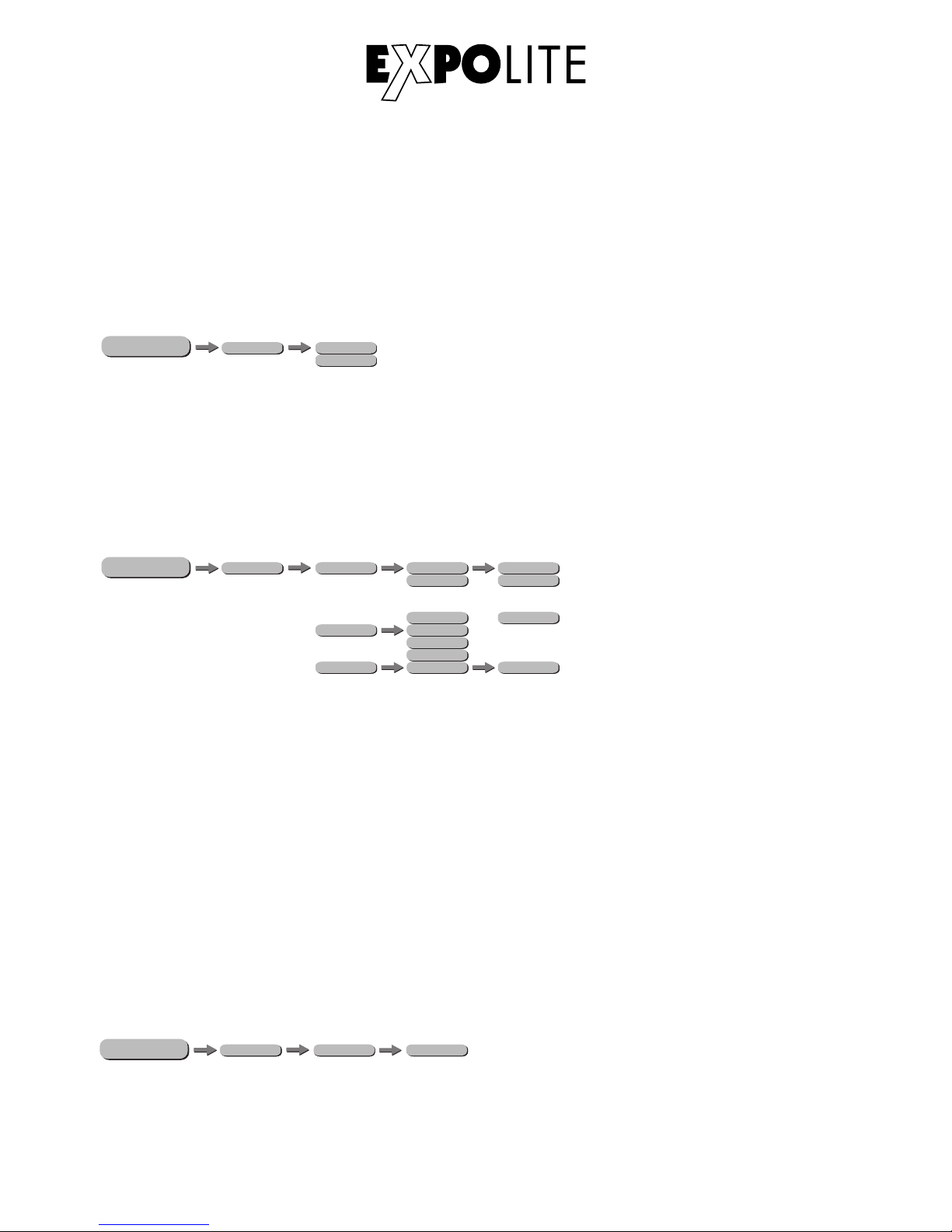
PWM: gives the user the possibility to adjust the PWM frequency of the leds (600Hz/1200Hz/2000Hz/
4000Hz/6000Hz/25000Hz).
FULL POWER CCT: sets the colour temperature at maximum output. 3200K/4200K/5600K/10000K
and NORMAL can be set.
Activate Password Protection
In the menu KEY the password protection of the fixture is activated or deactivated. If set ON the
fixture is password protected when started. 30 seconds after the last setting the menu is locked
again. To be able to make changes in the menu the password UP - DOWN - UP - DOWN - ENTER
needs to be typed in.
ME NU
PERSON
HSICKEY
ON
HSIC
OFF
ME NU
Calibration and Whiteadjustment
PERSON
CALIB.C
WHITE
WH.01
2700K
3000K
8000K
WH.12
o
o
o
RGBtoW
R(0 - 255)
G(0 - 255)
B(0 - 255)
****
CALR OK
o
o
o
WH.02
In the menu CALIB.C the calibrations and whiteadjustments can be set.
In the submenu WHITE the preset colour temperatures for the white values are stored.
In the submenu RGBtoW a custom colour calibration is stored which limits the maximum brightness
of the colour channels at the DMX value "255".
NOTE: The maximum value can be limited to 0. In this case, a colour channel does not respond
to a sent DMX value, which can be misinterpreted as a device error.
To reset the changes made to the colour temperature presets to factory default, the setting
CALR needs to be confirmed with the default password UP - DOWN - UP - DOWN ENTER.
Info Menu
ME NU
In the info menu (INFO), submenu VERS the currently installed firmware version is shown.
PERSON
HSIC
INFO VERS
V01
E-28
Page 21
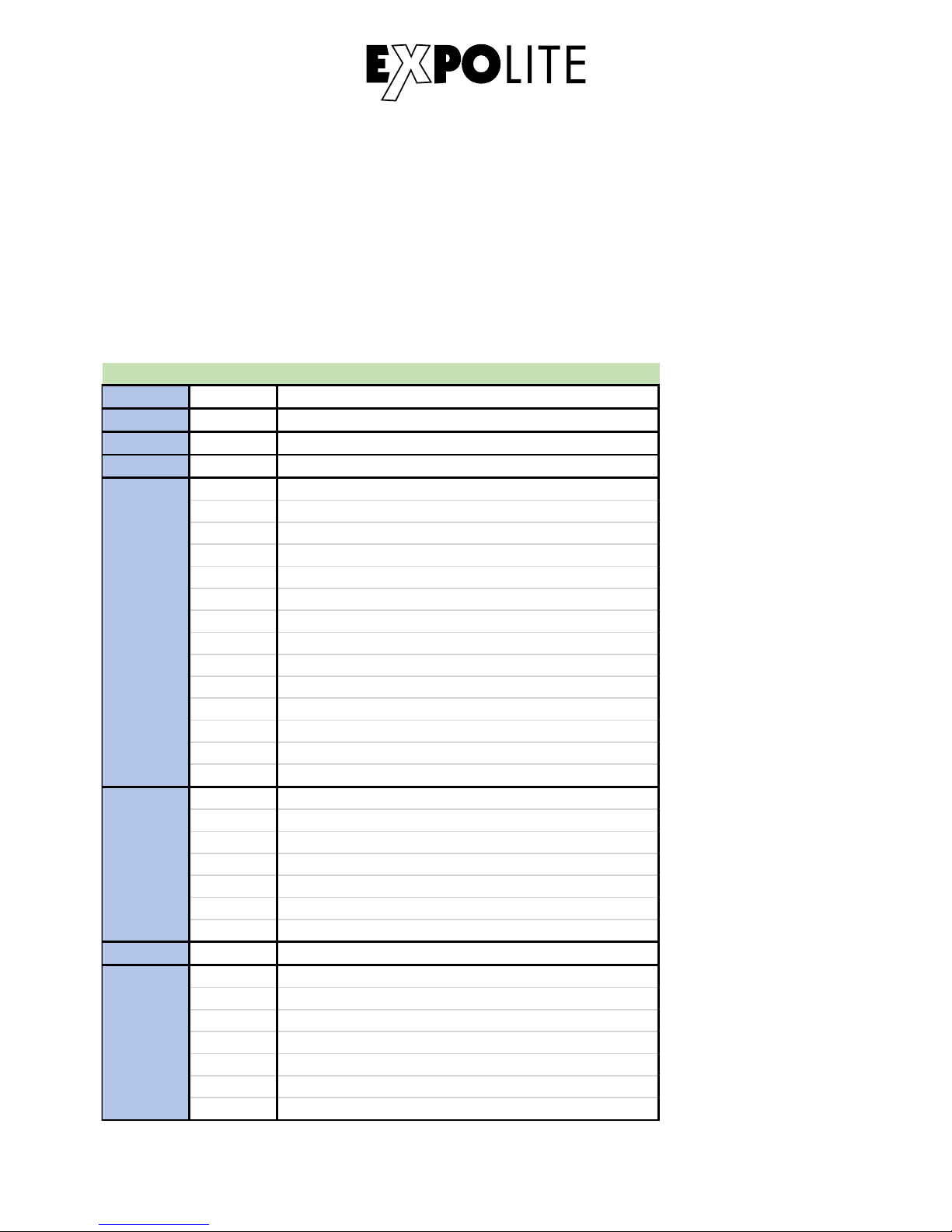
DMX-Channel assignment
This device has several DMX personalities. In each personality a different number of DMX channels
is used and the reaction of the device differs accordingly. There are four DMX personalities with 8, 10,
13 and 19 channels selectable.
Because of changes in the firmware of the fixture, functions can be added or changed.
You can find the current version „DMX-Channels“ as PDF-file on the website, ready to download.
Using DMX512 Control
E-29
1 0-255 Intensity
2 0-255 Hue
3 0-255 Hue Fine
4 0-255 Satura tion
CCT
0-10 No Function
11-30 2700K
31-50 3000K
51-70 3200K
71-90 3500K
91-110 4000K
111-130 4200K
131-150 4500K
151-170 5600K
171-190 6000K
191-210 6500K
211-230 7200K
231-255 8000K
Strobe
0-9 No Function
10-99 Strobe (Slow to fast)
100-109 No Function
110-179 Lightning Strobe
180-189 No Function
190-255 Rando m Strobe
7 0-255 Zoom
Dimmer Spee d
0-9 No Function
10-29 Off
30-69 Dim1
70-129 Dim2
130-189 Dim3
190-255 Dim4
HSIC
5
6
8
Page 22
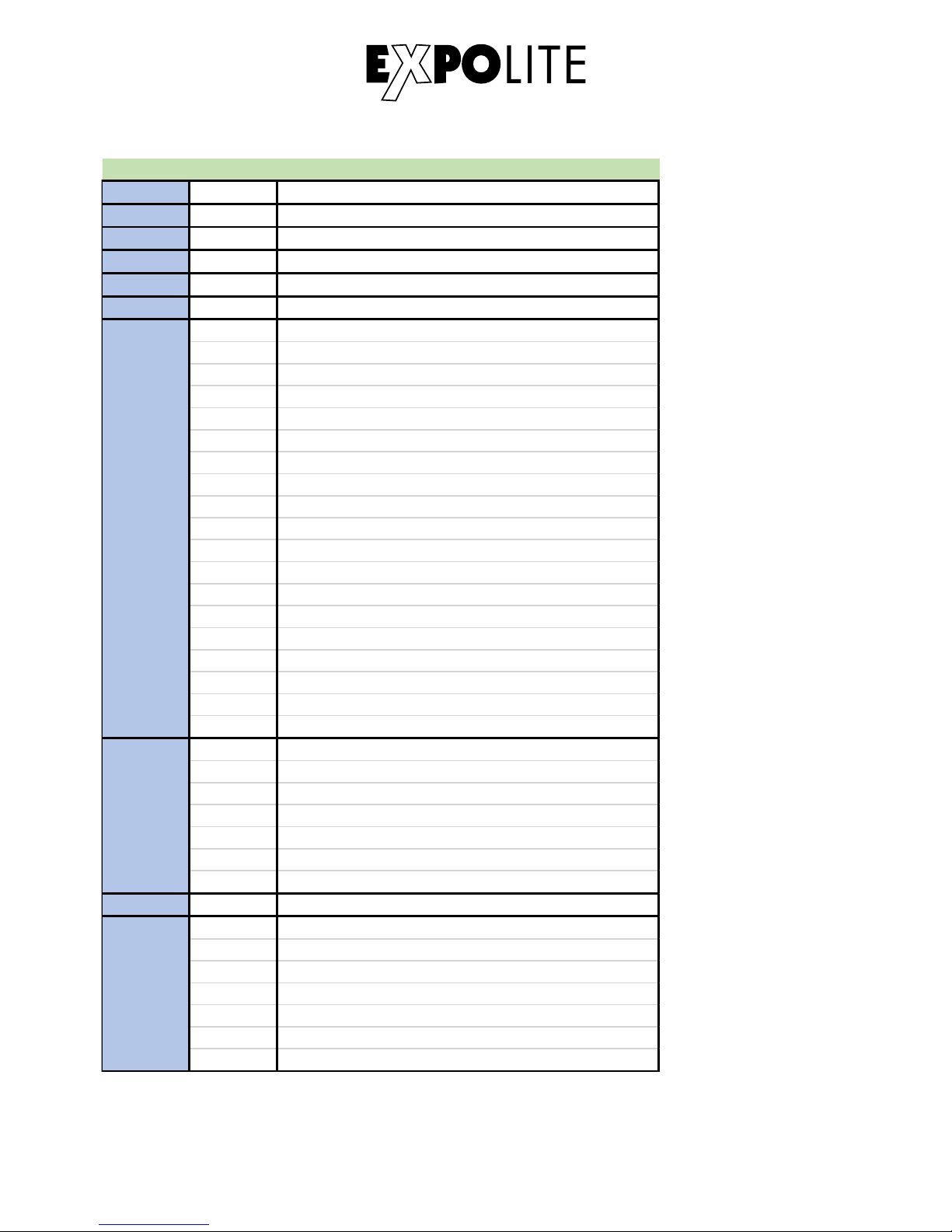
1 0-255 Master Dimmer
2 0-255 Red
3 0-255 Green
4 0-255 Blue
5 0-255 Lime
6 0-255 Amber
Pre set Colour
0-10 No Function
11-20 L106
21-30 R05
31-40 L194
41-50 R54
51-60 L019
61-70 R08
71-80 R89
81-90 R86
91-100 L213
101-110 R377
111-120 R80
121-130 L202
131-140 L328
141-150 R3314
151-160 L101
161-170 L768
171-255 No Function
Strobe
0-9 No Function
10-99 Strobe (Slow to fast)
100-109 No Function
110-179 Lightning Strobe
180-189 No Function
190-255 Rando m Strobe
9 0-255 Zoom
Dimmer Spee d
0-9 No Function
10-29 Off
30-69 Dim1
70-129 Dim2
130-189 Dim3
190-255 Dim4
SSP
7
8
10
E-30
Page 23
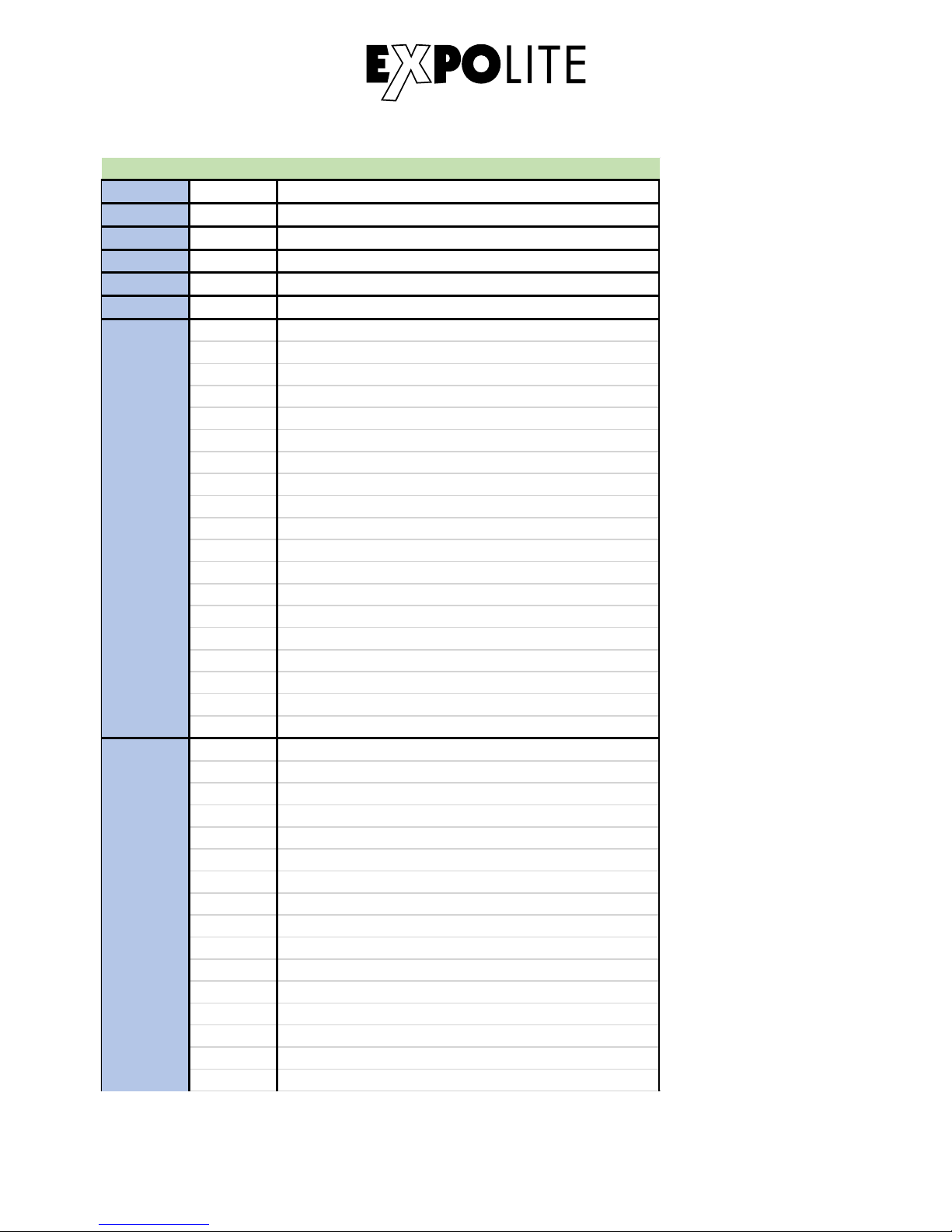
Tour Mode
1 0-255 Master Dimmer
2 0-255 Red
3 0-255 Green
4 0-255 Blue
5 0-255 Lime
6 0-255 Amber
Pre set Colour
0-10 No Function
11-20 L106
21-30 R05
31-40 L194
41-50 R54
51-60 L019
61-70 R08
71-80 R89
81-90 R86
91-100 L213
101-110 R377
111-120 R80
121-130 L202
131-140 L328
141-150 R3314
151-160 L101
161-170 L768
171-255 No Function
Colour Macro & W hite
0-10 No Function
11-30 Red 100% / Green Up / Blue 0%
31-50 Red Down / Green 100% / Blue 0%
51-70 Red 0% / Gree n 100% / Blue Up
71-90 Red 0% / Gree n Down / Blue 100%
91-110 Red Up / Green 0% / Blue 100%
111-130 Red 100% / Green 0% / Blue Dow n
131-150 Red 100% / Green Up / Blue Up
151-170 Red Dow n / Gree n Dow n / Blue 100%
171-195 All Led at Full Output
196-200 2700K
201-205 3000K
206-210 3200K
211-215 3500K
216-220 4000K
7
8
E-31
Page 24
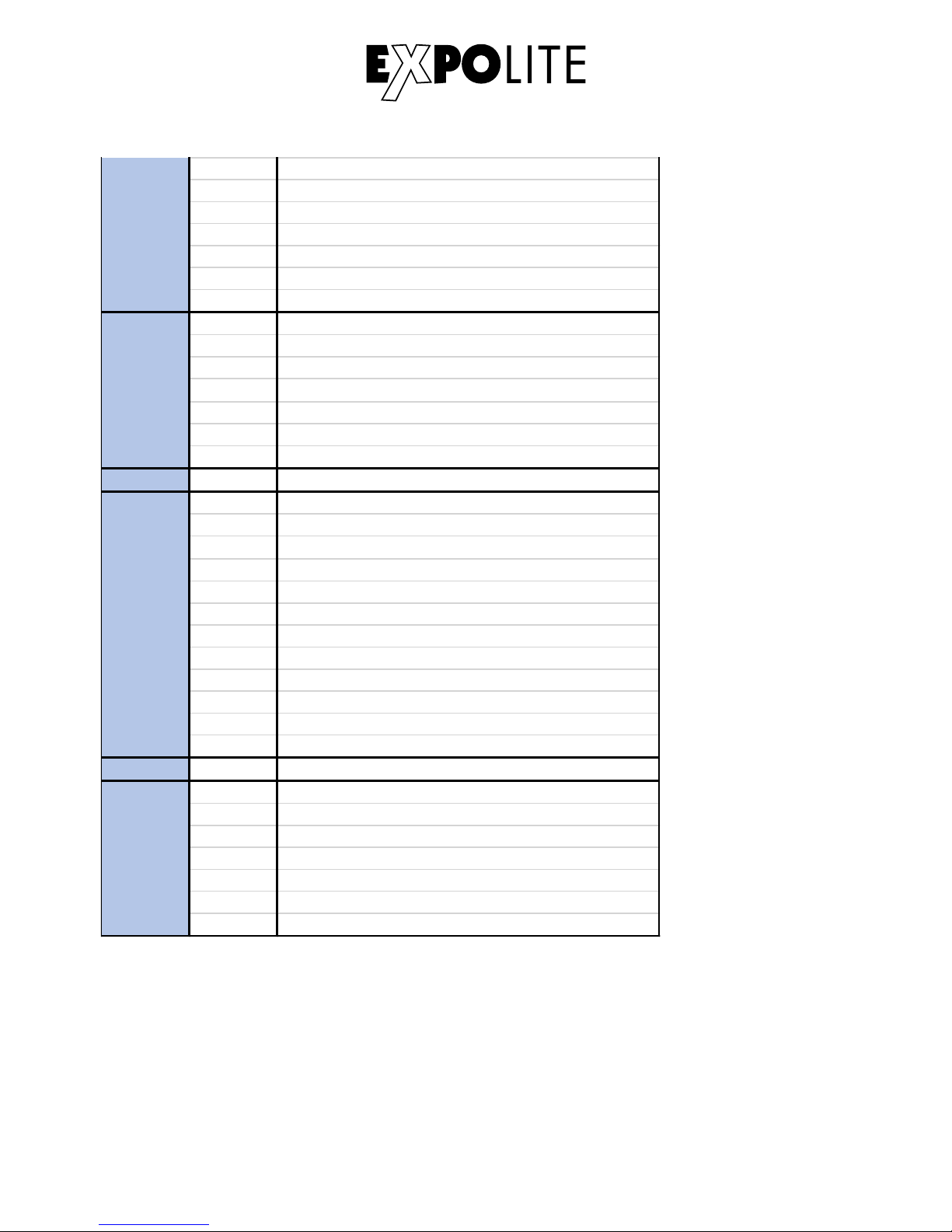
221-225 4200K
226-230 4500K
231-235 5600K
236-240 6000K
241-245 6500K
246-250 7200K
251-255 8000K
Strobe
0-9 No Function
10-99 Strobe (Slow to fast)
100-109 No Function
110-179 Lightning Strobe
180-189 No Function
190-255 Rando m Strobe
10 0-255 Zoom
Auto
0-40 No Function
41-60 Auto 1
61-80 Auto 2
81-100 Auto 3
101-120 Auto 4
121-140 Auto 5
141-160 Auto 6
161-180 Auto 7
181-200 Auto 8
201-220 Auto 9
221-255 Auto 10
12 0-255 Auto Speed Adjustment
Dimmer Speed
0-9 No Function
10-29 Off
30-69 Dim1
70-129 Dim2
130-189 Dim3
190-255 Dim4
9
11
13
8
E-32
Page 25
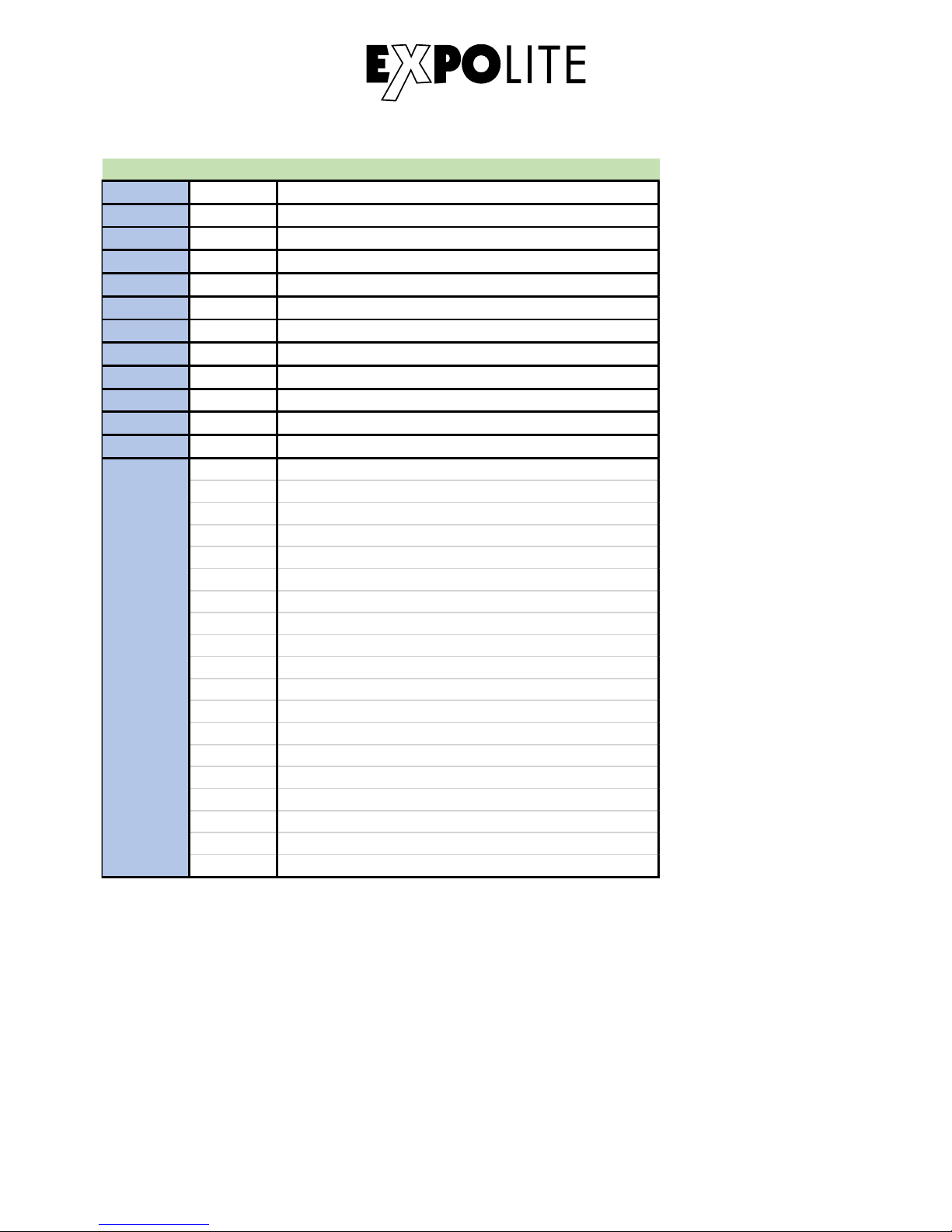
TR16 Mode
1 0-255 Master Dimmer
2 0-255 Master Dimmer Fine
3 0-255 Red
4 0-255 Red Fine
5 0-255 Green
6 0-255 Green Fine
7 0-255 Blue
8 0-255 Blue Fine
9 0-255 Lime
10 0-255 Lime Fine
11 0-255 Ambe r
12 0-255 Ambe r Fine
Pre set Colour
0-10 No Function
11-20 L106
21-30 R05
31-40 L194
41-50 R54
51-60 L019
61-70 R08
71-80 R89
81-90 R86
91-100 L213
101-110 R377
111-120 R80
121-130 L202
131-140 L328
141-150 R3314
151-160 L101
161-170 L768
171-255 No Function
13
E-33
Page 26
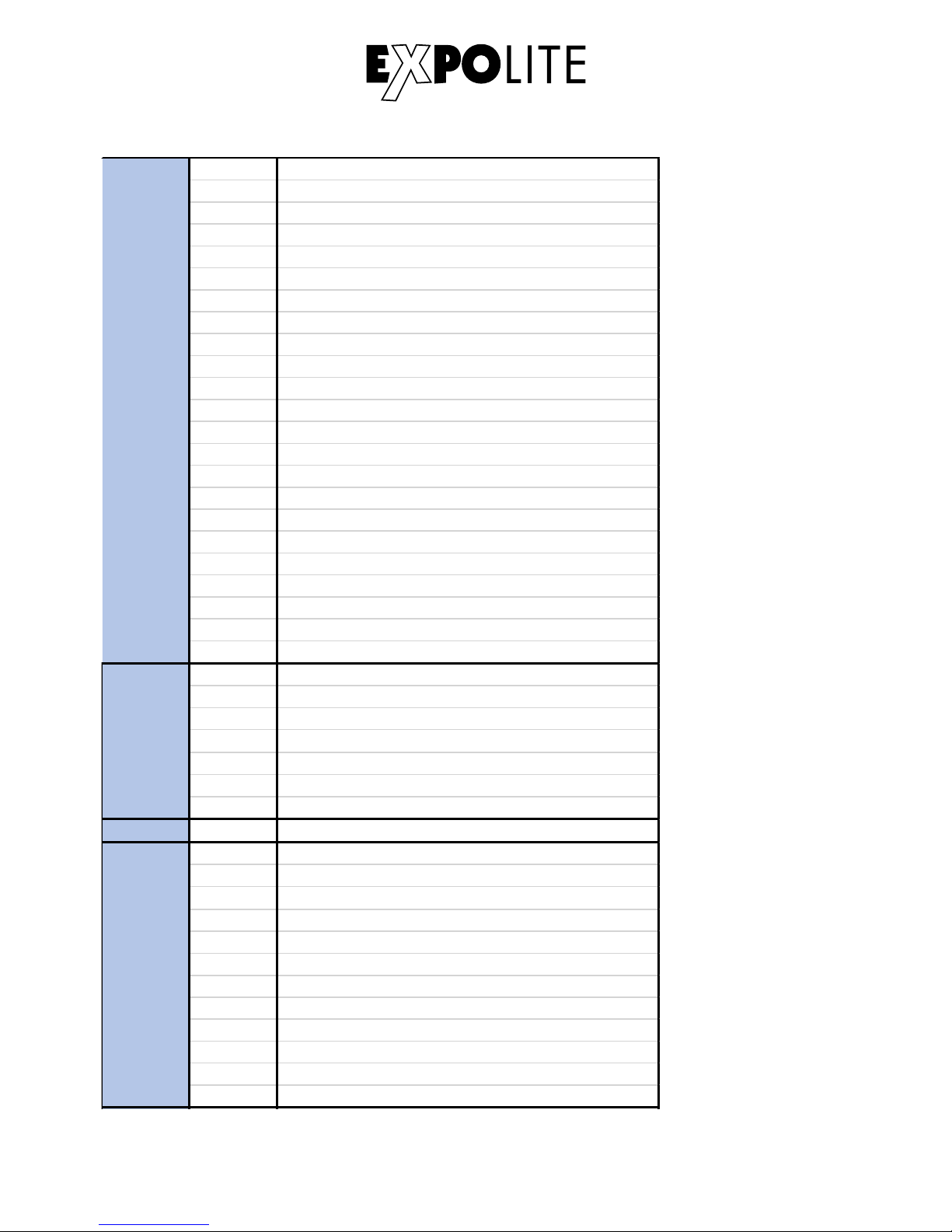
Colour Macro & W hite
0-10 No Function
11-30 Red 100% / Green Up / Blue 0%
31-50 Red Down / Green 100% / Blue 0%
51-70 Red 0% / Gree n 100% / Blue Up
71-90 Red 0% / Gree n Dow n / Blue 100%
91-110 Red Up / Green 0% / Blue 100%
111-130 Red 100% / Green 0% / Blue Dow n
131-150 Red 100% / Green Up / Blue Up
151-170 Red Dow n / Green Dow n / Blue 100%
171-195 All Led at Full Output
196-200 2700K
201-205 3000K
206-210 3200K
211-215 3500K
216-220 4000K
221-225 4200K
226-230 4500K
231-235 5600K
236-240 6000K
241-245 6500K
246-250 7200K
251-255 8000K
Strobe
0-9 No Function
10-99 Strobe (Slow to fast)
100-109 No Function
110-179 Lightning Strobe
180-189 No Function
190-255 Rando m Strobe
16 0-255 Zoom
Auto
0-40 No Function
41-60 Auto 1
61-80 Auto 2
81-100 Auto 3
101-120 Auto 4
121-140 Auto 5
141-160 Auto 6
161-180 Auto 7
181-200 Auto 8
201-220 Auto 9
221-255 Auto 10
14
15
17
E-34
Page 27
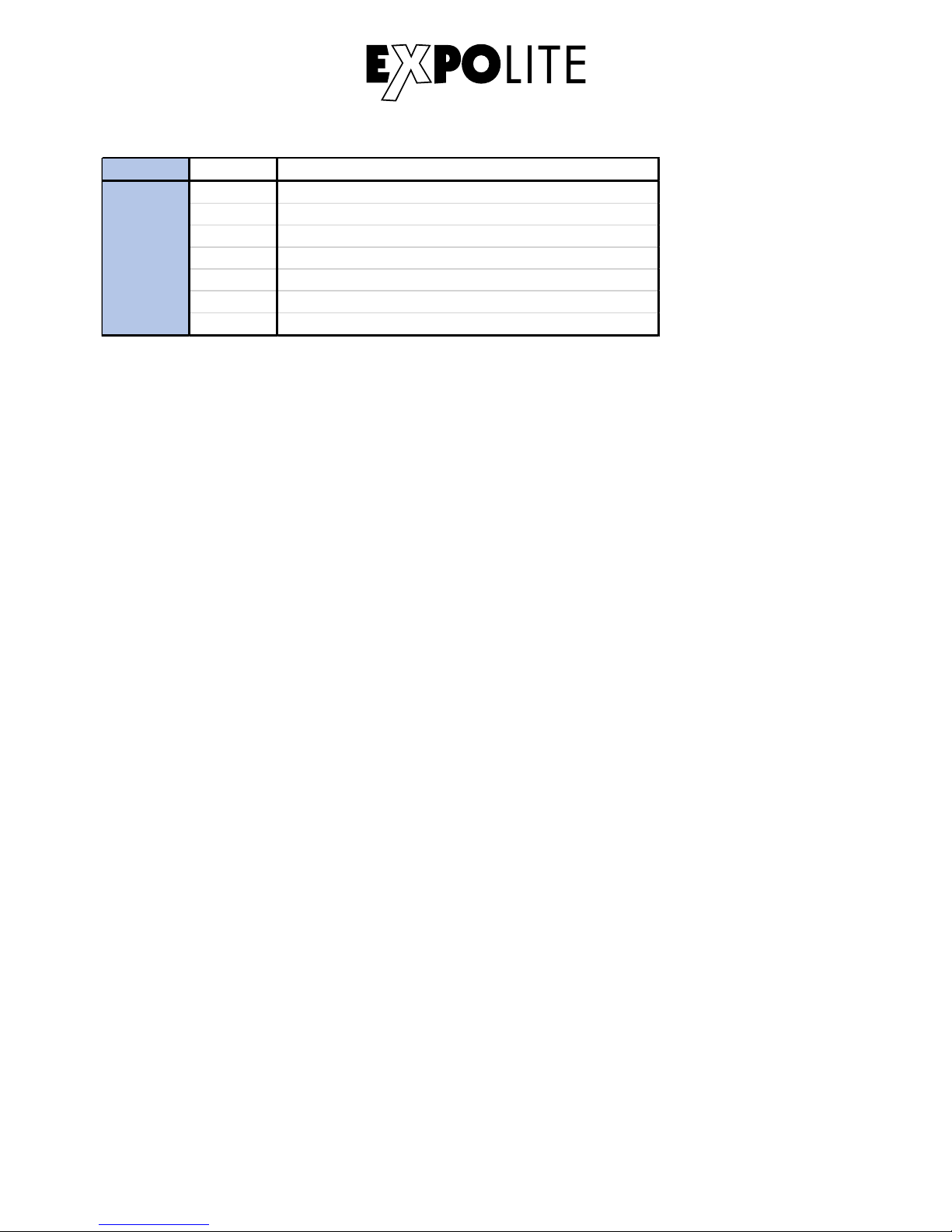
18 0-255 Auto Spee d Adjustment
Dimmer Speed
0-9 No Function
10-29 Off
30-69 Dim1
70-129 Dim2
130-189 Dim3
190-255 Dim4
19
E-35
Page 28
© 2018 by Focon Showtechnic Vertriebsgesellschaft mbH
 Loading...