

Page 1
Model:GL8898
INSPECTION TOOL
Version 1.0
Please read this user manual carefully before using this product.
Failure to understand operation procedures may result in injury.
3. The flexible tube can be bent into numerous shapes that may
help you explore areas you otherwise thought were impossible
4. The accessorie s included with EXP LORER COMPACT can be
dropped rings or screws.used to retrieve small items like
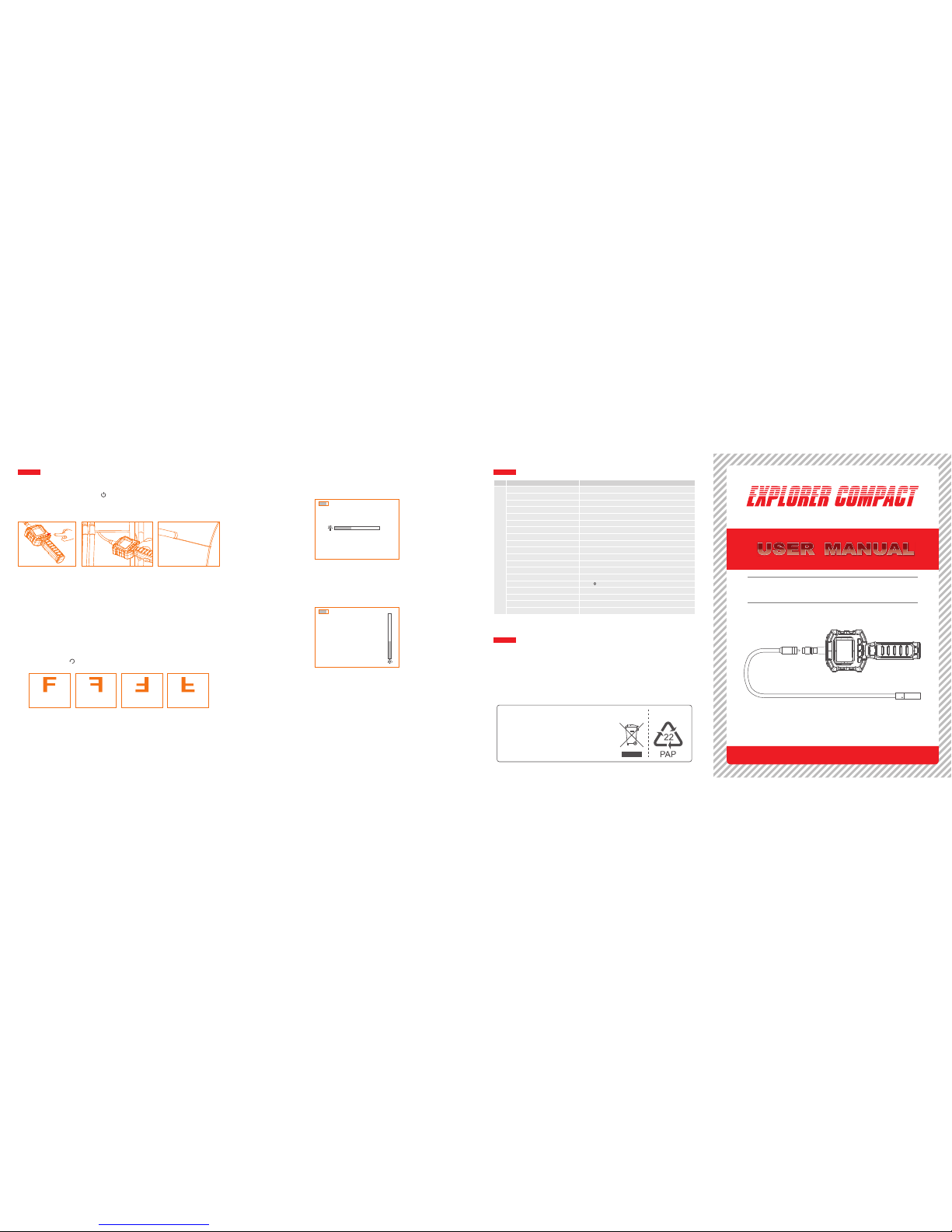
OPERATION
1. Press an d hold on the power switc h for about 3 seconds
to turn on the camera, the power indicator will illuminate and
Switch on Camera
Mirror Image
In real-time monitorin g mode, The mirror image can be adjusted
Normal U pside D own
Norma l
Mirror U pside D own
Mirro r
the LCD will become viewable.
by pressin g the button.
2. When in use, the tube should easily maneuver itself into position.
Do not apply excessive force.
to see.
LEDs Brightness Control
The 8 l evels of LED brigh tness can be adjus ted by press ing
the brightness button in real-time monitoring.
LCD Contrast Control
The 8 l evels of LCD contr ast ca n be ad juste d by pr essin g
the contrast button in real-time monitoring.
SPECIFICATIONS
※ All specifications are subject to minor change without prior notice.
Camera+Handle
FCC INFORMATION
This devic e complies with part 1 5 of the FCC Rules. Ope ration
is subject to the foll owing two c onditions :
(1) This device may not cause harmful interference;
(2) This device must accept any i nterference rec eived, includin g
undesired operation. Changes or interference that may cause
modifications not expressly approved by the party responsible
Model No.
Video System
Dimensions of Handle
Operating Temperature
Operating Humidity
Approx. Weight
Effective Pixels
Imaging Sensor
Screen Size
Minimum Illumination
Waterproof Capacity
Dimensions of Tube
Horizontal Viewing Angle
Consumption Current
Output Signal Impedance
Output Signal Level
Power Supply
Work Time
Contrast
Brightness
PAL/NTSC
238mA
257 x 92 x 44(mm) (Excluding Flexible Tube)
15~85%RH
-10 ~50 /14 F~122 F
O O O O
C C
Parameter
O
48
407g (Including Batteries)
640 x 480
1/9-inch CMOS
"
2.31 TFT LCD
IP67 (for lens/tube only)
8mm x 980mm (Including Camera)
0 Lux (LED ON)
75ohm
0.9--1.3Vp-p
AA x 4 batteries (1.5V x 4)
6Hour (Max.)
2
220CD/M (TYP)
300
for compliance could void the user’s authority to operate the
equipment.
EU Environmental Protection
Waste electrical products should
not be disposed of with household
waste. Please recycle where
facilities exist. Check with your
local authority or retailer for
recycling advice.
Inspection Camera
with Color LCD Monitor
Page 2
SAVE THESE INSTRUCTIONS!
※ Turn off the system if it is not in use.
※ Remove the batteries when cleaning the unit.
※ Remove the batteries before storing the unit for a long time.
※ When necessary, REPLACE ALL FOUR (4) BATTERIES in this
two (2) batteries at a time.unit with new ones, not one (1) or
※ Use only the size and type of battery specified.
GENERAL SAFETY INFORMATION
WARNING! Read and understand all instructions. Failure to follow
all instructions listed below may result in electric shock,
fire and/or serious personal injury.
※ Do not use the camera if condensation forms inside the lens.
using again.Let the water evaporate before
※ Preven t object an d liquid en try. Never spil l liquid of any kind
increases the risk of electricalon the video display unit. Liquid
shock and damage to the product.
※ The unit is not shock-resistant. Do not use Explorer Compact
as dropping the unit from height
as a hammer and avoid high impact resultant from things such
※ Do not immerse camera handle or LCD screen in water. Avoid
a dry plac e. Such meas ures moisture, and st ore product in
reduce the risk of electric shock and damage. The lens and the tube
are water resistant when the unit is fully assembled, but the LCD screen and handle are not.
※ Atte ntion sh ould be g iven to t he envir onmenta l aspec ts of
battery disposal.
※ Be sure to install the battery with the correct polarity as indicated
in the battery compartment.
※ Properly dispose of batteries. Exposure to high temperatures
so do not dispose of in a fire.
objects.
can cause batteries to explode,
Place tape over the terminals to prevent direct contact with other
Please follow all app licabl e regul ations .
※ Some countries have regulations concerning battery disposal.
FEATURES
WELCOME
PACKING LIST
● Allows for easy surveying of small hard-to-reach places,
● Mini water-proof camera with 980mm(3ft) flexible extended tube
● Manufactured and tested to IP67 waterproof standard
"
● 2.31 TFT LCD monitor-
● Adjustable brightness on lens-mounted LED light
● 4 useful accessories included: hook mirror and magnet,
● Lightweight, handheld design flexible and convenient to use,
Congratulations on your purchase of our inspection video camera
with rec ordable c olor LCD s creen, t he EXPLOR ER COMPACT.
This product is designed as a remote inspection device, live time video
streaming. Appropriate for use in surveying pipes or other hard-to-
reach places, equipment or furnishing installation, car repair, etc.
Video cable x 1Flexible Tube
with Lens x1
※ GL88 98 = GT8898(ha ndle) + GT4818 (camera)
Handle with LCD
screen x1
Please read the user manual carefully before using this product.
Features include waterproof LED le ns, real-time viewing.
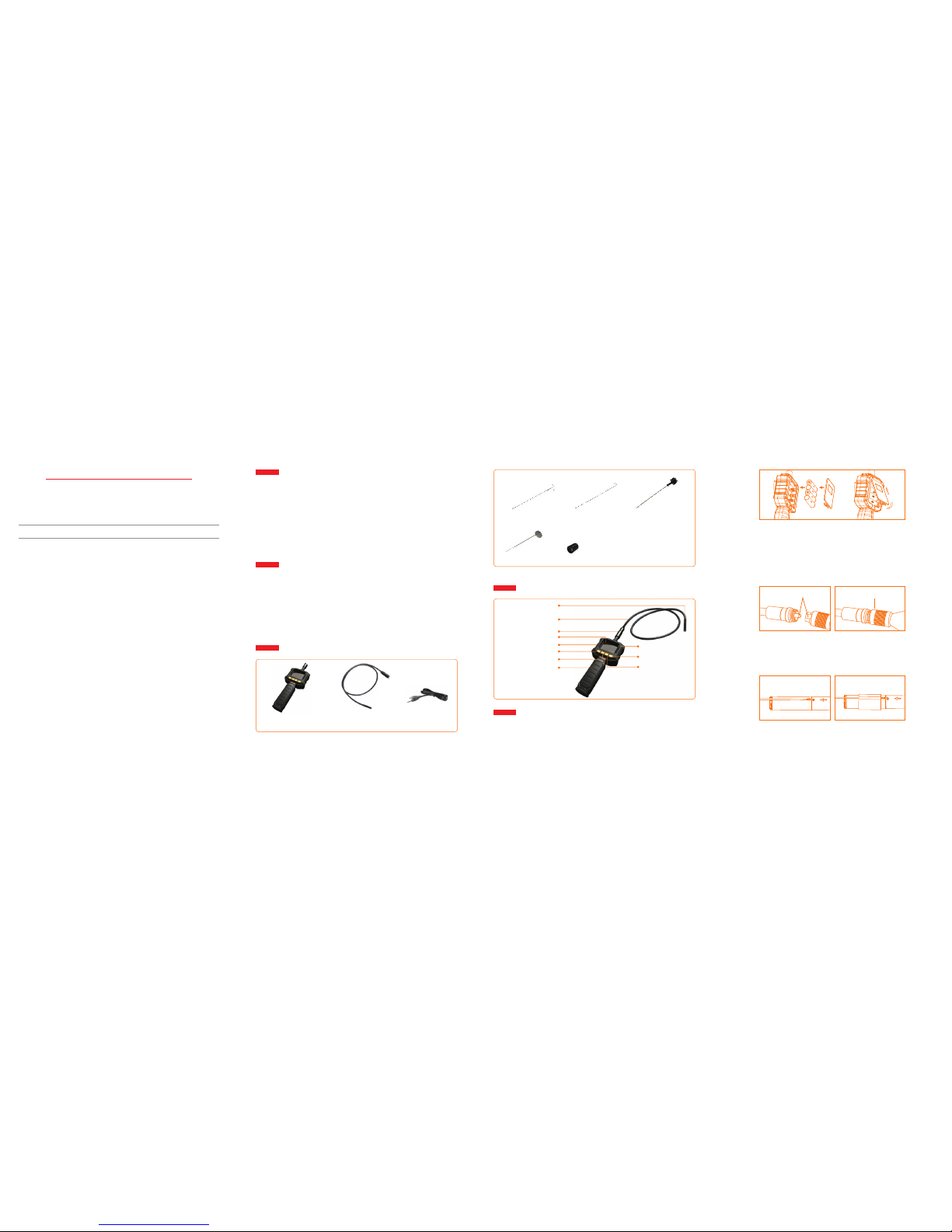
STRUCTURE
Mirror x 1
Rubber ring x 1
Magnet x 1
Single Hook x 1
Accessories
Double Hook x 1
INSTALLATION
To Install Batteries (Dry your hands before installation or replacing batteries.)
1. Remove battery cover;
2. Extrac t the batt ery box from the handl e, Insert f our (4) AA
batteries into their appropriate slots, with proper orientation,
3. Replace battery cover.
To Attach Flexible Tube with Handle
To connect the flexible tube camera with control handle, first make
sure that the keyed end of the tube is aligned with the slot in the
handle, then properlyuse slight force to push them together. Once
aligned, twist the treaded knob clockwise until the connection is
securely in place.
To Install Accessories
The three (3) included accessories (mirror, hook and magnet) are
Hook the hole
Insert video cable into the video out socket of the monitor, insert
the other end of the cable into the video in jack of any compatible
TV or display device. The LCD monitor is now capable of outputting
Video Output
all attached to the camera in the same way as illustrated below:
as indicated on the battery compartment;
Keyed end plugs into socket
Fasten the treaded knob
Wear the rubber ring
high quality video to another display.
Mini Waterproof
LED Lens
Power Indicator
Flexible Tube Interface
Color TFT-LCD Monitor
Power Switch
Rotate/Mirror Image
Video Output
Brightness
Contrast
Handle
Flexible Tube
Page 3
Model:GL9008
INSPECTION TOOL
Version 1.0
Please read this user manual carefully before using this product.
Failure to understand operation procedures may result in injury.
Inspection Camera
with Color LCD Monitor
折叠后成品尺寸 :10 5* 14 3m m
展开尺寸:420 *1 43 mm
材质:105g铜版 纸
颜色:4C 正反两面 印刷
折叠示意图
 Loading...