

Page 1

EXPERT 2K-FA
2KW SOLID STATE FULLY AUTOMATIC LINEAR
AMPLIFIER
Page 2

SPE Expert 2K-FA Quick-Start Guide
2
QUICK – START Guide
Page 3

SPE Expert 2K-FA Quick-Start Guide
3
This Guide written by:
Dr. Jeffrey A. Cantor, K1ZN
& edited by Bob Hardie, W5UQ
For
Expert Linears America LLC
Copyright Pending, 2017
Page 4
SPE Expert 2K-FA Quick-Start Guide
4
Setting Up the SPE 2K-FA Amplifier
Rear Panel Connections
Connections to Get Started
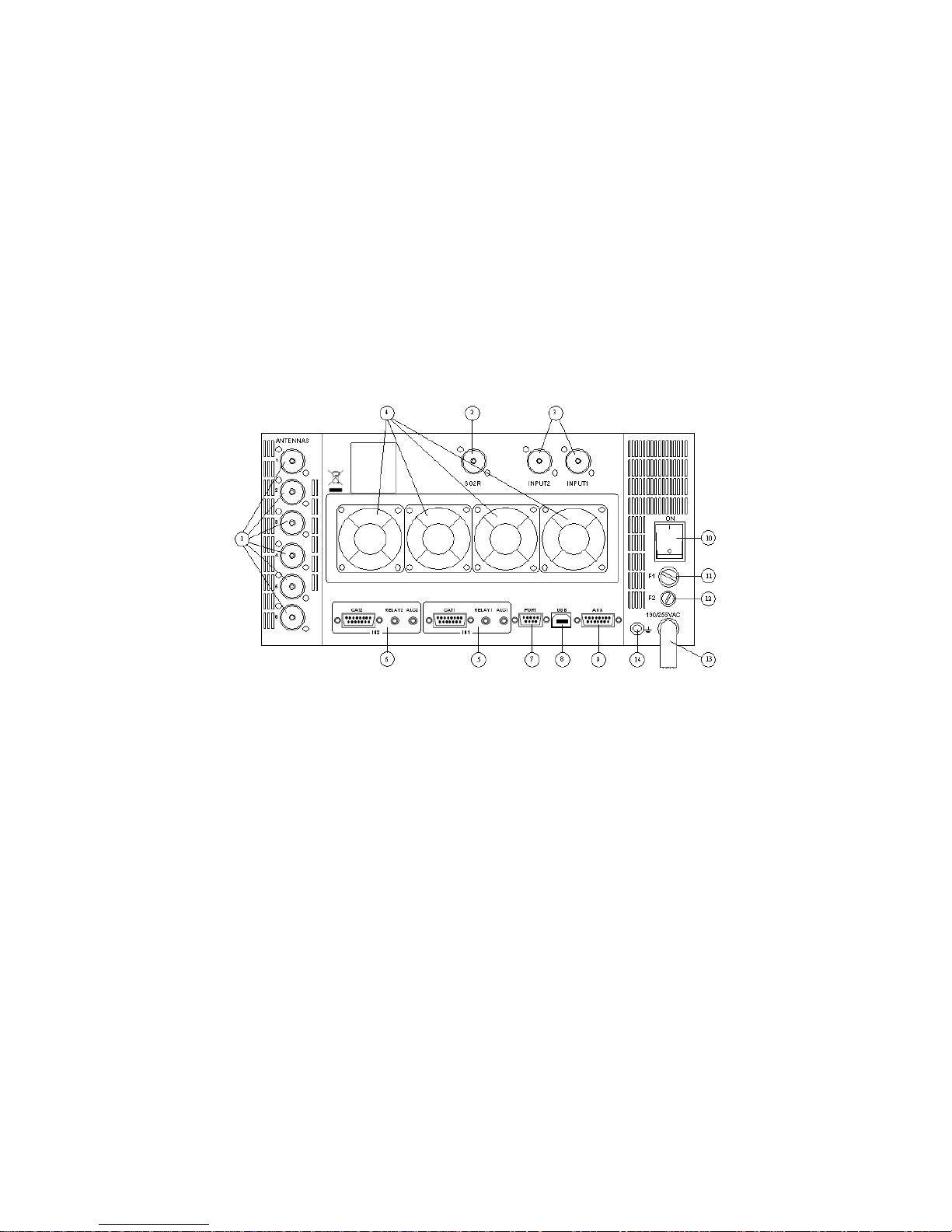
o Connect your antenna(s) to one or more of the six SO-239 ANT connectors (# 1 on the Rear Panel).
o There is also a dedicated SO-239 connector available for SO2R (single OP, 2 Rx’s) operation (#2 above).
o You may connect either one or two transceivers to the amplifier at INPUT 1 &/or INPUT 2 (#3 above).
o The SPE 2K-FA has four cooling fans on the rear (#4). More fans are inside. Two on 50V PS; one on combiner and
two on ATU.
o ALC, Relay and CAT control is provided for 1 or 2 transceivers (See #5 & #6 above).
- An RCA cable (provided in plastic pouch) connects between the transceiver and the amplifier for relay must be
connected at a minimum; and an ALC connection is also highly recommended. However, these are not
needed if connections are made using CAT connectors as the RCA phono connectors parallel the CAT
connectors connection for ALC and PTT/Relay.
Page 5
SPE Expert 2K-FA Quick-Start Guide
5
- CAT cable configuration for most transceivers is described in the SPE 2K-FA User’s Manual. Wiring from the
CAT connectors can include the ALC and RELAY control, and can eliminate the need for the RCA cables.
o A good ground connection is recommended (#12 above). Braid or copper straps are best. Read other literature about
obtaining good grounds for RF, lightning and electrical safety. They all are important. Removing antennas from your
amp when not in use can help prevent damage. Also, consider using coaxial switches to route antennas to ground
when not in use.
o The main power switch is located at position #10 above. It must be turned on first, prior to the Front Panel ON switch.
o This switch is a DPDT and will completely disconnect AC when turned off. For normal use, it is left on.
o Additional remote control and software updating can be done via the AUX, PORT and USB connections which are
discussed in the SPE 2K-FA User’s Manual.
Front Panel Controls
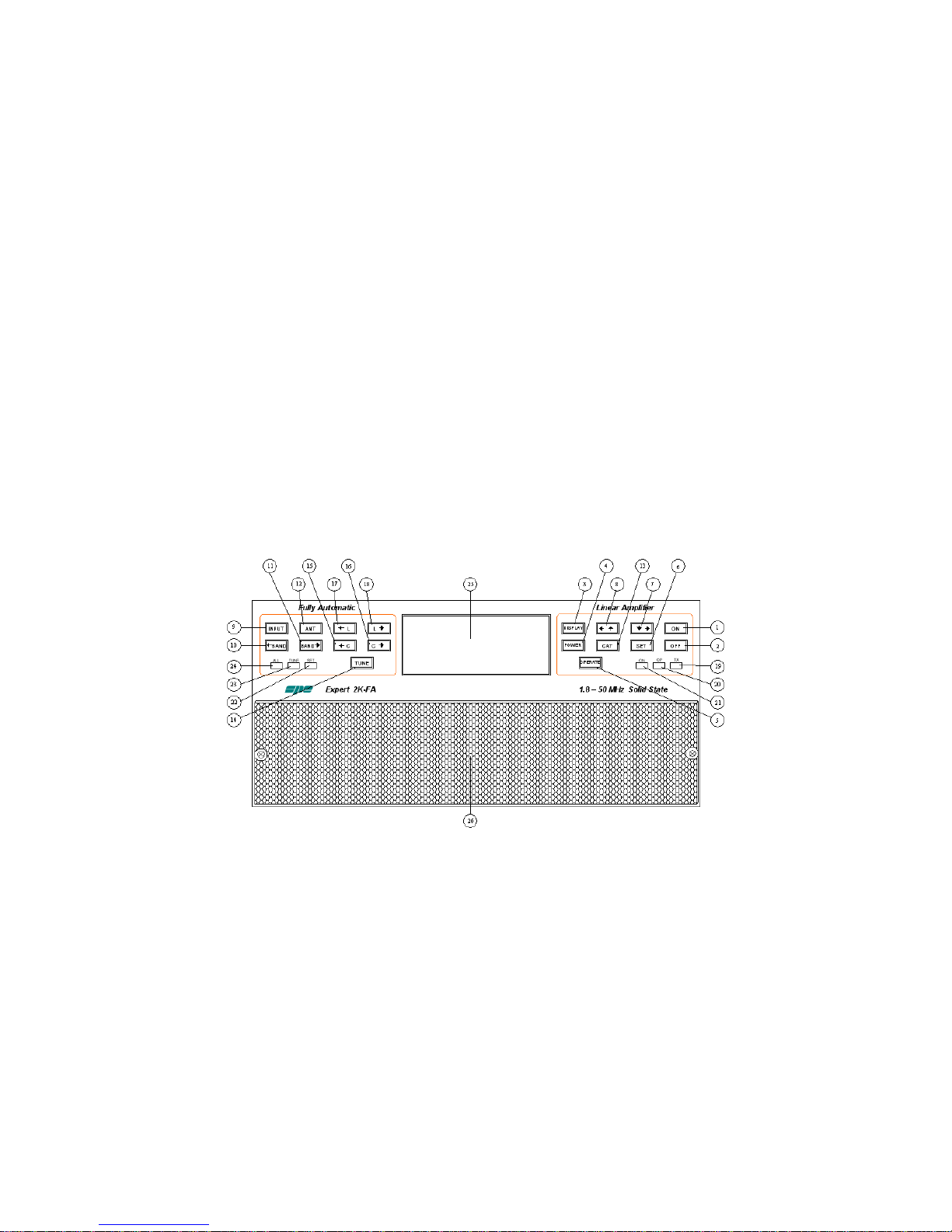
o Pressing the ON button (#1 above) turns the unit on. However, note that the main ON/OFF switch, #11 on the Rear
Panel must first be set to ON. (This switch is usually left on unless one wants to remove all AC from the 2K-FA
circuits).
Page 6

SPE Expert 2K-FA Quick-Start Guide
6
o
To turn off, press the OFF button (#2 above) and hold it down for at least three seconds (until the unit tones 73 in
CW or an error message detailing why the amp cannot turn off) turns the unit off. This is the only button requiring to
be held for three seconds or more.
Note the following:
- When OFF, only two direct RF (coaxial) connections are actuated:
- between INPUT 1 and ANT 1
- between INPUT 2 and SO2R
o
Pressing the POWER button (#4 on Front Panel) toggles the output power control level between “MAX/MID/ and
LOW.“
o Pressing the OP button (#5 on FP) toggles back and forth between Standby and Operate.
Front panel switches that will not work during normal operation unless special settings are made:
- BAND Switches. These changes are usually made with RS232 controlling the amplifier.
Or to use Front Panel BAND switches, the CAT has to be programmed (SET) to “None.”
- L> or L< and C> or C< switches only work when in SET/MANUAL TUNE.
Note the following:
- In STANDBY, all of the functions are activated (band change; antenna change; tuner control), but the
transmission is from the transceiver only (Barefoot).
- In OPERATE, all the functions are activated and the transmission is using the linear amplifier (QRO).
o It is recommended to use regulation of the exciter’s (transmitter) power that is achieved through the ALC link.
With the ALC connected, the amplifier input power (or DRIVE) when in OPERATE mode is automatically
adjusted to the correct driving level for the amplifier on all bands and power levels.
o In STANDBY, the exciter’s output will bypass the amplifier and go directly to the antenna that is selected. The
exciter’s power is set by the transceiver’s power output control.
Page 7

SPE Expert 2K-FA Quick-Start Guide
7
o In OPERATE, the exciter’s power output will be controlled by the amplifier’s ALC. However, without the ALC
connection, you have to manually adjust the exciter power to correctly drive the amplifier in order to avoid
damage. This is important as over driving needs to be avoided at all times!
o
Pressing the SET button (works ONLY in STANBY) (See #6 on FP), will activate the SET mode to program the
amplifier. This is described in detail on page 10, “Let’s Program the 2K-FA” section of the SPE 2K-FA User’s
Manual.
o
Pushing the INPUT button (#9 on the FP) allows selection of one of the two different exciter inputs (SO-239) to
the amplifier. See Rear Panel diagram for Input 1 & Input 2. The CAT connectors RELAY control will also control
INPUT selection. Keying on CAT 1 will activate INPUT 1. Keying on CAT 2 will switch the amplifier to INPUT 2.
Make sure you connect to the correct CAT connector matching the RF input.
o CAUTION: If while in STANDBY, the letters “SPE” are NOT visible on the DISPLAY, then the PTT or RELAY
control circuit has probably accidently been energized. The SPE letters will go away when the 2K-FA is keyed.
Also, when keyed, the 200 watt bar graph, for exciter power, is also displayed/visible. Unplug CAT cables (or
RCA cables) and search for a problem if the 2K-FA is keyed when it should not be.
o
Pushing the BAND buttons switches bands manually (◄BAND (#10 on FP) downward in frequency/ BAND►
(#11 on FP) upward in frequency). NOTE: The CAT menu setting must be set to “none” for these buttons to
become active. Otherwise, all band changes are made by transceiver control, the 2K-FA RF sensor or an
external software program you may have elected to use (EG: DDUtil). Please do not rely on the RF sensor to
switch bands. It is best to use controls that switch bands BEFORE RF transmissions.
o
The ANT button (#12 on FP) switches the antennas that are programmed for a given band if multiple antennas
are programmed in the SET/ANTENNA menu (e.g., 40M 1 2 4 – normally 40M 1 N N). The ANT switch will now
toggle antennas between #1; #2; and #4 ports. This switch only functions on bands where two or more antennas
are programmed for use.
o
Pushing the CAT button (#13 on FP) shows the current CAT interface setting. Pushing it twice shows the
current Software version.
Page 8

SPE Expert 2K-FA Quick-Start Guide
8
o Pushing TUNE button (#14 on FP), in STANDBY and not keyed, activates the automatic tuning process.
HOWEVER, a solid RF carrier MUST be sent from the transceiver within a second or two after the YELLOW LED
comes on. When the YELLOW TUNE LED comes on, keep the RF carrier drive into the amplifier until the
YELLOW LED goes off. If the carrier is removed early, the savings/memory can be erroneous. NOTE: Also,
the TUNE function will NOT work if there is a “b” or “t” next to the ANT number in the ANT box. (e.g., 1b or 1t
with either the ATU is “automatically bypassed” and the ATU will not function. Removal of the “b” or “t” is
necessary in order for the ATU TUNE button to cause the ATU to function.
o
Pushing buttons (#15 – 18 on FP) (◄C C► ◄L L►) can ONLY be used for manual tuning (in SET
programming).
A Word about Antennas
High-power amplifiers require properly rated antennas, connectors, baluns/transformers and feed line cables.
- The 2K-FA measures the SWR after the band pass filter matching, and it also measures the SWR of the
antenna system. This allows you to always evaluate your antenna system despite the matching and the
power applied, however:
o With the included ATU, the amplifier is able to overcome some mismatches of 3:1 SWR or more. As long as
the ATU matches the antenna to give a reading below 1.99:1 in the SWR box, the amplifier will operate.
Between 1.7 and 1.99 the output of the amplifier is slightly lowered. At 2.0 the amplifier will switch out of
Operate and exhibit an alarm of High SWR.
o While tuning matches the antenna to the PA, there will be some loss of power. Heating, and possibly higher
than acceptable voltages can be present in the ATU and BPF with increased SWR. Decreasing the output
power of the amplifier to lower these ‘higher voltages’ should be considered.
- Always operate with the best possible matching. Despite the amplifier’s protection against high SWR,
continuous use into a mismatched loads that cause warnings to be displayed could possibly lead to damage.
Always heed amplifier warnings and alarms!
- It is also suggested that suitable static protection be given to antenna coax cables. This is mainly for
protection of your transceiver.
Page 9

SPE Expert 2K-FA Quick-Start Guide
9
- Note that the software allows you to select up to three antennas for the same band.
A Word about the Internal TUNER
The SPE 2K-FA amplifier is equipped with an automatic tuner that handles load mismatches up about to 3:1 VSWR
(2.5:1 for 6 m).
o Antenna tuning and other working data are stored for tuner management, and recalled by the CPU when
returning to the sub-band using that stored data.
o The amplifier User’s Manual contains a “sub-band chart” with all the permitted ham bands. When the operator
programs in the SET program, the tuner settings and the antenna port will be automatically selected. (Note:
Using the RS232 information from the transceiver will allow your amp to know, to the KHz, the frequency of your
transceiver). Then the sub-band ATU memories are recalled and preset before transmitting.
o Explanation of Sub-bands: Only “One Frequency SETTING Per SUB-BAND” will be stored. The chart shows
the “center Frequency” of each sub-band. However, one can TUNE at any frequency within that sub-band.
Again, only one setting per sub-band will be stored. Tuning at a frequency higher or lower is fine. It is best to
TUNE at the “center frequency.” That decision is up to the operator/programmer.
o If you so choose, using the frequencies on the chart for TUNING, this procedure will pre-tune your amplifier to
that sub-band center frequency along with the ANTENNA that you have selected. (And those settings will be
remembered when your frequency and ANTENNA choices match those sub-bands)
o Realize that only the LAST TUNING setting in any sub-band is remembered. Only ONE memory per an
antenna in a sub-band, no matter if it is the “center frequency” or not.
o With a proper CAT cable (using RS-232), the amplifier will know to the KHz the transceiver’s frequency and the
settings for that “sub-band” will be recalled.
Page 10

SPE Expert 2K-FA Quick-Start Guide
10
The internal tuner may be bypassed as follows:
o Totally. (if all antenna choices have a “b” after the antenna number.)
o For single band.
o For single band and specific antenna.
o Basically, “as the programmer determines in SET/ANTENNA programming.)
The internal tuner is always automatically bypassed:
o When you have programmed the receiving-only antenna setting for a particular ANTENNA PORT. See
Receive ONLY: (e.g., for a Beverage antenna that you would not transmit into). Go to SET/RX ANT
programming and set your chosen ANT Port to “r.” On any band, that ANTENNA Port will NOT accept a
transmitting signal if set to “r”. EG: If ANT PORT 6 is set to “r”, the 6 will always be “6r”.
o With tunable antenna setting. Tunable antennas should be resonant and may not need an ATU.
o When ‘b’ is selected in ANTENNA programming. (Hence, “b” means BYPASSING the ATU).
o On 70 MHz band. The ATU is not available for this band.
It is strongly advised to not use the internal tuner and an external tuner simultaneously … as damage can be
sustained by the internal tuner or amplifier. If you intend to use an external tuner, then disable the internal tuner.
OR, pre-tune the external antenna with the 2K-FA internal tuner in BYPASS. Then activate the 2K-FA internal
tuner and tune with it. Most of the time the external antenna tuner will tune the antenna within the specifications of
the 2K-FA so the internal ATU will not be necessary this time. However, if the frequency has been increased or
decreased so as the SWR has increase, then the internal ATU may be used to correct that SWR. Word of
caution… be very careful when doing this. Damage to the amplifier can occur.
Let’s Program the 2K-FA
Programming operations are ONLY possible in STANDBY.
The three keys mostly used: [SET], [◄▲] and [▼►], plus [TUNE] allow programming of the amplifier. They can be
used in the following way:
o Press [SET] to open a menu page, to validate choices, and to exit from a menu page.
o Press the [◄▲], [▼►] keys to select options in the menu.
Page 11

SPE Expert 2K-FA Quick-Start Guide
11
o Press [TUNE] to bypass the ATU or toggle bypass off of ATU in ANTENNA programming.
o The green SET LED illuminates during the programming process.
o Programming changes take effect only if you have properly exited from a menu page (the green SET led
turns off). See instructions for exiting at the bottom of the DISPLAY Screen.
o You will find your programming choices confirmed by the items shown at the lower part of the display.
o Other keys: In MANUAL TUNE, the L> or L< and C> or C< become active. Otherwise they are mostly inactive.
Antenna Choices
Programming Antenna Choices:
o Turn power ON.
o Ensure amplifier is in STANDBY.
o Press [SET] to open the menu page.
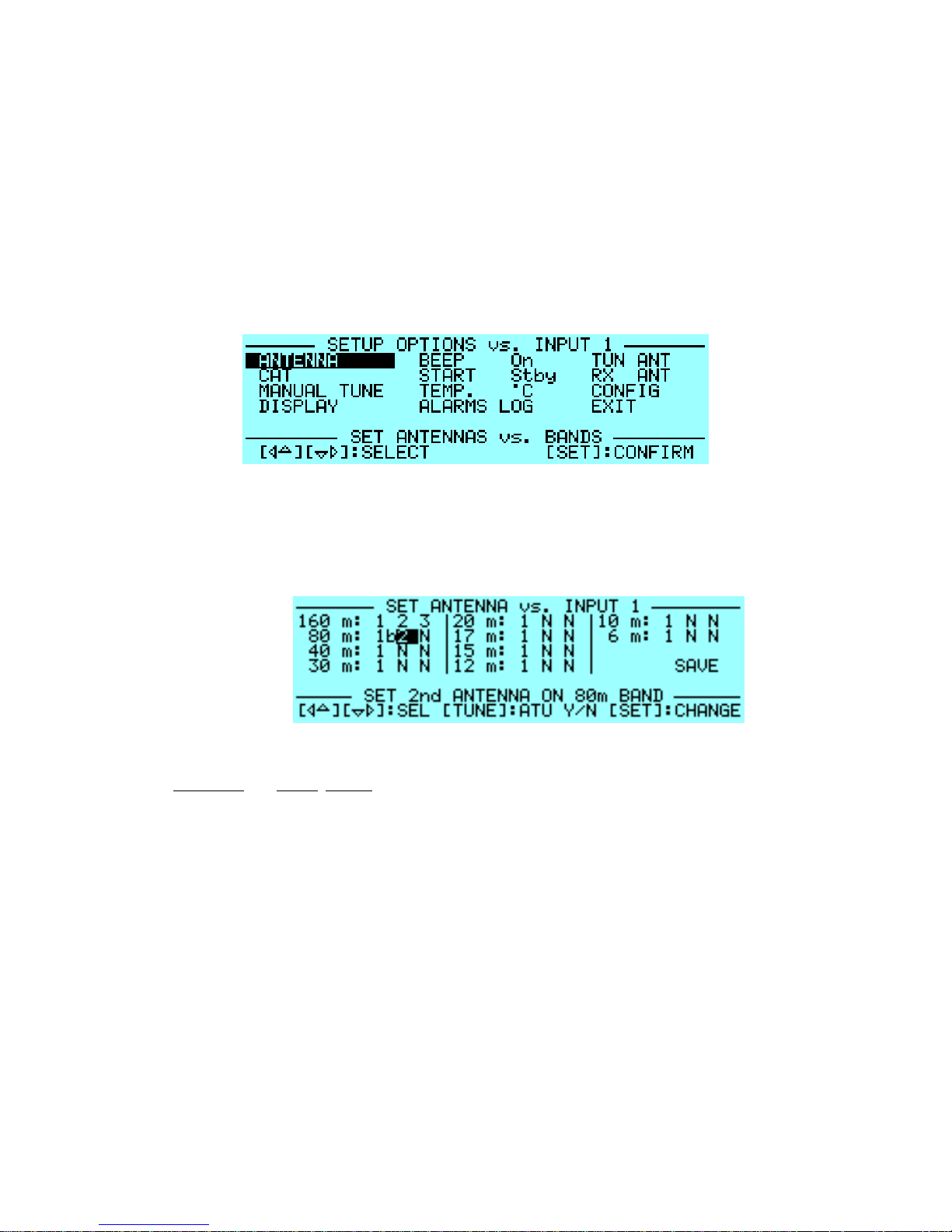
o The SET LED (green) will light and you will see this page:
Page 12
SPE Expert 2K-FA Quick-Start Guide
12
o The menu default will be on ANTENNA option. (The [◄▲] and [▼►] keys will advance or step to menu
choices, e.g.: “ANTENNA,” “CAT,” “MANUAL TUNE,” “DISPLAY,” etc.
o When ANTENNA is highlighted, press SET again to enter the ANTENNA sub-menu.
o You may assign an antenna to each band by selecting one or two of the amplifier’s ANT 1, ANT 2, ANT 3,
ANT 4, ANT 5, or ANT 6 connector for each band. Or a “NO” for “NONE.” (e.g.: “1 N N” would be “antenna
1 ANT Port and NONE NONE” which indicate the three antenna choices).
o This setup also allows you to preset up to 3 antennas per band; or one antenna, or none. None would be
N N N. An antenna could be 1 N N; another 3 N N; or even 1 2 4. (See below for switching between
antennas.) Any combination is acceptable except repeating a number. Hence 1 1 N or 2 2 4, or 4 5 4. All
of these examples, and others similar, are NOT acceptable.
Page 13

SPE Expert 2K-FA Quick-Start Guide
13
o Then when out of SET/Programming you will press the [ANT] button to switch between ANT 1, ANT 2 and
ANT 3 on any particular band. This action toggles between the programmed antennas.
o If you don’t have an antenna assignment for a particular band, select “NO” “NO” “NO” for NO antennas on
that band. When that band is selected, “NO ANTENNAS SELECTED FOR THIS BAND” will appear on the
display.
o You may bypass the ATU on any band and antenna by pressing the [TUNE] Key. You will see a "b" next to
the ANT number in the box. To remove the “b” (for bypass) just press [Tune] again. The [TUNE] key toggles
the “b” on and off when in SET/ANTENNA programming only.
o Bypassing the ATU can be programmed one band and one antenna port position at a time, allowing the
operator to bypass the ATU selectively per band and antenna port.
o Programming takes effect when you exit from the menu page. You are required to step to EXIT and push
SET or your settings will not be saved. You will see the green SET LED turn off and a message telling you
that your settings are being saved. NOTE: Turning off the amplifier during SET programming will most likely
lose your programming changes.
Antenna Tuning
The 2K-FA auto tuning process is activated ONLY in the STANDBY mode, when you key or push-to-talk the
transceiver, the amplifier is keyed, and an RF carrier* is present (CW dots or dashes will not work). (Note: The
SPE letters on the display will go away and a bar graph will appear displaying the wattage of the exciter power.
Max power is about 200 Watts. Tuning is always performed with about 20 to 30 watts of RF power. (*NOTE:
RTTY, FM or a continuous CW signal is considered an RF carrier.)
Page 14

SPE Expert 2K-FA Quick-Start Guide
14
As long as a carrier is emitted by the transceiver, the ATU will go through a Tuning Cycle and memorize its
settings. HOWEVER, if the carrier is lost before the YELLOW TUNE LED goes out, then an erroneous reading will
be memorized.
Your transceiver should be connected to the 2K-FA via a CAT cable to communicate to the amplifier all band and
frequency data from the transceiver. If not connected using RS232 information, then the amplifier will switch to the
band and frequency after it receives RF from the transceiver. This sort of operation is not recommended for
everyday use.
o The amplifier MUST be in STANDBY for the AUTO TUNING feature to function.
o To PROGRAM ANTENNAS, press [SET] and enter ANTENNA option sub-menu.
o Advance [▼►] to first band and antenna port that you wish to program.
o It is best that you pre-tune your transceiver to the central frequency of the sub-band for that position
on the band. (You can use the SUB-BAND chart from the User’s Manual to TUNE to a suggested
center frequency. Or just TUNE to any frequency you select. That will also work. Note: If you do not
use the SUB-BAND frequency chart suggested frequencies, the frequency you choose may not be
near the “center frequency” of that sub-band. This is okay, however you may find that you may not be
satisfied with some other frequencies SWR readings in that sub-band)”.
o Adjust your transceiver’s drive (power level) to about 20 to 30W unless you have the ALC link
established. During the tuning process, the ALC will drop the transceiver power the power
automatically.
o Now set your transceiver to transmit a continuous carrier (either RTTY or FM or continuous CW, not
dots or dashes). AM can be used, but is not recommended over the others.
o Press the amplifier’s [TUNE] key immediately followed by your transceiver’s PTT. The procedure for
automatic tuning will start. The TUNE LED light (yellow) will come on and you may hear the ATU
relays operate. As long as the YELLOW TUNE LED is on, you MUST keep the RF carrier to the 2KFA input and the amplifier keyed. Otherwise an erroneous tuning reading may be saved.
Page 15
SPE Expert 2K-FA Quick-Start Guide
15
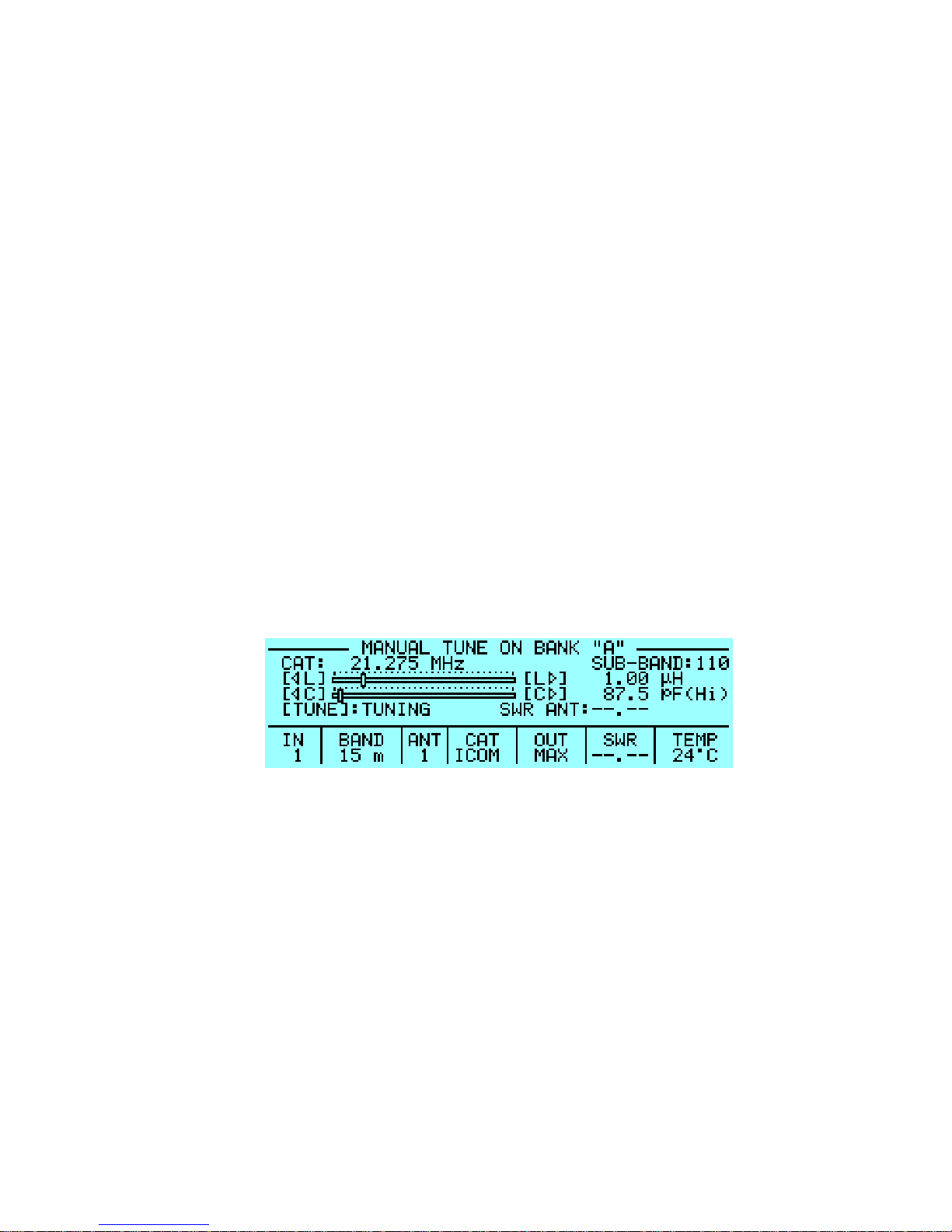
o You can also watch the SWR indication on the DISPLAY. When tuning stops, the SWR will be at a
minimum for that antenna. Note: Sometimes it is possible to improve tuning by repeating this step.
o Repeat these steps for other antennas assigned to the same band after having selected it using the
[ANT] key.
o Repeat the previous steps for all bands and antennas that you wish to use.
Manual Tuning
Manual Tuning is typically not needed. The automatic tuning should be sufficient.
- However, if needed, you can sometimes achieve a better match than that achieved with the automatic
tune procedure. It is possible to set the tuning manually by using the keys [◄C], [C►], [◄L], [L►]
while watching the SWR.
o Set your exciter to transmit a continuous RTTY or FM signal.
o Press the [◄ L], [L ►], [◄ C], [C ►] keys until you obtain the minimum SWR.
Page 16

SPE Expert 2K-FA Quick-Start Guide
16
- The operating frequency and the sub-band are also shown on the MANUAL display.
- Both types of tuning are always implemented in the STANDBY state. (Note: to SAVE this
setting, you HAVE to KEY your transceiver. The DISPLAY will now say [TUNE]: SAVE)
instead of TUNING. While the SAVE is on, push the TUNE button on front of amplifier. This
will SAVE your settings. Otherwise, your settings will probably be lost.
Receive Only Antennas
A unique feature allows the Expert 2K-FA to set a dedicated receiving antenna and to control its automatic
switching after a transmission starts, plus protect “receive only” antennas from accidental RF transmissions.
o In SET programming, look for the menu item RX ANT.
- Selecting an antenna port causes an "r" symbol to appear after the selected ANT number (e.g,3r or 4r).
- With the linear turned OFF the INPUT1 is directly connected to ANT1. Therefore, the selection of ANT1
as “RX ANT” is not permitted. This protects the receiving antenna (e.g. Beverage).
- More details for this function are in the Expert 2K-F User’s Manual.
Page 17
SPE Expert 2K-FA Quick-Start Guide
17
Remote Control
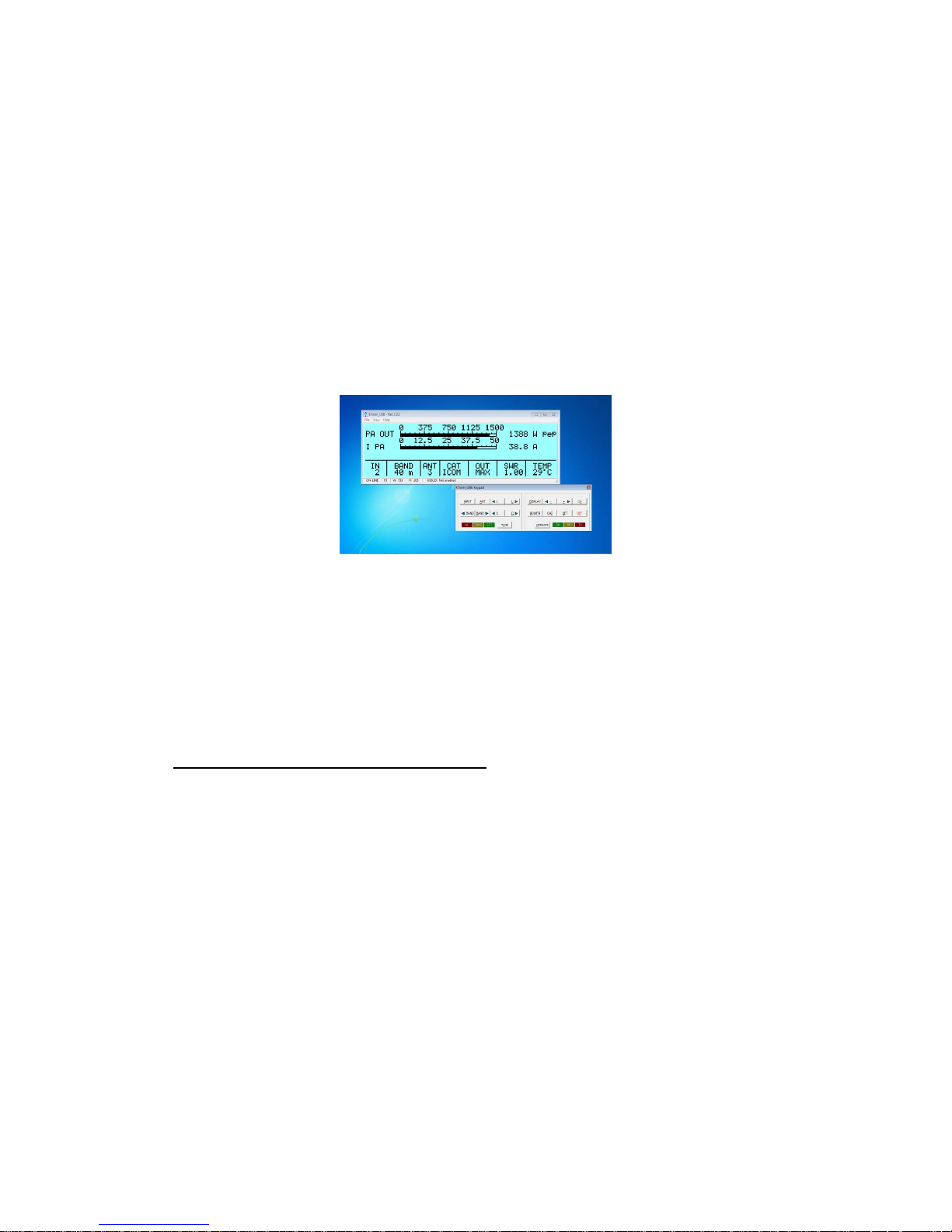
The SPE 2K-FA is supported by a software program that permits its operation remotely.
o
The program, Term_2K is on the supplied CD.
o
The KTerm software supports both USB and RS_232, and requires a minimum of Windows XP operating
systems. Win 7 and Win 10 OS are being used successfully. (Win 10 MS updates may cause need of reinstalling the CDM driver sometimes.)
o
The installation package is contained in a compressed .ZIP file named KTerm_Package_1_0.zip. See the
SPE Expert 2K-FA User’s Manual for full details on installation and use.
o
Please read the DRIVER Installation instructions. Do not have the USB connected when installing the
driver. Some OS, like Win 10 may require removing ALL USB connections (of course other than keyboard
and mouse) for proper DRIVER installation.
Page 18

SPE Expert 2K-FA Quick-Start Guide
18
Protecting the SPE 2K-FA (Alarms)
o The 2K-FA protection system monitors and controls the amplifier’s most important parameters, such as
temperature of the heatsinks; maximum/minimum voltage on the PA; maximum PA current; SWR;/reflected
power; and very important, the input power to prevent and warn of “over-driving.”
o The protection system is carried out in two different ways:
- Through hardware circuits to ensure a minimum intervention time.
- Through software, with a combined action of the two CPU’s, to ensure the maximum protection, warnings
and alarms.
o The two results get constantly compared; every difference produces a protection trip and a consequent alarm.
There are three types of protections/alarms:
o SIMPLE - This is the most common case. An acoustic warning beep sounds, but no operator intervention is
required, as the control system automatically restores the correct operating conditions.
o SERIOUS - When automatic system recovery is not possible (e.g., the temperature climbs over the limits due to
obstruction of the fans,; SWR is too high; etc.). In this case the amplifier switches back to standby state and the
alarm message gets stored. Normally transmission can continue with the exciter only. Operator needs to locate
and remove the problem for the amplifier to amplify.
o FATAL - If the amplifier is in the b) state, but one CPU has a fault or it can’t continue operating or some fault
appears in the power-supply module, then the amplifier gets turned OFF with no further warning. To restart the
amplifier, the main switch in the rear panel has to be switched to [O] (OFF) for about 3 minutes, and then to the
[I] position (ON).
It is possible to read the alarm history in the standby mode by pressing the [SET] and then [ALARMS LOG] keys. To empty
the alarm stack, press the [TUNE] and [OPERATE] keys at the same time.
o If the acoustic alarm is very frequent during transmission, the possible causes should be investigated.
Page 19

SPE Expert 2K-FA Quick-Start Guide
19
o At 75°C the amp will switch from MAX to MID power. If the temperature is not satisfied, the amp will switch to LOW power. If
the temperature has not reduced significantly, then the amp will go into standby. DO NOT TURN OFF until 40 to 50 °C is
achieved, for cool down.
o During a SERIOUS alarm, there is an acoustic alarm for 10 sec. Pressing the [DISPLAY] key, the system switches back to
STANDBY state immediately and stops the sound.
o Note that more details for the temperatures are in the 2K-FA User’s Manual.
o When a “FATAL” alarm occurs, immediately contact your reseller.
Operating Tips
o Again, ALC and CAT links are highly recommended.
o If one relies on the Frequency Counter in the 2K-FA to “switch bands,” more RF stress may be present on
some of the relays. The purpose of the CAT connectors is to help the amplifier be the most reliable avoiding
compromise. Therefore, a CAT cable is strongly recommended.
- If ALC is not used, it is better to lose a fraction of dB in transmitted power by slightly reducing the
drive power, than to overdrive the amplifier resulting in a poor-quality transmission. Remember, loss
of a few watts should not be detected by the receiving station and could save your amplifier from
damage.
- During transmission, a good practice is to periodically check the parameters on the display. Treat
your amplifier like you want it to last for years and years.
- When properly using the ALC link, the transceiver’s drive power will be reduced to the optimum drive
level, preventing OVER-DRIVING. OVER-DRIVING is one of the worst things for an amplifier, be it
solid state or tube type.
- You may reduce the linear output, if required, by switching the amplifier to MID or LOW with the
[POWER] key. The ALC will automatically reduce the drive power to the proper levels.
Page 20

SPE Expert 2K-FA Quick-Start Guide
20
- You may also continuously regulate the amplifier’s output power by changing the level of drive power
from your transceiver, even with the ALC connected. If an output power less than 1 KW or 500 Watts
is desired, for best efficiency begin reducing drive from the MID or LOW power state. Always use the
power level that gives the best efficiency
- For best efficiency, do not reduce drive to a power level close to or lower than the next lower POWER
LEVEL (e.g., MID power tops out at 1200Watts). Therefore, reducing drive while in MAX power, to a
power level of 1300W or lower is not recommended. The same goes for MID and LOW powers.
- See Flex and Elecraft for specific settings of their drive levels. These may require settings in the
transceiver. However, special FLEX settings can be made in the 2K-FA. See the 2K-FA User’s
Manual for details.
- If problems occur when using other software programs, remember to eliminate your amplifier as being
“the problem” by using ONLY your transceiver and the amplifier. If system works here, then the
problem is elsewhere.
Setting Drive Levels
a) SSB: Adjust the MIC GAIN of the transceiver until while speaking normally into the microphone, the signal peaks on
the display don't quite reach the maximum rated output power. Monitoring the transmission is a good way of
checking your settings. If there is some distortion, decrease the mike gain or decrease the power of the
transceiver until a small reduction of the output power of the amplifier is seen.
b) CW: The maximum output power is automatically achieved when ALC is properly operating.
c) DIGITAL: RTTY, SSTV and FM modes have very heavy-duty cycles. Also, JT65, JT9 or FT8 modes are very robust
and it is best to use these modes in the MID or LOW power settings. The 2K’s sophisticated software helps ensure this
operation.
Page 21

SPE Expert 2K-FA Quick-Start Guide
21
d) AM: This transmission mode radiates a continuous carrier which is 25% of its PEP value (e.g. 500W PEP AM =
125W carrier power). Always operate in MID or LOW mode for AM. To get an output signal without distortion,
proceed as follows: Transmit an AM carrier only. With your transceiver’s “MIC GAIN” set to zero, advance
transceiver’s drive and do not exceed 25% of the maximum carrier output from the amplifier. Then speak into
the microphone normally setting the MIC GAIN of the transceiver until the peak output power, on speech
peaks, is shown on the amplifier display to be no more than 0.4 KW or 400W. SPE suggests you monitor
your transmission closely to check that the MIC GAIN setting is correct.
If you choose to set the output power of the amplifier by varying the output power of the transceiver, the ALC
connection should be left connected for a “fail-safe” feature for OVER-DRIVING. All functionalities remain the
same, as does protection. You can reset your transceiver power to full power out when returning to STANDBY.
Never stress the amplifier with long periods in key-down transmission, as this can stress the amplifier components.
However, sophisticated software avoids transmitting a continuous signal in the MAX condition for five seconds by
seamlessly switching to MID power. Important: In SSB, use of high compression is not encouraged as this can
cause a rapid increase in the temperature of the amplifier.
Remember that high levels of audio compression can make your SSB signal be more like CW than SSB, meaning
that normal audio has lots of peaks and valleys. Highly compressed audio may “in your opinion” make you sound
louder, however it “MAY” be at the expense of over driving your amplifier. Be reasonably conservative about this.
Not only can it be detrimental to your linear, it can be objectionable to others on the air. Watch the temperature
when you use high compression also.
Treat your amplifier with loving care to extend its life. Keep the air filter clean so that air can freely flow through the
air plenum.
HAVE FUN. You are using one of the most popular and sophisticated solid state amplifiers in the world.
REV: 03-13-2017, 06-02-2017, 07-06-2017 and 08-6-2017 – 08-08-2017.
 Loading...