

Page 1

EX-9632R-H/EX-9633R-H
Manual
EX-9632R-H/EX-9633R-H • Manual Version 1.1 • 30.06.2012 www.topsccc.com
Router Series
EX-9632R-H/EX-9633R-H
User Manual
<Version 2.0>
Date: 6/30/2012
Page 2

EX-9632R-H/EX-9633R-H
Manual
EX-9632R-H/EX-9633R-H • Manual Version 1.1 • 30.06.2012 www.topsccc.com
Revision History
Version Date Comments Author
2.00 2012-06-30 Initial Release Version Carter Lee
Page 3

EX-9632R-H/EX-9633R-H
Manual
EX-9632R-H/EX-9633R-H • Manual Version 1.1 • 30.06.2012 www.topsccc.com
Important Notice
Due to the nature of wireless communications, transmission and reception of data can
never be guaranteed. Data may be delayed, corrupted (i.e., have errors) or be totally lost.
Although significant delays or losses of data are rare when wireless devices such as this
device are used in a normal manner with well constructed network, - this device should not
be used in situations where failure to transmit or receive data could result in damage of
any kind to the user or any other party, including but not limited to personal injury, death,
or loss of property. This device accepts no responsibility for damages of any kind resulting
from delays or errors in data transmission, or for failure of this device to transmit or
receive such data.
Safety and Hazards
Do not operate this device in areas where blasting is in progress, where explosive
atmospheres may be present, near medical equipment, near life support equipment, or
any equipment which may be susceptible to any form of radio interference. In such areas,
this device MUST BE POWERED OFF. This device can transmit signals that could interfere
with this equipment. Do not operate this device in any aircraft, whether the aircraft is on
the ground or in flight and it MUST BE POWERED OFF when in an aircraft. When operating,
this device can transmit signals that could interfere with various onboard systems.
Note: Some airlines may permit the use of cellular phones while
the aircraft is on the ground and the door is opened.
The driver or operator of any vehicle should not operate this device while in control of
a vehicle. Doing so will detract from the driver or operator’s control and operation of that
vehicle. In some states and provinces, operating such communications devices while in
control of a vehicle is an offence.
Page 4

EX-9632R-H/EX-9633R-H
Manual
EX-9632R-H/EX-9633R-H • Manual Version 1.1 • 30.06.2012 www.topsccc.com
Limitations of Liability
This manual is provided “as is”. We makes no warranties of any kind, either expressed
or implied, including any implied warranties of merchantability, fitness for a particular
purpose, or non-infringement. The recipient of the manual shall endorse all risks arising
from its use.
The information in this manual is subject to change without notice and does not
represent a commitment on the part of this device. WE SPECIFICALLY DISCLAIM LIABILITY
FOR ANY AND ALL DIRECT, INDIRECT, SPECIAL, GENERAL, INCIDENTAL, CONSEQUENTIAL,
PUNITIVE OR EXEMPLARY DAMAGES INCLUDING, BUT NOT LIMITED TO, LOSS OF PROFITS
OR REVENUE OR ANTICIPATED PROFITS OR REVENUE ARISING OUT OF THE USE OR
INABILITY TO USE ANY PRODUCT, EVEN IF WE HAVE BEEN ADVISED OF THE POSSIBILITY
OF SUCH DAMAGES OR THEY ARE FORESEEABLE OR FOR CLAIMS BY ANY THIRD PARTY.
Notwithstanding the foregoing, in no event shall we aggregate liability arising under
or in connection with our product, regardless of the number of events, occurrences, or
claims giving rise to liability, be in excess of the price paid by the purchaser for our
product.
Copyright
Trademarks
Windows® is a registered trademark of Microsoft Corporation.
QUALCOMM® is a registered trademark of QUALCOMM Incorporated. Used under
licensed.
Other trademarks are the property of the respective owners.
Page 5

EX-9632R-H/EX-9633R-H
Manual
EX-9632R-H/EX-9633R-H • Manual Version 1.1 • 30.06.2012 www.topsccc.com
Contents
Revision History ................................................................................................................................................. 2
Important Notice ............................................................................................................................................... 3
Safety and Hazards ........................................................................................................................................... 3
Limitations of Liability...................................................................................................................................... 4
Copyright.............................................................................................................................................................. 4
Trademarks........................................................................................................................................................... 4
Contents................................................................................................................................................................ 5
Overview ............................................................................................................................................................... 7
Abbreviations............................................................................................................................................. 7
Brief of Mobile Network ................................................................................................................................. 9
2G ................................................................................................................................................................... 9
2.5G................................................................................................................................................................ 9
3G ................................................................................................................................................................... 9
Features............................................................................................................................................................... 10
Specification ......................................................................................................................................................10
Application.........................................................................................................................................................10
Interface ..............................................................................................................................................................12
Web Interface....................................................................................................................................................13
Login............................................................................................................................................................13
System Info...............................................................................................................................................14
Port .............................................................................................................................................................. 16
WAN................................................................................................................................................... 16
LAN.....................................................................................................................................................17
WLAN................................................................................................................................................. 18
Network......................................................................................................................................................19
DHCP..................................................................................................................................................19
DNS&DDNS ....................................................................................................................................20
Static Routing.................................................................................................................................. 20
VLAN ..................................................................................................................................................21
MAC/IP Bind.................................................................................................................................... 23
Firewall........................................................................................................................................................24
Options ............................................................................................................................................. 24
Page 6

EX-9632R-H/EX-9633R-H
Manual
EX-9632R-H/EX-9633R-H • Manual Version 1.1 • 30.06.2012 www.topsccc.com
Time Schedule................................................................................................................................24
IP Manage........................................................................................................................................26
Port Manage ................................................................................................................................... 27
Port Map...........................................................................................................................................29
IP Map ............................................................................................................................................... 30
Strategy............................................................................................................................................. 32
SPI ....................................................................................................................................................... 33
VPN..............................................................................................................................................................34
IPSec................................................................................................................................................... 34
IPSec Status.....................................................................................................................................35
PPTP ...................................................................................................................................................36
PPTP User.........................................................................................................................................37
Service ........................................................................................................................................................ 39
Time ...................................................................................................................................................39
CLI ....................................................................................................................................................... 39
Upgrade............................................................................................................................................40
Backup/Restore..............................................................................................................................41
Reset...................................................................................................................................................42
Traffic...........................................................................................................................................................43
IP Flow Control............................................................................................................................... 43
DTU..............................................................................................................................................................44
Modem.......................................................................................................................................................45
Wizard.........................................................................................................................................................46
LOG..............................................................................................................................................................51
PASSWD .....................................................................................................................................................52
Reboot........................................................................................................................................................53
Logout ........................................................................................................................................................ 53
Appendix A ...............................................................................................................................................54
DDNS .................................................................................................................................................54
Page 7

EX-9632R-H/EX-9633R-H
Manual
EX-9632R-H/EX-9633R-H • Manual Version 1.1 • 30.06.2012 www.topsccc.com
Overview
This device is a 2G/3G router which compliance to GSM/GPRS/EDGE/WCDMA/HSPA or
EVDO/TD-SCDMA network and shares the network to other devices. This capability means that
remote and mobile devices can attach to Internet hosts using the public wireless networks.
Router series is easy to install, reducing the reliance on the end customer and enables
direct access to your remote LAN devices for controlling and monitoring purposes.
It enables companies to access equipment of mobile remotely, remote networks and
isolated sites
This router is seeking reliable, flexible and cost-effective data channel to build their
information system. Many applications such as ATM, POS, SCADA and surveillance system will
require data channels covered all over the country; this brings a bright future for mobile data
networks applications.
Abbreviations
APN
Access Point Name
DAC
Digital Analog Converter
GGSN
Gateway GPRS Support Node
GPRS
General Packet Radio Service
IP
Internet Protocol
KB
Kilobyte
MCC
Mobile Country Code
MNC
Mobile Network Codes
MS
Mobile Station
PDU
Protocol Data Unit
PLMN
Public Land Mobile Network
RSSI
Received Signal Strength Indication
SMA
Small Adapter
SMS
Short Message Services
CDMA
Code Division Multiple Access
RIP
Routing Information Protocol
Page 8

EX-9632R-H/EX-9633R-H
Manual
EX-9632R-H/EX-9633R-H • Manual Version 1.1 • 30.06.2012 www.topsccc.com
OSPF
Open Shortest Path First
QoS
Quality of Service
DNS
Domain Name System
DDNS
Dynamic Domain Name Server
DHCP
Dynamic Host Configuration Protocol
NAT
Network Address Translation
DMZ
Demilitarized Zone
PPP
Point to Point Protocol
PPTP
Point to Point Tunneling Protocol
UIM
User Identity Model
VPN
Virtual Private Network
Page 9

EX-9632R-H/EX-9633R-H
Manual
EX-9632R-H/EX-9633R-H • Manual Version 1.1 • 30.06.2012 www.topsccc.com
Brief of Mobile Network
2G
2G (or 2-G) stands for second-generation wireless telephone technology. Second
generation 2G cellular telecom networks were commercially launched on the GSM standard in
Finland by Radiolinja (now part of Elisa Oyj) in 1991. Three primary benefits of 2G networks
over their predecessors were that phone conversations were digitally encrypted; 2G systems
were significantly more efficient on the spectrum allowing for far greater mobile phone
penetration levels; and 2G introduced data services for mobile, starting with SMS text
messages.
2.5G
2.5G ("second and a half generation") is used to describe 2G-systems that have
implemented a packet-switched domain in addition to the circuit-switched domain. It does not
necessarily provide faster services because bundling of timeslots is used for circuit-switched
data services (HSCSD) as well.
The first major step in the evolution of GSM networks to 3G occurred with the
introduction of General Packet Radio Service (GPRS). CDMA2000 networks similarly evolved
through the introduction of 1xRTT. The combination of these capabilities came to be known as
2.5G.
3G
3G or 3rd generation mobile telecommunication is a generation of standards for mobile
phones and mobile telecommunication services fulfilling the International Mobile
Telecommunications-2000 (IMT-2000) specifications by the International Telecommunication
Union. Application services include wide-area wireless voice telephone, mobile Internet access,
video calls and mobile TV, all in a mobile environment. To meet the IMT-2000 standards, a
system is required to provide peak data rates of at least 200 Kbit/s. In recent 3G releases, often
Page 10

EX-9632R-H/EX-9633R-H
Manual
EX-9632R-H/EX-9633R-H • Manual Version 1.1 • 30.06.2012 www.topsccc.com
denoted 3.5G and 3.75G, also provide mobile broadband access of several Mbit/s to
smartphones and mobile modems in laptop computers.
Features
z Industrial design for small dimension
z Robust industrial housing
z Secure remote access - Support for up to 4 simultaneous VPN tunnels 6 Mbps 3DES VPN
throughput
z SPI/VPN Firewall
z NAT Router for Internet Access Sharing
z 1 10/100 LAN port
z 250Mhz CPU with hardware-based encryption accelerator
z DC5~25V wild rang, low power consumption
z Watch Dog
Specification
Product Network Work Temp Humidity Size Weight
850MHz
900MHz
1800MHz
GSM
1900MHz
850MHz
1900MHz
EX-9632R-H
WCDMA
2100MHz
-10 ~ +65°C 5 ~ 90%
EX-9633R-H
EV-DO
Rev. A
800MHz -10 ~ +55°C
5%∼95%
100x60x25mm 240g
Application
z POS terminals and scanners
Page 11

EX-9632R-H/EX-9633R-H
Manual
EX-9632R-H/EX-9633R-H • Manual Version 1.1 • 30.06.2012 www.topsccc.com
z Vending machines
z Security systems
z Remote telemetry and telematics systems
z Fleet management and tracking systems
z Traffic control and navigation systems
z Remote Data Monitor and Control
z AMR (automatic meter reading) for power, water, gas, oil meter
z Power station monitoring and control
z Traffic signals monitor and control
z Power distribution network supervision
z Central heating system supervision
z Weather station data transmission
z Hydrologic data acquisition
z Parking meter and Taxi Monitor
z Telecom equipment supervision (Mobile base station, microwave or optical relay station)
Page 12
EX-9632R-H/EX-9633R-H
Manual
EX-9632R-H/EX-9633R-H • Manual Version 1.1 • 30.06.2012 www.topsccc.com
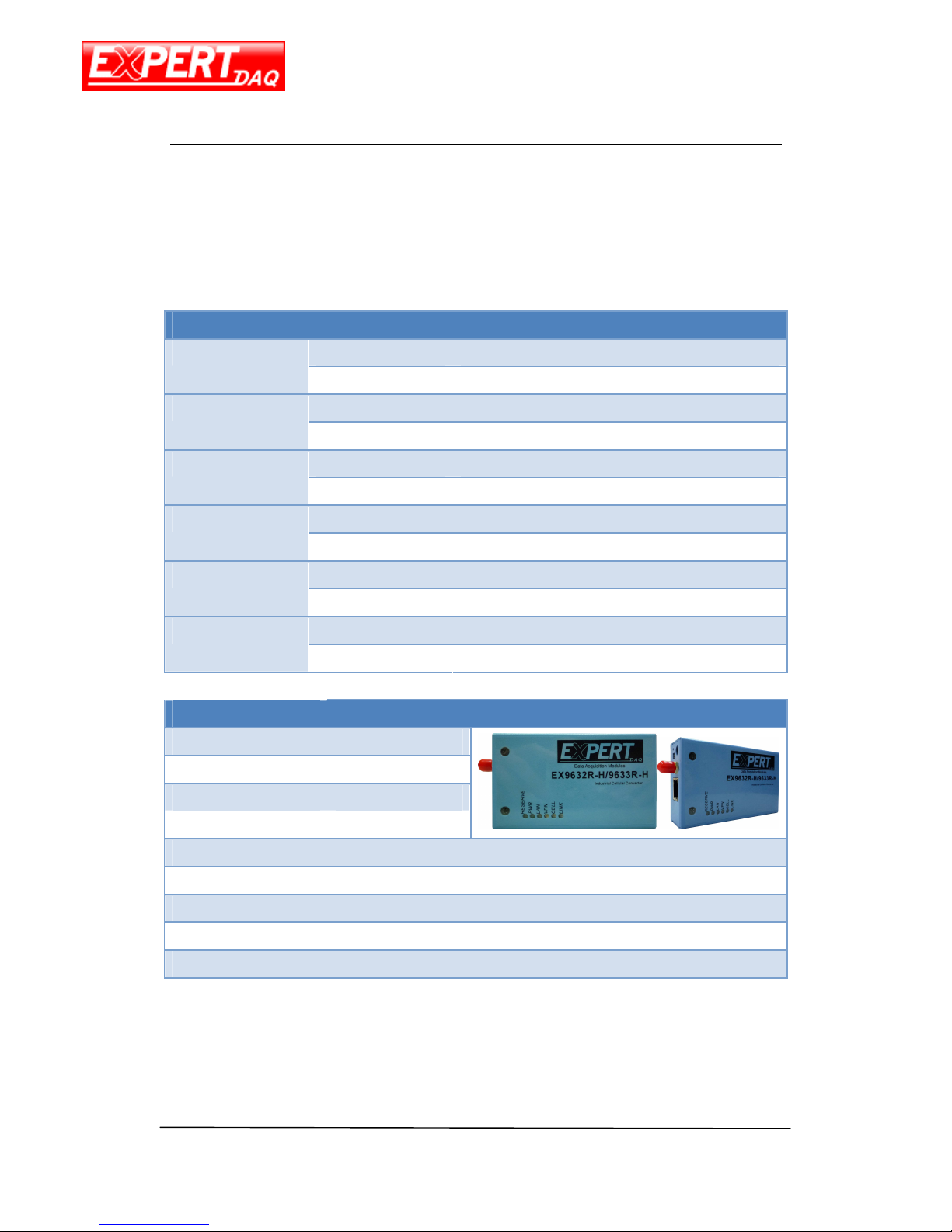
Interface
LED Description
OFF Reserved
Reserve
ON Device starting
PWR
Blink Device running
ON RJ45 connected
LAN
OFF RJ45 absent
ON VPN connected
VPN
OFF VPN absent
ON Cell module running
CELL
OFF Cell module starting
ON Network registered
Online
OFF Network registering
Interface Description
Antenna
50Ω/SMA/Female
Reset Hole Reset the device
Jumper Upper Only Modem mode
Jumper Lower Only Router mode
USB jack
Connect to PC (modem mode)
RJ45
Network cable interface
Power
Φ5.5mm/2.5mm,5~25V(standard 12V)
Serial Port
DB9 (for DTU mode)
SIM
3.3V/1.8V
Page 13
EX-9632R-H/EX-9633R-H
Manual
EX-9632R-H/EX-9633R-H • Manual Version 1.1 • 30.06.2012 www.topsccc.com
Web Interface
Login
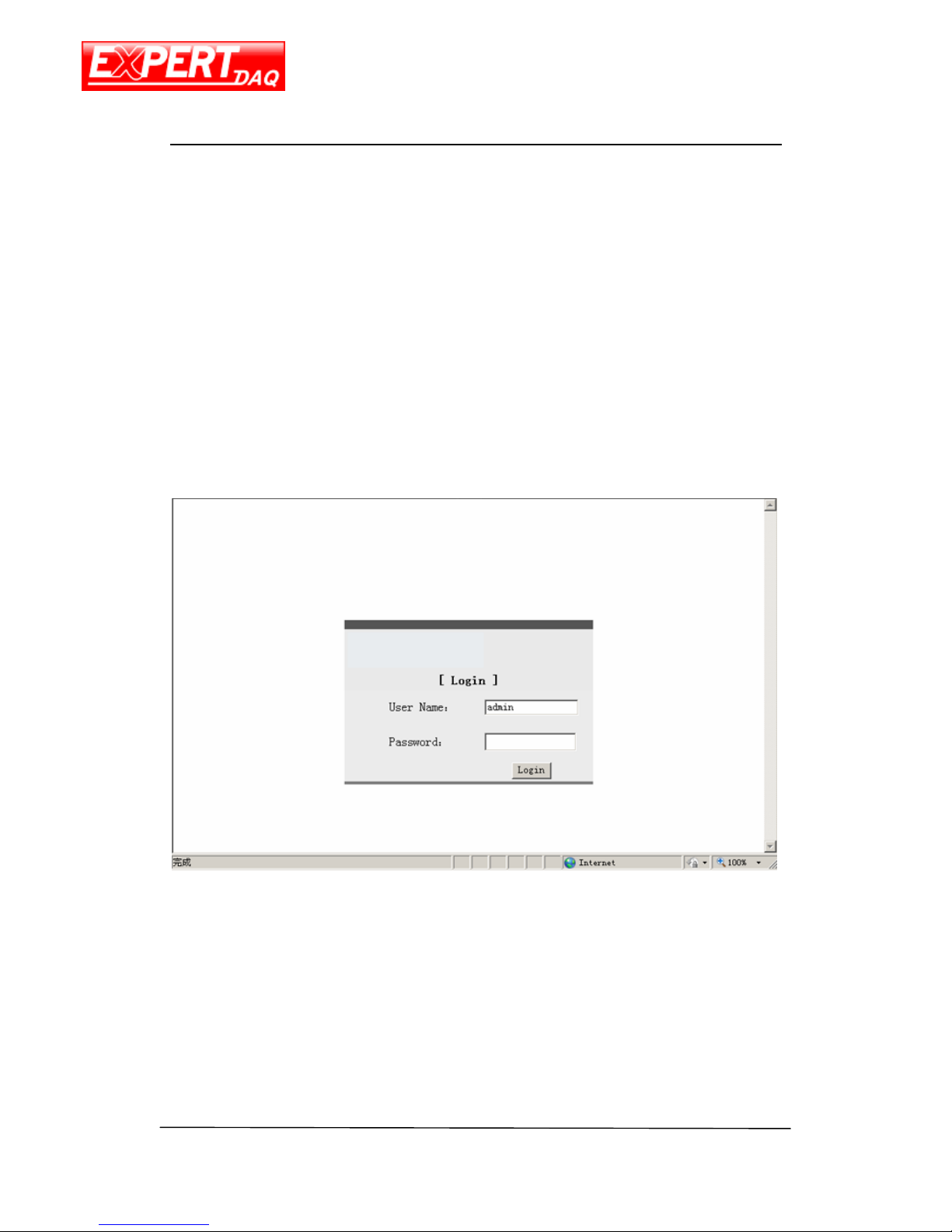
Default login address: http://192.168.0.254:10000
Default user name: admin
Default password: 888888
Page 14
EX-9632R-H/EX-9633R-H
Manual
EX-9632R-H/EX-9633R-H • Manual Version 1.1 • 30.06.2012 www.topsccc.com
System Info
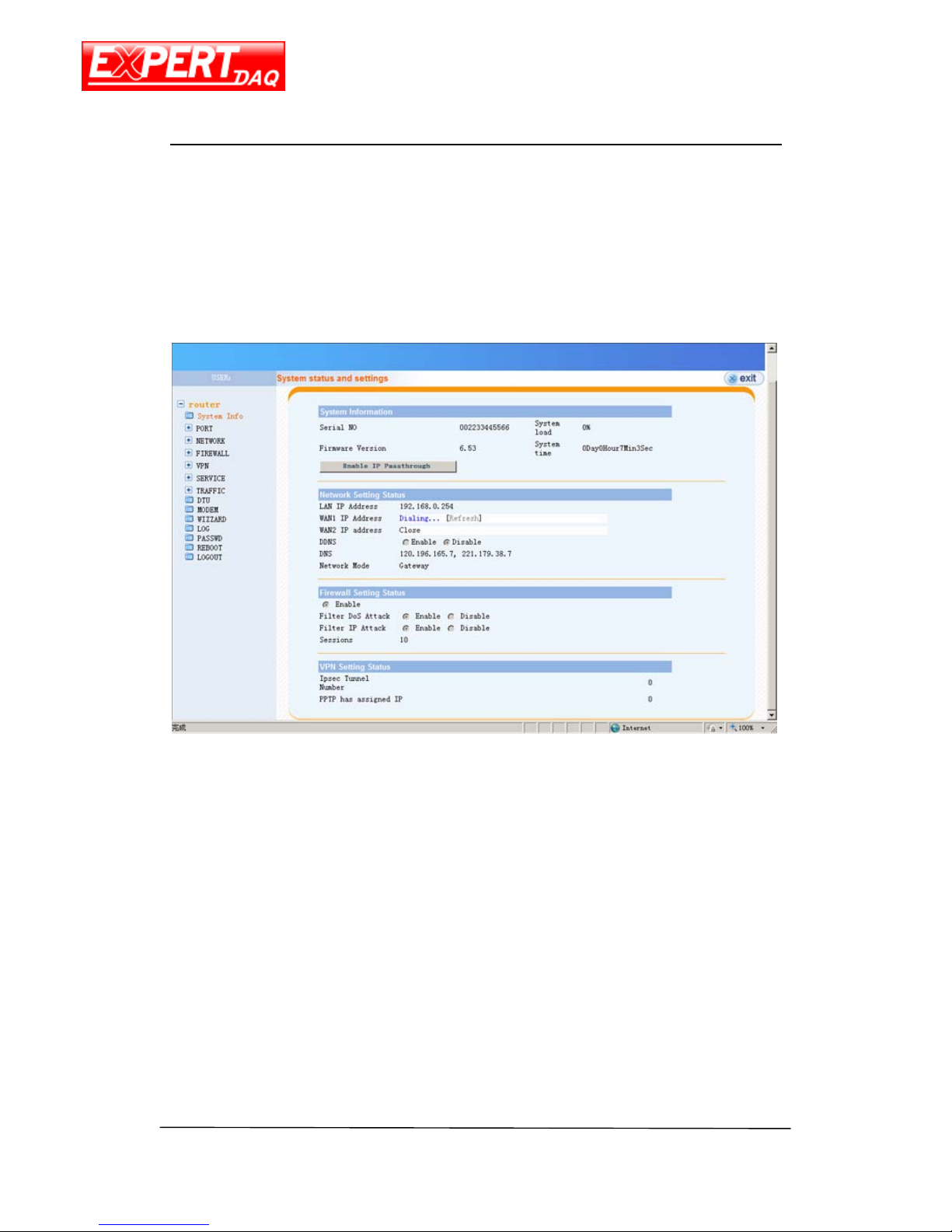
Router system information includes network status, firewall status and VPN status.
System Information
Serial NO device serial number
System load system CPU load
Firmware Version device firmware version
System active time system running time
Network Setting Status
LAN IP Address device LAN IP address
WAN1 IP Address device WAN IP address
DDNS dynamic domain name service
DNS domain name service
Network Mode device work mode
Page 15

EX-9632R-H/EX-9633R-H
Manual
EX-9632R-H/EX-9633R-H • Manual Version 1.1 • 30.06.2012 www.topsccc.com
Firewall Setting Status
Enable enable the firewall
Filter DoS Attack filter DoS attack
Filter IP Attack filter IP attack
Sessions currently connecting sessions
VPN Setting Status
IPSec Tunnel Number number of IPSec tunnel
PPTP has assigned IP assigned IP for PPTP
Page 16
EX-9632R-H/EX-9633R-H
Manual
EX-9632R-H/EX-9633R-H • Manual Version 1.1 • 30.06.2012 www.topsccc.com
Port
WAN
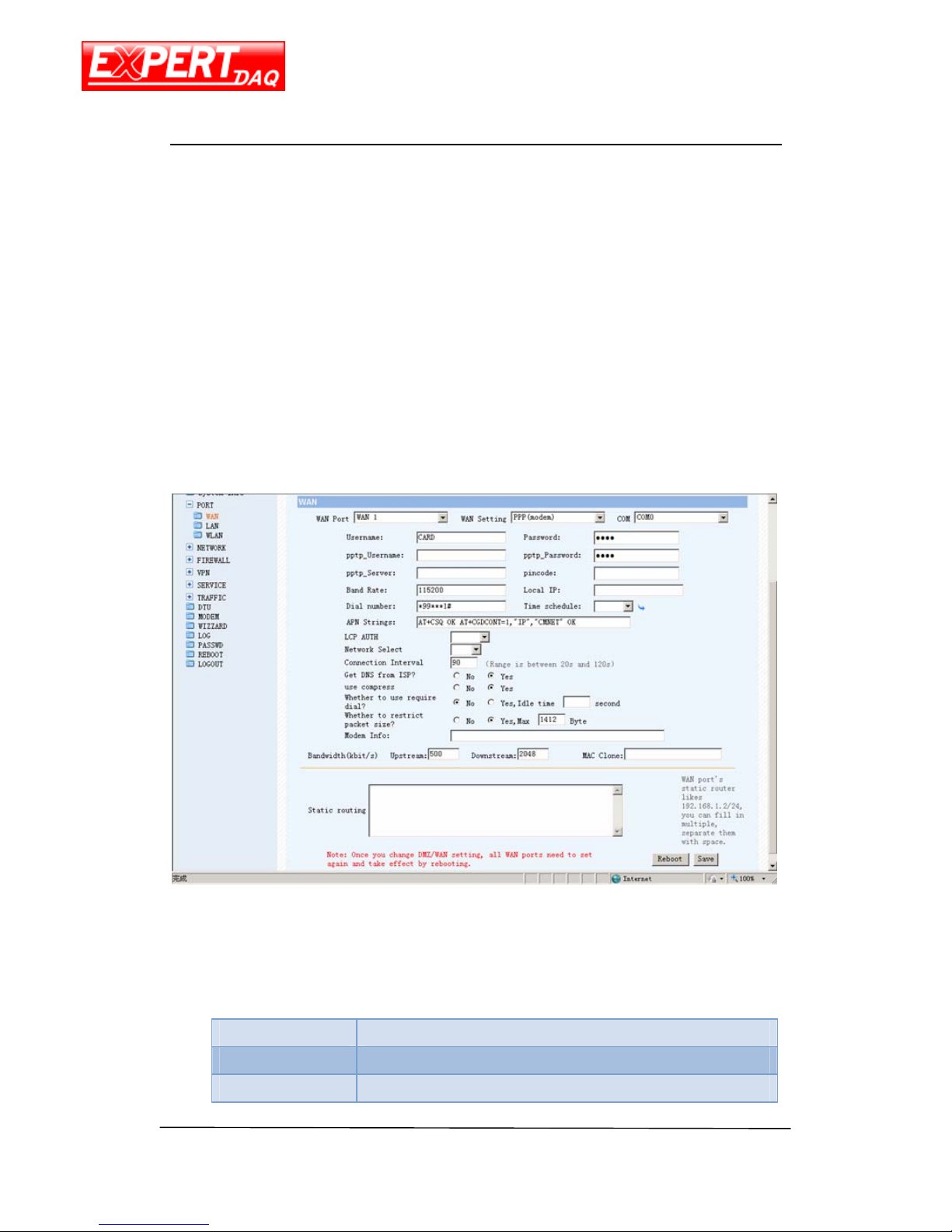
The device supports PPP for 3G network and Static IP, PPPoE, DHCP for Ethernet WAN. The
schedule
The scheduling selection also on this page named “Time Schedule”. Use this function to
configure the plan when this device will get online or offline.
The setting for connecting 3G network is different from ISP to ISP. Consult to your ISP
provider for following information: user name, password, dial number and APN string. Be sure
of the correctness of these information or you won’t get this device connecting to 3G network.
Following table is the required information if the ISP is Chunghwa Telecom Co.,Ltd.
User Name
Password
Band Rate
115200
Page 17
EX-9632R-H/EX-9633R-H
Manual
EX-9632R-H/EX-9633R-H • Manual Version 1.1 • 30.06.2012 www.topsccc.com
Dial Number
*99***1#
AT Str ing
AT+CSQ OK AT+CGDCONT=1,"IP","INTERNET" OK
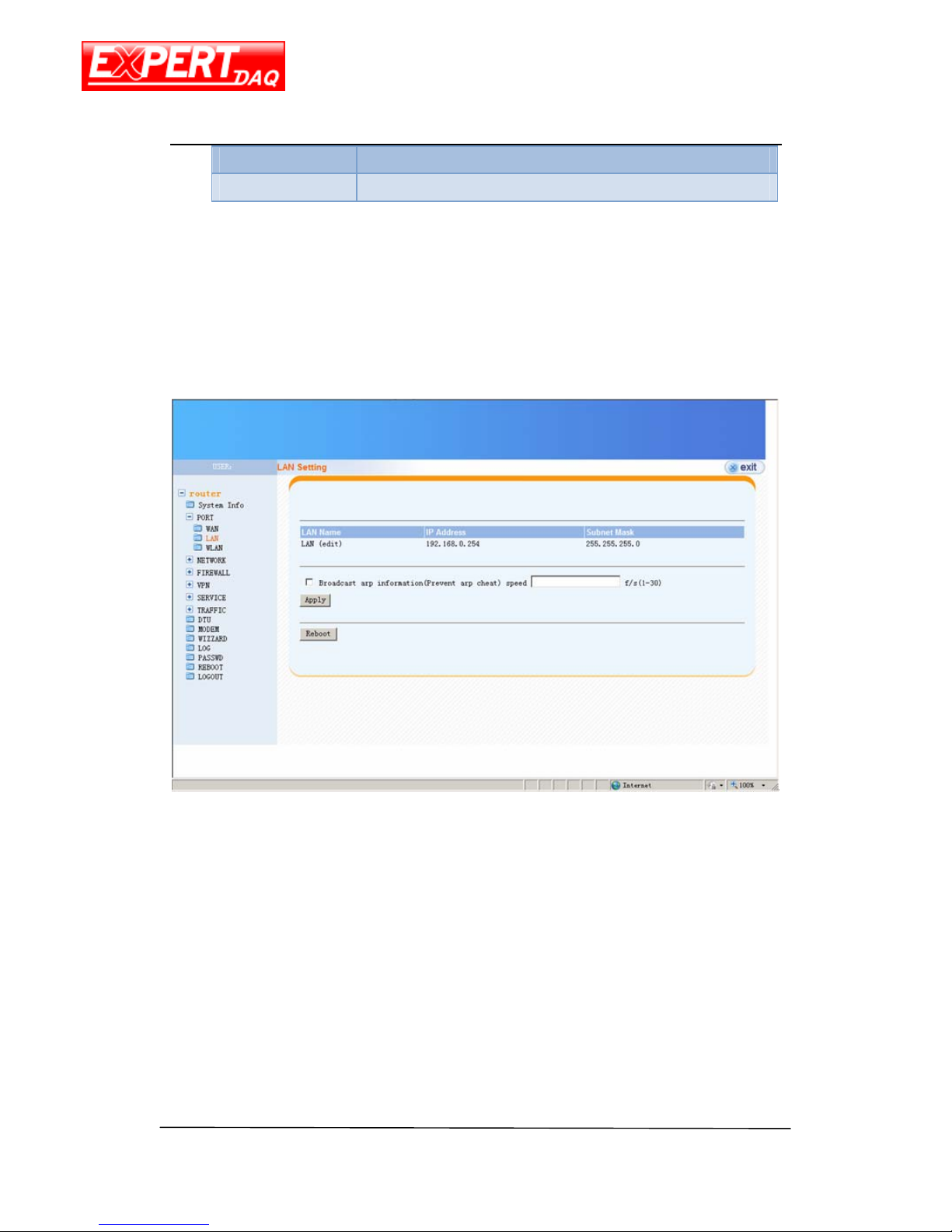
LAN
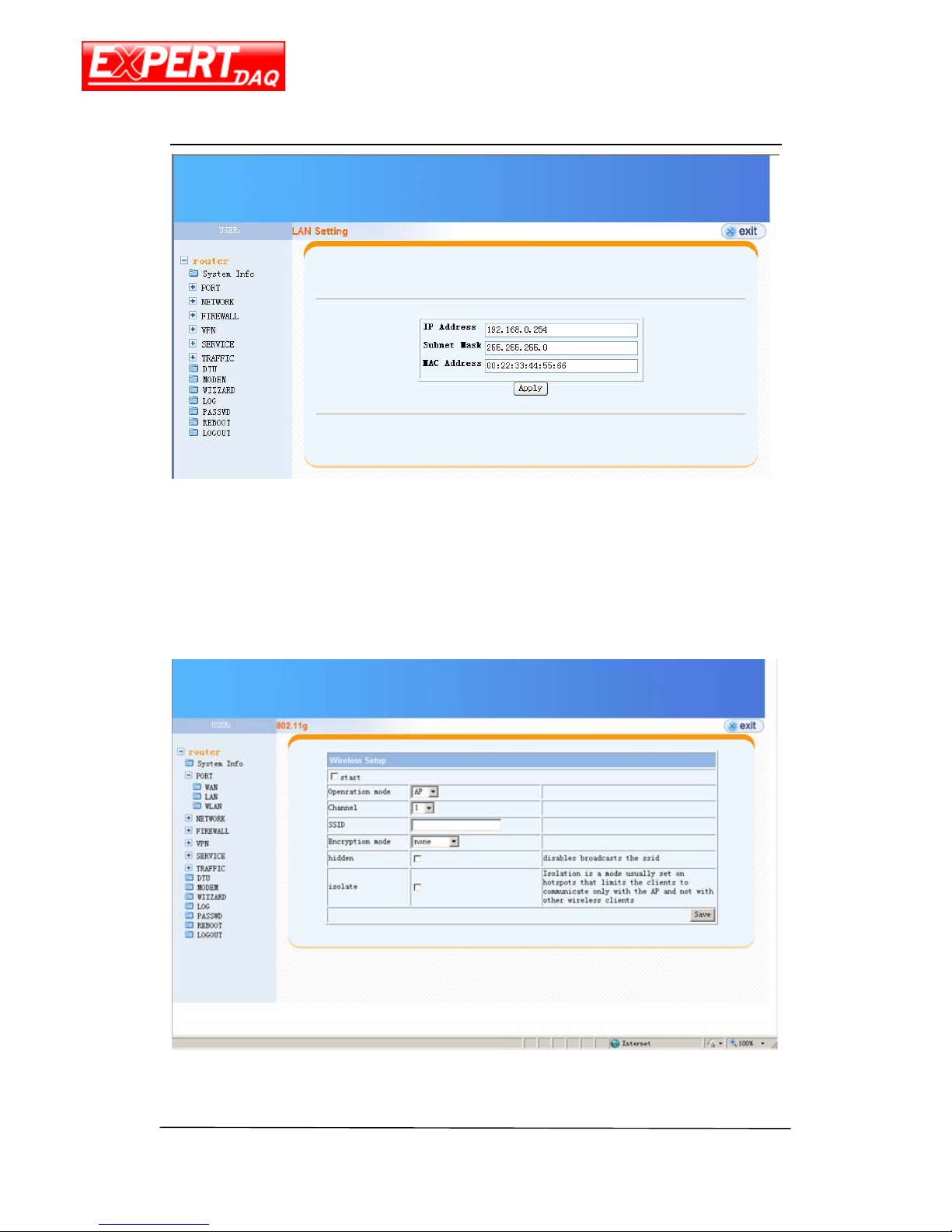
Click on the “LAN (edit)” of this page, you will able to configure LAN setting, including
router LAN IP, LAN subnet and LAN mask.
Page 18
EX-9632R-H/EX-9633R-H
Manual
EX-9632R-H/EX-9633R-H • Manual Version 1.1 • 30.06.2012 www.topsccc.com
WLAN
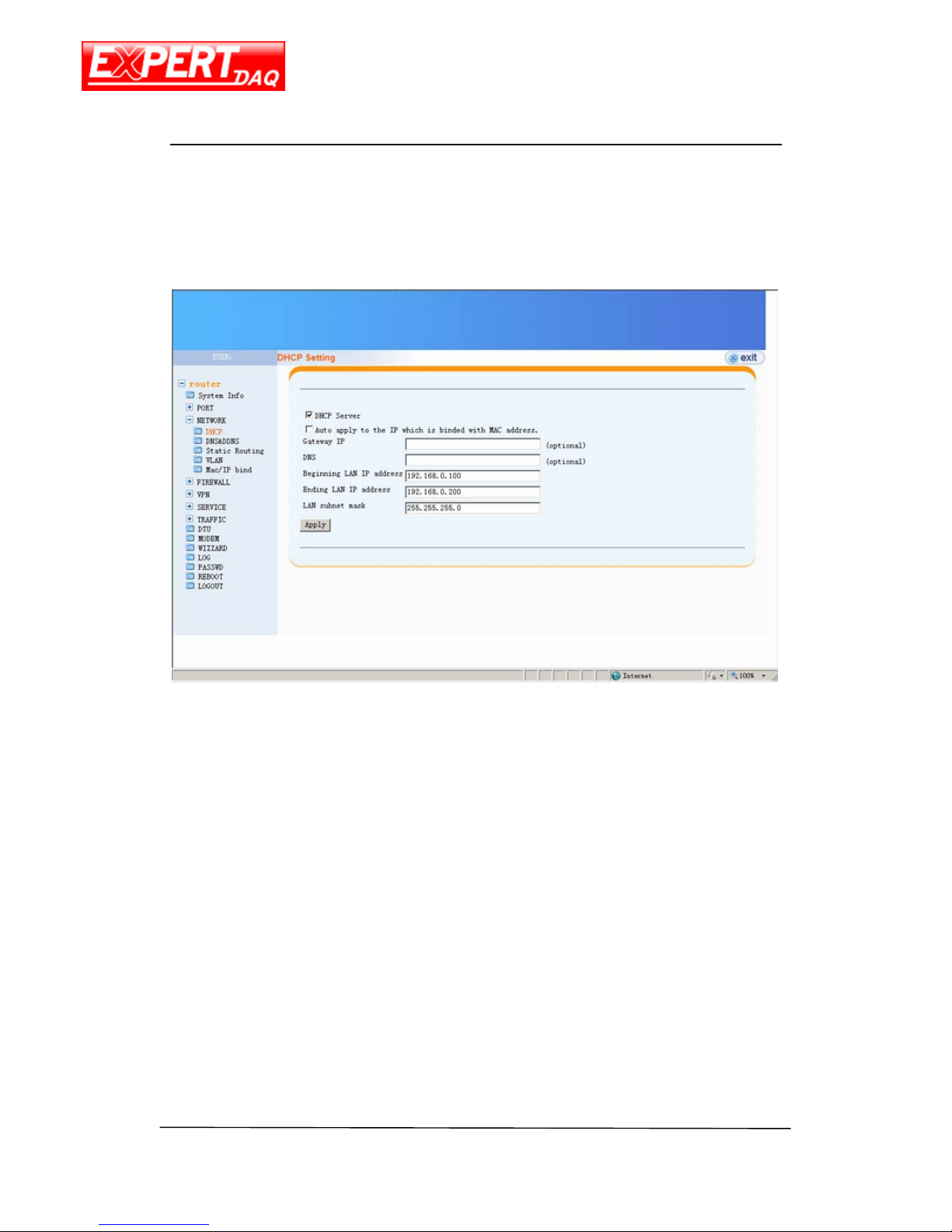
The WIFI setting not support by EX-9632R-H/EX-9633R-H. Just ignore it.
Page 19
EX-9632R-H/EX-9633R-H
Manual
EX-9632R-H/EX-9633R-H • Manual Version 1.1 • 30.06.2012 www.topsccc.com
Network
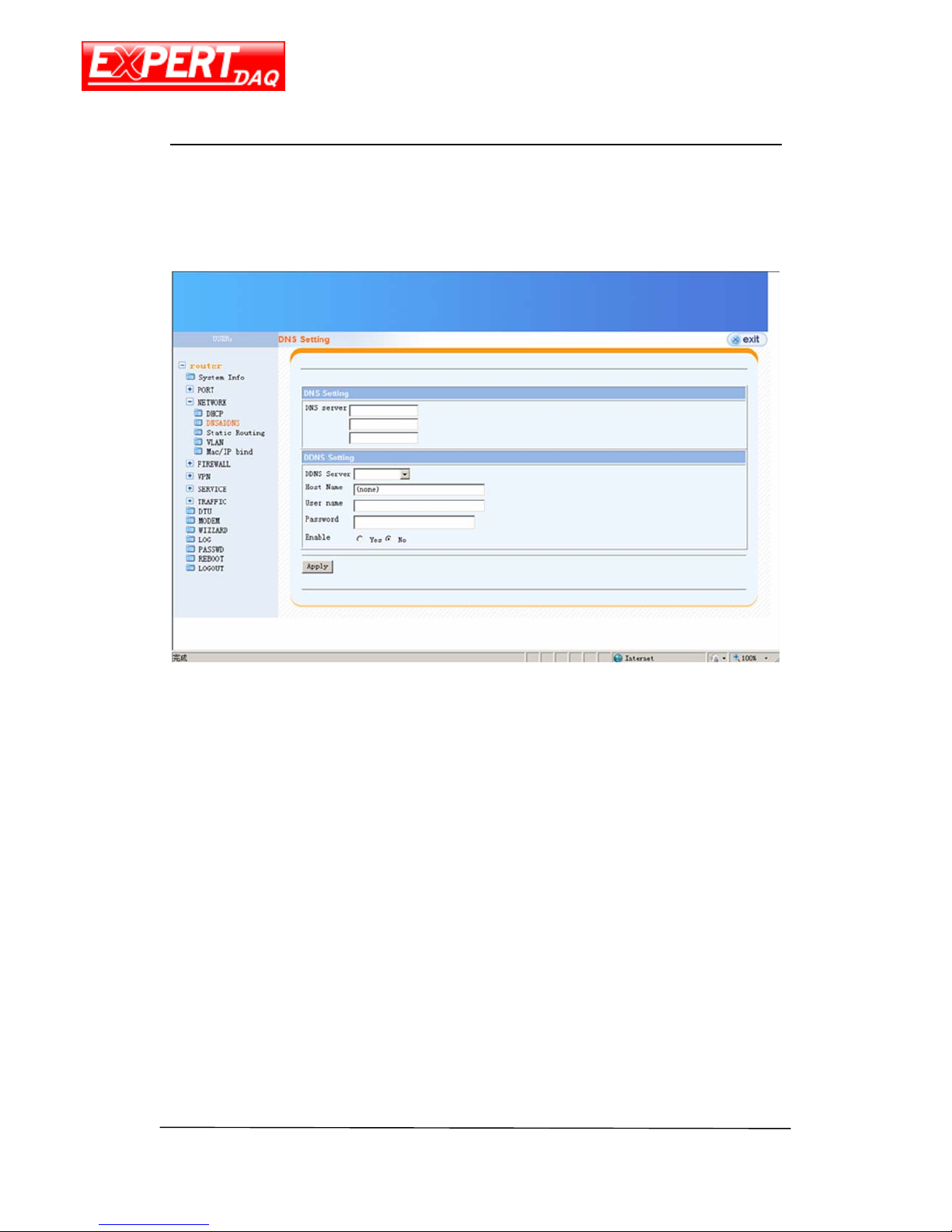
DHCP
DHCP Setting
DHCP Server enable the DHCP server
Auto apply to IP which is bound with MAC address use the rule of IP and MAC
bind
Gateway IP Gateway IP address (option)
DNS DNS IP address (option)
Beginning LAN IP address the begin of DHCP IP address pool
Ending LAN IP address the end of DHCP IP address pool
LAN Subnet Mask the LAN subnet mask
LAN Subnet Mask
the LAN subnet mask
Page 20
EX-9632R-H/EX-9633R-H
Manual
EX-9632R-H/EX-9633R-H • Manual Version 1.1 • 30.06.2012 www.topsccc.com
DNS&DDNS
For DDNS, please reference Appendix A for an example.
DNS and DDNS setting
DNS Server manual setting the IP address of DNS primary server and the secondary
server
DDNS Server the dynamic domain name server selection.
Host Name
the DDNS host name.
User Name the DDNS username
Password the DDNS password
Enable enable or disable the DDNS function
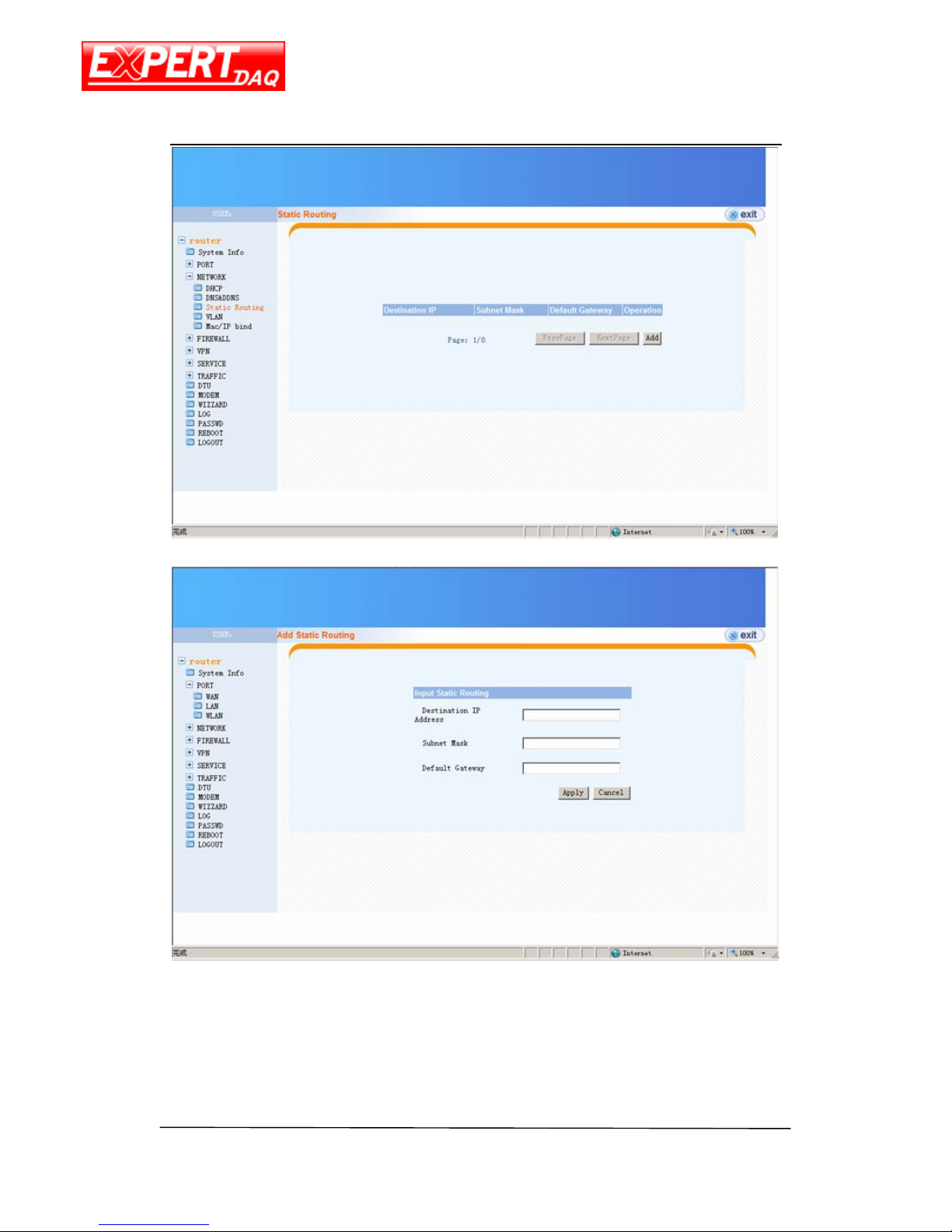
Static Routing
This page contains the list of static routing rules. Click on the Add button will allow you to
add a new rule.
Page 21
EX-9632R-H/EX-9633R-H
Manual
EX-9632R-H/EX-9633R-H • Manual Version 1.1 • 30.06.2012 www.topsccc.com
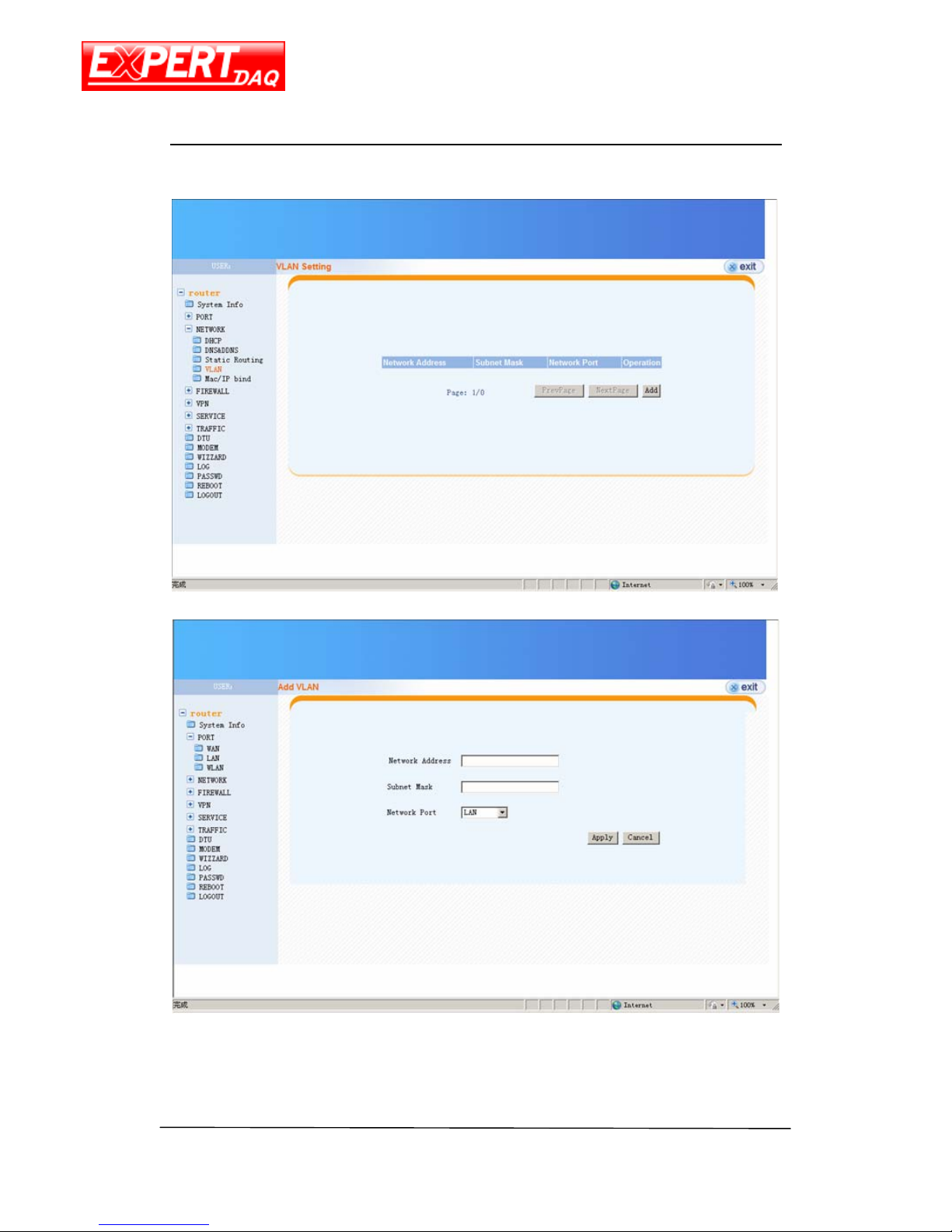
VLAN
This page contains the list of VLAN rules. Click on the Add button will allow you to add a
Page 22
EX-9632R-H/EX-9633R-H
Manual
EX-9632R-H/EX-9633R-H • Manual Version 1.1 • 30.06.2012 www.topsccc.com
new rule.
Add VLAN
Network Address the VLAN network address
Subnet Mask
the VLAN subnet mask
Page 23
EX-9632R-H/EX-9633R-H
Manual
EX-9632R-H/EX-9633R-H • Manual Version 1.1 • 30.06.2012 www.topsccc.com
Network Port the VLAN port, only the LAN
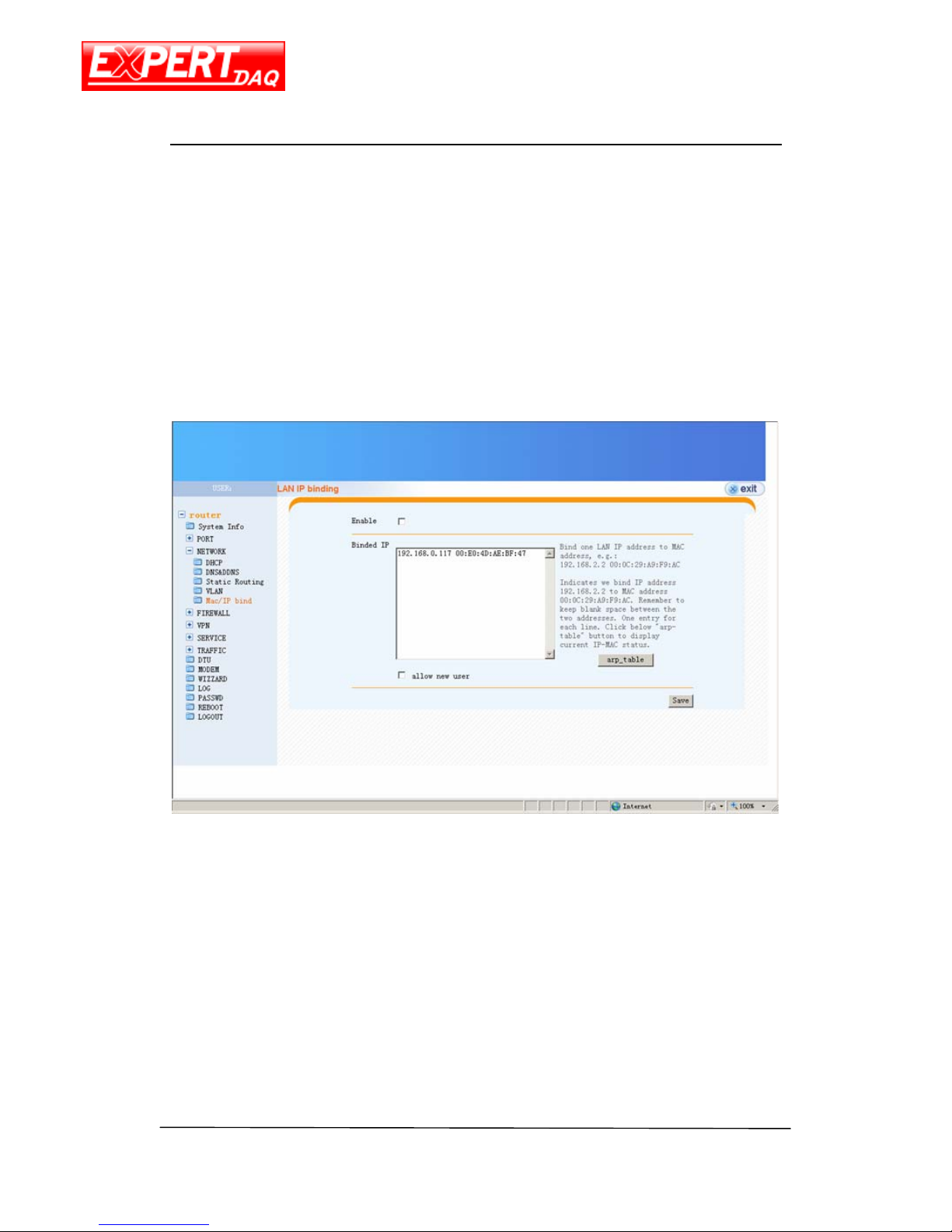
MAC/IP Bind
Setting of MAC and IP address binding. Follow the hints to add a new MAC-IP address
binding rule.
ARP table button is also in this page for showing the ARP list currently saved/used by this
device.
Page 24
EX-9632R-H/EX-9633R-H
Manual
EX-9632R-H/EX-9633R-H • Manual Version 1.1 • 30.06.2012 www.topsccc.com
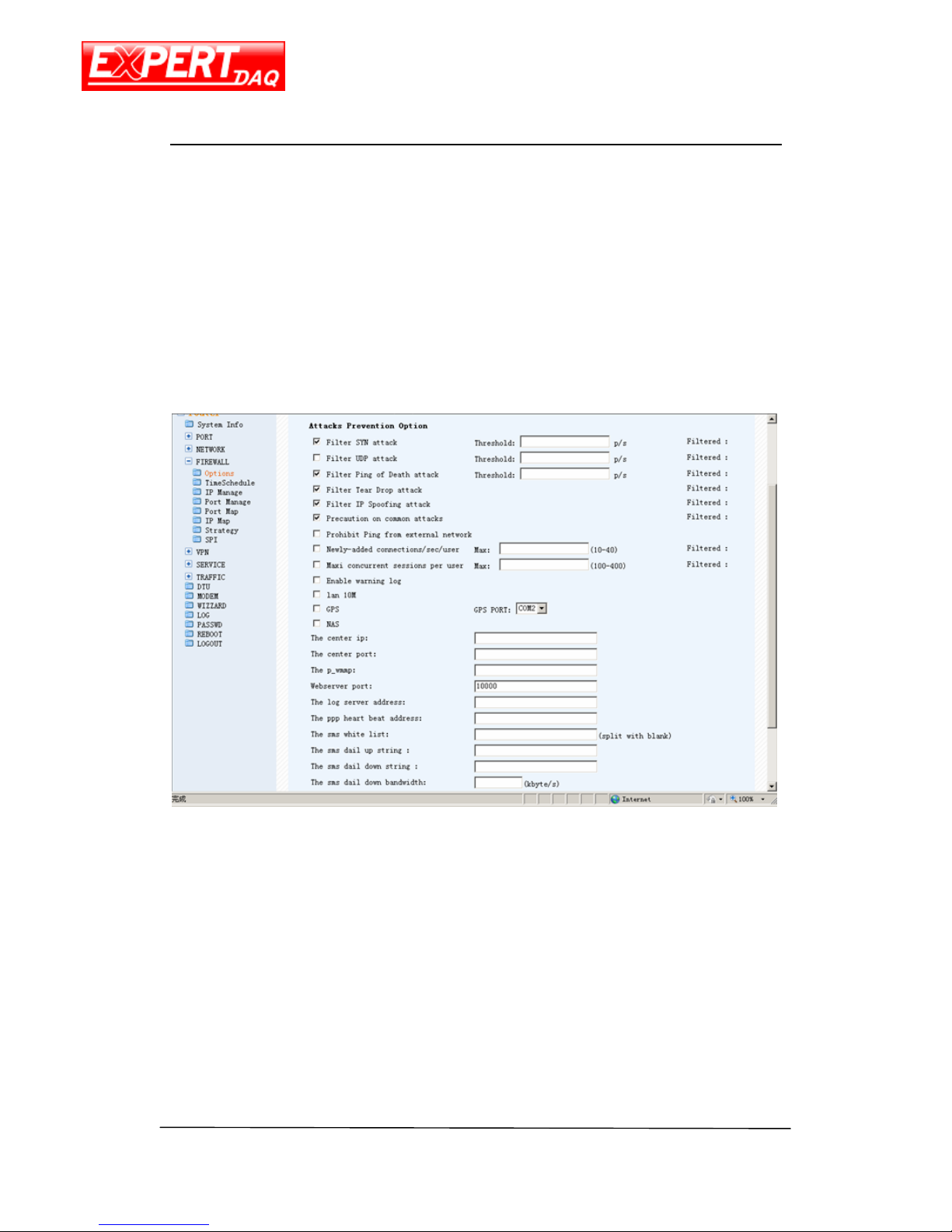
Firewall
Options
Settings of firewall rule.
Time Schedule
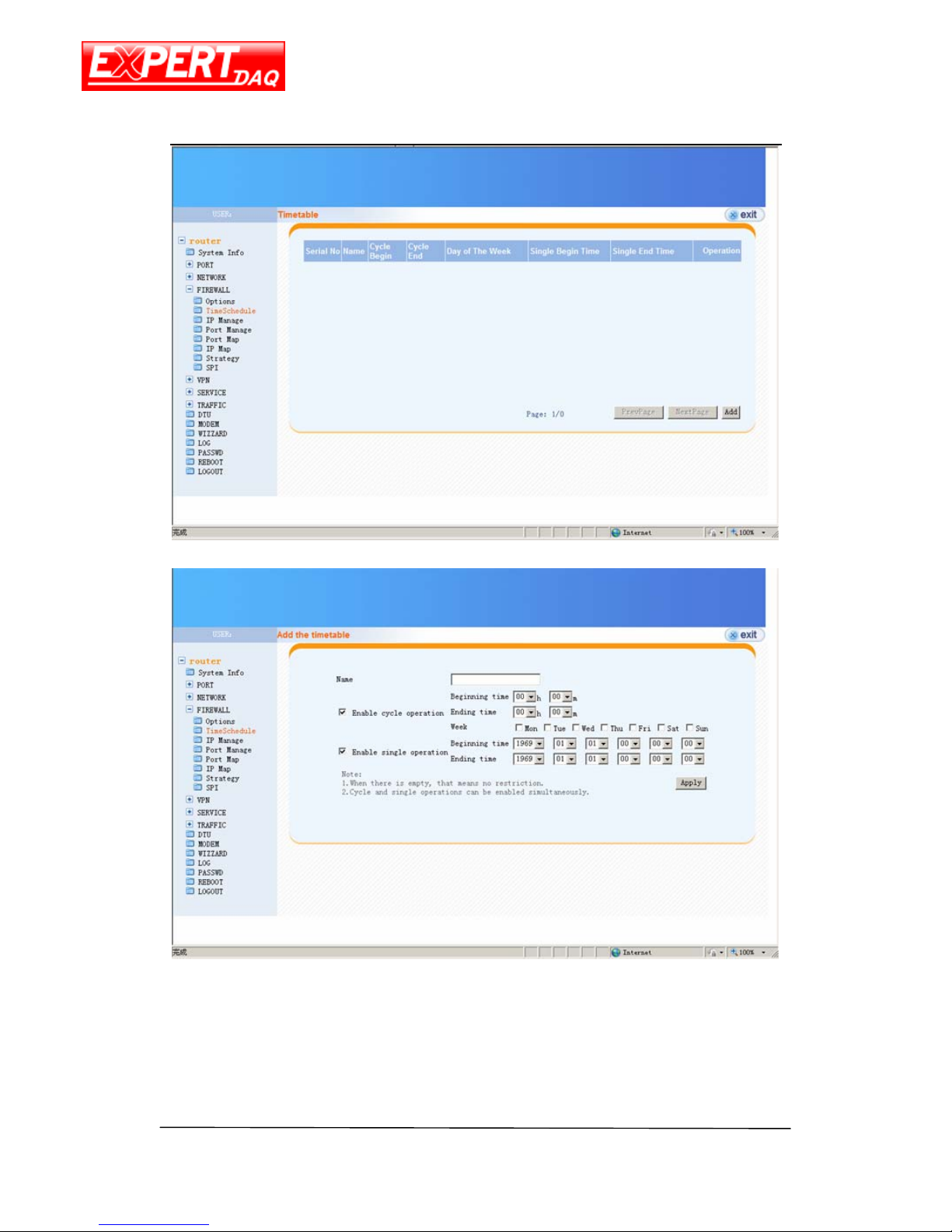
This page allows you to configure your plan about when this device will get online or
offline. The plan or plans are configured here first and enable by the “System Info” and firewall
“Strategy” page.
Page 25
EX-9632R-H/EX-9633R-H
Manual
EX-9632R-H/EX-9633R-H • Manual Version 1.1 • 30.06.2012 www.topsccc.com
Add the time table
Enable cycle operation enable cycle operation
Beginning time
start time to get online
Ending time end time to get offline
Week week setting for schedule
Page 26
EX-9632R-H/EX-9633R-H
Manual
EX-9632R-H/EX-9633R-H • Manual Version 1.1 • 30.06.2012 www.topsccc.com
Enable single operation online once only
Beginning time time for online
Ending time time for offline
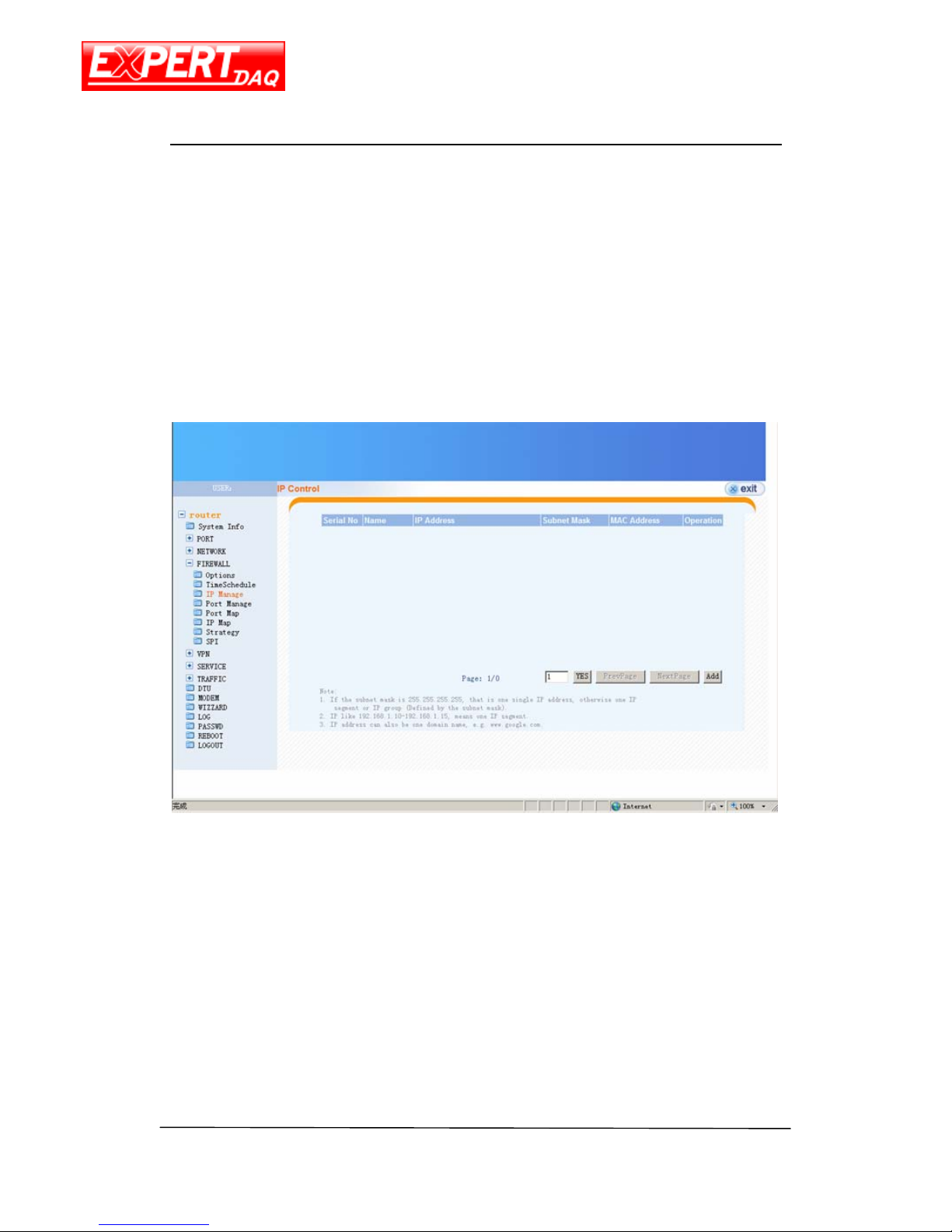
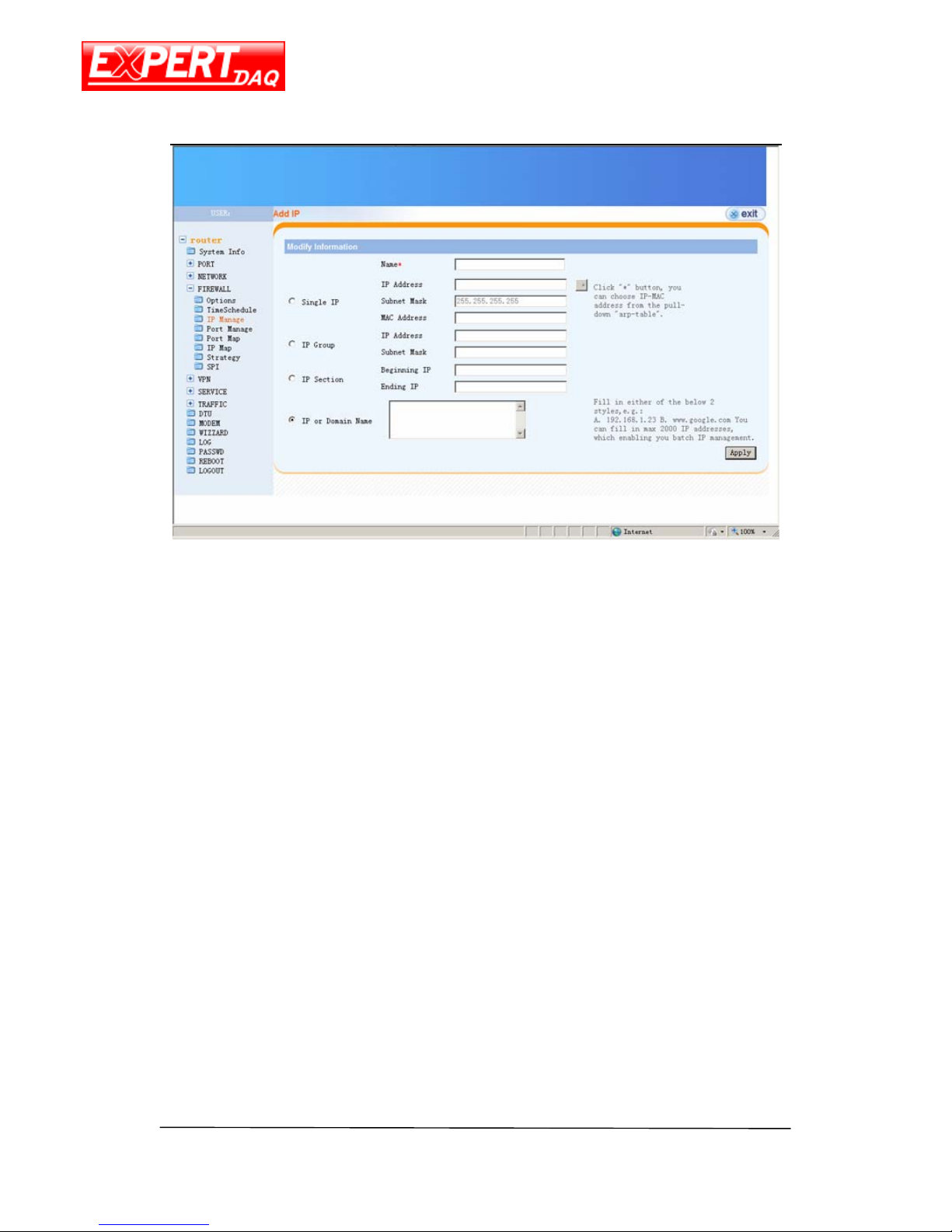
IP Manage
This page contains the list of all IP manage rules. Click on Add button will allow you to add
a new rule used “Strategy” page.
Page 27
EX-9632R-H/EX-9633R-H
Manual
EX-9632R-H/EX-9633R-H • Manual Version 1.1 • 30.06.2012 www.topsccc.com
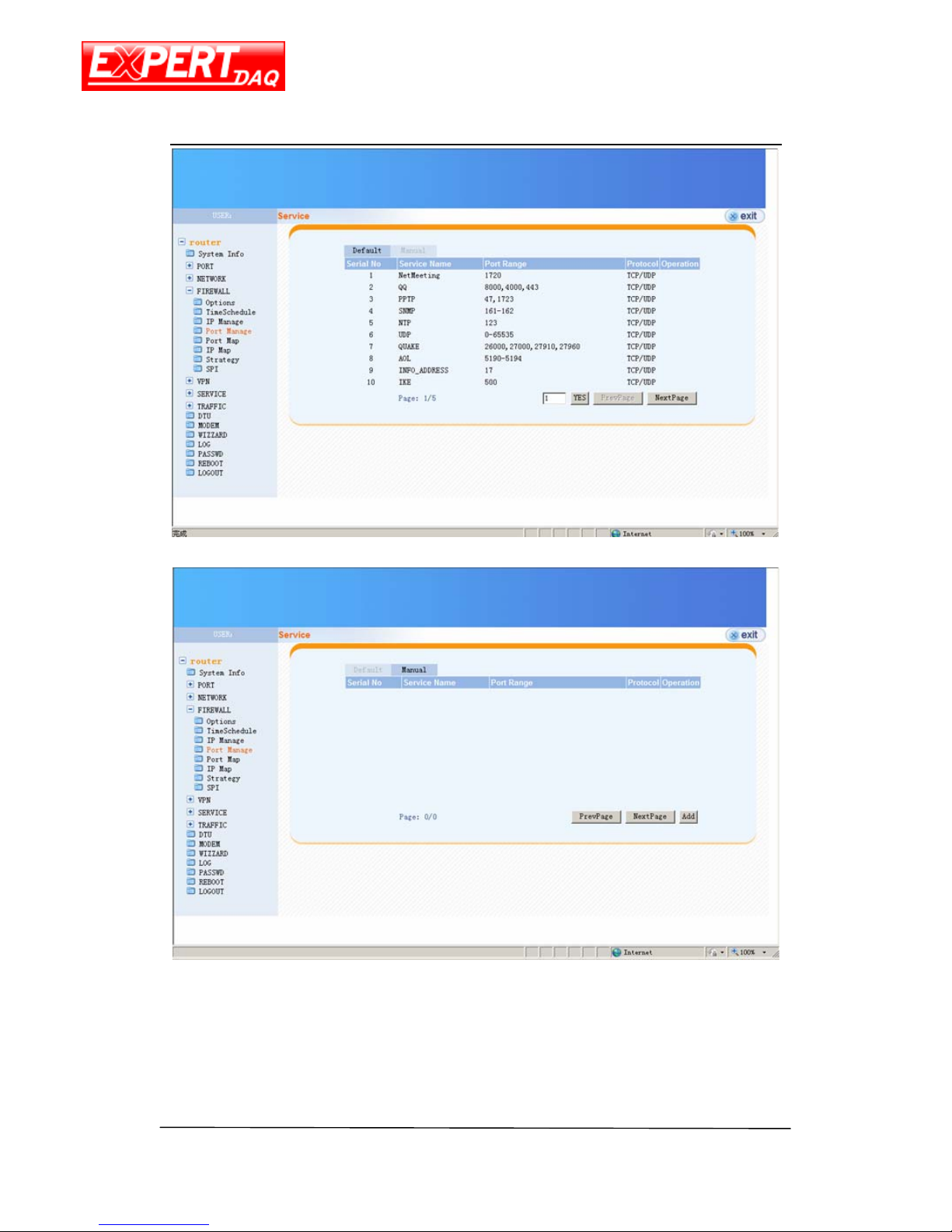
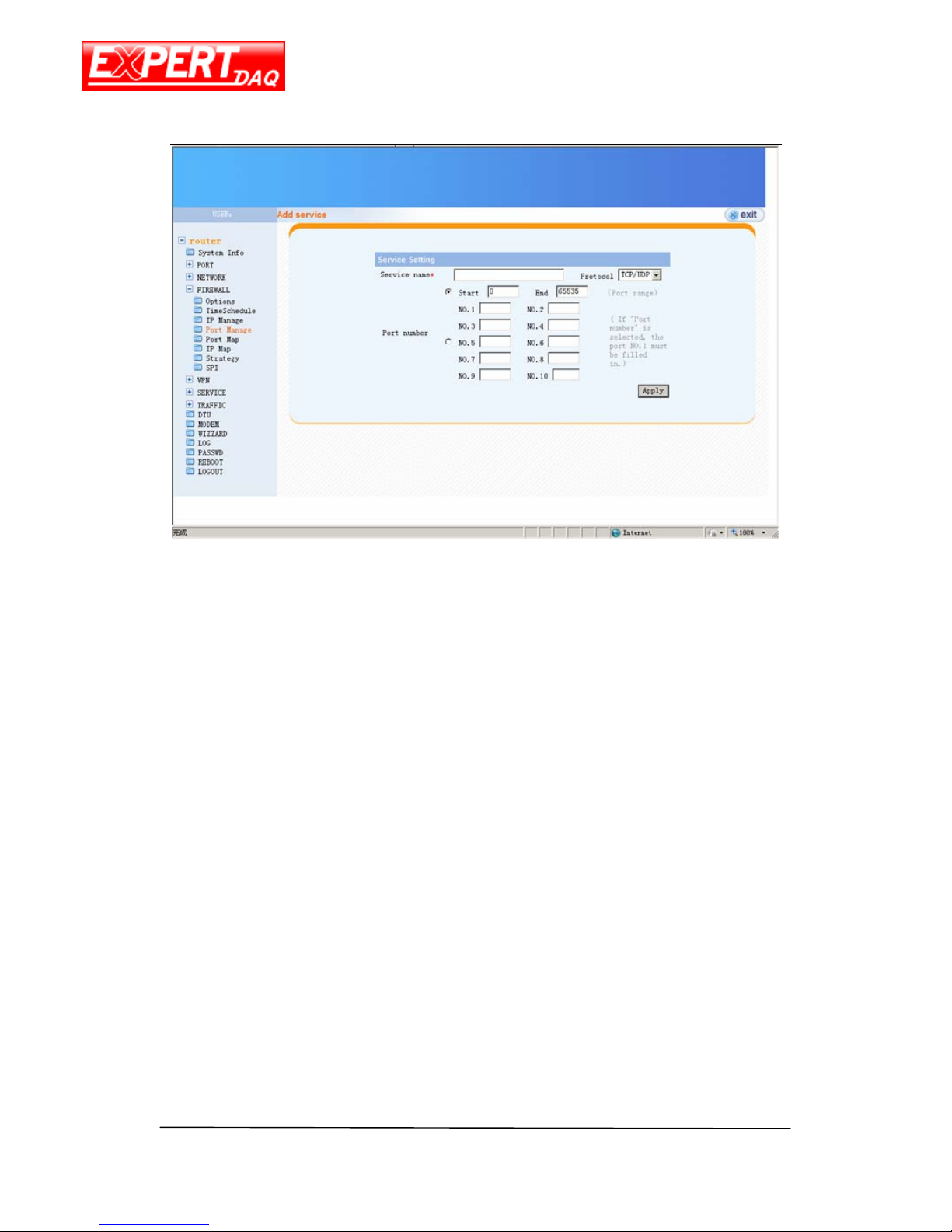
Port Manage
This page contains the list of all Port manage rules configured automatically or manually.
Select Manual tag and click on Add button will allow you to add a new rule used “Strategy”
page.
Page 28
EX-9632R-H/EX-9633R-H
Manual
EX-9632R-H/EX-9633R-H • Manual Version 1.1 • 30.06.2012 www.topsccc.com
Page 29
EX-9632R-H/EX-9633R-H
Manual
EX-9632R-H/EX-9633R-H • Manual Version 1.1 • 30.06.2012 www.topsccc.com
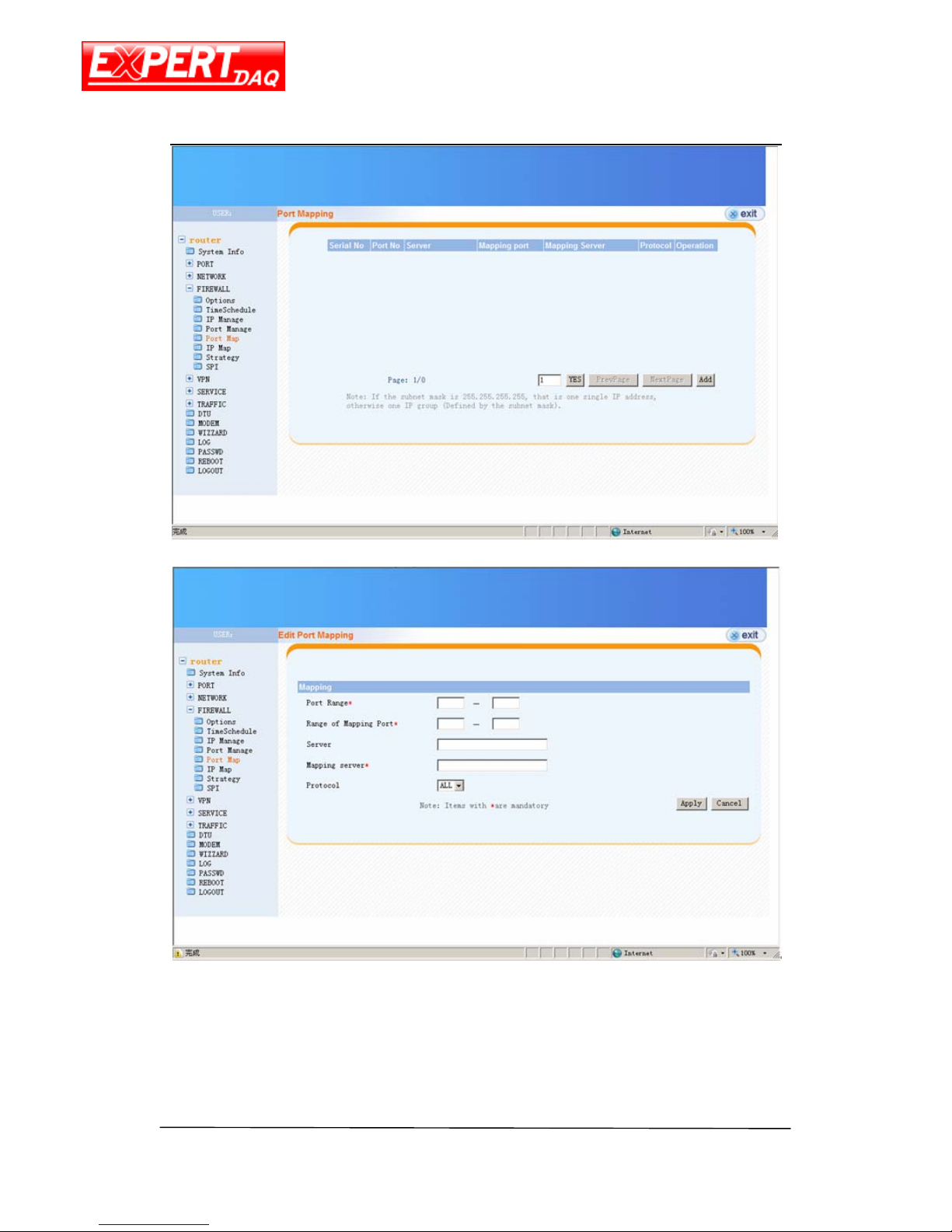
Port Map
This page contains the list of all Port mapping rules. Click on Add button will allow you to
add a new rule used “Strategy” page.
Page 30
EX-9632R-H/EX-9633R-H
Manual
EX-9632R-H/EX-9633R-H • Manual Version 1.1 • 30.06.2012 www.topsccc.com
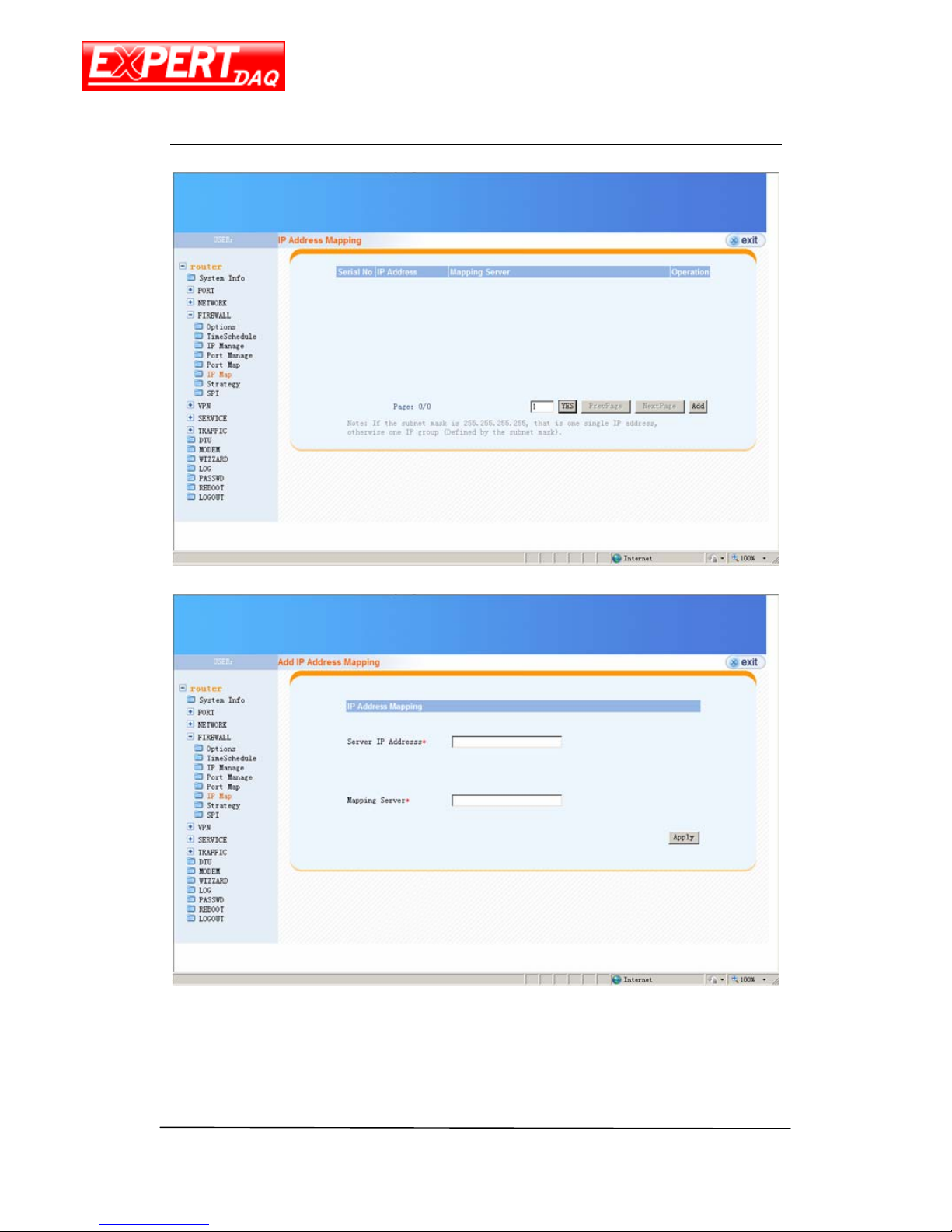
IP Map
This page contains the list of all IP mapping rules. Click on Add button will allow you to
Page 31
EX-9632R-H/EX-9633R-H
Manual
EX-9632R-H/EX-9633R-H • Manual Version 1.1 • 30.06.2012 www.topsccc.com
add a new rule used “Strategy” page.
Page 32
EX-9632R-H/EX-9633R-H
Manual
EX-9632R-H/EX-9633R-H • Manual Version 1.1 • 30.06.2012 www.topsccc.com
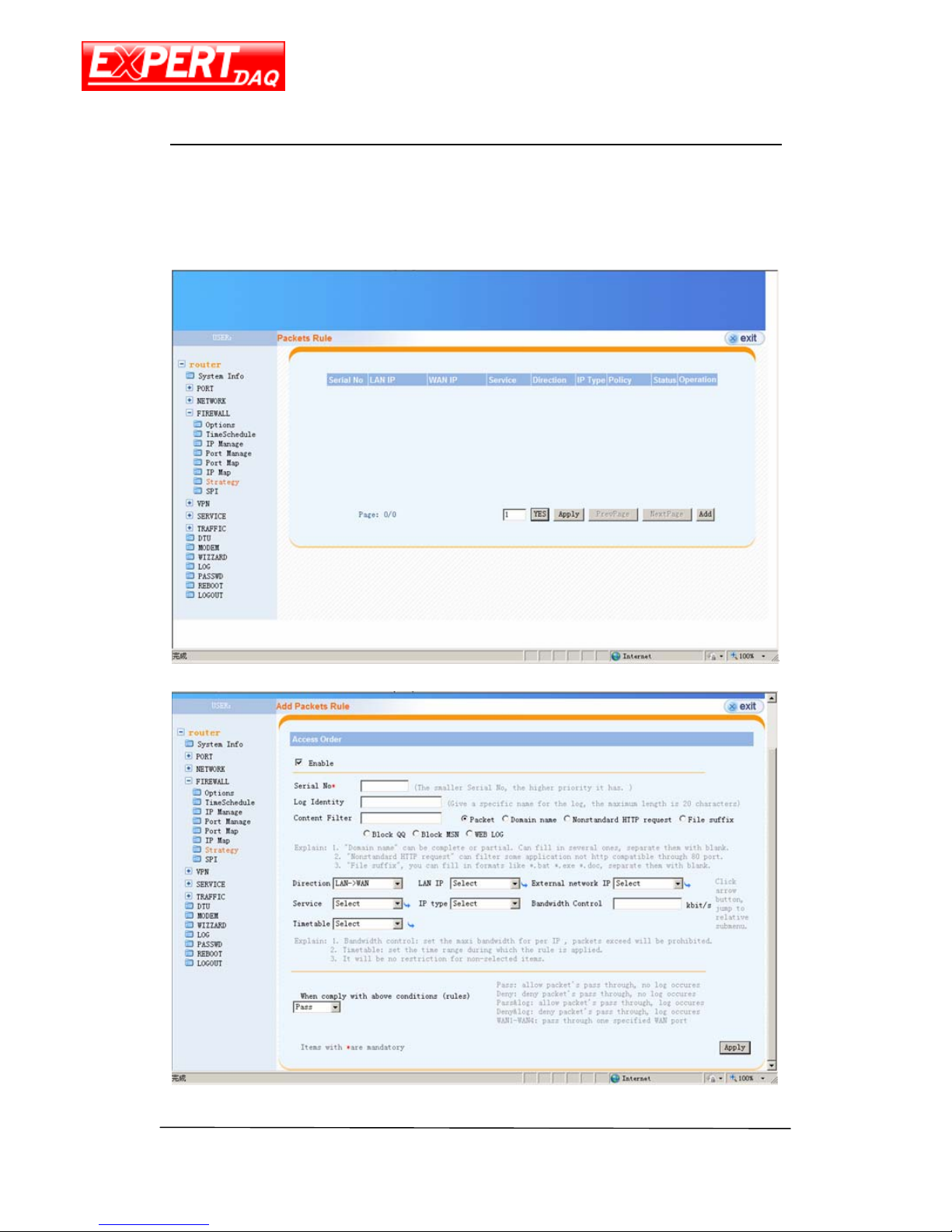
Strategy
This page contains the list of all firewall strategy. Click on Add button will allow you to add
a new rule.
Page 33
EX-9632R-H/EX-9633R-H
Manual
EX-9632R-H/EX-9633R-H • Manual Version 1.1 • 30.06.2012 www.topsccc.com
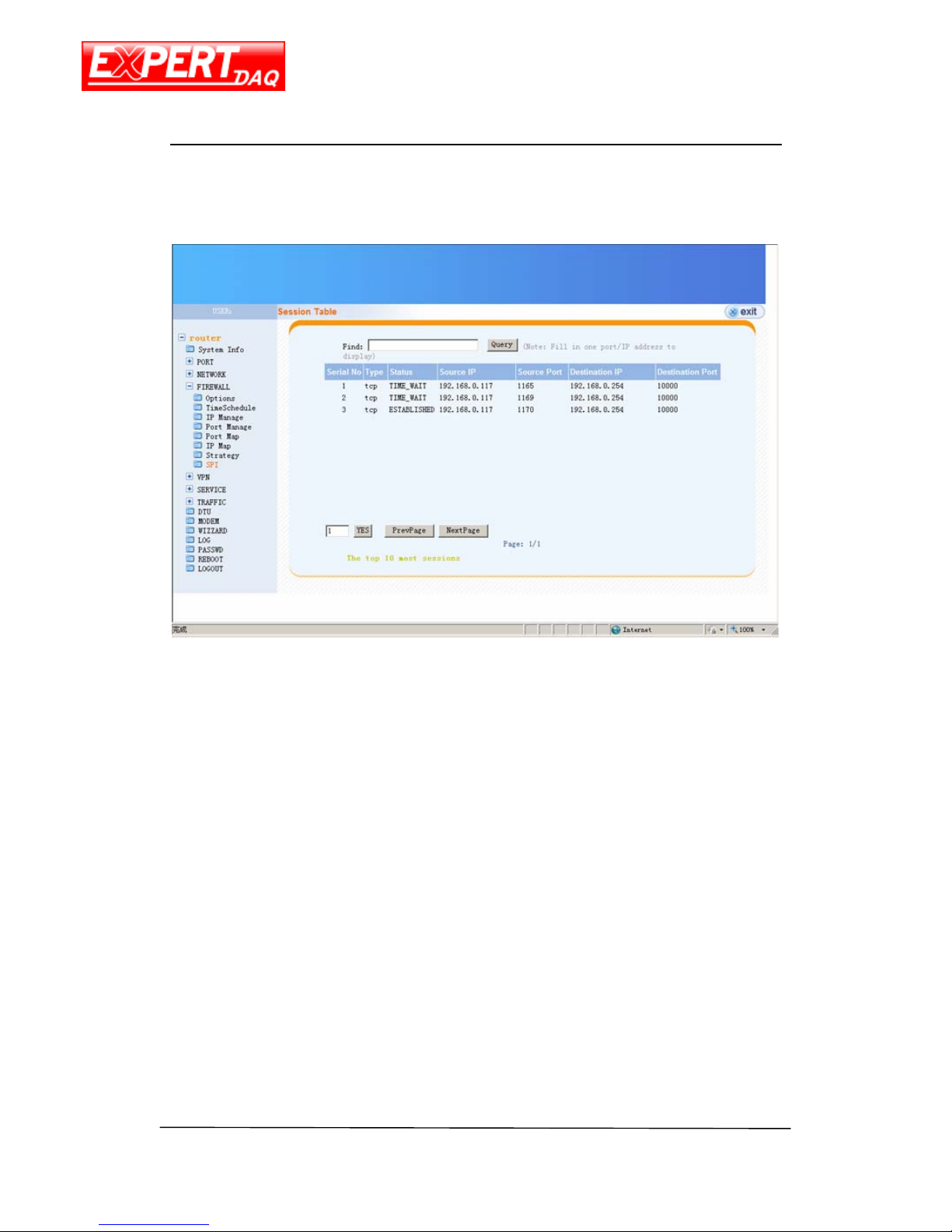
SPI
This page contains the list of all network sessions.
Page 34
EX-9632R-H/EX-9633R-H
Manual
EX-9632R-H/EX-9633R-H • Manual Version 1.1 • 30.06.2012 www.topsccc.com
VPN
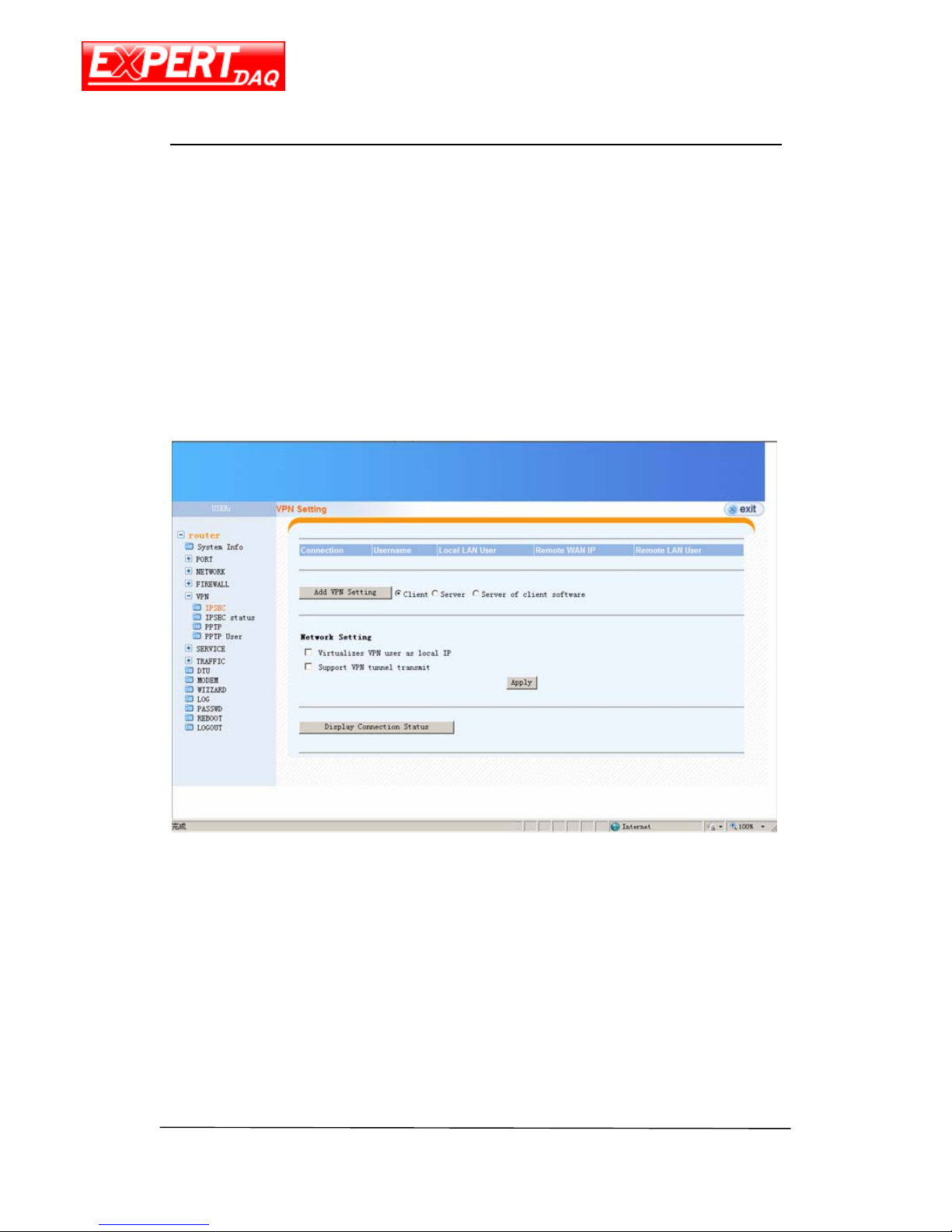
IPSec
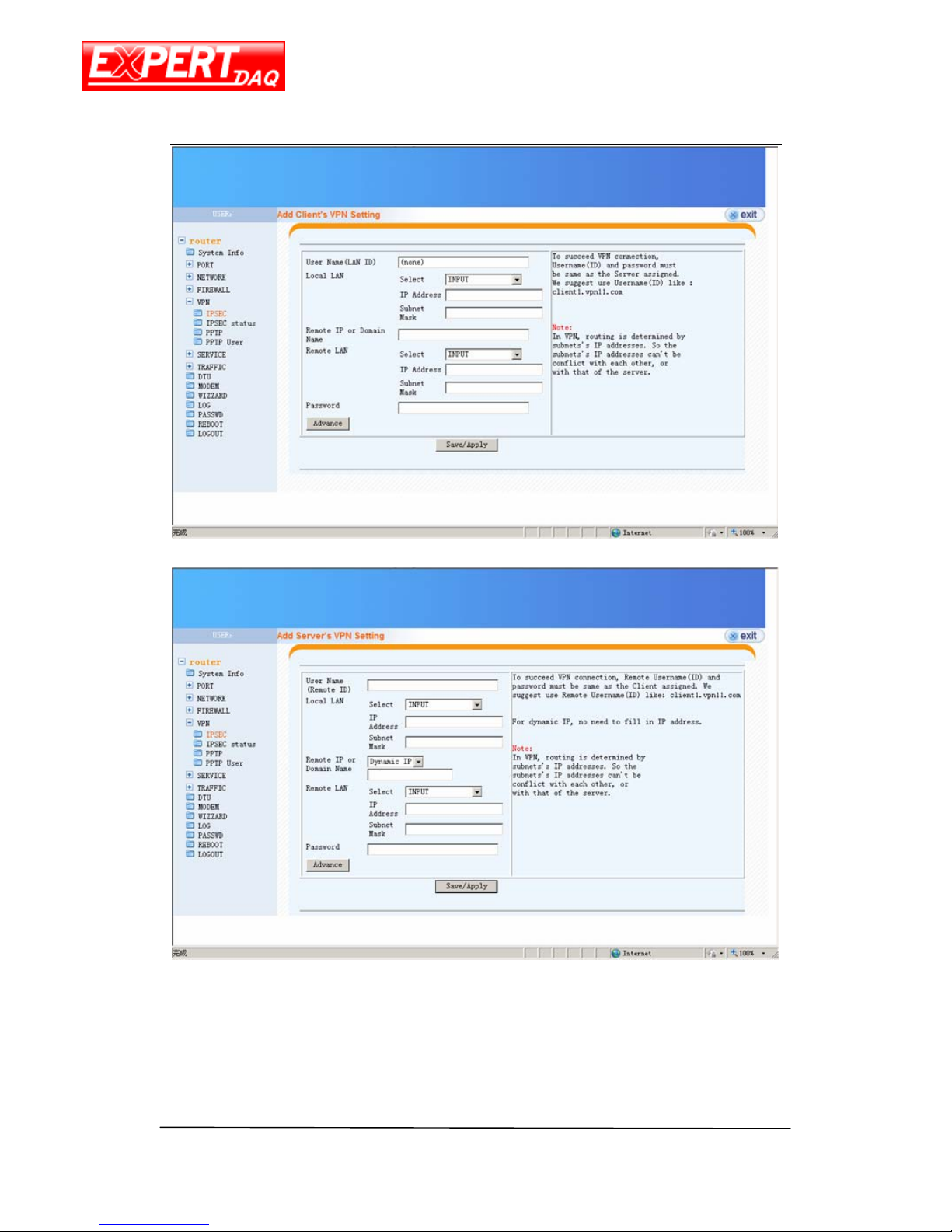
This page allows you to configure IPSec network. Select the type of setting and click on
Add VPN Setting to all a new rule.
Page 35
EX-9632R-H/EX-9633R-H
Manual
EX-9632R-H/EX-9633R-H • Manual Version 1.1 • 30.06.2012 www.topsccc.com
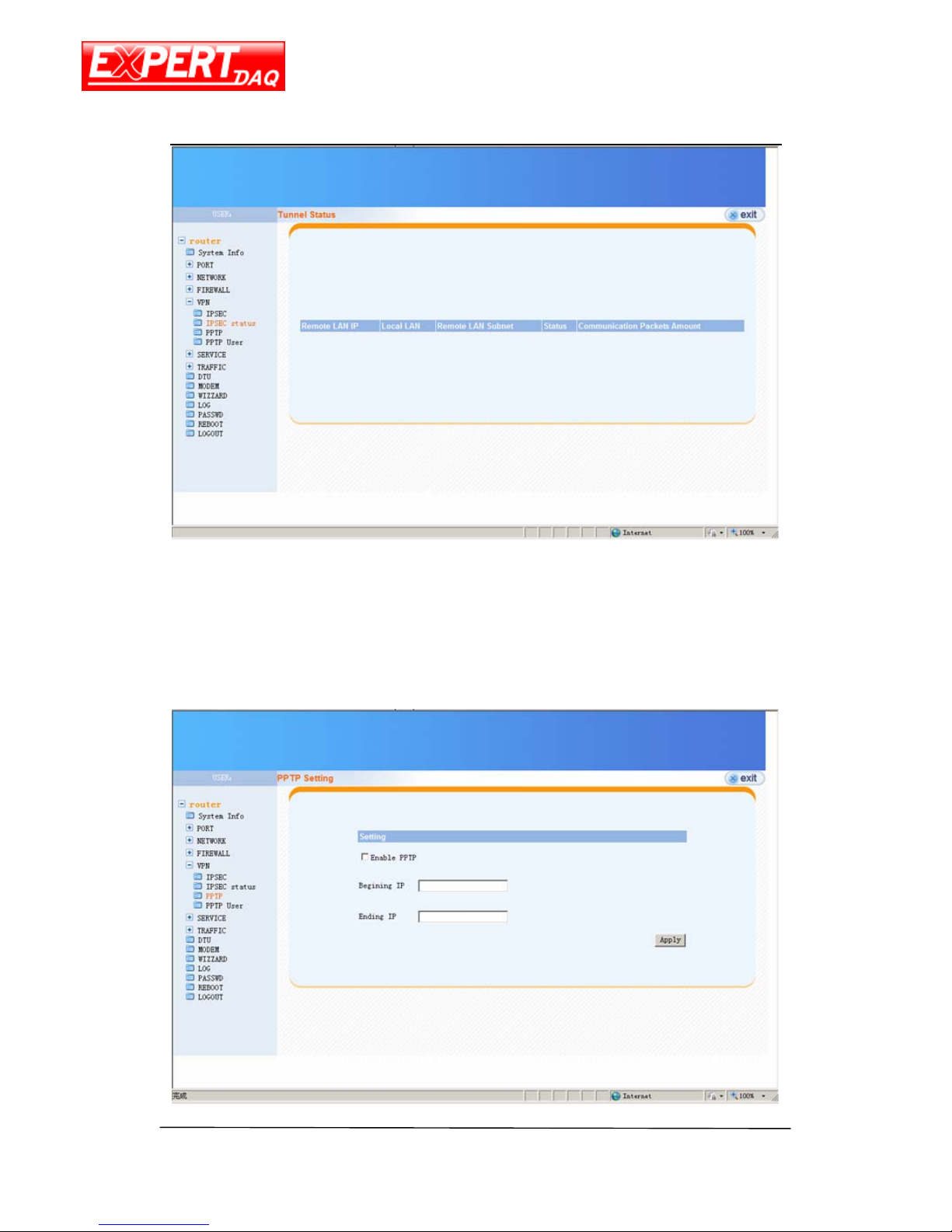
IPSec Status
This page contains the list and status of IPSec network.
Page 36
EX-9632R-H/EX-9633R-H
Manual
EX-9632R-H/EX-9633R-H • Manual Version 1.1 • 30.06.2012 www.topsccc.com
PPTP
This page allows you to configure PPTP IP pool.
Page 37
EX-9632R-H/EX-9633R-H
Manual
EX-9632R-H/EX-9633R-H • Manual Version 1.1 • 30.06.2012 www.topsccc.com
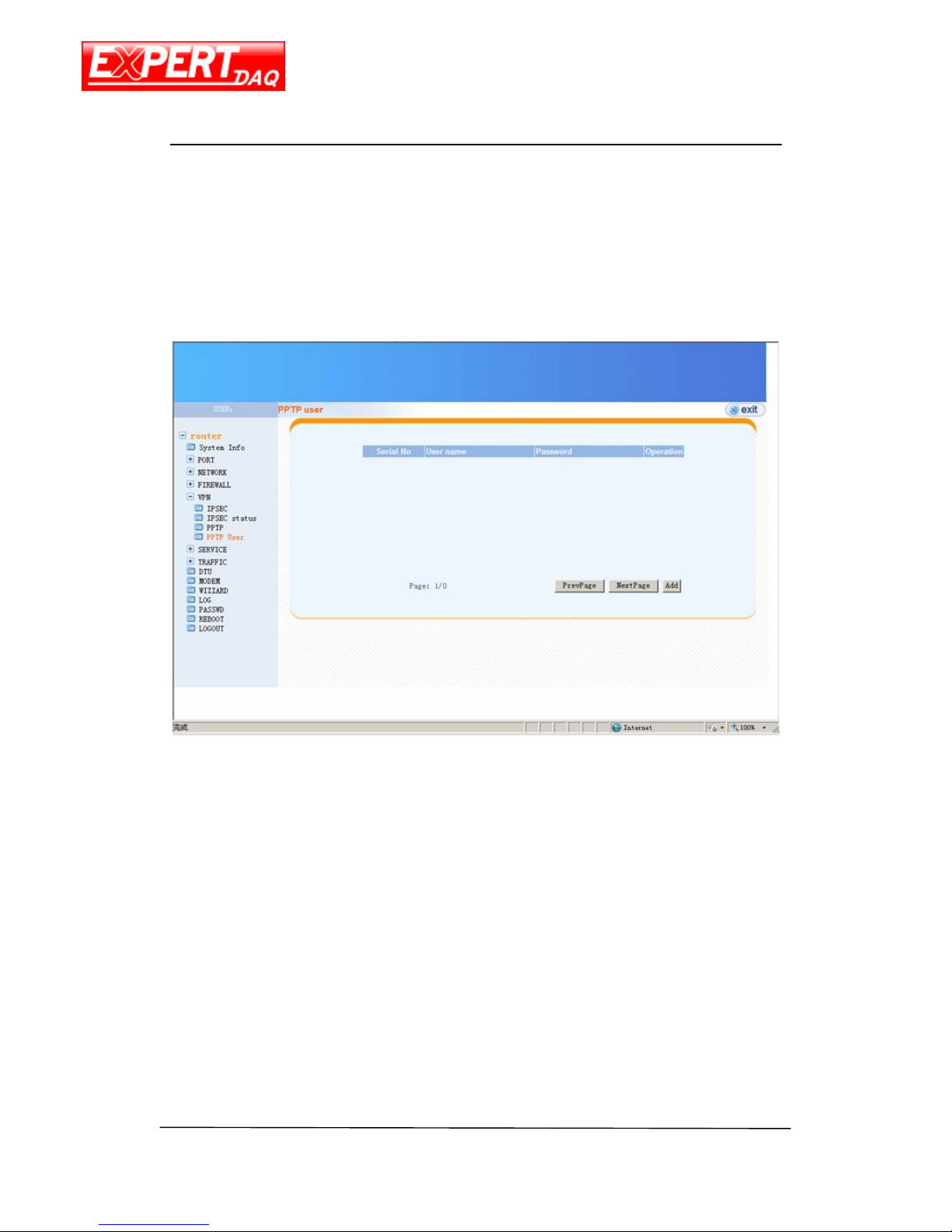
PPTP User
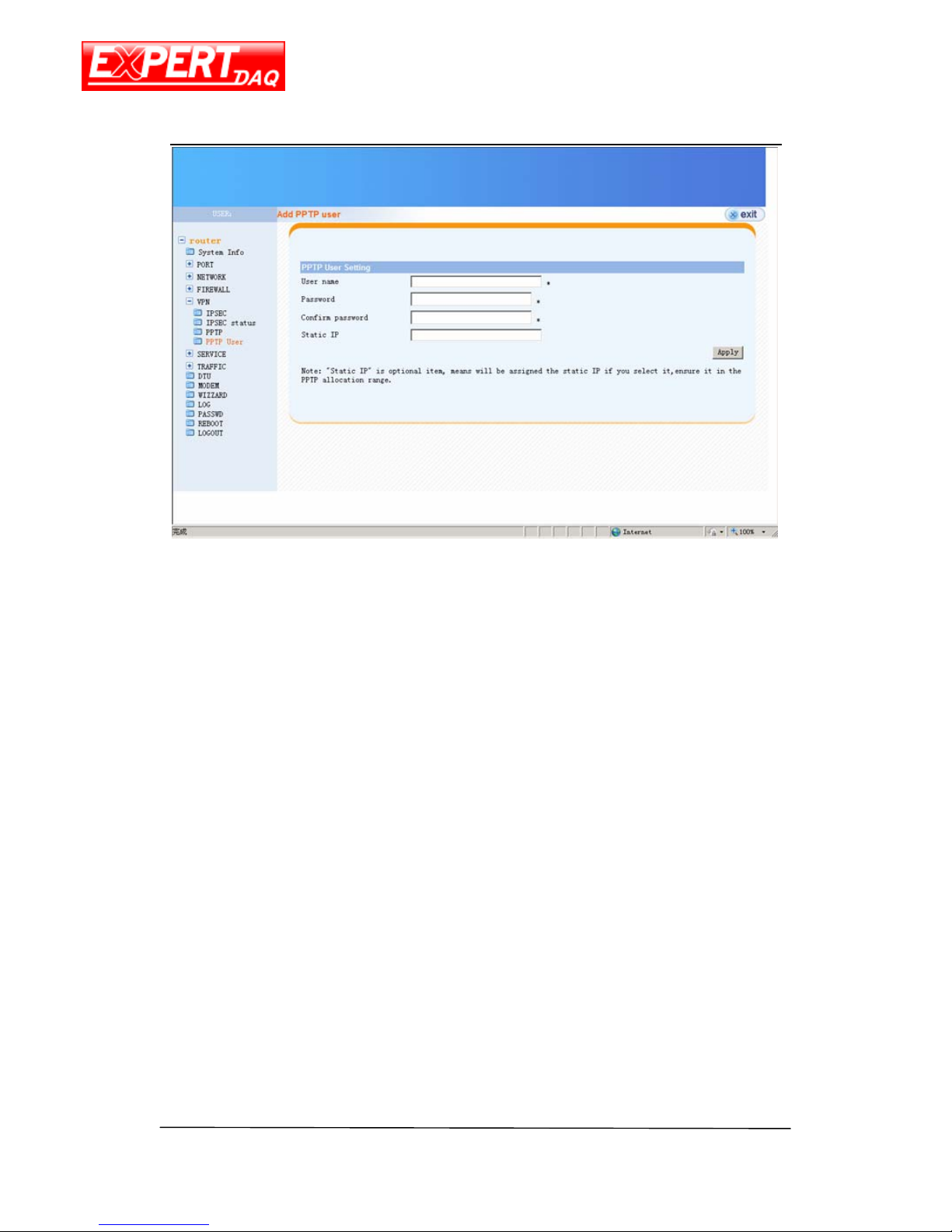
This page contains the list of PPTP user. Click on Add button will allow you to add a new
PPTP user.
Page 38
EX-9632R-H/EX-9633R-H
Manual
EX-9632R-H/EX-9633R-H • Manual Version 1.1 • 30.06.2012 www.topsccc.com
Page 39
EX-9632R-H/EX-9633R-H
Manual
EX-9632R-H/EX-9633R-H • Manual Version 1.1 • 30.06.2012 www.topsccc.com
Service
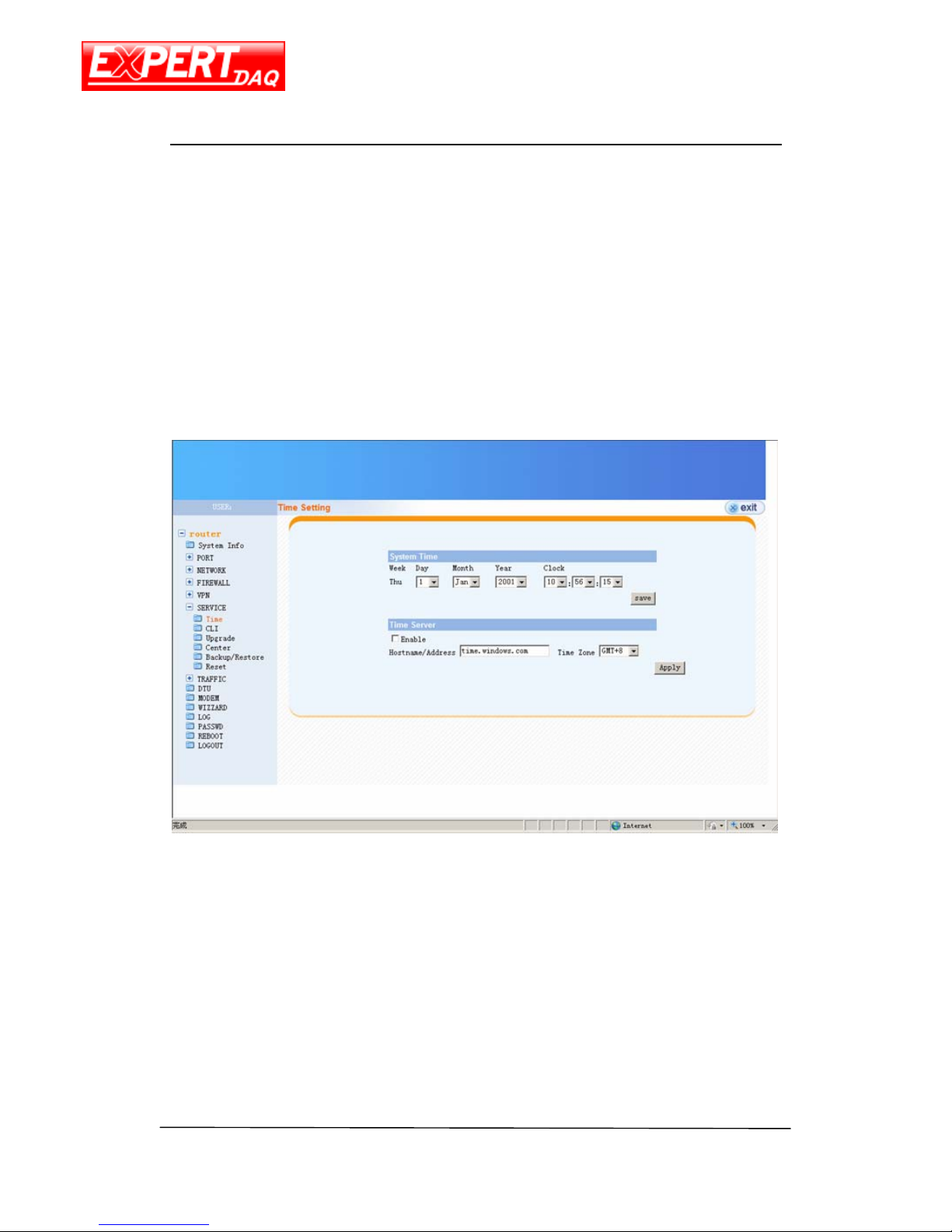
Time
Configure the system time of this device manually or ask this device to retrieve system
time from NTP server.
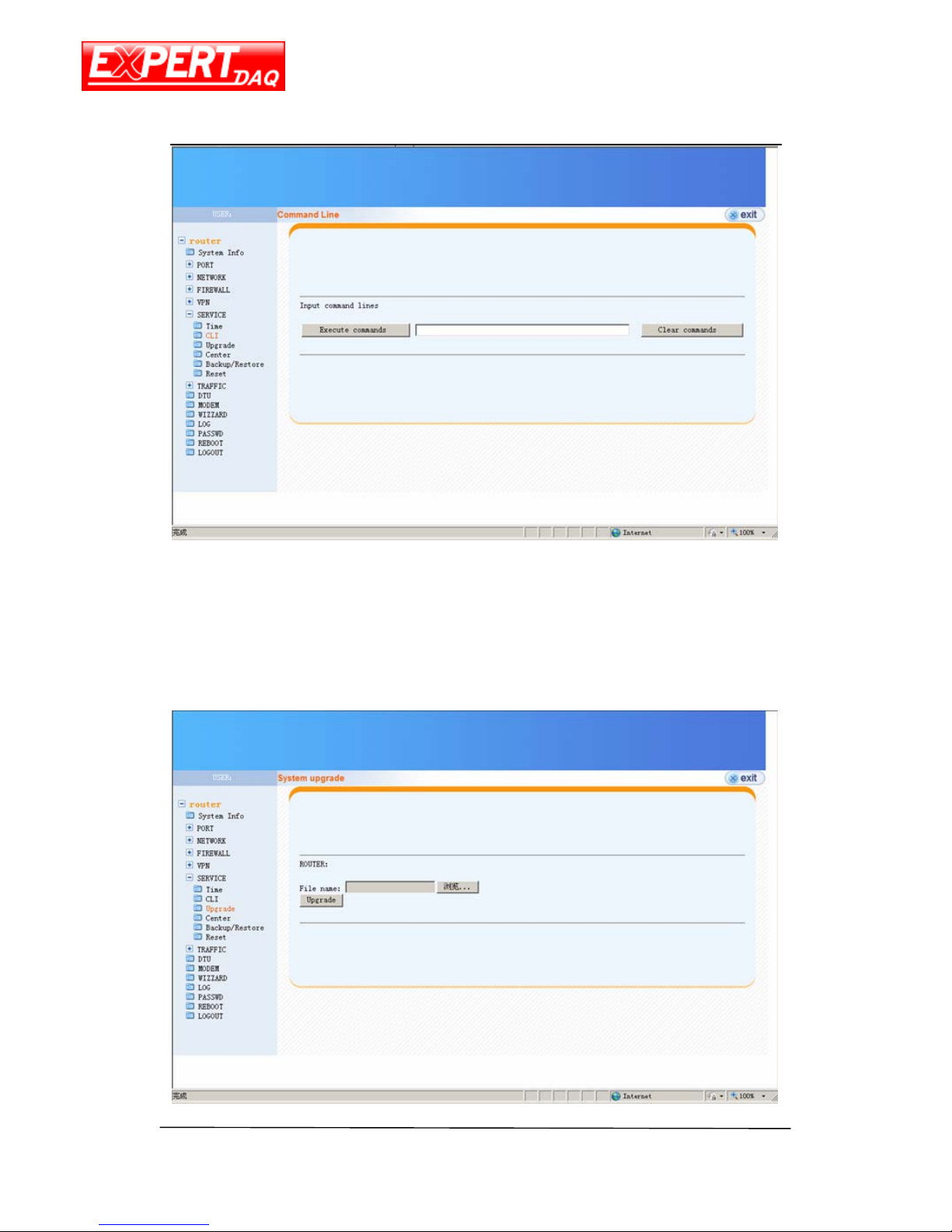
CLI
This page is an interface to execute some simple CLI commands.
Page 40
EX-9632R-H/EX-9633R-H
Manual
EX-9632R-H/EX-9633R-H • Manual Version 1.1 • 30.06.2012 www.topsccc.com
Upgrade
Use this page to do firmware upgrade.
Page 41
EX-9632R-H/EX-9633R-H
Manual
EX-9632R-H/EX-9633R-H • Manual Version 1.1 • 30.06.2012 www.topsccc.com
Upgrade the router as follow step:
1. MenuÆPortÆWAN, change all WAN setting to CLOSE, save.
2. Menu
Æ
ServiceÆUpgrade, choice the upgrade file, press Upgrade buttom.
3. Upgrade success information will display after 3 minutes, reboot the router.
4. Menu
Æ
ServiceÆReset, reset the router.
5. Configure the router for work again.
Note: the upgrade will use 3 minutes, without any information
before success. During the upgrade, do not touch the Ethernet
cable, power, and do not refresh the web also.
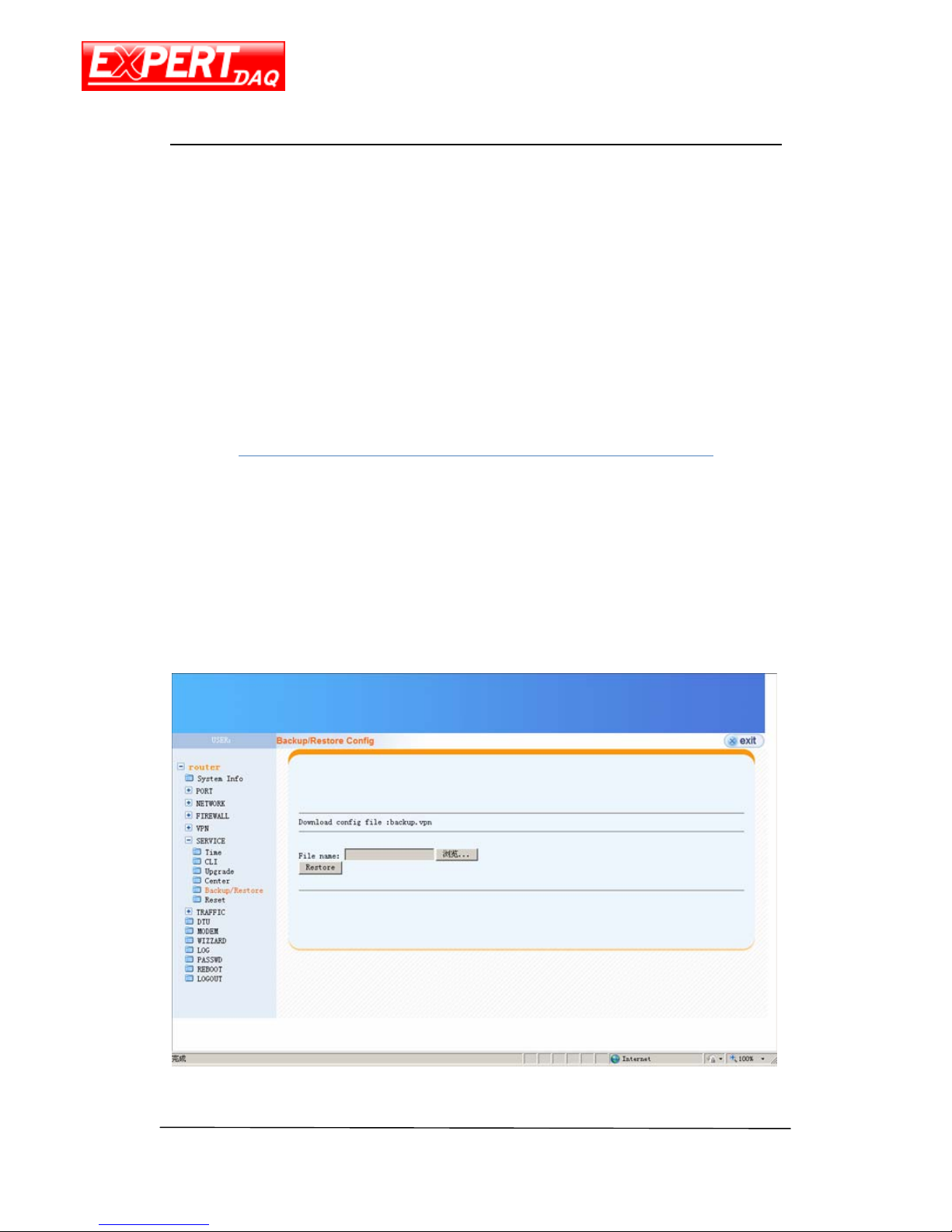
Backup/Restore
This page is used to save the settings of this device as file or restore the setting from the
file saved previously.
Page 42
EX-9632R-H/EX-9633R-H
Manual
EX-9632R-H/EX-9633R-H • Manual Version 1.1 • 30.06.2012 www.topsccc.com
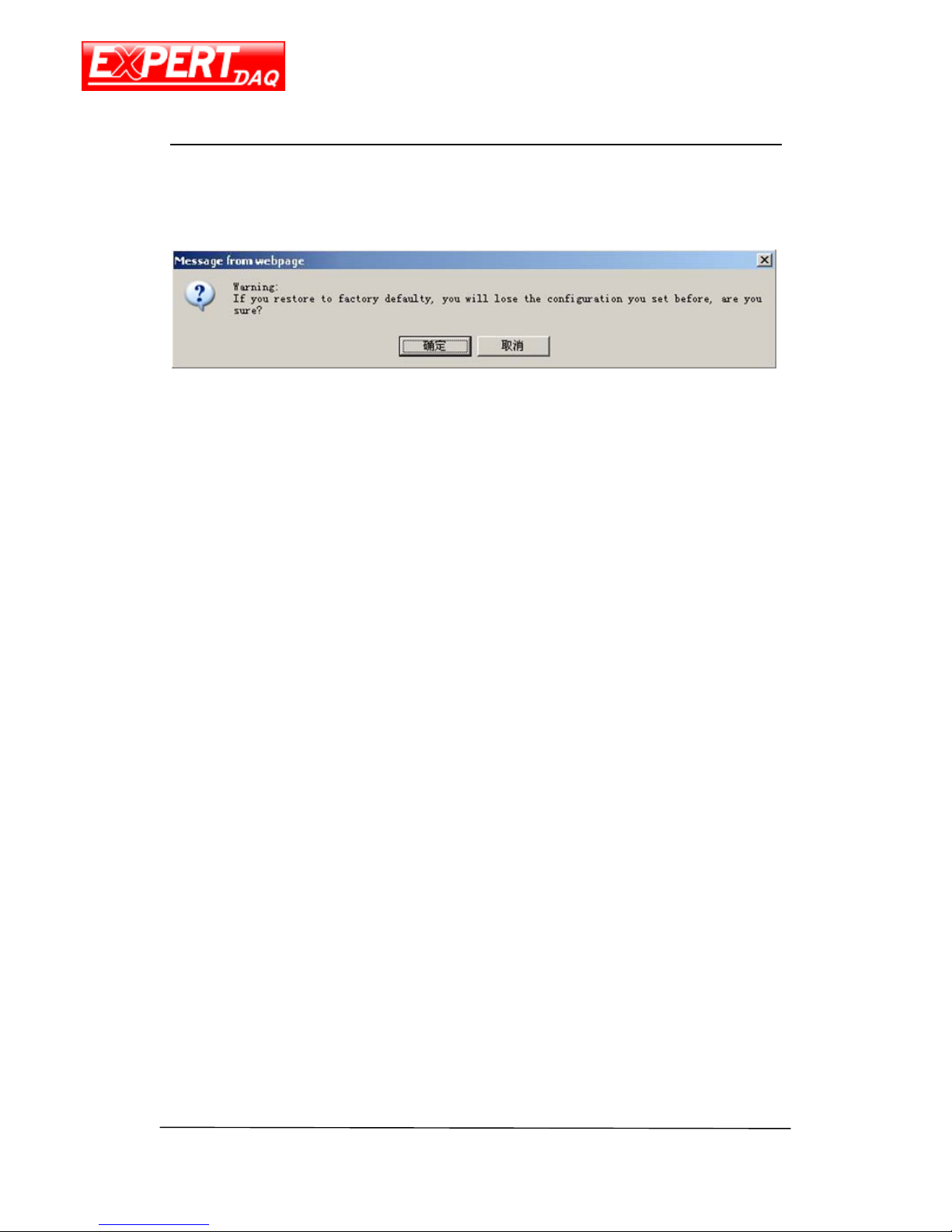
Reset
Reset all settings of this device to factory default by clicking this option.
Page 43
EX-9632R-H/EX-9633R-H
Manual
EX-9632R-H/EX-9633R-H • Manual Version 1.1 • 30.06.2012 www.topsccc.com
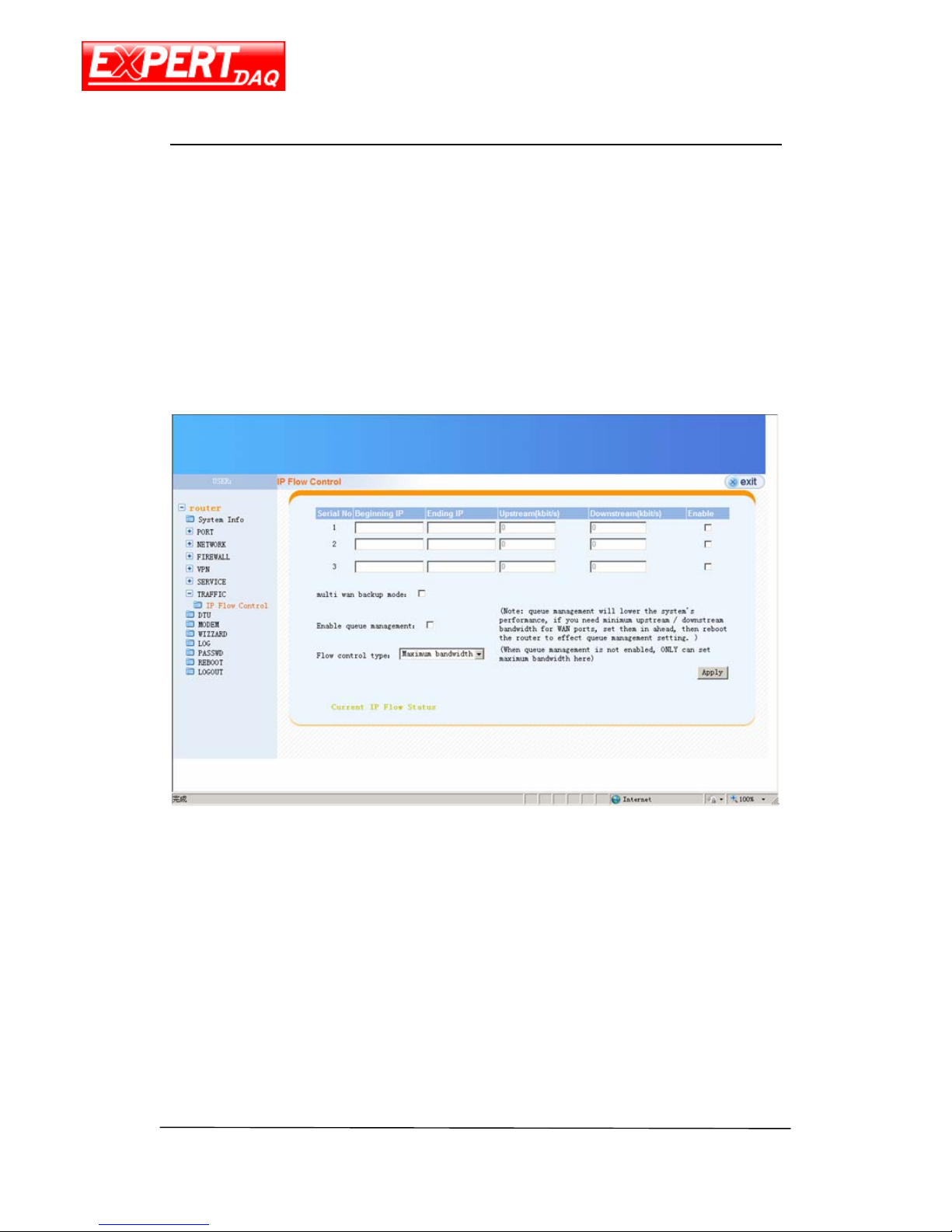
Traffic
IP Flow Control
This page is used configure the packet flow control of LAN devices.
Page 44
EX-9632R-H/EX-9633R-H
Manual
EX-9632R-H/EX-9633R-H • Manual Version 1.1 • 30.06.2012 www.topsccc.com
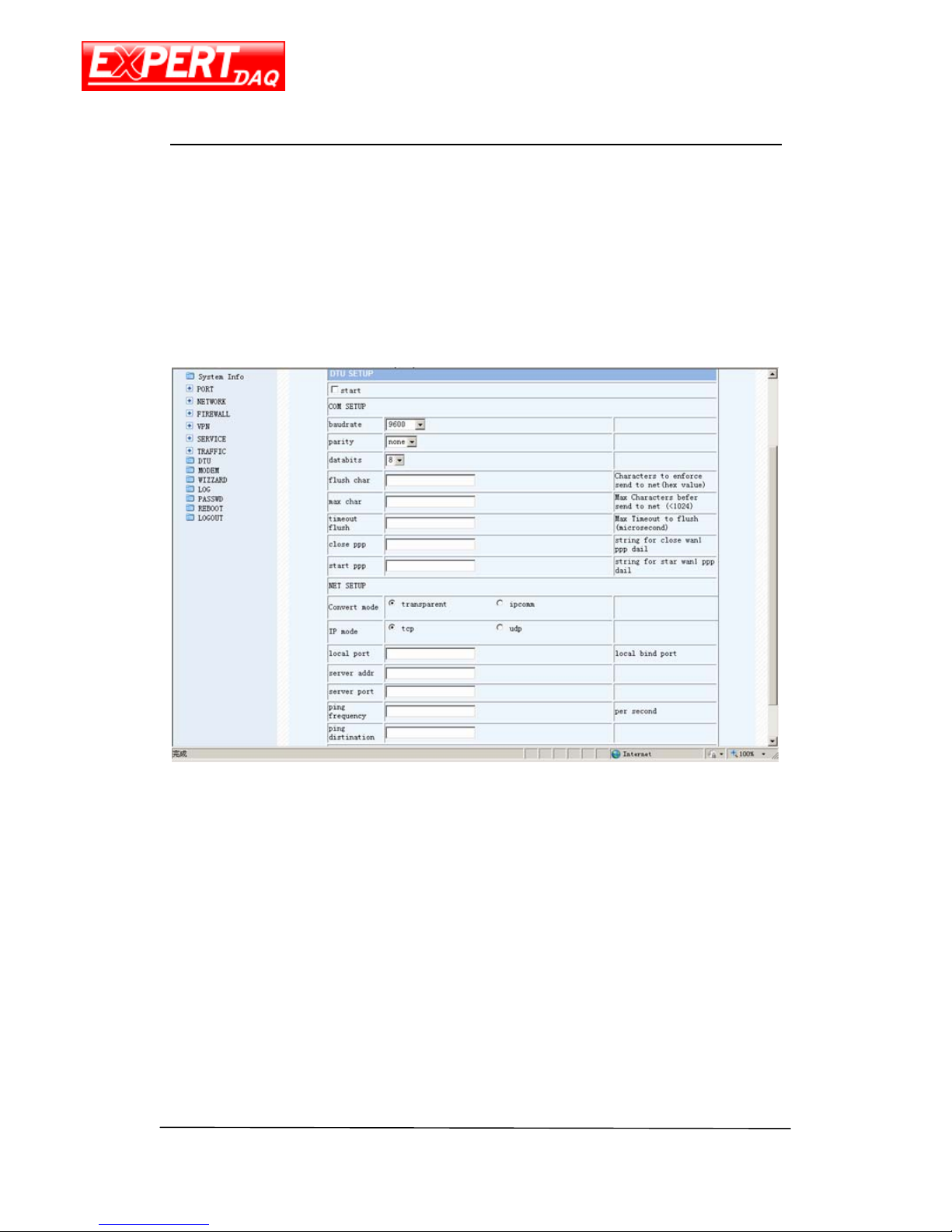
DTU
This device can be used as a DTU. The settings of serial port and server/client socket
information are configured here.
Page 45
EX-9632R-H/EX-9633R-H
Manual
EX-9632R-H/EX-9633R-H • Manual Version 1.1 • 30.06.2012 www.topsccc.com
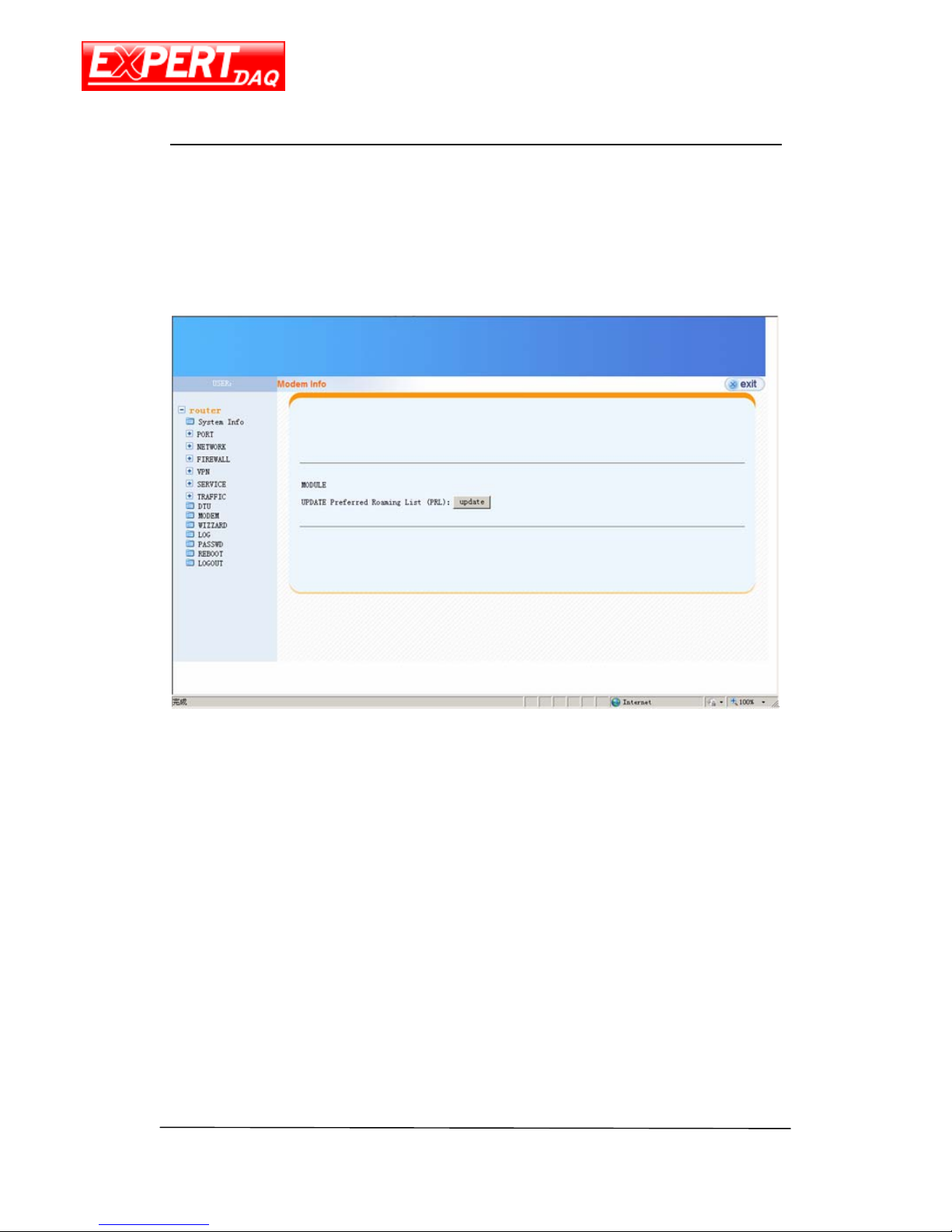
Modem
This page is used to update PRL of modem.
Page 46
EX-9632R-H/EX-9633R-H
Manual
EX-9632R-H/EX-9633R-H • Manual Version 1.1 • 30.06.2012 www.topsccc.com
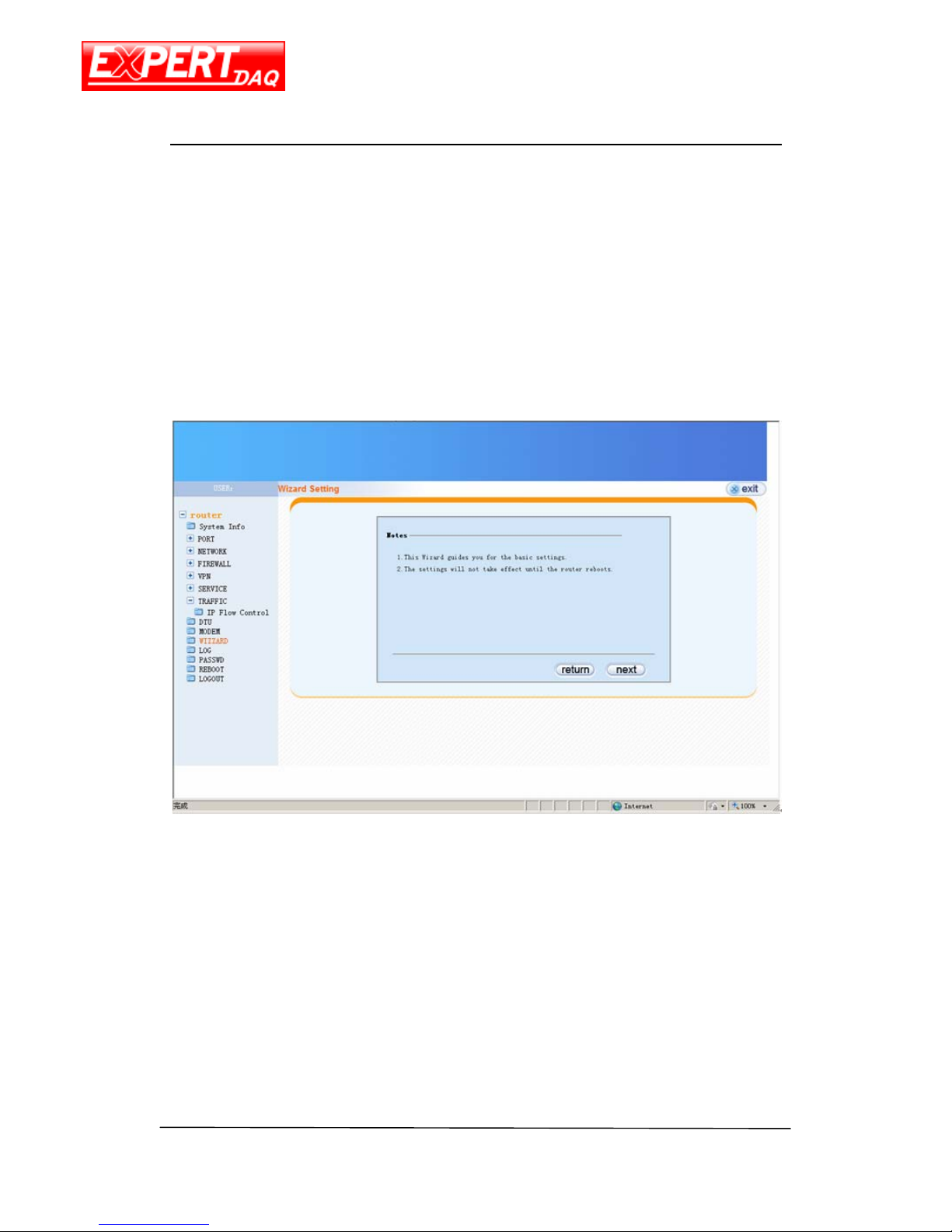
Wizard
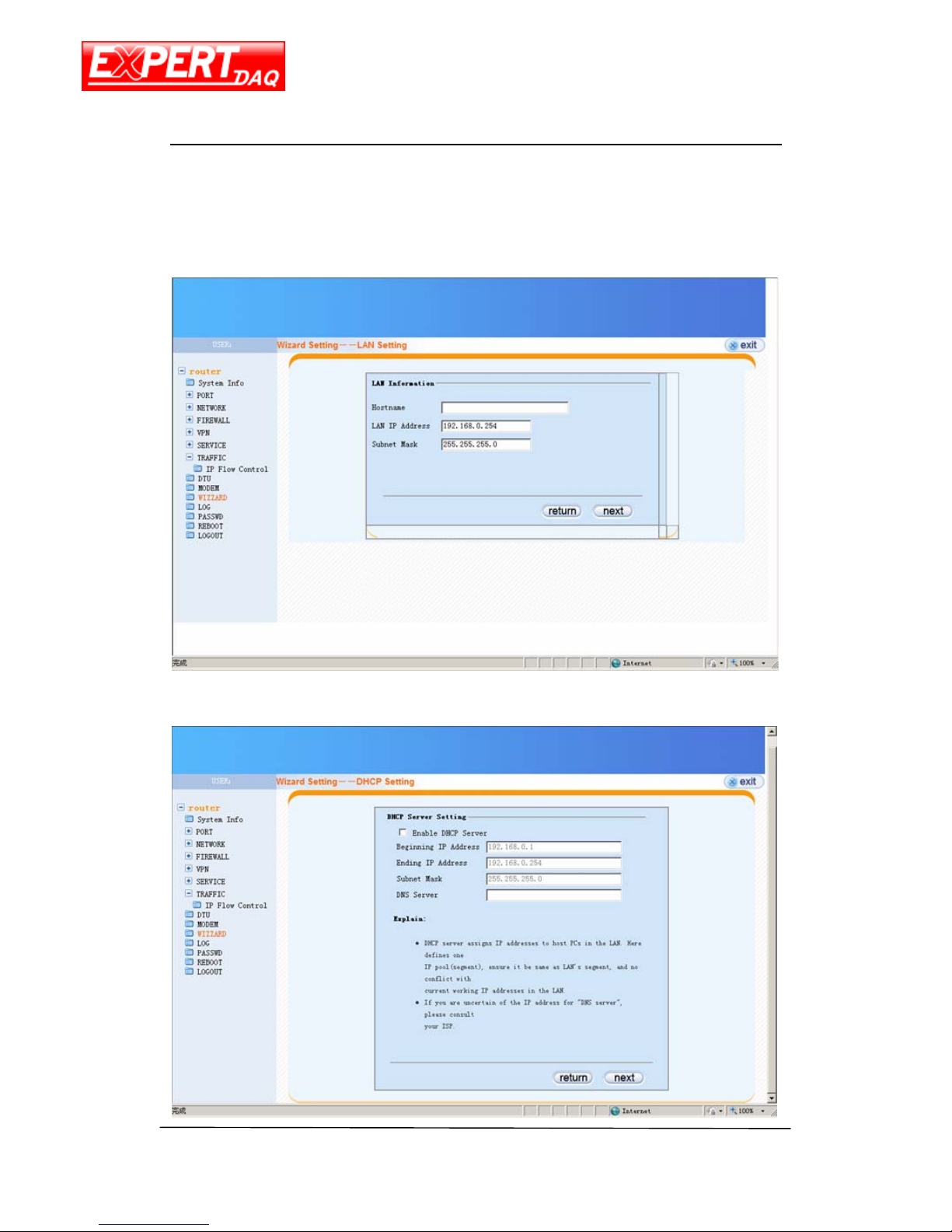
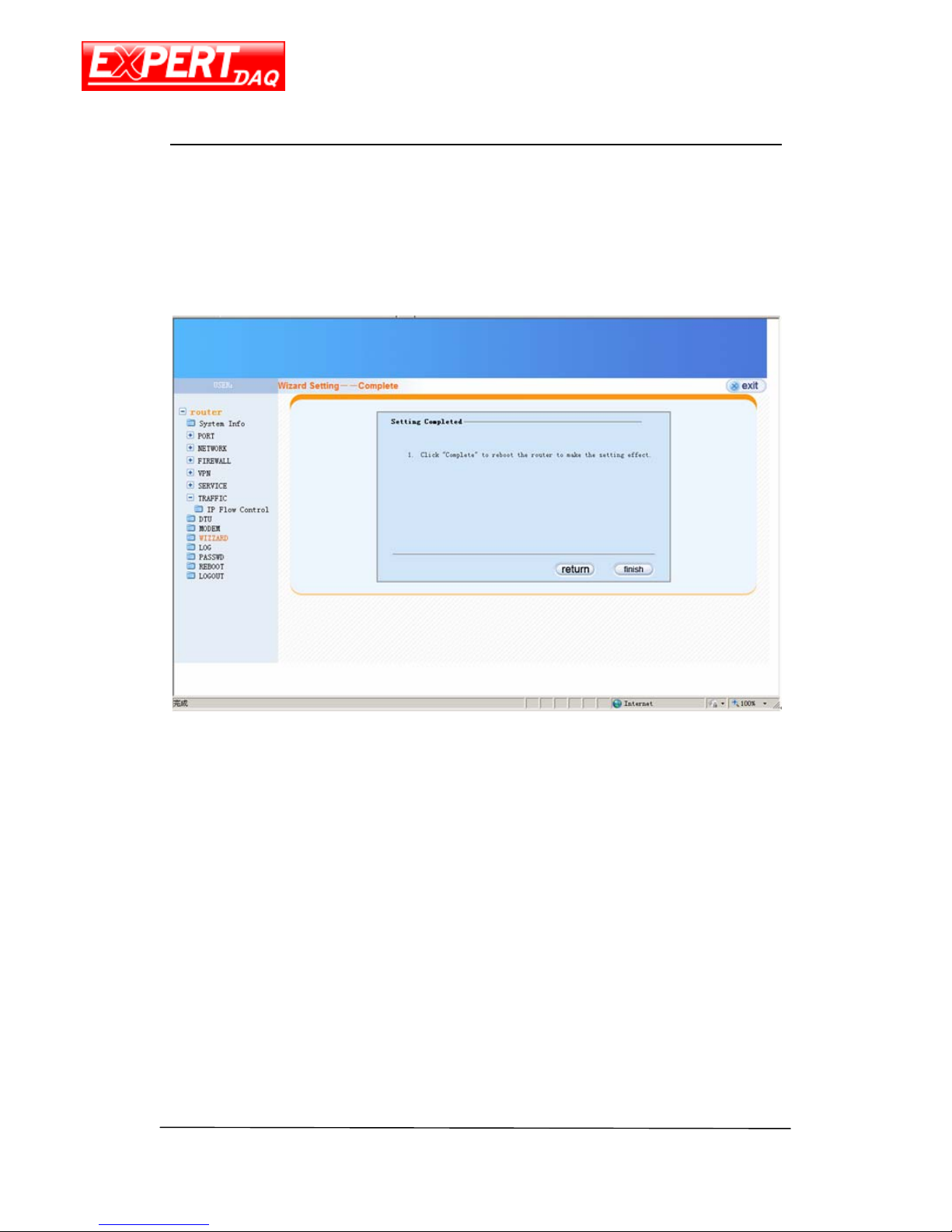
The RJ45 (Ethernet) port of this device can be used as WAN and this wizard is used to
guide you how to configure the RJ45 step by step.
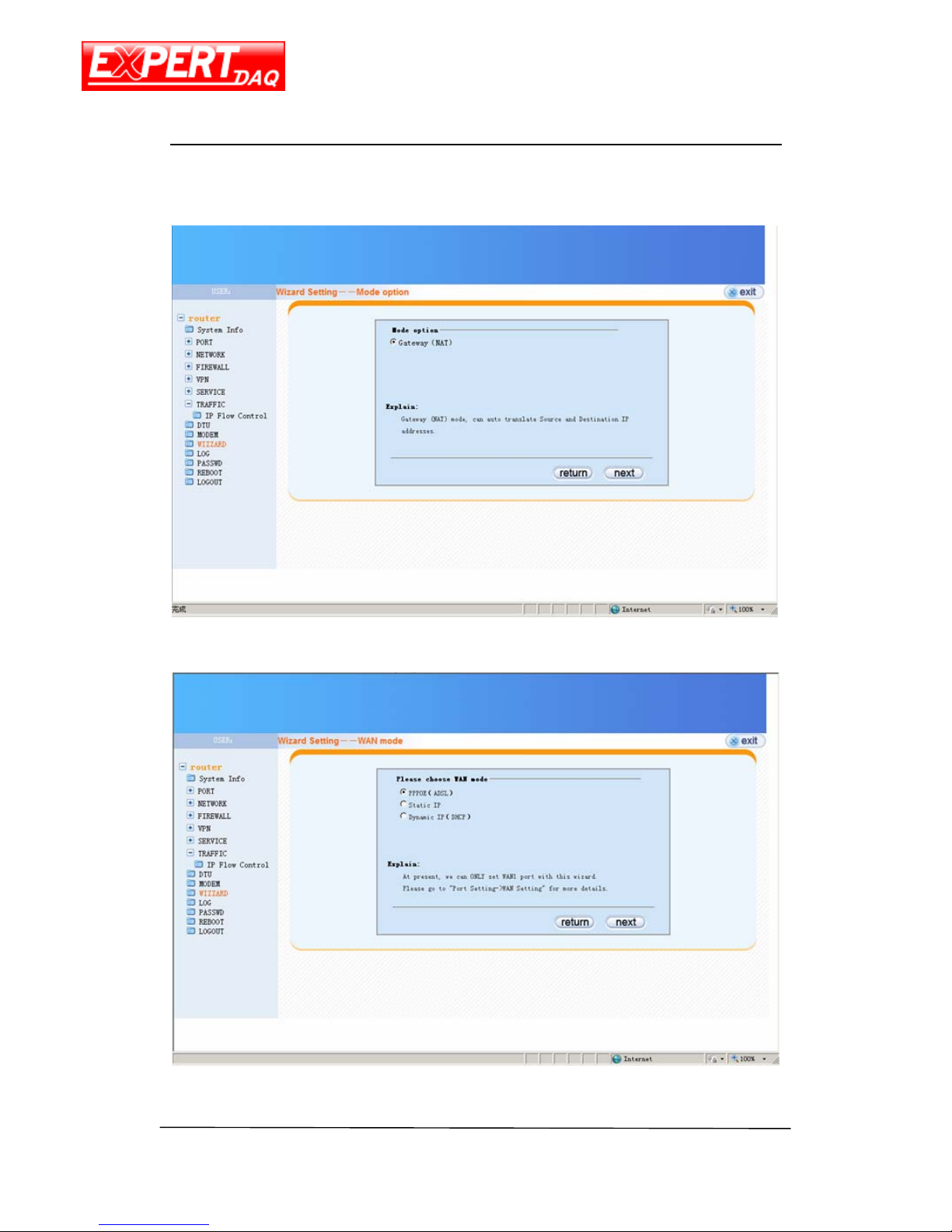
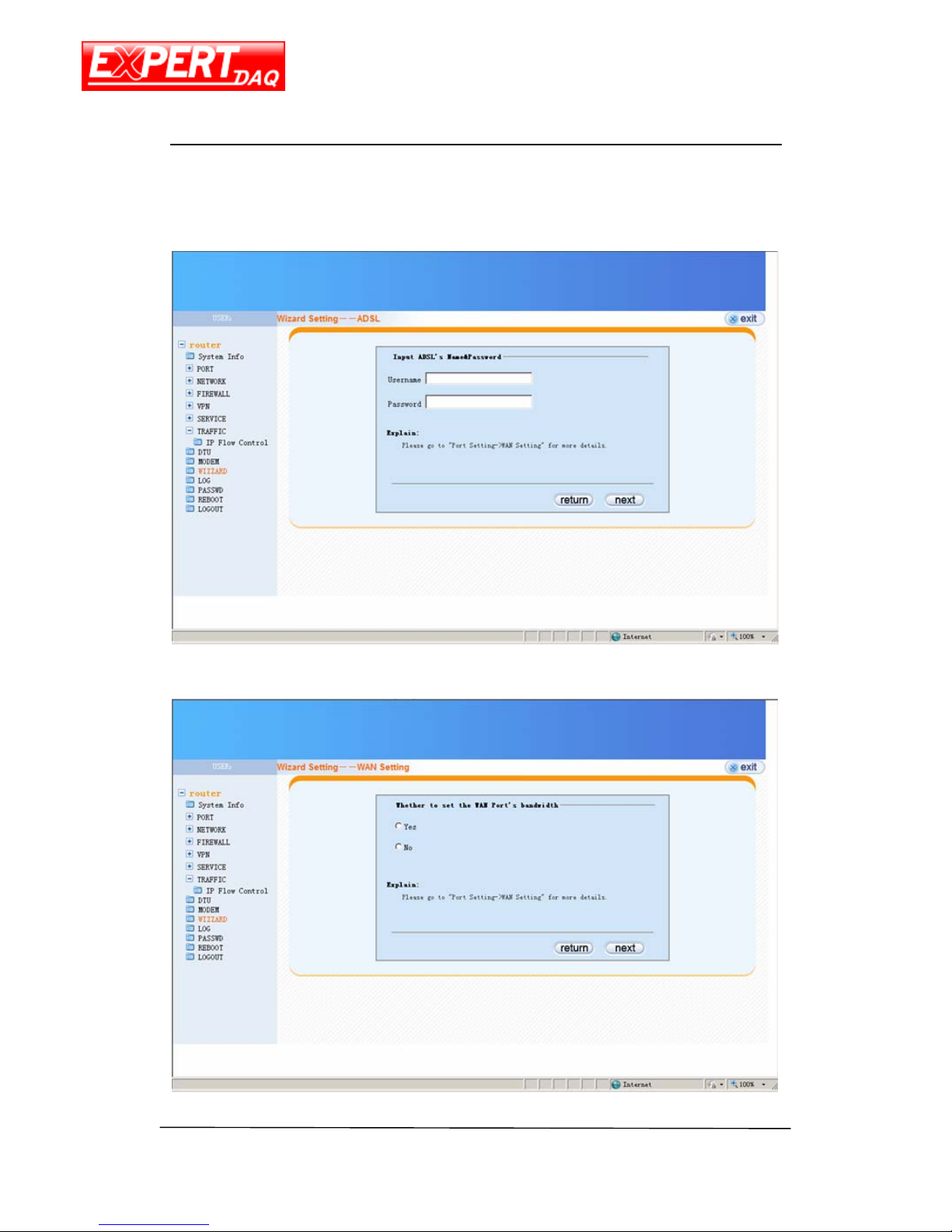
Following pictures act as example to demonstrate the steps to set RJ45 as PPPoE WAN.
1. The wizard starting page.
Page 47
EX-9632R-H/EX-9633R-H
Manual
EX-9632R-H/EX-9633R-H • Manual Version 1.1 • 30.06.2012 www.topsccc.com
2. Setting the router working mode.
3. Setting the router WAN mode.
Page 48
EX-9632R-H/EX-9633R-H
Manual
EX-9632R-H/EX-9633R-H • Manual Version 1.1 • 30.06.2012 www.topsccc.com
4. Setting the PPP user name and password.
5. Setting the limit of WAN bandwidth.
Page 49
EX-9632R-H/EX-9633R-H
Manual
EX-9632R-H/EX-9633R-H • Manual Version 1.1 • 30.06.2012 www.topsccc.com
6. Setting the LAN parameters.
7. Setting the DHCP parameters.
Page 50
EX-9632R-H/EX-9633R-H
Manual
EX-9632R-H/EX-9633R-H • Manual Version 1.1 • 30.06.2012 www.topsccc.com
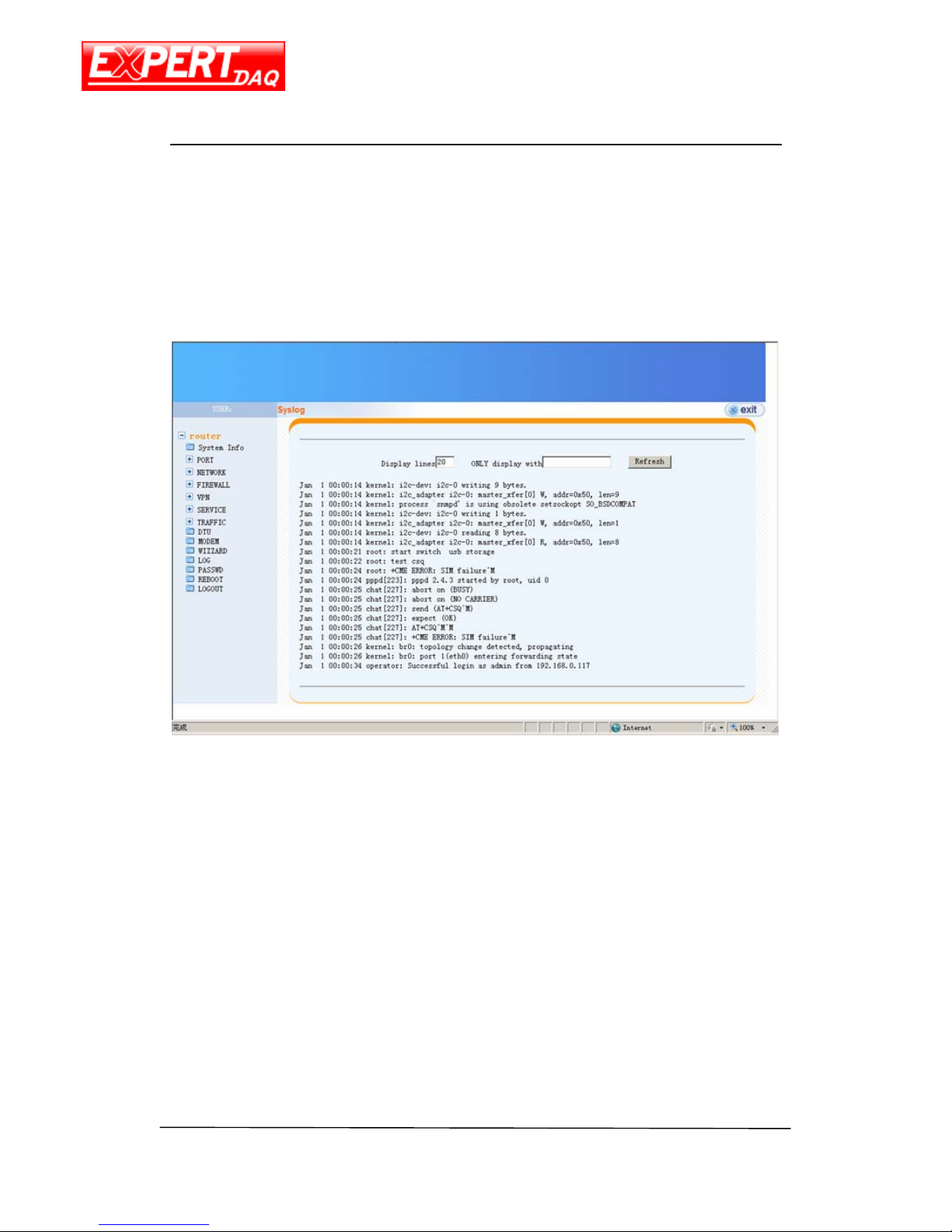
8. The wizard finished.
Page 51
EX-9632R-H/EX-9633R-H
Manual
EX-9632R-H/EX-9633R-H • Manual Version 1.1 • 30.06.2012 www.topsccc.com
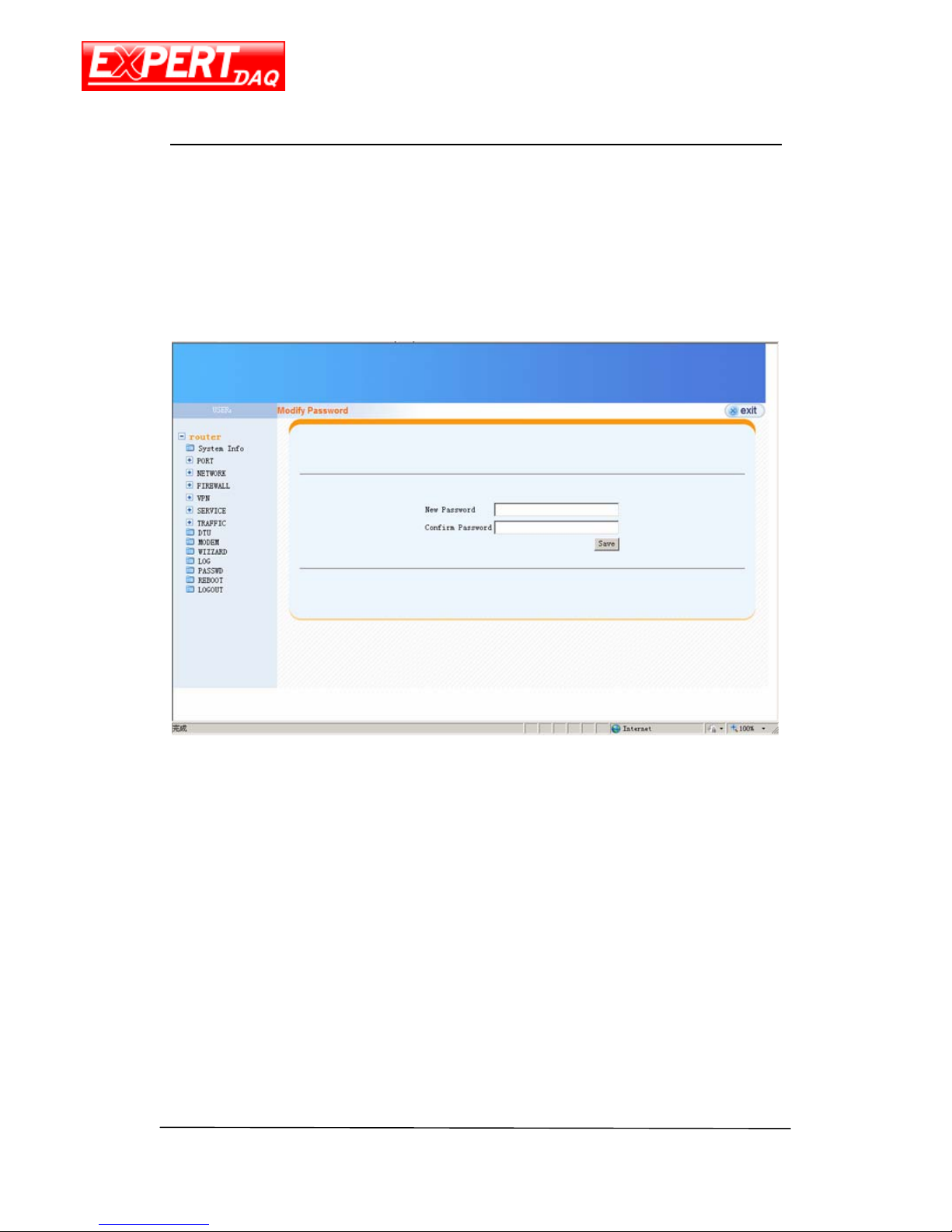
LOG
System log.
Page 52
EX-9632R-H/EX-9633R-H
Manual
EX-9632R-H/EX-9633R-H • Manual Version 1.1 • 30.06.2012 www.topsccc.com
PASSWD
Login password can be changed via this page.
Page 53
EX-9632R-H/EX-9633R-H
Manual
EX-9632R-H/EX-9633R-H • Manual Version 1.1 • 30.06.2012 www.topsccc.com
Reboot
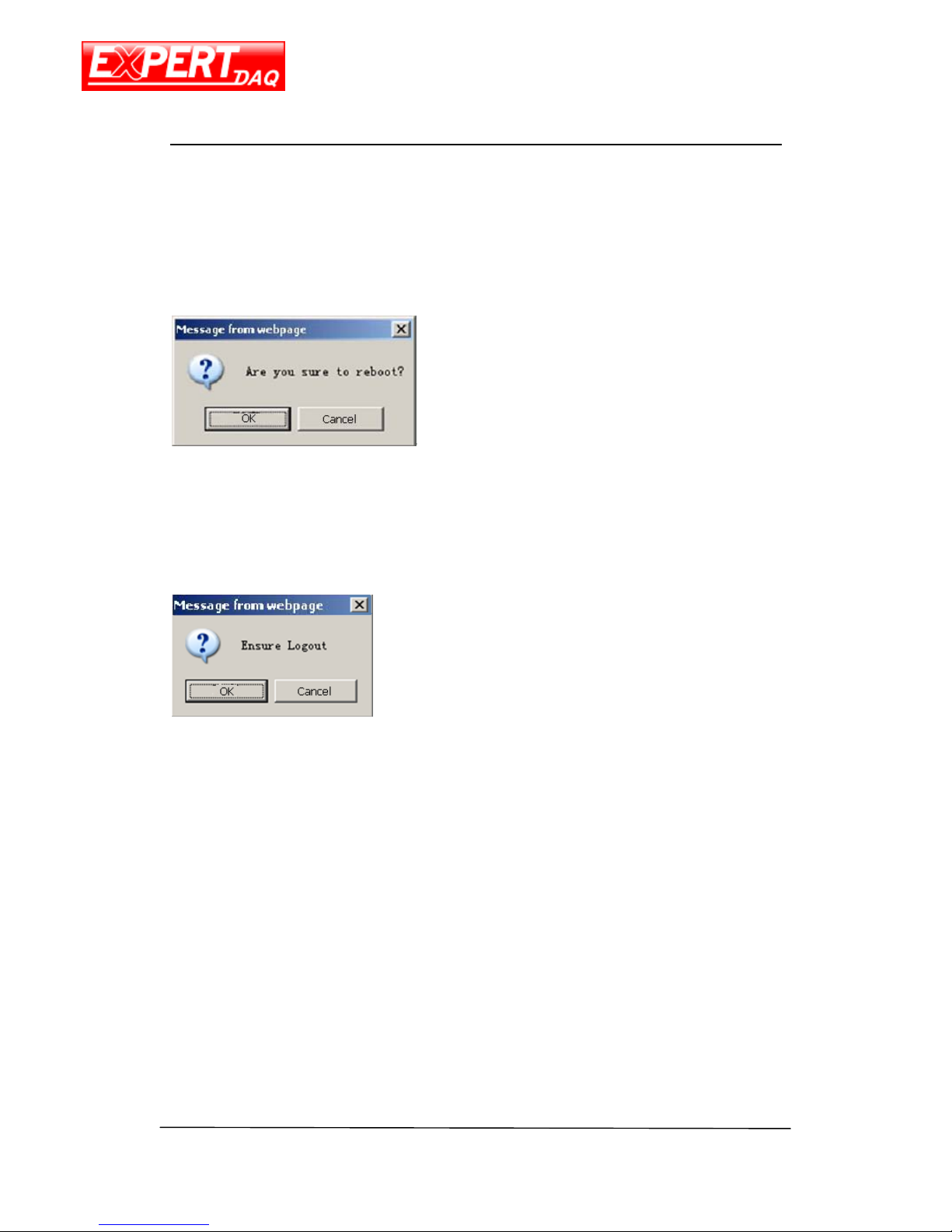
Reboot confirm dialog after press the reboot from menu.
Logout
Logout confirm dialog after press the logout from menu.
Page 54

EX-9632R-H/EX-9633R-H
Manual
EX-9632R-H/EX-9633R-H • Manual Version 1.1 • 30.06.2012 www.topsccc.com
Appendix A
DDNS
“Dynamic DNS or DDNS is a method of updating, in real time, a Domain Name System
(DNS) to point to a changing IP address on the Internet. This is used to provide a persistent
domain name for a resource that may change location on the network.” -- wiki
3 components needed to make the DDNS mechanism functional.
(A) A DDNS server
(B) A device requires DDNS service
(C) A device which wants to connect (B)
The reason why DDNS is needed is because (B) may change its IP address randomly or
periodically, and/or actively or passively. When this happens, (C) is not possible to connect to
(B) via IP address because it is not aware of the changes except that (B) tells (C) exceptively and
which can’t always possible. To solve this problem, (A) stands between (B) and (C). Firstly, (B)
have to register itself to (A) with expected domain name (e.g. mr521.gotdns.com). Every time
(B) changes its IP address, it has to tell (A) about new IP. Later on, if (C) wants to connect to (B),
it has to use the domain name, except the IP address. The domain name resolving request (i.e.
transfer domain name to IP address) from (C) will first sent to (A) and it will return with current
(B)’s IP. Then, (C) can connect to (B) with no problem.
So, the 1
st
step to setup DDNS is to find public or private DDNS server. Here, we use
14-days trial version service provided by DynDNS
as an example.
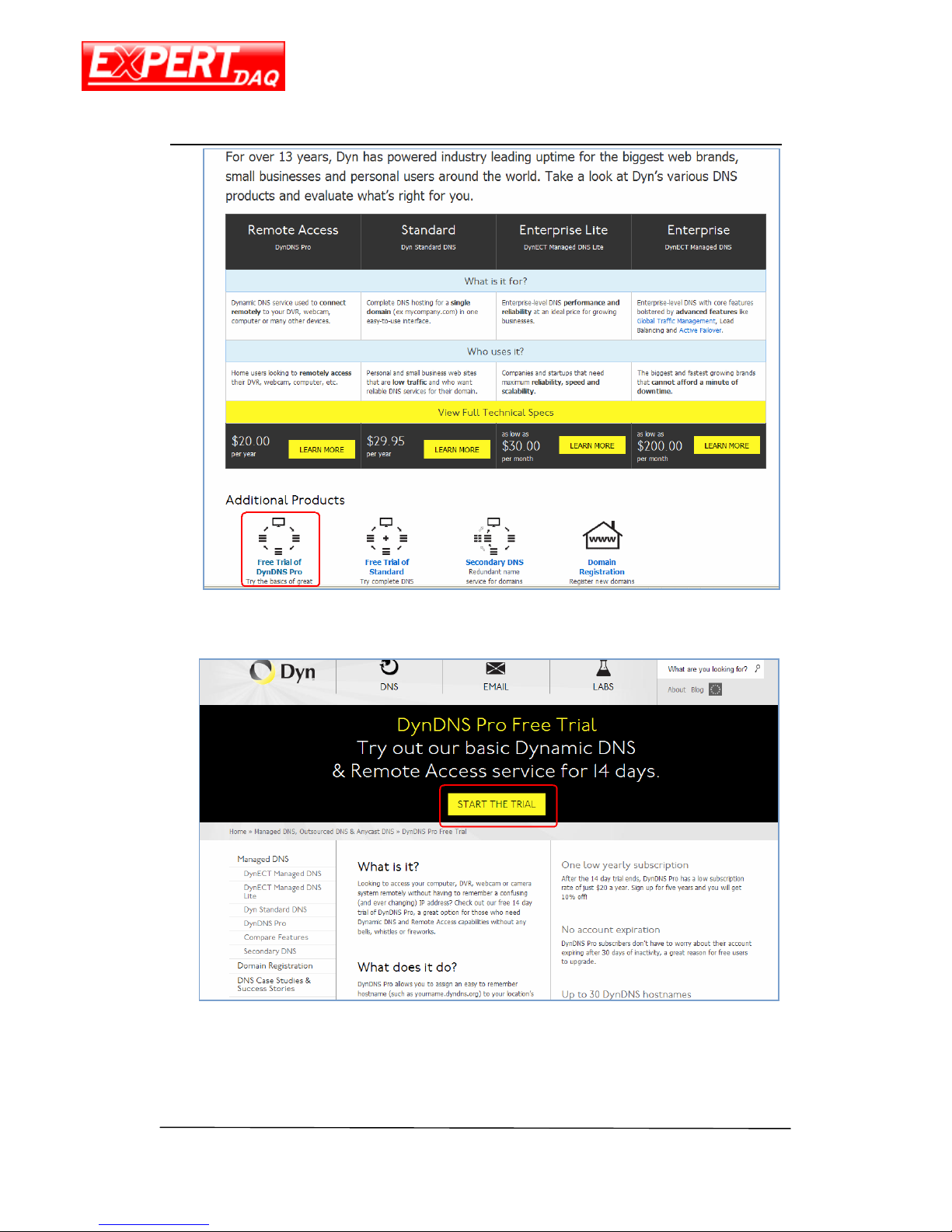
1. Connect to DynDNS home page, http://dyn.com/welcome-to-the-new-dyn-com/
, and
select “Free Trial of DynDNS Pro” on left bottom.
Page 55
EX-9632R-H/EX-9633R-H
Manual
EX-9632R-H/EX-9633R-H • Manual Version 1.1 • 30.06.2012 www.topsccc.com
2. Click on “START THE TRIAL”
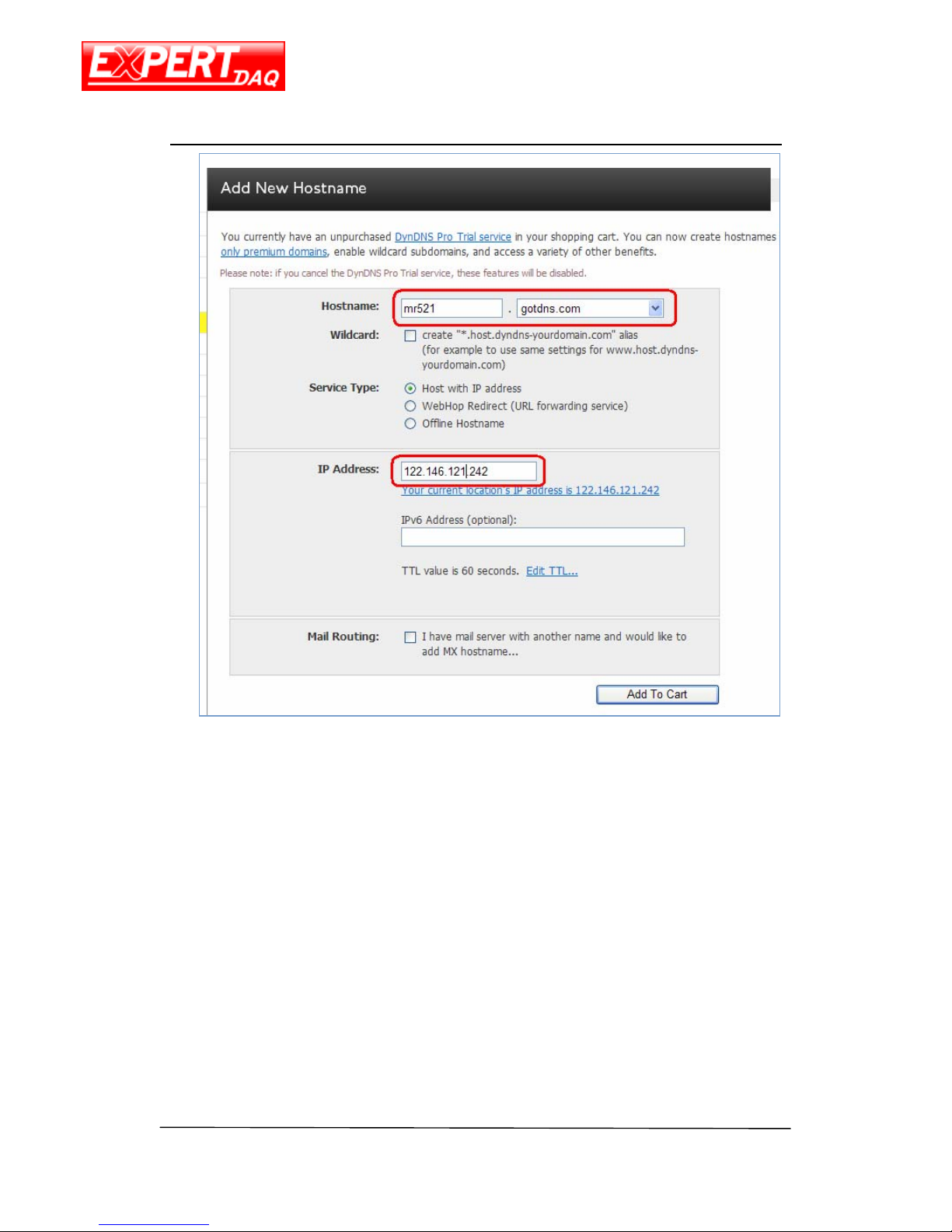
3. Type in desired name and select postfix domain name. And input the IP address of
your device.
Page 56
EX-9632R-H/EX-9633R-H
Manual
EX-9632R-H/EX-9633R-H • Manual Version 1.1 • 30.06.2012 www.topsccc.com
4. You will find your new DNS name on the top of this page. Input the information
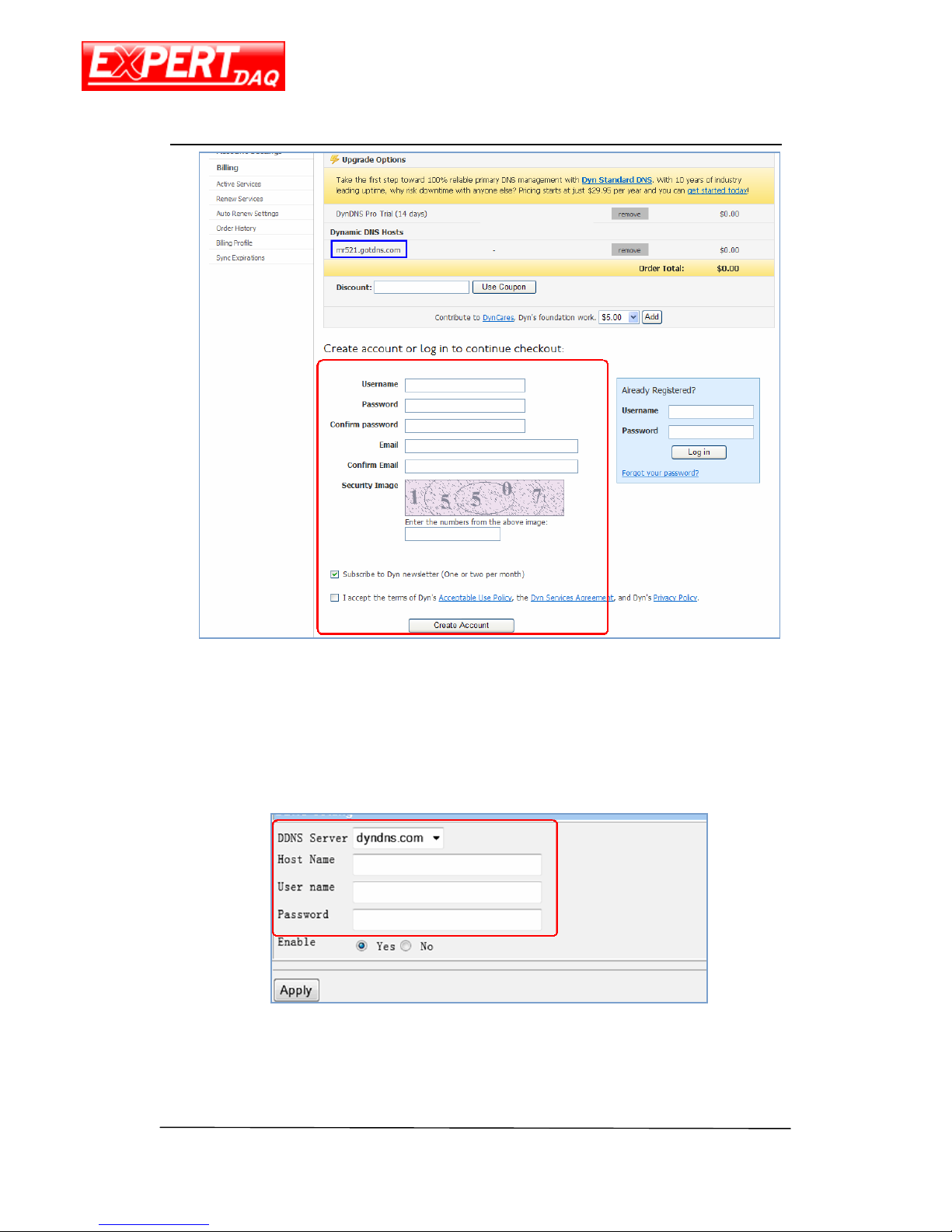
relevant to this domain name, including username, password, email address, numbers
in Security Image. Then check “I accept …” checkbox and click “Create Account”.
Page 57
EX-9632R-H/EX-9633R-H
Manual
EX-9632R-H/EX-9633R-H • Manual Version 1.1 • 30.06.2012 www.topsccc.com
5. Reply the confirmation mail sent to the e-mail address you inputted in Step 4 by
following the instruction in it.
6. Go to the DDNS page of this device and type in the information relating to your
account in DynDNS.
 Loading...