

Page 1

EX-9531
Isolated USB to RS-485 & 422(TX,RX,RTS,CTS) Converter
Introduction
The EX-9531 convert is an intelligent, stackable expansion module that connects to a PC USB port or USB Hub via
the Universal Serial Bus(USB) port, providing one High-Speed RS-422 or RS-485 serial port(jumperless) The
EX-9531 features easy connectivity for traditional serial devices.
The RS-232 standard supports full-duplex communication and handshaking signals (such as RTS, CTS) and The
RS-485 control is completely transparent to the user and software written for half-duplex COM works without any
modification.
The EX-9531's Opto-isolators provide 3000 Vdc of isolation to protect the host computer from ground loops and
destructive voltage spikes on the RS-422/485 data lines.
EX-9531 also offer internal surge-protection on their data lines. Internal high-speed transient suppressors on each
data line protect the modules from dangerous voltages levels or spikes.
The EX-9531 module derives the power from USB port and doesn’t need any power adapter.
Features
USB Specification 1.1 Compliant
Auto direction flow control on RS-485
Full-Duplex RS-422 support
RS-422 support RTS & CTS handshake signals
Minimum 3000 VDC isolation protection
Transient suppression on RS-485 data lines
Auto switching for USB to RS-422 or RS-485(jumperless)
Auto Switching Baud Rate up to 115.2 Kbps
Reserved space for termination resistors R1(TX/DATA), R2(RX), R3(CTS), R4(RTS)
Power and data flow indicator for troubleshooting
Driver support for Windows 95/98/ME/2000/XP, Linux
Power requirement: Self Power
Mounts easily on DIN-rail or panel
Specifications:
USB Controller: Compatibility USB Specification 1.1 Standard
USB interface connector: USB type B
Isolation Side: RS-422/485
Converted signals: RS-422 or RS-485 Auto switching(jumperless)
Handshakel: RS422 support RTS & CTS handshake signals
Auto Switching Baud rate (bps):300 ~115.2 K BPS
Transmission and Receiving LED indicator
Isolation voltage: 3000 V DC
RS-422/RS-485 connector: plug-in screw terminal
Accessories (Supplied):NYLON DIN-rail Mounting Adapter SECC Panel Mounting Bracket
Plug-in screw terminal wiring: Accepts AWG 1-#12 to #22 (0.5 to 2.5 mm) wires
Power requirement: USB bus power
Case: ABS with captive mounting hardware
Power consumption: 0.65 W
Operating temperature:0 ~ 70 °C (32 ~ 158 °F)
Storage temperature:-25 ~ 85 °C (13 ~ 185 °F)
Humidity: 5 ~ 95%, non-condensing
Block diagram
USB
Contro l l e r
Data+
Data+5V
GND
Isolated
Power Supply
Auto
baud rate
detector
Protector
TX+/D+
TX- /DRX+
RX-
RTS+
RTSCTS+
CTS-
VSS
F.GND
EX-9531 user’s manual
Page 2
EX-9531
Isolated USB to RS-485 & 422(TX,RX,RTS,CTS) Converter
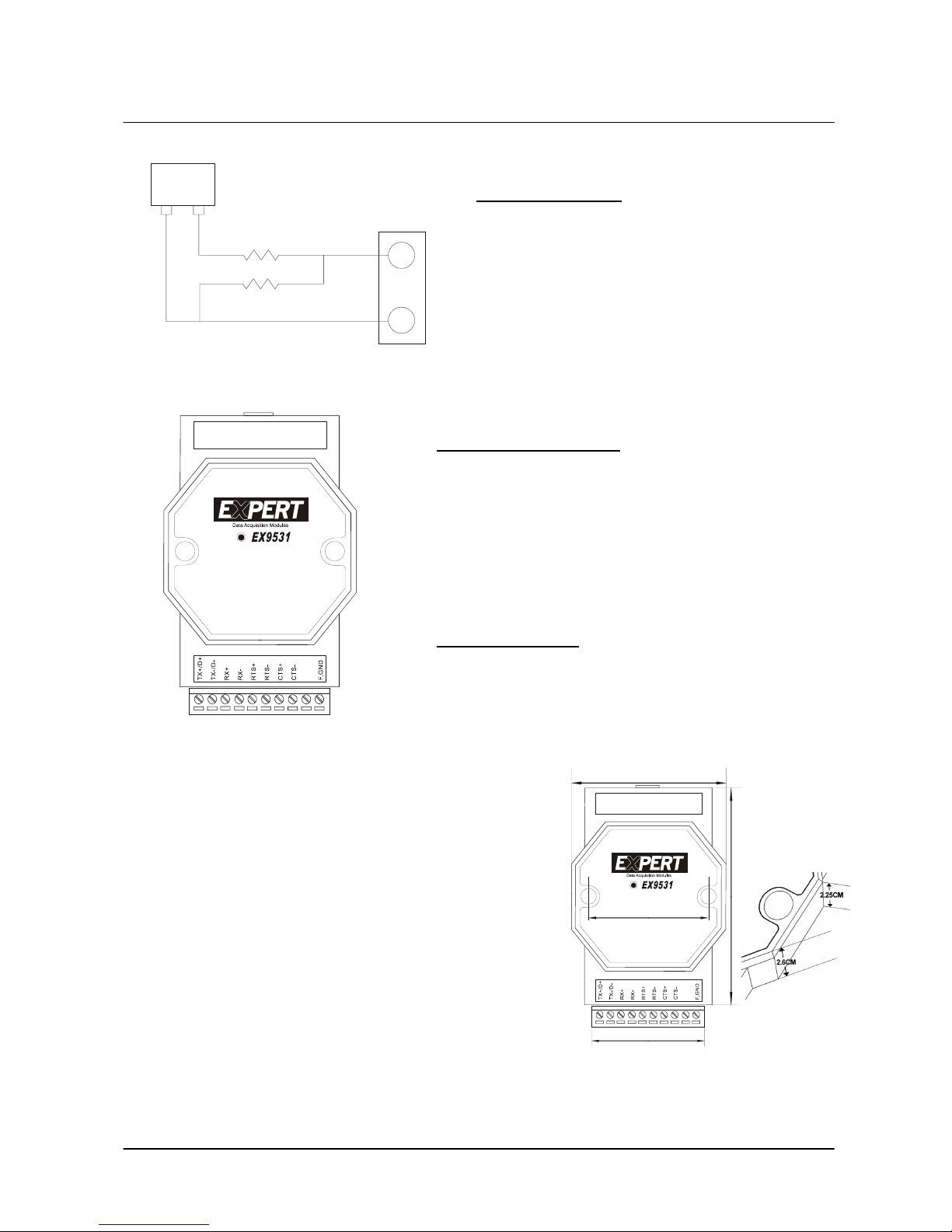
RS-422 / 485 Termination Resistor
120 R32
R1 1/4W(DIP)
D+/TX+
D-/TX-
Provide on-board termination(120 ohm)
or by user (R1) for D+/TX+ & D-/TX-
JP1
T ermination Resistor
Termination Resistor “R1” for D+/TX+ & D-/TXTermination Resistor “R2” for RX+ & RXTermination Resistor “R3” for CTS+/CTSTermination Resistor “R4” for RTS+/RTS-
If the length of RS-485 is about 1.2KM, try 120 ohm first.
If the length of RS-485 is about 600M, try 220 ohm first.
If the length of RS-485 is about 300M, try 330 ohm first.
Connection
USB
Pin Definitions
Pin No. Name Description
1 TX+/D+ RS-422 or RS-485 transmission line, positive
2 TX-/D- RS-422 or RS-485 transmission line, negative
3 RX+ RS-422 receive line, positive
4 RX - RS-422 receive line, negative
5 RTS+ RS-422 Request to send line, positive
6 RTS - RS-422 Request to send line, negative
7 CTS+ RS-422 Clear to send line, positive
8 CTS - RS-422 Clear to send line, negative
9 NC.
10 F.GND Ground
USB Type B connector
1 +5V USB +5VDC bus power
2 Data- USB Data line, Negative
3 Data+ USB Data line, Positive
Dimensions
Windows 98 USB Driver Installation
Plug the EX-9531 into the computer USB port or a USB Hub
USB
7.2CM
5CM
10.1CM
5.55CM
Open Control Panel.
Select Add New Hardware Wizard icon.
The ‘Add New Hardware Wizard’ appears,Press ‘Next’ button.
In the dialog box that comes up, leave the default choice,
(Search for the best drivers for your device), Press ‘Next’ button.
In the dialog box that comes up, leave the default choice,
(Floppy disk drivers), Press ‘Next’ button.
In the dialog box that comes up, leave the default choice,
(The update driver), Press ‘Next’ button.
In the dialog box that comes up, Press ‘Next’ button.
(Window driver file search for the device)
Diaglog box appears to tell you that the installation has finished,
Press ‘Finish’ button.
Now you have installed EX-9531 on your system, you can see a new
USB serial device in 'Control->Device Manager'. The EX-9531 plays a
role as standard COM port,you can use any UART serial communication
utility, or call standard windows API for COM.
EX-9531 user’s manual
 Loading...