

Page 1
SYSGuard 6060
Quick
Installation
Guide
Page 2
Welcome to SYSGuard 6060 LCD Screen Installation Guide
INTRODUCTION
Box Contents
6060 LCD Screen
Step 1
Mount the SYSGuard 6060 LCD Module in a suitable location. It is not recommended to mount
the heating and cooling devices where they directly affect it, it is not accurate to assemble them near
devices producing heat in similar ways or points where they are affected by the vents of the said
devices.
Step 2
Configuration for SYSGuard 6001;
Before connecting the sensor to the system, it is necessary to have SYSGuard 6001 Main Unit
gone into Sensor Assignment Mode.
When SYSGuard 6060 LCD Module is added to the system you need to select the box under
Configuration - LCD Module Setup – LCD/Signal Tower Attached.
Configuration for SYSGuard 3001;
Sensor addition and configuration operations are realized in “External Sensor Settings” page
under “Sensor Settings”. Operations such as naming a sensor, defining operational range and
assigning hysteresis will be concluded below.
To assign a new sensor clicking “Scan For New Sensors” button is enough. This button will check all
the ExaBus Ports in the Main Unit and add connected external sensors. When this process is complete
clicking the “Update” button will activate the sensors.
Before Installation!
Make sure your device is properly
mounted and ready to operate
safely.
Page 3
6060 LCD Module
S
SYSGUARD 6060
LCD Module
Front Panel View
Rear Panel View
2 3 4
1
6
5
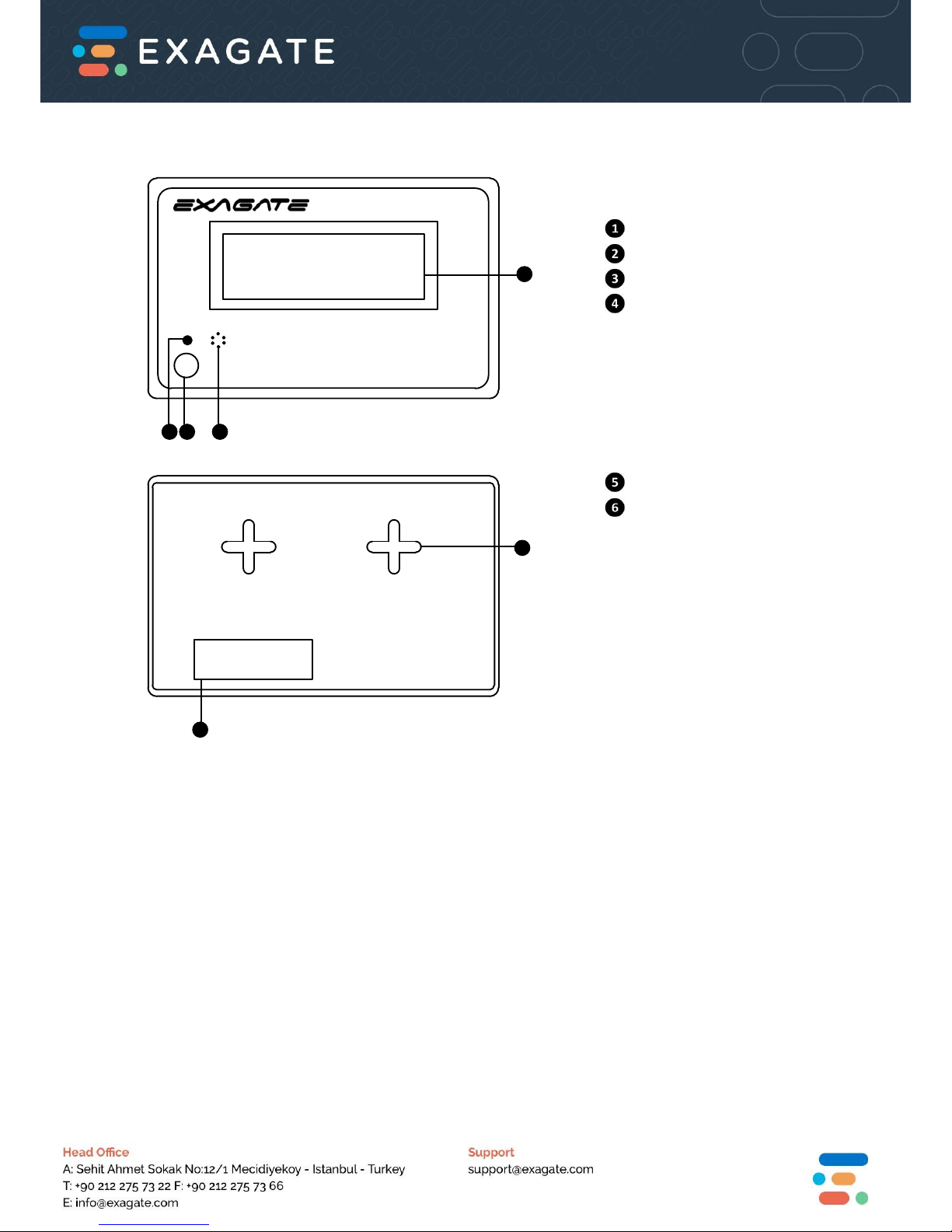
LCD Screen
Status LED
Mute Button
Buzzer
Assembly Hole
LAN Port
Page 4
Operational Properties
Power Supply Voltage 10,5 - 14,4 VDC typical 12 VDC
Power Consumption 0,020 - 0,024 A typical 0,022 A
0,210 - 0,350 W typical 0,250 W
Operational Temprature Range -10 +70 oC
Operational Humidity Range 0 - 85 % Rh
Storage Temprature Range -40 +85 oC
Storage Humidity Range 0 - 90 % Rh
Physical Properties
Dimensions (H x W x D) 96 x 125,7 x 22,3 mm
3,78 x 4,95 x 0,87 inches
Color Grey
Weight 200 (+/-5%) grams
Technical Properties
Screen Properties 4*20 character LCD
Maximum Distance from Main Unit 200 m
External Device Input NO
Power Over ExaBus Port YES
ExaBus Port 1 Unit
Power Over External Device NO
Supported External Devices NO
Supported Main Units SYSGuard 3001, SYSGuard 6001
Page 5
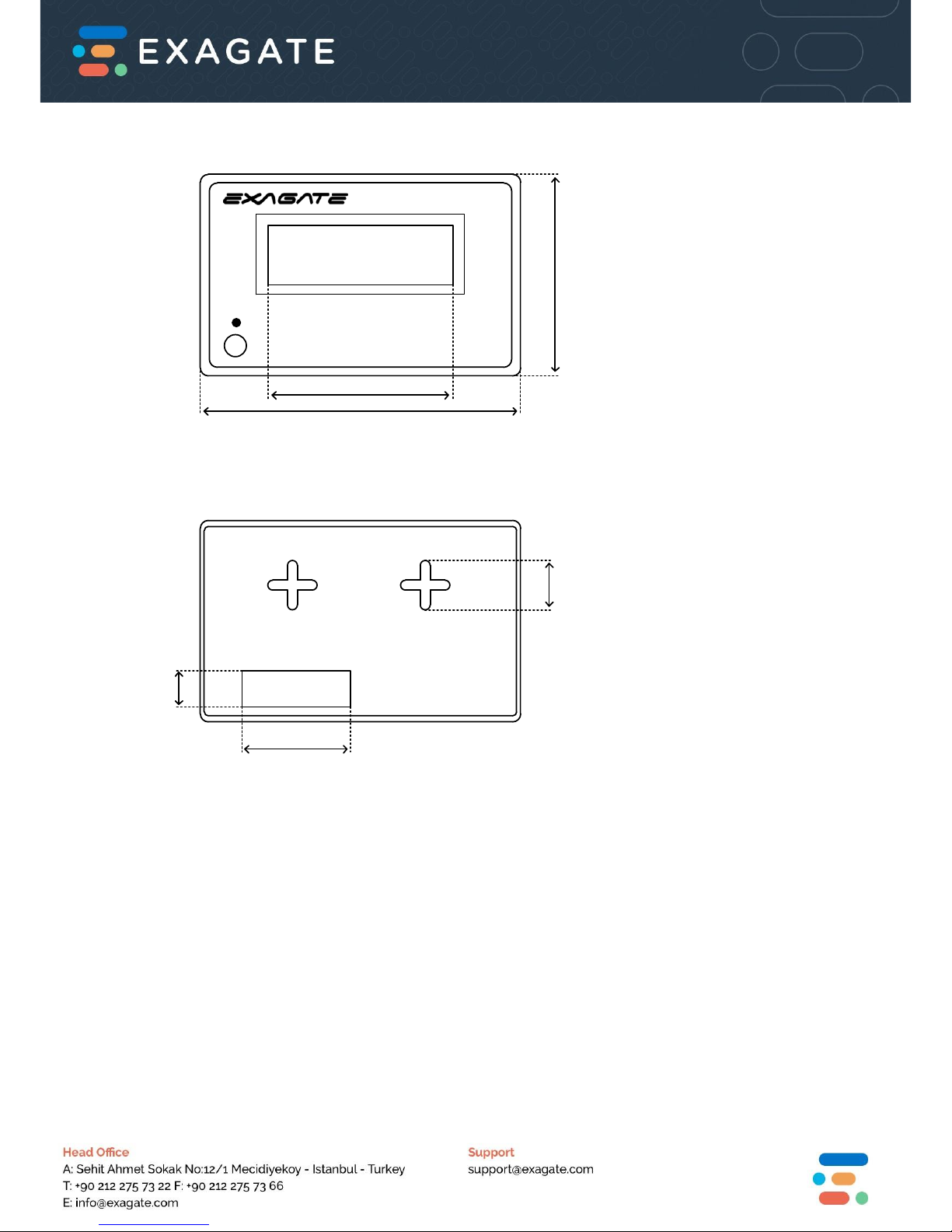
Dimensions
S
Front Panel View
Rear Panel View
3.78 in
96 mm
2.81 in
71.43 mm
4.95 in
125.7 mm
0.72 in
19.8 mm
2.28 in
58 mm
0.66 in
16.8 mm
Page 6
All ExaGate products are covered with 2 years limited guarantee from the date of original
purchase. (Warranty duration may change depending on your country) Your sales or delivery
receipt, showing the date of purchase of product is your proof of purchase. ExaGate is obliged to
repair or replace the defective hardware (or any part of it’s) with no charge to owner.
Conditions Void of Warranty
Damages on unit, cable or screen.
Defections due to electrical wiring and/or city network.
Interference to unit by non-authorized staff.
Any problems caused by act of nature.
Misusage of unit stated by the user manual.
Removal or destruction of serial number, warranty labels.
Any kind of modifications on unit.
Instructions in this QIG are in abstract essence.
For detailed information and instructions please visit www.exagate.com/support
or in Help Menu in SYSGuard 6001 Main Unit WebPack interface.
 Loading...