

Page 1

SYSGuard 3001
Quick Installation Guide
Page 2
Welcome to SYSGuard 3001 Main Unit Quick Installation Guide
INTRODUCTION
Box Contents
SYSGuard 3001 Main Unit
4 Assembly Screws
Mounting Kit
12 V DC Adapter
Step 1
Plug-in 12 V DC Adapter to SYSGuard 3001 Main Unit. Wait for the buzzer sound. After the buzzer is
heard SYSGuard 3001 Main Unit is ready to run.
Step 4
Before connecting the sensor to the system, it is necessary to have SYSGuard 3001 Main Unit gone
into Sensor Assignment Mode. Enter “External Sensor Settings” section in WebPack interface. Click
on “Scan For New Sensors”, SYSGuard 3001 Main Unit will go Sensor Assignment Mode.
Step 2
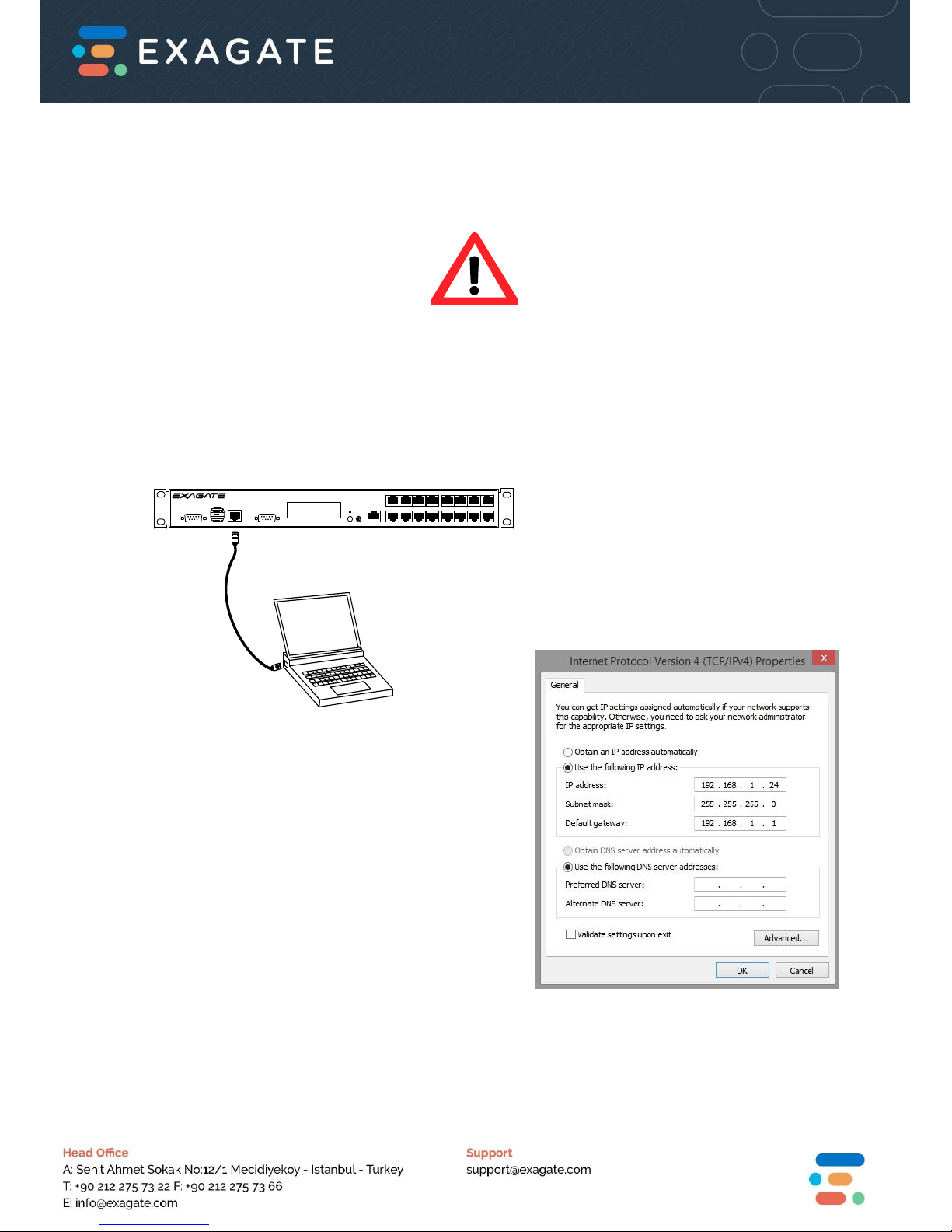
Main unit is equipped with default IP address
(192.168.1.141). For the first access to the
device a PC must be used to access the main
unit and devices should be connected to the
same network.
Your PC should have a static IP in order to
access SYSGuard 3001. You can carry out
these settings in TCP/IP Settings sections of
Local Area Network Connection options.
Step 3
Write 192.168.1.141 on the address bar of your
browser (for instance Internet Explorer) and press
Enter button.
Homepage of the SYSGuard 3001 Main Unit is as
follows: Default user name is “admin” and password
is “123456”.
SYSGUARD 3001
Environment Monitoring System
COM 1
USB
COM 2
LAN
READY
MENU
SET
T/H
Before Installation!
Make sure your device is properly
mounted and ready to operate
safely.
Page 3
Step 5
Sensor addition and configuration operations are realized in “External Sensor Settings” page under
“Sensor Settings”. Operations such as naming a sensor, defining operational range and assigning
hysteresis will be concluded below. To assign a new sensor clicking “Scan For New Sensors”
button is enough. This button will check all the ExaBus Ports in the Main Unit and add connected
external sensors. When this process is complete clicking the “Update” button will activate the
sensors.
There is special configuration for internal sensors and modules assignment in the SYSGUARD 3001
system. Just activating the SYSGUARD 3001 Main Unit is enough.
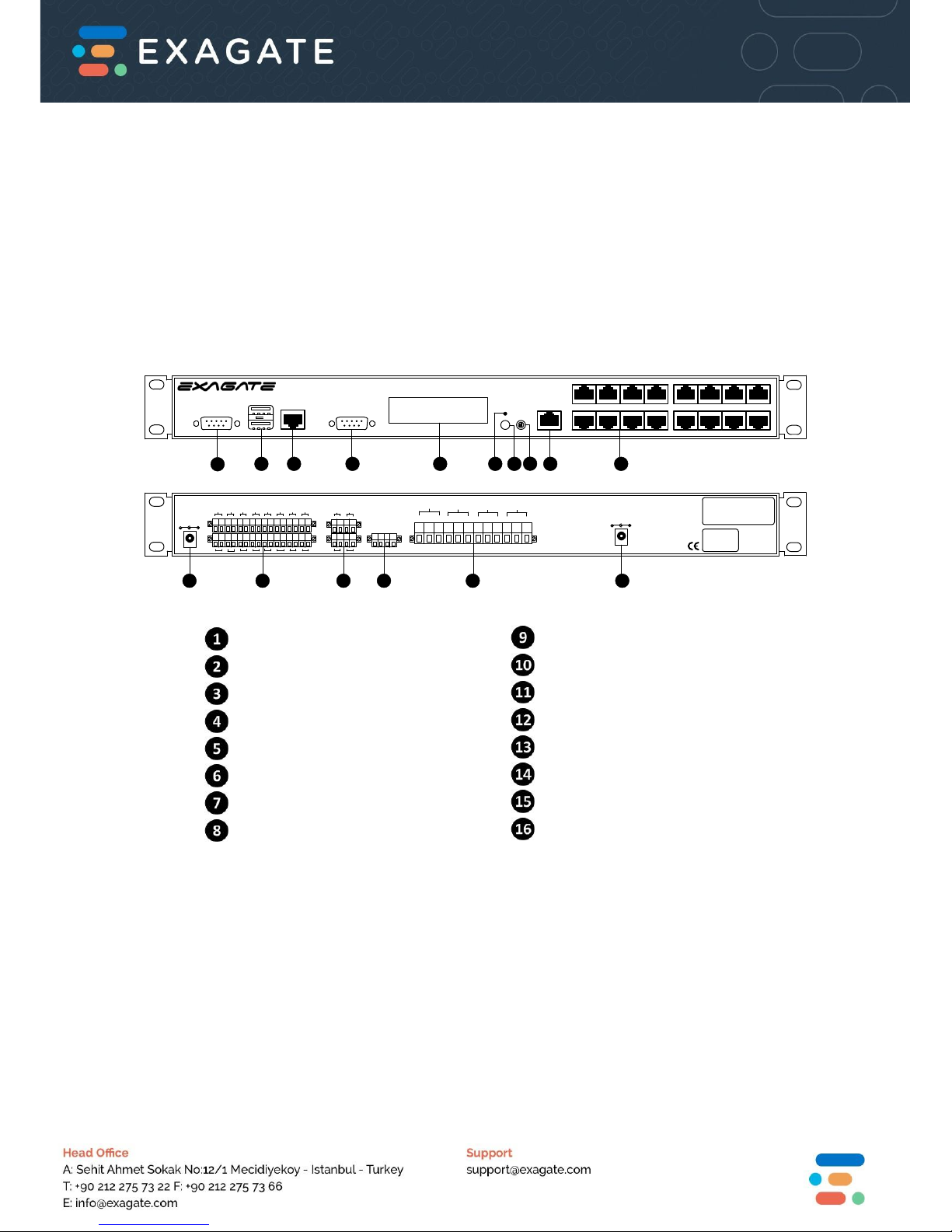
SYSGuard 3001 Layout
SYSGUARD 3001
Environment Monitoring System
COM 1
USB
COM 2
LAN
READY
MENU
X1
SET
X4
X7
T/H
X2
X3
X5 X6
X8
X15
X9
X10
X13
X11
X16
X14
X12
MAIN POWER
12V DC
SLAVE POWER
12V DC
+
-
+
-
+
-
+
- +
-
+
-
+
-
+
-
-
+
-
+
-
+
-
+ -
+
-
+
-
+
-
+
+
-
+
-
-
+
-
+
+12V DC
+12V DC
GND
GND
POWER
OUTPUTS
DRY CONTACT INPUTS ANALOG/W-DETECT INPUTS
RELAY OUTPUTS
123
456 7
8
91011
12
13 141516
1
2
4
3
NC
NO
COM
RELAY OUT 1
NC
NO
COM
RELAY OUT 2
NC
NO
COM
RELAY OUT 3
NC
NO
COM
RELAY OUT 4
EKSAGATE ELEKTRONIK
MUHENDISLIK VE BILGİSAYAR SAN. TİC. A.Ş.
Sehit Ahmet Str. No:12/1 Mecidiyeköy/Istanbul/Turkey
Tel: +90 212 275 13 22 Fax: +90 212 275 73 66
Web: www.exagate.com E-Mail: [email protected]
Product Code
SYSG3001
Serial No
ROHS
P
1
Front Panel View
Rear Panel View
2 3 4 5 6 789 10
11 12 131414 15 16
COM 1 Port, GSM Modem Input
USB Ports, For Programming
LAN Port
COM 2 Port, RS-232 Input
LCD Display
Status LED
Menu Button
Set / Mute
Temperature / Humidity Sensor Input
Sensor / Module Inputs
Power
Dry Contact Inputs
Analog / Water Detect Inputs
Power Outputs
Relay Outputs
Slave Power Input
Page 4
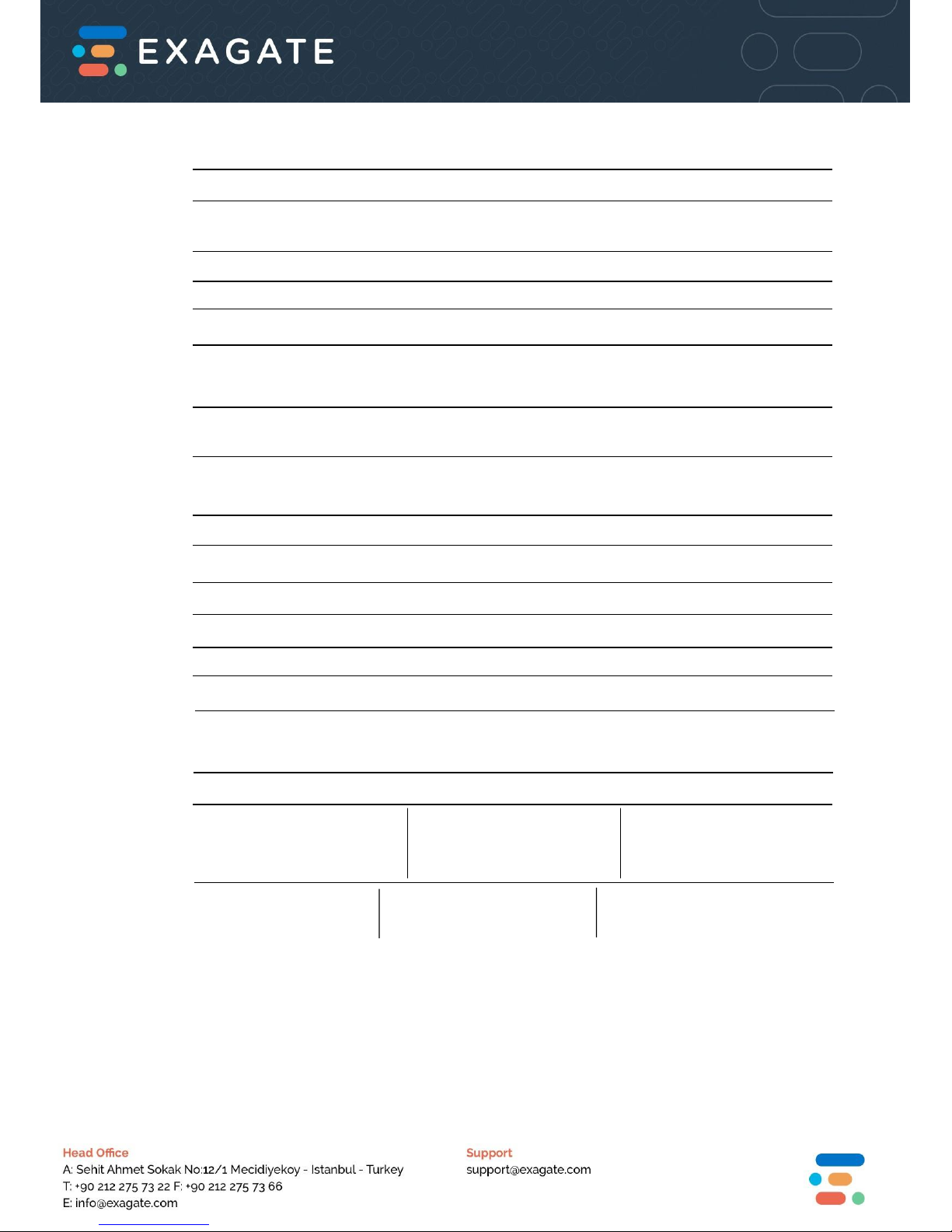
Operational Properties
Power Supply Voltage 10,5 - 14,4 VDC typical 12 VDC
Power Consumption 0,22 - 0,36 A typical 0,24 A
2,64 - 4,62 W typical 2,88 W
Operational Temprature Range -10 +70 oC
Operational Humidity Range 0 - 85 % Rh
Storage Temprature Range -40 +85 oC
Storage Humidity Range 0 - 90 % Rh
Physical Properties
Dimensions (H x W x D) 44,14 x 480 x 101 mm
1,73 x 18,89 x 3,97 inches
Color Black
Internal Temperature & Humidity Sensor
Temperature Measurement Range -10 +70
Temperature Measurement Tolerance +/- 0,4
Temperature Measurement Resolution 0,1
Humidity Measurement Range 0 - 85 % Rh
Humidity Measurement Tolerance +/-3 % Rh
Humidity Measurement Resolution %0,1 Rh
Maximum Distance from Main Unit 3 m
Inputs & Outputs
Analog / Water Sensor Port Dry Contact Input Relay Output
4 units 16 units 4 units
Analog resolution 10bit 5-12 VDC NO / NC
Voltage Range 0-5 VDC Isolated Max. 5A
RS232 (2 Units) USB Port (2 Units) Ethernet Port (1 Unit)
ExaBus Port (16 Units) Slave Power Input (1 Unit) External Power Input (max.=1A)
Page 5
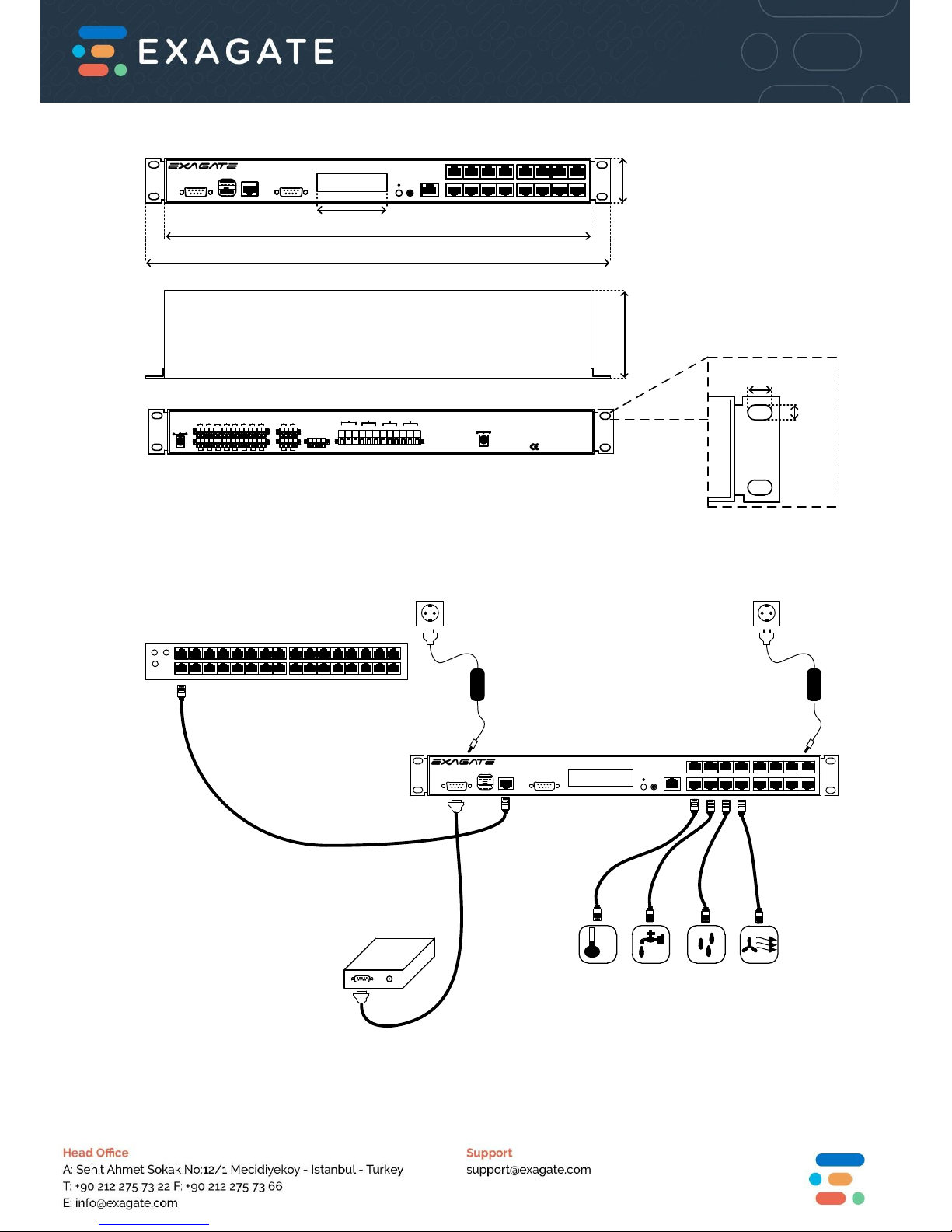
Dimensions
SYSGUARD 3001
Environment Monitoring System
+
-
+
-
+
-
+
-
+
-
+
-
+
-
+
-
-
+
-
+
-
+
-
+ -
+
-
+
-
+
-
+
+
-
+
-
-
+
-
+
P
18.89 in
480 mm
1.73 in
44.14 mm
3.97 in
101 mm
2.62 in
66.6 mm
0.24 in
6.30 mm
0.38 in
9.90 mm
16.92 in
430 mm
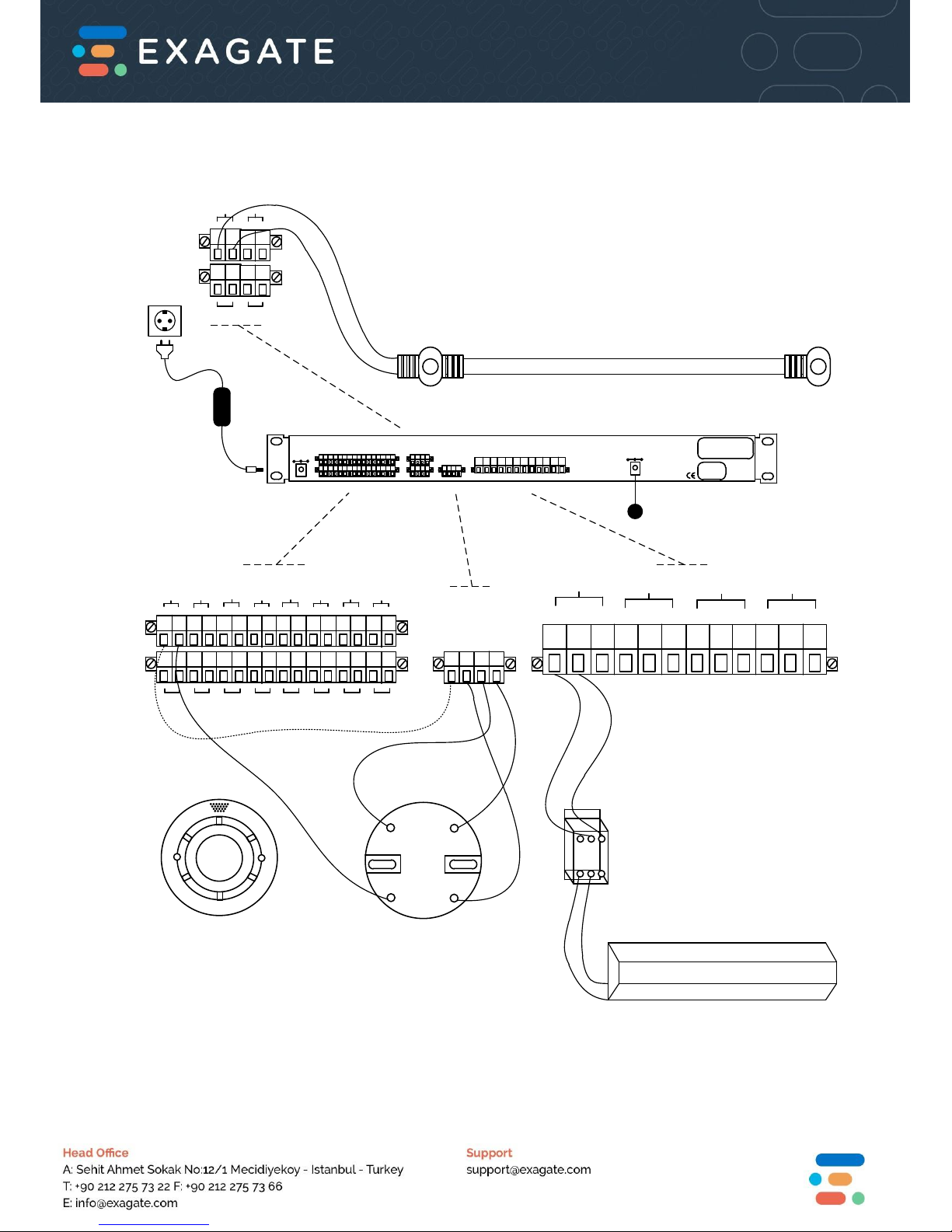
Sample Connection Diagrams
SYSGUARD 3001
Environment Monitoring System
COM 1
USB
COM 2
LAN
READY
MENU
SET
T/H
°C
GSM
MODEM
Page 6
+
-
+
-
+
-
+
- +
-
+
-
+
-
+
-
-
+
-
+
-
+
-
+ -
+
-
+
-
+
-
+
DRY CONTACT INPUTS
1
2
3
4
5
6 7
8
9
10
11
12
13 14
15
16
+12V DC
+12V DC
GND
GND
POWER
OUTPUTS
TEST
DO
NOT
PAINT
X
X
X
X
5
6
4
2
+
-
+
-
-
+
-
+
ANALOG/W-DETECT INPUTS
1
2
4
3
RELAY OUTPUTS
NC
NO
COM
RELAY OUT 1
NC
NO
COM
RELAY OUT 2
NC
NO
COM
RELAY OUT 3
NC
NO
COM
RELAY OUT 4
AIR CONDITIONER
CONTACTOR
(IF NECESSARY)
1
Page 7

Installation Notes:
………………………………………………………………………………………………………………………………………………....
………………………………………………………………………………………………………………………………………………….
………………………………………………………………………………………………………………………………………………….
………………………………………………………………………………………………………………………………………………….
………………………………………………………………………………………………………………………………………………….
………………………………………………………………………………………………………………………………………………….
………………………………………………………………………………………………………………………………………………….
………………………………………………………………………………………………………………………………………………….
………………………………………………………………………………………………………………………………………………….
………………………………………………………………………………………………………………………………………………….
………………………………………………………………………………………………………………………………………………….
………………………………………………………………………………………………………………………………………………….
………………………………………………………………………………………………………………………………………………….
………………………………………………………………………………………………………………………………………………….
………………………………………………………………………………………………………………………………………………….
………………………………………………………………………………………………………………………………………………….
………………………………………………………………………………………………………………………………………………….
………………………………………………………………………………………………………………………………………………….
………………………………………………………………………………………………………………………………………………….
………………………………………………………………………………………………………………………………………………….
………………………………………………………………………………………………………………………………………………….
………………………………………………………………………………………………………………………………………………….
………………………………………………………………………………………………………………………………………………….
………………………………………………………………………………………………………………………………………………….
………………………………………………………………………………………………………………………………………………….
………………………………………………………………………………………………………………………………………………….
Page 8
All ExaGate products are covered with 2 years limited guarantee from the date of original
purchase. (Warranty duration may change depending on your country) Your sales or delivery
receipt, showing the date of purchase of product is your proof of purchase. ExaGate is obliged to
repair or replace the defective hardware (or any part of it’s) with no charge to owner.
Conditions Void of Warranty
Damages on unit, cable or screen.
Defections due to electrical wiring and/or city network.
Interference to unit by non-authorized staff.
Any problems caused by act of nature.
Misusage of unit stated by the user manual.
Removal or destruction of serial number, warranty labels.
Any kind of modifications.
Instructions in this QIG are in abstract essence.
For detailed information and instructions please visit www.exagate.com/support
or in Help Menu in SYSGuard 3001 Main Unit WebPack interface.
 Loading...