

Page 1

GT IPSec
Setup Guide
2871 Pullman Street, Santa Ana, CA 92705 Phone. 949.486.0320 Fax. 949.486.0333 www.exadigm.com
Page 2

GT IPsec Setup Guide
Copyright 2012 ExaDigm, Inc.
All Rights Reserved.
Printed in USA
Warranty
The information contained in this document is subject to change without notice.
ExaDigm makes no warranty of any kind with regard to this material, including, but not limited to, the
implied warranties or merchantability and fitness for a particular purpose.
ExaDigm shall not be liable for errors contained herein or for incidental or consequential damages in
connection with the furnishing, performance, or use of this material.
© 2012 ExaDigm, Inc. Page 2 of 13 Rev. 1/1212
Page 3

GT IPsec Setup Guide
Table of Contents
1.0 Web GUI Login ..................................................................................................... 4
1.1 Initial Connection ....................................................................................................... 4
2.0 IPsec .................................................................................................................... 4
2.1 Tunnel Configuration ................................................................................................. 5
3.0 Cisco ASA Settings .............................................................................................. 6
3.1 Network Diagram ....................................................................................................... 6
3.2 Cisco ASA Configuration ........................................................................................... 6
3.3 Cisco ASA Configuration ........................................................................................... 7
4.0 NetGear VPN Settings ........................................................................................ 10
4.1 Network Diagram ..................................................................................................... 10
4.2 NetGear VPN Configuration ..................................................................................... 10
4.3 NetGear ProSafe VPN Screen ................................................................................. 11
5.0 IPsec Tunnel Listing ........................................................................................... 13
© 2012 ExaDigm, Inc. Page 3 of 13 Rev. 1/1212
Page 4
GT IPsec Setup Guide
1.0 Web GUI Login
1.1 Initial Connection
1. Verify the GT unit’s power supply is connected; the green LED light will be illuminated.
2. Connect a PC or laptop to the front of the GT using a RJ-45 Ethernet cable.
Note: The Ethernet Port on the GT is “auto-sensing”, which means a straight through or cross-
over cable can be used to connect to the ExaDigm router.
3. Launch a web browser and connect to the GT using the address http://192.168.12.20:8080/. If
you cannot connect, verify the address provided by the GT’s DCHP host using your system’s
network adapter information.
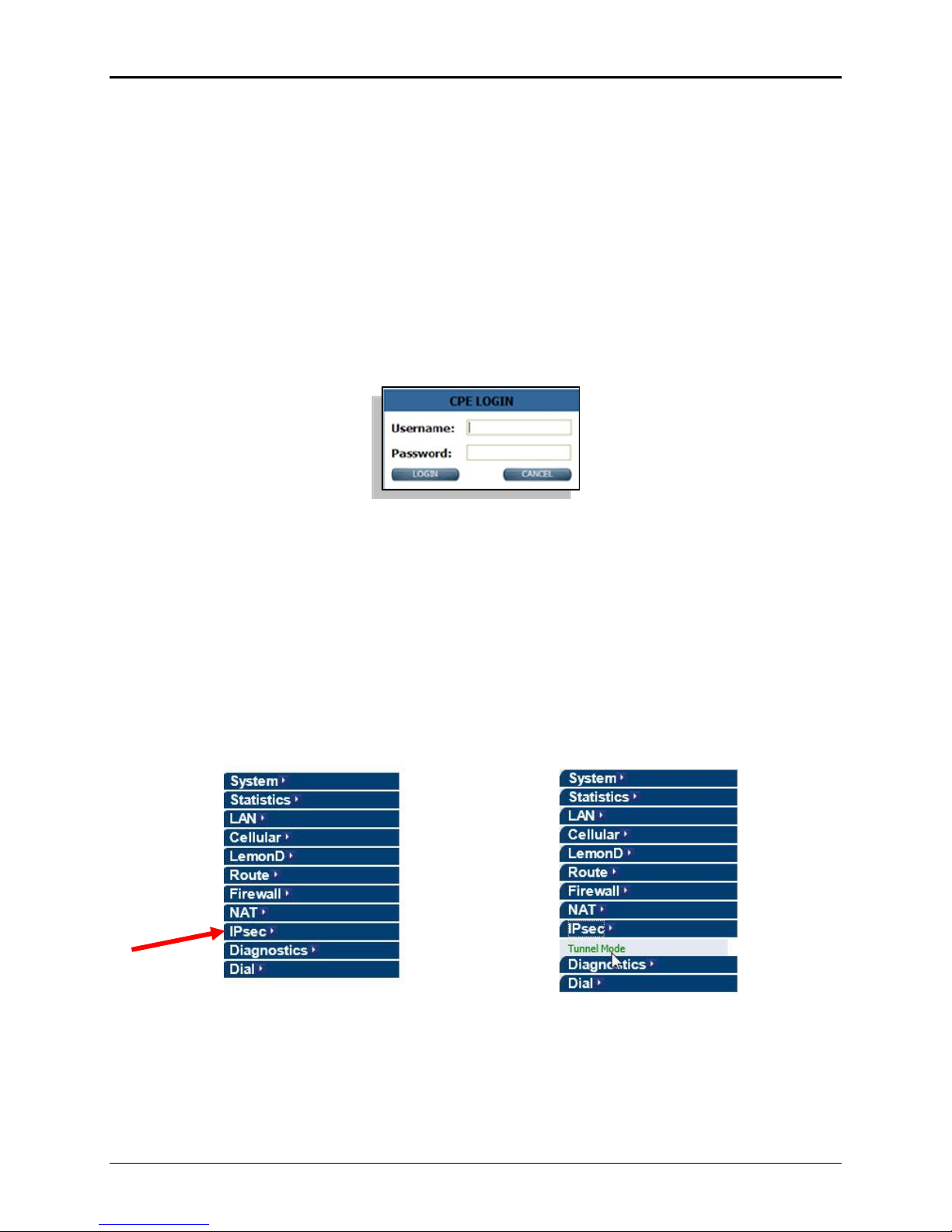
4. Once you are connected, the login screen will be displayed (see Figure 4 below).
Figure 4 – Login Screen
5. Enter the Username and Password, they are case sensitive. The default for access is:
Username: root
Password: admin
6. Once the GT validates the information, access will be granted and the Home Screen will be
displayed.
2.0 IPsec
Click on the IPsec tab located on the left side of the main screen (figure 1). Then click Tunnel Mode
under the IPsec menu (figure 2).
Figure 1 Figure 2
© 2012 ExaDigm, Inc. Page 4 of 13 Rev. 1/1212
Page 5
GT IPsec Setup Guide
2.1 Tunnel Configuration
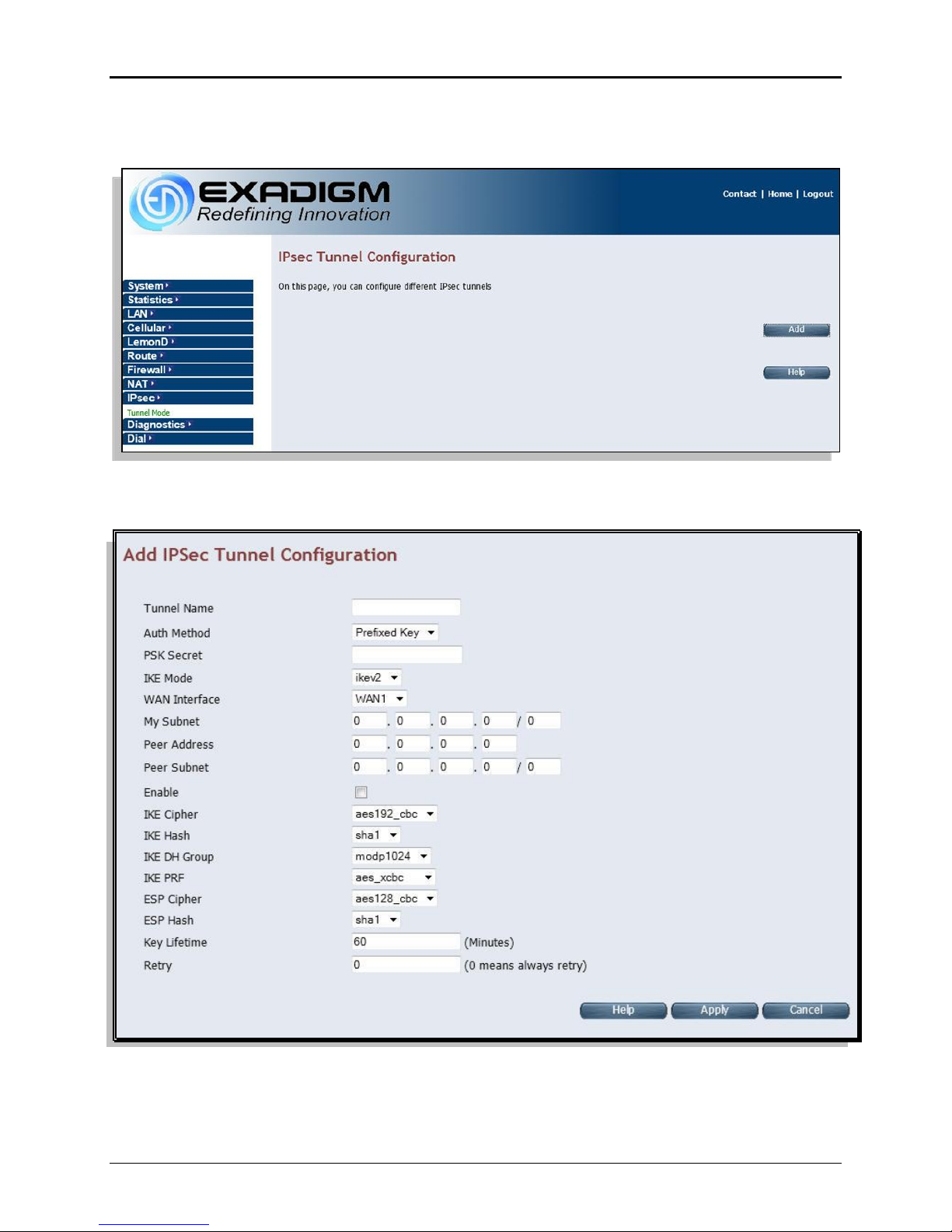
The IPsec parameters will need to be added according to the specific Adaptive Security Appliance (ASA).
Click the Add button to configure the parameters.
The above configuration should be set according to the ASA being used.
© 2012 ExaDigm, Inc. Page 5 of 13 Rev. 1/1212
Page 6
3.0 Cisco ASA Settings
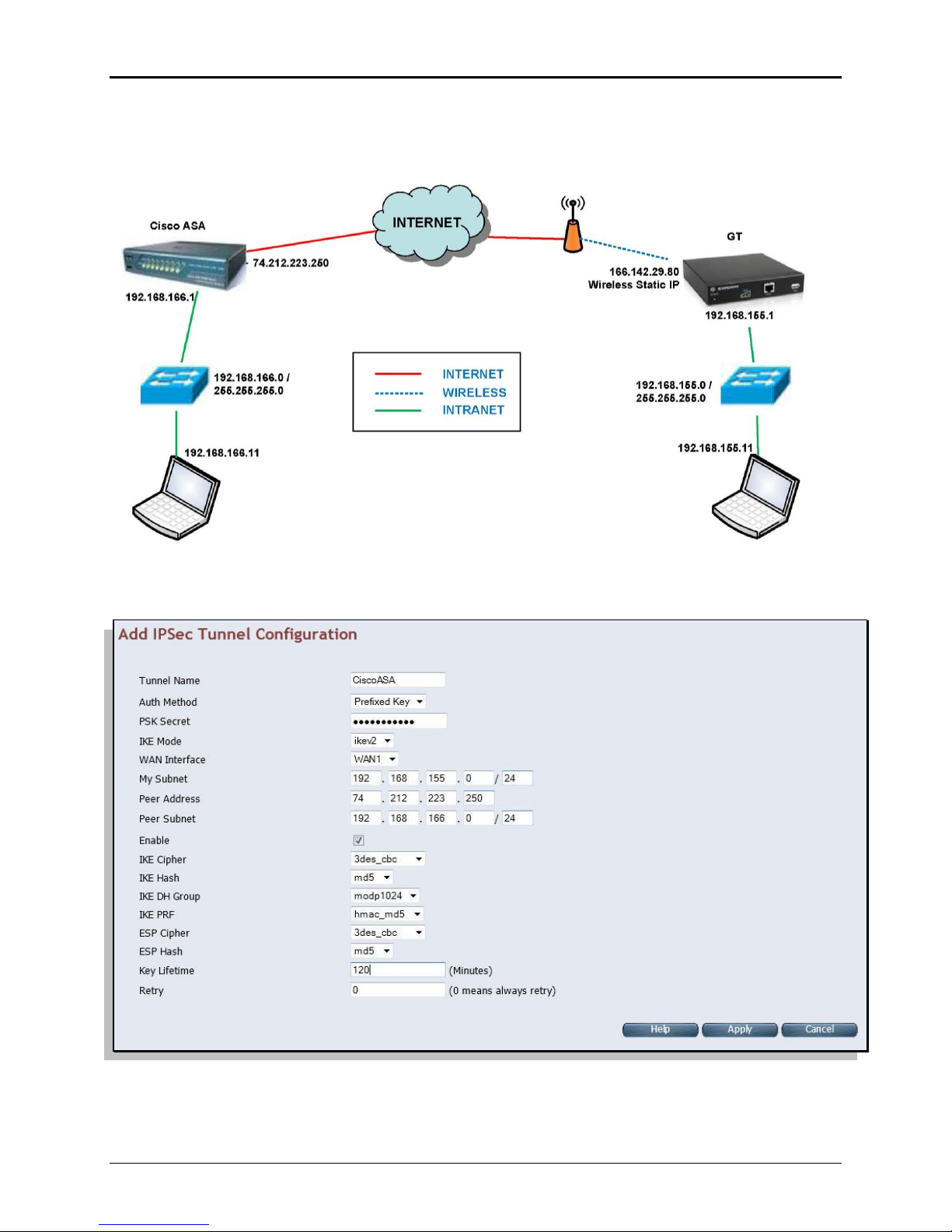
3.1 Network Diagram
GT IPsec Setup Guide
3.2 Cisco ASA Configuration
My Subnet will be set to the default DNS for the GT. The Peer Address is the external interface address
and the Peer Subnet is the internal address.
Once the configuration is set click on Apply.
© 2012 ExaDigm, Inc. Page 6 of 13 Rev. 1/1212
Page 7

GT IPsec Setup Guide
3.3 Cisco ASA Configuration
ASA Version 8.4(2)
!
hostname asa2
domain-name exadigm.com
enable password /xxxxxxxxxxxxxxxx encrypted
passwd xxxxxxxxxxxxxxxx encrypted
names
!
interface Ethernet0/0
switchport access vlan 2
!
interface Ethernet0/1
!
interface Ethernet0/2
!
interface Ethernet0/3
!
interface Ethernet0/4
!
interface Ethernet0/5
!
interface Ethernet0/6
!
interface Ethernet0/7
!
interface Vlan1
nameif inside
security-level 100
ip address 192.168.166.1 255.255.255.0
!
interface Vlan2
nameif outside
security-level 0
ip address 74.212.223.250 255.255.255.224
!
boot system disk0:/asa842-k8.bin
ftp mode passive
dns server-group DefaultDNS
domain-name exadigm.com
object network obj-192.168.166.0
subnet 192.168.166.0 255.255.255.0
object network obj-192.168.155.0
subnet 192.168.155.0 255.255.255.0
object network obj_any
subnet 0.0.0.0 0.0.0.0
access-list inside_access_in extended permit ip any any
access-list inside_access_in extended permit icmp any any
access-list inside_access_in extended permit tcp any any
access-list outside_access_in extended permit ip any any
access-list outside_access_in extended permit icmp any any
access-list outside_access_in extended permit tcp any any
access-list vzw_l2l extended permit ip 192.168.166.0 255.255.255.0
192.168.155.0 255.255.255.0
pager lines 50
logging enable
logging console debugging
logging asdm informational
© 2012 ExaDigm, Inc. Page 7 of 13 Rev. 1/1212
Page 8

GT IPsec Setup Guide
mtu inside 1500
mtu outside 1500
icmp unreachable rate-limit 1 burst-size 1
no asdm history enable
arp timeout 14400
nat (inside,any) source static obj-192.168.166.0 obj-192.168.166.0
destination static obj-192.168.155.0 obj-192.168.155.0 no-proxy-arp
!
object network obj_any
nat (inside,outside) dynamic interface
access-group inside_access_in in interface inside
access-group outside_access_in in interface outside
route outside 0.0.0.0 0.0.0.0 74.212.223.225 1
timeout xlate 3:00:00
timeout conn 1:00:00 half-closed 0:10:00 udp 0:02:00 icmp 0:00:02
timeout sunrpc 0:10:00 h323 0:05:00 h225 1:00:00 mgcp 0:05:00 mgcp-pat
0:05:00
timeout sip 0:30:00 sip_media 0:02:00 sip-invite 0:03:00 sip-disconnect
0:02:00
timeout sip-provisional-media 0:02:00 uauth 0:05:00 absolute
timeout tcp-proxy-reassembly 0:01:00
timeout floating-conn 0:00:00
dynamic-access-policy-record DfltAccessPolicy
user-identity default-domain LOCAL
no snmp-server location
no snmp-server contact
snmp-server enable traps snmp authentication linkup linkdown coldstart
crypto ipsec ikev2 ipsec-proposal AES256
protocol esp encryption aes-256
protocol esp integrity sha-1 md5
crypto ipsec ikev2 ipsec-proposal AES192
protocol esp encryption aes-192
protocol esp integrity sha-1 md5
crypto ipsec ikev2 ipsec-proposal AES
protocol esp encryption aes
protocol esp integrity sha-1 md5
crypto ipsec ikev2 ipsec-proposal 3DES
protocol esp encryption 3des
protocol esp integrity sha-1 md5
crypto ipsec ikev2 ipsec-proposal DES
protocol esp encryption des
protocol esp integrity sha-1 md5
crypto ipsec ikev2 ipsec-proposal gtikev2
protocol esp encryption aes-256 aes-192 aes 3des des
protocol esp integrity sha-1 md5
crypto ipsec security-association lifetime seconds 7200
crypto map gtmap 1 match address vzw_l2l
crypto map gtmap 1 set peer 166.142.29.80
crypto map gtmap 1 set ikev2 ipsec-proposal 3DES DES AES AES192 AES256
crypto map gtmap 1 set security-association lifetime seconds 7200
crypto map gtmap interface outside
crypto ikev2 policy 10
encryption aes-256 aes-192 aes 3des des
integrity sha md5
group 5 2 1
prf sha md5
lifetime seconds 7200
crypto ikev2 enable outside
telnet 192.168.166.0 255.255.255.0 inside
© 2012 ExaDigm, Inc. Page 8 of 13 Rev. 1/1212
Page 9

GT IPsec Setup Guide
telnet timeout 60
ssh timeout 5
console timeout 0
threat-detection basic-threat
threat-detection statistics access-list
no threat-detection statistics tcp-intercept
tunnel-group 166.142.29.80 type ipsec-l2l
tunnel-group 166.142.29.80 ipsec-attributes
ikev2 remote-authentication pre-shared-key *****
ikev2 local-authentication pre-shared-key *****
!
class-map inspection_default
match default-inspection-traffic
!
!
policy-map type inspect dns preset_dns_map
parameters
message-length maximum 512
policy-map global_policy
class inspection_default
inspect dns preset_dns_map
inspect ftp
inspect h323 h225
inspect h323 ras
inspect rsh
inspect rtsp
inspect esmtp
inspect sqlnet
inspect skinny
inspect sunrpc
inspect xdmcp
inspect sip
inspect netbios
inspect tftp
!
service-policy global_policy global
prompt hostname context
no call-home reporting anonymous
Cryptochecksum:1c3a9ebee9a82f086a684ec60755cb10
: end
© 2012 ExaDigm, Inc. Page 9 of 13 Rev. 1/1212
Page 10
4.0 NetGear VPN Settings
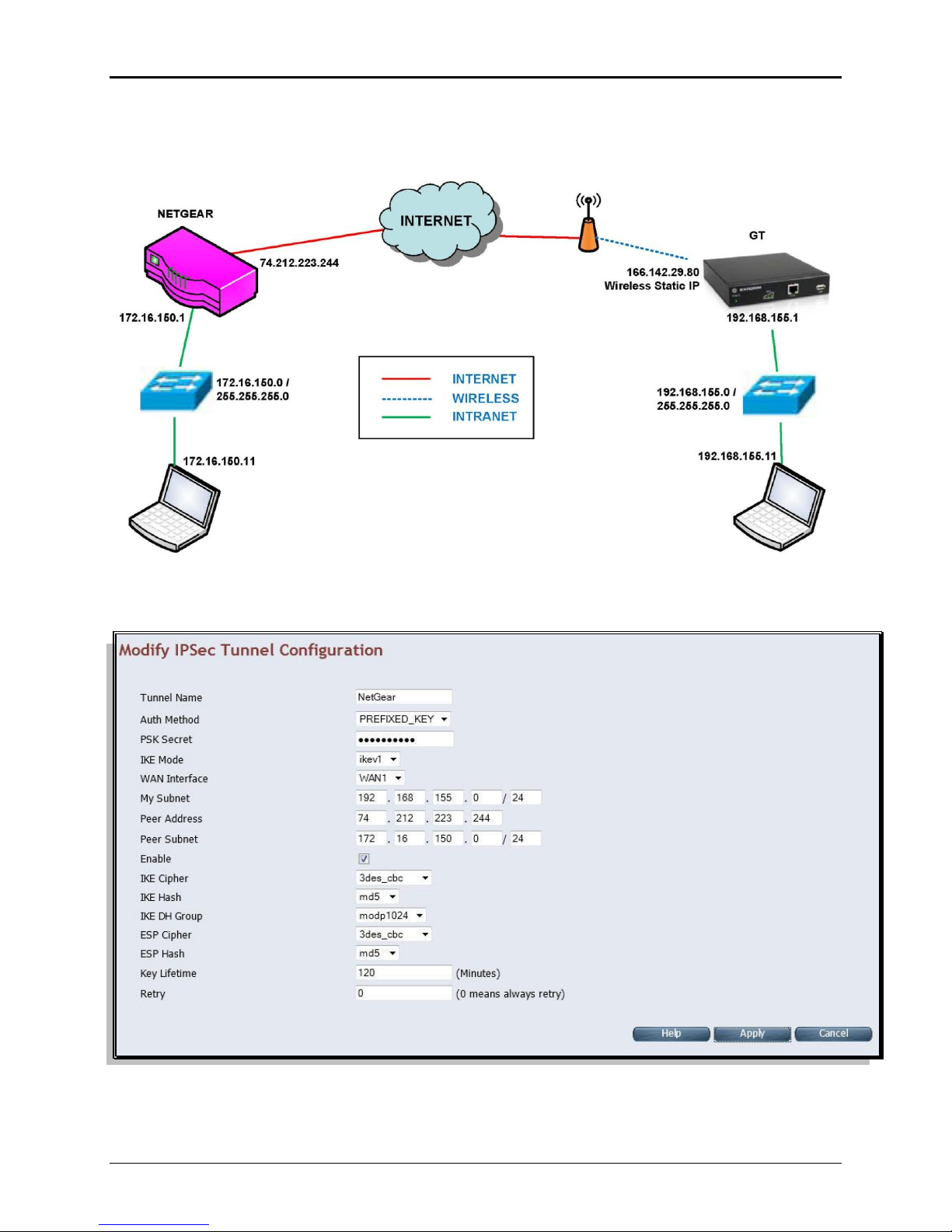
4.1 Network Diagram
GT IPsec Setup Guide
4.2 NetGear VPN Configuration
My Subnet will be set to the default DNS for the GT. The Peer Address is the external interface address
and the Peer Subnet is the internal address.
Once the configuration is set click on Apply.
© 2012 ExaDigm, Inc. Page 10 of 13 Rev. 1/1212
Page 11
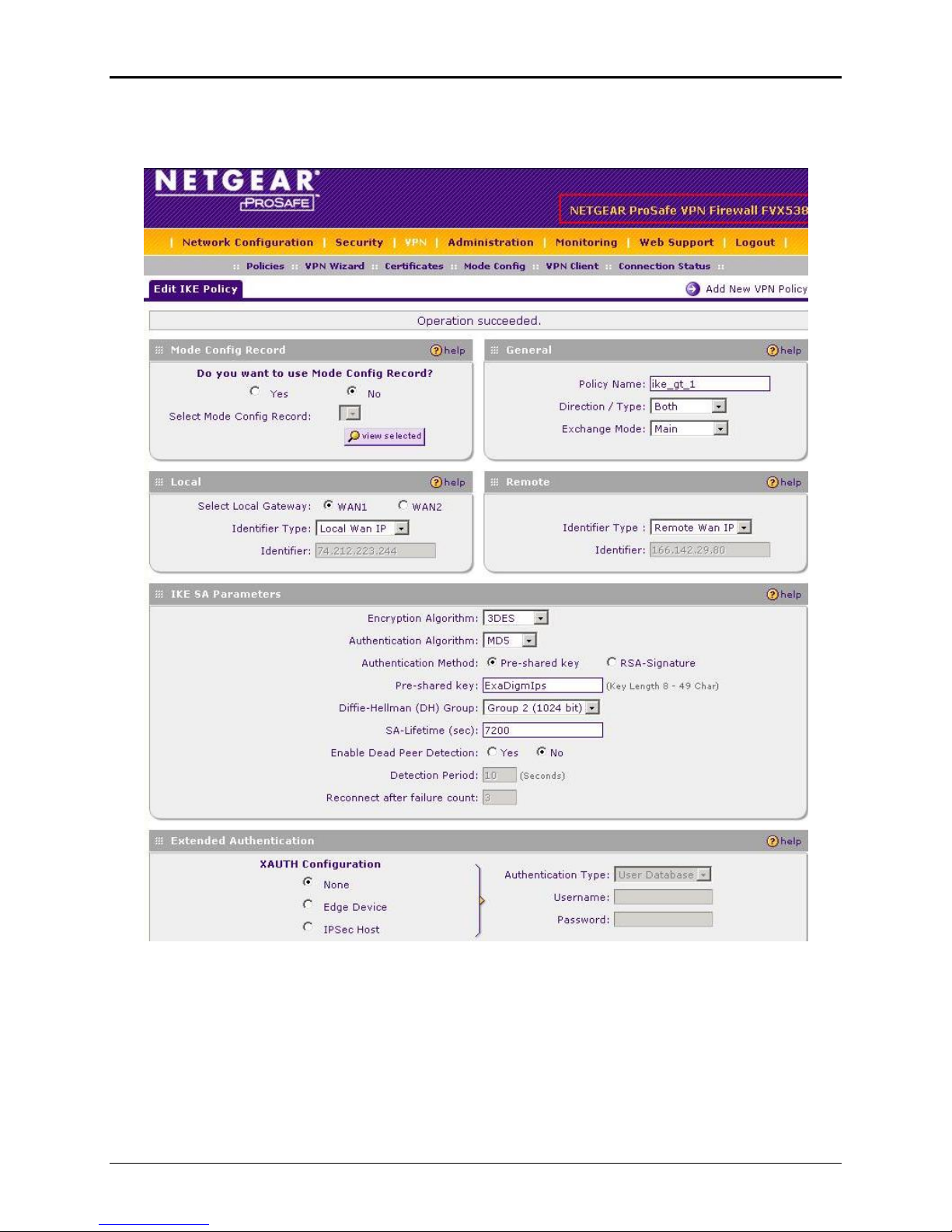
4.3 NetGear ProSafe VPN Screen
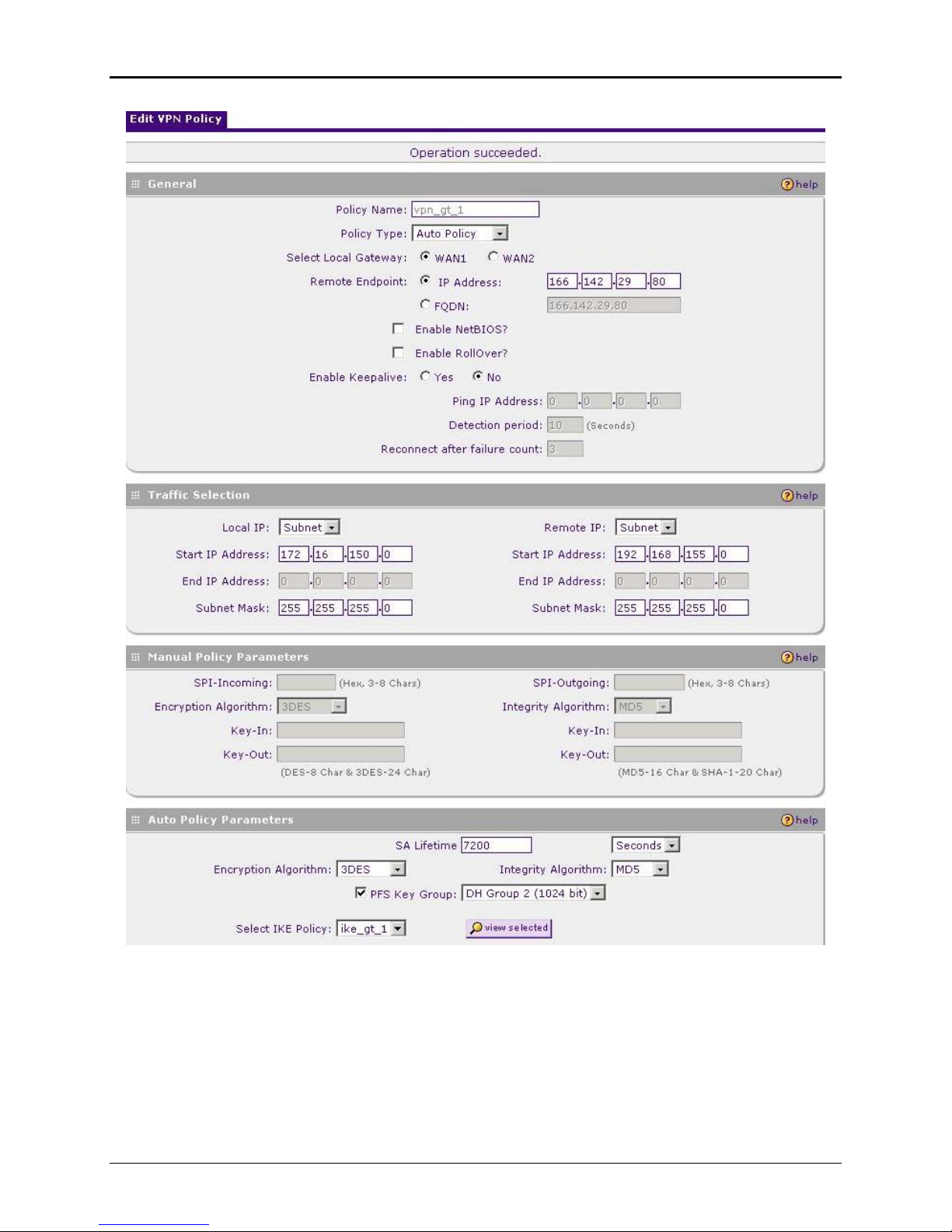
NetGear will display the following information on their VPN setup screen.
GT IPsec Setup Guide
© 2012 ExaDigm, Inc. Page 11 of 13 Rev. 1/1212
Figure 1 – page 1 of NetGear VPN setup
Page 12
GT IPsec Setup Guide
© 2012 ExaDigm, Inc. Page 12 of 13 Rev. 1/1212
Figure 2 – page 2 of NetGear VPN setup
Page 13
GT IPsec Setup Guide
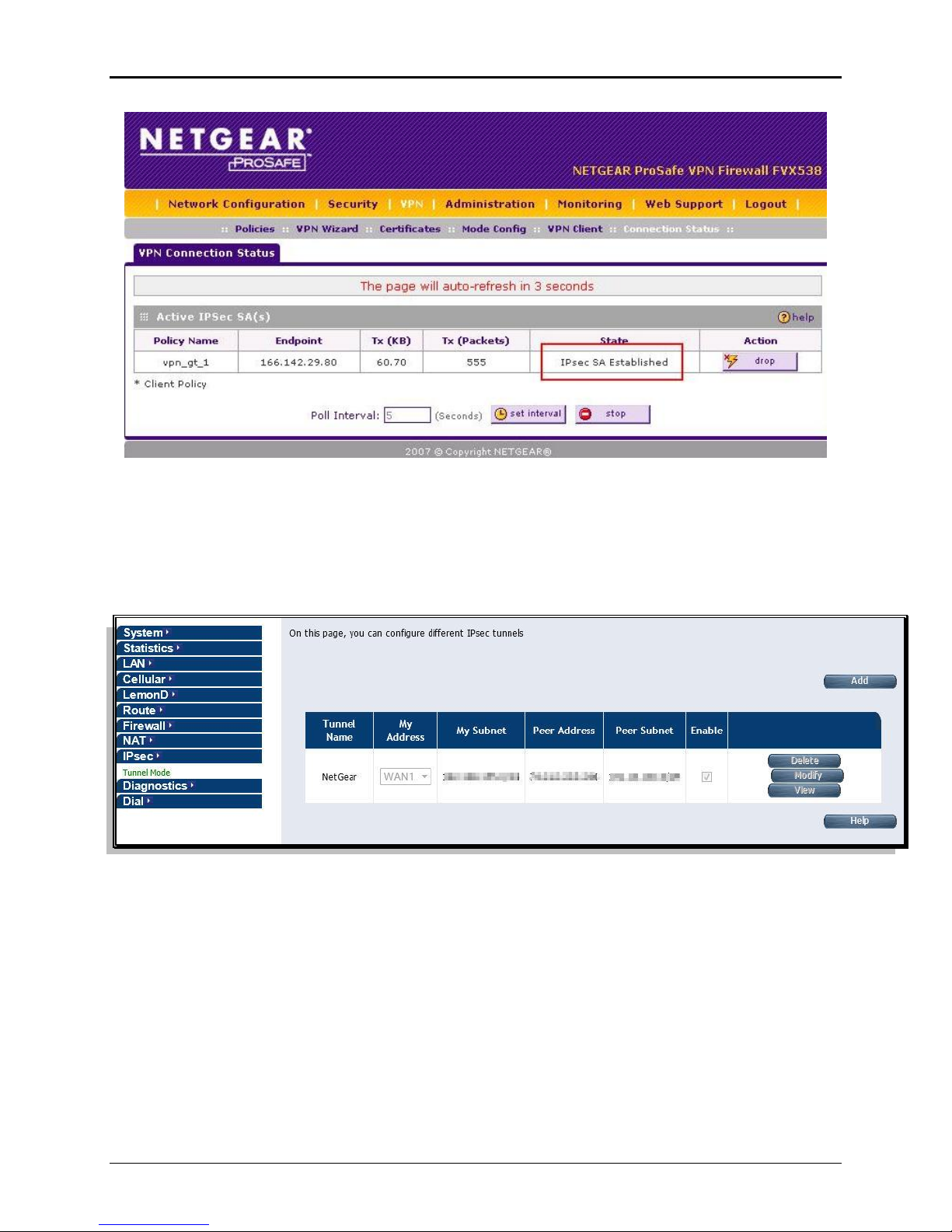
Figure 3 – page 3 of NetGear VPN setup
5.0 IPsec Tunnel Listing
A listing of configured Tunnels will appear. In this screen you can add new tunnels. An existing tunnel
may be deleted, modified or details viewed.
© 2012 ExaDigm, Inc. Page 13 of 13 Rev. 1/1212
 Loading...