

Page 1
1
Sensafe.com
QUICK START GUIDE
Pool
ADVANCED PHOTOMETER SYSTEM
DIGITAL ACCURACY FOR BETTER POOL CARE
Page 2

2
©2016, Industrial Test Systems, Inc. Printed in USA
WELCOME TO YOUR NEW POOL EXACT® EZ
PHOTOMETER.
Thank you for your Pool eXact® EZ purchase! This guide will quickly
walk you through the technical details of your new photometer. After
initial set-up, test procedures, and tips, you will be on your way to
digital water testing! Each test will require the use of one or more of
the testing methods outlined in this manual.
YOUR POOL EXACT® EZ COMES WITH:
• Cleaning Brush
• Quick Start Guide (this booklet)
• 48 foil packet strips (6 of each): Free Chlorine (DPD-1),
Combined Chlorine (DPD-3), pH, Total Alkalinity, Calcium
Hardness, Phosphate, Chloride, and Copper
WHAT YOU WILL NEED TO GET STARTED:
• Four (4) AAA batteries
• #4 Phillips head screwdriver
Note:
This system has been calibrated for use with only our
eXact® Micro reagents.
CONTENTS
Welcome. . . . . . . . . . . . . . . . . . . . . . . . . . . . . . . . . . . . . . . . . . . . . 2
Pool eXact® EZ Overview . . . . . . . . . . . . . . . . . . . . . . . . . . . . . . . 3
Install “AAA” Batteries . . . . . . . . . . . . . . . . . . . . . . . . . . . . . . . 3
Fill, Dip, Read
Total Alkalinity . . . . . . . . . . . . . . . . . . . . . . . . . . . . . . . . . . . . 4-5
pH . . . . . . . . . . . . . . . . . . . . . . . . . . . . . . . . . . . . . . . . . . . . . . 6-7
Free Chlorine . . . . . . . . . . . . . . . . . . . . . . . . . . . . . . . . . . . . . 8-9
Combined Chlorine
. . . . . . . . . . . . . . . . . . . . . . . . . . . . . . .10-11
eXact® Strip Micro CL Interferences . . . . . . . . . . . . . . . . . . . . 11
Phosphate . . . . . . . . . . . . . . . . . . . . . . . . . . . . . . . . . . . . . .12-13
Calcium Hardness . . . . . . . . . . . . . . . . . . . . . . . . . . . . . . . .14-15
Cyanuric Acid . . . . . . . . . . . . . . . . . . . . . . . . . . . . . . . . . . . .16-17
Copper . . . . . . . . . . . . . . . . . . . . . . . . . . . . . . . . . . . . . . . . 18-19
Chloride (Salt). . . . . . . . . . . . . . . . . . . . . . . . . . . . . . . . . . . 20-22
For Best Accuracy . . . . . . . . . . . . . . . . . . . . . . . . . . . . . . . . . . . 23
Troubleshooting . . . . . . . . . . . . . . . . . . . . . . . . . . . . . . . . . . . . . 24
Pool eXact® EZ Accuracy . . . . . . . . . . . . . . . . . . . . . . . . . . . . . 24
Technical Support . . . . . . . . . . . . . . . . . . . . . . . . . . . . . . . . . . . 24
About
Built-in Sample Cell . . . . . . . . . . . . . . . . . . . . . . . . . . . . . . . . . 25
Warranty (2 years) . . . . . . . . . . . . . . . . . . . . . . . . . . . . . . . . . . 25
Method Verifi cation Ready Snap® 3. . . . . . . . . . . . . . . . . . . . . 25
Compliance Testing (USEPA) . . . . . . . . . . . . . . . . . . . . . . . . . 26
Carrying Case . . . . . . . . . . . . . . . . . . . . . . . . . . . . . . . . . . . . . 26
Notes . . . . . . . . . . . . . . . . . . . . . . . . . . . . . . . . . . . . . . . . . . . . . . 27
eXact® Micro Tests & Reagents . . . . . . . . . . . . . . . . . . . . . . . . 28
Patent Information . . . . . . . . . . . . . . . . . . . . . . . . . . . . . . . . . . . 28
Page 3
3
Sensafe.com
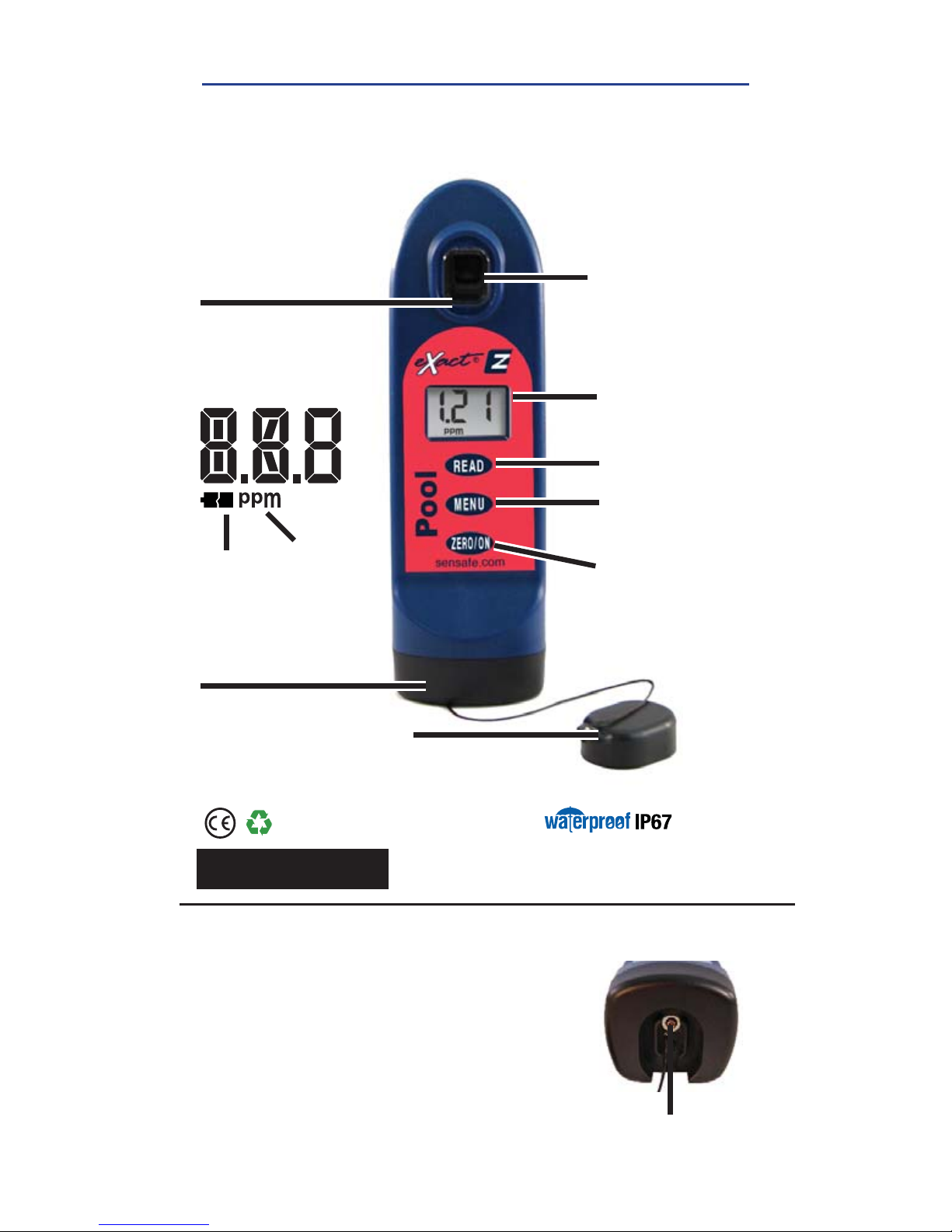
POOL EXACT® EZ OVERVIEW
YOUR NEW POOL EXACT EZ PHOTOMETER IS IDEAL FOR
TESTING AND MAINTAINING YOUR POOL AND SPA WATER.
SAMPLE CELL - 4 ML
Built-in plastic 4mL cell
for collecting your water
sample
LCD DISPLAY
Displays results
and test name
LIGHT SOURCE
Uses 525nm
wavelength and
11mm path-length
for testing
READ BUTTON
Starts test timer
MENU BUTTON
Cycles through
available tests
BASE
Install/replace batteries here
(IP67 rated waterproof)
RESULT
UNITS
LOW
BATTERY
LCD DISPLAY
ZERO/ON BUTTON
Turns the meter
on and creates a
baseline for your
water testing
CELL COVER
Covers the cell for
mixing and bright
light situations
Protected against the effects
of immersion in water to depth
between 15cm and 1m
Part no. 486201
SCREW
Unscrew to
remove base
INSTALL “AAA” BATTERIES (NOT INCLUDED)
1. Use a #4 Phillips head screwdriver to remove the screw
from the base of your Pool eXact
®
EZ .
2. Remove the base.
3. Install Four (4) new AAA batteries as illustrated inside
your photometer’s battery compartment. We recommend
using high quality batteries.
4. Replace the base fi rmly with pressure while tightening the
screw. The meter will turn on automatically.
5. Tighten the screw with #4 Phillips head screwdriver. Be
sure not to over tighten.
Page 4
4
©2016, Industrial Test Systems, Inc. Printed in USA
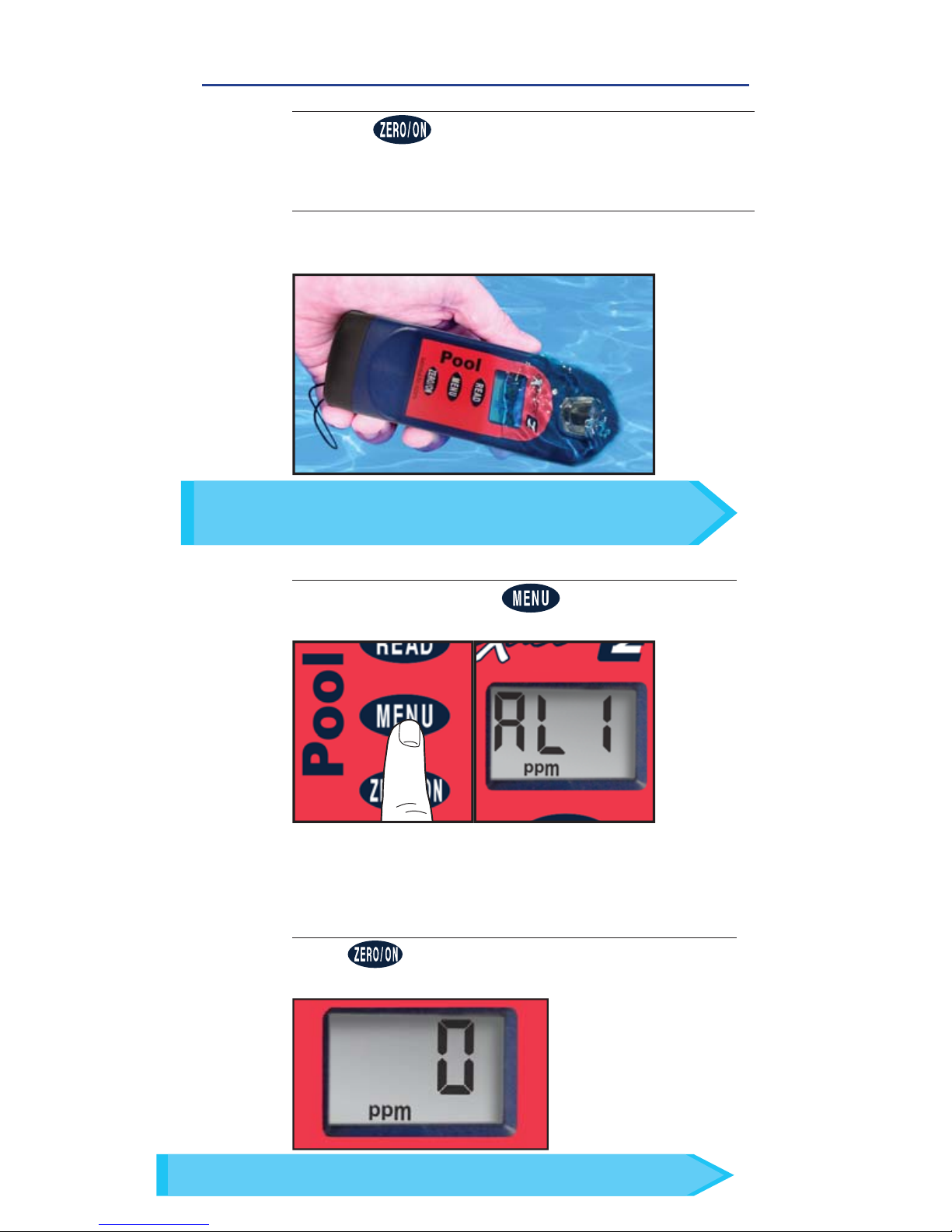
TOTAL ALKALINITY
1
POWER ON PHOTOMETER
Press the button to power on the Pool eXact® EZ.
3
SELECT TEST
Press and re-press the button until the
display shows AL1.
ZERO METER
Press and the LCD Display reads 0
PPM
,
indicating the meter is ready for testing.
4
FILL, DIP, READ
In bright light situations use cell cover for zeroing and reading.
TIP
FILL CELL
Rinse the cell 3 times with the water sample to
be tested and
FILL to the top to begin test.
2
Use the included cleaning brush to clean the cell before/
after each test to prevent reagent interferences and
achieve the most accurate result.
TIP
Page 5
5
Sensafe.com
TOTAL ALKALINITY
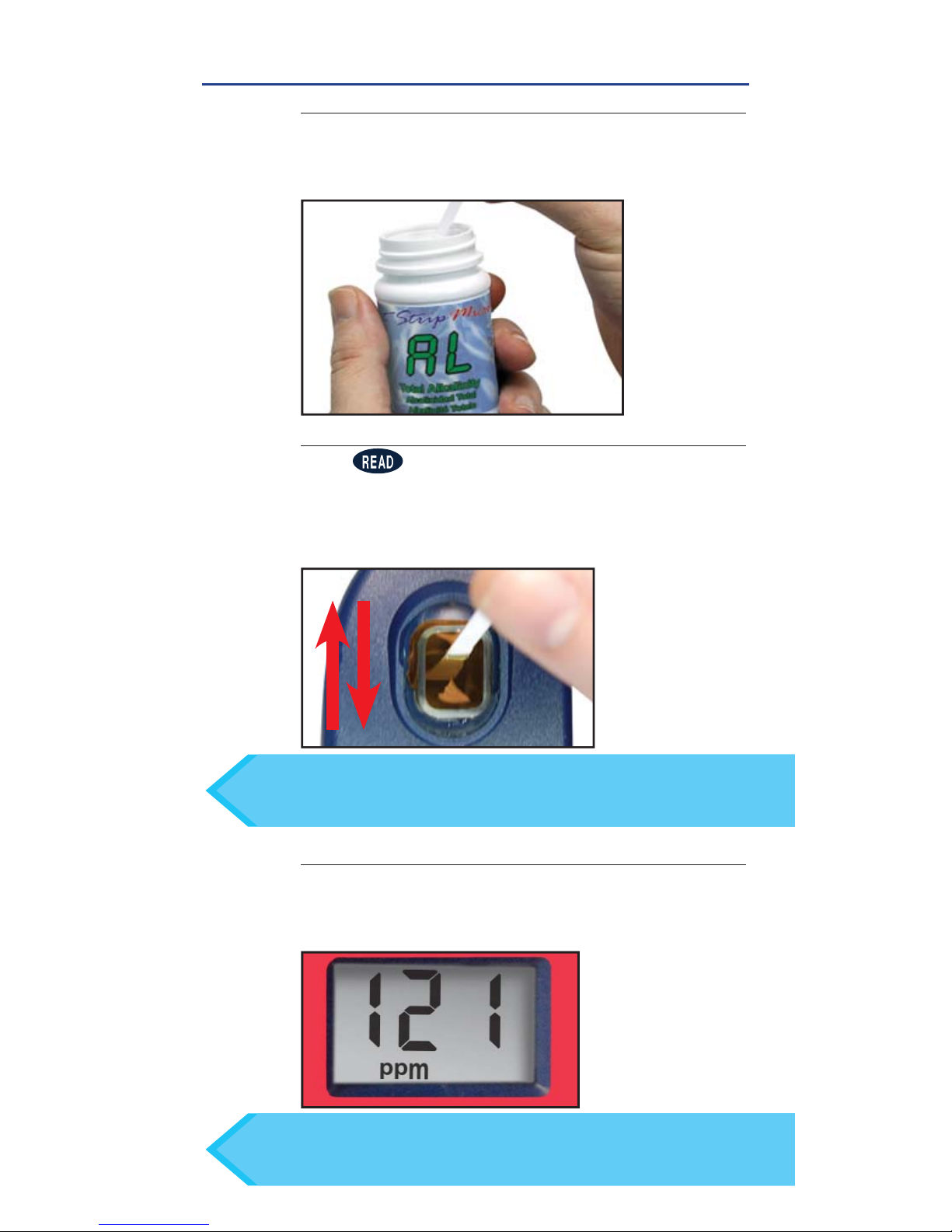
REMOVE STRIP
Remove one eXact® Strip Micro AL Total Alkalinity
and set in a dry, convenient place. Replace cap
on bottle.
5
READ RESULTS
READ result displayed as Total Alkalinity. This result is
automatically stored in the AL1 menu. After testing is
complete, rinse the sample cell immediately.
7
FILL, DIP, READ
DIP STRIP AND PRESS READ
Press to initiate a 20 second countdown and
simultaneously DIP the eXact® Strip by submerging all
pads in the sample then use a gentle, constant, back
and forth motion (2 strokes per second) until the timer
displays
‘1’
. Remove and discard the strip.
6
If result reads "HI", repeat steps 5-7 with a Total Alkalinity Range
Extender Strip (part no. 486665) until a numerical value is
displayed; each strip adds 130 ppm to the fi nal result.
TIP
For water temperatures above 95°F/35°C (hot tubs), remove
the strip when the timer displays “10”, or use the specially
calibrated SPA eXact
®
EZ photometer.
TIP
Page 6
6
©2016, Industrial Test Systems, Inc. Printed in USA
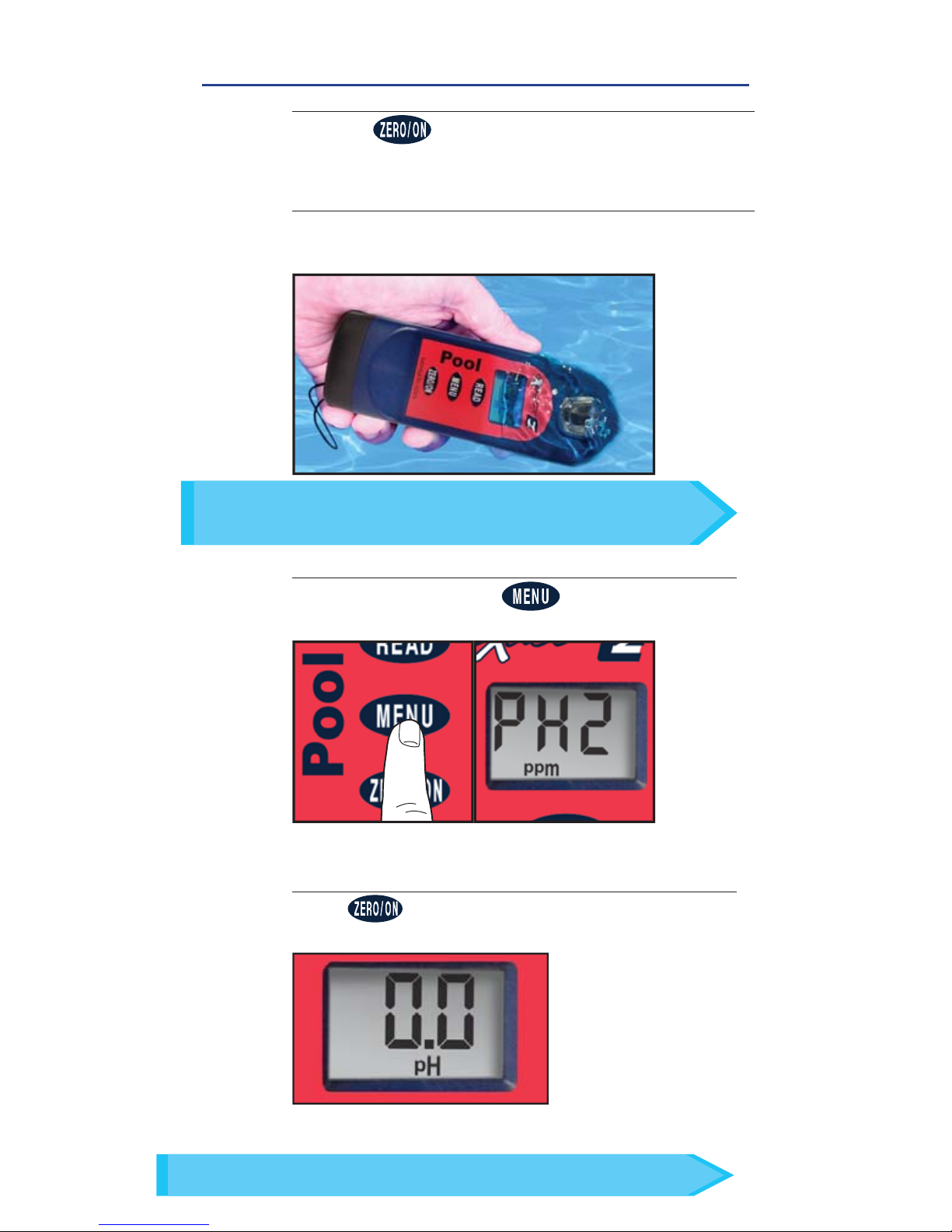
PH
FILL CELL
Rinse the cell 3 times with the water sample to
be tested and
FILL to the top to begin test.
2
1
POWER ON PHOTOMETER
Press the button to power on the Pool eXact® EZ.
3
SELECT TEST
Press and re-press the button until the
display shows PH2.
ZERO METER
Press and the LCD Display reads 0.0PH,
indicating the meter is ready for testing.
4
In bright light situations use cell cover for zeroing and reading.
TIP
FILL, DIP, READ
Use the included cleaning brush to clean the cell before/
after each test to prevent reagent interferences and
achieve the most accurate result.
TIP
Page 7
7
Sensafe.com
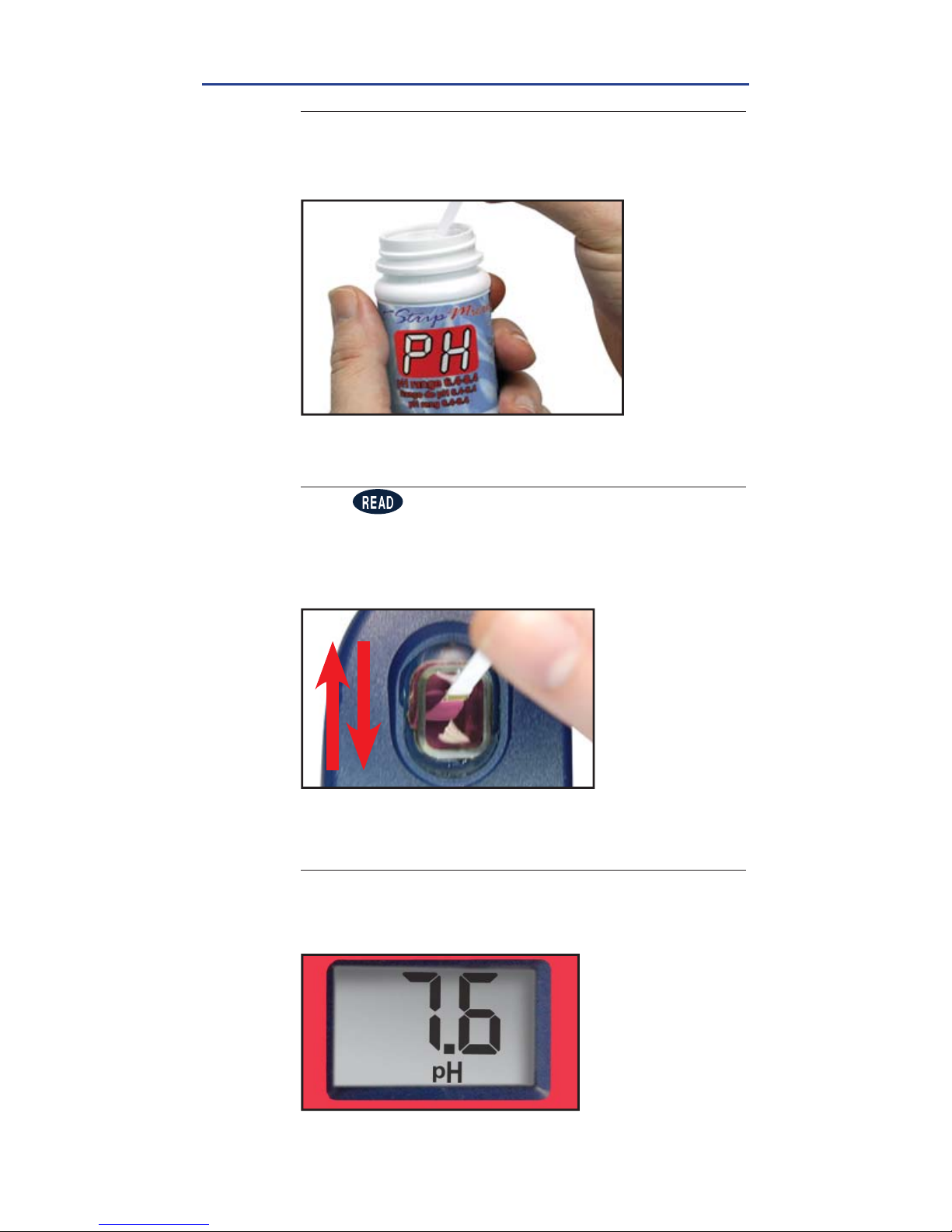
PH
FILL, DIP, READ
REMOVE STRIP
Remove one eXact® Strip Micro PH and set in a dry,
convenient place. Replace cap on bottle.
5
READ RESULTS
READ result displayed as pH. This result is
automatically stored in the PH2 menu. After testing is
complete, rinse the sample cell immediately.
7
DIP STRIP AND PRESS READ
Press to initiate a 20 second countdown and
simultaneously DIP the eXact® Strip by submerging all
pads in the sample then use a gentle, constant, back
and forth motion (2 strokes per second) until the timer
displays
‘1’
. Remove and discard the strip.
6
Page 8
8
©2016, Industrial Test Systems, Inc. Printed in USA
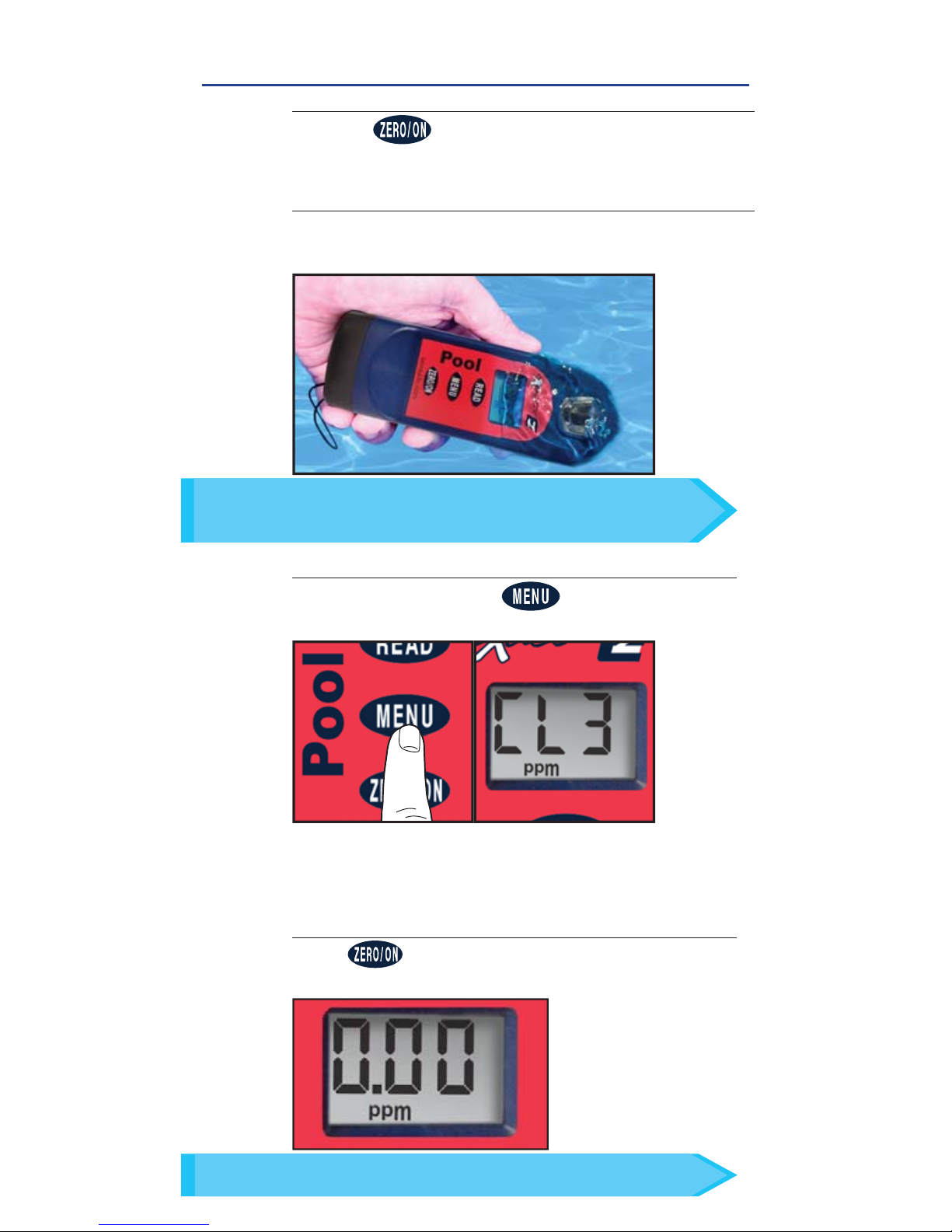
FREE CHLORINE AND BROMINE
FILL, DIP, READ
1
POWER ON PHOTOMETER
Press the button to power on the Pool eXact® EZ.
3
SELECT TEST
Press and re-press the button until the
display shows CL3.
ZERO METER
Press and the LCD Display reads 0.00
PPM
,
indicating the meter is ready for testing.
4
In bright light situations use cell cover for zeroing and reading.
TIP
Use the included cleaning brush to clean the cell before/
after each test to prevent reagent interferences and
achieve the most accurate result.
TIP
FILL CELL
Rinse the cell 3 times with the water sample to
be tested and
FILL to the top to begin test.
2
Page 9
9
Sensafe.com
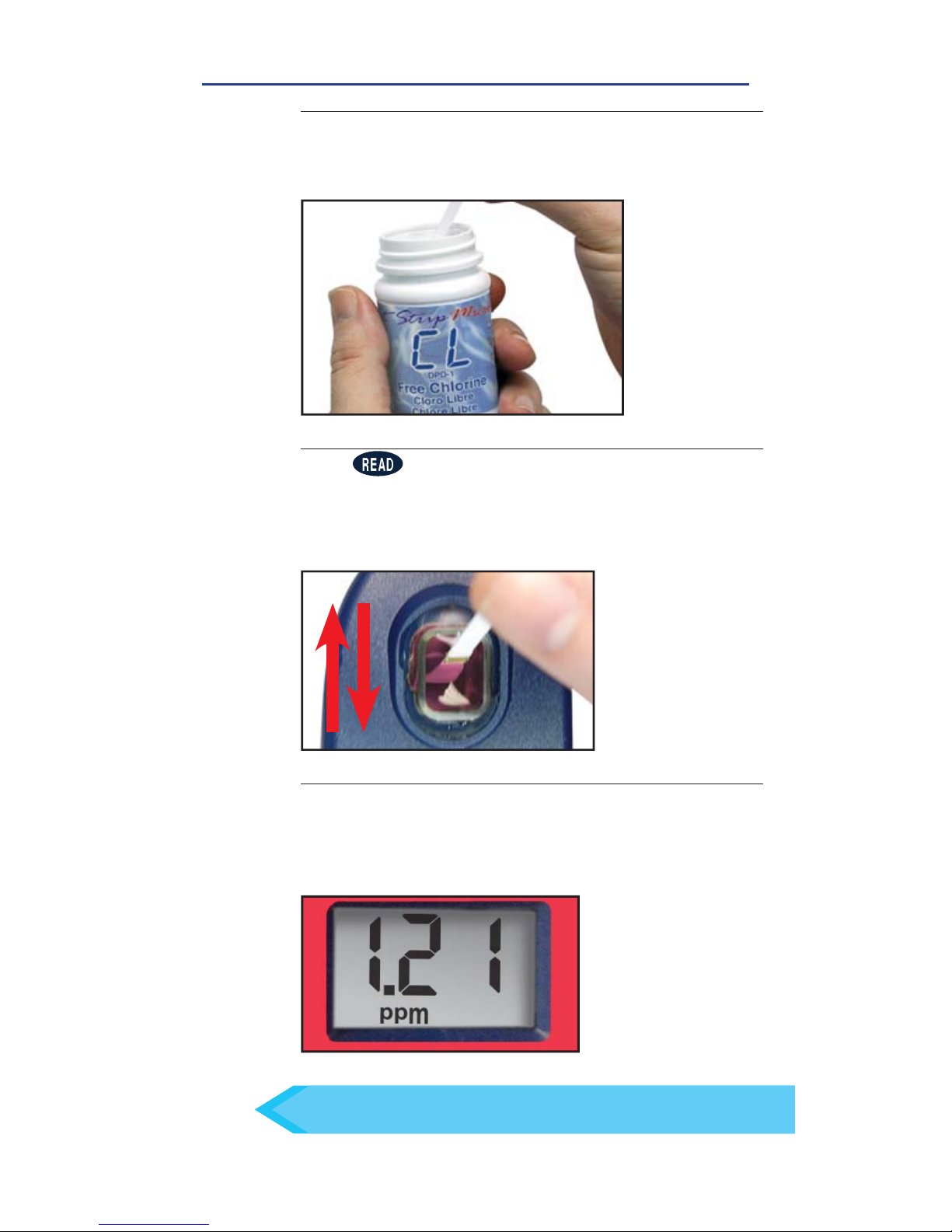
FREE CHLORINE AND BROMINE
REMOVE STRIP
Remove one eXact® Strip Micro CL (DPD-1) Free
Chlorine and set in a dry, convenient place. Replace
cap on bottle
5
DIP STRIP AND PRESS READ
Press to initiate a 20 second countdown and
simultaneously DIP the eXact® Strip by submerging all
pads in the sample then use a gentle, constant, back
and forth motion (2 strokes per second) until the timer
displays
‘1’
. Remove and discard the strip.
6
READ RESULTS
READ result displayed as Free Chlorine (for result
as Bromine, multply value by 2.6). This result is
automatically stored in the CL3 menu. After testing is
complete, rinse the sample cell immediately.
7
Important! Do not empty the CELL if you are also
testing for Combined Chlorine. You will need the sample.
FILL, DIP, READ
If result is 6.0 or greater, repeat steps 5-7 above
using same sample and a fresh strip.
TIP
Page 10
10
©2016, Industrial Test Systems, Inc. Printed in USA
COMBINED CHLORINE
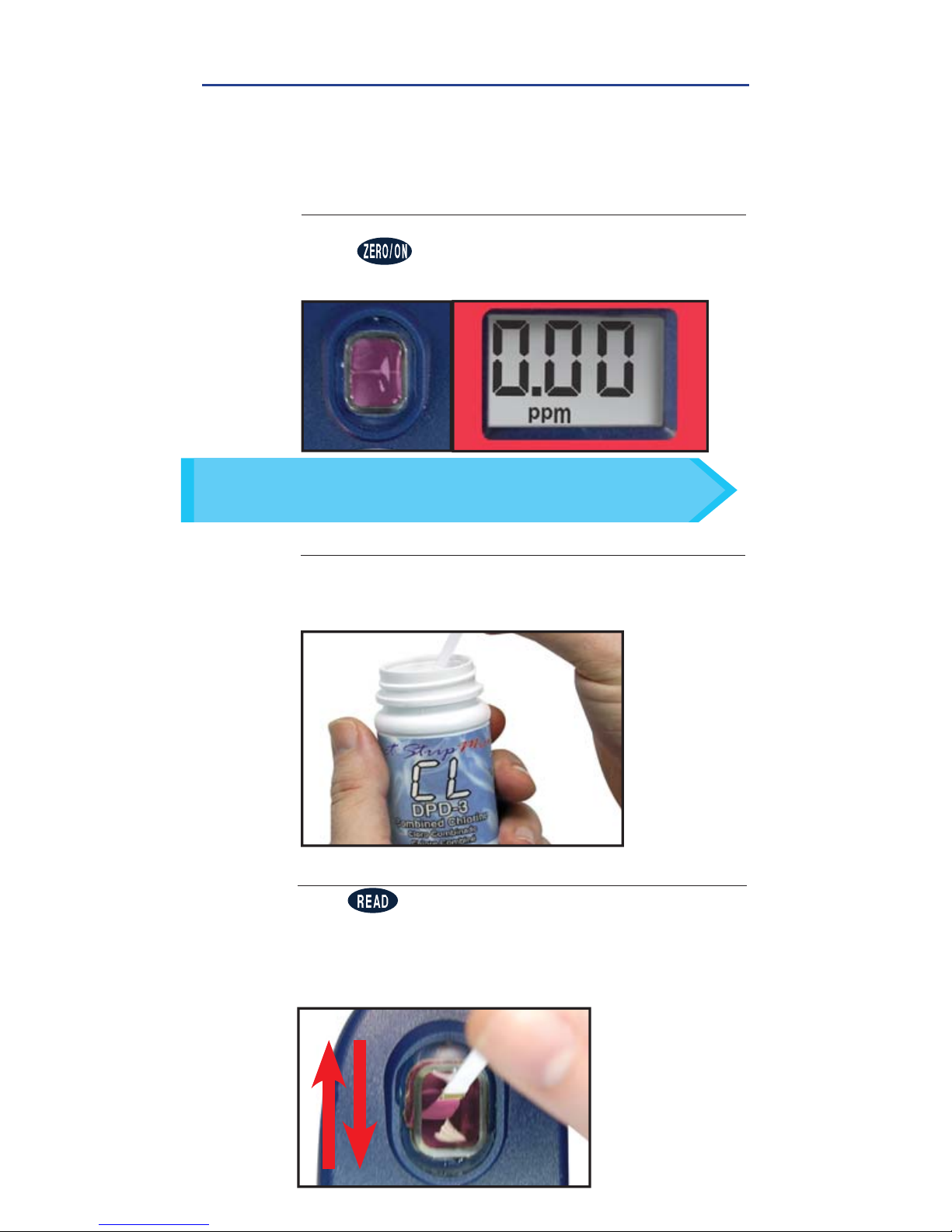
DIP STRIP AND PRESS READ
Press to initiate a 20 second countdown and
simultaneously DIP the eXact® Strip by submerging all
pads in the sample then use a gentle, constant, back
and forth motion (2 strokes per second) until the timer
displays ‘1’. Remove and discard the strip.
10
This procedure is a continuation from Free Chlorine Test Method
on previous pages.
DO NOT DISCARD SAMPLE FROM FREE
CHLORINE TEST.
REMOVE STRIP
Remove one eXact® Strip Micro CL (DPD-3) Combined
Chlorine and set in a dry, convenient place. Replace
cap on bottle.
9
8
ZERO METER
With the Free Chlorine sample still in the CELL,
press
and the LCD Display reads 0.00
PPM
,
indicating the meter is ready for testing.
FILL, DIP, READ
Use the included cleaning brush to clean the cell before/
after each test to prevent reagent interferences and
achieve the most accurate result.
TIP
Page 11
11
Sensafe.com
COMBINED CHLORINE
11
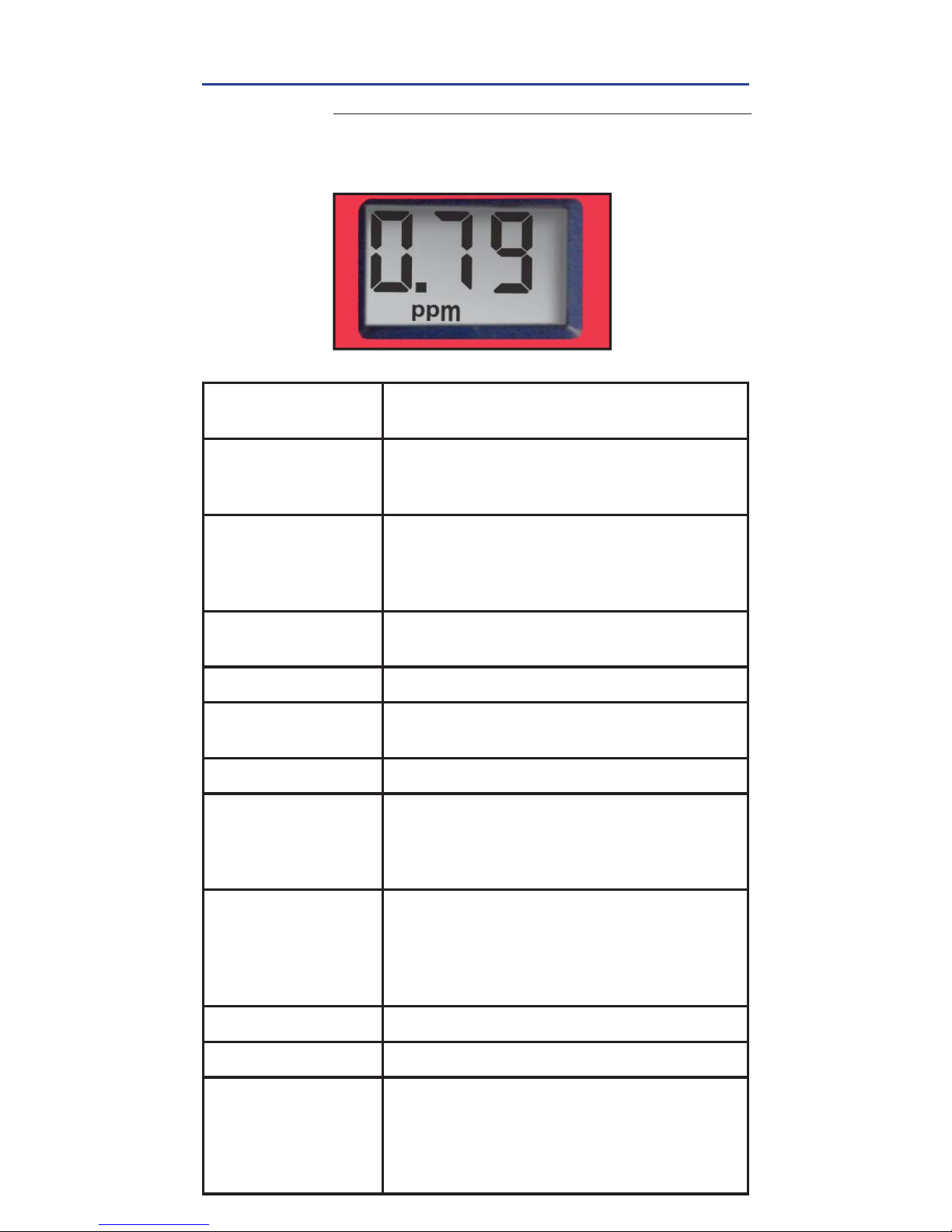
READ RESULTS
READ result displayed as Combined Chlorine. This
result is automatically stored in the CL3 menu. After
testing is complete, rinse the sample cell immediately.
eXact® Strip Micro CL (DPD-1, DPD-3, DPD-4) Interferences
Interfering
Substance
Interfering Levels & Treatments
Acidity If sample has acidity above 150mg/L CaCO3
test may not develop full color. Neutralize to
pH 6.0 to 7.0 with 0.5N Sodium hydroxide.
Alkalinity If sample has alkalinity above 200mg/L
CaCO3 test may not develop full color.
Neutralize to pH 6.0 to 7.0 with 0.5N
Sulfuric acid.
Bromine &
Bromamines, Br
2
Color similar to free chlorine reaction at all levels.
Chlorine Dioxide, ClO2Color similar to free chlorine reaction at all levels.
Copper, Cu
+2
Color development is reduced above 10
ppm (mg/L).
Iodine, I
2
Color similar to free chlorine reaction at all levels.
Manganese, Oxidized
(Mn+4, Mn+6)
or
Chromium,
Oxidized (Cr+6)
See AWWA procedure 4500-CL F, 1(d) for
removal of interferences.
Monochloramines
(NH2Cl)
(applies to DPD-1 only)
Monochloramine interferences are known
to occur in free chlorine
DPD methods. This interference is
dependent on temperature and
monochloramine concentration.
Ozone, O
3
Color similar to free chlorine reaction at all levels.
Peroxides Interference is possible.
pH Typical pH samples of potable water with
a pH of 6.0 to 9.0 are OK. If outside this
range adjust to pH 6.0 to 7.0 using acid
(0.5N Sulfuric acid) or base (0.5N Sodium
hydroxide).
FILL, DIP, READ
Page 12
12
©2016, Industrial Test Systems, Inc. Printed in USA
PHOSPHATE
FILL, DIP, READ
1
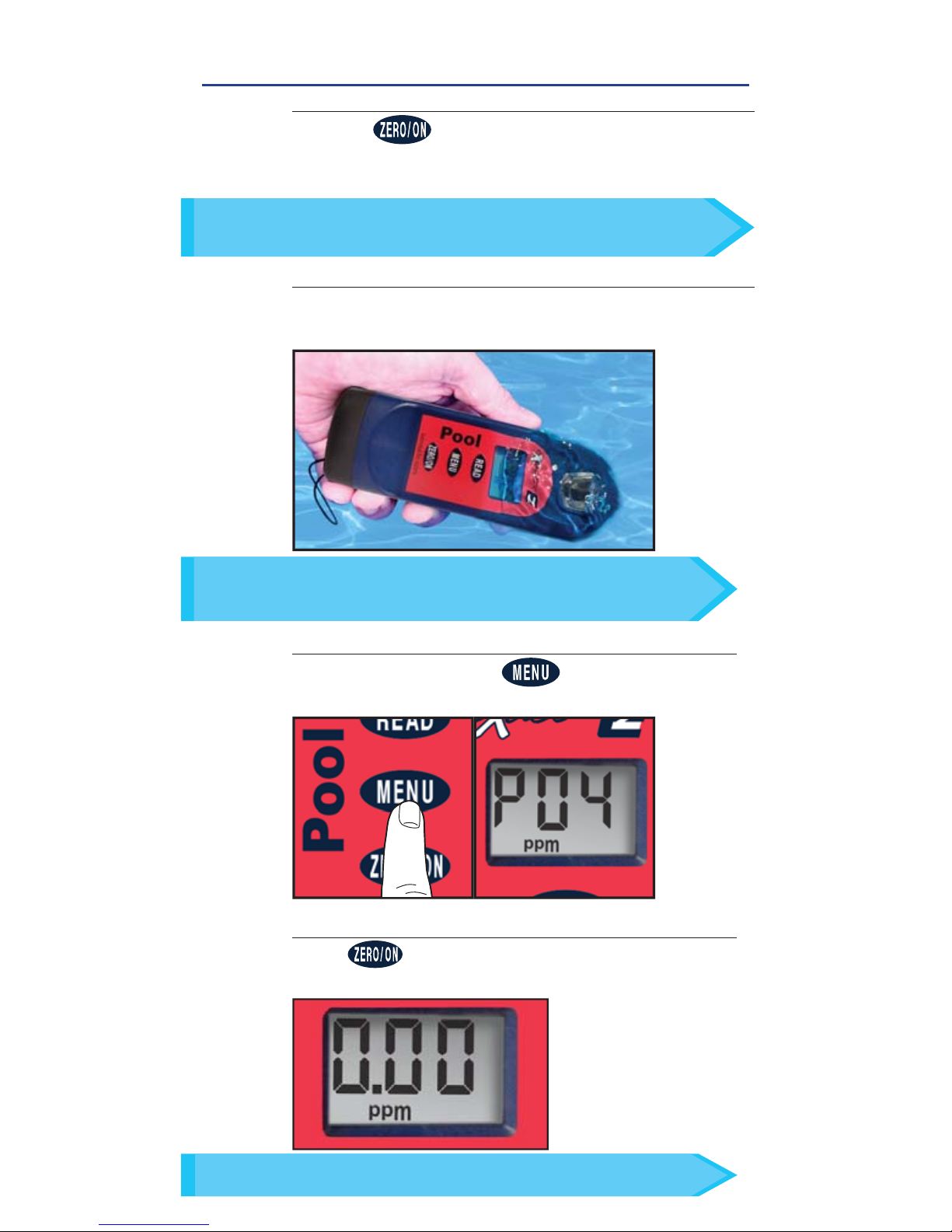
POWER ON PHOTOMETER
Press the button to power on the Pool eXact® EZ.
3
SELECT TEST
Press and re-press the button until the
display shows PO4.
ZERO METER
Press and the LCD Display reads 0.00
PPM
,
indicating the meter is ready for testing.
4
In bright light situations use cell cover for zeroing and reading.
TIP
Clean CELL with 0.1N HCl, Distilled Vinegar (5%), or Muriatic
Acid before fi lling the meter with the sample to be tested.
TIP
FILL CELL
Rinse the cell 3 times with the water sample to
be tested and FILL to the top to begin test.
2
Use the included cleaning brush to clean the cell before/
after each test to prevent reagent interferences and
achieve the most accurate result.
TIP
Page 13
13
Sensafe.com
PHOSPHATE
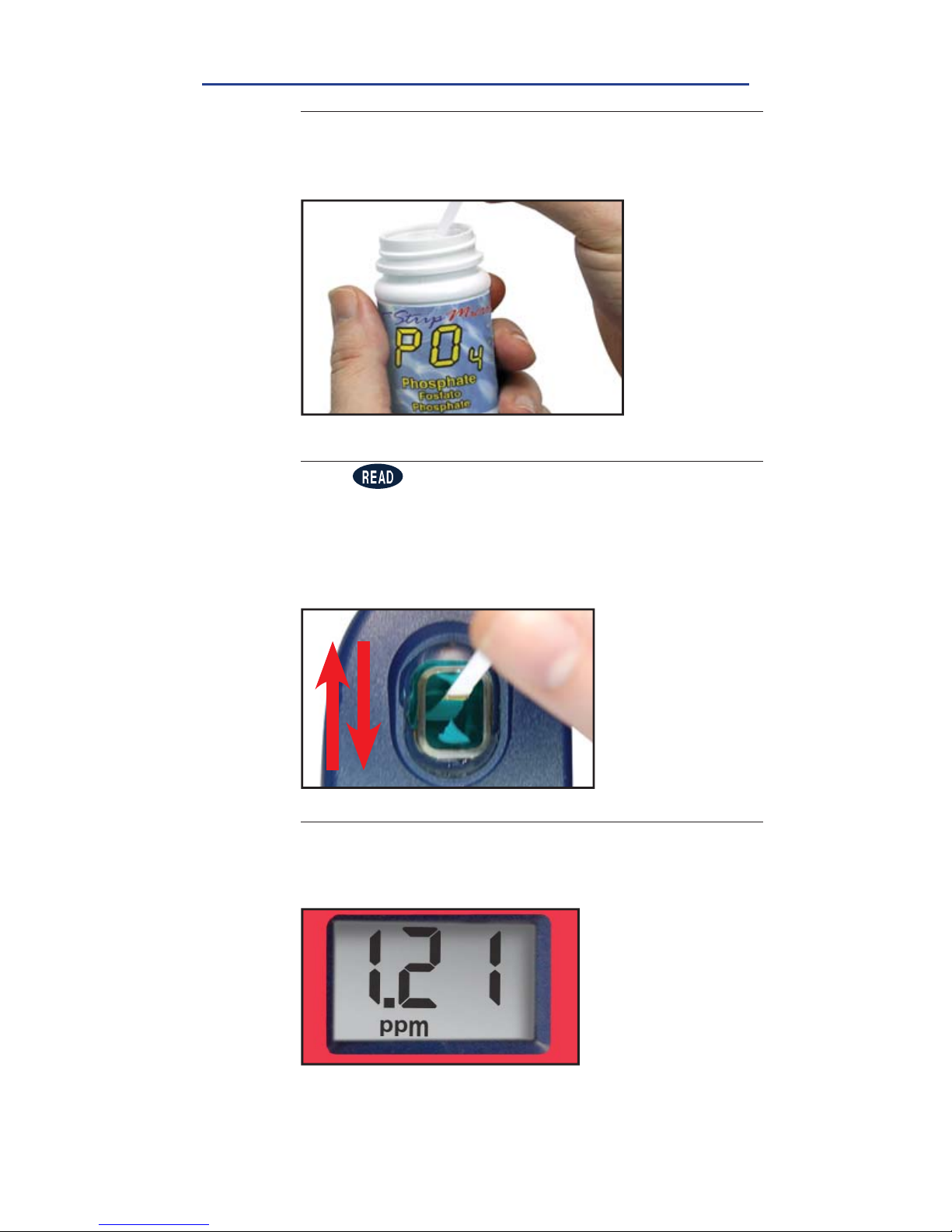
REMOVE STRIP
Remove one eXact® Strip Micro PO4 Phosphate and set
in a dry, convenient place. Replace cap on bottle
5
DIP STRIP AND PRESS READ
Press to initiate a 20 second countdown and
simultaneously DIP the eXact® Strip by submerging all
pads in the sample then use a gentle, constant, back
and forth motion (2 strokes per second) until the timer
displays
‘1’
. Remove and discard the strip. The display
will automatically start to count up for 120 seconds.
6
READ RESULTS
READ result displayed as Phosphate. This result is
automatically stored in the PO4 menu. After testing is
complete, rinse the sample cell immediately.
7
FILL, DIP, READ
Page 14
14
©2016, Industrial Test Systems, Inc. Printed in USA
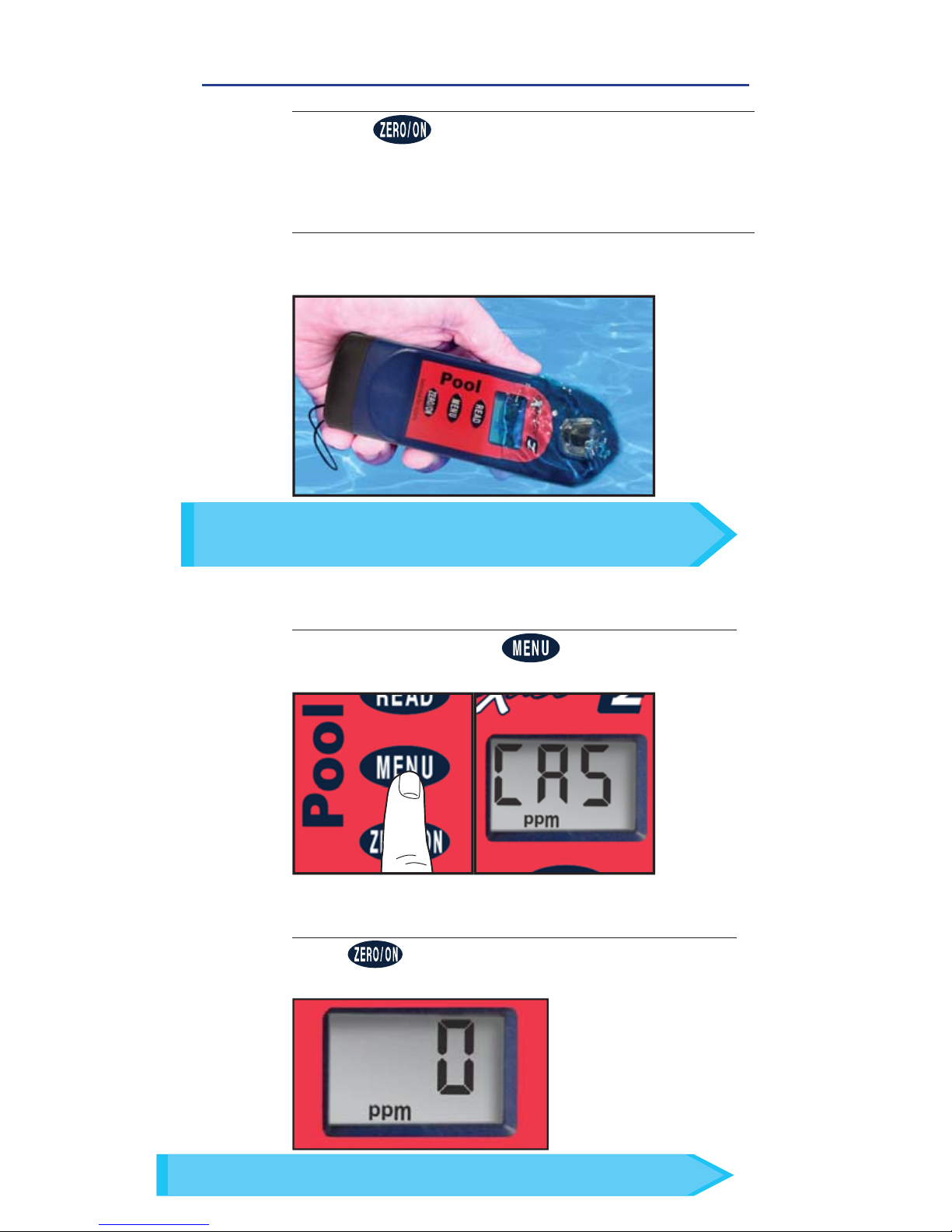
CALCIUM HARDNESS
1
POWER ON PHOTOMETER
Press the button to power on the Pool eXact® EZ.
3
SELECT TEST
Press and re-press the button until the
display shows CA5.
ZERO METER
Press and the LCD Display reads 0
PPM
,
indicating the meter is ready for testing.
4
FILL, DIP, READ
In bright light situations use cell cover for zeroing and reading.
TIP
FILL CELL
Rinse the cell 3 times with the water sample to
be tested and FILL to the top to begin test.
2
Use the included cleaning brush to clean the cell before/
after each test to prevent reagent interferences and
achieve the most accurate result.
TIP
Page 15
15
Sensafe.com
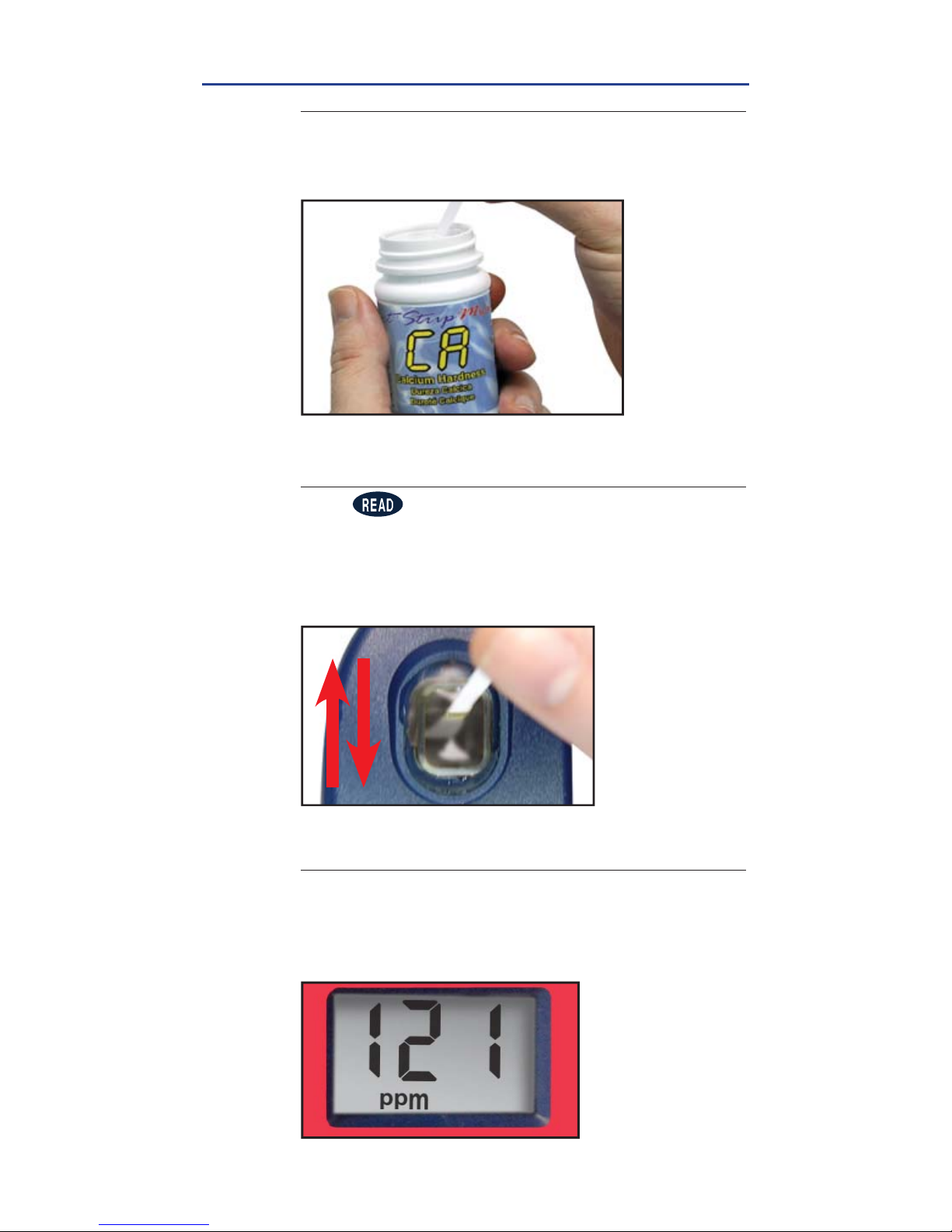
CALCIUM HARDNESS
REMOVE STRIP
Remove one eXact® Strip Micro CA Calcium
Hardness and set in a dry, convenient place. Replace
cap on bottle.
5
READ RESULTS
READ result displayed as Calcium Hardness
(CaCO3). This result is automatically stored in the CA5
menu. After testing is complete, rinse the sample cell
immediately.
7
FILL, DIP, READ
DIP STRIP AND PRESS READ
Press to initiate a 20 second countdown and
simultaneously DIP the eXact® Strip by submerging all
pads in the sample then use a gentle, constant, back
and forth motion (2 strokes per second) until the timer
displays
‘1’
. Remove and discard the strip.
6
Page 16
16
©2016, Industrial Test Systems, Inc. Printed in USA
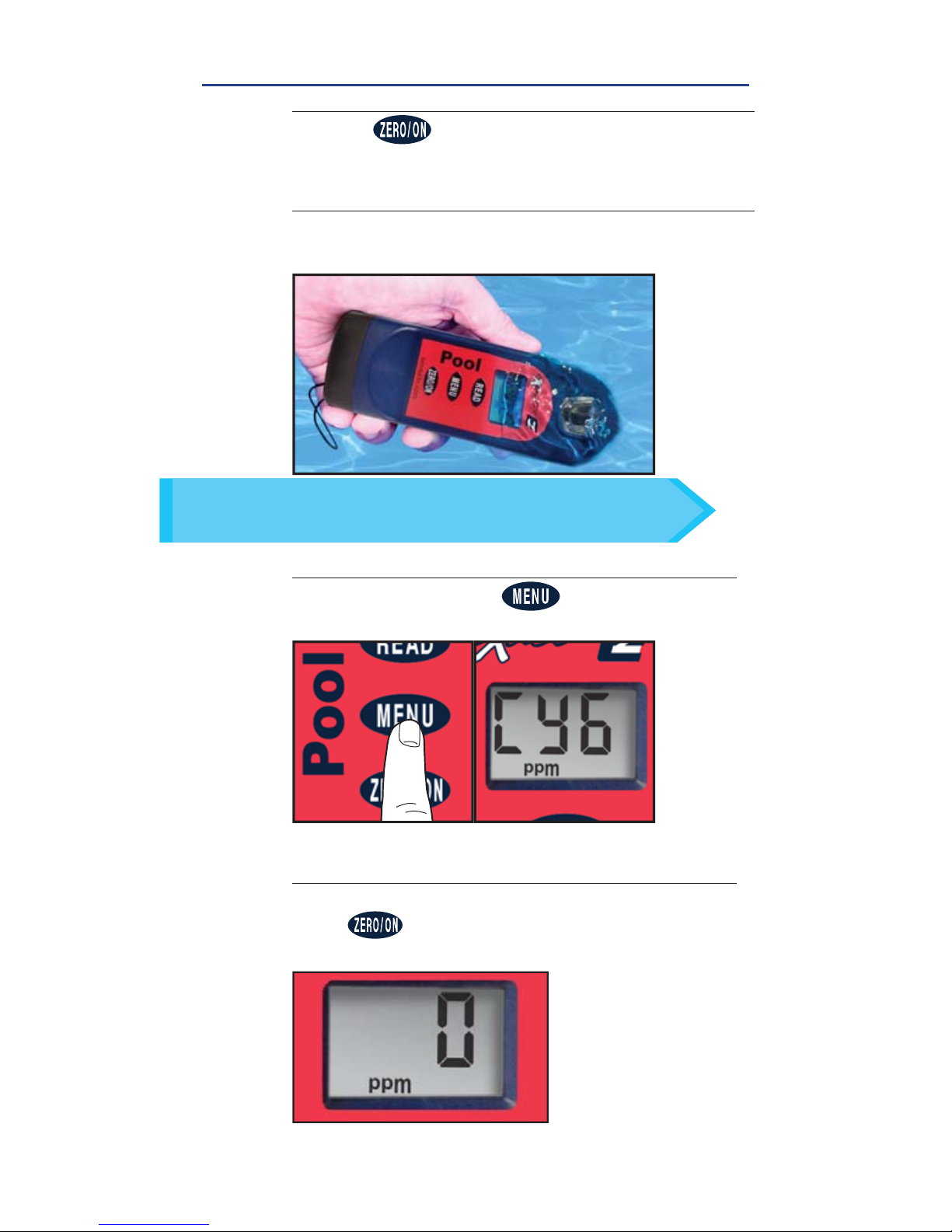
CYANURIC ACID
1
POWER ON PHOTOMETER
Press the button to power on the Pool eXact® EZ.
3
SELECT TEST
Press and re-press the button until the
display shows CY6.
ZERO METER
Place cell cover on sample cell before zeroing.
Press and the LCD Display reads 0
PPM
,
indicating the meter is ready for testing.
4
FILL, DIP, READ
FILL CELL
Rinse the cell 3 times with the water sample to
be tested and
FILL to the top to begin test.
2
Use the included cleaning brush to clean the cell before/
after each test to prevent reagent interferences and
achieve the most accurate result.
TIP
Page 17
17
Sensafe.com
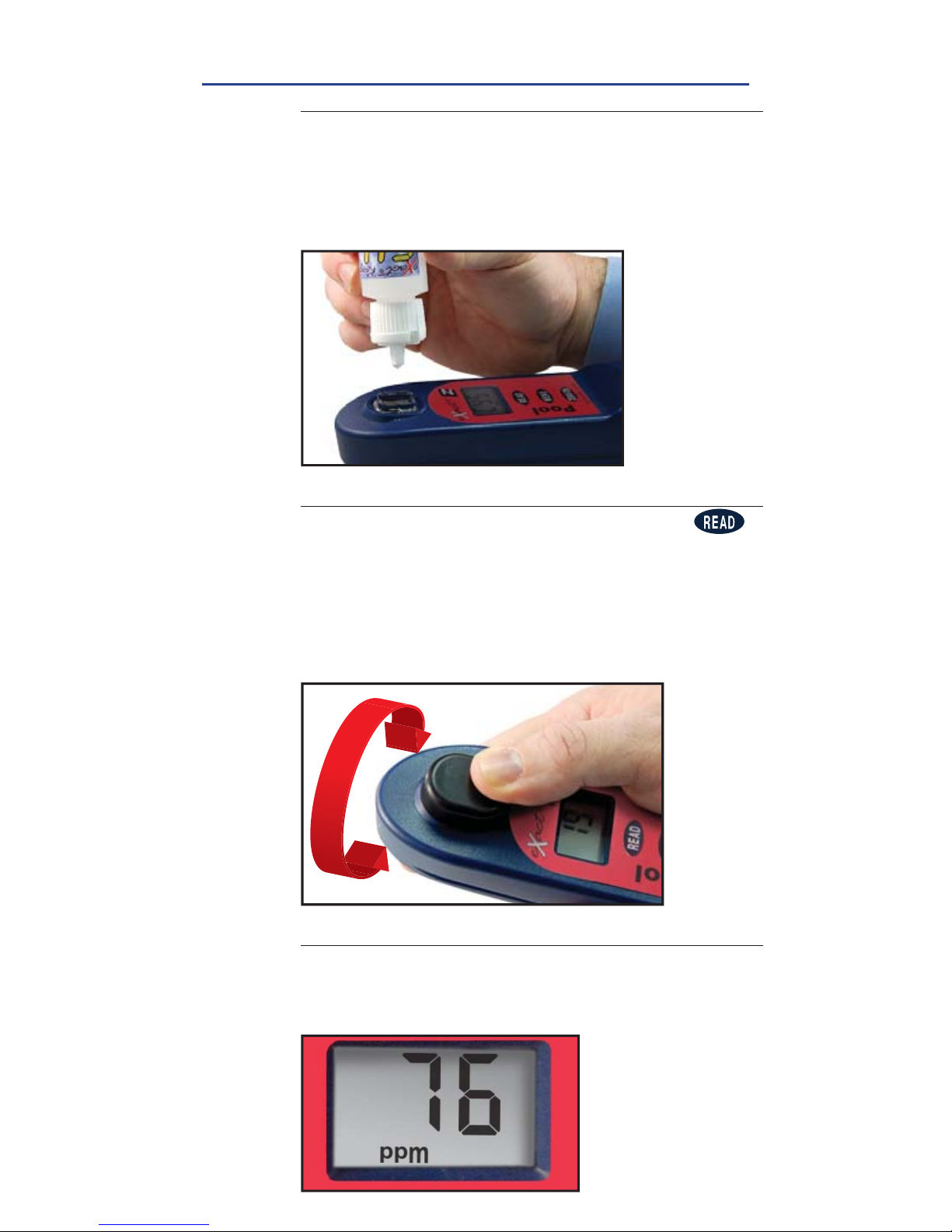
CYANURIC ACID
SHAKE BOTTLE & ADD DROPS
Tilt the meter to discard about 0.2mL water to leave
room for liquid reagent. Shake the bottle of eXact®
Reagent CY to mix the suspension in the bottle. Add
5 drops of the eXact® Reagent CY to the sample cell.
Keep reagent bottle vertical while adding drops.
5
READ RESULTS
READ result displayed as Cyanuric Acid. This result is
automatically stored in the CY6 menu. After testing is
complete, rinse the sample cell immediately.
7
FILL, DIP, READ
CAP & PRESS READ
Place the cell cover onto the sample cell. Press
to initiate a 20 second countdown. Place thumb or
fi nger over cap, and mix the sample by turning the
meter upside-down repetitively during the 20 second
countdown. When timer displays 1, place the meter on a
fl at surface (upright). The display will automatically start
to count up for 60 seconds.
6
Page 18
18
©2016, Industrial Test Systems, Inc. Printed in USA
COPPER
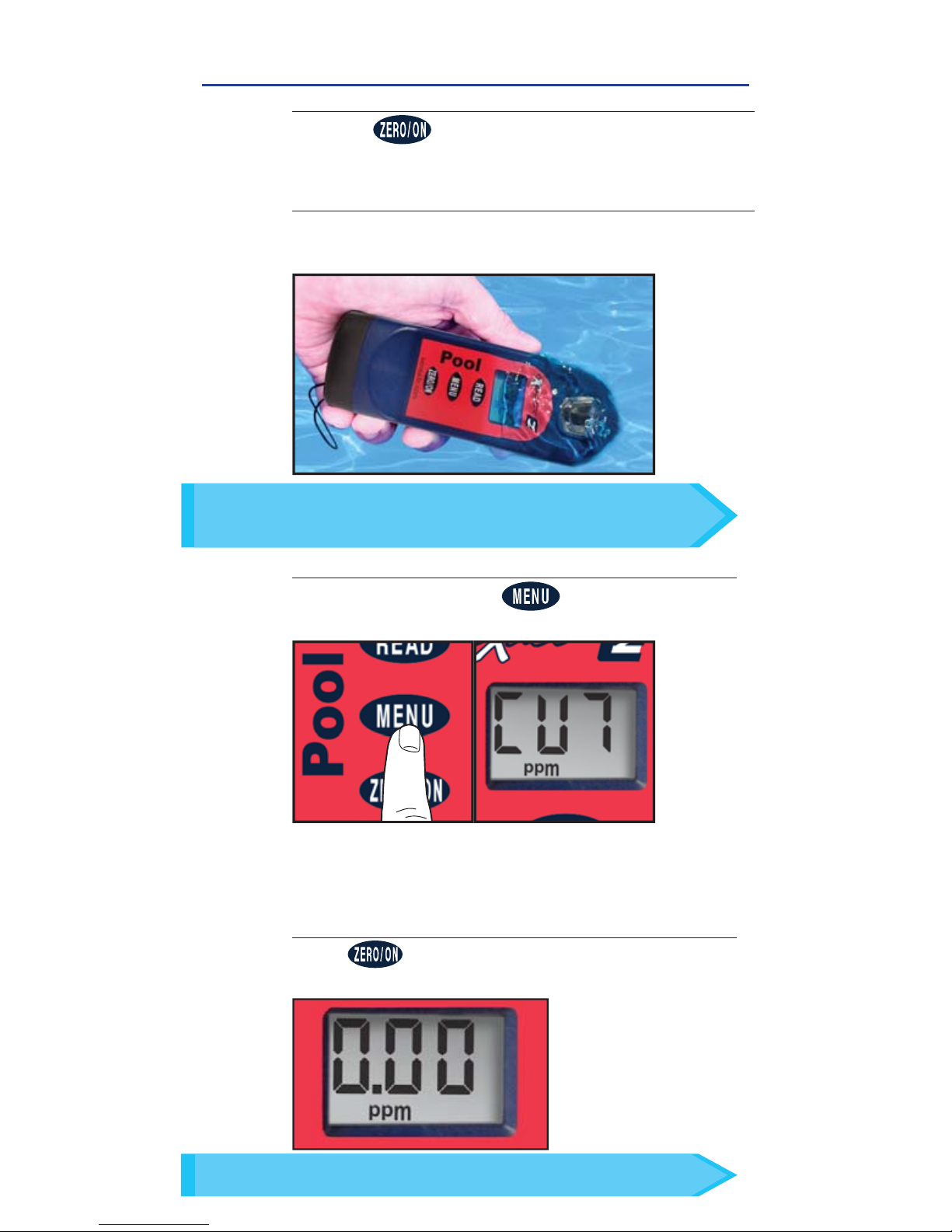
FILL, DIP, READ
1
POWER ON PHOTOMETER
Press the button to power on the Pool eXact® EZ.
3
SELECT TEST
Press and re-press the button until the
display shows CU7.
ZERO METER
Press and the LCD Display reads 0.00
PPM
,
indicating the meter is ready for testing.
4
In bright light situations use cell cover for zeroing and reading.
TIP
FILL CELL
Rinse the cell 3 times with the water sample to
be tested and
FILL to the top to begin test.
2
Use the included cleaning brush to clean the cell before/
after each test to prevent reagent interferences and
achieve the most accurate result.
TIP
Page 19
19
Sensafe.com
COPPER
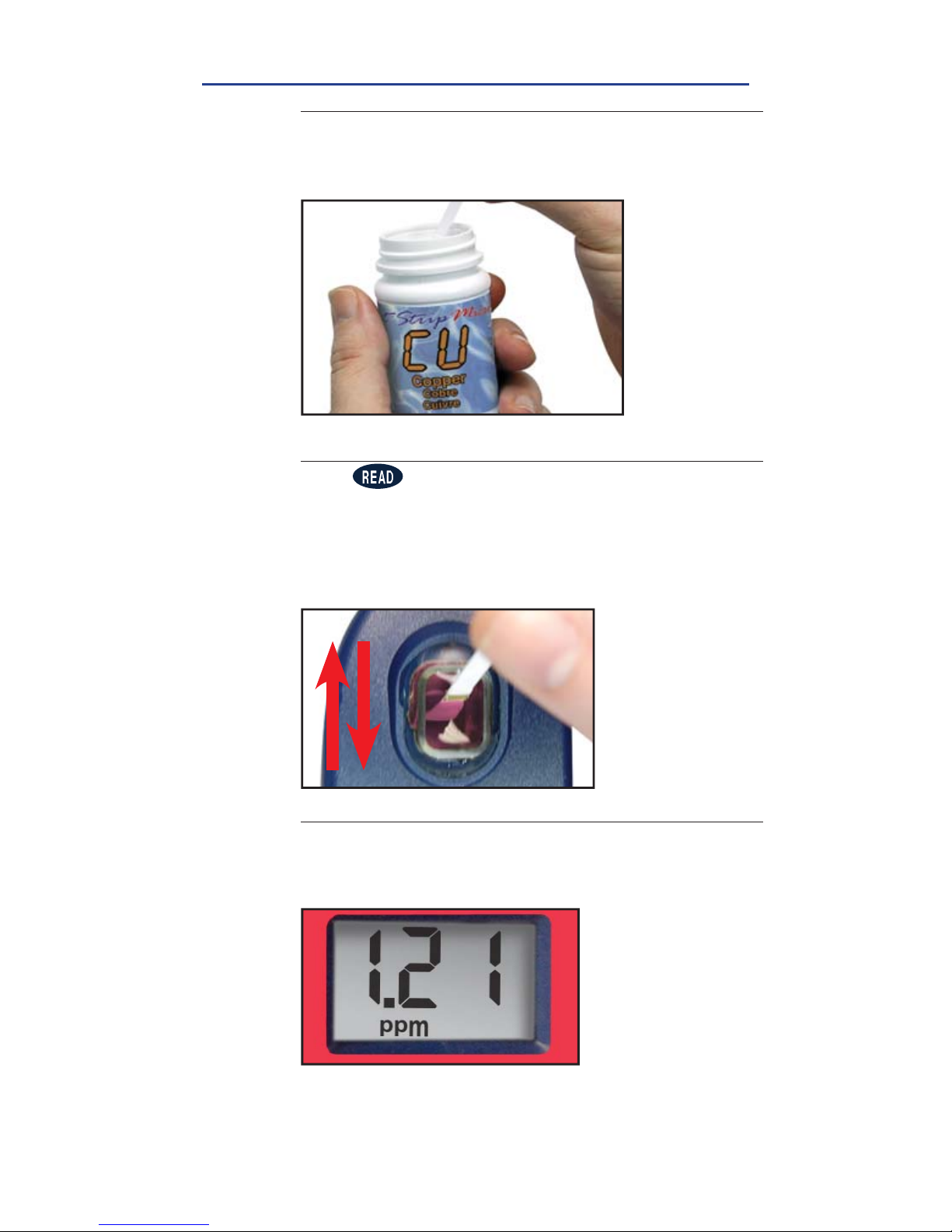
REMOVE STRIP
Remove one eXact® Strip Micro CU Copper and set in a
dry, convenient place. Replace cap on bottle
5
DIP STRIP AND PRESS READ
Press to initiate a 20 second countdown and
simultaneously DIP the eXact® Strip by submerging all
pads in the sample then use a gentle, constant, back
and forth motion (2 strokes per second) until the timer
displays
‘1’
. Remove and discard the strip. The display
will automatically start to count up for 120 seconds.
6
READ RESULTS
READ result displayed as Copper. This result is
automatically stored in the CU7 menu. After testing is
complete, rinse the sample cell immediately.
7
FILL, DIP, READ
Page 20

20
©2016, Industrial Test Systems, Inc. Printed in USA
CHLORIDE (Salt)
1
PREPARE SAMPLE
Prepare sample for testing using Mini Dilution Kit
II #487202.
1. Rinse 50mL graduated conical tube with
distilled or deionized (salt-free) water.
2. Rinse the 3.0mL syringe with saltwater sample
to be tested. Finally, fi ll the 3.0mL syringe to the
2.0mL line very precisely (plunger ring should
line up at the 2.0mL line and little or no air
bubble should be present).
3. Add the syringe content (2.0mL salt water
sample) to a clean 50mL graduated conical
tube by pushing plunger all the way down to
expel sample.
4. Now, fi ll the graduated conical tube to the 40mL
line with distilled or deionized (salt-free) water.
Cap graduated conical tube.
5. Mix content of graduated conical tube by turning
up side down at least three times. 1:20 Dilution
Sample is ready for testing.
Page 21
21
Sensafe.com
CHLORIDE (Salt)
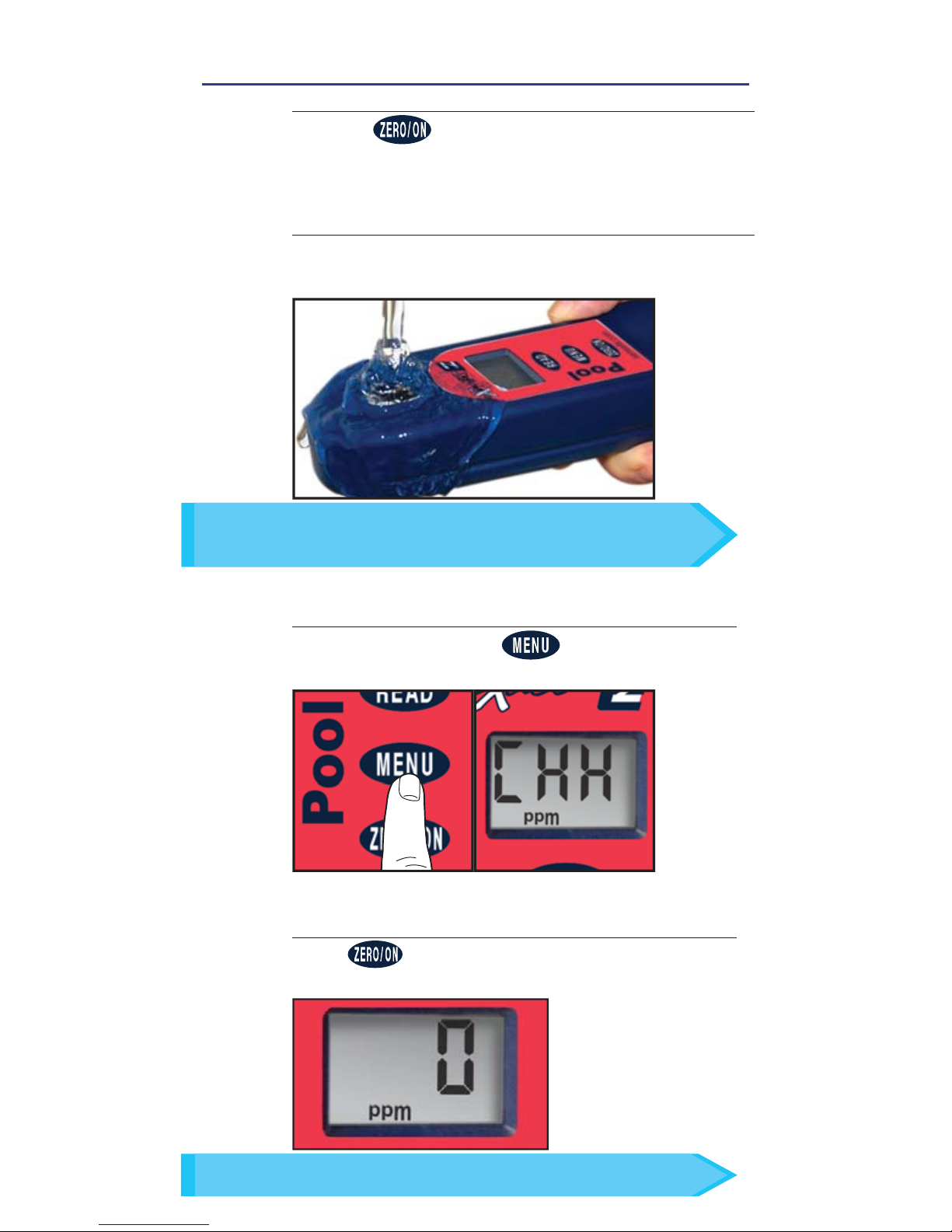
FILL, DIP, READ
1
POWER ON PHOTOMETER
Press the button to power on the Pool eXact® EZ.
3
SELECT TEST
Press and re-press the button until the
display shows CHH.
ZERO METER
Press and the LCD Display reads 0.00
PPM
,
indicating the meter is ready for testing.
4
In bright light situations use cell cover for zeroing and reading.
TIP
FILL CELL
Rinse the cell 3 times with the water sample to
be tested and FILL to the top to begin test.
2
Use the included cleaning brush to clean the cell before/
after each test to prevent reagent interferences and
achieve the most accurate result.
TIP
Page 22
22
©2016, Industrial Test Systems, Inc. Printed in USA
CHLORIDE (as NaCl)
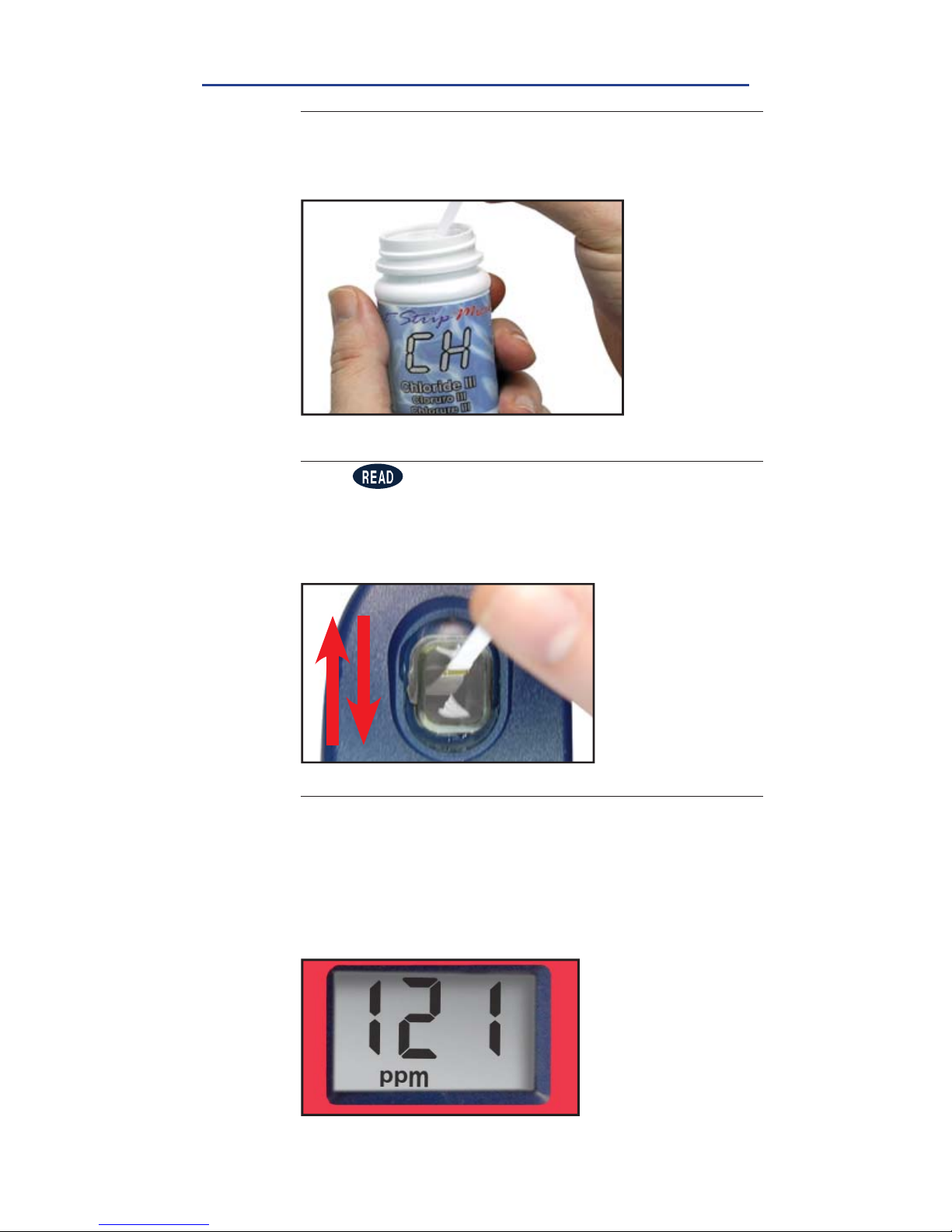
REMOVE STRIP
Remove one eXact® Strip Micro CH Chloride III and set
in a dry, convenient place. Replace cap on bottle
5
DIP STRIP AND PRESS READ
Press to initiate a 20 second countdown and
simultaneously DIP the eXact® Strip by submerging all
pads in the sample then use a gentle, constant, back
and forth motion (2 strokes per second) until the timer
displays
‘1’
. Remove and discard the strip.
6
READ RESULTS
READ result displayed as Chloride. Due to the limit
of three digits on the Pool eXact® EZ photometer, you
should add a “0” to the end of the result on the LCD
(ex. 121 = 1210 ppm). This result is automatically stored
in the CHH menu. After testing is complete, rinse the
sample cell immediately with cleaning brush.
7
FILL, DIP, READ
Page 23

23
Sensafe.com
FOR BEST ACCURACY
The Pool eXact® EZ photometer has a 5 minute auto-shutoff timer.
Each test menu can store 20 results. To retrieve the stored results,
go to the desired test using the MENU key. When the desired test is
displayed, press and hold down the MENU key. Continue holding down
the MENU key to scroll the stored results for that test, starting with the
most recent result. The meter will display, from memory, the last 20
readings in sequence beginning with -20, which is the latest result,
followed by -19, which is the 2nd latest result, etc; and fi nally -01,
which is the oldest result retained. Only the last 20 readings are stored
in each menu. This meter is able to store 160 results in memory (20 in
each menu).
Before testing, rinse the meter sample cell with the sample water 3 times.
Always fi ll the cell to capacity (4mL); be careful not to splash liquid over
the side.
Test immediately after fi lling the cell with the water sample.
To obtain optimal accuracy when testing outdoors (sunlight), use the
cell cover when zeroing and reading the sample.
Due to the strip slitting process, you may fi nd one or two strips that are
noticeably smaller or larger in width than the normal strips in the bottle.
These should be discarded. Using these strips may give unreliable results.
Meter is not compatible for use with powder pillows, tablets, or liquids
from other manufacturers.
Dip strip for entire countdown.
Each eXact® Strip Micro is valid for ONLY one test. Discard strip after use.
Dry the outside of the meter before storage.
Remove batteries before storing for prolonged periods.
Store the meter and test materials out of direct sunlight and away from
chemical storage areas.
Minimize exposure of meter and test reagents to heat above 90°F (32°C).
When installing batteries, verify the O-ring is still attached to the screw
before tightening.
Cleaning the cell with water and brush after each test is recommended
for best accuracy and prior to storage of unit.
Page 24
24
©2016, Industrial Test Systems, Inc. Printed in USA
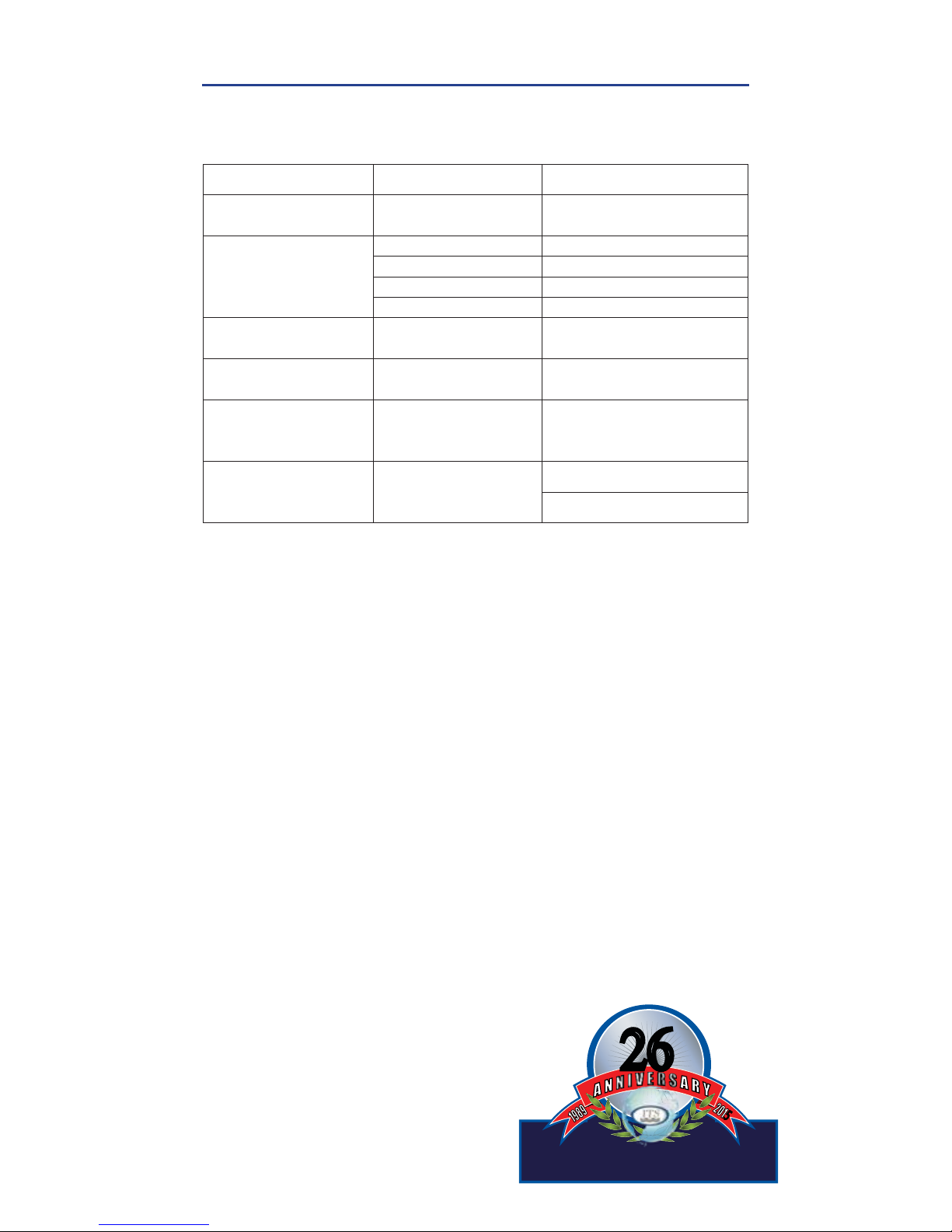
TROUBLESHOOTING
Listed below are possible situations that may arise while testing.
Please contact one of our knowledgeable customer service
representatives if you require further assistance
.
Subject Cause Solution
Dim screen or no
response from meter
Low battery
Replace batteries
“LO” on LCD while
zeroing
Low battery Replace batteries
Dirty cell Clean cell
Cloudy sample Dilute sample or use fi lter
Bad LED Contact ITS
“HI” on LCD while
reading
Result above
detection level
Re-run test to verify result
“LO” on LCD while
reading
Result below
detection level
Re-run test to verify result
“LO” fl ashes on
LCD, then "Err"
Improper test
procedure for
Combined Chlorine
Re-read test procedure
and follow directions
carefully
"HI" fl ashes on LCD,
then "Err"
Combined Chlorine
result above
detection limit
Re-run test to verify result
Dilute and re-run test
TECHNICAL SUPPORT
Please visit
sensafe.com/photometers/pool-exact-ez/
for the latest technical information and how-to-videos.
For additional technical support, call (803) 329-9712.
Industrial Test Systems, Inc.
1875 Langston Street, Rock Hill, SC 29730
800-861-9712 or 803-329-9712
[email protected] | sensafe.com
ITS Europe, Ltd.
The UK Centre for Homeland Security
Building 7, Chilmark, Salisbury,
Wiltshire SP3 5DU UK +44 1722 717911
[email protected] | itseurope.co.uk
I
n
d
u
s
t
r
i
a
l
T
e
s
t
S
y
s
t
e
m
s
,
I
n
c
.
th
26
26
5
5
Manufacturing quality products since 1989
POOL EXACT® EZ ACCURACY
All tests have been calibrated using certifi ed reference standards
and analytical spectrophotometric methods. The Pool eXact
®
EZ has been factory calibrated and will stay valid because of its
exceptional quality. We are so confi dent in the Pool eXact
®
EZ,
we offer an industry leading 2-year warranty.
We built the Pool eXact
®
EZ to be easy, accurate and
environmentally friendly. We have achieved this by utilizing our
patented eXact
®
Strip Micro Technology, which uses 60% less
water and chemistry than alternative methods. Instead of using
a 10mL water sample, eXact
®
Strip Micro uses a 4mL water
sample. The accuracy of the meter is maintained by designing
the sample cell with an 11mm path-length.
Page 25

25
Sensafe.com
BUILT IN SAMPLE CELL
The built-in sample cell is made of transparent plastic;
the sturdy cell design will last for over 20,000 readings.
Our studies have shown that scratches on the cell will not
compromise the accuracy of your results because of the
cell’s fi xed position.
WARRANTY (2 YEARS)
Registration of your Pool eXact® EZ photometer must be received within 30
days from date of purchase to activate the warranty. Registration is available
over the phone (+1-803-329-9712 Ext. 0) or online at
sensafe.com/micro/
warranty/
(Personal data is kept confi dential). The Pool eXact® EZ photometer
is warranted to be free from defects in materials and workmanship for a
period of two (2) years from the date of purchase by the customer. ITS will
repair or replace, at its discretion, product which is deemed to be faulty due
to manufacturing defect. Warranty does not cover product damage caused
by abuse (such as crushing a tablet in the cell), battery corrosion damage, or
improper use. If the meter is faulty or otherwise defective contact ITS by phone
(+1-803-329-9712 Ext. 0) or email ([email protected]) to describe the problem
and obtain a return authorization form before returning the photometer to ITS.
Damage caused by improper packing of the photometer for return shipment to
ITS will not be covered by the warranty. Customer is responsible for shipping
charges to ITS. ITS pays postage when photometer is returned to customer. A
maximum processing fee of $75 will be charged for repair or replacement of
non-registered photometers and damages not covered by this warranty. The
repair or replacement of the photometer will not extend or renew the period of
guarantee. This warranty does not affect your statutory rights. The warranty is
not transferable.
ABOUT
Ready Snap® 3 is a calibration verifi cation
solution with predetermined color to verify the
accuracy of your Pool eXact® EZ photometer.
The easy 3 step procedure (snap, fi ll, and
test) allows for quick verifi cation of test
parameters. Each box contains 10 ampoules
of 10mL solution with no dilution necessary.
METHOD VERIFICATION
POOL EXACT® EZ ASSIGNED VALUE FOR READY SNAP® 3
READY SNAP® 3
FREE CHLORINE
DESIRED VALUE
FREE CHLORINE
ACCEPTABLE RANGE
Red dye # 505
1.5 ppm 1.46 – 1.59
Note: Values indicated are specifi c to Pool eXact® EZ readings and current
concentrations as found at time of manufacture.
Page 26
26
©2016, Industrial Test Systems, Inc. Printed in USA
COMPLIANCE TESTING
This DPD test system for Chlorine is accepted
for reporting by most health departments
because the tests are USEPA (DIN Standard
38 408 G4/G5, ISO 7393/2) accepted for
testing requirements for Free Chlorine and Total Chlorine.
The compliance requirement is a photometer wavelength to
measure between 490 and 530nm. The Pool eXact® EZ smart
photometer uses a 525nm wavelength and 11 mm path-length.
The eXact® Strip Micro CL (DPD-1) use the same reagents and
proportions, and the resulting solution pH is maintained between
6.2 and 6.5 as specifi ed by AWWA method 4500-Cl G/ClO2-D.
The USEPA does not “approve” commercial DPD delivery
systems. The eXact® Strip Micro CL (DPD-1) for Free Chlorine,
and the eXact® Strip Micro CL (DPD-3) for Combined Chlorine,
and the eXact® Strip Micro CL (DPD-4) for Total Chlorine meet
your reportable testing requirements because the eXact® Strip
Micro strips deliver the same chemicals in identical proportions.
Consult with your local health department for offi cial regulations.
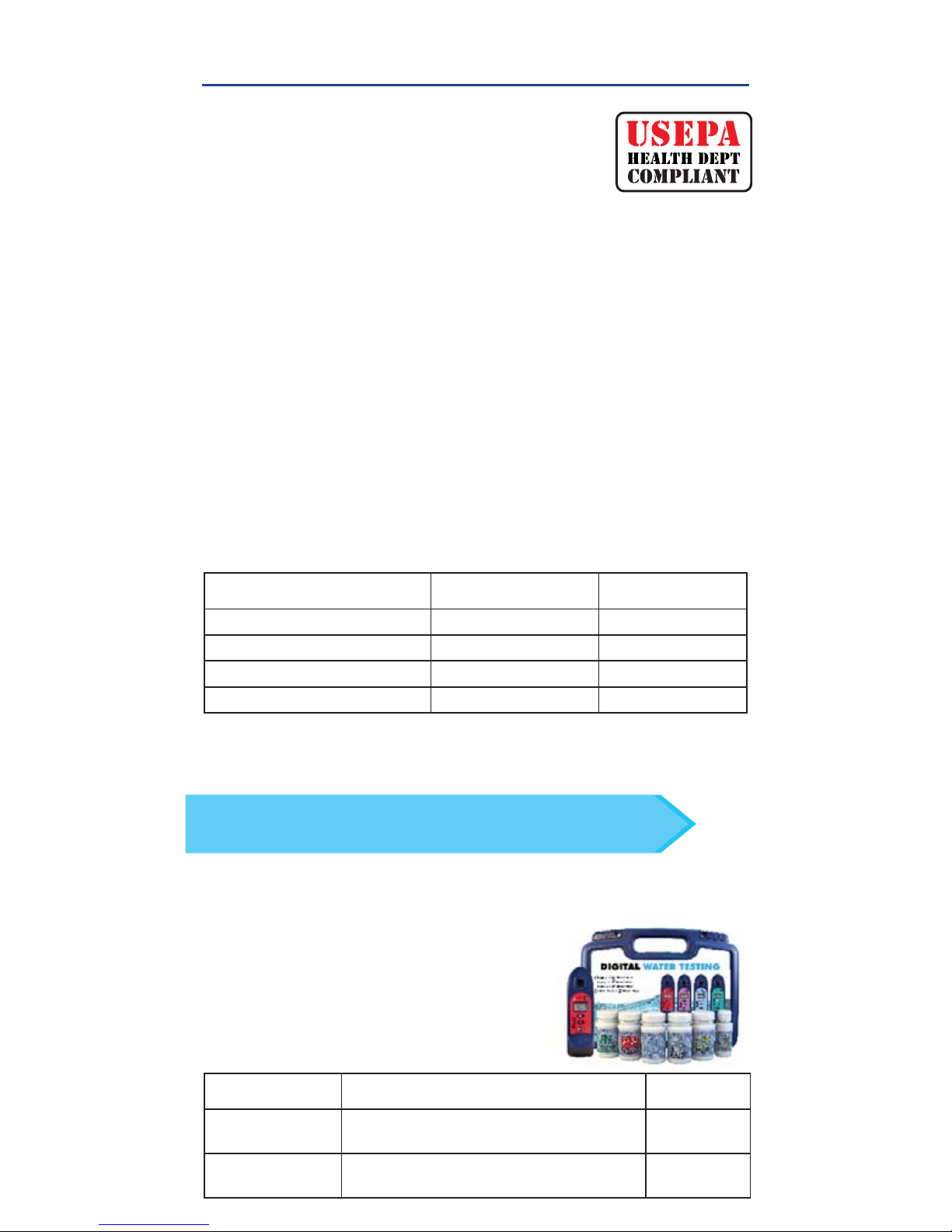
COMPONENT (FREE CHLORINE)
AWWA 4500-CL G
POOL EXACT® EZ
Anhydrous DPD sulfate
1.5% 1.5%
Anhydrous Na
2
HPO
4
33.4% 33.4%
Anhydrous KH2PO4Na
2
64.0% 64.0%
EDTA 1.1% 1.1%
ABOUT
ITEM
INCLUDES PART NO.
Standard
Carrying case
Blue carrying case with foam inserts
(holds up to 7 bottles)
486111
XL
Carrying case
Black carrying case with foam inserts
(holds up to 14 bottles)
486001
Made of sturdy material lined with
foam, the carrying case offers storage
for a Pool eXact® EZ photometer and
eXact® Micro reagents.
CARRYING CASE FOR POOL EXACT® EZ
Store all your necessary reagents together with your
Pool eXact
®
EZ in our convenient carrying case!
TIP
Page 27

27
Sensafe.com
NOTES
Page 28
28
©2016, Industrial Test Systems, Inc. Printed in USA
†
Value provided represents best possible accuracy under laboratory conditions, but may vary throughout the detection
range.
For a complete list of accuracies throughout all ranges, please visit sensafe.com/photometers/pool-exact-ez/.
1
Performance verifi ed with various salt systems and water samples with optimal water temperature at 10-40˚C / 50-104˚F.
Optimal water temperature for Phosphate test is 15-40˚C / 59-104˚F.
2
For detailed instructions on using this product, contact us (see below) or visit sensafe.com/photometers/pool-exact-ez/.
3
Requires the use of 2 strips if reading is above 6 ppm.
4
Combined Chlorine DPD-3 Test requires Free Chlorine DPD-1 (486637) to be run fi rst.
For resellers and distributors - products sold in case quantities (12 units per case).
PATENT INFORMATION
US Patent #7,333,194; Euro Pat No. 1 725 864 DE FR UK; South Africa Pat No 2007/0628
by Industrial Test Systems, Inc., 1875 Langston Street, Rock Hill, SC USA.
EXACT
®
is a registered trademark of Industrial Test Systems, Inc. Rock Hill, SC USA.
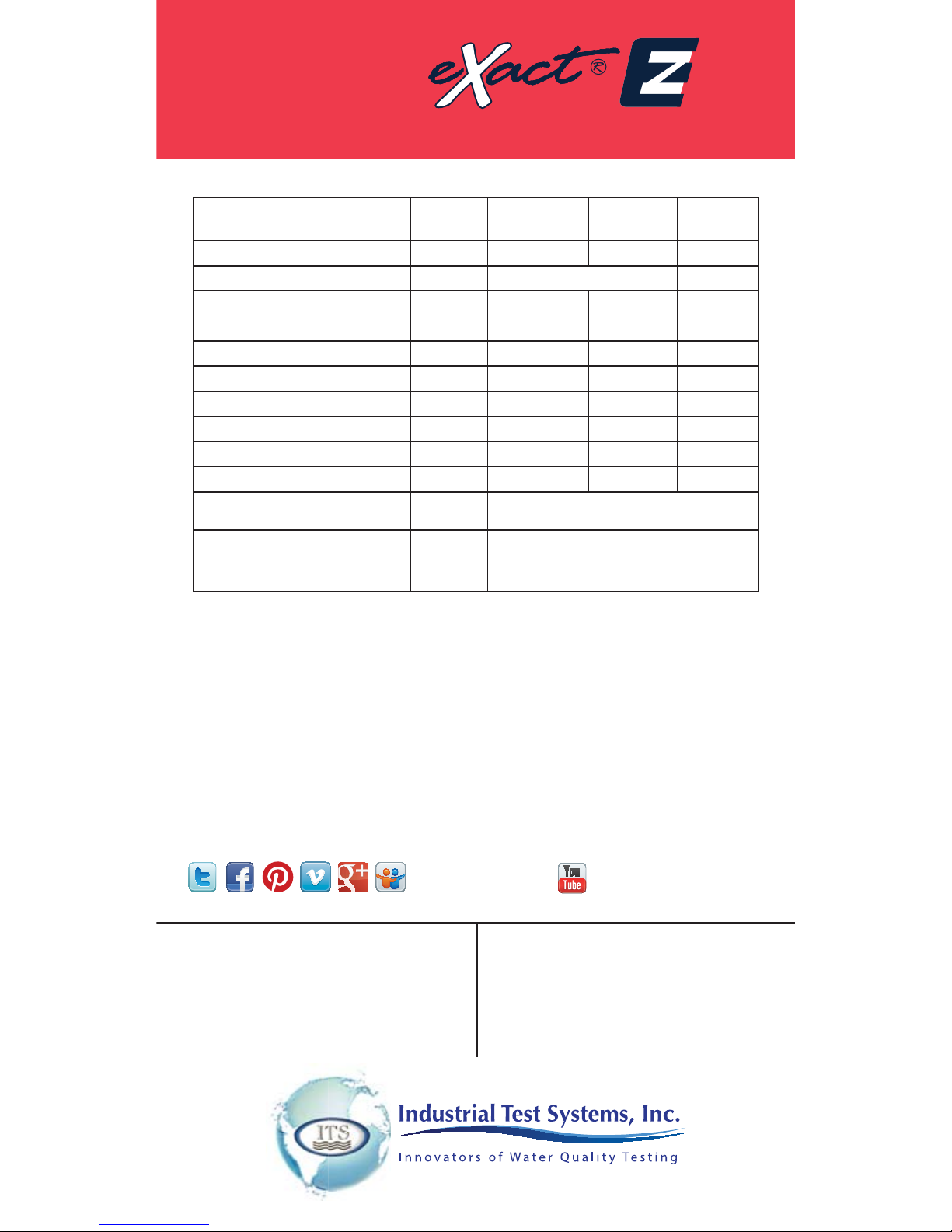
EXACT® MICRO TESTS & REAGENTS
PARAMETER / TEST
1
PART #
RANGE
ppm
% BEST
ACCURACY
# OF
TESTS
Alkalinity, Total 486641 10 – 200 10 100
Alkalinity, Total Range Extender 2486665 Each strip adds 130 ppm 100
Chloride (Salt)
486757
80 – 6700 5 25
Chlorine, Free (DPD–1)
3
486637 0.01 – 12.0 5 100
Chlorine, Combined (DPD–3) 4486638 0.01 – 12.0 5 100
Copper
486632
0.06 – 9 2 50
Cyanuric Acid
481652-II
3 – 110 12 60
Hardness, Calcium 486629 3 – 700 5 50
pH 486639-II 6.4 – 8.4 0.2 pH 100
Phosphate 486814 0.02 – 4 8 50
EXACT REFILL BOX
PART #
PARAMETER / TESTS
Pool Refi ll Box 486211
Total Alkalinity, pH, Free Chlorine,
Combined Chlorine, Calcium
Hardness, Cyanuric Acid
†
R072016-PEZQG
Visit us online:
sensafe.com/photometers/pool-exact-ez/
for up–to–date product information.
SENSAFE ITSSENSAFE
Industrial Test Systems, Inc.
1875 Langston Street
Rock Hill, SC 29730
1–800–861–9712—Inside the U.S.A.
1–803–329–9712—Outside the U.S.A.
Fax:1–803–329–9743
Email: [email protected]
WWW.SENSAFE.COM
ITS EUROPE, LTD
The UK Centre for Homeland Security
Building 7, Chilmark
Salisbury, Wiltshire, SP3 5DU, UK
Phone: +44 (0)1722 717911
Fax: +44 (0) 1722 717941
Email: [email protected]
WWW.ITSEUROPE.CO.UK
MANUFACTURED BY
Pool
ADVANCED PHOTOMETER SYSTEM
 Loading...