

Page 1
with
SMART PHOTOMETER SYSTEM
®
QUICK START GUIDE
®
Page 2

2
©2016, Industrial Test Systems, Inc. Printed in USA
CONTENTS
Welcome . . . . . . . . . . . . . . . . . . . . . . . . . . . . . . . . . . . . . . . . . . . 3-4
Warranty (2 years) . . . . . . . . . . . . . . . . . . . . . . . . . . . . . . . . . . . . 4
For Best Accuracy . . . . . . . . . . . . . . . . . . . . . . . . . . . . . . . . . . . . . 5
eXact iDip® Photometer Overview . . . . . . . . . . . . . . . . . . . . . . . . 6
Install “AAA” Batteries . . . . . . . . . . . . . . . . . . . . . . . . . . . . . . . 6
Getting Started
Download the App . . . . . . . . . . . . . . . . . . . . . . . . . . . . . . . . . . . . 7
Purchase Additional Tests . . . . . . . . . . . . . . . . . . . . . . . . . . . . . . 7
Compatible Smart Devices
. . . . . . . . . . . . . . . . . . . . . . . . . . . . . . 8
Troubleshooting/Technical Support . . . . . . . . . . . . . . . . . . . . . . 9
eXact iDip® App Overview . . . . . . . . . . . . . . . . . . . . . . . . . . . . . . 10
Using the eXact iDip® App
Menu . . . . . . . . . . . . . . . . . . . . . . . . . . . . . . . . . . . . . . . . . . . . . 11
Test . . . . . . . . . . . . . . . . . . . . . . . . . . . . . . . . . . . . . . . . . . . . . . 11
History . . . . . . . . . . . . . . . . . . . . . . . . . . . . . . . . . . . . . . . . . . . 12
Customers . . . . . . . . . . . . . . . . . . . . . . . . . . . . . . . . . . . . . . . . 12
Calendar . . . . . . . . . . . . . . . . . . . . . . . . . . . . . . . . . . . . . . . . . . 13
Store . . . . . . . . . . . . . . . . . . . . . . . . . . . . . . . . . . . . . . . . . . . . . 13
Results . . . . . . . . . . . . . . . . . . . . . . . . . . . . . . . . . . . . . . . . . . . 13
Select, Fill, Dip, Read - Test Procedure
Select Customer . . . . . . . . . . . . . . . . . . . . . . . . . . . . . . . . . . . . 14
Power on eXact iDip® . . . . . . . . . . . . . . . . . . . . . . . . . . . . . . . . 14
Select Bluetooth® Test . . . . . . . . . . . . . . . . . . . . . . . . . . . . . . . . 15
Connect eXact iDip® . . . . . . . . . . . . . . . . . . . . . . . . . . . . . . . . . 15
Fill Cell . . . . . . . . . . . . . . . . . . . . . . . . . . . . . . . . . . . . . . . . . . . 16
Select Test . . . . . . . . . . . . . . . . . . . . . . . . . . . . . . . . . . . . . . . . 16
Zero Meter . . . . . . . . . . . . . . . . . . . . . . . . . . . . . . . . . . . . . . . . 16
Test Methods . . . . . . . . . . . . . . . . . . . . . . . . . . . . . . . . . . . . . . 17
Standard Strip Method . . . . . . . . . . . . . . . . . . . . . . . . . . . . . . . 18
Standard Liquid Method . . . . . . . . . . . . . . . . . . . . . . . . . . . . . . 19
Auto-Calculated Methods . . . . . . . . . . . . . . . . . . . . . . . . . . 20-21
Managing Data
Save/Send/Share . . . . . . . . . . . . . . . . . . . . . . . . . . . . . . . . 22-24
About
eXact® Strip Micro CL Interferences . . . . . . . . . . . . . . . . . . . . . 25
Bluetooth® SMART Technology . . . . . . . . . . . . . . . . . . . . . . . . 25
Built-in Sample Cell . . . . . . . . . . . . . . . . . . . . . . . . . . . . . . . . . 25
Making Calls . . . . . . . . . . . . . . . . . . . . . . . . . . . . . . . . . . . . . . . 25
Compliance Testing (USEPA) . . . . . . . . . . . . . . . . . . . . . . . . . . 26
R&D 100 Award . . . . . . . . . . . . . . . . . . . . . . . . . . . . . . . . . . . . 26
eXact iDip® Accuracy . . . . . . . . . . . . . . . . . . . . . . . . . . . . . . . . 27
Method Verifi cation Ready Snap® . . . . . . . . . . . . . . . . . . . . . . 27
Kits and Accessories
Easy Refi ll Box . . . . . . . . . . . . . . . . . . . . . . . . . . . . . . . . . . . . . 28
Dry Case for Smartphone or Tablet . . . . . . . . . . . . . . . . . . . . . 28
Carrying Case for eXact iDip® . . . . . . . . . . . . . . . . . . . . . . . . . 29
Starter Kits . . . . . . . . . . . . . . . . . . . . . . . . . . . . . . . . . . . . . . . . 29
NSF/ANSI 50 Certifi cation . . . . . . . . . . . . . . . . . . . . . . . . . . . . . . 30
eXact iDip® Tests & Reagents . . . . . . . . . . . . . . . . . . . . . . . . 31-32
Page 3
3
exactidip.com
WELCOME TO YOUR NEW EXACT IDIP®
SMART PHOTOMETER SYSTEM®.
Thank you for your eXact iDip® purchase! This guide will quickly
walk you through the technical details of your new eXact iDip
®
.
This guide includes initial set-up, downloading the app, test
procedures, and tips. You are on your way to smart digital water
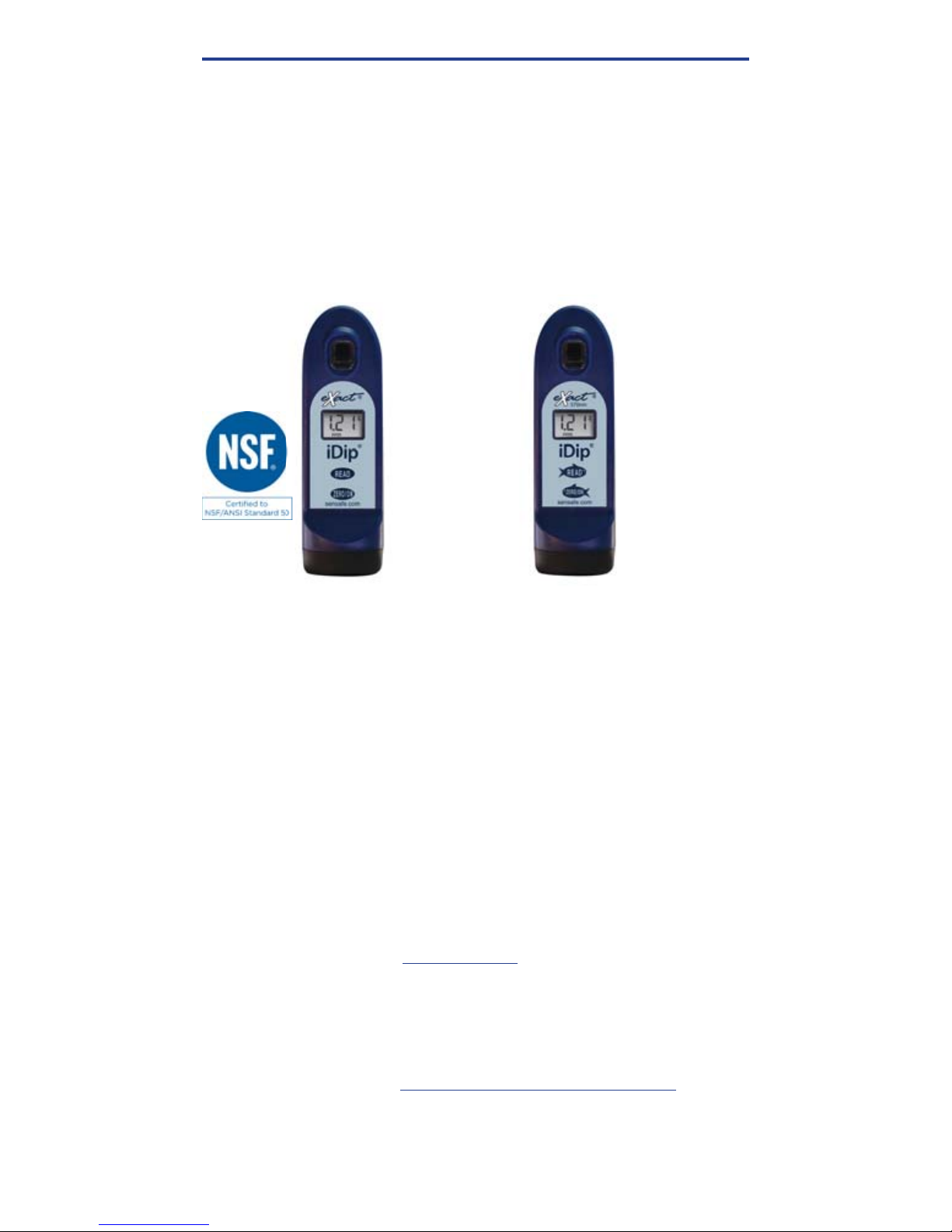
testing! Currently we offer two iDip® models: eXact iDip® (525nm)
and eXact iDip® 570 (570nm). Please ensure you purchase the
compatible premium tests and strips/reagents according to the
iDip
®
model you are using.
YOUR EXACT IDIP® COMES WITH
:
• Cleaning Brush
• Quick Start Guide (this booklet)
• 24 foil packet strips (6 of each): Free Chlorine (DPD-1),
Combined/Total Chlorine (DPD-3), pH-II, and Total Alkalinity
Note: The iDip® Starter Kits include eXact® Strip/Reagent
bottles with 25 tests each (reagents vary with each kit) and
not individual foil packets listed above.
WHAT YOU WILL NEED TO GET STARTED:
• Four (4) AAA batteries
• #4 Phillips head screwdriver
• eXact iDip
®
app – Visit exactidip.com to download the app, or
see page 7 for download instructions
• Compatible smart device
For a list of compatible smart devices,
see pages 8-9
.
We are constantly adding new devices to this list. View the
most up-to-date list at sensafe.com/compatible-devices.
WELCOME
US Designed and US and International Patent-Protected by Industrial Test Systems, Inc. 1875 Langston Street, Rock Hill,
SC USA.
EXACT®, IDIP® , EXACT IDIP®, SMART PHOTOMETER SYSTEM®, SMART DIGITAL WATER TESTING®, and READY SNAP® are
registered trademarks and SMART BREW™ is a trademark of Industrial Test Systems, Inc. Rock Hill, SC USA. Apple, the Apple logo, iPad,
iPhone, and iPod touch are trademarks of Apple Inc., Android, Google, and Google play are trademarks of Google Inc., Registered in the
U.S. Bluetooth® word mark and logos are owned by Bluetooth SIG and any use of such marks is under license. MarketWatch and R&D 100
are registered trademarks of each.
eXact iDip® 570
Part #486107
exactidip570.com
you are usin
eXact iDip
®
Part #486101
exactidip.com
Page 4

4
©2016, Industrial Test Systems, Inc. Printed in USA
THE EXACT IDIP
®
SMART PHOTOMETER SYSTEM
®
Using eXact® Micro reagents in combination with the
app and photometer completes the eXact iDip® Smart
Photometer System®. Each test will require the use of one or
more of the testing methods outlined in this manual.
This system’s unique and innovative technologies have
earned the eXact iDip® US and international patents (US
Patents #7,333,194, #7,491,546, and #9,429,553; Euro
Pat No. 1 725 864 DE FR UK, and South African Patent
#2007/0628) for underlying technology, and currently
pending is Euro Pat App 2 906 942 for technical features
relating to two-way data communication between a
photometer and a smart device.
Note:
This system has been manufactured for use with only
our eXact® Micro reagents.
WARRANTY (2 YEARS)
Registration of your eXact iDip® photometer must be received
within 30 days from date of purchase to activate the warranty.
Registration is available over the phone (+1-803-329-9712 Ext. 0)
or online at
sensafe.com/micro/warranty/ (Personal data is kept
confi dential). The eXact iDip
®
photometer is warranted to be free
from defects in materials and workmanship for a period of two (2)
years from the date of purchase by the customer. ITS will repair
or replace, at its discretion, product which is deemed to be faulty
due to manufacturing defect. Warranty does not cover product
damage caused by abuse (such as crushing a tablet in the cell),
battery corrosion damage, or improper use. If the meter is faulty
or otherwise defective contact ITS by phone (1-803-329-9712 Ext.
0) or email ([email protected]) to describe the problem and obtain
a return authorization form before returning the photometer to ITS.
Damage caused by improper packing of the photometer for return
shipment to ITS will not be covered by the warranty. Customer is
responsible for shipping charges to ITS. ITS pays postage when
photometer is returned to customer. A maximum processing fee
of $75 will be charged for repair or replacement of non-registered
photometers and damages not covered by this warranty. The repair
or replacement of the photometer will not extend or renew the period
of guarantee. This warranty does not affect your statutory rights. The
warranty is not transferable.
WELCOME
Page 5

5
exactidip.com
FOR BEST ACCURACY
All tests that begin with 570 are for use with the eXact iDip® 570
photometer only.
Visit exactidip.com or exactidip570.com to download individual test
instructions for each test.
The meter has a default 3 minute automatic shutoff timer. You can change
the duration in the ‘Settings’ menu located within the eXact iDip
®
app.
Always fi ll the cell to capacity (4mL).
Test immediately after fi lling the cell with the water sample.
Due to the strip slitting process, you may fi nd one or two strips that are
noticeably smaller or larger in width than the normal strips in the bottle.
These should be discarded. Using these strips may give unreliable results.
When testing pH, it is recommended to run the pH test prior to running
Chlorine. If you choose to run the pH after Chlorine, ensure you thoroughly
clean the cell with water and the brush provided.
To obtain optimal accuracy when testing outdoors (sunlight), use the Cell
Cover when zeroing and reading the sample.
Meter is not compatible for use with powder pillows, tablets, and liquids
from other manufacturers.
Dip strip for entire countdown.
Each eXact
®
Strip Micro is valid for ONLY one test. Discard strip after use.
Dry the outside of the meter before storage.
Remove batteries before storing for prolonged periods.
Store the meter and test materials out of direct sunlight and away from
chemical storage areas.
Minimize exposure of meter and test reagents to heat above 90°F (32°C).
When installing batteries, make sure that the O-ring is still attached to the
screw before tightening.
To pair the eXact iDip® photometer with your smart device, open the app
and connect through the app. You cannot connect the devices in the
settings section of your smart device.
All results must be saved from the results page to history in order to
permanently save to your smart device.
The eXact iDip® photometer may experience Bluetooth® disconnection
when submerged in water too deep. To avoid this, collect water sample
in a small container/cup and pour or pipette (contact us for ordering) the
water into the Sample Cell.
To ensure lab quality results, it is recommended to clean the cell with the
brush provided after every test. Use Distilled White Vinegar to clean the
cell after testing for Phosphate or Iron to remove reagent deposits from the
cell wall.
Page 6
6
©2016, Industrial Test Systems, Inc. Printed in USA
EXACT IDIP® PHOTOMETER OVERVIEW
YOUR NEW EXACT IDIP® PHOTOMETER IS IDEAL FOR TESTING
AND MAINTAINING DRINKING WATER, POOLS, SPAS, PONDS,
AQUARIUMS, FOOD PROCESS WATER, ENVIRONMENTAL
WATERS, AND MORE!
,
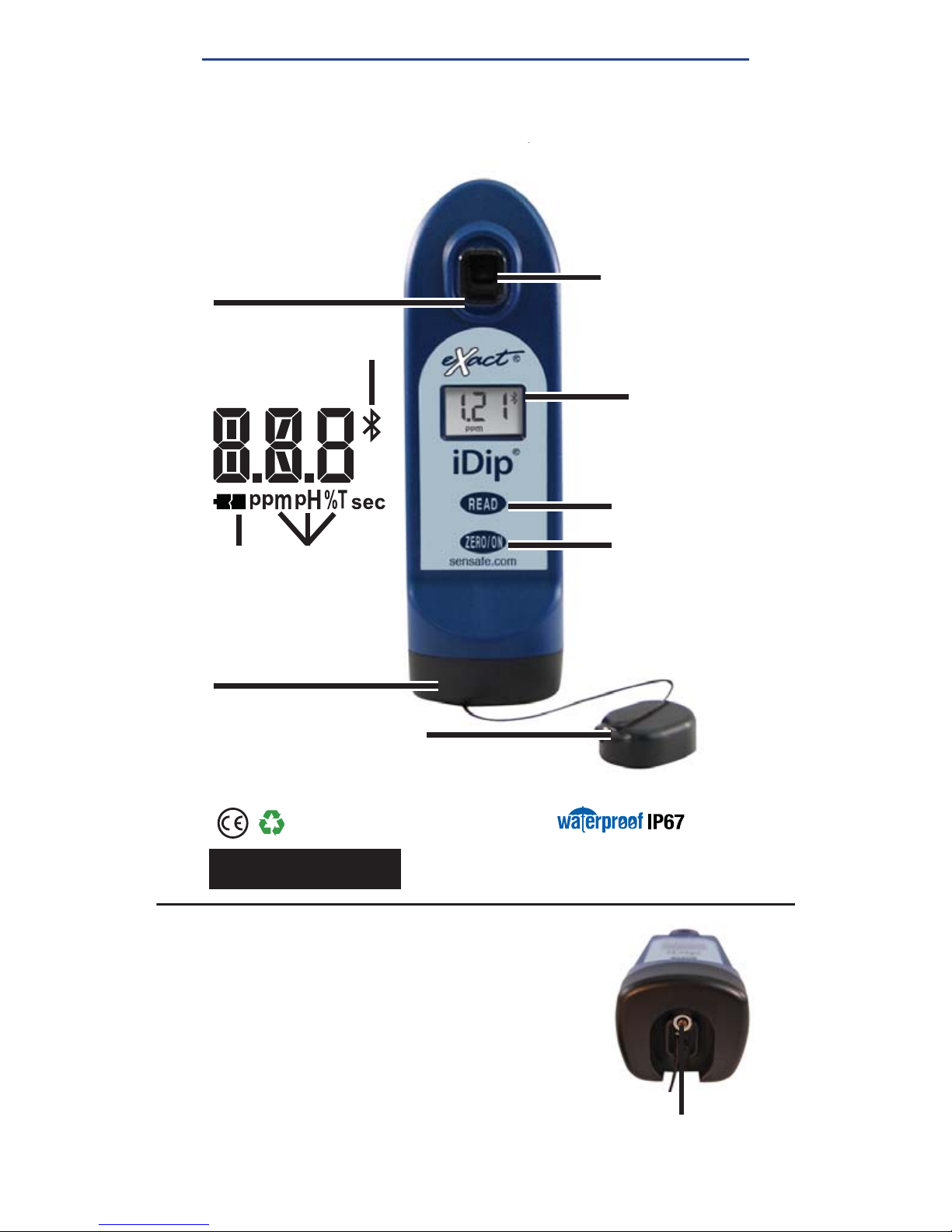
SAMPLE CELL - 4 ML
Built-in plastic 4mL cell
for collecting your water
sample
LCD DISPLAY
Displays results
and test name
LIGHT SOURCE
Uses 525nm or
570nm wavelength,
depending on model
purchased, and
11mm path-length
for testing
READ BUTTON
Starts test timer
BASE
Install/replace batteries here
(IP67 rated waterproof)
RESULT
UNITS
LOW
BATTERY
BLUETOOTH
CONNECTED
LCD DISPLAY
ZERO/ON BUTTON
Powers on the
meter and creates
a baseline for your
water testing
CELL COVER
Covers the cell for
mixing and bright
light situations
Protected against the effects
of immersion in water to depth
between 15 cm and 1 meter
SCREW
Unscrew to
remove base
Part no. 486101
INSTALL “AAA” BATTERIES (NOT INCLUDED)
1. Use a #4 Phillips head screwdriver to remove the screw from
the base of your eXact iDip
®
.
2. Remove the base.
3. Install Four (4) new AAA batteries as illustrated inside your
iDip’s battery compartment. We recommend using high
quality batteries.
4. Replace the base fi rmly with pressure while tightening the
screw. The meter will turn on automatically.
5. Tighten the screw with #4 Phillips head screwdriver. Be sure
not to over tighten.
Page 7

7
exactidip.com
DOWNLOAD THE APP
Using your Smart Device, download the eXact iDip®
app. The eXact iDip
®
app is the brain for this system;
download the latest update to ensure you are using
the current version with up-to-date tests and features.
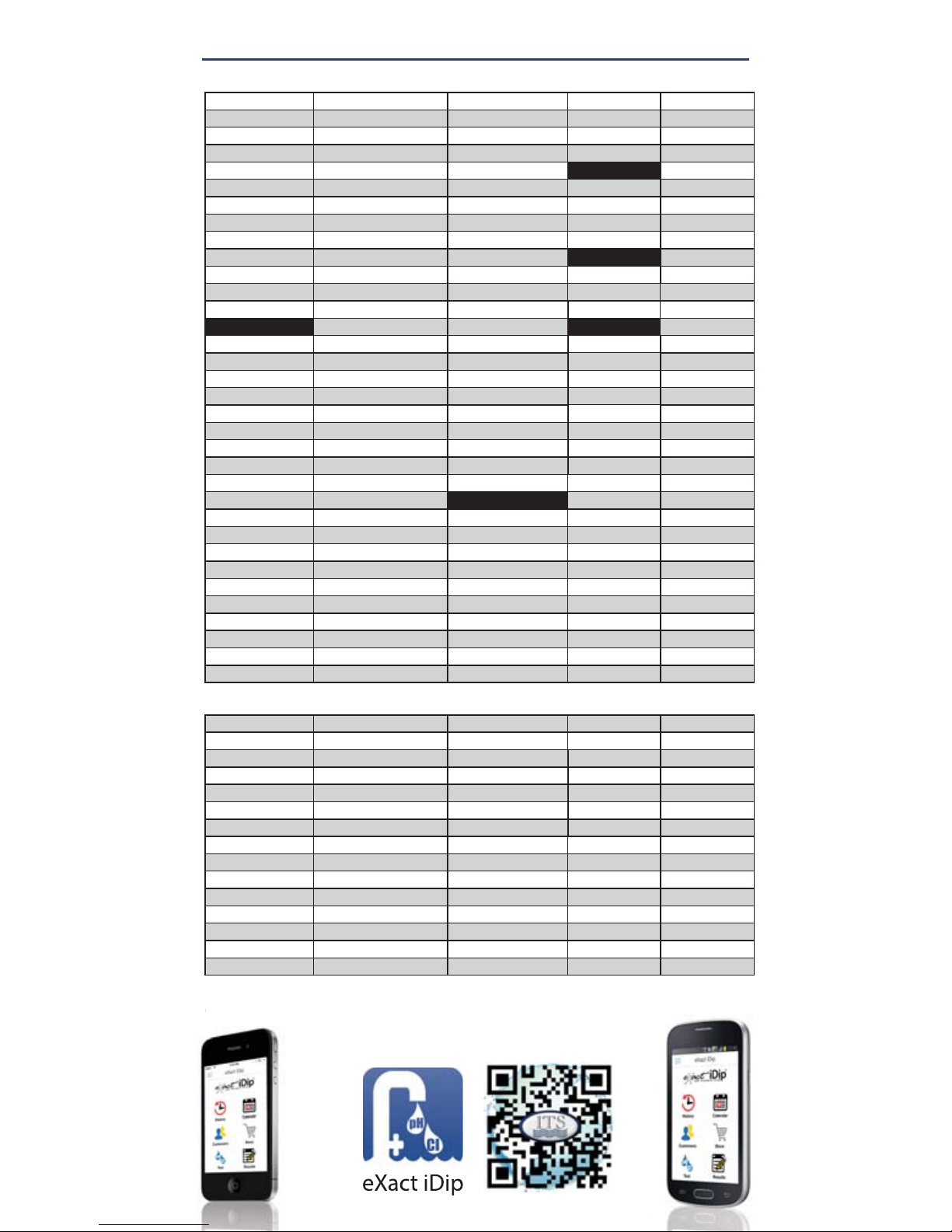
To see if your smart device is compatible, reference
our table on pages 8 and 9 of this manual.
We are constantly improving the
eXact iDip
®
app and welcome your
suggestions. Visit
exactidip.com or
e-mail
PURCHASE ADDITIONAL TESTS
The app comes pre-installed with tests for Total Alkalinity,
Free Chlorine, Combined Chlorine, and pH. Ensure you
have any additional tests you need by visiting the Store in
the eXact iDip® app. All tests that begin with 570 are for
use with the eXact iDip® 570 photometer only.
Step-by-step instructions on using the Store function of the
app can be found on page 13.
GET IT ON
APP STORE
DOWNLOAD
GOOGLE PLAY
DOWNLOAD
To view an instructional video,
please visit exactidip.com.
Note:
If using an Apple® iPad™, ensure you select 'iPhone
only app' when searching from the App Store, or scan the
QR code above.
GETTING STARTED
Page 8
8
©2016, Industrial Test Systems, Inc. Printed in USA
COMPATIBLE SMART DEVICES
SMART PHONE COMPATIBILITY
Updated
11/2016
APPLE SAMSUNG SONY MOTOROLA HTC
iPhone 4s Galaxy Ace Style Xperia AX Moto E Desire 610
iPod touch 5th Galaxy Alpha Xperia E1 Moto G Desire 816
iPhone 5 Galaxy Axiom Xperia GX Moto X Droid DNA
iPhone 5c Galaxy Core II Xperia M EVO 4G LTE
iPhone 5s Galaxy Core Lite Xperia M2
GOOGLE
One
iPhone 6 Galaxy Core Prime Xperia SP Nexus 4 One (E8)
iPhone 6+ Galaxy Exhibit Xperia T Nexus 5 One (M7)
iPhone 6s Galaxy Express Xperia T2 Ultra Nexus 6 One (M8)
iPhone 6s plus Galaxy Express 2 Xperia V One (M9)
iPhone SE Galaxy Grand 2 Xperia VL
LENOVO
One Max
iPhone 7 Galaxy Grand Duos Xperia Z Vibe X2 One Mini
iPhone 7 plus Galaxy Grand Neo Xperia Z ULTRA Vibe Z2 Pro One Mini 2
Galaxy J Xperia Z1
LG
Galaxy Light Xperia Z1 Compact
ZTE
F70 Galaxy Mega Xperia Z1F
Grand S Pro
G Pro2 Galaxy Mega 2 Xperia Z1S
Nubia X6
G2 Galaxy Pop Xperia Z2
Nubia Z5S Mini
G2 Mini Galaxy S3 Xperia Z3
Nubia Z7 Max
G3 Galaxy S3 Neo Xperia Z3 Compact
Optimus Exceed 2 Galaxy S4 Xperia Z3 Dual
Optimus Fuel Galaxy S4 Active Xperia ZL
Optimus G Galaxy S4 Mini Xperia ZR
Optimus G Pro Galaxy S4 Zoom
Optimus L35 Galaxy S5
MOTOROLA DROID
Optimus L40 Galaxy S5 Active Maxx
Optimus L65 Galaxy S5 Sport Mini
Optimus L70
Galaxy S6
Razr HD
Optimus L80
Galaxy S6 Edge
Razr HD Maxx
Optimus L90
Galaxy Stellar
Razr M
Optimus Zone 2
Galaxy Xcover 3
Turbo
Volt
Galaxy Trend Lite
Ultra
Galaxy Trend Plus
Galaxy Young II Duos
TABLET COMPATIBILITY
APPLE SAMSUNG LG SONY GOOGLE
iPad (3rd) Galaxy Note 10.1 G Pad Xperia Tablet Z Nexus 7 (2013)
iPad (4th) Galaxy Note 3 Neo Xperia Tablet Z2 Nexus 9
iPad Air
Galaxy Note 3 Neo Duos
iPad Air 2 Galaxy Note 4
iPad Pro Galaxy Note 8.0
iPad Mini Galaxy Note II
iPad Mini 2 Galaxy Note II Duos
iPad Mini Retina Galaxy Note III
iPad Mini 4
Galaxy Note III Round
Galaxy Note Pro
Galaxy Tab 3 V
Galaxy Tab 4
Galaxy Tab Pro
Galaxy Tab S
This list is current as of November, 2015. To view the most up-to-date list of
compatible devices, please visit
sensafe.com/compatible-devices.
VIEW INSTRUCTIONAL VIDEO
©
compatible devi
Page 9
9
exactidip.com
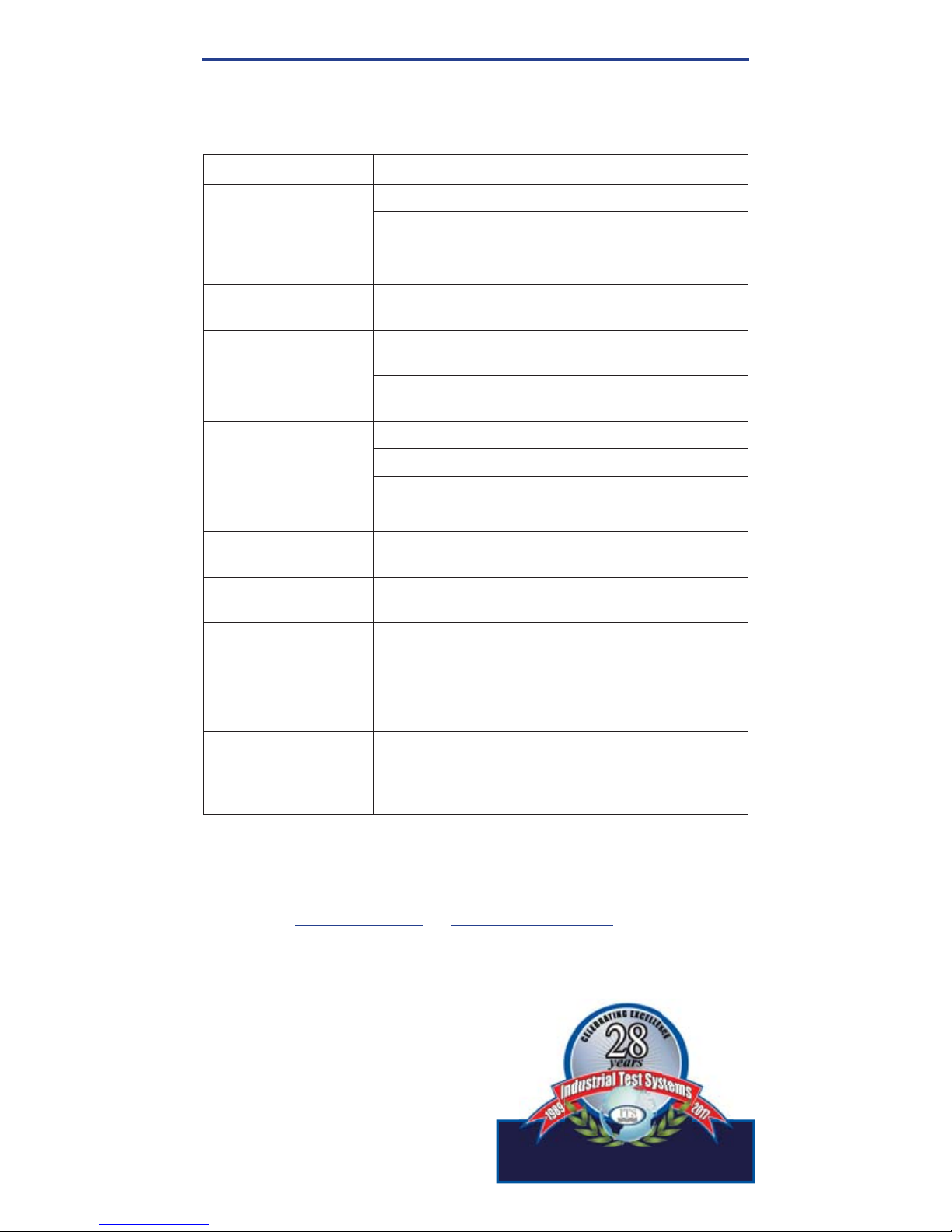
TROUBLESHOOTING
Listed below are possible situations that may arise while testing.
Please contact one of our knowledgeable customer service
representatives if you require further assistance
.
Subject Cause Solution
No response
from eXact iDip
®
Low battery Replace batteries
Chip failure Contact ITS
Dim screen on
eXact iDip
®
Low battery Replace batteries
“Er1” on
eXact iDip
®
LCD
No result sent to
eXact iDip® from app
Close & restart app
.
Reconnect to eXact iDip
®
“Er2” on
eXact iDip® LCD
No connection
to app
Connect eXact iDip
®
Lost connection
to app
Reconnect to eXact iDip
®
“LO” on eXact iDip
®
LCD while zeroing
Low battery Replace batteries
Dirty cell Clean cell
Cloudy sample Dilute sample or use fi lter
Bad LED Contact ITS
“HI” on eXact iDip
®
LCD while reading
Result above
detection level
Rerun test to verify result
“LO” on eXact iDip
®
LCD while reading
Result below
detection level
Rerun test to verify result
“AbS” on
eXact iDip
®
LCD
Start-up screen Continue with testing
App not
responding
Communication
error between device
and app
Force close app
and restart
Bluetooth
®
connection lost
eXact iDip®
submerged too far
in water
Collect water sample in
container and transfer
to cell or use Dry Case
while testing
TECHNICAL SUPPORT
Please visit exactidip.com or exactidip570.com for the latest
technical information and how-to-videos. For additional technical
support, call (803) 329-9712 or email at [email protected].
Industrial Test Systems, Inc.
1875 Langston Street, Rock Hill, SC
29730
(800) 861-9712 or (803) 329-9712
[email protected] | exactidip.com
ITS Europe, Ltd.
The UK Centre for Homeland Security
Building 7, Chilmark, Salisbury,
Wiltshire SP3 5DU UK +44 1722 717911
[email protected] | www.itseurope.co.uk
Manufacturing qualit products inc 1989
Page 10
10
©2016, Industrial Test Systems, Inc. Printed in USA
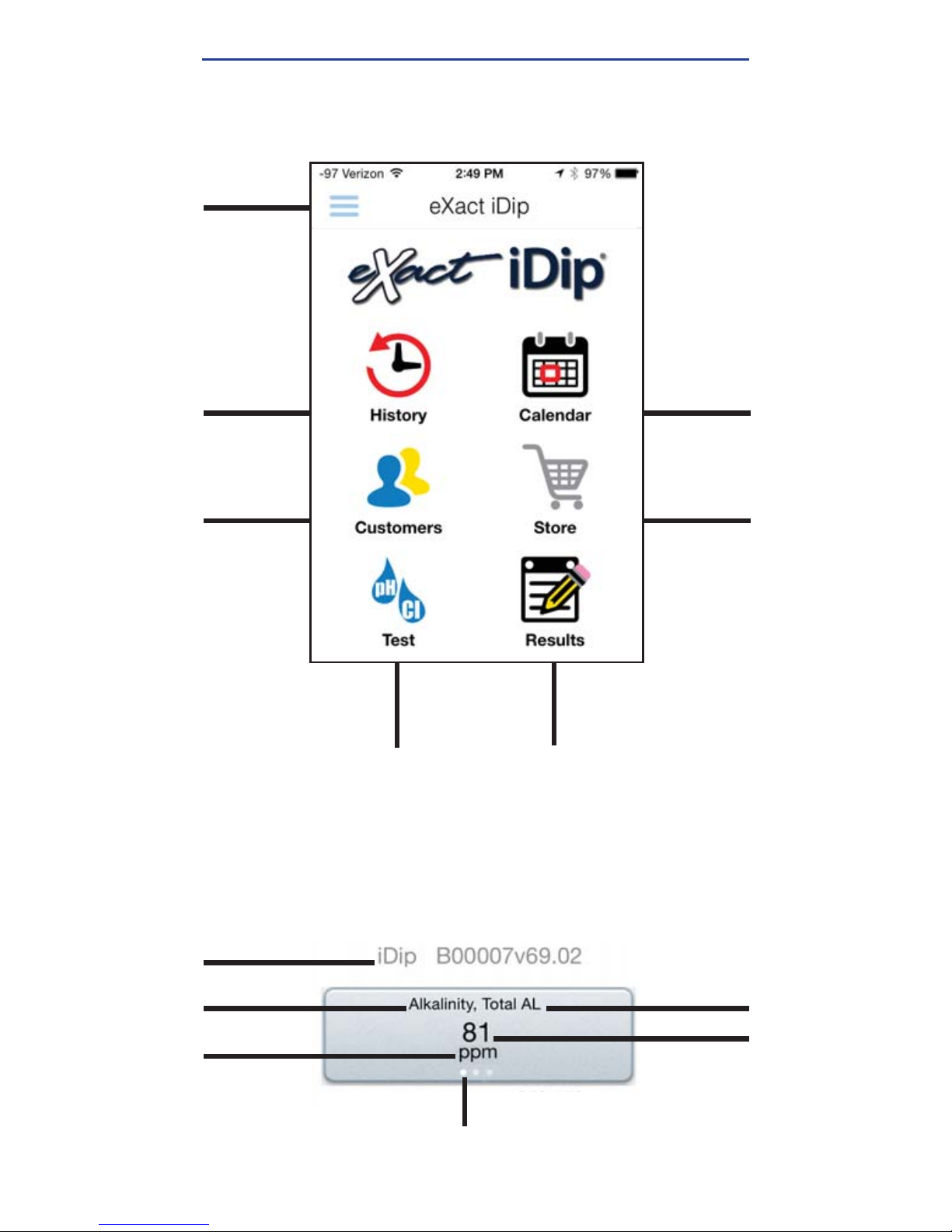
HISTORY:
Accesses
saved results
which can be
sorted, edited,
and emailed.
Also accesses
History Map
CALENDAR:
Displays your
schedule/
appointments
STORE:
Opens store
to unlock
additional tests
CUSTOMERS:
Attaches
results to
people and/or
locations from
your
smart
device contacts
TEST:
Initiates water
testing
RESULTS:
Accesses temporary
results that have
not been saved to
history
MENU:
Opens
slide-out for
easy access to
all app features
BLUETOOTH
DEVICE
TESTING
PARAMETER
TEST RESULT
HOME SCREEN
TEST RESULT SCREEN
TEST
ABBREVIATION
PARAMETER
UNIT OF MEASURE
DOTS INDICATE
MULTIPLE UNITS OF MEASURE
Swipe unit of measure values.
(Available for some tests)
®
®
EXACT IDIP® APP OVERVIEW
Page 11

11
exactidip.com
MENU
The Menu slide-out is available from any
screen within the app. The Menu allows you
to access any of the app’s features with ease.
HOW TO CHANGE THE TIMEOUT DURATION
The timeout setting is used to turn off the eXact iDip®
photometer. The default setting is 5 minutes, however this can
be adjusted. To do this, tap 'Settings' in the Menu slide-out
and tap either '+' or '–'.
Note: You may need to change the Auto-Lock time on your
smart device to allow for testing time (instructions will vary for
phone or tablet make/model)
HOW TO VIEW YOUR GPS LOCATION
ln the Settings screen you can view your current GPS
coordinates and/or refresh your current location coordinates. In
order to take advantage of the GPS feature, make sure to allow
eXact iDip® app to access your location.
ABOUT
Access the End-User License Agreement and contact
information to reach our offi ces in the USA and Europe from
the About section, located in the Menu slide-out.
Located in the About section you can fi nd the version of the
app you are running. Be sure to check for updates and install
the latest version before running a test as we are constantly
updating and adding more features to the app!
FAQS
Here you will fi nd videos, downloads, links, and answers to
the most frequently asked questions.
TEST
You can utilize two different testing methods
under Test: Manual Entry or Bluetooth Device.
BLUETOOTH TEST
Tests will be performed with your eXact iDip® photometer
using the
STANDARD STRIP METHOD
(page 18),
STANDARD LIQUID
METHOD
(page 19),
NON-STANDARD METHODS
, or
AUTO-CALCULATE
METHODS
(pages 20-21) test procedure.
MANUAL TEST
This feature allows you to utilize other testing methods and
manually enter your results into the app. Begin by selecting
'Test', 'Manual Entry', and select your desired test. Enter the
value obtained. Once fi nished, tap 'SAVE' at the top left. If the
test you need to enter is not available on the list, tap 'Custom*'.
Enter the type of test that was run, the value obtained, and the
unit of measure used. Then, tap 'SAVE' at the top left.
USING THE EXACT IDIP® APP
Page 12

12
©2016, Industrial Test Systems, Inc. Printed in USA
USING THE EXACT IDIP® APP
HISTORY
The History stores all your saved test result
information and allows you to sort by date,
customer name, or test type.
HOW TO SORT BY CUSTOMER
To sort by Customer begin by selecting 'History', then
'Sort by', 'Customer'. You can then scroll through your list of
customers by name, to fi nd a specifi c test result.
HOW TO SORT BY DATE
To sort by Date begin by selecting 'History' then 'Sort by',
'Date'. You can then scroll through a list of tests performed by
date. You can also set a specifi c date range by selecting 'Date
range'. Then set your From and To dates.
HOW TO SORT BY TEST
To sort by Test begin by selecting 'History' then 'Sort by',
'Test'. You can then scroll through a list of tests sorted in
alphabetical order.
HOW TO ACCESS HISTORY MAP
The History Map stores GPS locations of testing sites. See
page 24 for instructions on how to utilize this feature.
HOW TO EMAIL AND SHARE DATA
See page 23 for instructions on how to utilize these features.
CUSTOMERS
Customers attaches results to people and/or
locations in your smart device. In order to fully
utilize the features and capabilities of the app, each test
result will need to be stored (linked) to a profi le. You can add
customers in two ways. 1. By adding from your existing contact
list on your smartphone/tablet or 2. You can create a new contact.
HOW TO ADD EXISTING CONTACTS
To add current contact information already stored on
your device, begin by selecting 'Customers' then 'Add
customers from contacts'.
HOW TO CREATE A NEW CONTACT
To create a new contact, select 'Customers', tap the '+', then
enter all of the customers contact information. Once fi nished
tap 'Done'.
Page 13
13
exactidip.com
USING THE EXACT IDIP® APP
CALENDAR
Never miss an appointment! With the app’s
Calendar feature, you can access your device’s
calendar directly from the app. View by date range
to see past entries or future appointments.
STORE
The eXact iDip® app comes pre-installed with
tests for Total Alkalinity, Free Chlorine, Combined
Chlorine, and pH. You can purchase and unlock
over 50 additional tests from the Store located in
the app (eXact® Strips/reagents not included).
To purchase additional tests, begin by selecting 'Store',
scroll to the test you would like to purchase, and tap 'Buy'
(this will unlock the test in the app). When purchasing tests
in the app, be sure to select the appropriate test for your
eXact iDip® photometer. To order eXact® Strips/reagents,
contact your local supplier or order online (see pages 31-32
for a list of available reagents).
RESULTS
You can view details for tests that have not been
saved to History, add notes, or clear recent test
history from the Results section.
HOW TO ADD NOTES
To add notes begin by selecting 'Results' then select the test
result you would like to add notes to. Tap inside the blue note
section of the Results screen and add your notes. The app
will automatically save the information you enter.
Tap 'Results' to return to the previous screen.
HOW TO CLEAR PREVIOUS TEST RESULTS
To clear ALL recent test results, tap 'Results', then 'Reset'.
A notifi cation screen will display 'Reset data results'. “Are
you sure you want to reset all the results and notes?” Tap
'Yes' to clear.
If no entries are visible in the app, you may need to
allow the app to access your calendar. You can do this
in the settings and security section of your smartphone/
tablet (instructions for each will vary by make/model).
TIP
Page 14
14
©2016, Industrial Test Systems, Inc. Printed in USA
SELECT, FILL, DIP, READ
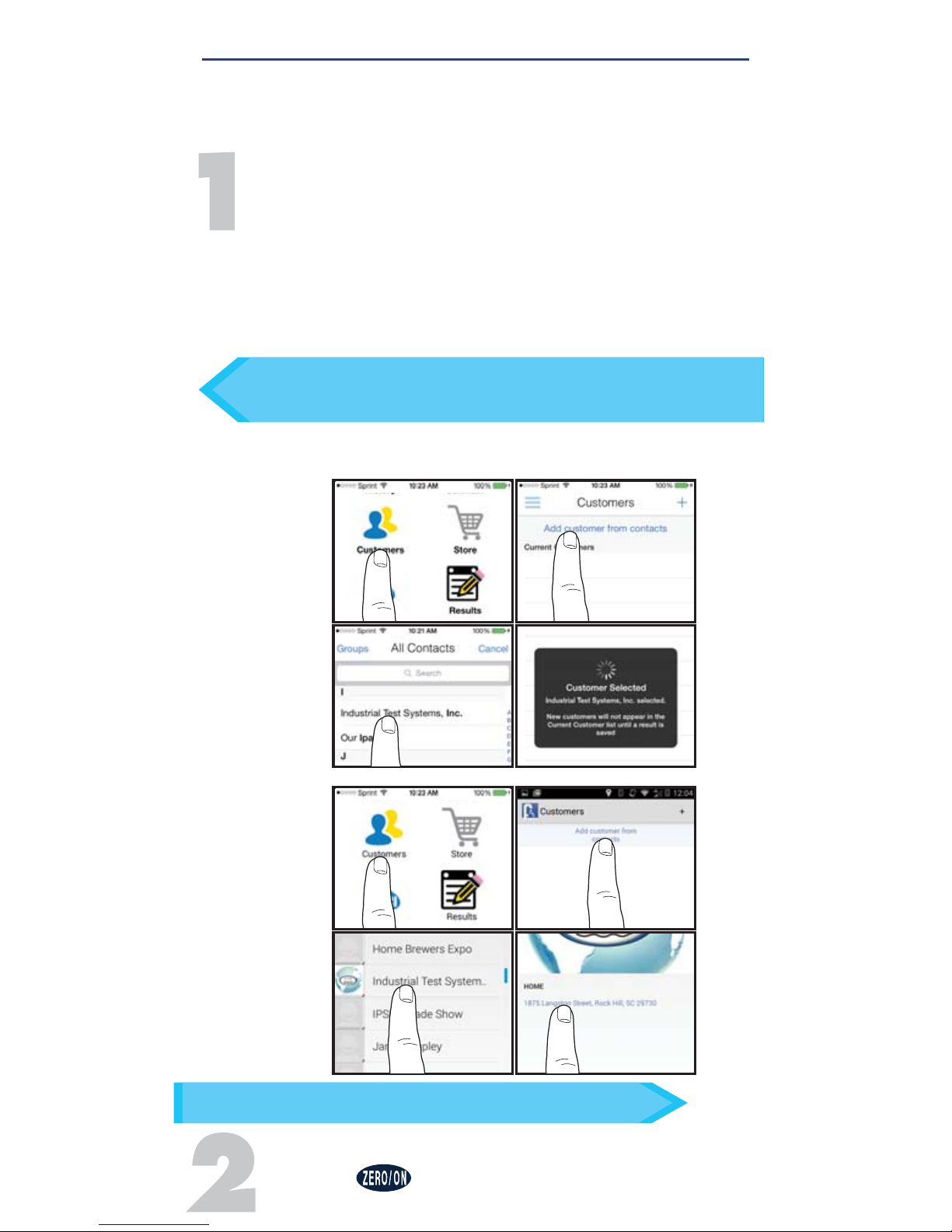
SELECT CUSTOMER
a. Select
'Customers'
from the
'Home'
screen.
b. Tap
'Add customer from contacts'.
c. Select a contact from your list. After selecting a
contact, tap on the customer's address if shown.
Android users: If no address is found, tap "No
addresses found"
d. Verify customer has been selected.
Note:
In order to take full advantage of the GPS and Data
Storage features, each test result is linked to a contact.
POWER ON EXACT IDIP
®
Press the button to power on the eXact iDip®.
Before you begin, ensure you have downloaded the app and all
necessary tests you require. For helpful tips regarding test procedures,
refer to tips “FOR BEST ACCURACY” on page 5.
After adding a customer, a test will need to be conducted
and a result saved in order for the customer’s information to
display in the app’s customers list.
TIP
You can also choose to complete this step after testing.
TIP
b
d
c
a
Apple
b
d
c
a
Android
Page 15
15
exactidip.com
SELECT, FILL, DIP, READ
SELECT
BLUETOOTH® TEST
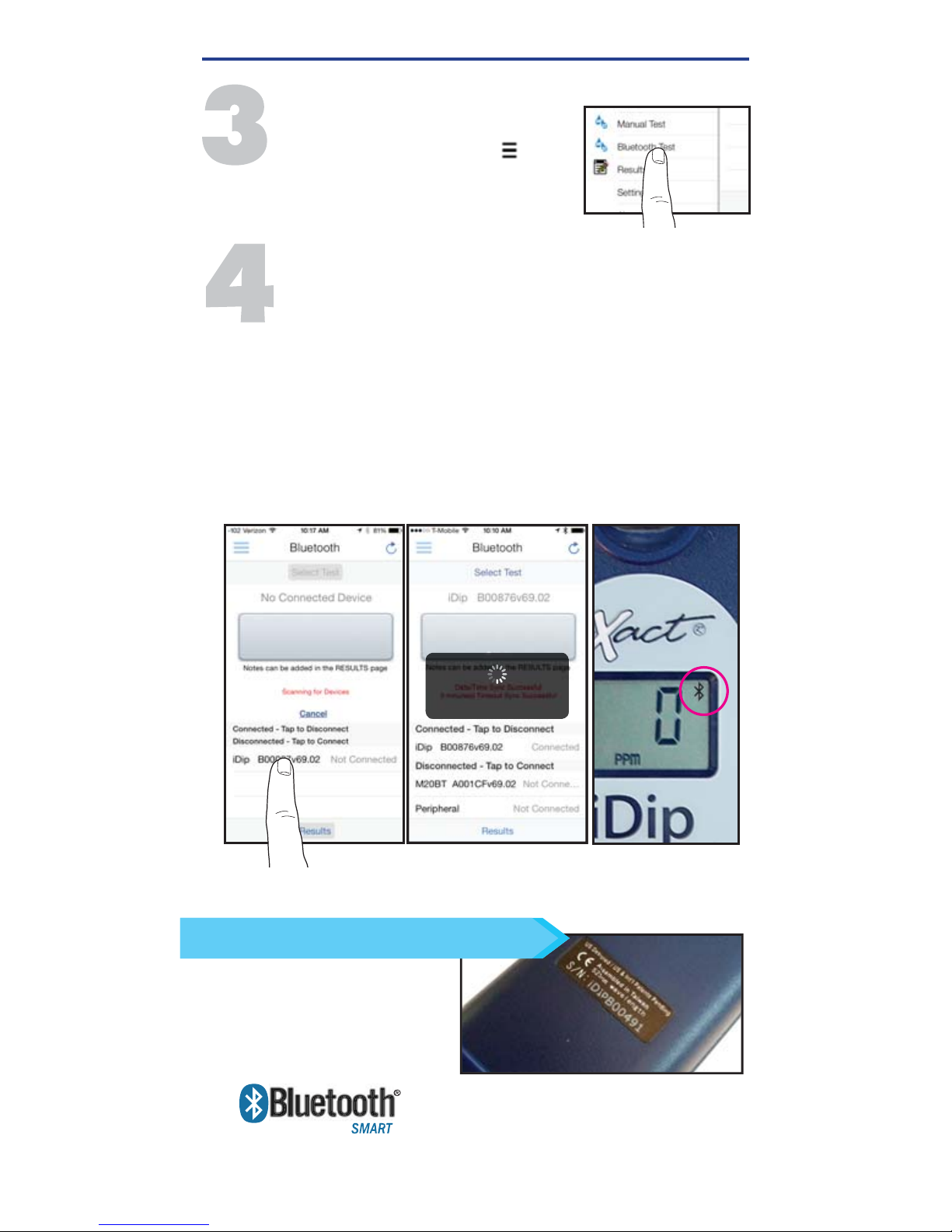
Tap the menu slide out ‘ ’
and select
'Bluetooth Test'
from the choices shown.
CONNECT EXACT IDIP
®
The eXact iDip® app will automatically connect to the
most recently used eXact iDip® photometer. If not,
select your eXact iDip® from the bottom of the screen.
Note: Ensure you always connect your eXact iDip
®
photometer
via the Bluetooth
®
connection within the app. To verify connection
look for the Bluetooth icon in the upper right corner of your
photometer.
If you experience an issue connecting your device, check to
ensure that your smartphone/tablet’s Bluetooth
®
function is turned
on and your device is compatible.
Refer to the back of your
eXact iDip
®
to determine the
serial number for your device.
This will also be the name for
the Bluetooth
®
connection.
Bluetooth® SMART is a low–power
wireless networking standard which
uses short radio waves to allow
electronic devices to communicate with each other. For more
information regarding Bluetooth
®
SMART, see page 25.
TIP
Easily verify your device.
Date/Time Sync Successful
Check LCD display for Bluetooth icon.
Page 16
16
©2016, Industrial Test Systems, Inc. Printed in USA
SELECT TEST
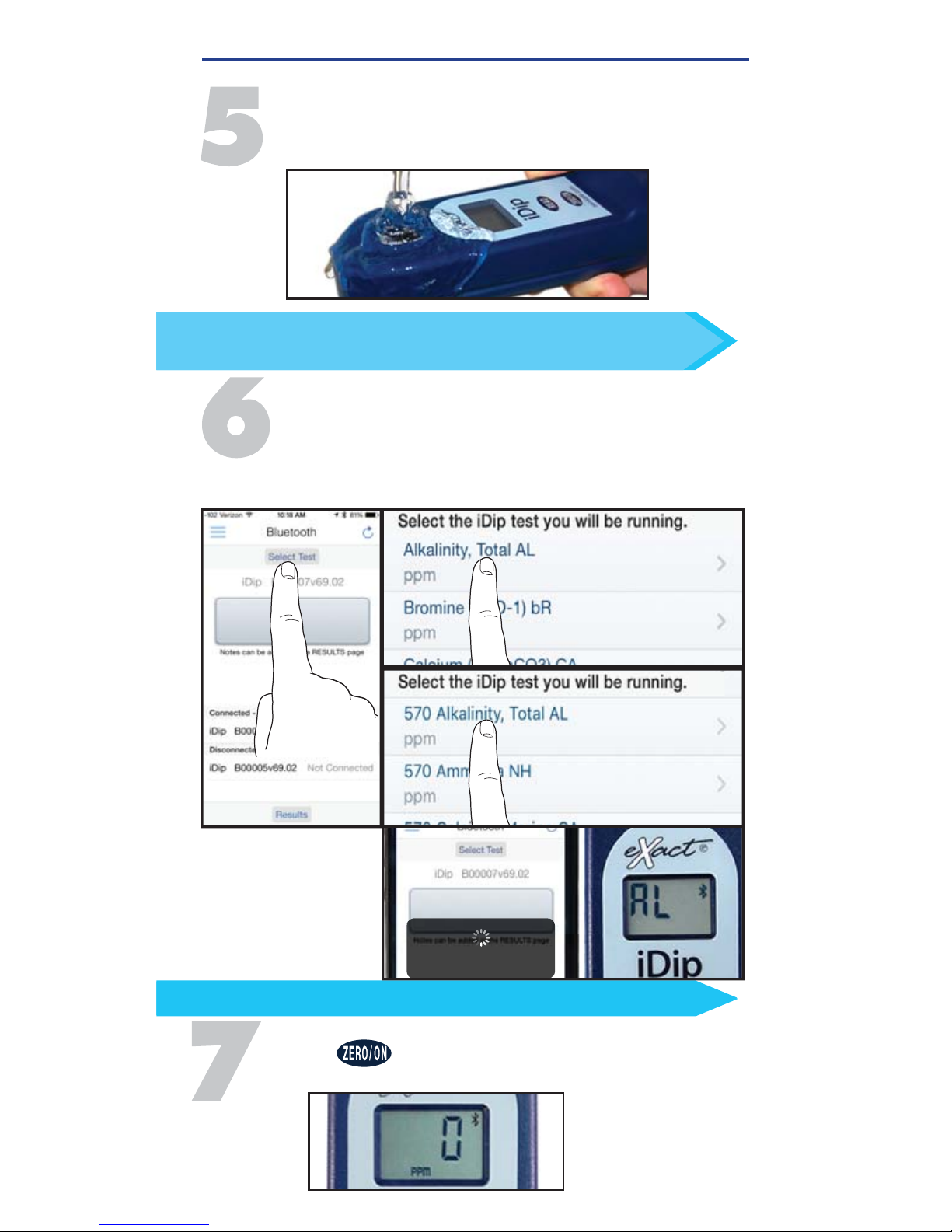
Tap
'Select Test'
at the top (e.g. Alkalinity, Total).
The eXact iDip® and app will both display the
test being run. If using the eXact iDip® 570, all
available tests will begin with 570 (see below).
FILL CELL
Rinse the cell 3 times with the water sample to
be tested and FILL to the top to begin test.
Use the included cleaning brush to clean the cell after
each test to achieve the most accurate result.
TIP
Alkalinity, Total AL
Bluetooth Test
Alkalinity, Total AL Selected
ZERO METER
Press and the iDip® display reads 0
PPM
indicating the meter is ready for testing.
In bright light and liquid method situations use cell cover
for zeroing and reading.
TIP
SELECT, FILL, DIP, READ
Page 17

17
exactidip.com
NON-STANDARD
METHODS
Download at exactidip.com or
exactidip570.com
Alkalinity, Total (when AL >200 ppm) Manganese (as Mn+2)
Ammonia (eXact iDip
®
570 only) Molybdate (120 sec)
Calcium, UH Marine (eXact iDip® 570 only) Sulfi de (as S2-) (180 sec)
Chloride, HR (as NaCl) Turbidity
Chlorine, Combined SPA Alkalinity, Total
Chlorine Dioxide SPA Bromine, Total
Hardness, Total (when AL >200 ppm)
SPA Hardness, Calcium
Hardness, Total UH Marine (
eXact iDip® 570 only)
SPA Chlorine, Free
Iron, Total SPA pH-II
AUTO-CALCULATED
METHODS
Chlorine, Combined Hardness, Magnesium Residual Alkalinity
Chlorine, Total Langelier Saturation Index (LSI) Sodium
See pages 20-21
Alkalinity, Total
Alkalinity, Total Marine (
eXact iDip® 570 only)
Bromine, Total Iodine
Chloride (as NaCl) Nitrate (as NO
3
) (600 sec)
Chlorine, Free Nitrite (as NO2) (360 sec)
Chlorine, Total (120 sec) Ozone
Chlorine, Total High
(120 sec) Peracetic Acid Low
Chromium (VI) (240 sec) Peracetic Acid
Copper (as Cu
+2
) (120 sec) Permanganate
Hardness, Calcium (as CaCO
3
) pH-II
Hardness, Total High (as CaCO3) pH, Acid
Hardness, Total Low (as CaCO
3
) pH, Alkali
Hydrogen Peroxide
(100 sec) Phosphate (as PO4) (120 sec)
Hydrogen Peroxide High Sodium Bromide (as NaBr)
Hydrogen Peroxide Low
(120 sec) Sulfate (as SO4)
Proceed to step 8 on page 18
STANDARD STRIP METHOD
The STANDARD STRIP METHOD (page 18) applies to both the eXact iDip®
photometer and the eXact iDip® 570 photometer unless otherwise stated
(some tests require a count-up time, listed below).
STANDARD LIQUID METHOD
Cyanuric Acid (5 drops, 60 sec) pH-BT
(eXact iDip® 570 only)
(2 drops)
Fluoride
(eXact iDip® 570 only)
(10 drops)
Metals (2 drops, 120 sec)
The
STANDARD LIQUID METHOD
(page 19) involves adding the specifi ed
number of drops (below) and mixing for a 20 second count-down (some
tests require a count-up time, listed below).
Proceed to Step 8 on page 19
TEST METHODS
For more detailed instructions, all test procedures are available for
download at exactidip.com and exactidip570.com.
Page 18
18
©2016, Industrial Test Systems, Inc. Printed in USA
STANDARD STRIP METHOD
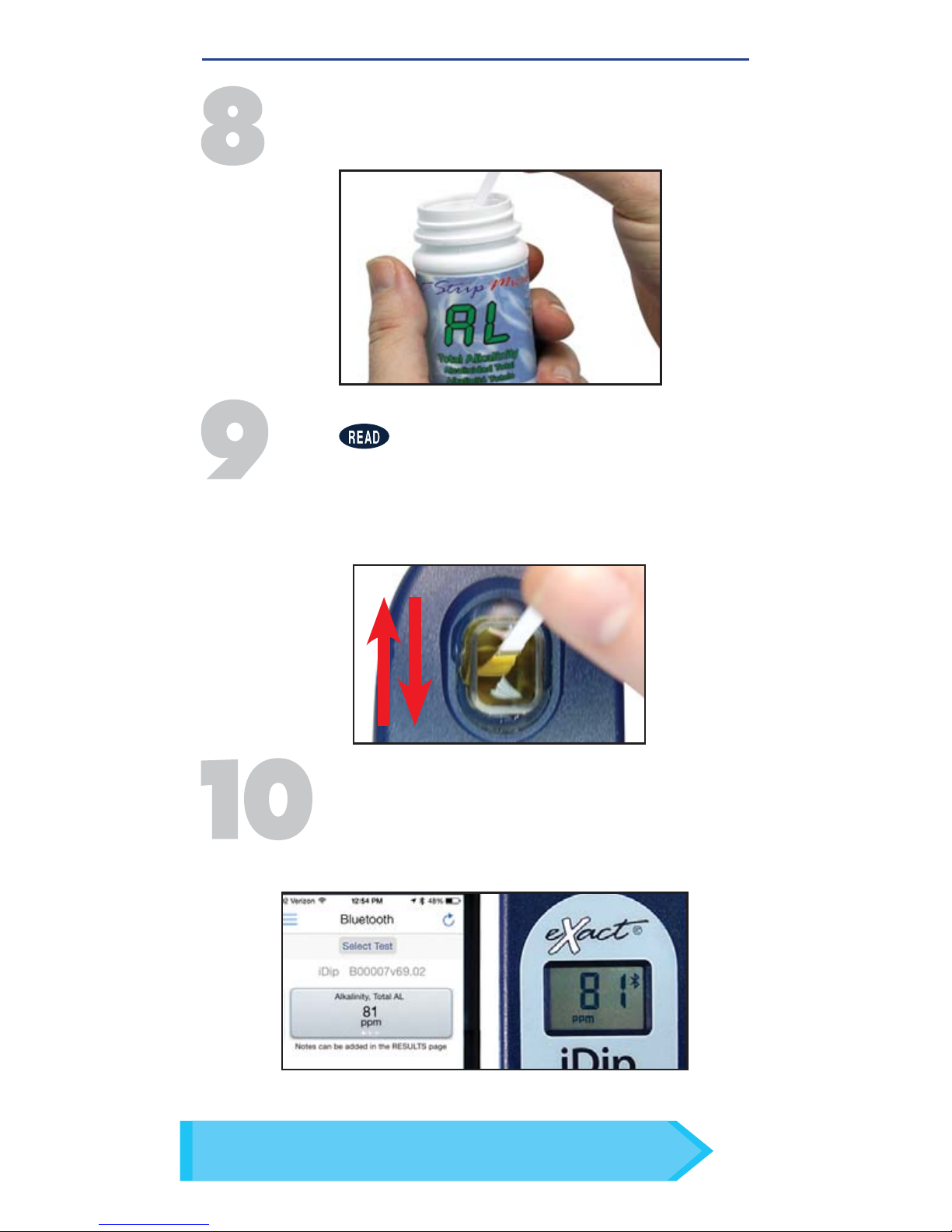
DIP STRIP AND PRESS READ
Press to initiate a 20 second countdown and
simultaneously DIP the eXact® strip by submerging
all pads in the sample. Use a gentle constant back
and forth motion (2 strokes per second) until the timer
displays
'1'
. Remove and discard the strip. Wait for
count-up time if required.
REMOVE STRIP
Remove one eXact® Strip Micro (e.g. Total Alkalinity) and
set in a dry, convenient place. Replace cap on bottle.
READ RESULTS
READ result displayed on the iDip
®
and in the app.
To run additional tests, repeat steps 5-9. To save,
send, and share results, proceed to page 22 prior
to closing the app.
TIP
On the Test Result Screen, swipe the result to the left,
or right, to view alternative units of measure.
Visit exactidip.com or exactidip570.com for complete test instructions.
Page 19
19
exactidip.com
STANDARD LIQUID METHOD
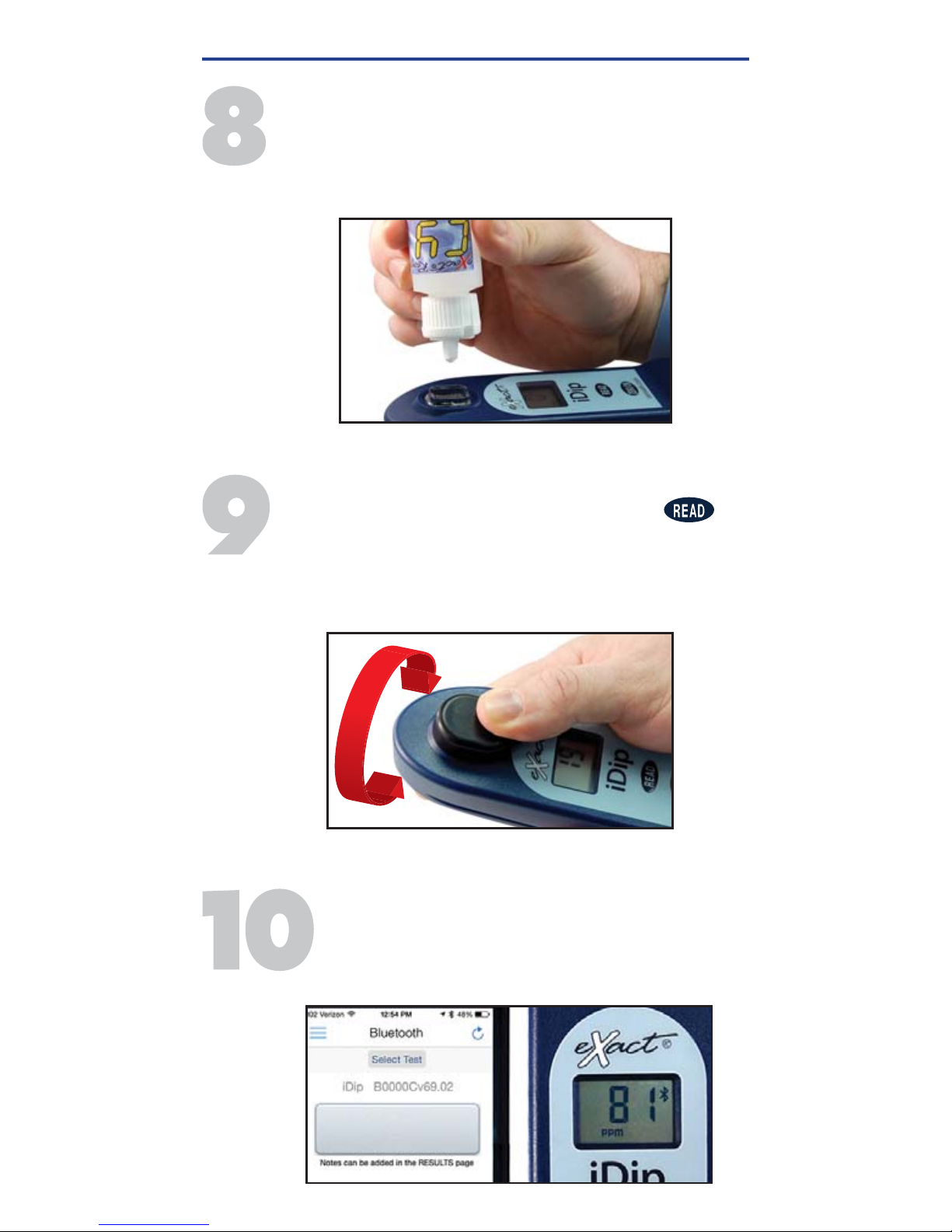
SHAKE BOTTLE & ADD DROPS
Tilt meter to discard about 0.2mL water in order to leave
room for liquid reagent. Shake the bottle of eXact®
Reagent (e.g. Cyanuric Acid) and add drops. Ensure the
reagent bottle remains vertical while adding drops.
COVER, PRESS READ, & MIX
Place the Cell Cover onto the CELL. Press
and a 20 second countdown begins. Turn the meter
upside-down repetitively during the 20 seconds.
When the timer displays '1', place the eXact iDip® on
a fl at surface. Wait for count-up time.
READ RESULTS
READ result displayed on the eXact iDip
®
and in
the app. To run additional tests, repeat steps 5-9.
To save, send, and share results, proceed to page
22 prior to closing the app.
Cyanuric Acid CY
81
ppm
Visit exactidip.com or exactidip570.com for complete test instructions.
Page 20
20
©2016, Industrial Test Systems, Inc. Printed in USA
AUTO-CALCULATED METHODS
MAGNESIUM HARDNESS
Perform tests for Total Hardness and Calcium
Hardness. Then, tap Results at the bottom of the page
and a Magnesium Hardness value will be calculated
automatically.
RESIDUAL ALKALINITY
Use the procedure above to obtain a Magnesium Hardness
value. Then use the STANDARD STRIP METHOD as illustrated
on page 18 to perform the test for Total Alkalinity. Lastly, tap
Results at the bottom of the page and a Residual Alkalinity
value will be calculated automatically.
SODIUM
Use the procedure above to obtain a Residual Alkalinity
value. Then use the STANDARD STRIP METHOD as illustrated
on page 18 to perform tests for Chloride and Sulfate. Lastly,
tap Results at the bottom of the page and a Sodium value
will be calculated automatically.
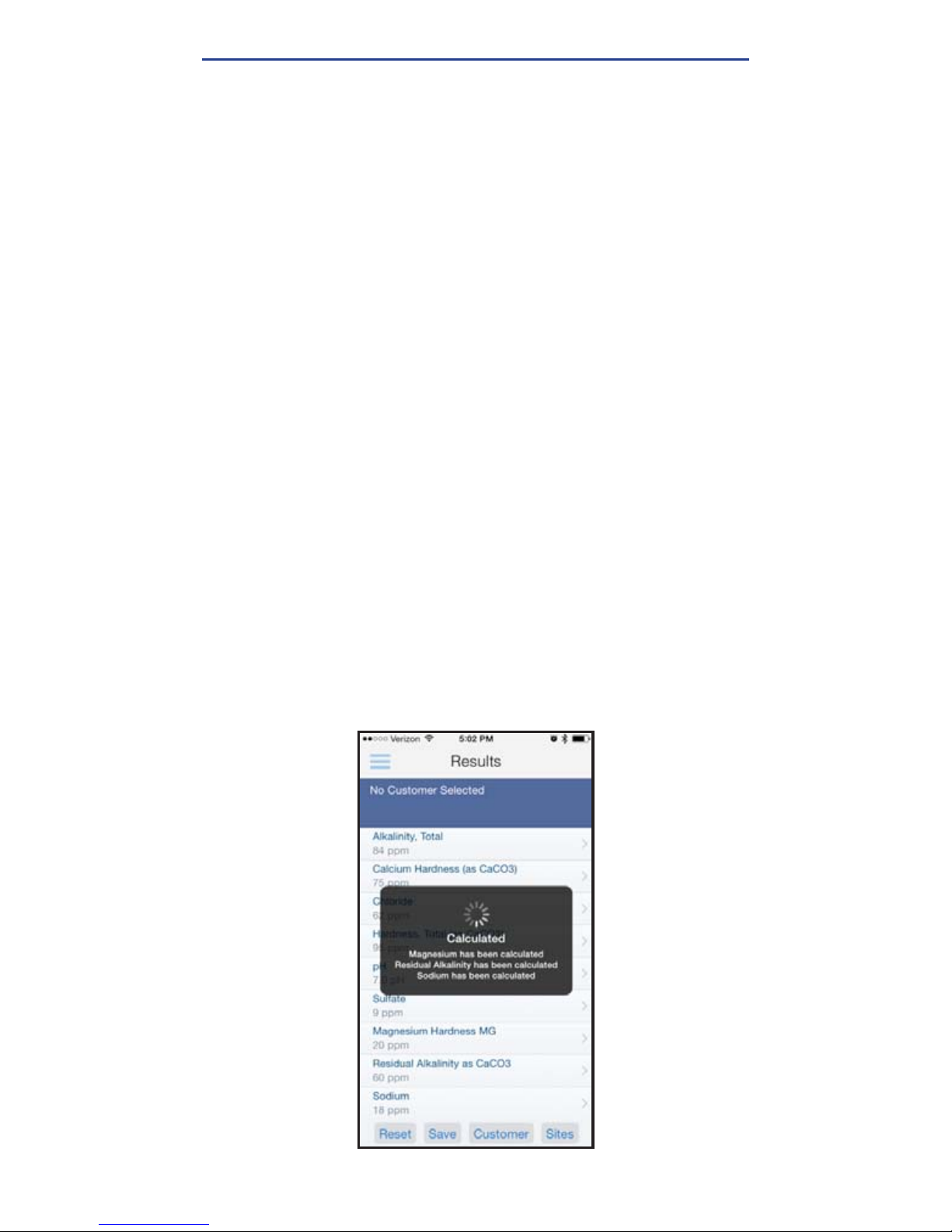
If you would like to obtain all three test results listed above,
you can perform all required tests (Total Hardness, Calcium
Hardness, Total Alkalinity, Chloride, and Sulfate) and then go
to Results. At this point, all three values will be automatically
calculated simultaneously (see below).
Visit exactidip.com or exactidip570.com for complete test instructions.
Page 21
21
exactidip.com
LANGELIER SATURATION INDEX (LSI)
Use the STANDARD STRIP METHOD as illustrated on page 18
to perform tests for Total Alkalinity, Calcium Hardness, and
pH. Then, obtain a TDS result and a Temperature result via
alternate means. Open the slide-out menu and tap Manual
Test. Tap Temperature and enter the value obtained. Tap
Save in the top left. Tap Total Dissolved Solids (TDS) and
enter the value obtained. Tap Save in the top left. Lastly, tap
Results at the bottom of the page and an LSI value will be
calculated automatically.
TOTAL CHLORINE
Perform the NON-STANDARD METHOD for Combined Chlorine
(available for download at exactidip.com). Lastly, tap
Results at the bottom of the page and a Total Chlorine value
will be calculated automatically.
COMBINED CHLORINE
Use the STANDARD STRIP METHOD as illustrated on page 18
to perform tests for Free Chlorine and Total Chlorine. Then,
tap Results at the bottom of the page and a Combined
Chlorine value will be calculated automatically.
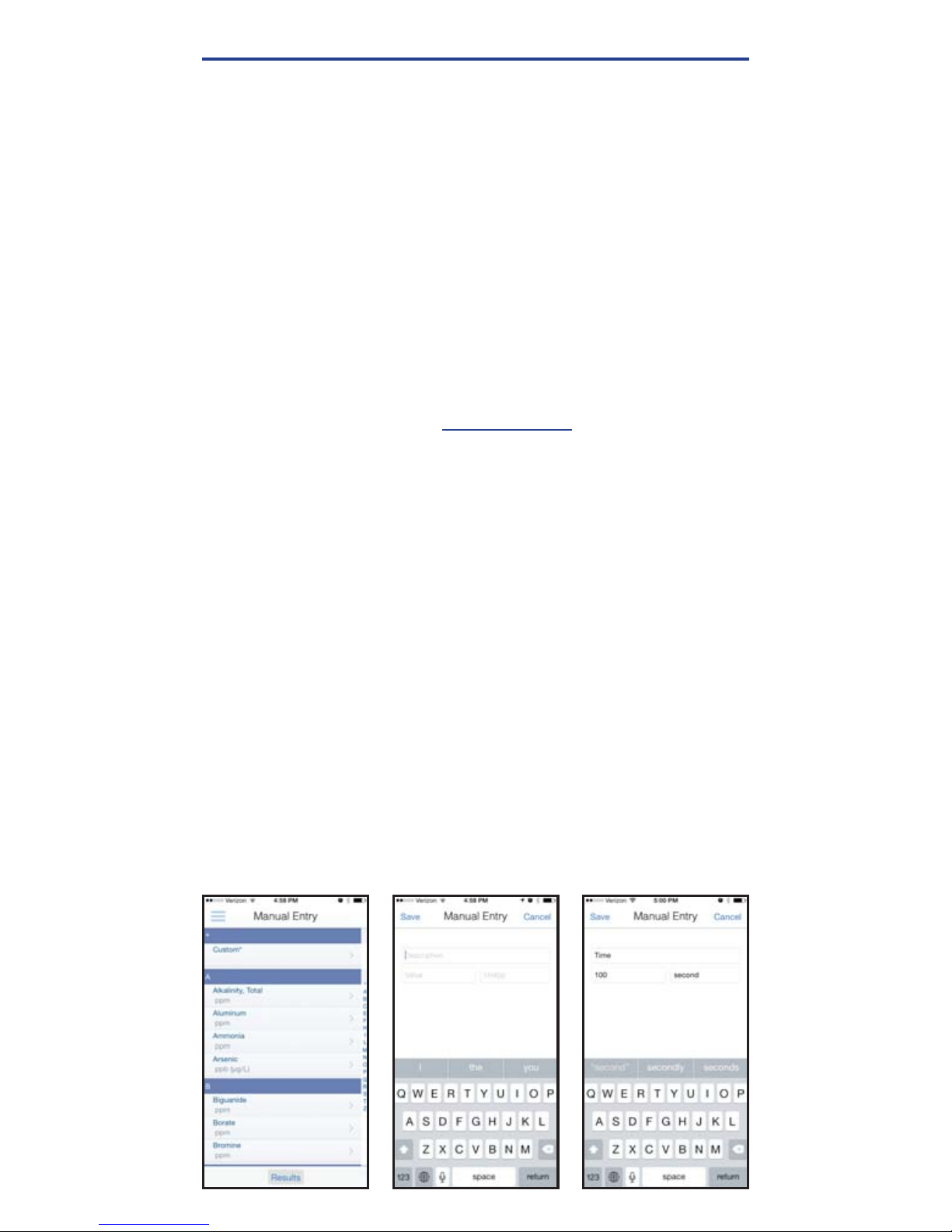
MANUAL ENTRY
This feature allows you to utilize other testing methods and
manually enter your results into the app. Begin by selecting
'Test', 'Manual Entry', select your desired test. Enter the value
obtained. Once fi nished, tap 'SAVE' at the top left. If the test
you need to enter is not available on the list, tap 'Custom*'.
Enter the type of test that was run, the value obtained, and the
unit of measure used. Then, tap 'SAVE' at the top left.
AUTO-CALCULATED METHODS
Visit exactidip.com or exactidip570.com for complete test instructions.
Page 22
22
©2016, Industrial Test Systems, Inc. Printed in USA
MANAGING DATA
SAVE
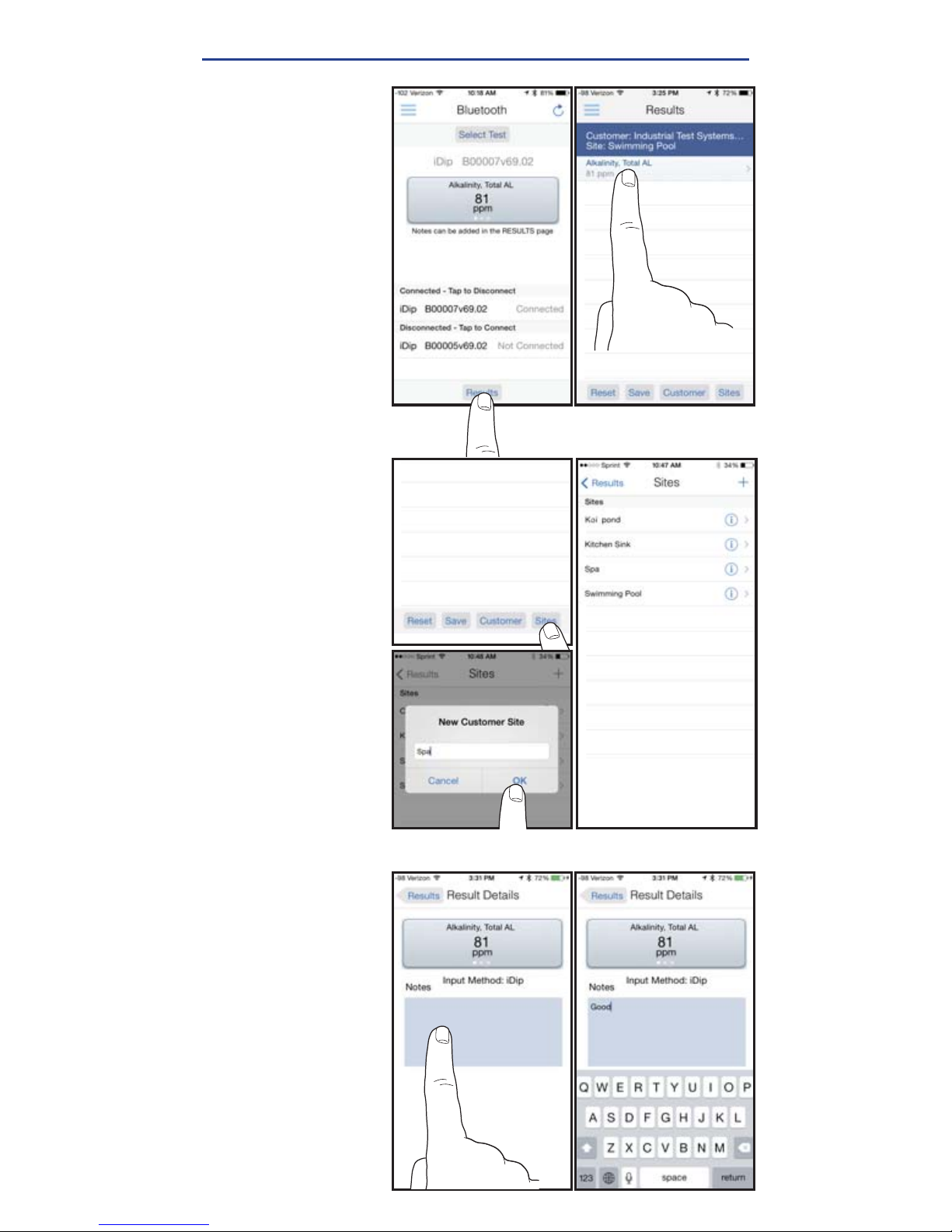
After tests have
been performed,
tap 'Results' at the
bottom of the screen.
ADD SITES
Each result can
be saved to a
customers 'Site'.
Swimming pool is
the default. Select a
site from the list or
to add additional
sites, tap 'Sites',
then '+'.
Enter a Site name,
tap 'OK'.
ADD NOTES
To add notes tap the
desired test result.
Type notes in the
'Notes' box, which
are automatically
saved. Press
'Results' to return to
the results menu.
Page 23
23
exactidip.com
SAVE TO RESULTS
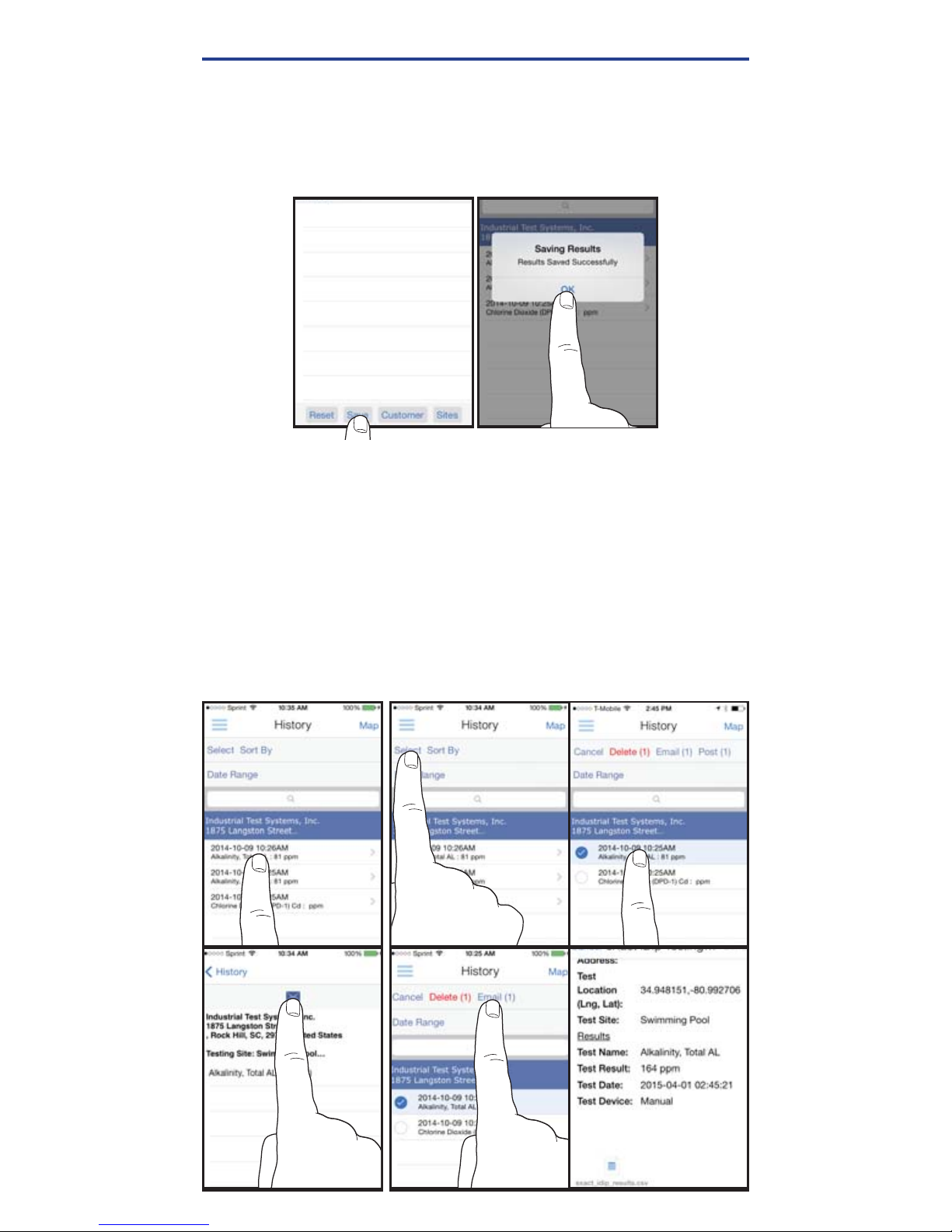
In 'Results' screen, tap 'Save' to store into 'History'.
A
'
Saving Results' screen appears, tap 'OK'. Your result is
now successfully saved.
MANAGING DATA
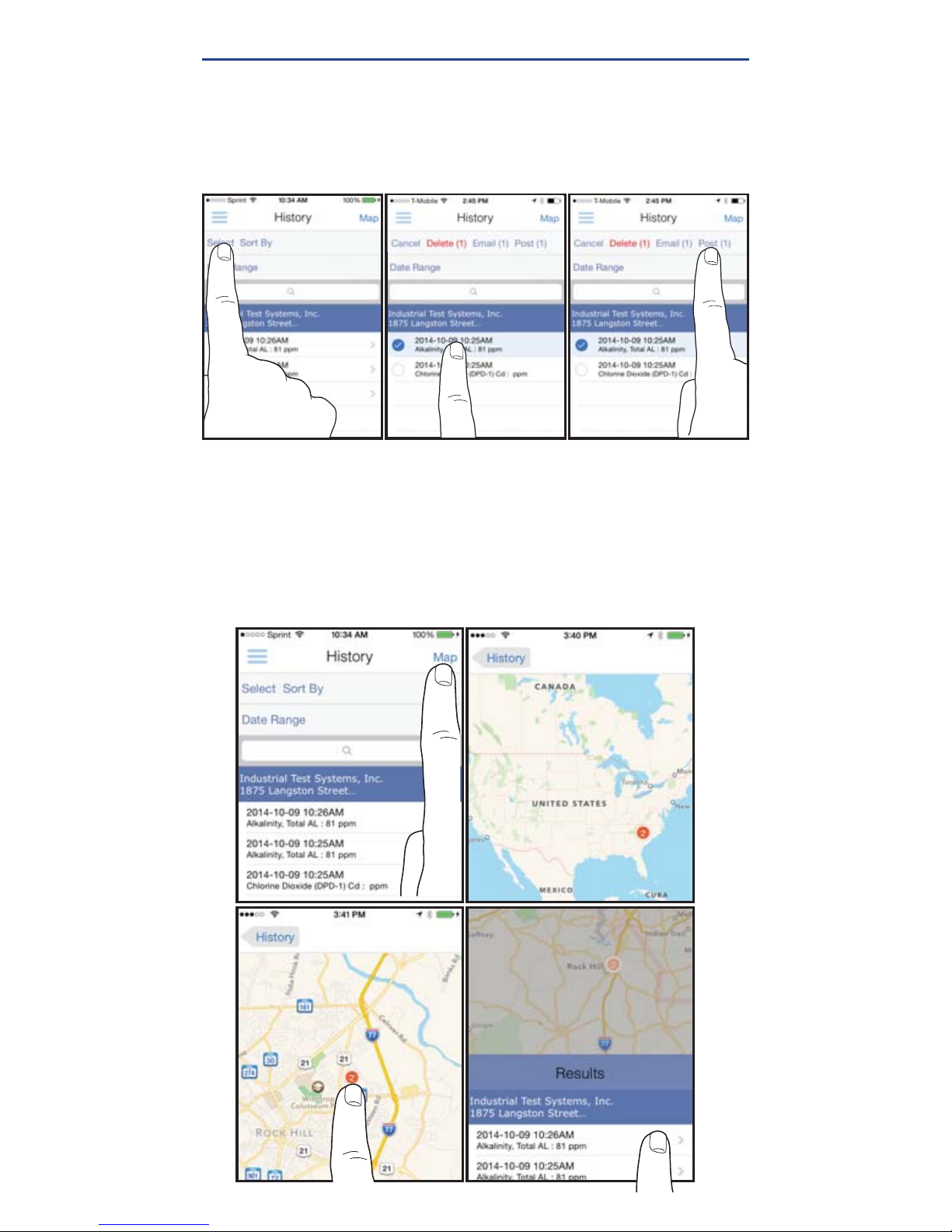
SEND/SHARE VIA EMAIL
In History you can edit, select, and email your results.
To email you can either tap an individual result displayed,
or use the 'Select' button to access multiple data points.
Press the blue envelope icon if you tapped an individual result.
Select
'Email'
at the top if multiple tests are selected. A .csv
(spreadsheet) fi le will be attached at the bottom of the e-mail.
Individual Result Multiple Results
Page 24
24
©2016, Industrial Test Systems, Inc. Printed in USA
MANAGING DATA
SEND/SHARE VIA SOCIAL MEDIA
To share your results on social media, use the 'Select' button
and check the result(s) you want to share. Tap 'Post' at the
top and choose whether to share via Facebook or Twitter.
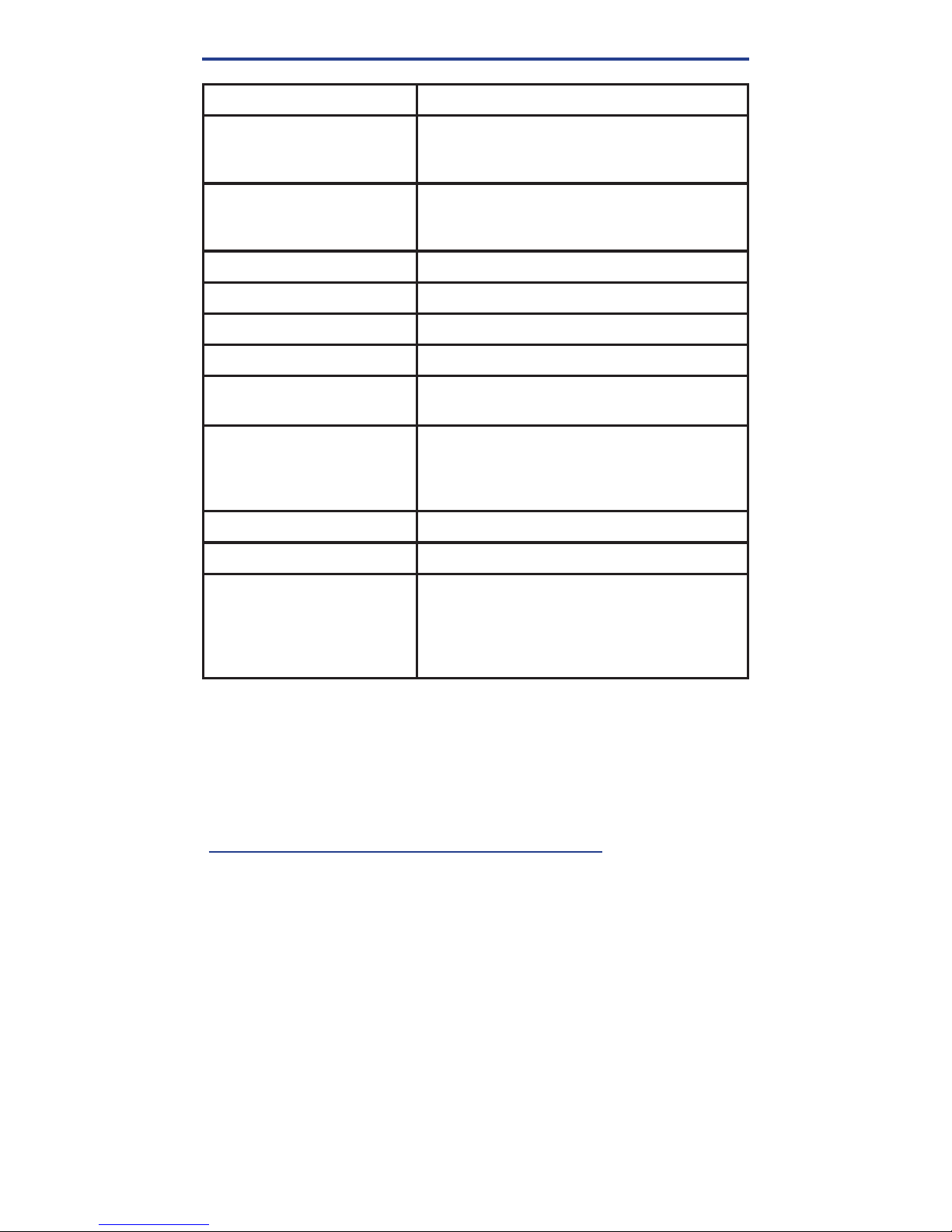
USING HISTORY MAP
Tap
'Map'
on History page to access History Map. Double-tap
or spread fi ngers to zoom. Tap on a pin to see results. Tap on
a result to bring up the details page.
Page 25
25
exactidip.com
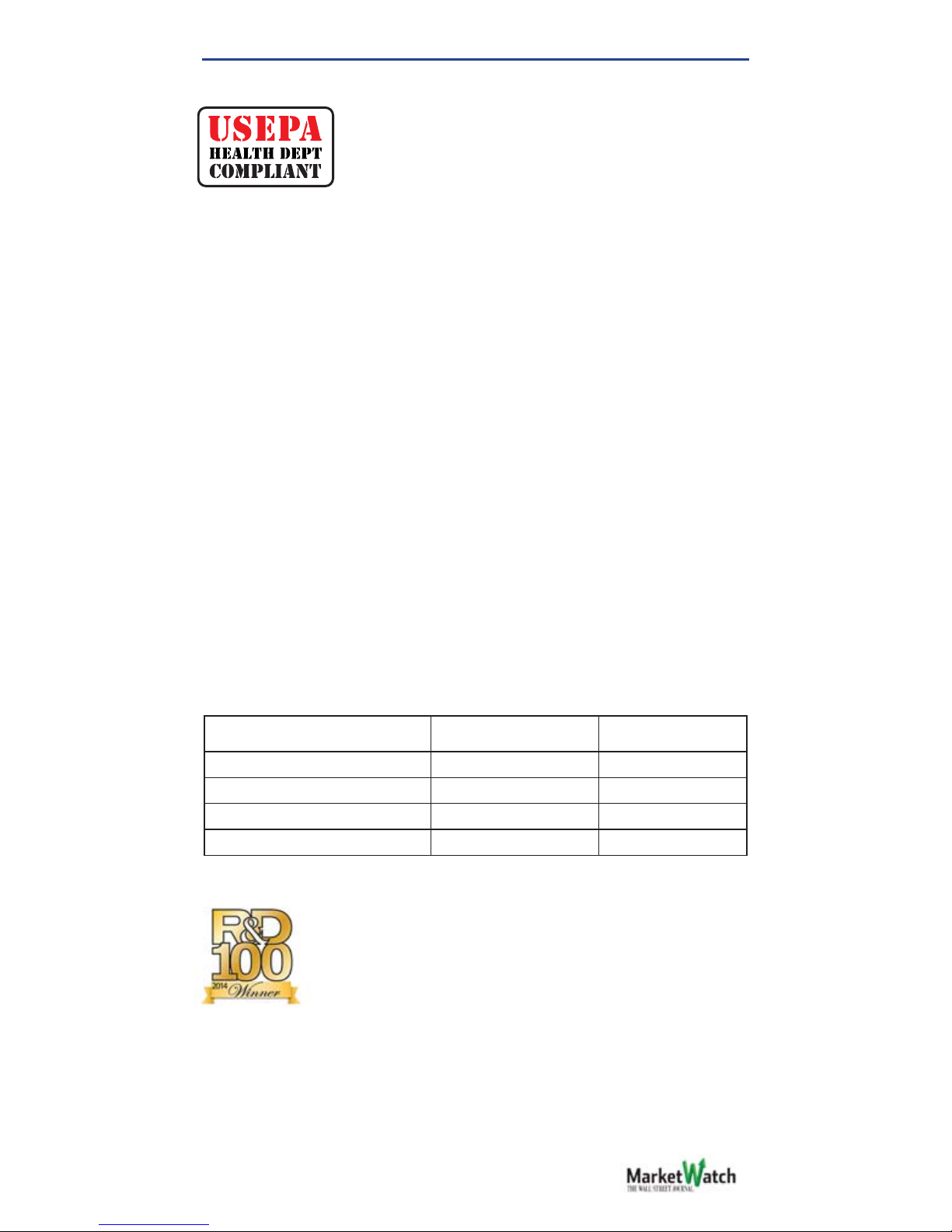
EXACT® STRIP MICRO CL INTERFERENCES
Interfering Substance Interfering Levels and Treatments
Acidity If sample has acidity above 150mg/L CaCO3
test may not develop full color. Neutralize to
pH 6.0 to 7.0 with 0.5N Sodium hydroxide.
Alkalinity
If sample has alkalinity above 200mg/L CaCO3
test may not develop full color. Neutralize to pH
6.0 to 7.0 with 0.5N Sulfuric acid.
Bromine and Bromamines, Br2Color similar to free chlorine reaction at all levels.
Chlorine Dioxide, ClO
2
Color similar to free chlorine reaction at all levels.
Copper, Cu
2+
Color development is reduced above 10 ppm (mg/L).
Iodine, I
2
Color similar to free chlorine reaction at all levels.
Manganese, oxidized (Mn4+, Mn7+)
or Chromium, oxidized (Cr6+)
See AWWA procedure 4500-CL F, 1(d) for
removal of interferences.
Monochloramines (NH2Cl)
(applies to DPD-1 only)
Monochloramine interferences are known
to occur in free chlorine DPD methods. This
interference is dependent on temperature and
monochloramine concentration.
Ozone, O
3
Color similar to free chlorine reaction at all levels.
Peroxides Interference is possible.
pH
Typical pH samples of potable water with a pH
of 6.0 to 9.0 are OK. If outside this range adjust
to pH 6.0 to 7.0 using acid (0.5N Sulfuric acid)
or base
(0.5N Sodium hydroxide).
BLUETOOTH® SMART TECHNOLOGY
Bluetooth® SMART is a low-power networking standard
which uses short radio waves to allow electronic devices
to communicate with each other wirelessly. The eXact iDip®
comes standard with the latest Bluetooth® 4.0 technology
(bluetooth.com/Pages/Bluetooth-Smart.aspx). It is a class
2 device with a wireless working distance of up to 30 feet
(10 meters) and a 2.1 Mbps data transfer rate. This allows a
seamless transfer of data between a smart device and the
eXact iDip®.
BUILT IN SAMPLE CELL
The built-in sample cell is made of transparent plastic;
the sturdy cell design will last for over 20,000 readings.
Our studies have shown that scratches on the cell will not
compromise the accuracy of your results because of the
cell’s fi xed position.
MAKING CALLS
The eXact iDip® is not intended for use while talking on your
smart phone. Talking during testing may cause the app
to shutdown.
ABOUT
Page 26
26
©2016, Industrial Test Systems, Inc. Printed in USA
ABOUT
COMPLIANCE TESTING
This DPD test system for Chlorine and Chlorine
Dioxide are accepted for reporting by most
health departments because the tests are
USEPA (DIN Standard 38 408 G4/G5, ISO
7393/2) accepted for testing requirements for Free Chlorine, Total
Chlorine, and Chlorine Dioxide.
The compliance requirement is a photometer wavelength to
measure between 490 and 530nm. The eXact iDip
®
photometer
uses a 525nm wavelength and 11 mm path-length. The
eXact® Strip Micro CL/Cd (DPD-1) use the same reagents and
proportions, and the resulting solution pH is maintained between
6.2 and 6.5 as specifi ed by AWWA method 4500-Cl G/ClO2-D.
The USEPA does not “approve” commercial DPD delivery
systems. The eXact® Strip Micro CL (DPD-1) for Free Chlorine,
and the eXact® Strip Micro CL (DPD-3) for Combined Chlorine,
the eXact® Strip Micro CL (DPD-4) for Total Chlorine, and the
eXact® Strip Micro Cd (DPD-1) for Chlorine Dioxide meet your
reportable testing requirements because the eXact® Strip Micro
strips deliver the same chemicals in identical proportions. The
eXact® Strip Micro Chromium is compliant because it uses the
same wavelength and delivers the same chemicals in the same
proportions as AWWA method 3500-Cr B. The eXact iDip® 570
photometer cannot be used for compliance monitoring because
the photometer wavelength of 570nm is outside of the required
490nm–530nm range. Consult with your local Health Department for
offi cial regulations.
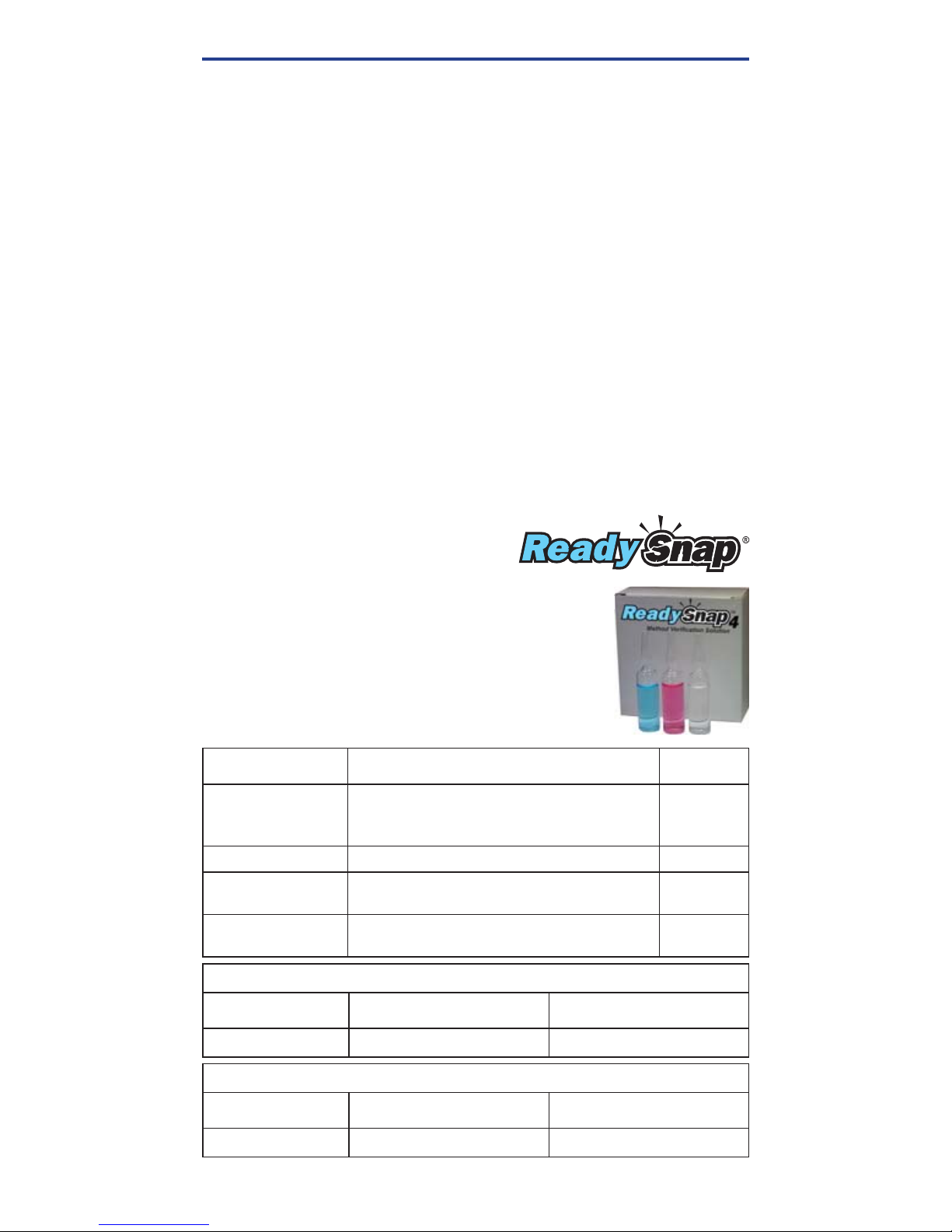
COMPONENT (FREE CHLORINE)
AWWA 4500-CL G EXACT
®
DPD-1
Anhydrous DPD sulfate
1.5% 1.5%
Anhydrous Na2HPO
4
33.4% 33.4%
Anhydrous KH2PO4Na
2
64.0% 64.0%
EDTA 1.1% 1.1%
EXACT IDIP® ALSO FEATURED IN
The eXact iDip
®
photometer is a winner of the
prestigious R&D100 award. Each year a panel
comprised of industry experts and R&D Magazine
editors evaluate and judge hundreds of entries. The
52nd R&D100 Awards, recognized as the “Oscars of
Invention,” identify and celebrate the top 100 most revolutionary
technology products of the previous year. R&D 100 selected
the eXact iDip® Smart Photometer System® as a recipient of the
esteemed Award. Compliance with the EPA, ISO, and DIN testing
specifi cations of the eXact iDip® attests to the meter’s quality,
reliability, and accuracy.
WINNER OF THE R&D100 AWARD
Page 27
27
exactidip.com
READY SNAP
®
METHOD VERIFICATION TEST FOR PART NO.
Ready Snap® 1P
(plastic ampoules)
Total Alkalinity, pH-II, Calcium Hardness,
Copper, Cyanuric Acid, and Phosphate. 480911
Ready Snap® 2 Ammonia, Arsenic, Iron, and Manganese 480902
Ready Snap
®
3
Red dye for verifying 525nm eXact®
Photometer calibration
480903
Ready Snap
®
7
Red dye for verifying 570nm eXact®
Photometer calibration
480907
ABOUT
EXACT IDIP
®
ACCURACY
Combined with your smart device, the eXact iDip® photometer is
designed to test your water for multiple water quality parameters.
Download the free eXact
iDip® app and sync to your smart device
running Bluetooth
®
SMART Technology.
All tests have been calibrated using certifi ed reference
standards and analytical spectrophotometric methods. The
algorithms in the app refl ect the best correlation of the eXact
iDip® against the AWWA, USEPA, DIN and ISO reference
test methods. The eXact
iDip® photometer has been factory
calibrated and will stay valid because of its exceptional quality.
We are so confi dent in the eXact
iDip® photometer, we offer an
industry leading 2-year warranty.
We built the eXact
iDip® photometer to be easy, accurate and
environmentally friendly. We have achieved this by utilizing our
patented eXact
®
Strip Micro Technology, which uses 60% less
water and chemistry than alternative methods. Instead of using
a 10mL water sample, eXact
®
Strip Micro uses a 4mL water
sample. The accuracy of the meter is maintained by designing
the sample cell with an 11mm path-length.
Ready Snap
®
is a method verifi cation solution
with predetermined values to verify the accuracy
of any manufacturer's tests including our eXact
iDip
®
Smart Photometer System.
The easy 3 step procedure (snap, fi ll, and test)
allows for quick verifi cation of test parameters.
Each box contains 10 ampoules of 10mL
solution with no dilution necessary.
METHOD VERIFICATION
EXACT IDIP® ASSIGNED VALUE FOR READY SNAP® 3
READY SNAP® 3
FREE CHLORINE
DESIRED VALUE
FREE CHLORINE
ACCEPTABLE RANGE
Red dye # 505
1.5 ppm 1.46 – 1.57
EXACT IDIP® 570 ASSIGNED VALUE FOR READY SNAP® 7
READY SNAP® 7
FREE CHLORINE
DESIRED VALUE
FREE CHLORINE
ACCEPTABLE RANGE
Red dye # 22515
2.15 ppm 2.10 – 2.22
Note: Values indicated are specifi c to eXact iDip® readings and current
concentrations as found at time of manufacture.
Page 28
28
©2016, Industrial Test Systems, Inc. Printed in USA
ITEM
INCLUDES PART NO.
Dry Case Waterproof
case for phones
Case, pump, neoprene armband,
and lanyard
486150
Dry Case Waterproof
case for tablets
Case and pump
486151
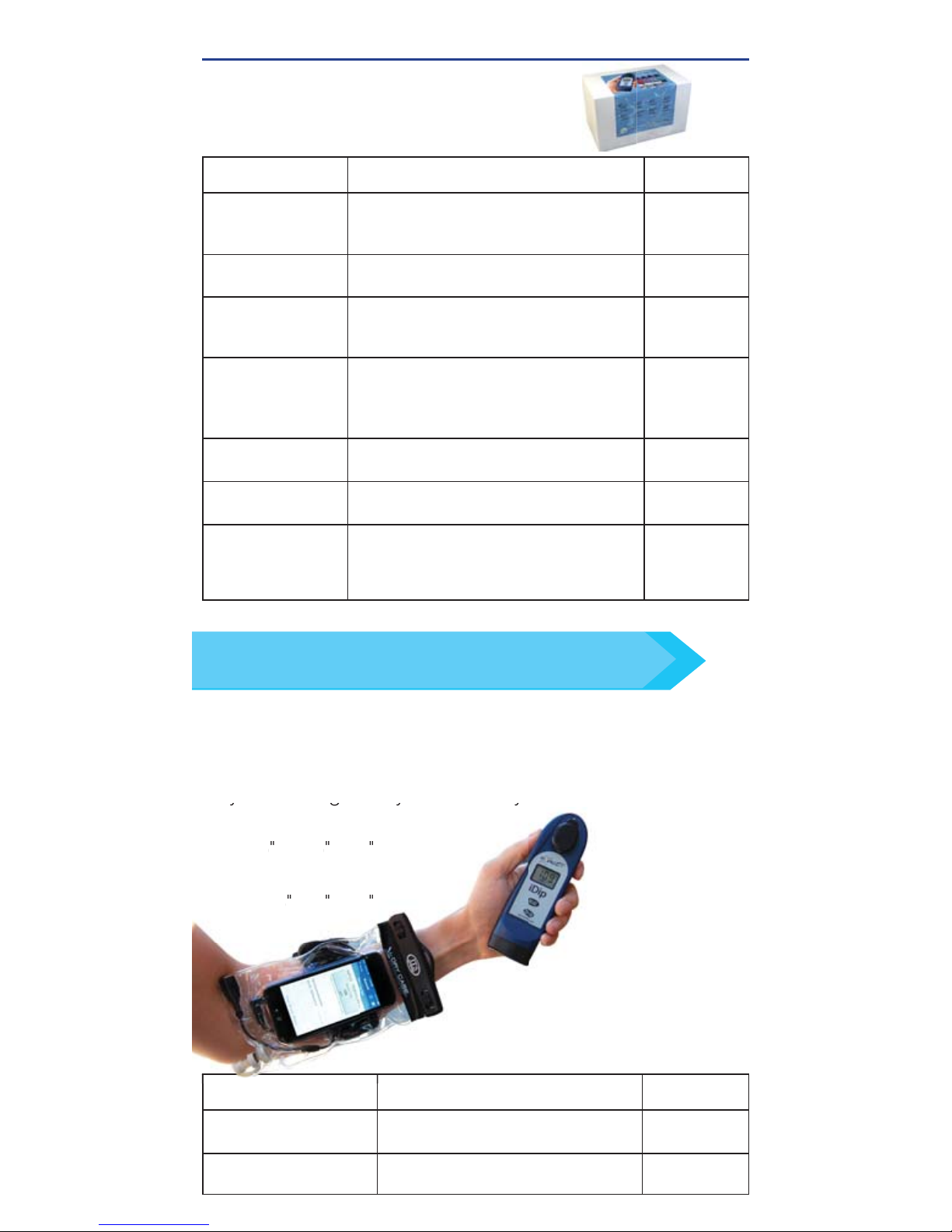
Features a waterproof vacuum seal for your smartphone/
tablet. Each case comes with a neoprene armband and
lanyard making it easy to use with your eXact iDip®.
Dry Case for phone:
8.5" x 4.5" x .5"
Dry Case for tablet:
13" x 9" x .5
"
DRY CASE FOR PHONE OR TABLET
ygy
y
Dry Case for phone:
8.5
x 4.5
x .5
Dry Case for tablet:
13x 9 x .5
KIT
CONTAINS PART NO.
Pool Water
Reagent Refi ll Box
Total Alkalinity, pH-II, Cyanuric Acid, Free
Chlorine (DPD-1), Combined Chlorine
(DPD-3), and Calcium Hardness
486211
Well Water
Reagent Refi ll Box
Iron, Nitrate, HR Total Hardness, Total
Alkalinity, and pH-II
486212
Tap Water
Reagent Refi ll Box
pH-II, Total Alkalinity, HR Total Hardness,
Free Chlorine (DPD-1), Total Chlorine
(DPD-4), HR Chlorine, and Metals
486213
Process Water
Reagent Refi ll Box
pH-II, Free Chlorine (DPD-1), Total
Chlorine (DPD-4), HR Chlorine, Hydrogen
Peroxide, and Glycine (used with DPD-1
for Chlorine Dioxide)
486214
Smart Brew
Reagent Refi ll Box
HR Total Hardness, Calcium Hardness, Total
Alkalinity, pH-II, Chloride, Sulfate
486216
eXact iDip
®
570
Aquarium Refi ll Box
pH-II, Nitrate, Total Alkalinity, HR Total
Hardness, Ammonia, and Phosphate
486217
eXact iDip
®
570
Marine Refi ll Box
Calcium Hardness, Calcium Hardness
Ultra-High, Nitrate, Total Alkalinity 570,
Ammonia, HR Total Hardness, Total
Hardness UH, Phosphate, and pH-BT
486218
Contains refi ll bottles of each test
for quick ordering (varies for each).
EASY REFILL BOX
KITS & ACCESSORIES
Order online at exactidip.com or call one of our helpful
customer service representatives at (800) 861-9712
TIP
Page 29
29
exactidip.com
KITS & ACCESSORIES
ITEM
INCLUDES PART NO.
Standard
Carrying case
Blue carrying case with foam inserts
(holds up to 7 bottles)
486111
XL
Carrying case
Black carrying case with foam inserts
(holds up to 14 bottles)
486001
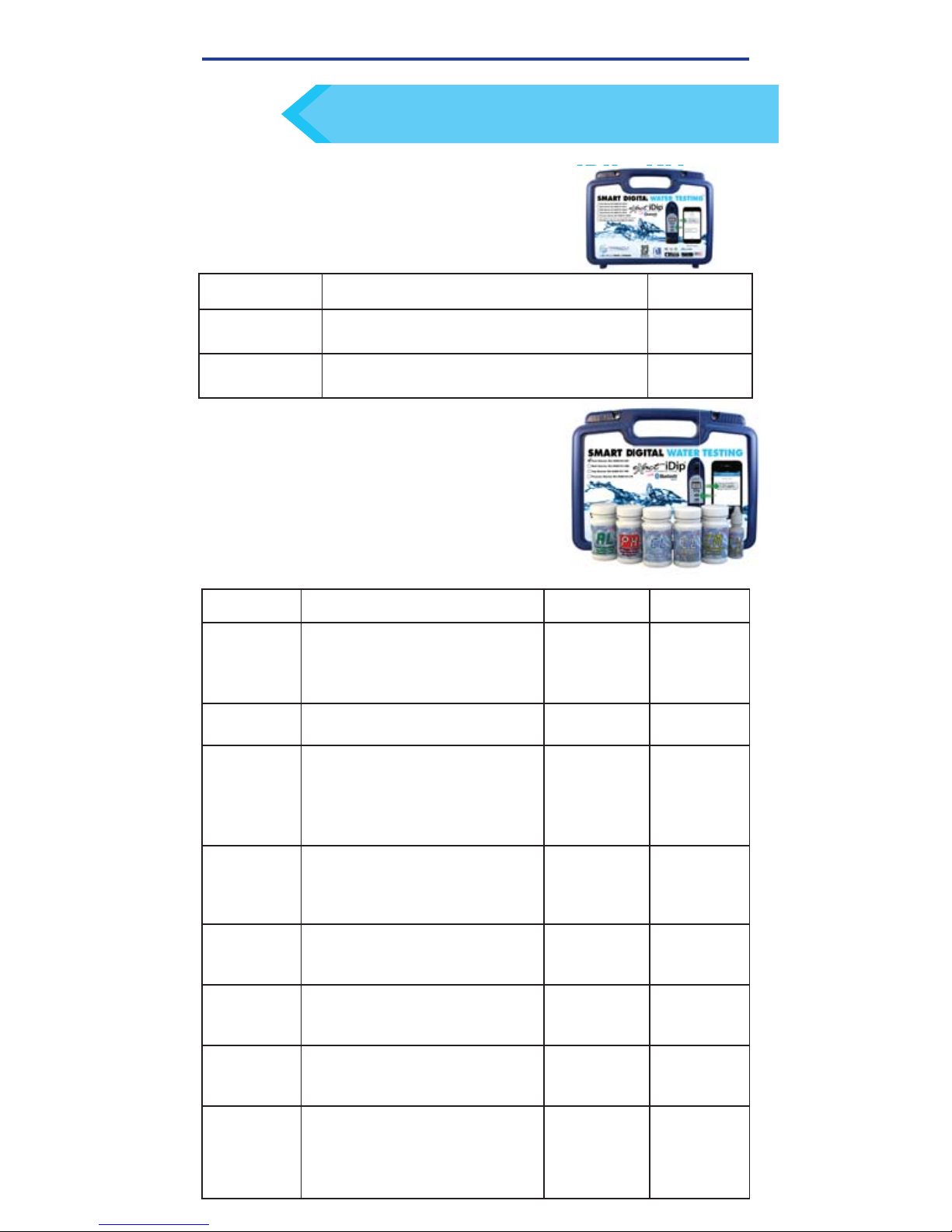
Made of sturdy material lined with
foam, the carrying case offers storage
for an eXact iDip® photometer and
eXact
®
Micro reagents.
CARRYING CASE FOR EXACT IDIP® KIT
Store all your necessary reagents together with
your eXact iDip
®
in our convenient carrying case!
TIP
KIT
CONTAINS
WITHOUT IDIP®WITH IDIP
®
Pool
Starter Kit
Total Alkalinity, pH-II, Cyanuric Acid,
Free Chlorine (DPD-1), Combined
Chlorine (DPD-3), and Calcium
Hardness
486101-KP 486101-KP-K
Well Driller
Starter Kit
Iron, Nitrate, HR Total Hardness,
Total Alkalinity, and pH-II
486101-WD 486101-WD-K
Process
Water
Starter Kit
pH-II, Free Chlorine (DPD-1), Total
Chlorine (DPD-4), HR Chlorine,
Hydrogen Peroxide, and Glycine
(used with DPD-1 for Chlorine
Dioxide)
486101-PW 486101-PW-K
Tap Water
Starter Kit
pH-II, Total Alkalinity, HR Total
Hardness, Free Chlorine (DPD-1),
Total Chlorine (DPD-4), Metals,
and HR Chlorine
486101-TW 486101-TW-K
Smart Brew
™
Starter Kit
HR Total Hardness, Calcium
Hardness, Total Alkalinity, pH-II,
Chloride, and Sulfate
486101-SB 486101-SB-K
Smart Brew
™
Advanced
Kit
HR Total Hardness, Calcium
Hardness, Total Alkalinity, Jenco pH/
Temp meter, Chloride, and Sulfate
486101-SB 486101-SB-K
iDip® 570
Aquarium
Starter Kit
pH-II, Nitrate, Total Alkalinity,
Ammonia, Total Hardness HR,
and Phosphate
486107-AQ 486107-AQ-K
iDip
®
570
Marine
Starter Kit
Calcium Hardness, Calcium
Hardness Ultra-High, Nitrate, Total
Alkalinity 570, Ammonia, HR Total
Hardness, Total Hardness UH,
Phosphate, and pH-BT
486107-MA 486107-MA-K
Each kit contains:
• Carrying case
• Cleaning brush
• User manual
• 25 of each eXact® Micro reagents
(reagents vary for each kit-see below).
Starter kits can be ordered with or without an
eXact iDip® photometer.
STARTER KITS
Page 30

30
©2016, Industrial Test Systems, Inc. Printed in USA
NSF/ANSI 50 CERTIFICATION
Third-party certifi cation to NSF/ANSI 50 allows manufacturers to
make verifi ed claims regarding the performance, accuracy and
operating range of their water quality testing devices. It allows
consumers to make apples-to-apples comparisons between
different products and provides confi dence that the test device will
work at the end of the shelf life indicated by the manufacturer.
Third-party certifi cation of a water quality test devices includes
a review of water contact materials for health effects, monitoring
audit(s) of production locations and product performance
verifi cation testing. The performance testing of a WQTD involves
accuracy and repeatability testing on two different lots of new
production. The two lots are tested multiple times on two different
days. Unlike most NSF/ANSI 50 certifi cations, WQTDs require
follow-up testing of the product at the end of the manufacturer’s
specifi ed shelf life. This is a follow-up performance test on product
that has been opened and stored, in order to mimic actual product
use. The original two lots are retested for accuracy at the end of
the manufacturer’s claimed product shelf life. The accuracy testing
verifi es the water quality test device accuracy claim. Certifi ed
products are given an accuracy rating to one of three levels: L1, L2
or L3, with L1 being the highest accuracy rating.
TEST RANGE
ACCURACY RATING
Total Alkalinity 10 - 200 ppm
Calcium Hardness 3 - 700 ppm
Chloride 77 - 6700 ppm
Combined Chlorine 0.05 - 12 ppm
Free Chlorine 0.01 - 12 ppm L1
Total Chlorine 0.01 - 12 ppm
Cyanuric Acid 3 - 110 ppm
pH 6.4 - 8.4 pH L1
Total Alkalinity (SPA) 20 - 200 ppm
Total Bromine (SPA) 0.08 - 17 ppm L1
Combined Chlorine (SPA)
0.01 - 12 ppm
Free Chlorine (SPA) 0.05 - 12 ppm L1
pH (SPA) 6.0 - 8.5 pH L2
Page 31
©2016, Industrial Test Systems, Inc. Printed in USA
PARAMETER / TEST
PART #
RANGE
ppm
% BEST †
ACCURACY
# OF
TESTS
570 Alkalinity, Total 486641 12 - 130 10 100
570 Alkalinity, Total Marine
486680 25 - 250
10
100
570 Ammonia
2
486654 0.06 - 12 6 25
570 Calcium Hardness UH (as CaCO3)
486768-K
730 - 1300 10 25
570 Chloride (as Salt) 486757 6 - 800 10 25
570 Chloride High (as Salt)
2
486757 120 - 16000 10 25
570 Chlorine, Free (DPD–1)
3
486637 0.06 - 15 8 100
570
Chlorine, Combined (DPD-3)
1,2
486638 0.06 - 15 8 100
570 Chlorine, Total (DPD-4)
3
486670 0.06 - 15 8 100
570 Copper 486632 0.04 - 7 4 50
570 Fluoride 486643 0.05 - 1.2 15 25
570 Hardness, Total High 486656 50 - 550 11 50
570 Hardness, Total Ultra-High
486669-K
2900 - 6600
850
570 Hardness, Total Low 486630 1 - 70 15 100
570 Iodine (DPD-1) 486627 0.2 - 39.6 5 100
570 Iron, Total (TPTZ) 486650 0.05 - 6 8 50
570 Metals (+2) 486604 0 - 3 6 25
570
Nitrate (as NO3) in Marine Water
486655 3 - 100 20 50
570
Nitrate (as NO3) in Fresh Water
486655 3 - 200 10 50
570 Nitrite (as NO
2
) 486623 0.07 - 16 4 50
570 Peracetic Acid (DPD-4) 486674 TBD TBD 100
570 Permanganate (DPD-1) 486626 TBD TBD 100
570 pH-II
486639-II
6.0 - 8.8 0.2 pH 100
570 pH, BT 486657 5.2 - 9.4 0.3 pH 50
570 Phosphate (as PO
4
) 486814 0.02 - 2.5 4 50
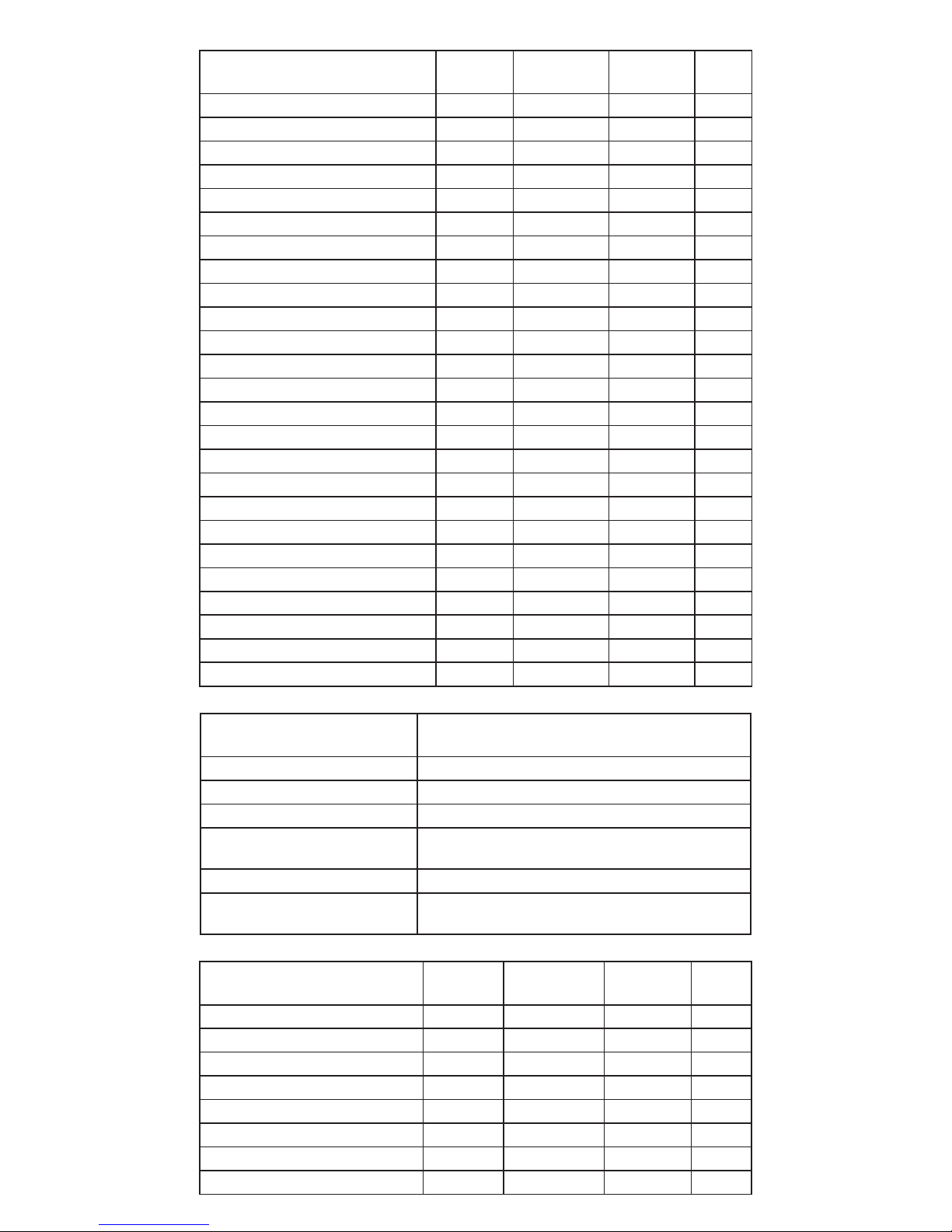
EXACT IDIP® 570 TESTS & REAGENTS
EXACT IDIP
®
SPA TESTS & REAGENTS
PARAMETER / TEST
PART #
RANGE
ppm
% BEST
†
ACCURACY
# OF
TESTS
SPA Alkalinity, Total
2
486641 20 - 200 7.5 100
SPA Bromine, Total
2
486654 0.00 - 17 3 100
SPA
Calcium Hardness (as CaCO3)
2
486629 23 - 700 5 50
SPA Chlorine, Free (DPD-1) 486637 0.00 - 12 5 100
SPA Chlorine, Combined (DPD-3)2486638 0.00 - 12 5 100
SPA Chlorine, Total (DPD-4) 486670 0.00 - 12 5 100
SPA Cyanuric Acid 481652-II 3 - 110 9 60
SPA pH-II
2
486639-II 6.0 - 8.5 0.2 pH 100
EXACT IDIP® CALCULATED TESTS
PARAMETER / TEST
REQUIRED TESTS
Chlorine, Combined Free Chlorine and Total Chlorine
Chlorine, Total Free Chlorine and Combined Chlorine
Hardness, Magnesium Total Hardness and Calcium Hardness
Langelier Saturation Index (LSI)
pH, Total Alkalinity, Calcium Hardness, TDS, and
Temperature
Residual Alkalinity
Total Alkalinity, Total Hardness, and Calcium Hardness
Sodium
Chloride, Sulfate, Total Alkalinity, Total Hardness,
and Calcium Hardness
31
Page 32

PARAMETER / TEST
PART #
RANGE
ppm
% BEST
†
ACCURACY
# OF
TESTS
Alkalinity, Total 486641 10 – 200 10 100
Alkalinity, Total Range Extender 2486665
Each strip adds 130 ppm
100
Bromine, Total (DPD–4) 486644 0.00 – 17 3 100
Chloride (as NaCl) 486757 4 – 335 5 25
Chloride (as NaCl) High
2
486757 80 – 6700 5 25
Chlorine Dioxide (DPD-1)
2
486633 0.00 – 6.0 5 100
Chlorine, Free (DPD–1)
3
486637 0.00 – 12.0 5 100
Chlorine, Combined (DPD–3)
1,2
486638 0.00 – 12.0 5 100
Chlorine, Total (DPD–4)
3
486670 0.00 – 12.0 5 100
Chlorine, Total High 486672 1 – 200 5 50
Chromium (Cr
+6
) 486614 0.00 – 2.00 8 50
Copper (as Cu+2) 486632 0.00 – 9.0 2 50
Cyanuric Acid
481652–II
3 – 110 12 60
Hardness, Calcium (as CaCO3)
486629 3 – 700 5 50
Hardness, Calcium (Salt Pools) 486629 20 – 900 5 50
Hardness, Calcium (Marine Water)
486629 30 – 1200 5 50
Hardness, Total High (as CaCO3)
486656 90 – 600 12 50
Hardness, Total Conditioner
2
486666
Use when Alkalinity >200 50
Hardness, Total Low (as CaCO3)
486630 1 – 80 15 100
Hydrogen Peroxide 486648 1 – 130 5 50
Hydrogen Peroxide High (DPD-4)
486676 16 – 4200 8 100
Hydrogen Peroxide Low 486616 0.00 – 3.50 7 50
Iodine (DPD–1) 486627 0.00 – 21.0 4 100
Iron, Total (TPTZ)
2
486650 0.00 – 8.00 8 50
Manganese (as Mn
+2) 2
486606 0.00 – 2.60 6 24
Metals (+2) 486604 0.00 – 1.75 6 25
Molybdate
2
486653 0.00 – 5.00 10 50
Nitrate (as NO
3
) (Fresh Water) 486655 0.25 – 32.0 8 50
Nitrate (as NO
3
) (Marine Water)
486655 4 – 100 14 50
Nitrite (as NO2) 486623 0.00 – 4.00 3 50
Ozone (DPD-4) 486634 0.00 – 2.00 10 100
Peracetic Acid Low (DPD-4) 486674 0.00 – 11.0 4 100
Peracetic Acid 486675 0 – 590 5 100
Permanganate (DPD–1) 486626 0.00 – 6.00 5 100
pH-II
486639-II
6.4 – 8.4 pH 0.2 pH 100
pH, Acid 486624 3.5 – 6.2 pH 0.3 pH 50
pH, Alkali 486609 7.5 – 10.0 pH 0.3 pH 50
Phosphate (as PO
4
) 486814 0.00 – 3.0 8 50
Sodium Bromide, Total (as NaBr)
486659 19 – 400 5 25
Sulfate (as SO
4
) 486608 1 – 270 5 50
Sulfi de (as S2–)
2
486818 0.11 – 5.30 12 50
Turbidity
2
N/A
24 – 780 NTU
N/A N/A
†
Value provided represents best possible accuracy under laboratory conditions, but may vary throughout the detection range.
For a complete list of accuracies throughout all ranges, please visit exactidip.com.
1
Combined Chlorine DPD-3 Test requires Free Chlorine DPD-1 (486637) to be run fi rst.
2
Test uses a non-standard test method. Visit exactidip.com for details.
3
Requires the use of 2 strips if reading is above 6 ppm.
EXACT IDIP® TESTS & REAGENTS
EXACTIDIP
#iDipwatertester
IDIP QUICK START GUIDE R013117
 Loading...