

Page 1
®
QUiCK sTaRT gUiDE
Page 2

2
WELCOME TO YOUR NEW EXaCT® iDip®. LET Us shOW YOU aROUND.
This guide shows you the technical details on your iDip®, helps you set
it up, and gets you started with tips for the tests you will use daily.
Your eXact® iDip® comes with:
Cleaning Brush
Quick Start Guide
6 Strips each of: Free Chlorine (DPD-1), Combined/Total Chlorine
(DPD-3), pH, and Total Alkalinity
You will need Four (4) AAA batteries, a Phillips head screwdriver, and
a compatible smart device to start testing your water.
Compatible smart devices:
Apple iPad
®
(Mini, Mini Retina, 3rd gen, 4th gen, Air)
Apple iPhone
®
(4s, 5, 5c, 5s)
Apple iPod touch
®
(5th gen)
We are constantly adding new devices, check out our full list at sensafe.com/idip.
CONTENTS
WELCOME
Welcome ................................................2
iDip
®
Overview ...........................................3
Let’s Get Started
Install Batteries ..........................................4
Download App ..........................................4
Home Screen ...........................................5
Test Result Screen .......................................5
Select, Fill, Dip, Read
Select Customer .........................................6
Turn on Meter ...........................................6
Bluetooth ..............................................7
Select Test .............................................7
Fill Cell ................................................8
Zero Meter .............................................8
Test Methods ...........................................8
Standard Strip Method ....................................9
Standard Liquid Method .................................10
Data Management
Results/Notes ..........................................11
History ...............................................12
Emailing Results ........................................12
Tips ....................................................13
Troubleshooting .........................................13
About
About eXact
®
iDip® Photometer ............................14
About Bluetooth
®
.......................................14
About Built-in Sample Cell ................................14
Cleaning the Cell .......................................14
Compliance Testing .....................................15
Warranty (2 years) ......................................15
Technical Support ......................................15
Reorder ...............................................BC
Page 3
3
YOUR NEW EXaCT® iDip® is iDEaL fOR TEsTiNg
DRiNKiNg WaTER, pOOLs & spas, pONDs &
aQUaRiUMs, fOOD & BEVERagE pROCEss WaTER,
ENViRONMENTaL WaTERs, aND MORE
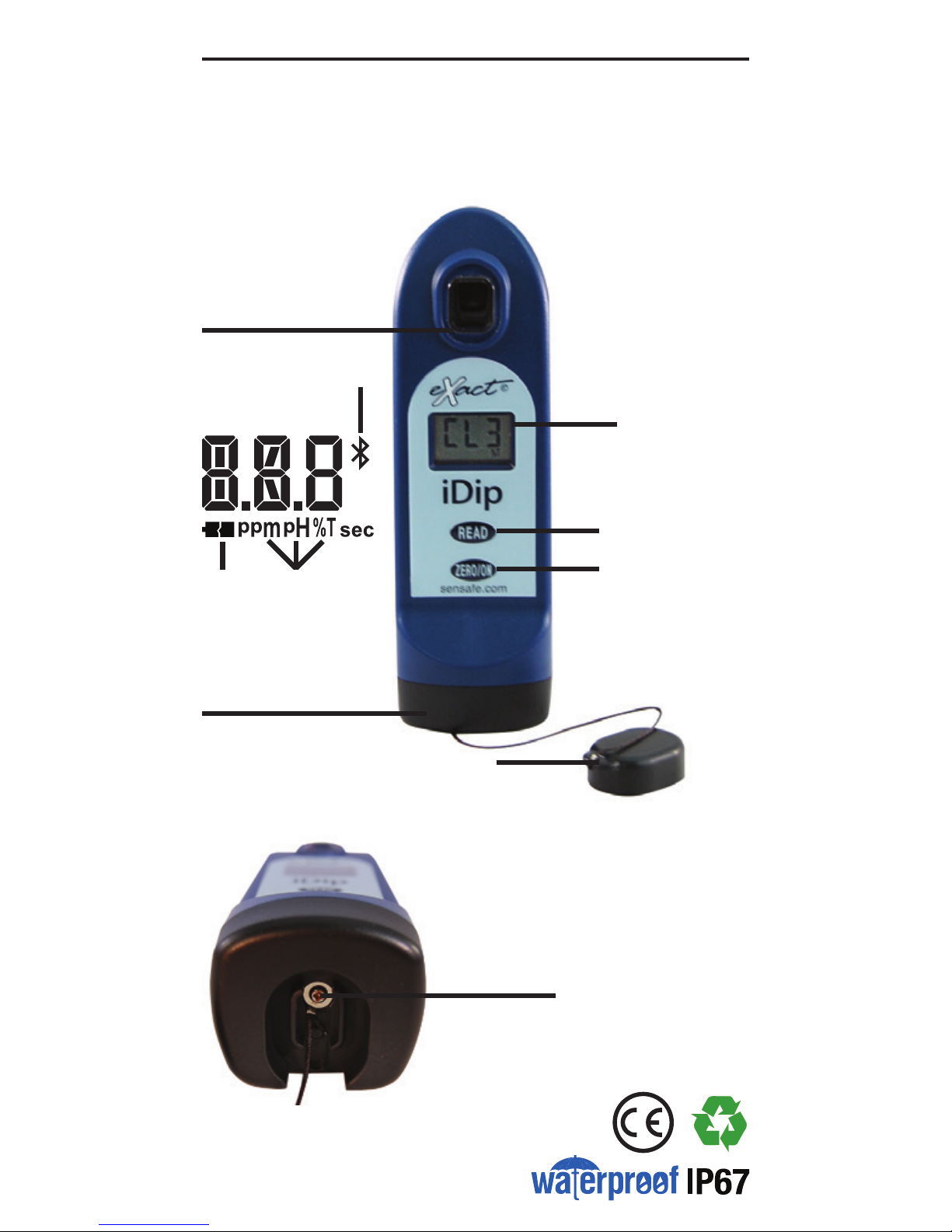
sAMpLE CELL
Built-in plastic 4ml cell for
collecting your water sample
LCD DispLAy
Displays results and
test name
rEAD BUttoN
Starts test timer
BAsE
Install/replace batteries here
(IP67 rated waterproof)
rEsULt
UNits
sCrEW
Unscrew to
remove base
LoW
BAttEry
BLUEtootH
CoNNECtED
LCD DispLaY
ZEro/oN BUttoN
Turns the meter on and
creates a baseline for
your water testing
CELL CovEr
Covers the cell for
mixing and bright light
situations
IDIP® OVERVIEW
Page 4

4
LET’S GET STARTED
iNsTaLL “aaa” BaTTERiEs (NOT iNCLUDED)
1. Use a Phillips head screwdriver to remove the screw from the
base of your iDip
®
.
2. Remove the base.
3. Install 4 new AAA batteries as illustrated inside your iDip
®
.
We recommend using high quality batteries.
4. Replace the base rmly with pressure while tightening the
screw. The meter will turn on automatically.
DOWNLOaD ThE app
Using your Smart Device, download the eXact® iDip® app.
Because the eXact
®
iDip® application is the brain for this
system, all you have to do is download the latest update to
have the most current version with the latest tests and features
available. We are constantly improving and welcome your
suggestions to help make our product even better. Please
be sure to visit www.sensafe.com/idip or send feedback to
[email protected].
SCAN FOR APP
DOWNLOAD
Page 5
5
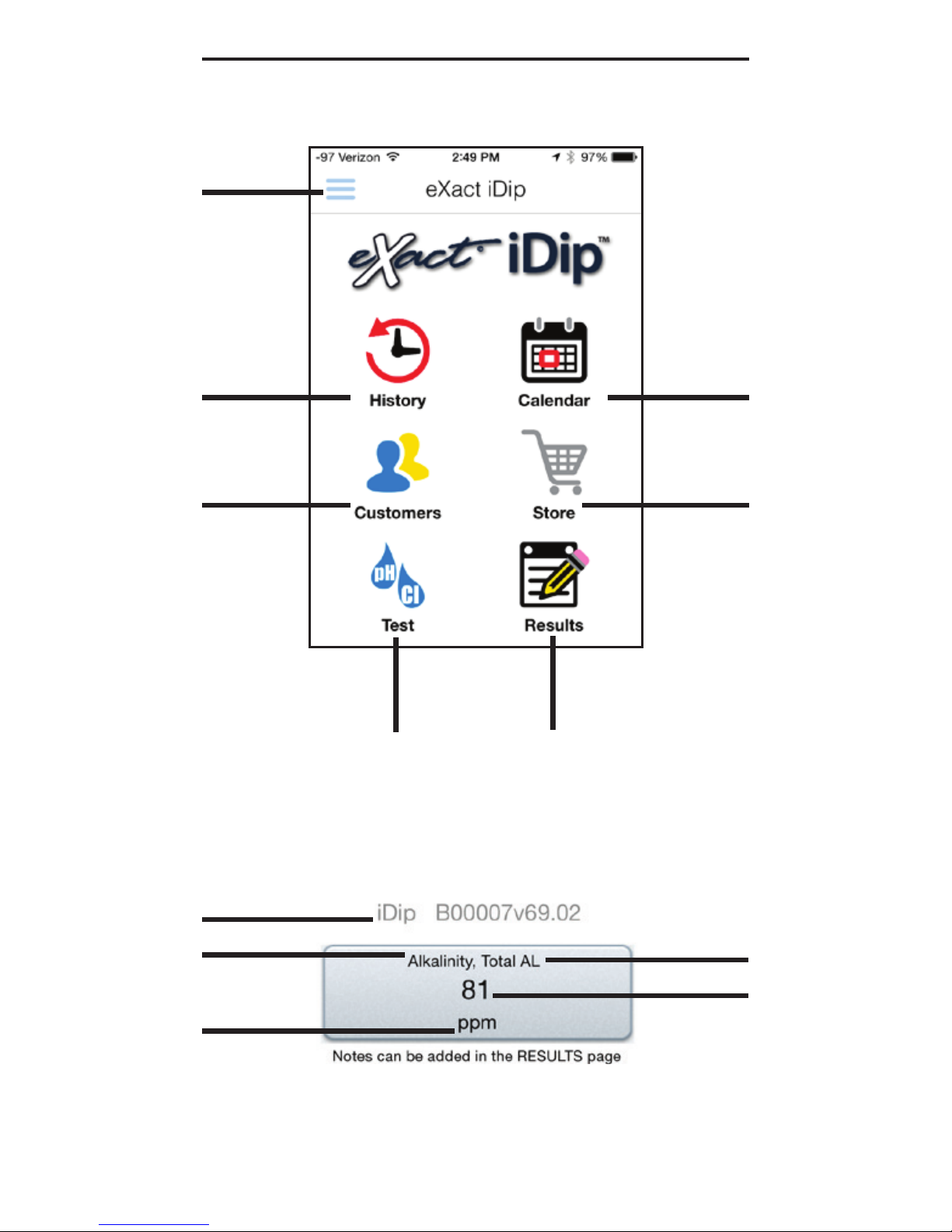
History:
Accesses all
previously saved
results which can
be sorted, edited,
and emailed
CALENDAr:
Displays your
schedule/
appointments
storE:
Opens store to
unlock additional
tests
CUstoMErs:
Attaches results
to people and/or
locations from
your
smart device
contacts
ALL rEsULts ArE AttACHED to A CoNtACt AND LoCAtioN. ENsUrE yoUr CoNtACt
iNforMAtioN (iNCLUDiNg ADDrEss) is ENtErED iNto yoUr DEviCE’s CoNtACt List.
tEst:
Initiates water
testing
rEsULts:
Accesses temporary
results that have not
been saved to history
sEttiNgs:
Opens menu for
easy access to all
app features
BLUEtootH
DEviCE
tEstiNg
pArAMEtEr
pArAMEtEr
UNits
BottLE LABEL
ABBrEviAtioN
tEst rEsULt
LET’S GET STARTED
hOME sCREEN
TEsT REsULT sCREEN
Page 6
6
1
2
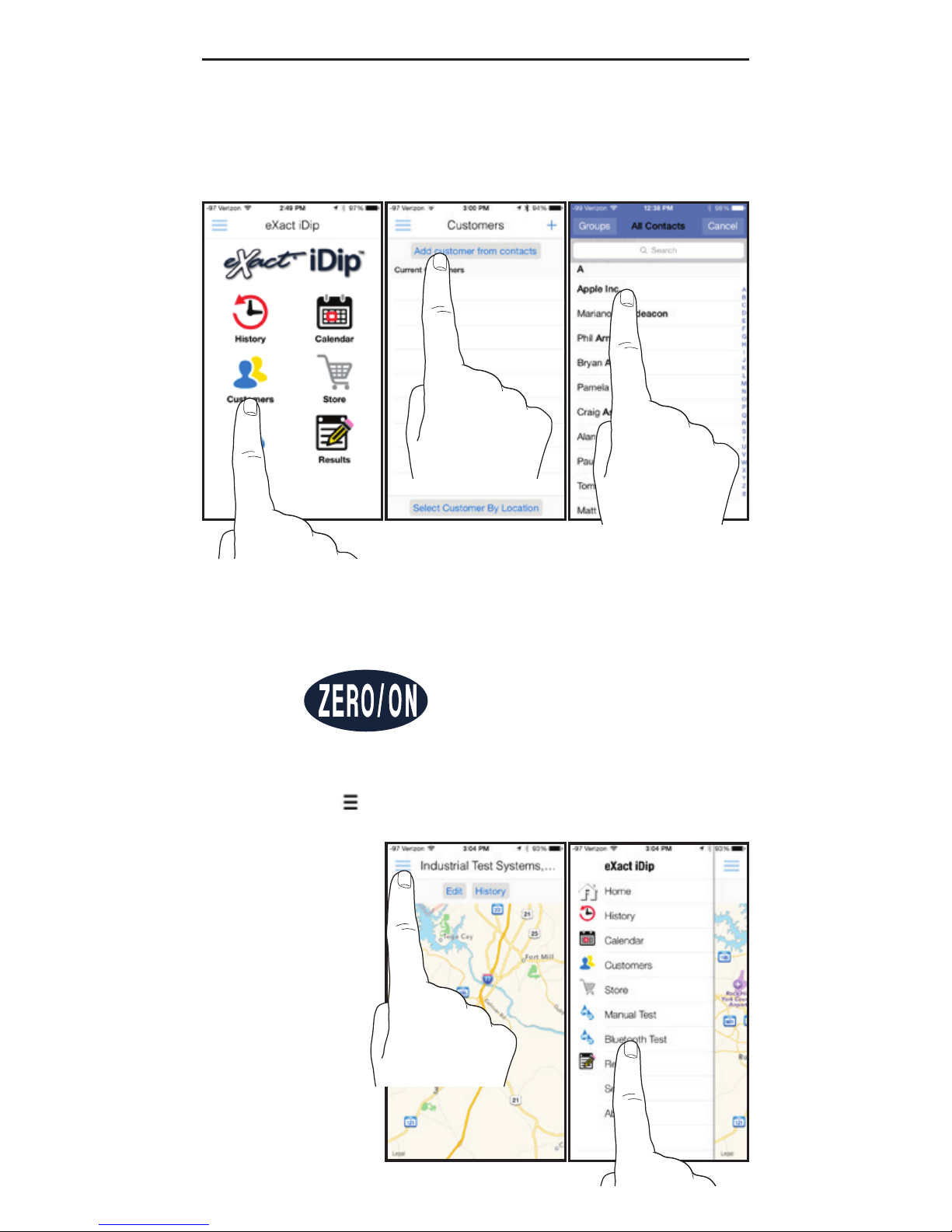
a. Select ‘Customers’ from the ‘Home’ screen.
b. Tap ‘Add Customers From Contacts.’
c. Select a contact from your list.
b c
a
SELECT, FILL, DIP, READ
3
Power on the eXact® iDip® hand-held photometer.
Tap ‘ ’ and select ‘Bluetooth Test’ on the slide out
screen.
Page 7
7
4
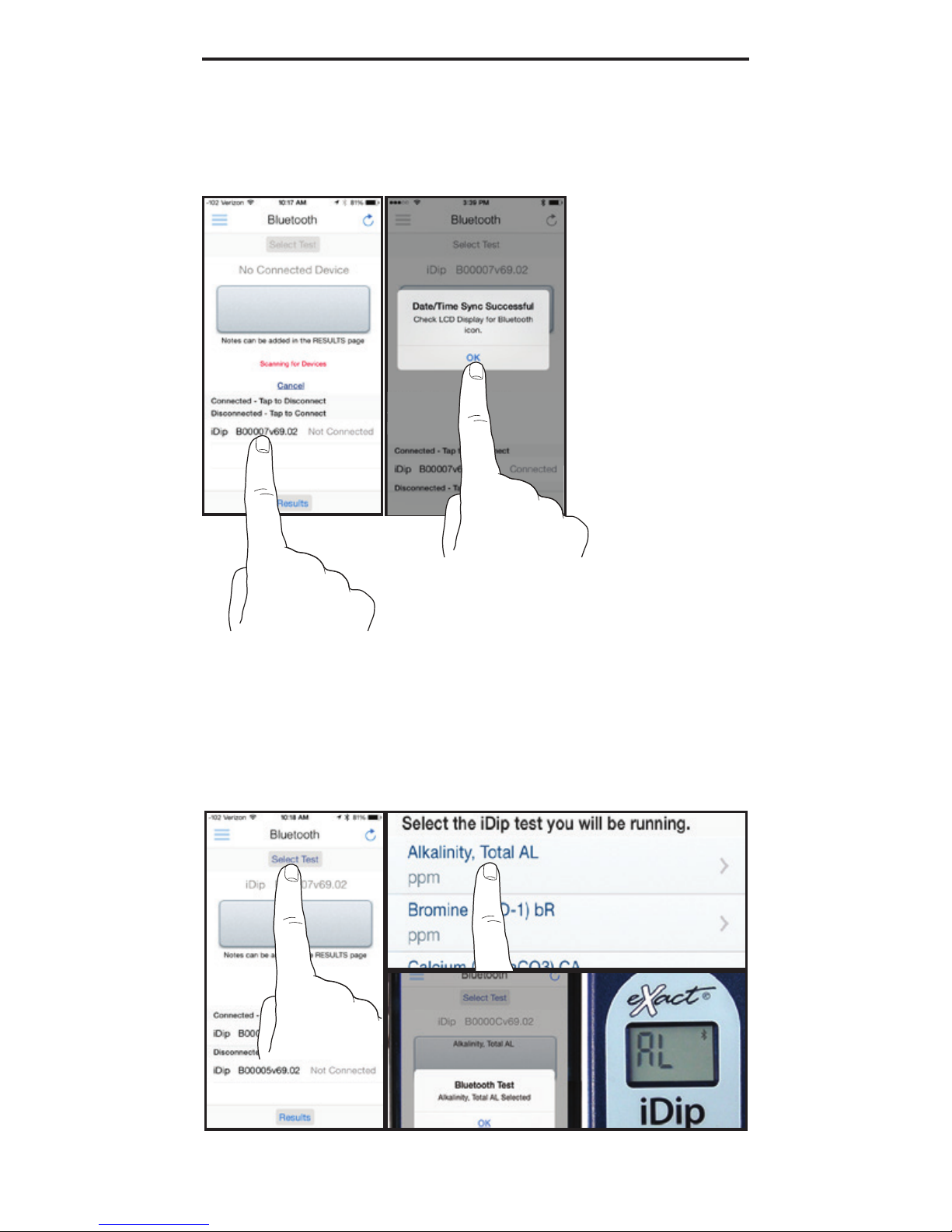
Select your iDip from the bottom of the screen. Verify it
has connected and tap ‘OK’. *
* Refer to the back of your iDip® to determine the serial number for your device. This will
also be the serial number for the bluetooth connection.
SELECT, FILL, DIP, READ
Tap ‘
sELECT
Test’ at the top (e.g. Alkalinity, Total). The
iDip and app will both display the test being run.
5
Page 8
8
6
SELECT, FILL, DIP, READ
7
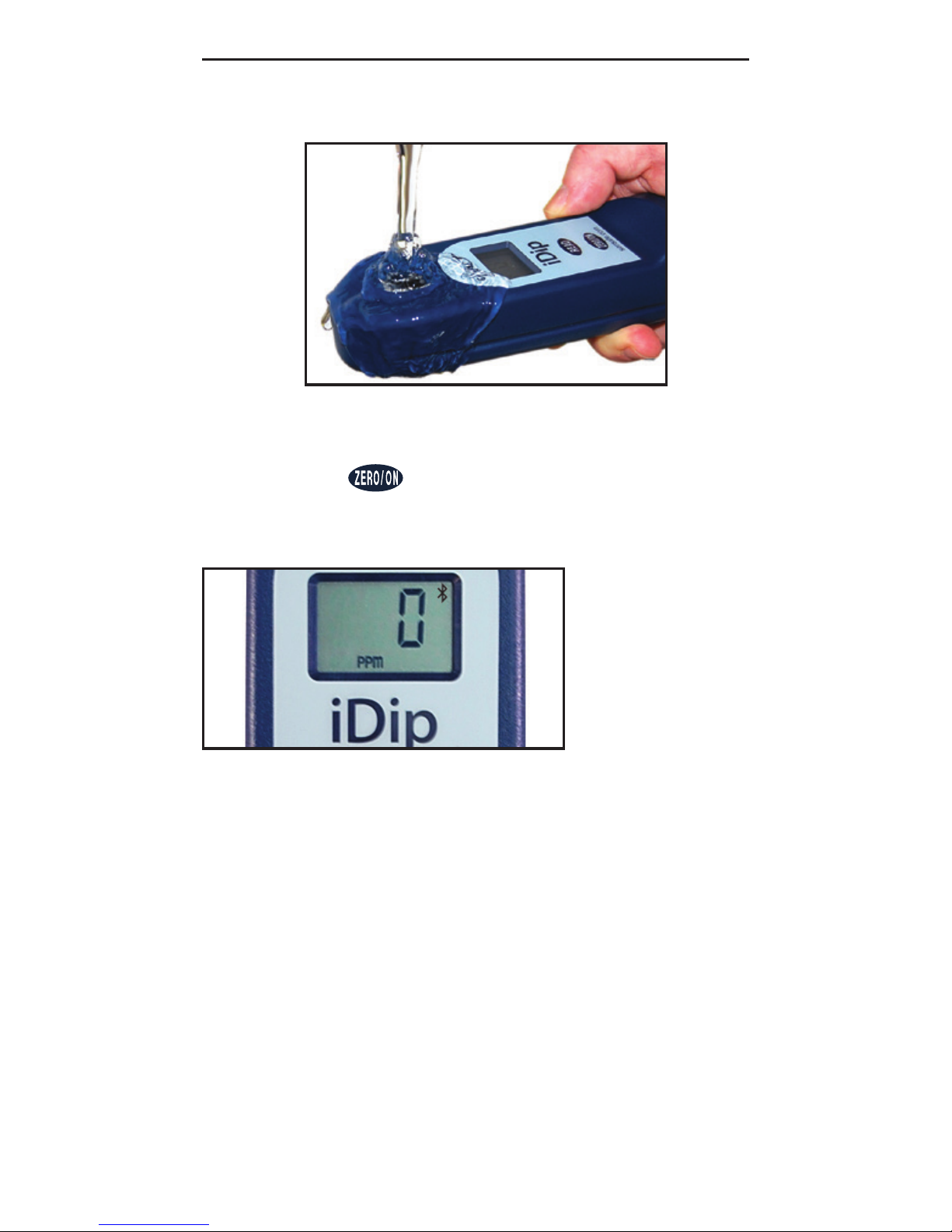
Rinse the cell 3 times with the water sample to be
tested and
fiLL
to the top to begin test.
Press and the iDip® display reads 0
PPM
indicating the
meter is ready to test. For Standard Liquid Method, place
Cell Cover on CELL before zeroing.
• Alkalinity, Total
• Bromide (as NaBr)
• Bromine
• Calcium (as CaCO
3
)
• Chloride (as NaCl)
• Chlorine Dioxide
• Chlorine, Free
• Chlorine, Total
• Chlorine, Total - High (120 sec)
• Chromium (VI) (240 sec)
• Copper (120 sec)
• Hardness, Total - Low
• Hardness, Total - High
• Hydrogen Peroxide - Low (120 sec)
• Hydrogen Peroxide - Mid (100 sec)
• Hydrogen Peroxide - High
• Iodine
• Magnesium Hardness
• Nitrate (as NO
3
) (600 sec)
• Nitrite (as NO
2
) (360 sec)
• Ozone
• Peracetic Acid
• Permanganate
• pH
• Phosphate (120 sec)
• Sulfate
• S u l fi d e
Standard Strip Method Tests (count-up if required):
• Cyanuric Acid (5 drops / 60 sec) • Metals (2 drops / 120 sec)
For non-standard test methods and detailed test instructions visit
www.sensafe.com/idip/.
Standard Liquid Method Tests (# of drops / count-up if required):
Page 9
9
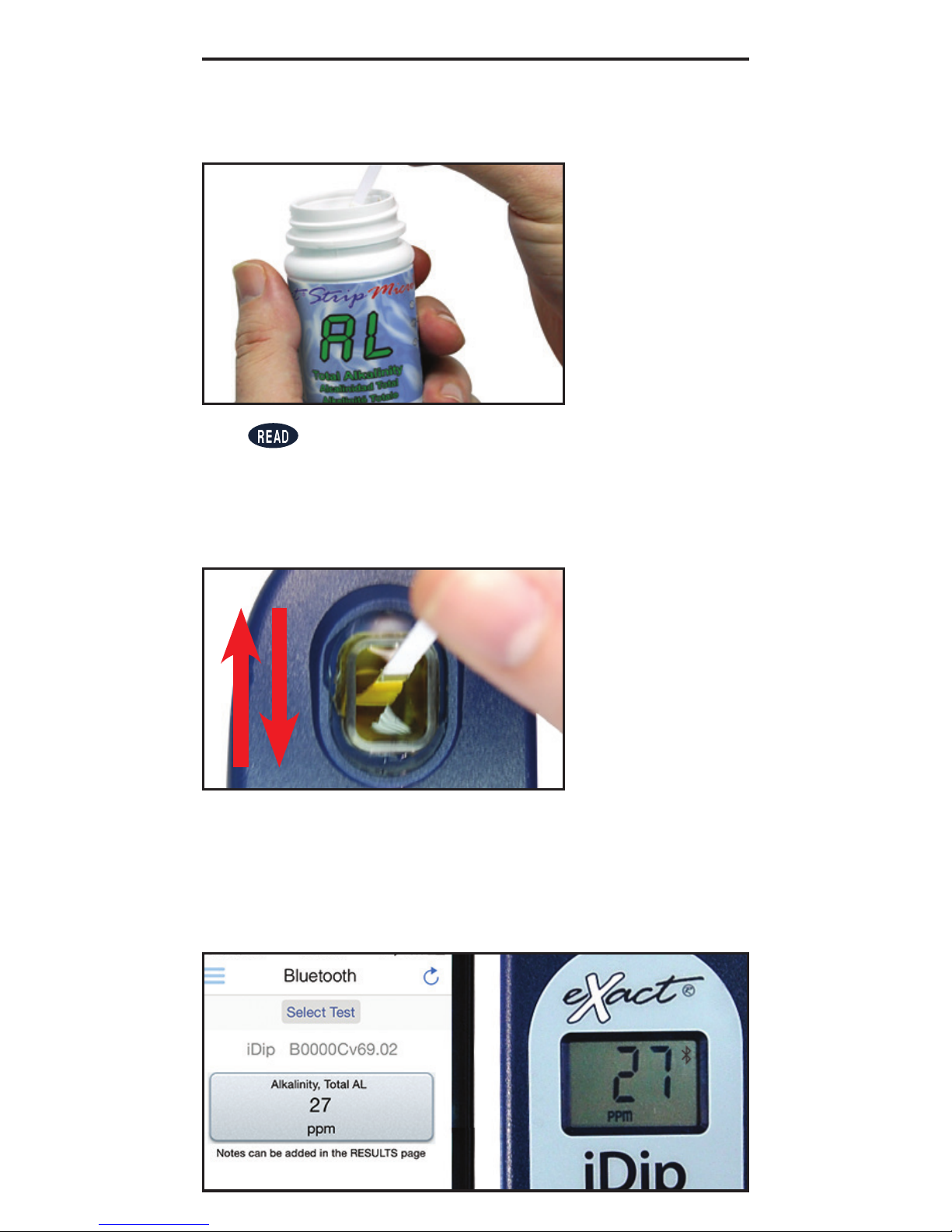
Remove one eXact® Strip Micro (e.g. Total
Alkalinity) and set in a dry, convenient place.
8a
9a
SELECT, FILL, DIP, READ
STANDARD STRIP METHOD
Press to initiate a 20 second countdown and
simultaneously Dip the test strip by submerging all
pads in the sample then use a gentle constant back
and forth motion (2 strokes per second) until the
timer displays “1”. Remove and discard the strip.
Wait for count-up time if required.
10a
REaD
result displayed on the iDip
®
and in the app. To run additional
tests, repeat steps 5-9. To save
your results and make available for
emailing, continue on page 11.
Page 10
10
SELECT, FILL, DIP, READ
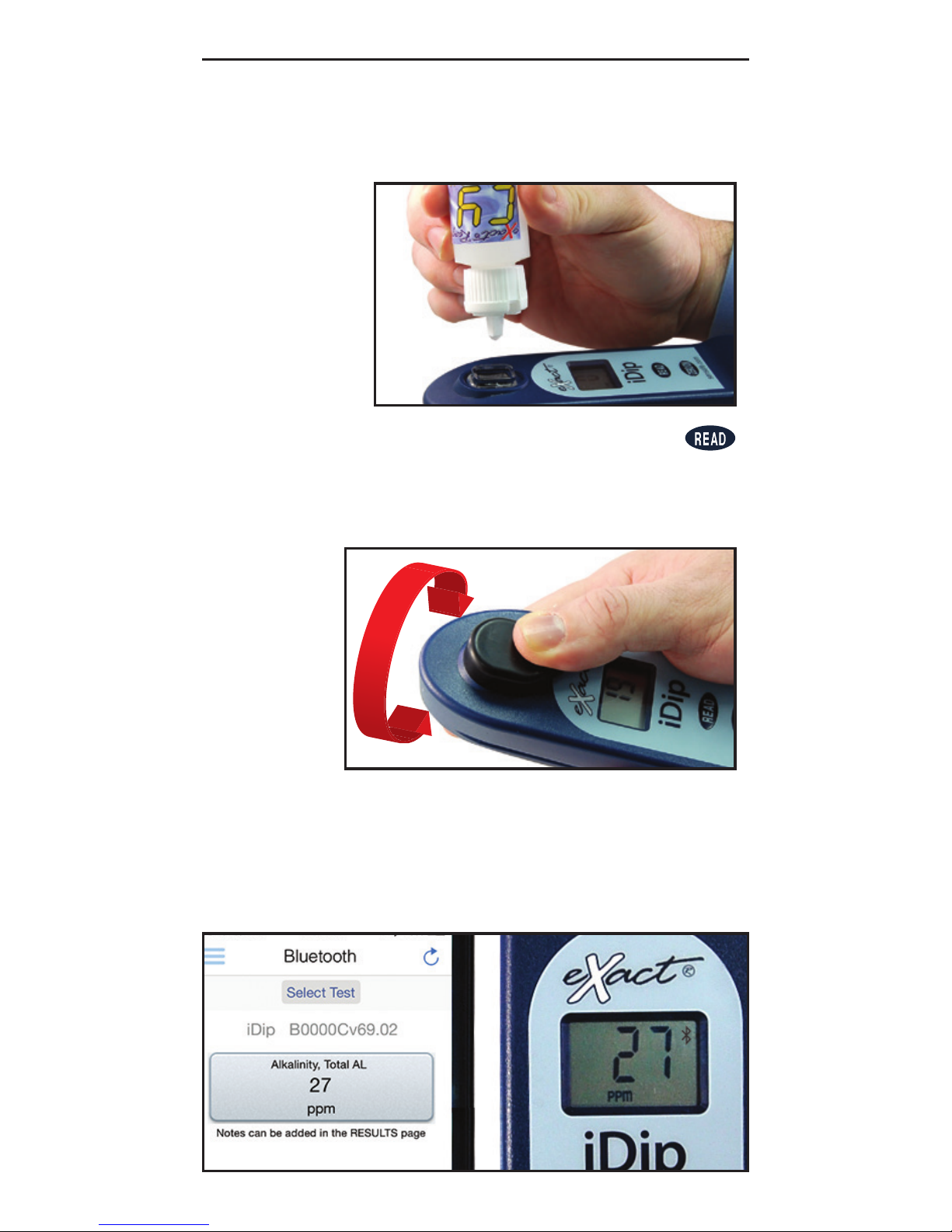
Shake the bottle of eXact® Reagent (e.g. Cyanuric
Acid) and add drops according to the list on page 8.
Keep reagent bottle vertical while adding drops.
8b
9b
Place the Cell Cover onto the CELL. Press
and a 20 second countdown begins. Turn the
meter upside-down repetitively during the 20
seconds. When the timer displays “1”, place the
iDip® on a fl at surface. Wait for count-up time.
10b
REaD
result displayed on the iDip
®
and in the app. To run additional
tests, repeat steps 5-10. To save
your results and make available for
emailing, continue on next page.
STANDARD LIQUID METHOD
Page 11
11
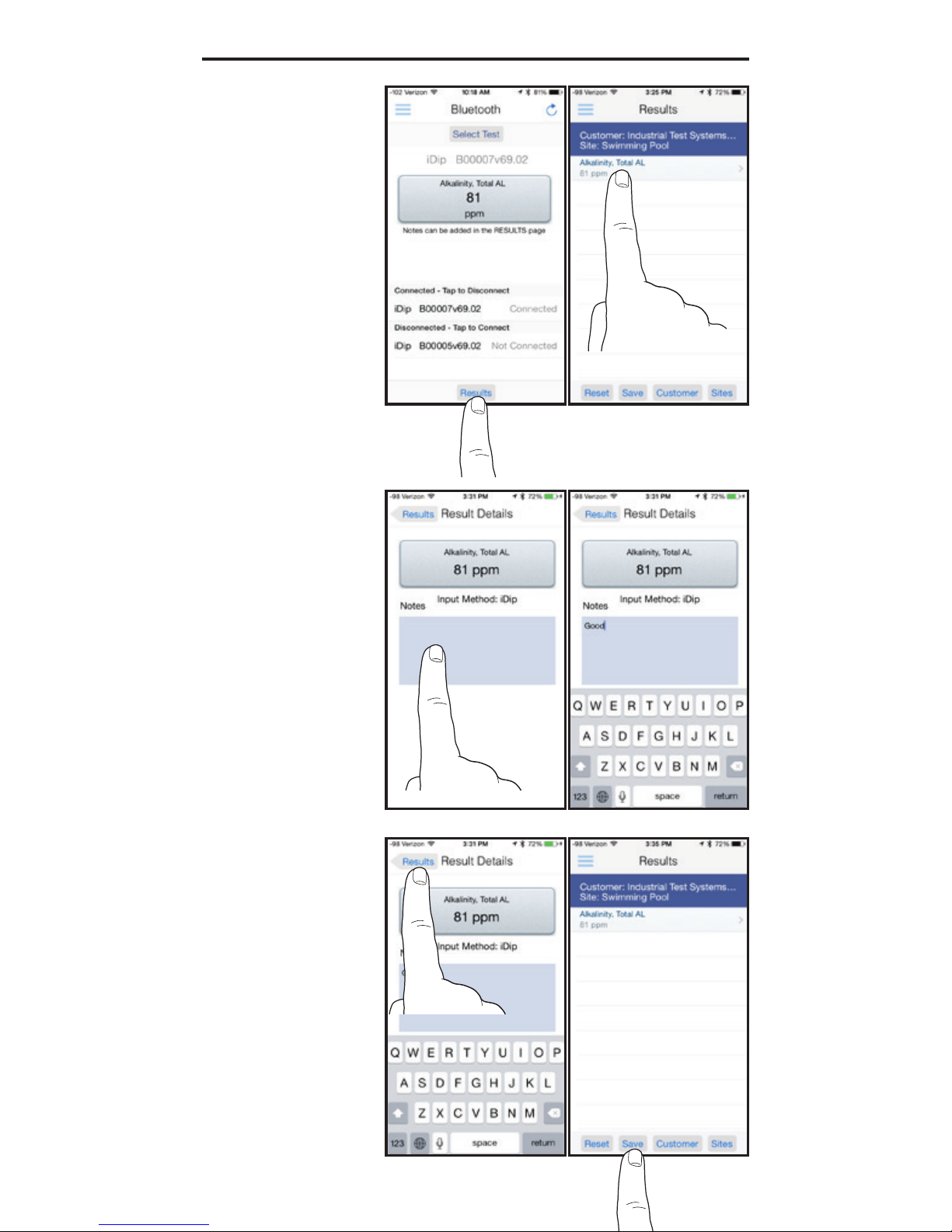
When all tests have
been performed, tap
‘Results’ at the bottom
of the screen. To add
notes tap the desired
test result.
Type notes in the
‘Notes’ box, which are
automatically saved.
Go back to ‘Results’
screen and tap ‘Save’
to store into ‘History’.
DATA MANAGEMENT
Page 12
12
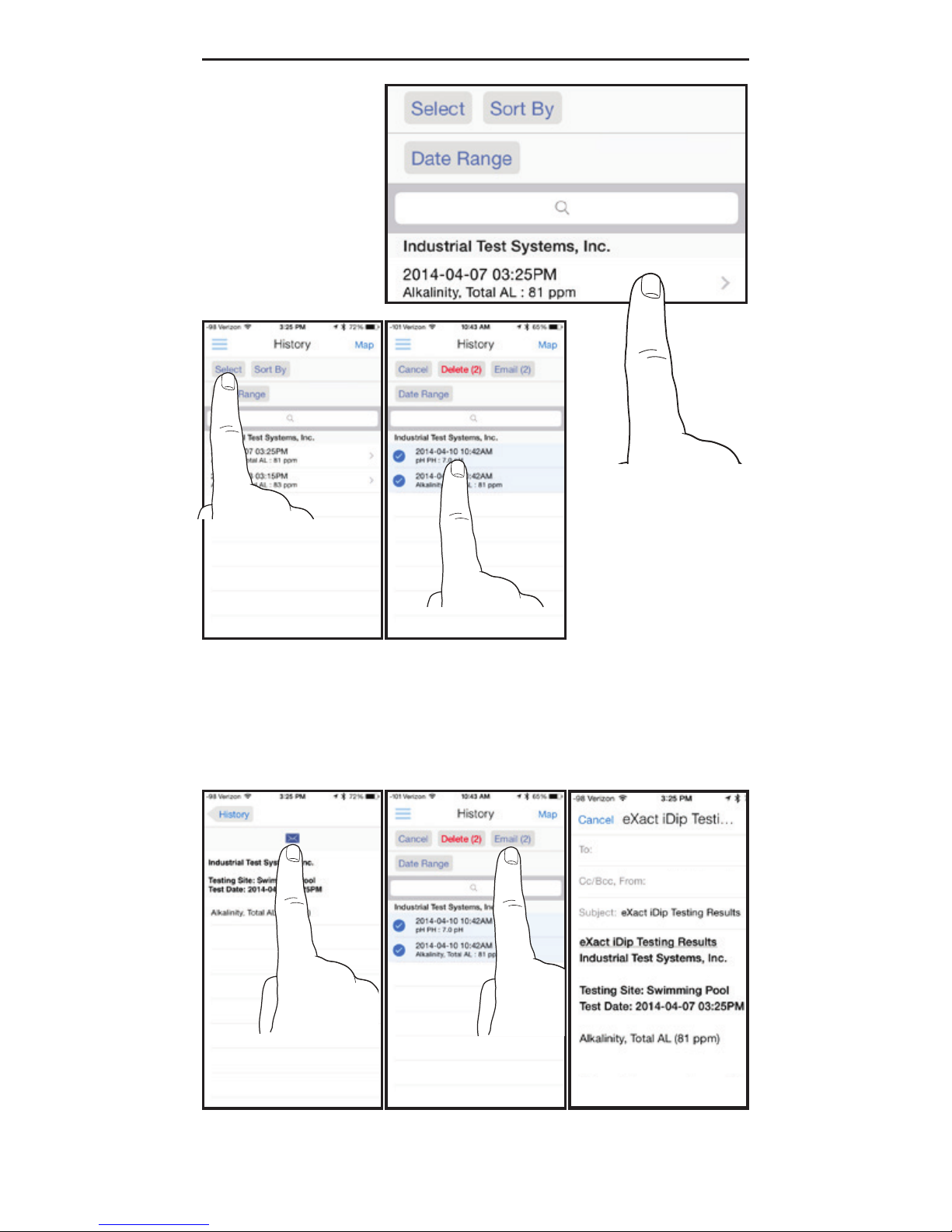
In History, you can
edit, select, and email
your results.
To email, you can
either tap an individual
result, or use the
‘Select’ button to
access multiple data
points.
Press the blue envelope icon if a single result is selected. Tap ‘Email’ at
the top if multiple tests are selected. Additional notes can be added to
the email body. Add recipients to your e-mail and tap send to complete.
DATA MANAGEMENT
Page 13

13
Issue Cause Solution
No response Low battery Replace batteries
from iDip Chip failure Contact ITS.
Dim screen on iDip Low battery Replace batteries
“Er1” on iDip LCD No result sent to Disconnect/reconnect to
iDip from app iDip (see pg. 7)
“Er2” on iDip LCD No connection to app Connect to iDip (see pg. 7)
Lost connection to app Reconnect to iDip
“LO” on iDip LCD Low battery Replace batteries
while zeroing Dirty cell Clean cell (see pg.15)
Cloudy sample Dilute sample or use sieve
Bad LED Contact ITS.
“HI” on iDip LCD Result above Rerun test to verify result
while reading detection level
“LO” on iDip LCD Result below Rerun test to verify result
while reading detection level
“AbS” on iDip LCD Start-up screen Continue with testing
TROUBLESHOOTING
• The meter has a 3 minute automatic shutdown timer by default. To change this, go to
Settings in the slide out menu.
•
Before testing, rinse the meter sample cell with the sample water 3 times.
• Always ll the cell to capacity (4ml).
• Test immediately after lling the cell with the water sample.
• To obtain optimal accuracy when testing outdoors (sunlight), use the Cell Cover
when zeroing and reading the sample.
• Due to the strip slitting process, you may nd one or two strips that are noticeably
smaller or larger in width than the normal strips in the bottle. These should be
discarded. Using these strips may give unreliable results.
• Meter is not compatible for use with powder pillows, tablets, and liquids from other
manufacturers.
• Dip strip for entire countdown.
• Each eXact
®
Strip Micro is valid for ONLY one test. Discard strip after use.
• Dry the outside of the meter before storage.
• Remove batteries before storing for prolonged periods.
• Store the meter and test materials out of direct sunlight and away from chemical
storage areas.
• Minimize exposure of meter and test reagents to heat above 90°F (32°C).
• When installing batteries, make sure that the O-ring is still attached to the screw
before tightening.
• Cleaning the cell with water and brush after each test is recommended for best
accuracy and prior to storage of unit. Use Distilled White Vinegar to clean the cell after
testing for Phosphate or Iron to remove reagent deposits from cell wall.
TIPS
Page 14

14
aCCURaCY Of ThE EXaCT® iDip
®
Combined with your smart device, the eXact® iDip® is designed to test
your water for multiple water quality parameters. Download the free
eXact
®
iDip® app and sync to your smart device running Bluetooth
®
Smart Technology
.
All tests have been calibrated using certi ed reference standards and
analytical spectrophotometric methods. The algorithms in the app
refl ect the best correlation of the eXact
®
iDip® against the AWWA,
USEPA, DIN and ISO reference test methods for chlorine. Independent
studies verify the eXact
®
iDip® repeatedly agrees with a USEPA
compliant reference method greater than 99% (R2= 0.99948, 0-5.00
ppm). The eXact
®
iDip® has been factory calibrated and will stay valid
because of the exceptional quality. We are so con dent in the eXact
®
iDip®, we offer an industry leading 2-year warranty.
We built the eXact
®
iDip® to be easy, accurate and environmentally
friendly. We have achieved this by utilizing our patented eXact
®
Strip
Micro Technology, which uses at least 60% less water and chemistry
than alternative methods. Instead of using a 10mL water sample, eXact
®
Strip Micro uses a 4mL water sample. The accuracy of the meter is
maintained by designing the sample cell with a 11mm path length.
BLUETOOTh TEChNOLOgY
Bluetooth® is a low-power wireless networking standard which uses
short radio waves to allow electronic devices to communicate with
each other wirelessly. The eXact
®
iDip® comes standard with the latest
Bluetooth
®
4.0 technology (www.bluetooth.com/Pages/Bluetooth-Smart.
aspx), a class 2 device with a wireless working distance of up to 30 feet
(10 meters) and a 2.1 Mbps data transfer rate. This allows a seamless
transfer of data between a smart device and the eXact
®
iDip®.
aBOUT ThE BUiLT iN saMpLE CELL
The built-in sample cell is made of transparent plastic; the sturdy cell design
will last for over 20,000 readings. Scratches on the cell will not compromise
the accuracy of your results because of the cell’s xed position.
CLEaNiNg ThE CELL
Fill the cell with water and use the enclosed cleaning brush to scrub
the CELL thoroughly. Rinse the CELL. You can use dish soap or
distilled white vinegar for cleaning the CELL if needed. NEVER use
solvents such as acetone.
ABOUT
SCAN FOR FLYER
SCAN FOR TEST
DEMO VIDEO
Page 15
15
Standard Methods 4500 - Cl G
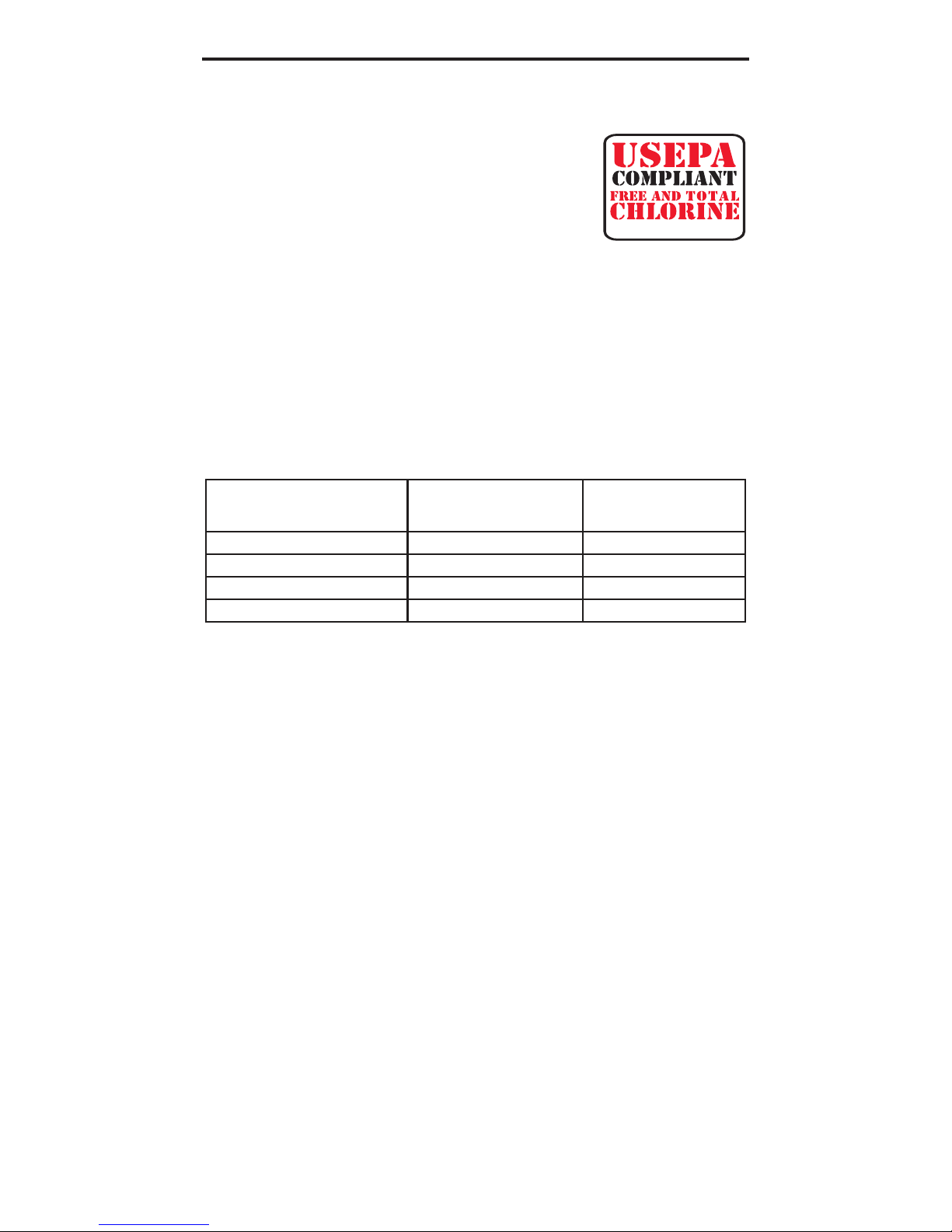
COMpLiaNCE TEsTiNg fOR fREE aND TOTaL ChLORiNE
This DPD test system is accepted by most health departments
because this test is USEPA (DIN Standard 38 408
G4, ISO 7393/2) accepted for testing requirements
for Free and Total Chlorine. The eXact
®
iDip® meter
uses a wavelength of 525nm; and the compliance
requirement is that the colorimeter wavelength is
between 490 and 530nm. The eXact
®
Strip Micro
CL (DPD-1) uses the same reagents AWWA (American Water Works
Association) method 4500-Cl G. It should be understood that the
USEPA does not “approve” commercial DPD delivery systems such
as reagent powder pillows, tablets,dispensers, or eXact
®
Strip DPD
delivery devices. The eXact
®
Strip Micro CL (DPD-1) for Free Chlorine,
and the eXact
®
Strip Micro CL (DPD-3) or the eXact® Strip Micro CL
(DPD-4) for Total Chlorine meet your reportable testing requirements
because the eXact
®
Strip Micro CL delivers the same chemicals
in identical proportions (see table below); therefore, the system is
compliant. Likewise, AWWA proportions are followed as required for
Total Chlorine measurements using Potassium Iodide.
WaRRaNTY (2 YEaRs)
Registration of your eXact® photometer must be received within 30 days from date
of purchase to activate the warranty. The eXact
®
photometer is warranted to be
free from defects in materials and workmanship for a period of two (2) years from
the date of purchase by the customer. ITS will repair or replace, at its discretion,
product which is deemed to be faulty due to manufacturing defect. Warranty does
not cover product damage caused by abuse (such as crushing a tablet in the
cell), battery corrosion damage, or improper use. If the meter is faulty or otherwise
defective contact ITS by phone (+1-803-329-9712 Ext. 0) or email ([email protected])
to describe the problem and obtain a return authorization form before returning the
photometer to ITS. Damage caused by improper packing of the photometer for return
shipment to ITS will not be covered by the warranty. Customer is responsible for
shipping charges to ITS. ITS pays postage when photometer is returned to customer.
A maximum processing fee of $75 will be charged for repair or replacement of nonregistered photometers and damages not covered by this warranty. Registration is
available over the phone (+1-803-329-9712 Ext. 0) or online at http://www.sensafe.
com/micro/warranty/ (Personal data is kept condential). The repair or replacement
of the photometer will not extend or renew the period of guarantee. This warranty
does not affect your statutory rights. The warranty is not transferable.
TEChNiCaL sUppORT
Please visit www.sensafe.com/idip for the latest technical information
and how-to videos.
For additional technical support, call (803) 329-9712 or send us an
email at [email protected].
ABOUT
COMpONENT
(fREE ChLORiNE)
aWWa
4500-CL g
EXaCT
®
DpD-1
Anhydrous DPD sulfate
1.5% 1.5%
Anhydrous Na
2
HPO
4
33.4% 33.4%
Anhydrous KH
2PO4Na2
64.0% 64.0%
EDTA 1.1% 1.1%
Page 16
16
www.sensafe.com/idip
*Combined Chlorine DPD-3 Test requires Free Chlorine DPD-1 (486637) to be run first.
For resellers and distributors - products sold in case quantities (12 units per case).
**Test uses a non-standard test method. Visit sensafe.com/idip for details.
Test Parameter Part # Range
Alkalinity, Total
Bromide
(as NaBr)
Bromine
(DPD-1)
Calcium
(as CaCO
3
)
Chloride
(as NaCl) Salt
Chloride, High Range
(as NaCl)
**
Chlorine Dioxide
(DPD-1)
Chlorine, Free
(DPD-1)
Chlorine, High Range
Chlorine, Combined
(DPD-3)
* **
Chlorine, Total
(DPD-4)
Chromium (VI)
Copper (Cu
+2
)
Cyanuric Acid
Hardness, Total HR (as CaCO
3
)
Hardness, Total LR (as CaCO
3
)
Hydrogen Peroxide LR
Hydrogen Peroxide MR
Hydrogen Peroxide HR
Iodine
(DPD-1)
Iron, Total (TPTZ)**
Magnesium Hardness
Manganese**
Metals
Molybdate**
Nitrate (as NO
3
)
Nitrite (as NO
2
)
Ozone
(DPD-4)
Peracetic Acid
(DPD-4)
Permanganate
(DPD-1)
pH
Phosphate
Sulfate
Sulfide (as H
2
S)
Turbidity**
486641
486659
486636
486629
486757
486757
486633
486637
486672
486638
486670
486614
486632
481652-II
486656
486630
486616
486648
486676
486627
486650
486610
486606
486604
486653
486655
486623
486634
486674
486626
486639-II
486814
486608
486646
N/A
11 - 200 ppm
19 - 400 ppm
0.07 - 17 ppm
19 - 550 ppm
3 - 600 ppm
347 - 9975 ppm
0.04 - 15 ppm
0.05 - 12 ppm
1 - 280 ppm
0.05 - 12 ppm
0.05 - 12 ppm
0.01 - 2 ppm
0.6 - 11 ppm
3 - 110 ppm
60 - 900 ppm
1 - 125 ppm
0.02 - 3.5 ppm
1 - 130 ppm
16 - 4200 ppm
Coming Soon
0.03 - 8 ppm
2 - 400 ppm
0.03 - 2.6 ppm
1 - 1.75 ppm
0.02 - 5 ppm
0.25 - 32 ppm
0.02 - 4 ppm
0.01 - 2 ppm
0.05 - 11 ppm
0.02 - 6 ppm
6.0 - 8.5 pH
0.02 - 5 ppm
1 - 270 ppm
Coming Soon
24 - 780 NTU
100
25
100
50
25
25
100
100
50
100
100
50
50
60
50
100
50
50
100
100
50
50
24
24
50
50
50
100
100
100
100
50
50
50
N/A
R041614
# of
Tests
AVAILABLE TESTS & REAGENTS
(1) Bulk meter, 6 foils of each: FC, CC, AL, pH,
(1) cleaning Brush, (1) instruction booklet
eXact
®
iDip
™
486101 As Below 6
eXact
®
Pool Refill Kit 486211 As Below As Below
AL, pH, DPD-1, DPD-3, CA, CY
eXact
®
Well Refill Kit 486212 As Below As Below
pH, Fe, NO
3
, AL, Ca
eXact
®
Tap Refill Kit 486213 As Below As Below
pH, AL, Ca, DPD-1, DPD-4, HR Cl, Metals
eXact
®
Process Refill Kit 486214 As Below As Below
pH, DPD-1, DPD-4, HR Cl, MR H
2
O
2
, Glycine
eXact
®
iDip
™
Carrying Case 481661-ID N/A N/A
REORDER
Apple, the Apple logo, iPad, iPhone, and iPod touch are trademarks of Apple Inc., registered in the U.S . and other countries.
EXACT® and IDIP® are registered trademarks of Industrial Test Systems, Inc. Rock Hill, SC USA.
The Bluetooth® word mark and logos are owned by Bluetooth SIG and any use of such marks is under license.
 Loading...