

Page 1
EW3964/EW3965/EW3966/EW3967/EW3971
Page 2
EW3964/EW3965/EW3966/EW3967/EW3971
Page 3

2 |
ENGLISH
EW3964/EW3965/EW3966/EW3967/EW3971
Table of contents
1.0 Introduction ........................................................................................................... 2
1.1 Packing contents ............................................................................................... 2
2.0 Using the laptop charger ........................................................................................ 2
2.1 Connecting the laptop charger to your laptop ..................................................... 3
2.2 Using the USB port (EW3971) ........................................................................... 5
3.0 Frequently Asked Questions and other related information .................................... 5
4.0 Service and support ............................................................................................... 5
5.0 Warning and points of attention ............................................................................. 5
6.0 Warranty conditions ............................................................................................... 6
1.0 Introduction
Congratulations with the purchase of this high-quality Ewent product! This product
has undergone extensive testing by Ewent’s technical experts. Should you
experience any problems with this product, you are covered by a five-year Ewent
warranty. Please keep this manual and the receipt in a safe place.
Register your product now on www.ewent-online.com and receive product updates!
1.1 Packing contents
The following parts need to be present in the packing:
• Laptop charger
• Power tips
• Power cable
• Safety instructions
2.0 Using the laptop charger
You only have to connect the power supply, and check whether the voltage
corresponds with the voltage of your laptop. Then connect the power connector to
your laptop to start charging your laptop.
Calculating the necessary power for your laptop
In case you want to know if the laptop charger can be used with your laptop you can
use the following calculation:
If your original laptop charger has an output of 15V 3A, you need a charger which
delivers a minimum of 45 Watts (15V x 3A).
Page 4
3 |
ENGLISH
2.1 Connecting the laptop charger to your laptop
Hint: Before using the charger, check what voltage is needed to charge your laptop.
Usually, this can be found on the bottom of your laptop or in the user’s manual of your
laptop.
1. Take the laptop charger, power cable and power connectors out of the
packaging.
Connecting the wrong power tip can mean you are using the wrong voltage. This can
lead to damaging the laptop or other connected devices!
2. Choose the power tip which fits the power input of your laptop. You can fit the tip
to the power input of your laptop first, without connecting this power tip to the
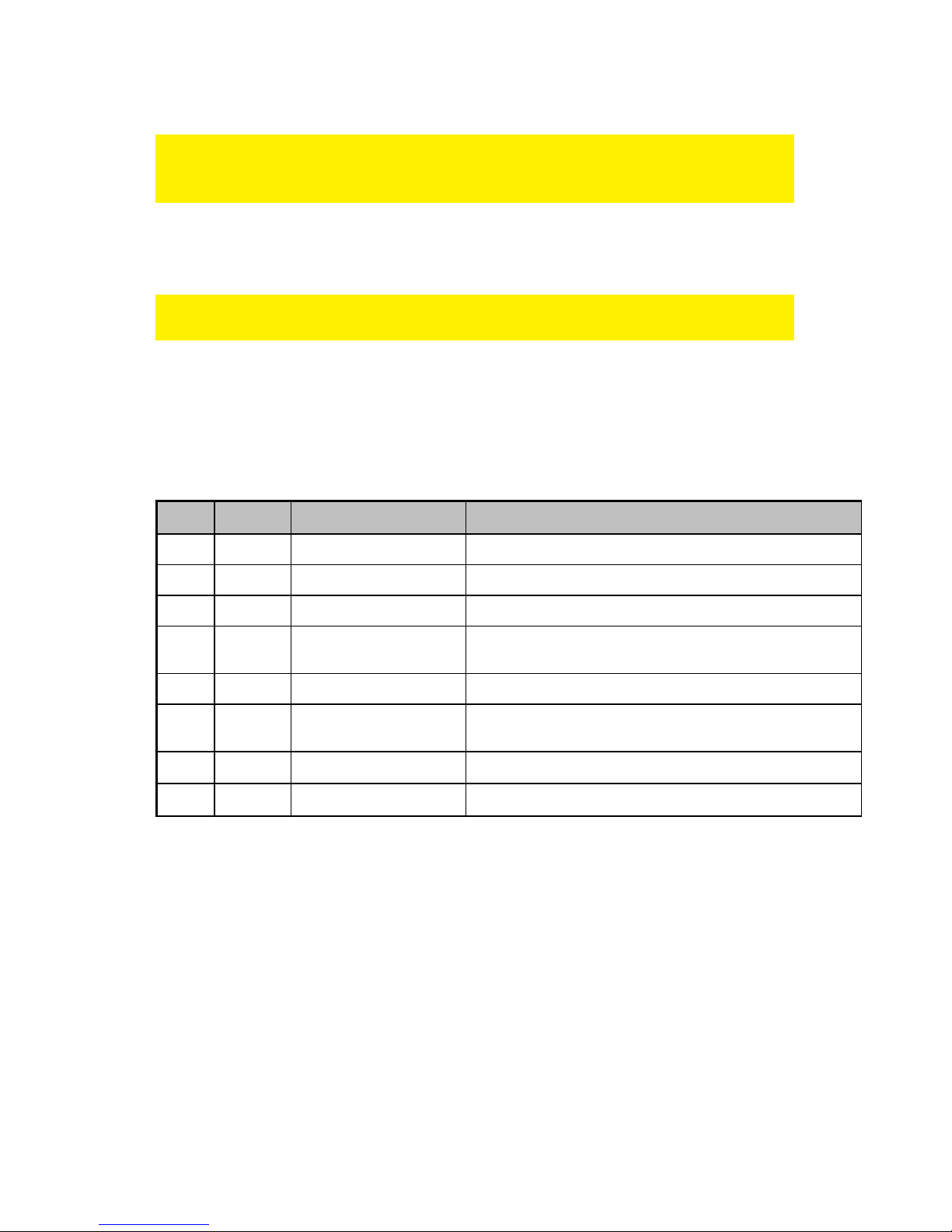
laptop charger. Each power connector has it’s own voltage. Below, you will find a
table with the supplied power tips and voltages per brand.
EW3964 :
Type Voltage Tips Size Notebook Brand
M1 15V 6,3 x 3,0 x 10,7 mm Toshiba Satelite (Pro) series, NEC Versa
M3 16V 6,0 x 4,4 x 10,7mm Panasonic, Sony, Fujitsu
M4 18,5V 4,8 x 1,7 x 10,7 mm Compaq, HP, LG
M5 19V 5,5 x 2,5 x 10,7 mm
HP, Compaq, Acer, Toshiba, Fujitsu, Gateway IBM, Dell,
NEC, Delta, LiteOn, Asus, Lenovo
M6 19V 5,0 x 3,0 x 10,7 mm Samsung
M7 19V 5,5 x 2,1 x 10,7 mm
Acer Travelmate series, Delta, HP, Gateway, Toshiba,
LiteOn
M8 19,5V 6,0 x 4,4 x 10,7 mm Sony PCG GRS Series, Fijitsu
M24 19V 2,5 x 0,7 x 9 mm Asus (Netbook)
Page 5
4 |
ENGLISH
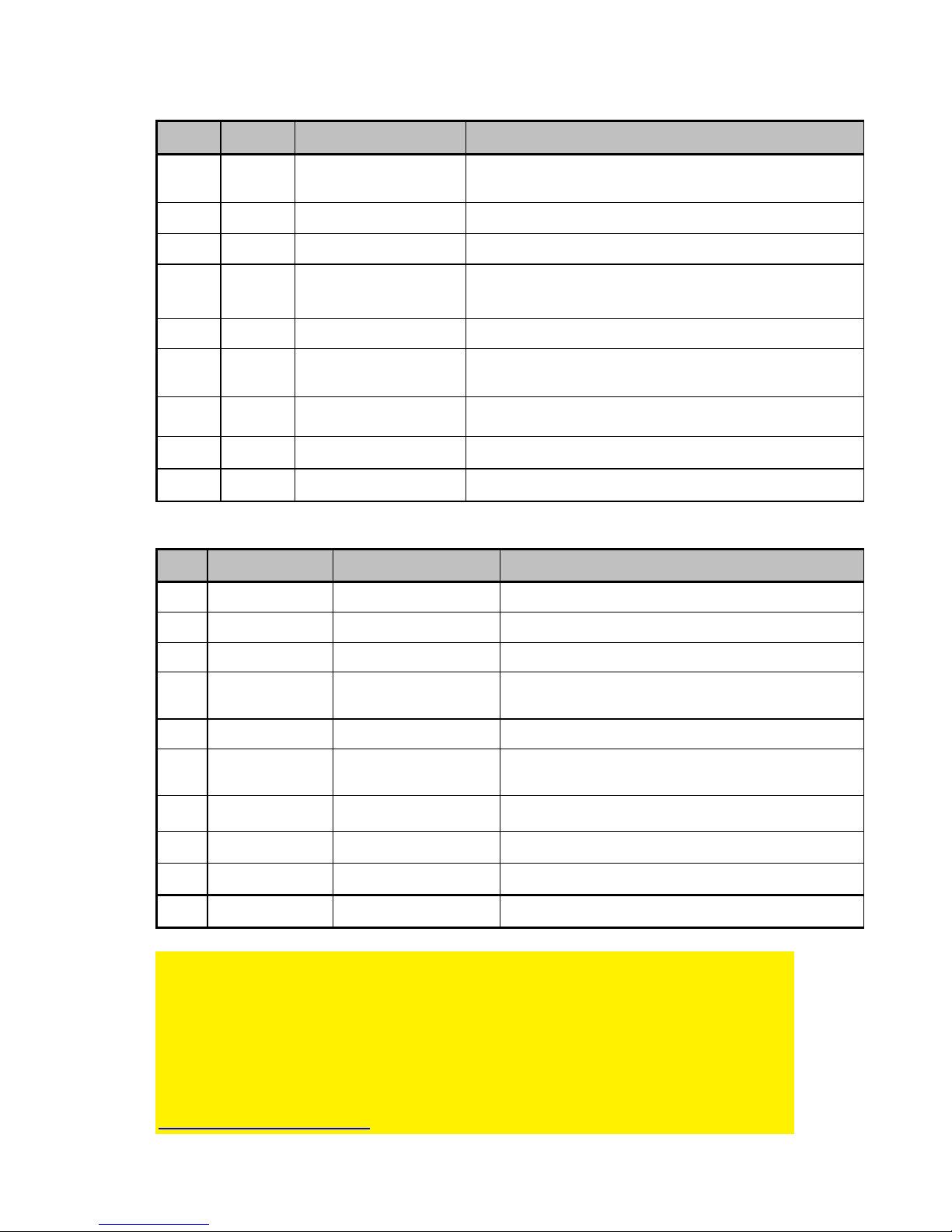
EW3965/EW3966/EW3967 :
Type Voltage Tips Size Notebook Brand
M1 15V 6,3 x 3,0 x 10,7 mm Toshiba Satelite (Pro) series, NEC Versa
M3 16V 6,0 x 4,4 x 10,7mm Panasonic, Sony, Fujitsu
M4 18,5V 4,8 x 1,7 x 10,7 mm Compaq, HP, LG
M5 19V 5,5 x 2,5 x 10,7 mm
HP, Compaq, Acer, Toshiba, Fujitsu, Gateway IBM, Dell,
NEC, Delta, LiteOn, Asus, Lenovo
M6 19V 5,0 x 3,0 x 10,7 mm Samsung
M7 19V 5,5 x 2,1 x 10,7 mm
Acer Travelmate series, Delta, HP, Gateway, Toshiba,
LiteOn
M8 19,5V 6,0 x 4,4 x 10,7 mm Sony PCG GRS Series, Fijitsu
M12 18,5V 7,4 x 5,0 x 12,5 mm HP, Compaq
M31 19.5V 4.5 x 3.0 x 9mm HP Envy
EW3971 :
Type Output Voltage Tips Size Notebook Brand
M1 15V 6,3 x 3,0 x 10,7 mm Toshiba Satelite (Pro) series, NEC Versa
M3 16V 6,0 x 4,4 x 10,7mm Panasonic, Sony, Fujitsu
M4 18,5V 4,8 x 1,7 x 10,7 mm Compaq, HP, LG
M5 19V 5,5 x 2,5 x 10,7 mm
HP, Compaq, Acer, Toshiba, Fujitsu, Gateway IBM,
Dell, NEC, Delta, LiteOn, Asus, Lenovo
M6 19V 5,0 x 3,0 x 10,7 mm Samsung
M7 19V 5,5 x 2,1 x 10,7 mm
Acer Travelmate series, Delta, HP, Gateway,
Toshiba, LiteOn
M8 19,5V 6,0 x 4,4 x 10,7 mm Sony PCG GRS Series, Fijitsu
M9 19,5V 7,4 x 5,0 x 12,5 mm Dell
M12 18,5V 7,4 x 5,0 x 12,5 mm HP, Compaq
M31 19.5V 4.5 x 3.0 x 9mm HP Envy
Free Tip Service
If your laptop/notebook requires another tip then the tips which are supplied with this
product, you can send a request for the right tip to Ewent (please check the tiplist in
this manual). We cannot guarantee that we have the requested tip at all time. When
available, our support desk will send the tip to you for free.
You can send your request for the tip to us by using the supportform on our website:
http://www.ewent-online.com
Page 6

5 |
ENGLISH
3. Once you know for sure which power tip fits your laptop, disconnect the power
connector from the laptop.
4. The voltage needs to correspond with the voltage needed for your laptop. If it
does not correspond with the voltage needed for your laptop, do not connect it to
your laptop.
5. Connect the power tip to your laptop.
6. Connect the power cable to the laptop charger. Connect the other side of the
power cable to a wall outlet. The laptop charger will now start charging your
laptop.
2.2 Using the USB port (EW3971)
The USB connector supplies 10W (5 Volt @ 2 Amperes) and can be used to charge
USB devices such as mobile phones, MP3 players and even the latest generation of
tablet computers.
1. Connect the USB device you want to charge to the USB port of the charger using
a USB cable.
2. Connect the charger to a wall outlet.
3. The charger will now start to charge the connected USB device.
3.0 Frequently Asked Questions and other
related information
The latest Frequently asked questions for your product can be found on the support
page of your product. Ewent will update these pages frequently to assure you have
the most recent information. Visit www.ewent-online.com for more information about
your product.
4.0 Service and support
This user’s manual has been carefully written by Ewent’s technical experts. If you
have problems installing or using the product, please fill out the support form at the
website www.ewent-online.com/
You can also contact us by phone. Please check www.ewent-online.com/ for the
helpdesk phone number and opening hours.
5.0 Warning and points of attention
Due to laws, directives and regulations set out by the European parliament, some
(wireless) devices could be subject to limitations concerning its use in certain
European member states. In certain European member states the use of such devices
Page 7

6 |
ENGLISH
could be prohibited. Contact your (local) government for more information about this
limitations.
Always follow up the instructions in the manual*, especially where it concerns devices
which need to be assembled.
Warning: In most cases this concerns an electronic device. Wrong/improper use may
lead to (severe) injuries!
Repairing of the device should be done by qualified Ewent staff. The warranty
immediately voids when products have undergone self repair and/or by misuse. For
extended warranty conditions, please visit our website at www.ewent-online.com.
*Tip: Ewent manuals are written with great care. However, due to new technological
developments it can happen that a printed manual does not longer contain the most
recent information.
If you are experiencing any problems with the printed manual or you cannot find what
you are looking for, please always check our website www.ewent-online.com first for
the newest updated manual.
Also, you will find frequently asked questions in the FAQ section. It is highly
recommended to consult the FAQ section. Very often the answer to your questions will
be found here.
6.0 Warranty conditions
The two-year Ewent warranty applies to all Ewent products, unless mentioned
otherwise before or during the moment of purchase. After buying a second-hand
Ewent product the remaining period of warranty is measured from the moment of
purchase by the product’s initial owner. Ewent warranty applies to all Ewent products
and parts, indissolubly connected or mounted to the product it concerns. Power supply
adapters, batteries, antennas and all other products not directly integrated in or
connected to the main product or products of which, without reasonable doubt, can be
assumed that wear and tear during use will show a different pattern than the main
product, are not covered by the Ewent warranty. Products are not covered by the
Ewent warranty when exposed to incorrect/improper use, external influences or when
opening the service parts of the product by parties other than Ewent. Ewent may use
refurbished materials for repair or replacement of your defective product. Ewent
cannot be held responsible for changes in network settings by internet providers. We
cannot guarantee that the Ewent networking product will keep working when settings
are changed by the internet providers. Ewent cannot guarantee the working of web
services, apps and other third party content that is available through Ewent products.
Ewent products with an internal hard disk have a limited warranty period of two years
on the hard disk. Ewent could not be held responsible for any data lost. Please make
sure that if the product stores data on a hard drive or other memory source, you will
Page 8
7 |
ENGLISH
make a copy before you return the product for repair.
When my product gets defective
Should you encounter a product rendered defective for reasons other than described
above: Please contact your point of purchase for taking care of your defective product.
EW3964/EW3965/EW3966/EW3967/EW3971 | 10-2014
Page 9
EW3964/EW3965/EW3966/EW3967/EW3971
Page 10

2 |
NEDERLANDS
EW3964/EW3965/EW3966/EW3967/EW3971/
Inhoudsopgave
1.0 Introductie ............................................................................................................. 2
1.1 Inhoud van de verpakking .................................................................................. 2
2.0 De laptoplader gebruiken ....................................................................................... 2
2.1 De laptoplader op je laptop aansluiten ............................................................... 3
2.2 De USB poort gebruiken (EW3971) ................................................................... 5
3.0 Veelgestelde vragen en andere relevante informatie ............................................. 5
4.0 Service en ondersteuning ...................................................................................... 5
5.0 Waarschuwingen en aandachtspunten .................................................................. 5
6.0 Garantievoorwaarden ............................................................................................ 6
1.0 Introductie
Gefeliciteerd met de aankoop van dit hoogwaardige Ewent product! Dit product is door
de technische experts van Ewent uitgebreid getest. Mocht dit product ondanks alle
zorg problemen vertonen, dan kun je een beroep doen op de vijf jaar Ewent garantie.
Bewaar deze handleiding samen met het bewijs van aankoop daarom zorgvuldig.
Registreer je aankoop nu op www.ewent-online.com en ontvang product updates!
1.1 Inhoud van de verpakking
De volgende onderdelen zijn aanwezig in het pakket:
• laptoplader
• stroompluggen
• Stroomkabel
• Veiligheidsinstructies
2.0 De laptoplader gebruiken
Je hoeft alleen maar de juiste stroomplug te kiezen, de stroomplug op zowel de
laptoplader als je laptop aan te sluiten. Sluit dan de laptoplader op het lichtnet aan om
je laptop op te laden.
De benodigde hoeveelheid stroom berekenen
Indien je wilt weten of de laptoplader gebruikt kan worden in combinatie met je laptop,
kun je de volgende berekening gebruiken:
Page 11
3 |
NEDERLANDS
Als je originele laptoplader een output heeft van 15V 3A, dan heb je een lader nodig
die minimaal 45Watt levert (15V x 3A).
2.1 De laptoplader op je laptop aansluiten
Tip: Voordat je de lader gebruikt, dien je te controleren welk voltage je laptop nodig
heeft om opgeladen te worden. Dit staat doorgaans op de onderkant van je laptop
vermeld, of in de handleiding van je laptop.
1. Neem de laptoplader, stroomkabel en de stroompluggen uit de verpakking.
Als je de verkeerde stroomplug aansluit kan dit betekenen dat het verkeerde
voltage wordt gebruikt. Dit kan leiden tot schade aan je laptop of andere
aangesloten apparaten.
2. Kies de stroomplug die in de stroomaansluiting van je laptop past. Pas deze
stroomplug eerst op je laptop voordat je de stroomplug op de laptoplader
aansluit. Hieronder staat een tabel vermeld met daarin de verschillende
stroompluggen en voltages per merk. Elke stroomplug heeft zijn eigen voltage.
EW3964 :
Type Voltage Tips Size Notebook Brand
M1 15V 6,3 x 3,0 x 10,7 mm Toshiba Satelite (Pro) series, NEC Versa
M3 16V 6,0 x 4,4 x 10,7mm Panasonic, Sony, Fujitsu
M4 18,5V 4,8 x 1,7 x 10,7 mm Compaq, HP, LG
M5 19V 5,5 x 2,5 x 10,7 mm
HP, Compaq, Acer, Toshiba, Fujitsu, Gateway IBM, Dell,
NEC, Delta, LiteOn, Asus, Lenovo
M6 19V 5,0 x 3,0 x 10,7 mm Samsung
M7 19V 5,5 x 2,1 x 10,7 mm
Acer Travelmate series, Delta, HP, Gateway, Toshiba,
LiteOn
M8 19,5V 6,0 x 4,4 x 10,7 mm Sony PCG GRS Series, Fijitsu
M24 19V 2,5 x 0,7 x 9 mm Asus (Netbook)
Page 12
4 |
NEDERLANDS
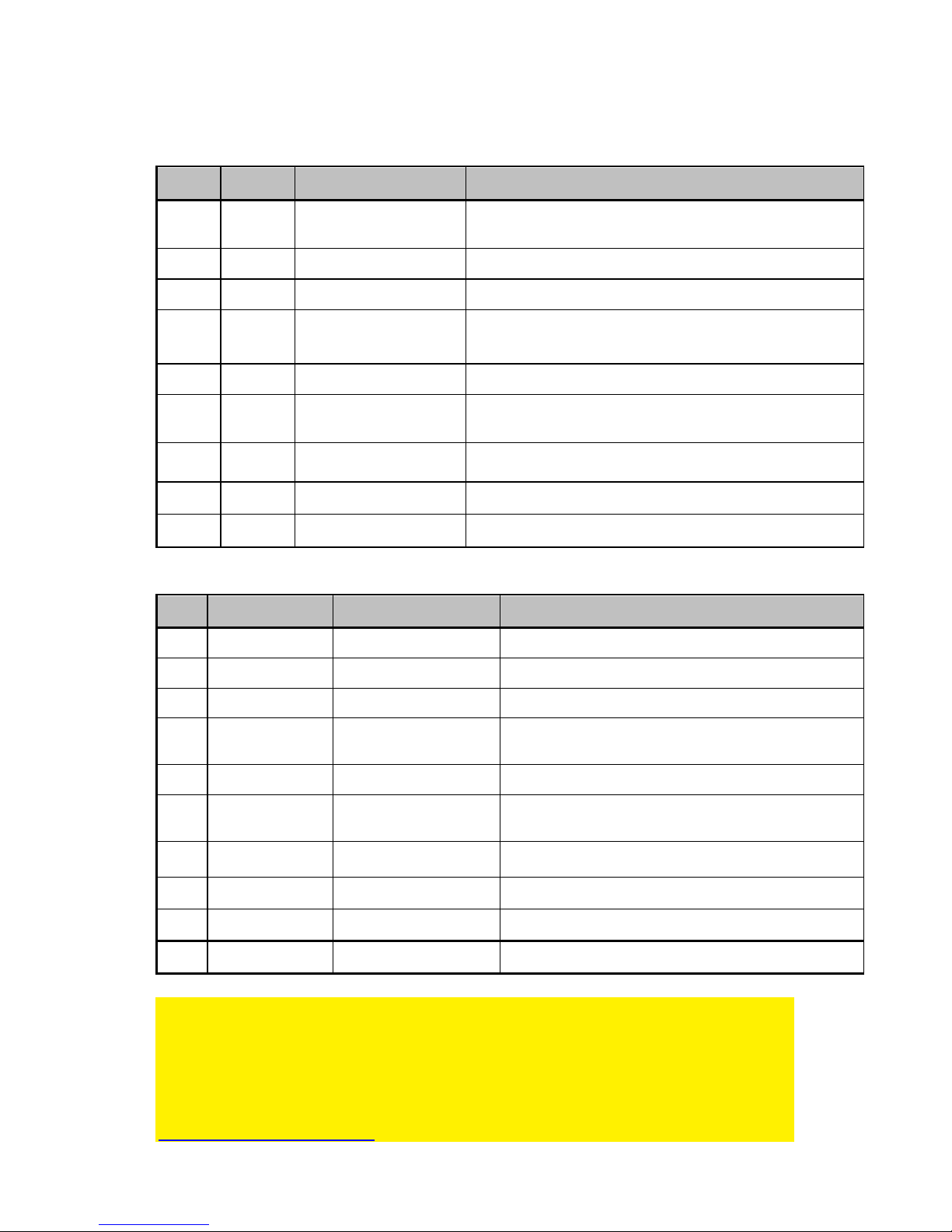
EW3965/EW3966/EW3967 :
Type Voltage Tips Size Notebook Brand
M1 15V 6,3 x 3,0 x 10,7 mm Toshiba Satelite (Pro) series, NEC Versa
M3 16V 6,0 x 4,4 x 10,7mm Panasonic, Sony, Fujitsu
M4 18,5V 4,8 x 1,7 x 10,7 mm Compaq, HP, LG
M5 19V 5,5 x 2,5 x 10,7 mm
HP, Compaq, Acer, Toshiba, Fujitsu, Gateway IBM, Dell,
NEC, Delta, LiteOn, Asus, Lenovo
M6 19V 5,0 x 3,0 x 10,7 mm Samsung
M7 19V 5,5 x 2,1 x 10,7 mm
Acer Travelmate series, Delta, HP, Gateway, Toshiba,
LiteOn
M8 19,5V 6,0 x 4,4 x 10,7 mm Sony PCG GRS Series, Fijitsu
M12 18,5V 7,4 x 5,0 x 12,5 mm HP, Compaq
M31 19.5V 4.5 x 3.0 x 9mm HP Envy
EW3971 :
Type Output Voltage Tips Size Notebook Brand
M1 15V 6,3 x 3,0 x 10,7 mm Toshiba Satelite (Pro) series, NEC Versa
M3 16V 6,0 x 4,4 x 10,7mm Panasonic, Sony, Fujitsu
M4 18,5V 4,8 x 1,7 x 10,7 mm Compaq, HP, LG
M5 19V 5,5 x 2,5 x 10,7 mm
HP, Compaq, Acer, Toshiba, Fujitsu, Gateway IBM,
Dell, NEC, Delta, LiteOn, Asus, Lenovo
M6 19V 5,0 x 3,0 x 10,7 mm Samsung
M7 19V 5,5 x 2,1 x 10,7 mm
Acer Travelmate series, Delta, HP, Gateway,
Toshiba, LiteOn
M8 19,5V 6,0 x 4,4 x 10,7 mm Sony PCG GRS Series, Fijitsu
M9 19,5V 7,4 x 5,0 x 12,5 mm Dell
M12 18,5V 7,4 x 5,0 x 12,5 mm HP, Compaq
M31 19.5V 4.5 x 3.0 x 9mm HP Envy
Gratis Plug Service
Indien je laptop/notebook een andere tip vereist dan de tips die bijgeleverd zijn bij dit
product, dan kun je een aanvraag voor de juiste tip indienen bij Ewent (zie de tiplijst in
deze handleiding). We kunnen niet garanderen dat we de gewenste tip op voorraad
hebben. Indien de tip beschikbaar is, zal onze Support afdeling deze gratis naar je
versturen. Je kunt je aanvraag indienen via het supportformulier op onze website:
http://www.ewent-online.com/
Page 13

5 |
NEDERLANDS
3. Als je zeker weet welke stroomplug op je laptop past, kun je de stroomplug weer
loskoppelen van je laptop.
4. Het voltage dient overeen te komen met het benodigde voltage van je laptop.
Komt dit niet overeen, gebruik deze dan niet!
5. Sluit nu de stroomplug op je laptop aan.
6. Sluit de stroomkabel op de laptoplader aan. Sluit de andere kant van de
stroomkabel op een stopcontact aan. De laptoplader begint nu met het opladen
van je laptop.
2.2 De USB poort gebruiken (EW3971)
De USB poort levert 10W (5 Volt @ 2 Ampère) waarmee de meeste USB apparaten
zoals mobiele telefoons, MP3 spelers en zelfs de laatste generatie tablet computers
opgeladen kunnen worden.
1. Sluit het USB apparaat dat je wilt opladen op de USB poort van de lader aan.
2. Sluit de lader op een stopcontact aan.
3. De lader start nu met het opladen van het aangesloten USB apparaat.
3.0 Veelgestelde vragen en andere relevante
informatie
De meest recente veelgestelde vragen voor je product kun je vinden op de
supportpagina van je product. Ewent zal deze veelgestelde vragen regelmatig
bijwerken zodat je bent voorzien van de meest recente informatie. Bezoek de Ewent
website voor meer informatie: www.ewent-online.com
4.0 Service en ondersteuning
Deze handleiding is door de technische experts van Ewent met zorg opgesteld.
Mocht je desondanks problemen ervaren bij de installatie of in het gebruik van je
Ewent product, vul dan het supportformulier in op de website www.ewent-online.com/.
Je kunt tevens gebruik maken van het Ewent servicenummer. Kijk op www.ewent-
online.com voor het telefoonnummer en de openingstijden.
5.0 Waarschuwingen en aandachtspunten
Vanwege wet- en regelgeving bepaald door het Europese parlement, kan sommige
(draadloze) apparatuur onderhevig zijn aan beperkingen omtrent het gebruik in
bepaalde Europese lidstaten. In sommige Europese lidstaten kan het gebruik van
deze apparatuur verboden zijn. Neem contact op met je (lokale) overheid voor meer
informatie over deze beperkingen.
Page 14

6 |
NEDERLANDS
Volg ten allen tijde de instructies in de handleiding*, speciaal wanneer het apparatuur
betreft wat geassembleerd dient te worden.
Waarschuwing: In de meeste gevallen gaat het om een elektronisch apparaat.
Verkeerd of oneigenlijk gebruik van het apparaat kan leiden tot (zware) verwondingen.
Het repareren van het apparaat dient uitgevoerd te worden door gekwalificeerd Ewent
personeel. De garantie vervalt per direct indien het apparaat zelf gerepareerd is en/of
wanneer het product misbruikt is. Voor uitgebreide garantie voorwaarden, ga naar
www.ewent-online.com/.
*Tip: Ewent handleidingen worden met de grootste zorgvuldigheid gemaakt. Door
nieuwe technische ontwikkelingen kán het echter gebeuren dat een geprinte
handleiding niet meer de meest recente informatie bevat. De online handleiding wordt
altijd direct geüpdatet met de nieuwste informatie.
Mocht je een probleem ervaren met de geprinte handleiding, check dan altijd eerst
onze website www.ewent-online.com waar de meest recente handleiding te
downloaden is.
Tevens vind je op onze website in de Vaakgestelde Vragen (FAQ) Sectie veel
informatie over je product. Het is zeer raadzaam eerst de FAQ sectie te raadplegen,
vaak is je antwoord hier terug te vinden.
6.0 Garantievoorwaarden
De garantietermijn van twee jaar geldt voor alle Ewent producten, tenzij anders
aangegeven op het moment van aankoop. Bij aankoop van een tweedehands Ewent
product resteert de garantieperiode gemeten vanaf het moment van de aankoop door
de eerste eigenaar. De Ewent garantieregeling is van toepassing op alle Ewent
producten en onderdelen onlosmakelijk verbonden met het betreffende product.
Voedingen, batterijen, accu’s, antennes en alle andere producten niet geïntegreerd in
of direct verbonden met het hoofdproduct of producten waarvan redelijkerwijs mag
worden aangenomen dat deze een ander slijtagepatroon kennen dan het
hoofdproduct vallen derhalve niet onder de Ewent garantieregeling. De garantie
vervalt tevens bij onjuist of oneigenlijk gebruik, externe invloeden en/of bij opening van
de behuizing van het betreffende product door partijen anders dan Ewent. Ewent kan
gereviseerde materialen gebruiken bij het herstellen of vervangen van uw defecte
product. Ewent is niet aansprakelijk voor veranderingen in de netwerkinstellingen door
internet providers. Ewent biedt geen garantie voor het niet functioneren van een
netwerkproduct dat veroorzaakt wordt door wijzigingen in de netwerkstructuur en/of
protocollen van een internetaanbieder. Tevens kan Ewent niet aansprakelijk gesteld
worden voor het niet functioneren van web services, apps en andere inhoud van
derden die beschikbaar is via producten van Ewent of Ewent. Producten van Ewent
Page 15
7 |
NEDERLANDS
met een interne vaste schijf hebben een beperkte garantieperiode van twee jaar op de
harde schijf. Ewent is niet aansprakelijk voor gegevensverlies. Zorg er dus altijd voor
dat als het product gegevens opslaat op een vaste schijf of andere geheugenbron, u
een kopie maakt voordat u het product voor reparatie terugbrengt.
Als mijn product defect raakt
Mocht uw product om andere dan de bovengenoemde oorzaken defect raken: neem
dan alstublieft contact op met uw verkoper.
EW3964/EW3965/EW3966/EW3967/EW3971 | 10-2014
Page 16
EW3964/EW3965/EW3966/EW3967/EW3971
Page 17

2 |
ITALIANO
EW3964/EW3965/EW3966/EW3967/EW3971
Contenuti
1.0 Introduzione........................................................................................................... 2
1.1 Contenuto della confezione ............................................................................... 2
2.0 Utilizzo del caricabatterie portatile ......................................................................... 2
2.1 Collegamento del caricabatterie portatile al laptop ............................................. 3
2.2 Utilizzo della porta USB (EW3971) .................................................................... 5
3.0 Domande frequenti e altre informazioni correlate ................................................... 5
4.0 Assistenza e supporto ........................................................................................... 5
5.0 Avvertenze e punti di atenzione ............................................................................. 6
6.0 Condizioni di garanzia ........................................................................................... 6
1.0 Introduzione
Congratulazioni per l’acquisto di questo prodotto Ewent d’alta qualità! Questo prodotto
è stato sottoposto ad analisi approfondite da parte dei tecnici Ewent. Se si dovesse
riscontrare qualsiasi problema con questo prodotto, si è coperti da una garanzia
Ewent quinquennale. Si prega di conservare questo manuale e lo scontrino in un
luogo sicuro.
Registrare il prodotto su www.ewent-online.com per ricevere aggiornamenti sul
prodotto!
1.1 Contenuto della confezione
Nella confezione devono essere presenti i seguenti elementi:
• Caricabatterie per laptop
• Spinotti di alimentazione
• Cavo alimentazione
• Istruzioni di sicurezza
2.0 Utilizzo del caricabatterie portatile
Basta collegare l'alimentatore e verificare che la tensione corrisponda a quella del
proprio laptop. Successivamente collegare il connettore di alimentazione al laptop per
iniziare la ricarica.
Calcolo dell'alimentazione necessaria al proprio laptop
Nel caso si volesse sapere se il caricatore può essere usato con il proprio laptop,
procedere al seguente calcolo:
Page 18
3 |
ITALIANO
Se il vostro caricatore per laptop originale ha un'uscita di 15V 3A, è richiesto l'uso di
un caricatore che fornisca almeno 45 W (15V x 3A).
2.1 Collegamento del caricabatterie portatile al laptop
Suggerimento: prima di utilizzare il caricatore, verificare la tensione necessaria a
caricare il laptop. Solitamente questa informazione si trova nella parte inferiore del
laptop oppure nel suo manuale d’uso.
1. Estrarre dalla confezione il caricatore per laptop, il cavo ed i connettori di
alimentazione.
Collegando uno spinotto di alimentazione errato si utilizza una tensione altrettanto
errata. Ciò potrebbe causare danni al laptop o agli altri dispositivi collegati!
2. Scegliere lo spinotto di alimentazione che si adatta all'ingresso di alimentazione
del laptop. In un primo momento, si può collegare lo spinotto all’ingresso di
alimentazione del laptop senza collegarlo al caricatore. Ciascun connettore di
alimentazione dispone di una tensione propria. Di seguito, viene illustrata una
tabella con gli spinotti di alimentazione e le tensioni delle varie marche.
EW3964 :
Type Voltage Tips Size Notebook Brand
M1 15V 6,3 x 3,0 x 10,7 mm Toshiba Satelite (Pro) series, NEC Versa
M3 16V 6,0 x 4,4 x 10,7mm Panasonic, Sony, Fujitsu
M4 18,5V 4,8 x 1,7 x 10,7 mm Compaq, HP, LG
M5 19V 5,5 x 2,5 x 10,7 mm
HP, Compaq, Acer, Toshiba, Fujitsu, Gateway IBM, Dell,
NEC, Delta, LiteOn, Asus, Lenovo
M6 19V 5,0 x 3,0 x 10,7 mm Samsung
M7 19V 5,5 x 2,1 x 10,7 mm
Acer Travelmate series, Delta, HP, Gateway, Toshiba,
LiteOn
M8 19,5V 6,0 x 4,4 x 10,7 mm Sony PCG GRS Series, Fijitsu
M24 19V 2,5 x 0,7 x 9 mm Asus (Netbook)
Page 19
4 |
ITALIANO
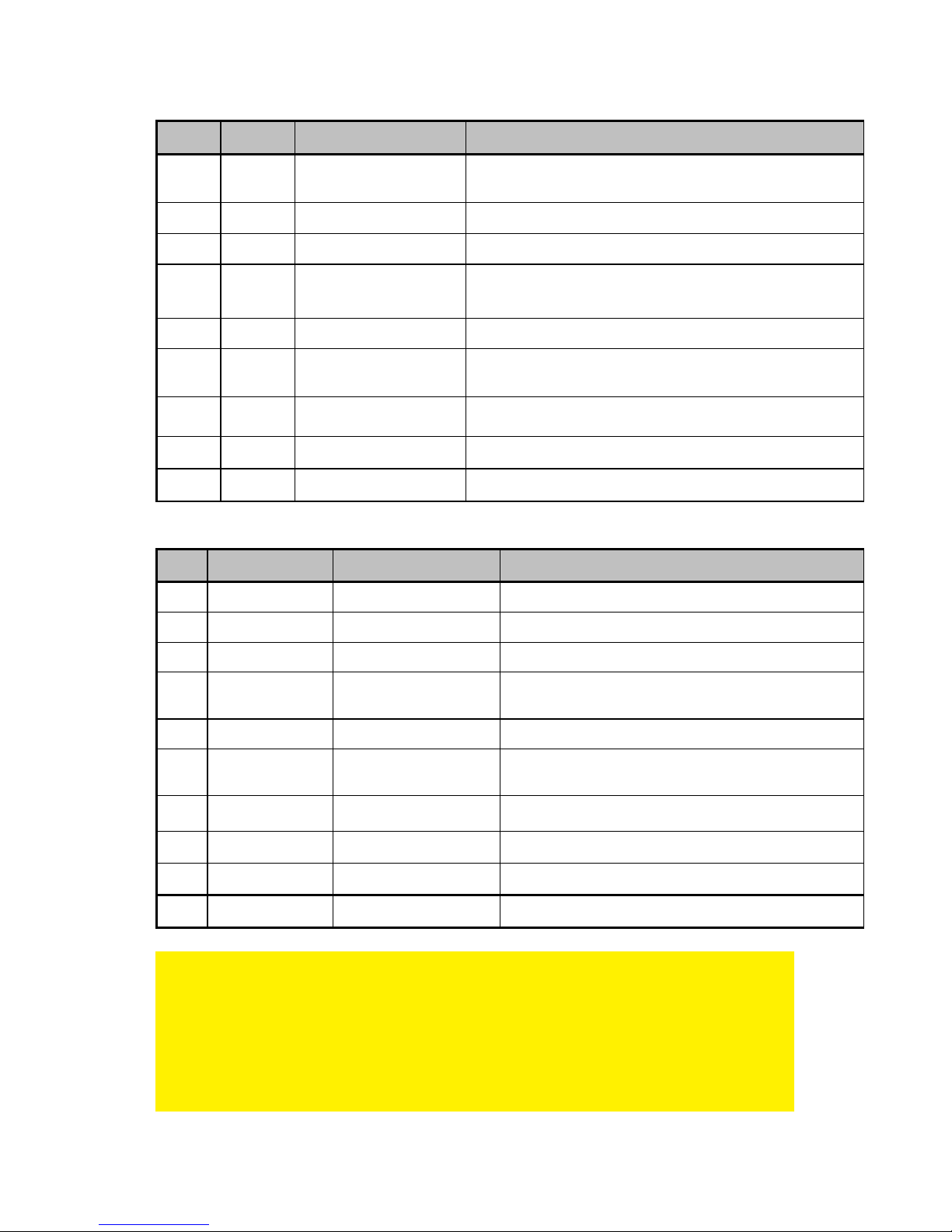
EW3965/EW3966/EW3967 :
Type Voltage Tips Size Notebook Brand
M1 15V 6,3 x 3,0 x 10,7 mm Toshiba Satelite (Pro) series, NEC Versa
M3 16V 6,0 x 4,4 x 10,7mm Panasonic, Sony, Fujitsu
M4 18,5V 4,8 x 1,7 x 10,7 mm Compaq, HP, LG
M5 19V 5,5 x 2,5 x 10,7 mm
HP, Compaq, Acer, Toshiba, Fujitsu, Gateway IBM, Dell,
NEC, Delta, LiteOn, Asus, Lenovo
M6 19V 5,0 x 3,0 x 10,7 mm Samsung
M7 19V 5,5 x 2,1 x 10,7 mm
Acer Travelmate series, Delta, HP, Gateway, Toshiba,
LiteOn
M8 19,5V 6,0 x 4,4 x 10,7 mm Sony PCG GRS Series, Fijitsu
M12 18,5V 7,4 x 5,0 x 12,5 mm HP, Compaq
M31 19.5V 4.5 x 3.0 x 9mm HP Envy
EW3971 :
Type Output Voltage Tips Size Notebook Brand
M1 15V 6,3 x 3,0 x 10,7 mm Toshiba Satelite (Pro) series, NEC Versa
M3 16V 6,0 x 4,4 x 10,7mm Panasonic, Sony, Fujitsu
M4 18,5V 4,8 x 1,7 x 10,7 mm Compaq, HP, LG
M5 19V 5,5 x 2,5 x 10,7 mm
HP, Compaq, Acer, Toshiba, Fujitsu, Gateway IBM,
Dell, NEC, Delta, LiteOn, Asus, Lenovo
M6 19V 5,0 x 3,0 x 10,7 mm Samsung
M7 19V 5,5 x 2,1 x 10,7 mm
Acer Travelmate series, Delta, HP, Gateway,
Toshiba, LiteOn
M8 19,5V 6,0 x 4,4 x 10,7 mm Sony PCG GRS Series, Fijitsu
M9 19,5V 7,4 x 5,0 x 12,5 mm Dell
M12 18,5V 7,4 x 5,0 x 12,5 mm HP, Compaq
M31 19.5V 4.5 x 3.0 x 9mm HP Envy
Servizio gratuito connettori.
Se il vs. LAPTOP/NOTEBOOK necessita di altri connettori oltre a quelli forniti all’
interno della confezione , potete inviare una richiesta per il connettore del quale avete
necessità ad Ewent ( previo consulto della lista connettori all’ interno di questo
manuale ).
Non possiamo sempre garantirvi la disponibilità e l’esistenza del connettore richiesto
ogni volta.
Page 20

5 |
ITALIANO
Quando disponibile , il ns. ufficio supporto vi invierà gratuitamente il connettore
richiesto.
Potete inviare la richiesta di connettore usando il form di supporto sul ns. sito :
http://www.ewent-online.com
3. Una volta che si conosce per certo lo spinotto di alimentazione adeguato al
laptop, scollegare il connettore di alimentazione dal laptop.
4. La tensione deve corrispondere a quella richiesta dal proprio laptop. Se la
tensione non corrisponde a quella richiesta dal laptop, non collegarlo al laptop.
5. Collegare lo spinotto di alimentazione al laptop.
6. Collegare il cavo d’alimentazione al caricabatterie per laptop. Collegare l'altra
estremità del cavo di alimentazione ad una presa a muro. Il caricabatterie inizierà
a caricare il laptop.
2.2 Utilizzo della porta USB (EW3971)
Il connettore USB eroga 10W (5 Volt @ 2 Ampere) e può essere usato per ricaricare
dispositivi USB come telefoni cellulari, lettori MP3 e perfino i computer tablet di ultima
generazione.
1. Collegare il dispositivo USB che si desidera ricaricare alla porta USB del
caricatore con il cavo USB.
2. Collegare il caricatore ad una presa a muro.
3. Il caricatore inizierà così a ricaricare il dispositivo USB collegato.
3.0 Domande frequenti e altre informazioni
correlate
Le domande frequenti più recenti riguardanti il prodotto si trovano sulla pagina
dell'assistenza dello stesso. Ewent aggiornerà queste pagine di frequente per
assicurare che siano sempre disponibili le informazioni più recenti. Visitare
www.ewent-online.com per altre informazioni sul prodotto.
4.0 Assistenza e supporto
Questo manuale d’uso è stato redatto in modo accurato dagli esperti tecnici Ewent. In
caso di problemi di installazione o nell’uso del prodotto, completare il modulo di
assistenza sul sito web www.ewent-online.com/.
Potete anche contattarci anche telefonicamente. Si prega di verificare al seguente
indirizzo
www.ewent-online.com/ i numeri telefonici e gli orari di apertura.
Page 21

6 | ITALIANO
5.0 Avvertenze e punti di atenzione
Per causa di leggi, direttive e regolamenti emanati dal Parlamento europeo, alcuni
dispositivi (wireless), possono essere soggetti a limitazioni sul loro uso in alcuni Stati
europei. In alcuni Stati, l´uso di alcuni prodotti potrebbe essere vietato. Si prega di
contattare il governo (locale) per ricevere piú informazioni per quanto riguarda queste
limitazioni.
Seguire sempre le istruzioni del manuale*, specialmente quando si riferisce a prodotti
che bisognano essere assemblati.
Avviso: Nella maggior parte dei casi si riferisce a un dispositivo elettronico. L´abuso o
l´uso improprio puó portare a lesioni (forte).
Le riparazioni del prodotto devono essere realizate per personale qualificato della
Ewent. La garanzia é cancellata immediatamente quando i prodotti siano stati autoriparati e/o abusati da parte del cliente. Per le condizioni di estensione della garanzia,
per favore visitare il nostro sito web: www.ewent-online.com.
*I manuali Ewent vengono scritti prestando parecchia cura ed attenzione.
Ad ogni modo , visti i continui sviluppi tecnologici , può essere che un manuale
stampato possa non contenere le informazioni più recenti.
Se avete modo di riscontrare un’incongruenza sul manuale stampato , o non siete in
grado di trovare quello che state cercando , vi invitiamo sempre a controllare il ns. sito
www.ewent-online.com al fine di trovare i manuali dei prodotti sempre aggiornati.
Sul sito Ewent potete inoltre trovare una sezione riservata alle FAQ ( domande
frequenti ) .
E’ altamente raccomandato consultare la sezione delle domande frequenti.
Molto spesso la risposta alle vs. domanda si può trovare all’ interno di questa sezione
del ns. sito.
6.0 Condizioni di garanzia
La garanzia Ewent di due anni si applica a tutti i prodotti Ewent salvo dichiarato
diversamente prima o al momento dell’acquisto del prodotto. Dopo aver acquistato un
prodotto Ewent di seconda mano, il periodo di garanzia rimanente è calcolato dalla
data d’acquisto del proprietario iniziale del prodotto. La garanzia Ewent si applica a
tutti i prodotti e componenti Ewent, indissolubilmente collegati o montati sul relativo
prodotto. Adattatori di corrente, batterie, antenne e tutti gli altri prodotti non integrati o
direttamente collegati al prodotto principale o i prodotti la cui usura mostra, senza
ombra di dubbio, uno sviluppo diverso rispetto al prodotto principale, non sono coperti
da garanzia Ewent. I prodotti non sono coperti dalla garanzia Ewent quando se ne fa
un uso scorretto/improprio, se sono esposti a influenze esterne o quando sono aperti
da soggetti diversi dal personale autorizzato Ewent. Ewent potrebbe utilizzare
materiali rinnovati per la riparazione o sostituzione del prodotto difettoso. Ewent non
Page 22

7 |
ITALIANO
può essere ritenuto responsabile per la modifica delle impostazioni di rete da parte dei
provider Internet. Non possiamo garantire che il prodotto di rete Ewent continui a
funzionare se le impostazioni vengono modificate dai provider Internet. Ewent non può
garantire il funzionamento di servizi web, applicazioni e altri contenuti di terzi
disponibili tramite prodotti Ewent. I prodotti Ewent dotati di disco rigido interno
presentano un periodo di garanzia limitata di due anni per quanto concerne il disco
rigido. Ewent non può essere ritenuto responsabile per la perdita dei dati. Se il
prodotto archivia i dati su un disco rigido o un'altra sorgente di memoria, assicurarsi di
effettuare un copia prima di restituire il prodotto per la riparazione.
In caso di difetti del prodotto
Qualora si dovessero incrontrare difetti per motivi diversi da quelli descritti in
precedenza: rivolgersi al proprio rivenditore per la riparazione del prodotto difettoso.
EW3964/EW3965/EW3966/EW3967/EW3971 | 10-2014
Page 23
EW3964/EW3965/EW3966/EW3967/ EW3971
Page 24

2 |
ESPAÑOL
EW3964/EW3965/EW3966/EW3967/EW3971
Contenidos
1.0 Introducción ........................................................................................................... 2
1.1 Contenido del paquete ....................................................................................... 2
2.0 Usar el cargador para equipos portátiles ............................................................... 2
2.1 Conectar el cargador para equipos portátiles portátil a su equipo portátil .......... 3
2.2 Utilizar el puerto USB del dispositivo (EW3971)................................................. 5
3.0 Preguntas más frecuentes y otra información relacionada ..................................... 5
4.0 Servicio de atención al cliente y soporte técnico .................................................... 5
5.0 Advertencias y puntos de atención ........................................................................ 6
6.0 Condiciones de la garantía .................................................................................... 6
1.0 Introducción
¡Enhorabuena por la compra de este producto de Ewent de alta calidad! This product
Este producto ha sido sometido a un exigente proceso de pruebas llevado a cabo por
expertos técnicos pertenecientes a Ewent. Should you Si experimenta algún problema
con este producto, recuerde que le ampara la garantía de cinco años de Ewent.
warranty. Conserve este manual y el recibo de compra en un lugar seguro.
¡Registre este producto ahora en www.ewent-online.com y reciba todas sus
actualizaciones!
1.1 Contenido del paquete
El paquete debe contener los siguientes artículos:
• Cargador para equipos portátiles
• Conectores de alimentación
• Cable de alimentación
• Instrucciones de seguridad
2.0 Usar el cargador para equipos portátiles
Solamente tiene que conectar la fuente de alimentación y comprobar si el voltaje se
corresponde con el voltaje de su equipo portátil. A continuación, enchufe el conector
de alimentación a su equipo portátil para comenzar a cargar este.
Calcular la potencia necesaria para su equipo portátil
En el caso de que desee saber si el cargador para equipos portátiles se puede utilizar
con su equipo portátil, puede utilizar el siguiente cálculo:
Page 25
3 |
ESPAÑOL
Si el cargador original de su equipo portátil tiene una salida de 15 V y 3 A, necesita un
cargador que suministre al menos 45 W (15 V x 3 A).
2.1 Conectar el cargador para equipos portátiles portátil a
su equipo portátil
Sugerencia: antes de utilizar el cargador, compruebe qué voltaje se necesita para
cargar el equipo portátil. Normalmente, esta información se encuentra en la parte
inferior del equipo portátil o en el manual de usuario del mismo.
1. Saque el cargador para equipos portátiles, el cable de alimentación y los
conectores de alimentación del paquete.
Si enchufa el conector de alimentación erróneo puede ser que esté utilizando el
voltaje incorrecto. ¡En este caso, el equipo portátil u otros dispositivos conectados
pueden resultar dañados!
2. Elija el conector de alimentación que encaje en la entrada de alimentación del
equipo portátil. En primer lugar, puede enchufar este conector en la entrada de
alimentación del equipo portátil sin enchufar el conector de alimentación en el
cargador para equipos portátiles. Cada conector de alimentación tiene su propio
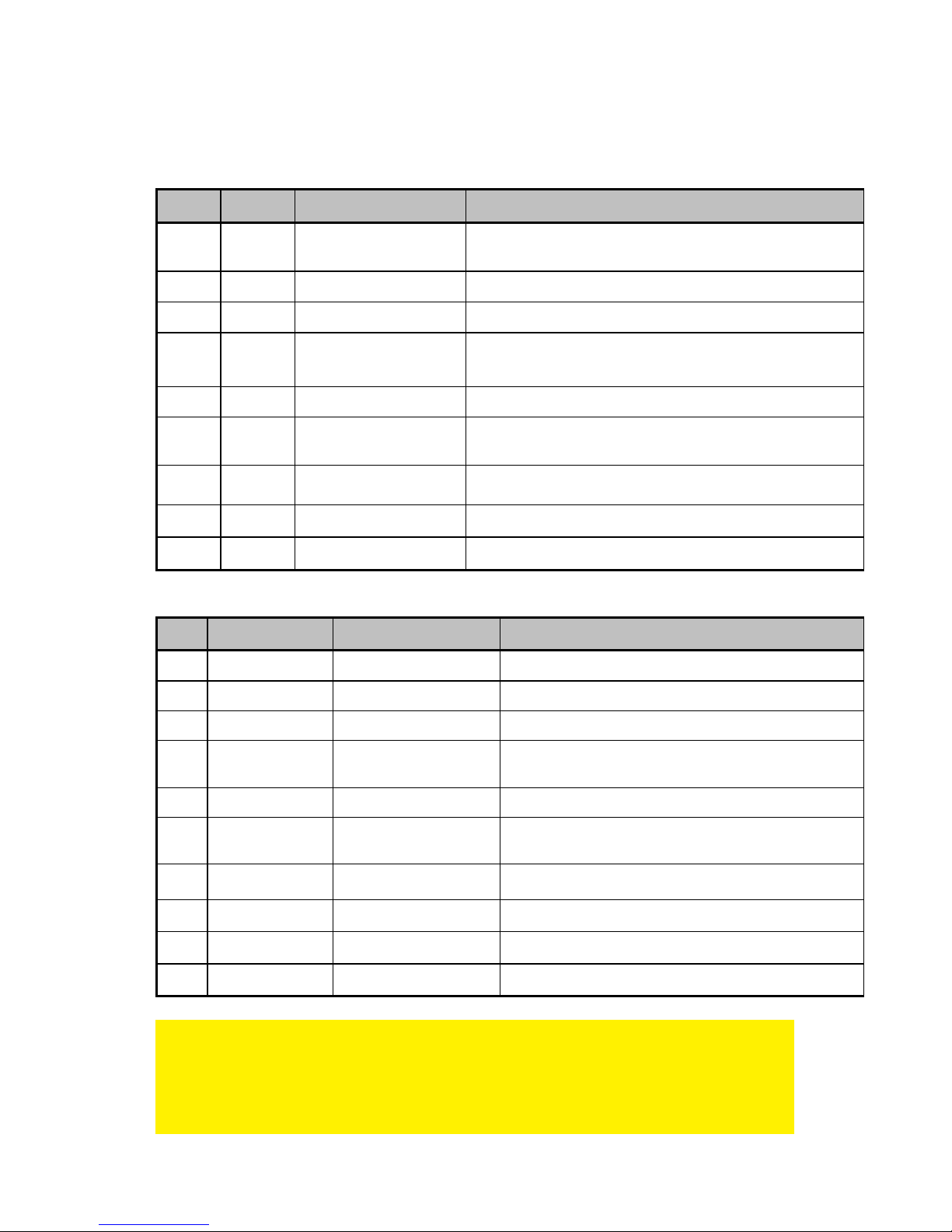
voltaje. A continuación se muestra una tabla con los conectores de alimentación
y voltajes suministrados por marca.
EW3964 :
Type Voltage Tips Size Notebook Brand
M1 15V 6,3 x 3,0 x 10,7 mm Toshiba Satelite (Pro) series, NEC Versa
M3 16V 6,0 x 4,4 x 10,7mm Panasonic, Sony, Fujitsu
M4 18,5V 4,8 x 1,7 x 10,7 mm Compaq, HP, LG
M5 19V 5,5 x 2,5 x 10,7 mm
HP, Compaq, Acer, Toshiba, Fujitsu, Gateway IBM, Dell,
NEC, Delta, LiteOn, Asus, Lenovo
M6 19V 5,0 x 3,0 x 10,7 mm Samsung
M7 19V 5,5 x 2,1 x 10,7 mm
Acer Travelmate series, Delta, HP, Gateway, Toshiba,
LiteOn
M8 19,5V 6,0 x 4,4 x 10,7 mm Sony PCG GRS Series, Fijitsu
M24 19V 2,5 x 0,7 x 9 mm Asus (Netbook)
Page 26
4 |
ESPAÑOL
EW3965/EW3966/EW3967 :
Type Voltage Tips Size Notebook Brand
M1 15V 6,3 x 3,0 x 10,7 mm Toshiba Satelite (Pro) series, NEC Versa
M3 16V 6,0 x 4,4 x 10,7mm Panasonic, Sony, Fujitsu
M4 18,5V 4,8 x 1,7 x 10,7 mm Compaq, HP, LG
M5 19V 5,5 x 2,5 x 10,7 mm
HP, Compaq, Acer, Toshiba, Fujitsu, Gateway IBM, Dell,
NEC, Delta, LiteOn, Asus, Lenovo
M6 19V 5,0 x 3,0 x 10,7 mm Samsung
M7 19V 5,5 x 2,1 x 10,7 mm
Acer Travelmate series, Delta, HP, Gateway, Toshiba,
LiteOn
M8 19,5V 6,0 x 4,4 x 10,7 mm Sony PCG GRS Series, Fijitsu
M12 18,5V 7,4 x 5,0 x 12,5 mm HP, Compaq
M31 19.5V 4.5 x 3.0 x 9mm HP Envy
EW3971
Type Output Voltage Tips Size Notebook Brand
M1 15V 6,3 x 3,0 x 10,7 mm Toshiba Satelite (Pro) series, NEC Versa
M3 16V 6,0 x 4,4 x 10,7mm Panasonic, Sony, Fujitsu
M4 18,5V 4,8 x 1,7 x 10,7 mm Compaq, HP, LG
M5 19V 5,5 x 2,5 x 10,7 mm
HP, Compaq, Acer, Toshiba, Fujitsu, Gateway IBM,
Dell, NEC, Delta, LiteOn, Asus, Lenovo
M6 19V 5,0 x 3,0 x 10,7 mm Samsung
M7 19V 5,5 x 2,1 x 10,7 mm
Acer Travelmate series, Delta, HP, Gateway,
Toshiba, LiteOn
M8 19,5V 6,0 x 4,4 x 10,7 mm Sony PCG GRS Series, Fijitsu
M9 19,5V 7,4 x 5,0 x 12,5 mm Dell
M12 18,5V 7,4 x 5,0 x 12,5 mm HP, Compaq
M31 19.5V 4.5 x 3.0 x 9mm HP Envy
Servicio gratuito de conexiones
Si su ordenador portátil requiere otro tipo de conector diferente a los suministrados
con este producto, puede enviar una solicitud a Ewent para obtener la punta
adecuada (por favor compruebe en el listado de puntas de este manual).
Page 27

5 |
ESPAÑOL
No podemos garantizar disponer en stock de la conexión solicitada en cualquier
momento. Una vez que esté disponible, nuestro servicio de soporte le enviará la
conexión de forma gratuita. Puede enviar su solicitud para la conexión a través del
formulario de soporte en nuestra página web: http://www.ewent-online.com
3. Cuando sepa con seguridad qué conector de alimentación encaja en el equipo
portátil, desconecte dicho conector del equipo portátil.
4. El voltaje necesita conincidir con el voltaje necesario del equipo portátil. Si no se
corresponde con el voltaje necesario para el equipo portátil, no lo conecte a este.
5. Enchufe el conector de alimentación al equipo portátil.
6. Conecte el cable de alimentación al cargador para equipos portátiles. Conecte el
otro extremo del cable de alimentación a una toma de corriente eléctrica. El
cargador para equipos portátiles no iniciará ahora la carga del portátil.
2.2 Utilizar el puerto USB del dispositivo (EW3971)
El conector USB suministra 10 W (5 V y 2 A) y puede utilizarse para cargar
dispositivos USB como teléfonos móviles, reproductores MP3 e, incluso, las tabletas
de última generación.
1. Conecte el dispositivo USB que desee cargar al puerto USB de la unidad
cargador mediante un cable USB.
2. Conecte el dispositivo cargador a una toma de corriente eléctrica.
3. El dispositivo cargador iniciará ahora la carga del dispositivo USB conectado.
3.0 Preguntas más frecuentes y otra
información relacionada
En la página de soporte del producto podrá encontrar las últimas preguntas más
frecuentes relacionadas con el producto. Ewent actualizará esta página
frecuentemente para garantizar que dispone de la información más reciente. Visite la
página Web www.ewent-online.com para obtener información acerca de su producto.
4.0 Servicio de atención al cliente y soporte
técnico
Este manual de usuario ha sido redactado por técnicos expertos de Ewent con sumo
cuidado. Si tiene algún problema para instalar o utilizar el producto, introduzca la
información solicitada en el formulario de solicitud de asistencia que encontrará en el
sitio Web
www.ewent-online.com/.
También puede ponerse en contacto con nosotros por teléfono. Visite www.ewent-
online.com/ para obtener el número de teléfono del servicio de ayuda y el horario de
apertura.
Page 28

6 |
ESPAÑOL
5.0 Advertencias y puntos de atención
Debido a las leyes, directivas y reglamentos establecidos por el Parlamento Europeo,
algunos dispositivos (inalámbricos) pueden estar sujetos a limitaciones relativas a su
uso en determinados miembros de estados europeos. En ciertos miembros de
estados de Europa el uso de dichos productos podría ser prohibido. Póngase en
contacto con el gobierno (local) para obtener más información acerca de estas
limitaciones.
Siempre siga las instrucciones del manual*, en especial cuando se refiera a productos
que necesitan ser montados.
Advertencia: En la mayoría de los casos esto se refiere a un dispositivo electrónico. El
mal uso / inadecuado puede dar lugar a lesiones (fuertes)!
La reparación del producto debe ser realizada por personal calificado de Ewent. La
garantía es anulada de inmediato cuando los productos hayan sido objeto de auto
reparación y / o por el mal uso por el cliente. Para las condiciones de garantía
extendida, por favor visite nuestro sitio web en www.ewent-online.com/.
*Sugerencia: Los manuales de Ewent se redactan con gran cuidado. Sin embargo,
debido a los nuevos desarrollos tecnológicos, puede suceder que un manual impreso
no contenga la información más reciente.
Si usted tiene cualquier problema con el manual impreso o no puede encontrar la
información que busca, por favor visite nuestro sitio web en www.ewent-online.com
para revisar el último manual actualizado.
Además, encontrará las preguntas más frecuentes en la sección FAQ. Se recomienda
consultar esta sección de preguntas frecuentes ya que a menudo la respuesta a sus
preguntas se encuentran aquí.
6.0 Condiciones de la garantía
La garantía de Ewent de dos años se aplica a todos los productos de Ewent a menos
que se indique lo contrario antes o durante el momento de la compra. Si ha adquirido
un producto de Ewent de segunda mano, el período restante de la garantía se contará
desde el momento en el que el primer propietario del producto lo adquiriera. La
garantía de Ewent se aplica a todos los productos y piezas de Ewent conectados o
montados indisolublemente al producto en cuestión. Los adaptadores de corriente, las
baterías, las antenas y el resto de productos no integrados en el producto principal o
no conectados directamente a éste, y/o los productos de los que, sin duda razonable,
se pueda asumir que el desgaste y rotura presentan un patrón diferente al del
producto principal, no se encuentran cubiertos por la garantía de Ewent. Los
productos quedan excluidos automáticamente de la garantía de Ewent si se usan de
manera incorrecta o inapropiada, se exponen a influencias externas o son abiertos
por entidades ajenas a Ewent. Ewent podría usar materiales renovados para
Page 29
7 |
ESPAÑOL
la reparación o sustitución del producto defectuoso. Ewent queda eximida de
responsabilidad por los cambios en la configuración de redes por parte de los
proveedores de Internet. No podemos garantizar que los productos en red de Ewent
sigan funcionando cuando la configuración es cambiada por parte de los proveedores
de Internet. Ewent no puede garantizar el funcionamiento de los servicios web,
aplicaciones y otros contenidos de terceros que están disponibles mediante los
productos Ewent. Los productos Ewent con un disco duro interno tienen un periodo
limitado de garantía de dos años para el disco duro. Ewent queda eximida de
responsabilidad por cualquier pérdida de datos. Asegúrese de hacer una copia antes
de llevar el producto a reparar en caso de que el producto guarde datos en un disco
duro u otra fuente de memoria.
En caso de productos defectuosos
Si encontrara un producto defectuoso por razones diversas a las descritas
anteriormente: contacte con su punto de venta para que se haga cargo del producto
defectuoso.
EW3964/EW3965/EW3966/EW3967/EW3971 | 10-2014
Page 30

EW3964/EW3965/EW3966/EW3967/EW3971
Page 31

2 |
PORTUGUÊS
EW3964/EW3965/EW3966/EW3967/EW3971
Índice
1.0 Introdução ............................................................................................................. 2
1.1 Conteúdo da embalagem .................................................................................. 2
2.0 Utilizar o carregador para computador portátil ....................................................... 2
2.1 Ligar o carregador ao seu computador portátil ................................................... 3
2.2 Utilizar a porta USB (EW3971) .......................................................................... 5
3.0 Perguntas frequentes ............................................................................................ 5
4.0 Assistência e suporte ............................................................................................ 5
5.0 Avisos e notas ....................................................................................................... 6
6.0 Condições da garantia ........................................................................................... 6
1.0 Introdução
Parabéns pela aquisição deste produto de alta qualidade da Ewent! Este produto foi
objeto de rigorosos testes pelos especialistas técnicos da Ewent. A Ewent providencia
uma garantia de cinco anos para o caso de experienciar algum problema com este
produto. Guarde este manual e o recibo de aquisição num local seguro.
Registe o seu produto agora em www.ewent-online.com e receba atualizações do
produto!
1.1 Conteúdo da embalagem
A embalagem deverá incluir os seguintes componentes:
• Carregador para computador portátil
• Fichas de alimentação
• Cabo de alimentação
• Instruções de segurança
2.0 Utilizar o carregador para computador
portátil
Apenas precisa de ligar o transformador e verificar se a tensão corresponde à tensão
do seu computador portátil. Em seguida, ligue a ficha ao seu computador portátil para
o começar a carregar.
Calcular a potência necessária para o seu computador portátil
Caso queira saber se o carregador para computador portátil pode ser utilizado com o
seu computador portátil pode utilizar o seguinte cálculo:
Se o seu carregador para computador portátil original possuir uma tensão de saída de
15V 3A, precisa de um carregador que forneça pelo menos 45 Watts (15V x 3A).
Page 32
3 |
PORTUGUÊS
2.1 Ligar o carregador ao seu computador portátil
Sugestão: Antes de utilizar o carregador, verifique a tensão que necessita para
carregar o seu computador portátil. Normalmente, esta informação pode ser
encontrada na parte inferior do seu computador portátil ou no manual do utilizador do
mesmo.
1. Retire o carregador para computador portátil, o cabo de alimentação e as fichas
da embalagem.
Se ligar a ficha errada poderá estar a utilizar a tensão incorreta. Isto poderá resultar
em danos ao computador portátil ou a outros dispositivos conectados!
2. Escolha a ficha correspondente à tensão de entrada do seu computador portátil.
Pode colocar primeiro a ficha na entrada de alimentação do seu computador
portátil, sem a colocar no carregador portátil. Cada ficha possui a sua própria
tensão. Pode encontrar abaixo uma tabela com as fichas fornecidas e as
respetivas tensões por marca.
EW3964:
Tipo Tensão Tamanho das fichas Marca de computador portátil
M1 15V 6,3 x 3,0 x 10,7 mm Toshiba série Satelite (Pro), NEC Versa
M3 16V 6,0 x 4,4 x 10,7mm Panasonic, Sony, Fujitsu
M4 18,5V 4,8 x 1,7 x 10,7 mm Compaq, HP, LG
M5 19V 5,5 x 2,5 x 10,7 mm
HP, Compaq, Acer, Toshiba, Fujitsu, Gateway IBM, Dell,
NEC, Delta, LiteOn, Asus, Lenovo
M6 19V 5,0 x 3,0 x 10,7 mm Samsung
M7 19V 5,5 x 2,1 x 10,7 mm
Acer série Travelmate, Delta, HP, Gateway, Toshiba,
LiteOn
M8 19,5V 6,0 x 4,4 x 10,7 mm Sony série PCG GRS, Fijitsu
M24 19V 2,5 x 0,7 x 9 mm Asus (Netbook)
Page 33
4 |
PORTUGUÊS
EW3965/EW3966/EW3967:
Tipo Tensão Tamanho das fichas Marca de computador portátil
M1 15V 6,3 x 3,0 x 10,7 mm Toshiba série Satelite (Pro), NEC Versa
M3 16V 6,0 x 4,4 x 10,7mm Panasonic, Sony, Fujitsu
M4 18,5V 4,8 x 1,7 x 10,7 mm Compaq, HP, LG
M5 19V 5,5 x 2,5 x 10,7 mm
HP, Compaq, Acer, Toshiba, Fujitsu, Gateway IBM, Dell,
NEC, Delta, LiteOn, Asus, Lenovo
M6 19V 5,0 x 3,0 x 10,7 mm Samsung
M7 19V 5,5 x 2,1 x 10,7 mm
Acer série Travelmate, Delta, HP, Gateway, Toshiba,
LiteOn
M8 19,5V 6,0 x 4,4 x 10,7 mm Sony série PCG GRS, Fijitsu
M12 18,5V 7,4 x 5,0 x 12,5 mm HP, Compaq
M31 19.5V 4.5 x 3.0 x 9mm HP Envy
EW3971:
Tipo Tensão de saída Tamanho das fichas Marca de computador portátil
M1 15V 6,3 x 3,0 x 10,7 mm Toshiba série Satelite (Pro), NEC Versa
M3 16V 6,0 x 4,4 x 10,7mm Panasonic, Sony, Fujitsu
M4 18,5V 4,8 x 1,7 x 10,7 mm Compaq, HP, LG
M5 19V 5,5 x 2,5 x 10,7 mm
HP, Compaq, Acer, Toshiba, Fujitsu, Gateway IBM,
Dell, NEC, Delta, LiteOn, Asus, Lenovo
M6 19V 5,0 x 3,0 x 10,7 mm Samsung
M7 19V 5,5 x 2,1 x 10,7 mm
Acer série Travelmate, Delta, HP, Gateway, Toshiba,
LiteOn
M8 19,5V 6,0 x 4,4 x 10,7 mm Sony série PCG GRS, Fijitsu
M9 19,5V 7,4 x 5,0 x 12,5 mm Dell
M12 18,5V 7,4 x 5,0 x 12,5 mm HP, Compaq
M31 19.5V 4.5 x 3.0 x 9mm HP Envy
Serviço de fichas grátis
Se o seu computador portátil necessitar de uma ficha que não seja fornecida com
este produto, pode pedir a ficha correta à Ewent (consulte a lista de fichas neste
manual). Não garantimos a disponibilidade da ficha solicitada a todos os momentos.
Quando disponível, o nosso serviço de apoio técnico irá enviar-lhe a ficha
gratuitamente.
Page 34

5 |
PORTUGUÊS
Pode enviar o seu pedido de ficha através do formulário de suporte no nosso Web
site: http://www.ewent-online.com
3. Quando tiver a certeza de qual a ficha adequada para o seu computador portátil,
desligue-a do mesmo.
4. A tensão tem de corresponder à tensão necessária para o seu computador
portátil. Se a tensão não corresponder à tensão necessária para o seu
computador portátil, não ligue o carregador ao computador portátil.
5. Ligue a ficha ao seu computador portátil.
6. Ligue o cabo de alimentação ao carregador para computador portátil. Ligue a
outra extremidade do cado de alimentação a uma tomada elétrica. O carregador
para computador portátil irá começar a carregar o seu computador portátil.
2.2 Utilizar a porta USB (EW3971)
O conector USB fornece 10W (5 Volts @ 2 Amperes) e pode ser utilizado para
carregar dispositivos USB, tais como telemóveis, leitores de MP3 ou mesmo a
geração mais recente de tablets.
1. Ligue o dispositivo USB que deseja carregar à porta USB do carregador através
de um cabo USB.
2. Ligue o carregador a uma tomada elétrica.
3. O carregador irá começar a carregar o dispositivo USB ligado.
3.0 Perguntas frequentes
Pode consultar as perguntas mais frequentes sobre o produto na página de suporte
do produto. A Ewent atualiza estas páginas regularmente para garantir que tem à sua
disposição as informações mais recentes. Visite www.ewent-online.com para mais
informações sobre o produto.
4.0 Assistência e suporte
Este manual do utilizador foi cuidadosamente redigido pelos técnicos especialistas da
Ewent. Se tiver dificuldades com a instalação ou utilização do produto, preencha o
formulário de suporte no sítio Web www.ewent-online.com/
Também nos pode contactar por telefone. Visite www.ewent-online.com para
consultar o número de telefone do e o horário de funcionamento do apoio ao cliente
Page 35

6 | PORTUGUÊS
5.0 Avisos e notas
Devido à legislação, diretivas e regulamentos definidos pelo Parlamento Europeu,
alguns dispositivos (sem fios) deverão estar sujeitos a limitações no respeitante à sua
utilização em determinados estados membros europeus. Em determinados estados
membros europeus a utilização de tais dispositivos pode ser interdita. Contacte o
governo (local) para mais informações sobre estas limitações.
Respeite sempre as instruções constantes deste manual, principalmente no
respeitante a instalação de dispositivos.
Atenção: Na maioria dos casos, isto é respeitante a dispositivos eletrónicos. A
utilização indevida/incorreta pode originar ferimentos (graves)!
A reparação do dispositivo deve ser efetuada por pessoal qualificado da Ewent. A
garantia é invalidada imediatamente se o produto for sujeito a reparação não
autorizada e/ou utilização indevida. Para condições de garantia alargada, visite o
nosso sítio Web em www.ewent-online.com
*Sugestão: Os manuais Ewent são cuidadosamente redigidos. No entanto, devido a
novos desenvolvimentos tecnológicos, um manual impresso poderá não conter as
informações mais recentes.
Se tiver dificuldades na utilização do manual ou não conseguir encontrar o que
procura, visite primeiro o nosso website www.ewent-online.com para consultar o
manual mais recente.
Poderá também consultar as perguntas mais frequentes na secção FAQ.
Recomendamos vivamente que consulte a secção FAQ. Muitas vezes, poderá
encontrar aqui as respostas para as suas questões.
6.0 Condições da garantia
A garantia de dois anos da Ewent aplica-se a todos os produtos da Ewent salvo
indicação em contrário antes ou durante o momento da compra. Na compra de um
produto Ewent usado, o período restante da garantia é calculado a partir do momento
da compra efetuada pelo primeiro proprietário. A garantia Ewent aplica-se a todos os
produtos Ewent e componentes inextricavelmente ligados ao produto principal.
Transformadores, baterias, antenas e todos os outros produtos não integrados ou
diretamente ligados ao produto principal ou produtos que, sem qualquer dúvida,
apresentam um desgaste diferente do apresentado pelo produto principal não estão
cobertos pela garantia Ewent. Os produtos não estão cobertos pela garantia Ewent
quando estiverem sujeitos a utilização incorreta/inadequada, a influências externas ou
quando os acessórios do produto forem abertos por pessoas não associadas à
Ewent. A Ewent poderá utilizar materiais restaurados na reparação ou substituição de
um produto com anomalias. A Ewent não se responsabiliza por alterações nas
definições de rede efetuadas por operadores de Internet. Não nos é possível garantir
Page 36

7 |
PORTUGUÊS
o funcionamento do produto da Ewent caso as definições sejam alteradas por
operadores de Internet. A Ewent não garante o funcionamento de serviços web,
aplicações e outros conteúdos de terceiros disponíveis através de produtos da Ewent.
Em produtos da Ewent com um disco rígido interno, o período de garantia limitada do
disco rígido é de dois anos. A Ewent não se responsabiliza por qualquer perda de
dados. Se um produto armazena dados num disco rígido ou outra fonte de
armazenamento, é fundamental que efetue uma cópia antes de enviar o produto para
reparação.
Quando o meu produto apresenta anomalias
Caso se depare com um produto com anomalias de natureza diferente ao acima
descrito: Contacte o seu ponto de venda para proceder à reparação do produto.
EW3964/EW3965/EW3966/EW3967/EW3971 | 10-2014
Page 37
EW3964/EW3965/EW3966/EW3967/EW3971
Page 38

2 |
MAGYAR
EW3964/EW3965/EW3966/EW3967/EW3971
Tartalomjegyzék
1.0 Bevezetés ............................................................................................................. 2
1.1 A csomag tartalma ............................................................................................. 2
2.0 A laptop töltő használata ....................................................................................... 2
2.1 A laptop töltő csatlakoztatása a laptophoz ......................................................... 3
2.2 Az USB-aljzatának használata (EW3971) .......................................................... 5
3.0 Gyakran ismételt kérdések és egyéb információk .................................................. 5
4.0 Szerviz és támogatás ............................................................................................ 5
5.0 Figyelmeztetések és felhívások ............................................................................. 5
6.0 Jótállási feltételek .................................................................................................. 6
1.0 Bevezetés
Gratulálunk a minőségi Ewent termék megvásárlásához! A terméket az Ewent
szakemberei alapos tesztelésnek vetették alá. Probléma esetén az Ewent öt év
jótállást biztosít a termékre. Kérjük, hogy a kézikönyvet és a nyugtát őrizze meg, és
tartsa biztonságos helyen.
Regisztrálja termékét a www.ewent-online.com oldalon! Ez lehetővé teszi a termékkel
kapcsolatos frissítések fogadását.
1.1 A csomag tartalma
A csomagnak a következőket kell tartalmaznia:
• Laptop töltő
• Tápfeszültség csatlakozó
• Tápkábel
• Biztonsági óvintézkedések
2.0 A laptop töltő használata
Mindössze a tápegységet kell csatlakoztatnia, és ellenőriznie kell, hogy a feszültség
megfelel-e laptopja tápfeszültségének. Ezután csatlakoztassa a tápfeszültség
csatlakozót a laptophoz és kezdje el a töltését.
A megfelelő tápfeszültség kiszámítása a laptophoz
Amennyiben arra kíváncsi, hogy a laptop töltő használható-e az Ön laptopjával,
használja az alábbi számítást:
ha a laptop eredeti töltője 15 V, 3 A kimenettel rendelkezik, legalább 45 Watt (15V x
3A) teljesítményű adapterre van szüksége.
Page 39
3 |
MAGYAR
2.1 A laptop töltő csatlakoztatása a laptophoz
Tipp: az laptop töltő használata előtt ellenőrizze, milyen feszültség szükséges laptop
számítógépe feltöltéséhez. Ezt általában megtalálhatja a laptop alján vagy annak
használati útmutatójában.
1. Vegye ki a laptop töltőt, tápkábelt és tápfeszültség csatlakozókat a
csomagolásból.
A helytelen tápfeszültség csatlakozó csatlakoztatásával helytelen feszültséget fog
használni. Ez a laptop vagy a többi csatlakoztatott eszköz rongálódását okozhatja!
2. Azt a tápfeszültség csatlakozót válassza, amely illeszkedik laptop számítógépe
tápfeszültség bemenetébe. A csatlakozót laptop számítógépe tápfeszültség
bemenetébe próbálhatja, mielőtt a tápfeszültség csatlakozót a laptop töltőhöz
csatlakoztatná. Mindegyik tápfeszültség csatlakozó saját feszültséggel
rendelkezik. Az alábbi táblázatban márkánként és feszültségenként feltüntettük a
mellékelt tápfeszültség csatlakozókat.
EW3964 :
Type Voltage Tips Size Notebook Brand
M1 15V 6,3 x 3,0 x 10,7 mm Toshiba Satelite (Pro) series, NEC Versa
M3 16V 6,0 x 4,4 x 10,7mm Panasonic, Sony, Fujitsu
M4 18,5V 4,8 x 1,7 x 10,7 mm Compaq, HP, LG
M5 19V 5,5 x 2,5 x 10,7 mm
HP, Compaq, Acer, Toshiba, Fujitsu, Gateway IBM, Dell,
NEC, Delta, LiteOn, Asus, Lenovo
M6 19V 5,0 x 3,0 x 10,7 mm Samsung
M7 19V 5,5 x 2,1 x 10,7 mm
Acer Travelmate series, Delta, HP, Gateway, Toshiba,
LiteOn
M8 19,5V 6,0 x 4,4 x 10,7 mm Sony PCG GRS Series, Fijitsu
M24 19V 2,5 x 0,7 x 9 mm Asus (Netbook)
Page 40
4 |
MAGYAR
EW3965/EW3966/EW3967 :
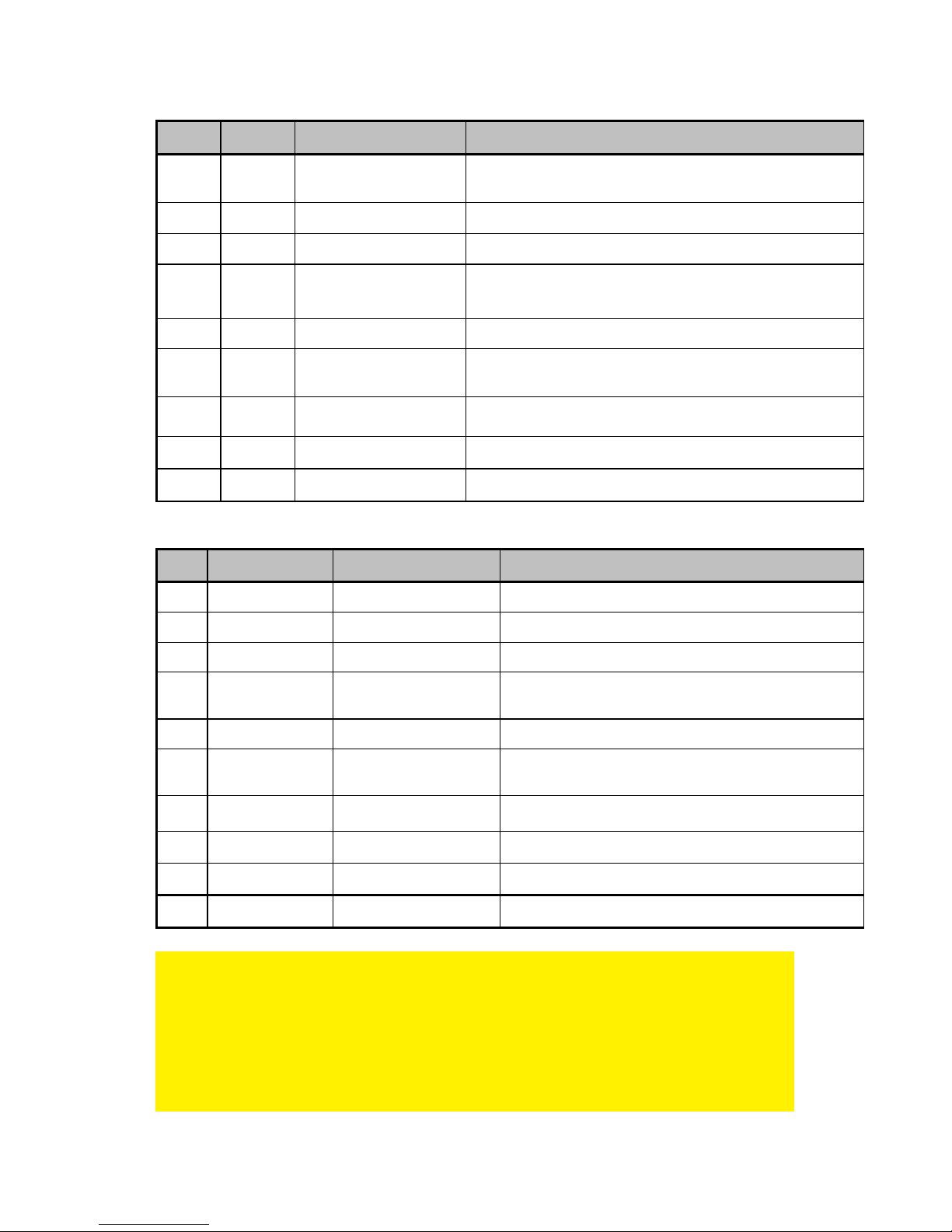
Type Voltage Tips Size Notebook Brand
M1 15V 6,3 x 3,0 x 10,7 mm Toshiba Satelite (Pro) series, NEC Versa
M3 16V 6,0 x 4,4 x 10,7mm Panasonic, Sony, Fujitsu
M4 18,5V 4,8 x 1,7 x 10,7 mm Compaq, HP, LG
M5 19V 5,5 x 2,5 x 10,7 mm
HP, Compaq, Acer, Toshiba, Fujitsu, Gateway IBM, Dell,
NEC, Delta, LiteOn, Asus, Lenovo
M6 19V 5,0 x 3,0 x 10,7 mm Samsung
M7 19V 5,5 x 2,1 x 10,7 mm
Acer Travelmate series, Delta, HP, Gateway, Toshiba,
LiteOn
M8 19,5V 6,0 x 4,4 x 10,7 mm Sony PCG GRS Series, Fijitsu
M12 18,5V 7,4 x 5,0 x 12,5 mm HP, Compaq
M31 19.5V 4.5 x 3.0 x 9mm HP Envy
EW3971:
Type Output Voltage Tips Size Notebook Brand
M1 15V 6,3 x 3,0 x 10,7 mm Toshiba Satelite (Pro) series, NEC Versa
M3 16V 6,0 x 4,4 x 10,7mm Panasonic, Sony, Fujitsu
M4 18,5V 4,8 x 1,7 x 10,7 mm Compaq, HP, LG
M5 19V 5,5 x 2,5 x 10,7 mm
HP, Compaq, Acer, Toshiba, Fujitsu, Gateway IBM,
Dell, NEC, Delta, LiteOn, Asus, Lenovo
M6 19V 5,0 x 3,0 x 10,7 mm Samsung
M7 19V 5,5 x 2,1 x 10,7 mm
Acer Travelmate series, Delta, HP, Gateway,
Toshiba, LiteOn
M8 19,5V 6,0 x 4,4 x 10,7 mm Sony PCG GRS Series, Fijitsu
M9 19,5V 7,4 x 5,0 x 12,5 mm Dell
M12 18,5V 7,4 x 5,0 x 12,5 mm HP, Compaq
M31 19.5V 4.5 x 3.0 x 9mm HP Envy
Ingyenes csatlakozó szolgáltatás.
Ha az Ön laptopja/notebookja másfajta csatlakozót igényel, mint amit a csomagban
mellékeltünk, kérjük, küldjön egy kérelmet az Ewent részére a megfelelő
csatlakozóról. (Kérjük, ellenőrizze a csatlakozók listáját a kézikönyvben)
Nem tudjuk garantálni, hogy minden csatlakozó azonnal szállítható. Amikor
rendelkezésre áll, az ügyfélszolgálat azonnal elküldi Önnek ingyen.
Page 41

5 |
MAGYAR
Kérjük, használja a kapcsolati űrlapot http://www.ewent-online.com a kérelem
elküldéséhez. Ebben adja meg számítógépe pontos típusát, valamint P/N és S/N
kódját.
3. Amint meggyőződött arról, hogy mely tápfeszültség csatlakozó illeszkedik
laptopjába, válassza le a tápfeszültség csatlakozót laptopjáról.
4. E feszültségnek meg kell felelnie laptopja feszültség-igényének. Amennyiben
nem felel meg laptopja tápfeszültség igéyének, ne csatlakoztassa a laptophoz.
5. Csatlakoztassa a tápfeszültség csatlakozót a laptophoz.
6. Csatlakoztassa a tápkábelt a laptop töltőhöz. Csatlakoztassa a tápkábel másik
végét egy konnektorhoz. A laptop töltő most elkezdi tölteni a laptop
számítógépet.
2.2 Az USB-aljzatának használata (EW3971)
Az USB-csatlakozó 10 W (5 Volt, 2 Amper) teljesítményt szolgáltat, amelyet USBeszközök feltöltésére lehet használni, mint pl. mobiltelefonok, MP3-lejátszók, vagy a
táblaszámítógépek legújabb generációja.
1. Csatlakoztassa a feltölteni kívánt eszközt az laptop töltő USB-csatlakozójához
egy USB-kábel segítségével.
2. Dugja az laptop töltő-et egy konnektorba.
3. Az laptop töltő elkezdi feltölteni a csatlakoztatott USB-eszközt.
3.0 Gyakran ismételt kérdések és egyéb
információk
A termékére vonatkozó, legújabb GYIK a termék támogatási oldalán található. Az
Ewent rendszeresen frissíti ezt az információt, hogy naprakész lehessen. Látogassa
meg a www.ewent-online.com bővebb információkért a termékével kapcsolatban.
4.0 Szerviz és támogatás
Ezt a használati utasítást az Ewent szakemberei írták. Ha problémát tapasztal a
termék telepítése vagy használata során, töltse ki a támogatási űrlapot a weboldalon:
www.ewent-online.com/.
Telefonon is elérhetők vagyunk. Látogasson el a www.ewent-online.com/ oldalra a
helpdesk telefonszámáért és a nyitvatartási időért.
5.0 Figyelmeztetések és felhívások
Az Európai Parlament törvényei, irányelvei és jogszabályai értelmében bizonyos
(vezeték nélküli) eszközök használata az Európai Unió bizonyos tagállamaiban
korlátozások alá esik. Az ilyen eszközök használata az Európai Unió bizonyos
Page 42

6 |
MAGYAR
tagállamaiban tilos lehet. A korlátozásokat illetően érdeklődjön a területileg illetékes
önkormányzatnál.
Mindig tartsa be a kézikönyv utasításait*, főleg az összeszerelést igénylő eszközök
tekintetében.
Figyelem: Ez a legtöbb esetben elektronikus eszközökre is vonatkozik. A
hibás/helytelen használat (súlyos) személyi sérüléshez vezethet!
A javítást csak az Ewent képzett szakemberei végezhetik. A garancia azonnal
érvényét veszíti, ha a terméket saját maga próbálja megjavítani vagy azt
rendeltetésellenes használják. A bővebb garanciafeltételeket megtekintheti
weboldalunkon: www.ewent-online.com.
*Megjegyzés: Az Ewent használati utasításai a legnagyobb gonddal készültek. Ezzel
együtt, a technológiai fejlesztéseknek köszönhetően előfordulhat, hogy a kinyomtatott
használati utasítás nem a legújabb információkat tartalmazza.
Ha bármi problémát tapasztal a nyomtatott használati utasítással, elsőként kérjük
ellenőrizze a weboldalunkat, www.ewent-online.com, ahol megtalálhatja a legfrissebb
használati utasítást
Ezen kívül a gyakran feltett kérdések részben (FAQ Section) is találhat válaszokat,
megoldásokat a problémákra. Kiemelten javasoljuk, hogy a termék honlapján ezt a
részt is tanulmányozza át.
6.0 Jótállási feltételek
Az Ewent két éves garanciája valamennyi Ewent termékre érvényes, a vásárlás előtt
vagy alatt említett kivételekkel. Ha használt Ewent terméket vásárolt, a garancia
fennmaradó időtartama a termék első vásárlója általi vásárlás időpontjától
számítandó. Az Ewent garanciája valamennyi Ewent termékre, illetve a termékre nem
bontható módon csatlakoztatott és/vagy szerelt alkatrészekre érvényes. Az Ewent
garanciája nem érvényes a hálózati tápegységekre, akkumulátorokra, antennákra és
az egyéb termékekre, amelyek nincsenek egybeépítve a főtermékkel vagy közvetlenül
csatlakoztatva hozzá és/vagy azon termékekre, amelyekről minden kétséget kizáróan
feltételezhető, hogy a főtermék rendes elhasználódásától eltérő elhasználódást
mutatnak. Az Ewent garanciája nem vonatkozik azon termékekre, amelyeket helytelen
módon/rendeltetésével ellentétesen használtak vagy külső befolyásnak tettek ki
és/vagy az Ewent cégtől eltérő fél nyitott ki. Az Ewent a hibás termék javításához vagy
cseréjéhez javított anyagokat is felhasználhat. Az Ewent nem tehető felelőssé az
internetszolgáltató általi hálózati beállítások változásokért. Nem garantálhatjuk, hogy
az Ewent hálózati termék akkor is működni fog, ha az internetszolgáltató
megváltoztatja a beállításokat. Az Ewent nem garantálja a webes szolgáltatások,
alkalmazások és független felek tartalmainak működését - amelyeket az Ewent Ewent
termékek által tettünk elérhetővé. A belső merevlemezt tartalmazó Ewent termékeknél
Page 43

7 |
MAGYAR
a merevlemezre rövidebb, két éves garancia vonatkozik. Az Ewent nem vállal
felelősséget semmilyen adatvesztésért. Kérjük, ha a terméket javításra küldi, akkor a
termék merevlemezén vagy más memóriáján tárolt adatokról készítsen előtte
másolatot.
Ha a termék meghibásodik
Ha a termék a fentieken kívül más módon meghibásodik: Kérjük, vegye fel a
kapcsolatot a forgalmazási ponttal, hogy megszervezzék a hibás termék javítását.
EW3964/EW3965/EW3966/EW3967/EW3971 | 10-2014
Page 44
EW3964/EW3965/EW3966/EW3967/EW3971
Page 45

2 |
FRANÇAIS
EW3964/EW3965/EW3966/EW3967/EW3971
Table des matières
1.0 Introduction ........................................................................................................... 2
1.1 Contenu de la boîte ........................................................................................... 2
2.0 Utilisation du chargeur d'ordinateur portable .......................................................... 2
2.1 Branchement du chargeur d'ordinateur portable à votre ordinateur portable ...... 3
2.2 Utilisation du port USB (EW3971) ...................................................................... 5
3.0 Foires aux questions et réponses et autres informations ....................................... 5
4.0 Service et assistance ............................................................................................. 5
5.0 Avertissements et mises en garde ......................................................................... 5
6.0 Conditions de garantie ........................................................................................... 6
1.0 Introduction
Nous vous félicitons pour l’achat de ce produit Ewent de haute qualité ! Ce produit
a fait l’objet de tests intensifs, réalisés par les techniciens experts d’Ewent. Si vous
rencontrez des problèmes avec ce produit, vous bénéficiez d’une garantie Ewent de
cinq ans. Veuillez conserver ce manuel ainsi que sa preuve d’achat, en lieu sûr.
Enregistrez dés maintenant votre achat sur www.ewent-online.com et bénéficiez des
mises à jour pour votre produit !
1.1 Contenu de la boîte
La boîte devrait contenir les pièces suivantes :
• Chargeur d'ordinateur portable
• Fiches d'alimentation
• Câble électrique
• Consignes de sécurité
2.0 Utilisation du chargeur d'ordinateur
portable
Il suffit de mettre l'ordinateur sous tension et de vérifier que la tension correspond à
celle de votre ordinateur portable. Branchez ensuite le connecteur d'alimentation à
votre ordinateur portable pour lancer le chargement de votre ordinateur portable.
Calcul de l'alimentation nécessaire à votre ordinateur portable
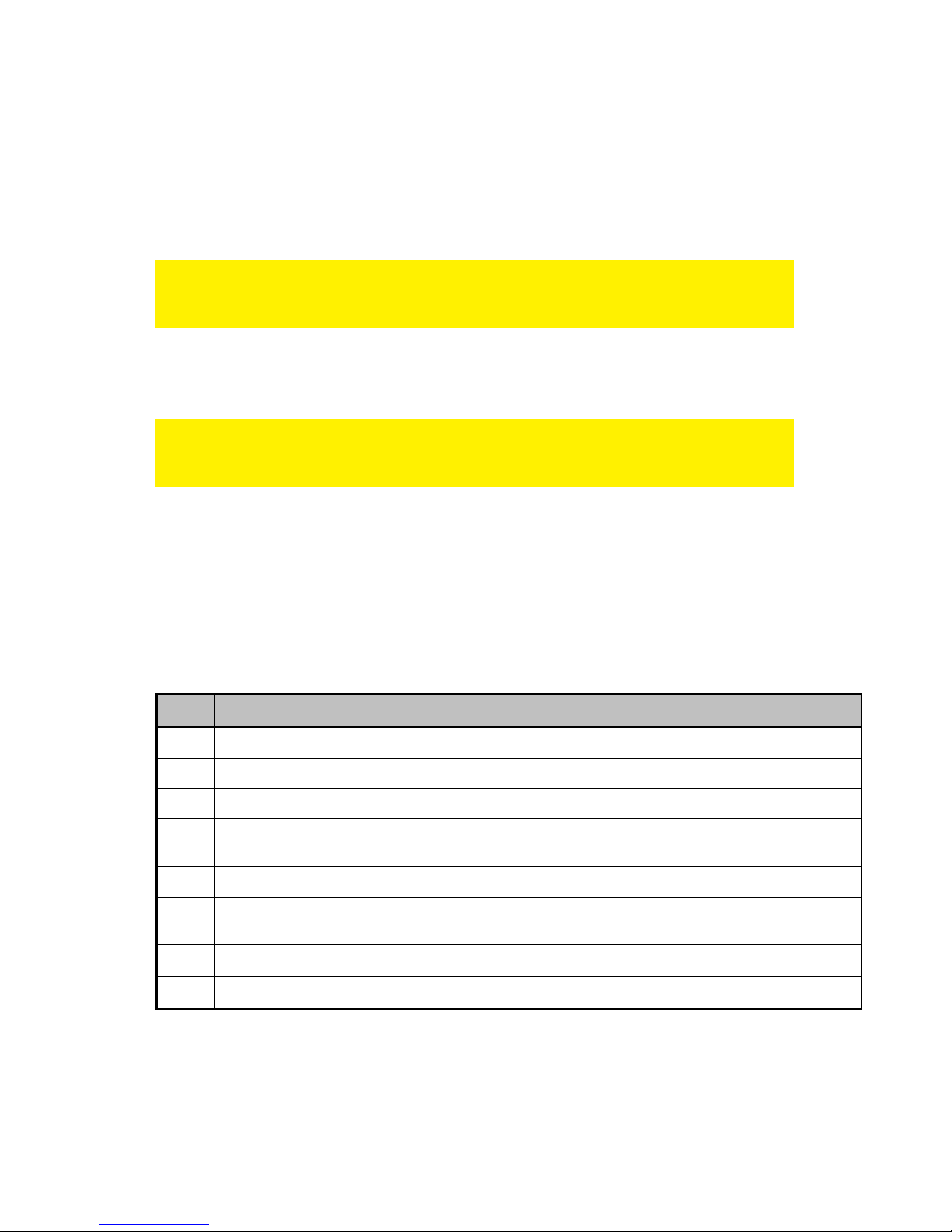
Pour déterminer si le chargeur d'ordinateur portable peut être utilisé avec votre
ordinateur portable, vous pouvez effectuer les calculs suivants :
Page 46
3 |
FRANÇAIS
Si votre chargeur d'ordinateur portable a une sortie de 15V 3A, vous avez besoin d'un
chargeur qui livre un minimum de 45 Watts (15V x 3A).
2.1 Branchement du chargeur d'ordinateur portable à
votre ordinateur portable
Conseil : Avant d'utiliser chargeur, vérifiez la tension requise par votre ordinateur
portable. En principe, vous trouverez cette information sur la partie inférieure de votre
ordinateur portable ou dans le guide de l'utilisateur de votre ordinateur portable.
1. Sortez le chargeur d'ordinateur portable, le câble d'alimentation ainsi que les
connecteurs d'alimentation de l'emballage.
La connexion d'une fiche d'alimentation inappropriée peut signifier que vous utilisez
une tension inappropriée. Cette erreur peut endommage l'ordinateur portable ou les
autres périphériques connectés !
2. Sélectionnez la fiche d'alimentation qui convient à l'entrée d'alimentation de votre
ordinateur portable. Vous pouvez d'abord installer la fiche sur l'entrée
d'alimentation de votre ordinateur sans connecter cette fiche au chargeur
d'ordinateur portable Chaque connecteur dispose de sa propre tension. Vous
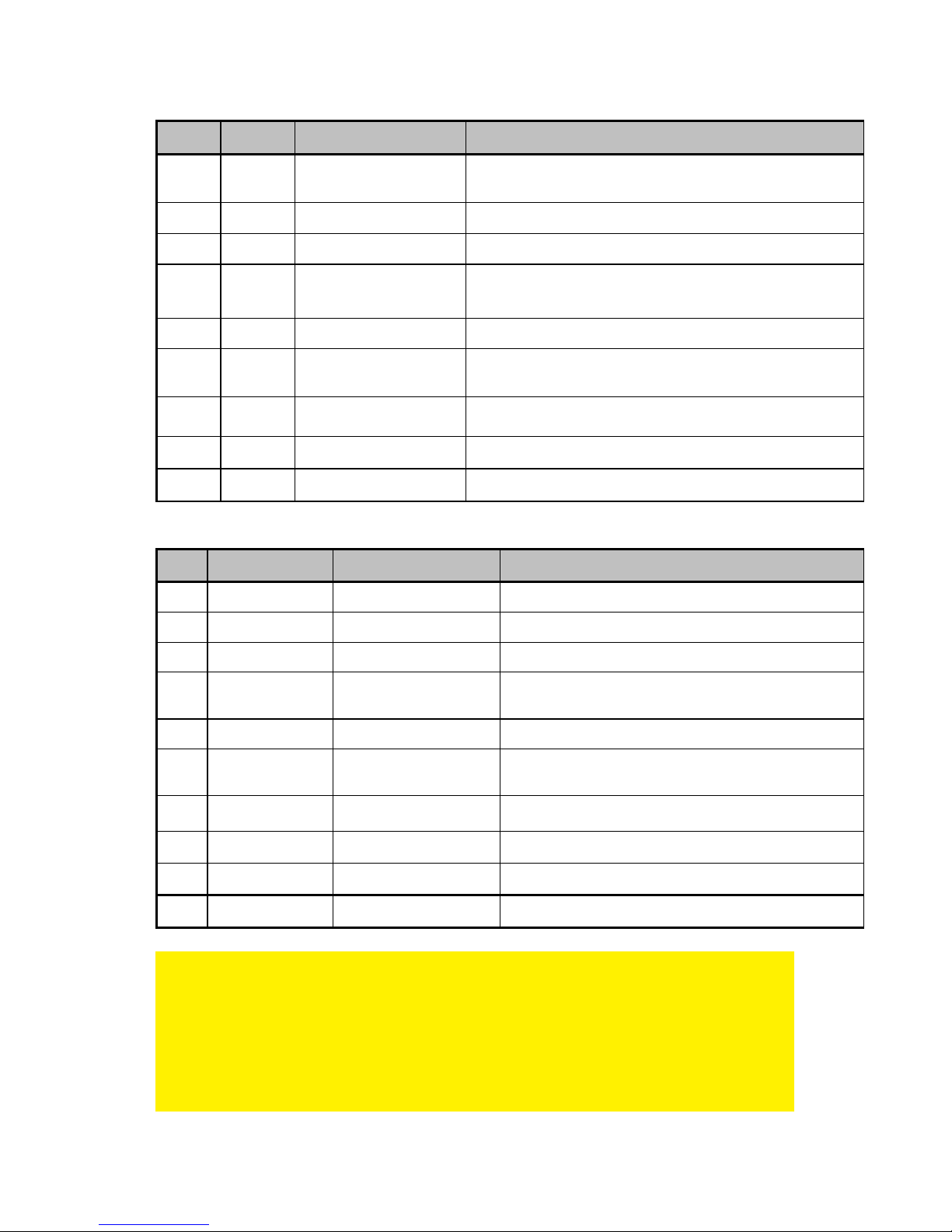
trouverez ci-dessous un tableau avec les fiches d'alimentation fournies et les
tensions par marque.
EW3964 :
Type Voltage Tips Size Notebook Brand
M1 15V 6,3 x 3,0 x 10,7 mm Toshiba Satelite (Pro) series, NEC Versa
M3 16V 6,0 x 4,4 x 10,7mm Panasonic, Sony, Fujitsu
M4 18,5V 4,8 x 1,7 x 10,7 mm Compaq, HP, LG
M5 19V 5,5 x 2,5 x 10,7 mm
HP, Compaq, Acer, Toshiba, Fujitsu, Gateway IBM, Dell,
NEC, Delta, LiteOn, Asus, Lenovo
M6 19V 5,0 x 3,0 x 10,7 mm Samsung
M7 19V 5,5 x 2,1 x 10,7 mm
Acer Travelmate series, Delta, HP, Gateway, Toshiba,
LiteOn
M8 19,5V 6,0 x 4,4 x 10,7 mm Sony PCG GRS Series, Fijitsu
M24 19V 2,5 x 0,7 x 9 mm Asus (Netbook)
Page 47
4 |
FRANÇAIS
EW3965/EW3966/EW3967 :
Type Voltage Tips Size Notebook Brand
M1 15V 6,3 x 3,0 x 10,7 mm Toshiba Satelite (Pro) series, NEC Versa
M3 16V 6,0 x 4,4 x 10,7mm Panasonic, Sony, Fujitsu
M4 18,5V 4,8 x 1,7 x 10,7 mm Compaq, HP, LG
M5 19V 5,5 x 2,5 x 10,7 mm
HP, Compaq, Acer, Toshiba, Fujitsu, Gateway IBM, Dell,
NEC, Delta, LiteOn, Asus, Lenovo
M6 19V 5,0 x 3,0 x 10,7 mm Samsung
M7 19V 5,5 x 2,1 x 10,7 mm
Acer Travelmate series, Delta, HP, Gateway, Toshiba,
LiteOn
M8 19,5V 6,0 x 4,4 x 10,7 mm Sony PCG GRS Series, Fijitsu
M12 18,5V 7,4 x 5,0 x 12,5 mm HP, Compaq
M31 19.5V 4.5 x 3.0 x 9mm HP Envy
EW3971
Type Output Voltage Tips Size Notebook Brand
M1 15V 6,3 x 3,0 x 10,7 mm Toshiba Satelite (Pro) series, NEC Versa
M3 16V 6,0 x 4,4 x 10,7mm Panasonic, Sony, Fujitsu
M4 18,5V 4,8 x 1,7 x 10,7 mm Compaq, HP, LG
M5 19V 5,5 x 2,5 x 10,7 mm
HP, Compaq, Acer, Toshiba, Fujitsu, Gateway IBM,
Dell, NEC, Delta, LiteOn, Asus, Lenovo
M6 19V 5,0 x 3,0 x 10,7 mm Samsung
M7 19V 5,5 x 2,1 x 10,7 mm
Acer Travelmate series, Delta, HP, Gateway,
Toshiba, LiteOn
M8 19,5V 6,0 x 4,4 x 10,7 mm Sony PCG GRS Series, Fijitsu
M9 19,5V 7,4 x 5,0 x 12,5 mm Dell
M12 18,5V 7,4 x 5,0 x 12,5 mm HP, Compaq
M31 19.5V 4.5 x 3.0 x 9mm HP Envy
Service d'aide gratuit
Si vous avez une question à propos de votre ordinateur portable/notebook dont la
solution n'est pas fournie avec ce produit, vous pouvez envoyer une requête d'aide à
Ewent (vérifiez la liste des solutions dans ce manuel).
Nous ne pouvons pas garantir que nous avons les solutions à tous les problèmes.
Lorsque disponible, notre service de support vous enverra la réponse à votre question
Page 48

5 |
FRANÇAIS
gratuitement. Vous pouvez nous envoyer votre question en utilisant le formulaire de
support sur notre site web : http://www.ewent-online.com
3. Lorsque vous êtes certain de la fiche appropriée à votre ordinateur portable,
débranchez le connecteur de l'ordinateur.
4. La tension doit correspondre à celle requise par votre ordinateur portable. Si elle
ne correspond pas, n'effectuez pas la connexion à votre ordinateur portable.
5. Connectez la fiche d'alimentation à votre ordinateur portable.
6. Branchez le câble d’alimentation au chargeur d'ordinateur portable. Branchez
l'autre extrémité du câble d'alimentation à une prise murale. Le chargeur de
l'ordinateur portable commence le chargement de votre ordinateur portable.
2.2 Utilisation du port USB (EW3971)
Le connecteur USB fournit 10W (5 V à 2 A) et peut être utilisé pour charger des
périphériques USB, tels que téléphones portables, lecteurs MP3 ainsi que la toute
dernière génération des ordinateurs tablettes.
1. Connectez le périphérique USB à charger au port USB de chargeur à l'aide du
câble USB.
2. Connectez le chargeur à la prise murale.
3. Le chargeur commence le chargement le périphérique USB connecté.
3.0 Foires aux questions et réponses et
autres informations
Vous trouverez les questions les plus récentes posées sur votre produits sur la page
d'assistance de votre produit. Ewent actualise fréquemment ces pages afin de garantir
qu'elles reflètent toujours des informations les plus récentes.
Visitez www.ewent-online.com pour de plus amples informations sur votre produit.
4.0 Service et assistance
Ce manuel d’utilisation a été conçu avec soin par les techniciens de Ewent. Si vous
rencontrez des problèmes lors de l’installation ou de l’utilisation du produit, veuillez
remplir le formulaire d’assistance disponible sur le site Web www.ewent-online.com/.
Vous pouvez aussi nous contacter par téléphone. Veuillez consulter www.ewent-
online.com pour le numéro de téléphone et les heures d'ouverture du centre d'aide.
5.0 Avertissements et mises en garde
En raison des lois, directives et régulations mises en place par le parlement
Européen, plusieurs appareils (sans fils) peuvent être soumis a des limitations
concernant leur usage dans certains membres de l'Union Européenne. Dans certains
Page 49

6 |
FRANÇAIS
membres de l'Union Européenne l'usage de tels appareils peut être interdit. Contactez
votre gouvernement ( local) pour plus d'informations concernant ces limitations.
Suivez toujours les instructions du mode d'emploi, spécialement quand il concerne
des produits qui doivent être assemblés.
Attention: Dans la plupart des cas ceci concerne des produits électriques. Une
mauvaise ou incorrecte utilisation peut conduire à de(sévères) blessures!
La réparation du produit doit être effectuée par un agent qualifié de Ewent: La garantie
prend fin dès le moment oú les produits ont étés réparés par le client et/ou mals
utilisés. Pour de plus amples informations sur les conditions de garantie, merci de
visiter notre site internet www.ewent-online.com.
Les manuels d'Ewent ont été écris avec une grande attention. Néanmoins et à cause
des améliorations technologiques, il peut arriver que les manuels ne contiennent pas
les informations les plus récentes.
Si vous rencontrez la moindre difficulté avec le manuel imprimé ou si vous n'y trouvez
pas de solutions à vos problèmes, nous vous invitons à visiter notre site Internet
www.ewent-online.com pour consulter les dernières mises à jours relatives à nos
manuels.
Aussi, vous trouverez dans notre rubrique FAQ les questions les plus fréquemment
posées par nos clients. Nous vous recommandons vivement de consulter notre FAQ.
Très souvent les réponses à vos questions s'y trouvent.
6.0 Conditions de garantie
La garantie d’Ewent de deux ans s’applique à tous les produits d’Ewent, sauf mention
contraire formulée avant ou au moment de l’achat. Après achat d'un produit Ewent de
seconde main, la période restante de la garantie se calcule à partir de la date d’achat
du produit par le propriétaire d'origine. La garantie Ewent s'applique à tous les
produits et pièces Ewent connectés ou installés sur le produit concerné. Les
adaptateurs d’alimentation secteur, les batteries, les antennes et tous les autres
produits non intégrés directement au produit principal, ou non connectés directement
au même produit, et/ou les produits associés qui sans aucun doute sont soumis à une
usure différente, ne sont pas couverts par la garantie Ewent. Les produits ne sont pas
couverts par la garantie Ewent lorsqu’ils ont été soumis à une mauvaise utilisation ou
une utilisation inadéquate, lorsqu’ils ont été soumis à des influences extérieures ou
lorsque des pièces ont été démontées par du personnel autre que celui agrée Ewent.
Ewent peuvent utiliser des matériaux reconditionnés pour la réparation ou le
remplacement du produit défectueux. Ewent ne sauraient être tenus responsables des
changements de paramètres réseaux des fournisseurs d'accès à Internet. Nous ne
pouvons garantir que les produits réseau Ewent continueront à fonctionner lorsque les
paramètres sont modifiés par des fournisseurs d'accès à Internet. Ewent ne peut
garantir le fonctionnement des services Web, applications et autres contenus tiers
Page 50

7 |
FRANÇAIS
disponibles via les produits Ewent. Les produits Ewent avec disque dur interne ont
une période de garantie limitée de deux ans sur le disque dur. Ewent ne sauraient être
tenus responsables d'aucune perte de données. Veuillez vous assurer que si le
produit stocke des données sur un disque dur ou une autre source de mémoire, vous
en ferez une copie avant d'envoyer votre produit pour réparation.
Lorsque mon produit est défectueux
Si vous rencontrez un produit rendu défectueux pour d'autres raisons que celles
décrites ci-dessus : Veuillez contacter votre point d'achat pour la prise en charge de
votre produit défectueux.
EW3964/EW3965/EW3966/EW3967/EW3971 | 10-2014
Page 51

EW3964/EW3965/EW3966/EW3967/EW3971
Page 52

2 |
DEUTSCH
EW3964/EW3965/EW3966/EW3967/EW3971
Inhalt
1.0 Einleitung .............................................................................................................. 2
1.1 Lieferumfang ..................................................................................................... 2
2.0 Notebook-Ladegerät verwenden ............................................................................ 2
2.1 Ladegerät an ein Notebook anschließen ............................................................ 3
2.2 USB-Port verwenden (EW3971) ........................................................................ 5
3.0 Häufig gestellte Fragen und weitere wichtige Informationen .................................. 5
4.0 Kundendienst und Unterstützung ........................................................................... 5
5.0 Warnhinweise und zu beachtende Punkte ............................................................. 6
6.0 Garantiebedingungen ............................................................................................ 6
1.0 Einleitung
Wir gratulieren Ihnen zum Kauf dieses hochwertigen Ewent-Produktes! Dieses
Produkt wurde durch Ewents technische Experten eingehend geprüft. Sollte es
dennoch einmal zu Problemen mit diesem Produkt kommen, genießen Sie eine 2jährige Ewent-Garantie. Bitte bewahren Sie diese Anleitung und Ihren Kaufbeleg an
einem sicheren Ort auf.
Registrieren Sie Ihr Produkt nun bei http://www.ewent-online.com/ und genießen Sie
Aktualisierungen Ihres Produktes!
1.1 Lieferumfang
Die folgenden Artikel sollten im Lieferumfang enthalten sein:
• Notebook-Ladegerät
• Anschlussstecker
• Netzkabel
• Sicherheitshinweise
2.0 Notebook-Ladegerät verwenden
Sie müssen das Gerät lediglich an die Stromversorgung anschließen und sich
vergewissern, dass die Spannung mit der Spannung Ihres Notebooks übereinstimmt.
Schließen Sie dann den Versorgungsstecker an Ihrem Notebook an, und schon wird
Ihr Notebook geladen.
Berechnen der für Ihr Notebook erforderlichen Versorgung
Wenn Sie überprüfen möchten, ob das Notebook-Ladegerät für Ihre Notebook
geeignet ist, können Sie die folgende Berechnung vornehmen:
Page 53
3 |
DEUTSCH
Wenn Ihr Original-Notebook-Ladegerät einen Ausgang von 15 Volt und 3 Ampere
aufweist, brauchen Sie ein Ladegerät, das mindestens 45 Watt liefert (15 V x 3 A).
2.1 Ladegerät an ein Notebook anschließen
Tipp: Überprüfen Sie vor der Verwendung des Ladegerät, welche Spannung zum
Laden Ihres Notebooks erforderlich ist. Entsprechende Angaben finden Sie
gewöhnlich an der Unterseite des Notebooks oder in der Bedienungsanleitung.
1. Nehmen Sie das Ladegerät, das Netzkabel und die Gerätestecker aus der
Verpackung.
Wenn Sie den falschen Gerätestecker anschließen, wählen Sie damit möglicherweise
auch die falsche Spannung. Dadurch können Notebooks oder andere angeschlossene
Geräte beschädigt werden!
2. Wählen Sie den Gerätestecker, der zum Netzteileingang Ihres Notebooks passt.
Sie können ausprobieren, ob der Gerätestecker Ihrer Wahl zum Netzteileingang
des Notebooks passt, bevor Sie den Stecker an das Ladegerät anschließen. Die
einzelnen Gerätestecker arbeiten jeweils mit unterschiedlichen Spannungen.
Nachstehend finden Sie eine Tabelle der mitgelieferten Versorgungsstecker und
der Spannungen, sortiert nach Marken.
EW3964 :
Type Voltage Tips Size Notebook Brand
M1 15V 6,3 x 3,0 x 10,7 mm Toshiba Satelite (Pro) series, NEC Versa
M3 16V 6,0 x 4,4 x 10,7mm Panasonic, Sony, Fujitsu
M4 18,5V 4,8 x 1,7 x 10,7 mm Compaq, HP, LG
M5 19V 5,5 x 2,5 x 10,7 mm
HP, Compaq, Acer, Toshiba, Fujitsu, Gateway IBM, Dell,
NEC, Delta, LiteOn, Asus, Lenovo
M6 19V 5,0 x 3,0 x 10,7 mm Samsung
M7 19V 5,5 x 2,1 x 10,7 mm
Acer Travelmate series, Delta, HP, Gateway, Toshiba,
LiteOn
M8 19,5V 6,0 x 4,4 x 10,7 mm Sony PCG GRS Series, Fijitsu
M24 19V 2,5 x 0,7 x 9 mm Asus (Netbook)
Page 54
4 |
DEUTSCH
EW3965/EW3966/EW3967 :
Type Voltage Tips Size Notebook Brand
M1 15V 6,3 x 3,0 x 10,7 mm Toshiba Satelite (Pro) series, NEC Versa
M3 16V 6,0 x 4,4 x 10,7mm Panasonic, Sony, Fujitsu
M4 18,5V 4,8 x 1,7 x 10,7 mm Compaq, HP, LG
M5 19V 5,5 x 2,5 x 10,7 mm
HP, Compaq, Acer, Toshiba, Fujitsu, Gateway IBM, Dell,
NEC, Delta, LiteOn, Asus, Lenovo
M6 19V 5,0 x 3,0 x 10,7 mm Samsung
M7 19V 5,5 x 2,1 x 10,7 mm
Acer Travelmate series, Delta, HP, Gateway, Toshiba,
LiteOn
M8 19,5V 6,0 x 4,4 x 10,7 mm Sony PCG GRS Series, Fijitsu
M12 18,5V 7,4 x 5,0 x 12,5 mm HP, Compaq
M31 19.5V 4.5 x 3.0 x 9mm HP Envy
EW3971
Type Output Voltage Tips Size Notebook Brand
M1 15V 6,3 x 3,0 x 10,7 mm Toshiba Satelite (Pro) series, NEC Versa
M3 16V 6,0 x 4,4 x 10,7mm Panasonic, Sony, Fujitsu
M4 18,5V 4,8 x 1,7 x 10,7 mm Compaq, HP, LG
M5 19V 5,5 x 2,5 x 10,7 mm
HP, Compaq, Acer, Toshiba, Fujitsu, Gateway IBM,
Dell, NEC, Delta, LiteOn, Asus, Lenovo
M6 19V 5,0 x 3,0 x 10,7 mm Samsung
M7 19V 5,5 x 2,1 x 10,7 mm
Acer Travelmate series, Delta, HP, Gateway,
Toshiba, LiteOn
M8 19,5V 6,0 x 4,4 x 10,7 mm Sony PCG GRS Series, Fijitsu
M9 19,5V 7,4 x 5,0 x 12,5 mm Dell
M12 18,5V 7,4 x 5,0 x 12,5 mm HP, Compaq
M31 19.5V 4.5 x 3.0 x 9mm HP Envy
Gratis Stecker (‘Tip’) Service
Wenn Ihr Notebook einen Stecker (‘Tip’) braucht den nicht in der Verpackung
enthalten ist, können den richtigen Stecker über Ewent bekommen (bitte klären Sie
vorab die List mit verfügbaren Stecker in dieser Bedienungsanleitung). Wir können
nicht gewährleisten dass wir jeder möglicher Stecker verfügbar haben. Falls verfügbar
wird unser Helpdesk Ihnen Gratis den gewünschten Stecker zuschicken.
Page 55

5 |
DEUTSCH
Sie können Ihren Antrag für den richtigen Stecker nur über unser Support Formular
auf unsere Webseite erstellen: http://www.ewent-online.com.
3. Wenn Sie sicher sind, welcher Gerätestecker zu Ihrem Notebook passt, trennen
Sie den Stecker zunächst wieder vom Notebook.
4. Die Spannung muss der für Ihr Notebook erforderlichen Spannung entsprechen.
Falls die Spannung nicht mit der Ladespannung Ihres Notebooks
übereinstimmen sollte, schließen Sie das Ladegerät NICHT an.
5. Schließen Sie den Anschlussstecker an Ihrem Notebook an.
6. Schließen Sie das Netzkabel an das Notebook-Ladegerät an. Stecken Sie den
Netzstecker in eine Steckdose. Ihr Notebook wird nun geladen.
2.2 USB-Port verwenden (EW3971)
Der USB-Anschluss liefert 10 Watt (5 Volt bei 2 Ampere) und kann verwendet werden,
um USB-Geräte wie Mobiltelefone, MP3-Player und sogar die neueste Generation von
Tablet-PCs zu laden.
1. Schließen Sie das USB-Gerät, das Sie laden möchten, mit einem USB-Kabel an
den USB-Anschluss des Ladegerät an.
2. Schließen Sie das Ladegerät an eine Steckdose an.
3. Das Ladegerät beginnt, das angeschlossene USB-Gerät zu laden.
3.0 Häufig gestellte Fragen und weitere
wichtige Informationen
Antworten auf häufig gestellte Fragen zu Ihrem Gerät finden Sie auf den
Kundendienstseiten zu Ihrem Produkt. Ewent aktualisiert diese Seiten regelmäßig,
damit Sie stets auf die aktuellsten Informationen zugreifen können. Besuchen Sie für
weitere Informationen über Ihr Produkt www.ewent-online.com.
4.0 Kundendienst und Unterstützung
Diese Bedienungsanleitung wurde sorgfältig von Ewent-Experten geschrieben. Falls
es dennoch zu Problemen bei der Installation oder Nutzung Ihres Gerätes kommen
sollte, füllen Sie bitte das Kundendienstformular auf unserer Website aus: www.ewent-
online.com.
Sie können uns auch telefonisch erreichen: Unter www.ewent-online.com finden Sie
die Helpdesk-Telefonnummer und die Bürozeiten.
Page 56

6 | DEUTSCH
5.0 Warnhinweise und zu beachtende Punkte
Durch Gesetze, Richtlinien und Verordnungen die vom Europäische Parlament
festgelegt sind, könnten einige (Wireless) Geräte, im Hinblick auf die Verwendung, in
bestimmten europäischen Mitgliedsstaaten Beschränkungen unterliegen. Die
Verwendung solcher Produkte könnte in einigen europäischen Mitgliedsstaaten
verboten werden. Wenden Sie sich an die (lokale) Regierung für weitere
Informationen zu diesen Einschränkungen.
Befolgen Sie unbedingt die Anweisungen im Handbuch, insbesondere wenn es sich
um Geräte handelt, die montiert werden müssen.
Warnung: In den meisten Fällen handelt es sich um ein elektronisches Gerät. Falsche
/ unsachgemäße Verwendung kann zu (schweren) Verletzungen führen!
Eine Reparatur des Gerätes sollte nur von qualifiziertem Ewent-Personal durchgeführt
werden. Die Garantie erlischt sofort, wenn die Produkte eigens repariert und / oder
Datenmissbrauch durch den Kunden betrieben wurde. Für erweiterte Garantie
Bedingungen, besuchen Sie bitte unsere Website unter www.ewent-online.com.
Hinweis: Ewent erstellt seine Bedienungsanleitungen mit großer Sorgfalt. Durch neue,
technische Entwicklungen kann es aber leider vorkommen, dass die gedruckte
Bedienungsanleitung nicht mehr hundertprozentig aktuell ist. Die OnlineBedienungsanleitung wird immer direkt nach Einführung einer solchen neuen,
technischen Entwicklung auf den letzten Stand gebracht. Falls Sie mit der gedruckten
Bedienungsanleitung eine Funktion nicht finden oder bedienen können, bitte laden Sie
immer die letzte Version von unserer Webseite www.ewent-online.com runter.
Sie finden außerdem viele Informationen und Lösungen zu Ihrem Produkt bereits auf
unserer Webseite unter den häufig gestellten Fragen (FAQs). Bitte lesen Sie zuerst
die FAQs zu Ihrem Produkt. Oft finden Sie hier schon die Antwort zu Ihrer Frage.
6.0 Garantiebedingungen
Die zweijährige Ewent-Garantie gilt für sämtliche Ewent-Produkte, sofern nicht anders
erwähnt oder nicht anders beim Kauf vereinbart. Nach Kauf eines gebrauchten
Ewent-Produktes gilt die restliche Garantiezeit ab Zeitpunkt des Kaufes durch den
Erstkäufer. Die Ewent-Garantie gilt für sämtliche Ewent-Produkte und -Teile, die
unlösbar mit dem betreffenden Produkt verbunden sind. Netzteile, Batterien/Akkus,
Antennen und sämtliche sonstige Produkte, die nicht in das Hauptprodukt integriert
oder direkt damit verbunden sind und/oder Produkte, deren Verschleiß zweifellos von
Verschleiß beim Produkteinsatz abweicht, werden nicht durch die Ewent-Garantie
abgedeckt. Die Ewent-Garantie gilt nicht, wenn Produkte falschem/unsachgemäßem
Gebrauch oder externen Einflüssen ausgesetzt oder Serviceteile durch Personen/
Institutionen geöffnet werden, die dazu nicht von Ewent autorisiert wurden. Ewent
kann
Page 57

7 |
DEUTSCH
wiederaufbereitete Materialien zum Reparieren oder Austauschen Ihres defekten
Produktes verwenden. Ewent kann nicht für Änderungen an Netzwerkeinstellungen
durch Internetanbieter verantwortlich gemacht werden. Wir können nicht garantieren,
dass das Ewent-Netzwerkprodukt weiterhin funktioniert, wenn
Einstellungsänderungen durch Internetanbieter vorgenommen werden. Ewent kann
nicht die Funktionstüchtigkeit von Webdiensten, Apps und anderen Inhalten Dritter
garantieren, die über Ewent-Produkte verfügbar sind. Ewent-Produkte mit einer
internen Festplatte haben eine eingeschränkte Garantiedauer von zwei Jahren auf die
Festplatte. Ewent kann nicht für jegliche Datenverluste verantwortlich gemacht
werden. Bitte stellen Sie sicher, dass Sie vor Rückgabe des Produktes zur Reparatur
eine Kopie erstellen, dass sich Daten auf der Festplatte oder einer anderen
Speicherquelle im Produkt befinden.
Wenn mein Produkt kaputtgeht
Falls Ihr Produkt aus anderen als den oben beschriebenen Gründen einen Defekt
aufweist: Bitte wenden Sie sich mit Ihrem defekten Produkt an die Stelle, bei der Sie
das Produkt erworben haben.
EW3964/EW3965/EW3966/EW3967/EW3971 | 10-2014
Page 58

EW3964/EW3965/EW3966/EW3967/EW3971
Page 59

2 |
POLSKI
EW3964/EW3965/EW3966/EW3967/EW3971
Spis treści
1.0 Wprowadzenie ....................................................................................................... 2
1.1 Zawartość opakowania ...................................................................................... 2
2.0 Korzystanie z zasilacza do laptopa ........................................................................ 2
2.1 Podłączenie zasilacza do laptopa ...................................................................... 3
2.2 Korzystanie z portu USB (EW3971) ................................................................... 5
3.0 Często zadawane pytania i inne powiązane informacje ......................................... 5
4.0 Obsługa i pomoc techniczna .................................................................................. 5
5.0 Ostrzeżenia i elementy na które należy zwrócić uwagę ......................................... 6
6.0 Warunki gwarancji ................................................................................................. 6
1.0 Wprowadzenie
Gratulujemy zakupienia tego wysokiej jakości produktu Ewent! Ten produkt
został poddany kompleksowym testom przez ekspertów technicznych Ewent. W
przypadku wystąpienia jakichkolwiek problemów z tym produktem, jest on chroniony
pięcioletnią gwarancją Ewent. Ten podręcznik i dowód zakupienia należy umieścić w
bezpiecznym miejscu.
Zarejestruj produkt pod adresem www.ewent-online.com i otrzymasz aktualizacje
produktu!
1.1 Zawartość opakowania
Opakowanie zawiera następujące części:
• Zasilacz do laptopa
• Wtyczki
• Kabel zasilający
• Instrukcje dotyczące bezpieczeństwa
2.0 Korzystanie z zasilacza do laptopa
Należy podłączyć zasilanie i sprawdzić, czy napięcie jest zgodne z napięciem z
laptopa. Następnie podłącz złącze zasilania do laptopa, aby rozpocząć ładowanie
laptopa.
Obliczanie odpowiedniego zasilania dla laptopa
Jeśli chcesz się dowiedzieć, czy zasilacz może być użyty z Twoim laptopem, możesz
użyć następujących obliczeń:
Jeśli Twój oryginalny zasilacz do laptopa ma moc 15V 3A, potrzebujesz zasilacza,
który dostarcza co najmniej 45 W (15V x 3A ).
Page 60
3 |
POLSKI
2.1 Podłączenie zasilacza do laptopa
Wskazówka: Przed użyciem zasilacza, sprawdź jakie napięcie jest potrzebne do
ładowania laptopa. Informacja ta zazwyczaj znajduje się na spodzie laptopa lub w
instrukcji obsługi Twojego laptopa.
1. Wyjmij zasilacz, kabel zasilający i złącze zasilania z opakowania.
Podłączenie złej wtyczki może oznaczać, że używasz niewłaściwego napięcia. Może
to prowadzić do uszkodzenia laptopa lub innych podłączonych urządzeń!
2. Wybierz wtyczkę zasilającą, która będzie pasowała do gniazda zasilania w
laptopie. Możesz najpierw podłączyć wtyczkę do gniazda zasilania w laptopie,
bez podłączania jej do zasilacza. Każda wtyczka ma własne napięcie. Poniżej
znajduje się tabela z dostarczonymi wtyczkami zasilającymi i ich napięciami.
EW3964 :
Typ Napięcie
Rozmiar wtyczki Firma notebooka
M1 15V 6.3 x 3.0 x 10.7 mm Toshiba Satelite (Pro) seria, NEC Versa
M3. 16V 6.0 x 4.4 x 10.7mm Panasonic, Sony, Fujitsu
M4 18,5V 4.8 x 1.7 x 10.7 mm Compaq, HP, LG
M5 19V 5.5 x 2.5 x 10.7 mm
HP, Compaq, Acer, Toshiba, Fujitsu, Gateway IBM, Dell,
NEC, Delta, LiteOn, Asus, Lenovo
M6 19V 5.0 x 3.0 x 10.7 mm Samsung
M7 19V 5.5 x 2.1 x 10.7 mm
Acer Travelmate serie, Delta, HP, Gateway, Toshiba,
LiteOn
M8 19,5V 6.0 x 4.4 x 10.7 mm Sony PCG GRS serie, Fijitsu
M24 19V 2.5 x 0.7 x 9 mm Asus (Netbook)
Page 61
4 |
POLSKI
EW3965/EW3966/EW3967 :
Typ Napięcie
Rozmiar wtyczki Firma notebooka
M1 15V 6.3 x 3.0 x 10.7 mm Toshiba Satelite (Pro) seria, NEC Versa
M3. 16V 6.0 x 4.4 x 10.7mm Panasonic, Sony, Fujitsu
M4 18,5V 4.8 x 1.7 x 10.7 mm Compaq, HP, LG
M5 19V 5.5 x 2.5 x 10.7 mm
HP, Compaq, Acer, Toshiba, Fujitsu, Gateway IBM, Dell,
NEC, Delta, LiteOn, Asus, Lenovo
M6 19V 5.0 x 3.0 x 10.7 mm Samsung
M7 19V 5.5 x 2.1 x 10.7 mm
Acer Travelmate serie, Delta, HP, Gateway, Toshiba,
LiteOn
M8 19,5V 6.0 x 4.4 x 10.7 mm Sony PCG GRS serie, Fijitsu
M12 18,5V 7.4 x 5.0 x 12.5 mm HP, Compaq
M31 19,5V 4.5 x 3.0 x 9mm HP Envy
EW3971 :
Typ
Napięcie
wyjściowe
Rozmiar wtyczki Firma notebooka
M1 15V 6.3 x 3.0 x 10.7 mm Toshiba Satelite (Pro) seria, NEC Versa
M3. 16V 6.0 x 4.4 x 10.7mm Panasonic, Sony, Fujitsu
M4 18,5V 4.8 x 1.7 x 10.7 mm Compaq, HP, LG
M5 19V 5.5 x 2.5 x 10.7 mm
HP, Compaq, Acer, Toshiba, Fujitsu, Gateway IBM,
Dell, NEC, Delta, LiteOn, Asus, Lenovo
M6 19V 5.0 x 3.0 x 10.7 mm Samsung
M7 19V 5.5 x 2.1 x 10.7 mm
Acer Travelmate serie, Delta, HP, Gateway, Toshiba,
LiteOn
M8 19,5V 6.0 x 4.4 x 10.7 mm Sony PCG GRS serie, Fijitsu
M9 19,5V 7.4 x 5.0 x 12.5 mm Dell
M12 18,5V 7.4 x 5.0 x 12.5 mm HP, Compaq
M31 19,5V 4.5 x 3.0 x 9mm HP Envy
Usługa bezpłatnych wtyczek
Jeśli twój laptop / notebook wymaga innej wtyczki niż te, które są dostarczane wraz z
produktem, można wysłać prośbę o poprawną wtyczkę do firmy Ewent (prosimy
sprawdzić listę wtyczek w tej instrukcji). Nie możemy zagwarantować, że posiadamy
wymaganą wtyczkę w danym momencie.Jeśli wtyczka będzie dostępna, nasze biuro
obsługi technicznej wyśle wtyczkę nieodpłatnie.
Page 62

5 |
POLSKI
Można wysłać prośbę o wtyczkę za pomocą formularza na naszej stronie internetowej:
http://www.ewent-online.com
3. Kiedy już upewnisz się, która wtyczka pasuje do Twojego laptopa, odłącz złącze
zasilania od laptopa.
4. Napięcie musi być zgodne z napięciem potrzebnym dla Twojego laptopa. Jeśli
napięcie nie jest zgodne z napięciem potrzebnym dla laptopa, nie należy
podłączać go do laptopa.
5. Podłącz wtyczkę do laptopa.
6. Podłącz kabel zasilający do zasilacza laptopa. Podłącz drugi koniec kabla
zasilającego do gniazdka elektrycznego. Zasilacz rozpocznie ładowanie laptopa.
2.2 Korzystanie z portu USB (EW3971)
Złącze USB dostarcza 10W (5V/2A) i może być używane do ładowania urządzeń
USB, takich jak telefony komórkowe, odtwarzacze MP3, a nawet najnowszej generacji
komputerów typu tablet.
1. Podłącz urządzenie USB, które chcesz naładować, do portu USB za pomocą
kabla USB.
2. Podłącz zasilacz do gniazdka elektrycznego.
3. Zasilacz rozpocznie ładowanie podłączonego urządzenia USB.
3.0 Często zadawane pytania i inne
powiązane informacje
Najnowsze często zadawane pytania dotyczące produktu, można znaleźć na stronie
pomocy produktu. Firma Ewent często aktualizuje te strony, aby zapewnić
użytkownikowi najnowsze informacje. W celu uzyskania informacji o produkcie,
odwiedź stronę www.ewent-online.com.
4.0 Obsługa i pomoc techniczna
Ten podręcznik użytkownika został starannie napisany przez ekspertów technicznych
firmy Ewent. W przypadku problemów z instalacją lub używaniem tego produktu,
należy wypełnić formularz pomocy technicznej na stronie sieci web www.ewent-
online.com/
Możesz także skontaktować się z nami telefonicznie. Numery telefonów pomocy
technicznej oraz informacje o godzinach otwarcia można znaleźć na stronie
www.ewent-online.com/.
Page 63

6 | POLSKI
5.0 Ostrzeżenia i elementy na które należy
zwrócić uwagę
Z powodu prawa, dyrektyw i przepisów ustanowionych przez parlament Europejski,
niektóre (bezprzewodowe) urządzenia, mogą podlegać ograniczeniom dotyczącym ich
używania w niektórych krajach członkowskich Unii Europejskiej. W określonych
krajach członkowskich Unii Europejskiej, używanie takich urządzeń może być
zabronione. Aby uzyskać więcej informacji o tych ograniczeniach należy się
skontaktować ze swoimi (lokalnymi) władzami.
Należy zawsze stosować się do instrukcji w podręczniku*, szczególnie, gdy dotyczą
one urządzeń do montażu.
Ostrzeżenie: W większości przypadków, dotyczą one urządzenia elektronicznego.
Nieprawidłowe/niewłaściwe używanie, może doprowadzić do (poważnych) obrażeń!
Naprawa urządzenia powinna zostać wykonana przez wykwalifikowanych
pracowników Ewent. Naprawa urządzenia samemu i/lub jego nieprawidłowe
używanie, spowoduje natychmiastową utratę gwarancji. Rozszerzone warunki
gwarancji, można uzyskać na naszej stronie sieci web, pod adresem
www.ewent-online.com/.
*Wskazówka: Podręczniki Ewent są pisane z dużą starannością. Jednakże, ze
względu na rozwój technologiczny, może się zdarzyć, że wydrukowany podręcznik nie
będzie zawierał najbardziej aktualnych informacji.
Po wystąpieniu problemów z wydrukowanym podręcznikiem lub, jeśli nie można
znaleźć poszukiwanych treści, należy zawsze sprawdzić naszą stronę sieci web, pod
adresem www.ewent-online.com w celu uzyskania najnowszej aktualizacji
podręcznika.
W części FAQ, można tam także znaleźć często zadawane pytania. Zdecydowanie
zaleca się sprawdzenie części FAQ. Bardzo często, odpowiedź na swoje pytania
można znaleźć w tej części.
6.0 Warunki gwarancji
Dwuletni gwarancja Ewent dotyczy wszystkich produktów Ewent chyba, że zostanie to
inaczej określone przed lub w trakcie zakupu. Po zakupieniu produktu Ewent z drugiej
ręki, pozostały okres gwarancji jest liczony od chwili zakupienia przez początkowego
nabywcy produktu. Gwarancja Ewent dotyczy wszystkich produktów i części Ewent,
trwale połączonych lub zamontowanych do produktu. Adaptery zasilania, baterie,
anteny i wszystkie inne produkty, nie bezpośrednio zintegrowane lub połączone z
głównym produktem lub produktami, niewątpliwie zużyte podczas używania,
wykazujące inne cechy niż główny produkt, nie są objęte gwarancją Ewent. Produkty
nie są objęte gwarancją Ewent, przy ich nieprawidłowym/niewłaściwym
Page 64
7 | POLSKI
używaniu, wpływie czynników zewnętrznych lub po otwarciu części produktu
podlegających serwisowi, przez inne strony niż firma Ewent. Firma Ewent może użyć
do naprawy lub wymiany uszkodzonego produktu materiały odnowione. Firma Ewent
nie odpowiada za zmiany w ustawieniach sieci, przez dostawców internetu. Nie
możemy zagwarantować, że produkt sieciowy Ewent będzie działał, po zmianie
ustawień przez dostawców internetu. Firma Ewent nie gwarantuje działania usług sieci
web, aplikacji i innych treści stron trzeci, dostępnych przez produkty Ewent. Produkty
firmy Ewent z wewnętrznym dyskiem twardym, mają dwuletni okres ograniczonej
gwarancji na dysk twardy. Firma Ewent nie odpowiada za utratę jakichkolwiek danych.
Należy się upewnić, jeśli produkt zapisuje dane na dysku twardym lub w innym źródle
pamięci, że przed zwróceniem produktu do naprawy została wykonana kopia tych
danych.
Gdy mój produkt zostanie uszkodzony
Jeśli okaże się, że produkt został uszkodzony ze względów innych, niż opisane
powyżej: Należy się skontaktować z miejscem zakupienia w celu zajęcia się
uszkodzonym produktem.
EW3964/EW3965/EW3966/EW3967/EW3971 | 10-2014
Page 65
EN |EU DECLARATION OF CONFORMITY NL |EU-CONFORMITEITSVERKLARING
IT |DICHIARAZIONE UE DI CONFORMITÀ ES |DECLARACIÓN UE DE CONFORMIDAD
PT |DECLARAÇÃO DE CONFORMIDADE UE HU |EU-MEGFELELŐSÉGI NYILATKOZAT
FR |DÉCLARATION UE DE CONFORMITÉ DE |EU-KONFORMITÄTSERKLÄRUNG
PL |DEKLARACJA ZGODNOŚCI UE
Ewent is a brand of: Intronics BV, Postbus 123, 3770 AC Barneveld, The Netherlands
Cosmos Electronic Italiana Srl, Crocevia 12 - 39057 Appiano (BZ), Italy www.ewent-online.com
This declaration of conformity is issued under the sole responsibility of the manufacturer | Deze conformiteitsverklaring wordt verstrekt onder
volledige verantwoordelijkheid van de fabrikant | La presente dichiarazione di conformità è rilasciata sotto la responsabilità esclusiva del
fabbricante | La presente declaración de conformidad se expide bajo la exclusiva responsabilidad del fabricante | A presente declaração de
conformidade é emitida sob a exclusiva responsabilidade do fabricante |E megfelelőségi nyilatkozat a gyártó kizárólagos felelősségére kerül
kibocsátásra | La présente déclaration de conformité est établie sous la seule responsabilité du fabrikant | Die alleinige Verantwortung für die
Ausstellung dieser Konformitätserklärung trägt der Hersteller | Niniejsza deklaracja zgodności wydana zostaje na wyłączną odpowiedzialność
producenta
Product number | Productnummer | Numero Prodotto | Número del
Producto | Número do Produto | Termékszám | Numéro Produit |
Produktnummer | Numer Produktu:
EW3964 / EW3965 / EW3966 / EW3967 / EW3971 / EW3973 /
EW3974
Manufacturer’s Name | Naam fabrikant | Nome produttore| Nombre del
fabricante | Nome do fabricante | Gyártó neve | Nom du fabricant | Name
des Herstellers | Nazwa producenta:
Ewent
Product description | Productomschrijving | | Descrizione del prodotto |
Descripción del producto | Descrição do produto | Termékleírás |
Description du produit | Produktbeschreibung | Opis produktu:
Universal Notebook automatic Charger|Universele notebook
lader|Alimentatore universale automatico|Cargador automático
pequeño de notebook| Universal Notebook carregador
automático| Univerzális automatikus notebook töltő| Chargeur
automatique universel|Automatisches Universal-NotebookLadegerät|Uniwersalna ładowarka automatyczna do notebooków
Conforms to the following standards | Voldoet aan de volgende standaarden | Conforme ai seguenti standard | Cumple las siguientes normativas |
Em conformidade com as seguintes normas | Megfelel az alábbi szabványoknak | Conforme aux normes suivantes | Stimmt mit folgenden Normen
überein | Zgodnoś z następującymi standardami:
EN 60590-1:2006+A11:2009
EN 55022:2006+A1:2007
EN 61000-3-2:2006+A1:2009+A2:2009
EN 61000-3-3:2008
EN 55024:1998+A1:2001+A2:2003
I, the undersigned, hereby declare that the equipment Conforms with the essential requirements and other relevant requirements of the R&TTE
Directive (1999/5/EC) and to the above standards | Ik, de ondergetekende, verklaar hierbij dat de apparatuur overeenkomt met de essentiële eisen
en andere relevante eisen van de R&TTE Richtlijn (1999/5/EG) en de bovengenoemde normen | Il sottoscritto dichiara che l'apparecchiatura è
conforme ai requisiti essenziali ed alle altre disposizioni pertinenti della Direttiva R&TTE (1999/5/CE) e agli standard di cui sopra | Yo, el abajo
firmante, por la presente declaro que este equipo cumple los requisitos esenciales y otros requisitos relevantes de la Directiva de Equipos
Radioeléctricos y Equipos Terminales de Telecomunicaciones (1999/5/EC) y las normativas indicadas anteriormente | Eu, abaixo assinado, declaro
que o equipamento está em conformidade com os requisitos essenciais e outras disposições relevantes da Diretiva ETRT (1999/5/CE) e com as
normas acima referidas | Alulírott, ezúton tanúsítom, hogy a berendezés megfelel az R&TTE irányelv (1999/5/EK) lényeges követelményeinek és
egyéb vonatkozó rendelkezéseinek, illetve a fenti szabványoknak | Je, sous-signé, déclare par la présente que l'équipement est conforme aux
exigences essentielles et aux autres exigences pertinentes de la directive R&TTE (1999/5/EC) et aux normes ci-dessus | Ich, der Unterzeichner,
erkläre hiermit, dass das Gerät mit den wesentlichen Anforderungen und weiteren diesbezüglichen Anforderungen der R&TTE-Richtlinie
(1999/5/EG) sowie den obig genannten Normen übereinstimmt | | Ja, niżej podpisany, niniejszym deklaruję, że to urządzenie spełnia ważne
wymagania oraz inne powiązane wymagania Dyrektywy R&TTE (1999/5/EC) i wspomnianych wyżej standardów.
The object of the declaration described above is in conformity with Directive 2011/65/EU (“RoHS”) of the European Parliament and of the Council of
8 June 2011 on the restriction of the use of certain hazardous substances in electrical and electronic equipment | Het hierboven beschreven
voorwerp is conform Richtlijn 2011/65/EU (“RoHS”) van het Europees Parlement en de Raad van 8 juni 2011 betreffende beperking van het gebruik
van bepaalde gevaarlijke stoffen in elektrische en elektronische apparatuur | L’oggetto della dichiarazione di cui sopra è conforme alla direttiva
2011/65/UE (“RoHS”) del Parlamento europeo e del Consiglio dell’8 giugno 2011, sulla restrizione dell’uso di determinate sostanze pericolose nelle
apparecchiature elettriche ed elettroniche | El objeto de la declaración descrito anteriormente es conforme a la Directiva 2011/65/UE (“RoHS”) del
Parlamento Europeo y del Consejo, de 8 de junio de 2011, sobre restricciones a la utilización de determinadas sustancias peligrosas en aparatos
eléctricos y electrónicos | O objecto da declaração acima mencionada está em conformidade com a Directiva 2011/65/UE (“RoHS”) do Parlamento
Europeu e do Conselho, de 8 de Junho de 2011, relativa à restrição do uso de determinadas substâncias perigosas em equipamentos eléctricos e
electrónicos | E nyilatkozat fent leírt tárgya összhangban van az egyes veszélyes anyagok elektromos és elektronikus berendezé sekben való
alkalmazásának korlátozásáról szóló, 2011. június 8-i 2011/65/EU (“RoHS”) európai parlamenti és tanácsi irányelvvel | L’objet de la déclaration
décrit ci-dessus est conforme à la directive 2011/65/UE du Parlement européen et du Conseil du 8 juin 2011 relative à la limitation de l’utilisation de
certaines substances dangereuses dans les équipements électriques et électroniques | Der oben beschriebene Gegenstand der Erklärung erfüllt die
Vorschriften der Richtlinie 2011/65/EU (“RoHS”) des Europäischen Parlaments und des Rates vom 8. Juni 2011 zur Beschränkung der Verwendung
bestimmter gefährlicher Stoffe in Elektro- und Elektronikgeräten | Opisany powyżej przedmiot deklaracji jest zgodny z dyrektywą Parlamentu
Europejskiego i Rady 2011/65/UE (“RoHS”) z dnia 8 czerwca 2011 r. w sprawie ograniczenia stosowania niektórych niebezpiecznych substancji w
sprzęcie elektrycznym i elektronicznym
Place| Plaats | Luogo | Lugar | Local | Hely | Lieu | Ort | Miejsce: Appiano, Italy
2011-06-01
Federico Vomiero, Product manager
Date | Datum | Data | Fecha | Data: | Dátum | Date | Datum | Data:
Name | Naam | Nome | Nombre | Nome | Név | Nom | Name | Nazwa:
Signature | Handtekening | Firma | Firma | Assinatura | Aláírás |
Signature | Unterschrift | Podpis:
Page 66

Page 67

Page 68
EW3964/EW3965/EW3966/EW3967/EW3971 | 10-2014
 Loading...