

Page 1
Evo Beam 100 User’s Manual Ver. 1.00 Page1
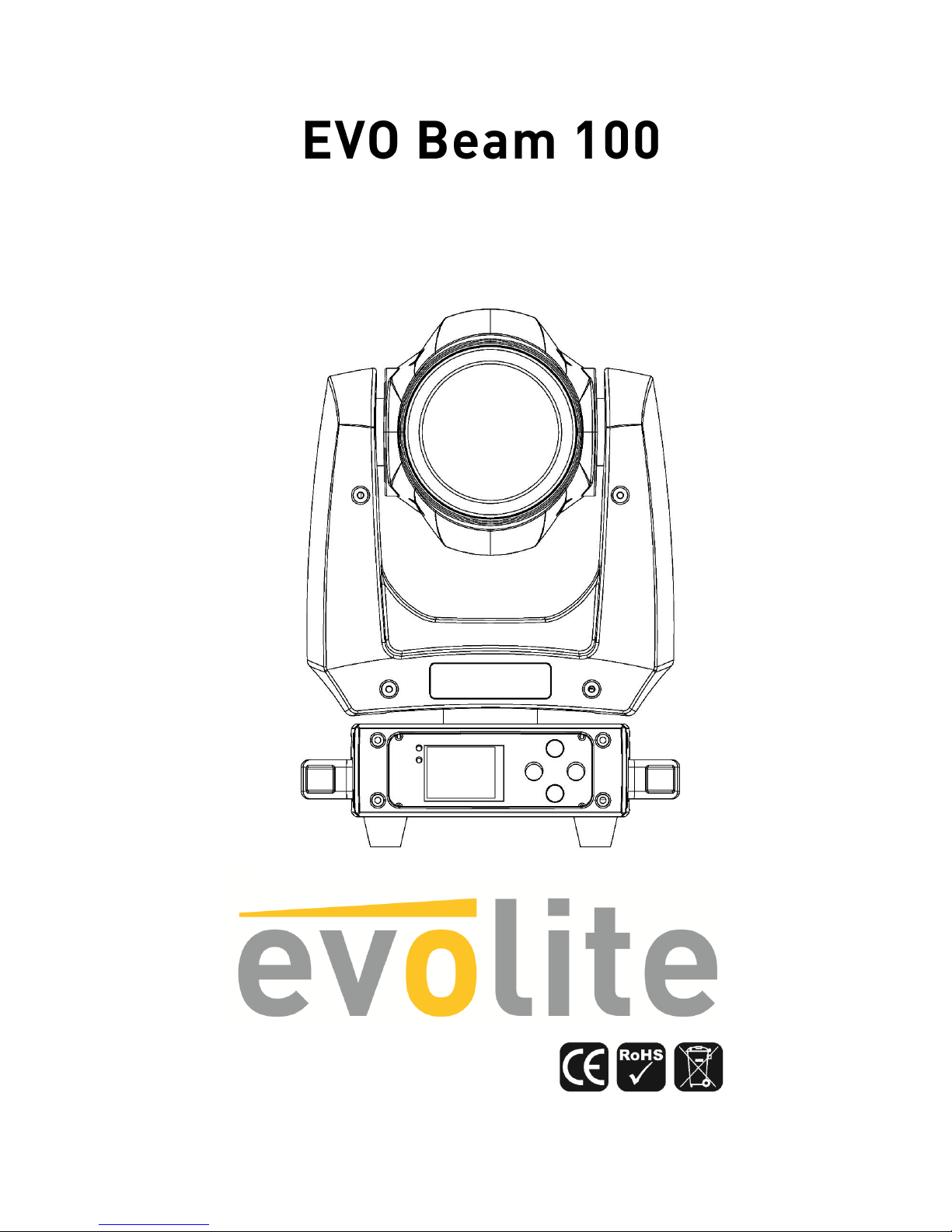
100W beam professional moving head
User manual / Mode d’emploi
Page 2
Evo Beam 100 User’s Manual Ver. 1.00 Page2
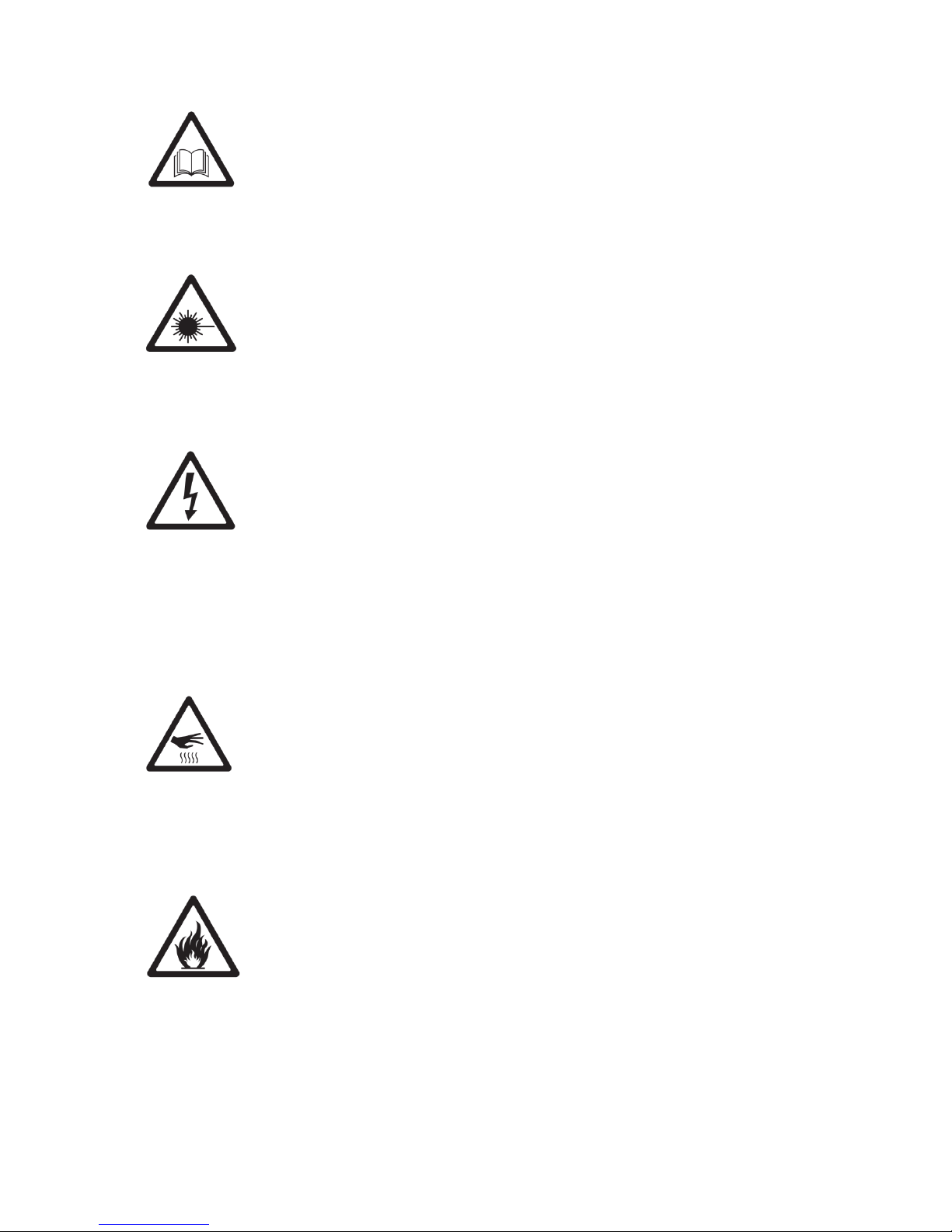
ATTENTION !
Avant d’utiliser votre matériel, nous vous recommandons de lire l’ensemble des instructions
de ce manuel.
ATTENTION !
Cet appareil produit une lumière intense et puissante. Risque pour les yeux. Ne regardez pas
directement dans le faisceau.
DANGER !
Risque de chocs électriques.
Il est important d’utiliser le câble d’alimentation secteur fourni (câble avec terre).
Toujours débrancher l’appareil avant une intervention technique ou avant son entretien.
Ne pas brancher cet appareil sur un bloc de puissance variable type “ Dimmer pack”.
Afin de réduire et d’éviter tout risque d’électrocution ou d’incendie, ne pas utiliser cet appareil
dans un milieu humidité ou sous la pluie.
ATTENTION !
Risque de brûlure.
Il est important d’éviter tout contact avec l’appareil en fonctionnement et au moins 10 minutes
après son utilisation. L’extérieur de l’appareil peut devenir très chaud.
Ne pas utilisez le projecteur avec une température ambiante supérieure de 40°C.
ATTENTION !
Risque d’incendie.
Il est important de garder éloigner tous matériaux combustibles et inflammables de l’appareil
en fonctionnement.
Page 3

Evo Beam 100 User’s Manual Ver. 1.00 Page3
DANGER !
Cet appareil présente des risques importants de blessures. Il est important de manipuler et
d’utiliser cet appareil de façon professionnelle, par un utilisateur qualifié.
Cet appareil evolite doit être installé avec des crochets solides et de dimension adéquate au
poids supporté. L’appareil doit être vissé aux crochets et serré convenablement afin d’éviter
toute chute due aux vibrations produites par la machine en fonctionnement. L’accroche de
l’appareil doit être sécurisée par une élingue de sécurité. Assurez-vous également que la
structure (ou point d’accroche) peut supporter au moins 10X le poids de l’appareil accroché.
L’appareil doit être installé par une personne qualifiée et doit être placée hors de portée du
public.
En cas de problème de fonctionnement, arrêtez immédiatement l’appareil. Ne pas essayer de
le réparer soi- même. Contactez votre revendeur ou faites appel à un réparateur spécialisé et
agréé. Il n’y a aucune pièce remplaçable par l’utilisateur.
Introduction
Toutes nos félicitations pour l’achat de ce projecteur evolite.
Ce projecteur professionnel est doté des dernières avancées technologiques, et a été conçu
pour un usage professionnel. Sa qualité et sa fiabilité sont le résultat d’une fabrication soignée
et suivant un cahier des charges précis. Ce projecteur intelligent respecte les normes
européennes en vigueur : 2014/35/EU, 2014/30/EU et RoHs 2011/65/EU.
Description du produit
- Lyre de type Beam à LED
- Rotation PAN et Tilt
- Doté d’une LED de 100W blanche
- Modes de contrôles : Par câbles DMX, en automatique, en automatique avec détection du son.
- Mode DMX : 9 ou 13 canaux
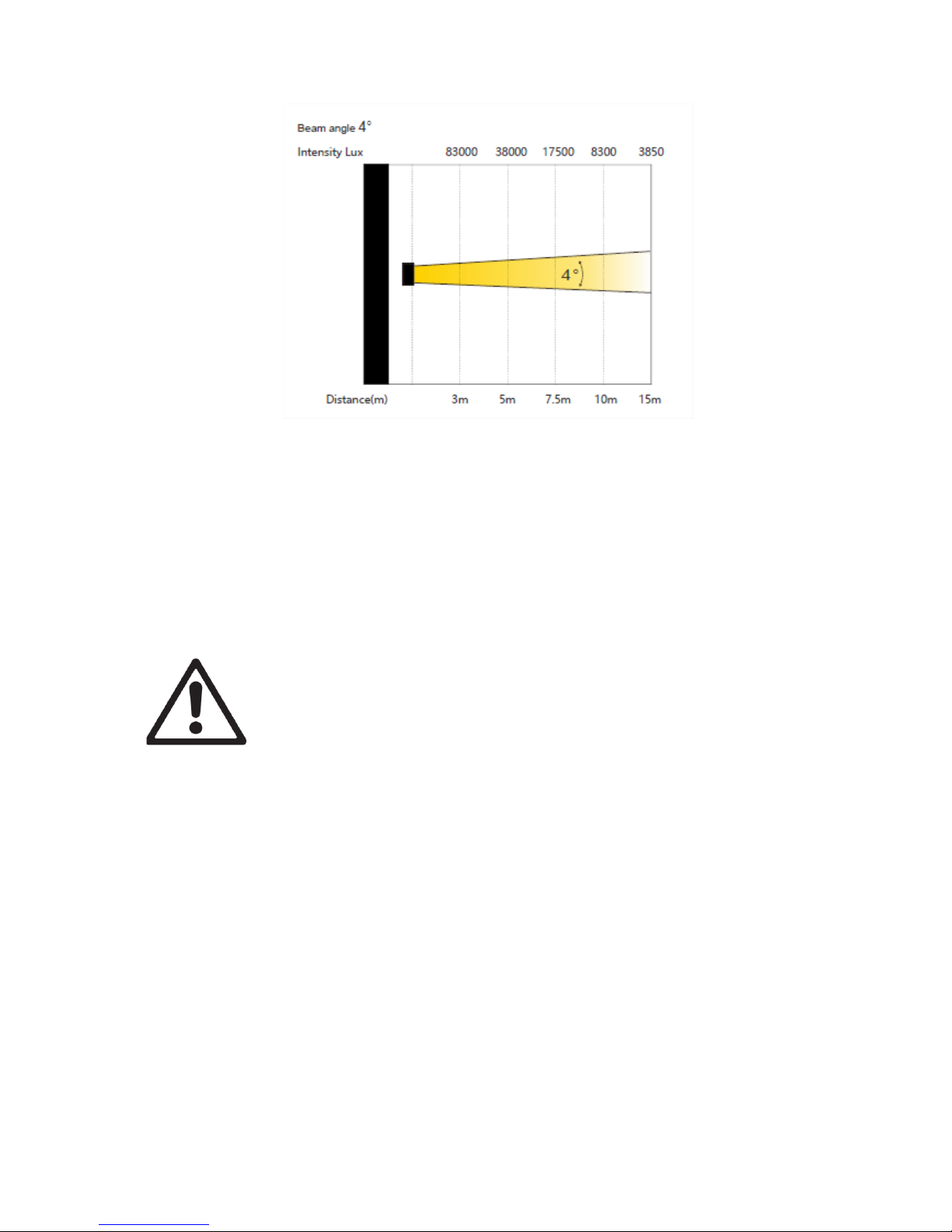
- Angle du faisceau : 4°
- Optique ultra claire
- Modes Automatiques très dynamiques et variés
- Mode Totem (180°)
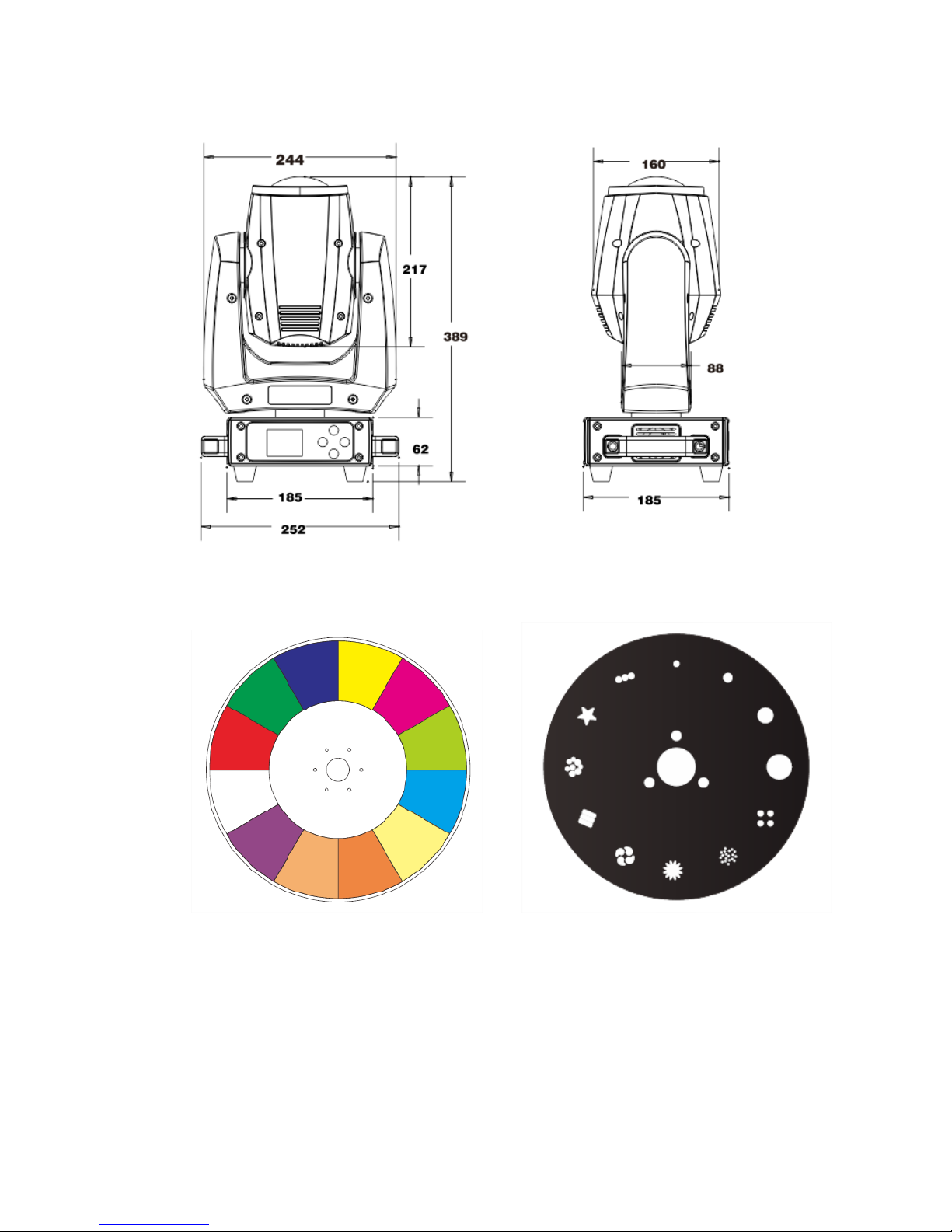
- Roue de 11 couleurs + blanc
- Roue de 12 Gobos fixes
- Prisme 8 facettes circulaire rotatif
- Prisme 6 facettes linéaire rotatif
- Ecran TFT 1.2’ couleurs
- Flux lumineux : 83000 lx @ 3m
- Livré avec attaches de montage oméga
- Refroidissement par ventilation forcée
- Consommation électrique : 160W max
- Dimensions de l’appareil : 389 x 252 x 185 mm
- Dimensions du carton : 450 x 320 x 255 mm
- Poids brut : 8 kg
- Poids net : 6 kg
Page 4
Evo Beam 100 User’s Manual Ver. 1.00 Page4
Couleurs
Gobos
Page 5
Evo Beam 100 User’s Manual Ver. 1.00 Page5
Installation
o Accroche
Ce projecteur asservi evolite doit être installé avec des crochets solides et de dimension
adéquate au poids supporté. L’appareil doit être vissé aux crochets et serré convenablement
afin d’éviter toute chute due aux vibrations produites par la machine en fonctionnement.
L’accroche de l’appareil doit être sécurisée par une élingue de sécurité. Assurez-vous
également que la structure (ou point d’accroche) peut supporter au moins 10X le poids de
l’appareil accroché.
L’appareil doit être installé par une personne qualifiée et doit être placée hors de portée du
public.
Sécurisez la fixation du projecteur avec une élingue de sécurité homologuée pour le poids du
projecteur.
Page 6
Evo Beam 100 User’s Manual Ver. 1.00 Page6
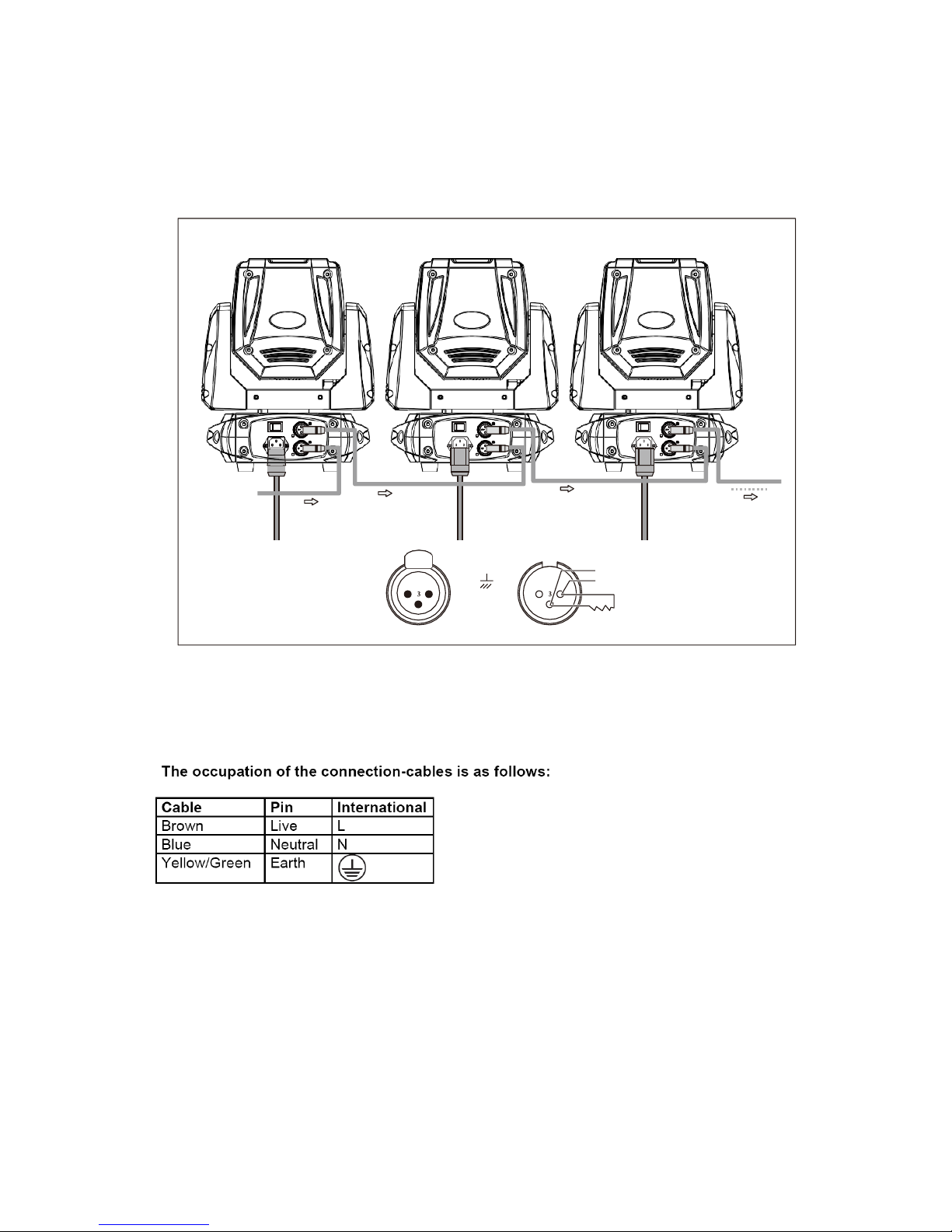
o Connexion DMX
Il est fortement conseillé d’utiliser des câbles DMX de bonne qualité. Utiliser du câble torsadé
blindé.
o Connexion du câble d’alimentation secteur
La terre ou « Earth » doit toujours être connectée. Les câble d’alimentation doivent être homologués
et conformes au Standard IEC.
DMX IN
POWER IN
POWER IN
POWER IN
Signal (-)
Signal (+)
Signal (-)
Signal (+)
2 1
Ground
1 2
120 Ω
DMX512 OUT
DMX512 IN
Page 7
Evo Beam 100 User’s Manual Ver. 1.00 Page7
Mise en service
Ne pas allumer l’appareil s’il a subi un changement de température important. Attendre que
la condensation disparaisse avant toute utilisation.
Configuration
o Panneau de contrôle / Navigation dans les menus
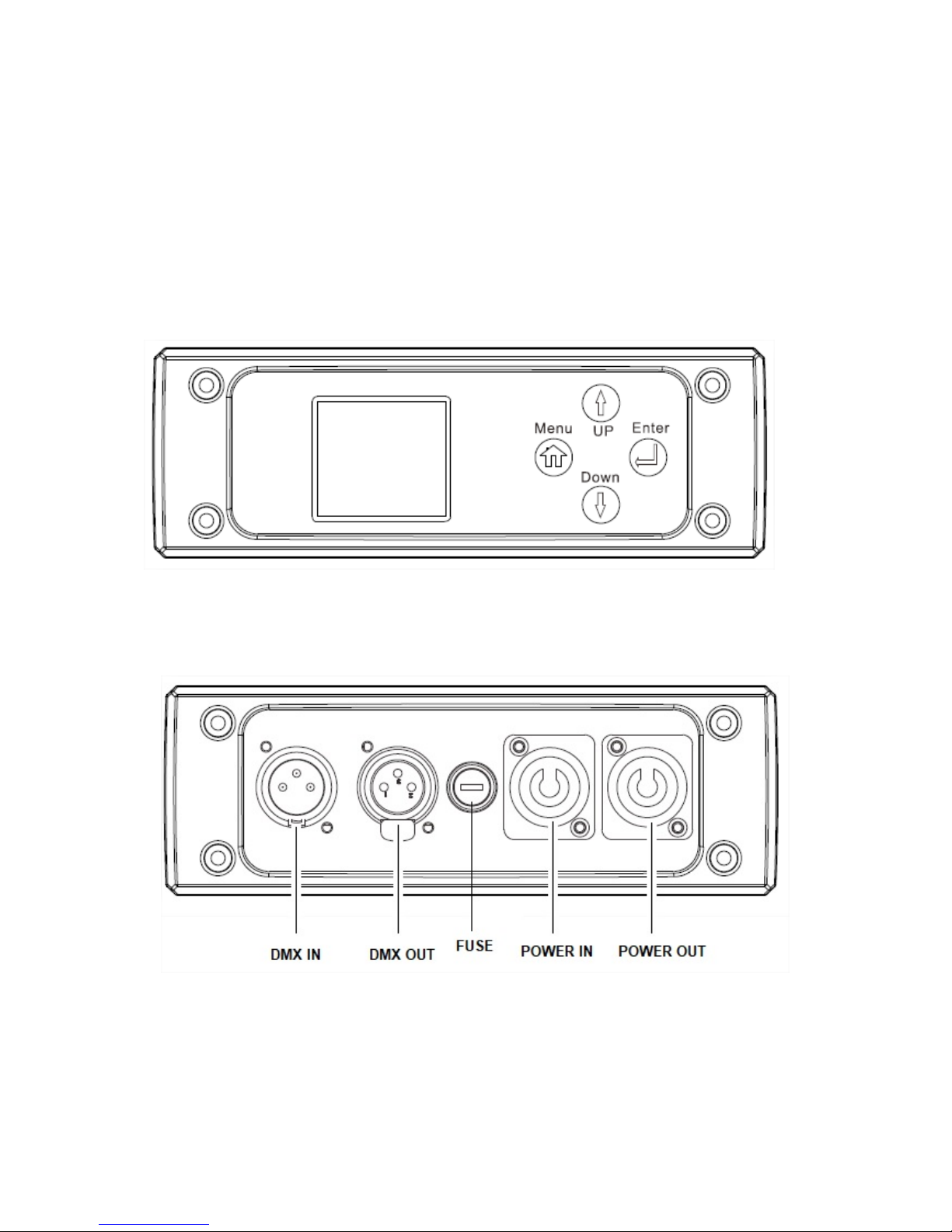
Panneau de contrôle avec afficheur.
Accédez directement au menu en appuyant sur la touche Menu puis déplacez-vous dans les
menus grâce aux touches UP & DOWN. Appuyez sur la touche ENTER pour valider vos choix
et valeurs.
Page 8
Evo Beam 100 User’s Manual Ver. 1.00 Page8
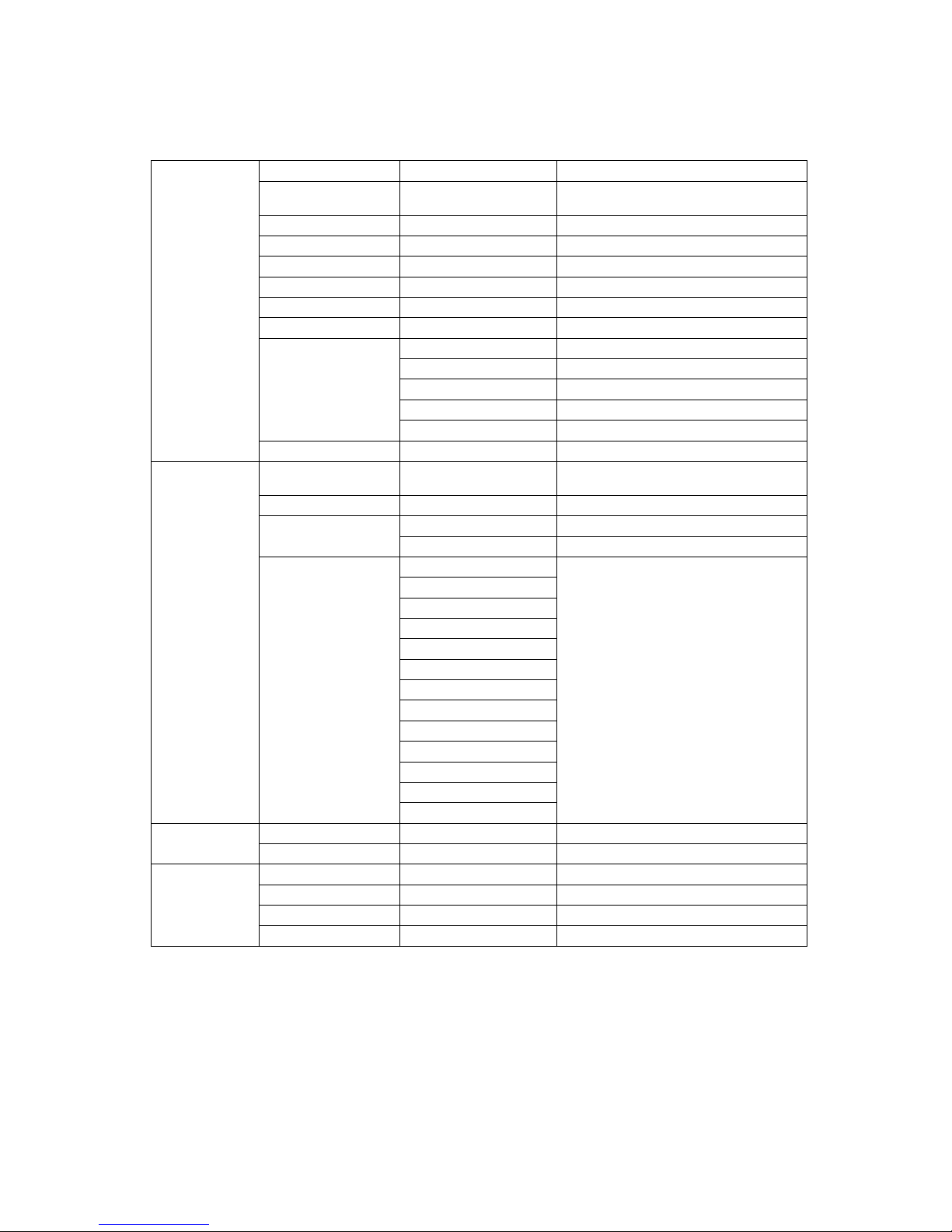
MENU :
System
setting
Dmx address
0/512
Adresse DMX
No signal
HOLD/BLACK/AUTO
/SOUND
Comportement lors d’absence de
signal DMX
Pan Reverse
ON/OFF
Inverse le movement PAN
Tilt Reverse
ON/OFF
Inverse le movement TLT
Pan Angle
540/630
Angle du PAN max
Microphone level
0-100
Sensibilité du micro
Display Reverse
ON/OFF
Retourner l’écran
Language
English
Calibrate
Pan
Calibrage Pan
Tilt
Calibrage Tilt
Color
Calibrage Couleurs
FixGo
Calibrage gobos
Focus
Calibrage Focus
Factory Setting
Reset Now?
Réglages d’usine
Mode
Dmx Channel
Mode
13ch/09ch
Sélection du nombre de canaux
DMX
Sound Mode
Mode detection du son
Auto Mode
AutoProgrm1
Mode auto 1
AutoProgrm2
Mode auto 2
Manual Mode
PAN
Mode Manuel
PAN-Fine
TILT
TILT-Fine
Move.Sp
Dimmer
Strobe
Color
FixGobo
Prism1
Prism2
Focus
Reset
Information
Fixture Run Time
10
Durée d’utilisation
Software
V1.0
Version logiciel
Reset
Pan Reset
Tilt Reset
Other Reset
All Motor Reset
Page 9

Evo Beam 100 User’s Manual Ver. 1.00 Page9
o Protocole DMX 13 canaux :
Mode/Channel
Value
Function
1
0-255
Mouvement PAN
2
0-255
Mouvement PAN fin
3
0-255
Mouvement TILT
4
0-255
Mouvement TILT fin
5
0-255
Vitesse PAN/TILT de rapide à lent
6
0-255
Dimmer
7
0-9
Shutter fermé
10-200
Strobe de lent à rapide
201-255
shutter ouvert
8
0-255
Roue de couleurs
9
0-255
Roue Gobos
10
0-255
Focus
11
0-9
N/A
10-127
Prisme 1
128-255
Rotation du Prisme 1
12
0-9
N/A
10-127
Prisme 2
128-255
Rotation du Prisme 2
13
0-127
N/A
128-159
RESET
160-191
Scan motor reset
192-223
Scan motor reset
224-255
All motor reset
Page 10
Evo Beam 100 User’s Manual Ver. 1.00 Page10
o Protocole DMX 9 canaux :
Mode/Channel
Value
Function
1
0-255
Mouvement PAN
2
0-255
Mouvement TILT
3
0-255
Dimmer
4
0-9
Shutter fermé
10-200
Strobe de lent à rapide
201-255
shutter ouvert
5
0-255
Roue de couleurs
6
0-255
Roue Gobos
7
0-255
Focus
8
0-9
N/A
10-127
Prisme 1
128-255
Rotation du Prisme 1
9
0-9
N/A
10-127
Prisme 2
128-255
Rotation du Prisme 2
Entretien et maintenance
o Nettoyage
Un nettoyage extérieur de l’appareil doit être fait régulièrement. Les lentilles doivent être nettoyées
pour une luminosité optimum. Si l’appareil est installé dans un environnement poussiéreux ou avec
de la fumée cet entretien régulier est très important. Débranchez l’appareil avant toute intervention !
Utilisez un chiffon propre et sec.
o Maintenance
DANGER !
Risque de chocs électriques.
Toujours débrancher l’appareil avant une intervention technique ou avant son entretien.
Voici quelques suggestions si vous rencontrez des problèmes avec votre appareil.
L’appareil ne fonctionne pas du tout.
o Vérifiez le cordon d’alimentation et le fusible.
o Assurez-vous que votre prise soit bien alimentée.
L’appareil ne répond pas ou pas correctement aux commandes DMX.
o Vérifiez vos câbles DMX
o Vérifiez votre adressage DMX
Page 11

Evo Beam 100 User’s Manual Ver. 1.00 Page11
o Essayez un autre contrôleur DMX
o Vérifiez que vos câbles DMX ne passent pas à proximité de câbles haute tension, ce qui
pourrait créer des interférences.
Ne réagit pas au son
o Vérifiez le mode de fonctionnement choisi
o Vérifiez qu’il n’y a pas de câble DMX branché sur DMX IN
o Tapotez directement sur le microphone pour tester sa réactivité.
Caractéristiques techniques
Modèle
Evo Beam 100
Voltage
110V- 250V / 50-60Hz
Consommation:
160W
LEDs
1x 100W
Poids brut
8 kg
Dimensions du carton
450x255x320 mm
Page 12
Evo Beam 100 User’s Manual Ver. 1.00 Page12
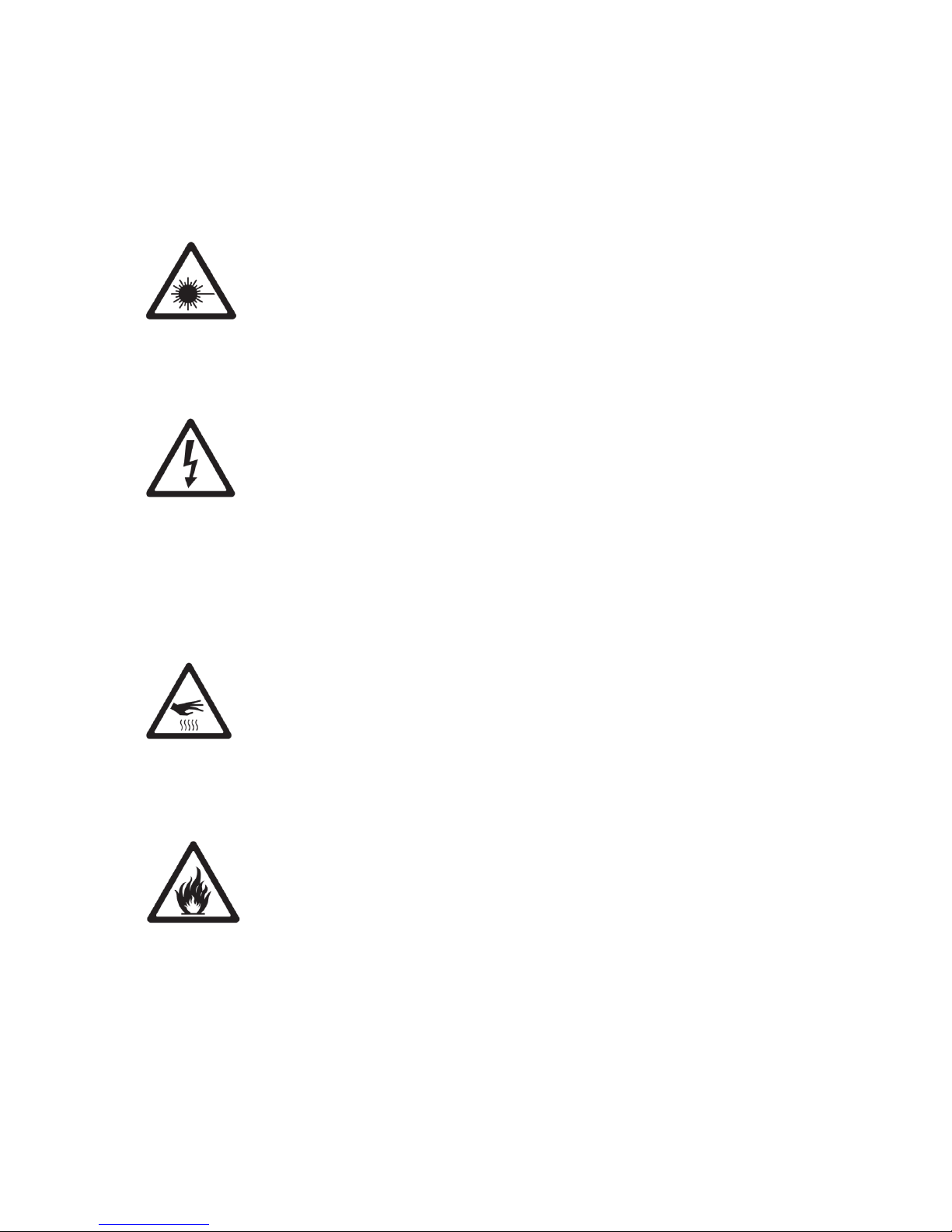
WARNING !
Before use, and before installing this fixture, read carefully user manual, and follow the
safety precautions listed on this page.
WARNING !
Very high level light output. DO NOT LOOK INTO THE BEAM.
DANGER !
Hazardous voltage. Risk of electric shock!
ALWAYS disconnect the fixture from power for servicing, for cleaning or installing.
Do not connect this unit on a dimmer power pack.
Protect the unit from rain or moisture.
WARNING !
Burn Hazard. Do not touch. Very hot surface
The fixture becomes hot during use and remains hot 10 min after use . Do not touch the unit.
WARNING !
Fire Hazard!
Keep flammable materials away from the fixture. Do not operate the fixture with ambient
temperature over 40°C.
.
Page 13

Evo Beam 100 User’s Manual Ver. 1.00 Page13
DANGER !
Safety Hazard. Risk of injury.
This evolite unit must be installed by professional people. If suspended, make sure the
structure and the hardware used for this suspension is secured. This Hardware must support
at least 10 times the weight of the device suspended.
Ensure public is not looking at the beam. Do not try to repair the fixture by yourself. Contact a
professional repair service.
The Evo Beam 100 is for beam effect for on-site decoration purpose.
Don’t turn on the fixture if it’s been through severe temperature difference like after
transportation because it might damage the light due to the environment changes. So make
sure to operate the fixture until it is in normal temperature.
This light should be keep away from strong shaking during any transportation or movement.
Don’t pull up the light by only the head, or it might cause damages to the mechanical parts.
Don’t expose the fixture in overheat, moisture or environment with too much dust when
installing it. And don’t lay any power cables on the floor. Or it might cause electronic shock to
the people.
Make sure the installation place is in good safety condition before installing the fixture.
Make sure to put the safety chain and check whether the screws are screwed properly when
installing the fixture.
Make sure the lens is in good condition. It’s recommended to replace the units if there are any
damages or severe scratch.
Make sure the fixture is operated by qualified personnel who knows the fixture before using.
Keep the original packages if any second shipment is needed.
Don’t try to change the fixtures without any instruction by the manufacturer or the appointed
repairing agencies.
It is not in warranty range if there are any malfunctions from not following the user manual to
operate or any illegal operation, like shock short circuit, electronic shock, lamp broke, etc.
Page 14
Evo Beam 100 User’s Manual Ver. 1.00 Page14
Introduction
Thank you for choosing this professional fixture from evolite.
This new intelligent Moving Wash will provide you reliability, latest features, and professional
lighting effects for a long period of time.
This evolite fixture is complying with European standards: 2014/35/EU, 2014/30/EU & RoHs
2011/65/EU.
Technical specification :
- Beam type LED projector
- Pan rotation 540 ° / 630 ° and TILT 180 °
- Equipped with a 100W LED
- Possible use on main socket or on built-in battery
- Control modes: By DMX cables, in automatic, in automatic with detection of the sound
- 2 DMX modes: 9 or 13 channels
- Beam angle: 4 °
- Ultra clear optics
- Very dynamic and varied automatic modes
- Totem mode (180 °)
- Wheel of 11 colors + white
- Wheel of 12 fixed Gobos
- 6-facet rotary linear prism
- 8-facet rotary circular prism
- TFT color display
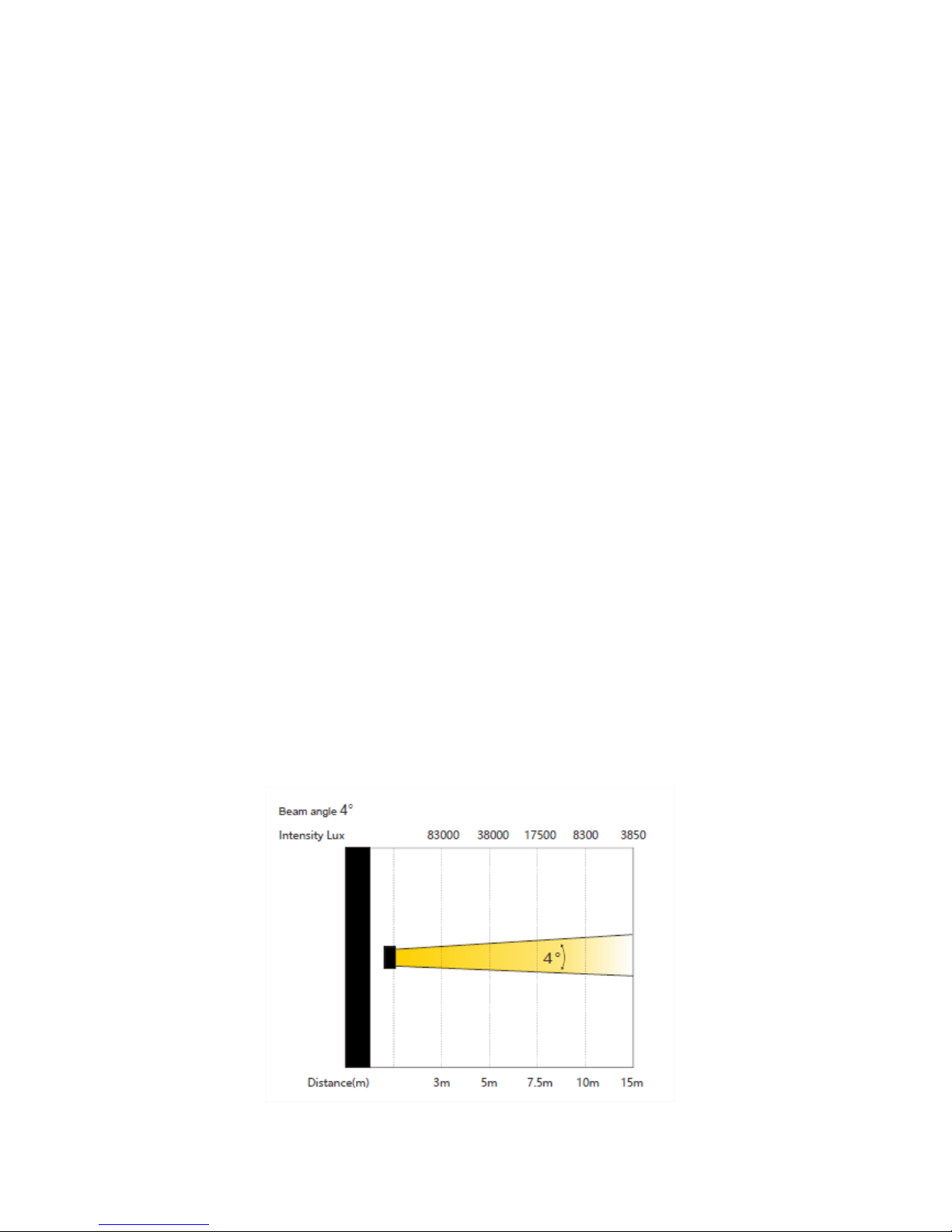
- Lux: 83000 lx @ 3m
- Supplied with omega mounting clips
- Forced ventilation cooling
- Power consumption: 160W max
- Dimensions of the device: 389 x 252 x 185 mm
- Carton dimensions: 450 x 320 x 255 mm
- Gross weight: 8 kg
- Net weight: 6 kg
Page 15

Evo Beam 100 User’s Manual Ver. 1.00 Page15
Page 16

Evo Beam 100 User’s Manual Ver. 1.00 Page16
Installation
For added protection mount the fixtures in areas outside walking paths, seating areas, or in
areas were the fixture might be reached by unauthorized personnel.
Before mounting the fixture to any surface, make sure that the installation area can hold a
minimum point load of 10 times the device’s weight.
Fixture installation must always be secured with a secondary safety attachment, such as an
appropriate safety cable.
Never stand directly below the device when mounting, removing, or servicing the fixture.
from a ceiling, or set on a flat level surface (see illustration below). Be sure this fixture is kept
at least 0.5m (1.5 f t) away from any flammable materials (decoration etc.).
Always use and install the supplied safety cable as a safety measure to prevent accidental
damage and/or injury in the event the clamp fails.
Mounting points:
Overhead mounting requires extensive experience, including amongst others calculating
working load limits, a fine knowledge of the installation material being used, and periodic
safety inspection of all installation material and the fixture. If you lack these qualifications, do
not attempt the installation yourself. Improper installation can result in bodily injury.
Be sure to complete all rigging and installation procedures before connecting the main power
cord to the appropriate wall outlet.
Clamp Mounting:
This moving head provides a unique mounting bracket assembly that integrates the bottom of
the base, and the safety cable rigging point in one unit (see the illustration below). When
mounting this fixture to truss be sure to secure an appropriately rated clamp to the included
omega bracket using a M10 screw fitted through the center hole of the “Hanging Kit”. As an
added safety measure be sure to attached at least one properly rated safety cable to the fixture
using on the safety cable rigging point integrated in the base assembly
Page 17
Evo Beam 100 User’s Manual Ver. 1.00 Page17
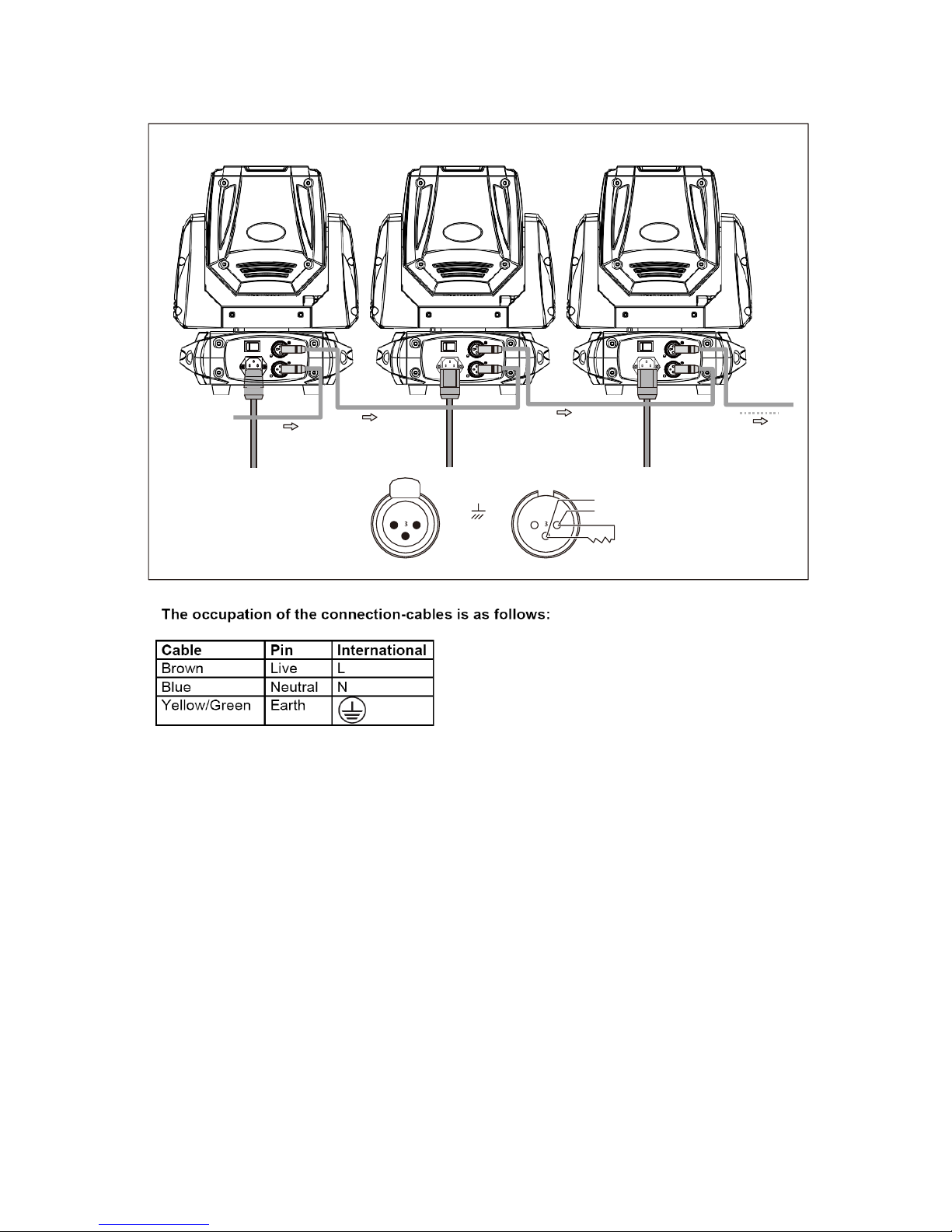
DMX IN
POWER IN
POWER IN
POWER IN
Signal (-)
Signal (+)
Signal (-)
Signal (+)
2 1
Ground
1 2
120 Ω
DMX512 OUT
DMX512 IN
How to use
Do not switch on the appliance if it has undergone a significant temperature change. Wait for the
condensation to disappear before use.
Page 18
Evo Beam 100 User’s Manual Ver. 1.00 Page18
Configuration
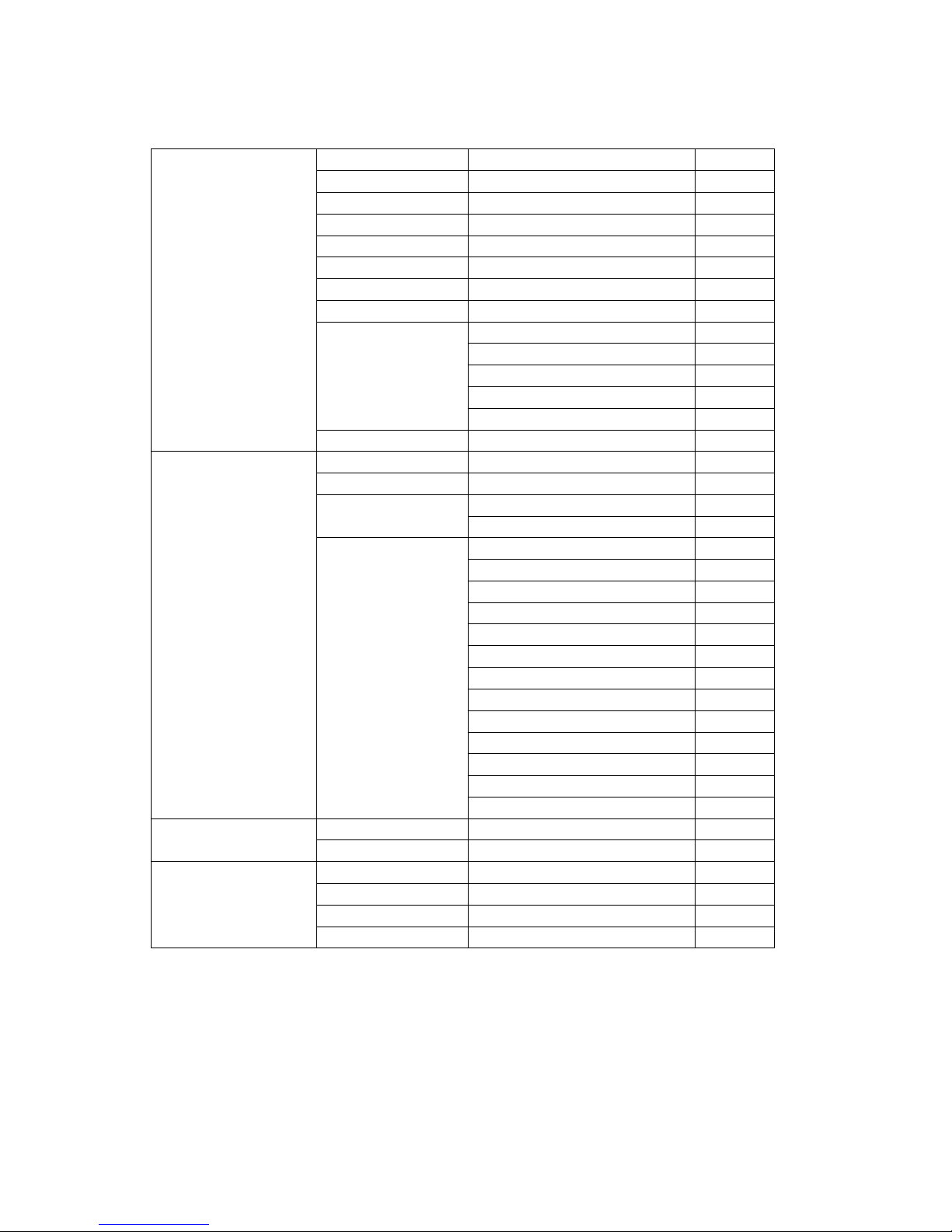
o Navigation in the menu
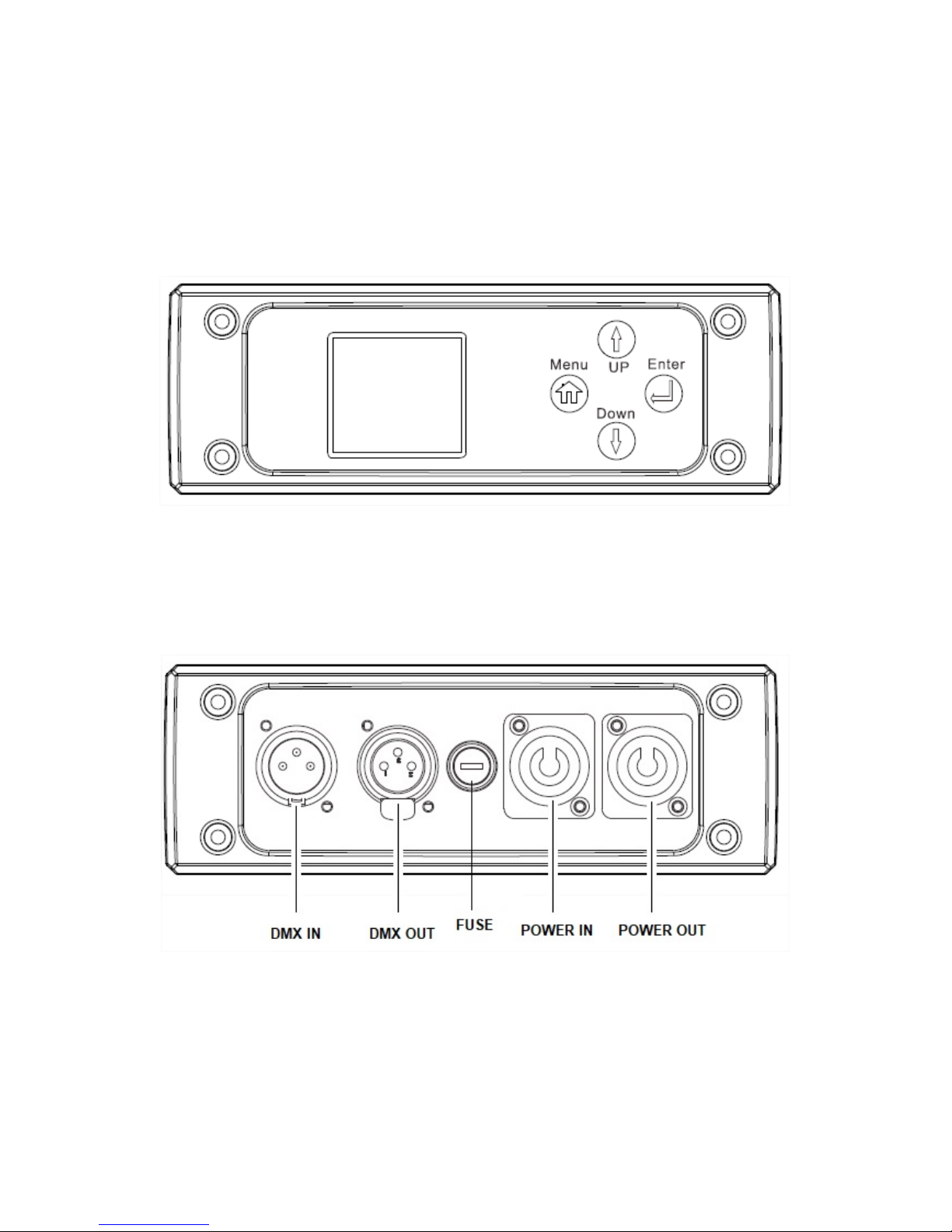
Control panel :
Access the menu directly by pressing the Menu key and move through the menus with the
UP & DOWN keys. Press the ENTER key to confirm your choices and values.
Page 19
Evo Beam 100 User’s Manual Ver. 1.00 Page19
Menu
System setting
Dmx address
0/512
No signal
HOLD/BLACK/AUTO/SOUND
Pan Reverse
ON/OFF
Tilt Reverse
ON/OFF
Pan Angle
540/630
Microphone level
0-100
Display Reverse
ON/OFF
Language
Chinese/English
Calibrate
Pan
0-255
Tilt
0-255
Color
0-255
FixGo
0-255
Focus
0-255
Factory Setting
Reset Now?
Mode
Dmx Channel Mode
13ch/09ch
Sound Mode
Auto Mode
AutoProgrm1
AutoProgrm2
Manual Mode
PAN
0-255
PAN-Fine
0-255
TILT
0-255
TILT-Fine
0-255
Move.Sp
0-255
Dimmer
0-255
Strobe
0-255
Color
0-255
FixGobo
0-255
Prism1
0-255
Prism2
0-255
Focus
0-255
Reset
0-255
Information
Fixture Run Time
10
Software
V1.0
Reset
Pan Reset
Tilt Reset
Other Reset
All Motor Reset
MENU
Page 20

Evo Beam 100 User’s Manual Ver. 1.00 Page20
o DMX Protocol 13 channels
Mode/Channel
Value
Function
1
0-255
Pan Movement By 630/540
2
0-255
Fine control of Pan movement
3
0-255
Tilt Movement By 270
4
0-255
Fine control of Tilt movement
5
0-255
PAN/TILT speed max to min
6
0-255
Total Dimmer
7
0-9
Shutter closed
10-200
Strobe effect slow to fast
201-255
shutter open
8
0-255
Color Wheel
9
0-255
Gobo Wheel
10
0-255
Focus
11
0-9
no function
10-127
Prism 1 open
128-255
Prism 1 rotation
12
0-9
no function
10-127
Prism 2 open
128-255
Prism 2 rotation
13
0-127
No Function
128-159
Scan motor reset
160-191
Scan motor reset
192-223
Scan motor reset
224-255
All motor reset
Page 21

Evo Beam 100 User’s Manual Ver. 1.00 Page21
o DMX Protocol 9 channels
Mode/Channel
Value
Function
1
0-255
Pan Movement By 630/540
2
0-255
Tilt Movement By 270
3
0-255
Total Dimmer
4
0-9
Shutter closed
10-200
Strobe effect slow to fast
201-255
shutter open
5
0-255
Color Wheel
6
0-255
Gobo Wheel
7
0-255
Focus
8
0-9
no function
10-127
Prism 1 open
128-255
Prism 1 rotation
9
0-9
no function
10-127
Prism 2 open
128-255
Prism 2 rotation
Page 22
Evo Beam 100 User’s Manual Ver. 1.00 Page22
Maintenance & service
o Cleaning
The cleaning of internal must be carried out periodically to optimize light output. Cleaning frequency depends
on the environment in which the fixture operates: damp, smoky or particularly dirty surrounding can cause
greater accumulation of dirt on the fixture’s optics.
Clean with soft cloth using normal glass cleaning fluid.
Always dry the parts carefully.
Clean the external optics at least every 20 days.
o Troubleshooting
Following are a few common problems that may occur during operation. Here are some suggestions for easy
troubleshooting:
The fixture does not work, no light
o Check the connection of power and main fuse.
o Measure the mains voltage on the main connector.
Not responding to DMX controller
o DMX LED should be on. If not, check DMX connectors, cables to see if link properly.
o If the DMX LED is on and no response to the channel, check the address settings and DMX
polarity.
o If you have intermittent DMX signal problems, check the pins on connectors or on PCB of the
fixture or the previous one.
o Try to use another DMX controller.
o Check if the DMX cables run near or run alongside to high voltage cables that may cause
damage or interference to DMX interface circuit.
Some fixtures don’t respond to the easy controller
o You may have a break in the DMX cabling.
o Check the LED for the response of the master/ slave mode signal.
No response to the sound
o Make sure the fixture does not receive DMX signal.
o Check microphone to see if it is good by tapping the microphone.
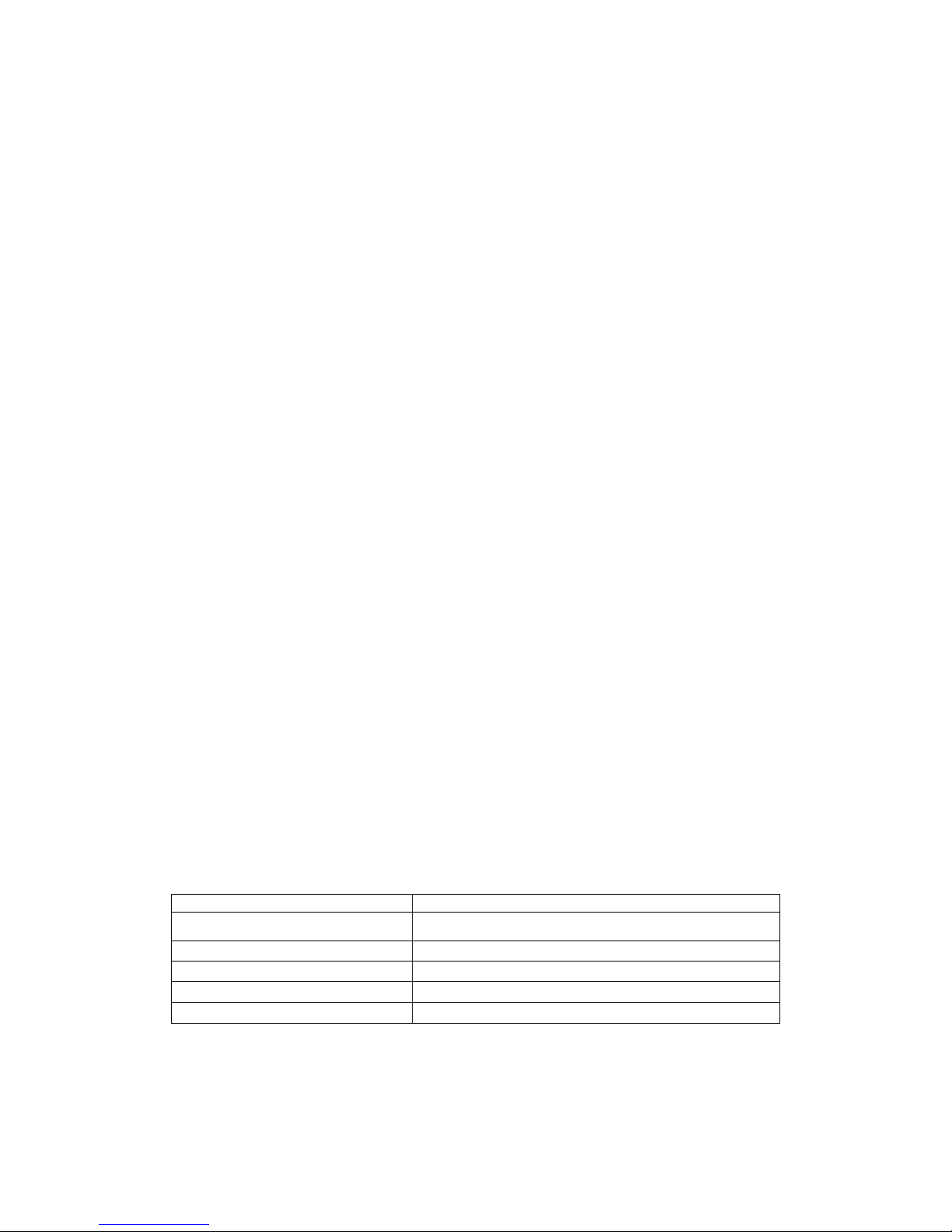
Technical Specifications
Model
Evo Beam 100
Voltage
110V- 250V / 50-60Hz
Power consumption:
160W
LED
1x 100W
Gross Weight
8 kg
Package Dimensions
450 x 255 x 320 mm
Page 23

Evo Beam 100 User’s Manual Ver. 1.00 Page23
Page 24

Evo Beam 100 User’s Manual Ver. 1.00 Page24
www.evolite-pro.com
Importé par / Imported by
EVOLITE – MSC
7 avenue du 1er Mai
91120 Palaiseau / FRANCE
Tel : +33 1 69 34 80 62
 Loading...