

Page 1
iplayer
The HD Media Centre
High Definition Home Media Centre
User Guide
Page 2
Introduction / Index
HD Media Centre
iplayer
2
Introduction 3
Getting started 4-5
Configure your iplayer 6
The remote control 7
Operating your iplayer 8-12
tvMAX 13
Home network 14
Troubleshooting 15
Safety information 16
My iplayer 17
Contents
Page 3
Introduction / Index
Congratulations on choosing the Evesham iplayer HD Media
Centre High Definition Home Media.
This guide is intended to help you get started and provide you with a basic overview of
the key functions. Before you get started, please take a moment to check that you have all
of the required components. We also recommend that you review the safety information
found at the end of this guide.
HD Media Centre
Your Evesham iplayer HD Media Centre
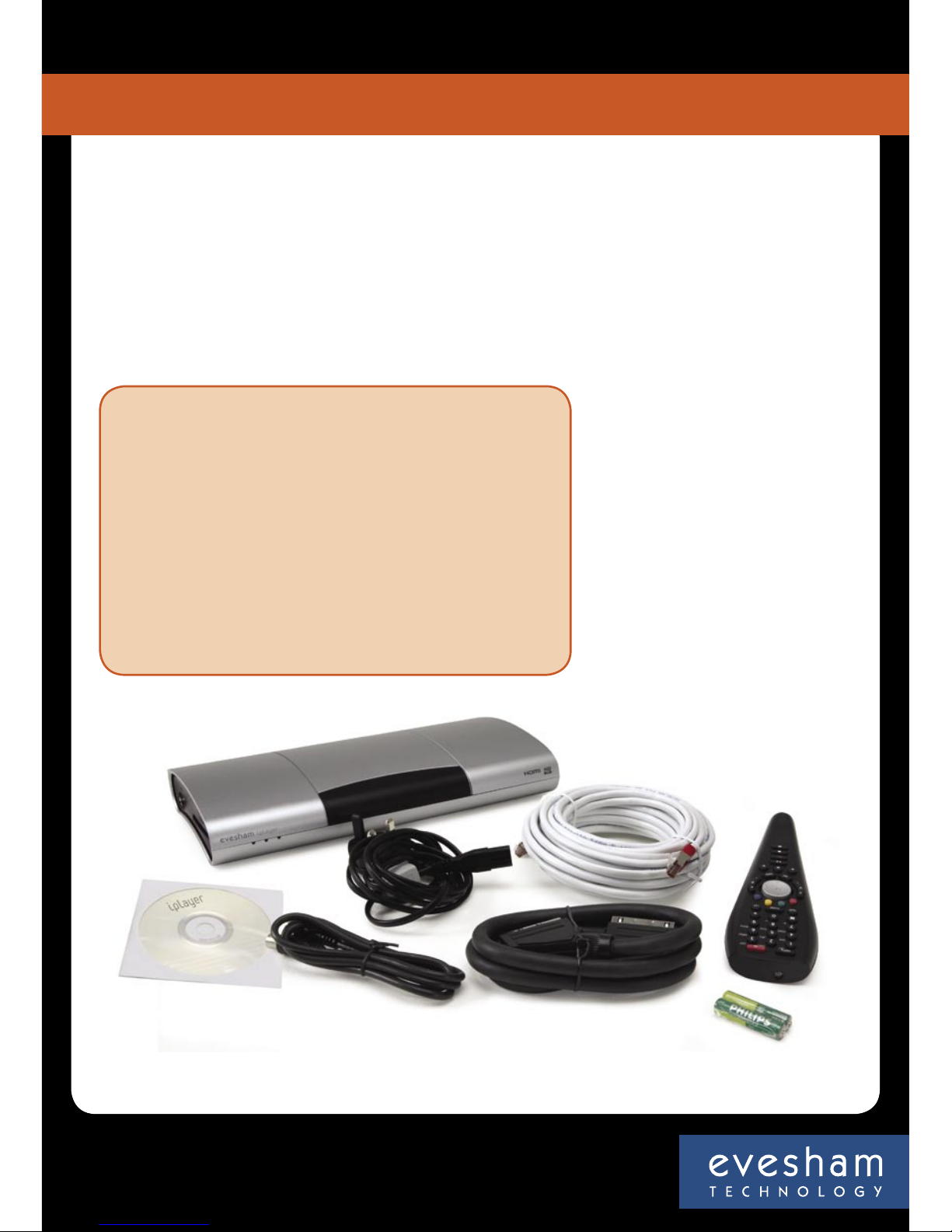
package should include:
• Evesham iplayer HD Media Centre HD Media Centre
• Aerial lead
• SCART cable
• Remote control
• 2 x AAA batteries
• Ethernet cable
• Power cable
• User guide on CD
Customer Service Helpline
Call 0870 160 9511
Monday to Saturday 9am – 8pm
iplayer
3
Introduction
Page 4
What’s in the box?
Insert the batteries into the remote control unit.
1
If you do not have a high definition screen, we strongly recommend that you purchase one, in order to get the most out of your
Evesham iplayer HD Media Centre. You can buy a range of high quality, high performance HD screens directly from Evesham Technology
www.evesham.com
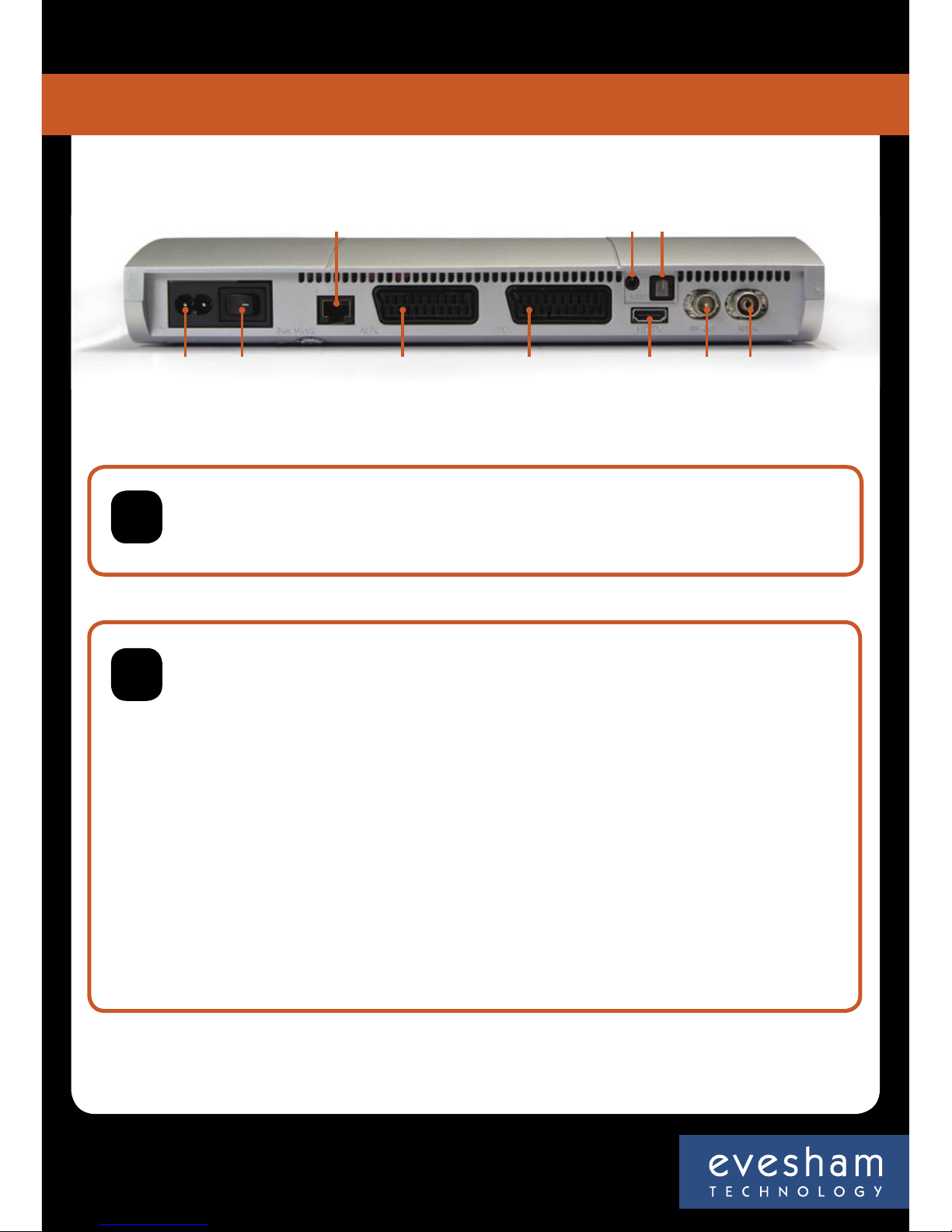
If you do not have an HD screen or do not have HDMI input on your screen, then connect the SCART cable to the “TV” socket on your
Evesham iplayer HD Media Centre and the main “SCART” socket of your TV set, making sure the SCART lead is fully inserted in both TV
and Evesham iplayer HD Media Centre.
If your DVD player or VCR is connected by a SCART cable, this should be connected to the “AUX” socket on your Evesham iplayer HD
Media Centre.
Connect your main incoming TV aerial to the socket marked “AERIAL” on your Evesham iplayer HD Media Centre.
If required, use the aerial cable supplied to connect from the socket marked “RF OUT” to your Television’s “Aerial In” or the “Aerial In” on
your VCR.
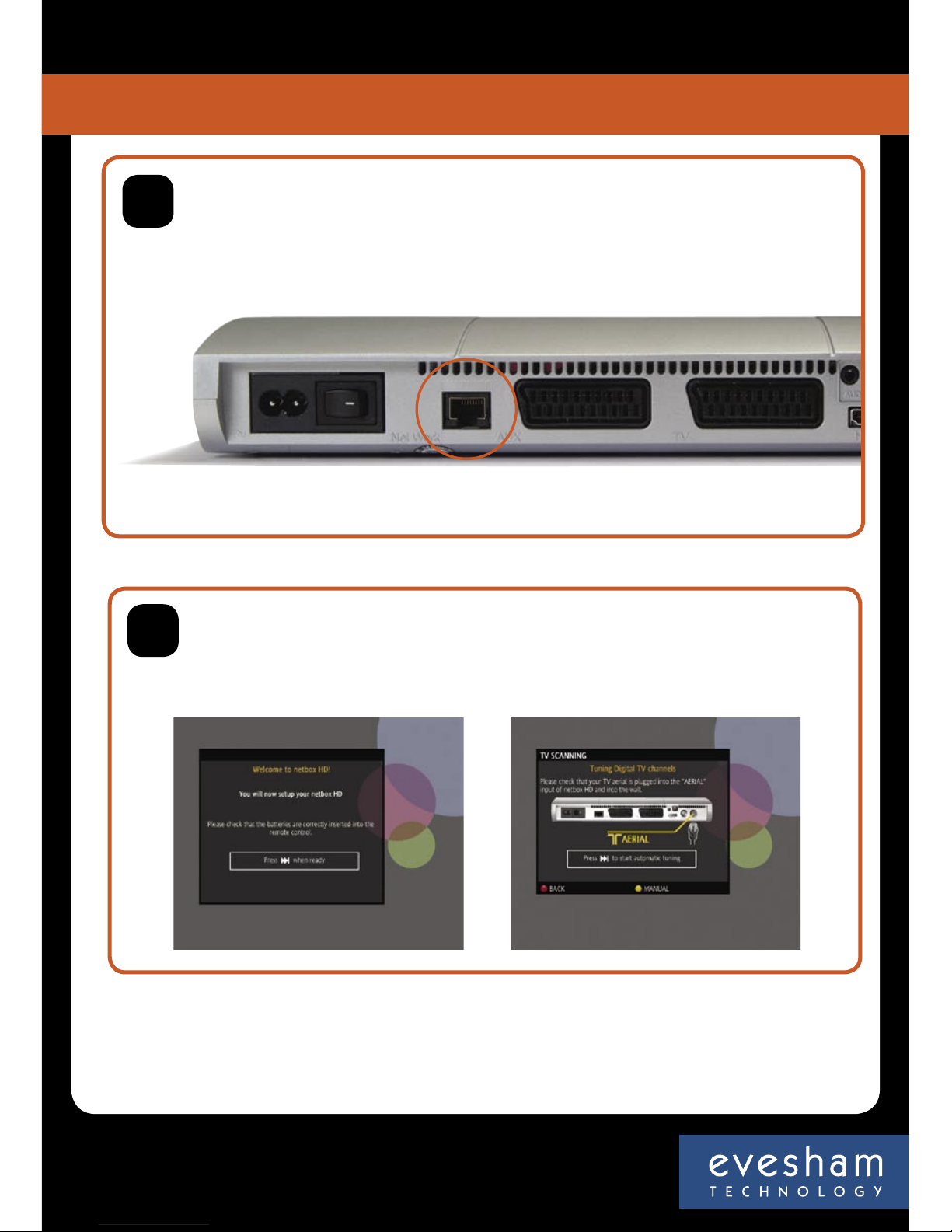
Using the “Ethernet” cable supplied, connect one end to the Evesham iplayer HD Media Centre socket marked “NETWORK” and the other
to the “LAN” socket on your router, or to a wireless bridge, powerline adaptor or whichever means of networking you have installed.
If you have an HDMI lead and a screen that can accept HDMI input, then connect the HDMI lead to the HDMI socket on the
back of you Evesham iplayer HD Media Centre, then connect the HDMI lead to the HDMI socket of your screen.
2
Connect the supplied power cable to your Evesham iplayer HD Media Centre and mains supply – do not switch the unit on at this point.
Mains
Power Switch
Network Connection
AUX Scart
TV Scart
HDMI RF Out
Aerial
Audio SPDIF
HD Media Centre
iplayer
4
Getting Started
Page 5
At this stage, you should connect your router as per the manufacturer’s instructions. To configure your router to work with the
Evesham iplayer HD Media Centre, see user manual.
Switch on your TV, then switch on your Evesham iplayer HD Media Centre, you should now see a welcome screen. If you do
not see the welcome screen, press the “AV” button (Sometimes marked as “AUX” or “EXT”) on your TV remote control. Or, if your
iplayer is connected to a high definition screen via an HDMI lead, select HDMI on your screen remote control.
NB. If you do not have a home network we recommend you install one to get the best from your iplayer.
Equipment and advice are available from www.evesham.com
3
You will now see the welcome screen and a series of on-screen instructions, follow these to tune in channels and setup the service
to your preference.
You will now need to install Windows Media Connect TM (now part of Media Player 11 from Microsoft) on your PC (download link
available on page 12 of this manual) to enable your Evesham iplayer HD Media Centre to access content on your PC.
4
Congratulations, you have successfully completed the basic setup of your Evesham iplayer HD Media Centre, giving you access to many fantastic
digital entertainment services!
HD Media Centre
iplayer
5
Getting Started
Page 6
Assembling the Sound Stage X1
Configuring the Evesham iplayer HD Media Centre for your TV
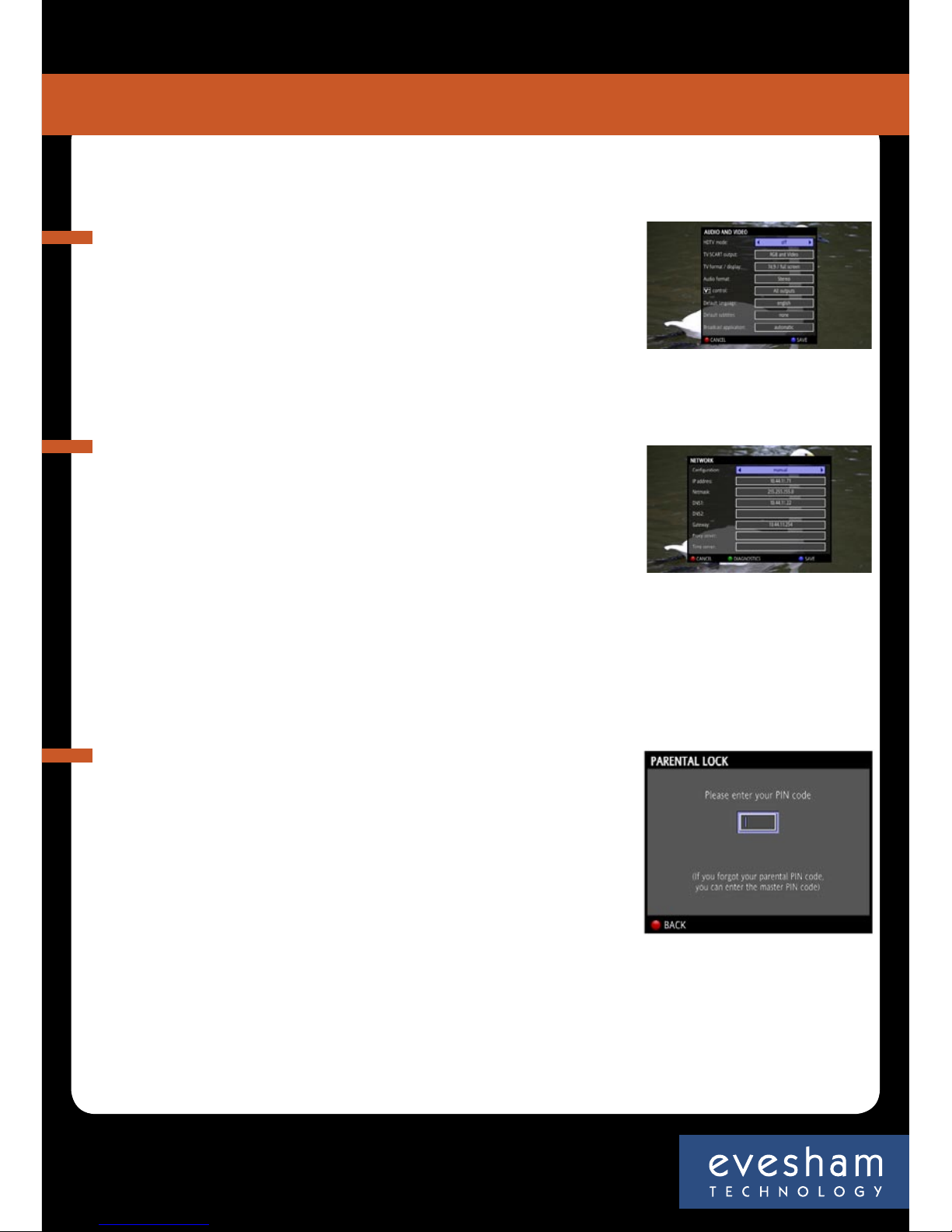
To configure the TV output settings
• Press the High Definition button on your remote control (HDTV)
• Select “Audio and Video” at the next menu
• From the “TV format/display” menu, choose the required setting
Configuring your home network
Your Evesham iplayer HD Media Centre needs to be connected
to your home network to access many of its features.
• Ensure that the supplied Ethernet cable is connected to the
Ethernet port on the back of your iplayer and to one of the
network ports of your router.
• If your router is set to use DHCP then it should automatically
set up the network access for your iplayer. To manually set your
network configuration, go to Menu, Preferences and Network. If
you select the manual option you can input your own settings.
Parental Control
The Evesham iplayer HD Media Centre allows you to restrict viewing by
use of a PIN number. To set the pin number
• Press the “Menu” button
• Use the Joystick to navigate to select “Settings”
• Select “Parental Lock”
• Enter the master code “xxxx” (this is the code you entered in the set-up
wizard) and press “OK”
• Press the “Blue Fastext Button ”
• Enter the new PIN into both boxes using the Number Input buttons
• Press the “Blue Fastext Button ” to set the PIN
• Exit by pressing the “Red Fastext Button ”
HD Media Centre
iplayer
6
Configure your iplayer
Page 7
Connecting the Sound Stage X1
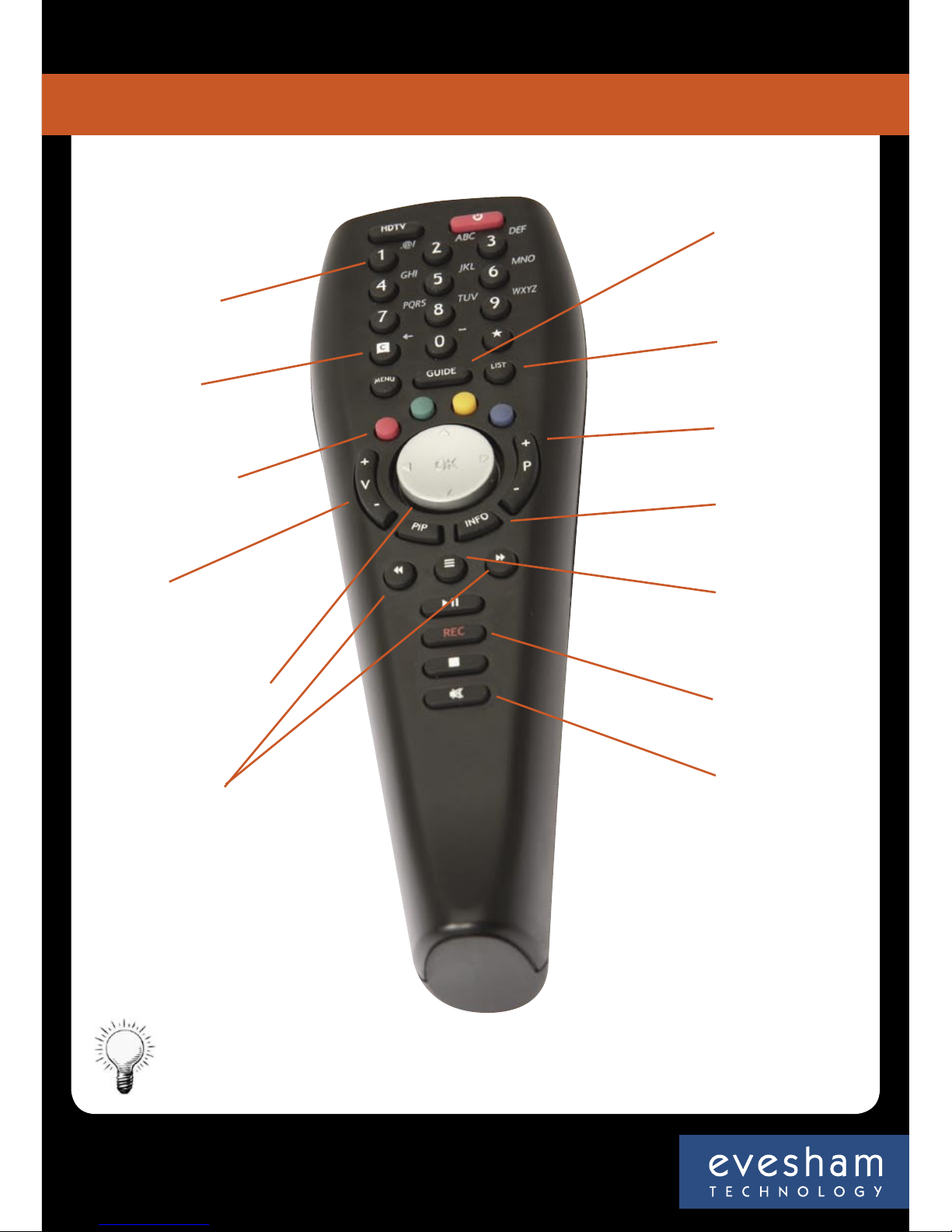
Number & text
input buttons
Cancel/back
button
Coloured ‘fastext’
buttons
Volume
OK button & joystick
up, down, left, right
Previous & next
Electronic
programme
guide (EPG)
List
Channel change
Channel info
Text
Record
Mute
Hint
To enter text using the remote control, use the Number and Text input keys in a similar way
to sending text messages from a mobile phone
HD Media Centre
iplayer
7
The remote control
Page 8
How to control your Sound Stage X1
Changing Channels
There are 3 basic ways to change the channel without the need to enter the Electronic
Programme Guide (EPG)
To move between channels, use the “Channel Change” button located to the right hand side
of the Joystick.
Enter the channel number using the number keys.
Press the “List” button on your remote control, scroll to the required channel using the
Joystick and press “OK” to select.
Electronic Programme Guide (EPG)
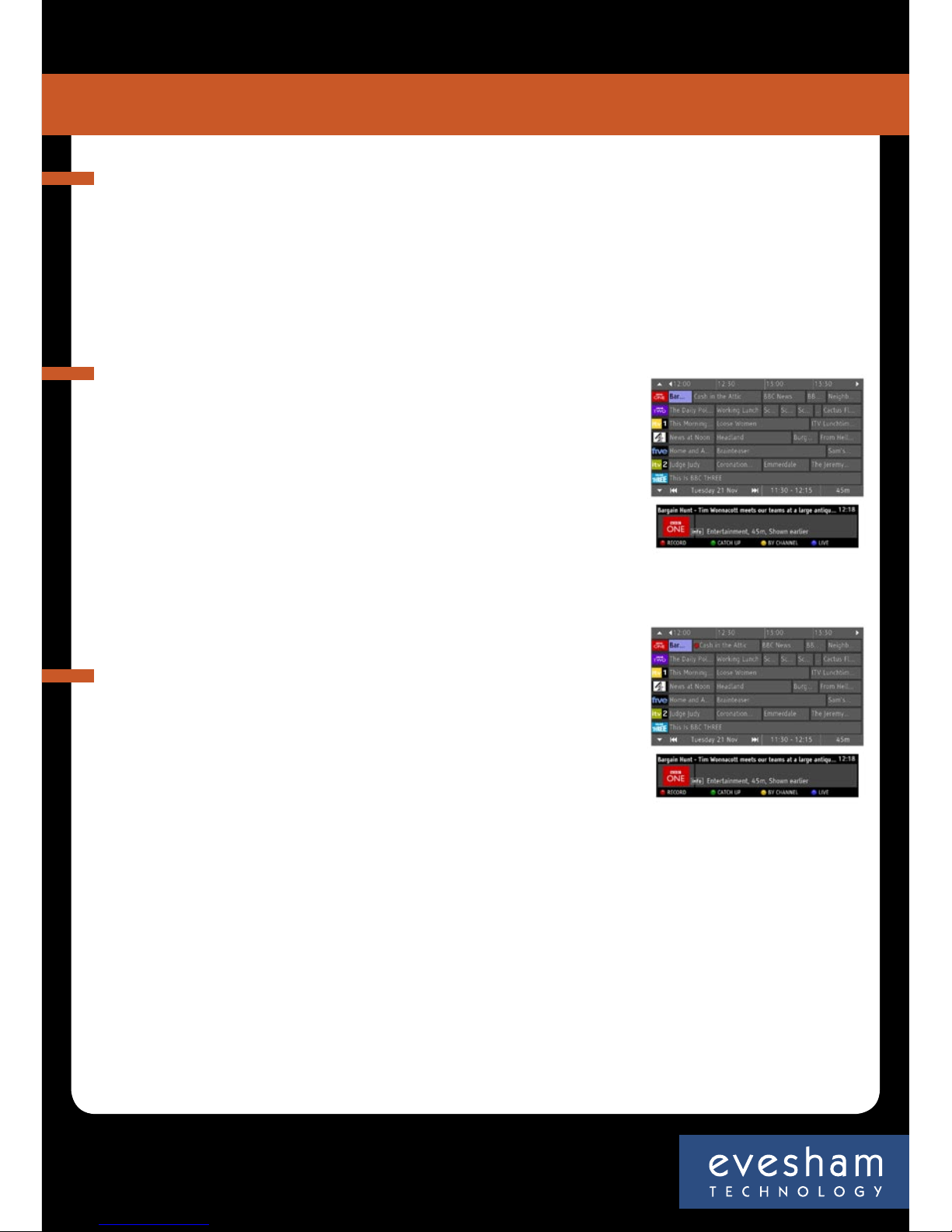
The EPG allows you to set programme recordings up to 8 days
in advance and can be accessed in one of two ways
Press the “Menu” button, use the Joystick to scroll to the “TV Guide”
option and press “OK” . Press the “Guide” button
• Use the Joystick to navigate through the EPG, pressing “OK” to
select programmes.
• Use the “Next/Previous” buttons to jump +/- 24 hours
• Press the blue button to go to the programme currently tuned to
• Press the yellow button to view as channel listing
• Press the “0” or the “Guide” button to exit the EPG
HD Media Centre
iplayer
8
Operating your iplayer
Record TV programmes
To use the programme record function, simply:
• Access the EPG as detailed above
• Using the Joystick, select the programme you wish to record
• Press the “Red Fastext Button ” to record the programme
• A red dot will appear next to the programme name to confirm
the record function
Recording the programme you are watching
If you want to record the programme you are currently watching press the Rec button on the
remote. A window will appear on the screen. If you press the green ‘manual’ button, recording
will continue until you stop it, or until the disk is full. If you press the red ‘automatic’ button
the current programme will be recorded. The start of the programme will be preserved (if the
box was on and tuned to that channel at the start of transmission) and the programme will be
recorded until the scheduled end time.
Note: the Evesham iplayer HD Media Centre can record approximately 60 hours of standard definition programmes or around 30
hours of high definition programmes. Once full, the Evesham iplayer HD Media Centre will be unable to record further programmes
until space has been made available by deleting old recordings.
Note: If you set two programmes to be recorded at the same time, the last one set will be recorded. You can check for recording
clashes in the Recording Timers menu.
Page 9
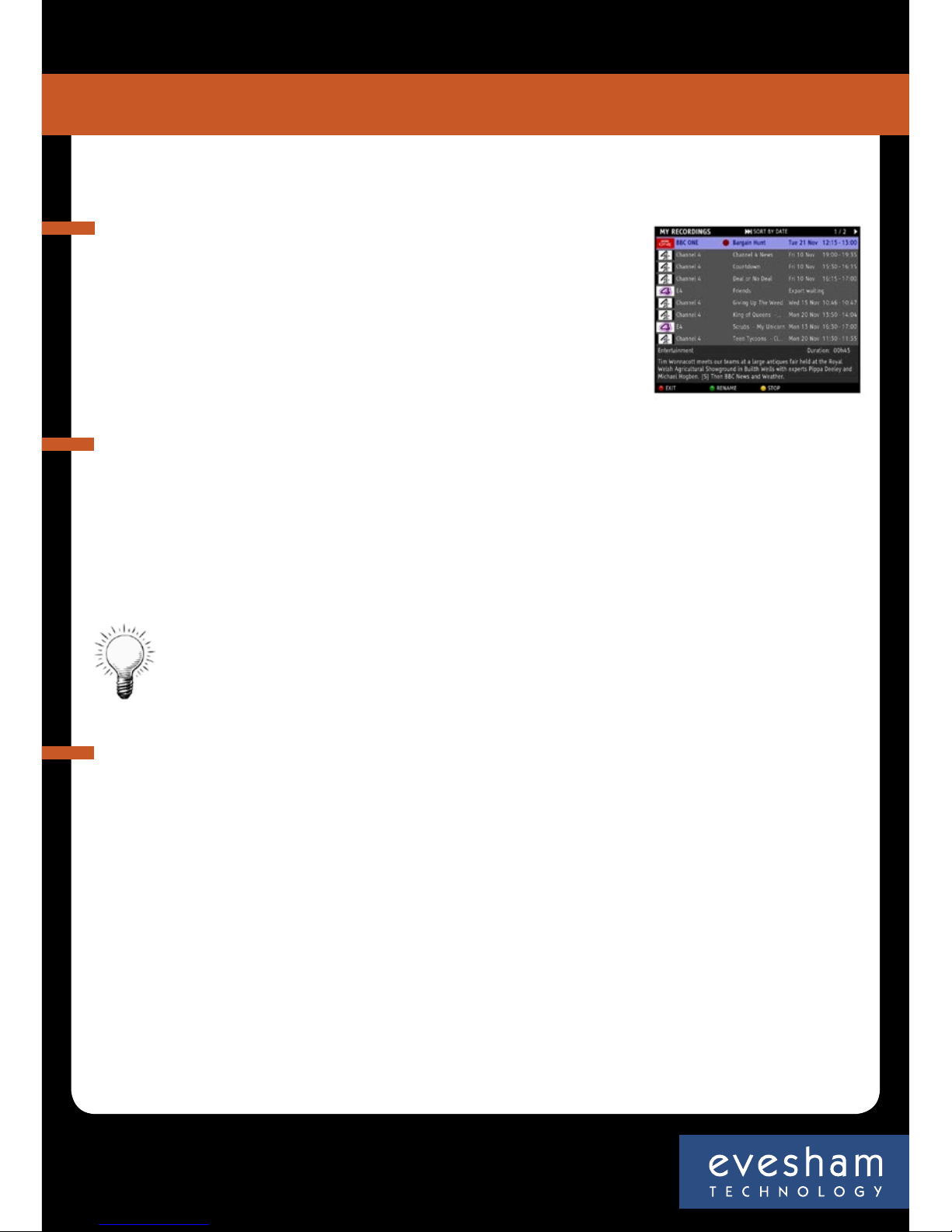
View a recorded TV programme
To view a previously recorded programme:
• Press the “Menu” button on the remote control
• Using the Joystick, scroll to “My Recordings” and press “OK”
• You will now see a list of recorded programmes
• Navigate to the required programme and press “OK” to view
Note: You can view a recorded programme while recording another programme
How to delete a stored recording
To delete a recorded programme:
• Press the “Menu” button on the remote control
• Using the Joystick, scroll to “My Recordings”
• Press “OK” – you will now see a list of recorded programmes
• Navigate to the required programme and press the “Green Fastext Button ” to delete
• Press the “Blue Fastext button ” to confirm
• Press “Menu” to exit
Hint
To lock a recording press the Yellow Fast text button instead of Green Fastext button. To jump 15
minutes forward or backward in a programme, press the > or < buttons on the Joystick (OK) button
Pause and Rewind Live TV
To pause live TV
Press the “OK” button on your remote control. An Information bar will temporarily appear
showing how far behind live you now are.
To resume viewing
Press the “OK” button on your remote control. An Information bar will temporarily appear
showing how far behind live you now are.
To rewind live TV
Press the rewind button <<. (Note: The Evesham iplayer HD Media Centre has multiple rewind
speeds. To change the speed of rewind, simply press the rewind button again to cycle through
the speeds.)
Once you have reached the required place in your programme, press “OK” to resume viewing or
press the fast forward button >> to fast forward at variable speeds.
HD Media Centre
iplayer
9
Operating your iplayer
Page 10
Digital Recorder Management
To manage the hard disk of your Evesham iplayer, press MENU > DIAGNOSTICS > DIGITAL
RECORDER. You will see an information screen showing the usage of your hard disk. You can
delete timeshift files by pressing green (these are the files stored for rewinding live TV) or erase
everything on the disk, including your recordings, by pressing yellow.
Press Menu of C to exit this dialogue box.
HD Media Centre
iplayer
Operating your iplayer
Setting Favourite Channels (TV)
You can set up the order of the TV channels on your Evesham iplayer or even hide channels you
do not want to access.
Press MENU > FAVOURITES then set up the channels to your preferences.
Setting Favourite Channels (Websites)
You can also set a web page to be a channel on your Evesham iplayer. So if you have a website of
your own, you can have your own ‘TV Channel’, or if you find sites you like or visit regularly, that
work on TV*, then you can save those with a channel number.
Navigate to the site (using the internet access in TV Max). Once the site is displaying press
the Info button on your remote control. You will then see the information bar. Press green
to bookmark the page. A dialogue box will appear showing the name of the page, the page
URL and the channel number, if you select the channel number box by pressing OK on your
remote, you can scroll down to a three figure channel number, starting with 9 and then save the
favourite.
When you are watching TV you can then type in the channel number and the Evesham iplayer
will go directly to the page.
Hint
If you press list on your remote control, you will see the list of TV channels. Press >> to access the list of
radio channels. Press >> again to access the list of your bookmarks.
Display Management
To access the display management interface, select MENU > PREFERENCES > DISPLAY.
You can now set the following variables:
Infobar timeout: normal, short, long or no display
Screensaver timeout: disabled, 5, 10 , 15 or 30 mins
TV Guide layout: large grid, small grid, now & next
You can also change the country or time zone, but you would not normally change these.
Finally, you can adjust the centring of the picture on your screen, adjusting it with the joystick on
your remote control.
10
Page 11
HD Media Centre
iplayer
Operating your iplayer
Recordings Export
You can export recordings from the hard drive of your Evesham iplayer, meaning that you need
never run out of recording space, or have to delete something you want to keep.
NOTE: The Evesham iplayer is a personal recording device and programmes recorded on it are
only for your personal use. Retransmission, duplicating or sharing of content is a breach of
copyright and is illegal. Evesham Technology support the fair use of recorded content.
To access the Recordings Export set up, select PREFERENCES > RECORDINGS EXPORT. You can
now set up details for your exports, or change the settings you have already input.
Hostname or IP Address of PC: Enter the IP address of your PC on your local network*, or the host
name of a storage device on the network. If you are exporting to a device connected to the USB
port of your Evesham iplayer, type usb, in lower case, in this field.
Now enter the name of the shared folder and any login or password you have set for this on your
PC. In the case of usb export, leave these fields blank.
Now press yellow to test your settings. Once they have been successfully tested, press blue to
save your settings.
You can now export any of the recordings on your Evesham iplayer’s hard disk by going to MENU > MY
RECORDINGS, selecting the programme you want to export and pressing blue on your remote. Note, if
you have not already set up your PC Export, the blue button will take you to the set up page.
11
USB Port
You can connect supported external storage devices to the USB port of your Evesham iplayer.
To be compatible they will need to be in FAT 32 format. This includes certain disk on key devices,
portable hard drives, keyboards and some MP3 players.
Hint
Make sure that there is enough space on your target device before exporting a programme.
*Hint
To identify the IP address of a computer the current IP address is listed against the network adapter
being used. In order to see the IP address, please follow the procedure below.
Within Windows, press the Start button, select the Run option , In the command line next to Open type
cmd and press ok. At the flashing cursor prompt type ipconfig –all (there is a space between the g of
ipconfig and the – character). The IP address will be listed under the active network adapter.
Page 12

HD Media Centre
iplayer
Operating your iplayer
Media Sharing
Using your Evesham iplayer you can access content stored on your PC or a storage device
connected to the USB port.
You will need to be running Windows Media ConnectTM on your PC or other network device. This
can be downloaded from www.microsoft.com/windows/windowsmedia/devices/wmconnect/
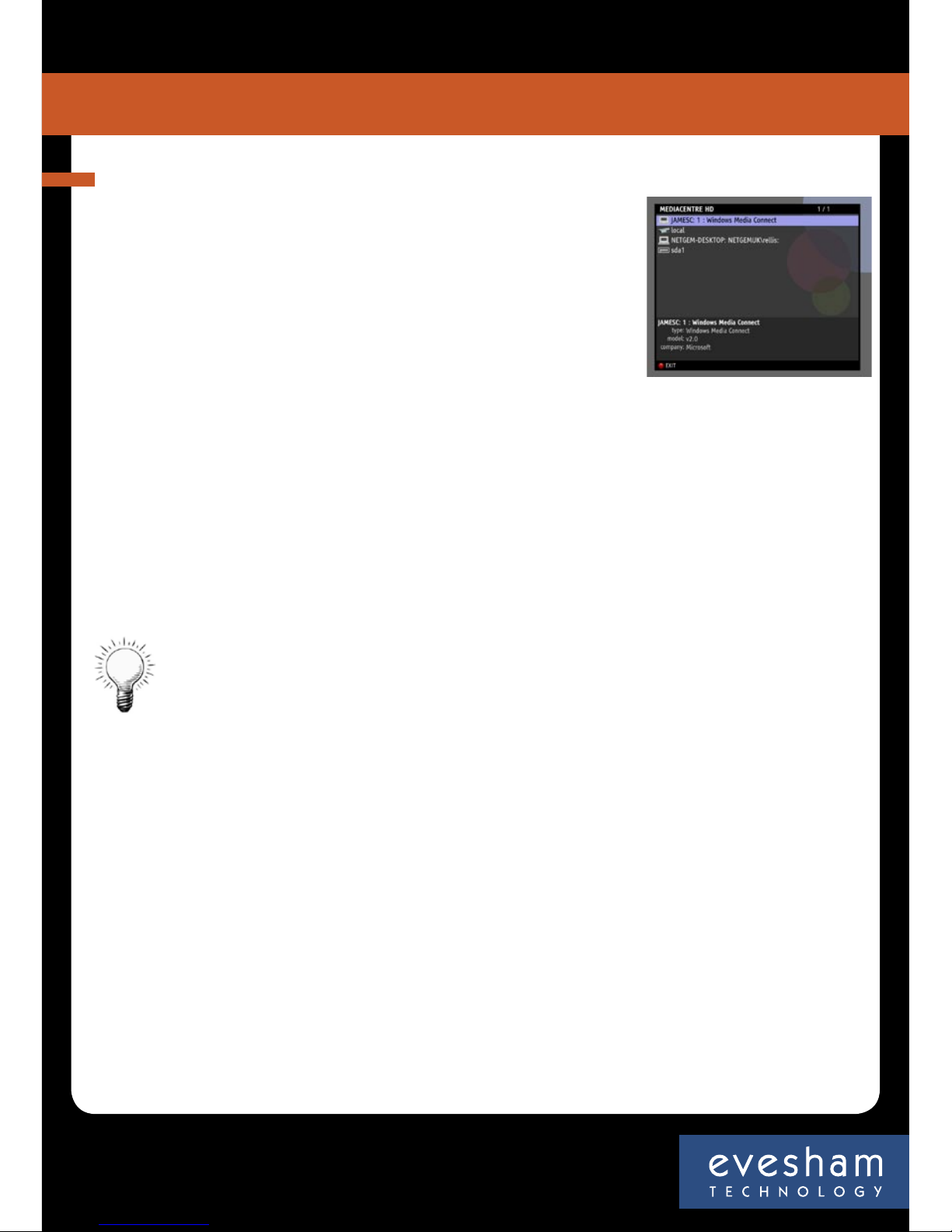
Select MENU > MEDIACENTRE. You will see a list of the connected devices available, including any
supported device connected to the USB port of your Evesham iplayer.
When you select a device you will see a list of folders including, Music, Pictures, Video and
Playlists.
Note: the first time you attempt to access a networked device you will need to authorise your
Evesham iplayer in the Windows Media Connect control panel on your PC.
Select a folder and you will see a list of contents. Provided you have the digital rights, you will be
able to play:
Music: MP3 and WMA
Video: MPEG 1, MPEG 2, MPEG 4, WMV and avi files
Pictures: JPEG, Gif and TIFF
12
Page 13

tvMax channel
You can access the tvMax channel as follows
Pressing the “Menu” button and selecting “TV Max” from the list
Selecting channel 900 from the EPG or channel list
Entering channel 900 from your Remote Control
To navigate tvMax services
The tvMax channel has been designed to give you easy access to on demand features and
interactive content. The portal displays all available options on the left hand side of the screen.
• Use the Joystick on your remote control or to navigate between the available options
• Press the “OK” button to select your desired option.
• Whilst using tvMax services, you can press the “Cancel” button on your remote control to
• return to the previous page or press “Menu” to exit.
Note: Many websites are not designed for viewing on TV and may not appear properly when
viewed with tvMax. To bookmark a website, press “info” followed by the “Green Fastext button ”
and follow the on-screen instructions.
Hint: You can use the next and previous buttons on your remote to navigate between pages
HD Media Centre
iplayer
tvMax
13
Page 14
Networking your PC
The Evesham iplayer HD Media Centre will recognise and play
compatible media stored on your home network including:
MPEG 1 & MPEG2, MPEG 4, AVI and WMV Video files MP3 and WMA
Audio Files, Jpeg, Gif, and Tiff image files. Please note that some
files that you have downloaded to your computer, may have digital
rights controls that do not allow you to play them back on another
device.
To setup your home network to work with the Evesham iplayer
HD Media Centre, you must first download the software for your
PC from: www.microsoft.com/windows/windowsmedia/devices/wmconnect
Networking software is only compatible with legal versions of Windows XP operating software.
After you have configured the computer(s) on your network, you can access the shared media
with the Evesham iplayer HD Media Centre, by following these steps:
Press the “Menu” button on your remote control
Using the Joystick, select “Media Centre” from the menu and press “OK”
Navigate and select the required media folder from the list
Hint: Media stored on compatible storage devices which are connected to the Evesham iplayer HD
Media Centre’s “USB” socket can be accessed in the same manner
HD Media Centre
iplayer
14
Home Network
Page 15
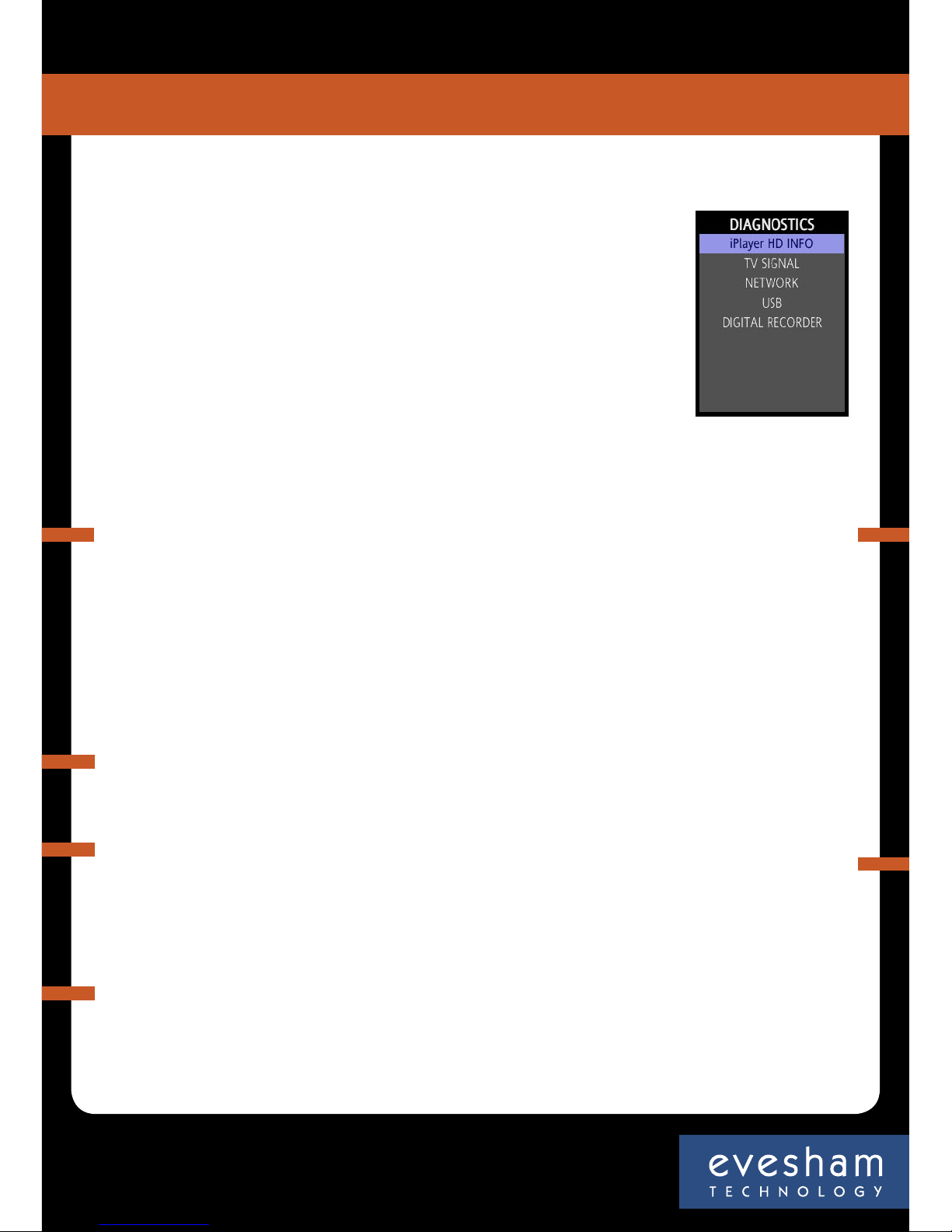
If you are experiencing problems with your Evesham iplayer HD Media Centre,
we recommend that you use the system’s built in tools to help
To access help visit channel 999, or
• Press the “Menu” button on your remote control
• Navigate to “Settings”
• At the next menu, choose “Help”
• Select “Diagnostics” from the list
• Select the menu option for your problem
If you are still experiencing difficulty we recommend that you
• Switch the Evesham iplayer HD Media Centre Off
• Wait 20 seconds
• Switch the Evesham iplayer HD Media Centre On
This process often resolves minor faults, however, here are some basic troubleshooting tips
for problems that may occur:
HD Media Centre
iplayer
15
Troubleshooting
Problems with a specific website
Some web pages may not display properly when
viewed on a TV set as they are designed to be viewed
only on a computer. If you experience problems with a
specific web page, please contact the website owner.
No response to remote
control commands
Make sure you are pointing the
control at the Evesham iplayer HD
Media Centre, that the front panel
is not covered and that the red and
green lights are on. The red light
should blink on each press. If not
switch the box off and on again and
check your batteries are correctly
installed and new.
No picture
Ensure you have your Evesham iplayer
HD Media Centre switched on and not
in standby, and that there is a red and
green light on the front of the Evesham
iplayer HD Media Centre. Make sure your
TV is tuned to the AV channel and that
the SCART/HDMI cable is con¬nected
securely.
Green, Red, Yellow or scrolling picture
Please remove the SCART lead, check all of the pins and carefully reseat, making sure that it’s
fully inserted in both the TV and the Evesham iplayer HD Media Centre.
Tuning problems or blocky picture
Make sure the cable connecting to your
Evesham iplayer HD Media Centre is coming
directly from your aerial, not via a VCR or other
machine. Ensure that all cables and connectors
are in good condition. If this does not solve the
problem you may consider either using a signal
booster - ensuring that it is compatible with
Digital TV, or having your aerial upgraded.
Problems connecting to the internet
If you are experiencing problems connecting to the internet
• Turn off your router/modem and leave for 1 minute
• Switch on your router/modem, waiting until all lights are lit
• Re-attempt access to the Internet
Page 16

Your safety is important to us, please read carefully:
• Do not try to open the Evesham iplayer HD Media Centre, as there is a risk of electrical shock.
• Install the Evesham iplayer HD Media Centre on a firm and flat surface.
• Allow a minimum of 1 cm around each side of the Evesham iplayer HD Media Centre for cooling.
• The adapter must not be exposed to dripping or splashing & no objects filled with liquids, such
as vases, should be placed close to it.
•
Do not place naked flame sources, such as lit candles near the Evesham iplayer HD Media Centre.
• Keep the Evesham iplayer HD Media Centre away from domestic heating equipment, direct
sunlight or humidity.
•
Always disconnect the Evesham iplayer HD Media Centre from the wall socket before cleaning it.
•
Do not insert foreign objects in openings and connectors of the Evesham iplayer HD Media Centre.
• You can use an external surge protection device to protect the Evesham iplayer HD Media
Centre from thunderstorm.
A 3-amp fuse is fitted in the Evesham iplayer HD Media Centre+ three-pin mains plug. If
replacement is needed, always use a 3-amp rated fuse approved by ASTA or BSI to BS1362. Check
for the BSI mark on the body of the fuse.
If the fitted plug has a removable fuse cover you must ensure that it is refitted when the fuse
is replaced. If you lose the fuse cover the plug must not be used until a replacement cover is
obtained.
If the fitted plug is replaced, the fuse should be taken out and the cut-off plug disposed of safely.
There is danger of severe electrical shock if the cut off plug is inserted into any 13amp socket. If
a new plug is to be fitted please observe the wiring code as shown below. If in any doubt please
consult a qualified electrician.
HD Media Centre
iplayer
16
Safety Information
Page 17

Warranty information
My iplayer details
To help us deal with your enquiry, please quote your account number, username and
password when you contact us:
Customer Service Helpline
Call 0870 160 9511 Monday to Saturday 9am - 8pm. Email [email protected]
My account number is
My username is
My password is
My Evesham iplayer HD Media Centre PIN number is
Evesham Technology Limited, Vale Park, Evesham WR11 1TD
How to replace the fuse:
Lift out the removable fuse compartment with a screwdriver and replace the fuse, then refit
securely into the mains plug.
IMPORTANT:
The wires in the mains lead of this appliance are coloured in accordance with the following
code: blue = neutral, brown = live
• As the colours of the wires in the mains lead of this appliance may not correspond to the
markings identifying the terminals in your plug, proceed as follows:
• The blue wire must be connected to the terminal marked ‘N’ or coloured black.
• The brown wire must be connected to the terminal marked ‘L’ or coloured red.
• Important note: Under no circumstances should either of these wires be connected to the Earth
terminal of the three-pin plug, marked with the letter ‘E’ or the earth symbol.
• If you encounter problems using the Evesham iplayer HD Media Centre you should never try to
repair the Evesham iplayer HD Media Centre by yourselves, please follow the instructions listed
in the troubleshooting section of the quick start guide.
This product is for use only in the United Kingdom.
Copyright © 2006 Evesham Technology Limited. All rights reserved. Version 1.1
HD Media Centre
iplayer
17
My iplayer
Page 18

Visit an Evesham store
Milton Keynes
320 Witan Court, Witan Gate, MK9 1EJ
T: 01908 230 898
Norwich
Co-op dep. store, 70 St Stephens Street, NR1 3SL
T: 01603 677 490
Nottingham
64 Mansfield Rd, NG1 3GY
T: 0115 852 3820
Peterborough
19 Cowgate, PE1 1LZ
T: 01733 347 278
Reading
107 Friar St, RG1 1EP
T: 0118 9337 919
Southampton
9 Castle Way, SO14 2BX
T: 023 8071 9490
Swansea
33-36 Singleton Street, SA1 3QN
T: 01792 467 980
Tunbridge Wells
72-74 Calverley Road, TN1 2UJ
T: 01892 772 950
Altrincham
105 George St, WA14 1RN
T: 0161 924 3830
Birmingham
Melchett Rd, B30 3HP
T: 0121 683 6868
Bristol
28 Merchant St, BS1 3EP
T: 0117 929 7900
Cambridge
5 Glisson Rd, CB1 2HA
T: 01223 323 898
Evesham
Vale Park, WR11 1TD
T: 01386 769 790
Glasgow
107-109 West George St, G2 1QR
T: 0141 221 0617
Ipswich
Co-op dep. store, Carr Street, IP4 1EW
T: 01473 225289
London
4 New Cavendish Street, W1G 8TS
T: 020 7486 1010
0870 160 9500
Order Direct
Shop Online
www.evesham.com
 Loading...