

Page 1
AN1
79
In-
Wall
On/Off
enabled device which is fully compatible with any Z
logo can also be used with it
, and ours can also be used in other manufacturer’s Z
on other manufacturer’s Wireless Controller menu allows remote operation
lighting and appliances
or security, t
At 230V voltage, t
fluorescent
a link key which is used to carry out the function of inclusio
is applied for the first time, the LED will flash on and off alternately and repeatedly, implying that
Wave enabled devices.
to Inclusion function when power is applied and no node ID is stored in the memory.
is applied for the first time and no node ID has been stored in the
4 minutes. Unlike the “inclusion” procedure shown in the
e necessity of pressing the link key.
The Z
-
Wave Controller does not allocate a node ID to the
unit.
The power
is applied for the first time and no node ID has
been stored in the
module, or after executing reset.
1. Put the Z-
Wave Controller
into inclusion mode.
2.
Press the link key three times within 1.5 seconds to
put the
unit into inclusion mode
.
1.
Put the Z-
Wave Controller
into ex
clusion mode.
2.
Press the link key three times within 1.5 seconds to
put the
unit into exclusion mode
.
Reset
1.
Press the link key three times within 1.5 secon
ds to
put the
unit into exclusion mode
.
2. Within 1 second
of step 1
,
press link key again and
hold until LED is off (about 5 sec
onds).
Wiring
Termin
als
Module
2-second on,
2-second off
primary controller is
inoperable.)
3. Node ID is excluded
and will be in auto
mi
nutes.
Failed or successful results in including/excluding the ID can be viewed on the Z
Avoid installing the unit in storming or raining weather.
Be sure to isolate or switch off power source befor
DO ensure that the power supply circuit is pro
IMPORTANT
Installation must be performed by skilled technicians who are informed about the standards and
requirements of the appliance and its proper installation.
Check your local codes as they apply to your situation. If the house wiring is of aluminum, consult
FF THE POWER TO THE LIGHTING CIRCUIT AT
THE CIRCUIT BREAKER OR FUSE BOX TO AVOID ELECTRICAL SHOCK.
2 sets of dry contacts
diagram, S1 provides a wall switch connection to the dry contacts. By default
Throw (SPDT
Gateway, S1 can be configured to support Toggle switches as well.
Under normal operation mode, press the button on
also turn on or off accordingly. The u
The unit is able to remember the status of the relay when power is cut off (such as power black
power is supplied again, the unit will resume the last status o
for over 5
he LED will flash 3 times rapidly upon successful switch.
The unit supports two association groups with 1
This has the effect that when the u
. The device reverts to factory
FF THE POWER TO THE LIGHTING CIRCUIT AT
default state
-inclusion mode for 4
The In-Wall On/Off Module is a Z-WaveTM
enabled network. Z-WaveTM enabled devices displaying the Z-WaveTM
regardless of the manufacturer
networks. Inclusion of this unit
of the unit and the connected load.
The In-Wall On/Off Module is designed to control the on/off status of
house. Two sets of dry contacts provide more wiring applications. F
overheating and will turn off relay automatically to avoid damage.
up to 2500W resistive, 1200W incandescent, 700W motor, or 320W (40W*8)
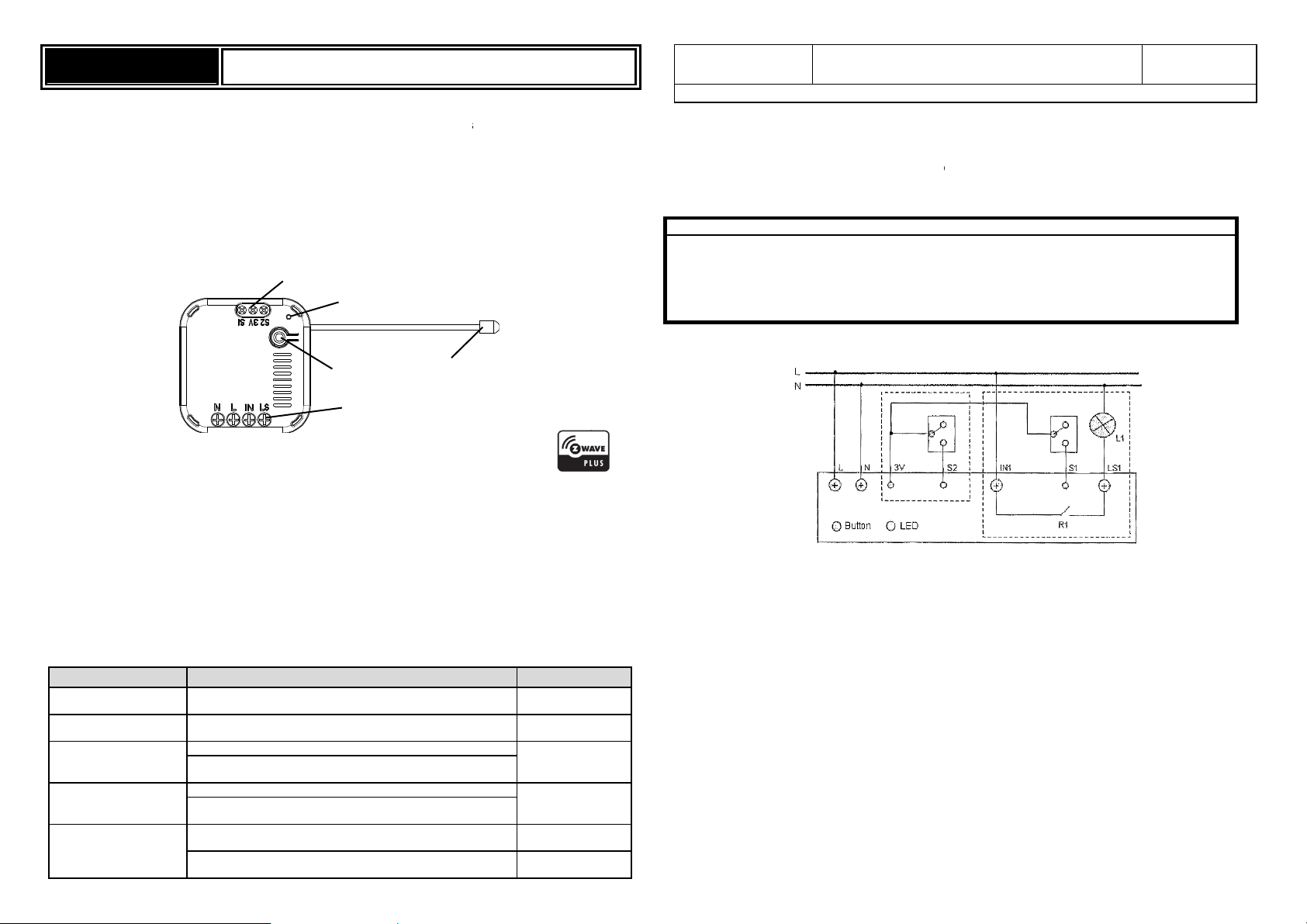
Product Overview
Dry Contact
LED Light
Link Key
RF Aerial
Adding to Z-WaveTM Network
On the unit you can find
When power
it has not yet been assigned a node ID and cannot work with other Zsupports the Au
Auto Inclusion
The module may automatically execute the function of inclusion when...
1. The power
2. The execution of reset is successful where the stored node ID is cleared.
Note: The duration for Auto Inclusion is about
table below, the execution of Auto Inclusion is automatic without th
Action/Status Description
No node ID
Auto Inclusion
Inclusion
Exclusion
(This procedure
should only be used
when the network
-WaveTM
-WaveTM enabled
load in your
he unit can detect
his module can support
load.
n, exclusion, and reset.
This unit
module.
LED indication
-Wave Controller.
Safety Precautions & Installation
fuse.
technical
with an electrician about proper wiring methods.
Before proceeding with the installation, TURN O
The In-Wall On/Off Module supports
wiring accordingly.
As illustrated in the above
switch supports Single-Pole-Double-
on/off status of the unit when toggled.
Operation
The LED indicator will
signals from the Z-Wave Controller.
Note: Pressing the button on the unit
operation mode of the dry contacts. T
Programming
Z-Wave Group Support
Grouping 2.
receive the relevant reports.
e installing or maintenance.
. Study the following figure and implement the
The S2 switch can also switch the
nit can also be controlled by receiving command
-out). When
f the relay (on or off) automatically.
S1
Page 2
Symptom
Cause of Failure
Recommendation
When the unit is powered up and was already a part of a Z-Wave network, the unit will send a
Notification Report to the node in Group 1.
When setting the unit or changing the unit’s status, the unit will send a Binary Switch Report to the node
of Group 1.
When performing Reset the unit will send Device Reset Locally Notification to the node of Group1.
The minimum interval time between two reports sent from this unit to the node of Group 1 is 3 seconds.
Refer to Configuration parameter 2 for more information.
When the button on the unit or the wall switch (S1) is pressed, the unit will send a Basic Set command to
the nodes of Group 2. When the unit is OFF, Basic Set Value = 0x00. When the unit is ON, Basic Set
Value = 0xFF.
Z-Wave Plus Info
Role Type Node Type Installer Icon User Icon
Slave Always On Z-Wave Plus node On/Off Power Switch On/Off Power Switch
Version
Protocol Library 3 (Slave_Enhance_232_Library)
Protocol Version 3.95 ( 6.51.02)
Manufacturer
Manufacturer ID Product Type Product ID
0x0060 0x0004 0x0008
AGI (Association Group Information) Table
Group Profile Command Class & Command (List) N bytes Group Name(UTF-8)
1 General:NA Binary Switch Report,
Notification Report,
Device Reset Locally Notification
2 Control:Key1 Basic Set On/Off control (Button1)
Lifeline
Basic
Basic Get: Inquire about the status of the device.
Basic Report: Report the status of the device.
Basic Set: Set the status of the device.
Notification
The device will send notifications (Notification Type =0x08, Event = 0x01) upon being powered on.
Configuration
The configurable values are as following:
Basic Set Command value:
Parameter Number Size Range Default
1 2 0~99 , 255(0xFF) 255 (0xFF)
The delaying time to report to Group 1:
Parameter Number Size Range Default
2 1 3 - 25 (seconds) 3
Remember the last status:
Parameter Number Size Range Default
3 1 1/0 1: remember (0: do not remember)
Switch 1 switching type:
Parameter Number Size Range Default
4 1 1/0 0: Single Pole Double Throw
(1: Toggle switch)
Command Classes
The module supports Command Classes including…
COMMAND_CLASS_ZWAVEPLUS_INFO_V2
COMMAND_CLASS_VERSION_V2
COMMAND_CLASS_MANUFACTURER_SPECIFIC_V2
COMMAND_CLASS_DEVICE_RESET_LOCALLY_V1
COMMAND_CLASS_ASSOCIATION_V2
COMMAND_CLASS_ASSOCIATION_GRP_INFO_V1
COMMAND_CLASS_POWERLEVEL_V1
COMMAND_CLASS_BASIC_V1
COMMAND_CLASS_NOTIFICATION_V4
COMMAND_CLASS_CONFIGURATION_V1
COMMAND_CLASS_SWITCH_BINARY_V1
COMMAND_CLASS_SWITCH_ALL_V1
COMMAND_CLASS_FIRMWARE_UPDATE_MD_V2
Additional Command Classes Supported
Power Level: For test purpose during product installation.
Binary Switch: Refer to Basic.
Switch All: The unit turns on when it receives “Switch All On”, and turns off upon receiving “Switch All Off”.
Firmware Update: For OTA function.
Troubleshooting
Device not responding and
LED not displaying
LED displaying, but cannot
control On/Off status of
connected load
Can press button to control,
but cannot control by RF
The device is not wired to the
mains power correctly
Device malfunction Send the device to be repaired
The connected load has its own
on/off switch
RF interference is occurring.
Someone nearby might be
emitting RF signal of the same
frequency
Check if wiring is correct, or
voltage is too high or too low
Turn the switch of the
connected load to On.
Wait for a while and retry the
operation
Specification
Power Input 220-240V/50Hz
Maximum Power Load Resistive load Max.2500W, Incandescent load Max. 1200W, Fluorescent
Transmission Range 30 meters (Indoor; Open space)
Working Temperature -10°C - 40°C
*Specifications are subject to change without notice
Warning:
Do not dispose of electrical appliances as unsorted municipal waste, use separate collection facilities.
Contact your local government for information regarding the collection systems available.
If electrical appliances are disposed of in landfills or dumps, hazardous substances can leak into the
groundwater and get into the food chain, damaging your health and well-being.
When replacing old appliances with new ones, the retailer is legally obligated to take back your old appliance
for disposal at least for free of charge.
- 2 -
load Max.320W
2013/08
 Loading...