

Page 1
AN144
Confidential Information of Everspring Industry Co. Ltd.
The AN144 Screw-in On/Off Module is a transceiver which belongs to the
member of UNet series and is fully compatible with any UNet enabled devices.
The connected light bulb can either be turned On/Off remotely by receiving RF
signal emitted from compatible UNet devices or manual override.
SCREW-IN ON/OFF MODULE
Initial Power Up & Installation
As soon as the light bulb is screwed into the lamp holder, the LED on the Module
will be flashing slowly. This implies that the Module does not memorize any ID
code and cannot work with UNet enabled devices. However, pressing the
On/Off knob will control directly the On/Off status of the connected incandescent
lamp without using the Wireless Controller .
(1) Turn off the wall switch on the wall or mains power supply.
(2) There are three types of lamp caps – B22, E26, E27. Choose whichever
suits you most.
(3) The Module is designed for ceiling mounting. Fit the Module into the
existing lamp cap.
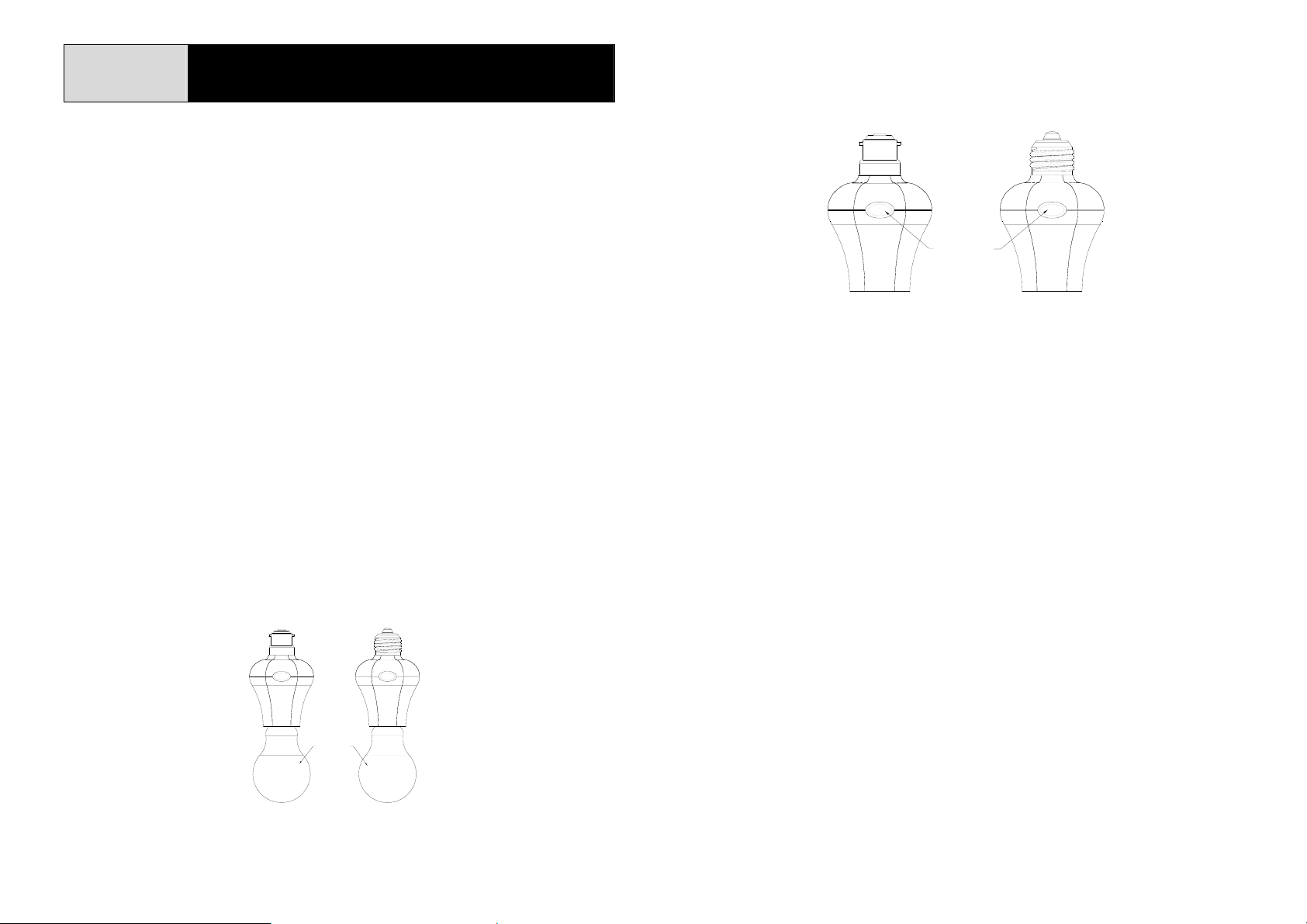
(4) Place the light bulb into the lamp holder (Fig. 1).
Note: To prevent the Module from being damaged by heat, please…
Ú Don’t screw Module in an airtight environment/lamp stand.
Ú Don’t screw tungsten bulb into the Module.
B22 lamp cap E26/E27 lamp cap
LIGHT BULB
Fig. 1
Learning the ID Code
(1) In the front cover, there is an On/Off knob with LED indicator (Fig. 2).
B22 lamp cap E26/E27 lamp cap
ON/OFF KNOB
LED INDICATOR
Fig. 2
Note: This On/Off knob serves as a gat eway to learn and clear the ID code.
(2) Keep pressing the button for 3 seconds until the LED flashes rapidly. A
30-second countdown will start. The Module is about to learn the ID code.
(3) Using the Remote Controller of UNet enabled device to emit the ID code to
the Module, press and hold the “Off” button on the Remote Controller more
than 3 seconds, so as to emit the ID code to the Module.
(4) If the Module learns the ID code properly, the LED indication will be on for 1
second then turn off.
(5) When the LED flashes rapidly for 3 times, it is ascribed to the following
two conditions:
i. The Module failed to learn the ID code.
ii. After entering 30-second ID code learning mode, press the
button again to exit the ID code learning mode.
Note:
Ú At the step (2), if you happen to press the On/Off button for less than 3
seconds, the Module will either turn to “On” or “Off” status depending on the
last status of the On/Off button, for instance……
a. If it was toggled as “Off”, the Module will turn to “On” status.
b. If it was toggled as “On”, the Module will turn to “Off” status.
1
Page 2
Ú The ID code setting is stored in non-volatile memory and is not lost during
Confidential Information of Everspring Industry Co. Ltd.
power failures. It can be cleared by proceeding with ID code clearance as
indicated below in ID code clearing section.
Ú Up to 12 ID codes can be learned. The Module’s LED will flash rapidly as
rejection if the 13
th
ID code is entered.
Clearing the ID Code
(1) Press the button for 3 seconds until the LED flashes rapidly. A 30-second
countdown will start.
(2) Press the button again more than 6 seconds within 30-second countdown,
the preset ID code will be cleared.
Operation
Simply press the On/Off knob. The red indicator LED will turn On and the
incandescent lamp screwed into the Module will also turn on, while pressing the
knob again will turn off the incandescent lamp and its LED will be off.
Troubleshooting
Symptom Cause of Failure Recommendation
The module not
working and LED
off
The module’s LED
working, but the
connected light bulb
not working
1. Poor connection
between lamp cap of
mounted ceiling and
lamp cap of the lamp
holder
2. The module break
down
1. Light bulb has burnt
out
2. Poor connection or
improper assembly
between lamp cap of
the light bulb and lamp
holder of the module
3. The module break
down
1. Check if the lamp cap of
mounted ceiling fits well
into the module
2. Don’t open up the module and send
it for repair
1. Replace a new bulb
2. The light bulb has screwed tightly to
the lamp holder of the module
3. Don’t open up the module and send
it for repair
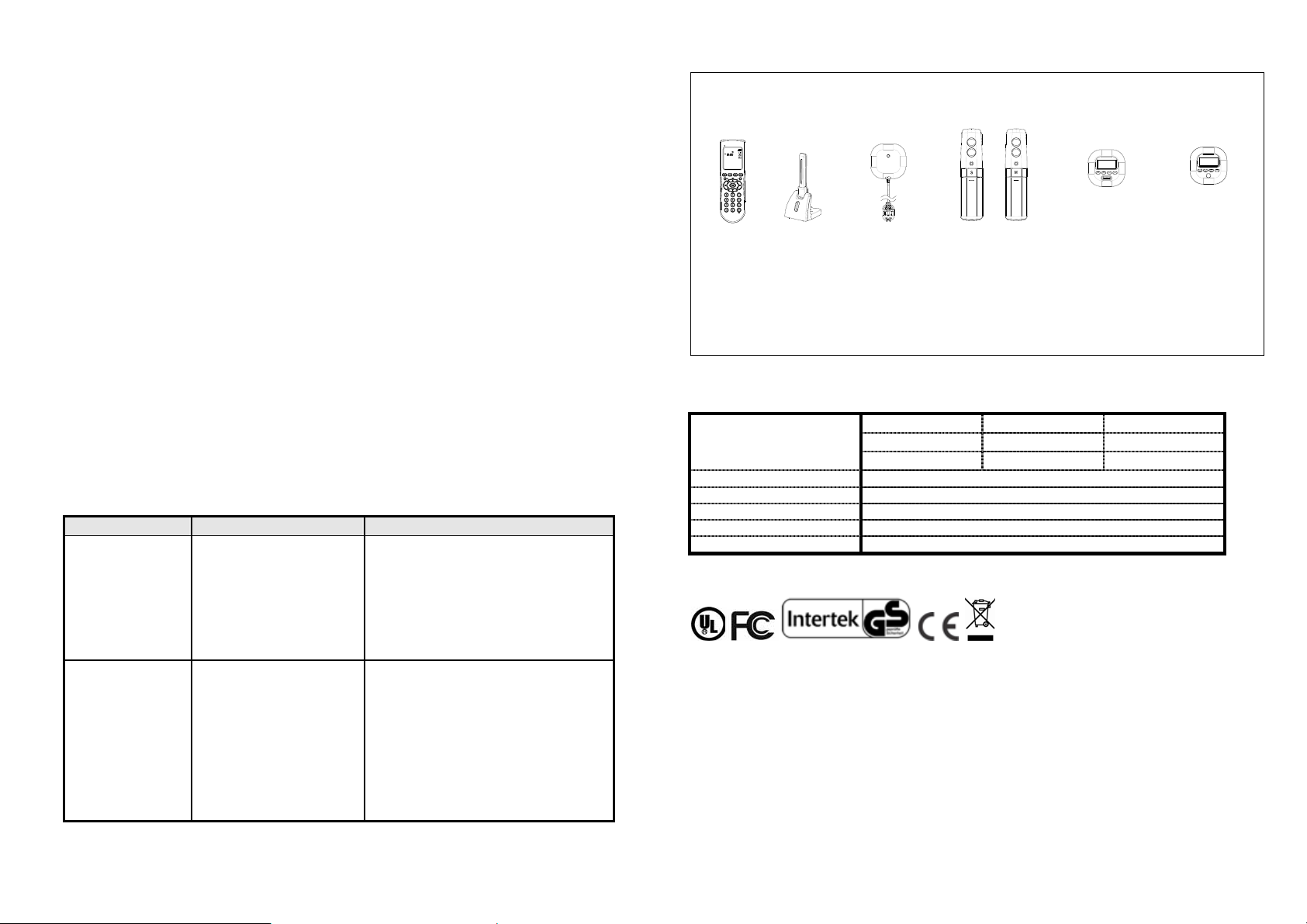
Compatibility
The following transceivers (sold separately) can control THIS module:
923.00 MHz/868.30MHz
Transmitter USB Dongle Flood Detector IR Beam Detector Temperature & Illumination
Humidity Detector Sensor
(AC124) (SA804) (ST802) (ST803) (ST804) (ST805)
IMPORTANT! To avoid poor compatibility w ith devices of other brands, purchase
only Everspring UNet devices to ensure best compatibility is strongly
recommended.
Specification
Operating Voltage /
Type of Lamp Cap
Maximum Load 100 Watts incandescent, 27 Watts energy saving bulb
Operating Temperature 0°C~40°C
Operating Humidity Range 85%RH
Receiving Range 30 meters min. line of sight
Frequency Range 923.00MHz or 868.30MHz
** Specifications are subject to change and improvement without notice.
AN144-1 120VAC/60Hz E26
AN144-2 230VAC/50Hz E27
AN144-4 230VAC/50Hz B22
Federal Communication Commission Interference Statement
This equipment has been tested and found to comply with the limits for a Class
B digital device, pursuant to Part 15 of the FCC Rules. These limits are
designed to provide reasonable protection against harmful interference in a
residential installation. This equipment generates, uses and can radiate radio
frequency energy and, if not installed and used in accordance with the
instructions, may cause harmful interference to radio communications.
However, there is no guarantee that interference will not occur in a particular
installation. If this equipment does cause harmful interference to radio or
2
Page 3

television reception, which can be determined by turning the equipment off and
Confidential Information of Everspring Industry Co. Ltd.
on, the user is encouraged to try to correct the interference by one of the
following measures:
- Reorient or relocate the receiving antenna.
- Increase the separation between the equipment and receiver.
- Connect the equipment into an outlet on a circuit different from that to which
the receiver is connected.
- Consult the dealer or an experienced radio/TV technician for help.
This device complies with Part 15 of the FCC Rules. Operation is subject to the
following two conditions: (1) This device may not cause harmful interference,
and (2) this device must accept any interference received, including interference
that may cause undesired operation.
FCC Caution: Any changes or modificati ons not expressly approved by the p arty
responsible for compliance could void the user's authority to operate this
equipment.
This transmitter must not be co-located or operating in conjunction with any
other antenna or transmitter.
WARNING:
Do not dispose of electrical appliances as unsorted municipal waste, use
separate collection facilities.
Contact your local government for information regarding the collection systems
available.
If electrical appliances are disposed of in landfills or dumps, hazardous
substances can leak into the groundwater and get into the food chain, damaging
your health and well-being.
When replacing old appliances with new once, the retailer is legally obligated to
take back your old appliance for disposal at least for free of charge.
3
 Loading...