

Page 1
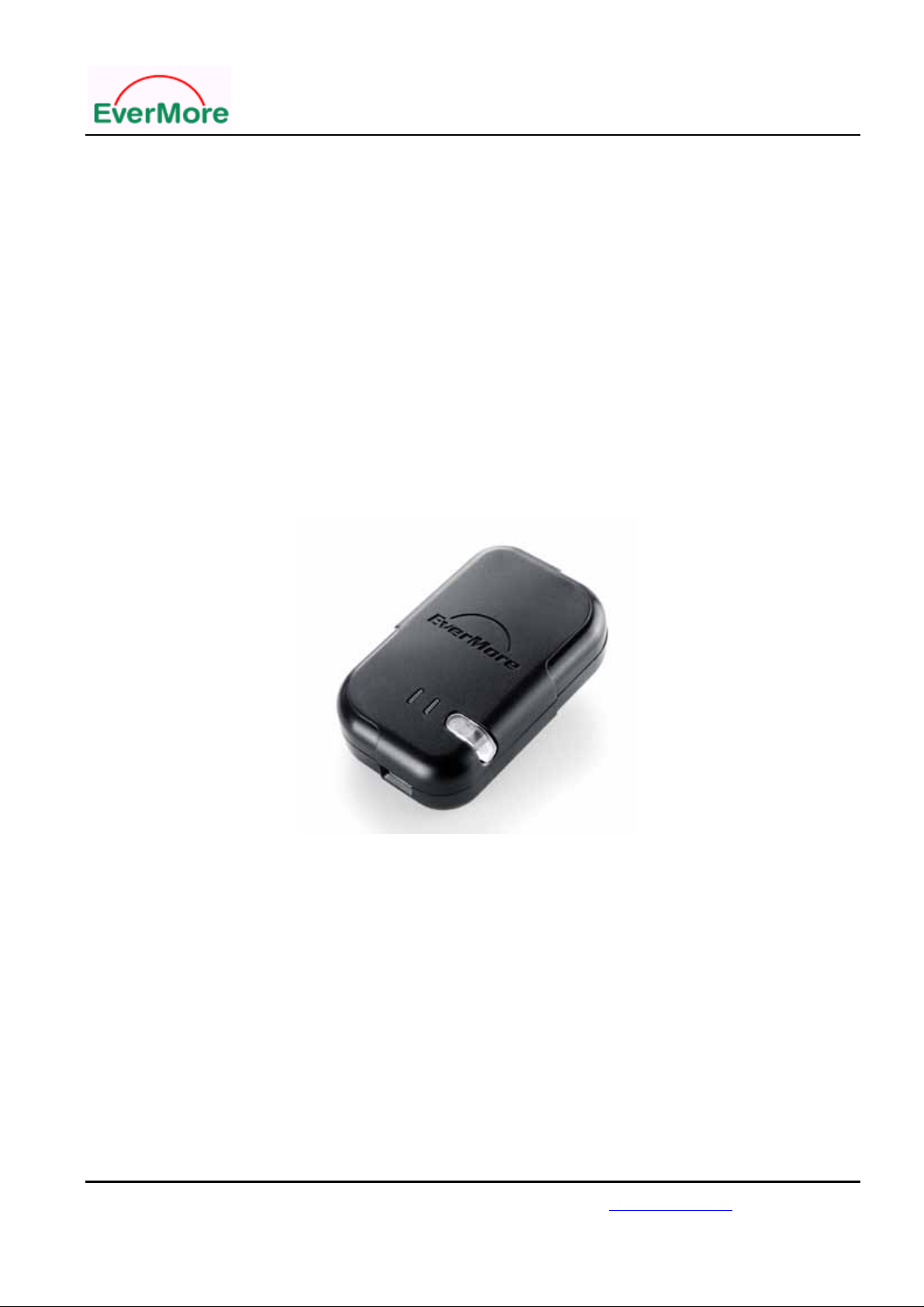
BT-R900 User’s Manual
BT-R900
Bluetooth
GPS Receiver
User’s Manual
Date: April 2006
Version: 2.1
All Rights Reserved
EverMore Technology, Inc.
2F, No.7, R&D Road 1, Science-Based Industrial Park, Hsinchu, Taiwan, 300, R.O.C. http://www.emt.com.tw
Page 1
Page 2

BT-R900 User’s Manual
Manual Revision History
Revision Date Update Summary
Issue 1.0 March 2006 Initial release
Issue 2.1 April 2006 Update
© EverMore Technology Inc. All rights reserved.
Not to be reproduced in whole or part for any purpose without written permission of EverMore Technology Inc. Information
provided by EverMore Technology Inc. is believed to be accurate and reliable. However, no responsibility is assumed by
EverMore Technology Inc. for its use. EverMore Technology Inc. reserves the right to change specification at any time without
notice.
EverMore Technology, Inc.
2F, No.7, R&D Road 1, Science-Based Industrial Park, Hsinchu, Taiwan, 300, R.O.C. http://www.emt.com.tw
Page 2
Page 3

BT-R900 User’s Manual
TABLE OF CONTENTS
0. Quick Installation..................................................................................................................................4
1. Introduction...........................................................................................................................................5
1.1 Overview.....................................................................................................................................5
1.2 Main Features..............................................................................................................................5
1.3 Possible Applications..................................................................................................................5
1.4 Package .......................................................................................................................................6
2. Hardware Interface................................................................................................................................7
2.1 LED Status..................................................................................................................................7
2.2 Power Jack ..................................................................................................................................7
3 . Installation............................................................................................................................................8
3.1 Wireless connection....................................................................................................................8
3.2 Wireless GPS device for Notebook...........................................................................................13
4. T echnical Specification.......................................................................................................................14
5 . Limited Warranty...............................................................................................................................16
6. Appendix.............................................................................................................................................16
7. Series Products Information................................................................................................................17
EverMore Technology, Inc.
2F, No.7, R&D Road 1, Science-Based Industrial Park, Hsinchu, Taiwan, 300, R.O.C. http://www.emt.com.tw
Page 3
Page 4

BT-R900 User’s Manual
0. Quick Installation
1. Have the battery full charged.
Before using the battery, please put it in BT-R900 and have it recharged for 4 hours.
2. Turn on your PDA.
Execute the Wireless function. If your PDA has no built-in Wireless function, you need an
optional CF or SD Wireless card and activate the Wireless function.
3. Connect BT-R900 with PDA.
3.1 Turn on the power of BT-R900. (Continued press power button 3 seconds.)
3.2 Create a new Wireless connection on your PDA.
3.3 Select the SPP Slave.
3.4 Connection completed.
LED Indicators:
Symbol LED
Color
Battery
Wireless Blue
GPS Green
Red
4. Pass Word
Status Light Indication
Light Twinkling
Light On
Light Off
Light On/Off 1 sec/1 sec
Light On/Off Continued On
Light On/Off Continued On
Light On/Off 1 sec/2 sec
Battery Low
In Charging
Battery Full or Not in charging
Linking Completed
Pair Searching
Acquiring Satellites
Position Fixed
The pass word for pair is “ 0000 “.
EverMore Technology, Inc.
2F, No.7, R&D Road 1, Science-Based Industrial Park, Hsinchu, Taiwan, 300, R.O.C. http://www.emt.com.tw
Page 4
Page 5

BT-R900 User’s Manual
1. Introduction
1.1 Overview
The BT-R900 is a GPS receiver with Wireless interface and built-in Patch antenna for high
sensitivity to tracking signal. Based on the Sirf starIII high performance chipset
The BT-R900 is well suited to system integration and users who use PDA , Smart phone,
Tablet PC and Notebook PC with Wireless devices. It satisfies a wide variety of applications.
For car navigation, personal navigation or touring devices, tracking, and marine navigation
purpose.
1.2 Main Features
SiRF starIII Chipset 20 Channels all in view tracking
High Sensitivity -159dBm
Reacquisition Time: 0.1 second
After device disconnects 30 minutes, the BT-R900 shall automatic turn off the power.
Support Standard NMEA-0183 at 4800 bps baud rate
Compatible with Wireless devices with Serial Port Profile (SPP)
Lithium-ion rechargeable battery lasts for more than 10 hours of use
Power On/Off button
Dimension: 73mm x 45mm x 20mm
Weight: 60g
1.3 Possible Applications
Vehicle Tracking & Location-based Services
Personal/Portable Navigation
Car Navigation
EverMore Technology, Inc.
2F, No.7, R&D Road 1, Science-Based Industrial Park, Hsinchu, Taiwan, 300, R.O.C. http://www.emt.com.tw
Page 5
Page 6

BT-R900 User’s Manual
1.4 Package
Before you start up, make sure that your package includes the following
Items. If any items are missing or damaged, contact your dealer immediately.
BT-R900 Bluetooth GPS Receiver
CD with the User ’s Manual
A USB charging cable
Battery (3.7V/1050mAh lithium-ion rechargeable)
DC Car Charger
EverMore Technology, Inc.
2F, No.7, R&D Road 1, Science-Based Industrial Park, Hsinchu, Taiwan, 300, R.O.C. http://www.emt.com.tw
Page 6
Page 7
BT-R900 User’s Manual
2. Hardware Interface
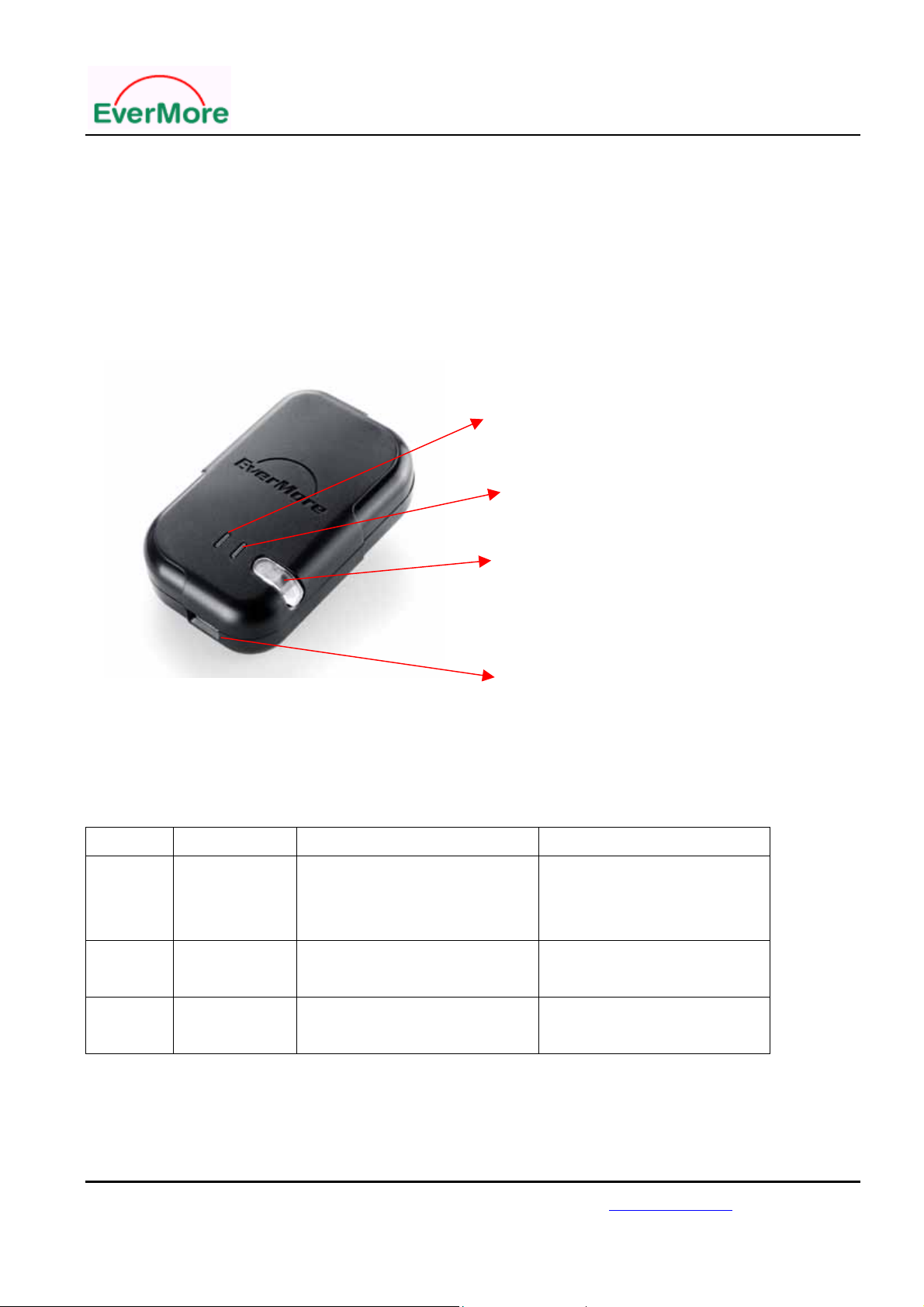
2.1 LED Status
GPS LED
Wireless LED
1. Power On/Off switch
2. Low Battery LED
3. Charger LED
Power Jack
How to turn on the BT-R900:
Continued press power button 3 seconds.
How to turn off the BT-R900: Continued press power button 3 seconds or automatic turn off.
LED Indicators:
Symbol LED Color Status Light Indication
Battery Red Light Twinkling
Light On
Light Off
Battery Low
In Charging
Battery Full or Not in charging
Wireless Blue Light On/Off 1 sec/1 sec
Light On/Off Continued On
GPS Green Light On/Off Continued On
Light On/Off 1 sec/2 sec
Linking Completed
Pair Searching
Acquiring Satellites
Position Fixed
2.2 Power Jack
The power jack lets you to connect a USB port to charge battery.
EverMore Technology, Inc.
2F, No.7, R&D Road 1, Science-Based Industrial Park, Hsinchu, Taiwan, 300, R.O.C. http://www.emt.com.tw
Page 7
Page 8
BT-R900 User’s Manual
Insert the rechargeable battery into the battery compartment.
3 . Installation
3.1 Wireless connection
<1> Power button
<1.1> Push Wireless “power on”, Wireless LED will be lighted for searching the
Wireless device.
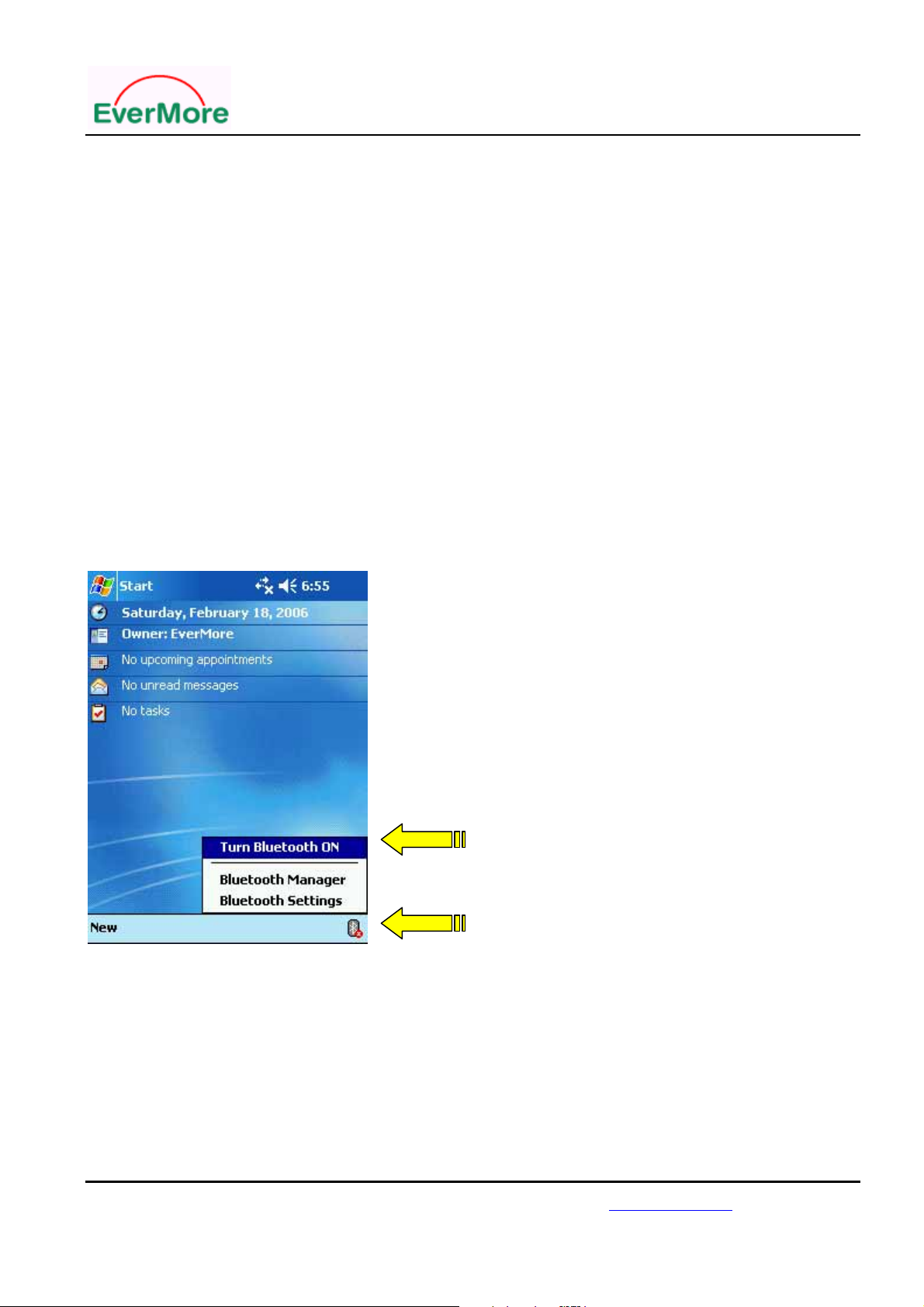
<2> On the PDA, make sure the Wireless device is available.
And select Wireless function.
Step 2
Step 1
EverMore Technology, Inc.
2F, No.7, R&D Road 1, Science-Based Industrial Park, Hsinchu, Taiwan, 300, R.O.C. http://www.emt.com.tw
Page 8
Page 9
BT-R900 User’s Manual
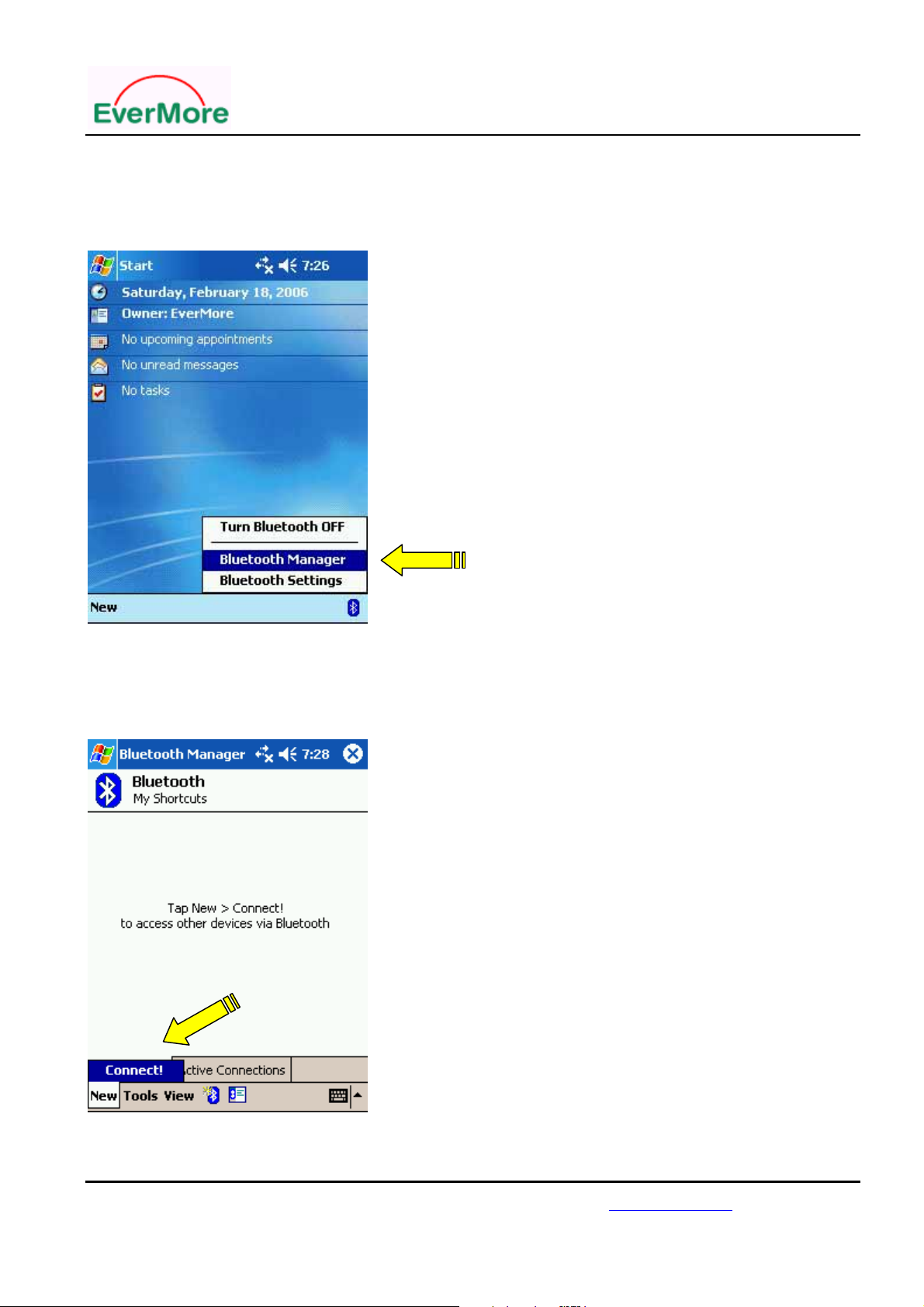
<3> Open “Wireless Manager “ in the PDA
<3.1> Click the Wireless icon and select Wireless manager.
<3.2> Click “new” to connect device
Select
EverMore Technology, Inc.
2F, No.7, R&D Road 1, Science-Based Industrial Park, Hsinchu, Taiwan, 300, R.O.C. http://www.emt.com.tw
Page 9
Page 10
BT-R900 User’s Manual
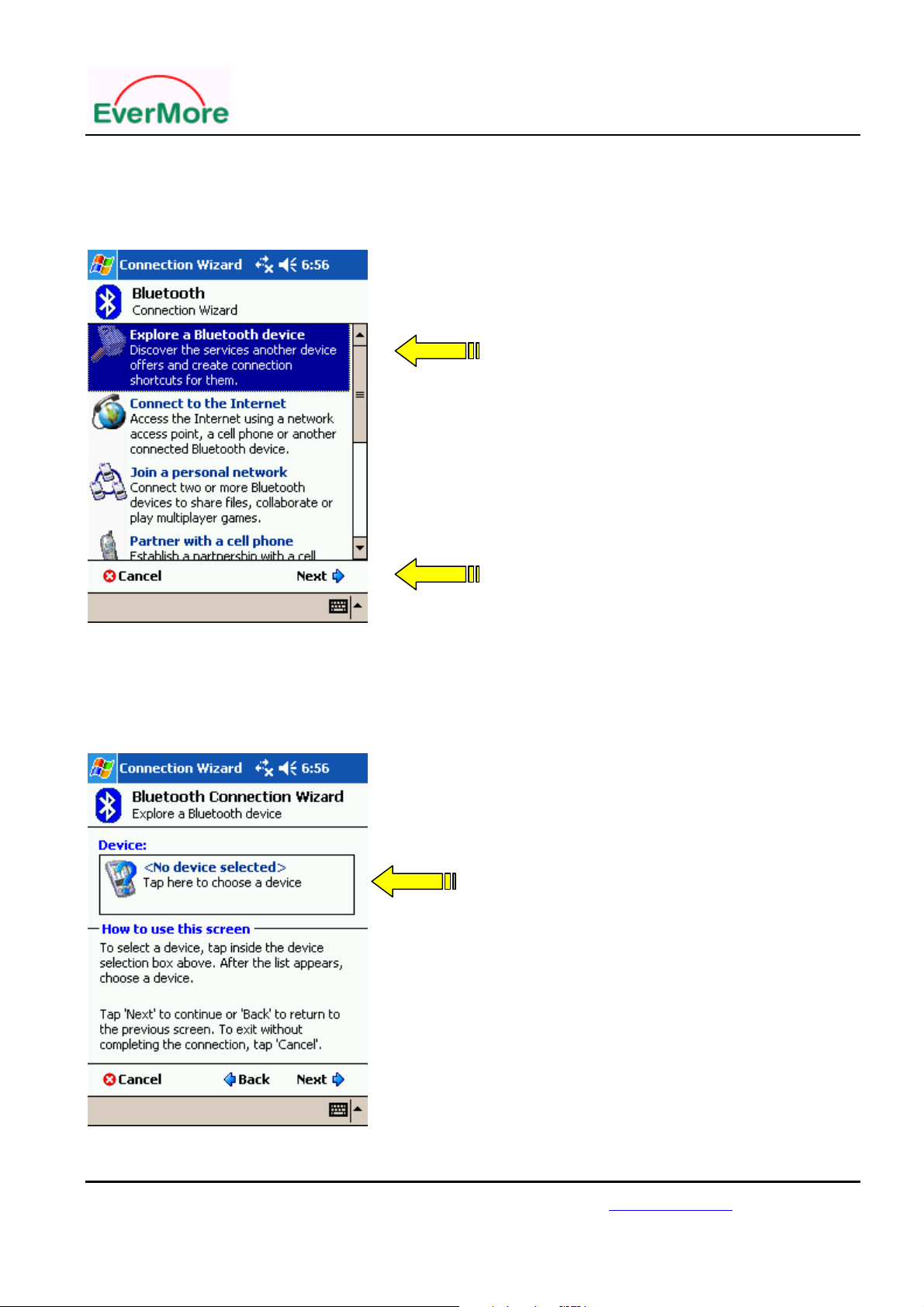
<4> Search for Wireless device “BT-R900 “
<4.1> Click “check Wireless device “ and then click “next”
Step 1
Step 2
<5> Click “Device” to connect with Wireless Product
< 5.1 > Click “device” and find BT-R900
Select
EverMore Technology, Inc.
2F, No.7, R&D Road 1, Science-Based Industrial Park, Hsinchu, Taiwan, 300, R.O.C. http://www.emt.com.tw
Page 10
Page 11
BT-R900 User’s Manual
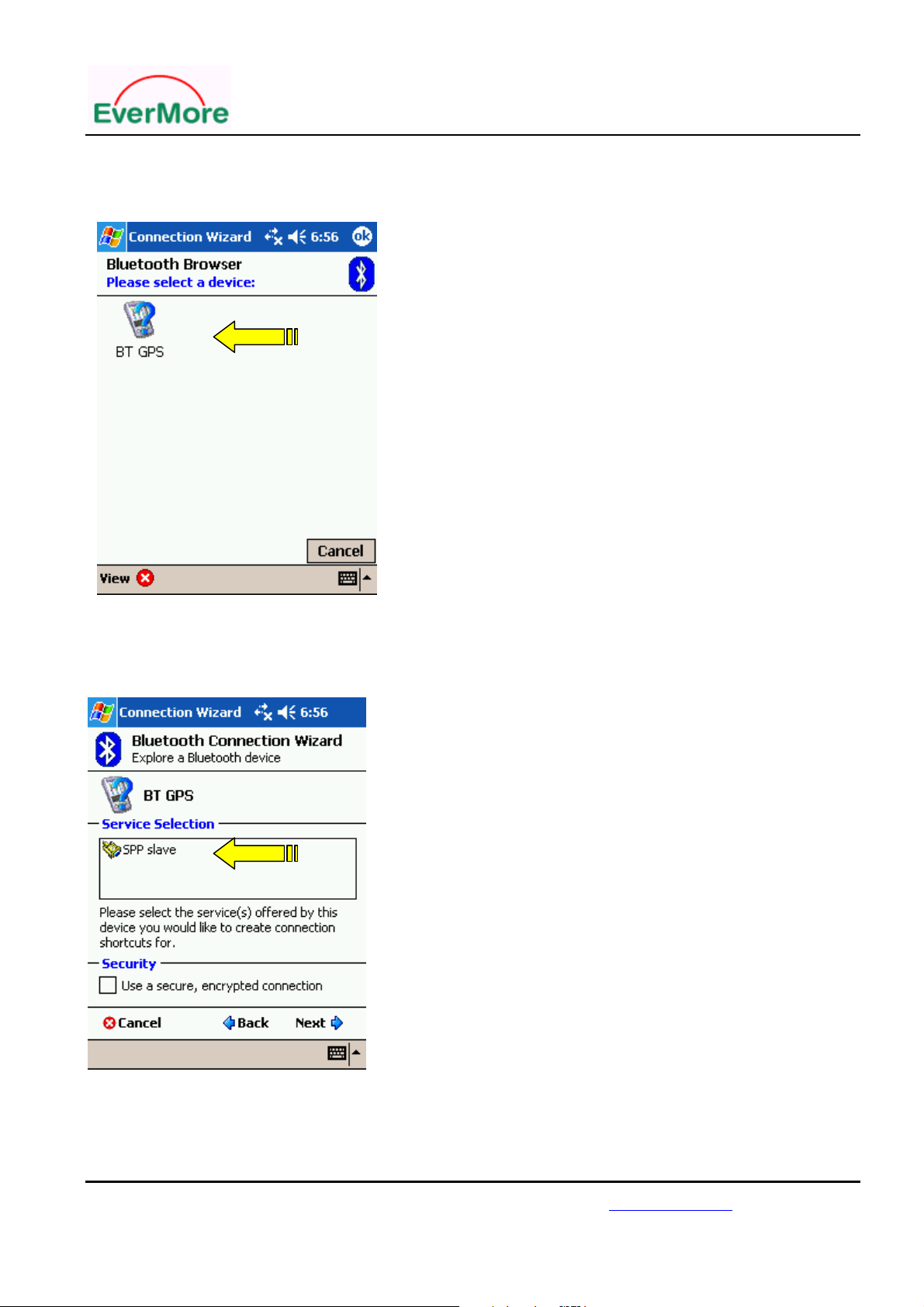
<5.2> Click “BT-R900 “to setup the device.
<6> Connect to SPP slave
<6.1> Click “SPP slave “and then click “next”
EverMore Technology, Inc.
2F, No.7, R&D Road 1, Science-Based Industrial Park, Hsinchu, Taiwan, 300, R.O.C. http://www.emt.com.tw
Page 11
Page 12
BT-R900 User’s Manual
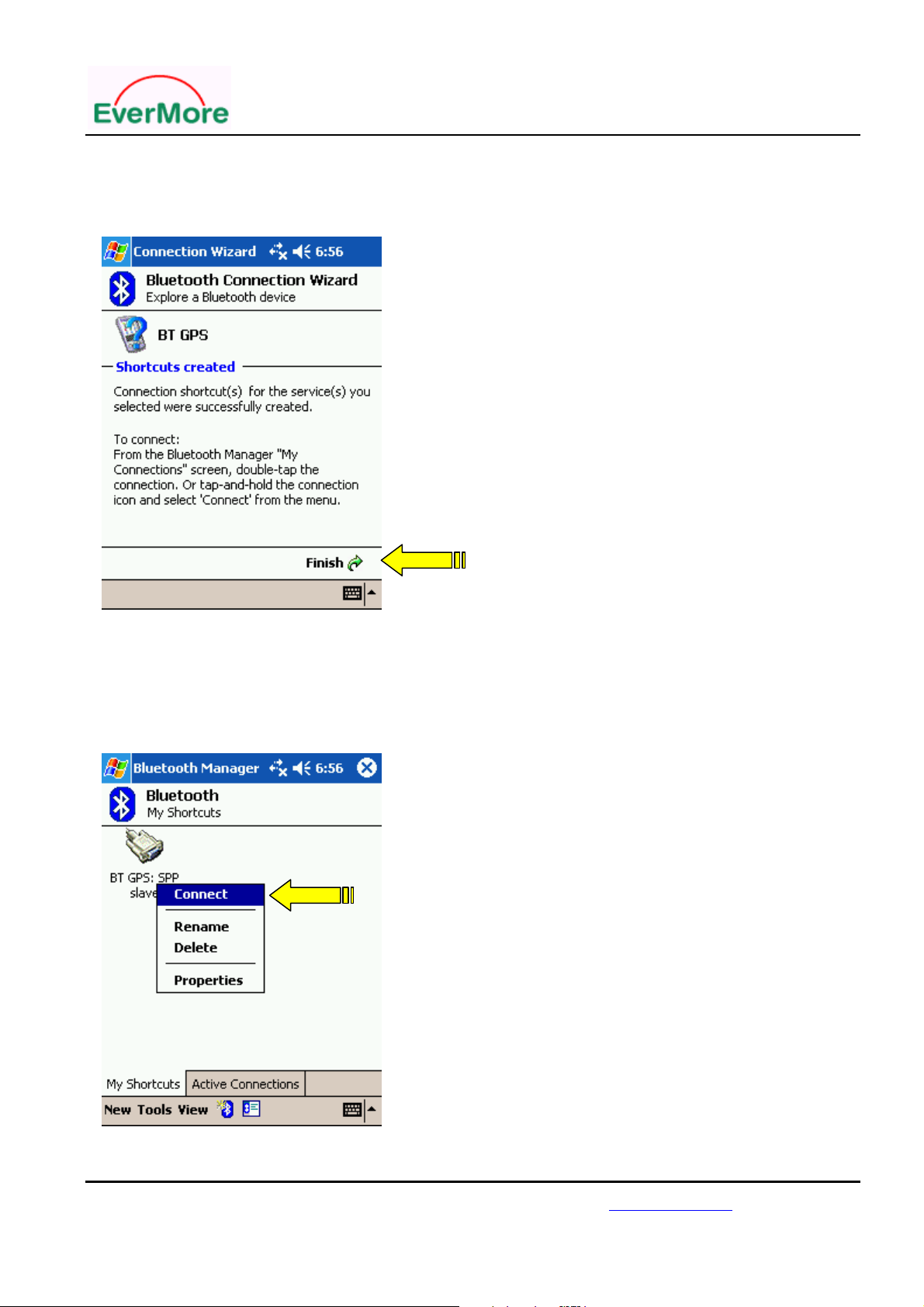
<6.2>Click “Finish”
<7>Connect PDA and GPS Device
<7.1 > Press “BT GPS” icon until pop up the new window
<7.2 > Click “connect” to access BT-R900 Wireless GPS device
EverMore Technology, Inc.
2F, No.7, R&D Road 1, Science-Based Industrial Park, Hsinchu, Taiwan, 300, R.O.C. http://www.emt.com.tw
Page 12
Page 13

BT-R900 User’s Manual
3.2 Wireless GPS device for Notebook.
1. Turn the BT-R900 power on
2. Check the COM port number used by Wireless Device. (Example: COM 6).
3. Run navigation software and set the right COM port and 4800 Baud Rate.
4. Pass word “0000".
EverMore Technology, Inc.
2F, No.7, R&D Road 1, Science-Based Industrial Park, Hsinchu, Taiwan, 300, R.O.C. http://www.emt.com.tw
Page 13
Page 14
BT-R900 User’s Manual
4. Technical Specification
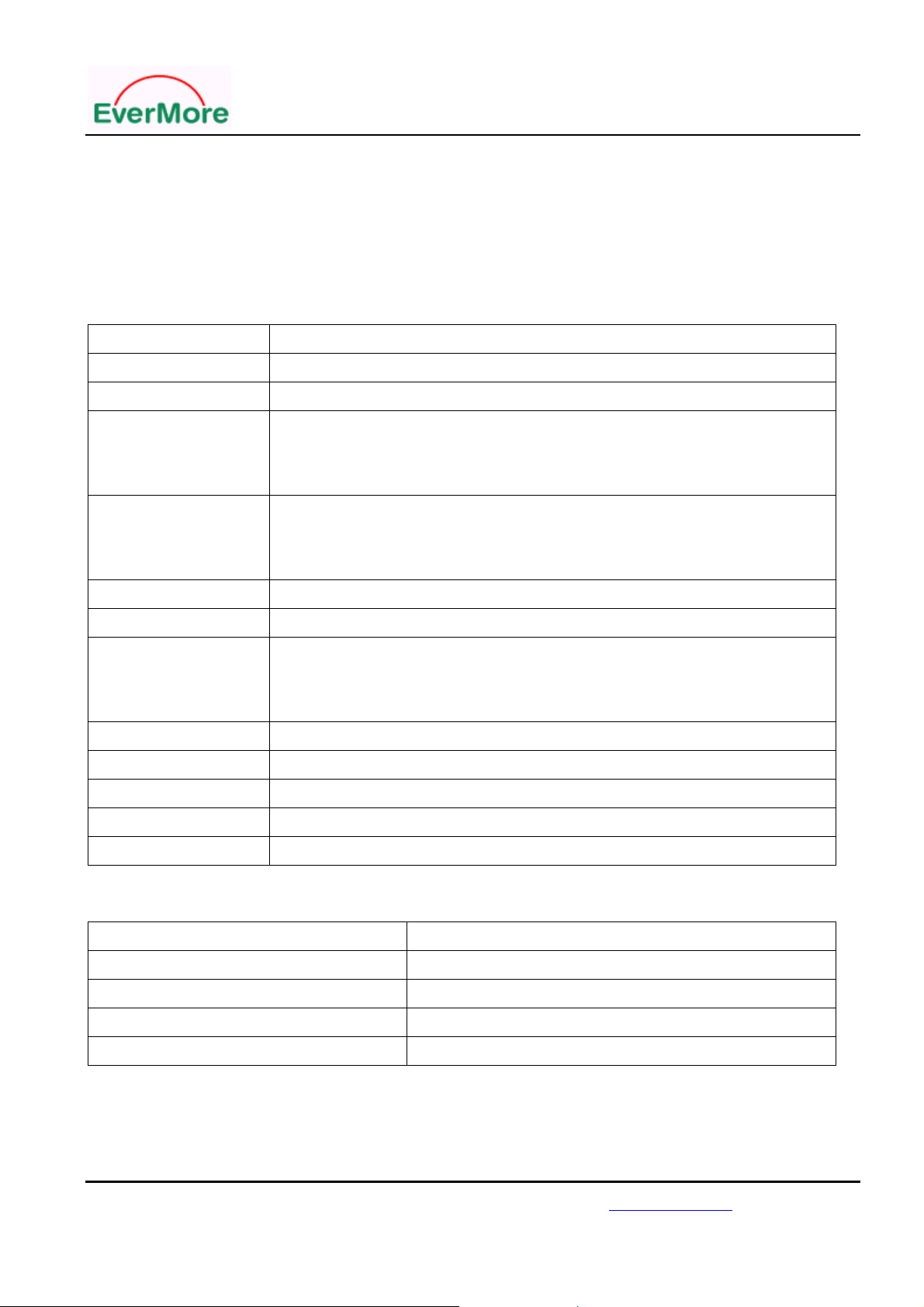
GPS Specification
Features Description
General
Sensitivity
Accuracy
Acquisition
Update Rate
Reacquisition
Dynamics
Protocol
Datum
NMEA Message
L1 1575.42MHz, C/A code, 20-channel all in view tracking
-159 dBm
Position: <15m(95%) without S/A
Velocity: 0.1 m/sec without S/A
Time: ± 100ns synchronized to GPS time
Cold start: 42 sec (average)
Warm start: 38 sec (average)
Hot start : 1 sec (average)
1 Hz
0.1 sec
Altitude: 18,000m Max
Velocity: 83m/s
Acceleration: 4g Max
NMEA-0183 V2.2 , Baud rate: 4800 , 8-None-1
WGS-84
Default: GGA, GSA, GSV, RMC
Dimension
Weight
73mm x 45mmx 20mm
60g
Wireless Specifications
Features
Standard
Wireless™ Range (Open Environment)
Wireless™ Output Level
Wireless™ Radio
Description
Wireless™ version 1.1 compliant (SPP slave)
Wireless™ Class 2 operation (Up to 10 meters, 30 Feet)
+4dBm
<-84dBm at 1 e-3 BER
EverMore Technology, Inc.
2F, No.7, R&D Road 1, Science-Based Industrial Park, Hsinchu, Taiwan, 300, R.O.C. http://www.emt.com.tw
Page 14
Page 15

BT-R900 User’s Manual
Power Specifications
Features Description
Battery
Operation Current
Operation Time
Charging time
Lithium-ion Rechargeable Battery 3.7V/1050mAh
100 mA (Typical)
10 hrs, after fully charged, in continuous
4 hrs. (Typical)
Interface Specification
Features
Interface
Description
Wireless™ version 1.1 compliant (SPP slave)
Environmental Specification
Features
Operation Temperature
Storage Temperature
Operating Humidity
* Preliminary Specification, Subject To Change Without Notice
Description
-10oC to +60oC
-20oC to +85oC
5% to 95%
EverMore Technology, Inc.
2F, No.7, R&D Road 1, Science-Based Industrial Park, Hsinchu, Taiwan, 300, R.O.C. http://www.emt.com.tw
Page 15
Page 16

BT-R900 User’s Manual
5 . Limited Warranty
The BT-R900 is warranted to be free from defects in material and functions for one year
from the date of purchase. Any failure of this product within this period under normal
conditions will be replaced at no charge to the customers
6. Appendix
EverMore Website
Welcome to EverMore website at http://www.emt.com.tw or
http://www.globalsources.com/gpsevermore.co for updated product information and
drivers download.
© EverMore Technology Inc. All rights reserved.
Not to be reproduced in whole or part for any purpose without written permission of
EverMore Technology Inc. Information provided by EverMore Technology Inc. is believed
to be accurate and reliable. However, no responsibility is assumed by EverMore
Technology Inc. for its use. EverMore Technology Inc. reserves the right to change
specification at any time without notice
EverMore Technology, Inc.
2F, No.7, R&D Road 1, Science-Based Industrial Park, Hsinchu, Taiwan, 300, R.O.C. http://www.emt.com.tw
Page 16
Page 17

BT-R900 User’s Manual
7. Series Products Information
300 Series for EverMore BBP1202 Chipset:
1: GM-307 (USB G-Mouse)
500 Series for EverMore BBP1202 Chipset:
1: BT-R500 (Wireless GPS)
2: GM-R500 (G-MOUSE)
3: CF-R500 (CF Card GPS)
4: CM-M500 (GPS Module)
5: DL-200 (Data logger)
700 Series for Nemerix NJ1030 Chipset:
1: EB-N700 (Engine Board, with patch antenna)
2: EB-N701 (Engine Board, without patch antenna)
3: BT-R700 (Wireless GPS Type I)
4: BT-R710 (Wireless GPS Type II)
5: BT-R730 (Wireless GPS Type III)
6: CF-R700 (CF Card GPS)
900 Series for SiRF StarIII Chipset:
1: BT-R900 (Bluetooth GPS )
2: GM-R900 (G-Mouse)
EverMore Technology, Inc.
2F, No.7, R&D Road 1, Science-Based Industrial Park, Hsinchu, Taiwan, 300, R.O.C. http://www.emt.com.tw
Page 17
Page 18
Federal Communication Commission Interference Sta tement
This equipment has been tested and found to comply with t he limits for a Class B digital device, pursuant to Part 15
of the FCC Rules. These limits are designed to provide reasonable protection against harmful interference in a
residential installation. This equipment generates, uses and can radiate radio frequency energy and, if not installed
and used in accordance with the instructions, may cause harmful interference to radio communications. However,
there is no guarantee that interference will not occur in a particular installation. If this equipment does cause
harmful interference to radio or television reception, which can be determined by turning the equipment off and on,
the user is encouraged to try to correct the interference by one of the following measures:
Reorient or relocate the receiving antenna.
Increase the separation between the equipment and receiver.
Connect the equipment into an outlet on a circuit different from that to which the receiver is connected.
Consult the dealer or an experienced radio/TV technician for help.
This device complies with Part 15 of the FCC Rules. Operation is subject to the following two conditions: (1)
This device may not cause harmful interference, and (2) this device must accept any interference received,
including interference that may cause undesired operation.
FCC Caution: Any changes or modifications not expressly approved by the party responsible for compliance
could void the user's authority to operate this equipment.
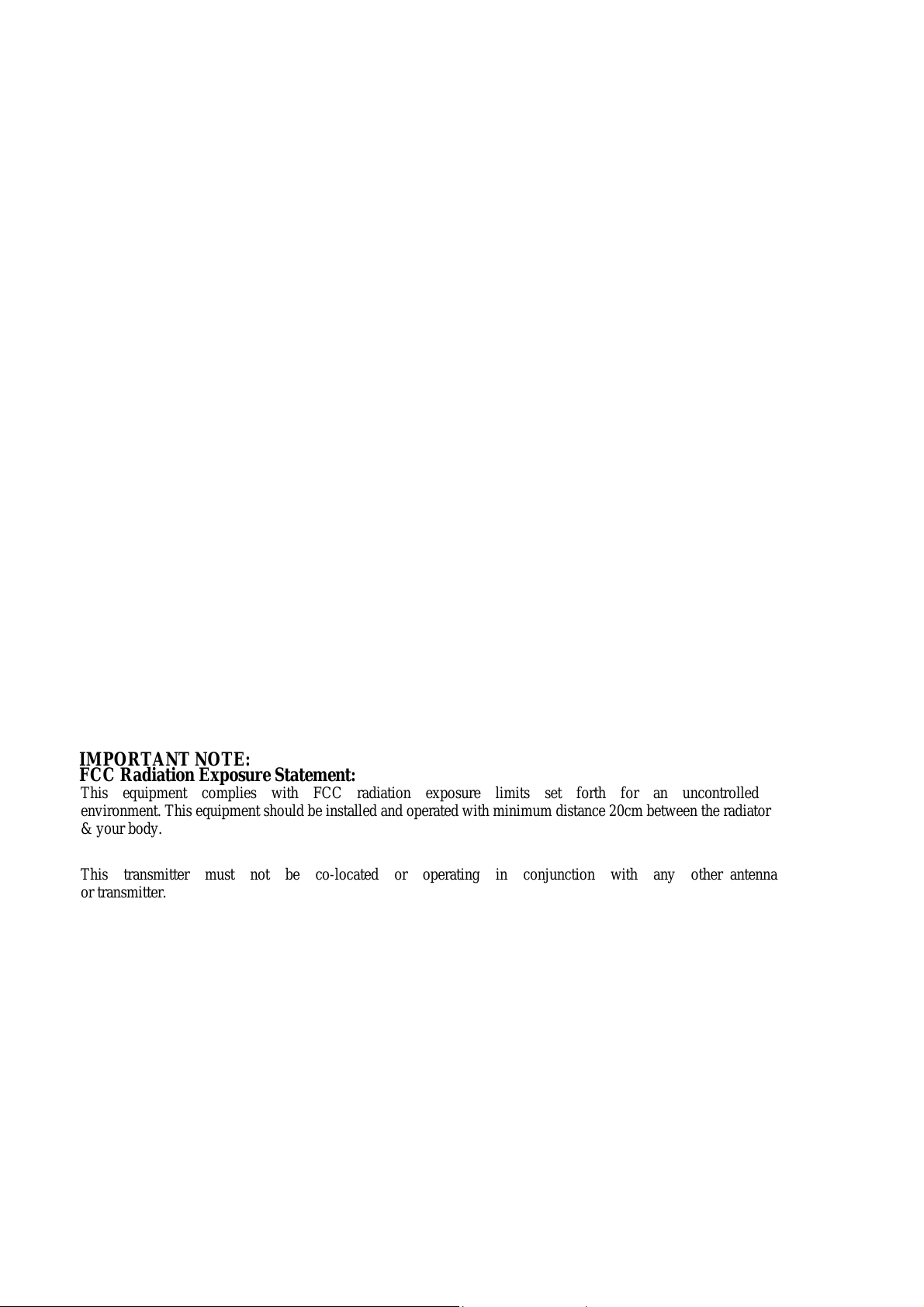
IMPORTANT NOTE:
FCC Radiation Exposure Statement:
This equipment complies with FCC radiation exposure limits set forth for an uncontrolled
environment. This equipment should be installed and operated wi th mi nim um dist ance 20cm bet ween the radiat or
& your body.
This transmitter must not be co-located or operating in conjunction with any other antenna
or transmitter.
 Loading...