

Page 1
user manual
Page 2

important safety instructions
1. Read these instructions.
2. Keep these instructions.
3. Heed all warnings.
4. Follow all instructions.
5. Do not use this apparatus near water.
6. Clean only with dry cloth.
7. Do not block any ventilation openings. Install in accordance with the manufacturer’s instructions.
8. Do not install near any heat sources such as radiators, heat registers, stoves, or other apparatus
(including amplifi ers) that produce heat.
9. This is a Class I product and shall be connected to a MAINS socket outlet with a protective earthing
connection.
10. Do not defeat the safety purpose of the polarized or grounding-type plug. A polarized plug has two
blades with one wider than the other. A grounding type plug has two blades and a third grounding
prong. The wide blade or the third prong are provided for your safety.
If the provided plug does not fi t into your outlet, consult an electrician for replacement of the obsolete
outlet.
11. Protect the power cord from being walked on or pinched particularly at plugs, convenience
receptacles, and the point where they exit from the apparatus.
12. Only use attachments/accessories specifi ed by the manufacturer.
13. Use only with the cart, stand, tripod, bracket, or table specifi ed by the manufacturer,
or sold with the apparatus.
When a cart is used, use caution when moving the cart/apparatus combination to
avoid injury from tip-over.
14. Unplug this apparatus during lightning storms or when unused for long periods of time.
15. Refer all servicing to qualifi ed service personnel. Servicing is required when the apparatus has been
damaged in any way, such as power-supply cord or plug is damaged, liquid has been spilled or objects
have fallen into the apparatus, the apparatus has been exposed to rain or moisture, does not operate
normally, or has been dropped.
16. Keep packaging out of reach of children.
17. Take care when lifting the speaker. The supplied bag is not designed to support the speaker’s weight.
18. The EVENT Opal is a precision monitoring tool capable of producing high sound pressure levels that
could cause permanent hearing loss.
Please exercise caution when listening, ideally using an SPL meter to monitor output levels.
19. Never touch the heatsink (blue) while in operation. Never cover the Opal while turned on. Ensure there
is suitable ventilation around the rear of the cabinet for heat dissipation.
20. The appliance coupler shall remain operable once the product is installed.
21. Warning - To reduce the risk of fi re or electric shock, do not expose this apparatus to rain or moisture.
22. Apparatus shall not be exposed to dripping or splashing and no objects fi lled with liquids, such as vases,
shall be placed on the apparatus.
23. The Opal is a free-standing speaker and is designed for operation on open surfaces such as speaker
stands or a work surface. Do not operate the Opal within cabinets or any enclosed space with limited
ventilation.
Page 3

5
12
15
16
18
15
17
19
Page 4
introduction
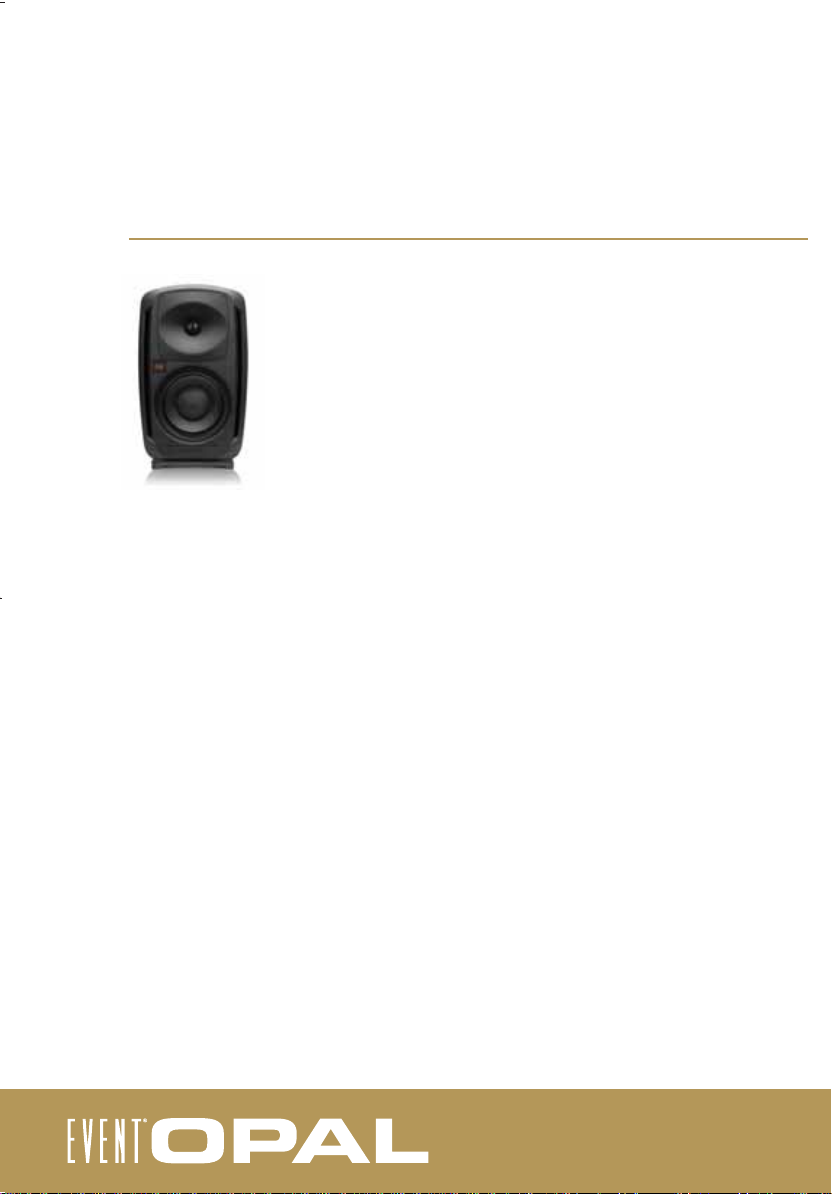
Thank you for purchasing the EVENT Opal. Before you set up your speakers for the
fi rst time, please read through this user manual to ensure you are able to get the
most out of your investment.
The ‘no compromise’ design brief for these speakers was essentially the
impossible. The Opal was to be an 8-inch two-way speaker with the same
dynamic and extended mid-range as the most expensive three-way systems.
It had to feature extended and powerful bass response, and have seamless and
transparent integration through all the frequency range. Distortion was entirely
unacceptable.
After many years of research and engineering, EVENT has defi ed conventional audio
philosophy and created the Opal. Its woofer , tweeter, amplifi er and cabinet all feature
innovative and unique design and technology elements, combined to create one of
the fi nest studio monitoring system ever released.
The EX8 driver provides characteristics previously unheard of in any other 8”
speaker. It pr ovides a raw response of 30Hz-10KHz and a power handling of 1000 watts.
Its high-power neodymium motor offers 36mm of linear excursion which gives the
listener an extremely detailed and high level of high-speed bass.
The Opal’s patented X-Coil confi guration increases the EX8 driver speed and lowers
harmonic distortion by up to 18dB, which results in mid-range accuracy that truly surpasses even the fi nest three-way studio monitors. The EX8 proprietary cone material
provides extension and control to complete this revolutionary driver.
The Opal’s tweeter combines an ultra-light and rigid aluminiummagnesium alloy with a low resonance Sonomax surround to provide the Opal with
unbelievable high frequency defi nition while minimising any distortion.
in a fully rotatable waveguide to provide complete versatility in application.
It is mounted
Page 5
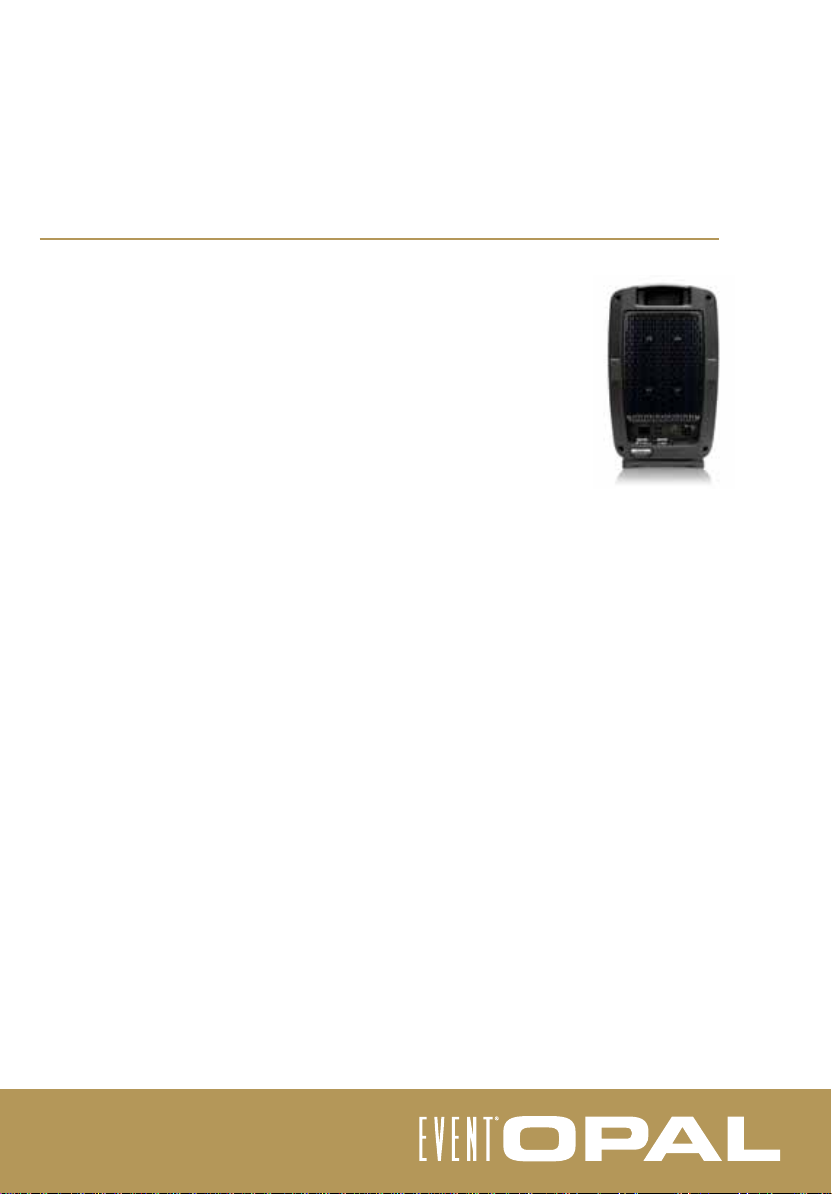
The Opal cabinet is moulded from aluminium to provide strength and minimise
resonance. It is curved in a combination of complex radii, completely minimising fl at or
cornered sections that can cause diffraction issues. A “no compromise” approach to
port design has resulted in front mounted variable impedance bass refl ex ports that
eliminate problems created by rear refl ection ports that rely on room acoustics, and
also air distortion artifacts found in conventional front ported systems. This gives the
Opal fast, deep and accurate bass response.
The Opal’s drive electronic system is purely high fi delity analogue, providing
750 watts of peak power in two-way confi guration and giving the Opal a transient
response and low distortion that surpasses the capabilities of any other monitoring
system.
All these elements combine to provide the Opal dynamic extended mid range and
powerful low end with seamless integration across the frequency range, and the
widest sweet spot of any system currently available.
The EVENT Opal is truly a revolution in studio monitoring.
Page 6
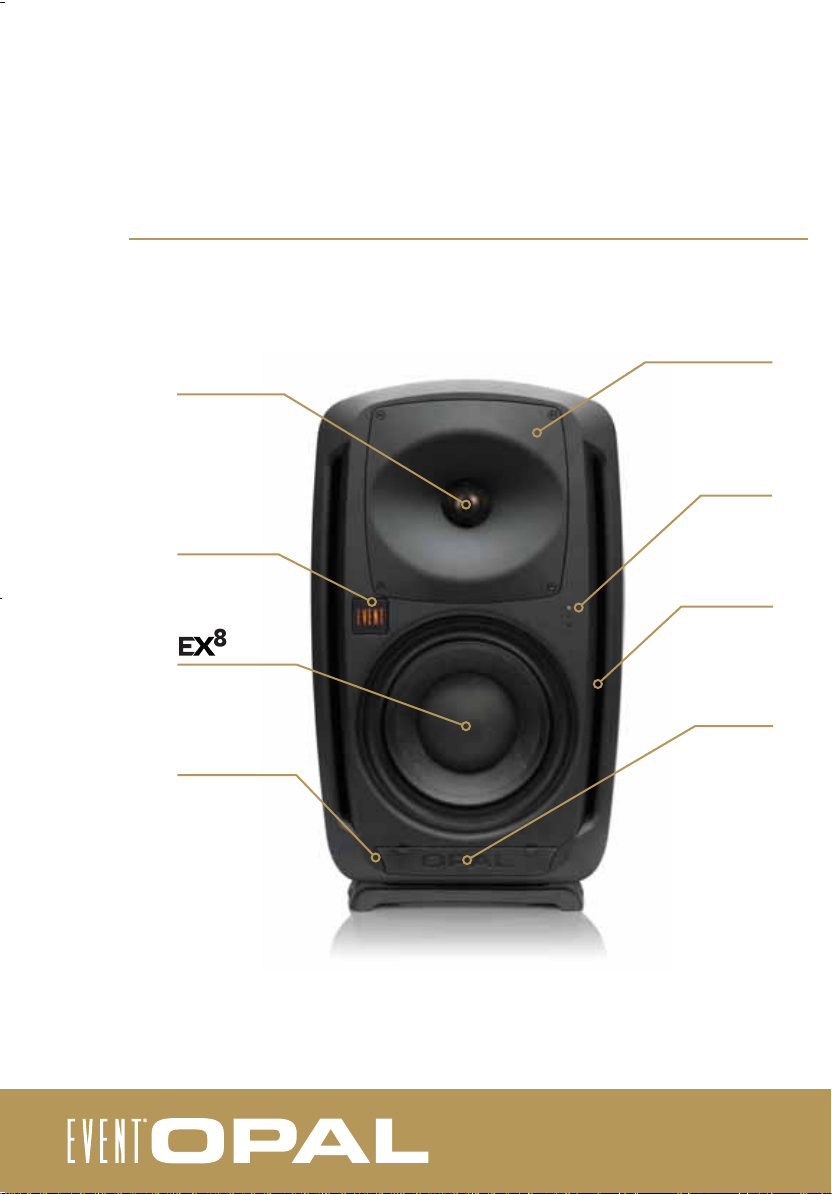
the opal - front
tweeter
rotatable badge
driver
AES/EBU
expansion module
status LED
rotatable waveguide
status LEDs
front ports
front control
panel cover
Page 7
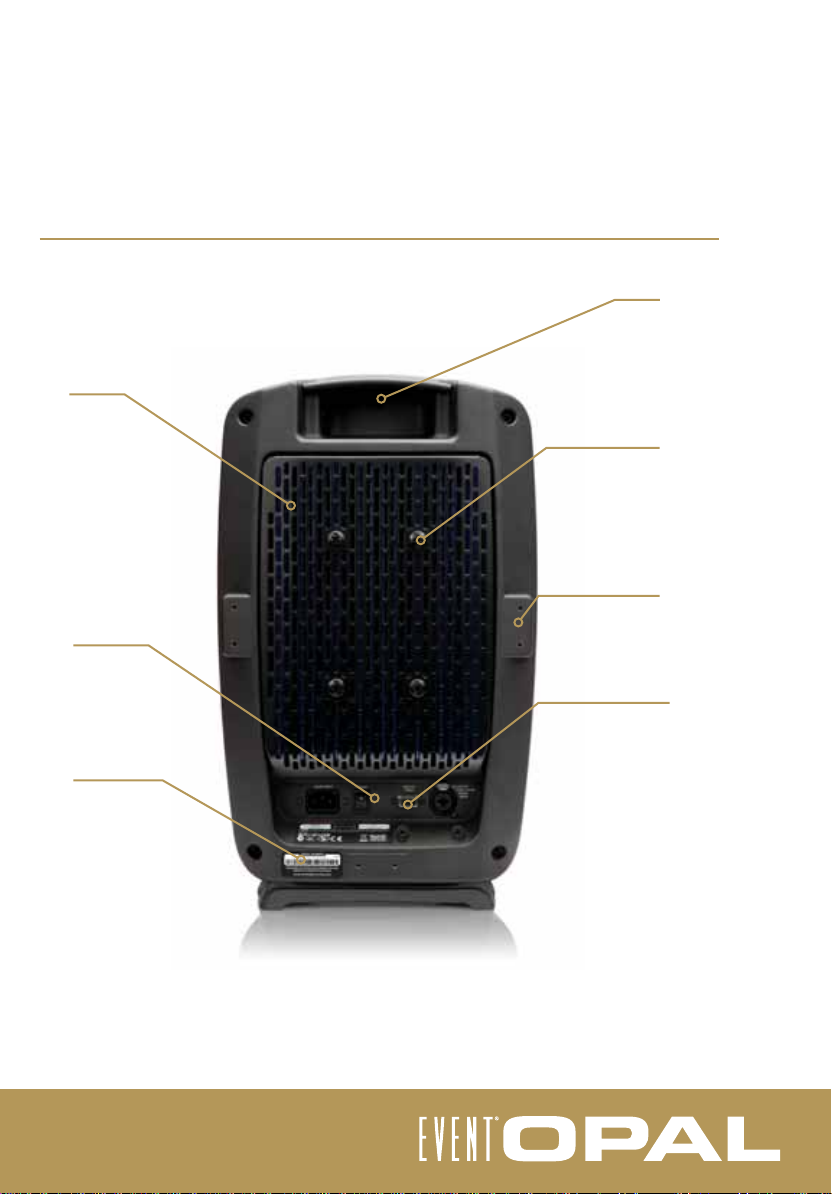
heatsink
rear panel
serial number
the opal - rear
handle
speaker mounting
points (M8)
accessory mounting
points (M4)
AES/EBU expansion
module port
Page 8
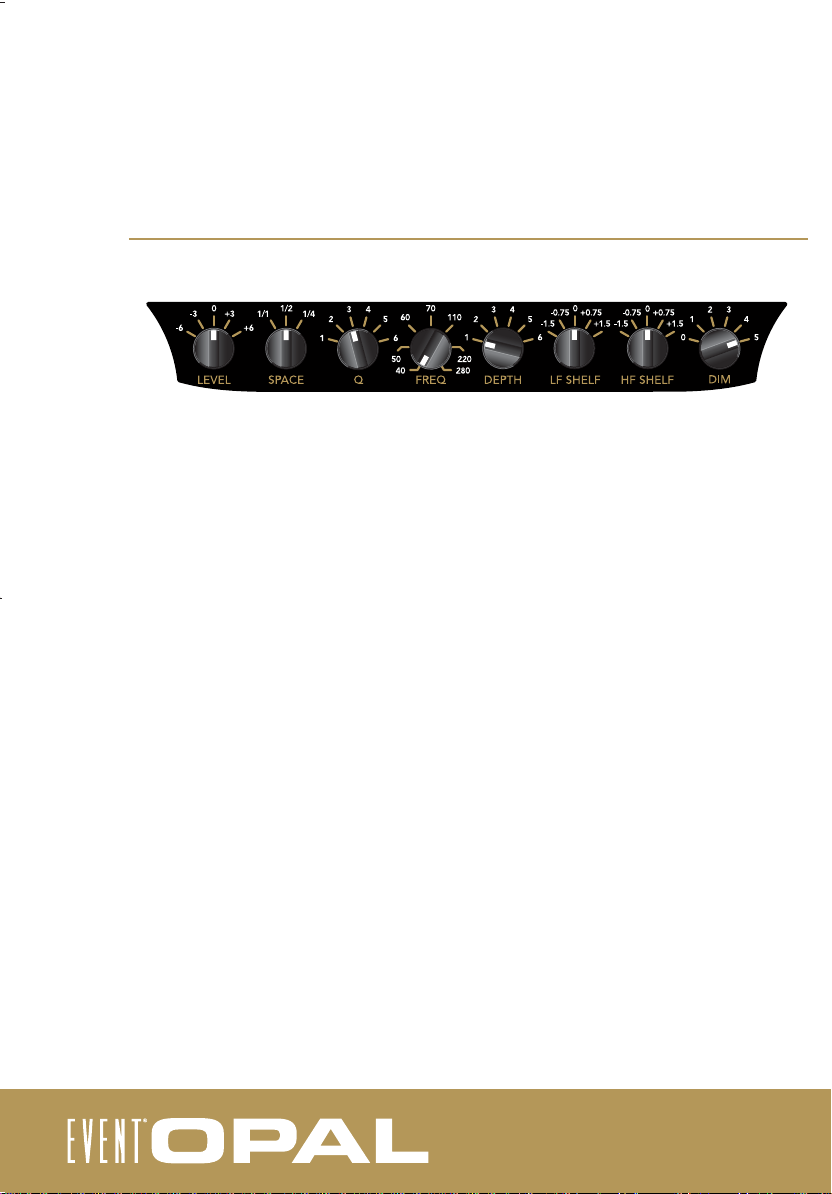
front control panel
Level: Allows for modifi cation of the input sensitivity, from -6dB to +6dB in regards to the reference sensitivity
of 0.775v RMS. The default setting is 0.
Space: Allows for the setting of Full, Half and Quarter space to compensate for the low frequency output
caused by the speaker location. If placed in an open environment, select ‘Full’ space. If placed against a wall,
select ‘Half’ space. If placed in a corner, select ‘Quarter’ space.
Room EQ Controls
The room equalisation controls allow for the implementation of an acoustic fi lter that can be used to eliminate
room resonance under 200Hz that can cause less defi ned bass reproduction.
Q: Adjusts the bandwidth (in frequency) of the acoustic fi lter -
1=Q of 50, 2=Q of 30, 3=Q of 20, 4=Q of 15, 5=Q of 10, 6=Q of 5
Freq: Adjusts the center position of the acoustic fi lter, from 40Hz to 280Hz.
Depth: Adjusts the intensity of the acoustic fi lter - 1 (0dB), 2 (-1.5dB), 3 (-3.0dB), 4 (-6.0dB), 5 (-12.0dB), 6 (-18.0dB).
The default setting is 0dB - fi lter not engaged.
LF shelf: Allows for the implementation of a shelving fi lter, centered at 200Hz. Available options are -1.5, -.75,
0, +.75 and +1.5dB. The default setting is 0 - fi lter not engaged.
HF shelf: Allows for the implementation of a shelving fi lter, centered at 5kHz. Available options are -1.5, -.75,
0, +.75 and +1.5dB. The default setting is 0 - fi lter not engaged.
DIM: Allows for the adjustment of the brightness of the EVENT rotatable badge on the front of the cabinet.
Settings range from 0 (completely off) to 5. The default setting is 5.
Page 9
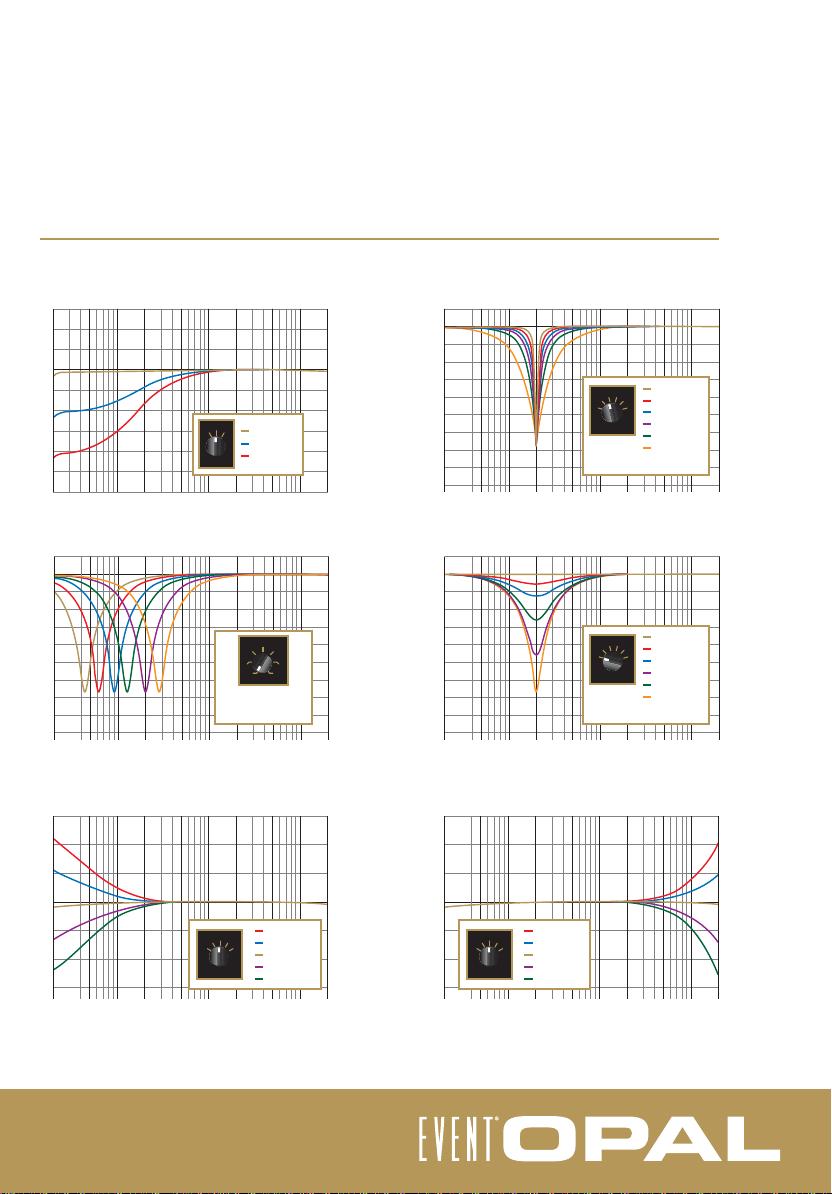
fi lter response graphs
+3
+2
+1
Output (dB)
0
-1
-2
-3
-4
-5
-6
20 50 100 200 500 1k 2k 5k 10k 20k
+3
0
-3
Output (dB)
-6
-9
-12
-15
-18
-21
-24
-27
20 50 100 200 500 1k 2k 5k 10k 20k
+3
+2
Output (dB)
+1
0
-1
-2
-3
20 50 100 200 500 1k 2k 5k 10k 20k
Space Filter
1/2
1/1
1/4
1/1 Space
1/2 Space
1/4 Space
SPACE
Frequency (Hz)
Freq Filter
556585
45
FREQ
Freq control sweep
40Hz to 280Hz
(Q @ 6, Depth @ 6)
Frequency (Hz) Frequency (Hz)
Low Frequency Shelving Filter
+1.5dB
0
-0.75
+0.75
-1.5
LF SHELF
+0.75dB
+1.5
0dB
-0.75dB
-1.5dB
Frequency (Hz) Frequency (Hz)
180
28040
+1.5
Q Filter
2345
1
(Freq @ 200Hz, Depth @ 6)
Depth Filter
2345
1
+1.5dB
+0.75dB
0dB
-0.75dB
-1.5dB
Position 1
Position 2
6
Position 3
Position 4
Q
Position 5
Position 6
Frequency (Hz)
Position 1
Position 2
6
Position 3
Position 4
DEPTH
Position 5
Position 6
(Freq @ 200Hz, Q @ 6)
+3
0
-3
Output (dB)
-6
-9
-12
-15
-18
-21
-24
-27
20 50 100 200 500 1k 2k 5k 10k 20k
+3
0
-3
Output (dB)
-6
-9
-12
-15
-18
-21
-24
-27
20 50 100 200 500 1k 2k 5k 10k 20k
High Frequency Shelving Filter
+3
+2
Output (dB)
+1
0
-1
0
-0.75
+0.75
-1.5
-2
HF SHELF
-3
20 50 100 200 500 1k 2k 5k 10k 20k
Page 10
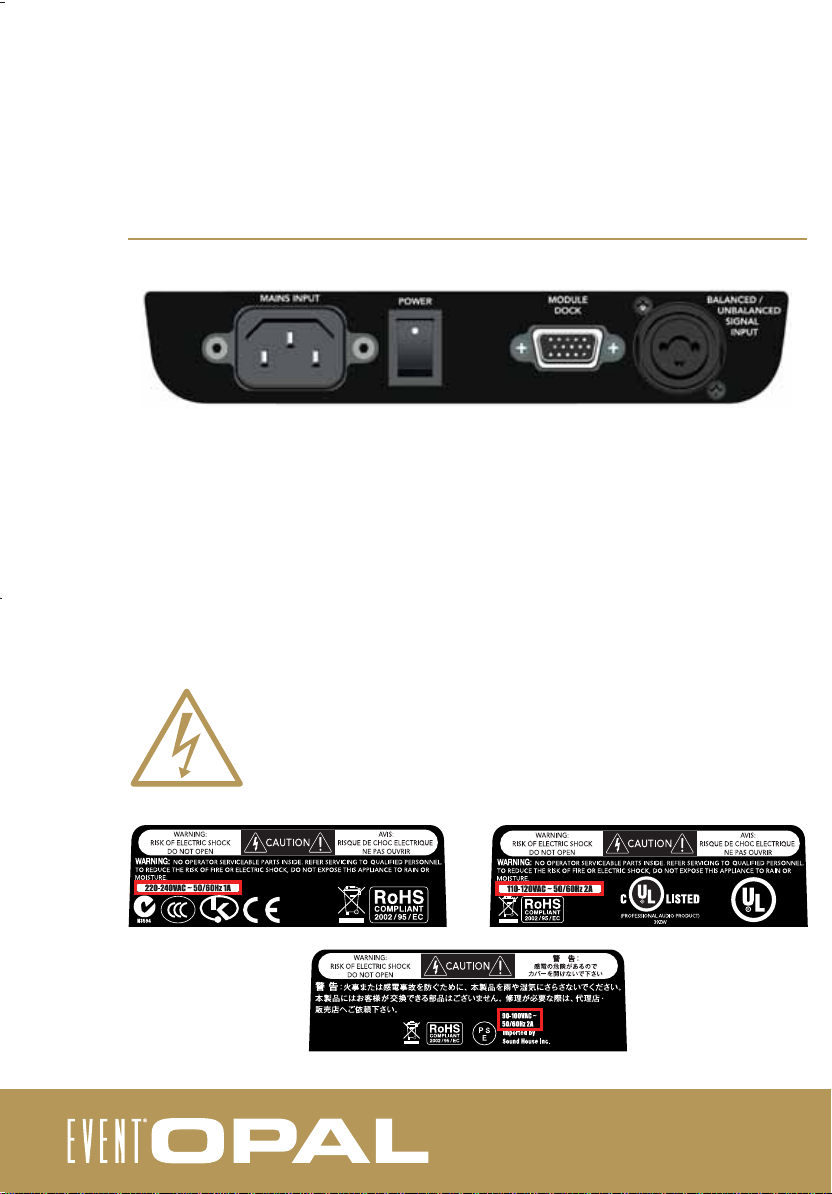
rear panel
Mains Input: Connect the mains supply here. Ensure that you use only the cable supplied or a genuine
EVENT replacement. Note that the amplifi er is not entirely disconnected from mains power unless this cable is
completely disconnected.
Mains Switch: Use the Mains Switch to turn the Opal on or off.
Module Dock: The Module Dock is a proprietary EVENT expansion Input/Output, allowing connection of the
Opal AES/EBU optional interface. If the module is connected, the expansion module status LED at the
bottom left of the front of the Opal will illuminate.
Balanced/Unbalanced Signal Input: The Opal allows for the input of a balanced or unbalanced line input.
The port accepts an XLR style cannon jack or a ¼” mono jack.
Please note that the Opal is fi xed to operate in the voltage range in the region that
it is sold in.
Page 11
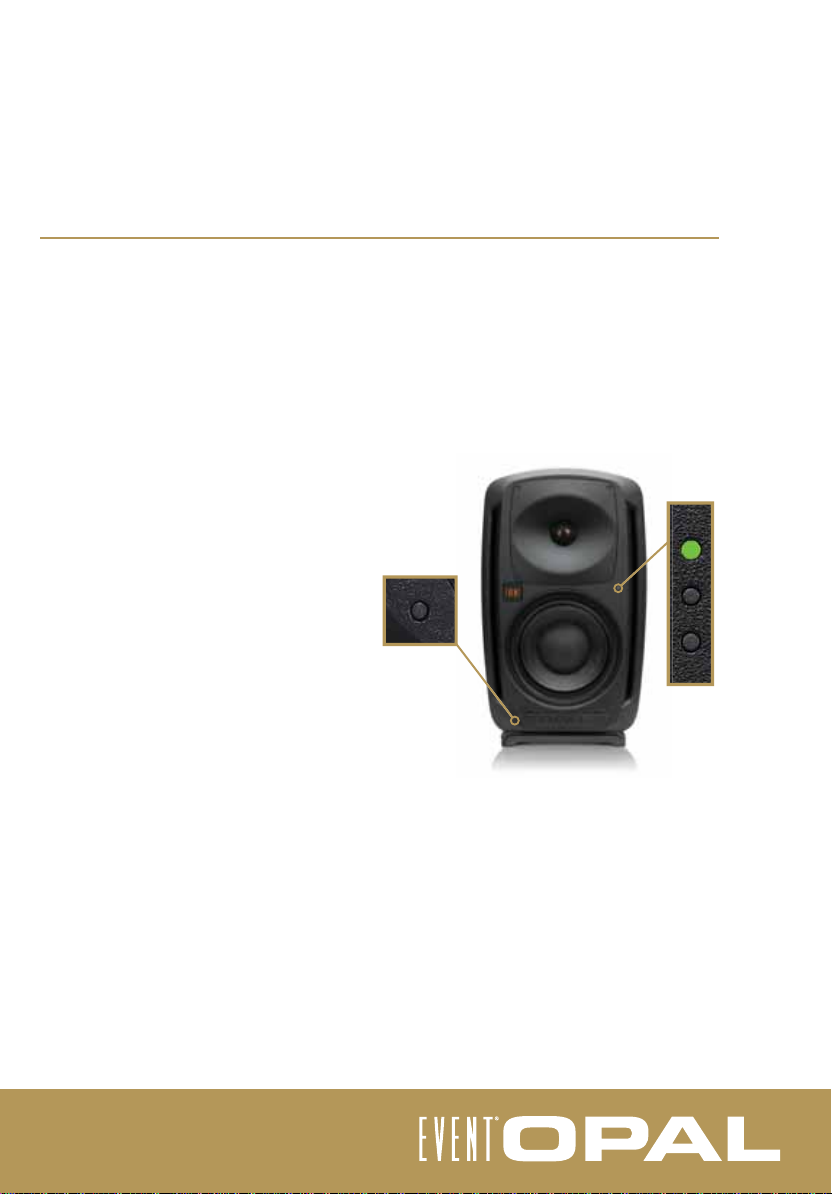
status LEDs
The EVENT Opal is an extremely powerful studio monitoring tool, therefore care needs to be taken when
listening. Professional monitoring should ideally be performed between 85-95dB. While the Opal provides
ample headroom above these levels, extended listening can cause permanent hearing damage as well as over
excurt the EVENT EX8 driver.
The Opal features four status LEDs to indicate the speaker and amplifi er status. It is important to familiarise
yourself with the function of these LEDs as they will communicate the status of your speaker and the inputs.
Startup sequence : When the Opal is fi rst switched
on and is running a self diagnosis, the output will
be muted and the middle LED will illuminate white
for twelve seconds, then fl ash for ten seconds.
Following this the Opal will be ready for use.
Top light (green/yellow): The top light will fl ash
green in indication of the input signal level. In the
event that the signal begins to overload the amplifi er, the light will change to yellow.
This is intended as a warning only and it is up to
the listener to determine if the audio level needs
to be decreased.
Middle light (white/orange) : Following the
startup sequence, the middle light will only
illuminate white in the event of an
excessive input level. The Opal will
automatically attenuate output levels for ten
seconds to allow the operator time to
correct the source level.
The middle light will illuminate orange in the
event of excessive temperature, and the speaker output will automatically attenuate to allow the Opal to
reset. In this case it is important to lower the speaker temperature to reasonable level, after which the Opal
will automatically reset.
Bottom light (red) : The bottom light will only illuminate red in the event of a fault condition. In this case the
Opal requires factory service (see warranty information).
Operation of the AES/EBU expansion module status LED (blue) will depend on the actual module being
used. Consult the expansion module user guide for more information.
Page 12
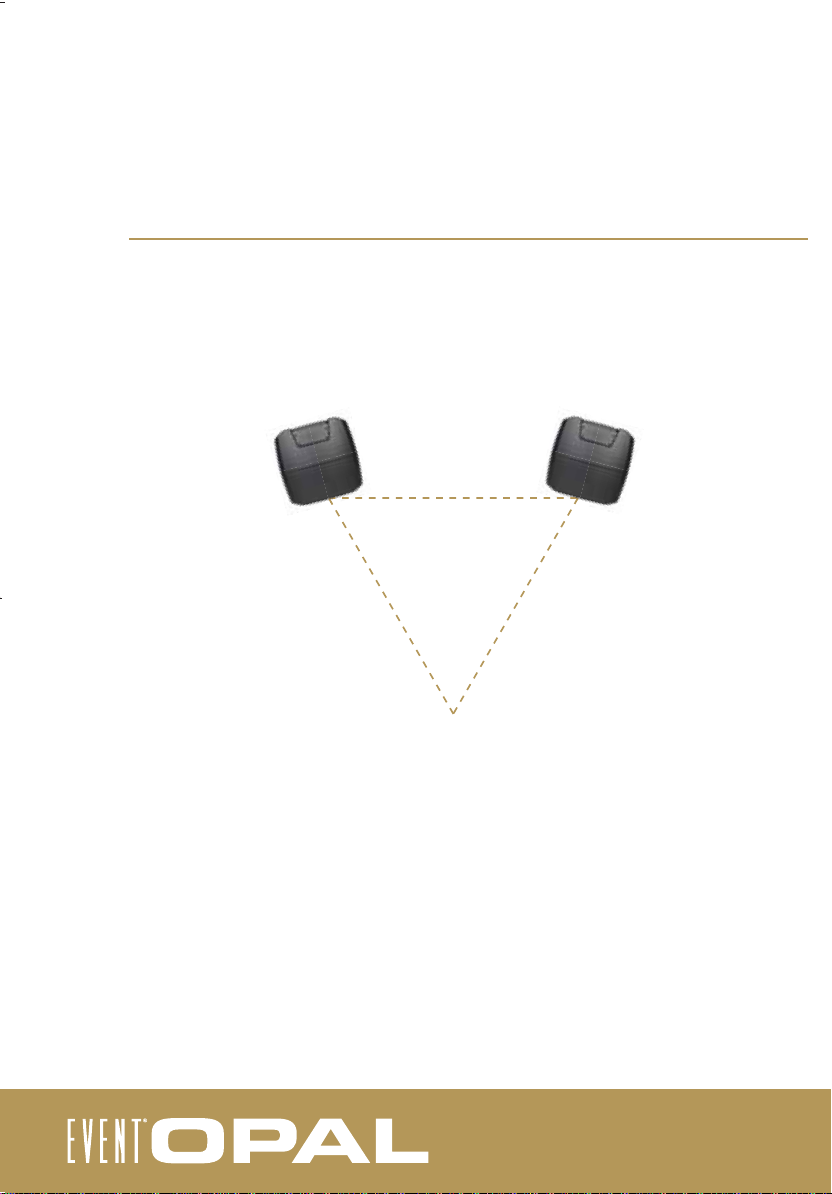
positioning your speakers
The EVENT Opal monitors are physically identical. When used in a stereo confi guration, there is no physical or
acoustic distinction between the left and right speakers. While we recommend mounting the Opal in vertical
orientation, it has been designed to allow horizontal alignment (see horizontal mounting).
For precise calibration within your monitoring environment please utilise the Event StudioEQ system,
available free of charge when you register your monitors online at www.eventelectronics.com.
sweet spot
Mount the speakers slightly inward, so that the driver components directly face the listening position. When
oriented this way, the listener is in the “sweet spot” which yields the most accurate stereo reproduction. If you
need a wider sweet spot to allow for greater listener movement or for group monitoring, face the speakers in
a slightly more open position, but never more than necessary.
While not ideal, if you must mount the speakers substantially above or below ear level, you will also need to tilt
the cabinets downward or upward to keep the driver components directly facing you.
It is important to note that the listening space has a large effect on the performance of speakers,
particularly the low frequency response. It is best to try your monitors in a variety of positions to acheive
optimum results. Additionally the Opal’s in-built acoustic fi lters can be introduced (see front control panel).
Page 13
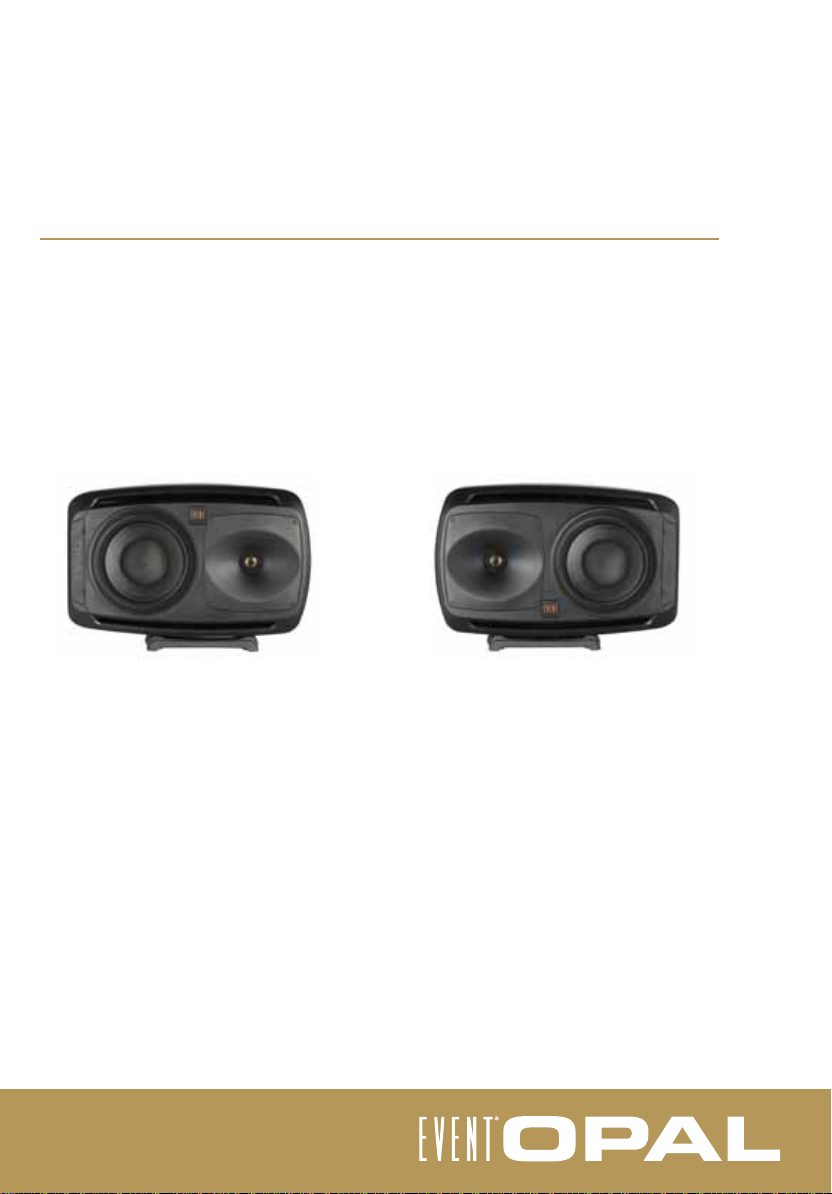
horizontal mounting
The EVENT Opal has been designed to overcome the performance issues exhibited in traditional monitoring
systems when mounting the speaker horizontally.
The key to this performance gain is the Opal’s rotatable high-frequency waveguide.
For more information on rotating the Opal waveguide please visit www.eventelectronics.com. Please note
that this operation should only be carried out by qualifi ed service personnel.
Note that when mounting the Opal horizontally, the tweeter should always be on the inside, as shown below.
The EVENT badge is also rotatable. To lift the badge from its magnetic mounting gently pry from the bottom
with a fl at screwdriver.
Please note that the supplied rubber plinth should always be used when mounting the speaker either
vertically or horizontally, to prevent any movement of the cabinet.
Page 14
warranty information and support
The EVENT Opal is supplied with a two year manufacturer’s warranty from date of
purchase, covering defect in product or workmanship.
The warranty excludes defects caused by modifi cation, shipping damage, or failure
to use the speaker as per the instruction guide.
Please retain your sales receipt as proof of purchase.
If you experience any problems with your Opal, please contact the EVENT Customer
Service department via the details below.
Before calling, however , we ask that you please consult the Technical Support section
of our web site, www.eventelectronics.com.
Please note that there are no user serviceable parts within the EVENT Opal. For any
servicing please refer to an authorised service technician.
If you believe your monitor is in need of repair, please contact the Event Customer
Service department to request a Return Authorization Number (RA#). We can accept
for servicing only those units that are accompanied by an RA#. Units shipped without
an RA# number will be refused.
EVENT Electronics Customer Support:
Page 15
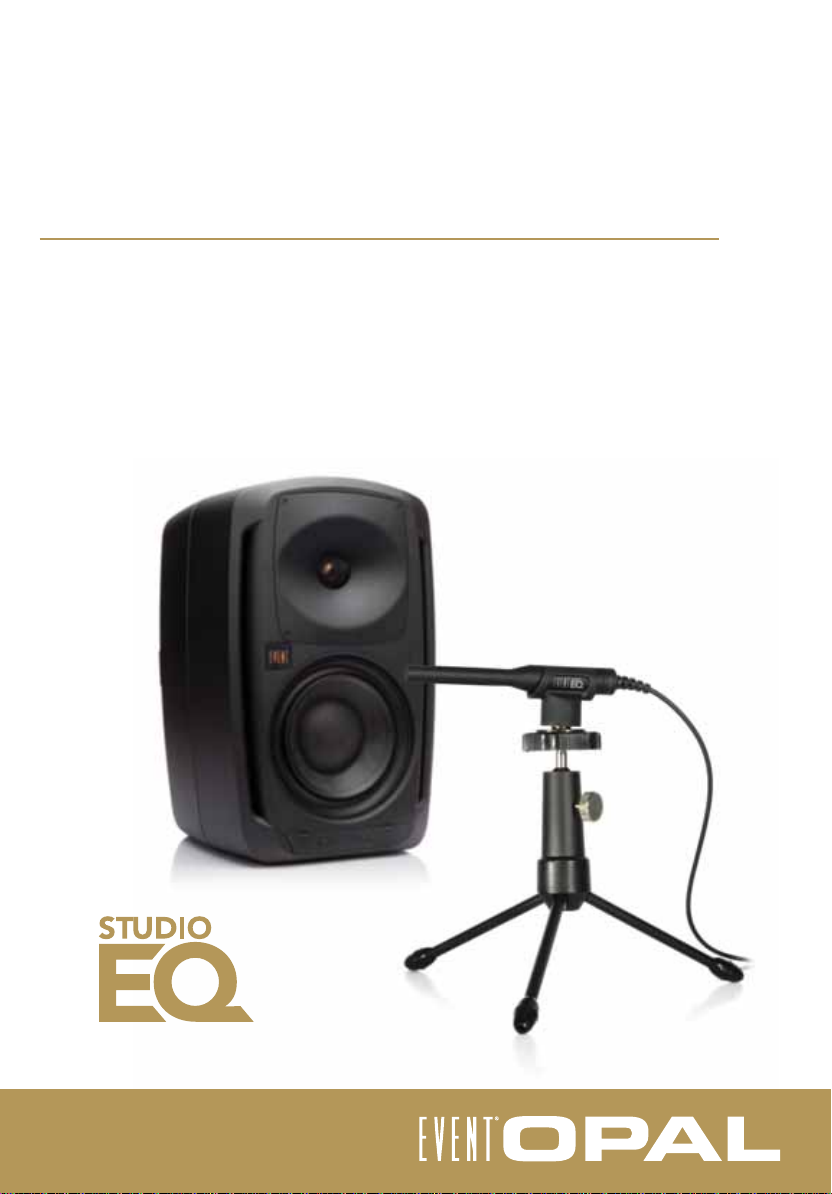
studioEQ calibration system
The EVENT StudioEQ system allows for precise calibration and measurement of your
speakers, with respect to your listening space and position.
EVENT offers a StudioEQ system free of charge to every customer who purchases a
pair of Opals. To register for your free StudioEQ please visit
www.eventelectronics.com
For more information on the system, please visit
www.eventelectronics.com/studioeq
Page 16
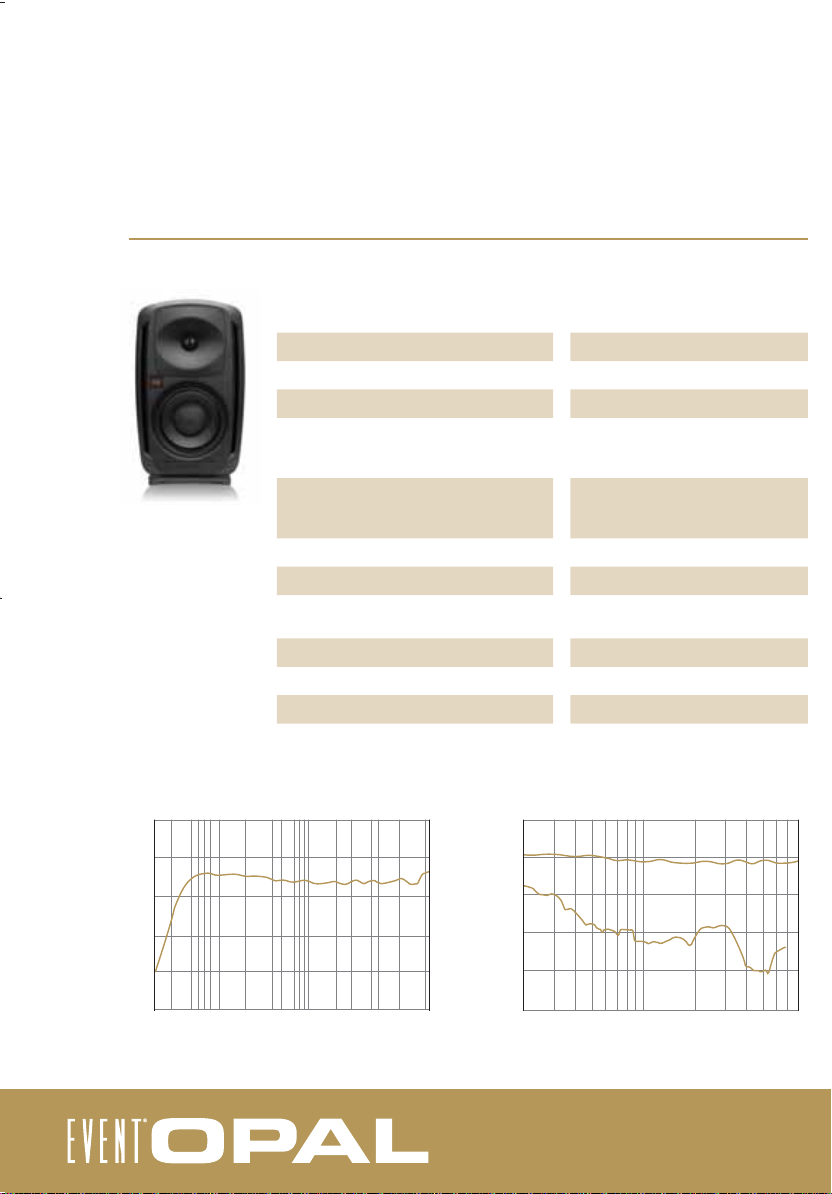
specifi cations
system
120
dBSPL
100
80
Frequency Response
Crossover Frequency
Crossover Type
3rd Harmonic Distortion @ 90dB SPL, 1m
35Hz – 22kHz (see graph)
1600Hz
Acoustic 8th Order (48dB/Oct)
500 - 7kHz - 0.08%
200 - 20kHz - 0.2%
<200Hz - 1.5%
Acoustic Output - SPL @ 1m
Long Term (80Hz - 20kHz)
Peak (80Hz - 20kHz)
Signal Input
Input Sensitivity
AC Input Voltage
111dB
114dB
Combo XLR, ¼” TRS (bal/unbal)
.755 v/rms is 0dBu
90-110V, 110-120V or 220-240V
(preset at factory)
AC Input Connector
Average Long-Term Power Consumption
Quiescent Power Consumption
3-Pin IEC
220 watts
<20 watts
Frequency Response Freq Response vs 3rd Harmonic Distortion
110
90
70
Freq Response
80
60
40
60
40
20
20 50 100 200 500 1k 2k 5k 10k 20k
Frequency (Hz) Frequency (Hz)
50
dBSPL - Frequency Response
30
10
200 500 1k 2k 5k
3rd Harmonic Distortion
20
dBSPL - 3rd Harmonic Distortion
0
-20
Page 17
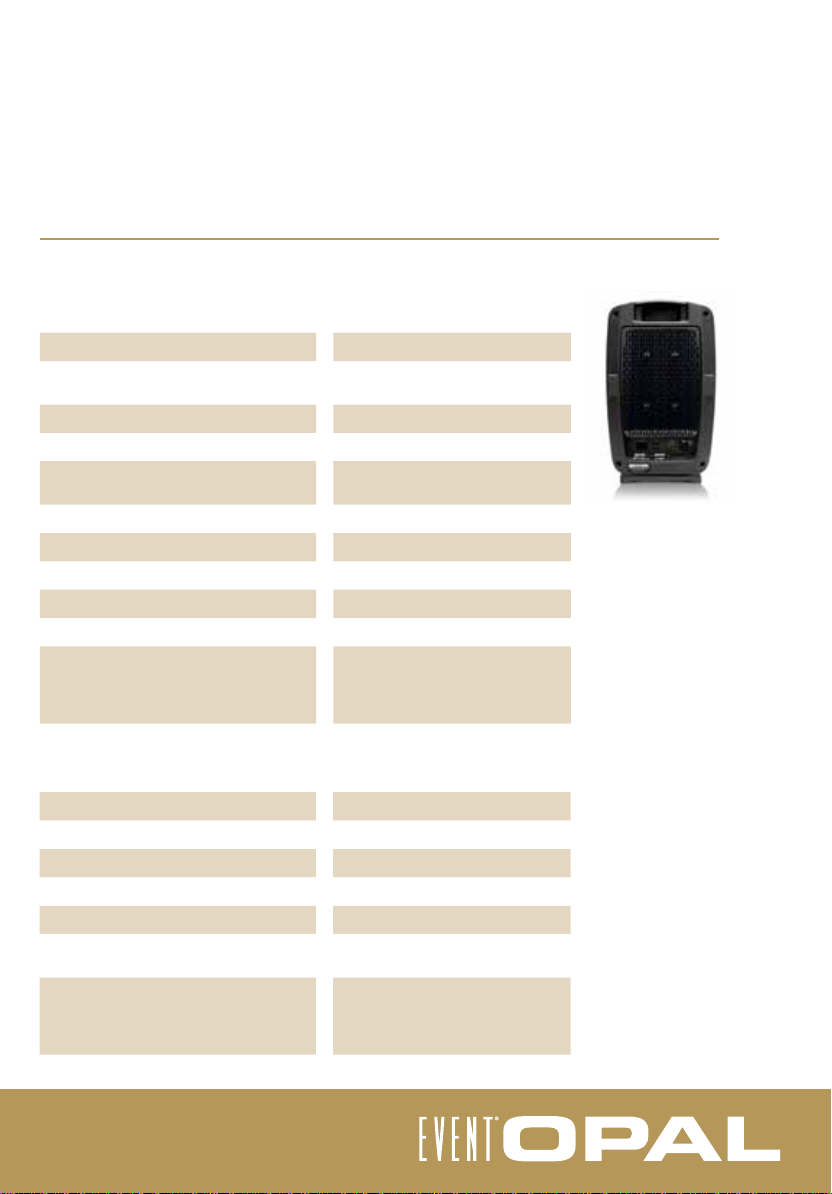
low frequency transducer - EX8
specifi cations
Piston Diameter
Voice Coil Confi guration
Voice Coil Diameter
X-Coil Diameter
Former Material
Voice Coil Wire
Magnet Type
Magnetic Gap Design
Impedance Nominal in Cabinet
Cone Type
Power Handling
Continuous Pink Noise
Program Power
Peak Power
high frequency transducer
Dome Diameter
Voice Coil Diameter
Magnet Type
Impedance DCr
Impedance Nominal in Cabinet
Dome Type
Power Handling
Continuous Pink Noise
Program Power
Peak Power
180mm (7.1”)
X-Coil double voice coil
Low distortion design
66mm (2.6”)
65.2mm (2.56”)
High Strength Polyamide Glass Fiber
Copper Clad Al
Neodymium
XBL - Split Gap
5 Ohms
Carbon fi ber composite
240 watts
360 watts
720 watts
25.4mm (1”)
25.0mm (0.98”)
Ferrite
6 Ohms
5 Ohms
Anodized Aluminium Magnesium
Alloy
25 watts (above 1.6kHz)
50 watts (above 1.6kHz)
100 watts (above 1.6kHz)
Page 18
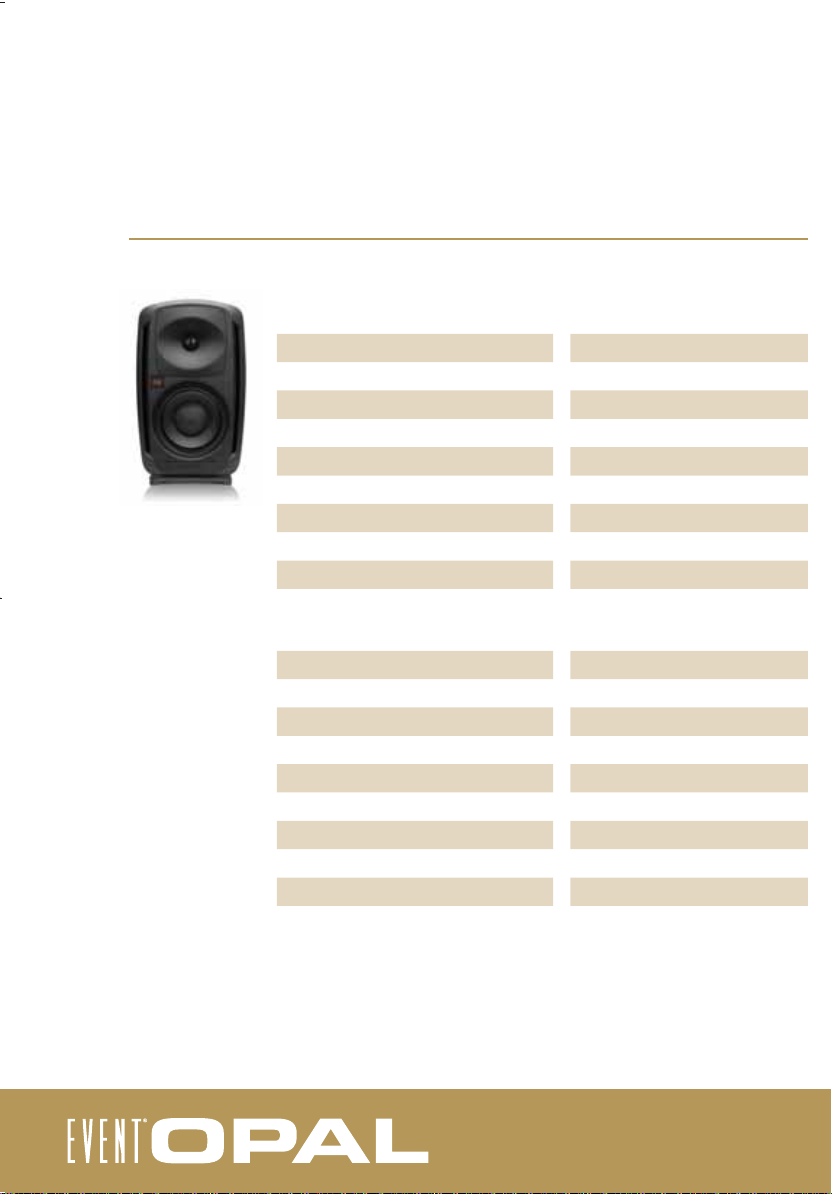
specifi cations
low frequency amplifi er
Frequency Response
Operating Band Pass
Total Harmonic Distortion
Voltage Gain
Long Term Power @ 5 Ohms*
Continuous Power @ 5 Ohms**
Burst Power @ 5 Ohms***
Output Topology
Cooling
high frequency amplifi er
Frequency Response
Operating Band Pass
Total Harmonic Distortion
Voltage Gain
Long Term Power @ 5 Ohms*
Continuous Power @ 5 Ohms**
Burst Power @ 5 Ohms***
Output Topology
Cooling
20Hz - 20kHz (±0.1dB)
20Hz - 1,600Hz
0.009% @ 300 watts into 5 ohm load
24dB
270 watts
387 watts
600 watts
Class AB
Convection - Aluminium Heat Sink
20Hz - 20kHz (±0.1dB)
1,600Hz - 20,000Hz
0.003% @ 90 watts into 5 ohm load
15dB
50 watts
112 watts
140 watts
Class AB
Convection - Aluminium Heat Sink
* Both high frequency and low frequency were measured simultaneously for this specifi ctation.
** Continuous power was measured using 1kHz sine wave signal
*** Burst power was measured using a 1kHz burst tone waveform where the burst portion contains four cycles (on) and the
low level (off) signal contains 200 cycles. This test signal succinctly represents the strain and demands placed on the
amplifi er by music content containing high transients.
Page 19
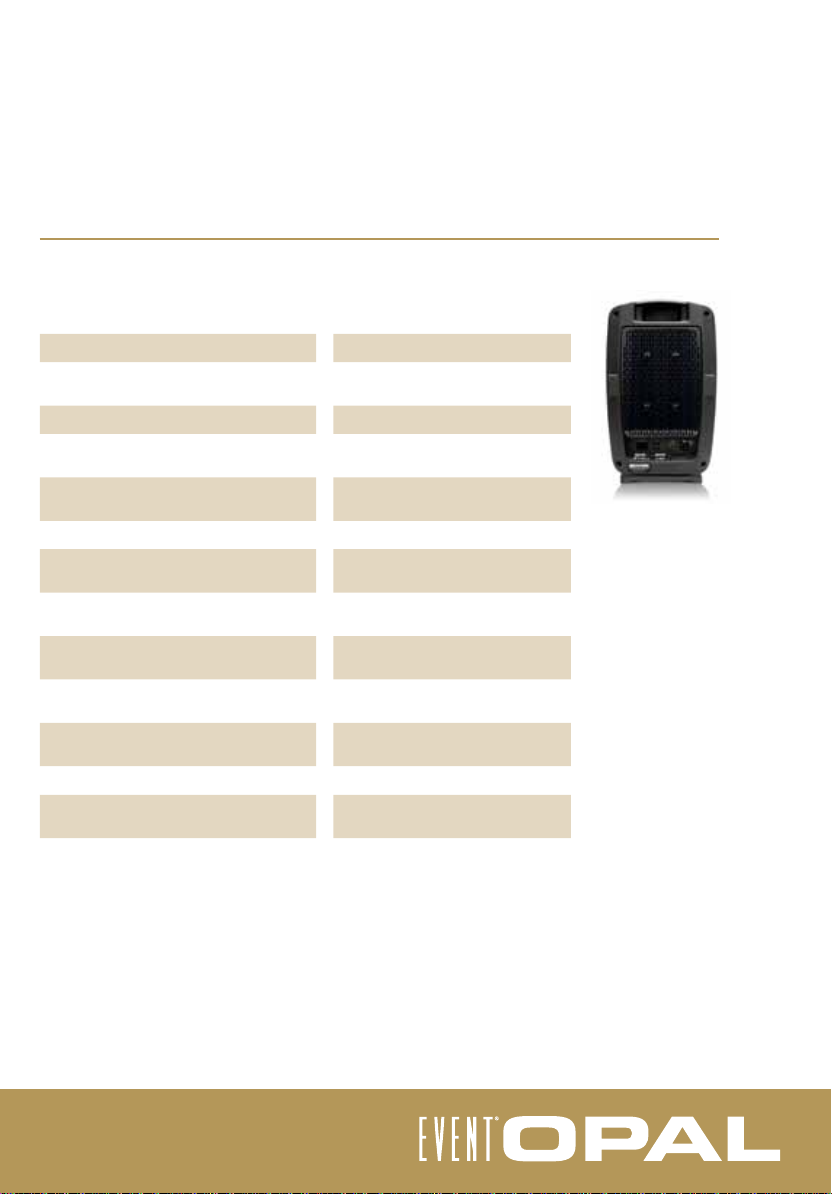
physical
specifi cations
Cabinet Volume
Cabinet Construction
Cabinet Finish
Low Frequency Vents
Waveguide Construction
Waveguide
Mounting Points
Cabinet Dimensions
Cabinet Weight
Shipping Dimensions
Shipping Weight
Operating Temperature Range
Agency Approvals
28 Litres
High Pressure Injection-Moulded
Aluminium
Black Powdercoat
Two Variable Impedance Ports
(patent pending)
High Pressure Injection-Moulded
Aluminium
Elliptical waveguide - Rotatable
Four each
M8 Omni-mount Pattern
295mmW x 450mmH x 273mmD
11.6”W x 17.7”H x 10.8”D
21.2kg
46.74lb
390mmW x 575mmH x 380mmD
15.4”W x 22.6”H x 15”D
24.3kg
53.57lb
5-35 ° C / 40-95 ° F
CE, UL, CCC, C-Tick, SASO, NON,
EK, PSE
Page 20
International
107 Carnarvon Street
Silverwater NSW 2128 Australia
www.eventelectronics.com
USA
P.O. Box 4189
Santa Barbara, CA 93140-4189
 Loading...