

Page 1
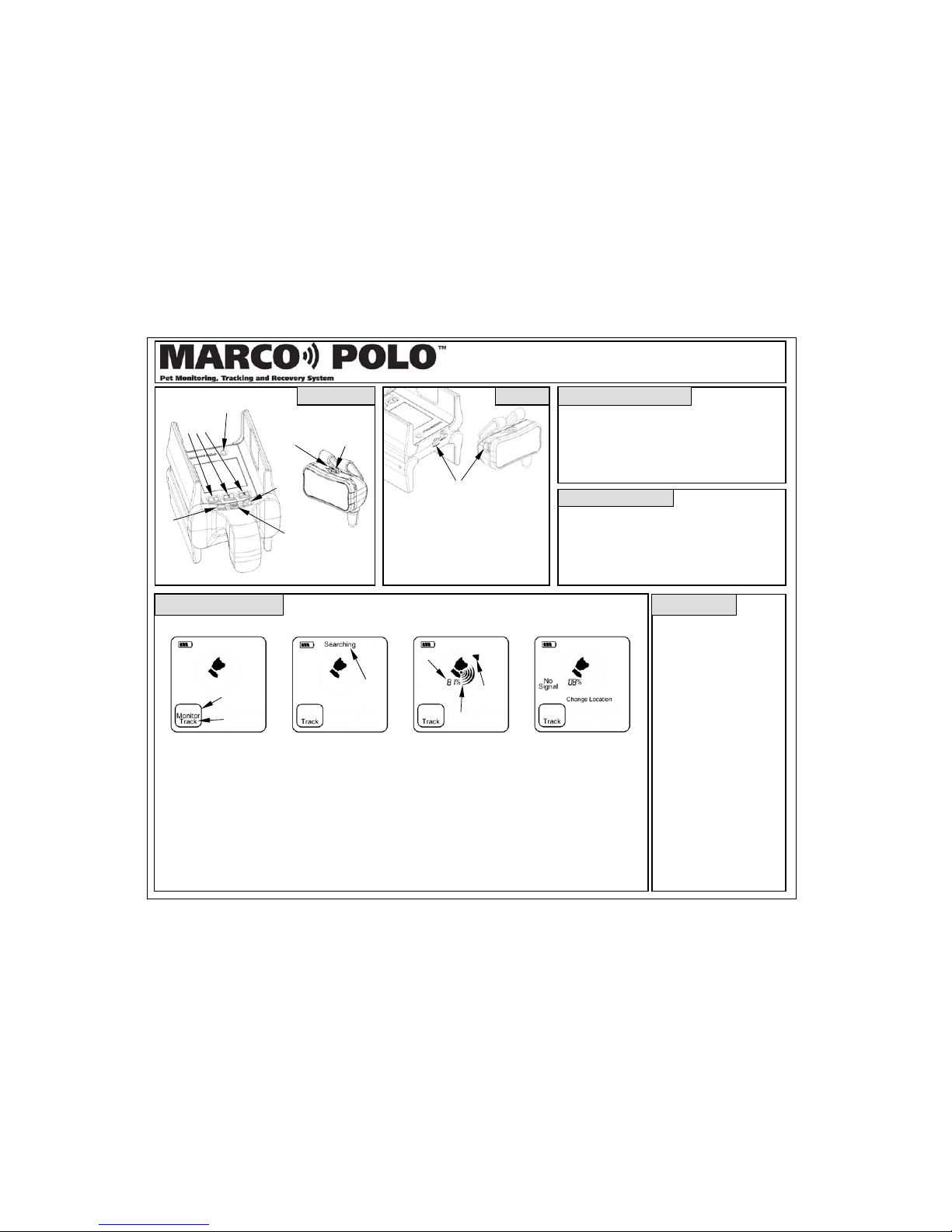
Locator
Ta
Up
User Controls
Charging Jacks
•
Batteries are fully charged in 3 hours.
• Tag battery will run 3 months in
monitor, 1 month in standby and 3 days
in track.
• Locator will run 8 hours in search, 3
days in track or 4 days in monitor.
• Locator may be kept connected to
charger for continuous monitoring.
Chargin
g
Selec
t
Power
Button
Status
Light
Pet
Buttons
1 2 3
Power
Button
Tag
Powering On the Locator
• Press and hold the power button until the display
comes on and the locator beeps twice.
• If the locator will not power on then connect the
charger and try again.
• Short presses of the power button turn the display
backlight on and off.
Powering On the Ta
g
• Press and hold the power button. The status light with
flash in 3 groups of 1 two or 3 flashes. 3 = Fully
charged battery; 2 = half charged; 1= needs charging.
• Press and hold the power button to turn off. 1 second
flash means tag is turning off. Short flash means tag
was busy communicating, try again.
Down
Searching for a Lost Pet
• Press the Pet button 1, 2
or 3 for the desired pet.
• “Track” will flash, press
Select to start searching.
• “Searching” will now
flash at the top of the
display.
• To stop the tracking
operation, press the Pet
button repeatedly until
the mode box is blank
and then press Select.
Searching Tips
•
If the locator loses contact
with your pet’s tag then “No
Signal” will be displayed.
• If a direction can not be
computed “Change Location”
will be displayed.
• These messages may pop up
occasionally in normal
operation.
• If the signal is lost for 40 sec
then the searching mode will
restart automatically.
•
Always hold the locator
level to the ground, waist
high in front of you.
• To get a directional arrow,
move to an unobstructed area,
higher ground is better.
• When you first get a
directional arrow turn 90
degrees and see if the arrow
tracks.
• Always point the locator in
the direction of the tag while
moving, not away from it.
• If the arrow is lost or jumps in
direction continue on in the
last known direction.
• If no arrow is displayed, use
the distance indication in a
“warmer/colder” fashion until
the direction is shown.
• Search by driving or walking
when no signal is received.
• Pressing Down for 2 seconds
silences the bee
p
er.
Selecting the Pet
Mode Box
Flashing
Searching
Flashing
Range %
Range Bars
Direction
Arrow
• A single beep indicates the
tag has begun responding to
the locator’s searching
signals.
• If after 2 minutes the pet’s
tag has not responded a long
beep will sound and “No
Signal” will be displayed.
• Press Select to restart search
mode again, walk or drive
to likel
y
areas where your
•
Each time your pet’s tag
responds the locator will
beep, about every 4 seconds.
• 1 beep = far, 2 beeps =
closer, 3 beeps = nearby
• The range bars and distance
percentage indicate the
proximity of the pet.
• More bars = closer
• Higher percentage = closer
• The directional arrow shows
the direction to your pet.
Quick Reference Guide
Tracking Error Messages
Page 2
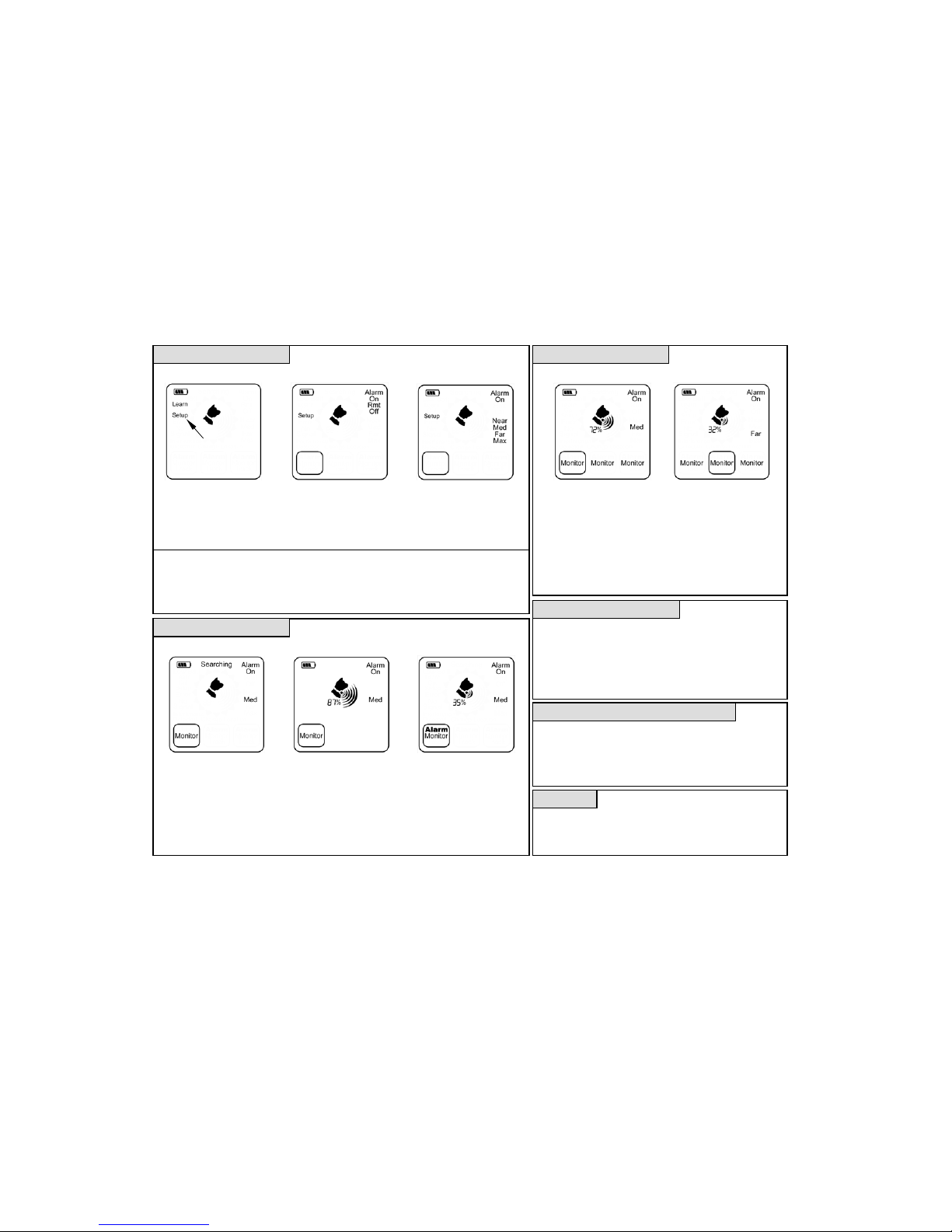
Monitoring Mode Setup Monitoring Multiple Pets
Monitoring a Single Pet
Selecting the Pet
Entering Setup Selecting the Alarm Mode Selecting the Boundary Displaying Pet 1’s Status Displaying Pet 2’s Status
Monitoring Display Alarm Display
• Press and hold the Select
button until Setup is flashing.
• Press Select again to enter
setup, all 3 mode boxes will
now flash.
• Press the Pet button for the
pet you wish to setup.
• Press Down to select the
desired alarm mode and
then press select.
•
Press the Down button to
select the desired boundary
and press Select to exit
setup.
Alarm Modes:
• On - Beeper sounds
• Remote - Beeper sounds and the external
alarm output is activated.
• Off - No beeper, display only.
Boundary Settings:
• Near - Inside pets, small yard, RV, campsite.
• Med - Average backyard
• Far - Large property or many obstructions.
•
Max - Must lose contact to activate alarm.
•
The Marco Polo system can monitor up to 3 pets at one time.
• Simply repeat the process under “Monitoring a Single Pet”
for each pet to be monitored, wait for searching to complete
before going on to the next pet.
• Each pet’s location is checked once every 40 seconds.
• The display will switch once every 7 seconds to show the
most recent information for that pet.
• If any pet is outside its defined boundary an alarm will sound
and “Alarm” will be displayed for each wandering pet.
Switching Between Modes
•
Each of the 3 pet channels can be switched between track,
monitor or idle (blank) modes by pressing the Pet button until
the desired mode is flashing and then by pressing Select.
• Mode switching can take up to 40 seconds depending on the
current mode and the new selected mode.
• Only one pet may be in track mode at a time.
Nig
httime and Hands-Free Searchin
g
•
A short press of the locator’s power button will turn the
backlight on or off for searching at night.
• When searching while driving the locator can be set to search
mode and placed on the seat, when the locator begins beeping
once every 4 seconds the pet is within range.
Contact Us
Eureka Technology Partners, LLC
Toll Free: (866) 825-4208
www.eurekaproducts.com
Copyright © 2012 Eureka Technology Partners, LLC ALL RIGHTS RESERVED
Protected under the following US and Foreign Patents: US 6,788,199 US 7,148,801 CA 2438172 AU 2002255750
Flashing
•
If your pet is outside the
selected boundary on two
consecutive checks the
alarm is activated.
• Cancel by pressing the Pet
button to enter track or idle
or press Down to silence.
• Once every 40 seconds the
locator will compare your
pet’s location to the selected
boundary and update its
status on the display.
• Press the Pet button 1, 2 or 3
twice for the desired pet and
then press Select to enter
monitor mode.
• “Searching” will flash while
the locator establishes
communications with your
pet’s tag.
 Loading...