

Page 1
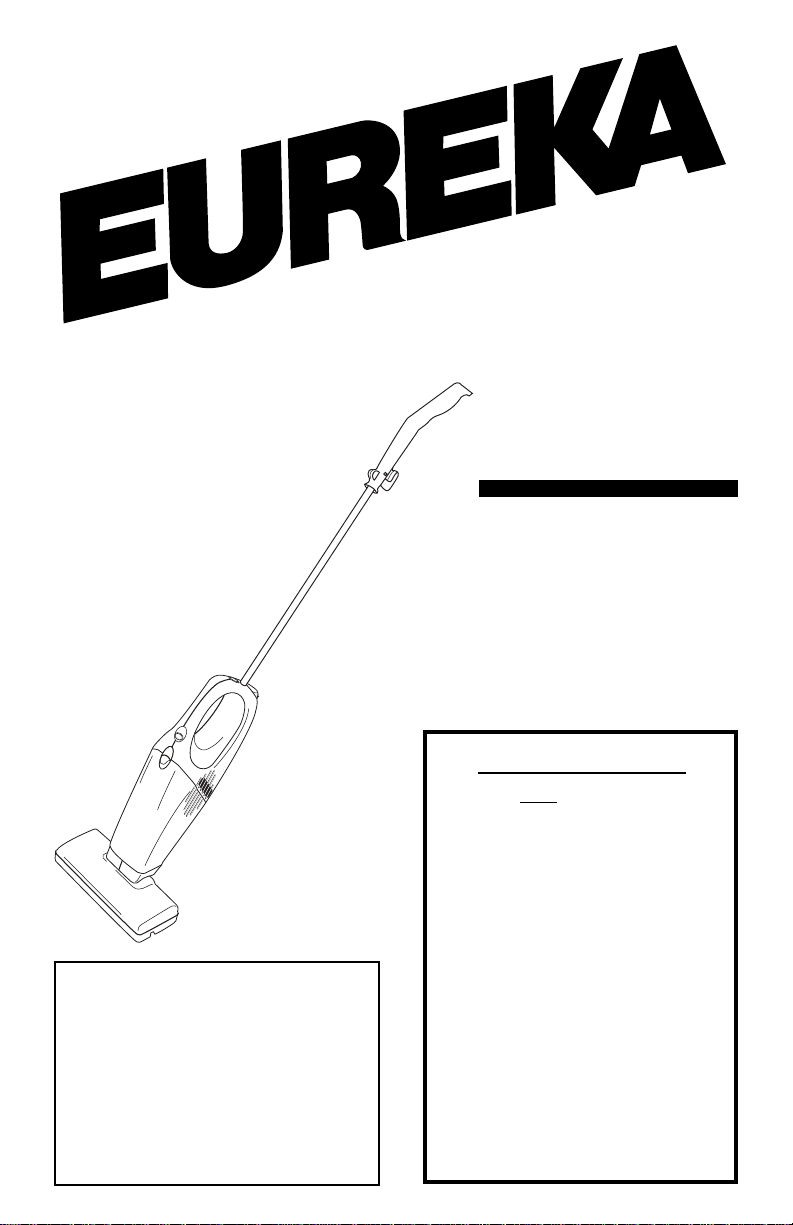
Cordless, Rechargeable
www.eureka.com
Index
Important Safeguards .................... 2
Service Information ........................ 4
Assembly........................................ 5
Use................................................. 7
Dust Cup ........................................ 7
Filter ............................................... 8
Battery Disposal............................. 8
Customer Order Form .................... 9
Warranty 11-12
VACUUM CLEANER
Household Type
Owner’s Guide
Model 96B
Charge 14-16 hours
before first use.
IMPORTANT
Do not return this
product to the store.
For assembly problems or
questions contact: Eureka’s
Customer Service Division
toll free at 1-800-282-2886*, 7
a.m. to 8 p.m., Central Standard
Time, Monday through Saturday.
For replacement of broken or
missing items to be shipped
direct to you, call 1-800-4387352*, 8 a.m. to 4:45 p.m.,
Central Standard Time, Monday
through Friday .
*En Mexico llame al 5670-6169.
Page 2

IMPORT ANT SAFEGUARDS
When using an electric appliance, basic precautions should always be followed,
including the following:
Read all instructions before using this vacuum cleaner.
WARNING
To reduce the risk of fire, electric shock, or injury:
• Do not use outdoors or on wet surfaces.
• Do not operate the vacuum cleaner or charger that has been damaged in any way.
If vacuum cleaner is not working as it should, has been dropped, damaged, left
outdoors, or dropped into water, return it to a service center.
• To avoid excessive heat and damage to the unit or batteries, do not operate the
vacuum cleaner while in the charging stand.
• Do not allow to be used as a toy. Close attention is necessary when used by or near
children.
• Use only as described in this manual.
• Use only the charger provided to recharge; Eureka model 351U-1025-1A for 120
volt.
• Do not pull or carry the charger by cord, use cord as a handle, close a door on cord,
or pull cord around sharp edges or corners. Keep cord away from heated surfaces.
• Do not use extension cords or outlets with inadequate current carrying capacity.
• Do not unplug by pulling on cord. To unplug, grasp the charger, not the cord.
• Do not handle charger or vacuum cleaner with wet hands.
• DO NOT MUTILATE OR INCINERATE BATTERIES AS THEY WILL EXPLODE AT
HIGH TEMPERATURES.
• Leaks from battery cells can occur under extreme usage or temperature conditions.
If the liquid gets on the skin (1) wash quickly with soap and water or (2) neutralize
with a mild acid such as lemon juice or vinegar. If the liquid gets into the eyes, flush
them immediately with clean water for a minimum of 10 minutes. Seek medical
attention.
• The terminal on the vacuum cleaner should be kept free and clean of objects. While
there is no shock hazard from the terminal, a burn could occur if metal objects are
inserted into the terminal area.
• This vacuum cleaner creates suction. Keep hair, loose clothing, fingers, and all parts
of body away from openings and moving parts.
• Do not pick up anything that is burning or smoking, such as cigarettes, matches, or
hot ashes.
• Do not use without a filter in place. When servicing the unit, never put fingers or
other objects into the fan chamber in case the unit would accidentally be turned on.
• Use extra care when cleaning on stairs.
• Do not use to pick up flammable or combustible liquids such as gasoline, or use in
areas where they may be present.
• Locate the wall bracket and charger indoors in a cool, dry area not exposed to the
weather to avoid electrical shock and/or cleaner damage.
• Keep your work area well lighted.
• Unplug electrical appliances before vacuuming them.
SA VE THESE INSTRUCTIONS
2
Page 3

CONSEILS DE SÉCURITÉ
Lors de l’utilisation d’un appareil électrique, quelques précautions élémentaires doivent
être observées, incluant les suivantes:
LISEZ TOUTES LES INSTRUCTIONS AVANT D’UTILISER VOTRE ASPIRATEUR.
AVERTISSEMENT
Pour réduire le risque de feu, de choc électrique ou de blessure:
N’utilisez pas l’aspirateur à l’extérieur ou sur une surface mouillée.
•
N’utilisez jamais l’aspirateur ou le chargeur s’ils ont été endommagés. Si l’aspirateur
•
ne fonctionne pas comme il le faut, s’il a été échappé, s’il a été endommagé, s’il a
été laissé à l’exterieur, s’il a été échappé dans de l’eau, retournez-le à un centre de
service avant de l’utiliser.
Pour éviter que l’aspirateur surchauffe, ou que l’aspirateur ou les piles soient
•
endommagés, n’utilisez pas l’aspirateur lorsqu’il est encore dans son support de
recharge.
Ne permittez pas que l’aspirateur soit utilisé comme un jouet. Une attention particulière
•
est nécessaire lorsqu’il est utilisé par ou près d’un enfant.
Suivez les recommandations d’utilisation de ce manuel.
•
Pour recharger l’aspirateur, utilisez uniquement le chargeur qui l’accompagne –
•
Eureka modèle nº 351U-1025-1A pour 120 volt.
Ne pas tirer l’aspirateur ou le transporter par le cordon. Ne pas utiliser le cordon en
•
guise de poignée. Ne pas fermer une porte sur le cordon ou tirer le cordon sur des
bordures ou des coins pointus. Tenir le cordon à distance des surfaces chauffantes.
Ne pas utiliser des rallonges ou des prises qui n’ont pas une capacité suffisante
•
pour transporter le courant.
Ne pas débrancher en tirant sur le cordon. Pour débrancher, empoignez le chargeur
•
et non pas le cordon.
Ne pas manipuler le chargeur ou l’aspirateur avec les mains mouillées.
•
NE PAS MUTILER OU INCINERER LES PILES. LES PILES EXPLOSENT A DES
•
TEMPERATURES EXCESSIVES.
Il peut y avoir des fuites des éléments des piles lorsque celles-ci sont soumises à
•
des conditions d’emploi excessif ou de température excessive. Si le liquide touche
la peau (1) laver tout de suite la peau avec de l’eau et du savon (2) Neutraliser avec
un acide doux, tel que le jus de citron ou le vinaigre. Au cas de contact avec les
yeux, nettoyer à grande eau pour un minimum de 10 minutes. Cherchez des soins
médicaux.
La borne de l’aspirateur doit être maintenue propre et libre de tout autre objet. Il n’y
•
a aucun risque de choc électrique de la borne elle-même, mais une brûlure est
possible si des objets en métal sont introduits dans la borne.
Cet aspirateur crée de la succion. T enir les parties mobiles et les ouvertures loin des
•
cheveux, des habits, des doigts et de toute partie du corps.
Ne pas ramasser des objets qui brûlent ou fument comme des cigarettes, des
•
allumettes ou les cendres chaudes.
Ne pas utiliser sans que le filtre ne soit installé. Lors de réparations ou d’entretien, il
•
ne faut jamais mettre les doigts, ou autres objets, près du ventilateur dans le cas où
l’aspirateur serait accidentalement mis en marche.
Portez une attention particulière lorsque vous nettoyez les escaliers.
•
Ne pas utiliser pour ramasser des liquides inflammables ou combustibles comme de
•
l’essence. Ne pas utiliser dans les endroits où ces liquides pourraient être présents.
Situez le support pour l’aspirateur à l’intérieur, dans un endroit frais, sec et protégé
•
pour éviter le choc électrique ou les dommages.
Travaillez toujours dans un endroit bien éclairé.
•
Débranchez les appareils électriques avant de les nettoyer avec l’aspirateur.
•
CONSERVEZ CES INSTRUCTIONS
3
Page 4
GENERAL INFORMATION
The cordless vacuum cleaner is the answer for quick, convenient, and easy cleanups.
Grab the cleaner for little tasks rather than using a larger cleaner. Place the wall bracket
in any area of easy access that allows versatile cleaning of kitchen crumbs, or steps.
Always store the cleaner in the wall bracket to provide a ready charge.
Charge for 14-16 hours before first use.
Batteries could lose charge in shipping.
It is best to charge the batteries when temperatures are between 32°F (0°C) and 104 °F
(40°C). Other temperatures could damage batteries.
While charging, the charger may become warm to the touch. This is a normal condition
and does not indicate a problem.
Service Information
The instructions in this booklet serve as a guide to routine maintenance. If additional
service is required, telephone toll free:
USA: 1-800-282-2886
Mexico: 5670-6169
Canada: 1-800-282-2886
for the nearest Eureka Authorized Warranty Station. If you prefer, you can write to The
Eureka Company, 807 North Main Street, Bloomington, IL 61701, USA. In Canada write
to The Eureka Company , 866 Langs Drive, Cambridge, Ontario N3H 2N7. Refer to The
Eureka Warranty for complete service information.
DO NOT OIL. The motor has lubrication and has a permanent seal.
Rating Plate
The model number is indicated on the rating plate
which is located on the underside of the vacuum
cleaner. For prompt and complete service, always
refer to these numbers
Model and T ype No. ____________________
Serial No. or Date Code _________________
THE EUREKA COMPANY
Bloomington, Illinois 61701 USA
HOUSEHOLD TYPE
MODEL
Important Battery Disposal Information - Call 1-800-822-8837
Nickel-Cadmium Batteries
Your vacuum cleaner uses nickel-cadmium batteries in a removable
pack. To protect our environment, properly dispose of the battery pack
when the batteries no longer hold a charge. A municipal waste will not
dispose of the battery pack.
Remove the battery pack and take or send it to your nearest Eureka
Ni-Cd
NOTE: Remove the battery pack only when the batteries no longer hold a charge
and you plan to dispose of them.
4
Warranty Service Station. T o learn the address of the nearest factory
service center call 1-800-282-2886.
Page 5
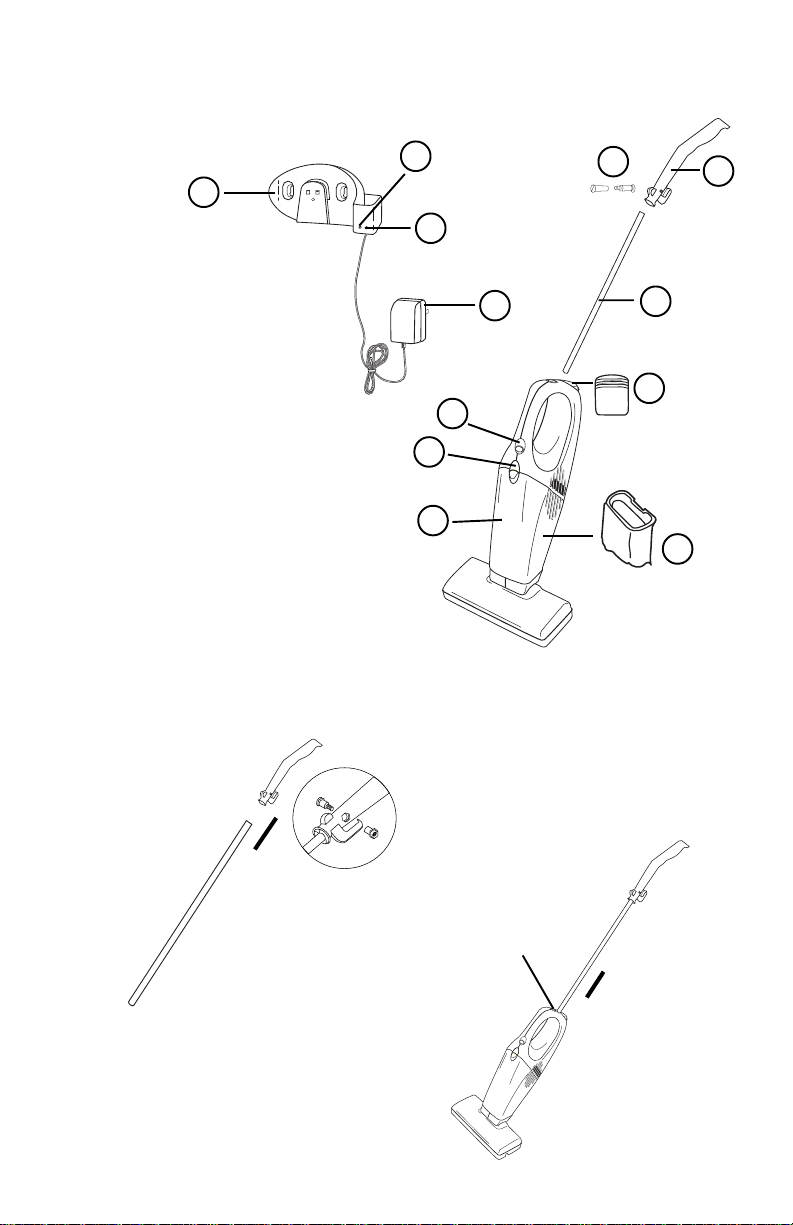
Identify Parts
NOTE: The charger and the wall bracket are in the packing material of the
shipping carton.
9
1. On/Off Switch
2. Dust Cup Latch
3. Battery Pack
4. Dust Cup
5. Motor Filter
6. Handle Grip
7. Handle
8. Handle Bolt
9. Wall Bracket/Counter
Bracket
10. Charge Light for unit
11. Charge Light for extra
battery
12. Charger Plug
10
11
12
1
2
4
8
7
3
(on back of cleaner)
5
(inside dust cup)
6
HOW TO ASSEMBLE
Assemble completely and charge batteries for 14-16 hours before using.
Caution: Use only Eureka charger model 351-U-1025-1A
Attach Handle Grip
Ä
Detail A
Attach Handle
1. Use your thumb to pull back on the
lock button.
2. Push handle into top of cleaner.
3. Release lock button and rotate
handle until it locks into place.
1. Locate the 2-part bolt in the
assembly package.
2. Align the hole and secure with the
2-part bolt, see Detail A. Tighten
the screws.
Lock Button
Ä
5
Page 6
HOW TO ASSEMBLE (continued)
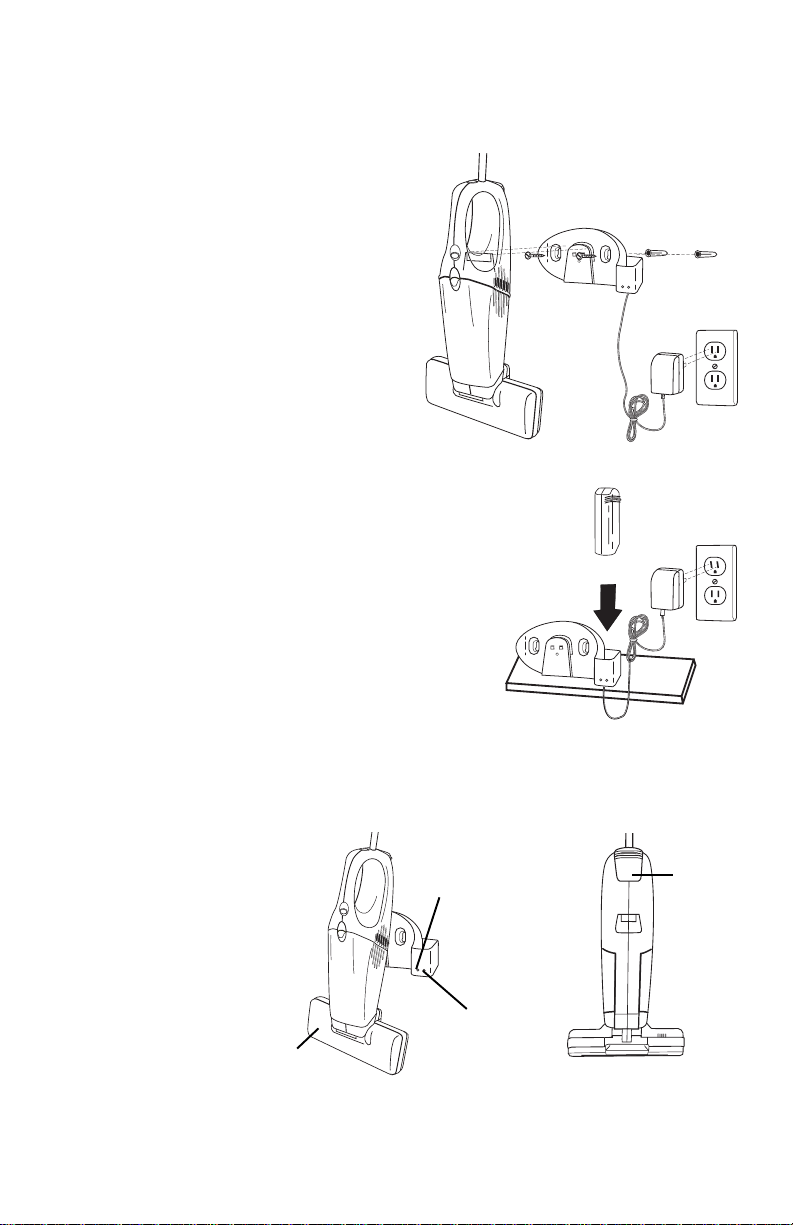
Secure Wall Bracket on W all
Cleaner hangs in bracket with the nozzle end down. Mount on a wall where there are no
dangerous objects hidden beneath the wall surface like electrical wires, pipes, etc. Leave
14 inches above the floor for clearance.
1. Hold bracket against wall to mark location
for screws. Make sure the wall bracket is
positioned vertically, with the charger
socket at the bottom. See Fig. 1.
2. Use a 1/4 inch drill for drilling holes for the
plastic anchors.
3. Insert the anchors and drive the screws
into both holes.
4. Tighten the screws to secure the bracket.
5. Place cleaner, with the nozzle pointed
down, on the wall bracket, Fig. 1.
6. Plug the charger into an electrical outlet.
Fig. 1
How to Use Charger on Shelf or Countertop
This charger has been designed to use as either a wall
mounted charger or to sit on a counter or shelf. To use
on a counter or shelf, locate next to an electrical outlet.
T ake the battery out of the cleaner and put in the charger
stand as shown to the right. The charge light will indicate
that the battery is charging.
Charge the Batteries
NOTE: Charge the batteries for 14-16 hours before initial use. A cleaner may lose
charge in shipment. The plug charger will become warm, however, this is
not a cause for concern.
NOTE: If the batteries are completely void of charge, the charging light may not
shine until there is sufficient charge in the batteries to provide power.
1. Turn the nozzle down and
lower the cleaner onto the
bracket.
2. When the charge light
lights up it indicates that
the battery in the unit and/
or an extra battery is
charging.
Nozzle
It is all right to leave the cleaner on constant charge so it is always ready to use. Unplug
only if it will not be in use for several weeks at a time.
NOTE: You can charge a battery in the unit and an extra battery (optional) at the
6
same time.
Charge Light
for Unit
Charge Light for
Extra Battery
Battery
Rear View
Page 7
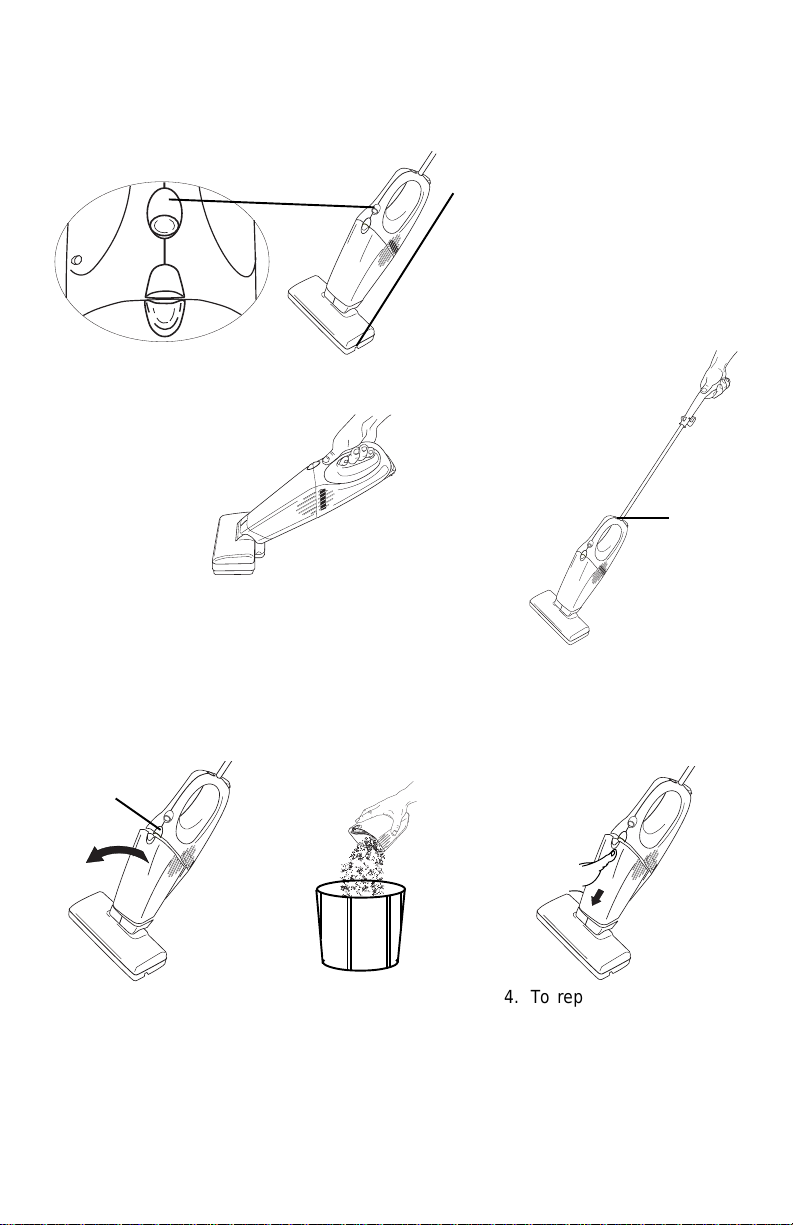
HOW TO USE
,,
yy
Power Switch
1. Push the power switch down to turn on; push up to turn off.
2. Select type of cleaning. Carpet cleaning starts the brush roll turning. Bare floor cleaning
stops the brush roll.
Off
Floors
Carpets
Nozzle with Edge Kleener
The nozzle turns down for regular or
low profile cleaning. Airflow under
®
the nozzle automatically directs
suction to the edges and corners for
maximum full width cleaning.
Dual Uses
To operate as a
handvac remove
the handle by
releasing the lock
button.
To operate as a stick vac
attach the handle.
Lock
Button
HOW TO MAINTAIN
The instructions given in this booklet serve as a guide to routine maintenance. Keep the
cleaner operating at top efficiency. Empty the dust cup after each use.
Empty Dust Cup
Dust Cup
Latch
1. Slide dust cup
latch up.
2. Pull dust cup
from handle
section and lift
from the nozzle.
3. Pull the filter out of the
dust cup, shake
contents of dust cup into
a waste container. (To
clean dust cup filter refer
to dust cup filter
section.)
4. To replace dust cup, fit
dust cup down into
nozzle.
5. Gently squeeze the
sections together until
the dust cup latch locks
the cup in place.
7
Page 8
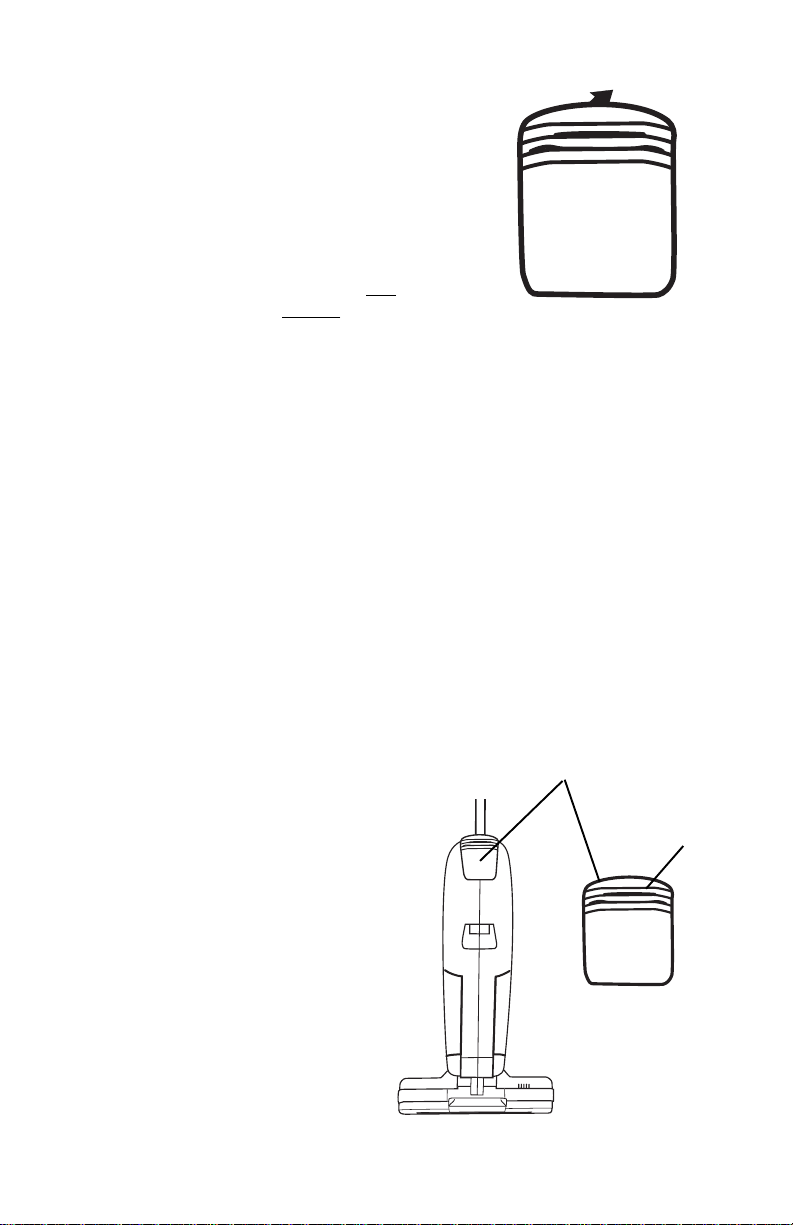
Clean Dust Cup Filter
Clean the dust cup filter as necessary.
1. Remove dust cup.
2. Pull dust cup filter out of dust cup.
3. Shake and brush the dust and dirt from
filter.
4. If desired, launder the filter by hand in
warm water using a mild detergent.
NOTE: The dust cup filter is not
dishwasher safe. Do not put in
diswasher.
5. Air dry thoroughly.
6. Replace filter in dust cup by pushing the
seal located at the top in firmly to ensure
proper filter performance.
Replace a dirty or torn filter. Order
additional dust cup filters from The
Eureka Company, Bloomington, IL
61701. Order dust cup filter, part
number 61544.
Battery Disposal - For information 1-800-822-8837
NOTE: Dispose of the battery when it no longer holds a charge.
CAUTION: Do not short circuit or dispose of in fire. Dispose of properly .
A municipal waste will not dispose of the battery. Use a recycling center if one is
convenient. Otherwise, take or send the battery to your nearest Eureka Warranty Service
Station. To learn the address of the nearest factory service center call 1-800-282-2886.
Battery
1. Push up on finger grips on the back of
disposable battery.
2. Pull up and out to remove.
3. Hold replacement battery so finger
grips on the back of the battery are
facing outward.
4. Push the battery down into the cleaner
until it snaps securely into place.
CAUTION: To avoid risk of fire, use
Eureka battery, part number
60776.
8
Finger Grips
Page 9
4/01
$3.75
Printed in China
TOTAL
(Not applicable in Canada)
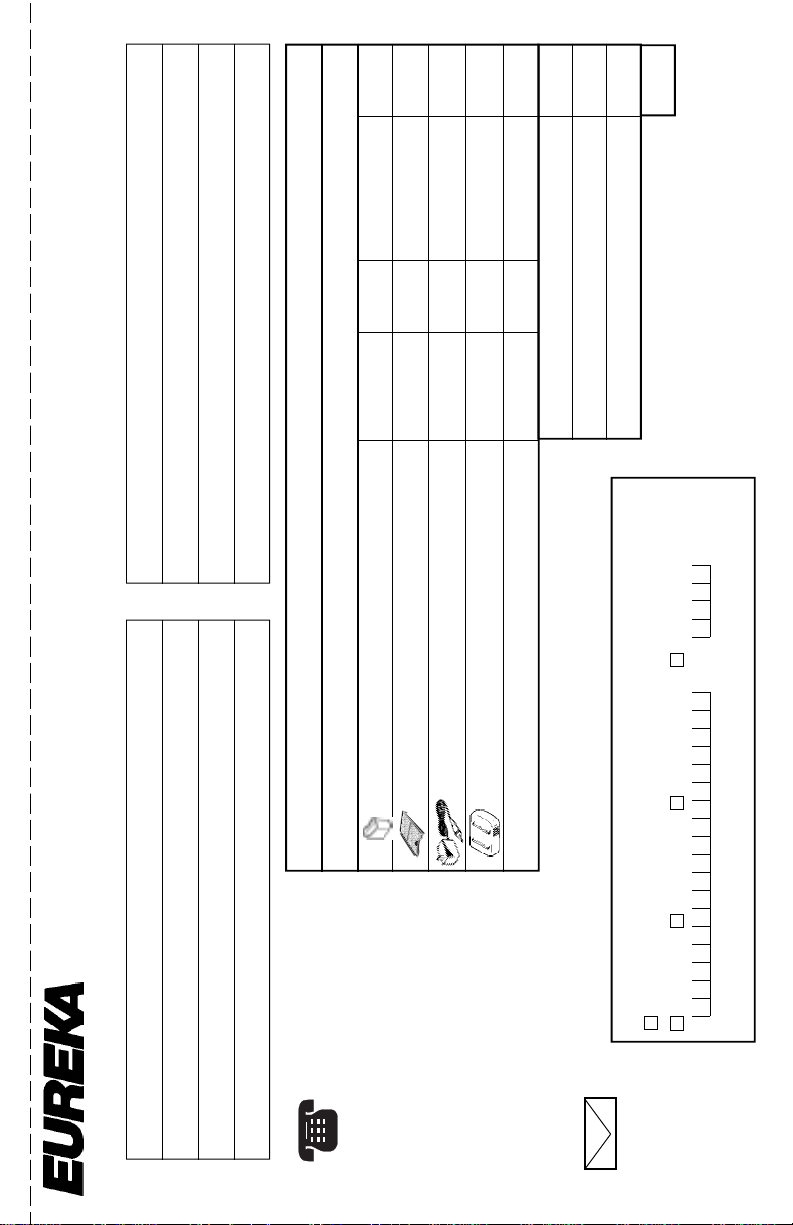
ORDER FORM
Part No. Qty. Price (USD) Total
Name
Address (street address needed for UPS)
City State Zip
T elephone (Day) (Eve) (Fax)
I
S
H
T
P
O
Filter (96B, 162, 169) 61544 3.99
Genuine Eureka Parts
Filter (96A, 164, 168) 60777 2.79
Charging Stand w/Charger (96 only) 60778 14.29
Battery Pack (96 only) 60776 16.79
© 2001 White Consolidated Industries, Inc.
Total (prices subject to change without notice)
Tax (add state and local taxes as required by law)
Postage and Handling Charge (Within the U.S.A.)
1-800-282-2886*
7 a.m. to 8 p.m. central standard time Monday through Saturday
T o Answer Problems or Questions for U.S.A. and Canada call:
The Eureka Company
P .O. Box 2799
Bloomington, IL 61702-2799
Name
Address (street address needed for UPS)
City State Zip
L
S
VACUUM CLEANERS
D
O
T elephone (Day) (Eve) (Fax)
T
__________________
Model Number
T o Order
By Phone
O
IMPORTANT:
__________________
Type
__________________
1-800-
HOURS:
and 4:45 p.m.
438-7352*
Call between 8 a.m.
Be sure to include
Serial Number
By FAX
central standard time
Monday through Friday.
plate.
numbers may be
found on the rating
your model, type, and
serial numbers. These
*En Mexico
1-309-823-5789
Llame al 5670-6169
Method of Payment (No C.O.D.s)
By Mail
Simply fill out this
Check or money order (payable to The Eureka Company). Do not send currency.
Charge to my Visa (13/16 digits) MasterCard (13 digits) American Express (15 digits)
Acct. number Expiration date
Signature (Full name as shown on account) _____________________________________________
include day
and evening
Order Form.
phone numbers.
Please be sure to
www.eureka.com
59814
Page 10

Page 11
THE EUREKA LIMITED WARRANTY
hat This Warranty Covers
W
Y our Eureka cleaner is warranted to be free from all defects in material and workmanship in normal household
use for a period of one year. The warranty is granted only to the original purchaser and members of his or her
immediate household. The warranty is subject to the following provisions.
hat This Warranty Does Not Cover
W
• Parts of the cleaner that require replacement under normal use, such as disposable dust bags, filters, drive belts,
light bulbs, and brush roll bristles
• Damages or malfunctions caused by negligence, abuse, or use not in accordance with the Owner’s Guide.
• Defects or damages caused by unauthorized service or the use of other than Genuine Eureka parts.
hat The Eureka Company Will Do
W
The Eureka Company will, at its option, repair or replace a defective cleaner or cleaner part that is covered by
this warranty. As a matter of warranty policy, the Eureka Company will not refund the consumer’s purchase
price.
arranty Registration
W
Please fill out and return the warranty registration card accompanying your cleaner.
btaining Warranty Service
O
To obtain warranty service you must return the defective cleaner or cleaner part along with proof of purchase
to any Eureka Authorized Warranty Station.
You will find the nearest location in the Yellow Pages, under “Vacuum Cleaners–Service and Repair.” Be
certain that the Warranty Station is “Eureka Authorized.”
For the location of the nearest Eureka Authorized Warranty Station or for service information, telephone toll
free:
If you prefer, you can write to The Eureka Company, Service Division, 807 North Main Street, Bloomington,
Illinois 61701, USA. In Canada write to The Eureka Company , 866 Langs Drive, Cambridge Ontario N3H 2N7.
If it is necessary to ship the cleaner outside your community to obtain warranty repair, you must pay the
shipping charges to the Eureka Authorized Warranty Station.
Return shipping charges will be paid by the Warranty Station. When returning parts for repair, please include
the model, type, and serial number from the data plate on the cleaner.
urther Limitations and Exclusions
F
Any warranty that may be implied in connection with your purchase or use of the cleaner, including any
warranty of Merchantability or any warranty for Fitness For A Particular Purpose is limited to the duration of
this warranty. Some states do not allow limitations on how long an implied warranty lasts, so the above
limitations may not apply to you.
Your relief for the breach of this warranty is limited to the relief expressly provided above. In no event
shall Eureka be liable for any consequential or incidental damages you may incur in connection with your
purchase or use of the cleaner. Some states do not allow the exclusion or limitation of incidental or
consequential damages, so the above limitation or exclusion may not apply to you.
This warranty gives you specific legal rights. You may also have other rights which vary by state.
USA: 1-800-282-2886
Mexico: 5670-6169
Canada: 1-800-282-2886
GENUINE
EUREKA PRODUCT
uestions & Answers about Genuine Eureka Products
Q
Q: Why should I use only Genuine Eureka paper bags, belts, and parts in my Eureka vacuum cleaner?
A: Using Genuine Eureka Products, which are made to our exacting specifications and engineered with
emphasis on quality, performance, and customer satisfaction, ensures the long life and cleaning
efficiency of your vacuum cleaner. Overall, this saves you money and helps to keep your home clean.
Q: How can I be sure I am using only genuine Eureka products in my vacuum cleaner?
A: Typically, packaged products and paper bags can be identified by a “Genuine Eureka Product” symbol
(see illustration above). For further identification assistance, you may call our toll-free number, 1-
800-282-2886, for the location of a nearby Eureka Authorized Warranty Station.
Q: Are there any differences between “made to fit” or “imitation” and Genuine Eureka paper bags,
belts, and parts?
A: Yes, there are some very important differences in materials, quality, and reliability. Many customers
have mistakenly purchased “imitation” paper bags and parts while thinking they purchased genuine.
Unfortunately, many of these customers discovered the differences after they experienced related
difficulties.
For Genuine Eureka Value, Accept No Imitations!
THE EUREKA COMPANY
Bloomington, Illinois 61701
Page 12

Part No. 59807A
(2/01) Printed in China
©2001 White Consolidated Industries, Inc.
 Loading...